




업데이트됨 2026년 9월 4일
월별 계정 명세서를 PDF 문서로 생성하기
개발자는 IronPDF C# PDF 라이브러리를 사용하여 외부 서비스에 의존하지 않고도 .NET 프로젝트 내에서 HTML을 신뢰할 수 있는 PDF 파일로 변환할 수 있습니다.
더 읽어보기

PDF SDK를 검색하는 많은 .NET 개발자는 동일한 문제에 직면합니다: 광범위한 설정, 모호한 라이선스 등급 및 개발자 사용 편의성을 고려하지 않은 PDF 사양을 기반으로 설계된 API를 요구하는 라이브러리입니다. ChromePdfRenderer는 이러한 마찰을 제거하기 위해 제작된 .NET PDF 라이브러리입니다. .NET Framework, .NET Core 및 .NET 10에서 작동하는 단일 NuGet 패키지를 통해 PDF 생성, 편집, 폼 처리 및 문서 보안을 제공합니다.
무료 체험을 시작하세요 및 문서 워크플로를 위해 ChromePdfRenderer를 믿고 사용하는 NASA, 테슬라 및 3M 팀에 가입하십시오.
프로덕션 사용을 위한 PDF 라이브러리를 선택하려면 빠른 NuGet 설치 테스트로는 드러나지 않는 트레이드오프를 평가해야 합니다. 네 가지 기준이 일관되게 적절한 라이브러리를 프로덕션 준비된 라이브러리와 구분합니다.
가장 중요한 선택은 라이브러리가 실제 브라우저 엔진(Chromium 또는 WebKit)을 사용하는지 아니면 사용자 정의 HTML을 PDF로 렌더러를 사용하는지 여부입니다. 사용자 정의 렌더러는 CSS2 하위 집합을 지원합니다 -- 기본적인 타이포그래피와 플로트는 작동하지만 플렉스박스, CSS Grid 및 JavaScript로 생성된 콘텐츠는 실패합니다. Chromium 기반 엔진은 HTML을 Chrome과 똑같이 렌더링하기 때문에 기존 Razor 보기, 보고서 템플릿 및 클라이언트 측 JavaScript가 수동 레이아웃 조정 없이 정확한 출력을 생성합니다. 렌더링 정확성을 테스트하려면 CSS Grid 및 JavaScript로 생성된 콘텐츠를 사용하는 문서를 렌더링하십시오; 제한된 CSS 지원을 제공하는 라이브러리는 요소가 잘못 배치되거나 스타일이 없는 출력으로 대체될 것입니다.
.NET PDF SDK는 Microsoft Office 또는 COM 자동화를 필요로 하지 않고 Linux에서 실행될 수 있어야 합니다. HTML 렌더링을 Word interop에 위임하는 라이브러리는 Linux Docker 컨테이너에서 실행할 수 없습니다. 크로미엄 기반 라이브러리는 렌더링 엔진을 네이티브 바이너리로 제공하고 데비안이나 우분투 호스트에서 표준 시스템 패키지(libgdiplus, fontconfig)만 필요로 합니다. 크로스 플랫폼 배포에 관한 .NET 문서는 Linux 또는 Alpine Docker 이미지를 대상으로 할 때 관련된 런타임 식별자 규칙을 다룹니다.
많은 PDF 라이브러리는 푸트노트에만 스레드 안전성을 문서로 남깁니다. HTTP 요청당 PDF를 생성하는 ASP.NET Core 애플리케이션의 경우 이 문제가 직접적으로 영향을 미칩니다. ChromePdfRenderer의 ChromePdfRenderer는 스레드 안전성이 없으므로 각 동시 작업은 자신의 인스턴스를 소유해야 합니다. 한 번의 반복당 하나의 렌더러와 동시성 제한을 사용하는 Parallel.ForEach은 경쟁을 피하고 비동기 및 멀티스레딩 방법 가이드의 지침과 일치합니다. 배치 작업의 경우, 워커 스레드당 하나의 렌더러를 사용하면 CPU 코어 수에 따라 선형으로 확장됩니다.
라이선스 구조는 대규모 소유 비용에 영향을 미칩니다. 개발자당 라이선스(ChromePdfRenderer, Syncfusion)는 애플리케이션을 빌드하고 배포하는 개발자의 수에 따라 과금을 합니다. AGPL 라이선스(iText 코어)는 상업용 라이선스를 구매하지 않으면 어플리케이션 소스 코드를 배포해야 합니다. MIT 라이선스 (QuestPDF, PDFsharp)는 배포 제한을 부과하지 않으며, 상업적 지원도 제공하지 않습니다. 장기 아카이빙을 요구하는 규제 환경의 경우 ISO 19005 PDF/A 표준 준수는 라이선스 모델과 별개의 요구 사항입니다 -- 이를 별도로 확인하십시오.
주요 요구 사항이 기존 HTML 템플릿 또는 Razor 뷰를 PDF로 변환하는 것이라면, Chromium 기반 라이브러리가 올바른 선택입니다. 웹을 위한 레이아웃 작업은 별도의 디자인 절차 없이 PDF로 직접 번역됩니다.
요구 사항이 HTML 템플릿 없이 데이터를 기반으로 구조화된 문서를 생성하는 것이라면, QuestPDF(MIT 라이선스)가 저용량 내부 툴링에 합리적인 옵션입니다. HTML 입력을 지원하지 않으며 기존 PDF를 읽거나 편집할 수는 없지만, Chromium 런타임 의존성을 제거합니다.
요구 사항이 기존 PDF 조작 - 병합, 분할, 비공개 처리 또는 다른 시스템에서 생성된 문서에 서명하는 것이라면, 대부분의 상 for .NET PDF 라이브러리가 이를 적절하게 처리합니다. 차별화 요소는 렌더링 기능보다 라이선스 비용과 API 인체공학입니다.
NuGet 패키지 관리자를 통해 프로젝트에 ChromePdfRenderer를 추가하는 데 1분도 걸리지 않습니다. Visual Studio에서 패키지 관리자 콘솔을 열고 다음을 실행하세요:
PM> Install-Package IronPdf대안으로, IronPdf를 검색하여 NuGet GUI를 통해 패키지를 추가하세요. 이 패키지는 .NET Standard 2.0에 맞춰져 있으므로, .NET Framework 4.6.2 이상, .NET Core 2.0 이상 및 .NET 10까지의 모든 최신 .NET 릴리스와 호환됩니다.
설치 후 렌더링 전에 라이선스 키를 적용하세요. 평가 시, 애플리케이션 시작 시 IronPdf.License.LicenseKey = "IRONPDF-TRIAL-KEY";를 호출하거나 ChromePdfRenderer 웹사이트에서 제공하는 무료 체험 라이선스를 사용하세요. 개발 중 로컬 라이브러리를 실행할 때 라이선스 키가 필요하지 않습니다.
ChromePdfRenderer는 기본 바이너리로 미리 빌드된 Chromium 엔진을 제공합니다. 새 컴퓨터에서 엔진이 처음 초기화될 때 런타임이 임시 폴더로 추출되며, 몇 초가 소요됩니다. 후속 호출은 빠릅니다. Linux 및 Docker에서는 libgdiplus 및 글꼴 패키지가 설치되어 있는지 확인하세요. Linux 배포 가이드는 배포판별 요구 사항을 다룹니다.
HTML에서 PDF로의 변환은 .NET PDF SDK 워크플로우의 가장 일반적인 시작점입니다. ChromePdfRenderer는 Chromium 기반의 렌더링 엔진을 사용하여 HTML 문자열, 로컬 파일, 라이브 URL을 픽셀 정확한 PDF로 변환하며, CSS3 레이아웃, Google 폰트 및 JavaScript 렌더된 콘텐츠를 유지합니다.
using IronPdf;

// Apply license key (omit for trial watermarked output)
// IronPdf.License.LicenseKey = "YOUR-LICENSE-KEY";

var renderer = new ChromePdfRenderer();

// Configure page layout
renderer.RenderingOptions.PaperSize = IronPdf.Rendering.PdfPaperSize.A4;
renderer.RenderingOptions.MarginTop = 20;
renderer.RenderingOptions.MarginBottom = 20;
renderer.RenderingOptions.MarginLeft = 15;
renderer.RenderingOptions.MarginRight = 15;

// Render an HTML string to PDF
string htmlContent = @"
    <html>
    <head><style>body { font-family: Arial; } h1 { color: #333; }</style></head>
    <body>
        <h1>Customer Registration</h1>
        <p>Form generated on: <span id='date'></span></p>
        <form>
            <label>Full Name: <input type='text' name='name' /></label><br/>
            <label>Email: <input type='email' name='email' /></label>
        </form>
        <script>document.getElementById('date').textContent = new Date().toLocaleDateString();</script>
    </body>
    </html>";

PdfDocument pdf = renderer.RenderHtmlAsPdf(htmlContent);
pdf.SaveAs("registration-form.pdf");Imports IronPdf
' Apply license key (omit for trial watermarked output)
' IronPdf.License.LicenseKey = "YOUR-LICENSE-KEY"
Dim renderer As New ChromePdfRenderer()
' Configure page layout
renderer.RenderingOptions.PaperSize = IronPdf.Rendering.PdfPaperSize.A4
renderer.RenderingOptions.MarginTop = 20
renderer.RenderingOptions.MarginBottom = 20
renderer.RenderingOptions.MarginLeft = 15
renderer.RenderingOptions.MarginRight = 15
' Render an HTML string to PDF
Dim htmlContent As String = "
<html>
<head><style>body { font-family: Arial; } h1 { color: #333; }</style></head>
<body>
<h1>Customer Registration</h1>
<p>Form generated on: <span id='date'></span></p>
<form>
<label>Full Name: <input type='text' name='name' /></label><br/>
<label>Email: <input type='email' name='email' /></label>
</form>
<script>document.getElementById('date').textContent = new Date().toLocaleDateString();</script>
</body>
</html>"
Dim pdf As PdfDocument = renderer.RenderHtmlAsPdf(htmlContent)
pdf.SaveAs("registration-form.pdf")ChromePdfRenderer 클래스는 PDF 레이아웃의 모든 측면을 제어하는 RenderingOptions 속성을 제공합니다. PaperSize을 표준 ISO 또는 ANSI 크기로 설정하거나 CustomPaperWidth 및 CustomPaperHeight를 사용하여 밀리미터 단위로 사용자 정의 크기를 정의하세요. 여백 값은 밀리미터로 지정되며, PrintHtmlBackgrounds는 배경색과 이미지가 올바르게 렌더링되도록 보장합니다.
URL을 PDF로 변환하려면 대상 주소를 RenderUrlAsPdf에 전달하세요. 렌더러는 쿠키, HTTP 헤더 및 사용자 정의 유저 에이전트를 처리하여 인증된 페이지와 단일 페이지 애플리케이션에 적합합니다. HTML to PDF 가이드는 인증, JavaScript 대기 조건 및 지연 로딩 콘텐츠를 자세히 설명합니다.
 ChromePdfRenderer ChromePdfRenderer 출력: CSS3 스타일이 유지된 A4 PDF로 렌더링된 HTML 템플릿
using IronPdf;

var renderer = new ChromePdfRenderer();

// Render from a URL (async variant for ASP.NET Core)
PdfDocument fromUrl = await renderer.RenderUrlAsPdfAsync("https://example.com/report");
fromUrl.SaveAs("url-report.pdf");

// Render from a local HTML file
PdfDocument fromFile = renderer.RenderHtmlFileAsPdf("templates/invoice.html");
fromFile.SaveAs("invoice.pdf");Imports IronPdf
Dim renderer As New ChromePdfRenderer()
' Render from a URL (async variant for ASP.NET Core)
Dim fromUrl As PdfDocument = Await renderer.RenderUrlAsPdfAsync("https://example.com/report")
fromUrl.SaveAs("url-report.pdf")
' Render from a local HTML file
Dim fromFile As PdfDocument = renderer.RenderHtmlFileAsPdf("templates/invoice.html")
fromFile.SaveAs("invoice.pdf")RenderUrlAsPdfAsync 메서드는 Task<PdfDocument>를 반환하므로 ASP.NET Core 컨트롤러와 백그라운드 서비스에서 await 패턴과 직접 통합됩니다. 비동기 렌더링 가이드는 고속 처리 시나리오를 위한 스레드 안전성과 연결 풀 구성을 설명합니다.
많은 .NET 애플리케이션은 이미지 파일을 PDF로 변환하거나 기존 문서에서 이미지와 텍스트를 추출할 필요가 있습니다. ChromePdfRenderer는 중간 파일 형식이나 외부 도구 없이 양방향을 모두 처리합니다.
using IronPdf;

// Convert a list of image files to a single multi-page PDF
var imageFiles = new System.Collections.Generic.List<string>
{
    "scans/page1.png",
    "scans/page2.jpg",
    "scans/page3.tiff"
};

PdfDocument pdfFromImages = ImageToPdfConverter.ImageToPdf(imageFiles);
pdfFromImages.SaveAs("scanned-document.pdf");

// Extract images from an existing document
PdfDocument existing = PdfDocument.FromFile("annual-report.pdf");
var images = existing.ExtractAllImages();
int index = 0;
foreach (var img in images)
{
    img.SaveAs($"extracted/image_{index++}.png");
}

// Extract all text content for indexing or search
string fullText = existing.ExtractAllText();
System.IO.File.WriteAllText("report-text.txt", fullText);IRON VB CONVERTER ERROR developers@ironsoftware.comImageToPdfConverter 클래스는 기본적으로 원본 이미지 크기를 유지하지만, IronPdf.Imaging.ImageBehavior.CenterImage 또는 FitToPage를 지정하여 이미지를 대상 용지 크기에 맞게 조정할 수 있습니다. JPEG, PNG, GIF, TIFF, BMP 및 WebP 포맷이 모두 지원됩니다.
ExtractAllText()를 통한 텍스트 추출은 포함된 텍스트 레이어가 있는 경우 네이티브 PDF와 이미지 기반(스캔된) 문서에서 기계 판독 가능한 텍스트를 반환합니다. 텍스트 레이어가 없는 스캔된 PDF의 경우, 제품 ChromePdfRenderer를 IronOCR과 결합하여 하나의 NuGet 설치로 광학 문자 인식을 추가합니다. ExtractAllImages() 메서드는 저장, 크기 조정 또는 다른 이미지 처리 라이브러리로 직접 전달할 수 있는 AnyBitmap 객체의 컬렉션을 반환합니다.
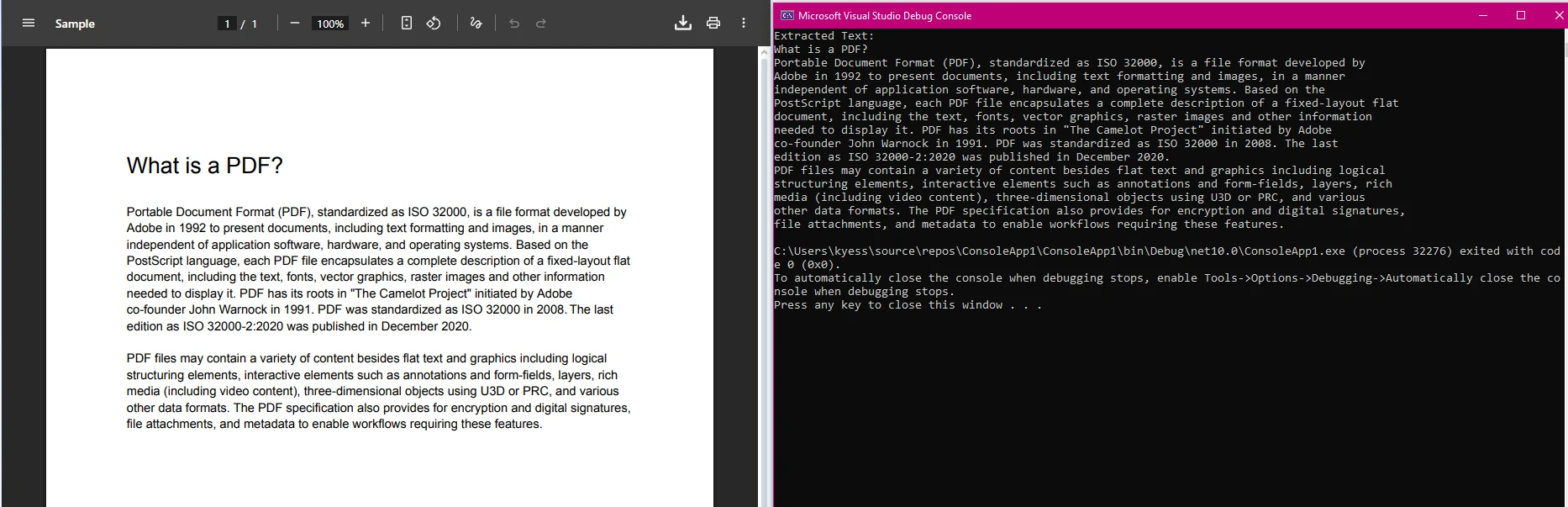 ImageToPdfConverter 출력: 세 개의 소스 이미지 파일이 하나의 다중 페이지 PDF 문서로 결합됨
기업 PDF 워크플로우에는 암호화되거나 디지털 서명되거나 둘 다 필요한 문서가 일상적으로 요구됩니다. ChromePdfRenderer는 SecuritySettings 속성과 PdfSignature 클래스를 통해 이러한 기능을 제공합니다.
using IronPdf;
using IronPdf.Signing;

// Load an existing contract
PdfDocument contract = PdfDocument.FromFile("contracts/service-agreement.pdf");

// Apply AES-256 encryption with separate owner and user passwords
contract.SecuritySettings.OwnerPassword = "owner-admin-2024";
contract.SecuritySettings.UserPassword = "client-readonly";
contract.SecuritySettings.AllowUserPrinting = IronPdf.Security.PdfPrintSecurity.FullPrintRights;
contract.SecuritySettings.AllowUserEdits = IronPdf.Security.PdfEditSecurity.NoEdit;
contract.SecuritySettings.AllowUserCopyPasteContent = false;

// Apply a digital signature from a .pfx certificate
var signature = new PdfSignature("certs/company.pfx", "cert-password")
{
    SigningContact = "legal@company.com",
    SigningLocation = "Chicago, IL",
    SigningReason = "Contract Authorization"
};

contract.Sign(signature);
contract.SaveAs("contracts/service-agreement-signed.pdf");Imports IronPdf
Imports IronPdf.Signing
' Load an existing contract
Dim contract As PdfDocument = PdfDocument.FromFile("contracts/service-agreement.pdf")
' Apply AES-256 encryption with separate owner and user passwords
contract.SecuritySettings.OwnerPassword = "owner-admin-2024"
contract.SecuritySettings.UserPassword = "client-readonly"
contract.SecuritySettings.AllowUserPrinting = IronPdf.Security.PdfPrintSecurity.FullPrintRights
contract.SecuritySettings.AllowUserEdits = IronPdf.Security.PdfEditSecurity.NoEdit
contract.SecuritySettings.AllowUserCopyPasteContent = False
' Apply a digital signature from a .pfx certificate
Dim signature As New PdfSignature("certs/company.pfx", "cert-password") With {
.SigningContact = "legal@company.com",
.SigningLocation = "Chicago, IL",
.SigningReason = "Contract Authorization"
}
contract.Sign(signature)
contract.SaveAs("contracts/service-agreement-signed.pdf")SecuritySettings 속성은 PDF 1.7 사양에 정의된 PDF 권한에 직접 매핑됩니다. OwnerPassword만 설정하면 PDF 리더 수준에서 편집 및 인쇄가 제한됩니다. UserPassword를 추가하면 파일을 열기 위해 비밀번호가 필요합니다.
디지털 서명은 .pfx 형식의 X.509 인증서를 사용하며, 이는 Windows 인증서 저장소와 대부분의 인증 기관에서 사용되는 같은 형식입니다. 서명에는 Adobe Acrobat의 서명 패널에서 볼 수 있는 연락처, 위치 및 이유 필드가 포함되어 있으며, 많은 전자 서명 규정 준수 요구 사항을 충족합니다. 스크립트 또는 배포 전에 보안 위험을 초래할 수 있는 임베디드 메타데이터가 포함된 PDF 문서의 경우, 정화 메서드는 JavaScript, 임베디드 파일 및 숨겨진 메타데이터를 제거합니다.
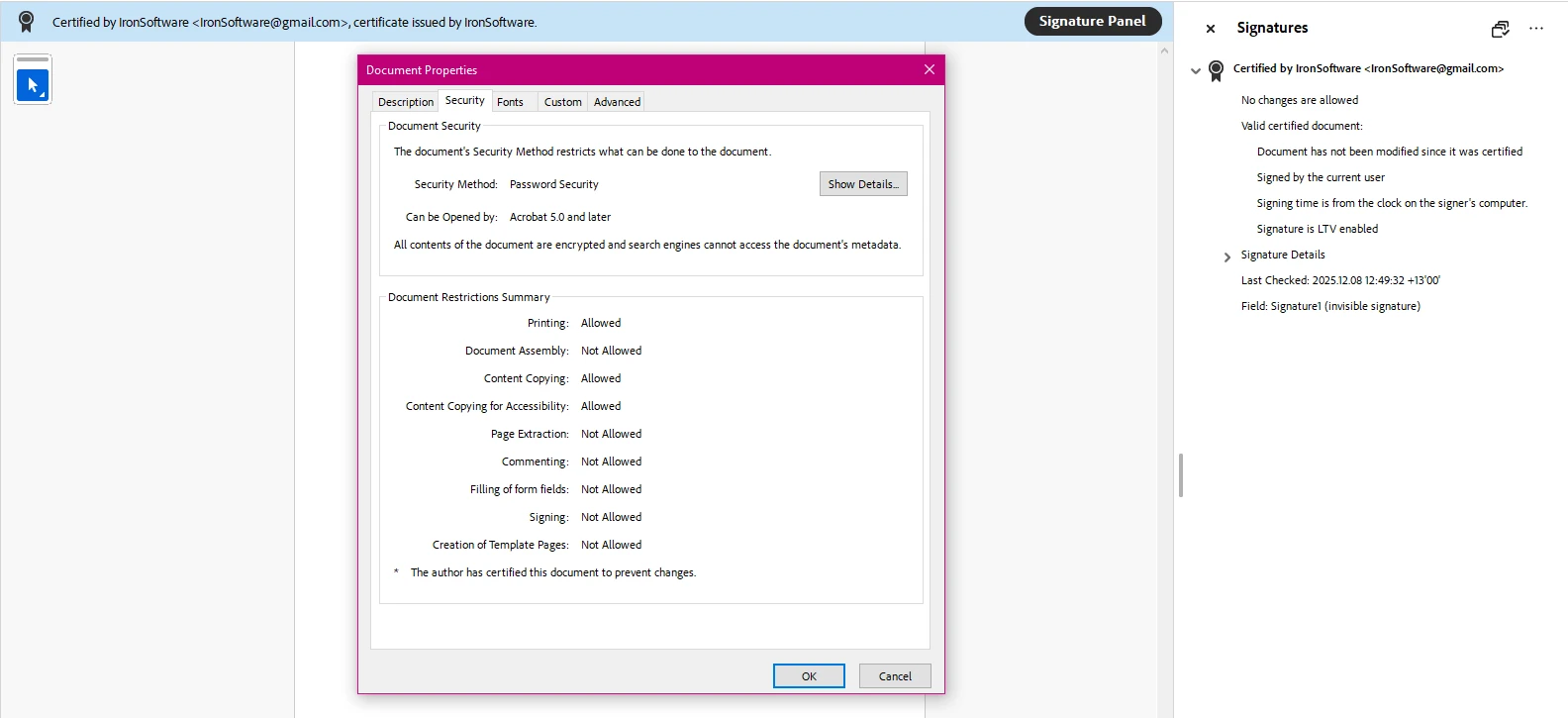 ChromePdfRenderer PdfSignature 결과: 계약서에 적용된 X.509 인증서, Adobe Acrobat에서 서명 패널 가시
AcroForm 및 XFA 양식 처리 요구는 보험, 의료, 법률 문서 워크플로에서 자주 발생합니다. ChromePdfRenderer는 기존 양식에서 필드 이름을 읽고, Acrobat 또는 어떤 PDF 뷰어도 필요 없이 프로그래밍 방식으로 값을 작성합니다.
using IronPdf;

// Open a PDF containing AcroForm fields
PdfDocument form = PdfDocument.FromFile("forms/application-form.pdf");

// List all field names for discovery
foreach (var field in form.Form.Fields)
{
    System.Console.WriteLine($"Field: {field.Name}, Type: {field.GetType().Name}");
}

// Set field values by name
form.Form.FindFormField("applicant_name").Value = "Jane Smith";
form.Form.FindFormField("date_of_birth").Value = "1985-04-12";
form.Form.FindFormField("agree_terms").Value = "true"; // checkbox

// Flatten the form to prevent further editing
form.Form.Flatten();
form.SaveAs("forms/completed-application.pdf");Imports IronPdf
' Open a PDF containing AcroForm fields
Dim form As PdfDocument = PdfDocument.FromFile("forms/application-form.pdf")
' List all field names for discovery
For Each field In form.Form.Fields
System.Console.WriteLine($"Field: {field.Name}, Type: {field.GetType().Name}")
Next
' Set field values by name
form.Form.FindFormField("applicant_name").Value = "Jane Smith"
form.Form.FindFormField("date_of_birth").Value = "1985-04-12"
form.Form.FindFormField("agree_terms").Value = "true" ' checkbox
' Flatten the form to prevent further editing
form.Form.Flatten()
form.SaveAs("forms/completed-application.pdf")ChromePdfRenderer의 양식 API는 식별자로 필드 이름을 사용하므로, 코드는 Acrobat에 표시되는 필드 구조에 직접적으로 매핑됩니다. Flatten() 메서드는 대화형 필드를 정적 콘텐츠로 변환하여 아카이빙 또는 전송에 적합한 읽기 전용 PDF를 생성합니다. 양식 유형, 라디오 그룹 및 드롭다운 목록에 대한 전체 세부 사항은 PDF 양식 안내서에 있습니다.
처음부터 새로운 양식을 생성하려면 <input>, <select> 및 <textarea> 요소와 함께 HTML을 사용하세요. Chromium 렌더러는 표준 HTML 양식 요소를 AcroForm 필드로 자동 변환하므로, 웹 애플리케이션에서 사용되는 기존 HTML 양식이 구조 변경 없이 작성 가능한 PDF를 생성할 수 있습니다. PDF 양식 생성 방법에서는 라디오 버튼, 날짜 선택기, 다중 선택 필드를 포함하여 전체 워크플로를 안내합니다.
.NET용 PDF SDK를 평가하는 개발자는 일반적으로 렌더링 품질, API 접근성, 배포 복잡성 및 라이선스 약관을 고려합니다. 다음 표는 이러한 기준에 따라 일반적인 .NET 대안에 대한 ChromePdfRenderer의 위치를 나타냅니다.
| 라이브러리 | HTML을 PDF로 | .NET 10 지원 | 양식 처리 | 디지털 서명 | 라이선스 모델 |
|---|---|---|---|---|---|
| ChromePdfRenderer | Chromium 기반 (전체 CSS3/JS) | 예 | AcroForm + XFA | 예 (.pfx) | 개발자당, 로열티 없음 |
| QuestPDF | 아니요 (코드 우선 레이아웃 엔진) | 예 | 아니요 | 아니요 | MIT (커뮤니티), 상업적 |
| iText 코어 | 추가 기능으로만 | 예 | AcroForm | 예 | AGPL 또는 상업적 |
| Syncfusion PDF | 부분적 (CSS2 하위 집합) | 예 | AcroForm | 예 | 개발자당 또는 수익 기반 |
| PDFsharp | 아니요 | 예 (v6+) | 제한된 | 아니요 | MIT |
ChromePdfRenderer의 라이선스 페이지는 SaaS 배포, OEM 재배포 및 ChromePdfRenderer가 포함된 Iron Suite 번들, IronBarcode, IronOCR 및 IronXL을 포함하여 각 제품을 개별적으로 구입하는 것보다 상당한 할인 혜택을 설명합니다.
ChromePdfRenderer의 주요 차별점은 HTML 렌더링 품질입니다. 저수준 PDF 그리기 API를 중심으로 구축된 라이브러리는 개발자가 CSS 레이아웃 로직을 수작업으로 구현해야 합니다. 기존 HTML 템플릿이나 Razor 뷰가 문서 구조를 이미 정의하는 경우, 이를 직접 PDF로 변환하는 것이 코드 우선 그리기 API를 사용하여 레이아웃을 재구성하는 것보다 더 빠르고 유지 관리가 용이합니다.
생산 애플리케이션용 PDF 라이브러리를 선택하는 것은 PDF를 생성할 수 있음을 확인하는 것보다 더 많은 것을 요구합니다. 문서 집중형 애플리케이션에서는 초기 개념 증명 작업이 실제 데이터 볼륨 및 배포 환경으로 확장되기 시작할 때만 나타나는 특정 기능이 필요합니다.
생산 등급의 .NET PDF SDK는 플랫폼별 코드 경로 없이 Windows Server, Linux 컨테이너 및 macOS 개발 기계에서 실행할 수 있어야 합니다. ChromePdfRenderer는 세 가지를 모두 기본으로 지원합니다. 동일한 NuGet 패키지가 Azure App Service, AWS Lambda 및 Docker에 배포되며, 애플리케이션 코드에서 플랫폼 전환이 없습니다.
정부, 금융 및 의료를 포함한 규제 산업에서는 장기 보관을 위해 PDF/A 준수가 자주 요구됩니다. ISO 19005 PDF/A 표준은 PDF/A-1b 및 PDF/A-3b를 정의하며, 내장 JavaScript 및 비포함 글꼴을 제한하여 문서가 원본 애플리케이션 없이 읽을 수 있도록 보장합니다. ChromePdfRenderer는 기존 PDF를 PDF/A로 변환하고 준수 여부를 검증하며, 출력이 표준을 충족하는지 여부를 나타내는 플래그를 반환합니다. WCAG 또는 섹션 508 요구 사항을 충족해야 하는 문서에 대해서도 PDF/UA(접근성) 준수가 가능합니다.
예약된 작업에서 수천 개의 PDF를 생성하거나 업로드 큐를 처리하려면 예측 가능한 메모리 동작이 필요합니다. ChromePdfRenderer의 혼합 래스터 콘텐츠(MRC) 압축은 텍스트와 고해상도 이미지를 모두 포함하는 문서의 파일 크기를 줄입니다. 대량 작업을 위해, 멀티스레딩 가이드는 Parallel.ForEach를 ChromePdfRenderer 인스턴스와 함께 사용하는 방법을 설명합니다. 렌더러는 스레드 안전성이 없으므로 각 작업은 자신의 인스턴스를 소유해야 합니다.
HTML 외에도, ChromePdfRenderer는 Word 문서 (.docx) 및 스프레드시트를 직접 PDF로 변환하여 문서 내보내기 워크플로우에 대한 Microsoft Office 인터롭 또는 COM 자동화에 대한 의존성을 제거합니다. ChromePdfRenderer와 IronXL을 결합하면 서버에 Office 설치 없이 전체 스프레드시트에서 PDF로의 파이프라인을 제공합니다.
ChromePdfRenderer는 복잡한 PDF 작업 흐름을 유지 관리가 가능한 C# 코드로 변환합니다. HTML에서 완벽한 CSS3 충실도로 PDF로 변환하거나 디지털 서명, 양식 처리, PDF/A 보관에 이르기까지 라이브러리는 단일 NuGet 패키지로 모든 문서 수명 주기를 다룹니다.
ChromePdfRenderer 문서 허브를 시작점으로 튜토리얼, 사용 방법 가이드, 및 API 참조를 탐색하세요. 예제 갤러리는 PDF 병합, 워터마크 추가, 헤더 및 푸터 스탬프, 민감한 콘텐츠 보호를 포함하여 가장 일반적인 PDF 작업에 대한 실행 가능한 코드를 제공합니다.
프로덕션 배포를 위한 라이선스 구매 또는 무료 체험판 시작으로 전체 기능 세트를 평가하며 의무 없이 사용해 보세요.


커티스 차우는 칼턴 대학교에서 컴퓨터 과학 학사 학위를 취득했으며, Node.js, TypeScript, JavaScript, React를 전문으로 하는 프론트엔드 개발자입니다. 직관적이고 미적으로 뛰어난 사용자 인터페이스를 만드는 데 열정을 가진 그는 최신 프레임워크를 활용하고, 잘 구성되고 시각적으로 매력적인 매뉴얼을 제작하는 것을 즐깁니다.



IronPDF는 IRON SUITE 의 일부입니다.
10개의 .NET API 제품, 당신의 사무 문서를 위해

PDF 파일을 HTML처럼 빠르게 변환해야 할 때.


