Bem-vindo ao nosso tutorial sobre a prática função Find em C#. Você acaba de descobrir um recurso poderoso que pode agilizar seu processo de codificação. Portanto, seja você um programador experiente ou esteja apenas começando, este tutorial irá guiá-lo por todos os elementos necessários para você começar.
O básico do Find
No seu cerne, Find é uma função que permite localizar o primeiro elemento em uma coleção, array ou lista que satisfaça um predicado especificado. O que é um predicado, você pergunta? Em programação, um predicado é uma função que testa determinadas condições definidas para elementos em uma coleção.
Agora, vamos analisar um exemplo de classe pública.
public class BikePart
{
    public string Id { get; set; } // Property to identify the bike part

    // Override the Equals method to specify how to compare two BikePart objects
    public override bool Equals(object obj)
    {
        if (obj == null || !(obj is BikePart))
            return false;

        return this.Id == ((BikePart)obj).Id;
    }

    // Override GetHashCode for hashing BikePart objects
    public override int GetHashCode()
    {
        return this.Id.GetHashCode();
    }

    // Override ToString to return a custom string representation of the object
    public override string ToString()
    {
        return "BikePart ID: " + this.Id;
    }
}
public class BikePart
{
    public string Id { get; set; } // Property to identify the bike part

    // Override the Equals method to specify how to compare two BikePart objects
    public override bool Equals(object obj)
    {
        if (obj == null || !(obj is BikePart))
            return false;

        return this.Id == ((BikePart)obj).Id;
    }

    // Override GetHashCode for hashing BikePart objects
    public override int GetHashCode()
    {
        return this.Id.GetHashCode();
    }

    // Override ToString to return a custom string representation of the object
    public override string ToString()
    {
        return "BikePart ID: " + this.Id;
    }
}
Public Class BikePart
Public Property Id() As String ' - Property to identify the bike part
' Override the Equals method to specify how to compare two BikePart objects
Public Overrides Function Equals(ByVal obj As Object) As Boolean
If obj Is Nothing OrElse Not (TypeOf obj Is BikePart) Then
Return False
End If
Return Me.Id = DirectCast(obj, BikePart).Id
End Function
' Override GetHashCode for hashing BikePart objects
Public Overrides Function GetHashCode() As Integer
Return Me.Id.GetHashCode()
End Function
' Override ToString to return a custom string representation of the object
Public Overrides Function ToString() As String
Return "BikePart ID: " & Me.Id
End Function
End Class
Public Class BikePart
	Public Property Id() As String ' -  Property to identify the bike part

	' Override the Equals method to specify how to compare two BikePart objects
	Public Overrides Function Equals(ByVal obj As Object) As Boolean
		If obj Is Nothing OrElse Not (TypeOf obj Is BikePart) Then
			Return False
		End If

		Return Me.Id = DirectCast(obj, BikePart).Id
	End Function

	' Override GetHashCode for hashing BikePart objects
	Public Overrides Function GetHashCode() As Integer
		Return Me.Id.GetHashCode()
	End Function

	' Override ToString to return a custom string representation of the object
	Public Overrides Function ToString() As String
		Return "BikePart ID: " & Me.Id
	End Function
End Class
Neste código, BikePart é nossa classe pública, e contém uma string pública ID para identificar cada parte da bicicleta. Sobrescrevemos o método ToString para imprimir o ID da parte da bicicleta de forma agradável e também sobrescrevemos os métodos Equals e GetHashCode para fins de comparação.
Agora que temos nossa classe BikePart, podemos criar uma lista de partes da bicicleta e usar Find para localizar partes específicas baseando-se em seus IDs. Vejamos o seguinte exemplo:
using System;
using System.Collections.Generic;

public static void Main()
{
    // Create a list of BikePart objects
    List<BikePart> bikeParts = new List<BikePart>
    {
        new BikePart { Id = "Chain Ring ID" },
        new BikePart { Id = "Crank Arm ID" },
        new BikePart { Id = "Regular Seat ID" },
        new BikePart { Id = "Banana Seat ID" },
    };

    // Define a predicate to find a BikePart with a specific ID
    Predicate<BikePart> findChainRingPredicate = (BikePart bp) => { return bp.Id == "Chain Ring ID"; };
    BikePart chainRingPart = bikeParts.Find(findChainRingPredicate);

    // Print the found BikePart's ID to the console
    Console.WriteLine(chainRingPart.ToString());
}
using System;
using System.Collections.Generic;

public static void Main()
{
    // Create a list of BikePart objects
    List<BikePart> bikeParts = new List<BikePart>
    {
        new BikePart { Id = "Chain Ring ID" },
        new BikePart { Id = "Crank Arm ID" },
        new BikePart { Id = "Regular Seat ID" },
        new BikePart { Id = "Banana Seat ID" },
    };

    // Define a predicate to find a BikePart with a specific ID
    Predicate<BikePart> findChainRingPredicate = (BikePart bp) => { return bp.Id == "Chain Ring ID"; };
    BikePart chainRingPart = bikeParts.Find(findChainRingPredicate);

    // Print the found BikePart's ID to the console
    Console.WriteLine(chainRingPart.ToString());
}
Imports System
Imports System.Collections.Generic
Public Shared Sub Main()
' Create a list of BikePart objects
Dim bikeParts As New List(Of BikePart) From {
New BikePart With {.Id = "Chain Ring ID"},
New BikePart With {.Id = "Crank Arm ID"},
New BikePart With {.Id = "Regular Seat ID"},
New BikePart With {.Id = "Banana Seat ID"}
}
' Define a predicate to find a BikePart with a specific ID
Dim findChainRingPredicate As Predicate(Of BikePart) = Function(bp As BikePart)
Return bp.Id = "Chain Ring ID"
End Function
Dim chainRingPart As BikePart = bikeParts.Find(findChainRingPredicate)
' Print the found BikePart's ID to the console
Console.WriteLine(chainRingPart.ToString())
End Sub
Imports System
Imports System.Collections.Generic

Public Shared Sub Main()
	' Create a list of BikePart objects
	Dim bikeParts As New List(Of BikePart) From {
		New BikePart With {.Id = "Chain Ring ID"},
		New BikePart With {.Id = "Crank Arm ID"},
		New BikePart With {.Id = "Regular Seat ID"},
		New BikePart With {.Id = "Banana Seat ID"}
	}

	' Define a predicate to find a BikePart with a specific ID
	Dim findChainRingPredicate As Predicate(Of BikePart) = Function(bp As BikePart)
		Return bp.Id = "Chain Ring ID"
	End Function
	Dim chainRingPart As BikePart = bikeParts.Find(findChainRingPredicate)

	' Print the found BikePart's ID to the console
	Console.WriteLine(chainRingPart.ToString())
End Sub
Neste código, instanciamos quatro objetos BikePart com IDs únicos. Em seguida, criamos um predicado findChainRingPredicate que verifica se uma parte da bicicleta tem o ID "Chain Ring ID". Finalmente, chamamos Find em nossa lista de partes da bicicleta usando o predicado que definimos e imprimimos o ID da parte encontrada no console.
Entendendo o parâmetro predicado
Você pode estar se perguntando sobre o parâmetro Predicate match em nosso método Find. É aqui que você define as condições sob as quais o método Find retorna um elemento. No nosso caso, queríamos que o método Find retornasse o primeiro elemento que correspondesse ao "Chain Ring ID".
Se nenhum elemento satisfizer as condições definidas no seu predicado, o método Find retornará um valor padrão. Por exemplo, se você estiver trabalhando com um array de inteiros e seu predicado não encontrar uma correspondência, o método Find retornará '0', o valor padrão para inteiros em C#.
O princípio da busca linear
É importante notar que a função Find realiza uma busca linear por todo o array, lista ou coleção. Isso significa que começa no primeiro elemento e inspeciona cada elemento seguinte em sequência até localizar a primeira ocorrência de um elemento que satisfaça o predicado.
Em alguns casos, você pode querer localizar o último elemento que satisfaz o predicado em vez do primeiro. Para este propósito, C# fornece a função FindLast.
FindIndex e FindLastIndex
Assim como Find ajuda a localizar a primeira ocorrência de um elemento que corresponde ao seu predicado especificado, C# também fornece métodos FindIndex e FindLastIndex para fornecer os índices dos primeiros e últimos elementos que correspondem às suas condições, respectivamente.
Vejamos um exemplo:
using System;
using System.Collections.Generic;

public static void Main()
{
    // Create a list of BikePart objects with an additional duplicate entry
    List<BikePart> bikeParts = new List<BikePart>
    {
        new BikePart { Id = "Chain Ring ID" },
        new BikePart { Id = "Crank Arm ID" },
        new BikePart { Id = "Regular Seat ID" },
        new BikePart { Id = "Banana Seat ID" },
        new BikePart { Id = "Chain Ring ID" }, // Added a second chain ring
    };

    // Define a predicate to find a BikePart with a specific ID
    Predicate<BikePart> findChainRingPredicate = (BikePart bp) => { return bp.Id == "Chain Ring ID"; };

    // Find the index of the first and last occurrence of the specified BikePart
    int firstChainRingIndex = bikeParts.FindIndex(findChainRingPredicate);
    int lastChainRingIndex = bikeParts.FindLastIndex(findChainRingPredicate);

    // Print the indices to the console
    Console.WriteLine($"First Chain Ring ID found at index: {firstChainRingIndex}");
    Console.WriteLine($"Last Chain Ring ID found at index: {lastChainRingIndex}");
}
using System;
using System.Collections.Generic;

public static void Main()
{
    // Create a list of BikePart objects with an additional duplicate entry
    List<BikePart> bikeParts = new List<BikePart>
    {
        new BikePart { Id = "Chain Ring ID" },
        new BikePart { Id = "Crank Arm ID" },
        new BikePart { Id = "Regular Seat ID" },
        new BikePart { Id = "Banana Seat ID" },
        new BikePart { Id = "Chain Ring ID" }, // Added a second chain ring
    };

    // Define a predicate to find a BikePart with a specific ID
    Predicate<BikePart> findChainRingPredicate = (BikePart bp) => { return bp.Id == "Chain Ring ID"; };

    // Find the index of the first and last occurrence of the specified BikePart
    int firstChainRingIndex = bikeParts.FindIndex(findChainRingPredicate);
    int lastChainRingIndex = bikeParts.FindLastIndex(findChainRingPredicate);

    // Print the indices to the console
    Console.WriteLine($"First Chain Ring ID found at index: {firstChainRingIndex}");
    Console.WriteLine($"Last Chain Ring ID found at index: {lastChainRingIndex}");
}
Imports System
Imports System.Collections.Generic
Public Shared Sub Main()
' Create a list of BikePart objects with an additional duplicate entry
Dim bikeParts As New List(Of BikePart) From {
New BikePart With {.Id = "Chain Ring ID"},
New BikePart With {.Id = "Crank Arm ID"},
New BikePart With {.Id = "Regular Seat ID"},
New BikePart With {.Id = "Banana Seat ID"},
New BikePart With {.Id = "Chain Ring ID"}
}
' Define a predicate to find a BikePart with a specific ID
Dim findChainRingPredicate As Predicate(Of BikePart) = Function(bp As BikePart)
Return bp.Id = "Chain Ring ID"
End Function
' Find the index of the first and last occurrence of the specified BikePart
Dim firstChainRingIndex As Integer = bikeParts.FindIndex(findChainRingPredicate)
Dim lastChainRingIndex As Integer = bikeParts.FindLastIndex(findChainRingPredicate)
' Print the indices to the console
Console.WriteLine($"First Chain Ring ID found at index: {firstChainRingIndex}")
Console.WriteLine($"Last Chain Ring ID found at index: {lastChainRingIndex}")
End Sub
Imports System
Imports System.Collections.Generic

Public Shared Sub Main()
	' Create a list of BikePart objects with an additional duplicate entry
	Dim bikeParts As New List(Of BikePart) From {
		New BikePart With {.Id = "Chain Ring ID"},
		New BikePart With {.Id = "Crank Arm ID"},
		New BikePart With {.Id = "Regular Seat ID"},
		New BikePart With {.Id = "Banana Seat ID"},
		New BikePart With {.Id = "Chain Ring ID"}
	}

	' Define a predicate to find a BikePart with a specific ID
	Dim findChainRingPredicate As Predicate(Of BikePart) = Function(bp As BikePart)
		Return bp.Id = "Chain Ring ID"
	End Function

	' Find the index of the first and last occurrence of the specified BikePart
	Dim firstChainRingIndex As Integer = bikeParts.FindIndex(findChainRingPredicate)
	Dim lastChainRingIndex As Integer = bikeParts.FindLastIndex(findChainRingPredicate)

	' Print the indices to the console
	Console.WriteLine($"First Chain Ring ID found at index: {firstChainRingIndex}")
	Console.WriteLine($"Last Chain Ring ID found at index: {lastChainRingIndex}")
End Sub
O Poder de FindAll
O método FindAll, como o nome sugere, recupera todos os elementos na coleção que satisfaçam o predicado. É utilizado quando você precisa filtrar elementos com base em determinadas condições. O método FindAll retorna uma nova Lista com todos os elementos correspondentes.
Aqui está um exemplo de código:
using System;
using System.Collections.Generic;

public static void Main()
{
    // Create a list of BikePart objects with an additional duplicate entry
    List<BikePart> bikeParts = new List<BikePart>
    {
        new BikePart { Id = "Chain Ring ID" },
        new BikePart { Id = "Crank Arm ID" },
        new BikePart { Id = "Regular Seat ID" },
        new BikePart { Id = "Banana Seat ID" },
        new BikePart { Id = "Chain Ring ID" }, // Added a second chain ring
    };

    // Define a predicate to find all BikeParts with a specific ID
    Predicate<BikePart> findChainRingPredicate = (BikePart bp) => { return bp.Id == "Chain Ring ID"; };

    // Use FindAll to get all matching BikePart objects
    List<BikePart> chainRings = bikeParts.FindAll(findChainRingPredicate);

    // Print the count and details of each found BikePart
    Console.WriteLine($"Found {chainRings.Count} Chain Rings:");
    foreach (BikePart chainRing in chainRings)
    {
        Console.WriteLine(chainRing.ToString());
    }
}
using System;
using System.Collections.Generic;

public static void Main()
{
    // Create a list of BikePart objects with an additional duplicate entry
    List<BikePart> bikeParts = new List<BikePart>
    {
        new BikePart { Id = "Chain Ring ID" },
        new BikePart { Id = "Crank Arm ID" },
        new BikePart { Id = "Regular Seat ID" },
        new BikePart { Id = "Banana Seat ID" },
        new BikePart { Id = "Chain Ring ID" }, // Added a second chain ring
    };

    // Define a predicate to find all BikeParts with a specific ID
    Predicate<BikePart> findChainRingPredicate = (BikePart bp) => { return bp.Id == "Chain Ring ID"; };

    // Use FindAll to get all matching BikePart objects
    List<BikePart> chainRings = bikeParts.FindAll(findChainRingPredicate);

    // Print the count and details of each found BikePart
    Console.WriteLine($"Found {chainRings.Count} Chain Rings:");
    foreach (BikePart chainRing in chainRings)
    {
        Console.WriteLine(chainRing.ToString());
    }
}
Imports System
Imports System.Collections.Generic
Public Shared Sub Main()
' Create a list of BikePart objects with an additional duplicate entry
Dim bikeParts As New List(Of BikePart) From {
New BikePart With {.Id = "Chain Ring ID"},
New BikePart With {.Id = "Crank Arm ID"},
New BikePart With {.Id = "Regular Seat ID"},
New BikePart With {.Id = "Banana Seat ID"},
New BikePart With {.Id = "Chain Ring ID"}
}
' Define a predicate to find all BikeParts with a specific ID
Dim findChainRingPredicate As Predicate(Of BikePart) = Function(bp As BikePart)
Return bp.Id = "Chain Ring ID"
End Function
' Use FindAll to get all matching BikePart objects
Dim chainRings As List(Of BikePart) = bikeParts.FindAll(findChainRingPredicate)
' Print the count and details of each found BikePart
Console.WriteLine($"Found {chainRings.Count} Chain Rings:")
For Each chainRing As BikePart In chainRings
Console.WriteLine(chainRing.ToString())
Next chainRing
End Sub
Imports System
Imports System.Collections.Generic

Public Shared Sub Main()
	' Create a list of BikePart objects with an additional duplicate entry
	Dim bikeParts As New List(Of BikePart) From {
		New BikePart With {.Id = "Chain Ring ID"},
		New BikePart With {.Id = "Crank Arm ID"},
		New BikePart With {.Id = "Regular Seat ID"},
		New BikePart With {.Id = "Banana Seat ID"},
		New BikePart With {.Id = "Chain Ring ID"}
	}

	' Define a predicate to find all BikeParts with a specific ID
	Dim findChainRingPredicate As Predicate(Of BikePart) = Function(bp As BikePart)
		Return bp.Id = "Chain Ring ID"
	End Function

	' Use FindAll to get all matching BikePart objects
	Dim chainRings As List(Of BikePart) = bikeParts.FindAll(findChainRingPredicate)

	' Print the count and details of each found BikePart
	Console.WriteLine($"Found {chainRings.Count} Chain Rings:")
	For Each chainRing As BikePart In chainRings
		Console.WriteLine(chainRing.ToString())
	Next chainRing
End Sub
Integrando o IronPDF ao cenário
Uma área crucial onde nosso conhecimento de C# Find pode ser utilizado é a manipulação de conteúdo de PDF usando o IronPDF, uma poderosa biblioteca C# para processamento de PDF.
Suponha que estejamos trabalhando com um documento PDF contendo informações sobre várias peças de bicicleta. Frequentemente, precisamos localizar partes específicas dentro desse conteúdo. É aqui que o IronPDF e o método Find do C# se combinam para fornecer uma solução poderosa.
Primeiro, usaríamos IronPDF para extrair o texto do nosso PDF e então podemos usar o método Find ou FindAll que aprendemos anteriormente para localizar a parte específica no texto extraído.
using IronPdf;
using System;
using System.Collections.Generic;
using System.Linq;

public class Program
{
    public static void Main()
    {
        // Load and extract text from a PDF document
        PdfDocument pdf = PdfDocument.FromFile(@"C:\Users\Administrator\Desktop\bike.pdf");
        string pdfText = pdf.ExtractAllText();

        // Split the extracted text into lines
        List<string> pdfLines = pdfText.Split('\n').ToList();

        // Define a predicate to find lines that contain a specific text
        Predicate<string> findChainRingPredicate = (string line) => { return line.Contains("Chain Ring ID"); };

        // Use FindAll to get all lines containing the specified text
        List<string> chainRingLines = pdfLines.FindAll(findChainRingPredicate);

        // Print the count and content of each found line
        Console.WriteLine($"Found {chainRingLines.Count} lines mentioning 'Chain Ring ID':");
        foreach (string line in chainRingLines)
        {
            Console.WriteLine(line);
        }
    }
}
using IronPdf;
using System;
using System.Collections.Generic;
using System.Linq;

public class Program
{
    public static void Main()
    {
        // Load and extract text from a PDF document
        PdfDocument pdf = PdfDocument.FromFile(@"C:\Users\Administrator\Desktop\bike.pdf");
        string pdfText = pdf.ExtractAllText();

        // Split the extracted text into lines
        List<string> pdfLines = pdfText.Split('\n').ToList();

        // Define a predicate to find lines that contain a specific text
        Predicate<string> findChainRingPredicate = (string line) => { return line.Contains("Chain Ring ID"); };

        // Use FindAll to get all lines containing the specified text
        List<string> chainRingLines = pdfLines.FindAll(findChainRingPredicate);

        // Print the count and content of each found line
        Console.WriteLine($"Found {chainRingLines.Count} lines mentioning 'Chain Ring ID':");
        foreach (string line in chainRingLines)
        {
            Console.WriteLine(line);
        }
    }
}
Imports IronPdf
Imports System
Imports System.Collections.Generic
Imports System.Linq
Public Class Program
Public Shared Sub Main()
' Load and extract text from a PDF document
Dim pdf As PdfDocument = PdfDocument.FromFile("C:\Users\Administrator\Desktop\bike.pdf")
Dim pdfText As String = pdf.ExtractAllText()
' Split the extracted text into lines
Dim pdfLines As List(Of String) = pdfText.Split(ControlChars.Lf).ToList()
' Define a predicate to find lines that contain a specific text
Dim findChainRingPredicate As Predicate(Of String) = Function(line As String) line.Contains("Chain Ring ID")
' Use FindAll to get all lines containing the specified text
Dim chainRingLines As List(Of String) = pdfLines.FindAll(findChainRingPredicate)
' Print the count and content of each found line
Console.WriteLine($"Found {chainRingLines.Count} lines mentioning 'Chain Ring ID':")
For Each line As String In chainRingLines
Console.WriteLine(line)
Next
End Sub
End Class
Imports IronPdf
Imports System
Imports System.Collections.Generic
Imports System.Linq

Public Class Program
    Public Shared Sub Main()
        ' Load and extract text from a PDF document
        Dim pdf As PdfDocument = PdfDocument.FromFile("C:\Users\Administrator\Desktop\bike.pdf")
        Dim pdfText As String = pdf.ExtractAllText()

        ' Split the extracted text into lines
        Dim pdfLines As List(Of String) = pdfText.Split(ControlChars.Lf).ToList()

        ' Define a predicate to find lines that contain a specific text
        Dim findChainRingPredicate As Predicate(Of String) = Function(line As String) line.Contains("Chain Ring ID")

        ' Use FindAll to get all lines containing the specified text
        Dim chainRingLines As List(Of String) = pdfLines.FindAll(findChainRingPredicate)

        ' Print the count and content of each found line
        Console.WriteLine($"Found {chainRingLines.Count} lines mentioning 'Chain Ring ID':")
        For Each line As String In chainRingLines
            Console.WriteLine(line)
        Next
    End Sub
End Class
Neste código, carregamos um PDF, extraímos o texto, dividimos em linhas e então usamos FindAll para localizar todas as linhas que mencionam 'Chain Ring ID'.
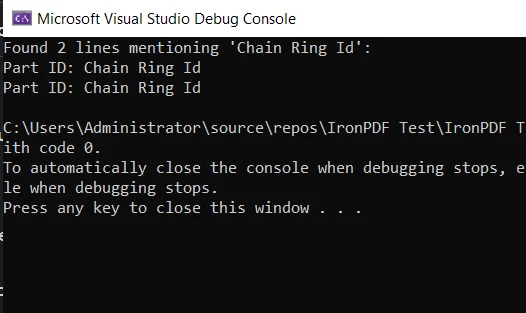
Este é um exemplo básico de como o método Find pode ser usado juntamente com IronPDF em um cenário prático. Isso demonstra a utilidade e a versatilidade do C#, juntamente com suas poderosas bibliotecas que ajudam a tornar suas tarefas de programação mais fáceis e eficientes.
Conclusão
Neste tutorial, mergulhamos fundo no método Find em C# e seus parentes, FindIndex, FindLastIndex, e FindAll. Exploramos suas aplicações, analisamos alguns exemplos de código e descobrimos as circunstâncias em que são mais eficazes.
Também nos aventuramos no mundo da manipulação de PDFs usando a biblioteca IronPDF . Da mesma forma, vimos uma aplicação prática do nosso conhecimento do método Find na extração e busca de conteúdo dentro de um documento PDF.
O IronPDF oferece um período de IronPDF gratuito, proporcionando uma excelente oportunidade para explorar suas funcionalidades e determinar como ele pode beneficiar seus projetos em C#. Se você decidir continuar usando IronPDF após o teste, as licenças começam a partir de $999.













