using IronPdf;

// Disable local disk access or cross-origin requests
Installation.EnableWebSecurity = true;

// Instantiate Renderer
var renderer = new ChromePdfRenderer();

// Create a PDF from a HTML string using C#
var pdf = renderer.RenderHtmlAsPdf("<h1>Hello World</h1>");

// Export to a file or Stream
pdf.SaveAs("output.pdf");

// Advanced Example with HTML Assets
// Load external html assets: Images, CSS and JavaScript.
// An optional BasePath 'C:\site\assets\' is set as the file location to load assets from
var myAdvancedPdf = renderer.RenderHtmlAsPdf("<img src='icons/iron.png'>", @"C:\site\assets\");
myAdvancedPdf.SaveAs("html-with-assets.pdf");
using IronPdf;// Disable local disk access or cross-origin requestsInstallation.EnableWebSecurity = true;// Instantiate Renderervar renderer = new ChromePdfRenderer();// Create a PDF from a HTML string using C#var pdf = renderer.RenderHtmlAsPdf("<h1>Hello World</h1>");// Export to a file or Streampdf.SaveAs("output.pdf");// Advanced Example with HTML Assets// Load external html assets: Images, CSS and JavaScript.// An optional BasePath 'C:\site\assets\' is set as the file location to load assets fromvar myAdvancedPdf = renderer.RenderHtmlAsPdf("<img src='icons/iron.png'>", @"C:\site\assets\");myAdvancedPdf.SaveAs("html-with-assets.pdf");
OpenAPI, anteriormente conhecido como Swagger, é uma especificação para construir e descrever APIs RESTful. Ele permite que os desenvolvedores definam a estrutura de suas APIs em um formato padronizado, possibilitando que diversas ferramentas e serviços entendam e interajam com a API REST de forma eficaz e forneçam feedback. No ecossistema .NET, a integração do OpenAPI .NET é facilitada por meio de diversas bibliotecas e ferramentas que tornam mais fácil criar, documentar e consumir APIs.
Neste artigo, aprenderemos sobre as especificações de suporte do OpenAPI e como criar um arquivo PDF usando o IronPDF e retorná-lo como resposta de uma chamada de API.
### Configurando o OpenAPI no .NET
Para começar a trabalhar com um projeto OpenAPI .NET , normalmente você usa a biblioteca Swashbuckle, que gera a especificação ou documentação OpenAPI para suas APIs ASP.NET Core .
#### Passo 1: Instale o Swashbuckle
Primeiro, é necessário instalar o pacote `Swashbuckle.AspNetCore` via NuGet no Visual Studio. Você pode fazer isso usando o Console do Gerenciador de Pacotes NuGet :
```shell
:InstallCmd Install-Package Swashbuckle.AspNetCore
```
Ou usando a CLI do .NET :
```bash
dotnet add package Swashbuckle.AspNetCore
```
#### Passo 2: Configurar o Swashbuckle
Em seguida, você precisa configurar o Swashbuckle em seu projeto ASP.NET Core . Isso envolve atualizar o arquivo `Program.cs` para adicionar serviços Swagger e configurar o middleware Swagger.
```csharp
var builder = WebApplication.CreateBuilder(args);

// Add services to the container.
builder.Services.AddControllers();
// Configures Swagger/OpenAPI descriptions.
builder.Services.AddEndpointsApiExplorer();
builder.Services.AddSwaggerGen();

var app = builder.Build();

// Configure the HTTP request pipeline.
if (app.Environment.IsDevelopment())
{
    app.UseSwagger();
    app.UseSwaggerUI();
}

app.UseHttpsRedirection();
app.UseAuthorization();
app.MapControllers();
app.Run();
```
### Geração e visualização da documentação da API
Após configurar o Swashbuckle, a execução da sua aplicação irá gerar automaticamente a documentação OpenAPI. Você pode visualizar essas descrições OpenAPI navegando até a [interface do Swagger UI](http://localhost:5000/swagger) .
### Usando definições OpenAPI
As definições OpenAPI são ferramentas poderosas que podem ser usadas para gerar SDKs de cliente, testar APIs e garantir a consistência entre diferentes serviços. A especificação OpenAPI define uma interface padrão e independente de linguagem para APIs, que permite que tanto humanos quanto computadores compreendam as funcionalidades de um serviço sem acesso ao código-fonte.
### Ampliando a API aberta com anotações personalizadas
O Swashbuckle permite que você aprimore sua documentação OpenAPI com anotações personalizadas. Essas anotações podem ser adicionadas diretamente aos seus controladores e modelos para fornecer informações adicionais sobre o comportamento e as estruturas de dados da API.
#### Exemplo: Anotações personalizadas
```csharp
using Microsoft.AspNetCore.Mvc;
namespace WebApplication8.Controllers
{
[ApiController]
[Route("[controller]")]
public class WeatherForecastController : ControllerBase
{
private static readonly string[] Summaries = new[]
{
"Freezing", "Bracing", "Chilly", "Cool", "Mild", "Warm", "Balmy", "Hot", "Sweltering", "Scorching"
};
private readonly ILogger<WeatherForecastController> _logger;
public WeatherForecastController(ILogger<WeatherForecastController> logger)
{
_logger = logger;
}
[HttpGet(Name = "GetWeatherForecast")]
[SwaggerOperation(Summary = "Gets the weather forecast for the next 5 days")]
[SwaggerResponse(200, "Successfully retrieved weather forecast")]
public IEnumerable<WeatherForecast> Get()
{
return Enumerable.Range(1, 5).Select(index => new WeatherForecast
{
Date = DateTime.Now.AddDays(index),
TemperatureC = Random.Shared.Next(-20, 55),
Summary = Summaries[Random.Shared.Next(Summaries.Length)]
})
.ToArray();
}
}
}
```
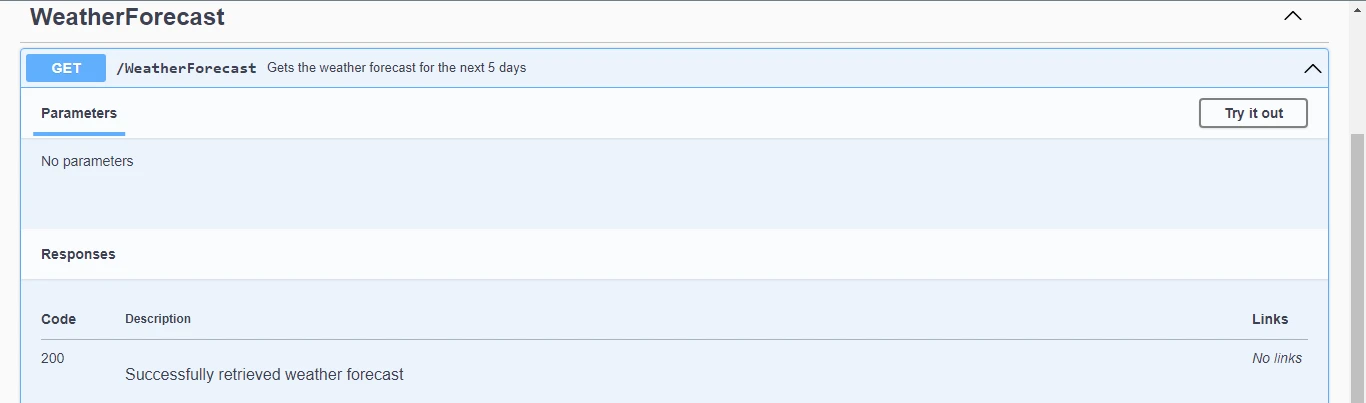
Neste exemplo, os atributos `SwaggerOperation` e `SwaggerResponse` são usados para fornecer descrições detalhadas do OpenAPI e códigos de resposta para o endpoint.
##### Saída
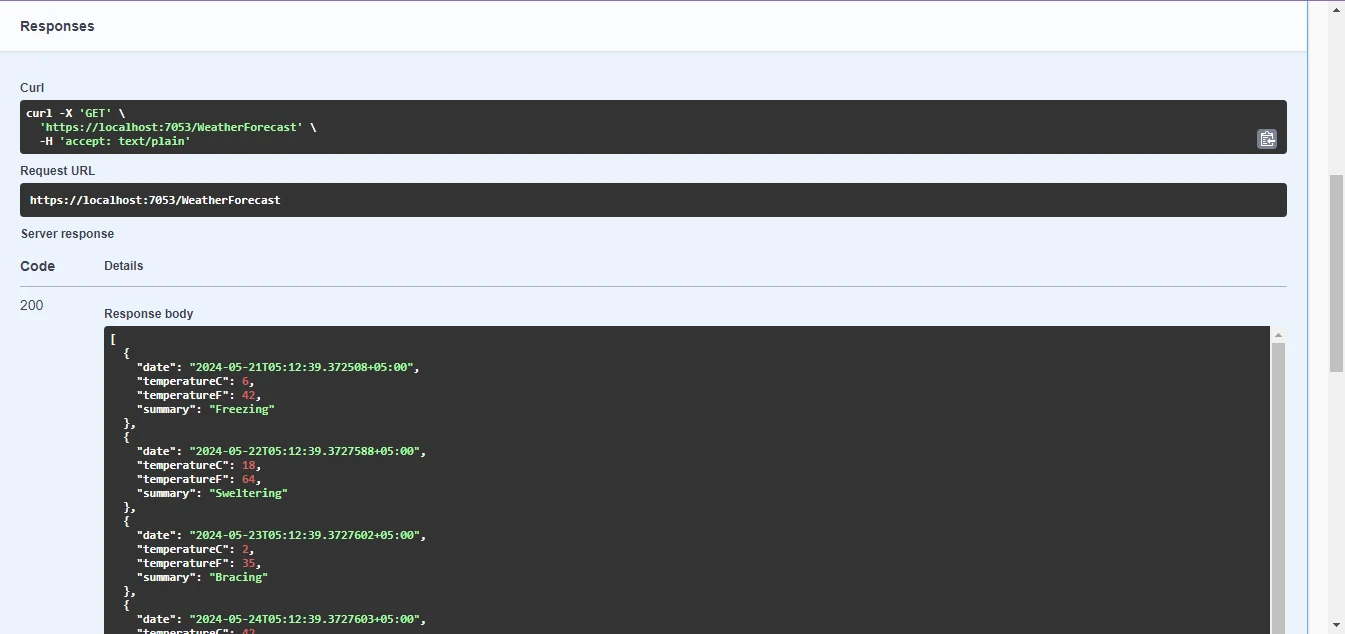
Clique no botão Executar e você receberá a seguinte resposta.
## IronPDF
IronPDF para ASP.NET é uma ferramenta poderosa que permite a geração e manipulação perfeitas de documentos PDF em aplicações ASP.NET . Com sua API intuitiva e funcionalidade robusta, os desenvolvedores podem integrar facilmente a geração de PDFs em seus projetos web, oferecendo aos usuários recursos aprimorados de gerenciamento de documentos. Seja para criar PDFs do zero, converter conteúdo HTML em PDF ou adicionar elementos dinâmicos como imagens e texto, o IronPDF simplifica o processo, garantindo a geração de documentos de forma eficiente e profissional.
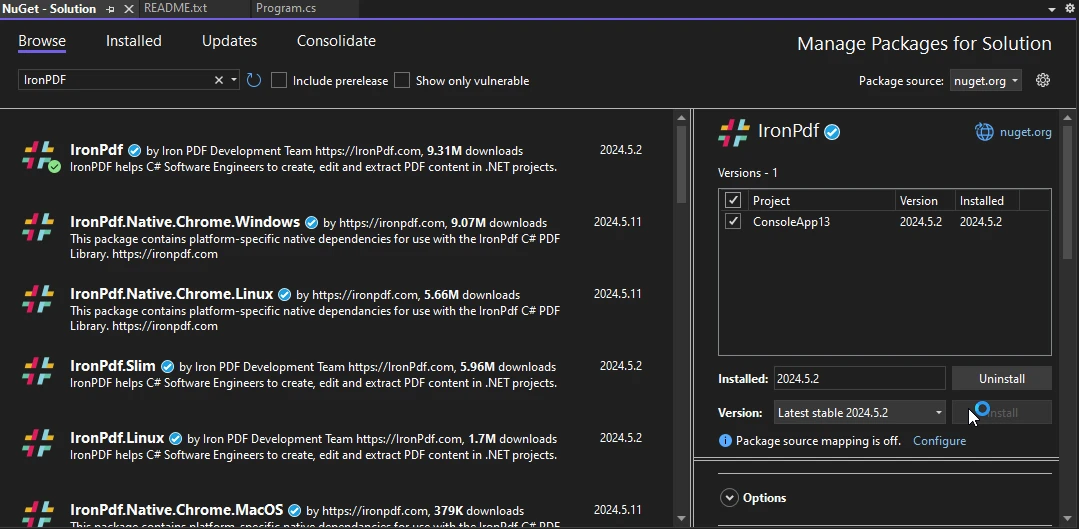
Passos para instalar usando o Gerenciador de Pacotes NuGet :
1. Abra seu projeto ASP.NET no Visual Studio e navegue até o menu "Ferramentas".
2. Selecione "Gerenciador de Pacotes NuGet " e clique em "Gerenciar Pacotes NuGet para a Solução".
3. Na aba "Procurar", pesquise por "IronPDF" e selecione a versão desejada. Clique em "Instalar" para adicionar o pacote ao seu projeto. O IronPDF e suas dependências serão baixados e integrados automaticamente, permitindo que você comece a aproveitar suas funcionalidades em sua aplicação ASP.NET sem problemas.
## Obter arquivo PDF em resposta a uma chamada de API
Adicione o seguinte código ao seu arquivo de controlador; ele usa o IronPDF para criar um arquivo PDF e retorná-lo como resposta à chamada da API.
```csharp
using Microsoft.AspNetCore.Mvc;
using IronPdf;
namespace WebApplication8.Controllers
{
[ApiController]
[Route("[controller]")]
public class WeatherForecastController : ControllerBase
{
private static readonly string[] Summaries = new[]
{
"Freezing", "Bracing", "Chilly", "Cool", "Mild", "Warm", "Balmy", "Hot", "Sweltering", "Scorching"
};
private readonly ILogger<WeatherForecastController> _logger;
public WeatherForecastController(ILogger<WeatherForecastController> logger)
{
_logger = logger;
}
[HttpGet(Name = "GetWeatherForecast")]
public IActionResult GetWeatherForecastPdf()
{
var htmlContent = @"
<html>
<head>
<title>Weather Forecast</title>
</head>
<body>
<h1>Weather Forecast</h1>
<table>
<tr>
<th>Date</th>
<th>Temperature (Celsius)</th>
<th>Summary</th>
</tr>";
var forecasts = Enumerable.Range(1, 5).Select(index => new WeatherForecast
{
Date = DateTime.Now.AddDays(index),
TemperatureC = Random.Shared.Next(-20, 55),
Summary = Summaries[Random.Shared.Next(Summaries.Length)]
});
// Iterate over the forecasts and add data to the HTML string
foreach (var forecast in forecasts)
{
htmlContent += $@"
<tr>
<td>{forecast.Date.ToShortDateString()}</td>
<td>{forecast.TemperatureC}</td>
<td>{forecast.Summary}</td>
</tr>";
}
htmlContent += @"
</table>
</body>
</html>";
// Convert the HTML string to a PDF using IronPDF
var renderer = new ChromePdfRenderer();
var pdfDocument = renderer.RenderHtmlAsPdf(htmlContent);
// Retrieve the byte array of the generated PDF
var pdfBytes = pdfDocument.BinaryData;
// Return the PDF file to the client
return File(pdfBytes, "application/pdf", "WeatherForecast.pdf");
}
}
}
```
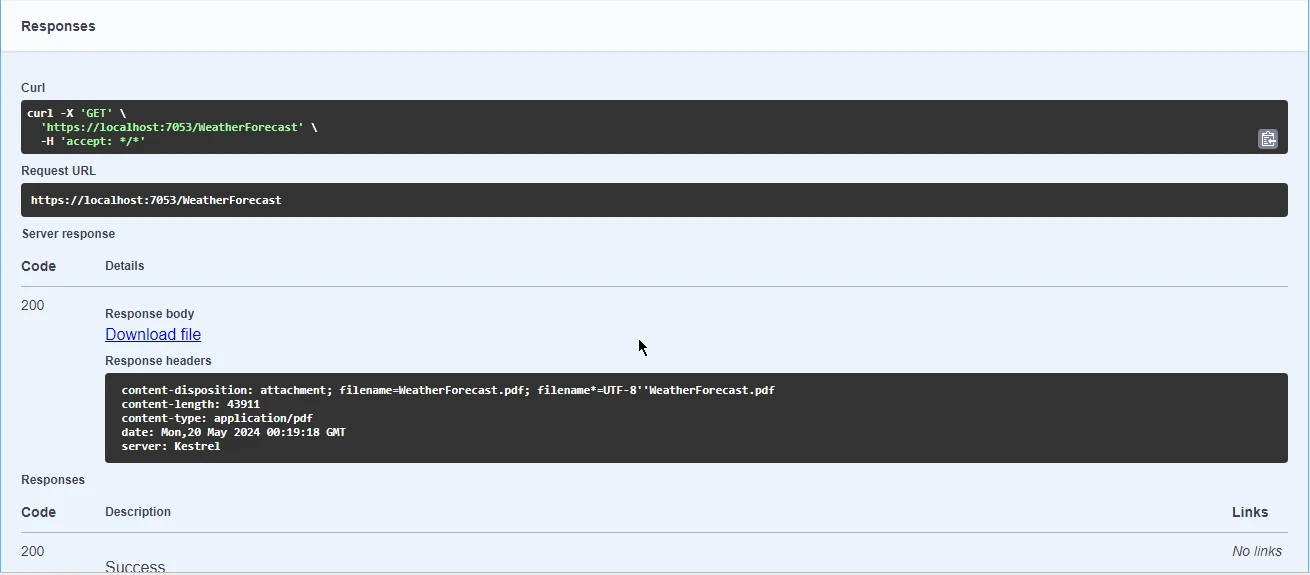
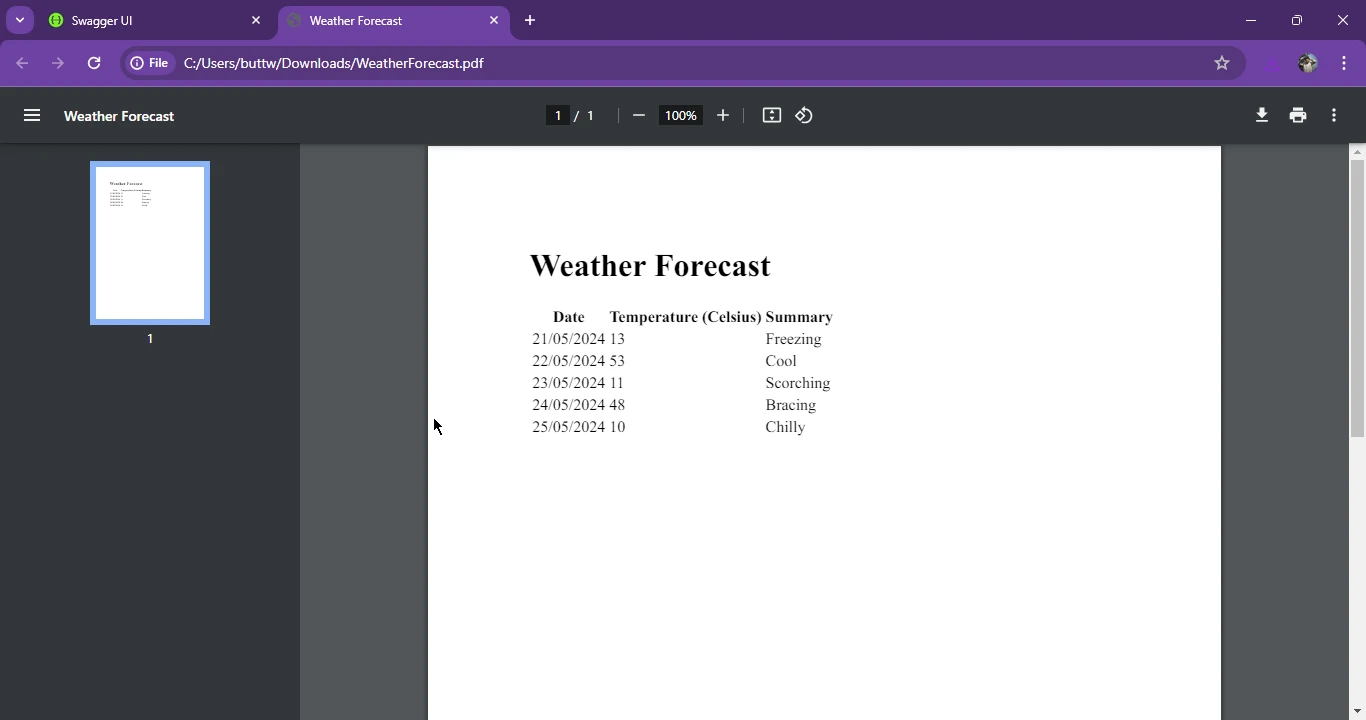
Faça o download e abra o arquivo PDF em anexo.
### Conclusão
O OpenAPI, anteriormente conhecido como Swagger, simplifica o design e a documentação de APIs RESTful no ecossistema .NET por meio de bibliotecas como o Swashbuckle, facilitando a geração automática de documentação de API para projetos ASP.NET Core . Demonstrando a sinergia entre OpenAPI e IronPDF, mostramos como utilizar os recursos do IronPDF para gerar arquivos PDF a partir de conteúdo HTML e retorná-los como respostas de API, enriquecendo a funcionalidade de aplicativos ASP.NET . Ao adotar os padrões OpenAPI e aproveitar os recursos robustos do IronPDF, os desenvolvedores podem aprimorar suas práticas de documentação de API e entregar aos usuários aplicativos refinados e repletos de funcionalidades.
Para obter informações detalhadas sobre o licenciamento do IronPDF , consulte os [detalhes de licenciamento do IronPDF](/licensing/) . Além disso, você pode consultar nosso [tutorial de conversão de HTML para PDF](/tutorials/html-to-pdf/) para obter mais orientações.
OpenAPI, anteriormente conhecido como Swagger, é uma especificação para construir e descrever APIs RESTful. Ele permite que os desenvolvedores definam a estrutura de suas APIs em um formato padronizado, possibilitando que diversas ferramentas e serviços entendam e interajam com a API REST de forma eficaz e forneçam feedback. No ecossistema .NET, a integração do OpenAPI .NET é facilitada por meio de diversas bibliotecas e ferramentas que tornam mais fácil criar, documentar e consumir APIs.
Neste artigo, aprenderemos sobre as especificações de suporte do OpenAPI e como criar um arquivo PDF usando o IronPDF e retorná-lo como resposta de uma chamada de API.
Configurando o OpenAPI no .NET
Para começar a trabalhar com um projeto OpenAPI .NET , normalmente você usa a biblioteca Swashbuckle, que gera a especificação ou documentação OpenAPI para suas APIs ASP.NET Core .
Passo 1: Instale o Swashbuckle
Primeiro, é necessário instalar o pacote Swashbuckle.AspNetCore via NuGet no Visual Studio. Você pode fazer isso usando o Console do Gerenciador de Pacotes NuGet :
PM > Install-Package Swashbuckle.AspNetCore
Install-Package Swashbuckle.AspNetCore
Ou usando a CLI do .NET :
dotnet add package Swashbuckle.AspNetCore
dotnet add package Swashbuckle.AspNetCore
SHELL
Passo 2: Configurar o Swashbuckle
Em seguida, você precisa configurar o Swashbuckle em seu projeto ASP.NET Core . Isso envolve atualizar o arquivo Program.cs para adicionar serviços Swagger e configurar o middleware Swagger.
var builder = WebApplication.CreateBuilder(args);// Add services to the container.builder.Services.AddControllers();// Configures Swagger/OpenAPI descriptions.builder.Services.AddEndpointsApiExplorer();builder.Services.AddSwaggerGen();var app = builder.Build();// Configure the HTTP request pipeline.if (app.Environment.IsDevelopment()){ app.UseSwagger(); app.UseSwaggerUI();}app.UseHttpsRedirection();app.UseAuthorization();app.MapControllers();app.Run();
var builder = WebApplication.CreateBuilder(args);

// Add services to the container.
builder.Services.AddControllers();
// Configures Swagger/OpenAPI descriptions.
builder.Services.AddEndpointsApiExplorer();
builder.Services.AddSwaggerGen();

var app = builder.Build();

// Configure the HTTP request pipeline.
if (app.Environment.IsDevelopment())
{
    app.UseSwagger();
    app.UseSwaggerUI();
}

app.UseHttpsRedirection();
app.UseAuthorization();
app.MapControllers();
app.Run();
Dim builder = WebApplication.CreateBuilder(args)' Add services to the container.builder.Services.AddControllers()' Configures Swagger/OpenAPI descriptions.builder.Services.AddEndpointsApiExplorer()builder.Services.AddSwaggerGen()Dim app = builder.Build()' Configure the HTTP request pipeline.If app.Environment.IsDevelopment() Then app.UseSwagger() app.UseSwaggerUI()End Ifapp.UseHttpsRedirection()app.UseAuthorization()app.MapControllers()app.Run()
Dim builder = WebApplication.CreateBuilder(args)

' Add services to the container.
builder.Services.AddControllers()
' Configures Swagger/OpenAPI descriptions.
builder.Services.AddEndpointsApiExplorer()
builder.Services.AddSwaggerGen()

Dim app = builder.Build()

' Configure the HTTP request pipeline.
If app.Environment.IsDevelopment() Then
	app.UseSwagger()
	app.UseSwaggerUI()
End If

app.UseHttpsRedirection()
app.UseAuthorization()
app.MapControllers()
app.Run()
Geração e visualização da documentação da API
Após configurar o Swashbuckle, a execução da sua aplicação irá gerar automaticamente a documentação OpenAPI. Você pode visualizar essas descrições OpenAPI navegando até a interface do Swagger UI .
Usando definições OpenAPI
As definições OpenAPI são ferramentas poderosas que podem ser usadas para gerar SDKs de cliente, testar APIs e garantir a consistência entre diferentes serviços. A especificação OpenAPI define uma interface padrão e independente de linguagem para APIs, que permite que tanto humanos quanto computadores compreendam as funcionalidades de um serviço sem acesso ao código-fonte.
Ampliando a API aberta com anotações personalizadas
O Swashbuckle permite que você aprimore sua documentação OpenAPI com anotações personalizadas. Essas anotações podem ser adicionadas diretamente aos seus controladores e modelos para fornecer informações adicionais sobre o comportamento e as estruturas de dados da API.
Exemplo: Anotações personalizadas
using Microsoft.AspNetCore.Mvc;namespace WebApplication8.Controllers{ [ApiController] [Route("[controller]")] public class WeatherForecastController : ControllerBase { private static readonly string[] Summaries = new[] { "Freezing", "Bracing", "Chilly", "Cool", "Mild", "Warm", "Balmy", "Hot", "Sweltering", "Scorching" }; private readonly ILogger<WeatherForecastController> _logger; publicWeatherForecastController(ILogger<WeatherForecastController> logger) { _logger = logger; } [HttpGet(Name = "GetWeatherForecast")] [SwaggerOperation(Summary = "Gets the weather forecast for the next 5 days")] [SwaggerResponse(200, "Successfully retrieved weather forecast")] public IEnumerable<WeatherForecast> Get() { returnEnumerable.Range(1, 5).Select(index => new WeatherForecast {Date = DateTime.Now.AddDays(index),TemperatureC = Random.Shared.Next(-20, 55),Summary = Summaries[Random.Shared.Next(Summaries.Length)] }) .ToArray(); } }}
using Microsoft.AspNetCore.Mvc;

namespace WebApplication8.Controllers
{
    [ApiController]
    [Route("[controller]")]
    public class WeatherForecastController : ControllerBase
    {
        private static readonly string[] Summaries = new[]
        {
            "Freezing", "Bracing", "Chilly", "Cool", "Mild", "Warm", "Balmy", "Hot", "Sweltering", "Scorching"
        };

        private readonly ILogger<WeatherForecastController> _logger;

        public WeatherForecastController(ILogger<WeatherForecastController> logger)
        {
            _logger = logger;
        }

        [HttpGet(Name = "GetWeatherForecast")]
        [SwaggerOperation(Summary = "Gets the weather forecast for the next 5 days")]
        [SwaggerResponse(200, "Successfully retrieved weather forecast")]
        public IEnumerable<WeatherForecast> Get()
        {
            return Enumerable.Range(1, 5).Select(index => new WeatherForecast
            {
                Date = DateTime.Now.AddDays(index),
                TemperatureC = Random.Shared.Next(-20, 55),
                Summary = Summaries[Random.Shared.Next(Summaries.Length)]
            })
            .ToArray();
        }
    }
}
ImportsMicrosoft.AspNetCore.MvcNamespaceWebApplication8.Controllers <ApiController> <Route("[controller]")> Public Class WeatherForecastControllerInheritsControllerBase PrivateSharedReadOnlySummaries() AsString = { "Freezing", "Bracing", "Chilly", "Cool", "Mild", "Warm", "Balmy", "Hot", "Sweltering", "Scorching" } PrivateReadOnly _logger AsILogger(OfWeatherForecastController) Public Sub New(ByVal logger AsILogger(OfWeatherForecastController)) _logger = logger End Sub <HttpGet(Name := "GetWeatherForecast")> <SwaggerOperation(Summary := "Gets the weather forecast for the next 5 days")> <SwaggerResponse(200, "Successfully retrieved weather forecast")> Public Function [Get]() AsIEnumerable(OfWeatherForecast) ReturnEnumerable.Range(1, 5).Select(Function(index) New WeatherForecastWith { .Date = DateTime.Now.AddDays(index), .TemperatureC = Random.Shared.Next(-20, 55), .Summary = Summaries(Random.Shared.Next(Summaries.Length)) }).ToArray() End Function End ClassEndNamespace
Imports Microsoft.AspNetCore.Mvc

Namespace WebApplication8.Controllers
	<ApiController>
	<Route("[controller]")>
	Public Class WeatherForecastController
		Inherits ControllerBase

		Private Shared ReadOnly Summaries() As String = { "Freezing", "Bracing", "Chilly", "Cool", "Mild", "Warm", "Balmy", "Hot", "Sweltering", "Scorching" }

		Private ReadOnly _logger As ILogger(Of WeatherForecastController)

		Public Sub New(ByVal logger As ILogger(Of WeatherForecastController))
			_logger = logger
		End Sub

		<HttpGet(Name := "GetWeatherForecast")>
		<SwaggerOperation(Summary := "Gets the weather forecast for the next 5 days")>
		<SwaggerResponse(200, "Successfully retrieved weather forecast")>
		Public Function [Get]() As IEnumerable(Of WeatherForecast)
			Return Enumerable.Range(1, 5).Select(Function(index) New WeatherForecast With {
				.Date = DateTime.Now.AddDays(index),
				.TemperatureC = Random.Shared.Next(-20, 55),
				.Summary = Summaries(Random.Shared.Next(Summaries.Length))
			}).ToArray()
		End Function
	End Class
End Namespace
Neste exemplo, os atributos SwaggerOperation e SwaggerResponse são usados para fornecer descrições detalhadas do OpenAPI e códigos de resposta para o endpoint.
Saída
Clique no botão Executar e você receberá a seguinte resposta.
IronPDF
IronPDF para ASP.NET é uma ferramenta poderosa que permite a geração e manipulação perfeitas de documentos PDF em aplicações ASP.NET . Com sua API intuitiva e funcionalidade robusta, os desenvolvedores podem integrar facilmente a geração de PDFs em seus projetos web, oferecendo aos usuários recursos aprimorados de gerenciamento de documentos. Seja para criar PDFs do zero, converter conteúdo HTML em PDF ou adicionar elementos dinâmicos como imagens e texto, o IronPDF simplifica o processo, garantindo a geração de documentos de forma eficiente e profissional.
Passos para instalar usando o Gerenciador de Pacotes NuGet :
Abra seu projeto ASP.NET no Visual Studio e navegue até o menu "Ferramentas".
Selecione "Gerenciador de Pacotes NuGet " e clique em "Gerenciar Pacotes NuGet para a Solução".
Na aba "Procurar", pesquise por "IronPDF" e selecione a versão desejada. Clique em "Instalar" para adicionar o pacote ao seu projeto. O IronPDF e suas dependências serão baixados e integrados automaticamente, permitindo que você comece a aproveitar suas funcionalidades em sua aplicação ASP.NET sem problemas.
Obter arquivo PDF em resposta a uma chamada de API
Adicione o seguinte código ao seu arquivo de controlador; ele usa o IronPDF para criar um arquivo PDF e retorná-lo como resposta à chamada da API.
using Microsoft.AspNetCore.Mvc;using IronPdf;namespace WebApplication8.Controllers{ [ApiController] [Route("[controller]")] public class WeatherForecastController : ControllerBase { private static readonly string[] Summaries = new[] { "Freezing", "Bracing", "Chilly", "Cool", "Mild", "Warm", "Balmy", "Hot", "Sweltering", "Scorching" }; private readonly ILogger<WeatherForecastController> _logger; publicWeatherForecastController(ILogger<WeatherForecastController> logger) { _logger = logger; } [HttpGet(Name = "GetWeatherForecast")] public IActionResultGetWeatherForecastPdf() { var htmlContent = @" <html> <head> <title>Weather Forecast</title> </head> <body> <h1>Weather Forecast</h1> <table> <tr> <th>Date</th> <th>Temperature (Celsius)</th> <th>Summary</th> </tr>"; var forecasts = Enumerable.Range(1, 5).Select(index => new WeatherForecast {Date = DateTime.Now.AddDays(index),TemperatureC = Random.Shared.Next(-20, 55),Summary = Summaries[Random.Shared.Next(Summaries.Length)] }); // Iterate over the forecasts and add data to the HTML string foreach (var forecast in forecasts) { htmlContent += $@" <tr> <td>{forecast.Date.ToShortDateString()}</td> <td>{forecast.TemperatureC}</td> <td>{forecast.Summary}</td> </tr>"; } htmlContent += @" </table> </body> </html>"; // Convert the HTML string to a PDF using IronPDF var renderer = new ChromePdfRenderer(); var pdfDocument = renderer.RenderHtmlAsPdf(htmlContent); // Retrieve the byte array of the generated PDF var pdfBytes = pdfDocument.BinaryData; // Return the PDF file to the client returnFile(pdfBytes, "application/pdf", "WeatherForecast.pdf"); } }}
using Microsoft.AspNetCore.Mvc;
using IronPdf;

namespace WebApplication8.Controllers
{
    [ApiController]
    [Route("[controller]")]
    public class WeatherForecastController : ControllerBase
    {
        private static readonly string[] Summaries = new[]
        {
            "Freezing", "Bracing", "Chilly", "Cool", "Mild", "Warm", "Balmy", "Hot", "Sweltering", "Scorching"
        };

        private readonly ILogger<WeatherForecastController> _logger;

        public WeatherForecastController(ILogger<WeatherForecastController> logger)
        {
            _logger = logger;
        }

        [HttpGet(Name = "GetWeatherForecast")]
        public IActionResult GetWeatherForecastPdf()
        {
            var htmlContent = @"
        <html>
        <head>
            <title>Weather Forecast</title>
        </head>
        <body>
            <h1>Weather Forecast</h1>
            <table>
                <tr>
                    <th>Date</th>
                    <th>Temperature (Celsius)</th>
                    <th>Summary</th>
                </tr>";

            var forecasts = Enumerable.Range(1, 5).Select(index => new WeatherForecast
            {
                Date = DateTime.Now.AddDays(index),
                TemperatureC = Random.Shared.Next(-20, 55),
                Summary = Summaries[Random.Shared.Next(Summaries.Length)]
            });

            // Iterate over the forecasts and add data to the HTML string
            foreach (var forecast in forecasts)
            {
                htmlContent += $@"
            <tr>
                <td>{forecast.Date.ToShortDateString()}</td>
                <td>{forecast.TemperatureC}</td>
                <td>{forecast.Summary}</td>
            </tr>";
            }

            htmlContent += @"
            </table>
        </body>
        </html>";

            // Convert the HTML string to a PDF using IronPDF
            var renderer = new ChromePdfRenderer();
            var pdfDocument = renderer.RenderHtmlAsPdf(htmlContent);

            // Retrieve the byte array of the generated PDF
            var pdfBytes = pdfDocument.BinaryData;
            // Return the PDF file to the client
            return File(pdfBytes, "application/pdf", "WeatherForecast.pdf");
        }
    }
}
ImportsMicrosoft.AspNetCore.MvcImportsIronPdfNamespaceWebApplication8.Controllers <ApiController> <Route("[controller]")> Public Class WeatherForecastControllerInheritsControllerBase PrivateSharedReadOnlySummaries() AsString = { "Freezing", "Bracing", "Chilly", "Cool", "Mild", "Warm", "Balmy", "Hot", "Sweltering", "Scorching" } PrivateReadOnly _logger AsILogger(OfWeatherForecastController) Public Sub New(ByVal logger AsILogger(OfWeatherForecastController)) _logger = logger End Sub <HttpGet(Name := "GetWeatherForecast")> Public Function GetWeatherForecastPdf() AsIActionResult Dim htmlContent = " <html> <head> <title>Weather Forecast</title> </head> <body> <h1>Weather Forecast</h1> <table> <tr> <th>Date</th> <th>Temperature (Celsius)</th> <th>Summary</th> </tr>" Dim forecasts = Enumerable.Range(1, 5).Select(Function(index) New WeatherForecastWith { .Date = DateTime.Now.AddDays(index), .TemperatureC = Random.Shared.Next(-20, 55), .Summary = Summaries(Random.Shared.Next(Summaries.Length)) }) ' Iterate over the forecasts and add data to the HTML string For Each forecast In forecasts htmlContent &= $" <tr> <td>{forecast.Date.ToShortDateString()}</td> <td>{forecast.TemperatureC}</td> <td>{forecast.Summary}</td> </tr>" Next forecast htmlContent &= " </table> </body> </html>" ' Convert the HTML string to a PDF using IronPDF Dim renderer = New ChromePdfRenderer() Dim pdfDocument = renderer.RenderHtmlAsPdf(htmlContent) ' Retrieve the byte array of the generated PDF Dim pdfBytes = pdfDocument.BinaryData ' Return the PDF file to the client ReturnFile(pdfBytes, "application/pdf", "WeatherForecast.pdf") End Function End ClassEndNamespace
Imports Microsoft.AspNetCore.Mvc
Imports IronPdf

Namespace WebApplication8.Controllers
	<ApiController>
	<Route("[controller]")>
	Public Class WeatherForecastController
		Inherits ControllerBase

		Private Shared ReadOnly Summaries() As String = { "Freezing", "Bracing", "Chilly", "Cool", "Mild", "Warm", "Balmy", "Hot", "Sweltering", "Scorching" }

		Private ReadOnly _logger As ILogger(Of WeatherForecastController)

		Public Sub New(ByVal logger As ILogger(Of WeatherForecastController))
			_logger = logger
		End Sub

		<HttpGet(Name := "GetWeatherForecast")>
		Public Function GetWeatherForecastPdf() As IActionResult
			Dim htmlContent = "
        <html>
        <head>
            <title>Weather Forecast</title>
        </head>
        <body>
            <h1>Weather Forecast</h1>
            <table>
                <tr>
                    <th>Date</th>
                    <th>Temperature (Celsius)</th>
                    <th>Summary</th>
                </tr>"

			Dim forecasts = Enumerable.Range(1, 5).Select(Function(index) New WeatherForecast With {
				.Date = DateTime.Now.AddDays(index),
				.TemperatureC = Random.Shared.Next(-20, 55),
				.Summary = Summaries(Random.Shared.Next(Summaries.Length))
			})

			' Iterate over the forecasts and add data to the HTML string
			For Each forecast In forecasts
				htmlContent &= $"
            <tr>
                <td>{forecast.Date.ToShortDateString()}</td>
                <td>{forecast.TemperatureC}</td>
                <td>{forecast.Summary}</td>
            </tr>"
			Next forecast

			htmlContent &= "
            </table>
        </body>
        </html>"

			' Convert the HTML string to a PDF using IronPDF
			Dim renderer = New ChromePdfRenderer()
			Dim pdfDocument = renderer.RenderHtmlAsPdf(htmlContent)

			' Retrieve the byte array of the generated PDF
			Dim pdfBytes = pdfDocument.BinaryData
			' Return the PDF file to the client
			Return File(pdfBytes, "application/pdf", "WeatherForecast.pdf")
		End Function
	End Class
End Namespace
Faça o download e abra o arquivo PDF em anexo.
Conclusão
O OpenAPI, anteriormente conhecido como Swagger, simplifica o design e a documentação de APIs RESTful no ecossistema .NET por meio de bibliotecas como o Swashbuckle, facilitando a geração automática de documentação de API para projetos ASP.NET Core . Demonstrando a sinergia entre OpenAPI e IronPDF, mostramos como utilizar os recursos do IronPDF para gerar arquivos PDF a partir de conteúdo HTML e retorná-los como respostas de API, enriquecendo a funcionalidade de aplicativos ASP.NET . Ao adotar os padrões OpenAPI e aproveitar os recursos robustos do IronPDF, os desenvolvedores podem aprimorar suas práticas de documentação de API e entregar aos usuários aplicativos refinados e repletos de funcionalidades.
Curtis Chau é bacharel em Ciência da Computação (Universidade Carleton) e se especializa em desenvolvimento front-end, com experiência em Node.js, TypeScript, JavaScript e React. Apaixonado por criar interfaces de usuário intuitivas e esteticamente agradáveis, Curtis gosta de trabalhar com frameworks modernos e criar manuais bem estruturados e visualmente atraentes.


















