跳至頁尾內容
產品比較
IronPDF與Apache PDFBox的HTML到PDF比較

IronPDF For Java 與 Apache PDFBox 的比較

這篇文章將介紹Java中用於處理PDF文件的兩個最受歡迎的程式庫:

  1. IronPDF
  2. Apache PDFBox

那麼我們應該使用哪個程式庫呢? 在這篇文章中,我將比較這兩個程式庫的核心功能,以便您可以決定哪一個最適合您的生產環境。

IronPDF

IronPDF程式庫支援HTML轉PDF轉換,適用於Java 8+、Kotlin和Scala。 此建立者提供跨平台支持,即Windows、Linux或雲平台。 它專為Java設計,優先考慮準確性、易用性和速度。

IronPDF的開發旨在幫助軟體開發者建立、編輯和提取PDF文件中的內容。 它基於IronPDF for .NET的成功和受歡迎程度。

IronPDF的突出功能包括:

使用HTML資產

  • HTML(5及以下)、CSS(螢幕和列印)、圖片(JPG、PNG、GIF、TIFF、SVG、BMP)、JavaScript(+ 渲染延遲)
  • 字體(網頁和圖示)

HTML轉PDF

  • HTML文件/字串到PDF文件的建立和操作
  • URL到PDF

轉換圖像

  • 圖像到新PDF文件
  • PDF到圖像

自訂紙張設置

  • 自訂紙張大小、方向和旋轉
  • 邊距(毫米、英寸和零)
  • 彩色和灰階、解析度和JPEG品質

其他功能

  • 網站和系統登入
  • 自訂使用者代理和代理伺服器
  • HTTP 標頭

Apache PDFBox程式庫

Apache PDFBox是一個開源Java程式庫,用於處理PDF文件。 它允許生成、編輯和操作現有文件。 它還可以從文件中提取內容。 該程式庫提供了幾個實用程式,用於對文件執行各種操作。

以下是Apache PDFBox的突出功能。

提取文字

  • 從文件中提取Unicode文字。

分割和合併

  • 將單個PDF分割成多個文件
  • 合併多個文件。

填寫表單

  • 從表單中提取資料
  • 填寫PDF表單。

預檢

  • 驗證文件是否符合PDF/A-1b標準。

列印

  • 使用標準列印API列印PDF。

保存為圖像

  • 將PDF保存為PNG、JPEG或其他圖像型別。

建立PDF

  • 從零開始開發PDF,嵌入字體和圖片。

簽名

  • 資料文件進行數位簽章。

概述

接下來的文章內容如下:

  1. 安裝IronPDF
  2. 安裝Apache PDFBox
  3. 建立PDF文件
  4. 分散轉文件
  5. 文件加密
  6. 授權
  7. 結論

現在,我們將下載並安裝這些程式庫,以便比較它們的強大功能。

1. 安裝IronPDF

安裝IronPDF在Java中很簡單。 有不同的方法來進行此操作。 本節將示範兩種最受歡迎的方法。

1.1. 下載JAR並新增程式庫

要下載IronPDF JAR文件,請存取Maven網站的IronPDF頁面,然後下載最新版本的IronPDF。
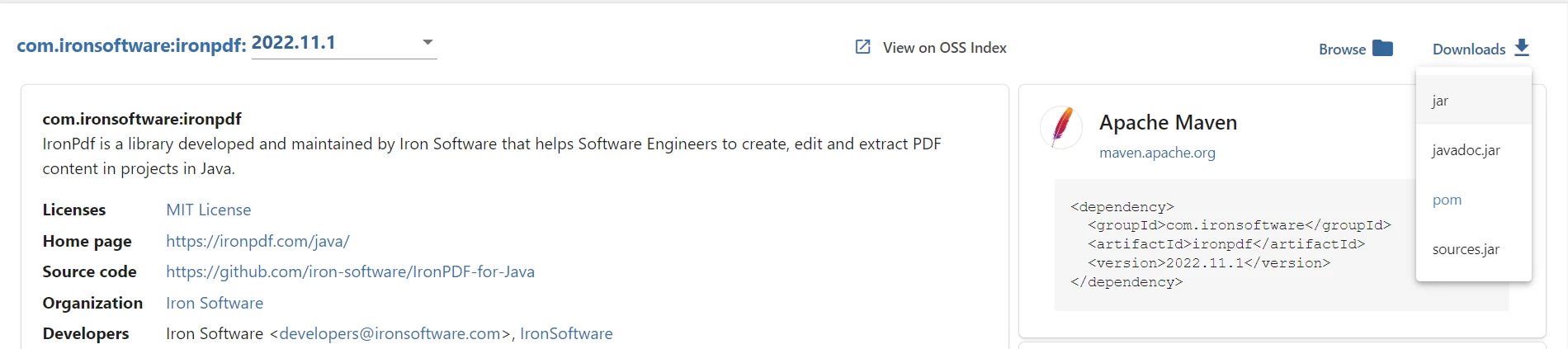
  • 點擊下載選項並下載JAR。
A Comparison between IronPDF For Java and Apache PDF Box for Java - Figure 1: 下載IronPDF JAR

下載IronPDF JAR

一旦下載了JAR,現在是時候將程式庫安裝到我們的Maven項目中。 您可以使用任何IDE,但我們將使用NetBeans。 在項目部分:
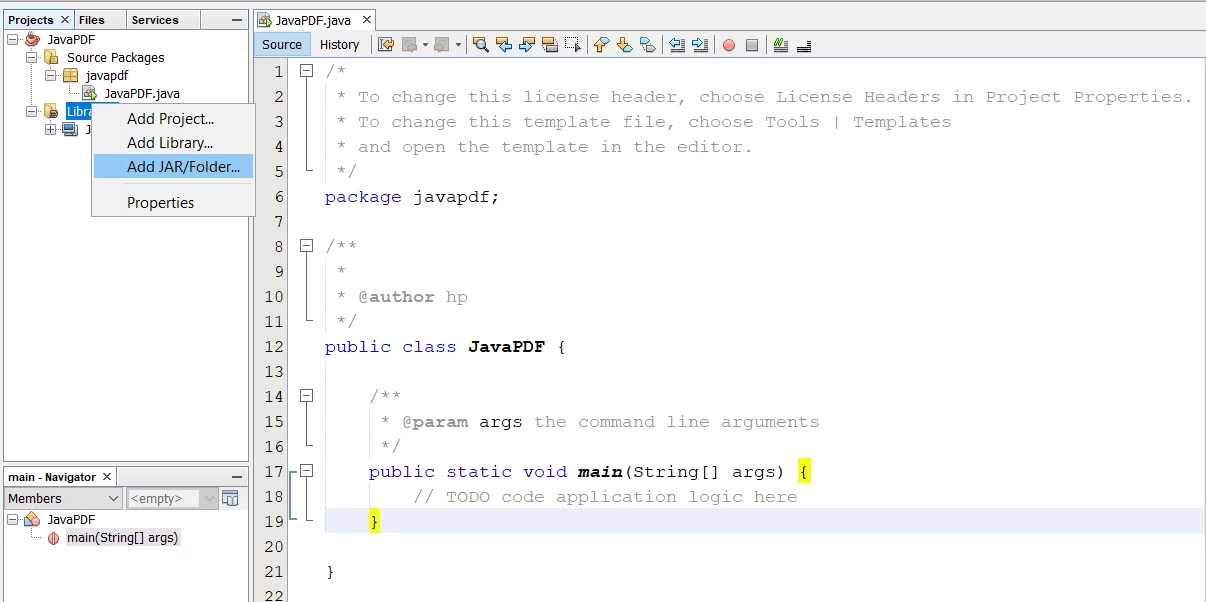
  • 右鍵單擊程式庫文件夾,選擇新增JAR/資料夾選項。
A Comparison between IronPDF For Java and Apache PDF Box for Java - Figure 2: 在Netbeans中新增IronPDF程式庫

在Netbeans中新增IronPDF程式庫

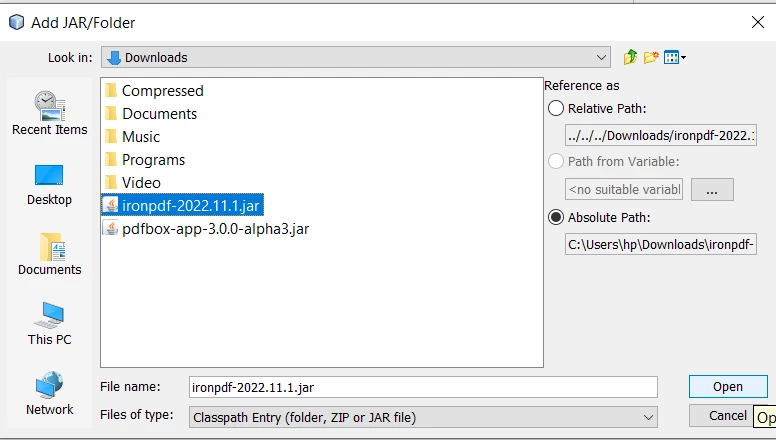
  • 轉到下載JAR的資料夾。
  • 選擇IronPDF JAR並點擊打開按鈕。
A Comparison between IronPDF For Java and Apache PDF Box for Java - Figure 3: 打開IronPDF JAR

打開IronPDF JAR

1.2. 通過Maven作為依賴項安裝

下載和安裝IronPDF的另一種方法是使用Maven。 您可以簡單在pom.xml中新增依賴項,或使用NetBeans的依賴項工具將其包括在您的項目中。

在pom.xml中新增程式庫依賴項

在您的pom.xml中新增以下依賴項:

<dependencies>
  <dependency>
    <groupId>com.ironsoftware</groupId>
    <artifactId>ironpdf</artifactId>
    <version>YOUR_VERSION_HERE</version>
  </dependency>
</dependencies>
<dependencies>
  <dependency>
    <groupId>com.ironsoftware</groupId>
    <artifactId>ironpdf</artifactId>
    <version>YOUR_VERSION_HERE</version>
  </dependency>
</dependencies>
XML

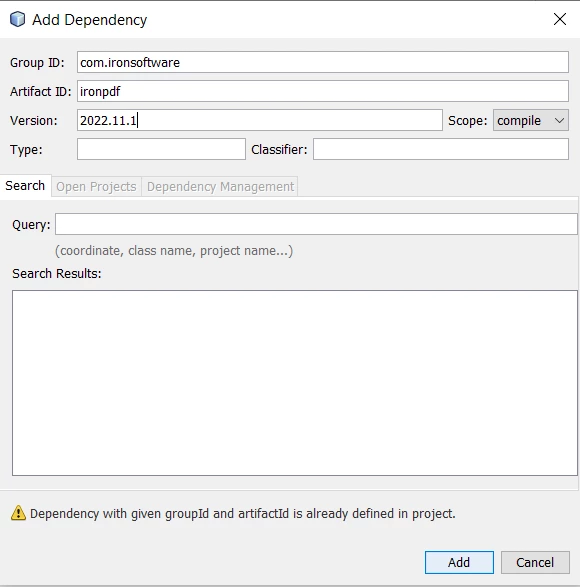
使用依賴項功能新增程式庫

  • 右鍵單擊依賴項
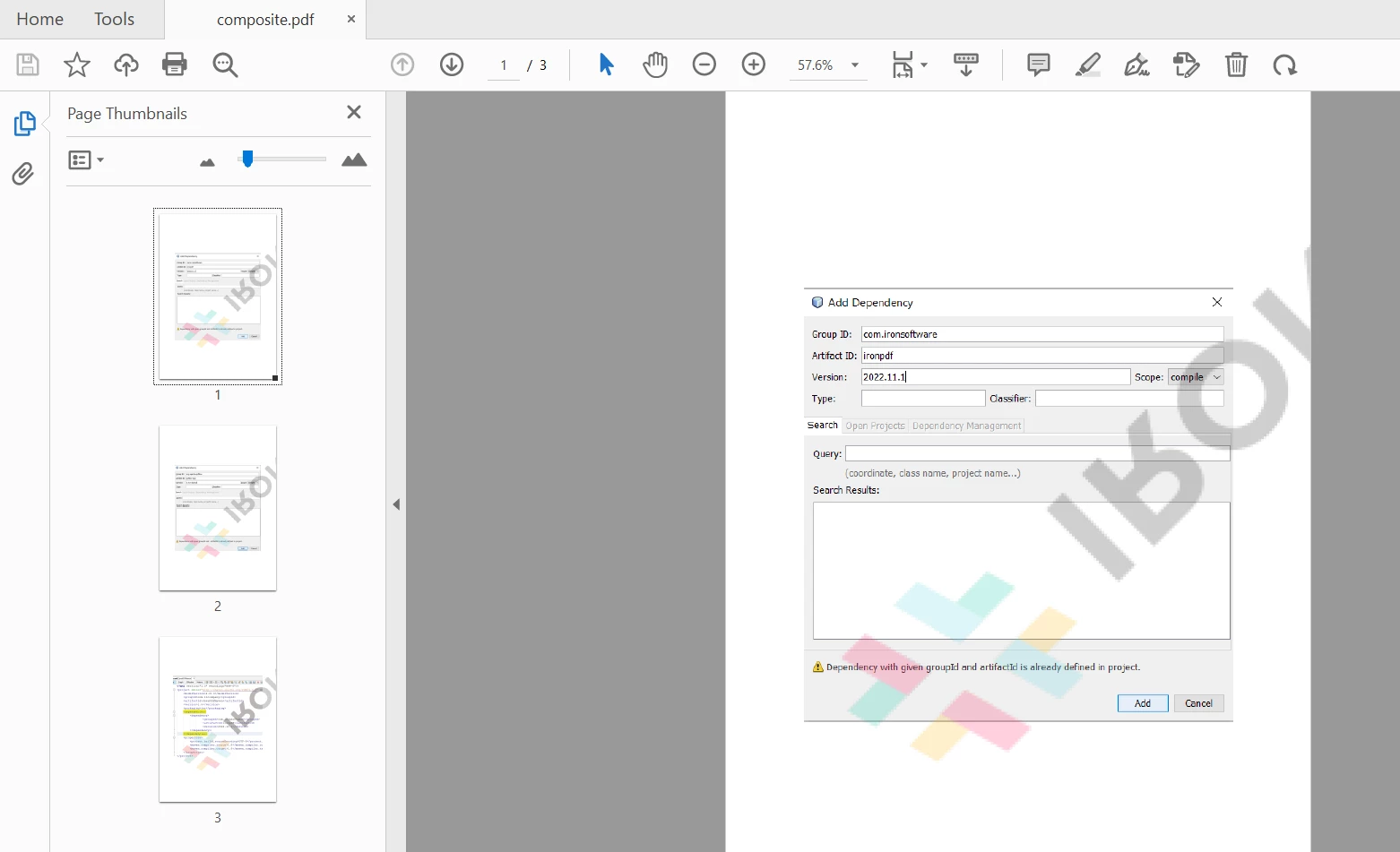
  • 選擇新增依賴項,並用更新版本填寫以下詳細資訊
A Comparison between IronPDF For Java and Apache PDF Box for Java - Figure 4: 新增IronPDF依賴項

新增IronPDF依賴項

現在讓我們安裝Apache PDFBox。

2. 安裝Apache PDFBox

我們可以使用與IronPDF相同的方法下載和安裝PDFBox。

2.1. 下載JAR並手動新增程式庫

要安裝PDFBox JAR,請存取官方網站並下載PDFBox程式庫的最新版本。

建立項目後,在項目部分:
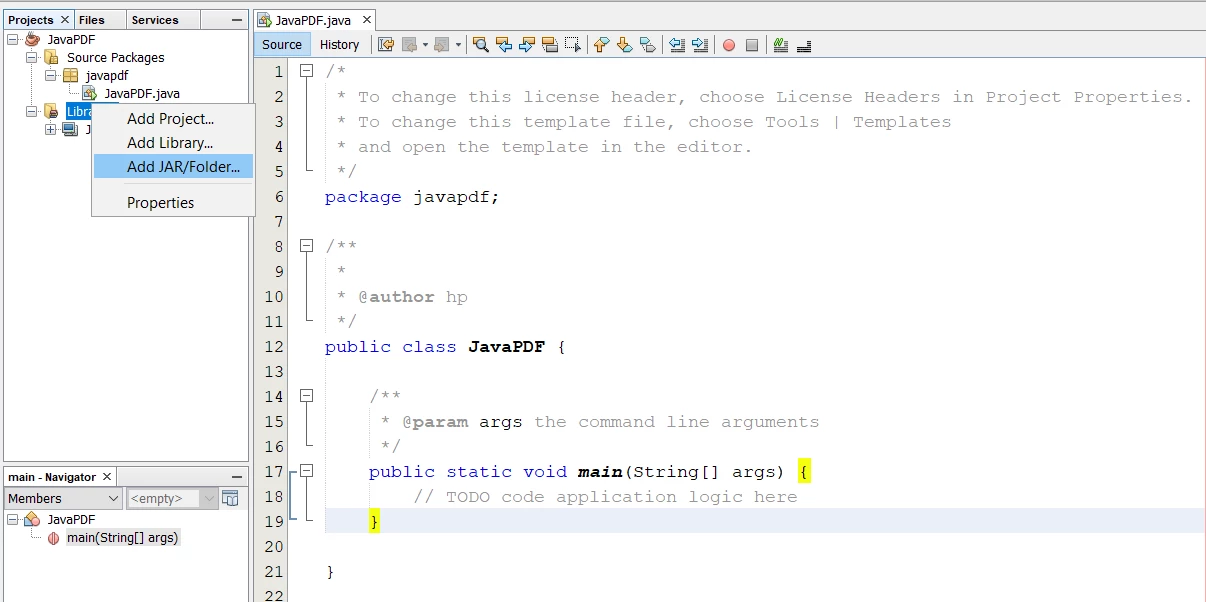
  • 右鍵單擊程式庫文件夾,選擇新增JAR/資料夾選項。
A Comparison between IronPDF For Java and Apache PDF Box for Java - Figure 5: 新增程式庫

新增程式庫

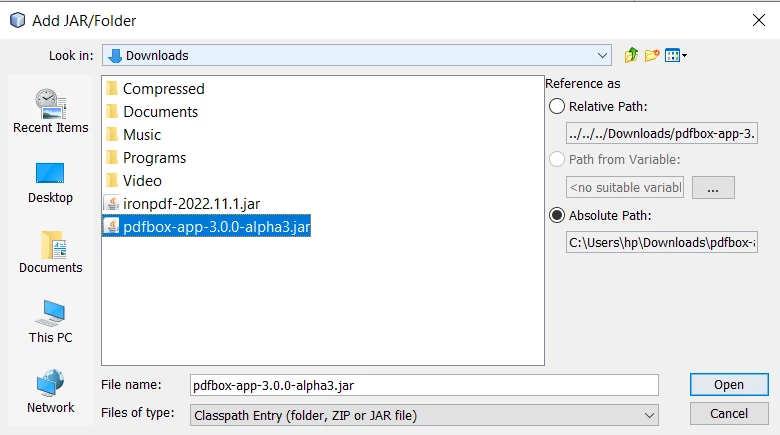
  • 轉到下載JAR的資料夾。
  • 選擇PDFBox JAR並點擊打開按鈕。
A Comparison between IronPDF For Java and Apache PDF Box for Java - Figure 6: 打開PDFBox JAR

打開PDFBox JAR

2.2. 通過Maven作為依賴項安裝

在pom.xml中新增依賴項

復製以下程式碼,並將其粘貼到pom.xml中。

<dependencies>
    <dependency>  
        <groupId>org.apache.pdfbox</groupId>
        <artifactId>pdfbox-app</artifactId>
        <version>3.0.0-alpha3</version>
    </dependency>
</dependencies>
<dependencies>
    <dependency>  
        <groupId>org.apache.pdfbox</groupId>
        <artifactId>pdfbox-app</artifactId>
        <version>3.0.0-alpha3</version>
    </dependency>
</dependencies>
XML

這將自動下載PDFBox依賴項並將其安裝在儲存庫文件夾中。 現在它已準備好使用。
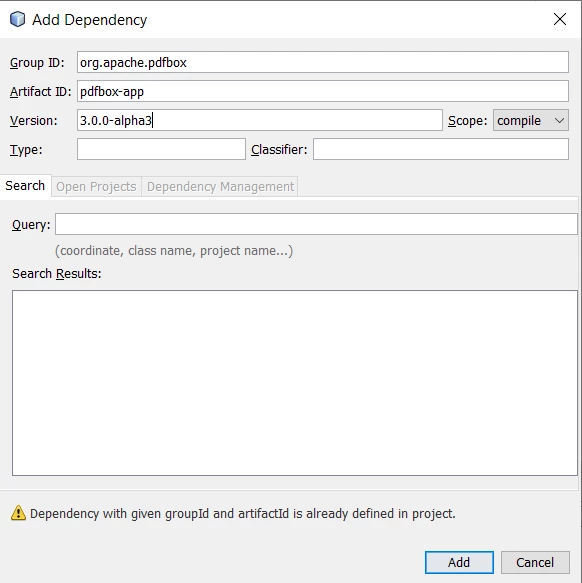
使用依賴項功能新增依賴項

  • 右鍵單擊項目部分的依賴項
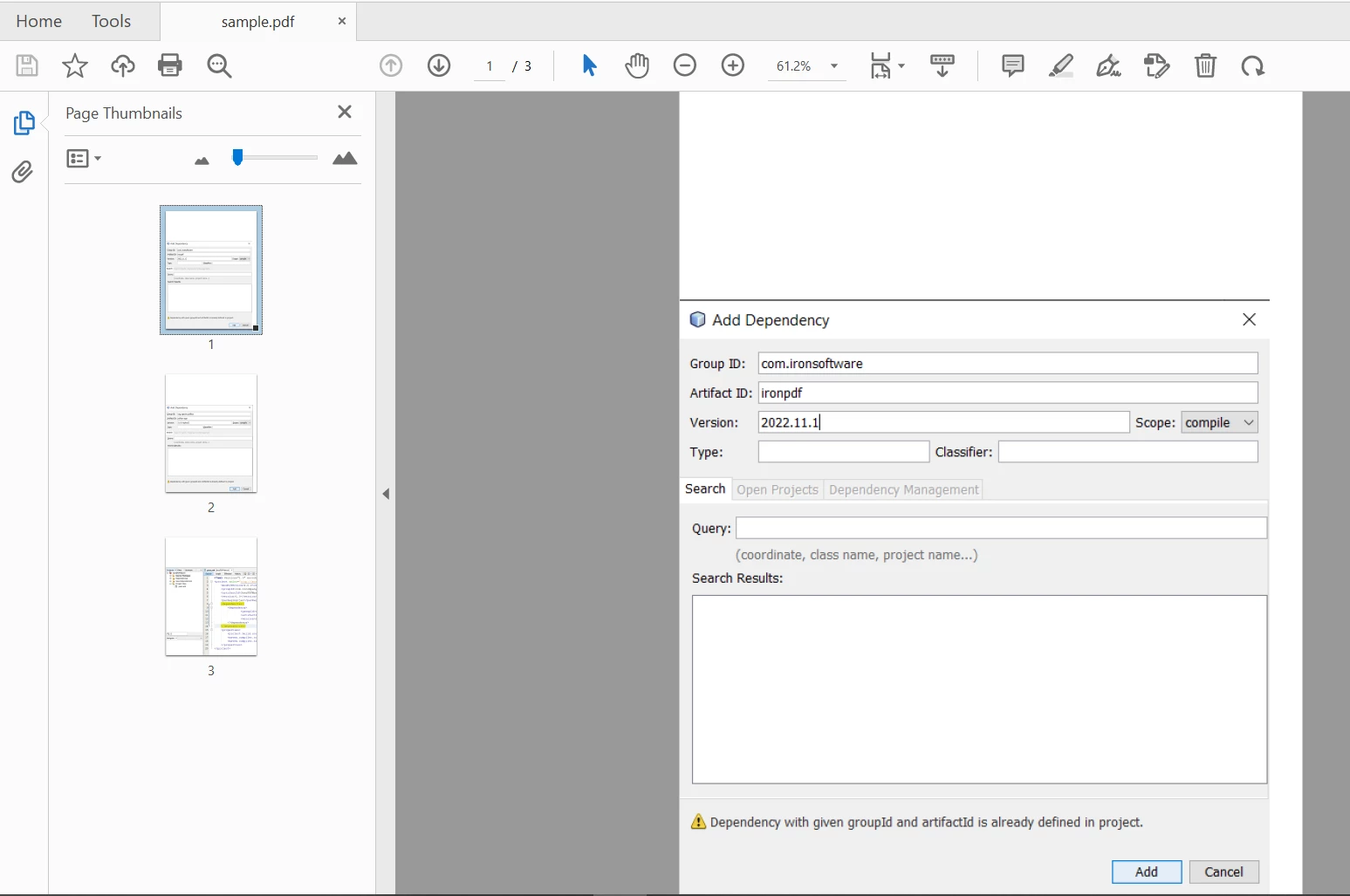
  • 選擇新增依賴項,並用更新版本填寫以下詳細資訊
A Comparison between IronPDF For Java and Apache PDF Box for Java - Figure 7: 新增PDFBox依賴項

新增PDFBox依賴項

3. 建立PDF文件

3.1. 使用IronPDF

IronPDF提供了不同的方法來建立文件。 讓我們看看兩個最重要的方法。

現有URL到PDF

IronPDF使從HTML生成文件變得非常簡單。 以下程式碼範例將網頁的URL轉換為PDF。

import com.ironsoftware.ironpdf.*;
import java.nio.file.Paths;

// Set the license key and log path
License.setLicenseKey("YOUR-LICENSE-KEY");
Settings.setLogPath(Paths.get("C:/tmp/IronPdfEngine.log"));

// Convert a URL to a PDF
PdfDocument myPdf = PdfDocument.renderUrlAsPdf("https://ironpdf.com");

// Save the PDF document to a file
myPdf.saveAs(Paths.get("url.pdf"));
import com.ironsoftware.ironpdf.*;
import java.nio.file.Paths;

// Set the license key and log path
License.setLicenseKey("YOUR-LICENSE-KEY");
Settings.setLogPath(Paths.get("C:/tmp/IronPdfEngine.log"));

// Convert a URL to a PDF
PdfDocument myPdf = PdfDocument.renderUrlAsPdf("https://ironpdf.com");

// Save the PDF document to a file
myPdf.saveAs(Paths.get("url.pdf"));
JAVA

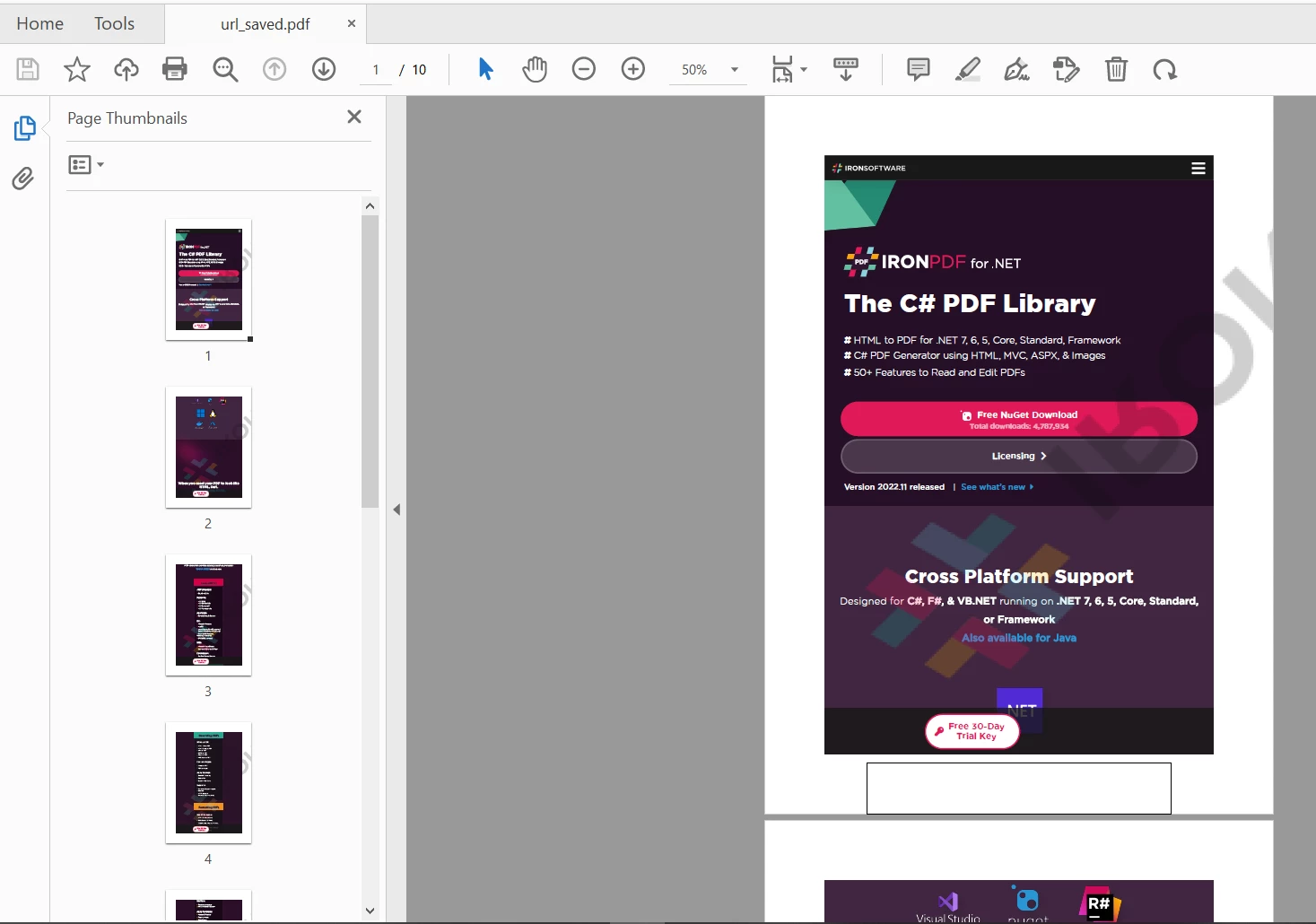
輸出是下麵格式良好的URL,並以以下方式保存:

A Comparison between IronPDF For Java and Apache PDF Box for Java - Figure 8: IronPDF URL輸出

IronPDF URL輸出

HTML輸入字串到PDF

以下程式碼範例顯示了如何使用HTML字串在Java中渲染PDF。 您只需使用HTML字串或文件將其轉換為新文件。

import com.ironsoftware.ironpdf.*;
import java.nio.file.Paths;

// Set the license key and log path
License.setLicenseKey("YOUR-LICENSE-KEY");
Settings.setLogPath(Paths.get("C:/tmp/IronPdfEngine.log"));

// Convert an HTML string to a PDF
PdfDocument myPdf = PdfDocument.renderHtmlAsPdf("<h1> ~Hello World~ </h1> Made with IronPDF!");

// Save the PDF document to a file
myPdf.saveAs(Paths.get("html_saved.pdf"));
import com.ironsoftware.ironpdf.*;
import java.nio.file.Paths;

// Set the license key and log path
License.setLicenseKey("YOUR-LICENSE-KEY");
Settings.setLogPath(Paths.get("C:/tmp/IronPdfEngine.log"));

// Convert an HTML string to a PDF
PdfDocument myPdf = PdfDocument.renderHtmlAsPdf("<h1> ~Hello World~ </h1> Made with IronPDF!");

// Save the PDF document to a file
myPdf.saveAs(Paths.get("html_saved.pdf"));
JAVA

輸出如下:

A Comparison between IronPDF For Java and Apache PDF Box for Java - Figure 9: IronPDF HTML輸出

IronPDF HTML輸出

3.2. 使用Apache PDFBox

PDFBox還可以從不同格式生成新的PDF文件,但不能直接從URL或HTML字串轉換。

以下程式碼範例建立了一個具有一些文字的文件:

import org.apache.pdfbox.pdmodel.*;
import org.apache.pdfbox.pdmodel.common.*;
import org.apache.pdfbox.pdmodel.font.*;
import org.apache.pdfbox.pdmodel.graphics.image.*;
import org.apache.pdfbox.pdmodel.interactive.annotation.*;
import org.apache.pdfbox.pdmodel.interactive.form.*;

import java.io.IOException;

public class PDFBoxExample {

  public static void main(String[] args) throws IOException {

    // Create a document object
    PDDocument document = new PDDocument();

    // Add a blank page to the document
    PDPage blankPage = new PDPage();
    document.addPage(blankPage);

    // Retrieve the page of the document 
    PDPage paper = document.getPage(0);
    try (PDPageContentStream contentStream = new PDPageContentStream(document, paper)) {
      // Begin the content stream 
      contentStream.beginText();

      // Set the font to the content stream  
      contentStream.setFont(PDType1Font.TIMES_ROMAN, 12);

      // Set the position for the line 
      contentStream.newLineAtOffset(25, 700);

      String text = "This is the sample document and we are adding content to it.";

      // Add text in the form of a string 
      contentStream.showText(text);      

      // End the content stream
      contentStream.endText();

      System.out.println("Content added");

      // Save the document
      document.save("C:/PdfBox_Examples/my_doc.pdf");
      System.out.println("PDF created");
    }
    // Closing the document
    document.close();
  }
}
import org.apache.pdfbox.pdmodel.*;
import org.apache.pdfbox.pdmodel.common.*;
import org.apache.pdfbox.pdmodel.font.*;
import org.apache.pdfbox.pdmodel.graphics.image.*;
import org.apache.pdfbox.pdmodel.interactive.annotation.*;
import org.apache.pdfbox.pdmodel.interactive.form.*;

import java.io.IOException;

public class PDFBoxExample {

  public static void main(String[] args) throws IOException {

    // Create a document object
    PDDocument document = new PDDocument();

    // Add a blank page to the document
    PDPage blankPage = new PDPage();
    document.addPage(blankPage);

    // Retrieve the page of the document 
    PDPage paper = document.getPage(0);
    try (PDPageContentStream contentStream = new PDPageContentStream(document, paper)) {
      // Begin the content stream 
      contentStream.beginText();

      // Set the font to the content stream  
      contentStream.setFont(PDType1Font.TIMES_ROMAN, 12);

      // Set the position for the line 
      contentStream.newLineAtOffset(25, 700);

      String text = "This is the sample document and we are adding content to it.";

      // Add text in the form of a string 
      contentStream.showText(text);      

      // End the content stream
      contentStream.endText();

      System.out.println("Content added");

      // Save the document
      document.save("C:/PdfBox_Examples/my_doc.pdf");
      System.out.println("PDF created");
    }
    // Closing the document
    document.close();
  }
}
JAVA
A Comparison between IronPDF For Java and Apache PDF Box for Java - Figure 10: PDFBox定位輸出

PDFBox定位輸出

然而,如果我們從上面的程式碼範例中刪除contentStream.newLineAtOffset(25, 700);,然後運行項目,它會生成一個PDF,輸出位於頁面底部。 這對一些開發者來說可能非常煩人,因為他們必須使用(x,y)坐標調整文字。 y = 0表示該文字將出現在底部。
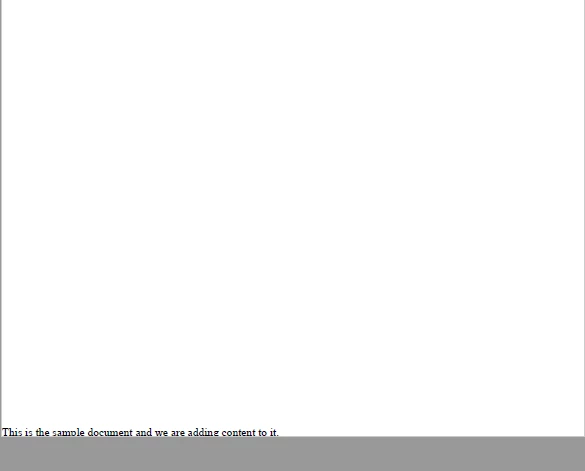
A Comparison between IronPDF For Java and Apache PDF Box for Java - Figure 11: PDFBox無定位輸出

PDFBox無定位輸出

4. 圖像轉文件

4.1. 使用IronPDF

IronPDF可以輕鬆將多個圖像轉換為單個PDF。 將多個圖像新增到單個文件的程式碼如下:

import com.ironsoftware.ironpdf.*;
import java.nio.file.*;
import java.util.ArrayList;  
import java.util.List;

// Reference to the directory containing the images that we desire to convert
List<Path> images = new ArrayList<>();
images.add(Paths.get("imageA.png"));
images.add(Paths.get("imageB.png"));
images.add(Paths.get("imageC.png"));
images.add(Paths.get("imageD.png"));
images.add(Paths.get("imageE.png"));

// Render all targeted images as PDF content and save them together in one document.
PdfDocument merged = PdfDocument.fromImage(images);
merged.saveAs(Paths.get("output.pdf"));
import com.ironsoftware.ironpdf.*;
import java.nio.file.*;
import java.util.ArrayList;  
import java.util.List;

// Reference to the directory containing the images that we desire to convert
List<Path> images = new ArrayList<>();
images.add(Paths.get("imageA.png"));
images.add(Paths.get("imageB.png"));
images.add(Paths.get("imageC.png"));
images.add(Paths.get("imageD.png"));
images.add(Paths.get("imageE.png"));

// Render all targeted images as PDF content and save them together in one document.
PdfDocument merged = PdfDocument.fromImage(images);
merged.saveAs(Paths.get("output.pdf"));
JAVA
A Comparison between IronPDF For Java and Apache PDF Box for Java - Figure 12: IronPDF圖像輸出

IronPDF圖像輸出

4.2. 使用Apache PDFBox

import org.apache.pdfbox.pdmodel.*;
import org.apache.pdfbox.pdmodel.graphics.image.*;
import java.io.IOException;
import java.nio.file.*;
import java.util.ArrayList;
import java.util.List;

public class ImageToPdf {

  public static void main(String[] args) {

    // Reference to the directory containing the images that we desire to convert
    Path imageDirectory = Paths.get("assets/images");

    // Create an empty list to contain Paths to images from the directory.
    List<Path> imageFiles = new ArrayList<>();

    PDDocument doc = new PDDocument();

    // Use a DirectoryStream to populate the list with paths for each image in the directory that we want to convert
    try (DirectoryStream<Path> stream = Files.newDirectoryStream(imageDirectory, "*.{png,jpg}")) {

      for (Path entry : stream) {
        imageFiles.add(entry);
      }

      for (int i = 0; i < imageFiles.size(); i++) {
        // Add a Page
        PDPage blankPage = new PDPage();
        doc.addPage(blankPage);
        PDPage page = doc.getPage(i);

        // Create PDImageXObject object
        PDImageXObject pdImage = PDImageXObject.createFromFile(imageFiles.get(i).toString(), doc);

        // Create the PDPageContentStream object
        PDPageContentStream contents = new PDPageContentStream(doc, page);

        // Drawing the image in the document
        contents.drawImage(pdImage, 0, 0);

        System.out.println("Image inserted");

        // Closing the PDPageContentStream object
        contents.close();
      }

      // Saving the document
      doc.save("C:/PdfBox_Examples/sample.pdf");

      // Closing the document
      doc.close();

    } catch (IOException exception) {
      throw new RuntimeException(String.format("Error converting images to PDF from directory: %s: %s",
              imageDirectory, exception.getMessage()), exception);
    }
  }
}
import org.apache.pdfbox.pdmodel.*;
import org.apache.pdfbox.pdmodel.graphics.image.*;
import java.io.IOException;
import java.nio.file.*;
import java.util.ArrayList;
import java.util.List;

public class ImageToPdf {

  public static void main(String[] args) {

    // Reference to the directory containing the images that we desire to convert
    Path imageDirectory = Paths.get("assets/images");

    // Create an empty list to contain Paths to images from the directory.
    List<Path> imageFiles = new ArrayList<>();

    PDDocument doc = new PDDocument();

    // Use a DirectoryStream to populate the list with paths for each image in the directory that we want to convert
    try (DirectoryStream<Path> stream = Files.newDirectoryStream(imageDirectory, "*.{png,jpg}")) {

      for (Path entry : stream) {
        imageFiles.add(entry);
      }

      for (int i = 0; i < imageFiles.size(); i++) {
        // Add a Page
        PDPage blankPage = new PDPage();
        doc.addPage(blankPage);
        PDPage page = doc.getPage(i);

        // Create PDImageXObject object
        PDImageXObject pdImage = PDImageXObject.createFromFile(imageFiles.get(i).toString(), doc);

        // Create the PDPageContentStream object
        PDPageContentStream contents = new PDPageContentStream(doc, page);

        // Drawing the image in the document
        contents.drawImage(pdImage, 0, 0);

        System.out.println("Image inserted");

        // Closing the PDPageContentStream object
        contents.close();
      }

      // Saving the document
      doc.save("C:/PdfBox_Examples/sample.pdf");

      // Closing the document
      doc.close();

    } catch (IOException exception) {
      throw new RuntimeException(String.format("Error converting images to PDF from directory: %s: %s",
              imageDirectory, exception.getMessage()), exception);
    }
  }
}
JAVA
A Comparison between IronPDF For Java and Apache PDF Box for Java - Figure 13: PDFBox圖像輸出

PDFBox圖像輸出

5. 加密文件

5.1. 使用IronPDF

在IronPDF中使用密碼加密PDF的程式碼如下:

import com.ironsoftware.ironpdf.*;
import java.nio.file.Paths;

// Open a document (or create a new one from HTML)
PdfDocument pdf = PdfDocument.fromFile(Paths.get("assets/composite.pdf"));

// Edit security settings
SecurityOptions securityOptions = new SecurityOptions();
securityOptions.setOwnerPassword("top-secret");
securityOptions.setUserPassword("sharable");

// Change or set the document encryption password
SecurityManager securityManager = pdf.getSecurity();
securityManager.setSecurityOptions(securityOptions);
pdf.saveAs(Paths.get("assets/secured.pdf"));
import com.ironsoftware.ironpdf.*;
import java.nio.file.Paths;

// Open a document (or create a new one from HTML)
PdfDocument pdf = PdfDocument.fromFile(Paths.get("assets/composite.pdf"));

// Edit security settings
SecurityOptions securityOptions = new SecurityOptions();
securityOptions.setOwnerPassword("top-secret");
securityOptions.setUserPassword("sharable");

// Change or set the document encryption password
SecurityManager securityManager = pdf.getSecurity();
securityManager.setSecurityOptions(securityOptions);
pdf.saveAs(Paths.get("assets/secured.pdf"));
JAVA

5.2. 使用Apache PDFBox

Apache PDFBox還提供文件加密功能,以提高文件的安全性。 您還可以新增其他資訊,如元資料。 程式碼如下:

import org.apache.pdfbox.pdmodel.*;
import org.apache.pdfbox.pdmodel.encryption.*;

import java.io.File;
import java.io.IOException;

public class PDFEncryption {

  public static void main(String[] args) throws IOException {

    // Load an existing document
    File file = new File("C:/PdfBox_Examples/sample.pdf");
    PDDocument document = PDDocument.load(file);

    // Create access permission object
    AccessPermission ap = new AccessPermission();

    // Create StandardProtectionPolicy object
    StandardProtectionPolicy spp = new StandardProtectionPolicy("1234", "1234", ap);

    // Setting the length of the encryption key
    spp.setEncryptionKeyLength(128);

    // Set the access permissions
    spp.setPermissions(ap);

    // Protect the document
    document.protect(spp);

    System.out.println("Document encrypted");

    // Save the document
    document.save("C:/PdfBox_Examples/encrypted.pdf");

    // Close the document
    document.close();
  }
}
import org.apache.pdfbox.pdmodel.*;
import org.apache.pdfbox.pdmodel.encryption.*;

import java.io.File;
import java.io.IOException;

public class PDFEncryption {

  public static void main(String[] args) throws IOException {

    // Load an existing document
    File file = new File("C:/PdfBox_Examples/sample.pdf");
    PDDocument document = PDDocument.load(file);

    // Create access permission object
    AccessPermission ap = new AccessPermission();

    // Create StandardProtectionPolicy object
    StandardProtectionPolicy spp = new StandardProtectionPolicy("1234", "1234", ap);

    // Setting the length of the encryption key
    spp.setEncryptionKeyLength(128);

    // Set the access permissions
    spp.setPermissions(ap);

    // Protect the document
    document.protect(spp);

    System.out.println("Document encrypted");

    // Save the document
    document.save("C:/PdfBox_Examples/encrypted.pdf");

    // Close the document
    document.close();
  }
}
JAVA

6. 價格和授權

IronPDF價格和授權

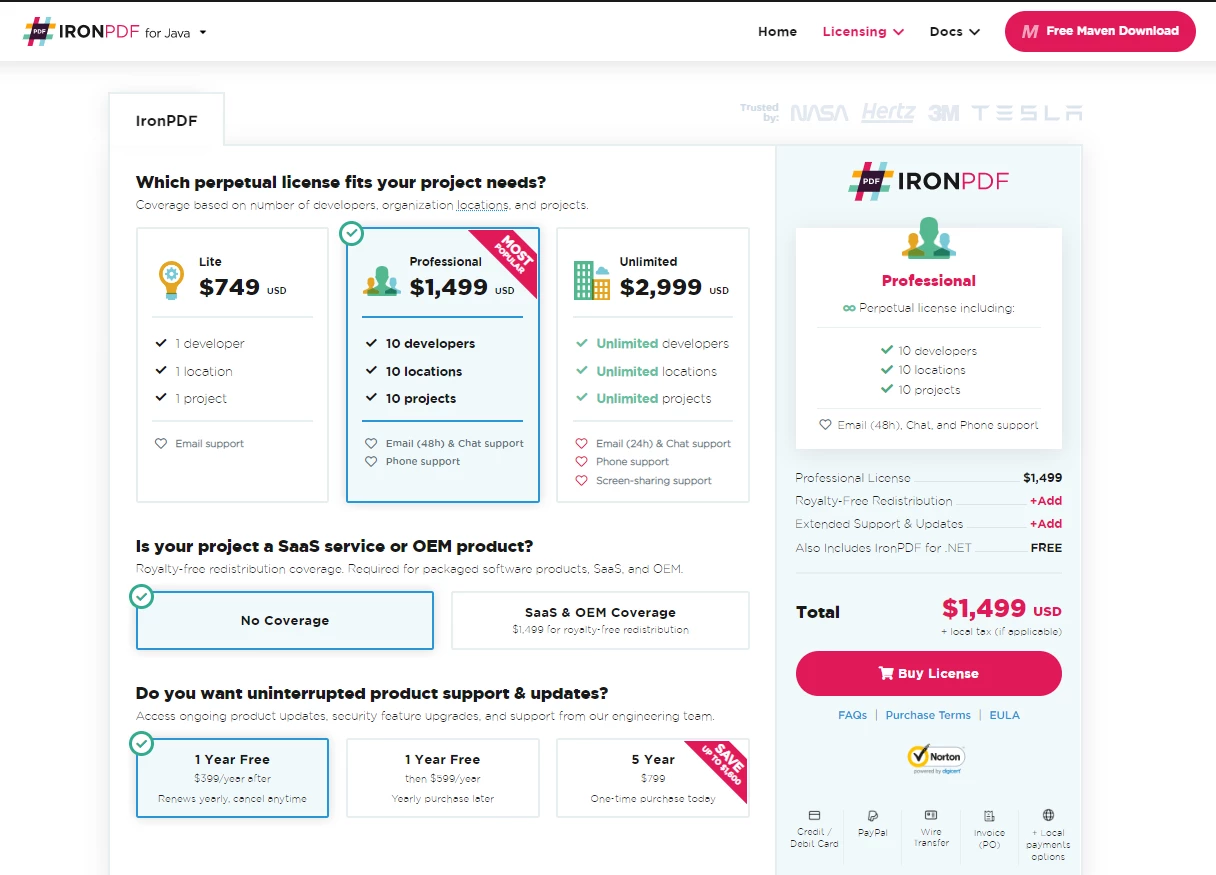
IronPDF可免費用於開發簡單的PDF應用程式,並可隨時獲得商業使用的授權。IronPDF提供單一項目授權、單一開發者授權、代理及跨國組織授權,以及SaaS 和OEM再分發授權及支持。 所有授權都享有免費試用、30天退貨保證以及一年軟體支持和升級。

Lite包可在$999。 使用IronPDF產品絕對沒有任何經常性费用。 有關軟體授權的更詳細資訊,請存取產品IronPDF授權頁面

A Comparison between IronPDF For Java and Apache PDF Box for Java - Figure 14: IronPDF授權

IronPDF授權

Apache PDFBox價格和授權

Apache PDFBox可免費使用且不收取任何费用。 無論用於個人、內部或商業目的,它都是免費的。

您可以從Apache License 2.0 文字中包含Apache License 2.0(當前版本)。 要包含許可證的副本,只需將其包含在您的作品中。 您還可以將以下通知作為註釋附加在源程式碼頂部。

Copyright [yyyy] [name of copyright owner]

Licensed under the Apache License, Version 2.0 (the "License");
you may not use this file except in compliance with the License.
You may obtain a copy of the License at

    https://www.apache.org/licenses/LICENSE-2.0

Unless required by applicable law or agreed to in writing, software
distributed under the License is distributed on an "AS IS" BASIS,
WITHOUT WARRANTIES OR CONDITIONS OF ANY KIND, either express or implied.
See the License for the specific language governing permissions and
limitations under the License.

結論

相比之下,IronPDF在功能和產品支持方面比Apache PDFBox更具優勢。 它還提供SaaS和OEM支持,這是現代軟體開發中的一項要求。 然而,該程式庫不像Apache PDFBox對商業使用是免費的。

擁有大型軟體應用程式的公司可能需要第三方供應商的持續錯誤修復和支援,以解決軟體開發過程中出現的問題。 這是許多開源解決方案所缺乏的,比如依賴志願者支援的Apache PDFBox。 簡而言之,IronPDF最適合業務和市場用途,而Apache PDFBox更適合個人及非商業應用。

另外還有免費試用版本來測試IronPDF的功能。 試試看購買IronPDF

您可以現在以大幅折扣的價格獲得Iron Suite中的所有Iron Software產品。請存取此Iron Suite網頁以了解更多有關此驚人優惠的資訊。

請注意Apache PDFBox是其相關所有者的註冊商標。 本網站不附屬於、由Apache PDFBox認可或贊助。 所有產品名稱、標誌和品牌是其各自所有者的財產。 比較僅供參考,反映撰寫時的公開資訊。

常見問題

我如何在Java中將HTML轉換為PDF?

您可以使用IronPDF的Java程式庫將HTML轉換為PDF。該程式庫提供將HTML字串、文件或URL輕鬆轉換為PDF的方法。

使用IronPDF for Java的優勢是什麼?

IronPDF for Java提供HTML到PDF轉換、圖像轉換、自訂紙張設置以及支援網站登入和自訂HTTP標頭。其設計易於使用並提供商業支援。

IronPDF可以將圖像轉換為PDF嗎?

是的,IronPDF可以將圖像轉換為PDF。此功能允許您從各種圖像格式生成PDF文件,所需操作最少。

Apache PDFBox在功能上與IronPDF有何不同?

雖然Apache PDFBox對於文字擷取、表單處理和數位簽名效果很好,但它缺乏直接將HTML轉換為PDF的功能。IronPDF則提供直接將HTML和URL轉換為PDF的功能,以及先進的PDF處理功能。

IronPDF適合企業使用嗎?

是的,IronPDF非常適合企業使用,因為它提供商業支援、強大的功能和許可選擇,非常適合商業應用。

將HTML轉換為PDF時常見的問題有哪些?

常見問題包括複雜HTML/CSS的渲染不正確、圖像缺失以及頁面佈局不正確。IronPDF通過自訂紙張設置和圖像支援來解決這些問題。

我如何將IronPDF整合到我的Java專案中?

您可以透過從Maven下載JAR文件或在專案的pom.xml文件中新增為依賴項來將IronPDF整合到您的Java專案中。

Apache PDFBox用於什麼?

Apache PDFBox用於建立、編輯和操作PDF文件。它支援文字擷取、文件拆分和合併、表單填寫和數位簽名。

使用IronPDF是否有許可費用?

IronPDF提供免費試用,基本開發可免費使用,但商業用途需購買許可。提供多種許可選擇以滿足不同需求。

為什麼有人會選擇Apache PDFBox而不是IronPDF?

如果有人需要一個免費、開源的解決方案用於個人或非商業用途,且不需要HTML到PDF轉換,他們可能會選擇Apache PDFBox而非IronPDF。

Darrius Serrant
全端軟體工程師(WebOps)

Darrius Serrant擁有邁阿密大學的電腦科學學士學位,並在Iron Software擔任全端WebOps行銷工程師。從小就對程式設計有興趣,他認為計算既神秘又易於理解,成為創意和問題解決的完美媒介。

在Iron Software,Darrius喜歡創造新事物並簡化複雜的概念,使其更易於理解。作為我們的常駐開發人員之一,他還志願教學,將他的專業知識傳授給下一代。

對Darrius來說,他的工作是有意義的,因為它有價值且對社會有真正的影響。

Iron 支援團隊

我們線上24小時,每週5天。
聊天
電子郵件
給我打電話