在当今节奏快速的发展环境中,选择合适的工具从HTML生成PDF对效率和输出质量都有显著的影响。 该任务的两个领先候选者是IronPDF和DocRaptor。 虽然这两个工具都旨在简化HTML到PDF的转换过程,但它们提供不同的功能、定价模式以及与.NET和其他平台的集成程度。
在本文中,我们将深入比较IronPDF与DocRaptor,突出它们的优势、局限性以及每个工具的最佳使用案例,帮助您决定哪种解决方案最适合您的项目需求。
IronPDF。和DocRaptor概述
IronPDF为在.NET应用程序中创建、编辑和管理PDF提供了广泛的功能。 全面支持HTML、CSS、JavaScript和C#,为开发者提供了一个高度可定制且强大的工具来处理PDF。 该库被设计为开发者友好的,拥有优秀的文档,确保在.NET环境中能够快速部署和易于使用。
DocRaptor是一个基于云的解决方案,提供PDF和Excel生成,重点是Web应用程序和API集成。 通过Prince PDF引擎,DocRaptor支持多种编程语言,包括.NET,并实现HTML到PDF的转换。 虽然该平台在基本PDF生成方面表现优异,但需要互联网连接来访问其API,并且缺乏IronPDF提供的相同级别的自定义和灵活性。
跨平台兼容性
IronPDF
IronPDF凭借其广泛的跨平台兼容性而脱颖而出。 它支持.NET框架内的多种环境,确保在不同平台之间的无缝操作。 以下是IronPDF平台兼容性的摘要:
-
.NET 版本:
-
完全使用C#编写,并支持VB.NET和F#
- .NET Core(8、7、6、5和3.1+)
- .NET Standard(2.0+)
- .NET Framework(4.6.2+)
-
**应用环境:**IronPDF可在多个应用环境中运行,如Windows、Linux、Mac、Docker、Azure和AWS。
-
**IDE:**支持使用Microsoft Visual Studio、JetBrains Rider & ReSharper的IDE。
-
**操作系统和处理器:**支持多种不同的操作系统和处理器,包括Windows、Mac、Linux、x64、x86、ARM。
有关IronPDF兼容性的更多详细信息,请访问IronPDF兼容性。
DocRaptor
DocRaptor提供强大的跨平台兼容性和.NET版本支持,包括以下内容:
- **Windows:**DocRaptor 在 Windows 环境中运行流畅,与 .NET 及其他常见开发栈集成良好。
- **Linux:**DocRaptor 可在基于 Linux 的环境中使用,因此适用于服务器端的 PDF 生成任务。
- **macOS:**使用 macOS 的开发者可无缝将 DocRaptor 集成到其开发流程中。
- **.NET Core:**DocRaptor 支持 .NET Core,为在最新 .NET 生态系统中工作的开发者提供现代化的跨平台功能。
- **.NET Framework:**它也兼容传统的 .NET Framework,使基于旧版系统的项目能够利用其 PDF 生成功能。
- **.NET 5 及更高版本:**DocRaptor 与 .NET 5 及更高版本兼容,确保使用新版 .NET 的开发人员在使用该库时无需担心兼容性问题。
关键功能比较:IronPDF vs. DocRaptor的PDF功能
IronPDF
-
**PDF转换:**IronPDF可以将HTML转换为PDF。 \u51ed\u501f\u5bf9\u73b0\u4ee3 Web \u6807\u51c6\u7684\u5168\u9762\u652f\u6301\uff0c\u60a8\u53ef\u4ee5\u653e\u5fc3\uff0cIronPDF \u5c06\u59cb\u7ec8\u4ece\u60a8\u7684 HTML \u5185\u5bb9\u4e2d\u8fd4\u56de\u50cf\u7d20\u5b8c\u7f8e\u7684 PDF\u3002 IronPDF还可以将其他格式的文件转换为PDF,如DOCX、图像、RTF等。
-
**PDF 生成:**借助 IronPDF,您可以从 URL、ASPX 文件或 HTML 字符串生成 PDF 文件。
-
**安全功能:**使用IronPDF,您可以始终确保任何敏感PDF文件都是安全的,感谢其安全功能。 使用IronPDF加密您的PDF文件,设置密码,并为PDF文件设置权限。
-
**PDF编辑功能:**使用IronPDF,您可以轻松处理现有的PDF文档,编辑它们,并读取PDF文件。 IronPDF提供编辑功能,如添加页眉和页脚,将文本和图像印在PDF页面上,为PDF添加自定义水印,处理PDF表单,以及拆分或合并PDF文件。
-
**集成:**与 ASP.NET 和 MVC 应用程序无缝集成。
-
**PDF版本支持:**可以支持PDF版本1.2-1.7
有关IronPDF功能的综合列表,请访问IronPDF功能。
DocRaptor
DocRaptor提供了一个全面的功能集,旨在实现可靠的HTML到PDF和HTML到Excel转换。 以下是其一些关键功能:
-
**精准渲染:**支持 HTML5、CSS3、JavaScript 和 SVG,确保现代网页能够准确渲染为 PDF。
-
**JavaScript 执行:**在转换前处理 JavaScript,确保动态内容能在生成的 PDF 中正确处理并显示。
-
**响应式设计支持:**支持媒体查询,使响应式设计能够适应 PDF 的尺寸。
-
**Excel 导出:**将 HTML 表格转换为 Excel 电子表格(.xlsx),适用于生成报告或导出结构化数据。
-
**单元格格式:**保留 Excel 输出中的单元格样式、字体及其他格式设置。
IronPDF与DocRaptor的顶级亮点功能比较与代码示例
1. 将HTML转换为PDF
IronPDF:
// Convert HTML to PDF using IronPDF
using IronPdf;

// Enable web security to prevent local disk access or cross-origin requests
Installation.EnableWebSecurity = true;

// Instantiate the PDF renderer
var renderer = new ChromePdfRenderer();

// Create a PDF from an HTML string
var pdf = renderer.RenderHtmlAsPdf("<h1>Hello World!</h1>");

// Export to a file or Stream
pdf.SaveAs("output.pdf");

// Advanced Example with HTML Assets
var myAdvancedPdf = renderer.RenderHtmlAsPdf("<img src='icons/iron.png'>", @"C:\site\assets\");
myAdvancedPdf.SaveAs("html-with-assets.pdf");
// Convert HTML to PDF using IronPDF
using IronPdf;

// Enable web security to prevent local disk access or cross-origin requests
Installation.EnableWebSecurity = true;

// Instantiate the PDF renderer
var renderer = new ChromePdfRenderer();

// Create a PDF from an HTML string
var pdf = renderer.RenderHtmlAsPdf("<h1>Hello World!</h1>");

// Export to a file or Stream
pdf.SaveAs("output.pdf");

// Advanced Example with HTML Assets
var myAdvancedPdf = renderer.RenderHtmlAsPdf("<img src='icons/iron.png'>", @"C:\site\assets\");
myAdvancedPdf.SaveAs("html-with-assets.pdf");
' Convert HTML to PDF using IronPDF
Imports IronPdf
' Enable web security to prevent local disk access or cross-origin requests
Installation.EnableWebSecurity = True
' Instantiate the PDF renderer
Dim renderer = New ChromePdfRenderer()
' Create a PDF from an HTML string
Dim pdf = renderer.RenderHtmlAsPdf("<h1>Hello World!</h1>")
' Export to a file or Stream
pdf.SaveAs("output.pdf")
' Advanced Example with HTML Assets
Dim myAdvancedPdf = renderer.RenderHtmlAsPdf("<img src='icons/iron.png'>", "C:\site\assets\")
myAdvancedPdf.SaveAs("html-with-assets.pdf")
' Convert HTML to PDF using IronPDF
Imports IronPdf

' Enable web security to prevent local disk access or cross-origin requests
Installation.EnableWebSecurity = True

' Instantiate the PDF renderer
Dim renderer = New ChromePdfRenderer()

' Create a PDF from an HTML string
Dim pdf = renderer.RenderHtmlAsPdf("<h1>Hello World!</h1>")

' Export to a file or Stream
pdf.SaveAs("output.pdf")

' Advanced Example with HTML Assets
Dim myAdvancedPdf = renderer.RenderHtmlAsPdf("<img src='icons/iron.png'>", "C:\site\assets\")
myAdvancedPdf.SaveAs("html-with-assets.pdf")
DocRaptor:
using DocRaptor.Client;
using DocRaptor.Model;
using DocRaptor.Api;
using System;
using System.IO;

// Example of using DocRaptor to convert HTML and JavaScript to PDF
DocApi docraptor = new DocApi();
docraptor.Configuration.Username = "YOUR_API_KEY_HERE";

try
{
    Doc doc = new Doc(
        name: "html-and-javascript",
        test: true, // Test flag to indicate trial mode
        documentType: Doc.DocumentTypeEnum.Pdf, // Specify document type
        documentContent: System.IO.File.ReadAllText(@"html-and-javascript-content.html"), // Load HTML content from file
        javascript: true // Enable JavaScript execution
    );

    byte[] document = docraptor.CreateDoc(doc);
    File.WriteAllBytes("html-and-javascript.pdf", document);
    Console.WriteLine("Successfully created html-and-javascript.pdf!");
}
catch (DocRaptor.Client.ApiException error)
{
    Console.Write(error.ErrorContent);
}
using DocRaptor.Client;
using DocRaptor.Model;
using DocRaptor.Api;
using System;
using System.IO;

// Example of using DocRaptor to convert HTML and JavaScript to PDF
DocApi docraptor = new DocApi();
docraptor.Configuration.Username = "YOUR_API_KEY_HERE";

try
{
    Doc doc = new Doc(
        name: "html-and-javascript",
        test: true, // Test flag to indicate trial mode
        documentType: Doc.DocumentTypeEnum.Pdf, // Specify document type
        documentContent: System.IO.File.ReadAllText(@"html-and-javascript-content.html"), // Load HTML content from file
        javascript: true // Enable JavaScript execution
    );

    byte[] document = docraptor.CreateDoc(doc);
    File.WriteAllBytes("html-and-javascript.pdf", document);
    Console.WriteLine("Successfully created html-and-javascript.pdf!");
}
catch (DocRaptor.Client.ApiException error)
{
    Console.Write(error.ErrorContent);
}
Imports DocRaptor.Client
Imports DocRaptor.Model
Imports DocRaptor.Api
Imports System
Imports System.IO
' Example of using DocRaptor to convert HTML and JavaScript to PDF
Private docraptor As New DocApi()
docraptor.Configuration.Username = "YOUR_API_KEY_HERE"
Try
Dim doc As New Doc(name:= "html-and-javascript", test:= True, documentType:= Doc.DocumentTypeEnum.Pdf, documentContent:= System.IO.File.ReadAllText("html-and-javascript-content.html"), javascript:= True)
Dim document() As Byte = docraptor.CreateDoc(doc)
File.WriteAllBytes("html-and-javascript.pdf", document)
Console.WriteLine("Successfully created html-and-javascript.pdf!")
Catch [error] As DocRaptor.Client.ApiException
Console.Write([error].ErrorContent)
End Try
Imports DocRaptor.Client
Imports DocRaptor.Model
Imports DocRaptor.Api
Imports System
Imports System.IO

' Example of using DocRaptor to convert HTML and JavaScript to PDF
Private docraptor As New DocApi()
docraptor.Configuration.Username = "YOUR_API_KEY_HERE"

Try
	Dim doc As New Doc(name:= "html-and-javascript", test:= True, documentType:= Doc.DocumentTypeEnum.Pdf, documentContent:= System.IO.File.ReadAllText("html-and-javascript-content.html"), javascript:= True)

	Dim document() As Byte = docraptor.CreateDoc(doc)
	File.WriteAllBytes("html-and-javascript.pdf", document)
	Console.WriteLine("Successfully created html-and-javascript.pdf!")
Catch [error] As DocRaptor.Client.ApiException
	Console.Write([error].ErrorContent)
End Try
IronPDF以轻松解决HTML到PDF转换,全面支持现代Web标准,确保您所有的PDF文档都能完美如画。 DocRaptor使用基于API的方法,需要API密钥和基于云的执行来转换HTML到PDF。
2. 加密PDF文件
IronPDF:
using IronPdf;
using System;

// Load an existing PDF with a password
var pdf = PdfDocument.FromFile("encrypted.pdf", "password");

// Edit file metadata
pdf.MetaData.Author = "Satoshi Nakamoto";
pdf.MetaData.Keywords = "SEO, Friendly";
pdf.MetaData.ModifiedDate = DateTime.Now;

// Edit file security settings
pdf.SecuritySettings.RemovePasswordsAndEncryption();
pdf.SecuritySettings.MakePdfDocumentReadOnly("secret-key");
pdf.SecuritySettings.AllowUserAnnotations = false;
pdf.SecuritySettings.AllowUserCopyPasteContent = false;
pdf.SecuritySettings.AllowUserFormData = false;
pdf.SecuritySettings.AllowUserPrinting = IronPdf.Security.PdfPrintSecurity.FullPrintRights;

// Change or set the document encryption password
pdf.Password = "my-password";
pdf.SaveAs("secured.pdf");
using IronPdf;
using System;

// Load an existing PDF with a password
var pdf = PdfDocument.FromFile("encrypted.pdf", "password");

// Edit file metadata
pdf.MetaData.Author = "Satoshi Nakamoto";
pdf.MetaData.Keywords = "SEO, Friendly";
pdf.MetaData.ModifiedDate = DateTime.Now;

// Edit file security settings
pdf.SecuritySettings.RemovePasswordsAndEncryption();
pdf.SecuritySettings.MakePdfDocumentReadOnly("secret-key");
pdf.SecuritySettings.AllowUserAnnotations = false;
pdf.SecuritySettings.AllowUserCopyPasteContent = false;
pdf.SecuritySettings.AllowUserFormData = false;
pdf.SecuritySettings.AllowUserPrinting = IronPdf.Security.PdfPrintSecurity.FullPrintRights;

// Change or set the document encryption password
pdf.Password = "my-password";
pdf.SaveAs("secured.pdf");
Imports IronPdf
Imports System
' Load an existing PDF with a password
Private pdf = PdfDocument.FromFile("encrypted.pdf", "password")
' Edit file metadata
pdf.MetaData.Author = "Satoshi Nakamoto"
pdf.MetaData.Keywords = "SEO, Friendly"
pdf.MetaData.ModifiedDate = DateTime.Now
' Edit file security settings
pdf.SecuritySettings.RemovePasswordsAndEncryption()
pdf.SecuritySettings.MakePdfDocumentReadOnly("secret-key")
pdf.SecuritySettings.AllowUserAnnotations = False
pdf.SecuritySettings.AllowUserCopyPasteContent = False
pdf.SecuritySettings.AllowUserFormData = False
pdf.SecuritySettings.AllowUserPrinting = IronPdf.Security.PdfPrintSecurity.FullPrintRights
' Change or set the document encryption password
pdf.Password = "my-password"
pdf.SaveAs("secured.pdf")
Imports IronPdf
Imports System

' Load an existing PDF with a password
Private pdf = PdfDocument.FromFile("encrypted.pdf", "password")

' Edit file metadata
pdf.MetaData.Author = "Satoshi Nakamoto"
pdf.MetaData.Keywords = "SEO, Friendly"
pdf.MetaData.ModifiedDate = DateTime.Now

' Edit file security settings
pdf.SecuritySettings.RemovePasswordsAndEncryption()
pdf.SecuritySettings.MakePdfDocumentReadOnly("secret-key")
pdf.SecuritySettings.AllowUserAnnotations = False
pdf.SecuritySettings.AllowUserCopyPasteContent = False
pdf.SecuritySettings.AllowUserFormData = False
pdf.SecuritySettings.AllowUserPrinting = IronPdf.Security.PdfPrintSecurity.FullPrintRights

' Change or set the document encryption password
pdf.Password = "my-password"
pdf.SaveAs("secured.pdf")
**DocRaptor:**DocRaptor 不原生支持 PDF 加密功能。
IronPDF提供内置加密、元数据和安全控制,而DocRaptor需要第三方工具才能实现类似功能。
3. 涂黑PDF内容
IronPDF:
using IronPdf;

// Load the PDF and redact specified text
PdfDocument pdf = PdfDocument.FromFile("novel.pdf");
pdf.RedactTextOnAllPages("are");
pdf.SaveAs("redacted.pdf");
using IronPdf;

// Load the PDF and redact specified text
PdfDocument pdf = PdfDocument.FromFile("novel.pdf");
pdf.RedactTextOnAllPages("are");
pdf.SaveAs("redacted.pdf");
Imports IronPdf
' Load the PDF and redact specified text
Private pdf As PdfDocument = PdfDocument.FromFile("novel.pdf")
pdf.RedactTextOnAllPages("are")
pdf.SaveAs("redacted.pdf")
Imports IronPdf

' Load the PDF and redact specified text
Private pdf As PdfDocument = PdfDocument.FromFile("novel.pdf")
pdf.RedactTextOnAllPages("are")
pdf.SaveAs("redacted.pdf")
DocRaptor不支持涂黑功能。
IronPDF提供本机涂黑,这是一个对于机密文档和法律文件非常重要的功能,但DocRaptor却缺乏这一功能。
4. 数字签署PDF文件
IronPDF:
using IronPdf;
using IronPdf.Signing;
using System.Security.Cryptography.X509Certificates;

// Initialize PDF renderer and create a PDF document
ChromePdfRenderer renderer = new ChromePdfRenderer();
PdfDocument pdf = renderer.RenderHtmlAsPdf("<h1>foo</h1>");

// Load the certificate for signing
X509Certificate2 cert = new X509Certificate2("IronSoftware.pfx", "123456", X509KeyStorageFlags.Exportable);

// Create a PdfSignature object
var sig = new PdfSignature(cert);

// Sign the PDF document
pdf.Sign(sig);
pdf.SaveAs("signed.pdf");
using IronPdf;
using IronPdf.Signing;
using System.Security.Cryptography.X509Certificates;

// Initialize PDF renderer and create a PDF document
ChromePdfRenderer renderer = new ChromePdfRenderer();
PdfDocument pdf = renderer.RenderHtmlAsPdf("<h1>foo</h1>");

// Load the certificate for signing
X509Certificate2 cert = new X509Certificate2("IronSoftware.pfx", "123456", X509KeyStorageFlags.Exportable);

// Create a PdfSignature object
var sig = new PdfSignature(cert);

// Sign the PDF document
pdf.Sign(sig);
pdf.SaveAs("signed.pdf");
Imports IronPdf
Imports IronPdf.Signing
Imports System.Security.Cryptography.X509Certificates
' Initialize PDF renderer and create a PDF document
Private renderer As New ChromePdfRenderer()
Private pdf As PdfDocument = renderer.RenderHtmlAsPdf("<h1>foo</h1>")
' Load the certificate for signing
Private cert As New X509Certificate2("IronSoftware.pfx", "123456", X509KeyStorageFlags.Exportable)
' Create a PdfSignature object
Private sig = New PdfSignature(cert)
' Sign the PDF document
pdf.Sign(sig)
pdf.SaveAs("signed.pdf")
Imports IronPdf
Imports IronPdf.Signing
Imports System.Security.Cryptography.X509Certificates

' Initialize PDF renderer and create a PDF document
Private renderer As New ChromePdfRenderer()
Private pdf As PdfDocument = renderer.RenderHtmlAsPdf("<h1>foo</h1>")

' Load the certificate for signing
Private cert As New X509Certificate2("IronSoftware.pfx", "123456", X509KeyStorageFlags.Exportable)

' Create a PdfSignature object
Private sig = New PdfSignature(cert)

' Sign the PDF document
pdf.Sign(sig)
pdf.SaveAs("signed.pdf")
DocRaptor不提供原生的PDF签名支持。
IronPDF提供内置机制来数字签署PDF,为认证和法律文件提供了优质选择。 DocRaptor缺少这一关键功能,因此该库的用户需要下载额外的库才能执行此任务。
5. 应用自定义水印
IronPDF:
using IronPdf;

// Stamper to apply a watermark on a PDF
var renderer = new ChromePdfRenderer();
var pdf = renderer.RenderUrlAsPdf("https://www.nuget.org/packages/IronPdf");
pdf.ApplyWatermark("<h2 style='color:red'>SAMPLE</h2>", 30, IronPdf.Editing.VerticalAlignment.Middle, IronPdf.Editing.HorizontalAlignment.Center);
pdf.SaveAs(@"C:\Path\To\Watermarked.pdf");
using IronPdf;

// Stamper to apply a watermark on a PDF
var renderer = new ChromePdfRenderer();
var pdf = renderer.RenderUrlAsPdf("https://www.nuget.org/packages/IronPdf");
pdf.ApplyWatermark("<h2 style='color:red'>SAMPLE</h2>", 30, IronPdf.Editing.VerticalAlignment.Middle, IronPdf.Editing.HorizontalAlignment.Center);
pdf.SaveAs(@"C:\Path\To\Watermarked.pdf");
Imports IronPdf
' Stamper to apply a watermark on a PDF
Private renderer = New ChromePdfRenderer()
Private pdf = renderer.RenderUrlAsPdf("https://www.nuget.org/packages/IronPdf")
pdf.ApplyWatermark("<h2 style='color:red'>SAMPLE</h2>", 30, IronPdf.Editing.VerticalAlignment.Middle, IronPdf.Editing.HorizontalAlignment.Center)
pdf.SaveAs("C:\Path\To\Watermarked.pdf")
Imports IronPdf

' Stamper to apply a watermark on a PDF
Private renderer = New ChromePdfRenderer()
Private pdf = renderer.RenderUrlAsPdf("https://www.nuget.org/packages/IronPdf")
pdf.ApplyWatermark("<h2 style='color:red'>SAMPLE</h2>", 30, IronPdf.Editing.VerticalAlignment.Middle, IronPdf.Editing.HorizontalAlignment.Center)
pdf.SaveAs("C:\Path\To\Watermarked.pdf")
DocRaptor:
using DocRaptor.Client;
using DocRaptor.Model;
using DocRaptor.Api;
using System;
using System.IO;

class DocRaptorExample
{
    static void Main(string[] args)
    {
        DocApi docraptor = new DocApi();
        docraptor.Configuration.Username = "YOUR_API_KEY_HERE";

        try
        {
            Doc doc = new Doc(
                name: "text-based-watermark",
                test: false, // Test documents are free but watermarked
                documentType: Doc.DocumentTypeEnum.Pdf,
                documentContent: System.IO.File.ReadAllText(@"text-based-watermark-content.html")
            );

            byte[] document = docraptor.CreateDoc(doc);
            File.WriteAllBytes("text-based-watermark.pdf", document);
            Console.WriteLine("Successfully created text-based-watermark.pdf!");
        } catch (DocRaptor.Client.ApiException error) {
            Console.Write(error.ErrorContent);
        }
    }
}
using DocRaptor.Client;
using DocRaptor.Model;
using DocRaptor.Api;
using System;
using System.IO;

class DocRaptorExample
{
    static void Main(string[] args)
    {
        DocApi docraptor = new DocApi();
        docraptor.Configuration.Username = "YOUR_API_KEY_HERE";

        try
        {
            Doc doc = new Doc(
                name: "text-based-watermark",
                test: false, // Test documents are free but watermarked
                documentType: Doc.DocumentTypeEnum.Pdf,
                documentContent: System.IO.File.ReadAllText(@"text-based-watermark-content.html")
            );

            byte[] document = docraptor.CreateDoc(doc);
            File.WriteAllBytes("text-based-watermark.pdf", document);
            Console.WriteLine("Successfully created text-based-watermark.pdf!");
        } catch (DocRaptor.Client.ApiException error) {
            Console.Write(error.ErrorContent);
        }
    }
}
Imports DocRaptor.Client
Imports DocRaptor.Model
Imports DocRaptor.Api
Imports System
Imports System.IO
Friend Class DocRaptorExample
Shared Sub Main(ByVal args() As String)
Dim docraptor As New DocApi()
docraptor.Configuration.Username = "YOUR_API_KEY_HERE"
Try
Dim doc As New Doc(name:= "text-based-watermark", test:= False, documentType:= Doc.DocumentTypeEnum.Pdf, documentContent:= System.IO.File.ReadAllText("text-based-watermark-content.html"))
Dim document() As Byte = docraptor.CreateDoc(doc)
File.WriteAllBytes("text-based-watermark.pdf", document)
Console.WriteLine("Successfully created text-based-watermark.pdf!")
Catch [error] As DocRaptor.Client.ApiException
Console.Write([error].ErrorContent)
End Try
End Sub
End Class
Imports DocRaptor.Client
Imports DocRaptor.Model
Imports DocRaptor.Api
Imports System
Imports System.IO

Friend Class DocRaptorExample
	Shared Sub Main(ByVal args() As String)
		Dim docraptor As New DocApi()
		docraptor.Configuration.Username = "YOUR_API_KEY_HERE"

		Try
			Dim doc As New Doc(name:= "text-based-watermark", test:= False, documentType:= Doc.DocumentTypeEnum.Pdf, documentContent:= System.IO.File.ReadAllText("text-based-watermark-content.html"))

			Dim document() As Byte = docraptor.CreateDoc(doc)
			File.WriteAllBytes("text-based-watermark.pdf", document)
			Console.WriteLine("Successfully created text-based-watermark.pdf!")
		Catch [error] As DocRaptor.Client.ApiException
			Console.Write([error].ErrorContent)
		End Try
	End Sub
End Class
IronPDF提供完整的水印功能,允许您仅需几行代码就可以创建和应用自定义水印,这些水印可以应用于新的或现有的PDF文件。 DocRaptor,然而,需要在将HTML内容转换为PDF之前使用HTML和CSS添加水印。
6. 盖章文本和图像
IronPDF:
using IronPdf;
using IronPdf.Editing;

// Initialize PDF renderer and create a basic HTML-based PDF
ChromePdfRenderer renderer = new ChromePdfRenderer();
PdfDocument pdf = renderer.RenderHtmlAsPdf("<h1>Example HTML Document!</h1>");

// Create a text stamper
TextStamper textStamper = new TextStamper()
{
    Text = "Text Stamper!",
    FontFamily = "Bungee Spice",
    UseGoogleFont = true,
    FontSize = 30,
    IsBold = true,
    IsItalic = true,
    VerticalAlignment = VerticalAlignment.Top,
};

// Apply the text stamper to the PDF
pdf.ApplyStamp(textStamper);
pdf.SaveAs("stampText.pdf");
using IronPdf;
using IronPdf.Editing;

// Initialize PDF renderer and create a basic HTML-based PDF
ChromePdfRenderer renderer = new ChromePdfRenderer();
PdfDocument pdf = renderer.RenderHtmlAsPdf("<h1>Example HTML Document!</h1>");

// Create a text stamper
TextStamper textStamper = new TextStamper()
{
    Text = "Text Stamper!",
    FontFamily = "Bungee Spice",
    UseGoogleFont = true,
    FontSize = 30,
    IsBold = true,
    IsItalic = true,
    VerticalAlignment = VerticalAlignment.Top,
};

// Apply the text stamper to the PDF
pdf.ApplyStamp(textStamper);
pdf.SaveAs("stampText.pdf");
Imports IronPdf
Imports IronPdf.Editing
' Initialize PDF renderer and create a basic HTML-based PDF
Private renderer As New ChromePdfRenderer()
Private pdf As PdfDocument = renderer.RenderHtmlAsPdf("<h1>Example HTML Document!</h1>")
' Create a text stamper
Private textStamper As New TextStamper() With {
.Text = "Text Stamper!",
.FontFamily = "Bungee Spice",
.UseGoogleFont = True,
.FontSize = 30,
.IsBold = True,
.IsItalic = True,
.VerticalAlignment = VerticalAlignment.Top
}
' Apply the text stamper to the PDF
pdf.ApplyStamp(textStamper)
pdf.SaveAs("stampText.pdf")
Imports IronPdf
Imports IronPdf.Editing

' Initialize PDF renderer and create a basic HTML-based PDF
Private renderer As New ChromePdfRenderer()
Private pdf As PdfDocument = renderer.RenderHtmlAsPdf("<h1>Example HTML Document!</h1>")

' Create a text stamper
Private textStamper As New TextStamper() With {
	.Text = "Text Stamper!",
	.FontFamily = "Bungee Spice",
	.UseGoogleFont = True,
	.FontSize = 30,
	.IsBold = True,
	.IsItalic = True,
	.VerticalAlignment = VerticalAlignment.Top
}

' Apply the text stamper to the PDF
pdf.ApplyStamp(textStamper)
pdf.SaveAs("stampText.pdf")
DocRaptor没有内置功能来给PDF盖章文本和图像。
IronPDF允许详细的定制在
a href="/how-to/stamp-text-image/">盖章文本和图像方面,使其成为文档注释和品牌的卓越选择。 DocRaptor缺乏任何本机支撑文本和图像盖章功能,水印是其最接近的相似功能。
7. DOCX到PDF
IronPDF:
using IronPdf;

// Instantiate a renderer specifically for DOCX files
DocxToPdfRenderer renderer = new DocxToPdfRenderer();

// Render a PDF document from a DOCX file
PdfDocument pdf = renderer.RenderDocxAsPdf("Modern-chronological-resume.docx");

// Save the resulting PDF
pdf.SaveAs("pdfFromDocx.pdf");
using IronPdf;

// Instantiate a renderer specifically for DOCX files
DocxToPdfRenderer renderer = new DocxToPdfRenderer();

// Render a PDF document from a DOCX file
PdfDocument pdf = renderer.RenderDocxAsPdf("Modern-chronological-resume.docx");

// Save the resulting PDF
pdf.SaveAs("pdfFromDocx.pdf");
Imports IronPdf
' Instantiate a renderer specifically for DOCX files
Dim renderer As New DocxToPdfRenderer()
' Render a PDF document from a DOCX file
Dim pdf As PdfDocument = renderer.RenderDocxAsPdf("Modern-chronological-resume.docx")
' Save the resulting PDF
pdf.SaveAs("pdfFromDocx.pdf")
Imports IronPdf

' Instantiate a renderer specifically for DOCX files
Dim renderer As New DocxToPdfRenderer()

' Render a PDF document from a DOCX file
Dim pdf As PdfDocument = renderer.RenderDocxAsPdf("Modern-chronological-resume.docx")

' Save the resulting PDF
pdf.SaveAs("pdfFromDocx.pdf")
DocRaptor:
没有本机支持DOCX到PDF转换。
IronPDF提供一个更顺畅以及更原生的DOCX到PDF转换过程,不需要像DocRaptor那样的外部库,因为它缺乏此任务的内建支持。
代码示例比较总结
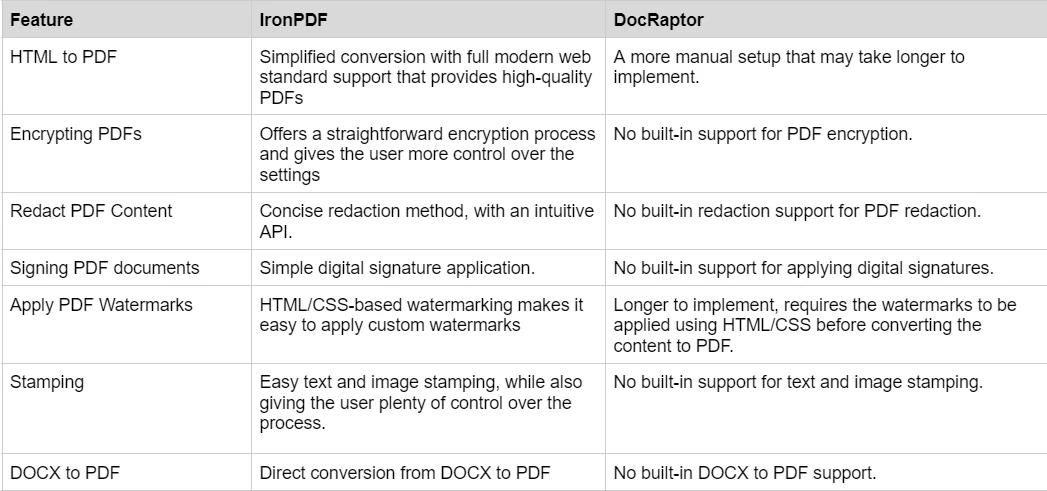
要了解IronPDF提供的丰富功能集,并看到它们的实际应用,请查看IronPDF的入门指南,深入探讨每个功能,探索它们的工作原理,并为您提供成为PDF专家所需的技能。
Bootstrap及现代CSS框架渲染支持
使用CSS框架如Bootstrap、Tailwind和Foundation构建的现代Web应用程序需要精准保留这些框架布局的PDF生成工具。 这种能力对于维护网页和PDF输出的一致性设计非常关键。
IronPDF。:原生Bootstrap和框架支持
IronPDF使用Chromium引擎提供对所有现代CSS框架的全面支持:
- **Bootstrap 5:**全面支持 Flexbox 和 CSS Grid,并包含所有响应式实用工具
- **Bootstrap 4:**完整的卡片系统、导航和表单组件
- **Tailwind CSS:**所有实用类和响应式修饰符
- **Foundation:**完整的网格和组件系统
- **现代 CSS3:**Flexbox、Grid、自定义属性、动画和变换
- **JavaScript 支持:**全面执行以实现框架交互性
现实场景验证:Bootstrap首页和官方模板以浏览器准确的保真度转换。
代码示例:带Bootstrap的FAQ手风琴
using IronPdf;

var renderer = new ChromePdfRenderer();

string bootstrapFAQ = @"
<!DOCTYPE html>
<html>
<head>
    <link href='https://cdn.jsdelivr.net/npm/bootstrap@5.3.0/dist/css/bootstrap.min.css' rel='stylesheet'>
</head>
<body>
    <div class='container my-5'>
        <h1 class='text-center mb-5'>Frequently Asked Questions</h1>

        <div class='row'>
            <div class='col-lg-8 mx-auto'>
                <div class='accordion' id='faqAccordion'>
                    <div class='accordion-item'>
                        <h2 class='accordion-header'></h2>
                            <button class='accordion-button' type='button'>
                                What file formats do you support?
                            </button>
                        </h2>
                        <div class='accordion-collapse collapse show'>
                            <div class='accordion-body'>
                                <strong>We support a wide range of formats:</strong> HTML, URL-based conversion, image to PDF,
                                DOCX to PDF, and more. Our Chromium engine ensures accurate rendering of modern web standards.
                            </div>
                        </div>
                    </div>

                    <div class='accordion-item'>
                        <h2 class='accordion-header'></h2>
                            <button class='accordion-button collapsed' type='button'>
                                Do you support responsive designs?
                            </button>
                        </h2>
                        <div class='accordion-collapse collapse'>
                            <div class='accordion-body'>
                                Yes! Our rendering engine fully supports responsive CSS frameworks including Bootstrap, Tailwind,
                                and custom responsive designs. You can specify viewport dimensions and paper sizes to control output.
                            </div>
                        </div>
                    </div>

                    <div class='accordion-item'>
                        <h2 class='accordion-header'></h2>
                            <button class='accordion-button collapsed' type='button'>
                                What about JavaScript rendering?
                            </button>
                        </h2>
                        <div class='accordion-collapse collapse'>
                            <div class='accordion-body'>
                                <div class='alert alert-info mb-3'>
                                    <strong>Full JavaScript Support:</strong> IronPDF executes JavaScript before PDF generation.
                                </div>
                                You can configure render delays to ensure dynamic content loads completely. This includes AJAX calls,
                                React/Vue/Angular components, and dynamic chart libraries.
                            </div>
                        </div>
                    </div>

                    <div class='accordion-item'>
                        <h2 class='accordion-header'></h2>
                            <button class='accordion-button collapsed' type='button'>
                                How does pricing work?
                            </button>
                        </h2>
                        <div class='accordion-collapse collapse'>
                            <div class='accordion-body'>
                                We offer transparent per-developer licensing starting at competitive rates. No per-document fees,
                                no hidden costs. Pricing includes all features, updates, and support for one year.
                                <a href='/licensing/' class='btn btn-sm btn-primary mt-2'>View Pricing Details</a>
                            </div>
                        </div>
                    </div>
                </div>

                <div class='card mt-5 bg-light'>
                    <div class='card-body'>
                        <h5 class='card-title'>Still have questions?</h5>
                        <p class='card-text'>Our support team is here to help you get started.</p>
                        <a href='#' class='btn btn-primary'>Contact Support</a>
                    </div>
                </div>
            </div>
        </div>
    </div>
</body>
</html>";

var pdf = renderer.RenderHtmlAsPdf(bootstrapFAQ);
pdf.SaveAs("faq-page.pdf");
using IronPdf;

var renderer = new ChromePdfRenderer();

string bootstrapFAQ = @"
<!DOCTYPE html>
<html>
<head>
    <link href='https://cdn.jsdelivr.net/npm/bootstrap@5.3.0/dist/css/bootstrap.min.css' rel='stylesheet'>
</head>
<body>
    <div class='container my-5'>
        <h1 class='text-center mb-5'>Frequently Asked Questions</h1>

        <div class='row'>
            <div class='col-lg-8 mx-auto'>
                <div class='accordion' id='faqAccordion'>
                    <div class='accordion-item'>
                        <h2 class='accordion-header'></h2>
                            <button class='accordion-button' type='button'>
                                What file formats do you support?
                            </button>
                        </h2>
                        <div class='accordion-collapse collapse show'>
                            <div class='accordion-body'>
                                <strong>We support a wide range of formats:</strong> HTML, URL-based conversion, image to PDF,
                                DOCX to PDF, and more. Our Chromium engine ensures accurate rendering of modern web standards.
                            </div>
                        </div>
                    </div>

                    <div class='accordion-item'>
                        <h2 class='accordion-header'></h2>
                            <button class='accordion-button collapsed' type='button'>
                                Do you support responsive designs?
                            </button>
                        </h2>
                        <div class='accordion-collapse collapse'>
                            <div class='accordion-body'>
                                Yes! Our rendering engine fully supports responsive CSS frameworks including Bootstrap, Tailwind,
                                and custom responsive designs. You can specify viewport dimensions and paper sizes to control output.
                            </div>
                        </div>
                    </div>

                    <div class='accordion-item'>
                        <h2 class='accordion-header'></h2>
                            <button class='accordion-button collapsed' type='button'>
                                What about JavaScript rendering?
                            </button>
                        </h2>
                        <div class='accordion-collapse collapse'>
                            <div class='accordion-body'>
                                <div class='alert alert-info mb-3'>
                                    <strong>Full JavaScript Support:</strong> IronPDF executes JavaScript before PDF generation.
                                </div>
                                You can configure render delays to ensure dynamic content loads completely. This includes AJAX calls,
                                React/Vue/Angular components, and dynamic chart libraries.
                            </div>
                        </div>
                    </div>

                    <div class='accordion-item'>
                        <h2 class='accordion-header'></h2>
                            <button class='accordion-button collapsed' type='button'>
                                How does pricing work?
                            </button>
                        </h2>
                        <div class='accordion-collapse collapse'>
                            <div class='accordion-body'>
                                We offer transparent per-developer licensing starting at competitive rates. No per-document fees,
                                no hidden costs. Pricing includes all features, updates, and support for one year.
                                <a href='/licensing/' class='btn btn-sm btn-primary mt-2'>View Pricing Details</a>
                            </div>
                        </div>
                    </div>
                </div>

                <div class='card mt-5 bg-light'>
                    <div class='card-body'>
                        <h5 class='card-title'>Still have questions?</h5>
                        <p class='card-text'>Our support team is here to help you get started.</p>
                        <a href='#' class='btn btn-primary'>Contact Support</a>
                    </div>
                </div>
            </div>
        </div>
    </div>
</body>
</html>";

var pdf = renderer.RenderHtmlAsPdf(bootstrapFAQ);
pdf.SaveAs("faq-page.pdf");
Imports IronPdf
Dim renderer As New ChromePdfRenderer()
Dim bootstrapFAQ As String = "
<!DOCTYPE html>
<html>
<head>
<link href='https://cdn.jsdelivr.net/npm/bootstrap@5.3.0/dist/css/bootstrap.min.css' rel='stylesheet'>
</head>
<body>
<div class='container my-5'>
<h1 class='text-center mb-5'>Frequently Asked Questions</h1>
<div class='row'>
<div class='col-lg-8 mx-auto'>
<div class='accordion' id='faqAccordion'>
<div class='accordion-item'>
<h2 class='accordion-header'></h2>
<button class='accordion-button' type='button'>
What file formats do you support?
</button>
</h2>
<div class='accordion-collapse collapse show'>
<div class='accordion-body'>
<strong>We support a wide range of formats:</strong> HTML, URL-based conversion, image to PDF,
DOCX to PDF, and more. Our Chromium engine ensures accurate rendering of modern web standards.
</div>
</div>
</div>
<div class='accordion-item'>
<h2 class='accordion-header'></h2>
<button class='accordion-button collapsed' type='button'>
Do you support responsive designs?
</button>
</h2>
<div class='accordion-collapse collapse'>
<div class='accordion-body'>
Yes! Our rendering engine fully supports responsive CSS frameworks including Bootstrap, Tailwind,
and custom responsive designs. You can specify viewport dimensions and paper sizes to control output.
</div>
</div>
</div>
<div class='accordion-item'>
<h2 class='accordion-header'></h2>
<button class='accordion-button collapsed' type='button'>
What about JavaScript rendering?
</button>
</h2>
<div class='accordion-collapse collapse'>
<div class='accordion-body'>
<div class='alert alert-info mb-3'>
<strong>Full JavaScript Support:</strong> IronPDF executes JavaScript before PDF generation.
</div>
You can configure render delays to ensure dynamic content loads completely. This includes AJAX calls,
React/Vue/Angular components, and dynamic chart libraries.
</div>
</div>
</div>
<div class='accordion-item'>
<h2 class='accordion-header'></h2>
<button class='accordion-button collapsed' type='button'>
How does pricing work?
</button>
</h2>
<div class='accordion-collapse collapse'>
<div class='accordion-body'>
We offer transparent per-developer licensing starting at competitive rates. No per-document fees,
no hidden costs. Pricing includes all features, updates, and support for one year.
<a href='/licensing/' class='btn btn-sm btn-primary mt-2'>View Pricing Details</a>
</div>
</div>
</div>
</div>
<div class='card mt-5 bg-light'>
<div class='card-body'>
<h5 class='card-title'>Still have questions?</h5>
<p class='card-text'>Our support team is here to help you get started.</p>
<a href='#' class='btn btn-primary'>Contact Support</a>
</div>
</div>
</div>
</div>
</div>
</body>
</html>"
Dim pdf = renderer.RenderHtmlAsPdf(bootstrapFAQ)
pdf.SaveAs("faq-page.pdf")
Imports IronPdf

Dim renderer As New ChromePdfRenderer()

Dim bootstrapFAQ As String = "
<!DOCTYPE html>
<html>
<head>
    <link href='https://cdn.jsdelivr.net/npm/bootstrap@5.3.0/dist/css/bootstrap.min.css' rel='stylesheet'>
</head>
<body>
    <div class='container my-5'>
        <h1 class='text-center mb-5'>Frequently Asked Questions</h1>

        <div class='row'>
            <div class='col-lg-8 mx-auto'>
                <div class='accordion' id='faqAccordion'>
                    <div class='accordion-item'>
                        <h2 class='accordion-header'></h2>
                            <button class='accordion-button' type='button'>
                                What file formats do you support?
                            </button>
                        </h2>
                        <div class='accordion-collapse collapse show'>
                            <div class='accordion-body'>
                                <strong>We support a wide range of formats:</strong> HTML, URL-based conversion, image to PDF,
                                DOCX to PDF, and more. Our Chromium engine ensures accurate rendering of modern web standards.
                            </div>
                        </div>
                    </div>

                    <div class='accordion-item'>
                        <h2 class='accordion-header'></h2>
                            <button class='accordion-button collapsed' type='button'>
                                Do you support responsive designs?
                            </button>
                        </h2>
                        <div class='accordion-collapse collapse'>
                            <div class='accordion-body'>
                                Yes! Our rendering engine fully supports responsive CSS frameworks including Bootstrap, Tailwind,
                                and custom responsive designs. You can specify viewport dimensions and paper sizes to control output.
                            </div>
                        </div>
                    </div>

                    <div class='accordion-item'>
                        <h2 class='accordion-header'></h2>
                            <button class='accordion-button collapsed' type='button'>
                                What about JavaScript rendering?
                            </button>
                        </h2>
                        <div class='accordion-collapse collapse'>
                            <div class='accordion-body'>
                                <div class='alert alert-info mb-3'>
                                    <strong>Full JavaScript Support:</strong> IronPDF executes JavaScript before PDF generation.
                                </div>
                                You can configure render delays to ensure dynamic content loads completely. This includes AJAX calls,
                                React/Vue/Angular components, and dynamic chart libraries.
                            </div>
                        </div>
                    </div>

                    <div class='accordion-item'>
                        <h2 class='accordion-header'></h2>
                            <button class='accordion-button collapsed' type='button'>
                                How does pricing work?
                            </button>
                        </h2>
                        <div class='accordion-collapse collapse'>
                            <div class='accordion-body'>
                                We offer transparent per-developer licensing starting at competitive rates. No per-document fees,
                                no hidden costs. Pricing includes all features, updates, and support for one year.
                                <a href='/licensing/' class='btn btn-sm btn-primary mt-2'>View Pricing Details</a>
                            </div>
                        </div>
                    </div>
                </div>

                <div class='card mt-5 bg-light'>
                    <div class='card-body'>
                        <h5 class='card-title'>Still have questions?</h5>
                        <p class='card-text'>Our support team is here to help you get started.</p>
                        <a href='#' class='btn btn-primary'>Contact Support</a>
                    </div>
                </div>
            </div>
        </div>
    </div>
</body>
</html>"

Dim pdf = renderer.RenderHtmlAsPdf(bootstrapFAQ)
pdf.SaveAs("faq-page.pdf")
**输出:**一个 Professional 常见问题解答页面,其中包含 Bootstrap 的折叠面板组件、提示框、卡片样式和响应式网格——所有这些元素在 PDF 中均准确呈现。
DocRaptor:良好的Bootstrap支持与API复杂度
DocRaptor是一个基于云的服务,使用Prince XML渲染引擎,支持良好的CSS:
- **支持 Bootstrap 4/5:**对 Bootstrap 布局的支持总体良好
- **Prince XML Engine:**Professional 级 HTML/CSS 渲染引擎
- **CSS3 特性:**强大的 Flexbox 支持及对现代 CSS 的支持
- **JavaScript 限制:**与完整浏览器相比,JavaScript 执行能力有限
- **云依赖:**所有转换操作均需互联网连接并调用 API
DocRaptor 的关键注意事项:
- **基于 API:**所有转换均通过向 DocRaptor 服务器发起 HTTP API 调用完成
- **需联网:**无法在离线或气隙环境中生成 PDF
- **按文档计费:**与 IronPDF 的按开发者计费许可不同,DocRaptor 采用按文档计费模式
- **数据隐私:**HTML 内容会被发送至外部服务器进行处理
- **批量成本:**高流量应用可能会产生可观的持续 API 费用
**开发影响:**虽然 DocRaptor 能很好地处理 Bootstrap,但其基于云的架构带来了运营方面的考量:
- 所有PDF生成取决于外部服务的可用性
- 高文档生成量会导致快速上升的按文件费用
- 敏感内容需要考虑数据处理政策
- 每次转换的网络往返引入的延迟
对于需要本地处理、离线功能或高容量文档生成的应用,IronPDF的本地处理模式可能提供更好的长期价值和控制。
有关Bootstrap框架的最佳实践,请参见Bootstrap & Flexbox CSS指南。
价格和许可:IronPDF vs. DocRaptor
IronPDF
IronPDF具有不同级别和其他购买许可证的特点。 开发者还可以购买[Iron Suite](Iron Suite),它让您在两种价格下可使用Iron Software的所有产品。 如果您还没准备好购买许可证,IronPDF提供了一免费试用,让您在承诺购买许可证前探索所有功能。
定价(截至2026年4月):
-
**永久许可证:**提供一系列永久许可证,具体取决于团队规模、项目需求和地点数量。 每种许可证类型都配有电子邮件支持。
-
**Lite License:**此许可证支持一位开发人员、一个地点和一个项目。 \u5b9a\u4ef7\u53ef\u6839\u636e\u8981\u6c42\u63d0\u4f9b\u3002
-
**Plus 许可证:**支持三名开发者、三个地点和三个项目,这是从 Lite 许可证到更高一级的选择,费用为$1,499。 Plus许可证除了电子邮件支持外,还提供聊天支持和电话支持。
-
**Professional 许可证:**适合更大的团队,支持十名开发者、十个地点和十个项目,费用为$2,399。 \u5b83\u63d0\u4f9b\u4e0e\u4e4b\u524d\u5c42\u6b21\u76f8\u540c\u7684\u8054\u7cfb\u652f\u6301\u6e20\u9053\uff0c\u4f46\u4e5f\u63d0\u4f9b\u5c4f\u5e55\u5171\u4eab\u652f\u6301\u3002
-
**免版税再分发:**IronPDF 许可还提供免版税再分发覆盖,费用为额外$2,399
-
**不间断产品支持:**IronPDF 提供访问持续的产品更新、安全功能升级,以及来自其工程团队的支持,每年费用为$2,399可享5年覆盖。
-
Iron Suite: For $2,998, you get access to all Iron Software products including IronPDF, IronOCR, IronWord, IronXL, IronBarcode, IronQR, IronZIP, IronPrint, and IronWebScraper.
DocRaptor
DocRaptor根据使用提供几种定价选项。 起价为$15每月,基于使用量,这意味着费用会随您生成的文档量增加而增加。 他们还提供免费试用,以便在承诺付费前测试服务。
文档和支持:IronPDF vs. DocRaptor
IronPDF
IronPDF在提供详细使用文档和支持方面表现突出:
- 全面的文档: 涵盖所有功能的详尽且用户友好的文档。
- 24/5支持: 提供活跃的工程师支持。
- 视频教程: 在YouTube上提供分步视频指导。
- 社区论坛: 提供活跃的社区以获得额外支持。
- 定期更新: 每月产品更新以确保最新功能和安全补丁。
- **PDF API参考:**提供API参考,以便您能充分利用我们的工具。
有关更多信息,请查看IronPDF的详细文档,并访问Iron Software YouTube频道。
DocRaptor
- **API 参考:**详细指南,介绍如何将 DocRaptor 与各种编程语言集成,涵盖 PDF 和 Excel 的生成。
- **入门指南:**分步教程,帮助新用户设置并使用 DocRaptor 进行 HTML 转 PDF 转换。
- **客户端库:**适用于常见编程语言(包括 Java、C#、Python、PHP、Ruby 和 Node.js)的代码示例和库。
- **电子邮件支持:**提供技术协助或解答与服务相关的问题。
结论
综上所述,IronPDF和DocRaptor均为HTML生成PDF提供了强大的解决方案,但它们针对不同受众和项目需求。 IronPDF在与.NET环境的无缝集成方面表现突出,提供多样化的选择范围和离线处理能力。 它非常适合在.NET框架下工作的开发者,他们需要对PDF生成和操作有精准控制。 \u53e6\u4e00\u65b9\u9762\uff0cDocRaptor \u4ee5\u5176\u57fa\u4e8e\u4e91\u7684\u6a21\u578b\u8131\u9896\u800c\u51fa\uff0c\u786e\u4fdd\u7b26\u5408 PDF/A \u6807\u51c6\uff0c\u5e76\u63d0\u4f9b\u7b80\u5355\u7684 API \u4ee5\u4f9b\u8de8\u5e73\u53f0\u4f7f\u7528\uff0c\u4f7f\u5176\u6210\u4e3a\u9700\u8981\u53ef\u9760\u3001\u53ef\u6269\u5c55\u6587\u6863\u751f\u6210\u7684\u591a\u79cd\u7f16\u7a0b\u8bed\u8a00\u9879\u76ee\u7684\u7edd\u4f73\u9009\u62e9\u3002
最终,IronPDF和DocRaptor的选择应取决于您的开发栈、所需控制级别,以及您是否偏好云端或本地化的解决方案。
DocRaptor是其相应所有者的注册商标。 本网站不与DocRaptor有任何关联、认可或赞助。 所有产品名称、徽标和品牌均为各自所有者的财产。 比较仅供参考,反映撰写时公开可用的信息。