




已更新 2026年4月23日
简化 .NET 与 Microsoft.Extensions.AI 的 LLM 集成
AI正在改变软件开发,但将大型语言模型(LLM)集成到.NET中直到现在一直很复杂。通过IronPdf.AI,将AI集成更进一步,该产品为.NET应用程序带来了OpenAI驱动的PDF解析、数据提取和内容摘要。
阅读更多

在当今快节奏的开发世界中,处理时间间隔对于众多应用程序至关重要,从项目管理系统到时间跟踪工具不一而足。 C#中的TimeSpan结构提供了一种强大的方式来表示时间间隔,使开发者能够更轻松地进行计算并高效地格式化时间数据。 将其与IronPDF结合,作为.NET的强大PDF生成库,可根据时间数据创建动态且具有视觉吸引力的报告。
本文将深入探讨如何在C#中格式化TimeSpan,展示如何将其无缝集成到IronPDF中以生成具有洞察力的报告。 无论是跟踪员工工时还是测量项目持续时间,本指南都将提供实用示例,以提升您的报告能力。
C#中的TimeSpan结构表示一个时间间隔,且可用于测量持续时间或两个日期和时间值之间的差异。 这是一种多用途结构,使开发者能够执行各种与时间相关的计算,例如:
TimeSpan的意义在于其能够简化和标准化跨应用程序的时间间隔管理,使得处理各种与时间相关的任务更为容易。
创建一个TimeSpan对象非常简单,有多种方法可用,例如:
TimeSpan.FromHours(double hours):**创建一个表示指定小时数的 TimeSpan。TimeSpan.FromMinutes(double minutes):**创建一个表示指定分钟数的 TimeSpan。TimeSpan.FromSeconds(double seconds):**创建一个表示指定秒数的 TimeSpan。以下是一个说明如何创建TimeSpan实例并在计算中使用它们的示例:
// Creating TimeSpan instances
TimeSpan taskDuration = TimeSpan.FromHours(2.5); // 2 hours and 30 minutes
TimeSpan breakDuration = TimeSpan.FromMinutes(15); // 15 minutes
// Calculating total time spent
TimeSpan totalTime = taskDuration + breakDuration;
Console.WriteLine($"Total time spent: {totalTime}"); // Outputs: 02:45:00' Creating TimeSpan instances
Dim taskDuration As TimeSpan = TimeSpan.FromHours(2.5) ' 2 hours and 30 minutes
Dim breakDuration As TimeSpan = TimeSpan.FromMinutes(15) ' 15 minutes
' Calculating total time spent
Dim totalTime As TimeSpan = taskDuration.Add(breakDuration)
Console.WriteLine($"Total time spent: {totalTime}") ' Outputs: 02:45:00这将显示以下输出:
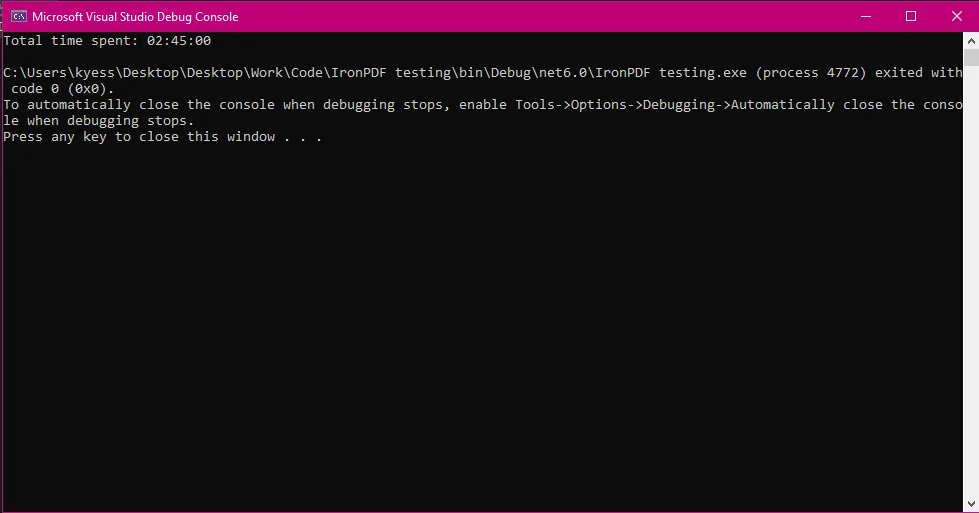
在显示TimeSpan值时,C#提供了多种格式选项。 使用说明符输出来控制将TimeSpan值转换为字符串时如何显示它们。 这些说明符定义了TimeSpan对象的输出格式,帮助自定义其在最终PDF报告中的表示。 最常用的格式说明符包括:
以下是格式化TimeSpan以在报告或日志中输出的示例:
TimeSpan duration = new TimeSpan(1, 2, 30, 45); // 1 day, 2 hours, 30 minutes, 45 seconds
// Default "c" format string produces the output: 1.02:30:45
Console.WriteLine(duration.ToString("c"));
// Custom format "hh:mm:ss" outputs: 26:30:45
Console.WriteLine(duration.ToString(@"hh\:mm\:ss"));
// Custom format with days, outputs: 1d 02h 30m
Console.WriteLine(duration.ToString(@"d'd 'hh'h 'mm'm '"));Dim duration As New TimeSpan(1, 2, 30, 45) ' 1 day, 2 hours, 30 minutes, 45 seconds
' Default "c" format string produces the output: 1.02:30:45
Console.WriteLine(duration.ToString("c"))
' Custom format "hh:mm:ss" outputs: 26:30:45
Console.WriteLine(duration.ToString("hh\:mm\:ss"))
' Custom format with days, outputs: 1d 02h 30m
Console.WriteLine(duration.ToString("d'd 'hh'h 'mm'm '"))此示例显示以下输出:
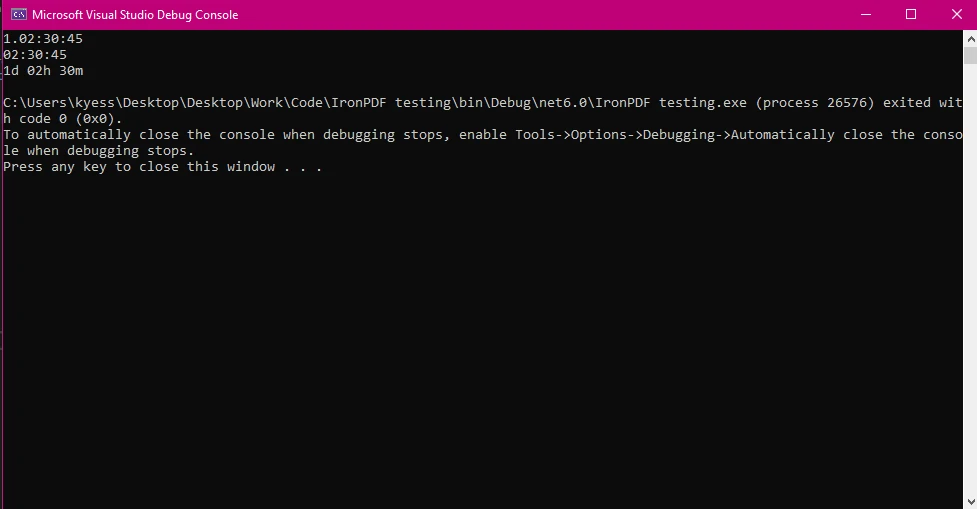
要开始使用 IronPDF,您首先需要安装它。 如果它已经安装,您可以跳到下一部分,否则,以下步骤介绍如何安装IronPDF库。
要使用 NuGet 包管理器控制台安装 IronPDF,打开 Visual Studio 并导航到包管理器控制台。 然后运行以下命令:
打开 Visual Studio,转到 "工具 -> NuGet 包管理器 -> 为解决方案管理 NuGet 包",然后搜索 IronPDF。 从这里,您只需选择您的项目并点击"安装",IronPDF将被添加到您的项目中。
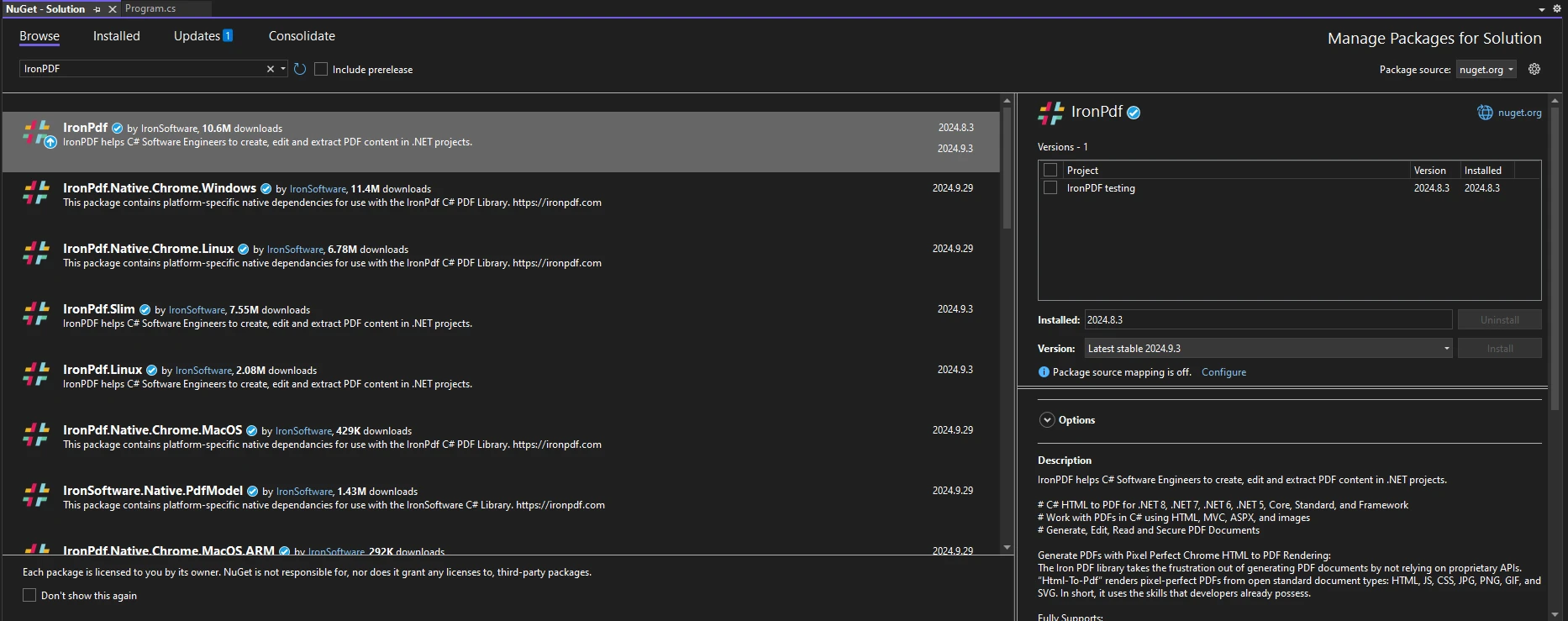
一旦您安装了 IronPDF,您所需添加的全部内容就是在代码顶部添加正确的 using 语句以开始使用 IronPDF:
using IronPdf;Imports IronPdf现在,您已准备好开始使用IronPDF和TimeSpan进行PDF生成任务了。
一旦设置好IronPDF,您就可以使用TimeSpan数据生成信息丰富的PDF报告。 例如,考虑一个需要为员工生成工作日志的场景。 您可以利用TimeSpan值有效地显示任务持续时间和休息时间。
如下是在PDF报告中使用TimeSpan数据的方式,包括生成一个简单的工作日志:
using IronPdf;
public static void Main(string[] args)
{
    TimeSpan duration = new TimeSpan(9, 30, 25);
    var employees = new List<(string name, TimeSpan timeSpan)> {
    ("Jane Doe",  duration),
    ("John Doe", duration)
    };
    GenerateWorkLogReport(employees);
}
public static void GenerateWorkLogReport(List<(string Employee, TimeSpan Duration)> workLogs)
{
    ChromePdfRenderer renderer = new ChromePdfRenderer();
    var htmlContent = "<h1>Work Log Report</h1><table border='1'><tr><th>Employee</th><th>Duration</th></tr>";
    foreach (var log in workLogs)
    {
        htmlContent += $"<tr><td>{log.Employee}</td><td>{log.Duration.ToString(@"hh\:mm\:ss")}</td></tr>";
    }
    htmlContent += "</table>";
    var pdf = renderer.RenderHtmlAsPdf(htmlContent);
    pdf.SaveAs("WorkLogReport.pdf");
}Imports IronPdf
Public Shared Sub Main(ByVal args() As String)
Dim duration As New TimeSpan(9, 30, 25)
Dim employees = New List(Of (name As String, timeSpan As TimeSpan)) From {("Jane Doe", duration), ("John Doe", duration)}
GenerateWorkLogReport(employees)
End Sub
Public Shared Sub GenerateWorkLogReport(ByVal workLogs As List(Of (Employee As String, Duration As TimeSpan)))
Dim renderer As New ChromePdfRenderer()
Dim htmlContent = "<h1>Work Log Report</h1><table border='1'><tr><th>Employee</th><th>Duration</th></tr>"
For Each log In workLogs
htmlContent &= $"<tr><td>{log.Employee}</td><td>{log.Duration.ToString("hh\:mm\:ss")}</td></tr>"
Next log
htmlContent &= "</table>"
Dim pdf = renderer.RenderHtmlAsPdf(htmlContent)
pdf.SaveAs("WorkLogReport.pdf")
End Sub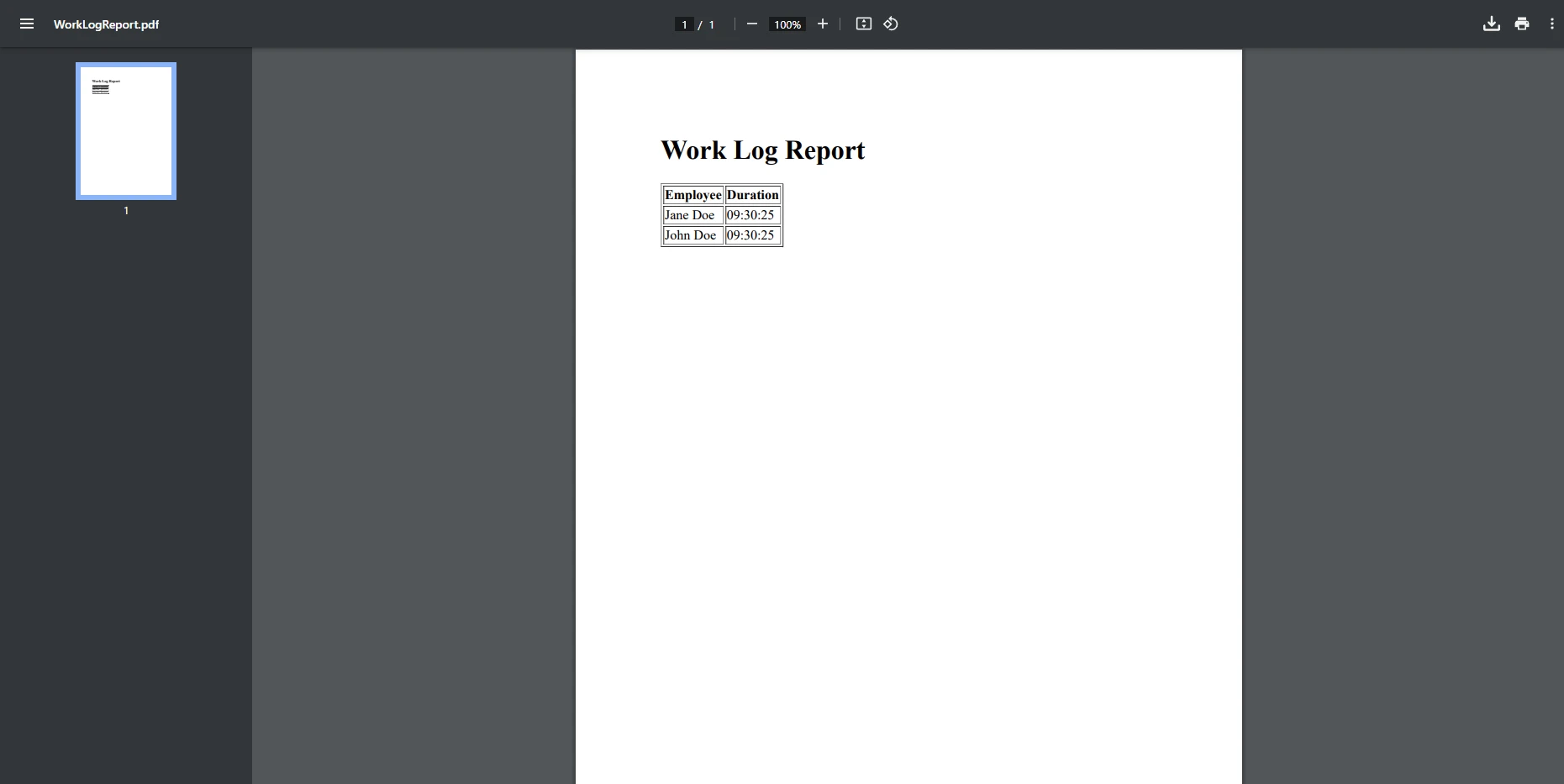
在此示例中,我们创建了一个简单的表格来显示员工的工作日志。 GenerateWorkLogReport方法生成一个包含格式化TimeSpan值的HTML表,然后将其转换为PDF文档。 我们使用IronPDF的ChromePdfRenderer类来处理HTML内容的PDF格式渲染。 PdfDocument用于创建处理新生成的PDF并保存它的PDF对象。
自定义TimeSpan输出可以显著提高报告的可读性。 例如,如果您只需要显示小时和分钟,您可以相应地格式化您的TimeSpan。 在此示例中,我们将采用上一个示例中创建的相同员工数据,并格式化TimeSpan以仅显示他们工作的小时和分钟。 在此场景中,秒对于记录是没有必要的,只会占用不必要的空间,因此我们将其去除:
using IronPdf;
class Program
{
    public static void Main(string[] args)
    {
        TimeSpan duration = new TimeSpan(9, 30, 25);
        var employees = new List<(string name, TimeSpan timeSpan)> {
        ("Jane Doe",  duration),
        ("John Doe", duration)
        };
        GenerateWorkLogReport(employees);
    }
    public static void GenerateWorkLogReport(List<(string Employee, TimeSpan Duration)> workLogs)
    {
        ChromePdfRenderer renderer = new ChromePdfRenderer();
        var htmlContent = "<h1>Work Log Report</h1><table border='1'><tr><th>Employee</th><th>Duration</th></tr>";
        foreach (var log in workLogs)
        {
            // Custom format string to format the TimeSpan value for display
            string formattedDuration = log.Duration.ToString(@"hh\:mm");
            htmlContent += $"<tr><td>{log.Employee}</td><td>{formattedDuration}</td></tr>";
        }
        htmlContent += "</table>";
        var pdf = renderer.RenderHtmlAsPdf(htmlContent);
        pdf.SaveAs("WorkLogReport.pdf");
    }
}Imports IronPdf
Friend Class Program
Public Shared Sub Main(ByVal args() As String)
Dim duration As New TimeSpan(9, 30, 25)
Dim employees = New List(Of (name As String, timeSpan As TimeSpan)) From {("Jane Doe", duration), ("John Doe", duration)}
GenerateWorkLogReport(employees)
End Sub
Public Shared Sub GenerateWorkLogReport(ByVal workLogs As List(Of (Employee As String, Duration As TimeSpan)))
Dim renderer As New ChromePdfRenderer()
Dim htmlContent = "<h1>Work Log Report</h1><table border='1'><tr><th>Employee</th><th>Duration</th></tr>"
For Each log In workLogs
' Custom format string to format the TimeSpan value for display
Dim formattedDuration As String = log.Duration.ToString("hh\:mm")
htmlContent &= $"<tr><td>{log.Employee}</td><td>{formattedDuration}</td></tr>"
Next log
htmlContent &= "</table>"
Dim pdf = renderer.RenderHtmlAsPdf(htmlContent)
pdf.SaveAs("WorkLogReport.pdf")
End Sub
End Class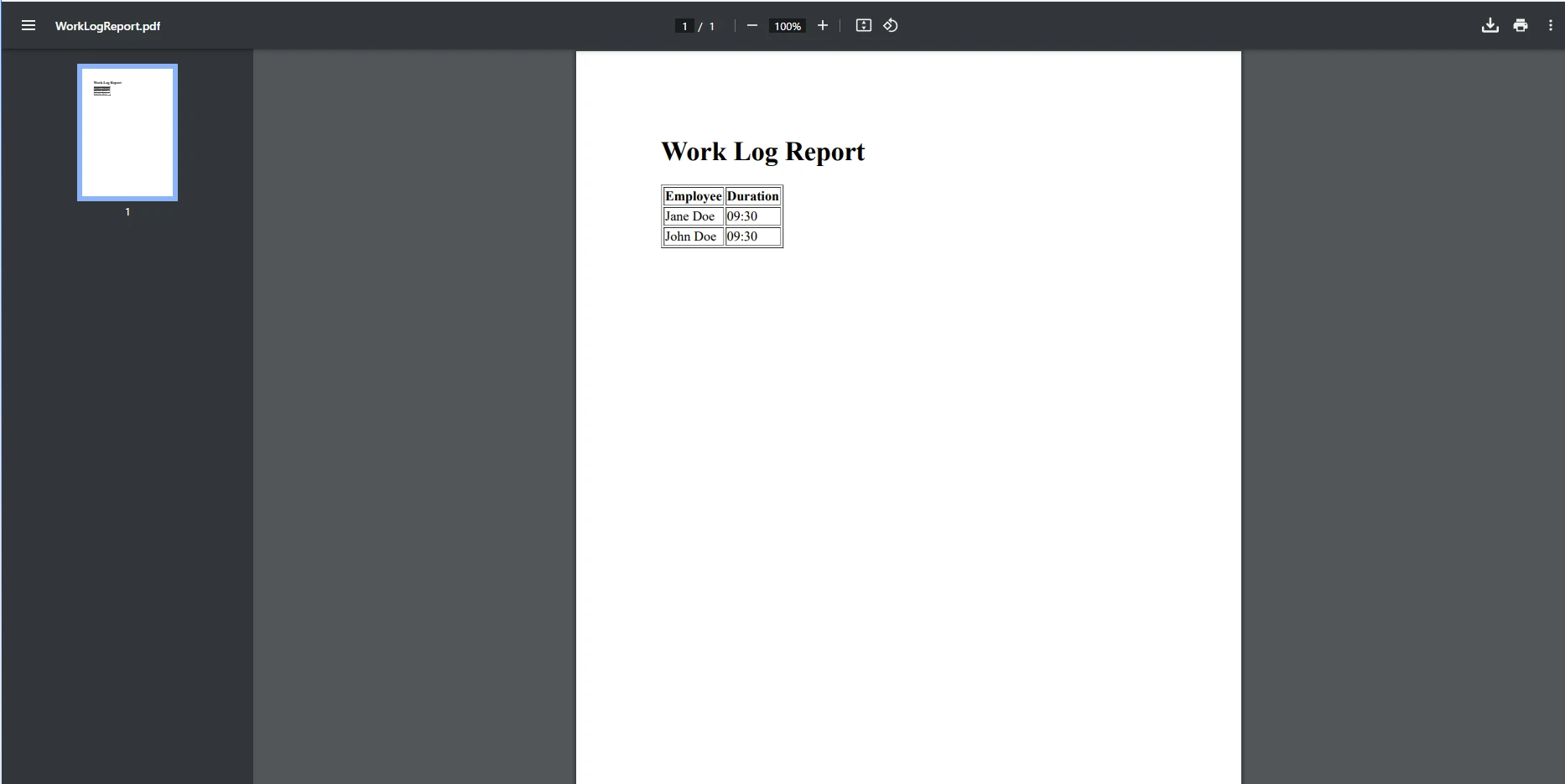
在此示例中,ToString(@"hh\:mm")使用自定义格式字符串将TimeSpan格式化为09:30(总小时和分钟)。 通过这样做,您可以确保TimeSpan根据需求显示,保持文档的可读性。 这也可以反过来,通过将字符串解析为TimeSpan实现。 解析将遵循特定格式(如"hh:mm"或"d.hh:mm")的输入字符串转换为C#可以编程处理的实际TimeSpan对象。
处理较大的TimeSpan值时,重要的是对其进行格式化以提高可读性。 例如,您可以将长时间转换为更易于理解的格式,如"3天5小时":
class Program
{
    public static void Main(string[] args)
    {
        // Sample data: List of employee names and their work durations (TimeSpan)
        var workLogs = new List<(string Employee, TimeSpan Duration)>
        {
            ("Alice", new TimeSpan(5, 30, 0)), // 5 hours, 30 minutes
            ("Bob", new TimeSpan(3, 15, 0)),   // 3 hours, 15 minutes
            ("Charlie", new TimeSpan(7, 45, 0)) // 7 hours, 45 minutes
        };
        // Create the HTML content for the PDF report
        string htmlContent = @"
            <h1>Work Log Report</h1>
            <table border='1' cellpadding='5' cellspacing='0'>
                <tr>
                    <th>Employee</th>
                    <th>Work Duration (hh:mm)</th>
                </tr>";
        // Loop through the work logs and add rows to the table
        foreach (var log in workLogs)
        {
            string formattedDuration = FormatLargeTimeSpan(log.Duration);  // Custom method to format large TimeSpan values
            htmlContent += $"<tr><td>{log.Employee}</td><td>{formattedDuration}</td></tr>";
        }
        // Close the HTML table
        htmlContent += "</table>";
        // Create a new HtmlToPdf renderer
        ChromePdfRenderer renderer = new ChromePdfRenderer();
        // Render the HTML content as a PDF
        PdfDocument pdf = renderer.RenderHtmlAsPdf(htmlContent);
        // Save the PDF to a file
        pdf.SaveAs("WorkLogReport.pdf");
    }
    // Custom method to handle the formatting operation
    static string FormatLargeTimeSpan(TimeSpan timeSpan)
    {
        // Check if there are days in the TimeSpan and format accordingly
        if (timeSpan.TotalDays >= 1)
        {
            return string.Format("{0} days, {1} hours, {2} minutes",
                (int)timeSpan.TotalDays,
                timeSpan.Hours,
                timeSpan.Minutes);
        }
        else
        {
            // If the duration is less than a day, show only hours and minutes
            return string.Format("{0} hours, {1} minutes", timeSpan.Hours, timeSpan.Minutes);
        }
    }
}Imports System
Friend Class Program
Public Shared Sub Main(ByVal args() As String)
' Sample data: List of employee names and their work durations (TimeSpan)
Dim workLogs = New List(Of (Employee As String, Duration As TimeSpan)) From {("Alice", New TimeSpan(5, 30, 0)), ("Bob", New TimeSpan(3, 15, 0)), ("Charlie", New TimeSpan(7, 45, 0))}
' Create the HTML content for the PDF report
Dim htmlContent As String = "
<h1>Work Log Report</h1>
<table border='1' cellpadding='5' cellspacing='0'>
<tr>
<th>Employee</th>
<th>Work Duration (hh:mm)</th>
</tr>"
' Loop through the work logs and add rows to the table
For Each log In workLogs
Dim formattedDuration As String = FormatLargeTimeSpan(log.Duration) ' Custom method to format large TimeSpan values
htmlContent &= $"<tr><td>{log.Employee}</td><td>{formattedDuration}</td></tr>"
Next log
' Close the HTML table
htmlContent &= "</table>"
' Create a new HtmlToPdf renderer
Dim renderer As New ChromePdfRenderer()
' Render the HTML content as a PDF
Dim pdf As PdfDocument = renderer.RenderHtmlAsPdf(htmlContent)
' Save the PDF to a file
pdf.SaveAs("WorkLogReport.pdf")
End Sub
' Custom method to handle the formatting operation
Private Shared Function FormatLargeTimeSpan(ByVal timeSpan As TimeSpan) As String
' Check if there are days in the TimeSpan and format accordingly
If timeSpan.TotalDays >= 1 Then
Return String.Format("{0} days, {1} hours, {2} minutes", CInt(Math.Truncate(timeSpan.TotalDays)), timeSpan.Hours, timeSpan.Minutes)
Else
' If the duration is less than a day, show only hours and minutes
Return String.Format("{0} hours, {1} minutes", timeSpan.Hours, timeSpan.Minutes)
End If
End Function
End Class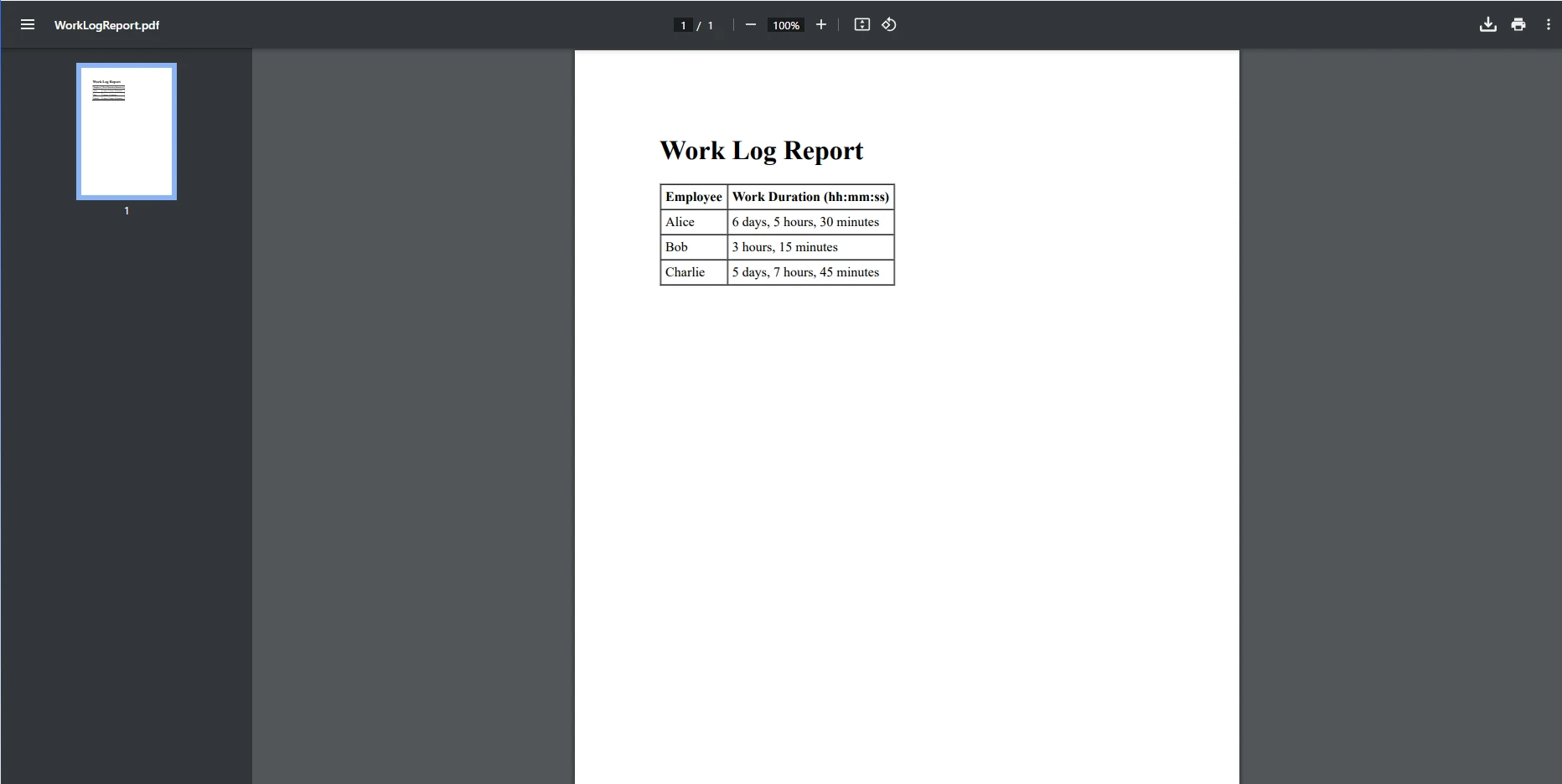
在此示例中,自定义方法FormatLargeTimeSpan将大型TimeSpan值转换为易于阅读的格式,如"6天5小时30分钟"。它检查TimeSpan值是否包括天数并相应地格式化输出,使用支持复合格式的方法。
IronPDF因其基于字符串、时间和HTML数据生成动态PDF的强大功能而脱颖而出。 使用IronPDF,您与PDF相关的任务将变得轻而易举。 从基本PDF生成到安全PDF加密,IronPDF都为您提供支持。 一些关键优势包括:
IronPDF与.NET应用程序集成无缝,使开发人员能够有效利用TimeSpan结构。 使用IronPDF,您可以生成包含格式化时间数据的专业报告,所需的努力最小化,从而使您的报告过程高效和简单。
在这篇文章中,我们探讨了如何在C#中格式化和处理TimeSpan值,并将其无缝集成到IronPDF中以生成动态的基于时间的报告。 C#的TimeSpan格式结构是表示项目持续时间、工作日志和任务完成时间等应用的时间间隔的基本工具。 无论您处理的是短时间跨度还是跨越几天、小时和分钟的大间隔,C#都提供了灵活的格式选项,以便将这些数据以人类易读的格式呈现。 继续更高级的示例可能包括遵循文化习俗的格式化约定、接收时间输入、将字符串解析为TimeSpan等。
IronPDF在精准转换HTML到PDF方面表现出色,使其成为从数据驱动应用生成报告的理想工具。 它与C#的集成使得将复合结构如TimeSpan集成到高质量的PDF中变得容易。
现在您已经了解如何格式化TimeSpan值并将其集成到使用IronPDF的PDF报告中,是时候迈出下一步了。下载试用版IronPDF,探索其在生成动态、数据驱动报告中的全部潜力。 使用IronPDF,您可以轻松地将基于时间的数据转换为精美、专业的文档。

Jacob Mellor 是 Iron Software 的首席技术官,也是一位开创 C# PDF 技术的有远见的工程师。作为 Iron Software 核心代码库的原始开发者,他从公司成立之初就开始塑造公司的产品架构,与首席执行官 Cameron Rimington 一起将公司转变为一家拥有 50 多名员工的公司,为 NASA、特斯拉和全球政府机构提供服务。



当您需要PDF看起来像HTML时,速度快。













