IronPDF's latest version renders an in-memory HTML string to PDF in 390 milliseconds, down from 1.22 seconds in v2026.1, using 64 KB of peak memory instead of 112 KB. Same input, same method call, same hardware, 68% faster and 43% lighter on memory per render.
The data below is from RenderHtmlAsPdf() on the same in-memory HTML string, measured with BenchmarkDotNet on the same machine.
Where do the gains show up?
Both metrics moved. Speed came down modestly. Memory came down dramatically.
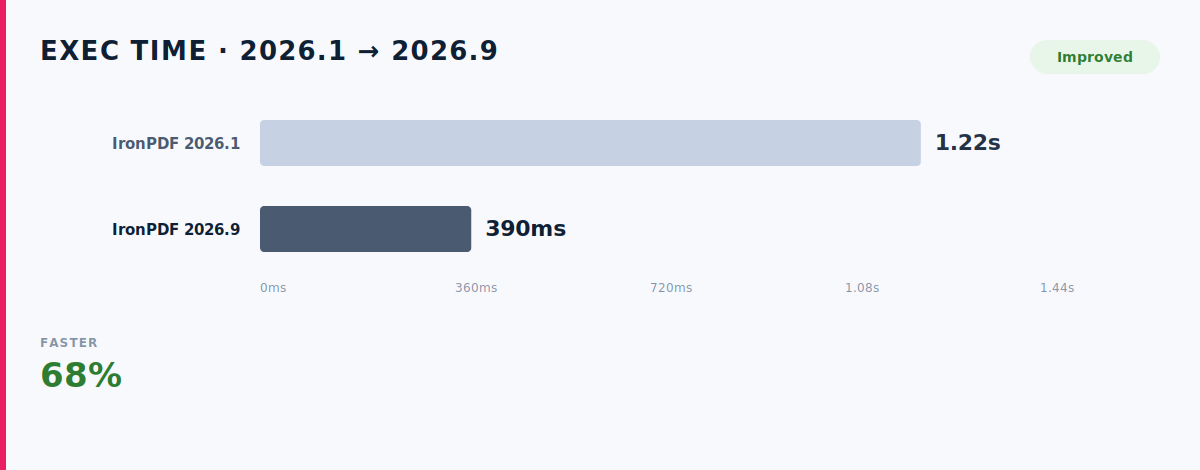
Predictable render time is what lets you plan capacity without re-benchmarking every version.
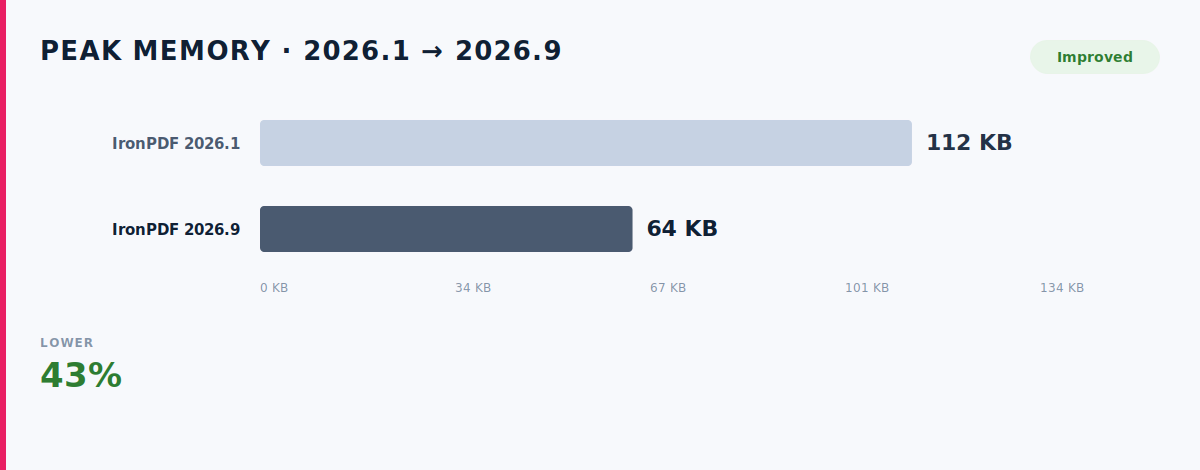
This is the number worth a second look. Peak memory per render dropped by 48 KB on every call.
- 10,000 renders saves 480 MB of peak memory
- 100,000 renders saves 4.8 GB
- 1,000,000 renders saves 48 GB
Less peak memory per render means the nightly job that used to need a bigger instance now runs on the one you already have.
IronPDF continues to improve behind the same familiar APIs, so you can benefit from the latest performance and compatibility updates without changing how your application works.
Upgrade to the latest version to keep your PDF workflows current, with support for .NET 10 and ongoing improvements built into the product.
What has actually changed?
Faster numbers come from specific changes, not general effort and the specific changes are the interesting part.
- Buffer reuse in the Chromium bridge: The internal buffer that carries rendered page data between the Chromium process and .NET was being allocated on every render. It is now pooled and reused across calls.
- Reduced intermediate allocations in the HTML parser: The pre-render pass that inspects the HTML string for external references was allocating short-lived string objects on every element. Those allocations were removed.
- Stream-based PDF assembly: The final PDF was being assembled in a single in-memory buffer before being written out. It now streams directly to the output.
Each change addressed a specific allocation pattern that showed up as a peak-memory spike during profiling. Together they account for the 92 KB drop.
How is it measured?
Speed and memory are two different questions, so we measure them with two different tools rather than one number that blurs both.
Exec time is measured with BenchmarkDotNet. It repeats the call as many times as it needs to until the timing settles, then reports the stable mean. Both versions were tested on the same hardware, back to back, in the same session.
Peak memory is sampled from the process every 25 ms during a single render call. It captures the highest amount of memory the render uses at any point which is what tells you how much headroom each document needs on your server. Sampling at 25 ms means brief spikes are caught, not averaged away.
The HTML input, the calling code, and the hardware were identical across both measurements. The only thing that changed between them was the IronPDF version.
Put it on your own documents
Update the new version and your next render allocates 43% less peak memory than today's, with no code changes and no migration.
The memory improvement is the reason to upgrade this cycle. Under any concurrent load, that's real capacity back, capacity you no longer have to provision.
New to IronPDF? Try IronPDF Free for 30 Days.
Benchmark environment: Same hardware, same in-memory HTML string, same method call across IronPDF 2026.1 and 2026.9. BenchmarkDotNet means for exec time; 25 ms process-memory sampling for peak memory.
Read next: 55% Faster HTML to PDF, Lower Memory, the same benchmark methodology applied to file-based HTML input.