




Updated April 23, 2026
Bridging CLI Simplicity & .NET : Using Curl DotNet with IronPDF
Jacob Mellor has bridged this gap with CurlDotNet, a library created to bring the familiarity of cURL to the .NET ecosystem.
Read More

One of the main characteristics of C#, Inheritance, is well known for its strong support of Object-Oriented Programming (OOP) principles. It is essential for writing scalable and effective code. This post will explore the topic of C# inheritance emphasizing real-world uses for IronPDF library, a potent library that makes handling PDFs in C# programs easier.
A key idea in object-oriented programming (OOP) is inheritance, which lets a class (the derived or subclass) take on traits and characteristics from another class (the base or superclass). In C#, inheritance is accomplished by putting the base class name after the colon : symbol.
In C#, a class can inherit from just one base class since only single inheritance is supported. This is useful when you want a derived class to extend the capabilities of a single base class.
class Animal { /* Base/Parent class */ }

class Dog : Animal { /* Derived class */ }Friend Class Animal
End Class
Friend Class Dog
Inherits Animal
End ClassSeveral classes can inherit from the same base class in a hierarchical inheritance scheme. This setup allows multiple derived classes to inherit from a single base class.
class Animal { /* Base class */ }

class Dog : Animal { /* Derived class */ }

class Wolf : Animal { /* Derived class */ }Friend Class Animal
End Class
Friend Class Dog
Inherits Animal
End Class
Friend Class Wolf
Inherits Animal
End ClassA class functions as both a base class and a derived class in multilevel inheritance. This creates a chain of inheritance where each class builds upon its predecessor.
class Animal { /* Base class */ }

class Mammal : Animal { /* Derived class from Animal */ }

class Dog : Mammal { /* Derived class from Mammal */ }Friend Class Animal
End Class
Friend Class Mammal
Inherits Animal
End Class
Friend Class Dog
Inherits Mammal
End ClassA class in C# can implement one or more interfaces and inherit from a single base class. This allows a class to inherit method implementations described in interfaces, thus achieving a kind of multiple inheritance.
interface ILogger
{
    void Log(string message);
}

class ConsoleLogger : ILogger // Derived class
{
    public void Log(string message)
    {
        Console.WriteLine(message);
    }
}

class FileLogger : ILogger
{
    public void Log(string message)
    {
        // Code to log to a file
    }
}Friend Interface ILogger
Sub Log(ByVal message As String)
End Interface
Friend Class ConsoleLogger ' Derived class
Implements ILogger
Public Sub Log(ByVal message As String) Implements ILogger.Log
Console.WriteLine(message)
End Sub
End Class
Friend Class FileLogger
Implements ILogger
Public Sub Log(ByVal message As String) Implements ILogger.Log
' Code to log to a file
End Sub
End ClassIn C#, an abstract class serves as a base class and cannot be instantiated on its own. Its purpose is to provide a common interface and set of methods for its derived classes. Abstract methods in such a base class must be implemented by derived classes.
abstract class Shape
{
    public abstract double Area(); // Abstract method
}

class Circle : Shape
{
    public double Radius { get; set; }
    public override double Area()
    {
        return Math.PI * Math.Pow(Radius, 2);
    }
}Friend MustInherit Class Shape
Public MustOverride Function Area() As Double ' Abstract method
End Class
Friend Class Circle
Inherits Shape
Public Property Radius() As Double
Public Overrides Function Area() As Double
Return Math.PI * Math.Pow(Radius, 2)
End Function
End ClassThese are examples of inheritance in C#. The chosen method depends on the required flexibility, relationship between classes, and design goals.
The .NET library IronPDF allows programmers to create, edit, and modify PDF documents using C#. IronPDF offers various utilities to manage PDF tasks, such as generating PDFs from HTML, converting HTML to PDF, merging or splitting PDF documents, and annotating PDFs. For more information, refer to the IronPDF documentation.
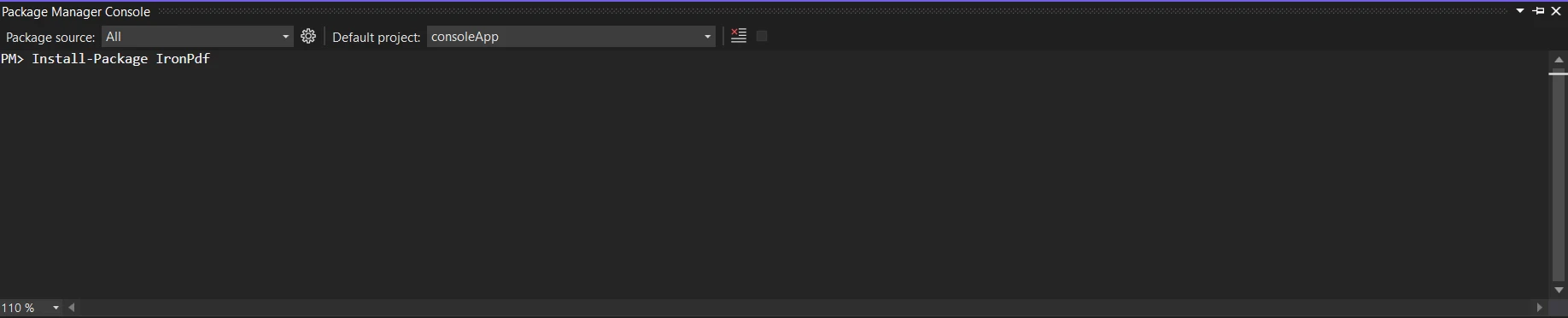
To use IronPDF, you need to install it. You can use the following command in the Package Manager Console:
or
Alternatively, use the NuGet Package Manager to search and install "IronPDF."
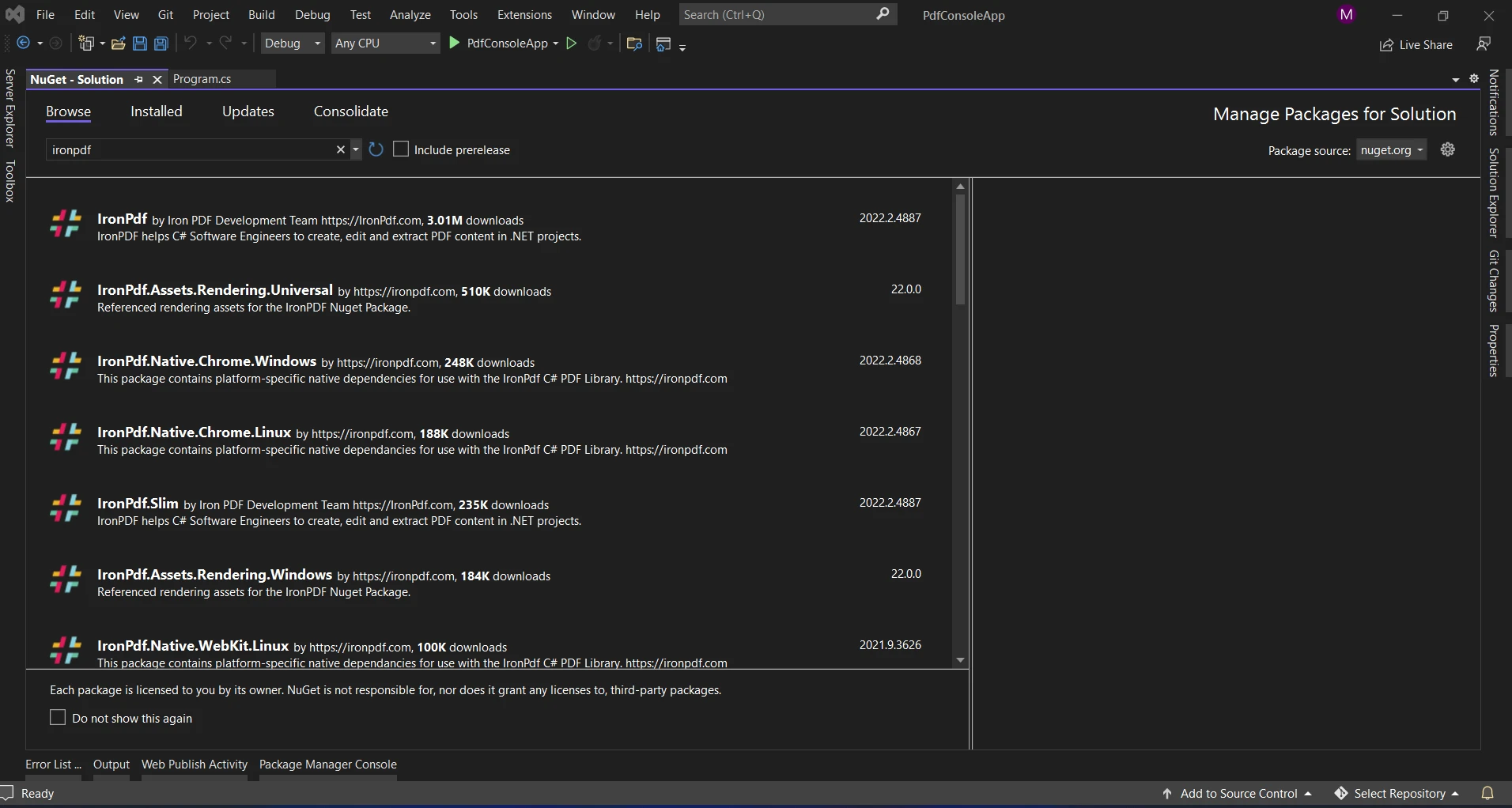
IronPDF enhances the ease of working with PDF documents in C#. By incorporating IronPDF with inherited classes, you can extend the functionality of your application to create and manipulate PDFs effortlessly.
To extend the capabilities of PdfDocument for IronPDF integration, let's create a class named IronPdfDocument:
using IronPdf;

public class IronPdfDocument : PdfDocument
{
    // Additional properties or methods specific to IronPDF can be added here

    // Method to convert HTML to PDF
    public void ConvertToPdf()
    {
        var Renderer = new IronPdf.HtmlToPdf();
        var PDF = Renderer.RenderHtmlAsPdf("<h1>Hello, World</h1>");
        PDF.SaveAs("Output.pdf");
    }
}Imports IronPdf
Public Class IronPdfDocument
Inherits PdfDocument
' Additional properties or methods specific to IronPDF can be added here
' Method to convert HTML to PDF
Public Sub ConvertToPdf()
Dim Renderer = New IronPdf.HtmlToPdf()
Dim PDF = Renderer.RenderHtmlAsPdf("<h1>Hello, World</h1>")
PDF.SaveAs("Output.pdf")
End Sub
End ClassThis IronPdfDocument class extends PdfDocument to facilitate easy PDF handling with IronPDF.
Let's use inheritance and IronPDF to create a simple PDF report generator. First, we define a Report base class:
public class Report
{
    // Base method for generating a report
    public virtual void GenerateReport()
    {
        var Renderer = new IronPdf.HtmlToPdf();
        var PDF = Renderer.RenderHtmlAsPdf("<h1>Hello, World</h1>");
        PDF.SaveAs("Output.pdf");
    }
}Public Class Report
' Base method for generating a report
Public Overridable Sub GenerateReport()
Dim Renderer = New IronPdf.HtmlToPdf()
Dim PDF = Renderer.RenderHtmlAsPdf("<h1>Hello, World</h1>")
PDF.SaveAs("Output.pdf")
End Sub
End ClassNow, we create a PdfReport derived class that incorporates IronPDF specifics:
public class PdfReport : Report
{
    // Override method to customize PDF report generation
    public override void GenerateReport()
    {
        var Renderer = new IronPdf.HtmlToPdf();
        var PDF = Renderer.RenderHtmlAsPdf("<h1>Hello, IronPDF</h1>");
        PDF.SaveAs("Output.pdf");
        Console.WriteLine("Generating PDF report...");
        // Additional code for PDF generation with IronPDF
    }
}Public Class PdfReport
Inherits Report
' Override method to customize PDF report generation
Public Overrides Sub GenerateReport()
Dim Renderer = New IronPdf.HtmlToPdf()
Dim PDF = Renderer.RenderHtmlAsPdf("<h1>Hello, IronPDF</h1>")
PDF.SaveAs("Output.pdf")
Console.WriteLine("Generating PDF report...")
' Additional code for PDF generation with IronPDF
End Sub
End ClassIn this example, the PdfReport class inherits from Report and overrides the GenerateReport method to include custom logic for IronPDF-based PDF generation.
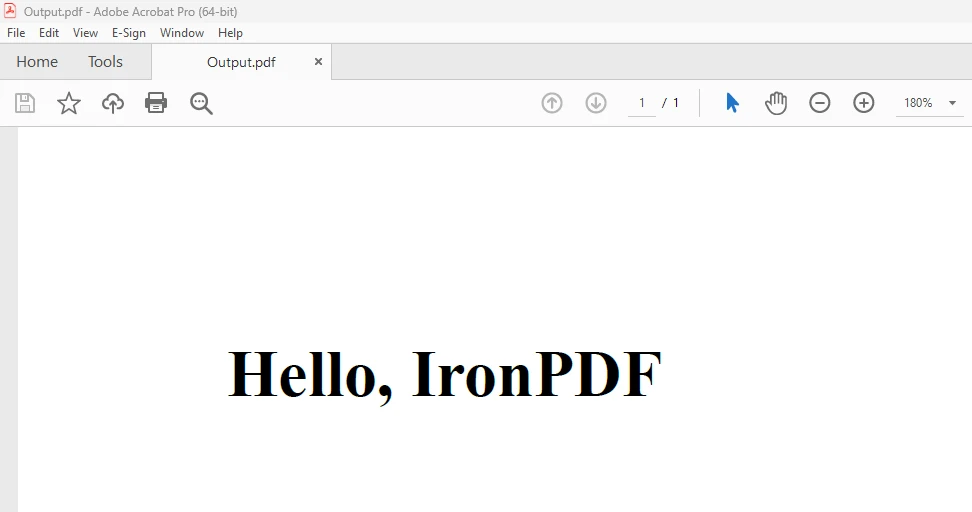
For more information on converting an HTML string to PDF, refer to the HTML to PDF example.
Inheritance, when paired with libraries like IronPDF, is a powerful feature that enhances the application development process. This post covered the basics of inheritance and provided a practical guide for integration with IronPDF.
Developing hierarchical class structures leads to a modular and structured codebase. Classes that inherit the general functions of base classes while addressing specific tasks demonstrate the benefits of reusability and extensibility. Integrating IronPDF elevates these advantages, offering seamless PDF management in your C# applications.
IronPDF's $999 Light pack includes a permanent license, upgrade options, and a year of software support. During the watermarked trial period, you can assess the software in real application environments. For more details on IronPDF's pricing, licensing, and trial version, visit the IronPDF licensing page. Explore the official Iron Software website for more Iron Software products.

Jacob Mellor is Chief Technology Officer at Iron Software and a visionary engineer pioneering C# PDF technology. As the original developer behind Iron Software's core codebase, he has shaped the company's product architecture since its inception, transforming it alongside CEO Cameron Rimington into a 50+ person company serving NASA, Tesla, and global government agencies.



IronPDF is a part of IRONSUITE
10 .NET API products for your office documents











When you need your PDF to look like HTML, fast.


