 Most FinTech applications store transaction data in a relational database and generate receipts on demand. When a customer requests one, the application re-queries the record and renders a view. That approach has a fundamental problem: the resulting PDF or "receipt" reflects the current state of the data, not what the customer saw at the moment the transaction completed.
Database records can be corrected, amended, or updated through normal operational processes. A re-queried receipt is not a historical document; it's a current snapshot with a past timestamp. When a payment processor faces a chargeback, when a neobank's compliance team responds to a regulator, when a lending platform's audit log is subpoenaed, or when a crypto exchange needs to demonstrate document integrity to a KYC examiner, there needs to be a document, not a query.
A PDF document stored at the moment of settlement, hashed for tamper detection, and written to immutable storage is that document. This ensures that existing PDF documents remain valid for years. Whether you are dealing with financial reports or a simple first PDF, document generation must be final.
PCI-DSS, SOX, and AML record-keeping obligations don't require PDF documents programmatically specifically, but they do require demonstrable, auditable records. A rendered, hashed, timestamped PDF file satisfies that bar in a way a database row alone does not. Later in this article, we'll take a look at an IronPDF example of how this process can work when creating a new PDF document.
The Solution at a Glance: Convert HTML Content to PDF in C#
The IronPDF library from Iron Software generates a generated PDF receipt at the exact moment a transaction completes, synchronously, as part of the transaction pipeline. You can install IronPDF via the NuGet Package Manager or the Package Manager Console in Visual Studio. Using the .NET CLI, simply run install package IronPDF.
The receipt is rendered from an HTML template or HTML file, stamped with a transaction ID and timestamp, hashed, and written to immutable storage. It becomes the final document. There is no SSRS definition to maintain, no third-party document API to call, and no headless browser sidecar. IronPDF runs in-process as a NuGet library for PDF tasks.
Key Benefits of Automating Document Workflows:
- Preserving formatting across all page sizes.
- Support for digital signatures to ensure document integrity.
- Ability to create PDF objects from a web page or HTML string.
- Iron Software's customer logos and branding can be embedded easily
How a Transaction-to-Receipt Pipeline Works
The Happy Path
A payment succeeds and the transaction record is written to the database. The same handler - before returning a response - populates an HTML content receipt template with the transaction details: ID, UTC timestamp, amount and currency, sender and receiver identifiers, fee breakdown, and dynamic content.
The renderer new ChromePdfRenderer (specifically var renderer = new ChromePdfRenderer();) converts the web content to a PDF format. The resulting PDF byte array is immediately hashed using SHA-256.
using IronPdf
using System.Security.Cryptography;
var renderer = new ChromePdfRenderer();
renderer.RenderingOptions.MarginTop = 15;
renderer.RenderingOptions.MarginBottom = 15;
string receiptHtml = $@"
<h1>Transaction Receipt</h1>
<p><strong>Transaction ID:</strong> {tx.Id}</p>
<p><strong>Timestamp (UTC):</strong> {tx.CompletedAt:u}</p>
<p><strong>Amount:</strong> {tx.Amount:F2} {tx.Currency}</p>
<p><strong>Fee:</strong> {tx.Fee:F2} {tx.Currency}</p>
<p><strong>From:</strong> {tx.SenderRef} → <strong>To:</strong> {tx.ReceiverRef}</p>
<p><strong>Resulting Balance:</strong> {tx.ClosingBalance:F2} {tx.Currency}</p>";
var pdf = renderer.RenderHtmlAsPdf(receiptHtml);
string hash = Convert.ToHexString(SHA256.HashData(pdf.BinaryData));
await _db.StoreReceiptHashAsync(tx.Id, hash);
await _blobStorage.UploadImmutableAsync($"receipts/{tx.Id}.pdf", pdf.BinaryData);
using IronPdf
using System.Security.Cryptography;
var renderer = new ChromePdfRenderer();
renderer.RenderingOptions.MarginTop = 15;
renderer.RenderingOptions.MarginBottom = 15;
string receiptHtml = $@"
<h1>Transaction Receipt</h1>
<p><strong>Transaction ID:</strong> {tx.Id}</p>
<p><strong>Timestamp (UTC):</strong> {tx.CompletedAt:u}</p>
<p><strong>Amount:</strong> {tx.Amount:F2} {tx.Currency}</p>
<p><strong>Fee:</strong> {tx.Fee:F2} {tx.Currency}</p>
<p><strong>From:</strong> {tx.SenderRef} → <strong>To:</strong> {tx.ReceiverRef}</p>
<p><strong>Resulting Balance:</strong> {tx.ClosingBalance:F2} {tx.Currency}</p>";
var pdf = renderer.RenderHtmlAsPdf(receiptHtml);
string hash = Convert.ToHexString(SHA256.HashData(pdf.BinaryData));
await _db.StoreReceiptHashAsync(tx.Id, hash);
await _blobStorage.UploadImmutableAsync($"receipts/{tx.Id}.pdf", pdf.BinaryData);Imports IronPdf
Imports System.Security.Cryptography
Dim renderer As New ChromePdfRenderer()
renderer.RenderingOptions.MarginTop = 15
renderer.RenderingOptions.MarginBottom = 15
Dim receiptHtml As String = $"
<h1>Transaction Receipt</h1>
<p><strong>Transaction ID:</strong> {tx.Id}</p>
<p><strong>Timestamp (UTC):</strong> {tx.CompletedAt:u}</p>
<p><strong>Amount:</strong> {tx.Amount:F2} {tx.Currency}</p>
<p><strong>Fee:</strong> {tx.Fee:F2} {tx.Currency}</p>
<p><strong>From:</strong> {tx.SenderRef} → <strong>To:</strong> {tx.ReceiverRef}</p>
<p><strong>Resulting Balance:</strong> {tx.ClosingBalance:F2} {tx.Currency}</p>"
Dim pdf = renderer.RenderHtmlAsPdf(receiptHtml)
Dim hash As String = Convert.ToHexString(SHA256.HashData(pdf.BinaryData))
Await _db.StoreReceiptHashAsync(tx.Id, hash)
Await _blobStorage.UploadImmutableAsync($"receipts/{tx.Id}.pdf", pdf.BinaryData)
Imports IronPdf
Imports System.Security.Cryptography
Dim renderer As New ChromePdfRenderer()
renderer.RenderingOptions.MarginTop = 15
renderer.RenderingOptions.MarginBottom = 15
Dim receiptHtml As String = $"
<h1>Transaction Receipt</h1>
<p><strong>Transaction ID:</strong> {tx.Id}</p>
<p><strong>Timestamp (UTC):</strong> {tx.CompletedAt:u}</p>
<p><strong>Amount:</strong> {tx.Amount:F2} {tx.Currency}</p>
<p><strong>Fee:</strong> {tx.Fee:F2} {tx.Currency}</p>
<p><strong>From:</strong> {tx.SenderRef} → <strong>To:</strong> {tx.ReceiverRef}</p>
<p><strong>Resulting Balance:</strong> {tx.ClosingBalance:F2} {tx.Currency}</p>"
Dim pdf = renderer.RenderHtmlAsPdf(receiptHtml)
Dim hash As String = Convert.ToHexString(SHA256.HashData(pdf.BinaryData))
Await _db.StoreReceiptHashAsync(tx.Id, hash)
Await _blobStorage.UploadImmutableAsync($"receipts/{tx.Id}.pdf", pdf.BinaryData)
Example Generated PDF Document
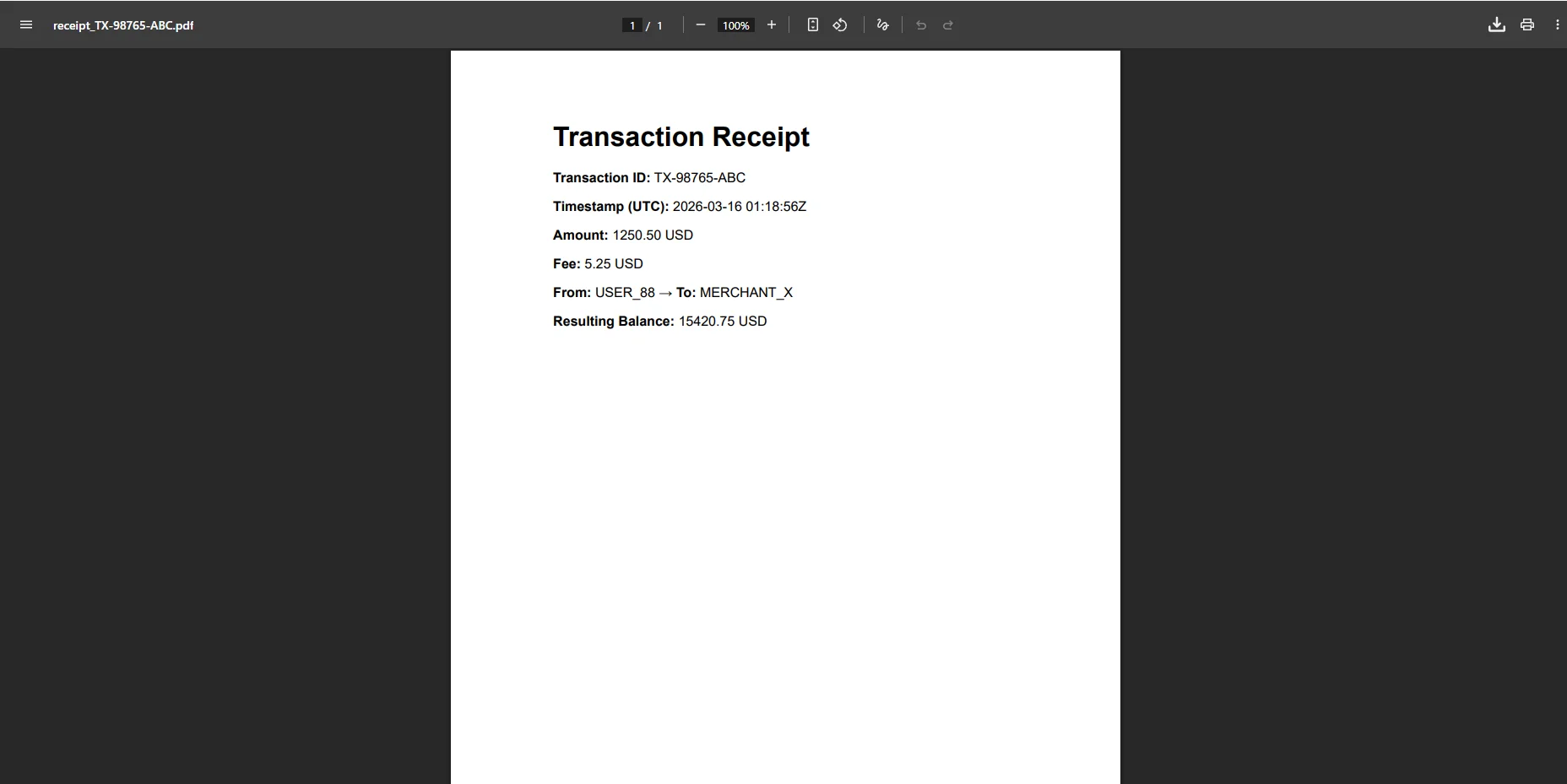 The new PDF document is then stored in immutable storage. Whether it's your first PDF or you are merging existing PDFs, the process remains the same. A copy is surfaced in a PDF viewer for the customer. During an Iron Software product demo, the software product demo team often highlights how just a few lines of code can handle dynamic reports and tasks such as HTML to PDF conversion or PDF generation tasks.
To assist with UI/UX, you might see a key in blue circle, a grey key in circle, or a blue key in circle in the dashboard to indicate a secured, hashed file. An icon right caret related to the download link helps users navigate.
A stamped header or footer reinforces the document's provenance on every page:
var shortHash = hash[..12];
renderer.RenderingOptions.HtmlFooter = new HtmlHeaderFooter
{
HtmlFragment = $@"
<div style='font-size:9px; color:#666; text-align:center;'>
Generated: {tx.CompletedAt:u} |
TX: {tx.Id} |
SHA-256: {shortHash}...
</div>"
};
var shortHash = hash[..12];
renderer.RenderingOptions.HtmlFooter = new HtmlHeaderFooter
{
HtmlFragment = $@"
<div style='font-size:9px; color:#666; text-align:center;'>
Generated: {tx.CompletedAt:u} |
TX: {tx.Id} |
SHA-256: {shortHash}...
</div>"
};
HTML
 Every page of the receipt carries the transaction ID, generation timestamp, and a truncated hash, enough for a compliance officer to spot-check integrity without needing access to the database.
The Edge Cases
Reversals and refunds. A failed or reversed transaction still requires a document. Generate a separate PDF for the reversal event, referencing the original transaction ID and receipt hash. The reversal receipt stands alone as a record of what happened; it does not replace or modify the original.
Multi-currency transactions. The HTML template must handle currency symbol placement, decimal separators, and exchange rate disclosure correctly per locale. C# format strings handle most of this: {amount.ToString("F2", CultureInfo.GetCultureInfo("de-DE"))} for German decimal conventions, explicit symbol placement for currencies like JPY that use no decimal places. The exchange rate and its timestamp should appear as a disclosed line item, not inferred from the amounts.
Regulatory watermarks. Some jurisdictions require specific text on certain document types, "NOT A TAX INVOICE," "UNOFFICIAL COPY," or jurisdiction-specific disclosure language. These are cleanly handled as an HTML overlay in the template or as a styled header band, without modifying the underlying transaction data.
Why This Matters Beyond Compliance
Enable PDF/A output with a single rendering option - renderer.RenderingOptions.PdfArchiveFormat = IronPdf.Rendering.PdfArchiveFormat.PDF_A_3B - to produce ISO-standardized archival documents acceptable for long-term financial record retention.
Closing
The gap between "we store transaction data" and "we have an auditable record" is smaller than it looks; it's one rendering step added to the transaction commit flow. That step produces a document with a provenance that a database row alone cannot provide: a timestamp that can't be backdated, a hash that detects tampering, and a physical artifact that looks the same whether a customer opens it or an auditor requests it.
IronPDF gives .NET teams full control over that step, from rendering the HTML receipt to stamping the footer, hashing the output, and streaming to immutable storage, all from a single library at ironpdf.com. If you're building or hardening a transaction pipeline, start your free 30-day trial and validate the receipt output against your compliance requirements before going to production.













