 When a customer completes a multi-step web form: a mortgage application, an insurance quote, or an employee onboarding packet, the data lands in a database row or a JSON payload. That's it. There is no PDF document. The customer has no printable record or PDF files of what they submitted. The borrower who just spent forty minutes entering income details and uploading documents walks away with a confirmation email that says "We received your application." They have nothing to file in PDF format, and nothing they can reference if there's a dispute regarding document integrity.
The compliance problem is more serious. Audit teams often require a snapshot of exactly what the applicant submitted in an entire document at the moment they clicked Submit. Internal reviewers fill that gap by taking screenshots or copy-pasting into Word. None of those methods produce a canonical, reproducible record or preserve the document structure. When an auditor asks for the original loan application, the answer shouldn't be "let me export this from the database and format it." Today, we'll be looking at how IronPDF can be the solution to your problems.
The Solution: Generating a PDF in C# at the Moment of Submission
Using Iron Software's IronPDF library, .NET applications and .NET Core systems can convert HTML and submitted form data into branded PDF documents immediately. This .NET PDF library ensures that the same HTML content and web technologies your team already uses for the confirmation page become the template for PDF generation. There is no third-party document generation API to pay for; the PDF creation is produced inside the existing application.
The generated PDF is emailed to the applicant and stored in a PDF viewer or document management system for the back-office document workflows. Automating document workflows means reviewers get a standardized final document. Every submission produces the same high-quality PDF generation, regardless of which web pages the user visited.
When the user clicks Submit, the server-side handler receives the form model and e-signature metadata. At this point, the data is complete. Rather than only persisting it, the handler passes the model to the pdf generation tasks. Using IronPDF, various PDF generation tasks, including digital signatures, can be handled in just a few lines of code.
For this simple IronPDF example, we'll be using this sample data code:

2. HTML File or String Template Is Populated With Submission Data
A Razor view, HTML file, HTML structure, or HTML string template acts as the layout. This simple HTML string includes the company logo, which may include Iron Software's customer logos or a text logo Iron Suite related image. You can use an external CSS file or inline CSS to set the font family and font size to ensure you are preserving formatting.
3. ChromePdfRenderer Converts the HTML to PDF Documents
Using IronPDF, the process is straightforward. First, you install IronPDF via the NuGet Package Manager, the Visual Studio Package Manager, or the Package Manager Console.
The following code snippet shows the same code used for HTML to PDF conversion:
using IronPdf;

var renderer = new ChromePdfRenderer();

renderer.RenderingOptions.MarginTop = 20;

renderer.RenderingOptions.MarginBottom = 20;

renderer.RenderingOptions.PaperSize = IronPdf.Rendering.PdfPaperSize.A4;

string html = $@"
    <h1>Loan Application Summary</h1>
    <p><strong>Applicant:</strong> {submission.FullName}</p>
    <p><strong>Submitted:</strong> {submission.SubmittedAt:f}</p>
    <p><strong>Loan Amount:</strong> {submission.LoanAmount:C}</p>
    <p><strong>Reference:</strong> {submission.ReferenceNumber}</p>
    <hr/>
    <h2>Employment Details</h2>
    <p>{submission.EmployerName} — {submission.AnnualIncome:C} per year</p>";

PdfDocument summary = renderer.RenderHtmlAsPdf(html);
using IronPdf;

var renderer = new ChromePdfRenderer();

renderer.RenderingOptions.MarginTop = 20;

renderer.RenderingOptions.MarginBottom = 20;

renderer.RenderingOptions.PaperSize = IronPdf.Rendering.PdfPaperSize.A4;

string html = $@"
    <h1>Loan Application Summary</h1>
    <p><strong>Applicant:</strong> {submission.FullName}</p>
    <p><strong>Submitted:</strong> {submission.SubmittedAt:f}</p>
    <p><strong>Loan Amount:</strong> {submission.LoanAmount:C}</p>
    <p><strong>Reference:</strong> {submission.ReferenceNumber}</p>
    <hr/>
    <h2>Employment Details</h2>
    <p>{submission.EmployerName} — {submission.AnnualIncome:C} per year</p>";

PdfDocument summary = renderer.RenderHtmlAsPdf(html);
Imports IronPdf
Dim renderer As New ChromePdfRenderer()
renderer.RenderingOptions.MarginTop = 20
renderer.RenderingOptions.MarginBottom = 20
renderer.RenderingOptions.PaperSize = IronPdf.Rendering.PdfPaperSize.A4
Dim html As String = $"
<h1>Loan Application Summary</h1>
<p><strong>Applicant:</strong> {submission.FullName}</p>
<p><strong>Submitted:</strong> {submission.SubmittedAt:f}</p>
<p><strong>Loan Amount:</strong> {submission.LoanAmount:C}</p>
<p><strong>Reference:</strong> {submission.ReferenceNumber}</p>
<hr/>
<h2>Employment Details</h2>
<p>{submission.EmployerName} — {submission.AnnualIncome:C} per year</p>"
Dim summary As PdfDocument = renderer.RenderHtmlAsPdf(html)
Imports IronPdf

Dim renderer As New ChromePdfRenderer()

renderer.RenderingOptions.MarginTop = 20

renderer.RenderingOptions.MarginBottom = 20

renderer.RenderingOptions.PaperSize = IronPdf.Rendering.PdfPaperSize.A4

Dim html As String = $"
    <h1>Loan Application Summary</h1>
    <p><strong>Applicant:</strong> {submission.FullName}</p>
    <p><strong>Submitted:</strong> {submission.SubmittedAt:f}</p>
    <p><strong>Loan Amount:</strong> {submission.LoanAmount:C}</p>
    <p><strong>Reference:</strong> {submission.ReferenceNumber}</p>
    <hr/>
    <h2>Employment Details</h2>
    <p>{submission.EmployerName} — {submission.AnnualIncome:C} per year</p>"

Dim summary As PdfDocument = renderer.RenderHtmlAsPdf(html)
Example C# PDF Output
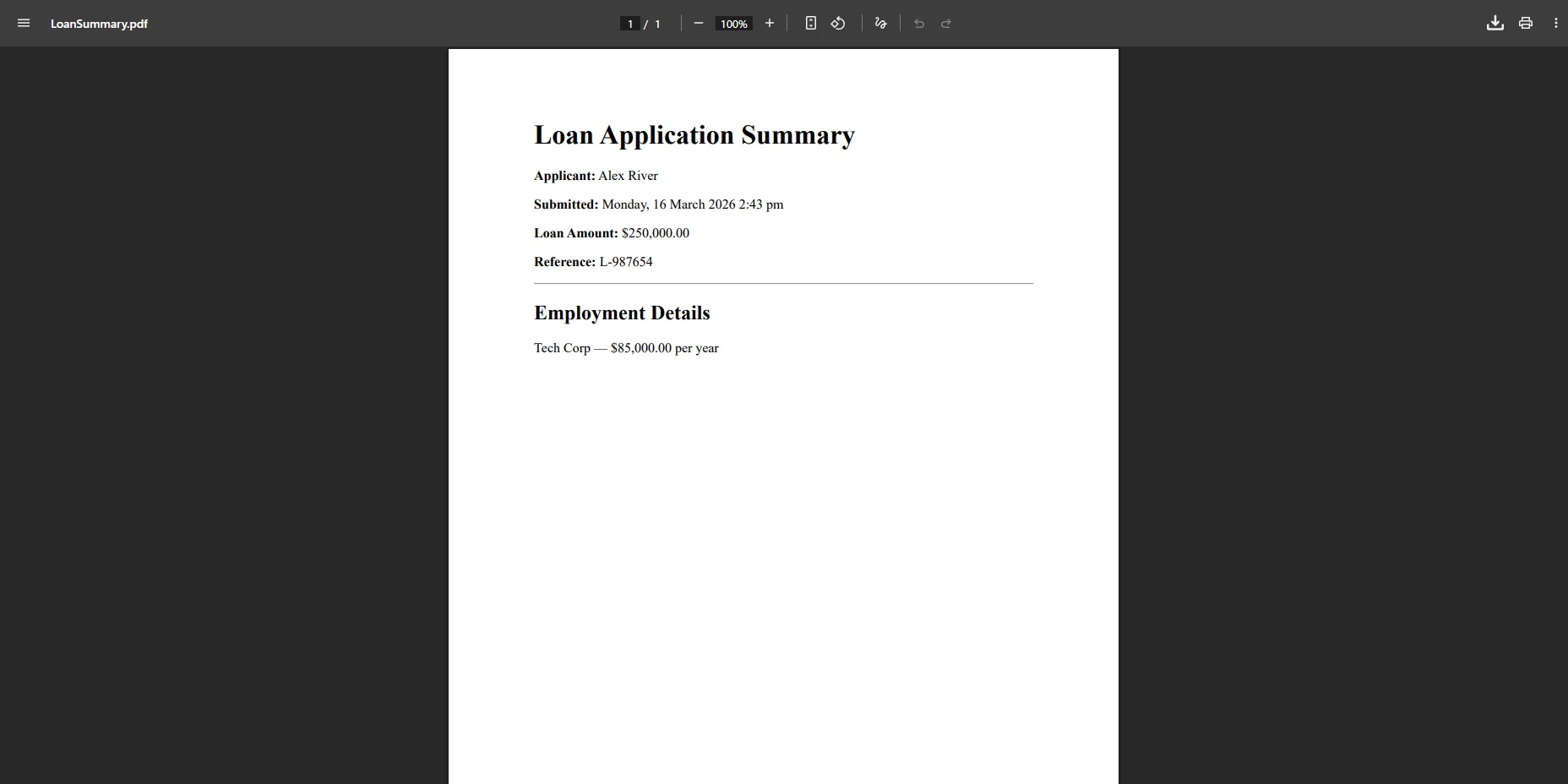 The easy-to-use API allows you to generate PDF documents and create PDFs from local files or a simple HTML string. For dynamic reports, the ChromePdfRenderer handles javascript execution perfectly. Note that in the UI, you might see a key in blue circle or a grey key in circle representing key features or license status.
Embed your company logo as a base64 data URI directly in the HTML template to ensure it renders correctly regardless of where the application is deployed, no dependency on a file path or CDN availability at render time.
4. Generated PDF Emailed to the Applicant and Stored for Review
The new PDF document exposes BinaryData for email attachment. You can also modify PDF files, edit PDFs, encrypt PDFs, or embed images. If you need to split PDFs, separate PDFs, or split PDFs into multiple PDFs, the library handles it. You can even merge it with an existing PDF or manage PDF forms.
using System.Net.Mail;
using System.IO;

var stream = new MemoryStream(summary.BinaryData);

var attachment = new Attachment(
    stream,
    $"Application-{submission.ReferenceNumber}.pdf",
    "application/pdf"
);

var message = new MailMessage
{
    From = new MailAddress("applications@yourcompany.com"),
    Subject = $"Your Application Confirmation – Ref {submission.ReferenceNumber}",
    Body = $"Dear {submission.FullName},\n\nThank you for submitting your application. Your submission summary is attached.",
};

message.To.Add(submission.Email);

message.Attachments.Add(attachment);

using var client = new SmtpClient("smtp.yourprovider.com");

await client.SendMailAsync(message);
using System.Net.Mail;
using System.IO;

var stream = new MemoryStream(summary.BinaryData);

var attachment = new Attachment(
    stream,
    $"Application-{submission.ReferenceNumber}.pdf",
    "application/pdf"
);

var message = new MailMessage
{
    From = new MailAddress("applications@yourcompany.com"),
    Subject = $"Your Application Confirmation – Ref {submission.ReferenceNumber}",
    Body = $"Dear {submission.FullName},\n\nThank you for submitting your application. Your submission summary is attached.",
};

message.To.Add(submission.Email);

message.Attachments.Add(attachment);

using var client = new SmtpClient("smtp.yourprovider.com");

await client.SendMailAsync(message);
Imports System.Net.Mail
Imports System.IO
Dim stream As New MemoryStream(summary.BinaryData)
Dim attachment As New Attachment(
stream,
$"Application-{submission.ReferenceNumber}.pdf",
"application/pdf"
)
Dim message As New MailMessage With {
.From = New MailAddress("applications@yourcompany.com"),
.Subject = $"Your Application Confirmation – Ref {submission.ReferenceNumber}",
.Body = $"Dear {submission.FullName}," & vbCrLf & vbCrLf & "Thank you for submitting your application. Your submission summary is attached."
}
message.To.Add(submission.Email)
message.Attachments.Add(attachment)
Using client As New SmtpClient("smtp.yourprovider.com")
Await client.SendMailAsync(message)
End Using
Imports System.Net.Mail
Imports System.IO

Dim stream As New MemoryStream(summary.BinaryData)

Dim attachment As New Attachment(
    stream,
    $"Application-{submission.ReferenceNumber}.pdf",
    "application/pdf"
)

Dim message As New MailMessage With {
    .From = New MailAddress("applications@yourcompany.com"),
    .Subject = $"Your Application Confirmation – Ref {submission.ReferenceNumber}",
    .Body = $"Dear {submission.FullName}," & vbCrLf & vbCrLf & "Thank you for submitting your application. Your submission summary is attached."
}

message.To.Add(submission.Email)

message.Attachments.Add(attachment)

Using client As New SmtpClient("smtp.yourprovider.com")
    Await client.SendMailAsync(message)
End Using
Example Sent Email with PDF Attached
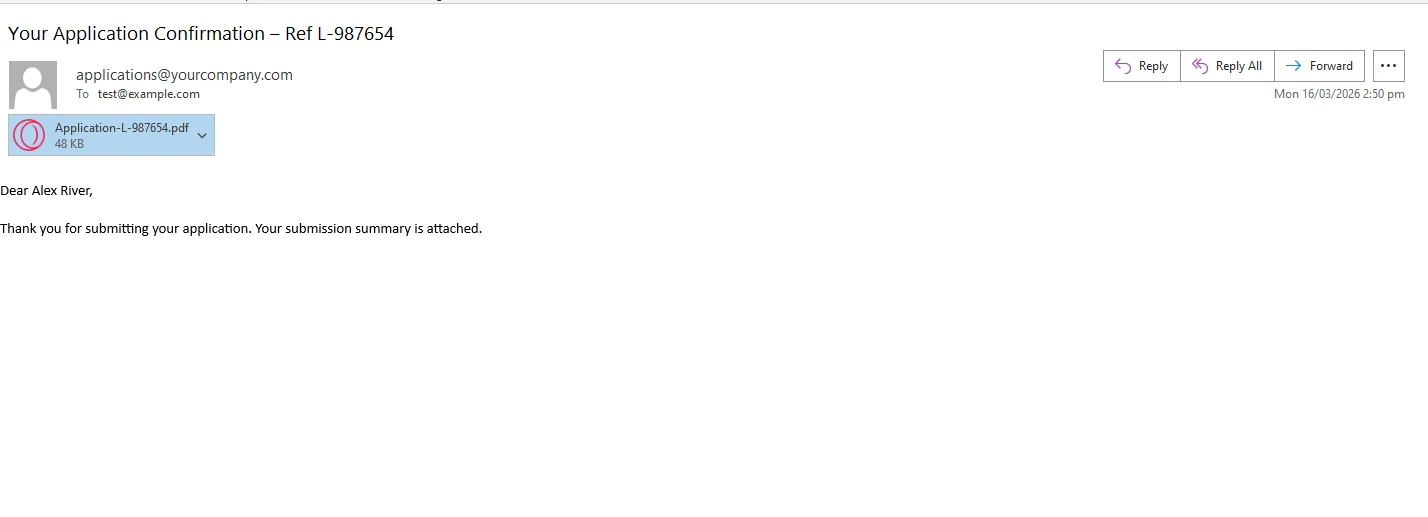 The same BinaryData byte array is written to blob storage - Azure Blob, AWS S3, or your document management system - alongside the submission record. Reviewers pull it from the queue and open a consistent, formatted document every time.
Real-World Benefits
Compliance and audit trail. The PDF is generated from the exact data the applicant submitted, timestamped at the moment of submission. It is immutable, a snapshot the compliance team can produce on demand without reconstructing it from a database that may have changed.
Customer confidence. Applicants receive a professional, branded document confirming what they submitted. For a mortgage borrower or insurance applicant, that confirmation carries real weight, it's something they can file alongside other policy or loan documents.
Internal efficiency. Reviewers work from a standardized PDF that presents every submission in the same structure and format. No more screenshots, no copy-pasted field values in Word, no formatting inconsistencies between submissions handled by different team members.
Template reuse. The HTML template is the only thing that controls the document's layout. When the form gains a new section, a co-applicant field, a revised disclosure block, the team updates one file and every future submission reflects it automatically.
No external services. IronPDF runs in-process as a NuGet package. There are no per-document API fees, no external rendering service to monitor, and no network dependency during the submission flow.
Closing
A submitted web form produces structured data. What it doesn't produce, without deliberate effort, is a document. That gap creates real friction: for applicants who have no confirmation they can keep, for reviewers who work from inconsistent exports, and for compliance teams who need something they can actually hand to an auditor.
Generating a PDF at the moment of submission closes that gap with one additional step in the handler. IronPDF brings the full spectrum of PDF capability to .NET, generating, reading, editing, and extracting from documents within the same library. If you want to test it against your own form workflow, start your free 30-day trial and validate the output before committing to anything.













