



Actualizado 21 de abril de 2026
Cómo Convertir TIFF A PDF en Java
Esta guía integral te llevará a través de los pasos sobre cómo convertir imágenes TIFF a PDF sin problemas en Java usando IronPDF.
Leer más

Este artículo demostrará cómo se leen los archivos PDF en Java usando la Biblioteca PDF para el proyecto de demostración Java, llamado Descripción general de la biblioteca IronPDF for Java, para leer texto y objetos de tipo metadatos en archivos PDF junto con la creación de documentos encriptados.
PdfDocument.fromFile.Para agilizar el proceso de lectura de archivos PDF en Java, los desarrolladores a menudo recurren a bibliotecas de terceros que ofrecen soluciones integrales y eficientes. Una biblioteca destacada de este tipo es IronPDF for Java.
IronPDF está diseñado para ser amigable para desarrolladores, proporcionando una API sencilla que abstrae las complejidades de la manipulación de páginas PDF. Con IronPDF, los desarrolladores de Java pueden integrar sin problemas capacidades de lectura de PDF en sus proyectos, reduciendo el tiempo y el esfuerzo de desarrollo. Esta biblioteca admite una amplia gama de funcionalidades PDF, lo que la convierte en una opción versátil para varios casos de uso.
Las características principales incluyen la capacidad de crear un archivo PDF a partir de diferentes formatos, incluidos documentos HTML, JavaScript, CSS, XML y varios formatos de imagen. Además, IronPDF ofrece la capacidad de agregar encabezados y pies de página a los PDF, crear tablas dentro de documentos PDF, y mucho más.
Para configurar IronPDF, asegúrese de tener un compilador Java confiable. Este artículo recomienda utilizar IntelliJ IDEA.
Inicie IntelliJ IDEA e inicie un nuevo proyecto Maven.
Una vez establecido el proyecto, acceda al archivo pom.xml. Inserte las siguientes dependencias de Maven para integrar IronPDF:
<dependency>
    <groupId>com.ironsoftware</groupId>
    <artifactId>ironpdf</artifactId>
    <version>YOUR_VERSION_HERE</version>
</dependency>Después de agregar estas dependencias, haga clic en el pequeño botón que aparece en el lado derecho de la pantalla para instalarlas.
Exploremos un ejemplo de código Java simple que demuestra cómo usar IronPDF para leer el contenido de un archivo PDF. En este ejemplo, centrémonos en el método de extracción de texto de un documento PDF.
// Importing necessary classes from IronPDF and Java libraries
import com.ironsoftware.ironpdf.*;

import java.io.IOException;
import java.nio.file.Paths;

// Class definition
class Test {
    public static void main(String[] args) throws IOException {
        // Setting the license key for IronPDF (replace "License-Key" with a valid key)
        License.setLicenseKey("License-Key");

        // Loading a PDF document from the file "html_file_saved.pdf"
        PdfDocument pdf = PdfDocument.fromFile(Paths.get("html_file_saved.pdf"));

        // Extracting all text content from the PDF document
        String text = pdf.extractAllText();

        // Printing the extracted text to the console
        System.out.println(text);
    }
}Este código Java utiliza la biblioteca IronPDF para extraer texto de un archivo PDF especificado. Importará la biblioteca Java y establecerá la clave de licencia, un requisito previo para usar la biblioteca. Luego, el código carga un documento PDF del archivo "html_file_saved.pdf" y extrae todo su contenido de texto del archivo como un búfer de cadena interno. El texto extraído se almacena en una variable y posteriormente se imprime en la consola.
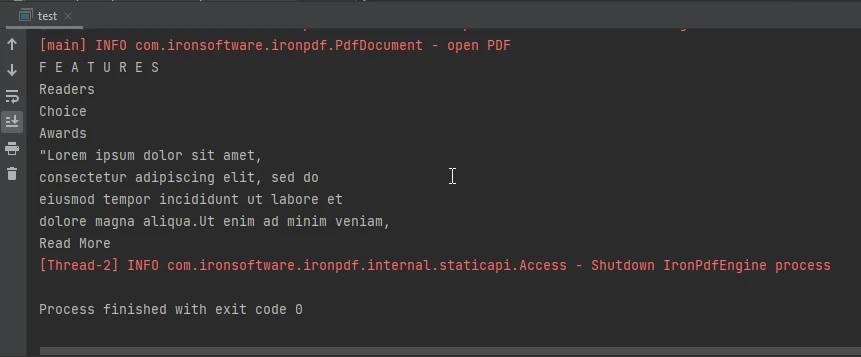 La salida de la consola
Ampliando sus capacidades más allá de la extracción de texto, IronPDF extiende el soporte a la extracción de metadatos de archivos PDF. Para ilustrar esta funcionalidad, adentrémonos en un ejemplo de código Java que muestra el proceso de recuperación de metadatos de un documento PDF.
// Importing necessary classes from IronPDF and Java libraries
import com.ironsoftware.ironpdf.*;
import com.ironsoftware.ironpdf.metadata.MetadataManager;

import java.io.IOException;
import java.nio.file.Paths;

// Class definition
class Test {
    public static void main(String[] args) throws IOException {
        // Setting the license key for IronPDF (replace "License-Key" with a valid key)
        License.setLicenseKey("License-Key");

        // Loading a PDF document from the file "html_file_saved.pdf"
        PdfDocument document = PdfDocument.fromFile(Paths.get("html_file_saved.pdf"));

        // Creating a MetadataManager object to access document metadata
        MetadataManager metadata = document.getMetadata();

        // Extracting the author information from the document metadata
        String author = metadata.getAuthor();

        // Printing the extracted author information to the console
        System.out.println(author);
    }
}Este código Java utiliza la biblioteca IronPDF para extraer metadatos, específicamente la información del autor, de un documento PDF. Comienza cargando un documento PDF desde el archivo "html_file_saved.pdf". El código recupera los metadatos del documento usando el documentación de la clase MetadataManager, obteniendo específicamente la información del autor. Los detalles del autor extraídos se almacenan en una variable y se imprimen en la consola.
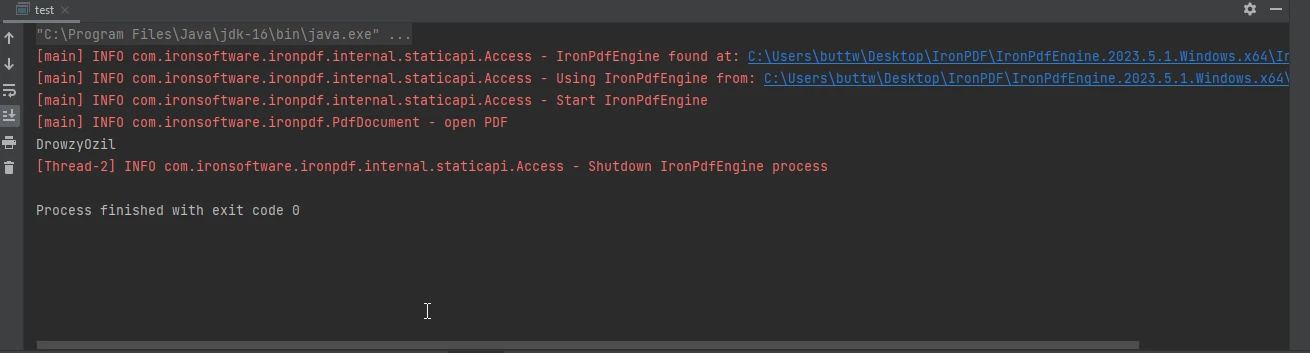 La salida de la consola
En conclusión, leer un documento PDF existente en un programa Java es una habilidad valiosa que abre un mundo de posibilidades para los desarrolladores. Ya sea extrayendo texto, imágenes u otros datos, la capacidad de manipular PDFs de manera programática es un aspecto crucial de muchas aplicaciones. IronPDF for Java sirve como una solución robusta y eficiente para desarrolladores que buscan integrar capacidades de lectura de PDF en sus proyectos Java.
Siguiendo los pasos de instalación y explorando los ejemplos de código proporcionados, los desarrolladores pueden aprovechar rápidamente el poder de IronPDF para crear nuevos archivos y manejar tareas relacionadas con PDF con facilidad. Además de esto, también se pueden explorar más sus capacidades en la creación de documentos encriptados.
El portal de productos IronPDF ofrece un soporte extenso para sus desarrolladores. Para saber más sobre cómo funciona IronPDF for Java, visite estas páginas de documentación completas. Además, IronPDF ofrece una página de oferta de licencia de prueba gratuita, que es una gran oportunidad para explorar IronPDF y sus características.

Curtis Chau tiene una licenciatura en Ciencias de la Computación (Carleton University) y se especializa en el desarrollo front-end con experiencia en Node.js, TypeScript, JavaScript y React. Apasionado por crear interfaces de usuario intuitivas y estéticamente agradables, disfruta trabajando con frameworks modernos y creando manuales bien estructurados y visualmente atractivos.



IronPDF es parte de IRONSUITE
10 productos API .NET para tus documentos de oficina











Cuando necesitas que tu PDF se parezca al HTML, rápido.

