La classe HttpClient, faisant partie du framework .NET, fournit des méthodes pour envoyer des requêtes HTTP et recevoir des réponses HTTP d'une ressource identifiée par un URI. Elle simplifie la réalisation d'appels de requêtes HTTP, que vous effectuiez des requêtes GET, POST, PUT ou DELETE. Ce guide couvrira l'utilisation essentielle de HttpClient dans des scénarios pratiques et introduira la bibliothèque IronPDF.
Créer une nouvelle instance de HttpClient
La classe HttpClient est utilisée pour envoyer des requêtes HTTP. Vous pouvez créer une nouvelle instance de celle-ci comme suit :
using System;
using System.Net.Http;
using System.Threading.Tasks;

class Program
{
    static async Task Main(string[] args)
    {
        using var client = new HttpClient(); // Create a new instance of HttpClient

        // Send a GET request to the specified URI and store the HTTP response
        var response = await client.GetAsync("https://api.weatherapi.com/v1/current.json?key=YOUR_API_KEY&q=London");

        // Retrieve the response content as a string
        var responseBody = await response.Content.ReadAsStringAsync();

        // Print the response content to the console
        Console.WriteLine(responseBody);
    }
}
using System;
using System.Net.Http;
using System.Threading.Tasks;

class Program
{
    static async Task Main(string[] args)
    {
        using var client = new HttpClient(); // Create a new instance of HttpClient

        // Send a GET request to the specified URI and store the HTTP response
        var response = await client.GetAsync("https://api.weatherapi.com/v1/current.json?key=YOUR_API_KEY&q=London");

        // Retrieve the response content as a string
        var responseBody = await response.Content.ReadAsStringAsync();

        // Print the response content to the console
        Console.WriteLine(responseBody);
    }
}
Imports System
Imports System.Net.Http
Imports System.Threading.Tasks
Module Program
Async Function Main(args As String()) As Task
Using client As New HttpClient() ' Create a new instance of HttpClient
' Send a GET request to the specified URI and store the HTTP response
Dim response = Await client.GetAsync("https://api.weatherapi.com/v1/current.json?key=YOUR_API_KEY&q=London")
' Retrieve the response content as a string
Dim responseBody = Await response.Content.ReadAsStringAsync()
' Print the response content to the console
Console.WriteLine(responseBody)
End Using
End Function
End Module
Imports System
Imports System.Net.Http
Imports System.Threading.Tasks

Module Program
    Async Function Main(args As String()) As Task
        Using client As New HttpClient() ' Create a new instance of HttpClient

            ' Send a GET request to the specified URI and store the HTTP response
            Dim response = Await client.GetAsync("https://api.weatherapi.com/v1/current.json?key=YOUR_API_KEY&q=London")

            ' Retrieve the response content as a string
            Dim responseBody = Await response.Content.ReadAsStringAsync()

            ' Print the response content to the console
            Console.WriteLine(responseBody)
        End Using
    End Function
End Module
Dans cet exemple :
- Une nouvelle instance de HttpClient est créée en utilisant
var client = new HttpClient().
- Une requête HTTP GET est envoyée en utilisant la méthode
GetAsync.
- Le
HttpResponseMessage est stocké dans var response.
- Le contenu de la réponse est récupéré en utilisant
response.Content.ReadAsStringAsync().
Envoi de requêtes HTTP
Requête HTTP GET
Pour effectuer une requête HTTP GET et gérer la réponse :
using System;
using System.Net.Http;
using System.Threading.Tasks;

class Example
{
    static async Task Main(string[] args)
    {
        var client = new HttpClient();
        var response = await client.GetAsync("https://api.weatherapi.com/v1/current.json?key=YOUR_API_KEY&q=Paris");

        // Check if the request was successful
        if (response.IsSuccessStatusCode)
        {
            var responseBody = await response.Content.ReadAsStringAsync();
            Console.WriteLine(responseBody);
        }
    }
}
using System;
using System.Net.Http;
using System.Threading.Tasks;

class Example
{
    static async Task Main(string[] args)
    {
        var client = new HttpClient();
        var response = await client.GetAsync("https://api.weatherapi.com/v1/current.json?key=YOUR_API_KEY&q=Paris");

        // Check if the request was successful
        if (response.IsSuccessStatusCode)
        {
            var responseBody = await response.Content.ReadAsStringAsync();
            Console.WriteLine(responseBody);
        }
    }
}
Imports System
Imports System.Net.Http
Imports System.Threading.Tasks
Friend Class Example
Shared Async Function Main(ByVal args() As String) As Task
Dim client = New HttpClient()
Dim response = Await client.GetAsync("https://api.weatherapi.com/v1/current.json?key=YOUR_API_KEY&q=Paris")
' Check if the request was successful
If response.IsSuccessStatusCode Then
Dim responseBody = Await response.Content.ReadAsStringAsync()
Console.WriteLine(responseBody)
End If
End Function
End Class
Imports System
Imports System.Net.Http
Imports System.Threading.Tasks

Friend Class Example
	Shared Async Function Main(ByVal args() As String) As Task
		Dim client = New HttpClient()
		Dim response = Await client.GetAsync("https://api.weatherapi.com/v1/current.json?key=YOUR_API_KEY&q=Paris")

		' Check if the request was successful
		If response.IsSuccessStatusCode Then
			Dim responseBody = Await response.Content.ReadAsStringAsync()
			Console.WriteLine(responseBody)
		End If
	End Function
End Class
- La propriété
IsSuccessStatusCode garantit que la requête a réussi.
- Le corps de réponse est lu de manière asynchrone avec
ReadAsStringAsync().
Requête HTTP POST
L'envoi d'une requête POST implique l'ajout d'un corps de requête :
using System;
using System.Net.Http;
using System.Text;
using System.Threading.Tasks;

class Example
{
    static async Task Main(string[] args)
    {
        var client = new HttpClient();
        var requestBody = new StringContent("{ \"location\": \"New York\" }", Encoding.UTF8, "application/json");

        // Send the POST request with the specified body
        var response = await client.PostAsync("https://api.weatherapi.com/v1/forecast.json?key=YOUR_API_KEY", requestBody);

        // Check if the request was successful
        if (response.IsSuccessStatusCode)
        {
            var responseBody = await response.Content.ReadAsStringAsync();
            Console.WriteLine(responseBody);
        }
    }
}
using System;
using System.Net.Http;
using System.Text;
using System.Threading.Tasks;

class Example
{
    static async Task Main(string[] args)
    {
        var client = new HttpClient();
        var requestBody = new StringContent("{ \"location\": \"New York\" }", Encoding.UTF8, "application/json");

        // Send the POST request with the specified body
        var response = await client.PostAsync("https://api.weatherapi.com/v1/forecast.json?key=YOUR_API_KEY", requestBody);

        // Check if the request was successful
        if (response.IsSuccessStatusCode)
        {
            var responseBody = await response.Content.ReadAsStringAsync();
            Console.WriteLine(responseBody);
        }
    }
}
Imports System
Imports System.Net.Http
Imports System.Text
Imports System.Threading.Tasks
Friend Class Example
Shared Async Function Main(ByVal args() As String) As Task
Dim client = New HttpClient()
Dim requestBody = New StringContent("{ ""location"": ""New York"" }", Encoding.UTF8, "application/json")
' Send the POST request with the specified body
Dim response = Await client.PostAsync("https://api.weatherapi.com/v1/forecast.json?key=YOUR_API_KEY", requestBody)
' Check if the request was successful
If response.IsSuccessStatusCode Then
Dim responseBody = Await response.Content.ReadAsStringAsync()
Console.WriteLine(responseBody)
End If
End Function
End Class
Imports System
Imports System.Net.Http
Imports System.Text
Imports System.Threading.Tasks

Friend Class Example
	Shared Async Function Main(ByVal args() As String) As Task
		Dim client = New HttpClient()
		Dim requestBody = New StringContent("{ ""location"": ""New York"" }", Encoding.UTF8, "application/json")

		' Send the POST request with the specified body
		Dim response = Await client.PostAsync("https://api.weatherapi.com/v1/forecast.json?key=YOUR_API_KEY", requestBody)

		' Check if the request was successful
		If response.IsSuccessStatusCode Then
			Dim responseBody = Await response.Content.ReadAsStringAsync()
			Console.WriteLine(responseBody)
		End If
	End Function
End Class
PostAsync envoie la requête avec le corps spécifié (requestBody).- Le type de contenu doit être spécifié (application/json).
Requête HTTP PUT
Une requête HTTP PUT met à jour les ressources :
using System;
using System.Net.Http;
using System.Text;
using System.Threading.Tasks;

class Example
{
    static async Task Main(string[] args)
    {
        var client = new HttpClient();
        var requestBody = new StringContent("{ \"location\": \"Tokyo\", \"days\": 3 }", Encoding.UTF8, "application/json");

        // Send a PUT request to update the resource
        var response = await client.PutAsync("https://api.weatherapi.com/v1/forecast.json?key=YOUR_API_KEY", requestBody);

        // Check if the request was successful
        if (response.IsSuccessStatusCode)
        {
            var responseBody = await response.Content.ReadAsStringAsync();
            Console.WriteLine(responseBody);
        }
    }
}
using System;
using System.Net.Http;
using System.Text;
using System.Threading.Tasks;

class Example
{
    static async Task Main(string[] args)
    {
        var client = new HttpClient();
        var requestBody = new StringContent("{ \"location\": \"Tokyo\", \"days\": 3 }", Encoding.UTF8, "application/json");

        // Send a PUT request to update the resource
        var response = await client.PutAsync("https://api.weatherapi.com/v1/forecast.json?key=YOUR_API_KEY", requestBody);

        // Check if the request was successful
        if (response.IsSuccessStatusCode)
        {
            var responseBody = await response.Content.ReadAsStringAsync();
            Console.WriteLine(responseBody);
        }
    }
}
Imports System
Imports System.Net.Http
Imports System.Text
Imports System.Threading.Tasks
Friend Class Example
Shared Async Function Main(ByVal args() As String) As Task
Dim client = New HttpClient()
Dim requestBody = New StringContent("{ ""location"": ""Tokyo"", ""days"": 3 }", Encoding.UTF8, "application/json")
' Send a PUT request to update the resource
Dim response = Await client.PutAsync("https://api.weatherapi.com/v1/forecast.json?key=YOUR_API_KEY", requestBody)
' Check if the request was successful
If response.IsSuccessStatusCode Then
Dim responseBody = Await response.Content.ReadAsStringAsync()
Console.WriteLine(responseBody)
End If
End Function
End Class
Imports System
Imports System.Net.Http
Imports System.Text
Imports System.Threading.Tasks

Friend Class Example
	Shared Async Function Main(ByVal args() As String) As Task
		Dim client = New HttpClient()
		Dim requestBody = New StringContent("{ ""location"": ""Tokyo"", ""days"": 3 }", Encoding.UTF8, "application/json")

		' Send a PUT request to update the resource
		Dim response = Await client.PutAsync("https://api.weatherapi.com/v1/forecast.json?key=YOUR_API_KEY", requestBody)

		' Check if the request was successful
		If response.IsSuccessStatusCode Then
			Dim responseBody = Await response.Content.ReadAsStringAsync()
			Console.WriteLine(responseBody)
		End If
	End Function
End Class
PutAsync envoie une requête PUT pour mettre à jour la ressource à l'URI spécifié.- Le corps de la requête contient généralement les données à mettre à jour.
Requête HTTP DELETE
Pour envoyer une requête HTTP DELETE :
using System;
using System.Net.Http;
using System.Threading.Tasks;

class Example
{
    static async Task Main(string[] args)
    {
        var client = new HttpClient();

        // Send a DELETE request to remove the resource
        var response = await client.DeleteAsync("https://api.weatherapi.com/v1/locations/1?key=YOUR_API_KEY");

        // Check if the request was successful
        if (response.IsSuccessStatusCode)
        {
            Console.WriteLine("Resource deleted successfully");
        }
    }
}
using System;
using System.Net.Http;
using System.Threading.Tasks;

class Example
{
    static async Task Main(string[] args)
    {
        var client = new HttpClient();

        // Send a DELETE request to remove the resource
        var response = await client.DeleteAsync("https://api.weatherapi.com/v1/locations/1?key=YOUR_API_KEY");

        // Check if the request was successful
        if (response.IsSuccessStatusCode)
        {
            Console.WriteLine("Resource deleted successfully");
        }
    }
}
Imports System
Imports System.Net.Http
Imports System.Threading.Tasks
Friend Class Example
Shared Async Function Main(ByVal args() As String) As Task
Dim client = New HttpClient()
' Send a DELETE request to remove the resource
Dim response = Await client.DeleteAsync("https://api.weatherapi.com/v1/locations/1?key=YOUR_API_KEY")
' Check if the request was successful
If response.IsSuccessStatusCode Then
Console.WriteLine("Resource deleted successfully")
End If
End Function
End Class
Imports System
Imports System.Net.Http
Imports System.Threading.Tasks

Friend Class Example
	Shared Async Function Main(ByVal args() As String) As Task
		Dim client = New HttpClient()

		' Send a DELETE request to remove the resource
		Dim response = Await client.DeleteAsync("https://api.weatherapi.com/v1/locations/1?key=YOUR_API_KEY")

		' Check if the request was successful
		If response.IsSuccessStatusCode Then
			Console.WriteLine("Resource deleted successfully")
		End If
	End Function
End Class
DeleteAsync envoie une requête DELETE pour supprimer la ressource.
Gestion des réponses HTTP
Chaque requête HTTP retourne un objet HttpResponseMessage, qui comprend le corps de la réponse, les en-têtes et le code de statut. Par exemple :
using System;
using System.Net.Http;
using System.Threading.Tasks;

class Example
{
    static async Task Main(string[] args)
    {
        var client = new HttpClient();
        var response = await client.GetAsync("https://api.weatherapi.com/v1/current.json?key=YOUR_API_KEY&q=Sydney");

        // Check if the request was successful
        if (response.IsSuccessStatusCode)
        {
            var responseBody = await response.Content.ReadAsStringAsync();
            Console.WriteLine(responseBody);
        }
        else
        {
            Console.WriteLine($"Error: {response.StatusCode}");
        }
    }
}
using System;
using System.Net.Http;
using System.Threading.Tasks;

class Example
{
    static async Task Main(string[] args)
    {
        var client = new HttpClient();
        var response = await client.GetAsync("https://api.weatherapi.com/v1/current.json?key=YOUR_API_KEY&q=Sydney");

        // Check if the request was successful
        if (response.IsSuccessStatusCode)
        {
            var responseBody = await response.Content.ReadAsStringAsync();
            Console.WriteLine(responseBody);
        }
        else
        {
            Console.WriteLine($"Error: {response.StatusCode}");
        }
    }
}
Imports System
Imports System.Net.Http
Imports System.Threading.Tasks
Friend Class Example
Shared Async Function Main(ByVal args() As String) As Task
Dim client = New HttpClient()
Dim response = Await client.GetAsync("https://api.weatherapi.com/v1/current.json?key=YOUR_API_KEY&q=Sydney")
' Check if the request was successful
If response.IsSuccessStatusCode Then
Dim responseBody = Await response.Content.ReadAsStringAsync()
Console.WriteLine(responseBody)
Else
Console.WriteLine($"Error: {response.StatusCode}")
End If
End Function
End Class
Imports System
Imports System.Net.Http
Imports System.Threading.Tasks

Friend Class Example
	Shared Async Function Main(ByVal args() As String) As Task
		Dim client = New HttpClient()
		Dim response = Await client.GetAsync("https://api.weatherapi.com/v1/current.json?key=YOUR_API_KEY&q=Sydney")

		' Check if the request was successful
		If response.IsSuccessStatusCode Then
			Dim responseBody = Await response.Content.ReadAsStringAsync()
			Console.WriteLine(responseBody)
		Else
			Console.WriteLine($"Error: {response.StatusCode}")
		End If
	End Function
End Class
Response.StatusCode fournit le code de statut (par exemple, 200, 404).response.Content contient le corps de réponse, qui peut être lu de manière asynchrone en utilisant ReadAsStringAsync().
Utilisation efficace de HttpClient
Les instances de HttpClient doivent être réutilisées pour exploiter le pool de connexions et éviter d'épuiser les ressources système. Un schéma typique est de créer une seule instance de HttpClient pour la durée de vie de votre application ou service. Cela peut être fait en utilisant une variable statique ou l'injection de dépendances pour les applications web.
Exemple de HttpClient statique
public static class HttpClientProvider
{
    private static readonly HttpClient client = new HttpClient();
    public static HttpClient Client => client;
}
public static class HttpClientProvider
{
    private static readonly HttpClient client = new HttpClient();
    public static HttpClient Client => client;
}
Public Module HttpClientProvider
'INSTANT VB NOTE: The field client was renamed since Visual Basic does not allow fields to have the same name as other class members:
Private ReadOnly client_Conflict As New HttpClient()
Public ReadOnly Property Client() As HttpClient
Get
Return client_Conflict
End Get
End Property
End Module
Public Module HttpClientProvider
'INSTANT VB NOTE: The field client was renamed since Visual Basic does not allow fields to have the same name as other class members:
	Private ReadOnly client_Conflict As New HttpClient()
	Public ReadOnly Property Client() As HttpClient
		Get
			Return client_Conflict
		End Get
	End Property
End Module
L'instance HttpClient est réutilisée à travers l'application, réduisant le surcoût de création de nouvelles connexions HTTP.
Utilisation de HttpClient avec l'injection de dépendances
Dans une application web, l'approche recommandée est d'enregistrer HttpClient comme service singleton :
public void ConfigureServices(IServiceCollection services)
{
    services.AddHttpClient();
}
public void ConfigureServices(IServiceCollection services)
{
    services.AddHttpClient();
}
Public Sub ConfigureServices(ByVal services As IServiceCollection)
services.AddHttpClient()
End Sub
Public Sub ConfigureServices(ByVal services As IServiceCollection)
	services.AddHttpClient()
End Sub
Vous pouvez également créer des clients nommés et des clients typés pour des configurations plus spécifiques.
Pooling des connexions et paramètres de proxy
En réutilisant les instances de HttpClient, vous bénéficiez du pooling des connexions, ce qui améliore les performances de requêtes multiples vers le même serveur. Vous pouvez aussi configurer les paramètres proxy en utilisant la classe HttpClientHandler :
using System.Net;
using System.Net.Http;

var handler = new HttpClientHandler
{
    Proxy = new WebProxy("http://proxyserver:port"), // Set the proxy server
    UseProxy = true
};

var client = new HttpClient(handler);
using System.Net;
using System.Net.Http;

var handler = new HttpClientHandler
{
    Proxy = new WebProxy("http://proxyserver:port"), // Set the proxy server
    UseProxy = true
};

var client = new HttpClient(handler);
Imports System.Net
Imports System.Net.Http
Private handler = New HttpClientHandler With {
.Proxy = New WebProxy("http://proxyserver:port"),
.UseProxy = True
}
Private client = New HttpClient(handler)
Imports System.Net
Imports System.Net.Http

Private handler = New HttpClientHandler With {
	.Proxy = New WebProxy("http://proxyserver:port"),
	.UseProxy = True
}

Private client = New HttpClient(handler)
Gestion des erreurs et codes de statut
Pour gérer les différents codes de statut HTTP, vérifiez la propriété HttpResponseMessage.StatusCode :
using System;
using System.Net;
using System.Net.Http;
using System.Threading.Tasks;

async Task MakeRequestAsync()
{
    try
    {
        using var client = new HttpClient();
        var response = await client.GetAsync("https://api.weatherapi.com/v1/current.json?key=YOUR_API_KEY&q=Berlin");

        // Handle the response based on the status code
        switch (response.StatusCode)
        {
            case HttpStatusCode.OK:
                Console.WriteLine("Success");
                var content = await response.Content.ReadAsStringAsync();
                Console.WriteLine($"Response content: {content}");
                break;
            case HttpStatusCode.NotFound:
                Console.WriteLine("Resource not found");
                break;
            case HttpStatusCode.Unauthorized:
                Console.WriteLine("Unauthorized access");
                break;
            case HttpStatusCode.InternalServerError:
                Console.WriteLine("Server error occurred");
                break;
            default:
                Console.WriteLine($"Unexpected status code: {response.StatusCode}");
                break;
        }
    }
    catch (HttpRequestException e)
    {
        Console.WriteLine($"Request error: {e.Message}");
    }
    catch (Exception e)
    {
        Console.WriteLine($"An error occurred: {e.Message}");
    }
}
using System;
using System.Net;
using System.Net.Http;
using System.Threading.Tasks;

async Task MakeRequestAsync()
{
    try
    {
        using var client = new HttpClient();
        var response = await client.GetAsync("https://api.weatherapi.com/v1/current.json?key=YOUR_API_KEY&q=Berlin");

        // Handle the response based on the status code
        switch (response.StatusCode)
        {
            case HttpStatusCode.OK:
                Console.WriteLine("Success");
                var content = await response.Content.ReadAsStringAsync();
                Console.WriteLine($"Response content: {content}");
                break;
            case HttpStatusCode.NotFound:
                Console.WriteLine("Resource not found");
                break;
            case HttpStatusCode.Unauthorized:
                Console.WriteLine("Unauthorized access");
                break;
            case HttpStatusCode.InternalServerError:
                Console.WriteLine("Server error occurred");
                break;
            default:
                Console.WriteLine($"Unexpected status code: {response.StatusCode}");
                break;
        }
    }
    catch (HttpRequestException e)
    {
        Console.WriteLine($"Request error: {e.Message}");
    }
    catch (Exception e)
    {
        Console.WriteLine($"An error occurred: {e.Message}");
    }
}
Imports System
Imports System.Net
Imports System.Net.Http
Imports System.Threading.Tasks
Async Function MakeRequestAsync() As Task
Try
Dim client = New HttpClient()
Dim response = Await client.GetAsync("https://api.weatherapi.com/v1/current.json?key=YOUR_API_KEY&q=Berlin")
' Handle the response based on the status code
Select Case response.StatusCode
Case HttpStatusCode.OK
Console.WriteLine("Success")
Dim content = Await response.Content.ReadAsStringAsync()
Console.WriteLine($"Response content: {content}")
Case HttpStatusCode.NotFound
Console.WriteLine("Resource not found")
Case HttpStatusCode.Unauthorized
Console.WriteLine("Unauthorized access")
Case HttpStatusCode.InternalServerError
Console.WriteLine("Server error occurred")
Case Else
Console.WriteLine($"Unexpected status code: {response.StatusCode}")
End Select
Catch e As HttpRequestException
Console.WriteLine($"Request error: {e.Message}")
Catch e As Exception
Console.WriteLine($"An error occurred: {e.Message}")
End Try
End Function
Imports System
Imports System.Net
Imports System.Net.Http
Imports System.Threading.Tasks

Async Function MakeRequestAsync() As Task
	Try
		Dim client = New HttpClient()
		Dim response = Await client.GetAsync("https://api.weatherapi.com/v1/current.json?key=YOUR_API_KEY&q=Berlin")

		' Handle the response based on the status code
		Select Case response.StatusCode
			Case HttpStatusCode.OK
				Console.WriteLine("Success")
				Dim content = Await response.Content.ReadAsStringAsync()
				Console.WriteLine($"Response content: {content}")
			Case HttpStatusCode.NotFound
				Console.WriteLine("Resource not found")
			Case HttpStatusCode.Unauthorized
				Console.WriteLine("Unauthorized access")
			Case HttpStatusCode.InternalServerError
				Console.WriteLine("Server error occurred")
			Case Else
				Console.WriteLine($"Unexpected status code: {response.StatusCode}")
		End Select
	Catch e As HttpRequestException
		Console.WriteLine($"Request error: {e.Message}")
	Catch e As Exception
		Console.WriteLine($"An error occurred: {e.Message}")
	End Try
End Function
Gestion du corps de réponse JSON
Vous travaillez souvent avec des réponses JSON. Vous pouvez désérialiser le contenu de la réponse dans un objet fortement typé :
using System;
using System.Net.Http;
using System.Text.Json;
using System.Threading.Tasks;

class Example
{
    static async Task Main(string[] args)
    {
        var client = new HttpClient();
        var response = await client.GetAsync("https://api.weatherapi.com/v1/current.json?key=YOUR_API_KEY&q=London");
        var jsonString = await response.Content.ReadAsStringAsync();

        // Deserialize the JSON response into a WeatherResponse object
        var weatherResponse = JsonSerializer.Deserialize<WeatherResponse>(jsonString);

        Console.WriteLine($"Location: {weatherResponse.Location}, Temperature: {weatherResponse.Temperature}");
    }
}

public class WeatherResponse
{
    public string Location { get; set; }
    public double Temperature { get; set; }
}
using System;
using System.Net.Http;
using System.Text.Json;
using System.Threading.Tasks;

class Example
{
    static async Task Main(string[] args)
    {
        var client = new HttpClient();
        var response = await client.GetAsync("https://api.weatherapi.com/v1/current.json?key=YOUR_API_KEY&q=London");
        var jsonString = await response.Content.ReadAsStringAsync();

        // Deserialize the JSON response into a WeatherResponse object
        var weatherResponse = JsonSerializer.Deserialize<WeatherResponse>(jsonString);

        Console.WriteLine($"Location: {weatherResponse.Location}, Temperature: {weatherResponse.Temperature}");
    }
}

public class WeatherResponse
{
    public string Location { get; set; }
    public double Temperature { get; set; }
}
Imports System
Imports System.Net.Http
Imports System.Text.Json
Imports System.Threading.Tasks
Module Example
Async Function Main(ByVal args As String()) As Task
Dim client = New HttpClient()
Dim response = Await client.GetAsync("https://api.weatherapi.com/v1/current.json?key=YOUR_API_KEY&q=London")
Dim jsonString = Await response.Content.ReadAsStringAsync()
' Deserialize the JSON response into a WeatherResponse object
Dim weatherResponse = JsonSerializer.Deserialize(Of WeatherResponse)(jsonString)
Console.WriteLine($"Location: {weatherResponse.Location}, Temperature: {weatherResponse.Temperature}")
End Function
End Module
Public Class WeatherResponse
Public Property Location As String
Public Property Temperature As Double
End Class
Imports System
Imports System.Net.Http
Imports System.Text.Json
Imports System.Threading.Tasks

Module Example
    Async Function Main(ByVal args As String()) As Task
        Dim client = New HttpClient()
        Dim response = Await client.GetAsync("https://api.weatherapi.com/v1/current.json?key=YOUR_API_KEY&q=London")
        Dim jsonString = Await response.Content.ReadAsStringAsync()

        ' Deserialize the JSON response into a WeatherResponse object
        Dim weatherResponse = JsonSerializer.Deserialize(Of WeatherResponse)(jsonString)

        Console.WriteLine($"Location: {weatherResponse.Location}, Temperature: {weatherResponse.Temperature}")
    End Function
End Module

Public Class WeatherResponse
    Public Property Location As String
    Public Property Temperature As Double
End Class
La méthode ReadAsStringAsync() simplifie la lecture de contenu JSON directement dans les objets C#.
Présentation d'IronPDF
IronPDF est une bibliothèque PDF .NET conçue pour créer, manipuler et convertir des fichiers PDF en C#. Elle est largement utilisée pour générer des PDF de haute qualité à partir de HTML, CSS, JavaScript et d'autres formats. IronPDF offre des fonctionnalités telles que la conversion de HTML en PDF, la fusion PDF, l'ajout de filigranes et même des opérations avancées comme les signatures digitales et le cryptage de PDF. Elle est compatible avec diverses plateformes, y compris Windows, Linux et macOS, ce qui en fait une solution polyvalente pour le développement multiplateforme.
Utilisation de IronPDF avec HttpClient
Combiner IronPDF avec la classe HttpClient en C# est un moyen efficace de générer et manipuler des documents PDF à partir de ressources web dynamiquement. Par exemple, vous pouvez récupérer du contenu HTML à partir d'une URL via HttpClient et ensuite convertir ce HTML en document PDF à l'aide d'IronPDF. C'est utile lors de la génération de rapports, de factures ou de tout document de manière dynamique basé sur un contenu web en direct.
using System;
using System.Net.Http;
using System.Text.Json;
using System.Threading.Tasks;
using IronPdf;

class Program
{
    static async Task Main(string[] args)
    {
        License.LicenseKey = "YOUR_LICENSE_KEY"; // Set your IronPDF license key
        using var client = new HttpClient();
        var response = await client.GetAsync("https://api.weatherapi.com/v1/forecast.json?key=YOUR_API_KEY&q=London&days=3");

        // Check if the request was successful
        if (response.IsSuccessStatusCode)
        {
            var jsonContent = await response.Content.ReadAsStringAsync();
            var jsonElement = JsonSerializer.Deserialize<JsonElement>(jsonContent);

            // Format the JSON content for pretty-printing
            var formattedJson = JsonSerializer.Serialize(jsonElement, new JsonSerializerOptions { WriteIndented = true });

            // Escape the JSON for HTML
            formattedJson = System.Web.HttpUtility.HtmlEncode(formattedJson);

            // Create an HTML string for PDF generation
            var htmlContent = $@"
            <html>
            <head>
                <style>
                    body {{font-family: Arial, sans-serif;}}
                    pre {{background-color: #f4f4f4; padding: 20px; border-radius: 5px; white-space: pre-wrap; word-wrap: break-word;}}
                </style>
            </head>
            <body>
                <h1>Weather Forecast (JSON Data)</h1>
                <pre>{formattedJson}</pre>
            </body>
            </html>";

            // Generate the PDF from the HTML content
            var renderer = new ChromePdfRenderer();
            var pdf = renderer.RenderHtmlAsPdf(htmlContent);

            // Save the PDF to a file
            pdf.SaveAs("F://weather_report.pdf");

            Console.WriteLine("PDF generated successfully!");
        }
        else
        {
            Console.WriteLine($"Failed to retrieve content. Status code: {response.StatusCode}");
        }
    }
}
using System;
using System.Net.Http;
using System.Text.Json;
using System.Threading.Tasks;
using IronPdf;

class Program
{
    static async Task Main(string[] args)
    {
        License.LicenseKey = "YOUR_LICENSE_KEY"; // Set your IronPDF license key
        using var client = new HttpClient();
        var response = await client.GetAsync("https://api.weatherapi.com/v1/forecast.json?key=YOUR_API_KEY&q=London&days=3");

        // Check if the request was successful
        if (response.IsSuccessStatusCode)
        {
            var jsonContent = await response.Content.ReadAsStringAsync();
            var jsonElement = JsonSerializer.Deserialize<JsonElement>(jsonContent);

            // Format the JSON content for pretty-printing
            var formattedJson = JsonSerializer.Serialize(jsonElement, new JsonSerializerOptions { WriteIndented = true });

            // Escape the JSON for HTML
            formattedJson = System.Web.HttpUtility.HtmlEncode(formattedJson);

            // Create an HTML string for PDF generation
            var htmlContent = $@"
            <html>
            <head>
                <style>
                    body {{font-family: Arial, sans-serif;}}
                    pre {{background-color: #f4f4f4; padding: 20px; border-radius: 5px; white-space: pre-wrap; word-wrap: break-word;}}
                </style>
            </head>
            <body>
                <h1>Weather Forecast (JSON Data)</h1>
                <pre>{formattedJson}</pre>
            </body>
            </html>";

            // Generate the PDF from the HTML content
            var renderer = new ChromePdfRenderer();
            var pdf = renderer.RenderHtmlAsPdf(htmlContent);

            // Save the PDF to a file
            pdf.SaveAs("F://weather_report.pdf");

            Console.WriteLine("PDF generated successfully!");
        }
        else
        {
            Console.WriteLine($"Failed to retrieve content. Status code: {response.StatusCode}");
        }
    }
}
C#
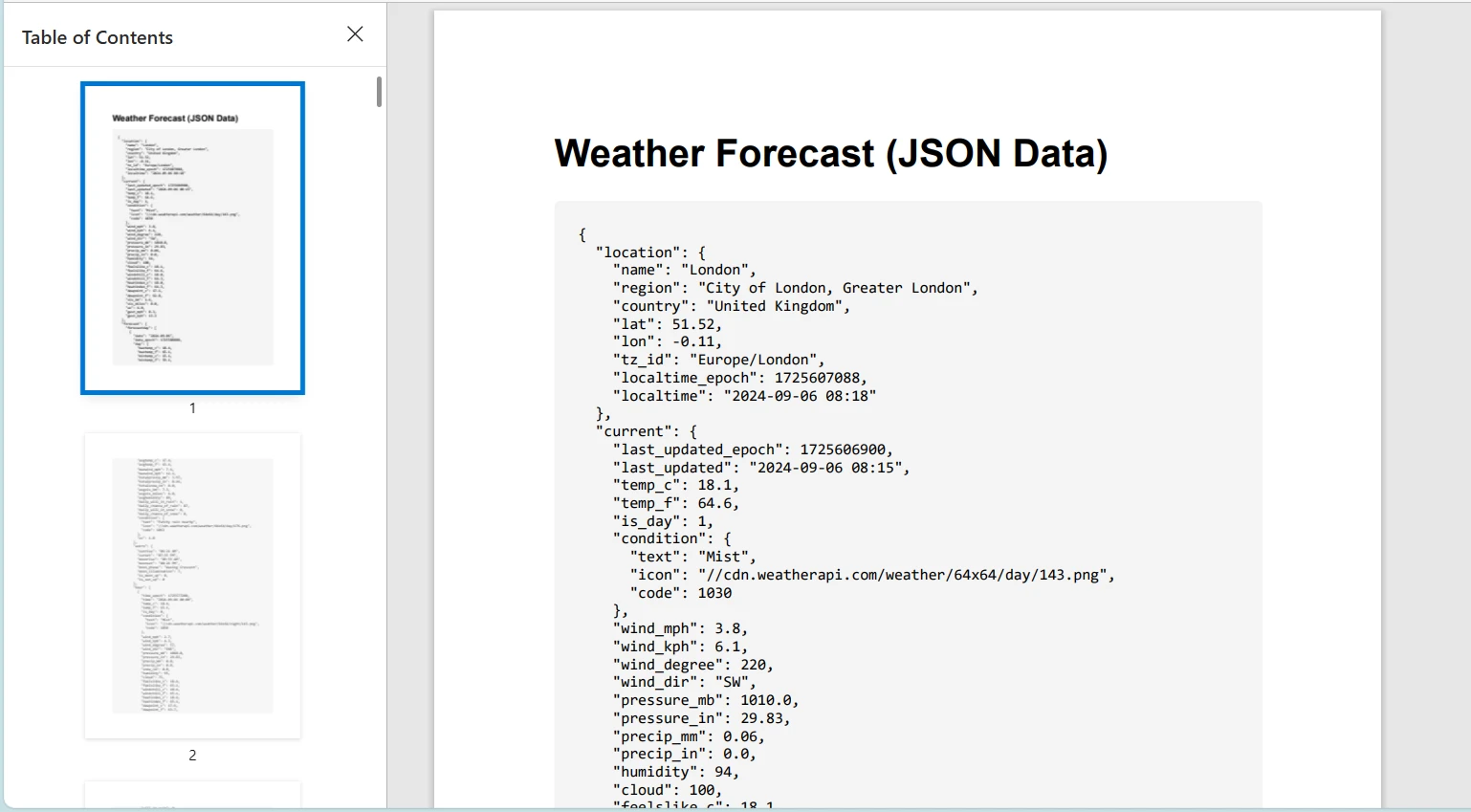
N'oubliez pas de remplacer "YOUR_API_KEY" par une clé API lorsque vous utilisez une API météo réelle.
Conclusion
Ce tutoriel a exploré l'utilisation de la classe HttpClient en C# pour envoyer des requêtes HTTP et gérer les réponses. Nous avons également introduit IronPDF, une puissante bibliothèque pour générer des PDF dans les applications .NET. Nous avons démontré comment combiner ces technologies en récupérant du contenu HTML depuis un service web via HttpClient et en le convertissant en PDF via IronPDF.
IronPDF offre un essai gratuit, et ses licences commencent à $999, en faisant un outil précieux pour les développeurs cherchant des capacités complètes de génération de PDF.























