


C# PDFコンバータを作る方法

PDFのプログラム生成は、請求書、レポート、証明書、またはチケットを作成する必要があるかどうかに関わらず、現代のWebアプリケーションにとって重要な要件です。 ピクセル完璧なレンダリングと企業向け機能を備えた堅牢なPDF生成を実装することを望んでいるASP.NET Core .NET開発者であれば、あなたは適切な場所にいます。
この包括的なガイドは、IronPDFを使用してプロフェッショナルなPDFファイルの生成を行う方法を詳しく説明しています。IronPDFは、PDFドキュメントを簡単に作成できる強力な.NETライブラリです。 基本的なセットアップから高度なバッチ処理まで、効率的かつ簡単に統合できることを紹介します。 最後には、IronPDFを使用してASP.NETアプリでPDFドキュメントを生成するための強力なPDFコンバータを取得できます。
なぜASP.NET CoreでPDFを生成するのか?
サーバーサイドのPDF生成は、クライアントサイドの代替手段に比べて大きな利点があります。 サーバーでPDFを生成すると、すべてのブラウザやデバイスで一貫した出力が保証され、クライアントサイドのリソースへの依存が排除され、機密データのより良い制御が維持されます。 HTML から PDF への変換の一般的なビジネスシナリオには以下が含まれます:
*財務文書:*請求書、明細書、取引領収書 コンプライアンスレポート:規制書類および監査文書 ユーザー証明書:トレーニングの修了と専門資格 イベントチケット:** QRコード付き入場パスと搭乗券 *データのエクスポート:分析レポートとダッシュボードのスナップショット
さらに、サーバー側のアプローチにより、PDFはすべてのブラウザとオペレーティングシステムにおいて一貫性が保証され、法律および金融ドキュメントの観点から非常に高く評価されています。
IronPDFはどのようにしてPDF生成を変革するのか?
IronPDFは.NETエコシステムで際立っているPDFライブラリで、背後に完全なChromeレンダリングエンジンを利用したHTMLコンバーターを持っています。 つまり、PDFドキュメントはGoogle Chromeでのレンダリングと同じに見え、最新のCSS3、JavaScript実行、ウェブフォントを完全にサポートします。 他のライブラリとは異なり、IronPDFでは既存のHTML、CSS、およびJavaScriptの知識を使用して、ASP.NET Coreアプリケーション内でPDF生成機能を直接活用できます。
開発を変革する主な利点:
- Chromeベースのレンダリング によるピクセル単位での正確性で、HTMLからPDFへの変換タスクを実行する際に、ブラウザで見るものをそのまま再現します(多くの場合、数行のコード内で)。
- 最新のフレームワーク(Bootstrapなど)を含む完全なHTML5、CSS3、JavaScript対応
- 外部依存やコマンドラインツールなしでのネイティブな.NET統合
- .NET 6/7/8、.NET Core、さらに古いアプリケーション for .NET Framework 4.6.2+をサポートするクロスプラットフォーム互換性
- 包括的なAPIで、生成後の操作を含むマージ、透かし、およびデジタル署名をあなたのPDFページに行うことができます。
 NuGetでインストール
ASP.NET Core プロジェクトの設定
PDF生成用に設定された新しいASP.NET Core MVCアプリケーションを作成しましょう。 適切な依存性注入とエラーハンドリングを備えた生産準備が整ったセットアップを構築します。 これはVisual Studioでの新しい.NETプロジェクトになります; ただし、既存のプロジェクトを使用しても構いません。
プロジェクトの作成
次のコマンドを実行して、このプロジェクトを作成し、適切なプロジェクト名を付けます:
dotnet new mvc -n PdfGeneratorApp
cd PdfGeneratorApp
IronPDFのインストール
ASP.NETでPDF文書を生成し始める前に、以下の行をNuGetパッケージマネージャコンソールで実行してIronPDFをプロジェクトに追加します:
Install-Package IronPdf
Install-Package IronPdf.Extensions.Mvc.Core
詳細なインストールオプションについては、NuGetパッケージの構成やWindowsインストーラーを参照してください。
Program.csでのサービスの構成
using IronPdf;
using IronPdf.Extensions.Mvc.Core;
using Microsoft.AspNetCore.Mvc.ViewFeatures;
var builder = WebApplication.CreateBuilder(args);
// Configure IronPDF license (use your license key)
License.LicenseKey = "your-license-key";
// Add MVC services
builder.Services.AddControllersWithViews();
// Register IronPDF services
builder.Services.AddSingleton<IHttpContextAccessor, HttpContextAccessor>();
builder.Services.AddSingleton<ITempDataProvider, CookieTempDataProvider>();
builder.Services.AddSingleton<IRazorViewRenderer, RazorViewRenderer>();
// Configure ChromePdfRenderer as a service
builder.Services.AddSingleton<ChromePdfRenderer>(provider =>
{
    var renderer = new ChromePdfRenderer();
    // Configure rendering options
    renderer.RenderingOptions.MarginTop = 25;
    renderer.RenderingOptions.MarginBottom = 25;
    renderer.RenderingOptions.MarginLeft = 20;
    renderer.RenderingOptions.MarginRight = 20;
    renderer.RenderingOptions.EnableJavaScript = true;
    renderer.RenderingOptions.RenderDelay = 500; // Wait for JS execution
    return renderer;
});
var app = builder.Build();
// Configure middleware pipeline
if (!app.Environment.IsDevelopment())
{
    app.UseExceptionHandler("/Home/Error");
    app.UseHsts();
}
app.UseHttpsRedirection();
app.UseStaticFiles();
app.UseRouting();
app.UseAuthorization();
app.MapControllerRoute(
    name: "default",
    pattern: "{controller=Home}/{action=Index}/{id?}");
app.Run();
using IronPdf;
using IronPdf.Extensions.Mvc.Core;
using Microsoft.AspNetCore.Mvc.ViewFeatures;
var builder = WebApplication.CreateBuilder(args);
// Configure IronPDF license (use your license key)
License.LicenseKey = "your-license-key";
// Add MVC services
builder.Services.AddControllersWithViews();
// Register IronPDF services
builder.Services.AddSingleton<IHttpContextAccessor, HttpContextAccessor>();
builder.Services.AddSingleton<ITempDataProvider, CookieTempDataProvider>();
builder.Services.AddSingleton<IRazorViewRenderer, RazorViewRenderer>();
// Configure ChromePdfRenderer as a service
builder.Services.AddSingleton<ChromePdfRenderer>(provider =>
{
var renderer = new ChromePdfRenderer();
// Configure rendering options
renderer.RenderingOptions.MarginTop = 25;
renderer.RenderingOptions.MarginBottom = 25;
renderer.RenderingOptions.MarginLeft = 20;
renderer.RenderingOptions.MarginRight = 20;
renderer.RenderingOptions.EnableJavaScript = true;
renderer.RenderingOptions.RenderDelay = 500; // Wait for JS execution
return renderer;
});
var app = builder.Build();
// Configure middleware pipeline
if (!app.Environment.IsDevelopment())
{
app.UseExceptionHandler("/Home/Error");
app.UseHsts();
}
app.UseHttpsRedirection();
app.UseStaticFiles();
app.UseRouting();
app.UseAuthorization();
app.MapControllerRoute(
name: "default",
pattern: "{controller=Home}/{action=Index}/{id?}");
app.Run();Imports IronPdf
Imports IronPdf.Extensions.Mvc.Core
Imports Microsoft.AspNetCore.Mvc.ViewFeatures
Imports Microsoft.Extensions.DependencyInjection
Imports Microsoft.AspNetCore.Builder
Imports Microsoft.AspNetCore.Hosting
Module Program
Sub Main(args As String())
Dim builder = WebApplication.CreateBuilder(args)
' Configure IronPDF license (use your license key)
License.LicenseKey = "your-license-key"
' Add MVC services
builder.Services.AddControllersWithViews()
' Register IronPDF services
builder.Services.AddSingleton(Of IHttpContextAccessor, HttpContextAccessor)()
builder.Services.AddSingleton(Of ITempDataProvider, CookieTempDataProvider)()
builder.Services.AddSingleton(Of IRazorViewRenderer, RazorViewRenderer)()
' Configure ChromePdfRenderer as a service
builder.Services.AddSingleton(Of ChromePdfRenderer)(Function(provider)
Dim renderer = New ChromePdfRenderer()
' Configure rendering options
renderer.RenderingOptions.MarginTop = 25
renderer.RenderingOptions.MarginBottom = 25
renderer.RenderingOptions.MarginLeft = 20
renderer.RenderingOptions.MarginRight = 20
renderer.RenderingOptions.EnableJavaScript = True
renderer.RenderingOptions.RenderDelay = 500 ' Wait for JS execution
Return renderer
End Function)
Dim app = builder.Build()
' Configure middleware pipeline
If Not app.Environment.IsDevelopment() Then
app.UseExceptionHandler("/Home/Error")
app.UseHsts()
End If
app.UseHttpsRedirection()
app.UseStaticFiles()
app.UseRouting()
app.UseAuthorization()
app.MapControllerRoute(
name:="default",
pattern:="{controller=Home}/{action=Index}/{id?}")
app.Run()
End Sub
End Moduleあなたの特定の要件に合わせてRenderingOptionsをさらに変更することもできます。 特定の要件に合わせてRenderingOptions\をさらに修正できます。 ## RazorビューからPDFを生成する
ASP.NET Coreで新しいPDFドキュメントを生成する最も強力なアプローチは、Razorビューを使用したPDF変換を活用することです。
ASP.NET Coreで新しいPDF文書を生成する最も強力なアプローチは、PDF変換のためのRazorビューを活用することです。 MicrosoftのRazor Pagesに関する文書によると、このアプローチはページ中心のシナリオにおける最も明確な関心の分離を提供します。 ### データモデルの作成
まず、典型的なビジネスドキュメントを表す包括的なモデルを作成します:
Razorビューの構築
namespace PdfGeneratorApp.Models
{
    public class InvoiceModel
    {
        public string InvoiceNumber { get; set; }
        public DateTime InvoiceDate { get; set; }
        public DateTime DueDate { get; set; }
        public CompanyInfo Vendor { get; set; }
        public CompanyInfo Customer { get; set; }
        public List<InvoiceItem> Items { get; set; }
        public decimal Subtotal => Items?.Sum(x => x.Total) ?? 0;
        public decimal TaxRate { get; set; }
        public decimal TaxAmount => Subtotal * (TaxRate / 100);
        public decimal Total => Subtotal + TaxAmount;
        public string Notes { get; set; }
        public string PaymentTerms { get; set; }
    }
    public class CompanyInfo
    {
        public string Name { get; set; }
        public string Address { get; set; }
        public string City { get; set; }
        public string State { get; set; }
        public string ZipCode { get; set; }
        public string Email { get; set; }
        public string Phone { get; set; }
    }
    public class InvoiceItem
    {
        public string Description { get; set; }
        public int Quantity { get; set; }
        public decimal UnitPrice { get; set; }
        public decimal Total => Quantity * UnitPrice;
    }
}
namespace PdfGeneratorApp.Models
{
public class InvoiceModel
{
public string InvoiceNumber { get; set; }
public DateTime InvoiceDate { get; set; }
public DateTime DueDate { get; set; }
public CompanyInfo Vendor { get; set; }
public CompanyInfo Customer { get; set; }
public List<InvoiceItem> Items { get; set; }
public decimal Subtotal => Items?.Sum(x => x.Total) ?? 0;
public decimal TaxRate { get; set; }
public decimal TaxAmount => Subtotal * (TaxRate / 100);
public decimal Total => Subtotal + TaxAmount;
public string Notes { get; set; }
public string PaymentTerms { get; set; }
}
public class CompanyInfo
{
public string Name { get; set; }
public string Address { get; set; }
public string City { get; set; }
public string State { get; set; }
public string ZipCode { get; set; }
public string Email { get; set; }
public string Phone { get; set; }
}
public class InvoiceItem
{
public string Description { get; set; }
public int Quantity { get; set; }
public decimal UnitPrice { get; set; }
public decimal Total => Quantity * UnitPrice;
}
}Imports System
Imports System.Collections.Generic
Imports System.Linq
Namespace PdfGeneratorApp.Models
Public Class InvoiceModel
Public Property InvoiceNumber As String
Public Property InvoiceDate As DateTime
Public Property DueDate As DateTime
Public Property Vendor As CompanyInfo
Public Property Customer As CompanyInfo
Public Property Items As List(Of InvoiceItem)
Public ReadOnly Property Subtotal As Decimal
Get
Return If(Items?.Sum(Function(x) x.Total), 0)
End Get
End Property
Public Property TaxRate As Decimal
Public ReadOnly Property TaxAmount As Decimal
Get
Return Subtotal * (TaxRate / 100)
End Get
End Property
Public ReadOnly Property Total As Decimal
Get
Return Subtotal + TaxAmount
End Get
End Property
Public Property Notes As String
Public Property PaymentTerms As String
End Class
Public Class CompanyInfo
Public Property Name As String
Public Property Address As String
Public Property City As String
Public Property State As String
Public Property ZipCode As String
Public Property Email As String
Public Property Phone As String
End Class
Public Class InvoiceItem
Public Property Description As String
Public Property Quantity As Integer
Public Property UnitPrice As Decimal
Public ReadOnly Property Total As Decimal
Get
Return Quantity * UnitPrice
End Get
End Property
End Class
End NamespaceRazorビューの構築
PDFコンテンツをレンダリングするViews/Invoice/InvoiceTemplate.cshtmlでビューを作成します:
@model PdfGeneratorApp.Models.InvoiceModel
@{
    Layout = null; // PDFs should not use the site layout
}
<!DOCTYPE html>
<html>
<head>
    <meta charset="utf-8" />
    <title>Invoice @Model.InvoiceNumber</title>
    <style>
        * {
            margin: 0;
            padding: 0;
            box-sizing: border-box;
        }
        body {
            font-family: 'Segoe UI', Tahoma, Geneva, Verdana, sans-serif;
            line-height: 1.6;
            color: #333;
        }
        .invoice-container {
            max-width: 800px;
            margin: 0 auto;
            padding: 30px;
        }
        .invoice-header {
            display: flex;
            justify-content: space-between;
            margin-bottom: 40px;
            padding-bottom: 20px;
            border-bottom: 2px solid #2c3e50;
        }
        .company-details {
            flex: 1;
        }
        .company-details h1 {
            color: #2c3e50;
            margin-bottom: 10px;
        }
        .invoice-details {
            text-align: right;
        }
        .invoice-details h2 {
            color: #2c3e50;
            font-size: 28px;
            margin-bottom: 10px;
        }
        .invoice-details p {
            margin: 5px 0;
            font-size: 14px;
        }
        .billing-details {
            display: flex;
            justify-content: space-between;
            margin-bottom: 40px;
        }
        .billing-section {
            flex: 1;
        }
        .billing-section h3 {
            color: #2c3e50;
            margin-bottom: 10px;
            font-size: 16px;
            text-transform: uppercase;
        }
        .items-table {
            width: 100%;
            border-collapse: collapse;
            margin-bottom: 40px;
        }
        .items-table thead {
            background-color: #2c3e50;
            color: white;
        }
        .items-table th,
        .items-table td {
            padding: 12px;
            text-align: left;
            border-bottom: 1px solid #ddd;
        }
        .items-table tbody tr:hover {
            background-color: #f5f5f5;
        }
        .text-right {
            text-align: right;
        }
        .invoice-summary {
            display: flex;
            justify-content: flex-end;
            margin-bottom: 40px;
        }
        .summary-table {
            width: 300px;
        }
        .summary-table tr {
            border-bottom: 1px solid #ddd;
        }
        .summary-table td {
            padding: 8px;
        }
        .summary-table .total-row {
            font-weight: bold;
            font-size: 18px;
            color: #2c3e50;
            border-top: 2px solid #2c3e50;
        }
        .invoice-footer {
            margin-top: 60px;
            padding-top: 20px;
            border-top: 1px solid #ddd;
        }
        .footer-notes {
            margin-bottom: 20px;
        }
        .footer-notes h4 {
            color: #2c3e50;
            margin-bottom: 10px;
        }
        @@media print {
            .invoice-container {
                padding: 0;
            }
        }
    </style>
</head>
<body>
    <div class="invoice-container">
        <div class="invoice-header">
            <div class="company-details">
                <h1>@Model.Vendor.Name</h1>
                <p>@Model.Vendor.Address</p>
                <p>@Model.Vendor.City, @Model.Vendor.State @Model.Vendor.ZipCode</p>
                <p>Email: @Model.Vendor.Email</p>
                <p>Phone: @Model.Vendor.Phone</p>
            </div>
            <div class="invoice-details">
                <h2>INVOICE</h2>
                <p><strong>Invoice #:</strong> @Model.InvoiceNumber</p>
                <p><strong>Date:</strong> @Model.InvoiceDate.ToString("MMM dd, yyyy")</p>
                <p><strong>Due Date:</strong> @Model.DueDate.ToString("MMM dd, yyyy")</p>
            </div>
        </div>
        <div class="billing-details">
            <div class="billing-section">
                <h3>Bill To:</h3>
                <p><strong>@Model.Customer.Name</strong></p>
                <p>@Model.Customer.Address</p>
                <p>@Model.Customer.City, @Model.Customer.State @Model.Customer.ZipCode</p>
                <p>@Model.Customer.Email</p>
            </div>
        </div>
        <table class="items-table">
            <thead>
                <tr>
                    <th>Description</th>
                    <th class="text-right">Quantity</th>
                    <th class="text-right">Unit Price</th>
                    <th class="text-right">Total</th>
                </tr>
            </thead>
            <tbody>
                @foreach (var item in Model.Items)
                {
                    <tr>
                        <td>@item.Description</td>
                        <td class="text-right">@item.Quantity</td>
                        <td class="text-right">@item.UnitPrice.ToString("C")</td>
                        <td class="text-right">@item.Total.ToString("C")</td>
                    </tr>
                }
            </tbody>
        </table>
        <div class="invoice-summary">
            <table class="summary-table">
                <tr>
                    <td>Subtotal:</td>
                    <td class="text-right">@Model.Subtotal.ToString("C")</td>
                </tr>
                <tr>
                    <td>Tax (@Model.TaxRate%):</td>
                    <td class="text-right">@Model.TaxAmount.ToString("C")</td>
                </tr>
                <tr class="total-row">
                    <td>Total:</td>
                    <td class="text-right">@Model.Total.ToString("C")</td>
                </tr>
            </table>
        </div>
        @if (!string.IsNullOrEmpty(Model.Notes))
        {
            <div class="invoice-footer">
                <div class="footer-notes">
                    <h4>Notes</h4>
                    <p>@Model.Notes</p>
                </div>
            </div>
        }
        @if (!string.IsNullOrEmpty(Model.PaymentTerms))
        {
            <div class="footer-notes">
                <h4>Payment Terms</h4>
                <p>@Model.PaymentTerms</p>
            </div>
        }
    </div>
</body>
</html>
@model PdfGeneratorApp.Models.InvoiceModel
@{
Layout = null; // PDFs should not use the site layout
}
<!DOCTYPE html>
<html>
<head>
<meta charset="utf-8" />
<title>Invoice @Model.InvoiceNumber</title>
<style>
* {
margin: 0;
padding: 0;
box-sizing: border-box;
}
body {
font-family: 'Segoe UI', Tahoma, Geneva, Verdana, sans-serif;
line-height: 1.6;
color: #333;
}
.invoice-container {
max-width: 800px;
margin: 0 auto;
padding: 30px;
}
.invoice-header {
display: flex;
justify-content: space-between;
margin-bottom: 40px;
padding-bottom: 20px;
border-bottom: 2px solid #2c3e50;
}
.company-details {
flex: 1;
}
.company-details h1 {
color: #2c3e50;
margin-bottom: 10px;
}
.invoice-details {
text-align: right;
}
.invoice-details h2 {
color: #2c3e50;
font-size: 28px;
margin-bottom: 10px;
}
.invoice-details p {
margin: 5px 0;
font-size: 14px;
}
.billing-details {
display: flex;
justify-content: space-between;
margin-bottom: 40px;
}
.billing-section {
flex: 1;
}
.billing-section h3 {
color: #2c3e50;
margin-bottom: 10px;
font-size: 16px;
text-transform: uppercase;
}
.items-table {
width: 100%;
border-collapse: collapse;
margin-bottom: 40px;
}
.items-table thead {
background-color: #2c3e50;
color: white;
}
.items-table th,
.items-table td {
padding: 12px;
text-align: left;
border-bottom: 1px solid #ddd;
}
.items-table tbody tr:hover {
background-color: #f5f5f5;
}
.text-right {
text-align: right;
}
.invoice-summary {
display: flex;
justify-content: flex-end;
margin-bottom: 40px;
}
.summary-table {
width: 300px;
}
.summary-table tr {
border-bottom: 1px solid #ddd;
}
.summary-table td {
padding: 8px;
}
.summary-table .total-row {
font-weight: bold;
font-size: 18px;
color: #2c3e50;
border-top: 2px solid #2c3e50;
}
.invoice-footer {
margin-top: 60px;
padding-top: 20px;
border-top: 1px solid #ddd;
}
.footer-notes {
margin-bottom: 20px;
}
.footer-notes h4 {
color: #2c3e50;
margin-bottom: 10px;
}
@@media print {
.invoice-container {
padding: 0;
}
}
</style>
</head>
<body>
<div class="invoice-container">
<div class="invoice-header">
<div class="company-details">
<h1>@Model.Vendor.Name</h1>
<p>@Model.Vendor.Address</p>
<p>@Model.Vendor.City, @Model.Vendor.State @Model.Vendor.ZipCode</p>
<p>Email: @Model.Vendor.Email</p>
<p>Phone: @Model.Vendor.Phone</p>
</div>
<div class="invoice-details">
<h2>INVOICE</h2>
<p><strong>Invoice #:</strong> @Model.InvoiceNumber</p>
<p><strong>Date:</strong> @Model.InvoiceDate.ToString("MMM dd, yyyy")</p>
<p><strong>Due Date:</strong> @Model.DueDate.ToString("MMM dd, yyyy")</p>
</div>
</div>
<div class="billing-details">
<div class="billing-section">
<h3>Bill To:</h3>
<p><strong>@Model.Customer.Name</strong></p>
<p>@Model.Customer.Address</p>
<p>@Model.Customer.City, @Model.Customer.State @Model.Customer.ZipCode</p>
<p>@Model.Customer.Email</p>
</div>
</div>
<table class="items-table">
<thead>
<tr>
<th>Description</th>
<th class="text-right">Quantity</th>
<th class="text-right">Unit Price</th>
<th class="text-right">Total</th>
</tr>
</thead>
<tbody>
@foreach (var item in Model.Items)
{
<tr>
<td>@item.Description</td>
<td class="text-right">@item.Quantity</td>
<td class="text-right">@item.UnitPrice.ToString("C")</td>
<td class="text-right">@item.Total.ToString("C")</td>
</tr>
}
</tbody>
</table>
<div class="invoice-summary">
<table class="summary-table">
<tr>
<td>Subtotal:</td>
<td class="text-right">@Model.Subtotal.ToString("C")</td>
</tr>
<tr>
<td>Tax (@Model.TaxRate%):</td>
<td class="text-right">@Model.TaxAmount.ToString("C")</td>
</tr>
<tr class="total-row">
<td>Total:</td>
<td class="text-right">@Model.Total.ToString("C")</td>
</tr>
</table>
</div>
@if (!string.IsNullOrEmpty(Model.Notes))
{
<div class="invoice-footer">
<div class="footer-notes">
<h4>Notes</h4>
<p>@Model.Notes</p>
</div>
</div>
}
@if (!string.IsNullOrEmpty(Model.PaymentTerms))
{
<div class="footer-notes">
<h4>Payment Terms</h4>
<p>@Model.PaymentTerms</p>
</div>
}
</div>
</body>
</html>エラーハンドリングを持つコントローラーの実装
さあ、包括的なエラーハンドリングを備えたPDFを生成する堅牢なコントローラーを作成しましょう:
using IronPdf;
using IronPdf.Extensions.Mvc.Core;
using Microsoft.AspNetCore.Mvc;
using PdfGeneratorApp.Models;
using System.Diagnostics;
namespace PdfGeneratorApp.Controllers
{
    public class InvoiceController : Controller
    {
        private readonly ILogger<InvoiceController> _logger;
        private readonly IRazorViewRenderer _viewRenderer;
        private readonly ChromePdfRenderer _pdfRenderer;
        private readonly IWebHostEnvironment _environment;
        public InvoiceController(
            ILogger<InvoiceController> logger,
            IRazorViewRenderer viewRenderer,
            ChromePdfRenderer pdfRenderer,
            IWebHostEnvironment environment)
        {
            _logger = logger;
            _viewRenderer = viewRenderer;
            _pdfRenderer = pdfRenderer;
            _environment = environment;
        }
        [HttpGet]
        public IActionResult Index()
        {
            // Display a form or list of invoices
            return View();
        }
        [HttpGet]
        public async Task<IActionResult> GenerateInvoice(string invoiceNumber)
        {
            var stopwatch = Stopwatch.StartNew();
            try
            {
                // Validate input
                if (string.IsNullOrEmpty(invoiceNumber))
                {
                    _logger.LogWarning("Invoice generation attempted without invoice number");
                    return BadRequest("Invoice number is required");
                }
                // Generate sample data (in production, fetch from database)
                var invoice = CreateSampleInvoice(invoiceNumber);
                // Log the generation attempt
                _logger.LogInformation($"Generating PDF for invoice {invoiceNumber}");
                // Configure PDF rendering options
                _pdfRenderer.RenderingOptions.PaperOrientation = IronPdf.Rendering.PdfPaperOrientation.Portrait;
                _pdfRenderer.RenderingOptions.PaperSize = IronPdf.Rendering.PdfPaperSize.A4;
                _pdfRenderer.RenderingOptions.PrintHtmlBackgrounds = true;
                _pdfRenderer.RenderingOptions.CreatePdfFormsFromHtml = false;
                // Add custom header with page numbers
                _pdfRenderer.RenderingOptions.TextHeader = new TextHeaderFooter
                {
                    CenterText = $"Invoice {invoice.InvoiceNumber}",
                    DrawDividerLine = true,
                    Font = IronSoftware.Drawing.FontTypes.Helvetica,
                    FontSize = 10
                };
                // Add footer with page numbers
                _pdfRenderer.RenderingOptions.TextFooter = new TextHeaderFooter
                {
                    LeftText = "{date} {time}",
                    RightText = "Page {page} of {total-pages}",
                    DrawDividerLine = true,
                    Font = IronSoftware.Drawing.FontTypes.Helvetica,
                    FontSize = 8
                };
                // Render the view to PDF
                PdfDocument pdf;
                try
                {
                    pdf = _pdfRenderer.RenderRazorViewToPdf(
                        _viewRenderer,
                        "Views/Invoice/InvoiceTemplate.cshtml",
                        invoice);
                }
                catch (Exception renderEx)
                {
                    _logger.LogError(renderEx, "Failed to render Razor view to PDF");
                    throw new InvalidOperationException("PDF rendering failed. Please check the template.", renderEx);
                }
                // Apply metadata
                pdf.MetaData.Author = "PdfGeneratorApp";
                pdf.MetaData.Title = $"Invoice {invoice.InvoiceNumber}";
                pdf.MetaData.Subject = $"Invoice for {invoice.Customer.Name}";
                pdf.MetaData.Keywords = "invoice, billing, payment";
                pdf.MetaData.CreationDate = DateTime.UtcNow;
                pdf.MetaData.ModifiedDate = DateTime.UtcNow;
                // Optional: Add password protection
                // pdf.SecuritySettings.UserPassword = "user123";
                // pdf.SecuritySettings.OwnerPassword = "owner456";
                // pdf.SecuritySettings.AllowUserPrinting = IronPdf.Security.PdfPrintSecurity.FullPrintRights;
                // Log performance metrics
                stopwatch.Stop();
                _logger.LogInformation($"PDF generated successfully for invoice {invoiceNumber} in {stopwatch.ElapsedMilliseconds}ms");
                // Return the PDF file
                Response.Headers.Add("Content-Disposition", $"inline; filename=Invoice_{invoiceNumber}.pdf");
                return File(pdf.BinaryData, "application/pdf", $"Invoice_{invoiceNumber}.pdf");
            }
            catch (Exception ex)
            {
                _logger.LogError(ex, $"Error generating PDF for invoice {invoiceNumber}");
                // In development, return detailed error
                if (_environment.IsDevelopment())
                {
                    return StatusCode(500, new
                    {
                        error = "PDF generation failed",
                        message = ex.Message,
                        stackTrace = ex.StackTrace
                    });
                }
                // In production, return generic error
                return StatusCode(500, "An error occurred while generating the PDF");
            }
        }
        private InvoiceModel CreateSampleInvoice(string invoiceNumber)
        {
            return new InvoiceModel
            {
                InvoiceNumber = invoiceNumber,
                InvoiceDate = DateTime.Now,
                DueDate = DateTime.Now.AddDays(30),
                Vendor = new CompanyInfo
                {
                    Name = "Tech ソリューションs Inc.",
                    Address = "123 Business Ave",
                    City = "New York",
                    State = "NY",
                    ZipCode = "10001",
                    Email = "billing@techsolutions.com",
                    Phone = "(555) 123-4567"
                },
                Customer = new CompanyInfo
                {
                    Name = "Acme Corporation",
                    Address = "456 Commerce St",
                    City = "Los Angeles",
                    State = "CA",
                    ZipCode = "90001",
                    Email = "accounts@acmecorp.com",
                    Phone = "(555) 987-6543"
                },
                Items = new List<InvoiceItem>
                {
                    new InvoiceItem
                    {
                        Description = "Software Development Services - 40 hours",
                        Quantity = 40,
                        UnitPrice = 150.00m
                    },
                    new InvoiceItem
                    {
                        Description = "Project Management - 10 hours",
                        Quantity = 10,
                        UnitPrice = 120.00m
                    },
                    new InvoiceItem
                    {
                        Description = "Quality Assurance Testing",
                        Quantity = 1,
                        UnitPrice = 2500.00m
                    }
                },
                TaxRate = 8.875m,
                Notes = "Payment is due within 30 days. Late payments subject to 1.5% monthly interest.",
                PaymentTerms = "Net 30"
            };
        }
    }
}
using IronPdf;
using IronPdf.Extensions.Mvc.Core;
using Microsoft.AspNetCore.Mvc;
using PdfGeneratorApp.Models;
using System.Diagnostics;
namespace PdfGeneratorApp.Controllers
{
public class InvoiceController : Controller
{
private readonly ILogger<InvoiceController> _logger;
private readonly IRazorViewRenderer _viewRenderer;
private readonly ChromePdfRenderer _pdfRenderer;
private readonly IWebHostEnvironment _environment;
public InvoiceController(
ILogger<InvoiceController> logger,
IRazorViewRenderer viewRenderer,
ChromePdfRenderer pdfRenderer,
IWebHostEnvironment environment)
{
_logger = logger;
_viewRenderer = viewRenderer;
_pdfRenderer = pdfRenderer;
_environment = environment;
}
[HttpGet]
public IActionResult Index()
{
// Display a form or list of invoices
return View();
}
[HttpGet]
public async Task<IActionResult> GenerateInvoice(string invoiceNumber)
{
var stopwatch = Stopwatch.StartNew();
try
{
// Validate input
if (string.IsNullOrEmpty(invoiceNumber))
{
_logger.LogWarning("Invoice generation attempted without invoice number");
return BadRequest("Invoice number is required");
}
// Generate sample data (in production, fetch from database)
var invoice = CreateSampleInvoice(invoiceNumber);
// Log the generation attempt
_logger.LogInformation($"Generating PDF for invoice {invoiceNumber}");
// Configure PDF rendering options
_pdfRenderer.RenderingOptions.PaperOrientation = IronPdf.Rendering.PdfPaperOrientation.Portrait;
_pdfRenderer.RenderingOptions.PaperSize = IronPdf.Rendering.PdfPaperSize.A4;
_pdfRenderer.RenderingOptions.PrintHtmlBackgrounds = true;
_pdfRenderer.RenderingOptions.CreatePdfFormsFromHtml = false;
// Add custom header with page numbers
_pdfRenderer.RenderingOptions.TextHeader = new TextHeaderFooter
{
CenterText = $"Invoice {invoice.InvoiceNumber}",
DrawDividerLine = true,
Font = IronSoftware.Drawing.FontTypes.Helvetica,
FontSize = 10
};
// Add footer with page numbers
_pdfRenderer.RenderingOptions.TextFooter = new TextHeaderFooter
{
LeftText = "{date} {time}",
RightText = "Page {page} of {total-pages}",
DrawDividerLine = true,
Font = IronSoftware.Drawing.FontTypes.Helvetica,
FontSize = 8
};
// Render the view to PDF
PdfDocument pdf;
try
{
pdf = _pdfRenderer.RenderRazorViewToPdf(
_viewRenderer,
"Views/Invoice/InvoiceTemplate.cshtml",
invoice);
}
catch (Exception renderEx)
{
_logger.LogError(renderEx, "Failed to render Razor view to PDF");
throw new InvalidOperationException("PDF rendering failed. Please check the template.", renderEx);
}
// Apply metadata
pdf.MetaData.Author = "PdfGeneratorApp";
pdf.MetaData.Title = $"Invoice {invoice.InvoiceNumber}";
pdf.MetaData.Subject = $"Invoice for {invoice.Customer.Name}";
pdf.MetaData.Keywords = "invoice, billing, payment";
pdf.MetaData.CreationDate = DateTime.UtcNow;
pdf.MetaData.ModifiedDate = DateTime.UtcNow;
// Optional: Add password protection
// pdf.SecuritySettings.UserPassword = "user123";
// pdf.SecuritySettings.OwnerPassword = "owner456";
// pdf.SecuritySettings.AllowUserPrinting = IronPdf.Security.PdfPrintSecurity.FullPrintRights;
// Log performance metrics
stopwatch.Stop();
_logger.LogInformation($"PDF generated successfully for invoice {invoiceNumber} in {stopwatch.ElapsedMilliseconds}ms");
// Return the PDF file
Response.Headers.Add("Content-Disposition", $"inline; filename=Invoice_{invoiceNumber}.pdf");
return File(pdf.BinaryData, "application/pdf", $"Invoice_{invoiceNumber}.pdf");
}
catch (Exception ex)
{
_logger.LogError(ex, $"Error generating PDF for invoice {invoiceNumber}");
// In development, return detailed error
if (_environment.IsDevelopment())
{
return StatusCode(500, new
{
error = "PDF generation failed",
message = ex.Message,
stackTrace = ex.StackTrace
});
}
// In production, return generic error
return StatusCode(500, "An error occurred while generating the PDF");
}
}
private InvoiceModel CreateSampleInvoice(string invoiceNumber)
{
return new InvoiceModel
{
InvoiceNumber = invoiceNumber,
InvoiceDate = DateTime.Now,
DueDate = DateTime.Now.AddDays(30),
Vendor = new CompanyInfo
{
Name = "Tech ソリューションs Inc.",
Address = "123 Business Ave",
City = "New York",
State = "NY",
ZipCode = "10001",
Email = "billing@techsolutions.com",
Phone = "(555) 123-4567"
},
Customer = new CompanyInfo
{
Name = "Acme Corporation",
Address = "456 Commerce St",
City = "Los Angeles",
State = "CA",
ZipCode = "90001",
Email = "accounts@acmecorp.com",
Phone = "(555) 987-6543"
},
Items = new List<InvoiceItem>
{
new InvoiceItem
{
Description = "Software Development Services - 40 hours",
Quantity = 40,
UnitPrice = 150.00m
},
new InvoiceItem
{
Description = "Project Management - 10 hours",
Quantity = 10,
UnitPrice = 120.00m
},
new InvoiceItem
{
Description = "Quality Assurance Testing",
Quantity = 1,
UnitPrice = 2500.00m
}
},
TaxRate = 8.875m,
Notes = "Payment is due within 30 days. Late payments subject to 1.5% monthly interest.",
PaymentTerms = "Net 30"
};
}
}
}Imports IronPdf
Imports IronPdf.Extensions.Mvc.Core
Imports Microsoft.AspNetCore.Mvc
Imports PdfGeneratorApp.Models
Imports System.Diagnostics
Namespace PdfGeneratorApp.Controllers
Public Class InvoiceController
Inherits Controller
Private ReadOnly _logger As ILogger(Of InvoiceController)
Private ReadOnly _viewRenderer As IRazorViewRenderer
Private ReadOnly _pdfRenderer As ChromePdfRenderer
Private ReadOnly _environment As IWebHostEnvironment
Public Sub New(logger As ILogger(Of InvoiceController), viewRenderer As IRazorViewRenderer, pdfRenderer As ChromePdfRenderer, environment As IWebHostEnvironment)
_logger = logger
_viewRenderer = viewRenderer
_pdfRenderer = pdfRenderer
_environment = environment
End Sub
<HttpGet>
Public Function Index() As IActionResult
' Display a form or list of invoices
Return View()
End Function
<HttpGet>
Public Async Function GenerateInvoice(invoiceNumber As String) As Task(Of IActionResult)
Dim stopwatch = Stopwatch.StartNew()
Try
' Validate input
If String.IsNullOrEmpty(invoiceNumber) Then
_logger.LogWarning("Invoice generation attempted without invoice number")
Return BadRequest("Invoice number is required")
End If
' Generate sample data (in production, fetch from database)
Dim invoice = CreateSampleInvoice(invoiceNumber)
' Log the generation attempt
_logger.LogInformation($"Generating PDF for invoice {invoiceNumber}")
' Configure PDF rendering options
_pdfRenderer.RenderingOptions.PaperOrientation = IronPdf.Rendering.PdfPaperOrientation.Portrait
_pdfRenderer.RenderingOptions.PaperSize = IronPdf.Rendering.PdfPaperSize.A4
_pdfRenderer.RenderingOptions.PrintHtmlBackgrounds = True
_pdfRenderer.RenderingOptions.CreatePdfFormsFromHtml = False
' Add custom header with page numbers
_pdfRenderer.RenderingOptions.TextHeader = New TextHeaderFooter With {
.CenterText = $"Invoice {invoice.InvoiceNumber}",
.DrawDividerLine = True,
.Font = IronSoftware.Drawing.FontTypes.Helvetica,
.FontSize = 10
}
' Add footer with page numbers
_pdfRenderer.RenderingOptions.TextFooter = New TextHeaderFooter With {
.LeftText = "{date} {time}",
.RightText = "Page {page} of {total-pages}",
.DrawDividerLine = True,
.Font = IronSoftware.Drawing.FontTypes.Helvetica,
.FontSize = 8
}
' Render the view to PDF
Dim pdf As PdfDocument
Try
pdf = _pdfRenderer.RenderRazorViewToPdf(_viewRenderer, "Views/Invoice/InvoiceTemplate.cshtml", invoice)
Catch renderEx As Exception
_logger.LogError(renderEx, "Failed to render Razor view to PDF")
Throw New InvalidOperationException("PDF rendering failed. Please check the template.", renderEx)
End Try
' Apply metadata
pdf.MetaData.Author = "PdfGeneratorApp"
pdf.MetaData.Title = $"Invoice {invoice.InvoiceNumber}"
pdf.MetaData.Subject = $"Invoice for {invoice.Customer.Name}"
pdf.MetaData.Keywords = "invoice, billing, payment"
pdf.MetaData.CreationDate = DateTime.UtcNow
pdf.MetaData.ModifiedDate = DateTime.UtcNow
' Optional: Add password protection
' pdf.SecuritySettings.UserPassword = "user123"
' pdf.SecuritySettings.OwnerPassword = "owner456"
' pdf.SecuritySettings.AllowUserPrinting = IronPdf.Security.PdfPrintSecurity.FullPrintRights
' Log performance metrics
stopwatch.Stop()
_logger.LogInformation($"PDF generated successfully for invoice {invoiceNumber} in {stopwatch.ElapsedMilliseconds}ms")
' Return the PDF file
Response.Headers.Add("Content-Disposition", $"inline; filename=Invoice_{invoiceNumber}.pdf")
Return File(pdf.BinaryData, "application/pdf", $"Invoice_{invoiceNumber}.pdf")
Catch ex As Exception
_logger.LogError(ex, $"Error generating PDF for invoice {invoiceNumber}")
' In development, return detailed error
If _environment.IsDevelopment() Then
Return StatusCode(500, New With {
.error = "PDF generation failed",
.message = ex.Message,
.stackTrace = ex.StackTrace
})
End If
' In production, return generic error
Return StatusCode(500, "An error occurred while generating the PDF")
End Try
End Function
Private Function CreateSampleInvoice(invoiceNumber As String) As InvoiceModel
Return New InvoiceModel With {
.InvoiceNumber = invoiceNumber,
.InvoiceDate = DateTime.Now,
.DueDate = DateTime.Now.AddDays(30),
.Vendor = New CompanyInfo With {
.Name = "Tech ソリューションs Inc.",
.Address = "123 Business Ave",
.City = "New York",
.State = "NY",
.ZipCode = "10001",
.Email = "billing@techsolutions.com",
.Phone = "(555) 123-4567"
},
.Customer = New CompanyInfo With {
.Name = "Acme Corporation",
.Address = "456 Commerce St",
.City = "Los Angeles",
.State = "CA",
.ZipCode = "90001",
.Email = "accounts@acmecorp.com",
.Phone = "(555) 987-6543"
},
.Items = New List(Of InvoiceItem) From {
New InvoiceItem With {
.Description = "Software Development Services - 40 hours",
.Quantity = 40,
.UnitPrice = 150.0D
},
New InvoiceItem With {
.Description = "Project Management - 10 hours",
.Quantity = 10,
.UnitPrice = 120.0D
},
New InvoiceItem With {
.Description = "Quality Assurance Testing",
.Quantity = 1,
.UnitPrice = 2500.0D
}
},
.TaxRate = 8.875D,
.Notes = "Payment is due within 30 days. Late payments subject to 1.5% monthly interest.",
.PaymentTerms = "Net 30"
}
End Function
End Class
End Namespaceコードの説明
上記のPDFジェネレーターをテストして実行するには、プロジェクトを起動し、次のURLにアクセスしてください:https://localhost:[port]/Invoice/GenerateInvoice?invoiceNumber=055。これにより、請求書が生成されます。アプリケーションをホストした実際のポート番号に置き換えることを忘れないでください。
出力
最大の効率を達成するためにWeb APIエンドポイントからPDFを返す方法は?
RESTful APIでPDFを提供するアプリケーション向けの効率的な実装方法です。 このアプローチは、特にマイクロサービスを構築する際や、ASP.NET Core Web API コントローラーで PDF を生成する必要がある場合に便利です。
using Microsoft.AspNetCore.Mvc;
using IronPdf;
using System.IO;
namespace PdfGeneratorApp.Controllers.Api
{
    [ApiController]
    [Route("api/[controller]")]
    public class PdfApiController : ControllerBase
    {
        private readonly ChromePdfRenderer _pdfRenderer;
        private readonly ILogger<PdfApiController> _logger;
        public PdfApiController(
            ChromePdfRenderer pdfRenderer,
            ILogger<PdfApiController> logger)
        {
            _pdfRenderer = pdfRenderer;
            _logger = logger;
        }
        [HttpPost("generate-report")]
        public async Task<IActionResult> GenerateReport([FromBody] ReportRequest request)
        {
            try
            {
                // Validate request
                if (!ModelState.IsValid)
                {
                    return BadRequest(ModelState);
                }
                // Build HTML content dynamically
                var htmlContent = BuildReportHtml(request);
                // Generate PDF with memory-efficient streaming
                using var pdfDocument = _pdfRenderer.RenderHtmlAsPdf(htmlContent);
                // Apply compression for smaller file size
                pdfDocument.CompressImages(60); // 60% quality
                // Stream the PDF directly to response
                var stream = new MemoryStream();
                pdfDocument.SaveAs(stream);
                stream.Position = 0;
                _logger.LogInformation($"Report generated for {request.ReportType}");
                return new FileStreamResult(stream, "application/pdf")
                {
                    FileDownloadName = $"Report_{DateTime.Now:yyyyMMdd_HHmmss}.pdf"
                };
            }
            catch (Exception ex)
            {
                _logger.LogError(ex, "Failed to generate report");
                return StatusCode(500, new { error = "Report generation failed" });
            }
        }
        [HttpGet("download/{documentId}")]
        public async Task<IActionResult> DownloadDocument(string documentId)
        {
            try
            {
                // In production, retrieve document from database or storage
                var documentPath = Path.Combine("wwwroot", "documents", $"{documentId}.pdf");
                if (!System.IO.File.Exists(documentPath))
                {
                    return NotFound(new { error = "Document not found" });
                }
                var memory = new MemoryStream();
                using (var stream = new FileStream(documentPath, FileMode.Open))
                {
                    await stream.CopyToAsync(memory);
                }
                memory.Position = 0;
                return File(memory, "application/pdf", $"Document_{documentId}.pdf");
            }
            catch (Exception ex)
            {
                _logger.LogError(ex, $"Failed to download document {documentId}");
                return StatusCode(500, new { error = "Download failed" });
            }
        }
        private string BuildReportHtml(ReportRequest request)
        {
            return $@"
                <!DOCTYPE html>
                <html>
                <head>
                    <style>
                        body {{font-family: Arial, sans-serif;
                            margin: 40px;}}
                        h1 {{color: #2c3e50;
                            border-bottom: 2px solid #3498db;
                            padding-bottom: 10px;}}
                        .report-date {{color: #7f8c8d;
                            font-size: 14px;}}
                        .data-table {{width: 100%;
                            border-collapse: collapse;
                            margin-top: 20px;}}
                        .data-table th, .data-table td {{border: 1px solid #ddd;
                            padding: 12px;
                            text-align: left;}}
                        .data-table th {{background-color: #3498db;
                            color: white;}}
                    </style>
                </head>
                <body>
                    <h1>{request.ReportType} Report</h1>
                    <p class='report-date'>Generated: {DateTime.Now:MMMM dd, yyyy HH:mm}</p>
                    <p>{request.Description}</p>
                    {GenerateDataTable(request.Data)}
                </body>
                </html>";
        }
        private string GenerateDataTable(List<ReportDataItem> data)
        {
            if (data == null || !data.Any())
                return "<p>No data available</p>";
            var table = "<table class='data-table'><thead><tr>";
            // Add headers
            foreach (var prop in typeof(ReportDataItem).GetProperties())
            {
                table += $"<th>{prop.Name}</th>";
            }
            table += "</tr></thead><tbody>";
            // Add data rows
            foreach (var item in data)
            {
                table += "<tr>";
                foreach (var prop in typeof(ReportDataItem).GetProperties())
                {
                    var value = prop.GetValue(item) ?? "";
                    table += $"<td>{value}</td>";
                }
                table += "</tr>";
            }
            table += "</tbody></table>";
            return table;
        }
    }
    public class ReportRequest
    {
        public string ReportType { get; set; }
        public string Description { get; set; }
        public List<ReportDataItem> Data { get; set; }
    }
    public class ReportDataItem
    {
        public string Name { get; set; }
        public string Category { get; set; }
        public decimal Value { get; set; }
        public DateTime Date { get; set; }
    }
}
using Microsoft.AspNetCore.Mvc;
using IronPdf;
using System.IO;
namespace PdfGeneratorApp.Controllers.Api
{
[ApiController]
[Route("api/[controller]")]
public class PdfApiController : ControllerBase
{
private readonly ChromePdfRenderer _pdfRenderer;
private readonly ILogger<PdfApiController> _logger;
public PdfApiController(
ChromePdfRenderer pdfRenderer,
ILogger<PdfApiController> logger)
{
_pdfRenderer = pdfRenderer;
_logger = logger;
}
[HttpPost("generate-report")]
public async Task<IActionResult> GenerateReport([FromBody] ReportRequest request)
{
try
{
// Validate request
if (!ModelState.IsValid)
{
return BadRequest(ModelState);
}
// Build HTML content dynamically
var htmlContent = BuildReportHtml(request);
// Generate PDF with memory-efficient streaming
using var pdfDocument = _pdfRenderer.RenderHtmlAsPdf(htmlContent);
// Apply compression for smaller file size
pdfDocument.CompressImages(60); // 60% quality
// Stream the PDF directly to response
var stream = new MemoryStream();
pdfDocument.SaveAs(stream);
stream.Position = 0;
_logger.LogInformation($"Report generated for {request.ReportType}");
return new FileStreamResult(stream, "application/pdf")
{
FileDownloadName = $"Report_{DateTime.Now:yyyyMMdd_HHmmss}.pdf"
};
}
catch (Exception ex)
{
_logger.LogError(ex, "Failed to generate report");
return StatusCode(500, new { error = "Report generation failed" });
}
}
[HttpGet("download/{documentId}")]
public async Task<IActionResult> DownloadDocument(string documentId)
{
try
{
// In production, retrieve document from database or storage
var documentPath = Path.Combine("wwwroot", "documents", $"{documentId}.pdf");
if (!System.IO.File.Exists(documentPath))
{
return NotFound(new { error = "Document not found" });
}
var memory = new MemoryStream();
using (var stream = new FileStream(documentPath, FileMode.Open))
{
await stream.CopyToAsync(memory);
}
memory.Position = 0;
return File(memory, "application/pdf", $"Document_{documentId}.pdf");
}
catch (Exception ex)
{
_logger.LogError(ex, $"Failed to download document {documentId}");
return StatusCode(500, new { error = "Download failed" });
}
}
private string BuildReportHtml(ReportRequest request)
{
return $@"
<!DOCTYPE html>
<html>
<head>
<style>
body {{font-family: Arial, sans-serif;
margin: 40px;}}
h1 {{color: #2c3e50;
border-bottom: 2px solid #3498db;
padding-bottom: 10px;}}
.report-date {{color: #7f8c8d;
font-size: 14px;}}
.data-table {{width: 100%;
border-collapse: collapse;
margin-top: 20px;}}
.data-table th, .data-table td {{border: 1px solid #ddd;
padding: 12px;
text-align: left;}}
.data-table th {{background-color: #3498db;
color: white;}}
</style>
</head>
<body>
<h1>{request.ReportType} Report</h1>
<p class='report-date'>Generated: {DateTime.Now:MMMM dd, yyyy HH:mm}</p>
<p>{request.Description}</p>
{GenerateDataTable(request.Data)}
</body>
</html>";
}
private string GenerateDataTable(List<ReportDataItem> data)
{
if (data == null || !data.Any())
return "<p>No data available</p>";
var table = "<table class='data-table'><thead><tr>";
// Add headers
foreach (var prop in typeof(ReportDataItem).GetProperties())
{
table += $"<th>{prop.Name}</th>";
}
table += "</tr></thead><tbody>";
// Add data rows
foreach (var item in data)
{
table += "<tr>";
foreach (var prop in typeof(ReportDataItem).GetProperties())
{
var value = prop.GetValue(item) ?? "";
table += $"<td>{value}</td>";
}
table += "</tr>";
}
table += "</tbody></table>";
return table;
}
}
public class ReportRequest
{
public string ReportType { get; set; }
public string Description { get; set; }
public List<ReportDataItem> Data { get; set; }
}
public class ReportDataItem
{
public string Name { get; set; }
public string Category { get; set; }
public decimal Value { get; set; }
public DateTime Date { get; set; }
}
}Imports Microsoft.AspNetCore.Mvc
Imports IronPdf
Imports System.IO
Namespace PdfGeneratorApp.Controllers.Api
<ApiController>
<Route("api/[controller]")>
Public Class PdfApiController
Inherits ControllerBase
Private ReadOnly _pdfRenderer As ChromePdfRenderer
Private ReadOnly _logger As ILogger(Of PdfApiController)
Public Sub New(pdfRenderer As ChromePdfRenderer, logger As ILogger(Of PdfApiController))
_pdfRenderer = pdfRenderer
_logger = logger
End Sub
<HttpPost("generate-report")>
Public Async Function GenerateReport(<FromBody> request As ReportRequest) As Task(Of IActionResult)
Try
' Validate request
If Not ModelState.IsValid Then
Return BadRequest(ModelState)
End If
' Build HTML content dynamically
Dim htmlContent = BuildReportHtml(request)
' Generate PDF with memory-efficient streaming
Using pdfDocument = _pdfRenderer.RenderHtmlAsPdf(htmlContent)
' Apply compression for smaller file size
pdfDocument.CompressImages(60) ' 60% quality
' Stream the PDF directly to response
Dim stream = New MemoryStream()
pdfDocument.SaveAs(stream)
stream.Position = 0
_logger.LogInformation($"Report generated for {request.ReportType}")
Return New FileStreamResult(stream, "application/pdf") With {
.FileDownloadName = $"Report_{DateTime.Now:yyyyMMdd_HHmmss}.pdf"
}
End Using
Catch ex As Exception
_logger.LogError(ex, "Failed to generate report")
Return StatusCode(500, New With {.error = "Report generation failed"})
End Try
End Function
<HttpGet("download/{documentId}")>
Public Async Function DownloadDocument(documentId As String) As Task(Of IActionResult)
Try
' In production, retrieve document from database or storage
Dim documentPath = Path.Combine("wwwroot", "documents", $"{documentId}.pdf")
If Not System.IO.File.Exists(documentPath) Then
Return NotFound(New With {.error = "Document not found"})
End If
Dim memory = New MemoryStream()
Using stream = New FileStream(documentPath, FileMode.Open)
Await stream.CopyToAsync(memory)
End Using
memory.Position = 0
Return File(memory, "application/pdf", $"Document_{documentId}.pdf")
Catch ex As Exception
_logger.LogError(ex, $"Failed to download document {documentId}")
Return StatusCode(500, New With {.error = "Download failed"})
End Try
End Function
Private Function BuildReportHtml(request As ReportRequest) As String
Return $"
<!DOCTYPE html>
<html>
<head>
<style>
body {{font-family: Arial, sans-serif;
margin: 40px;}}
h1 {{color: #2c3e50;
border-bottom: 2px solid #3498db;
padding-bottom: 10px;}}
.report-date {{color: #7f8c8d;
font-size: 14px;}}
.data-table {{width: 100%;
border-collapse: collapse;
margin-top: 20px;}}
.data-table th, .data-table td {{border: 1px solid #ddd;
padding: 12px;
text-align: left;}}
.data-table th {{background-color: #3498db;
color: white;}}
</style>
</head>
<body>
<h1>{request.ReportType} Report</h1>
<p class='report-date'>Generated: {DateTime.Now:MMMM dd, yyyy HH:mm}</p>
<p>{request.Description}</p>
{GenerateDataTable(request.Data)}
</body>
</html>"
End Function
Private Function GenerateDataTable(data As List(Of ReportDataItem)) As String
If data Is Nothing OrElse Not data.Any() Then
Return "<p>No data available</p>"
End If
Dim table = "<table class='data-table'><thead><tr>"
' Add headers
For Each prop In GetType(ReportDataItem).GetProperties()
table += $"<th>{prop.Name}</th>"
Next
table += "</tr></thead><tbody>"
' Add data rows
For Each item In data
table += "<tr>"
For Each prop In GetType(ReportDataItem).GetProperties()
Dim value = If(prop.GetValue(item), "")
table += $"<td>{value}</td>"
Next
table += "</tr>"
Next
table += "</tbody></table>"
Return table
End Function
End Class
Public Class ReportRequest
Public Property ReportType As String
Public Property Description As String
Public Property Data As List(Of ReportDataItem)
End Class
Public Class ReportDataItem
Public Property Name As String
Public Property Category As String
Public Property Value As Decimal
Public Property Date As DateTime
End Class
End Namespaceプロフェッショナルなヘッダー、フッター、およびスタイリングの追加
プロフェッショナルなPDFには、一貫したヘッダー、フッター、およびスタイリングが必要です。 IronPDFは、シンプルなテキストベースのオプションと高度なHTMLベースのオプションの両方を提供します。 HTMLマークアップのスタイルをCSSスタイルを使用してスタイリングすることで、カスタムPDFヘッダーとフッターを作成できます。 次のコードスニペットでは、これを現在のプロジェクトでどのように使用できるかを探ります:
using IronPdf;
using IronPdf.Extensions.Mvc.Core;
using Microsoft.AspNetCore.Mvc;
using PdfGeneratorApp.Models;
using PdfGeneratorApp.Services;
using System.Diagnostics;
namespace PdfGeneratorApp.Controllers
{
    public class InvoiceController : Controller
    {
        private readonly ILogger<InvoiceController> _logger;
        private readonly IRazorViewRenderer _viewRenderer;
        private readonly ChromePdfRenderer _pdfRenderer;
        private readonly PdfFormattingService _pdfFormattingService;
        private readonly IWebHostEnvironment _environment;
        public InvoiceController(
            ILogger<InvoiceController> logger,
            IRazorViewRenderer viewRenderer,
            ChromePdfRenderer pdfRenderer,
            PdfFormattingService pdfFormattingService,
            IWebHostEnvironment environment)
        {
            _logger = logger;
            _viewRenderer = viewRenderer;
            _pdfRenderer = pdfRenderer;
            _pdfFormattingService = pdfFormattingService;
            _environment = environment;
        }
        [HttpGet]
        public IActionResult Index()
        {
            // Display a form or list of invoices
            return View();
        }
        private void ConfigurePdfRendererOptions(ChromePdfRenderer renderer, InvoiceModel invoice, PdfStylingOptions options)
        {
            // Margins
            renderer.RenderingOptions.MarginTop = options.MarginTop;
            renderer.RenderingOptions.MarginBottom = options.MarginBottom;
            renderer.RenderingOptions.MarginLeft = options.MarginLeft;
            renderer.RenderingOptions.MarginRight = options.MarginRight;
            // Header
            if (options.UseHtmlHeader)
            {
                renderer.RenderingOptions.HtmlHeader = new HtmlHeaderFooter
                {
                    MaxHeight = 50,
                    HtmlFragment = $@"
                <div style='width: 100%; font-size: 12px; font-family: Arial;'>
                    <div style='float: left; width: 50%;'>

                        <img src='https://ironpdf.com/img/products/ironpdf-logo-text-dotnet.svg' height='40' />
                    </div>
                    <div style='float: right; width: 50%; text-align: right;'>
                        <strong>Invoice {invoice.InvoiceNumber}</strong><br/>
                        Generated: {DateTime.Now:yyyy-MM-dd}
                    </div>
                </div>",
                    LoadStylesAndCSSFromMainHtmlDocument = true
                };
            }
            else
            {
                renderer.RenderingOptions.TextHeader = new TextHeaderFooter
                {
                    CenterText = options.HeaderText,
                    Font = IronSoftware.Drawing.FontTypes.Arial,
                    FontSize = 12,
                    DrawDividerLine = true
                };
            }
            // Footer
            renderer.RenderingOptions.HtmlFooter = new HtmlHeaderFooter
            {
                MaxHeight = 30,
                HtmlFragment = @"
            <div style='width: 100%; font-size: 10px; color: #666;'>
                <div style='float: left; width: 33%;'>
                    © 2025 Your Company
                </div>
                <div style='float: center; width: 33%; text-align: center;'>
                    yourwebsite.com
                </div>
                <div style='float: right; width: 33%; text-align: right;'>
                    Page {page} of {total-pages}
                </div>
            </div>"
            };
            // Optional: Add watermark here (IronPDF supports adding after PDF is generated, so keep it as-is)
            // Margins, paper size etc., can also be set here if needed
            renderer.RenderingOptions.PaperOrientation = IronPdf.Rendering.PdfPaperOrientation.Portrait;
            renderer.RenderingOptions.PaperSize = IronPdf.Rendering.PdfPaperSize.A4;
            renderer.RenderingOptions.PrintHtmlBackgrounds = true;
        }
        [HttpGet]
        public async Task<IActionResult> GenerateInvoice(string invoiceNumber)
        {
            var stopwatch = Stopwatch.StartNew();
            try
            {
                // Validate input
                if (string.IsNullOrEmpty(invoiceNumber))
                {
                    _logger.LogWarning("Invoice generation attempted without invoice number");
                    return BadRequest("Invoice number is required");
                }
                // Generate sample data (in production, fetch from database)
                var invoice = CreateSampleInvoice(invoiceNumber);
                // Log the generation attempt
                _logger.LogInformation($"Generating PDF for invoice {invoiceNumber}");
                // Configure PDF rendering options
                _pdfRenderer.RenderingOptions.PaperOrientation = IronPdf.Rendering.PdfPaperOrientation.Portrait;
                _pdfRenderer.RenderingOptions.PaperSize = IronPdf.Rendering.PdfPaperSize.A4;
                _pdfRenderer.RenderingOptions.PrintHtmlBackgrounds = true;
                _pdfRenderer.RenderingOptions.CreatePdfFormsFromHtml = false;
                var options = new PdfStylingOptions
                {
                    MarginTop = 25,
                    MarginBottom = 25,
                    MarginLeft = 20,
                    MarginRight = 20,
                    UseHtmlHeader = true,
                    HeaderText = $"Invoice {invoice.InvoiceNumber}",
                    AddWatermark = false,
                    ForcePageBreaks = false
                };
                // Apply the styling to the renderer BEFORE rendering PDF
                ConfigurePdfRendererOptions(_pdfRenderer, invoice, options);
                // Render the view to PDF
                PdfDocument pdf;
                try
                {
                    pdf = _pdfRenderer.RenderRazorViewToPdf(
                        _viewRenderer,
                        "Views/Invoice/InvoiceTemplate.cshtml",
                        invoice);
                }
                catch (Exception renderEx)
                {
                    _logger.LogError(renderEx, "Failed to render Razor view to PDF");
                    throw new InvalidOperationException("PDF rendering failed. Please check the template.", renderEx);
                }
                // Apply metadata
                pdf.MetaData.Author = "PdfGeneratorApp";
                pdf.MetaData.Title = $"Invoice {invoice.InvoiceNumber}";
                pdf.MetaData.Subject = $"Invoice for {invoice.Customer.Name}";
                pdf.MetaData.Keywords = "invoice, billing, payment";
                pdf.MetaData.CreationDate = DateTime.UtcNow;
                pdf.MetaData.ModifiedDate = DateTime.UtcNow;
                // Optional: Add password protection
                // pdf.SecuritySettings.UserPassword = "user123";
                // pdf.SecuritySettings.OwnerPassword = "owner456";
                // pdf.SecuritySettings.AllowUserPrinting = IronPdf.Security.PdfPrintSecurity.FullPrintRights;
                // Log performance metrics
                stopwatch.Stop();
                _logger.LogInformation($"PDF generated successfully for invoice {invoiceNumber} in {stopwatch.ElapsedMilliseconds}ms");
                // Return the PDF file
                Response.Headers.Add("Content-Disposition", $"inline; filename=Invoice_{invoiceNumber}.pdf");
                return File(pdf.BinaryData, "application/pdf", $"Invoice_{invoiceNumber}.pdf");
            }
            catch (Exception ex)
            {
                _logger.LogError(ex, $"Error generating PDF for invoice {invoiceNumber}");
                // In development, return detailed error
                if (_environment.IsDevelopment())
                {
                    return StatusCode(500, new
                    {
                        error = "PDF generation failed",
                        message = ex.Message,
                        stackTrace = ex.StackTrace
                    });
                }
                // In production, return generic error
                return StatusCode(500, "An error occurred while generating the PDF");
            }
        }
        private InvoiceModel CreateSampleInvoice(string invoiceNumber)
        {
            return new InvoiceModel
            {
                InvoiceNumber = invoiceNumber,
                InvoiceDate = DateTime.Now,
                DueDate = DateTime.Now.AddDays(30),
                Vendor = new CompanyInfo
                {
                    Name = "Tech ソリューションs Inc.",
                    Address = "123 Business Ave",
                    City = "New York",
                    State = "NY",
                    ZipCode = "10001",
                    Email = "billing@techsolutions.com",
                    Phone = "(555) 123-4567"
                },
                Customer = new CompanyInfo
                {
                    Name = "Acme Corporation",
                    Address = "456 Commerce St",
                    City = "Los Angeles",
                    State = "CA",
                    ZipCode = "90001",
                    Email = "accounts@acmecorp.com",
                    Phone = "(555) 987-6543"
                },
                Items = new List<InvoiceItem>
                {
                    new InvoiceItem
                    {
                        Description = "Software Development Services - 40 hours",
                        Quantity = 40,
                        UnitPrice = 150.00m
                    },
                    new InvoiceItem
                    {
                        Description = "Project Management - 10 hours",
                        Quantity = 10,
                        UnitPrice = 120.00m
                    },
                    new InvoiceItem
                    {
                        Description = "Quality Assurance Testing",
                        Quantity = 1,
                        UnitPrice = 2500.00m
                    }
                },
                TaxRate = 8.875m,
                Notes = "Payment is due within 30 days. Late payments subject to 1.5% monthly interest.",
                PaymentTerms = "Net 30"
            };
        }
    }
}
using IronPdf;
using IronPdf.Extensions.Mvc.Core;
using Microsoft.AspNetCore.Mvc;
using PdfGeneratorApp.Models;
using PdfGeneratorApp.Services;
using System.Diagnostics;
namespace PdfGeneratorApp.Controllers
{
public class InvoiceController : Controller
{
private readonly ILogger<InvoiceController> _logger;
private readonly IRazorViewRenderer _viewRenderer;
private readonly ChromePdfRenderer _pdfRenderer;
private readonly PdfFormattingService _pdfFormattingService;
private readonly IWebHostEnvironment _environment;
public InvoiceController(
ILogger<InvoiceController> logger,
IRazorViewRenderer viewRenderer,
ChromePdfRenderer pdfRenderer,
PdfFormattingService pdfFormattingService,
IWebHostEnvironment environment)
{
_logger = logger;
_viewRenderer = viewRenderer;
_pdfRenderer = pdfRenderer;
_pdfFormattingService = pdfFormattingService;
_environment = environment;
}
[HttpGet]
public IActionResult Index()
{
// Display a form or list of invoices
return View();
}
private void ConfigurePdfRendererOptions(ChromePdfRenderer renderer, InvoiceModel invoice, PdfStylingOptions options)
{
// Margins
renderer.RenderingOptions.MarginTop = options.MarginTop;
renderer.RenderingOptions.MarginBottom = options.MarginBottom;
renderer.RenderingOptions.MarginLeft = options.MarginLeft;
renderer.RenderingOptions.MarginRight = options.MarginRight;
// Header
if (options.UseHtmlHeader)
{
renderer.RenderingOptions.HtmlHeader = new HtmlHeaderFooter
{
MaxHeight = 50,
HtmlFragment = $@"
<div style='width: 100%; font-size: 12px; font-family: Arial;'>
<div style='float: left; width: 50%;'>
<img src='https://ironpdf.com/img/products/ironpdf-logo-text-dotnet.svg' height='40' />
</div>
<div style='float: right; width: 50%; text-align: right;'>
<strong>Invoice {invoice.InvoiceNumber}</strong><br/>
Generated: {DateTime.Now:yyyy-MM-dd}
</div>
</div>",
LoadStylesAndCSSFromMainHtmlDocument = true
};
}
else
{
renderer.RenderingOptions.TextHeader = new TextHeaderFooter
{
CenterText = options.HeaderText,
Font = IronSoftware.Drawing.FontTypes.Arial,
FontSize = 12,
DrawDividerLine = true
};
}
// Footer
renderer.RenderingOptions.HtmlFooter = new HtmlHeaderFooter
{
MaxHeight = 30,
HtmlFragment = @"
<div style='width: 100%; font-size: 10px; color: #666;'>
<div style='float: left; width: 33%;'>
© 2025 Your Company
</div>
<div style='float: center; width: 33%; text-align: center;'>
yourwebsite.com
</div>
<div style='float: right; width: 33%; text-align: right;'>
Page {page} of {total-pages}
</div>
</div>"
};
// Optional: Add watermark here (IronPDF supports adding after PDF is generated, so keep it as-is)
// Margins, paper size etc., can also be set here if needed
renderer.RenderingOptions.PaperOrientation = IronPdf.Rendering.PdfPaperOrientation.Portrait;
renderer.RenderingOptions.PaperSize = IronPdf.Rendering.PdfPaperSize.A4;
renderer.RenderingOptions.PrintHtmlBackgrounds = true;
}
[HttpGet]
public async Task<IActionResult> GenerateInvoice(string invoiceNumber)
{
var stopwatch = Stopwatch.StartNew();
try
{
// Validate input
if (string.IsNullOrEmpty(invoiceNumber))
{
_logger.LogWarning("Invoice generation attempted without invoice number");
return BadRequest("Invoice number is required");
}
// Generate sample data (in production, fetch from database)
var invoice = CreateSampleInvoice(invoiceNumber);
// Log the generation attempt
_logger.LogInformation($"Generating PDF for invoice {invoiceNumber}");
// Configure PDF rendering options
_pdfRenderer.RenderingOptions.PaperOrientation = IronPdf.Rendering.PdfPaperOrientation.Portrait;
_pdfRenderer.RenderingOptions.PaperSize = IronPdf.Rendering.PdfPaperSize.A4;
_pdfRenderer.RenderingOptions.PrintHtmlBackgrounds = true;
_pdfRenderer.RenderingOptions.CreatePdfFormsFromHtml = false;
var options = new PdfStylingOptions
{
MarginTop = 25,
MarginBottom = 25,
MarginLeft = 20,
MarginRight = 20,
UseHtmlHeader = true,
HeaderText = $"Invoice {invoice.InvoiceNumber}",
AddWatermark = false,
ForcePageBreaks = false
};
// Apply the styling to the renderer BEFORE rendering PDF
ConfigurePdfRendererOptions(_pdfRenderer, invoice, options);
// Render the view to PDF
PdfDocument pdf;
try
{
pdf = _pdfRenderer.RenderRazorViewToPdf(
_viewRenderer,
"Views/Invoice/InvoiceTemplate.cshtml",
invoice);
}
catch (Exception renderEx)
{
_logger.LogError(renderEx, "Failed to render Razor view to PDF");
throw new InvalidOperationException("PDF rendering failed. Please check the template.", renderEx);
}
// Apply metadata
pdf.MetaData.Author = "PdfGeneratorApp";
pdf.MetaData.Title = $"Invoice {invoice.InvoiceNumber}";
pdf.MetaData.Subject = $"Invoice for {invoice.Customer.Name}";
pdf.MetaData.Keywords = "invoice, billing, payment";
pdf.MetaData.CreationDate = DateTime.UtcNow;
pdf.MetaData.ModifiedDate = DateTime.UtcNow;
// Optional: Add password protection
// pdf.SecuritySettings.UserPassword = "user123";
// pdf.SecuritySettings.OwnerPassword = "owner456";
// pdf.SecuritySettings.AllowUserPrinting = IronPdf.Security.PdfPrintSecurity.FullPrintRights;
// Log performance metrics
stopwatch.Stop();
_logger.LogInformation($"PDF generated successfully for invoice {invoiceNumber} in {stopwatch.ElapsedMilliseconds}ms");
// Return the PDF file
Response.Headers.Add("Content-Disposition", $"inline; filename=Invoice_{invoiceNumber}.pdf");
return File(pdf.BinaryData, "application/pdf", $"Invoice_{invoiceNumber}.pdf");
}
catch (Exception ex)
{
_logger.LogError(ex, $"Error generating PDF for invoice {invoiceNumber}");
// In development, return detailed error
if (_environment.IsDevelopment())
{
return StatusCode(500, new
{
error = "PDF generation failed",
message = ex.Message,
stackTrace = ex.StackTrace
});
}
// In production, return generic error
return StatusCode(500, "An error occurred while generating the PDF");
}
}
private InvoiceModel CreateSampleInvoice(string invoiceNumber)
{
return new InvoiceModel
{
InvoiceNumber = invoiceNumber,
InvoiceDate = DateTime.Now,
DueDate = DateTime.Now.AddDays(30),
Vendor = new CompanyInfo
{
Name = "Tech ソリューションs Inc.",
Address = "123 Business Ave",
City = "New York",
State = "NY",
ZipCode = "10001",
Email = "billing@techsolutions.com",
Phone = "(555) 123-4567"
},
Customer = new CompanyInfo
{
Name = "Acme Corporation",
Address = "456 Commerce St",
City = "Los Angeles",
State = "CA",
ZipCode = "90001",
Email = "accounts@acmecorp.com",
Phone = "(555) 987-6543"
},
Items = new List<InvoiceItem>
{
new InvoiceItem
{
Description = "Software Development Services - 40 hours",
Quantity = 40,
UnitPrice = 150.00m
},
new InvoiceItem
{
Description = "Project Management - 10 hours",
Quantity = 10,
UnitPrice = 120.00m
},
new InvoiceItem
{
Description = "Quality Assurance Testing",
Quantity = 1,
UnitPrice = 2500.00m
}
},
TaxRate = 8.875m,
Notes = "Payment is due within 30 days. Late payments subject to 1.5% monthly interest.",
PaymentTerms = "Net 30"
};
}
}
}Imports IronPdf
Imports IronPdf.Extensions.Mvc.Core
Imports Microsoft.AspNetCore.Mvc
Imports PdfGeneratorApp.Models
Imports PdfGeneratorApp.Services
Imports System.Diagnostics
Namespace PdfGeneratorApp.Controllers
Public Class InvoiceController
Inherits Controller
Private ReadOnly _logger As ILogger(Of InvoiceController)
Private ReadOnly _viewRenderer As IRazorViewRenderer
Private ReadOnly _pdfRenderer As ChromePdfRenderer
Private ReadOnly _pdfFormattingService As PdfFormattingService
Private ReadOnly _environment As IWebHostEnvironment
Public Sub New(logger As ILogger(Of InvoiceController), viewRenderer As IRazorViewRenderer, pdfRenderer As ChromePdfRenderer, pdfFormattingService As PdfFormattingService, environment As IWebHostEnvironment)
_logger = logger
_viewRenderer = viewRenderer
_pdfRenderer = pdfRenderer
_pdfFormattingService = pdfFormattingService
_environment = environment
End Sub
<HttpGet>
Public Function Index() As IActionResult
' Display a form or list of invoices
Return View()
End Function
Private Sub ConfigurePdfRendererOptions(renderer As ChromePdfRenderer, invoice As InvoiceModel, options As PdfStylingOptions)
' Margins
renderer.RenderingOptions.MarginTop = options.MarginTop
renderer.RenderingOptions.MarginBottom = options.MarginBottom
renderer.RenderingOptions.MarginLeft = options.MarginLeft
renderer.RenderingOptions.MarginRight = options.MarginRight
' Header
If options.UseHtmlHeader Then
renderer.RenderingOptions.HtmlHeader = New HtmlHeaderFooter With {
.MaxHeight = 50,
.HtmlFragment = $"
<div style='width: 100%; font-size: 12px; font-family: Arial;'>
<div style='float: left; width: 50%;'>
<img src='https://ironpdf.com/img/products/ironpdf-logo-text-dotnet.svg' height='40' />
</div>
<div style='float: right; width: 50%; text-align: right;'>
<strong>Invoice {invoice.InvoiceNumber}</strong><br/>
Generated: {DateTime.Now:yyyy-MM-dd}
</div>
</div>",
.LoadStylesAndCSSFromMainHtmlDocument = True
}
Else
renderer.RenderingOptions.TextHeader = New TextHeaderFooter With {
.CenterText = options.HeaderText,
.Font = IronSoftware.Drawing.FontTypes.Arial,
.FontSize = 12,
.DrawDividerLine = True
}
End If
' Footer
renderer.RenderingOptions.HtmlFooter = New HtmlHeaderFooter With {
.MaxHeight = 30,
.HtmlFragment = "
<div style='width: 100%; font-size: 10px; color: #666;'>
<div style='float: left; width: 33%;'>
© 2025 Your Company
</div>
<div style='float: center; width: 33%; text-align: center;'>
yourwebsite.com
</div>
<div style='float: right; width: 33%; text-align: right;'>
Page {page} of {total-pages}
</div>
</div>"
}
' Optional: Add watermark here (IronPDF supports adding after PDF is generated, so keep it as-is)
' Margins, paper size etc., can also be set here if needed
renderer.RenderingOptions.PaperOrientation = IronPdf.Rendering.PdfPaperOrientation.Portrait
renderer.RenderingOptions.PaperSize = IronPdf.Rendering.PdfPaperSize.A4
renderer.RenderingOptions.PrintHtmlBackgrounds = True
End Sub
<HttpGet>
Public Async Function GenerateInvoice(invoiceNumber As String) As Task(Of IActionResult)
Dim stopwatch = Stopwatch.StartNew()
Try
' Validate input
If String.IsNullOrEmpty(invoiceNumber) Then
_logger.LogWarning("Invoice generation attempted without invoice number")
Return BadRequest("Invoice number is required")
End If
' Generate sample data (in production, fetch from database)
Dim invoice = CreateSampleInvoice(invoiceNumber)
' Log the generation attempt
_logger.LogInformation($"Generating PDF for invoice {invoiceNumber}")
' Configure PDF rendering options
_pdfRenderer.RenderingOptions.PaperOrientation = IronPdf.Rendering.PdfPaperOrientation.Portrait
_pdfRenderer.RenderingOptions.PaperSize = IronPdf.Rendering.PdfPaperSize.A4
_pdfRenderer.RenderingOptions.PrintHtmlBackgrounds = True
_pdfRenderer.RenderingOptions.CreatePdfFormsFromHtml = False
Dim options = New PdfStylingOptions With {
.MarginTop = 25,
.MarginBottom = 25,
.MarginLeft = 20,
.MarginRight = 20,
.UseHtmlHeader = True,
.HeaderText = $"Invoice {invoice.InvoiceNumber}",
.AddWatermark = False,
.ForcePageBreaks = False
}
' Apply the styling to the renderer BEFORE rendering PDF
ConfigurePdfRendererOptions(_pdfRenderer, invoice, options)
' Render the view to PDF
Dim pdf As PdfDocument
Try
pdf = _pdfRenderer.RenderRazorViewToPdf(_viewRenderer, "Views/Invoice/InvoiceTemplate.cshtml", invoice)
Catch renderEx As Exception
_logger.LogError(renderEx, "Failed to render Razor view to PDF")
Throw New InvalidOperationException("PDF rendering failed. Please check the template.", renderEx)
End Try
' Apply metadata
pdf.MetaData.Author = "PdfGeneratorApp"
pdf.MetaData.Title = $"Invoice {invoice.InvoiceNumber}"
pdf.MetaData.Subject = $"Invoice for {invoice.Customer.Name}"
pdf.MetaData.Keywords = "invoice, billing, payment"
pdf.MetaData.CreationDate = DateTime.UtcNow
pdf.MetaData.ModifiedDate = DateTime.UtcNow
' Optional: Add password protection
' pdf.SecuritySettings.UserPassword = "user123"
' pdf.SecuritySettings.OwnerPassword = "owner456"
' pdf.SecuritySettings.AllowUserPrinting = IronPdf.Security.PdfPrintSecurity.FullPrintRights
' Log performance metrics
stopwatch.Stop()
_logger.LogInformation($"PDF generated successfully for invoice {invoiceNumber} in {stopwatch.ElapsedMilliseconds}ms")
' Return the PDF file
Response.Headers.Add("Content-Disposition", $"inline; filename=Invoice_{invoiceNumber}.pdf")
Return File(pdf.BinaryData, "application/pdf", $"Invoice_{invoiceNumber}.pdf")
Catch ex As Exception
_logger.LogError(ex, $"Error generating PDF for invoice {invoiceNumber}")
' In development, return detailed error
If _environment.IsDevelopment() Then
Return StatusCode(500, New With {
.error = "PDF generation failed",
.message = ex.Message,
.stackTrace = ex.StackTrace
})
End If
' In production, return generic error
Return StatusCode(500, "An error occurred while generating the PDF")
End Try
End Function
Private Function CreateSampleInvoice(invoiceNumber As String) As InvoiceModel
Return New InvoiceModel With {
.InvoiceNumber = invoiceNumber,
.InvoiceDate = DateTime.Now,
.DueDate = DateTime.Now.AddDays(30),
.Vendor = New CompanyInfo With {
.Name = "Tech ソリューションs Inc.",
.Address = "123 Business Ave",
.City = "New York",
.State = "NY",
.ZipCode = "10001",
.Email = "billing@techsolutions.com",
.Phone = "(555) 123-4567"
},
.Customer = New CompanyInfo With {
.Name = "Acme Corporation",
.Address = "456 Commerce St",
.City = "Los Angeles",
.State = "CA",
.ZipCode = "90001",
.Email = "accounts@acmecorp.com",
.Phone = "(555) 987-6543"
},
.Items = New List(Of InvoiceItem) From {
New InvoiceItem With {
.Description = "Software Development Services - 40 hours",
.Quantity = 40,
.UnitPrice = 150.0D
},
New InvoiceItem With {
.Description = "Project Management - 10 hours",
.Quantity = 10,
.UnitPrice = 120.0D
},
New InvoiceItem With {
.Description = "Quality Assurance Testing",
.Quantity = 1,
.UnitPrice = 2500.0D
}
},
.TaxRate = 8.875D,
.Notes = "Payment is due within 30 days. Late payments subject to 1.5% monthly interest.",
.PaymentTerms = "Net 30"
}
End Function
End Class
End Namespaceコードの説明
IronPDFを使用すれば、カスタマイズされたHTMLヘッダーとフッターを請求書に追加して、それをさらにスタイルとして完全に自分自身のものにすることもできます。 ヘッダーとフッターの追加について詳しくは、このハウツーガイドを参照してください。
ヘッダーとフッターを追加する詳細情報については、このハウツーガイドを参照してください。
出力
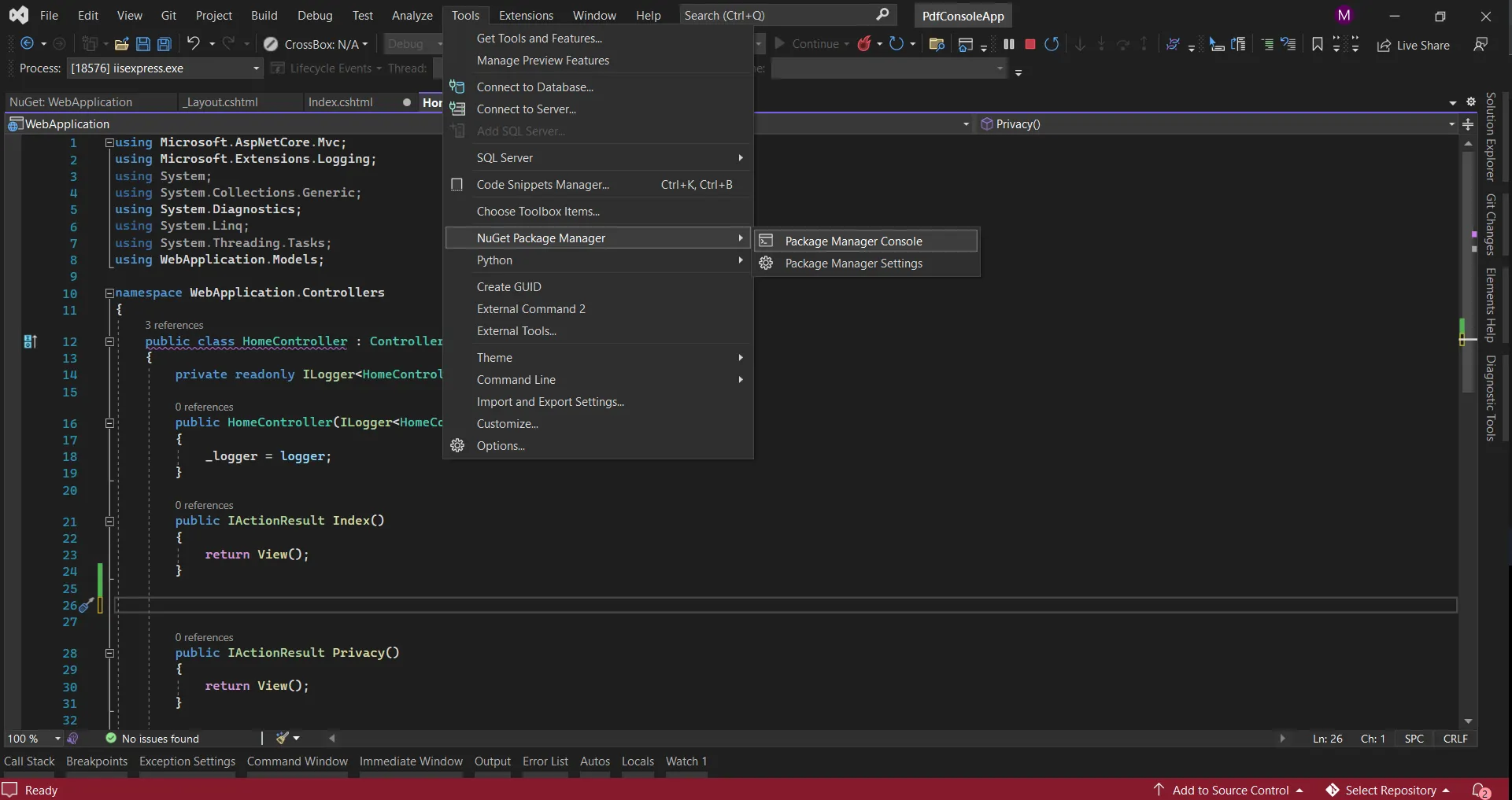
高性能なバッチPDF処理を実装する方法は?
何百、何千もの PDF を生成する必要がありますか? 完全な動作例をダウンロードして、これを実際に見ることができます。 複数のPDFを効率的に生成する必要があるアプリケーションの場合、非同期およびマルチスレッド技術を使用した最適化されたバッチ処理の実装を行います。
このアプローチは、C#を使用してASP.NET CoreでPDFを生成する際に、Microsoftの並列プログラミングのベストプラクティスに従います。 このアプローチは、C# を使用してASP.NET Coreで PDF を生成するときに最適なパフォーマンスを実現するための Microsoft の並列プログラミングのベスト プラクティスに従います。
using System.Collections.Concurrent;
using System.Diagnostics;
public class BatchPdfProcessor
{
    private readonly ChromePdfRenderer _renderer;
    private readonly ILogger<BatchPdfProcessor> _logger;
    private readonly SemaphoreSlim _semaphore;
    public BatchPdfProcessor(
        ChromePdfRenderer renderer,
        ILogger<BatchPdfProcessor> logger)
    {
        _renderer = renderer;
        _logger = logger;
        // Limit concurrent PDF generation to prevent memory exhaustion
        _semaphore = new SemaphoreSlim(Environment.ProcessorCount);
    }
    public async Task<BatchProcessingResult> ProcessBatchAsync(
        List<BatchPdfRequest> requests,
        IProgress<BatchProgressReport> progress = null)
    {
        var result = new BatchProcessingResult
        {
            StartTime = DateTime.UtcNow,
            TotalRequests = requests.Count
        };
        var successfulPdfs = new ConcurrentBag<GeneratedPdf>();
        var errors = new ConcurrentBag<ProcessingError>();
        var stopwatch = Stopwatch.StartNew();
        // Process PDFs in parallel with controlled concurrency
        var tasks = requests.Select(async (request, index) =>
        {
            await _semaphore.WaitAsync();
            try
            {
                var taskStopwatch = Stopwatch.StartNew();
                // Generate PDF
                var pdf = await GeneratePdfAsync(request);
                taskStopwatch.Stop();
                successfulPdfs.Add(new GeneratedPdf
                {
                    Id = request.Id,
                    FileName = request.FileName,
                    Data = pdf.BinaryData,
                    GenerationTime = taskStopwatch.ElapsedMilliseconds,
                    PageCount = pdf.PageCount
                });
                // Report progress
                progress?.Report(new BatchProgressReport
                {
                    ProcessedCount = successfulPdfs.Count + errors.Count,
                    TotalCount = requests.Count,
                    CurrentFile = request.FileName
                });
                _logger.LogDebug($"Generated PDF {request.Id} in {taskStopwatch.ElapsedMilliseconds}ms");
            }
            catch (Exception ex)
            {
                errors.Add(new ProcessingError
                {
                    RequestId = request.Id,
                    FileName = request.FileName,
                    Error = ex.Message,
                    StackTrace = ex.StackTrace
                });
                _logger.LogError(ex, $"Failed to generate PDF for request {request.Id}");
            }
            finally
            {
                _semaphore.Release();
            }
        });
        await Task.WhenAll(tasks);
        stopwatch.Stop();
        // Compile results
        result.EndTime = DateTime.UtcNow;
        result.TotalProcessingTime = stopwatch.ElapsedMilliseconds;
        result.SuccessfulPdfs = successfulPdfs.ToList();
        result.Errors = errors.ToList();
        result.SuccessCount = successfulPdfs.Count;
        result.ErrorCount = errors.Count;
        result.AverageGenerationTime = successfulPdfs.Any()
            ? successfulPdfs.Average(p => p.GenerationTime)
            : 0;
        result.TotalPages = successfulPdfs.Sum(p => p.PageCount);
        result.TotalSizeBytes = successfulPdfs.Sum(p => p.Data.Length);
        // Log summary
        _logger.LogInformation($"Batch processing completed: {result.SuccessCount} successful, " +
                             $"{result.ErrorCount} errors, {result.TotalProcessingTime}ms total time");
        // Clean up memory after large batch
        if (requests.Count > 100)
        {
            GC.Collect();
            GC.WaitForPendingFinalizers();
            GC.Collect();
        }
        return result;
    }
    private async Task<PdfDocument> GeneratePdfAsync(BatchPdfRequest request)
    {
        return await Task.Run(() =>
        {
            // Configure renderer for this specific request
            var localRenderer = new ChromePdfRenderer();
            localRenderer.RenderingOptions.PaperSize = request.PaperSize;
            localRenderer.RenderingOptions.MarginTop = request.MarginTop;
            localRenderer.RenderingOptions.MarginBottom = request.MarginBottom;
            // Generate PDF
            var pdf = localRenderer.RenderHtmlAsPdf(request.HtmlContent);
            // Apply compression if requested
            if (request.CompressImages)
            {
                pdf.CompressImages(request.CompressionQuality);
            }
            return pdf;
        });
    }
}
public class BatchPdfRequest
{
    public string Id { get; set; }
    public string FileName { get; set; }
    public string HtmlContent { get; set; }
    public IronPdf.Rendering.PdfPaperSize PaperSize { get; set; } = IronPdf.Rendering.PdfPaperSize.A4;
    public int MarginTop { get; set; } = 25;
    public int MarginBottom { get; set; } = 25;
    public bool CompressImages { get; set; } = true;
    public int CompressionQuality { get; set; } = 80;
}
public class BatchProcessingResult
{
    public DateTime StartTime { get; set; }
    public DateTime EndTime { get; set; }
    public long TotalProcessingTime { get; set; }
    public int TotalRequests { get; set; }
    public int SuccessCount { get; set; }
    public int ErrorCount { get; set; }
    public double AverageGenerationTime { get; set; }
    public int TotalPages { get; set; }
    public long TotalSizeBytes { get; set; }
    public List<GeneratedPdf> SuccessfulPdfs { get; set; }
    public List<ProcessingError> Errors { get; set; }
}
public class GeneratedPdf
{
    public string Id { get; set; }
    public string FileName { get; set; }
    public byte[] Data { get; set; }
    public long GenerationTime { get; set; }
    public int PageCount { get; set; }
}
public class ProcessingError
{
    public string RequestId { get; set; }
    public string FileName { get; set; }
    public string Error { get; set; }
    public string StackTrace { get; set; }
}
public class BatchProgressReport
{
    public int ProcessedCount { get; set; }
    public int TotalCount { get; set; }
    public string CurrentFile { get; set; }
    public double PercentComplete => (double)ProcessedCount / TotalCount * 100;
}
using System.Collections.Concurrent;
using System.Diagnostics;
public class BatchPdfProcessor
{
private readonly ChromePdfRenderer _renderer;
private readonly ILogger<BatchPdfProcessor> _logger;
private readonly SemaphoreSlim _semaphore;
public BatchPdfProcessor(
ChromePdfRenderer renderer,
ILogger<BatchPdfProcessor> logger)
{
_renderer = renderer;
_logger = logger;
// Limit concurrent PDF generation to prevent memory exhaustion
_semaphore = new SemaphoreSlim(Environment.ProcessorCount);
}
public async Task<BatchProcessingResult> ProcessBatchAsync(
List<BatchPdfRequest> requests,
IProgress<BatchProgressReport> progress = null)
{
var result = new BatchProcessingResult
{
StartTime = DateTime.UtcNow,
TotalRequests = requests.Count
};
var successfulPdfs = new ConcurrentBag<GeneratedPdf>();
var errors = new ConcurrentBag<ProcessingError>();
var stopwatch = Stopwatch.StartNew();
// Process PDFs in parallel with controlled concurrency
var tasks = requests.Select(async (request, index) =>
{
await _semaphore.WaitAsync();
try
{
var taskStopwatch = Stopwatch.StartNew();
// Generate PDF
var pdf = await GeneratePdfAsync(request);
taskStopwatch.Stop();
successfulPdfs.Add(new GeneratedPdf
{
Id = request.Id,
FileName = request.FileName,
Data = pdf.BinaryData,
GenerationTime = taskStopwatch.ElapsedMilliseconds,
PageCount = pdf.PageCount
});
// Report progress
progress?.Report(new BatchProgressReport
{
ProcessedCount = successfulPdfs.Count + errors.Count,
TotalCount = requests.Count,
CurrentFile = request.FileName
});
_logger.LogDebug($"Generated PDF {request.Id} in {taskStopwatch.ElapsedMilliseconds}ms");
}
catch (Exception ex)
{
errors.Add(new ProcessingError
{
RequestId = request.Id,
FileName = request.FileName,
Error = ex.Message,
StackTrace = ex.StackTrace
});
_logger.LogError(ex, $"Failed to generate PDF for request {request.Id}");
}
finally
{
_semaphore.Release();
}
});
await Task.WhenAll(tasks);
stopwatch.Stop();
// Compile results
result.EndTime = DateTime.UtcNow;
result.TotalProcessingTime = stopwatch.ElapsedMilliseconds;
result.SuccessfulPdfs = successfulPdfs.ToList();
result.Errors = errors.ToList();
result.SuccessCount = successfulPdfs.Count;
result.ErrorCount = errors.Count;
result.AverageGenerationTime = successfulPdfs.Any()
? successfulPdfs.Average(p => p.GenerationTime)
: 0;
result.TotalPages = successfulPdfs.Sum(p => p.PageCount);
result.TotalSizeBytes = successfulPdfs.Sum(p => p.Data.Length);
// Log summary
_logger.LogInformation($"Batch processing completed: {result.SuccessCount} successful, " +
$"{result.ErrorCount} errors, {result.TotalProcessingTime}ms total time");
// Clean up memory after large batch
if (requests.Count > 100)
{
GC.Collect();
GC.WaitForPendingFinalizers();
GC.Collect();
}
return result;
}
private async Task<PdfDocument> GeneratePdfAsync(BatchPdfRequest request)
{
return await Task.Run(() =>
{
// Configure renderer for this specific request
var localRenderer = new ChromePdfRenderer();
localRenderer.RenderingOptions.PaperSize = request.PaperSize;
localRenderer.RenderingOptions.MarginTop = request.MarginTop;
localRenderer.RenderingOptions.MarginBottom = request.MarginBottom;
// Generate PDF
var pdf = localRenderer.RenderHtmlAsPdf(request.HtmlContent);
// Apply compression if requested
if (request.CompressImages)
{
pdf.CompressImages(request.CompressionQuality);
}
return pdf;
});
}
}
public class BatchPdfRequest
{
public string Id { get; set; }
public string FileName { get; set; }
public string HtmlContent { get; set; }
public IronPdf.Rendering.PdfPaperSize PaperSize { get; set; } = IronPdf.Rendering.PdfPaperSize.A4;
public int MarginTop { get; set; } = 25;
public int MarginBottom { get; set; } = 25;
public bool CompressImages { get; set; } = true;
public int CompressionQuality { get; set; } = 80;
}
public class BatchProcessingResult
{
public DateTime StartTime { get; set; }
public DateTime EndTime { get; set; }
public long TotalProcessingTime { get; set; }
public int TotalRequests { get; set; }
public int SuccessCount { get; set; }
public int ErrorCount { get; set; }
public double AverageGenerationTime { get; set; }
public int TotalPages { get; set; }
public long TotalSizeBytes { get; set; }
public List<GeneratedPdf> SuccessfulPdfs { get; set; }
public List<ProcessingError> Errors { get; set; }
}
public class GeneratedPdf
{
public string Id { get; set; }
public string FileName { get; set; }
public byte[] Data { get; set; }
public long GenerationTime { get; set; }
public int PageCount { get; set; }
}
public class ProcessingError
{
public string RequestId { get; set; }
public string FileName { get; set; }
public string Error { get; set; }
public string StackTrace { get; set; }
}
public class BatchProgressReport
{
public int ProcessedCount { get; set; }
public int TotalCount { get; set; }
public string CurrentFile { get; set; }
public double PercentComplete => (double)ProcessedCount / TotalCount * 100;
}Imports System.Collections.Concurrent
Imports System.Diagnostics
Public Class BatchPdfProcessor
Private ReadOnly _renderer As ChromePdfRenderer
Private ReadOnly _logger As ILogger(Of BatchPdfProcessor)
Private ReadOnly _semaphore As SemaphoreSlim
Public Sub New(renderer As ChromePdfRenderer, logger As ILogger(Of BatchPdfProcessor))
_renderer = renderer
_logger = logger
' Limit concurrent PDF generation to prevent memory exhaustion
_semaphore = New SemaphoreSlim(Environment.ProcessorCount)
End Sub
Public Async Function ProcessBatchAsync(requests As List(Of BatchPdfRequest), Optional progress As IProgress(Of BatchProgressReport) = Nothing) As Task(Of BatchProcessingResult)
Dim result As New BatchProcessingResult With {
.StartTime = DateTime.UtcNow,
.TotalRequests = requests.Count
}
Dim successfulPdfs As New ConcurrentBag(Of GeneratedPdf)()
Dim errors As New ConcurrentBag(Of ProcessingError)()
Dim stopwatch As Stopwatch = Stopwatch.StartNew()
' Process PDFs in parallel with controlled concurrency
Dim tasks = requests.Select(Async Function(request, index)
Await _semaphore.WaitAsync()
Try
Dim taskStopwatch As Stopwatch = Stopwatch.StartNew()
' Generate PDF
Dim pdf = Await GeneratePdfAsync(request)
taskStopwatch.Stop()
successfulPdfs.Add(New GeneratedPdf With {
.Id = request.Id,
.FileName = request.FileName,
.Data = pdf.BinaryData,
.GenerationTime = taskStopwatch.ElapsedMilliseconds,
.PageCount = pdf.PageCount
})
' Report progress
If progress IsNot Nothing Then
progress.Report(New BatchProgressReport With {
.ProcessedCount = successfulPdfs.Count + errors.Count,
.TotalCount = requests.Count,
.CurrentFile = request.FileName
})
End If
_logger.LogDebug($"Generated PDF {request.Id} in {taskStopwatch.ElapsedMilliseconds}ms")
Catch ex As Exception
errors.Add(New ProcessingError With {
.RequestId = request.Id,
.FileName = request.FileName,
.Error = ex.Message,
.StackTrace = ex.StackTrace
})
_logger.LogError(ex, $"Failed to generate PDF for request {request.Id}")
Finally
_semaphore.Release()
End Try
End Function)
Await Task.WhenAll(tasks)
stopwatch.Stop()
' Compile results
result.EndTime = DateTime.UtcNow
result.TotalProcessingTime = stopwatch.ElapsedMilliseconds
result.SuccessfulPdfs = successfulPdfs.ToList()
result.Errors = errors.ToList()
result.SuccessCount = successfulPdfs.Count
result.ErrorCount = errors.Count
result.AverageGenerationTime = If(successfulPdfs.Any(), successfulPdfs.Average(Function(p) p.GenerationTime), 0)
result.TotalPages = successfulPdfs.Sum(Function(p) p.PageCount)
result.TotalSizeBytes = successfulPdfs.Sum(Function(p) p.Data.Length)
' Log summary
_logger.LogInformation($"Batch processing completed: {result.SuccessCount} successful, {result.ErrorCount} errors, {result.TotalProcessingTime}ms total time")
' Clean up memory after large batch
If requests.Count > 100 Then
GC.Collect()
GC.WaitForPendingFinalizers()
GC.Collect()
End If
Return result
End Function
Private Async Function GeneratePdfAsync(request As BatchPdfRequest) As Task(Of PdfDocument)
Return Await Task.Run(Function()
' Configure renderer for this specific request
Dim localRenderer As New ChromePdfRenderer()
localRenderer.RenderingOptions.PaperSize = request.PaperSize
localRenderer.RenderingOptions.MarginTop = request.MarginTop
localRenderer.RenderingOptions.MarginBottom = request.MarginBottom
' Generate PDF
Dim pdf = localRenderer.RenderHtmlAsPdf(request.HtmlContent)
' Apply compression if requested
If request.CompressImages Then
pdf.CompressImages(request.CompressionQuality)
End If
Return pdf
End Function)
End Function
End Class
Public Class BatchPdfRequest
Public Property Id As String
Public Property FileName As String
Public Property HtmlContent As String
Public Property PaperSize As IronPdf.Rendering.PdfPaperSize = IronPdf.Rendering.PdfPaperSize.A4
Public Property MarginTop As Integer = 25
Public Property MarginBottom As Integer = 25
Public Property CompressImages As Boolean = True
Public Property CompressionQuality As Integer = 80
End Class
Public Class BatchProcessingResult
Public Property StartTime As DateTime
Public Property EndTime As DateTime
Public Property TotalProcessingTime As Long
Public Property TotalRequests As Integer
Public Property SuccessCount As Integer
Public Property ErrorCount As Integer
Public Property AverageGenerationTime As Double
Public Property TotalPages As Integer
Public Property TotalSizeBytes As Long
Public Property SuccessfulPdfs As List(Of GeneratedPdf)
Public Property Errors As List(Of ProcessingError)
End Class
Public Class GeneratedPdf
Public Property Id As String
Public Property FileName As String
Public Property Data As Byte()
Public Property GenerationTime As Long
Public Property PageCount As Integer
End Class
Public Class ProcessingError
Public Property RequestId As String
Public Property FileName As String
Public Property Error As String
Public Property StackTrace As String
End Class
Public Class BatchProgressReport
Public Property ProcessedCount As Integer
Public Property TotalCount As Integer
Public Property CurrentFile As String
Public ReadOnly Property PercentComplete As Double
Get
Return CDbl(ProcessedCount) / TotalCount * 100
End Get
End Property
End ClassHIPAA準拠の医療レポートを生成するための特定の実装例をご紹介します:
生産環境でPDFを生成する場合、または機密情報を扱う場合、セキュリティが最も重要です。
public class MedicalReportGenerator
{
    private readonly ChromePdfRenderer _renderer;
    private readonly ILogger<MedicalReportGenerator> _logger;
    public MedicalReportGenerator(
        ChromePdfRenderer renderer,
        ILogger<MedicalReportGenerator> logger)
    {
        _renderer = renderer;
        _logger = logger;
    }
    public async Task<PdfDocument> GeneratePatientReport(PatientReportModel model)
    {
        var stopwatch = Stopwatch.StartNew();
        // Configure for medical document standards
        _renderer.RenderingOptions.PaperSize = IronPdf.Rendering.PdfPaperSize.Letter;
        _renderer.RenderingOptions.MarginTop = 50;
        _renderer.RenderingOptions.MarginBottom = 40;
        // HIPAA-compliant header
        _renderer.RenderingOptions.HtmlHeader = new HtmlHeaderFooter
        {
            Height = 45,
            HtmlFragment = $@"
                <div style='width: 100%; font-size: 10px;'>
                    <div style='float: left;'>
                        <strong>CONFIDENTIAL MEDICAL RECORD</strong><br/>
                        Patient: {model.PatientName} | MRN: {model.MedicalRecordNumber}
                    </div>
                    <div style='float: right; text-align: right;'>
                        Generated: {{date}} {{time}}<br/>
                        Provider: {model.ProviderName}
                    </div>
                </div>"
        };
        // Generate report HTML
        var html = GenerateMedicalReportHtml(model);
        // Create PDF with encryption for HIPAA compliance
        var pdf = _renderer.RenderHtmlAsPdf(html);
        // Apply 256-bit AES encryption
        pdf.SecuritySettings.UserPassword = GenerateSecurePassword();
        pdf.SecuritySettings.OwnerPassword = GenerateOwnerPassword();
        pdf.SecuritySettings.AllowUserCopyPasteContent = false;
        pdf.SecuritySettings.AllowUserPrinting = IronPdf.Security.PdfPrintSecurity.NoPrint;
        pdf.SecuritySettings.AllowUserFormData = false;
        pdf.SecuritySettings.AllowUserAnnotations = false;
        // Add audit metadata
        pdf.MetaData.Author = model.ProviderName;
        pdf.MetaData.Title = $"Medical Report - {model.PatientName}";
        pdf.MetaData.Keywords = "medical,confidential,hipaa";
        pdf.MetaData.CustomProperties.Add("ReportType", model.ReportType);
        pdf.MetaData.CustomProperties.Add("GeneratedBy", model.UserId);
        pdf.MetaData.CustomProperties.Add("Timestamp", DateTime.UtcNow.ToString("O"));
        stopwatch.Stop();
        _logger.LogInformation($"Medical report generated in {stopwatch.ElapsedMilliseconds}ms for patient {model.MedicalRecordNumber}");
        return pdf;
    }
    private string GenerateMedicalReportHtml(PatientReportModel model)
    {
        // Generate comprehensive medical report HTML
        // This would typically use a Razor view in production
        return $@"
            <!DOCTYPE html>
            <html>
            <head>
                <style>
                    body {{font-family: 'Segoe UI', Arial, sans-serif; margin: 0; padding: 20px;}}
                    .header {{background: #f0f4f8; padding: 20px; margin-bottom: 30px;}}
                    .patient-info {{display: grid; grid-template-columns: 1fr 1fr; gap: 20px; margin-bottom: 30px;}}
                    .section {{margin-bottom: 30px;}}
                    .section h2 {{color: #2c3e50; border-bottom: 2px solid #3498db; padding-bottom: 10px;}}
                    .vital-signs {{display: grid; grid-template-columns: repeat(3, 1fr); gap: 15px;}}
                    .vital-box {{background: #ecf0f1; padding: 15px; border-radius: 5px;}}
                    .medication-table {{width: 100%; border-collapse: collapse;}}
                    .medication-table th, .medication-table td {{border: 1px solid #ddd; padding: 10px; text-align: left;}}
                    .medication-table th {{background: #3498db; color: white;}}
                    .alert {{background: #e74c3c; color: white; padding: 10px; border-radius: 5px; margin-bottom: 20px;}}
                </style>
            </head>
            <body>
                <div class='header'>
                    <h1>Patient Medical Report</h1>
                    <p>Report Date: {DateTime.Now:MMMM dd, yyyy}</p>
                </div>
                {(model.HasAllergies ? "<div class='alert'>⚠ PATIENT HAS KNOWN ALLERGIES - SEE ALLERGY SECTION</div>" : "")}
                <div class='patient-info'>
                    <div>
                        <strong>Patient Name:</strong> {model.PatientName}<br/>
                        <strong>Date of Birth:</strong> {model.DateOfBirth:MM/dd/yyyy}<br/>
                        <strong>Age:</strong> {model.Age} years<br/>
                        <strong>Gender:</strong> {model.Gender}
                    </div>
                    <div>
                        <strong>MRN:</strong> {model.MedicalRecordNumber}<br/>
                        <strong>Admission Date:</strong> {model.AdmissionDate:MM/dd/yyyy}<br/>
                        <strong>Provider:</strong> {model.ProviderName}<br/>
                        <strong>Department:</strong> {model.Department}
                    </div>
                </div>
                <div class='section'>
                    <h2>Vital Signs</h2>
                    <div class='vital-signs'>
                        <div class='vital-box'>
                            <strong>Blood Pressure</strong><br/>
                            {model.BloodPressure}
                        </div>
                        <div class='vital-box'>
                            <strong>Heart Rate</strong><br/>
                            {model.HeartRate} bpm
                        </div>
                        <div class='vital-box'>
                            <strong>Temperature</strong><br/>
                            {model.Temperature}°F
                        </div>
                        <div class='vital-box'>
                            <strong>Respiratory Rate</strong><br/>
                            {model.RespiratoryRate} /min
                        </div>
                        <div class='vital-box'>
                            <strong>O2 Saturation</strong><br/>
                            {model.OxygenSaturation}%
                        </div>
                        <div class='vital-box'>
                            <strong>Weight</strong><br/>
                            {model.Weight} lbs
                        </div>
                    </div>
                </div>
                <div class='section'>
                    <h2>Current Medications</h2>
                    <table class='medication-table'>
                        <thead>
                            <tr>
                                <th>Medication</th>
                                <th>Dosage</th>
                                <th>Frequency</th>
                                <th>Route</th>
                                <th>Start Date</th>
                            </tr>
                        </thead>
                        <tbody>
                            {string.Join("", model.Medications.Select(m => $@"
                                <tr>
                                    <td>{m.Name}</td>
                                    <td>{m.Dosage}</td>
                                    <td>{m.Frequency}</td>
                                    <td>{m.Route}</td>
                                    <td>{m.StartDate:MM/dd/yyyy}</td>
                                </tr>
                            "))}
                        </tbody>
                    </table>
                </div>
                <div class='section'>
                    <h2>Clinical Notes</h2>
                    <p>{model.ClinicalNotes}</p>
                </div>
                <div class='section'>
                    <h2>Treatment Plan</h2>
                    <p>{model.TreatmentPlan}</p>
                </div>
            </body>
            </html>";
    }
    private string GenerateSecurePassword()
    {
        // Generate cryptographically secure password
        using var rng = System.Security.Cryptography.RandomNumberGenerator.Create();
        var bytes = new byte[32];
        rng.GetBytes(bytes);
        return Convert.ToBase64String(bytes);
    }
    private string GenerateOwnerPassword()
    {
        // In production, retrieve from secure configuration
        return "SecureOwnerPassword123!";
    }
}
public class PatientReportModel
{
    public string PatientName { get; set; }
    public string MedicalRecordNumber { get; set; }
    public DateTime DateOfBirth { get; set; }
    public int Age { get; set; }
    public string Gender { get; set; }
    public DateTime AdmissionDate { get; set; }
    public string ProviderName { get; set; }
    public string Department { get; set; }
    public string ReportType { get; set; }
    public string UserId { get; set; }
    // Vital Signs
    public string BloodPressure { get; set; }
    public int HeartRate { get; set; }
    public decimal Temperature { get; set; }
    public int RespiratoryRate { get; set; }
    public int OxygenSaturation { get; set; }
    public decimal Weight { get; set; }
    // Medical Information
    public bool HasAllergies { get; set; }
    public List<Medication> Medications { get; set; }
    public string ClinicalNotes { get; set; }
    public string TreatmentPlan { get; set; }
}
public class Medication
{
    public string Name { get; set; }
    public string Dosage { get; set; }
    public string Frequency { get; set; }
    public string Route { get; set; }
    public DateTime StartDate { get; set; }
}
public class MedicalReportGenerator
{
private readonly ChromePdfRenderer _renderer;
private readonly ILogger<MedicalReportGenerator> _logger;
public MedicalReportGenerator(
ChromePdfRenderer renderer,
ILogger<MedicalReportGenerator> logger)
{
_renderer = renderer;
_logger = logger;
}
public async Task<PdfDocument> GeneratePatientReport(PatientReportModel model)
{
var stopwatch = Stopwatch.StartNew();
// Configure for medical document standards
_renderer.RenderingOptions.PaperSize = IronPdf.Rendering.PdfPaperSize.Letter;
_renderer.RenderingOptions.MarginTop = 50;
_renderer.RenderingOptions.MarginBottom = 40;
// HIPAA-compliant header
_renderer.RenderingOptions.HtmlHeader = new HtmlHeaderFooter
{
Height = 45,
HtmlFragment = $@"
<div style='width: 100%; font-size: 10px;'>
<div style='float: left;'>
<strong>CONFIDENTIAL MEDICAL RECORD</strong><br/>
Patient: {model.PatientName} | MRN: {model.MedicalRecordNumber}
</div>
<div style='float: right; text-align: right;'>
Generated: {{date}} {{time}}<br/>
Provider: {model.ProviderName}
</div>
</div>"
};
// Generate report HTML
var html = GenerateMedicalReportHtml(model);
// Create PDF with encryption for HIPAA compliance
var pdf = _renderer.RenderHtmlAsPdf(html);
// Apply 256-bit AES encryption
pdf.SecuritySettings.UserPassword = GenerateSecurePassword();
pdf.SecuritySettings.OwnerPassword = GenerateOwnerPassword();
pdf.SecuritySettings.AllowUserCopyPasteContent = false;
pdf.SecuritySettings.AllowUserPrinting = IronPdf.Security.PdfPrintSecurity.NoPrint;
pdf.SecuritySettings.AllowUserFormData = false;
pdf.SecuritySettings.AllowUserAnnotations = false;
// Add audit metadata
pdf.MetaData.Author = model.ProviderName;
pdf.MetaData.Title = $"Medical Report - {model.PatientName}";
pdf.MetaData.Keywords = "medical,confidential,hipaa";
pdf.MetaData.CustomProperties.Add("ReportType", model.ReportType);
pdf.MetaData.CustomProperties.Add("GeneratedBy", model.UserId);
pdf.MetaData.CustomProperties.Add("Timestamp", DateTime.UtcNow.ToString("O"));
stopwatch.Stop();
_logger.LogInformation($"Medical report generated in {stopwatch.ElapsedMilliseconds}ms for patient {model.MedicalRecordNumber}");
return pdf;
}
private string GenerateMedicalReportHtml(PatientReportModel model)
{
// Generate comprehensive medical report HTML
// This would typically use a Razor view in production
return $@"
<!DOCTYPE html>
<html>
<head>
<style>
body {{font-family: 'Segoe UI', Arial, sans-serif; margin: 0; padding: 20px;}}
.header {{background: #f0f4f8; padding: 20px; margin-bottom: 30px;}}
.patient-info {{display: grid; grid-template-columns: 1fr 1fr; gap: 20px; margin-bottom: 30px;}}
.section {{margin-bottom: 30px;}}
.section h2 {{color: #2c3e50; border-bottom: 2px solid #3498db; padding-bottom: 10px;}}
.vital-signs {{display: grid; grid-template-columns: repeat(3, 1fr); gap: 15px;}}
.vital-box {{background: #ecf0f1; padding: 15px; border-radius: 5px;}}
.medication-table {{width: 100%; border-collapse: collapse;}}
.medication-table th, .medication-table td {{border: 1px solid #ddd; padding: 10px; text-align: left;}}
.medication-table th {{background: #3498db; color: white;}}
.alert {{background: #e74c3c; color: white; padding: 10px; border-radius: 5px; margin-bottom: 20px;}}
</style>
</head>
<body>
<div class='header'>
<h1>Patient Medical Report</h1>
<p>Report Date: {DateTime.Now:MMMM dd, yyyy}</p>
</div>
{(model.HasAllergies ? "<div class='alert'>⚠ PATIENT HAS KNOWN ALLERGIES - SEE ALLERGY SECTION</div>" : "")}
<div class='patient-info'>
<div>
<strong>Patient Name:</strong> {model.PatientName}<br/>
<strong>Date of Birth:</strong> {model.DateOfBirth:MM/dd/yyyy}<br/>
<strong>Age:</strong> {model.Age} years<br/>
<strong>Gender:</strong> {model.Gender}
</div>
<div>
<strong>MRN:</strong> {model.MedicalRecordNumber}<br/>
<strong>Admission Date:</strong> {model.AdmissionDate:MM/dd/yyyy}<br/>
<strong>Provider:</strong> {model.ProviderName}<br/>
<strong>Department:</strong> {model.Department}
</div>
</div>
<div class='section'>
<h2>Vital Signs</h2>
<div class='vital-signs'>
<div class='vital-box'>
<strong>Blood Pressure</strong><br/>
{model.BloodPressure}
</div>
<div class='vital-box'>
<strong>Heart Rate</strong><br/>
{model.HeartRate} bpm
</div>
<div class='vital-box'>
<strong>Temperature</strong><br/>
{model.Temperature}°F
</div>
<div class='vital-box'>
<strong>Respiratory Rate</strong><br/>
{model.RespiratoryRate} /min
</div>
<div class='vital-box'>
<strong>O2 Saturation</strong><br/>
{model.OxygenSaturation}%
</div>
<div class='vital-box'>
<strong>Weight</strong><br/>
{model.Weight} lbs
</div>
</div>
</div>
<div class='section'>
<h2>Current Medications</h2>
<table class='medication-table'>
<thead>
<tr>
<th>Medication</th>
<th>Dosage</th>
<th>Frequency</th>
<th>Route</th>
<th>Start Date</th>
</tr>
</thead>
<tbody>
{string.Join("", model.Medications.Select(m => $@"
<tr>
<td>{m.Name}</td>
<td>{m.Dosage}</td>
<td>{m.Frequency}</td>
<td>{m.Route}</td>
<td>{m.StartDate:MM/dd/yyyy}</td>
</tr>
"))}
</tbody>
</table>
</div>
<div class='section'>
<h2>Clinical Notes</h2>
<p>{model.ClinicalNotes}</p>
</div>
<div class='section'>
<h2>Treatment Plan</h2>
<p>{model.TreatmentPlan}</p>
</div>
</body>
</html>";
}
private string GenerateSecurePassword()
{
// Generate cryptographically secure password
using var rng = System.Security.Cryptography.RandomNumberGenerator.Create();
var bytes = new byte[32];
rng.GetBytes(bytes);
return Convert.ToBase64String(bytes);
}
private string GenerateOwnerPassword()
{
// In production, retrieve from secure configuration
return "SecureOwnerPassword123!";
}
}
public class PatientReportModel
{
public string PatientName { get; set; }
public string MedicalRecordNumber { get; set; }
public DateTime DateOfBirth { get; set; }
public int Age { get; set; }
public string Gender { get; set; }
public DateTime AdmissionDate { get; set; }
public string ProviderName { get; set; }
public string Department { get; set; }
public string ReportType { get; set; }
public string UserId { get; set; }
// Vital Signs
public string BloodPressure { get; set; }
public int HeartRate { get; set; }
public decimal Temperature { get; set; }
public int RespiratoryRate { get; set; }
public int OxygenSaturation { get; set; }
public decimal Weight { get; set; }
// Medical Information
public bool HasAllergies { get; set; }
public List<Medication> Medications { get; set; }
public string ClinicalNotes { get; set; }
public string TreatmentPlan { get; set; }
}
public class Medication
{
public string Name { get; set; }
public string Dosage { get; set; }
public string Frequency { get; set; }
public string Route { get; set; }
public DateTime StartDate { get; set; }
}Imports System
Imports System.Collections.Generic
Imports System.Diagnostics
Imports System.Threading.Tasks
Imports IronPdf
Imports IronPdf.Rendering
Imports IronPdf.Security
Imports Microsoft.Extensions.Logging
Public Class MedicalReportGenerator
Private ReadOnly _renderer As ChromePdfRenderer
Private ReadOnly _logger As ILogger(Of MedicalReportGenerator)
Public Sub New(renderer As ChromePdfRenderer, logger As ILogger(Of MedicalReportGenerator))
_renderer = renderer
_logger = logger
End Sub
Public Async Function GeneratePatientReport(model As PatientReportModel) As Task(Of PdfDocument)
Dim stopwatch = Stopwatch.StartNew()
' Configure for medical document standards
_renderer.RenderingOptions.PaperSize = PdfPaperSize.Letter
_renderer.RenderingOptions.MarginTop = 50
_renderer.RenderingOptions.MarginBottom = 40
' HIPAA-compliant header
_renderer.RenderingOptions.HtmlHeader = New HtmlHeaderFooter With {
.Height = 45,
.HtmlFragment = $"
<div style='width: 100%; font-size: 10px;'>
<div style='float: left;'>
<strong>CONFIDENTIAL MEDICAL RECORD</strong><br/>
Patient: {model.PatientName} | MRN: {model.MedicalRecordNumber}
</div>
<div style='float: right; text-align: right;'>
Generated: {{date}} {{time}}<br/>
Provider: {model.ProviderName}
</div>
</div>"
}
' Generate report HTML
Dim html = GenerateMedicalReportHtml(model)
' Create PDF with encryption for HIPAA compliance
Dim pdf = _renderer.RenderHtmlAsPdf(html)
' Apply 256-bit AES encryption
pdf.SecuritySettings.UserPassword = GenerateSecurePassword()
pdf.SecuritySettings.OwnerPassword = GenerateOwnerPassword()
pdf.SecuritySettings.AllowUserCopyPasteContent = False
pdf.SecuritySettings.AllowUserPrinting = PdfPrintSecurity.NoPrint
pdf.SecuritySettings.AllowUserFormData = False
pdf.SecuritySettings.AllowUserAnnotations = False
' Add audit metadata
pdf.MetaData.Author = model.ProviderName
pdf.MetaData.Title = $"Medical Report - {model.PatientName}"
pdf.MetaData.Keywords = "medical,confidential,hipaa"
pdf.MetaData.CustomProperties.Add("ReportType", model.ReportType)
pdf.MetaData.CustomProperties.Add("GeneratedBy", model.UserId)
pdf.MetaData.CustomProperties.Add("Timestamp", DateTime.UtcNow.ToString("O"))
stopwatch.Stop()
_logger.LogInformation($"Medical report generated in {stopwatch.ElapsedMilliseconds}ms for patient {model.MedicalRecordNumber}")
Return pdf
End Function
Private Function GenerateMedicalReportHtml(model As PatientReportModel) As String
' Generate comprehensive medical report HTML
' This would typically use a Razor view in production
Return $"
<!DOCTYPE html>
<html>
<head>
<style>
body {{font-family: 'Segoe UI', Arial, sans-serif; margin: 0; padding: 20px;}}
.header {{background: #f0f4f8; padding: 20px; margin-bottom: 30px;}}
.patient-info {{display: grid; grid-template-columns: 1fr 1fr; gap: 20px; margin-bottom: 30px;}}
.section {{margin-bottom: 30px;}}
.section h2 {{color: #2c3e50; border-bottom: 2px solid #3498db; padding-bottom: 10px;}}
.vital-signs {{display: grid; grid-template-columns: repeat(3, 1fr); gap: 15px;}}
.vital-box {{background: #ecf0f1; padding: 15px; border-radius: 5px;}}
.medication-table {{width: 100%; border-collapse: collapse;}}
.medication-table th, .medication-table td {{border: 1px solid #ddd; padding: 10px; text-align: left;}}
.medication-table th {{background: #3498db; color: white;}}
.alert {{background: #e74c3c; color: white; padding: 10px; border-radius: 5px; margin-bottom: 20px;}}
</style>
</head>
<body>
<div class='header'>
<h1>Patient Medical Report</h1>
<p>Report Date: {DateTime.Now:MMMM dd, yyyy}</p>
</div>
{(If(model.HasAllergies, "<div class='alert'>⚠ PATIENT HAS KNOWN ALLERGIES - SEE ALLERGY SECTION</div>", ""))}
<div class='patient-info'>
<div>
<strong>Patient Name:</strong> {model.PatientName}<br/>
<strong>Date of Birth:</strong> {model.DateOfBirth:MM/dd/yyyy}<br/>
<strong>Age:</strong> {model.Age} years<br/>
<strong>Gender:</strong> {model.Gender}
</div>
<div>
<strong>MRN:</strong> {model.MedicalRecordNumber}<br/>
<strong>Admission Date:</strong> {model.AdmissionDate:MM/dd/yyyy}<br/>
<strong>Provider:</strong> {model.ProviderName}<br/>
<strong>Department:</strong> {model.Department}
</div>
</div>
<div class='section'>
<h2>Vital Signs</h2>
<div class='vital-signs'>
<div class='vital-box'>
<strong>Blood Pressure</strong><br/>
{model.BloodPressure}
</div>
<div class='vital-box'>
<strong>Heart Rate</strong><br/>
{model.HeartRate} bpm
</div>
<div class='vital-box'>
<strong>Temperature</strong><br/>
{model.Temperature}°F
</div>
<div class='vital-box'>
<strong>Respiratory Rate</strong><br/>
{model.RespiratoryRate} /min
</div>
<div class='vital-box'>
<strong>O2 Saturation</strong><br/>
{model.OxygenSaturation}%
</div>
<div class='vital-box'>
<strong>Weight</strong><br/>
{model.Weight} lbs
</div>
</div>
</div>
<div class='section'>
<h2>Current Medications</h2>
<table class='medication-table'>
<thead>
<tr>
<th>Medication</th>
<th>Dosage</th>
<th>Frequency</th>
<th>Route</th>
<th>Start Date</th>
</tr>
</thead>
<tbody>
{String.Join("", model.Medications.Select(Function(m) $"
<tr>
<td>{m.Name}</td>
<td>{m.Dosage}</td>
<td>{m.Frequency}</td>
<td>{m.Route}</td>
<td>{m.StartDate:MM/dd/yyyy}</td>
</tr>
"))}
</tbody>
</table>
</div>
<div class='section'>
<h2>Clinical Notes</h2>
<p>{model.ClinicalNotes}</p>
</div>
<div class='section'>
<h2>Treatment Plan</h2>
<p>{model.TreatmentPlan}</p>
</div>
</body>
</html>"
End Function
Private Function GenerateSecurePassword() As String
' Generate cryptographically secure password
Using rng = System.Security.Cryptography.RandomNumberGenerator.Create()
Dim bytes = New Byte(31) {}
rng.GetBytes(bytes)
Return Convert.ToBase64String(bytes)
End Using
End Function
Private Function GenerateOwnerPassword() As String
' In production, retrieve from secure configuration
Return "SecureOwnerPassword123!"
End Function
End Class
Public Class PatientReportModel
Public Property PatientName As String
Public Property MedicalRecordNumber As String
Public Property DateOfBirth As DateTime
Public Property Age As Integer
Public Property Gender As String
Public Property AdmissionDate As DateTime
Public Property ProviderName As String
Public Property Department As String
Public Property ReportType As String
Public Property UserId As String
' Vital Signs
Public Property BloodPressure As String
Public Property HeartRate As Integer
Public Property Temperature As Decimal
Public Property RespiratoryRate As Integer
Public Property OxygenSaturation As Integer
Public Property Weight As Decimal
' Medical Information
Public Property HasAllergies As Boolean
Public Property Medications As List(Of Medication)
Public Property ClinicalNotes As String
Public Property TreatmentPlan As String
End Class
Public Class Medication
Public Property Name As String
Public Property Dosage As String
Public Property Frequency As String
Public Property Route As String
Public Property StartDate As DateTime
End Classセキュリティの考慮事項
本番環境で PDF を生成する際や、機密情報を扱う場合は、セキュリティが最も重要です。 ### セキュリティ設定の適用
上記のヘルパークラス内でSecurityLevel列挙型を使用して、PDFに対する異なるセキュリティオプションを設定します。
using System.Text.RegularExpressions;
namespace PdfGeneratorApp.Utilities
{
    public static class PdfSecurityHelper
    {
        public static void ApplySecuritySettings(PdfDocument pdf, SecurityLevel level)
        {
            switch (level)
            {
                case SecurityLevel.Low:
                    // Basic protection
                    pdf.SecuritySettings.AllowUserCopyPasteContent = true;
                    pdf.SecuritySettings.AllowUserPrinting = IronPdf.Security.PdfPrintSecurity.FullPrintRights;
                    break;
                case SecurityLevel.Medium:
                    // Restricted copying
                    pdf.SecuritySettings.UserPassword = GeneratePassword(8);
                    pdf.SecuritySettings.AllowUserCopyPasteContent = false;
                    pdf.SecuritySettings.AllowUserPrinting = IronPdf.Security.PdfPrintSecurity.PrintLowQuality;
                    break;
                case SecurityLevel.High:
                    // Maximum security
                    pdf.SecuritySettings.UserPassword = GeneratePassword(16);
                    pdf.SecuritySettings.OwnerPassword = GeneratePassword(16);
                    pdf.SecuritySettings.AllowUserCopyPasteContent = false;
                    pdf.SecuritySettings.AllowUserPrinting = IronPdf.Security.PdfPrintSecurity.NoPrint;
                    pdf.SecuritySettings.AllowUserAnnotations = false;
                    pdf.SecuritySettings.AllowUserFormData = false;
                    break;
            }
        }
    public enum SecurityLevel
    {
        Low,
        Medium,
        High
    }
}
using System.Text.RegularExpressions;
namespace PdfGeneratorApp.Utilities
{
public static class PdfSecurityHelper
{
public static void ApplySecuritySettings(PdfDocument pdf, SecurityLevel level)
{
switch (level)
{
case SecurityLevel.Low:
// Basic protection
pdf.SecuritySettings.AllowUserCopyPasteContent = true;
pdf.SecuritySettings.AllowUserPrinting = IronPdf.Security.PdfPrintSecurity.FullPrintRights;
break;
case SecurityLevel.Medium:
// Restricted copying
pdf.SecuritySettings.UserPassword = GeneratePassword(8);
pdf.SecuritySettings.AllowUserCopyPasteContent = false;
pdf.SecuritySettings.AllowUserPrinting = IronPdf.Security.PdfPrintSecurity.PrintLowQuality;
break;
case SecurityLevel.High:
// Maximum security
pdf.SecuritySettings.UserPassword = GeneratePassword(16);
pdf.SecuritySettings.OwnerPassword = GeneratePassword(16);
pdf.SecuritySettings.AllowUserCopyPasteContent = false;
pdf.SecuritySettings.AllowUserPrinting = IronPdf.Security.PdfPrintSecurity.NoPrint;
pdf.SecuritySettings.AllowUserAnnotations = false;
pdf.SecuritySettings.AllowUserFormData = false;
break;
}
}
public enum SecurityLevel
{
Low,
Medium,
High
}
}Imports System.Text.RegularExpressions
Namespace PdfGeneratorApp.Utilities
Public Module PdfSecurityHelper
Public Sub ApplySecuritySettings(pdf As PdfDocument, level As SecurityLevel)
Select Case level
Case SecurityLevel.Low
' Basic protection
pdf.SecuritySettings.AllowUserCopyPasteContent = True
pdf.SecuritySettings.AllowUserPrinting = IronPdf.Security.PdfPrintSecurity.FullPrintRights
Case SecurityLevel.Medium
' Restricted copying
pdf.SecuritySettings.UserPassword = GeneratePassword(8)
pdf.SecuritySettings.AllowUserCopyPasteContent = False
pdf.SecuritySettings.AllowUserPrinting = IronPdf.Security.PdfPrintSecurity.PrintLowQuality
Case SecurityLevel.High
' Maximum security
pdf.SecuritySettings.UserPassword = GeneratePassword(16)
pdf.SecuritySettings.OwnerPassword = GeneratePassword(16)
pdf.SecuritySettings.AllowUserCopyPasteContent = False
pdf.SecuritySettings.AllowUserPrinting = IronPdf.Security.PdfPrintSecurity.NoPrint
pdf.SecuritySettings.AllowUserAnnotations = False
pdf.SecuritySettings.AllowUserFormData = False
End Select
End Sub
Public Enum SecurityLevel
Low
Medium
High
End Enum
End Module
End Namespace上記のヘルパークラスでは、SecurityLevel列挙型を使用してPDFのさまざまなセキュリティオプションを設定します。 例えば、低FullPrintRightsとコピー&ペーストが許可されます。 これらの設定は、IronPDFを使用してPDFクラスのプロパティを調整することで有効にされます。 セキュリティに関するプロパティとオプションの完全なリストについては、このハウツーガイドを参照してください。
エラーハンドリングとトラブルシューティング
ASP.NET CoreでPDFを生成する際の一般的な問題とその解決策は、開発者コミュニティで広く議論されています。 IronPDFにおけるメモリリークの処理に関する詳細なガイダンスについては、次のパターンを実装してください:
メモリ管理
一般的な例外と解決策
public class PdfMemoryManager : IDisposable
{
    private readonly List<PdfDocument> _openDocuments = new();
    private readonly ILogger<PdfMemoryManager> _logger;
    private bool _disposed;
    public PdfMemoryManager(ILogger<PdfMemoryManager> logger)
    {
        _logger = logger;
    }
    public PdfDocument CreateDocument(ChromePdfRenderer renderer, string html)
    {
        try
        {
            var pdf = renderer.RenderHtmlAsPdf(html);
            _openDocuments.Add(pdf);
            return pdf;
        }
        catch (OutOfMemoryException ex)
        {
            _logger.LogError(ex, "Out of memory while generating PDF");
            // Force garbage collection
            CleanupMemory();
            // Retry with reduced quality
            renderer.RenderingOptions.JpegQuality = 50;
            var pdf = renderer.RenderHtmlAsPdf(html);
            _openDocuments.Add(pdf);
            return pdf;
        }
    }
    private void CleanupMemory()
    {
        // Dispose all open documents
        foreach (var doc in _openDocuments)
        {
            doc?.Dispose();
        }
        _openDocuments.Clear();
        // Force garbage collection
        GC.Collect();
        GC.WaitForPendingFinalizers();
        GC.Collect();
        _logger.LogInformation("Memory cleanup performed");
    }
    public void Dispose()
    {
        if (!_disposed)
        {
            CleanupMemory();
            _disposed = true;
        }
    }
}
public class PdfMemoryManager : IDisposable
{
private readonly List<PdfDocument> _openDocuments = new();
private readonly ILogger<PdfMemoryManager> _logger;
private bool _disposed;
public PdfMemoryManager(ILogger<PdfMemoryManager> logger)
{
_logger = logger;
}
public PdfDocument CreateDocument(ChromePdfRenderer renderer, string html)
{
try
{
var pdf = renderer.RenderHtmlAsPdf(html);
_openDocuments.Add(pdf);
return pdf;
}
catch (OutOfMemoryException ex)
{
_logger.LogError(ex, "Out of memory while generating PDF");
// Force garbage collection
CleanupMemory();
// Retry with reduced quality
renderer.RenderingOptions.JpegQuality = 50;
var pdf = renderer.RenderHtmlAsPdf(html);
_openDocuments.Add(pdf);
return pdf;
}
}
private void CleanupMemory()
{
// Dispose all open documents
foreach (var doc in _openDocuments)
{
doc?.Dispose();
}
_openDocuments.Clear();
// Force garbage collection
GC.Collect();
GC.WaitForPendingFinalizers();
GC.Collect();
_logger.LogInformation("Memory cleanup performed");
}
public void Dispose()
{
if (!_disposed)
{
CleanupMemory();
_disposed = true;
}
}
}Imports System
Imports System.Collections.Generic
Public Class PdfMemoryManager
Implements IDisposable
Private ReadOnly _openDocuments As New List(Of PdfDocument)()
Private ReadOnly _logger As ILogger(Of PdfMemoryManager)
Private _disposed As Boolean
Public Sub New(logger As ILogger(Of PdfMemoryManager))
_logger = logger
End Sub
Public Function CreateDocument(renderer As ChromePdfRenderer, html As String) As PdfDocument
Try
Dim pdf = renderer.RenderHtmlAsPdf(html)
_openDocuments.Add(pdf)
Return pdf
Catch ex As OutOfMemoryException
_logger.LogError(ex, "Out of memory while generating PDF")
' Force garbage collection
CleanupMemory()
' Retry with reduced quality
renderer.RenderingOptions.JpegQuality = 50
Dim pdf = renderer.RenderHtmlAsPdf(html)
_openDocuments.Add(pdf)
Return pdf
End Try
End Function
Private Sub CleanupMemory()
' Dispose all open documents
For Each doc In _openDocuments
doc?.Dispose()
Next
_openDocuments.Clear()
' Force garbage collection
GC.Collect()
GC.WaitForPendingFinalizers()
GC.Collect()
_logger.LogInformation("Memory cleanup performed")
End Sub
Public Sub Dispose() Implements IDisposable.Dispose
If Not _disposed Then
CleanupMemory()
_disposed = True
End If
End Sub
End Classフォントレンダリングの問題
public class FontTroubleshooter
{
    public static void EnsureFontsAvailable(ChromePdfRenderer renderer)
    {
        // Embed fonts in the PDF
        renderer.RenderingOptions.CssMediaType = IronPdf.Rendering.PdfCssMediaType.Print;
        // Use web-safe fonts as fallback
        var fontFallback = @"
            <style>
                body {
                    font-family: 'Segoe UI', Tahoma, Geneva, Verdana, sans-serif;
                }
                @font-face {
                    font-family: 'CustomFont';
                    src: url('data:font/woff2;base64,YOUR_BASE64_FONT_HERE') format('woff2');
                }
            </style>";
        // Add to HTML head
        renderer.RenderingOptions.CustomCssUrl = "https://fonts.googleapis.com/css2?family=Roboto:wght@300;400;700&display=swap";
    }
}
public class FontTroubleshooter
{
public static void EnsureFontsAvailable(ChromePdfRenderer renderer)
{
// Embed fonts in the PDF
renderer.RenderingOptions.CssMediaType = IronPdf.Rendering.PdfCssMediaType.Print;
// Use web-safe fonts as fallback
var fontFallback = @"
<style>
body {
font-family: 'Segoe UI', Tahoma, Geneva, Verdana, sans-serif;
}
@font-face {
font-family: 'CustomFont';
src: url('data:font/woff2;base64,YOUR_BASE64_FONT_HERE') format('woff2');
}
</style>";
// Add to HTML head
renderer.RenderingOptions.CustomCssUrl = "https://fonts.googleapis.com/css2?family=Roboto:wght@300;400;700&display=swap";
}
}Public Class FontTroubleshooter
Public Shared Sub EnsureFontsAvailable(renderer As ChromePdfRenderer)
' Embed fonts in the PDF
renderer.RenderingOptions.CssMediaType = IronPdf.Rendering.PdfCssMediaType.Print
' Use web-safe fonts as fallback
Dim fontFallback As String = "
<style>
body {
font-family: 'Segoe UI', Tahoma, Geneva, Verdana, sans-serif;
}
@font-face {
font-family: 'CustomFont';
src: url('data:font/woff2;base64,YOUR_BASE64_FONT_HERE') format('woff2');
}
</style>"
' Add to HTML head
renderer.RenderingOptions.CustomCssUrl = "https://fonts.googleapis.com/css2?family=Roboto:wght@300;400;700&display=swap"
End Sub
End Class一般的な例外と解決策
**例外** | **原因** | **ソリューション** |
IronPdf.Exceptions.IronPdfNativeException | Chrome エンジンの初期化に失敗しました。 | Visual C++ 再頒布可能ファイルがインストールされていることを確認してください。 |
System.UnauthorizedAccessException | 不十分なパーミッション | tempフォルダへの書き込みアクセスを許可する |
System.TimeoutException | JavaScriptに時間がかかりすぎる | RenderDelayを増やすか、JavaScriptを無効にする |
System.OutOfMemoryException | 大規模PDFまたはバッチ処理 | ページネーションの実装または画質の低下 |
IronPdf.Exceptions.IronPdfLicensingException | 無効または期限切れのライセンス | コンフィギュレーションでライセンスキーを確認する |
デバッグに関するヒント
ログを有効にするには、EnableDebuggingをtrueに設定し、LogFilePathプロパティにログの保存先を指定します。 ログを有効にするには、LogFilePathプロパティに値を割り当ててログのファイルパスを指定します。 ## ローカルデプロイメントのベストプラクティス
public class PdfDebugger
{
    private readonly ILogger<PdfDebugger> _logger;
    public PdfDebugger(ILogger<PdfDebugger> logger)
    {
        _logger = logger;
    }
    public void EnableDebugging(ChromePdfRenderer renderer)
    {
        // Enable detailed logging
        IronPdf.Logging.Logger.EnableDebugging = true;
        IronPdf.Logging.Logger.LogFilePath = "IronPdf.log";
        IronPdf.Logging.Logger.LoggingMode = IronPdf.Logging.Logger.LoggingModes.All;
        // Log rendering settings
        _logger.LogDebug($"Paper Size: {renderer.RenderingOptions.PaperSize}");
        _logger.LogDebug($"Margins: T{renderer.RenderingOptions.MarginTop} " +
                         $"B{renderer.RenderingOptions.MarginBottom} " +
                         $"L{renderer.RenderingOptions.MarginLeft} " +
                         $"R{renderer.RenderingOptions.MarginRight}");
        _logger.LogDebug($"JavaScript Enabled: {renderer.RenderingOptions.EnableJavaScript}");
        _logger.LogDebug($"Render Delay: {renderer.RenderingOptions.RenderDelay}ms");
    }
    public void SaveDebugHtml(string html, string fileName)
    {
        // Save HTML for inspection
        var debugPath = Path.Combine("debug", $"{fileName}_{DateTime.Now:yyyyMMdd_HHmmss}.html");
        Directory.CreateDirectory("debug");
        File.WriteAllText(debugPath, html);
        _logger.LogDebug($"Debug HTML saved to: {debugPath}");
    }
}
public class PdfDebugger
{
private readonly ILogger<PdfDebugger> _logger;
public PdfDebugger(ILogger<PdfDebugger> logger)
{
_logger = logger;
}
public void EnableDebugging(ChromePdfRenderer renderer)
{
// Enable detailed logging
IronPdf.Logging.Logger.EnableDebugging = true;
IronPdf.Logging.Logger.LogFilePath = "IronPdf.log";
IronPdf.Logging.Logger.LoggingMode = IronPdf.Logging.Logger.LoggingModes.All;
// Log rendering settings
_logger.LogDebug($"Paper Size: {renderer.RenderingOptions.PaperSize}");
_logger.LogDebug($"Margins: T{renderer.RenderingOptions.MarginTop} " +
$"B{renderer.RenderingOptions.MarginBottom} " +
$"L{renderer.RenderingOptions.MarginLeft} " +
$"R{renderer.RenderingOptions.MarginRight}");
_logger.LogDebug($"JavaScript Enabled: {renderer.RenderingOptions.EnableJavaScript}");
_logger.LogDebug($"Render Delay: {renderer.RenderingOptions.RenderDelay}ms");
}
public void SaveDebugHtml(string html, string fileName)
{
// Save HTML for inspection
var debugPath = Path.Combine("debug", $"{fileName}_{DateTime.Now:yyyyMMdd_HHmmss}.html");
Directory.CreateDirectory("debug");
File.WriteAllText(debugPath, html);
_logger.LogDebug($"Debug HTML saved to: {debugPath}");
}
}Imports System
Imports System.IO
Imports Microsoft.Extensions.Logging
Public Class PdfDebugger
Private ReadOnly _logger As ILogger(Of PdfDebugger)
Public Sub New(logger As ILogger(Of PdfDebugger))
_logger = logger
End Sub
Public Sub EnableDebugging(renderer As ChromePdfRenderer)
' Enable detailed logging
IronPdf.Logging.Logger.EnableDebugging = True
IronPdf.Logging.Logger.LogFilePath = "IronPdf.log"
IronPdf.Logging.Logger.LoggingMode = IronPdf.Logging.Logger.LoggingModes.All
' Log rendering settings
_logger.LogDebug($"Paper Size: {renderer.RenderingOptions.PaperSize}")
_logger.LogDebug($"Margins: T{renderer.RenderingOptions.MarginTop} " &
$"B{renderer.RenderingOptions.MarginBottom} " &
$"L{renderer.RenderingOptions.MarginLeft} " &
$"R{renderer.RenderingOptions.MarginRight}")
_logger.LogDebug($"JavaScript Enabled: {renderer.RenderingOptions.EnableJavaScript}")
_logger.LogDebug($"Render Delay: {renderer.RenderingOptions.RenderDelay}ms")
End Sub
Public Sub SaveDebugHtml(html As String, fileName As String)
' Save HTML for inspection
Dim debugPath = Path.Combine("debug", $"{fileName}_{DateTime.Now:yyyyMMdd_HHmmss}.html")
Directory.CreateDirectory("debug")
File.WriteAllText(debugPath, html)
_logger.LogDebug($"Debug HTML saved to: {debugPath}")
End Sub
End ClassIIS構成
IISへのデプロイの際には、適切な構成を確認してください。
必要な依存関係
<configuration>
  <system.webServer>

    <applicationPool>
      <processModel enable32BitAppOnWin64="false" />
    </applicationPool>

    <httpRuntime executionTimeout="300" maxRequestLength="51200" />

    <system.web>
      <compilation tempDirectory="~/App_Data/Temp/" />
    </system.web>
  </system.webServer>
</configuration>
<configuration>
  <system.webServer>

    <applicationPool>
      <processModel enable32BitAppOnWin64="false" />
    </applicationPool>

    <httpRuntime executionTimeout="300" maxRequestLength="51200" />

    <system.web>
      <compilation tempDirectory="~/App_Data/Temp/" />
    </system.web>
  </system.webServer>
</configuration>必要な依存関係
-
.NETランタイム - バージョン6.0以降
- Visual C++ Redistributables - 2015-2022 (x64)
- Windows Server - 2012 R2以降がおすすめです
ファイルシステムの権限
パフォーマンスチューニング
# Grant IIS_IUSRS write access to temp folder
icacls "C:\inetpub\wwwroot\YourApp\App_Data\Temp" /grant "IIS_IUSRS:(OI)(CI)M" /T
# Grant access to IronPDF cache folder
icacls "C:\Windows\Temp\IronPdf" /grant "IIS_IUSRS:(OI)(CI)M" /T
# Grant IIS_IUSRS write access to temp folder
icacls "C:\inetpub\wwwroot\YourApp\App_Data\Temp" /grant "IIS_IUSRS:(OI)(CI)M" /T
# Grant access to IronPDF cache folder
icacls "C:\Windows\Temp\IronPdf" /grant "IIS_IUSRS:(OI)(CI)M" /Tベストプラクティスの概要
// Startup.cs or Program.cs
public void ConfigureServices(IServiceCollection services)
{
    // Configure IronPDF for production
    services.AddSingleton<ChromePdfRenderer>(provider =>
    {
        var renderer = new ChromePdfRenderer();
        // Production optimizations
        renderer.RenderingOptions.RenderDelay = 50; // Minimize delay
        renderer.RenderingOptions.Timeout = 120; // 2 minutes max
        renderer.RenderingOptions.CssMediaType = IronPdf.Rendering.PdfCssMediaType.Print;
        // Enable caching for static resources
        Installation.ChromeGpuMode = IronPdf.Engines.Chrome.ChromeGpuModes.Disabled;
        Installation.LinuxAndDockerDependenciesAutoConfig = false;
        return renderer;
    });
    // Configure memory cache for generated PDFs
    services.AddMemoryCache(options =>
    {
        options.SizeLimit = 100_000_000; // 100 MB cache
    });
}
// Startup.cs or Program.cs
public void ConfigureServices(IServiceCollection services)
{
// Configure IronPDF for production
services.AddSingleton<ChromePdfRenderer>(provider =>
{
var renderer = new ChromePdfRenderer();
// Production optimizations
renderer.RenderingOptions.RenderDelay = 50; // Minimize delay
renderer.RenderingOptions.Timeout = 120; // 2 minutes max
renderer.RenderingOptions.CssMediaType = IronPdf.Rendering.PdfCssMediaType.Print;
// Enable caching for static resources
Installation.ChromeGpuMode = IronPdf.Engines.Chrome.ChromeGpuModes.Disabled;
Installation.LinuxAndDockerDependenciesAutoConfig = false;
return renderer;
});
// Configure memory cache for generated PDFs
services.AddMemoryCache(options =>
{
options.SizeLimit = 100_000_000; // 100 MB cache
});
}Imports IronPdf
Imports Microsoft.Extensions.DependencyInjection
Public Sub ConfigureServices(services As IServiceCollection)
' Configure IronPDF for production
services.AddSingleton(Of ChromePdfRenderer)(Function(provider)
Dim renderer = New ChromePdfRenderer()
' Production optimizations
renderer.RenderingOptions.RenderDelay = 50 ' Minimize delay
renderer.RenderingOptions.Timeout = 120 ' 2 minutes max
renderer.RenderingOptions.CssMediaType = IronPdf.Rendering.PdfCssMediaType.Print
' Enable caching for static resources
Installation.ChromeGpuMode = IronPdf.Engines.Chrome.ChromeGpuModes.Disabled
Installation.LinuxAndDockerDependenciesAutoConfig = False
Return renderer
End Function)
' Configure memory cache for generated PDFs
services.AddMemoryCache(Sub(options)
options.SizeLimit = 100000000 ' 100 MB cache
End Sub)
End Sub-
PDFドキュメントオブジェクトを適切にディスポーズする:メモリリークを防ぐ
- ChromePdfRendererインスタンスを再利用する:パフォーマンス向上のため
- ChromePdfRenderer のインスタンスを再利用して、パフォーマンスを向上させます
- 詳細なロギングを持つ適切なエラーハンドリングを実装
- スケーラビリティのために非同期/awaitパターンを使用する
- JavaScriptレンダリングのために適切なタイムアウトを設定する
- 画像を圧縮してファイルサイズを減らす
- ファイルサイズを減らすために画像を圧縮
- 静的コンテンツの時に生成されたPDFをキャッシュする
- バッチ処理中のメモリ使用量を監視する
- デプロイ前に生産に近いデータボリュームでテストする
今日、あなたのASP.NETアプリケーションを変革しましょう
あなたは、IronPDFを使用してC#でASP.NET CoreでPDFを生成する方法を完全に理解しました。 重要な業績を解放しました:
解除した主要な成果:
- ピクセルパーフェクトなレンダリング は、HTML ページやウェブページから PDF を作成する際に書式に関する驚きを排除する IronPDF の Chrome エンジンを使用します。
- 本番準備が整ったテンプレート は、Razor ビューを使用して、馴染みがあり、保守可能な PDF 生成を提供します。
- エンタープライズグレードのエラーハンドリング とメモリ管理により、大規模な信頼性のある運用を実現します。
- 最適化されたバッチ処理 により、数千の文書を処理しながら並行生成を行います。
- プロフェッショナルなセキュリティ機能 により、機密文書を 256 ビット暗号化で保護します。
今すぐプロフェッショナルな PDF を作成しましょう

IronPDFの無料トライアルをダウンロードして、ウォーターマークなしで30日間の制限なしでプロフェッショナルなPDF生成の威力を体験してください。 包括的な文書、応答性の高いエンジニアリングサポート、および30日間の返金保証を備えているので、安心して本番対応のPDFソリューションを構築できます。 ### あなたの旅に重要なリソース
-
📚 完全なAPI文書を探索して、詳細なメソッドリファレンスを参照
- 👥 開発者コミュニティに参加してリアルタイムでの支援を受ける
- 🚀 商用ライセンスを購入して、$liteLicenseからの本番展開を始める
- 🚀 商用ライセンスを購入する 生産展開用の$999から始める
あなたのASP.NET Coreアプリケーションを期待通りに動作するエンタープライズグレードのPDF生成で変革し、今すぐIronPDFでビルドを始めましょう!
よくある質問
ASP.NETアプリケーションにおけるIronPDFの主な用途は何ですか?
IronPDF は主に PDF ドキュメントからコンテンツを生成、編集、抽出するために使用されるため、ASP.NET アプリケーションで請求書、レポート、証明書、チケットを作成するための必須ツールとなります。
IronPDFはどのようにしてピクセル完璧なPDFレンダリングを確保するのですか?
IronPDFは高度なレンダリングエンジンや企業向け機能を利用してHTML、画像、その他のドキュメントフォーマットを高品質なPDFに正確に変換することで、ピクセル完璧なレンダリングを保証しています。
IronPDFはASP.NET Coreアプリケーションと統合できますか?
はい、IronPDF は ASP.NET Core アプリケーションとシームレスに統合でき、開発者にさまざまな PDF タスクを効率的に処理するための強力なライブラリを提供します。
PDF生成にIronPDFを使用する利点は何ですか?
IronPDFを使用したPDF生成は、使いやすさ、高品質なレンダリング、複雑なドキュメント機能のサポート、およびアプリケーション内でのPDFタスクの自動化の利点を提供します。
IronPDFは既存のPDFドキュメントの編集をサポートしていますか?
はい、IronPDFは既存のPDFドキュメントの編集をサポートしており、開発者がコンテンツを変更したり、注釈を追加したり、プログラム的にPDFメタデータを更新することができます。
IronPDFは企業レベルのPDFドキュメントを作成するのに適していますか?
IronPDFは、複雑なドキュメント構造のサポートや暗号化、デジタル署名などのセキュリティ機能を含む堅牢な機能により、企業レベルのPDFドキュメントを作成するのに理想的です。
IronPDFはどのようなファイル形式をPDFに変換できますか?
IronPDFはHTML、画像、およびその他のドキュメントタイプを含む様々なファイル形式をPDFに変換でき、異なるデータソースとの柔軟性と互換性を確保します。
IronPDFはPDFコンテンツ抽出をどのように処理しますか?
IronPDFは、テキスト、画像、メタデータを抽出するAPIを提供することでPDFコンテンツ抽出を処理し、PDFドキュメントからデータを簡単に取得し操作できるようにしています。
IronPDFはPDFドキュメントワークフローの自動化に使用できますか?
はい、IronPDFはPDFドキュメントワークフローの自動化に使用でき、WebアプリケーションでのPDFファイルのバッチ生成、変換、配信などのプロセスを簡略化します。
IronPDFは開発者にどのようなサポートを提供しますか?
IronPDFは詳細なドキュメント、サンプルコード、および統合とトラブルシューティングを支援する応答性のあるカスタマーサービスを含む、開発者向けに広範なサポートを提供します。
IronPDF はすぐに .NET 10 をサポートしますか?
IronPDF は .NET 10 のプレリリース サポートを提供し、2025 年 11 月に予定されている .NET 10 リリースにすでに準拠しています。開発者は、特別な構成を必要とせずに .NET 10 プロジェクトで IronPDF を使用できます。










 無料で始めましょう
 無料で始めましょう
 無料ライブデモを予約
















