PDF를 이미지로 변환하려면 해상도, 출력 형식 및 페이지 선택을 제어할 수 있는 라이브러리가 필요합니다. 적합한 라이브러리는 내장 래스터화 엔진이 필요한지 아니면 별도의 종속성으로부터 직접 구축할 수 있는지에 따라 달라집니다.
이 비교는 IronPDF와 PDFSharp를 PDF에서 이미지로의 변환, 성능, 지원 형식 및 라이선싱에서 비교하여 프로젝트의 실제 요구 사항에 맞는 라이브러리를 평가할 수 있도록 합니다.
다음은 이 글에서 다룬 기능들을 각 라이브러리가 어느 정도 수준까지 지원하는지 간략하게 정리한 내용입니다.
[30일 무료 평가판](trial-license는 자체 코드베이스에서 PDFsharp와 비교하여 IronPDF를 평가하는 팀에게 제공됩니다.
IronPDF란?
IronPDF 는 HTML을 PDF로 변환하고 , 문서를 조작하고, 페이지를 래스터화하는 기능을 하나의 NuGet 패키지에 담은 .NET 라이브러리입니다. 그의 RasterizeToImageFiles 메서드는 PDF 페이지를 JPEG, PNG, BMP 및 기타 형식으로 변환하며, DPI를 구성할 수 있으며 외부 렌더링 종속성이 필요하지 않습니다.
주요 특징
- HTML을 PDF로 변환: IronPDF를 사용하면 HTML 콘텐츠를 고품질 PDF로 변환할 수 있습니다. 이는 보고서, 청구서, HTML로 렌더링되는 모든 콘텐츠를 작성하는 데 특히 유용합니다.
- PDF 편집 및 조작: 병합, 분할 또는 페이지 추출을 통해 기존 PDF 문서를 조작할 수 있습니다. 게다가, IronPDF는 PDF 내의 콘텐츠를 수정하여 텍스트, 이미지 또는 주석을 추가할 수 있게 합니다.
- 고품질 이미지 출력: IronPDF는 이미지 해상도 및 품질에 대한 세밀한 제어를 허용합니다.
- 다양한 출력 형식: 자주 사용되는 JPEG, PNG, BMP 등의 형식을 지원하여 변환된 PDF를 표시하는 데 유연성을 제공합니.
- 커스터마이징 옵션: IronPDF는 개발자가 DPI (인치당 점), 이미지 스케일링, 페이지 선택 등의 설정을 조정할 수 있도록 합니다.
PDFSharp는 무엇인가요?
PDFSharp는 .NET Framework에서 PDF 작업을 수행하는 또 다른 인기 있는 라이브러리로, 문서 생성 및 조작에 중점을 둡니다. PDFSharp는 PDF 생성과 조작에 뛰어나지만, PDF에서 이미지로의 변환은 현재 범위를 벗어납니다. PDF를 이미지로 변환해야 하는 개발자는 해당 기능을 위해 Pdfium 또는 SkiaSharp과 같은 외부 라이브러리 에 의존해야 합니다.
주요 특징
- 기본적인 PDF 조작: PDFSharp는 PDF 문서 생성, 편집 및 조작에 뛰어나며, PDF 병합 및 분할 또는 기존 콘텐츠 수정과 같은 작업을 수행할 수 있습니다.
- 제한된 출력 옵션: PDF에서 이미지로 변환은 PDFSharp의 범위를 벗어나므로, 모든 이미지 변환에는 외부 도구가 필요합니다. PDFSharp는 벡터 기반 PDF 생성 및 텍스트와 그래픽 콘텐츠 내보내기와 같은 작업을 처리하지만, 일반적인 이미지 형식으로의 직접 변환을 제공하지 않습니다.
- 간단한 API: 이 라이브러리는 단순성과 사용 용이성으로 인하여, 복잡한 이미지 조작이나 PDF이미지 변환이 필요하지 않은 개발자들에게 접근할 만한 선택입니다.
PDF를 이미지로 변환: 주요 기능 비교
IronPDF의 PDF를 이미지로 변환 기능
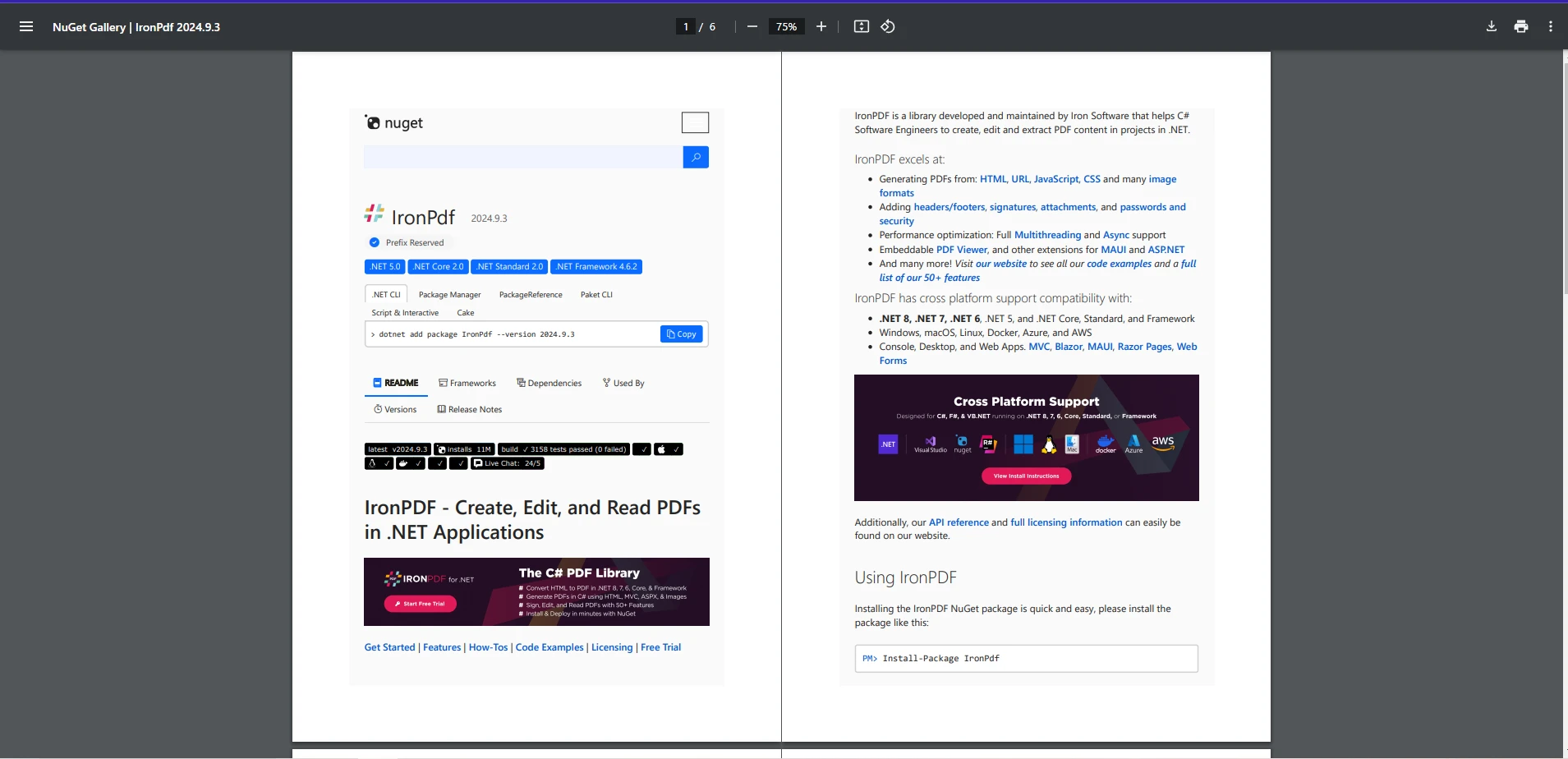
IronPDF의 PDF-이미지 변환 기능은 개발자가 단일 API 호출을 통해 해상도, 출력 형식 및 페이지 선택을 직접 제어할 수 있도록 해줍니다. 아래 예시에서는 다음 PDF 파일을 사용합니다.
using IronPdf;
class Program
{
    static void Main()
    {
        // Load the PDF file into a PdfDocument object.
        var pdf = PdfDocument.FromFile("example.pdf");

        // Convert the PDF pages to image files with a specific output pattern and DPI.
        pdf.RasterizeToImageFiles("PdfImage_*.png", DPI: 200);
    }
}
using IronPdf;
class Program
{
    static void Main()
    {
        // Load the PDF file into a PdfDocument object.
        var pdf = PdfDocument.FromFile("example.pdf");

        // Convert the PDF pages to image files with a specific output pattern and DPI.
        pdf.RasterizeToImageFiles("PdfImage_*.png", DPI: 200);
    }
}
Imports IronPdf
Friend Class Program
Shared Sub Main()
' Load the PDF file into a PdfDocument object.
Dim pdf = PdfDocument.FromFile("example.pdf")
' Convert the PDF pages to image files with a specific output pattern and DPI.
pdf.RasterizeToImageFiles("PdfImage_*.png", DPI:= 200)
End Sub
End Class
Imports IronPdf
Friend Class Program
	Shared Sub Main()
		' Load the PDF file into a PdfDocument object.
		Dim pdf = PdfDocument.FromFile("example.pdf")

		' Convert the PDF pages to image files with a specific output pattern and DPI.
		pdf.RasterizeToImageFiles("PdfImage_*.png", DPI:= 200)
	End Sub
End Class
출력 이미지
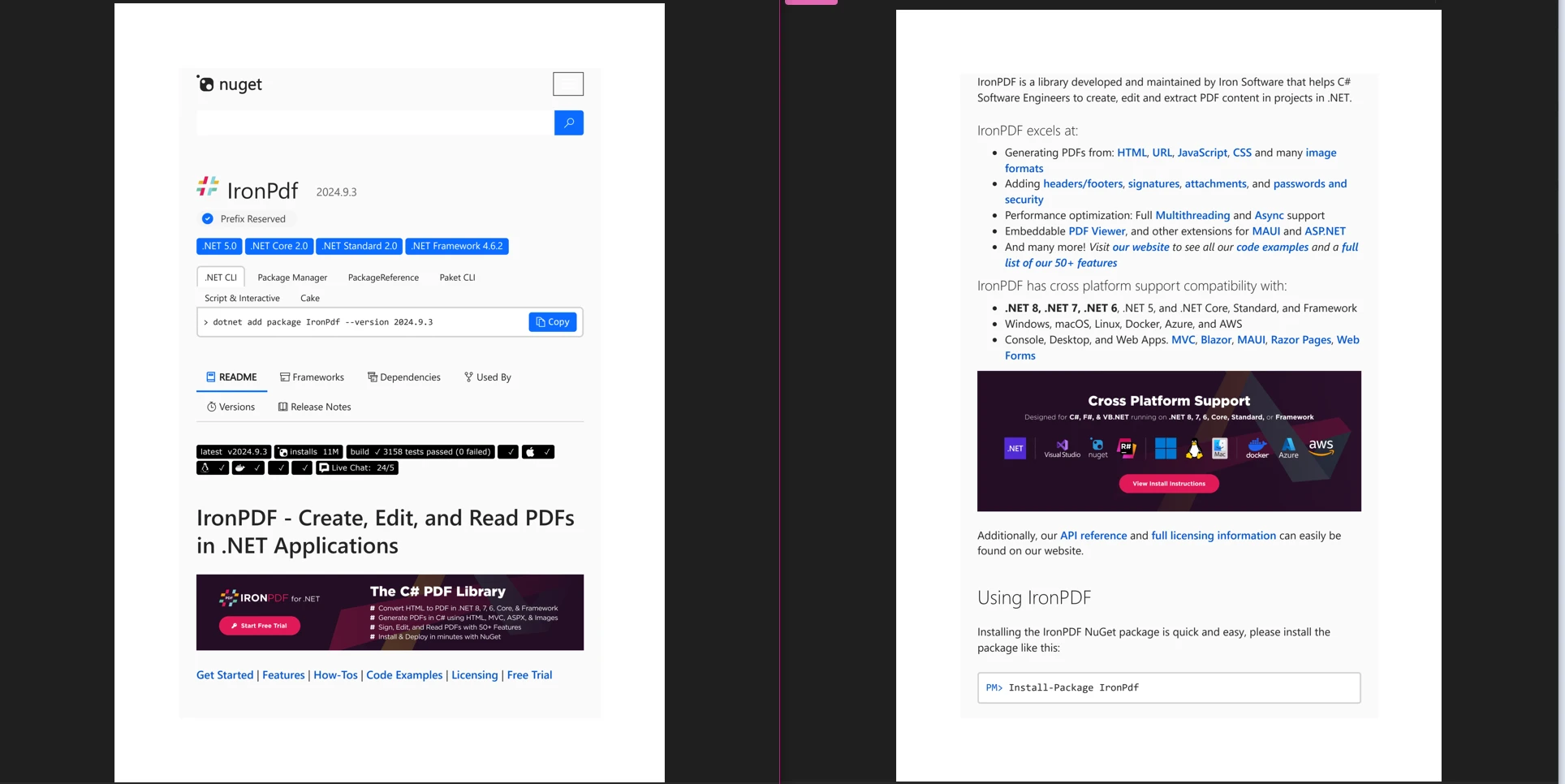
이 코드 예제에서는 IronPDF가 단 두 줄의 코드만으로 PDF 파일을 이미지 형식으로 변환할 수 있음을 보여줍니다. 여기서는 **PdfDocument.FromFile()**을 사용하여 예제 PDF를 로드하며, 이는 원래 이 URL에서 생성되었습니다. 그런 후, RasterizeToImageFiles 메소드를 사용하여 새로운 이미지 파일의 이름 지정 방법을 지정하고, 사용자 정의 DPI를 200으로 설정합니다.
지원 형식 및 커스터마이징
IronPDF는 다양한 이미지 형식을 지원하며, JPEG, PNG, BMP 등으로 다양한 상황에 적합합니다. 또한, 개발자는 DPI 및 이미지 해상도를 사용자 지정하여 인쇄 또는 웹 표시와 같은 특정 요구를 충족하는 출력 이미지를 보장할 수 있습니다.
PDFSharp의 PDF에서 이미지로 변환
PDFSharp는 자체적으로 PDF 페이지를 이미지로 변환하기 위한 기본 기능을 제공하지 않습니다. PDFSharp는 주로 PDF 문서를 생성, 읽기 및 수정하기 위해 설계되었으며, 이미지 렌더링은 아키텍처 표면에 포함되어 있지 않습니다. PDF에서 이미지를 변환하려면 PDFSharp과 별도의 라이브러리를 결합하여 사용해야 하며, PDFSharp의 초점이 있는 범위로 인해 이미지 변환이 필요한 팀에 추가 통합 단계가 발생합니다 – 이 점에서 IronPDF와 같은 라이브러리는 렌더링 기능을 단일 패키지로 번들하여 종속성 표면을 단일 패키지로 줄입니다.
.NET 환경에서 PDF 페이지를 이미지로 변환해야 하는 경우, 다음과 같은 몇 가지 접근 방법이 있습니다:
옵션 1: PDFSharp와 함께 PdfiumSharp 사용
PDF 페이지를 이미지로 렌더링하기 위해 PdfiumSharp을 사용할 수 있으며, PDF 파일을 사전에 작성, 조작 또는 읽어야 하는 경우 PDFSharp과 결합하여 사용할 수 있습니다. PdfiumSharp은 Pdfium 라이브러리를 사용하여 PDF를 이미지로 렌더링합니다.
단계:
- PDF 문서 처리(읽기, 수정 또는 데이터 추출)를 위해 PDFSharp 사용.
- PDF 페이지를 이미지로 변환하려면 PdfiumSharp (또는 PdfRenderer, Pdfium.Net SDK와 같은 다른 라이브러리) 사용.
옵션 2: PDFSharp와 함께 Ghostscript 사용
PDF를 이미지로 변환하는 또 다른 방법은 강력한 PostScript 및 PDF 파일 작업 라이브러리인 Ghostscript를 사용하는 것입니다. C# 코드에서 Ghostscript를 호출하여 PDF를 이미지로 렌더링할 수 있습니다.
옵션 3: PDFSharp와 함께 SkiaSharp 사용
SkiaSharp는 PDF를 이미지로 렌더할 수 있는 크로스 플랫폼 그래픽 라이브러리입니다. 또한 PDF 파일을 사용하여 이미지로 변환하는 것을 지원하며, 이미지를 변환하고 PDF를 읽기 위해 PDFSharp과 함께 사용할 수 있습니다.
성능 비교
속도 및 효율성
PDF를 이미지로 변환하기 위해 IronPDF 추가 라이브러리 종속성 없이 단일 메서드 호출로 페이지를 이미지로 변환하는 내장 렌더링 파이프라인을 제공합니다. 이러한 독립형 접근 방식은 구성 요소의 수를 줄여줍니다. 하나의 NuGet 패키지가 PDF 로딩부터 래스터화에 이르는 전체 워크플로를 처리하므로 Enterprise급 애플리케이션 의 초기 설정과 장기적인 유지 관리가 모두 간소화됩니다.
PDFSharp는 가벼운 라이브러리로, 초점이 있는 범위가 프로젝트의 필요와 잘 맞는 경우, 더 작고 간단한 PDF에 더 적합할 수 있습니다. 그러나 이미지 변환이 PdfiumSharp, Ghostscript 또는 SkiaSharp과 같은 외부 렌더링 라이브러리와 PDFSharp을 결합해야 하므로, 결과적으로 생기는 다중 라이브러리 파이프라인은 추가적인 구성 및 종속성 관리를 초래하며, 팀 평가 시 이를 고려해야 합니다.
기능 비교
이미지 품질
IronPDF는 이미지 품질 측면에서 돋보입니다. 개발자는 해상도를 조정하고 출력 설정을 미세 조정하여 이미지가 높은 선명도와 세부 사항으로 렌더링되도록 할 수 있으며, 이는 시각적 충실도가 중요한 응용 프로그램(예: 고급 인쇄 응용 프로그램)에 필수적입니다.
비교했을 때, PDFSharp은 PDF에서 이미지로의 변환을 처리하기 위해 타사 라이브러리에 의존함에 따라, PDFSharp의 PDF 문서에서 변환된 이미지의 품질은 변환을 처리하는 개별 라이브러리의 기능에 따라 다릅니다.
지원되는 이미지 형식
IronPDF는 JPEG, PNG, BMP 등 다양한 이미지 포맷을 지원합니다. 이것은 개발자가 웹 애플리케이션, 인쇄 또는 저장을 위해 필요한 대로 이미지 출력을 처리할 수 있는 유연성을 제공합니다.
PDFSharp는 반면 PDF에서 이미지로의 변환 프로세스를 위해 사용된 타사 라이브러리에 이미지 형식 지원을 위임하므로, 사용 가능한 형식은 해당 외부 종속성에 따라 다릅니다.
사용의 용이성
두 라이브러리 모두 .NET 프로젝트에 통합하기 상대적으로 쉽습니다. PDFSharp는 단순한 API를 가지고 있어, 고급 기능의 복잡성 없이 기본 PDF 기능이 필요한 개발자에게 이상적일 것입니다.
IronPDF 풍부한 기능 세트로 인해 다소 복잡하지만, 광범위한 문서 와 예제를 제공하여 PDF를 이미지로 변환하는 프로세스를 더욱 세밀하게 제어해야 하는 개발자들이 쉽게 사용할 수 있습니다.
라이선스 및 가격
IronPDF
IronPDF는 상업적 라이센스를 검색하는 사용자에게 영구적인 라이센스 모델을 제공하여 구매 전에 기능을 테스트할 수 있게 하며, 개발 목적으로 무료입니다. 가격은 일반적으로 PDFSharp보다 높지만, 고급 기능 및 기업 수준의 기능을 반영합니다.
PDFSharp
오픈 소스로 제공되는 PDFSharp은 오픈 소스 라이선스의 조건에 따라 무료로 사용할 수 있습니다. 예산이 빠듯한 소규모 프로젝트나 개발자에게 매력적인 옵션입니다. 하지만 내장 이미지 변환 기능이나 전용 벤더 지원과 같은 기능은 포함되지 않으므로 일부 팀에게는 고려 사항이 될 수 있습니다.
라이선스 비용 외, 프로젝트 총 비용에는 별도의 렌더링 라이브러리 조립 및 유지 관리, PDF에서 이미지 변환을 위한 독립적인 종속성 업데이트 관리, PDFSharp과 PdfiumSharp 또는 Ghostscript와 같은 외부 도구 간의 통합 문제 해결 등이 포함됩니다. 수년에 걸친 프로젝트 수명 주기 동안 비용을 평가하는 팀의 경우, 이러한 통합 및 유지 관리 비용이 오픈 소스 라이선스와 상용 라이선스 간의 차이를 훨씬 능가하는 경우가 많습니다.
어떤 라이브러리를 선택해야 합니까?
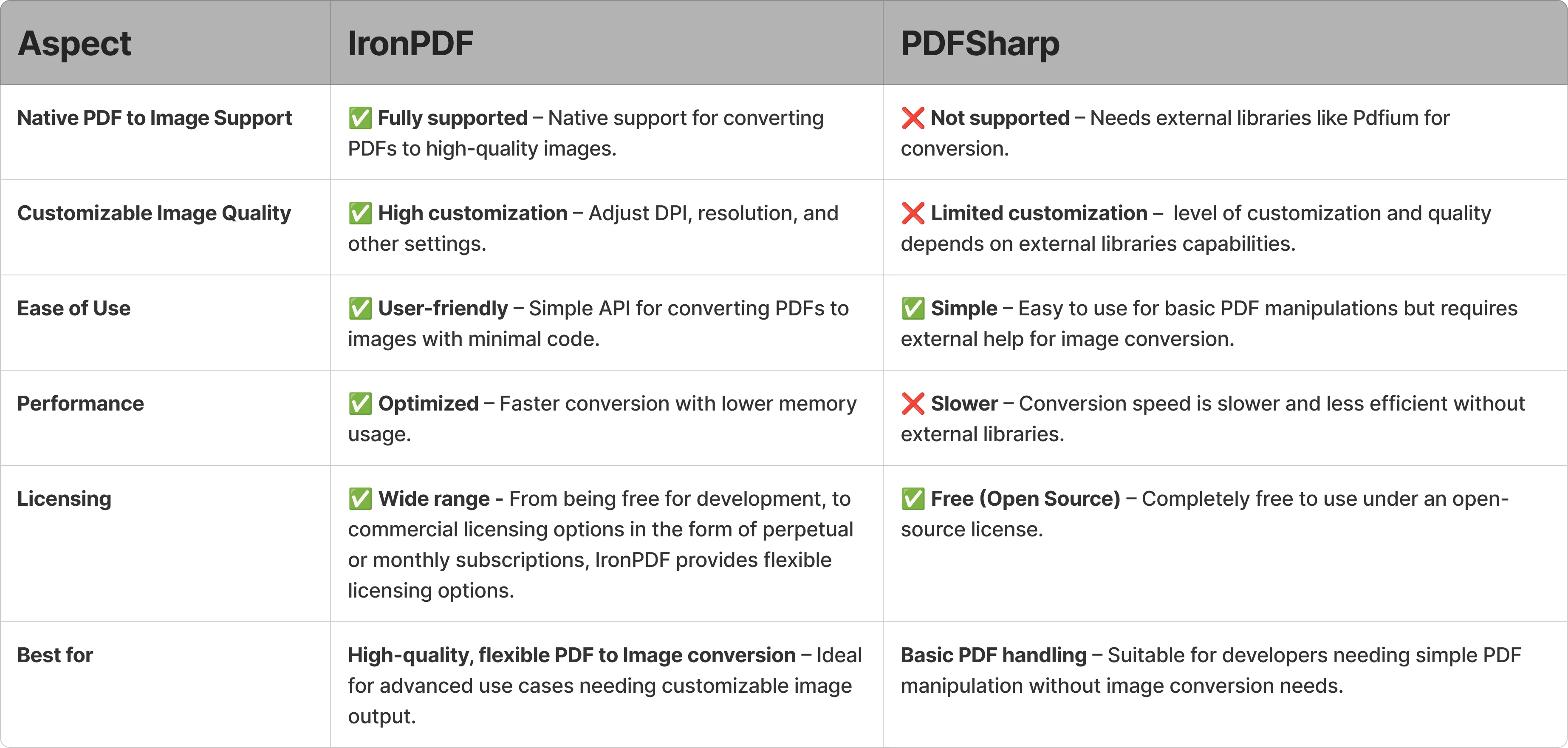
PDF를 이미지로 변환하는 데 있어서 IronPDF 유연성, 이미지 품질 및 내장 렌더링 기능 측면에서 더욱 포괄적인 솔루션을 제공합니다. 이 라이브러리는 고품질의 맞춤형 이미지 출력과 확장성이 요구되는 프로젝트에 적합한 상업용 수준의 라이브러리입니다.
PDFSharp은 PDF 생성 및 기본 문서 작업을 위한 견고하고 비용 효율적인 기반을 제공합니다. 요구 사항이 해당 범위 내에 머무르는 팀에게는 여전히 강력한 선택입니다. 팀이 어려움을 겪는 경우는 요구 사항이 이미지 변환이나 고급 렌더링으로 확장될 때입니다. 이 전환점에서 외부 라이브러리 종속성을 구성하고 유지 관리해야 하는 필요성이 중요한 요소가 됩니다.
DPI 설정, 다양한 출력 형식 지원, 단일 패키지 종속성 등 PDF-이미지 변환 기능을 내장한 솔루션이 필요한 개발자라면 IronPDF 검토해 볼 가치가 있습니다. [IronPDF 무료 평가판 다운로드](trial-license를 통해 자신의 프로젝트에서 이러한 기능을 테스트할 수 있습니다.
PdfiumSharp와 SkiaSharp는 해당 소유자의 등록 상표입니다.) 이 사이트는 PdfiumSharp나 SkiaSharp와 관련이 없으며, 승인이나 후원을 받지 않았습니다. 모든 제품 이름, 로고 및 브랜드는 각각 소유자의 재산입니다. 비교는 정보 제공 목적으로만 사용되며, 작성 시점에 공개적으로 이용 가능한 정보를 반영합니다.























