




업데이트됨 2026년 4월 23일
.NET에서 Microsoft.Extensions.AI로 LLM 통합 간소화
AI는 소프트웨어 개발을 변혁하고 있으나, 대규모 언어 모델(LLM)을 .NET에 통합하는 것은 지금까지 복잡했습니다. 현대에는 OpenAI 기반 PDF 파싱, 데이터 추출 및 콘텐츠 요약을 .NET 애플리케이션에 가져오는 IronPdf.AI로 AI 통합을 더욱 확장하세요.
더 읽어보기

C#의 패턴 매칭은 C# 7.0에서 도입된 강력한 기능으로, 이후 버전에서 확장되었습니다. 이는 개발자가 조건문, 타입 검사, 객체의 해체를 더 간결하고 표현력 있게 코드 작성할 수 있도록 합니다.
패턴 매칭 표현식은 값을 패턴에 맞추고 해당하는 코드 블록을 실행하는 유연하고 직관적인 방법을 제공합니다. 이 기사에서는 C#의 패턴 매칭 표현식의 구문, 사용 사례, 코드 예제를 포함한 복잡성을 탐구할 것입니다. 기사의 끝부분에서는 IronPDF PDF Generation Library를 통해 C# 애플리케이션에서 PDF 문서를 실시간으로 생성하는 방법을 Iron Software에서 살펴볼 것입니다.
C# 코드에서의 패턴 매칭은 다양한 이점을 제공합니다:
패턴 매칭은 다음과 같은 표현식에 의해 지원됩니다:
is 표현식switch 문장switch 표현식들다음 패턴을 사용하여 구성 요소와 일치시킬 수 있습니다:
선언 및 타입 패턴은 주어진 타입과 표현식 실행 시점 타입의 호환성을 검사하는 데 필수적인 도구입니다. 선언 패턴을 통해 호환성을 검사하고 동시에 새로운 지역 변수를 선언할 수 있습니다. 다음 예를 생각해 보세요.
object greeting = "Iron Software is Awesome!";
if (greeting is string message)
{
    Console.WriteLine(message.ToLower());  // output: iron software is awesome!
}Dim greeting As Object = "Iron Software is Awesome!"
Dim tempVar As Boolean = TypeOf greeting Is String
Dim message As String = If(tempVar, DirectCast(greeting, String), Nothing)
If tempVar Then
Console.WriteLine(message.ToLower()) ' output: iron software is awesome!
End If여기서 선언 패턴은 표현식 greeting가 string 타입과 일치할 경우, 변수 message에 할당되어 이후 작업을 가능하게 합니다.
다음 조건 중 하나라도 참일 경우, 선언 패턴이 유효합니다:
T입니다.T에서 파생되거나 인터페이스 T를 구현하거나 T로 암묵적 변환이 가능합니다.T인 널러블 값 타입입니다.T 타입으로의 박싱 또는 언박싱 변환이 존재합니다.위 조건을 시연하는 다음 예제를 고려하십시오:
int? nullableX = 8;
int y = 45;
object boxedy = y;
if (nullableX is int a && boxedy is int b)
{
    Console.WriteLine(a + b);  // output: 53
}Dim nullableX? As Integer = 8
Dim y As Integer = 45
Dim boxedy As Object = y
Dim tempVar As Boolean = TypeOf boxedy Is Integer
Dim b As Integer = If(tempVar, DirectCast(boxedy, Integer), Nothing)
Dim tempVar2 As Boolean = TypeOf nullableX Is Integer
Dim a As Integer = If(tempVar2, CInt(nullableX), Nothing)
If tempVar2 AndAlso tempVar Then
Console.WriteLine(a + b) ' output: 53
End If여기서 nullableX는 기본 타입이 int인 널러블 값 타입이므로 패턴과 일치하며, boxedy는 int로 언박싱할 수 있어 패턴과 일치합니다.
새 변수를 선언하지 않고 표현식의 타입만 확인해야 할 때, 아래의 예시와 같이 _를 사용할 수 있습니다.
public static decimal CalculateToll(Vehicle vehicle) => vehicle switch
{
    Bus _ => 4.00m,
    Motor _ => 8.50m,
    null => throw new ArgumentNullException(nameof(vehicle)),
    _ => throw new ArgumentException("Unknown type of a vehicle", nameof(vehicle)),
};'INSTANT VB TODO TASK: The following 'switch expression' was not converted by Instant VB:
'public static decimal CalculateToll(Vehicle vehicle) => vehicle switch
'{
' Bus _ => 4.00m,
' Motor _ => 8.50m,
' null => throw new ArgumentNullException(nameof(vehicle)),
' _ => throw new ArgumentException("Unknown type of a vehicle", nameof(vehicle)),
'};이 코드 조각에서는 _가 Vehicle과 일치하는 모든 타입의 자리표시자로 사용됩니다.
선언 및 타입 패턴 모두 검사 전에는 표현식이 null이 아님을 보장합니다. 아래와 같이 부정된 null 상수 패턴을 사용하여 null 여부를 확인할 수 있습니다:
if (inputVal is not null)
{
    // ...
}If inputVal IsNot Nothing Then
' ...
End If이 부정은 inputVal이 null이 아님을 보장하여 추가 작업을 진행할 수 있게 합니다.
C# 코드에서 선언 및 타입 패턴을 활용함으로써 가독성을 높이고, 코드 줄 수를 줄이며, 알고리즘을 더 효과적으로 표현할 수 있습니다. 이러한 패턴은 타입 기반 논리를 다루고 코드베이스의 유지 보수를 향상시키는 간결하고 표현력 있는 방법을 제공합니다.
상수 패턴은 표현식 결과가 특정 상수 값과 일치하는지 확인하는 역할을 합니다. 다음 예를 생각해 보세요.
public static decimal GetGroupTicketPrice(int visitorCount) => visitorCount switch
{
1 => 2.0m,
2 => 10.0m,
3 => 25.0m,
4 => 60.0m,
0 => 0.0m,
_ => throw new ArgumentException($"Not supported number of visitors: {visitorCount}", nameof(visitorCount)),
};Dim tempVar As Decimal
Select Case visitorCount
Case 1
tempVar = 2.0D
Case 2
tempVar = 10.0D
Case 3
tempVar = 25.0D
Case 4
tempVar = 60.0D
Case 0
tempVar = 0.0D
Case Else
'INSTANT VB TODO TASK: Throw expressions are not converted by Instant VB:
'ORIGINAL LINE: tempVar = throw new ArgumentException(string.Format("Not supported number of visitors: {0}", visitorCount), nameof(visitorCount));
tempVar = throw New ArgumentException($"Not supported number of visitors: {visitorCount}", NameOf(visitorCount))
End Select
'INSTANT VB TODO TASK: Local functions are not converted by Instant VB:
'public static decimal GetGroupTicketPrice(int visitorCount)
'{
' Return tempVar;
'}여기서 상수 패턴은 visitorCount이 지정된 상수 값 중 하나와 일치하는지 확인하고 해당하는 티켓 가격을 반환합니다.
상수 패턴에서는 다양한 유형의 상수 표현식을 사용할 수 있습니다. 예를 들어:
true 또는 false).null.Span<char> 또는 ReadOnlySpan<char> 타입의 표현식은 상수 문자열과 일치할 수 있습니다.
null을 확인하려면 다음과 같은 상수 패턴을 사용합니다:
if (inputVal is null)
{
return;
}If inputVal Is Nothing Then
Return
End If여기서 패턴은 inputVal이 null임을 보장하여 추가 작업을 진행할 수 있게 합니다.
또한 부정된 null 상수 패턴을 사용하여 null이 아닌 값을 확인할 수 있습니다:
if (inputVal is not null)
{
    // ...
}
If inputVal IsNot Nothing Then
' ...
End If이 패턴은 inputVal이 null이 아님을 검증하여 후속 작업을 안전하게 수행할 수 있도록 합니다.
상수 패턴을 C# 코드에 통합하면 특정 상수 값을 일치시켜야 하는 시나리오를 효과적으로 처리할 수 있어 코드의 명확성과 유지 보수성이 향상됩니다.
관계 패턴은 식 결과를 상수와 비교하는 수단을 제공합니다. 다음 예를 생각해 보세요.
Console.WriteLine(Classify(20));  // output: Too high
Console.WriteLine(Classify(double.NaN));  // output: Unknown
Console.WriteLine(Classify(4));  // output: Acceptable

static string Classify(double measurement) => measurement switch
{
    < -4.0 => "Too low",
    > 10.0 => "Too high",
    double.NaN => "Unknown",
    _ => "Acceptable",
};Console.WriteLine(Classify(20)) ' output: Too high
Console.WriteLine(Classify(Double.NaN)) ' output: Unknown
Console.WriteLine(Classify(4)) ' output: Acceptable
'INSTANT VB TODO TASK: The following 'switch expression' was not converted by Instant VB:
'static string Classify(double measurement) => measurement switch
'{
' < -4.0 => "Too low",
' > 10.0 => "Too high",
' double.NaN => "Unknown",
' _ => "Acceptable",
'};여기서 관계 패턴은 measurement을 특정 임계값과 비교하여 그 분류를 결정합니다.
관계 패턴의 오른쪽 부분은 정수, 부동 소수점, char 또는 enum 타입의 상수 표현식이어야 합니다. <, >, <=, >= 연산자를 왼쪽에 사용할 수 있습니다.
특정 범위 내에서 식 결과를 일치시키기 위해 아래 예시처럼 연결 '그리고' 패턴을 사용하십시오:
Console.WriteLine(GetCalendarSeason(new DateTime(2024, 3, 12)));  // output: spring
Console.WriteLine(GetCalendarSeason(new DateTime(2024, 7, 12)));  // output: summer
Console.WriteLine(GetCalendarSeason(new DateTime(2024, 2, 12)));  // output: winter

static string GetCalendarSeason(DateTime date) => date.Month switch
{
    >= 3 and < 6 => "spring",
    >= 6 and < 9 => "summer",
    >= 9 and < 12 => "autumn",
    12 or (>= 1 and <3) => "winter",
    _ => throw new ArgumentOutOfRangeException(nameof(date), $"Date with unexpected month: {date.Month}."),
};Console.WriteLine(GetCalendarSeason(New DateTime(2024, 3, 12))) ' output: spring
Console.WriteLine(GetCalendarSeason(New DateTime(2024, 7, 12))) ' output: summer
Console.WriteLine(GetCalendarSeason(New DateTime(2024, 2, 12))) ' output: winter
'INSTANT VB TODO TASK: The following 'switch expression' was not converted by Instant VB:
'static string GetCalendarSeason(DateTime date) => date.Month switch
'{
' >= 3 and < 6 => "spring",
' >= 6 and < 9 => "summer",
' >= 9 and < 12 => "autumn",
' 12 or (>= 1 and <3) => "winter",
' _ => throw new ArgumentOutOfRangeException(nameof(date), $"Date with unexpected month: {date.Month}."),
'};이 발췌문은 특정 범위 내에 있는 월을 기반으로 달력의 계절을 확인하기 위해 연결 '그리고' 패턴이 어떻게 사용되는지를 설명합니다. 또한 관계 패턴이 식 결과를 상수와 비교할 수 있는 간결하고 표현력 있는 수단을 제공하여 코드의 명확성과 유지 보수성이 향상된다는 점도 언급되어 있습니다.
바구니 패턴, 즉 _로 표시되는 형태는 null을 포함한 모든 표현식과 일치하도록 합니다. 다음 예시를 보십시오:
Console.WriteLine(GetDiscountInPercent(DayOfWeek.Friday));  // output: 5.0
Console.WriteLine(GetDiscountInPercent(null));  // output: 0.0
Console.WriteLine(GetDiscountInPercent((DayOfWeek)10));  // output: 0.0

static decimal GetDiscountInPercent(DayOfWeek? dayOfWeek) => dayOfWeek switch
{
    DayOfWeek.Monday => 0.5m,
    DayOfWeek.Tuesday => 12.5m,
    DayOfWeek.Wednesday => 7.5m,
    DayOfWeek.Thursday => 12.5m,
    DayOfWeek.Friday => 5.0m,
    DayOfWeek.Saturday => 2.5m,
    DayOfWeek.Sunday => 2.0m,
    _ => 0.0m,
};Console.WriteLine(GetDiscountInPercent(DayOfWeek.Friday)) ' output: 5.0
Console.WriteLine(GetDiscountInPercent(Nothing)) ' output: 0.0
Console.WriteLine(GetDiscountInPercent(CType(10, DayOfWeek))) ' output: 0.0
Dim tempVar As Decimal
Select Case dayOfWeek
Case DayOfWeek.Monday
tempVar = 0.5D
Case DayOfWeek.Tuesday
tempVar = 12.5D
Case DayOfWeek.Wednesday
tempVar = 7.5D
Case DayOfWeek.Thursday
tempVar = 12.5D
Case DayOfWeek.Friday
tempVar = 5.0D
Case DayOfWeek.Saturday
tempVar = 2.5D
Case DayOfWeek.Sunday
tempVar = 2.0D
Case Else
tempVar = 0.0D
End Select
'INSTANT VB TODO TASK: Local functions are not converted by Instant VB:
'static decimal GetDiscountInPercent(System.Nullable(Of DayOfWeek) dayOfWeek)
'{
' Return tempVar;
'}위의 버림 패턴 예시에서는 가능한 모든 입력 값을 처리합니다. 일주일의 모든 날이 관리되고 기본값이 제공됩니다. 이로써 가능한 모든 값이 처리됩니다. 바구니 패턴은 is 표현식이나 switch 문장에서 패턴으로 사용될 수 없습니다. 이러한 경우에는 var 패턴을 사용하여 바구니와 함께 var _와 같은 방식으로 모든 표현식에 일치시킬 수 있습니다. 그러나, 바구니 패턴은 switch 표현식에서는 허용됩니다. 자세한 내용은 기능 제안 메모의 버림 패턴 섹션을 참조하십시오.
C#의 논리 패턴은 부정, 접속, 이접을 포함한 강력한 패턴 매칭 도구를 제공하며, 더 유연하고 표현력 있는 매칭 조건을 허용합니다.
not 패턴)부정 패턴, 즉 not로 표현되는 형태는 부정된 패턴이 표현식과 일치하지 않을 때 표현식과 일치합니다. 이는 특히 표현식이 null이 아닌지 확인하는 데 유용하며, 아래에 설명되어 있습니다:
if (input is not null)
{
    // ...
}If input IsNot Nothing Then
' ...
End If여기서 코드 블록은 input이 null이 아닌 경우 실행됩니다.
and 패턴)구속적 패턴은 and 키워드를 사용하여 두 패턴이 모두 표현식과 일치할 경우 표현식과 일치합니다. 다음 예시처럼 여러 조건을 결합할 수 있습니다:
Console.WriteLine(Classify(13));    // output: High
Console.WriteLine(Classify(-100));  // output: Too low
Console.WriteLine(Classify(5.7));   // output: Acceptable

static string Classify(double measurement) => measurement switch
{
    < -40.0 => "Too low",
    >= -40.0 and < 0 => "Low",
    >= 0 and < 10.0 => "Acceptable",
    >= 10.0 and < 20.0 => "High",
    >= 20.0 => "Too high",
    double.NaN => "Unknown",
};Console.WriteLine(Classify(13)) ' output: High
Console.WriteLine(Classify(-100)) ' output: Too low
Console.WriteLine(Classify(5.7)) ' output: Acceptable
'INSTANT VB TODO TASK: The following 'switch expression' was not converted by Instant VB:
'static string Classify(double measurement) => measurement switch
'{
' < -40.0 => "Too low",
' >= -40.0 and < 0 => "Low",
' >= 0 and < 10.0 => "Acceptable",
' >= 10.0 and < 20.0 => "High",
' >= 20.0 => "Too high",
' double.NaN => "Unknown",
'};이 예시에서 measurement는 값 범위에 따라 분류됩니다.
or 패턴)대체적 패턴은 or 키워드를 사용하여 두 패턴 중 하나가 표현식과 일치할 경우 표현식과 일치합니다. 이는 아래에 표시된 것처럼 여러 가능한 조건을 처리할 수 있도록 합니다:
Console.WriteLine(GetCalendarSeason(new DateTime(2021, 1, 19)));  // output: winter
Console.WriteLine(GetCalendarSeason(new DateTime(2021, 10, 9)));  // output: autumn
Console.WriteLine(GetCalendarSeason(new DateTime(2021, 5, 11)));  // output: spring

static string GetCalendarSeason(DateTime date) => date.Month switch
{
    3 or 4 or 5 => "spring",
    6 or 7 or 8 => "summer",
    9 or 10 or 11 => "autumn",
    12 or 1 or 2 => "winter",
    _ => throw new ArgumentOutOfRangeException(nameof(date), $"Date with unexpected month: {date.Month}."),
};Console.WriteLine(GetCalendarSeason(New DateTime(2021, 1, 19))) ' output: winter
Console.WriteLine(GetCalendarSeason(New DateTime(2021, 10, 9))) ' output: autumn
Console.WriteLine(GetCalendarSeason(New DateTime(2021, 5, 11))) ' output: spring
Dim tempVar As String
Select Case [date].Month
Case 3, 4, 5
tempVar = "spring"
Case 6, 7, 8
tempVar = "summer"
Case 9, 10, 11
tempVar = "autumn"
Case 12, 1, 2
tempVar = "winter"
Case Else
'INSTANT VB TODO TASK: Throw expressions are not converted by Instant VB:
'ORIGINAL LINE: tempVar = throw new ArgumentOutOfRangeException(nameof(date), string.Format("Date with unexpected month: {0}.", date.Month));
tempVar = throw New ArgumentOutOfRangeException(NameOf([date]), $"Date with unexpected month: {[date].Month}.")
End Select
'INSTANT VB TODO TASK: Local functions are not converted by Instant VB:
'static string GetCalendarSeason(DateTime @date)
'{
' Return tempVar;
'}여기서, 달력의 계절은 제공된 날짜의 월을 기준으로 결정됩니다.
이러한 패턴 조합기를 반복적으로 사용하여 보다 복잡하고 정확한 매칭 조건을 만들 수 있어 코드의 유연성과 가독성이 향상됩니다.
속성 패턴은 표현식의 속성이나 필드를 중첩된 패턴에 맞춰 일치시키는 기능을 제공합니다. 다음 코드 조각에서 이를 확인할 수 있습니다:
static bool IsConferenceDay(DateTime date) => date is { Year: 2020, Month: 5, Day: 19 or 20 or 21 };Shared Function IsConferenceDay(ByVal [date] As DateTime) As Boolean
'INSTANT VB TODO TASK: The following 'is' operator pattern is not converted by Instant VB:
Return [date] is { Year: 2020, Month: 5, Day: 19 [or] 20 [or] 21 }
End Function여기서, 속성 패턴은 제공된 날짜가 지정된 학술회의 날 중 하나에 해당하는지를 보장합니다.
속성 패턴 내에서 런타임 타입 검사 및 변수 선언도 아래에 설명된 것처럼 포함할 수 있습니다:
static string TakeFive(object input) => input switch
{
    string { Length: >= 5 } s => s.Substring(0, 5),
    string s => s,
    ICollection<char> { Count: >= 5 } symbols => new string(symbols.Take(5).ToArray()),
    ICollection<char> symbols => new string(symbols.ToArray()),
    null => throw new ArgumentNullException(nameof(input)),
    _ => throw new ArgumentException("Unsupported input type."),
};'INSTANT VB TODO TASK: The following 'switch expression' was not converted by Instant VB:
'static string TakeFive(object input) => input switch
'{
' string { Length: >= 5 } s => s.Substring(0, 5),
' string s => s,
' ICollection<char> { Count: >= 5 } symbols => new string(symbols.Take(5).ToArray()),
' ICollection<char> symbols => new string(symbols.ToArray()),
' null => throw new ArgumentNullException(nameof(input)),
' _ => throw new ArgumentException("Unsupported input type."),
'};여기서는 속성 패턴이 문자열 및 문자 집합을 처리하는 데 사용되어 속성에 따라 적절히 처리됩니다.
C#의 위치 패턴은 표현식 결과를 해체하고 해당 중첩 패턴에 대해 결과 값을 일치시킬 수 있게 합니다. 예를 들어:
public readonly struct Point
{
    public int X { get; }
    public int Y { get; }
    public Point(int x, int y) => (X, Y) = (x, y);
    public void Deconstruct(out int x, out int y) => (x, y) = (X, Y);
}

static string Classify(Point point) => point switch
{
    (0, 0) => "Origin",
    (1, 0) => "Positive X basis end",
    (0, 1) => "Positive Y basis end",
    _ => "Just a point",
};'INSTANT VB WARNING: VB has no equivalent to the C# readonly struct:
'ORIGINAL LINE: public readonly struct Point
Public Structure Point
Public ReadOnly Property X() As Integer
Public ReadOnly Property Y() As Integer
Public Sub New(ByVal x As Integer, ByVal y As Integer)
'INSTANT VB TODO TASK: VB has no equivalent to the C# deconstruction assignments:
(X, Y) = (x, y)
End Sub
Public Sub Deconstruct(<System.Runtime.InteropServices.Out()> ByRef x As Integer, <System.Runtime.InteropServices.Out()> ByRef y As Integer)
'INSTANT VB TODO TASK: VB has no equivalent to the C# deconstruction assignments:
(x, y) = (X, Y)
End Sub
End Structure
'INSTANT VB TODO TASK: The following 'switch expression' was not converted by Instant VB:
'static string Classify(Point point) => point switch
'{
' (0, 0) => "Origin",
' (1, 0) => "Positive X basis end",
' (0, 1) => "Positive Y basis end",
' _ => "Just a point",
'};이 예시에서는 위치 패턴이 좌표를 기준으로 포인트를 분류하는 데 사용됩니다.
또한, 속성 패턴 내에서 중첩된 속성이나 필드를 참조할 수 있으며, 이것은 C# 10에 도입된 확장 속성 패턴으로 알려져 있습니다:
static bool IsAnyEndOnXAxis(Segment segment) =>
segment is { Start.Y: 0 } or { End.Y: 0 };Shared Function IsAnyEndOnXAxis(ByVal segment As Segment) As Boolean
'INSTANT VB TODO TASK: The following 'is' operator pattern is not converted by Instant VB:
Return segment is { Start.Y: 0 } [or] { [End].Y: 0 }
End Function이 기능은 중첩된 속성에 직접 액세스할 수 있도록 하여 속성 패턴의 유연성을 강화합니다.
이러한 패턴들은 복잡한 데이터 구조를 처리하고 코드의 가독성과 표현성을 향상시킬 수 있는 강력한 메커니즘을 제공합니다.
Var 패턴은 모든 유형과 일치시킬 수 있습니다. 이는 Boolean 표현식 내에서 중간 결과를 캡처하거나 스위치 케이스 가드에서 여러 검사를 수행할 때 특히 유용할 수 있습니다.
Boolean 표현식에서 var 패턴 사용을 보여주는 예입니다:
static bool IsAcceptable(int id, int absLimit) =>
    SimulateDataFetch(id) is var results
    && results.Min() >= -absLimit
    && results.Max() <= absLimit;

static int [] SimulateDataFetch(int id)
{
    var rand = new Random();
    return Enumerable
               .Range(start: 0, count: 5)
               .Select(s => rand.Next(minValue: -10, maxValue: 11))
               .ToArray();
}Shared Function IsAcceptable(ByVal id As Integer, ByVal absLimit As Integer) As Boolean
Dim tempVar As Boolean = TypeOf SimulateDataFetch(id) Is var
Dim results = If(tempVar, CType(SimulateDataFetch(id), var), Nothing)
Return tempVar AndAlso results.Min() >= -absLimit AndAlso results.Max() <= absLimit
End Function
Shared Function SimulateDataFetch(ByVal id As Integer) As Integer()
Dim rand = New Random()
Return Enumerable.Range(start:= 0, count:= 5).Select(Function(s) rand.Next(minValue:= -10, maxValue:= 11)).ToArray()
End Function이 예시에서 SimulateDataFetch은 정수 배열을 반환하고, is var 패턴은 결과를 results 변수에 캡처하여 그 속성을 기반으로 한 후속 계산을 가능하게 합니다.
또한, var 패턴은 코드의 간결성과 가독성을 높이기 위해 switch 표현식이나 문 내에서 활용될 수 있습니다. 스위치 케이스 가드에서 var 패턴을 사용하는 예입니다:
public record Point(int X, int Y);

static Point Transform(Point point) => point switch
{
    var (x, y) when x < y => new Point(-x, y),
    var (x, y) when x > y => new Point(x, -y),
    var (x, y) => new Point(x, y),
};

static void TestTransform()
{
    Console.WriteLine(Transform(new Point(1, 2)));  // output: Point { X = -1, Y = 2 }
    Console.WriteLine(Transform(new Point(5, 2)));  // output: Point { X = 5, Y = -2 }
}'INSTANT VB TODO TASK: C# 'records' are not converted by Instant VB:
'public record Point(int X, int Y)
'INSTANT VB TODO TASK: The following 'switch expression' was not converted by Instant VB:
'static Point Transform(Point point) => point switch
'{
' var (x, y) when x < y => new Point(-x, y),
' var (x, y) when x > y => new Point(x, -y),
' var (x, y) => new Point(x, y),
'};
Shared Sub TestTransform()
Console.WriteLine(Transform(New Point(1, 2))) ' output: Point { X = -1, Y = 2 }
Console.WriteLine(Transform(New Point(5, 2))) ' output: Point { X = 5, Y = -2 }
End Sub이 예시에서 var 패턴 (x, y)는 점의 좌표를 캡처하여 그 값에 기반한 다양한 변환을 가능하게 합니다.
var 패턴에서는 선언된 변수의 유형이 패턴과 일치하는 표현식의 컴파일 시간 유형에서 추론됩니다.
var 패턴은 사전 알려지지 않은 특정 유형의 표현식을 처리하는 편리한 방법을 제공하여 코드의 명료성과 유연성을 향상시킵니다.
IronPDF 문서 렌더링은 Iron Software의 라이브러리로, PDF 문서 생성을 전문으로 합니다. 시작하려면 NuGet 패키지 관리자 또는 Visual Studio 패키지 관리자를 통해 라이브러리를 설치하는 것이 첫 번째입니다.
# To install from the NuGet Package Manager Console
Install-Package IronPdf아래 이미지는 Visual Studio 설치 가이드에서 설치하는 방법을 보여줍니다.

아래 코드에서는 간단한 PDF 문서를 생성하는 방법을 설명합니다:
using IronPdf;

namespace IronPatterns
{
    class Program
    {
        static void Main()
        {
            Console.WriteLine("-----------Iron Software-------------");
            var renderer = new ChromePdfRenderer(); // var pattern
            var content = " <h1> Iron Software is Awesome </h1> Made with IronPDF!";

            // Declaration Pattern
            int? nullableX = 8;
            int y = 45;
            object boxedy = y;
            content += "<p>Declaration Pattern</p>";
            if (nullableX is int a && boxedy is int b)
            {
                Console.WriteLine(a + b); // output: 53
                content += $"<p>Output: {(a + b)}</p>";
            }

            // Relational patterns
            content += "<p>Relational patterns</p>";
            var season1 = GetCalendarSeason(new DateTime(2024, 2, 25));
            Console.WriteLine(season1);
            content += $"<p>2024, 2, 25: {season1}</p>";
            var season2 = GetCalendarSeason(new DateTime(2024, 5, 25));
            Console.WriteLine(season2);
            content += $"<p>2024, 5, 25: {season2}</p>";
            var season3 = GetCalendarSeason(new DateTime(2024, 7, 25));
            Console.WriteLine(season3);
            content += $"<p>2024, 7, 25: {season3}</p>";

            var pdf = renderer.RenderHtmlAsPdf(content);
            pdf.SaveAs("output.pdf"); // Saves our PdfDocument object as a PDF
        }

        static string GetCalendarSeason(DateTime date) => date.Month switch
        {
            >= 3 and < 6 => "spring",
            >= 6 and < 9 => "summer",
            >= 9 and < 12 => "autumn",
            12 or (>= 1 and < 3) => "winter",
            _ => throw new ArgumentOutOfRangeException(nameof(date), $"Date with unexpected month: {date.Month}."),
        };
    }
}Imports IronPdf
Namespace IronPatterns
Friend Class Program
Shared Sub Main()
Console.WriteLine("-----------Iron Software-------------")
Dim renderer = New ChromePdfRenderer() ' var pattern
Dim content = " <h1> Iron Software is Awesome </h1> Made with IronPDF!"
' Declaration Pattern
Dim nullableX? As Integer = 8
Dim y As Integer = 45
Dim boxedy As Object = y
content &= "<p>Declaration Pattern</p>"
Dim tempVar As Boolean = TypeOf boxedy Is Integer
Dim b As Integer = If(tempVar, DirectCast(boxedy, Integer), Nothing)
Dim tempVar2 As Boolean = TypeOf nullableX Is Integer
Dim a As Integer = If(tempVar2, CInt(nullableX), Nothing)
If tempVar2 AndAlso tempVar Then
Console.WriteLine(a + b) ' output: 53
content &= $"<p>Output: {(a + b)}</p>"
End If
' Relational patterns
content &= "<p>Relational patterns</p>"
Dim season1 = GetCalendarSeason(New DateTime(2024, 2, 25))
Console.WriteLine(season1)
content &= $"<p>2024, 2, 25: {season1}</p>"
Dim season2 = GetCalendarSeason(New DateTime(2024, 5, 25))
Console.WriteLine(season2)
content &= $"<p>2024, 5, 25: {season2}</p>"
Dim season3 = GetCalendarSeason(New DateTime(2024, 7, 25))
Console.WriteLine(season3)
content &= $"<p>2024, 7, 25: {season3}</p>"
Dim pdf = renderer.RenderHtmlAsPdf(content)
pdf.SaveAs("output.pdf") ' Saves our PdfDocument object as a PDF
End Sub
'INSTANT VB TODO TASK: The following 'switch expression' was not converted by Instant VB:
' static string GetCalendarSeason(DateTime date) => date.Month switch
' {
' >= 3 and < 6 => "spring",
' >= 6 and < 9 => "summer",
' >= 9 and < 12 => "autumn",
' 12 or (>= 1 and < 3) => "winter",
' _ => throw new ArgumentOutOfRangeException(nameof(date), $"Date with unexpected month: {date.Month}."),
' };
End Class
End Namespace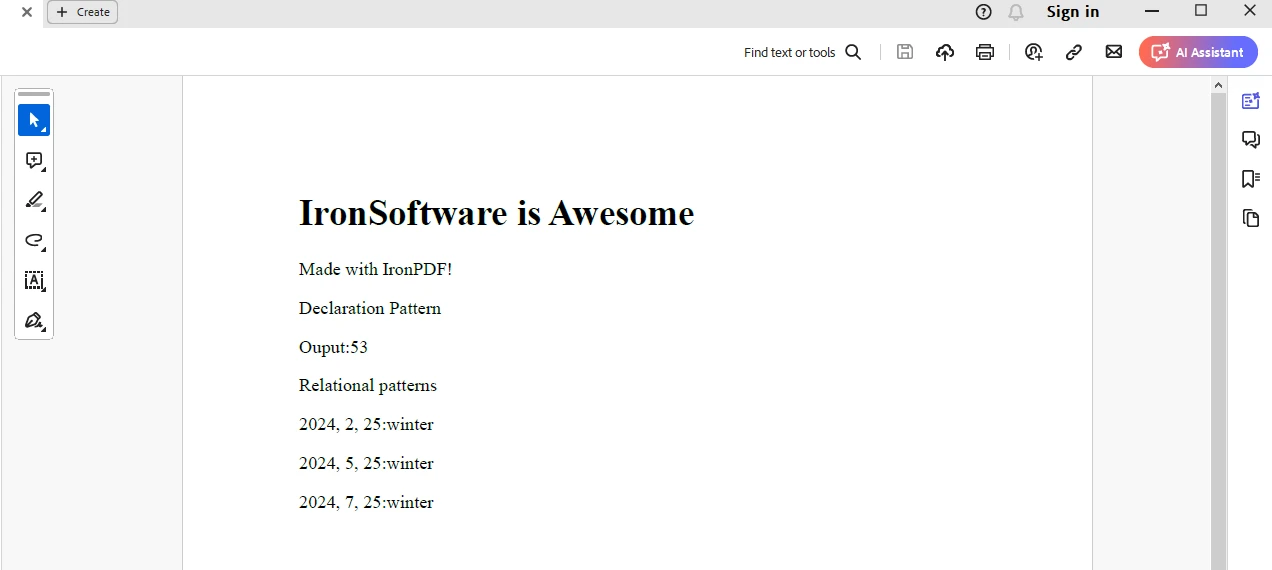
여기에서는 IronPDF의 ChromePdfRenderer 클래스를 사용하여 HTML 문자열을 PDF 문서로 저장합니다. 출력은 "output.pdf" 문서에 저장됩니다.
IronPDF는 체험판 라이센스를 IronPDF 라이센스 페이지에서 얻어 사용할 수 있습니다. 라이센스 키 생성에 사용할 이메일 주소를 제공하세요.
"IronPdf.LicenseKey": "<Your Key>""IronPdf.LicenseKey" = "<Your Key>"위에 설명된 대로 라이선스 키를 appsettings.json 파일에 배치하세요.
C#의 패턴 매칭 표현식은 조건문, 유형 검사, 객체 분해를 간결하고 읽기 쉽게 작성할 수 있는 강력하고 유연한 방법을 제공합니다. 패턴 매칭을 활용하면 개발자는 중복과 보일러플레이트를 줄이면서 코드의 명확성과 유지 보수성을 높일 수 있습니다. 유형 검사, 스위치 문, 또는 분해 작업 모두 C#에서 패턴 매칭 표현식은 다양한 프로그래밍 작업을 해결하는 다재다능한 도구 세트를 제공합니다.
결론적으로, 패턴 매칭 표현식을 마스터하면 C# 프로그래밍 기술을 크게 향상시킬 수 있으며, 더 깔끔하고 표현력이 뛰어난 코드를 작성할 수 있는 능력을 제공합니다. 또한 PDF 문서 생성에 활용할 수 있는 IronPDF의 HTML to PDF 생성 기능에 대해서도 다루었습니다.

제이콥 멜러는 Iron Software의 최고 기술 책임자(CTO)이자 C# PDF 기술을 개척한 선구적인 엔지니어입니다. Iron Software의 핵심 코드베이스를 최초로 개발한 그는 창립 초기부터 회사의 제품 아키텍처를 설계해 왔으며, CEO인 캐머런 리밍턴과 함께 회사를 NASA, 테슬라, 그리고 전 세계 정부 기관에 서비스를 제공하는 50명 이상의 직원을 보유한 기업으로 성장시켰습니다.



IronPDF는 IRON SUITE 의 일부입니다.
10개의 .NET API 제품, 당신의 사무 문서를 위해

PDF 파일을 HTML처럼 빠르게 변환해야 할 때.


