




업데이트됨 2026년 9월 4일
월별 계정 명세서를 PDF 문서로 생성하기
개발자는 IronPDF C# PDF 라이브러리를 사용하여 외부 서비스에 의존하지 않고도 .NET 프로젝트 내에서 HTML을 신뢰할 수 있는 PDF 파일로 변환할 수 있습니다.
더 읽어보기

소프트웨어 개발 분야에서는 PDF 문서 관리가 일반적인 요구 사항입니다. 영수증 생성에서 전자 및 디지털 서명으로 계약서를 보안하는 것까지, 개발자들은 PDF 기능을 애플리케이션에 효율적으로 통합할 방법을 끊임없이 모색하고 있습니다.
"PDF SDK"라는 용어는 종합적인 도구 모음을 의미하지만, 강력한 PDF 라이브러리인 IronPDF는 개발자가 기대하는 모든 PDF 기능을 제공할 수 있으며 종종 전통적이고 거대한 SDK들보다 더 유연하고 사용하기 쉽습니다.
논의했듯이, SDK(소프트웨어 개발 킷)는 특정 플랫폼에서 애플리케이션을 만들기 위해 설계된 도구, 라이브러리, 문서, 샘플의 광범위한 모음입니다. 반면 라이브러리는 특정 작업을 수행하기 위해 설계된 코드 모음입니다.
많은 사람들이 "PDF SDK"를 모든 PDF 관련 작업을 위한 완전한 패키지로 인식합니다. 그러나 .NET 개발자에게 IronPDF는 불필요한 키트의 큰 부하 없이 포괄적 기능을 제공하는 사실상의 PDF SDK로서 고성능 PDF 라이브러리의 전형을 보여줍니다. 이것은 PDF 파일과 문서 워크플로에 대한 완전한 제어를 제공하는 전문 도구입니다.
IronPDF는 여러 플랫폼에서 소프트웨어 개발을 위해 구축된 .NET ( .NET Core 포함)용 선도적인 PDF 라이브러리입니다. 개발자가 PDF 파일을 생성하고, PDF 편집을 수행하며, 데이터를 추출하고, 애플리케이션 내에서 PDF 보안을 관리할 수 있게 하며, 모두 몇 줄의 코드로 가능합니다. 웹 앱, 데스크탑, 그리고 리액트 네이티브 또는 자마린 통합을 통해 향후 모바일 앱에도 고급 PDF 기능을 통합하기 위한 솔루션입니다.
IronPDF가 최고의 PDF SDK에서 기대할 수 있는 핵심 API 기능을 어떻게 제공하는지 탐구해 봅시다:
HTML/CSS에서: IronPDF는 HTML 및 CSS를 직접 고충실도의 PDF로 렌더링하는 데 능숙합니다. 이것은 기존 웹 디자인을 활용하거나 웹 애플리케이션에서 동적으로 콘텐츠를 생성할 수 있다는 것을 의미합니다. 현대적 CSS3, JavaScript, 및 반응형 레이아웃을 지원하여 생성된 문서가 의도한 대로 정확히 보이도록 합니다.
마이크로소프트 오피스 문서에서: Microsoft Office 문서(DOCX)를 PDF로 쉽게 변환하여 문서 생성 워크플로를 간소화합니다.
컨텐츠 추가: 개발자는 동적으로 텍스트, 이미지, 헤더, 푸터, 페이지 번호 (예: 첫 페이지 또는 모든 페이지), 복잡한 레이아웃과 같은 콘텐츠를 추가할 수 있습니다.
기존 PDF 수정: IronPDF는 기존 PDF 문서를 편집하기 위한 강력한 API를 제공합니다. 여러 페이지를 추가하거나 제거하고, 여러 파일을 병합하며, 대형 PDF를 분할하고, 텍스트 또는 이미지 형식을 업데이트할 수 있습니다.
주석 및 양식: 프로그래밍 방식으로 주석을 추가하고 기존 양식 필드를 편집하며 심지어 새 양식을 생성할 수 있습니다. 이는 대화형 문서 및 데이터 추출에 필수적입니다.
워터마킹 및 수정: 워터마크를 적용하거나 민감한 정보 및 개인 식별 가능 정보(PII)를 수정하여 PDF 보안을 강화하여 컴플라이언스와 개인정보 보호를 보장합니다.
텍스트 및 이미지 추출: PDF에서 효율적으로 데이터를 추출하며, 이는 일반 텍스트, 구조화된 데이터 또는 심지어 이미지일 수 있습니다. 파일의 PDF 내용을 처리할 필요가 있는 문서 관리 시스템에 매우 중요합니다.
양식 필드 데이터: 프로그래밍 방식으로 양식 필드에서 데이터를 읽고 쓰며, 자동화된 워크플로를 촉진합니다.
비밀번호 보호: 암호화 및 비밀번호 보호로 PDF 문서를 보호합니다.
전자 및 디지털 서명: IronPDF는 PDF에 전자 서명 및 디지털 서명을 추가하여 문서의 진정성과 부인 방지를 보장합니다. 이는 법적 및 금융 기관에 필수적입니다.
서명 필드: PDF 내에서 서명 필드를 생성하고 관리하여 사용자가 문서를 직접 서명할 수 있게 합니다.
"최고의 PDF SDK"를 평가할 때 개발자는 종종 네이티브 C# 라이브러리를 오래된 자바 기반 솔루션이나 Adobe PDF 라이브러리 개발자 도구 같은 중량급 벤더와 비교합니다. IronPDF는 사용의 용이성, 성능, 배포 측면에서 일관된 주요 장점을 제공합니다.
| 특징 | IronPDF (.NET 라이브러리) | 전통적인 SDK (예: Java 기반) | 클라이언트 사이드 JS 라이브러리 |
|---|---|---|---|
| 핵심 API 언어 | .NET (C#) | 자바 또는 C++ 자주 사용 | JavaScript |
| PDF 생성 | HTML/CSS 렌더링 (Chromium) | 직접 PDF 명령 (저수준) | 제한적, 기본 HTML 렌더링 |
| 성능 | 고성능, 멀티 스레드 | 변수, 종종 JVM에 의존 | 클라이언트 측 브라우저 자원으로 제한 |
| 통합 모델 | .NET Core 및 .NET과의 원활한 통합 (동일 코드베이스) | 래퍼 또는 별도의 서버 프로세스 요구 | 주로 웹 앱 UI/디스플레이 용 |
| 크로스 플랫폼 | 예 (Windows, Linux, macOS에 대한 크로스 플랫폼 지원) | 가능, JVM/종속성 필요 | 예 (브라우저) |
| 의존성 | 독립적. Adobe PDF 라이브러리 필요 없음. | 종종 큰 런타임 또는 복잡한 라이센스를 필요로 함. | 없음 (브라우저) |
HTML 렌더링 품질: 복잡한, 저수준 API에 의존하는 오래된 PDF 라이브러리와 달리 IronPDF는 Chromium 엔진을 사용하여 복잡한 HTML 및 CSS에서 생성된 문서가 픽셀 단위로 완벽하며, 브라우저에서 보는 것과 동일하게 현대 웹 표준에 완전히 부합되도록 보장합니다.
단순화된 .NET 환경: .NET 환경에서 작업하는 개발 팀은 외부 자바 기반 또는 관리되지 않은 C++ SDK 구성 요소 통합과 관련된 오버헤드, 성능 저하 및 배포 복잡성을 피합니다. 같은 코드베이스와 동일한 기능을 사용합니다.
배포: 순수 .NET 라이브러리로서 유연한 배포 옵션을 제공합니다. 다른 도구는 대형의 플랫폼 특정 이진 파일을 포함할 수 있는 것과 달리 외부 서비스나 복잡한 설치 프로그램이 필요 없이 서버 환경에 간단히 배포할 수 있습니다.
매끄러운 통합: .NET Core 및 .NET (Framework)에 맞춰 설계된 IronPDF는 기존 프로젝트에 매끄럽게 통합됩니다.
크로스 플랫폼 지원: 크로스 플랫폼 지원을 통해 Windows, Linux, macOS에서 개발하고 솔루션을 일관되게 배포할 수 있습니다. 다른 환경에서도 동일한 기능과 동일한 코드베이스를 사용할 수 있습니다.
높은 성능: 속도와 효율성을 위해 설계된 IronPDF는 대용량 파일 및 복잡한 렌더링 작업을 높은 성능으로 처리하여 느린 엔진을 최적화하는 데 걸리는 개발 시간을 단축합니다.
완전한 준수: IronPDF는 완전히 준수하는 PDF를 생성하여 Acrobat 및 기타 업계 표준 도구와의 호환성을 보장합니다.
개발자 친화적: 명확한 문서, 수많은 샘플 애플리케이션 및 직관적인 핵심 API를 자랑하는 IronPDF는 개발자가 빠르게 목표를 달성할 수 있도록 지원합니다. PDF 전문가일 필요는 없습니다; 라이브러리는 빌딩 블록으로 복잡성을 처리합니다.
Adobe PDF 라이브러리 종속성 없음: Adobe PDF 라이브러리를 필요로 하는 솔루션과 달리, IronPDF는 완전히 자립하여 더 간단한 배포 모델을 제공합니다.
강력한 PDF 라이브러리인 IronPDF의 진정한 척도는 렌더링, 보안 및 데이터 추출과 같은 복잡한 작업을 간단하고 고수준의 명령을 통해 처리하는 SDK 수준의 기능을 제공합니다. 이러한 통합은 IronPDF가 .NET 개발자를 위한 매우 효율적인 PDF SDK 대체품으로 작동할 수 있도록 합니다.
포괄적인 PDF SDK는 다양한 형식에 대한 신뢰할 수 있고 고해상도의 문서 생성을 제공해야 합니다. IronPDF는 복잡한 폰트, 레이아웃 및 색상 공간 렌더링 API 대신 단일 강력한 방법으로 최신 웹 기술(HTML)을 완전한 PDF로 변환하여 개발자가 최종 출력에 대한 완전한 제어권을 가질 수 있도록 합니다.
using IronPdf;

// SDK Functionality: The ChromePdfRenderer acts as the specialized rendering engine
// found within a robust PDF SDK.
var renderer = new ChromePdfRenderer();

// Data Input: Seamlessly integrate dynamic data from your web app or server.
string customerName = "Acme Corporation";
string invoiceNumber = "INV-2025-001";

string htmlContent = $@"
    <html>
        <body>
            <h1>Invoice #{invoiceNumber}</h1>
            <p>Billed to: <strong>{customerName}</strong></p>
            <table>
                <thead><tr><th>Item</th><th>Price</th></tr></thead>
                <tbody>
                    <tr><td>Widget Pro</td><td>$99.99</td></tr>
                </tbody>
            </table>
        </body>
    </html>";

// Core API: Create PDF (SDK feature) from HTML/CSS in just a few lines of code.
var pdfDocument = renderer.RenderHtmlAsPdf(htmlContent);

// Output: SDK-level capability to save the generated PDF file.
pdfDocument.SaveAs("Invoice.pdf");Imports IronPdf
' SDK Functionality: The ChromePdfRenderer acts as the specialized rendering engine
' found within a robust PDF SDK.
Dim renderer As New ChromePdfRenderer()
' Data Input: Seamlessly integrate dynamic data from your web app or server.
Dim customerName As String = "Acme Corporation"
Dim invoiceNumber As String = "INV-2025-001"
Dim htmlContent As String = $"
<html>
<body>
<h1>Invoice #{invoiceNumber}</h1>
<p>Billed to: <strong>{customerName}</strong></p>
<table>
<thead><tr><th>Item</th><th>Price</th></tr></thead>
<tbody>
<tr><td>Widget Pro</td><td>$99.99</td></tr>
</tbody>
</table>
</body>
</html>"
' Core API: Create PDF (SDK feature) from HTML/CSS in just a few lines of code.
Dim pdfDocument = renderer.RenderHtmlAsPdf(htmlContent)
' Output: SDK-level capability to save the generated PDF file.
pdfDocument.SaveAs("Invoice.pdf")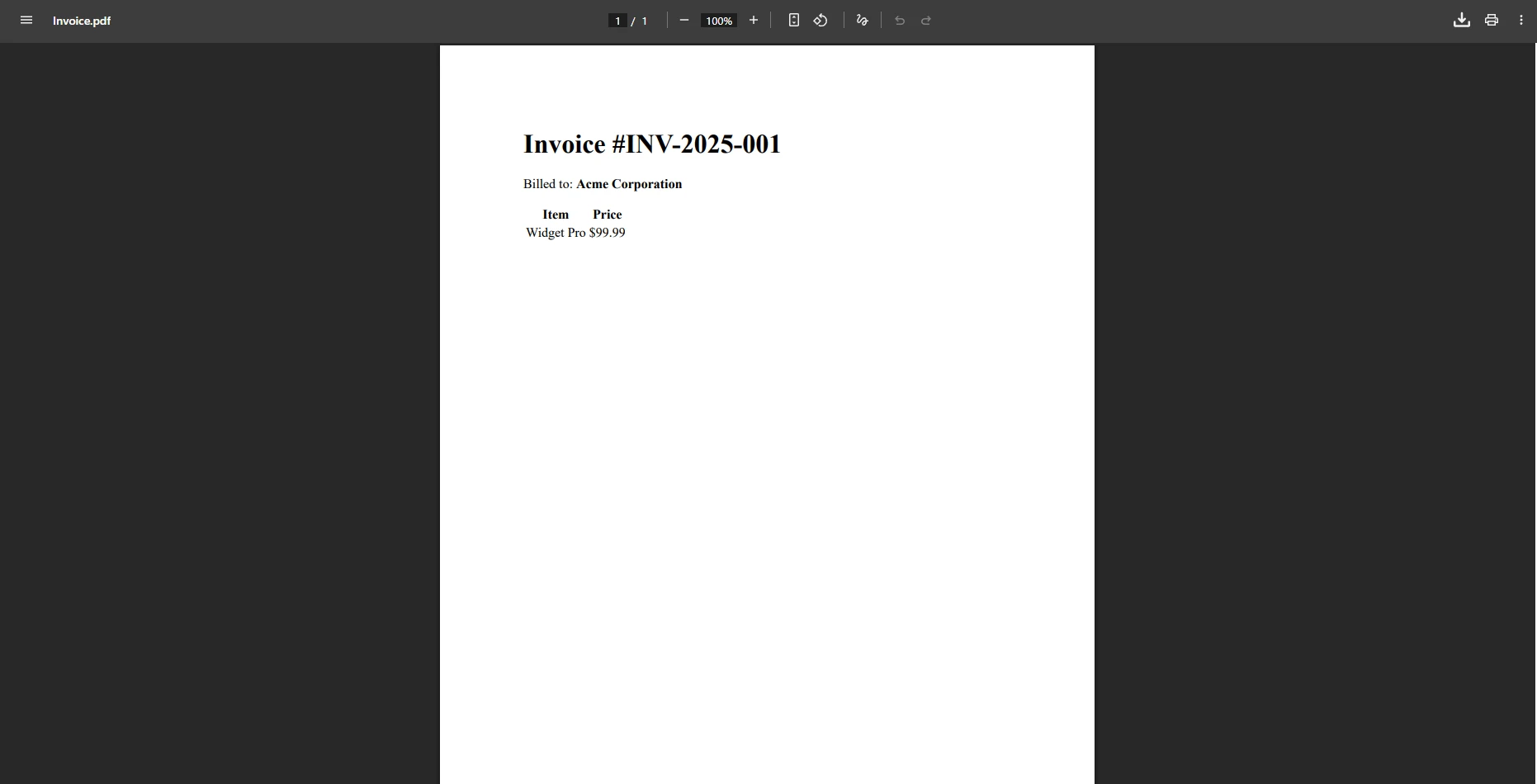
디지털 서명을 구현하는 것은 현대 문서 워크플로에서 PDF 보안을 위해 필수적인 복잡한 암호화 작업입니다. 실제 PDF SDK는 이를 단순화합니다. IronPDF는 X.509 인증서 및 PDF 바이트 조작의 복잡성을 전자 서명을 적용하기 위한 명확하고 전담된 API로 추상화합니다.
using IronPdf;
using IronPdf.Signing;

// SDK Input: Load the existing PDF file that requires securing.
var pdf = PdfDocument.FromFile("input.pdf");

// SDK Component: Instantiate the Signing Tool, handling private key access and certificate setup.
var signature = new PdfSignature("certificate.pfx", "password")
{
    // SDK Feature: Adding mandatory metadata to the digital signatures.
    SigningContact = "legal@mycompany.com",
    SigningLocation = "Server Farm, USA",
    SigningReason = "Contractual Agreement"
};

// Core API: Apply the digital signature (SDK feature) to the PDF's signature fields.
pdf.Sign(signature);

// Output: A fully compliant, signed PDF, demonstrating high-performance security features.
pdf.SaveAs("Signed_Contract.pdf");Imports IronPdf
Imports IronPdf.Signing
' SDK Input: Load the existing PDF file that requires securing.
Dim pdf = PdfDocument.FromFile("input.pdf")
' SDK Component: Instantiate the Signing Tool, handling private key access and certificate setup.
Dim signature As New PdfSignature("certificate.pfx", "password") With {
' SDK Feature: Adding mandatory metadata to the digital signatures.
.SigningContact = "legal@mycompany.com",
.SigningLocation = "Server Farm, USA",
.SigningReason = "Contractual Agreement"
}
' Core API: Apply the digital signature (SDK feature) to the PDF's signature fields.
pdf.Sign(signature)
' Output: A fully compliant, signed PDF, demonstrating high-performance security features.
pdf.SaveAs("Signed_Contract.pdf")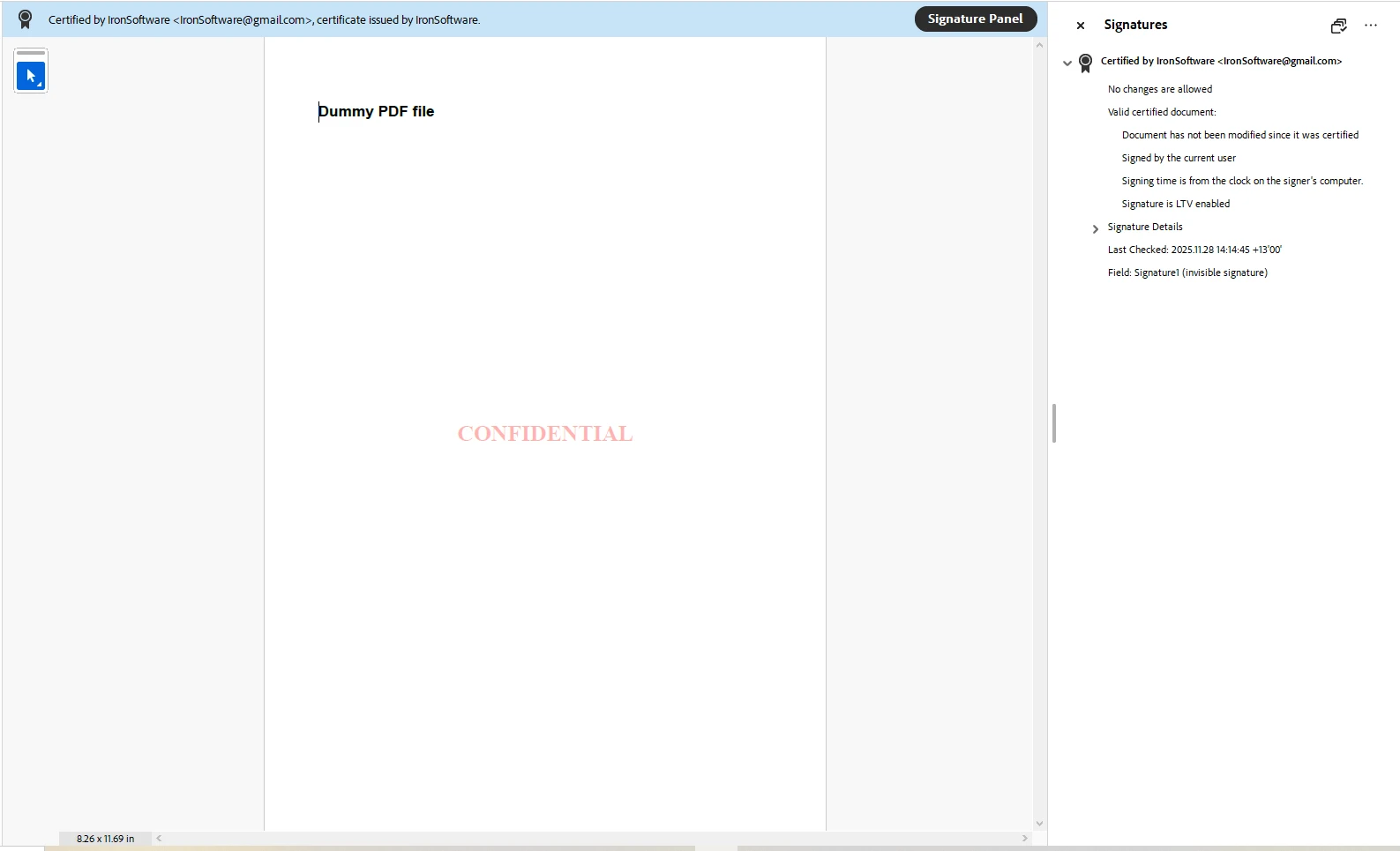
효과적인 PDF SDK 대체품은 민감한 정보를 보호하기 위한 자동화된 워크플로를 가능하게 해야 합니다. 워터마킹은 문서 관리에 중요한 기능입니다. IronPDF는 HTML 엔진을 사용하여 단 한 줄의 코드로 이러한 PDF 편집을 가능하게 하며 회전, 불투명도 및 스타일링에 대한 세밀한 제어를 제공합니다.
using IronPdf;

// SDK Input: Load the existing PDF file containing sensitive data.
var pdf = PdfDocument.FromFile(@"signed-contract.pdf");

// Core API: Apply the watermark across all pages (SDK feature for bulk editing).
pdf.ApplyWatermark("<h2 style='color:red'>Confidential</h2>", 65, IronPdf.Editing.VerticalAlignment.Middle, IronPdf.Editing.HorizontalAlignment.Center);

// Output: Save the securely watermarked PDF file.
pdf.SaveAs("Secured_Watermarked.pdf");Imports IronPdf
' SDK Input: Load the existing PDF file containing sensitive data.
Dim pdf = PdfDocument.FromFile("signed-contract.pdf")
' Core API: Apply the watermark across all pages (SDK feature for bulk editing).
pdf.ApplyWatermark("<h2 style='color:red'>Confidential</h2>", 65, IronPdf.Editing.VerticalAlignment.Middle, IronPdf.Editing.HorizontalAlignment.Center)
' Output: Save the securely watermarked PDF file.
pdf.SaveAs("Secured_Watermarked.pdf")
"PDF SDK"라는 용어가 다목적 패키지를 의미할 수 있지만, 현대 개발은 종종 전문적이고 강력한 라이브러리로부터 이점을 얻습니다. IronPDF는 포괄적인 SDK 수준 PDF 기능을 제공하는 뛰어난 .NET PDF 라이브러리로 두드러집니다. 다양한 형식에서 PDF 문서를 효율적으로 생성, 편집, 보안 및 관리하려는 개발자를 위해 IronPDF는 고성능 솔루션을 제공하여 보통 몇 줄의 코드만으로 완전한 제어를 제공합니다.
오늘 무료 체험판으로 IronPDF를 사용해 보세요! IronPDF가 귀하의 문서 워크플로를 어떻게 변화시키고 귀하의 애플리케이션에서 PDF의 모든 잠재력을 오늘 어떻게 해제할 수 있는지 알아보십시오.

커티스 차우는 칼턴 대학교에서 컴퓨터 과학 학사 학위를 취득했으며, Node.js, TypeScript, JavaScript, React를 전문으로 하는 프론트엔드 개발자입니다. 직관적이고 미적으로 뛰어난 사용자 인터페이스를 만드는 데 열정을 가진 그는 최신 프레임워크를 활용하고, 잘 구성되고 시각적으로 매력적인 매뉴얼을 제작하는 것을 즐깁니다.



IronPDF는 IRON SUITE 의 일부입니다.
10개의 .NET API 제품, 당신의 사무 문서를 위해

PDF 파일을 HTML처럼 빠르게 변환해야 할 때.


