


如何使用 IronPDF 在 ASP.NET 面板中顯示 PDF

在軟體開發的世界中,管理PDF文件是一項無處不在的需求。 從生成發票到使用電子和數位簽名來確保合約安全,開發者始終尋求有效的方法將PDF功能整合到其應用程式中。
儘管"PDF SDK"這個術語經常用來描述一整套工具,但必須了解像IronPDF這樣強大的PDF程式庫可以提供開發者預期的全套PDF功能,通常比傳統的單普SDK具更大的靈活性和使用便利性。
PDF SDK 與 PDF 程式庫:快速回顧
如前所述,SDK(軟體開發工具包)是專為在特定平台上構建應用程式而設計的一個廣泛工具、程式庫、文件和範例的集合。 另一方面,程式庫是設計來執行特定任務的一個專注的程式碼集合。
許多人認為"PDF SDK"是用於PDF相關所有事務的完整套件。 然而,對於 .NET 開發者來說,IronPDF 體現了一個高效能PDF程式庫如何作為實際上的PDF SDK,提供全面的功能而不需要更廣泛工具包的不必要負擔。 它是一個專業工具,賦予您對PDF文件和文件流程的完全控制權。
IronPDF:您全方位的.NET PDF程式庫,具備SDK級別的功能
IronPDF 是一個領先的.NET (包括.NET Core) PDF 程式庫,為跨多個平台的軟體開發而構建。 它允許開發者建立 PDF 文件、執行PDF 編輯、提取資料,並在其應用中管理PDF 安全,所需的只是幾行程式碼。 這是將高級PDF功能整合到Web應用、桌面,甚至未來移動應用(透過React Native或Xamarin整合)的首選解決方案。
主要功能及 IronPDF 的實現方式
讓我們探索 IronPDF 如何提供您從最佳 PDF SDK 中期望的核心API功能:
文件生成
PDF 編輯與操作
-
修改現有的PDFs: IronPDF 提供強大的API來編輯現有的PDF文件。 您可以新增或刪除頁面,合併多個文件,拆分大型PDF以及更新文字或圖像格式。
-
註釋和表單: 新增註釋,處理現有表單欄位,甚至以程式化方式建立新表單。 這對於交互式文件和資料提取至關重要。
- 水印和遮蔽: 透過應用水印或遮蔽敏感和個人身份資訊 (PII) 來增強PDF安全性,確保合規性和隱私。
資料提取
安全性與數位簽名
IronPDF 與其他替代品的比較
在評估"最佳PDF SDK"時,開發者常常比較原生C#程式庫與舊Java解決方案或像Adobe PDF Library開發者工具這樣的大型供應商。 IronPDF 一直以來在易用性、性能和部署上提供了關鍵優勢。
| 功能 | IronPDF (.NET Library) | 傳統SDK(例如,基於Java) | 客戶端JS程式庫 |
|---|---|---|---|
| 核心API語言 | .NET (C#) | 通常是Java或C++ | JavaScript |
| PDF 生成 | HTML/CSS 渲染(Chromium) | 直接PDF命令(低層次) | 有限的,基本文件渲染 |
| 表現 | 高效能,多執行緒 | 可變,通常取決於JVM | 受限於 клиент 背景資源 |
| 整合模式 | 與 .NET Core 和 .NET 無縫整合(同一程式碼庫) | 需要包裝器或單獨的伺服器進程 | 主要用於 Web 應用程式的 UI/顯示 |
| 跨平臺 | 是的(Windows、Linux、macOS 上的跨平臺支持) | 是的,需要 JVM/依賴關係 | 是的(瀏覽器) |
| 依賴性 | 自包含。 無需要 Adobe PDF 庫。 | 通常需要大運行時或複雜的許可。 | 無(瀏覽器) |
關鍵差異點:
-
HTML 渲染質量: 不像依賴複雜、低層次 API 的舊 PDF 庫來新增內容和結構,IronPDF 使用 Chromium 引擎。這確保了從複雜 HTML 和 CSS 生成的文件像素完美,並完全符合現代 Web 標準,反映瀏覽器中您所看到的。
-
簡化的 .NET 生態系統: 在 .NET 生態系統中工作的開發團隊避免了與整合外部基於 Java 或非託管 C++ 的 SDK 組件相關的負擔、性能損失和部署複雜性。 您使用相同的程式碼庫和相同的功能。
- 部署: 作爲一個純 .NET 庫,它提供了靈活的部署選項。 它很簡單,能夠在伺服器環境中部署,無需外部服務或複雜安裝程式,不像其他工具可能捆綁大平臺特定二進制文件。
爲什麼選擇 IronPDF 滿足您的開發需求?
-
無縫整合: 專門爲 .NET Core 和 .NET(框架)設計,IronPDF 提供了無縫整合到現有項目中。
-
跨平臺支持: 具有跨平臺支持,您可以在 Windows、Linux、macOS 上進行開發,並一致地部署您的解決方案。 相同的功能和相同的程式碼庫可用於不同的環境。
-
高性能: 設計用於速度和效率,IronPDF 處理大型文件和複雜的渲染任務,具有高性能,消除月度優化緩慢引擎的開發時間。
-
完全合規: IronPDF 生成完全合規的 PDFs,確保與 Acrobat 及其他行業標準工具的相容性。
-
開發者友好: 擁有清晰的文件、衆多範例應用程式和簡單的核心 API,IronPDF 使開發者能夠快速實現目標。 您無需成爲 PDF 專家; 該庫將複雜性處理爲構建塊。
- 無 Adobe PDF 庫依賴: 不像可能需要 Adobe PDF 庫的解決方案,IronPDF 是完全自包含的,提供易於部署的模型。
程式碼範例:通過庫簡化 SDK 功能的交付
像 IronPDF 這樣強大的 PDF 庫的真正衡量標準是它提供 SDK 級功能能力,將複雜任務(例如渲染、安全性和資料提取)通過簡單的高層命令進行處理。 這種整合使 IronPDF 能夠爲 .NET 開發人員充當高度有效的 PDF SDK 替代品。
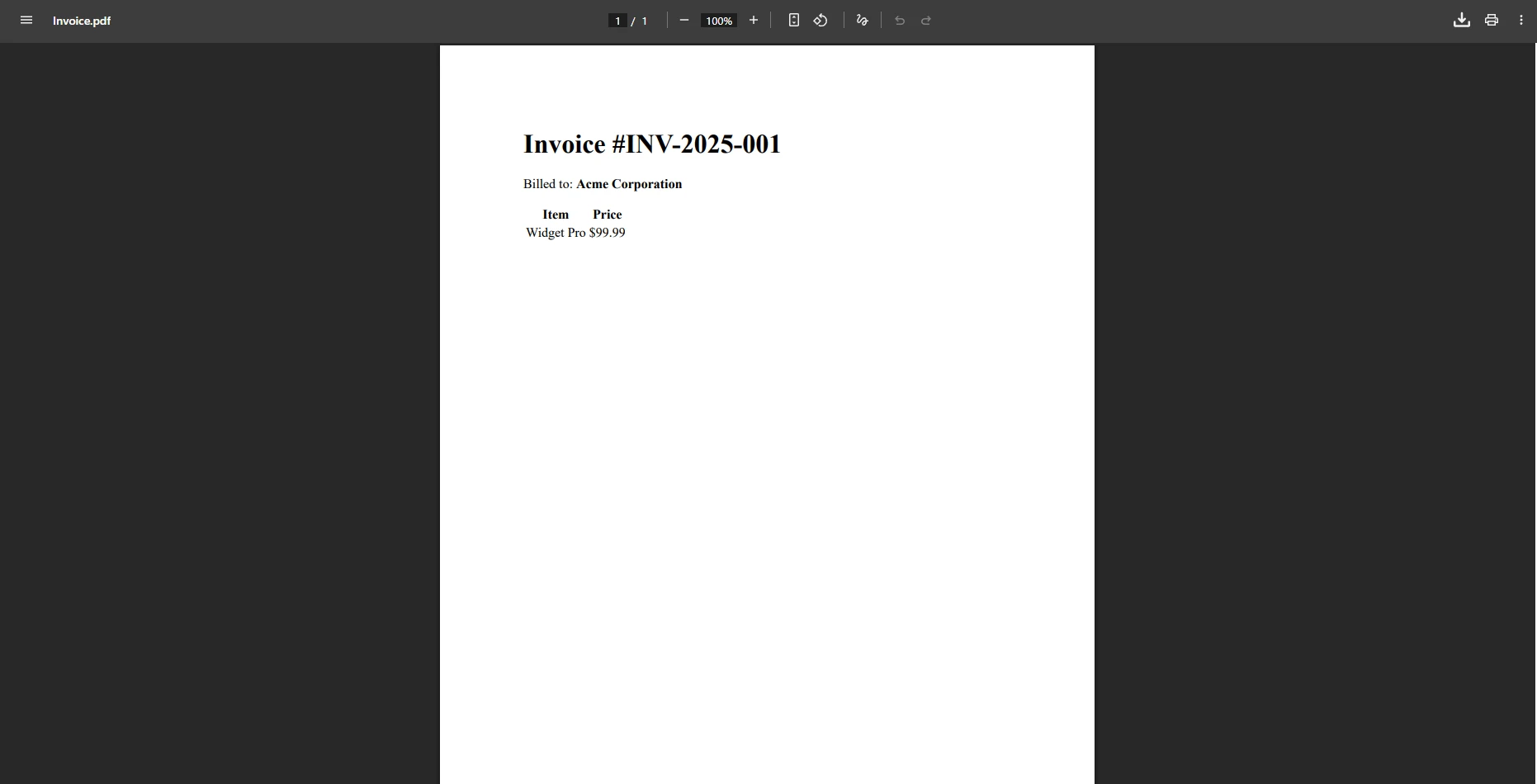
1. 文件生成:抽象复杂的 PDF 渲染
一個綜合性的 PDF SDK 必須在各種格式中提供可靠的高保真可視文件生成。 IronPDF 不使用用於渲染字體、佈局和顏色空間的複雜 API,使用單一的強大方法將現代 Web 技術(HTML)變成一個完整的 PDF,給予開發人員對最終輸出的完全控制權。
using IronPdf;

// SDK Functionality: The ChromePdfRenderer acts as the specialized rendering engine
// found within a robust PDF SDK.
var renderer = new ChromePdfRenderer();

// Data Input: Seamlessly integrate dynamic data from your web app or server.
string customerName = "Acme Corporation";
string invoiceNumber = "INV-2025-001";

string htmlContent = $@"
    <html>
        <body>
            <h1>Invoice #{invoiceNumber}</h1>
            <p>Billed to: <strong>{customerName}</strong></p>
            <table>
                <thead><tr><th>Item</th><th>Price</th></tr></thead>
                <tbody>
                    <tr><td>Widget Pro</td><td>$99.99</td></tr>
                </tbody>
            </table>
        </body>
    </html>";

// Core API: Create PDF (SDK feature) from HTML/CSS in just a few lines of code.
var pdfDocument = renderer.RenderHtmlAsPdf(htmlContent);

// Output: SDK-level capability to save the generated PDF file.
pdfDocument.SaveAs("Invoice.pdf");
using IronPdf;
// SDK Functionality: The ChromePdfRenderer acts as the specialized rendering engine
// found within a robust PDF SDK.
var renderer = new ChromePdfRenderer();
// Data Input: Seamlessly integrate dynamic data from your web app or server.
string customerName = "Acme Corporation";
string invoiceNumber = "INV-2025-001";
string htmlContent = $@"
<html>
<body>
<h1>Invoice #{invoiceNumber}</h1>
<p>Billed to: <strong>{customerName}</strong></p>
<table>
<thead><tr><th>Item</th><th>Price</th></tr></thead>
<tbody>
<tr><td>Widget Pro</td><td>$99.99</td></tr>
</tbody>
</table>
</body>
</html>";
// Core API: Create PDF (SDK feature) from HTML/CSS in just a few lines of code.
var pdfDocument = renderer.RenderHtmlAsPdf(htmlContent);
// Output: SDK-level capability to save the generated PDF file.
pdfDocument.SaveAs("Invoice.pdf");Imports IronPdf
' SDK Functionality: The ChromePdfRenderer acts as the specialized rendering engine
' found within a robust PDF SDK.
Dim renderer As New ChromePdfRenderer()
' Data Input: Seamlessly integrate dynamic data from your web app or server.
Dim customerName As String = "Acme Corporation"
Dim invoiceNumber As String = "INV-2025-001"
Dim htmlContent As String = $"
<html>
<body>
<h1>Invoice #{invoiceNumber}</h1>
<p>Billed to: <strong>{customerName}</strong></p>
<table>
<thead><tr><th>Item</th><th>Price</th></tr></thead>
<tbody>
<tr><td>Widget Pro</td><td>$99.99</td></tr>
</tbody>
</table>
</body>
</html>"
' Core API: Create PDF (SDK feature) from HTML/CSS in just a few lines of code.
Dim pdfDocument = renderer.RenderHtmlAsPdf(htmlContent)
' Output: SDK-level capability to save the generated PDF file.
pdfDocument.SaveAs("Invoice.pdf")輸出PDF
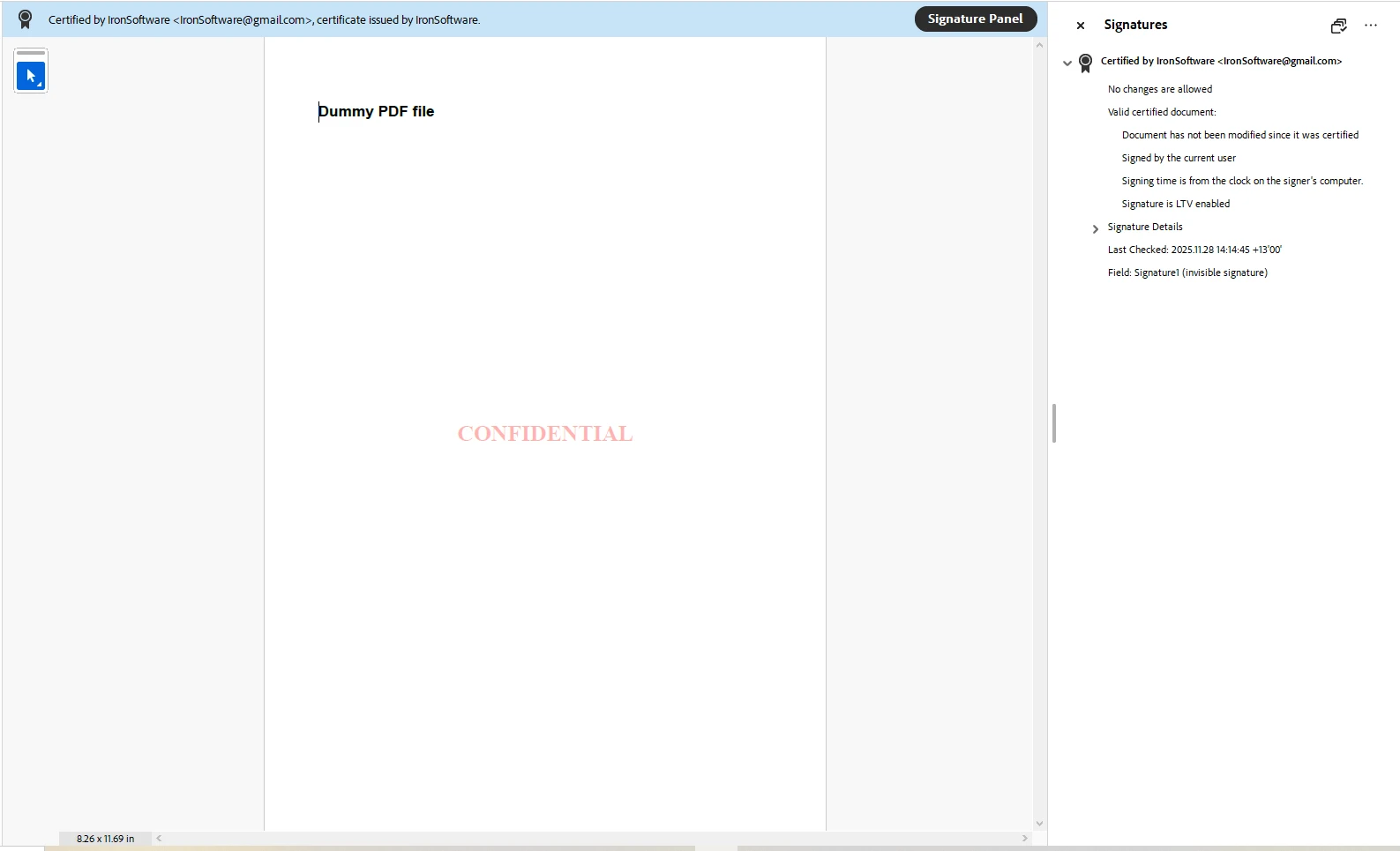
2. PDF 安全性:簡化數位簽章
實現數位簽章是一個複雜的加密任務,pdf安全性在現代文件中是不可協商的。 一個真正的 PDF SDK 簡化了這一點。 IronPDF 將 X.509 證書和 PDF 字節操作的複雜性簡化爲一個明確的專用 API,用於應用電子簽名。
using IronPdf;
using IronPdf.Signing;

// SDK Input: Load the existing PDF file that requires securing.
var pdf = PdfDocument.FromFile("input.pdf");

// SDK Component: Instantiate the Signing Tool, handling private key access and certificate setup.
var signature = new PdfSignature("certificate.pfx", "password")
{
    // SDK Feature: Adding mandatory metadata to the digital signatures.
    SigningContact = "legal@mycompany.com",
    SigningLocation = "Server Farm, USA",
    SigningReason = "Contractual Agreement"
};

// Core API: Apply the digital signature (SDK feature) to the PDF's signature fields.
pdf.Sign(signature);

// Output: A fully compliant, signed PDF, demonstrating high-performance security features.
pdf.SaveAs("Signed_Contract.pdf");
using IronPdf;
using IronPdf.Signing;
// SDK Input: Load the existing PDF file that requires securing.
var pdf = PdfDocument.FromFile("input.pdf");
// SDK Component: Instantiate the Signing Tool, handling private key access and certificate setup.
var signature = new PdfSignature("certificate.pfx", "password")
{
// SDK Feature: Adding mandatory metadata to the digital signatures.
SigningContact = "legal@mycompany.com",
SigningLocation = "Server Farm, USA",
SigningReason = "Contractual Agreement"
};
// Core API: Apply the digital signature (SDK feature) to the PDF's signature fields.
pdf.Sign(signature);
// Output: A fully compliant, signed PDF, demonstrating high-performance security features.
pdf.SaveAs("Signed_Contract.pdf");Imports IronPdf
Imports IronPdf.Signing
' SDK Input: Load the existing PDF file that requires securing.
Dim pdf = PdfDocument.FromFile("input.pdf")
' SDK Component: Instantiate the Signing Tool, handling private key access and certificate setup.
Dim signature As New PdfSignature("certificate.pfx", "password") With {
' SDK Feature: Adding mandatory metadata to the digital signatures.
.SigningContact = "legal@mycompany.com",
.SigningLocation = "Server Farm, USA",
.SigningReason = "Contractual Agreement"
}
' Core API: Apply the digital signature (SDK feature) to the PDF's signature fields.
pdf.Sign(signature)
' Output: A fully compliant, signed PDF, demonstrating high-performance security features.
pdf.SaveAs("Signed_Contract.pdf")簽署的 PDF
3. PDF 安全性:水印和保密化
一個有效的 PDF SDK 替代品必須能夠啓用自動化工作流程以保護敏感資訊。 水印是文件管理的關鍵功能。 IronPDF 允許通過其 HTML 引擎使用單行程式碼進行此 PDF 編輯,使您能對旋轉、不透明度和樣式進行細粒度控制。
using IronPdf;

// SDK Input: Load the existing PDF file containing sensitive data.
var pdf = PdfDocument.FromFile(@"signed-contract.pdf");

// Core API: Apply the watermark across all pages (SDK feature for bulk editing).
pdf.ApplyWatermark("<h2 style='color:red'>Confidential</h2>", 65, IronPdf.Editing.VerticalAlignment.Middle, IronPdf.Editing.HorizontalAlignment.Center);

// Output: Save the securely watermarked PDF file.
pdf.SaveAs("Secured_Watermarked.pdf");
using IronPdf;
// SDK Input: Load the existing PDF file containing sensitive data.
var pdf = PdfDocument.FromFile(@"signed-contract.pdf");
// Core API: Apply the watermark across all pages (SDK feature for bulk editing).
pdf.ApplyWatermark("<h2 style='color:red'>Confidential</h2>", 65, IronPdf.Editing.VerticalAlignment.Middle, IronPdf.Editing.HorizontalAlignment.Center);
// Output: Save the securely watermarked PDF file.
pdf.SaveAs("Secured_Watermarked.pdf");Imports IronPdf
' SDK Input: Load the existing PDF file containing sensitive data.
Dim pdf = PdfDocument.FromFile("signed-contract.pdf")
' Core API: Apply the watermark across all pages (SDK feature for bulk editing).
pdf.ApplyWatermark("<h2 style='color:red'>Confidential</h2>", 65, IronPdf.Editing.VerticalAlignment.Middle, IronPdf.Editing.HorizontalAlignment.Center)
' Output: Save the securely watermarked PDF file.
pdf.SaveAs("Secured_Watermarked.pdf")水印 PDF

總結
雖然"PDF SDK"這個詞可能意味着一個單塊軟體包,但現代開發通常受惠於專門和強大的庫。 IronPDF 是一個突出的 .NET PDF 庫,提供綜合的 SDK 水平的 PDF 功能。 對於希望高效地跨各種格式建立、編輯、保護和管理 PDF 文件的開發者來說,IronPDF 提供了一種高性能的解決方案,通過僅需幾行程式碼真正地將完全的控制權交到您手中。
今天就試用 IronPDF,它免費試用! 探索 IronPDF 如何改變您的文件工作流程並在今天解鎖PDF在您的應用中的全部潛力。
常見問題
什麼是 IronPDF?
IronPDF是一個強大的PDF程式庫,使開發者能夠將全面的PDF功能整合到他們的應用中,包括建立、編輯和保護PDF文件。
開發者如何使用IronPDF建立PDF文件?
開發者可以使用IronPDF通過將HTML、ASPX、URL和圖像轉換為PDF格式來輕鬆生成PDF文件,所需程式碼極少。
IronPDF支持哪些PDF功能?
IronPDF支持廣泛的PDF功能,如建立、編輯、合併、拆分、使用數位簽名保護,以及在多種格式之間轉換PDF。
IronPDF能處理數位簽名嗎?
是的,IronPDF可以管理數位簽名,允許開發者在PDF文件中新增、編輯和驗證數位簽名,以確保真實性和完整性。
使用IronPDF進行PDF管理有什麼優勢?
IronPDF提供了一套強大的功能、易於使用和靈活性,使之成為開發者無需大量程式碼便可高效管理PDF文件的理想選擇。
IronPDF是否適合生成發票?
絕對適合。IronPDF可輕鬆將HTML模板轉換為具有格式和樣式的專業外觀PDF文件,非常適合生成發票。
IronPDF如何與現有的應用整合?
IronPDF可無縫整合到現有的.NET應用中,使開發者能夠通過簡單的API增加PDF功能,從而在不大幅更改的情況下增強應用能力。
IronPDF能轉換圖像為PDF嗎?
可以,IronPDF能將圖像轉換為PDF,支持各種圖像格式,並可輕鬆整合到PDF文件中。
IronPDF支持哪些平台?
IronPDF支持多個平台,包括.NET Core、.NET 5+和.NET Framework,適用於各種開發環境,靈活性高。
IronPDF如何確保PDF的安全性?
IronPDF通過允許開發者對PDF文件新增密碼保護、加密和數位簽名來確保PDF的安全性,保護敏感資訊。








 免費開始
免費開始 免費開始
免費開始 預訂免費直播演示
















