




已更新 2026年9月4日
產生每月帳戶報表(PDF 文件)
using IronPDF C# PDF 庫,開發人員可以在 .NET 專案中將 HTML 轉換為可靠的 PDF 文件,而無需依賴外部服務。
閱讀更多

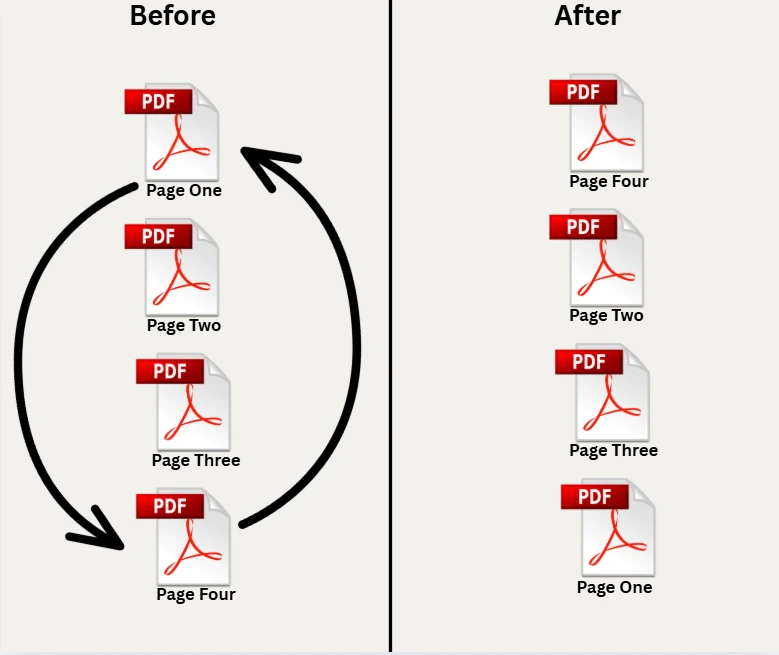
使用C#重新排列PDF檔案中的頁面可以免去繁瑣的手動工作,當您需要在報告中重新組織內容、重新排序合同附錄或在交付前重建文件包時。 IronPDF提供了簡單明了的API,可以載入PDF,指定新的頁面順序,並只需幾行.NET程式碼即可保存結果。 本文介紹了五種實用技巧:基本的頁面重新排序、大幅逆轉、將單頁移動到新索引、刪除不需要的頁面,以及完全在記憶體中操作而不觸及文件系統。
IronPdf.PdfDocument.FromFile("input.pdf")
    .CopyPages(new[] { 2, 0, 1, 3 })
.SaveAs("reordered.pdf");Imports IronPdf
PdfDocument.FromFile("input.pdf") _
.CopyPages({2, 0, 1, 3}) _
.SaveAs("reordered.pdf") 使用NuGet安裝
使用NuGet包管理器或.NET CLI可以在數秒內將IronPDF新增到任何.NET 8或.NET 10專案中。 在Windows、Linux或macOS上不需要額外的運行時相依性或本機二進位。
包安裝後,在您的C#文件頂部新增using IronPdf; 。有效的授權金鑰可解鎖全面商業用途; 有一個免費試用授權可用於評估。 在調用任何API之前設置您的金鑰:
IronPdf.License.LicenseKey = "YOUR-LICENSE-KEY";IronPdf.License.LicenseKey = "YOUR-LICENSE-KEY"引用包並配置授權後,本文中的所有範例都將無需修改即可運行。 IronPDF NuGet包針對.NET Standard 2.0及更高版本,因此可在.NET Framework 4.6.2+、.NET Core及所有現代.NET版本中運行。
使用C#重新排列PDF頁面涉及載入源文件、通過頁面索引陣列指定所需的頁面順序並保存輸出文件。IronPDF提供PdfDocument物件。
以下程式碼展示了如何通過建立新的int陣列來定義目標順序以重新排序頁面。 陣列中的每個值代表原始文件中的一個頁面索引,頁面使用零基索引(第0頁是第一頁)。
using IronPdf;

// Load the source document from file path
var pdf = PdfDocument.FromFile("quarterly-report.pdf");

// Define new page order: move page 3 to front, then pages 1, 2, 0
int[] pageOrder = new int[] { 3, 1, 2, 0 };

// Copy each requested page into its own PdfDocument
var pageDocs = new List<PdfDocument>();
foreach (var idx in pageOrder)
{
    // CopyPage returns a PdfDocument containing only that page
    var single = pdf.CopyPage(idx);
    pageDocs.Add(single);
}

// Merge the single-page docs into one ordered document
using var merged = PdfDocument.Merge(pageDocs.ToArray());

// Save the new ordered PDF
merged.SaveAs("report-reorganized.pdf");Imports IronPdf
' Load the source document from file path
Dim pdf As PdfDocument = PdfDocument.FromFile("quarterly-report.pdf")
' Define new page order: move page 3 to front, then pages 1, 2, 0
Dim pageOrder As Integer() = {3, 1, 2, 0}
' Copy each requested page into its own PdfDocument
Dim pageDocs As New List(Of PdfDocument)()
For Each idx In pageOrder
' CopyPage returns a PdfDocument containing only that page
Dim single As PdfDocument = pdf.CopyPage(idx)
pageDocs.Add(single)
Next
' Merge the single-page docs into one ordered document
Using merged As PdfDocument = PdfDocument.Merge(pageDocs.ToArray())
' Save the new ordered PDF
merged.SaveAs("report-reorganized.pdf")
End Using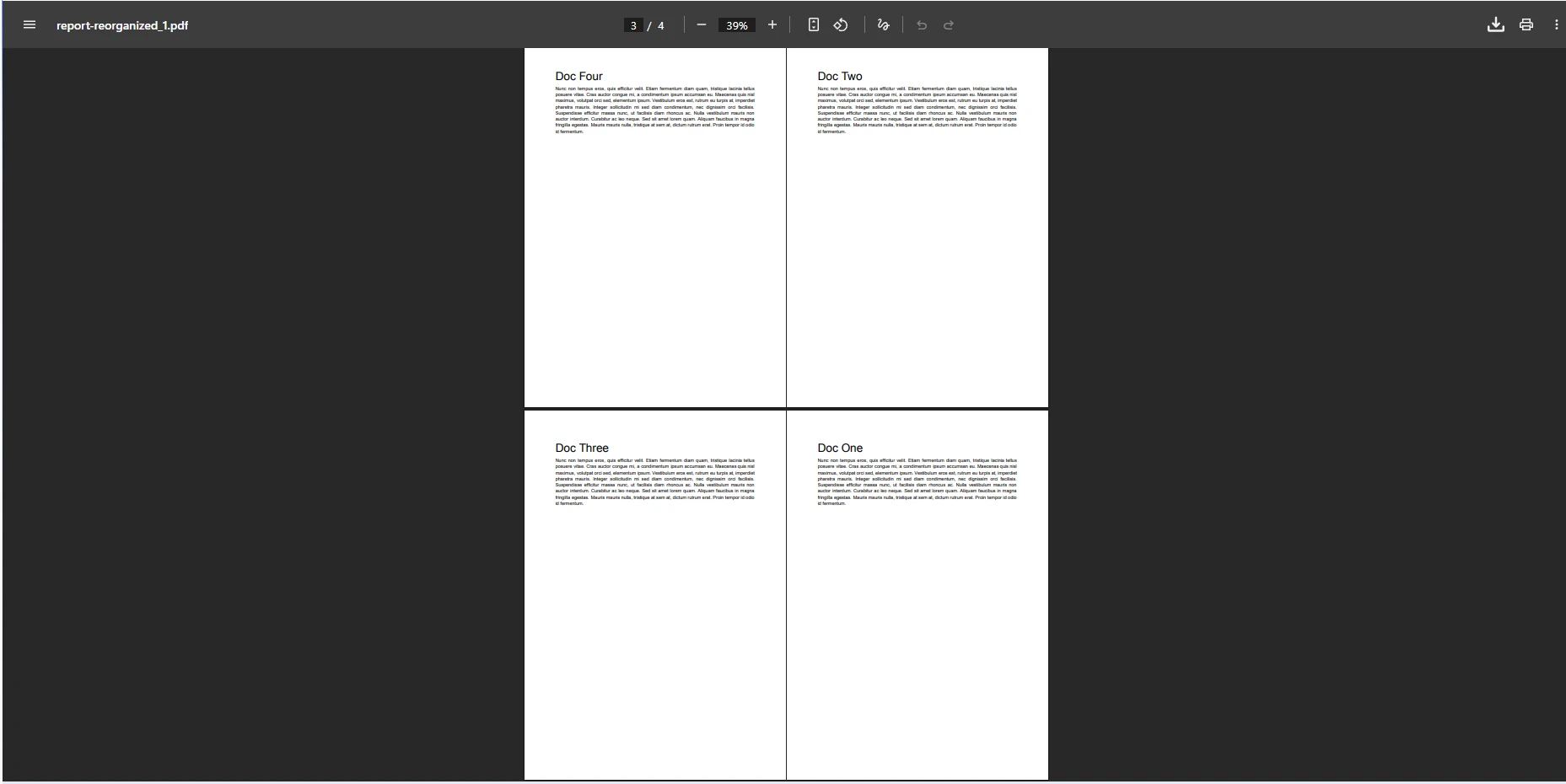
IEnumerable<int>。 此方法允許您重新排列PDF頁面、複製特定頁面或提取子集並分為單獨的文件。 該方法返回新的PdfDocument物件,並保持原始源文件不變。 因為原始文件從未被更改,所以您可以安全地多次調用CopyPages以從同一源文件生成不同的排列。
對於在Java環境中工作的團隊來說,IronPDF for Java提供了類似的頁面操作方法和相容的API介面,因此技能可以在不同語言目標中轉移。
IronPDF在其API中全程使用零基頁面索引。 第0頁是第一個實體頁面,第1頁是第二個,以此類推。 當您建立索引陣列時,從0而不是1開始計算。 超出範圍的索引會拋出PdfDocument.PageCount驗證陣列值。
安全的驗證模式是檢查陣列中的每個索引都在[0, PageCount - 1]範圍內,然後再將陣列傳遞給任意頁面複製方法。 這可以防止在輸入文件在處理步驟之間改變形狀的情況下出現運行時異常。
當一個PDF文件包含許多頁面時,您可以在一次操作中重新排列整個結構。 下面的程式碼顯示瞭如何通過程式計算索引陣列來逆轉所有頁面或建立任何自訂順序。
using IronPdf;

// Load PDF document with several pages
var doc = PdfDocument.FromFile("quarterly-report.pdf");
int count = doc.PageCount;

// Build reversed single-page PDFs
var pages = new List<PdfDocument>();
for (int i = count - 1; i >= 0; i--)
{
    // Copy a single page as a standalone PdfDocument
    pages.Add(doc.CopyPage(i));
}

// Merge all the reversed single-page PDFs
using var reversed = PdfDocument.Merge(pages.ToArray());

// Save to a new filename
reversed.SaveAs("report-reversed.pdf");Imports IronPdf
' Load PDF document with several pages
Dim doc = PdfDocument.FromFile("quarterly-report.pdf")
Dim count As Integer = doc.PageCount
' Build reversed single-page PDFs
Dim pages As New List(Of PdfDocument)()
For i As Integer = count - 1 To 0 Step -1
' Copy a single page as a standalone PdfDocument
pages.Add(doc.CopyPage(i))
Next
' Merge all the reversed single-page PDFs
Using reversed = PdfDocument.Merge(pages.ToArray())
' Save to a new filename
reversed.SaveAs("report-reversed.pdf")
End Using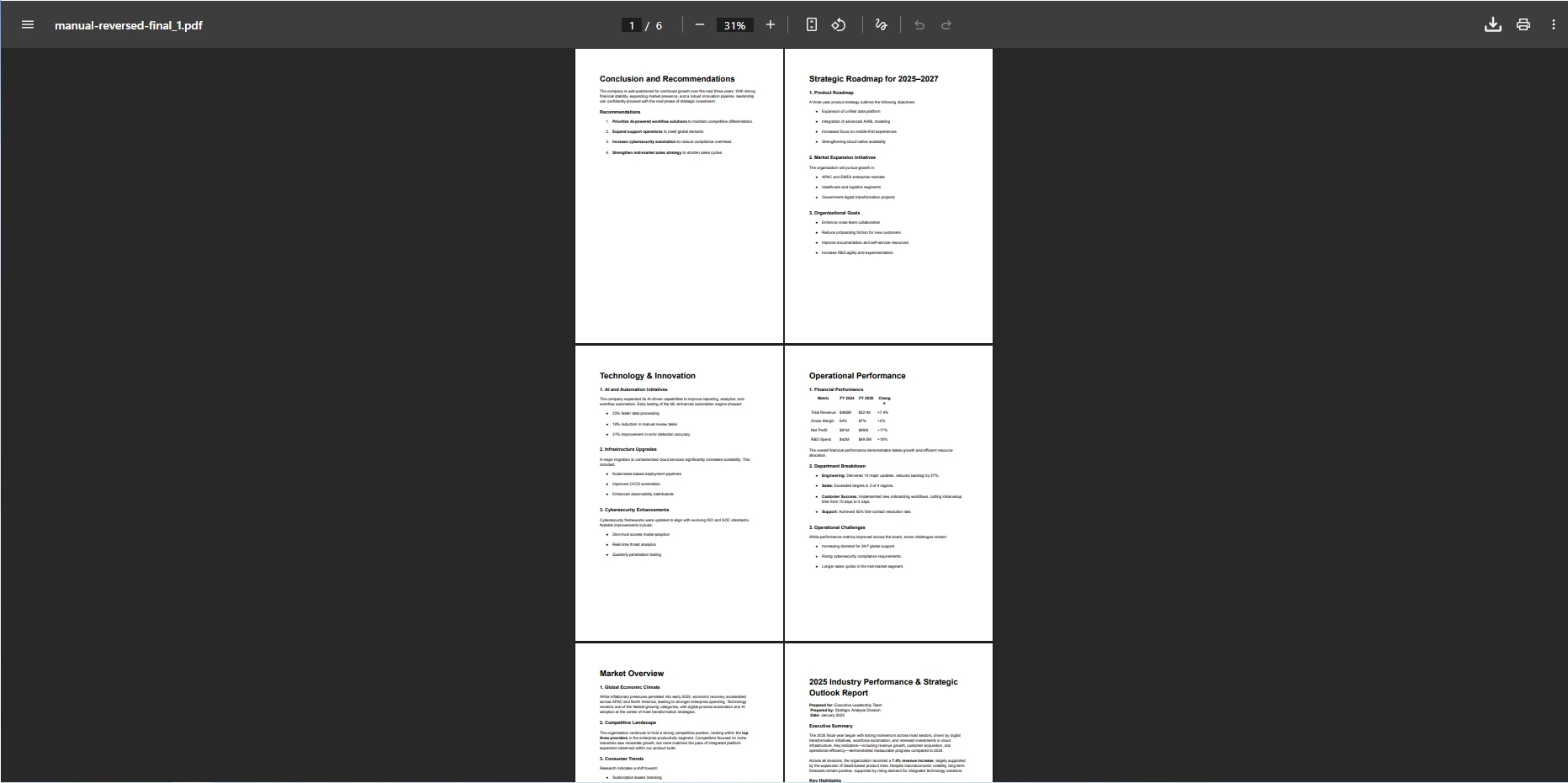
此程式碼載入PDF文件,查詢PageCount,並構建一個反轉頁面順序的清單。 for迴圈動態構建新順序,使該方法可擴展到任何長度的文件。 您可以將相同的模式調整為任何非平凡的排序:按元資料字母順序排列,按文件大小排序(如果從多個來源提取單個頁面),或隨機混排以獲取匿名測試資料。
您還可以精確交換兩個頁面而無需重建完整清單。要在三頁文件中交換第0頁和第2頁,同時保持第1頁不變,請傳遞new int[] { 2, 1, 0 }作為您的索引陣列。 IronPDF頁面操作文件包含有關復制、插入和刪除頁面的其他範例。
對於具有數百頁的文件,在緊湊的迴圈中調用CopyPage會分配許多中間物件。 更高效的替代方法是構建完整的索引陣列一次,並將其直接傳遞給CopyPages。 CopyPages(IEnumerable<int>)重載在單內部遍歷中完成整個重新排序,相比於逐一合併複製頁面更快且使用更少的記憶體。
當處理大型批量的PDF時,考慮使用PdfDocument物件。 .NET垃圾回收器自動管理記憶體,但熱情地釋放未託管資源可減少高吞吐服務的峰值記憶體使用。
將某個頁面移動到不同位置需要結合復制、刪除和插入。 PdfDocument。
using IronPdf;

// Load the input PDF file
var pdf = PdfDocument.FromFile("presentation.pdf");
int sourceIndex = 1;   // page to move
int targetIndex = 3;   // destination position

// Track direction to handle index shift after removal
bool movingForward = targetIndex > sourceIndex;

// 1. Copy the page to move (produces a one-page PdfDocument)
var pageDoc = pdf.CopyPage(sourceIndex);

// 2. Remove the original page from its current position
pdf.RemovePage(sourceIndex);

// 3. Adjust target index if moving forward (removal shifts remaining pages left)
if (movingForward)
    targetIndex--;

// 4. Insert the copied page at the target position
pdf.InsertPdf(pageDoc, targetIndex);

// Save the result
pdf.SaveAs("presentation-reordered.pdf");Imports IronPdf
' Load the input PDF file
Dim pdf = PdfDocument.FromFile("presentation.pdf")
Dim sourceIndex As Integer = 1 ' page to move
Dim targetIndex As Integer = 3 ' destination position
' Track direction to handle index shift after removal
Dim movingForward As Boolean = targetIndex > sourceIndex
' 1. Copy the page to move (produces a one-page PdfDocument)
Dim pageDoc = pdf.CopyPage(sourceIndex)
' 2. Remove the original page from its current position
pdf.RemovePage(sourceIndex)
' 3. Adjust target index if moving forward (removal shifts remaining pages left)
If movingForward Then
targetIndex -= 1
End If
' 4. Insert the copied page at the target position
pdf.InsertPdf(pageDoc, targetIndex)
' Save the result
pdf.SaveAs("presentation-reordered.pdf")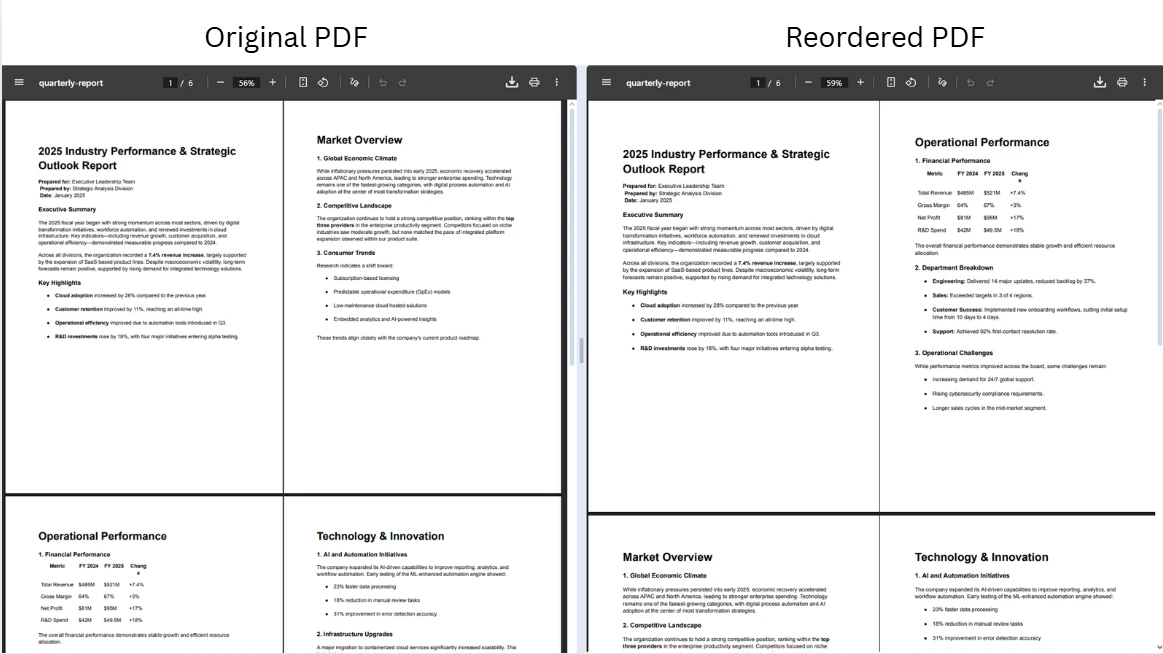
該算法複制來源頁面,從文件中刪除它(這會使所有後續頁面索引下移一個),調整目標索引以考慮到該移位,然後在校正位置插入頁面。 此模式正確處理向前和向後移動。 需要對一兩頁進行特殊控制而不重建整個文件時使用它。
對於需要從第二個PDF插入內容而不是移動現有頁面的情況,PdfDocument作為其第一個參數,包括使用IronPDF HTML-to-PDF API生成的文件。
自動化PDF工作流程的應用程式有時需要在不將中間文件寫入磁碟的情況下操作文件。 從位元組陣列載入並導出至MemoryStream可保持所有處理在記憶體中,對於瞬態操作更快速並在容器化或無伺服器環境中避免文件系統許可權問題。
using IronPdf;
using System.IO;

// Load PDF from byte array (simulating input from a database or API response)
byte[] pdfBytes = File.ReadAllBytes("report-with-blank.pdf");
var pdf = new PdfDocument(pdfBytes);

// Delete the blank page at index 2 (zero-based)
pdf.RemovePage(2);

// Reorder remaining pages: new sequence from a four-page document
var reorderedPdf = pdf.CopyPages(new int[] { 1, 0, 2, 3 });

// Export to MemoryStream for further processing (e.g., HTTP response body)
MemoryStream outputStream = reorderedPdf.Stream;

// Or save directly using the BinaryData property
File.WriteAllBytes("cleaned-report.pdf", reorderedPdf.BinaryData);Imports IronPdf
Imports System.IO
' Load PDF from byte array (simulating input from a database or API response)
Dim pdfBytes As Byte() = File.ReadAllBytes("report-with-blank.pdf")
Dim pdf As New PdfDocument(pdfBytes)
' Delete the blank page at index 2 (zero-based)
pdf.RemovePage(2)
' Reorder remaining pages: new sequence from a four-page document
Dim reorderedPdf = pdf.CopyPages(New Integer() {1, 0, 2, 3})
' Export to MemoryStream for further processing (e.g., HTTP response body)
Dim outputStream As MemoryStream = reorderedPdf.Stream
' Or save directly using the BinaryData property
File.WriteAllBytes("cleaned-report.pdf", reorderedPdf.BinaryData)MemoryStream形式返回結果PDF。 此模式適合返回文件響應的ASP.NET Core控制器、從Blob儲存中讀取和寫入的Azure功能,以及從消息隊列處理PDF批次的背景服務。 該程式庫即使對於包含嵌入圖像的大型文件也有效處理記憶體管理。
請參閱PdfDocument API參考以探索一整套頁面操作方法,包括旋轉、提取和標籤。
從控制器返回重新排序的PDF非常簡單。 在載入文件上調用BinaryData寫入響應中:
using IronPdf;
using Microsoft.AspNetCore.Mvc;

[ApiController]
[Route("api/pdf")]
public class PdfController : ControllerBase
{
    [HttpPost("reorder")]
    public IActionResult Reorder(IFormFile file, [FromQuery] string order)
    {
        // Parse comma-separated page indexes from query string
        var indexes = order.Split(',').Select(int.Parse).ToArray();

        using var stream = file.OpenReadStream();
        using var ms = new System.IO.MemoryStream();
        stream.CopyTo(ms);

        var pdf = new PdfDocument(ms.ToArray());
        var reordered = pdf.CopyPages(indexes);

        // Return the reordered PDF as a downloadable file
        return File(reordered.BinaryData, "application/pdf", "reordered.pdf");
    }
}Imports IronPdf
Imports Microsoft.AspNetCore.Mvc
Imports System.IO
<ApiController>
<Route("api/pdf")>
Public Class PdfController
Inherits ControllerBase
<HttpPost("reorder")>
Public Function Reorder(file As IFormFile, <FromQuery> order As String) As IActionResult
' Parse comma-separated page indexes from query string
Dim indexes = order.Split(","c).Select(Function(s) Integer.Parse(s)).ToArray()
Using stream = file.OpenReadStream()
Using ms = New MemoryStream()
stream.CopyTo(ms)
Dim pdf = New PdfDocument(ms.ToArray())
Dim reordered = pdf.CopyPages(indexes)
' Return the reordered PDF as a downloadable file
Return File(reordered.BinaryData, "application/pdf", "reordered.pdf")
End Using
End Using
End Function
End Class此控制器讀取上傳的文件,通過查詢字串接受逗號分隔的頁面順序,並將重新排序的PDF流返回作為響應。 在任何時候都不會寫入暫存文件。 同樣的方式適合於從HTML或模板在ASP.NET Core中生成PDF。
重新排序頁面常常與合併來自多個源文件的內容密切相關。 IronPDF的PdfDocument物件的陣列並按供應順序合併它們,這與上面展示的頁面複製技術自然配合很好。
using IronPdf;

// Load two separate PDF files
var docA = PdfDocument.FromFile("section-a.pdf");
var docB = PdfDocument.FromFile("section-b.pdf");

// Reorder pages within each source document
var reorderedA = docA.CopyPages(new int[] { 1, 0, 2 });
var reorderedB = docB.CopyPages(new int[] { 0, 2, 1 });

// Merge into a single output document
using var combined = PdfDocument.Merge(reorderedA, reorderedB);
combined.SaveAs("combined-report.pdf");Imports IronPdf
' Load two separate PDF files
Dim docA = PdfDocument.FromFile("section-a.pdf")
Dim docB = PdfDocument.FromFile("section-b.pdf")
' Reorder pages within each source document
Dim reorderedA = docA.CopyPages(New Integer() {1, 0, 2})
Dim reorderedB = docB.CopyPages(New Integer() {0, 2, 1})
' Merge into a single output document
Using combined = PdfDocument.Merge(reorderedA, reorderedB)
combined.SaveAs("combined-report.pdf")
End Using合併後,所得文件包含reorderedB中的所有頁面。 您可以連續調用其他Merge或傳遞更多文件以組合任意多個來源。 IronPDF的合併和分割文件介紹了將文件分割為單獨部分,這是逆向的操作。
欲更深入了解合併位元組陣列和記憶體中文件,合併來自位元組陣列的PDF指南講解了文件以二進位BLOB儲存而非文件路徑的資料庫支持工作流。
防禦性程式碼習慣在大規模操作PDF頁面時防止細微的錯誤和生產故障。 一致應用這些實踐使頁面重新排序程式碼更易於測試和維護。
在將頁面索引傳遞給PdfDocument.PageCount驗證。 在運行時,掉出ArgumentOutOfRangeException。一行保護檢查可以完全消除此類故障。
在處理多頁重新排序時,優先選擇CopyPage。 批次重載在單遍中處理完整序列,減少了分配和執行時間。將每頁迴圈模式保留於您需要在合併之前對每頁進行轉換的情況,如旋轉個別頁面。
將中間using語句中,以確保其未託管資源在使用後立即得到釋放。 這在網頁請求處理程式和背景作業中特別重要,因為如果中間物件沒有及時釋放,則會有許多文件集積在記憶體中。 IronPDF疑難排解指南詳細闡述了常見的記憶體和性能模式。
在構建文件自動化管道時,考慮將重新排序邏輯從文件輸入/輸出中分離。 在您的服務層接受並返回MemoryStream以保持單元測試快速並避免文件系統相依性。 IronPDF的PDF頁面操作範例展示了文件路徑和記憶體工作流的模式並排展示。
使用IronPDF在C#中重新排列PDF頁面將複雜的文件操作任務簡化到少數方法調用。 本文涵蓋的核心技術包括使用MemoryStream在記憶體中完全處理文件。
這些模式中的每一個都與IronPDF的其餘功能集整合。 重新排序頁面後,您可以新增水印或印章、裁剪單個頁面或新增頁碼,然後再交付最終文件。 IronPDF指南提供了每個後續操作的程式碼範例。
從免費試用授權開始,測試頁面重新排以及您自己環境中IronPDF的所有其他功能。 當您準備好部署時,查看IronPDF授權選項以尋找適合您專案需求的等級。 IronPDF文件及物件參考隨時可供您探索例如電子簽名、PDF/A合規性和無障礙標籤等高級使用者場景。

Curtis Chau擁有Carleton大學的電腦科學學士學位,專精於前端開發,擁有Node.js、TypeScript、JavaScript和React的專業知識。Curtis熱衷於建立直觀且美觀的使用者介面,喜愛使用現代框架並建立結構良好、視覺吸引力的手冊。

IronPDF 是 IRONSUITE 的一部分
10 款適用於辦公室文件的 .NET API 產品

當您需要您的PDF看起來像HTML一樣快速。














