更新日 2026年9月4日
月次口座明細書をPDF文書として生成する
IronPDF C# PDFライブラリを使用することで、開発者は外部サービスに依存することなく、.NETプロジェクト内でHTMLを信頼性の高いPDFファイルに変換することができます。
詳しく読む

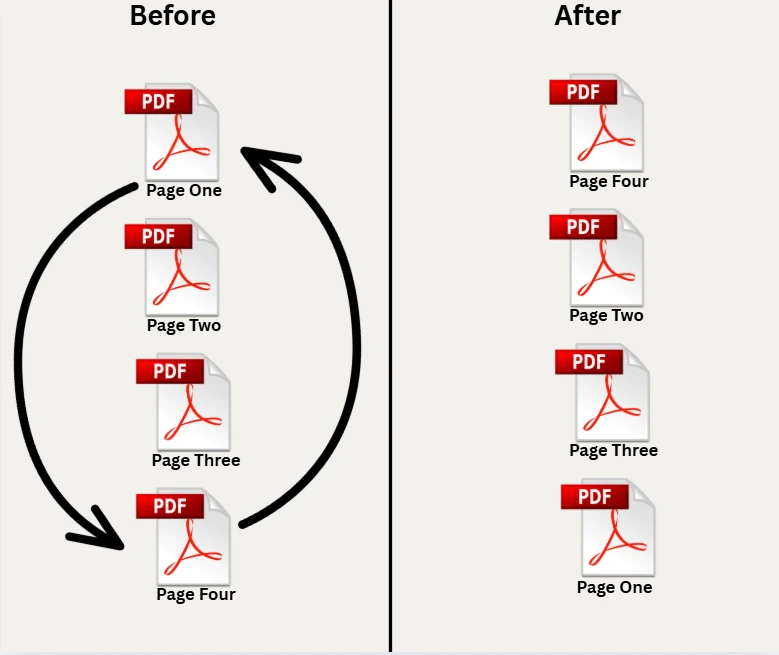
C# を使用して PDF ファイル内のページを並べ替えると、レポートの整理、契約書の付録の並べ替え、配信前のドキュメント パッケージの再構築など、何時間もかかる手作業が不要になります。 IronPDF は、わずか数行 for .NETコードで PDF を読み込み、新しいページ シーケンスを指定して結果を保存するための簡単な API を提供します。 この記事では、基本的なページの並べ替え、一括反転、単一ページの新しいインデックスへの移動、不要なページの削除、ファイル システムに触れることなく完全にメモリ内で作業するという 5 つの実用的なテクニックについて説明します。
IronPdf.PdfDocument.FromFile("input.pdf")
    .CopyPages(new[] { 2, 0, 1, 3 })
.SaveAs("reordered.pdf");Imports IronPdf
PdfDocument.FromFile("input.pdf") _
.CopyPages({2, 0, 1, 3}) _
.SaveAs("reordered.pdf") NuGetでインストール
NuGetパッケージ マネージャーまたは.NET CLI を使用して、数秒で任意 for .NET 8 または.NET 10 プロジェクトにIronPDF を追加します。 Windows、Linux、macOS では追加のランタイム依存関係やネイティブ バイナリは必要ありません。
パッケージがインストールされたら、C#ファイルの先頭にusing IronPdf;を追加してください。有効なライセンスキーを使用すると、完全な商用利用が可能になります。 評価用に無料の試用ライセンスが利用可能です。 API を呼び出す前にキーを設定します。
IronPdf.License.LicenseKey = "YOUR-LICENSE-KEY";IronPdf.License.LicenseKey = "YOUR-LICENSE-KEY"パッケージが参照され、ライセンスが設定されている場合、この記事のすべての例は変更なしで実行されます。 IronPDF NuGetパッケージは.NET Standard 2.0 以上を対象としているため、 .NET Framework 4.6.2 以降、 .NET Core、およびすべての最新 for .NETバージョンで動作します。
C#を使用してPDFのページを並べ替えるプロセスは、ソースドキュメントを読み込み、ページ-インデックス配列を通じて希望のページ順序を指定し、出力ファイルを保存することを含みます。IronPDFは、PDFからページを抽出して並べ替え、新しいCopyPagesメソッドを提供します。
以下のコードは、ターゲットシーケンスを定義する新しいint配列を作成してページを並べ替える方法を示しています。 配列の各値は、原文のページインデックスを表し、ページはゼロベースのインデックスを使用します(ページ0は最初のページです)。
using IronPdf;

// Load the source document from file path
var pdf = PdfDocument.FromFile("quarterly-report.pdf");

// Define new page order: move page 3 to front, then pages 1, 2, 0
int[] pageOrder = new int[] { 3, 1, 2, 0 };

// Copy each requested page into its own PdfDocument
var pageDocs = new List<PdfDocument>();
foreach (var idx in pageOrder)
{
    // CopyPage returns a PdfDocument containing only that page
    var single = pdf.CopyPage(idx);
    pageDocs.Add(single);
}

// Merge the single-page docs into one ordered document
using var merged = PdfDocument.Merge(pageDocs.ToArray());

// Save the new ordered PDF
merged.SaveAs("report-reorganized.pdf");Imports IronPdf
' Load the source document from file path
Dim pdf As PdfDocument = PdfDocument.FromFile("quarterly-report.pdf")
' Define new page order: move page 3 to front, then pages 1, 2, 0
Dim pageOrder As Integer() = {3, 1, 2, 0}
' Copy each requested page into its own PdfDocument
Dim pageDocs As New List(Of PdfDocument)()
For Each idx In pageOrder
' CopyPage returns a PdfDocument containing only that page
Dim single As PdfDocument = pdf.CopyPage(idx)
pageDocs.Add(single)
Next
' Merge the single-page docs into one ordered document
Using merged As PdfDocument = PdfDocument.Merge(pageDocs.ToArray())
' Save the new ordered PDF
merged.SaveAs("report-reorganized.pdf")
End Using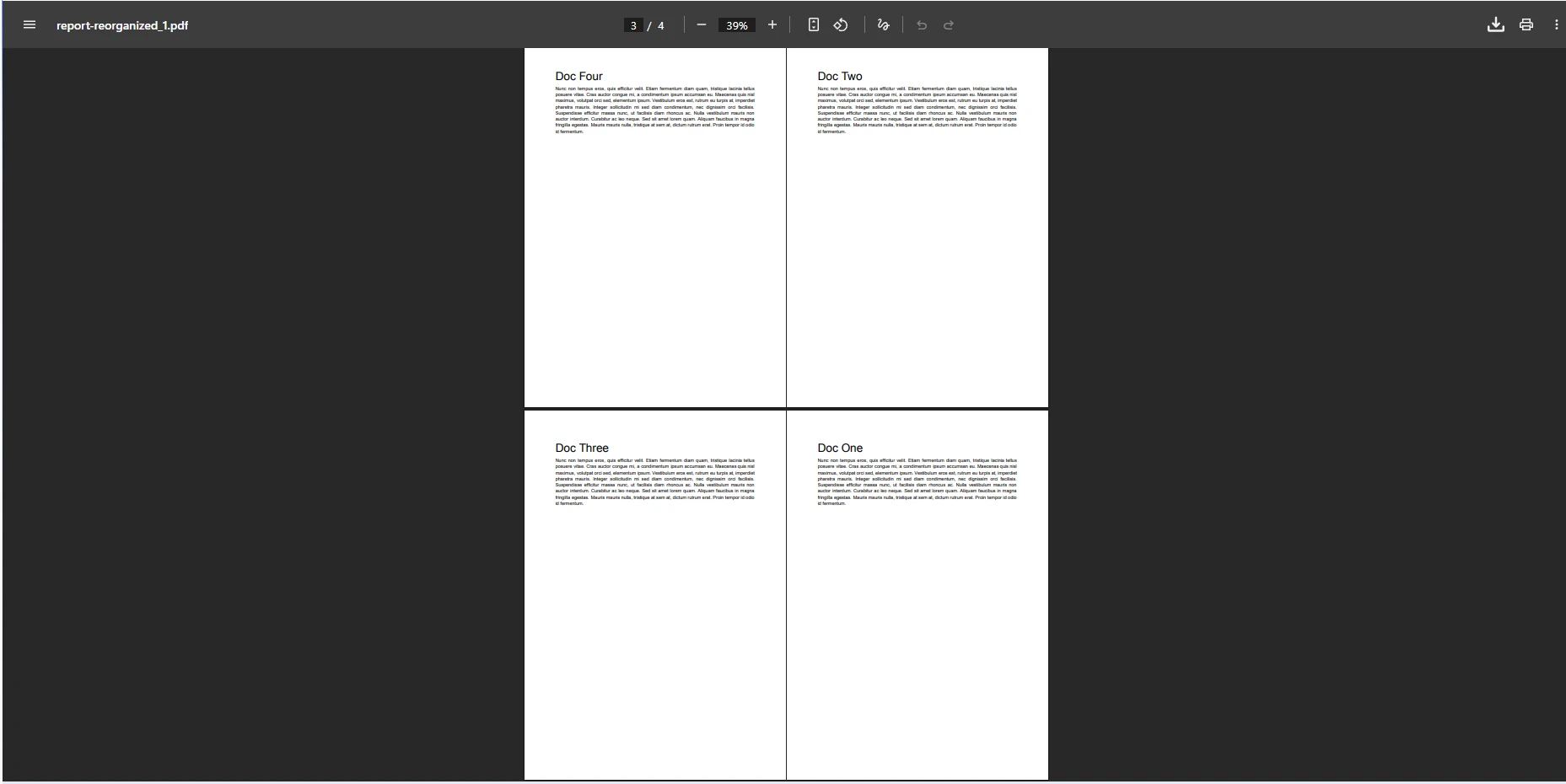
IEnumerable<int>を受け入れます。 この方法を使用すると、PDF ページを並べ替えたり、特定のページを複製したり、サブセットを別のドキュメントに抽出したりできます。 メソッドは、新しいPdfDocumentオブジェクトを返し、元のソースドキュメントは変更されません。 元のドキュメントが変更されることはないので、同じソースファイルから異なる順序を生成するためにCopyPagesを何度でも安全に呼び出すことができます。
Java 環境で作業するチームの場合、 IronPDF Java 向け は同様のページ操作方法と互換性のある API サーフェスを公開するため、言語ターゲット間でスキルを転送できます。
IronPDF は、API 全体でゼロベースのページ インデックスを使用します。 ページ 0 は最初の物理ページ、ページ 1 は 2 番目の物理ページ、というようになります。 インデックス配列を構築するときは、1 からではなく 0 からカウントします。 範囲外のインデックスは、PdfDocument.PageCountと比較して確認してください。
安全な検証パターンとして、配列をページコピー方法に渡す前に、配列内のすべてのインデックスが[0, PageCount - 1]内にあることを確認することです。 これにより、処理ステップ間で入力ドキュメントの形状が変化するシナリオで実行時例外が発生するのを防ぎます。
PDF ドキュメントに多数のページが含まれている場合、1 回のパスで全体の構造を並べ替えることができます。 以下のコードは、インデックス配列をプログラムで計算して、すべてのページを反転したり、カスタム シーケンスを作成したりする方法を示しています。
using IronPdf;

// Load PDF document with several pages
var doc = PdfDocument.FromFile("quarterly-report.pdf");
int count = doc.PageCount;

// Build reversed single-page PDFs
var pages = new List<PdfDocument>();
for (int i = count - 1; i >= 0; i--)
{
    // Copy a single page as a standalone PdfDocument
    pages.Add(doc.CopyPage(i));
}

// Merge all the reversed single-page PDFs
using var reversed = PdfDocument.Merge(pages.ToArray());

// Save to a new filename
reversed.SaveAs("report-reversed.pdf");Imports IronPdf
' Load PDF document with several pages
Dim doc = PdfDocument.FromFile("quarterly-report.pdf")
Dim count As Integer = doc.PageCount
' Build reversed single-page PDFs
Dim pages As New List(Of PdfDocument)()
For i As Integer = count - 1 To 0 Step -1
' Copy a single page as a standalone PdfDocument
pages.Add(doc.CopyPage(i))
Next
' Merge all the reversed single-page PDFs
Using reversed = PdfDocument.Merge(pages.ToArray())
' Save to a new filename
reversed.SaveAs("report-reversed.pdf")
End Using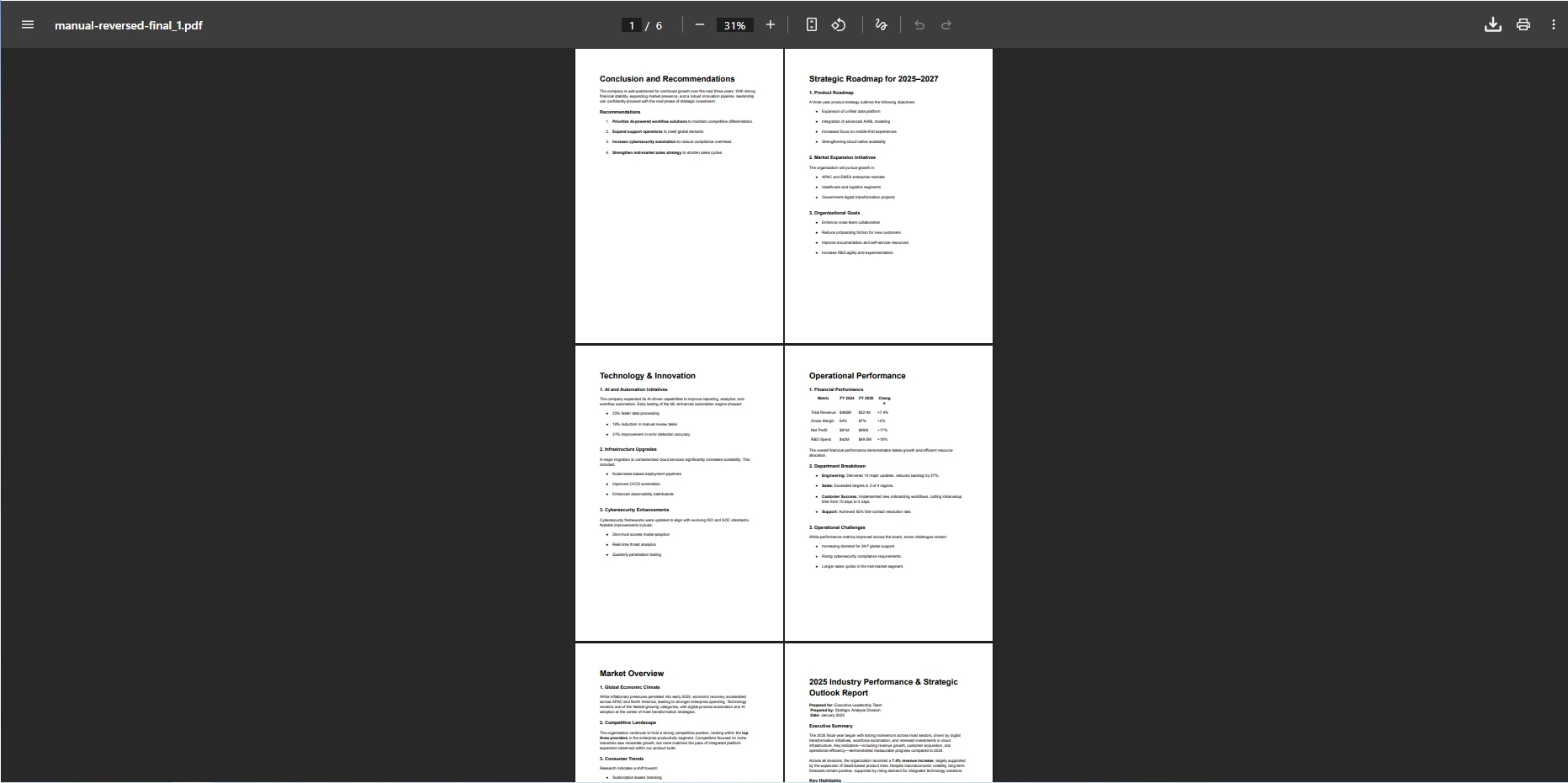
このコードはPDFファイルを読み込み、PageCountをクエリし、ページシーケンスを逆にするリストを作成します。 forループは、新しい順序を動的に構築し、このアプローチをいかなる長さのドキュメントにも対応できるようにします。 同じパターンを、メタデータによるアルファベット順、複数のソースから個々のページを抽出する場合はファイル サイズで並べ替え、匿名化されたテスト データの場合はシャッフルするなど、あらゆる非自明な順序付けに適応できます。
完全なリストを作り直すことなく、正確に2つのページを入れ替えることも可能です。3ページの文書で、ページ0と2を入れ替え、ページ1をその位置に保持するには、new int[] { 2, 1, 0 }をインデックス配列として渡します。 IronPDFページ操作ドキュメントには、ページのコピー、挿入、削除に関する追加の例が含まれています。
何百ものページを持つドキュメントに対して、CopyPageをタイトなループで呼び出すと、多くの中間オブジェクトが割り当てられます。 より効率的な代替方法は、完全なインデックス配列を一度構築し、それをCopyPagesに直接渡すことです。 CopyPages(IEnumerable<int>)オーバーロードは、単一の内部パスで全体の並べ替えを行い、個別にコピーされたページをマージするよりも高速でメモリ効率が高いです。
大量のPDFバッチを処理する場合、中間Dispose()呼び出しを使用することを検討してください。 .NETガベージ コレクターはメモリを自動的に管理しますが、管理されていないリソースを積極的に解放すると、高スループット サービスのピーク時のメモリ使用量が削減されます。
1 ページを別の位置に移動するには、コピー、削除、挿入を組み合わせる必要があります。 PdfDocumentを配置します。
using IronPdf;

// Load the input PDF file
var pdf = PdfDocument.FromFile("presentation.pdf");
int sourceIndex = 1;   // page to move
int targetIndex = 3;   // destination position

// Track direction to handle index shift after removal
bool movingForward = targetIndex > sourceIndex;

// 1. Copy the page to move (produces a one-page PdfDocument)
var pageDoc = pdf.CopyPage(sourceIndex);

// 2. Remove the original page from its current position
pdf.RemovePage(sourceIndex);

// 3. Adjust target index if moving forward (removal shifts remaining pages left)
if (movingForward)
    targetIndex--;

// 4. Insert the copied page at the target position
pdf.InsertPdf(pageDoc, targetIndex);

// Save the result
pdf.SaveAs("presentation-reordered.pdf");Imports IronPdf
' Load the input PDF file
Dim pdf = PdfDocument.FromFile("presentation.pdf")
Dim sourceIndex As Integer = 1 ' page to move
Dim targetIndex As Integer = 3 ' destination position
' Track direction to handle index shift after removal
Dim movingForward As Boolean = targetIndex > sourceIndex
' 1. Copy the page to move (produces a one-page PdfDocument)
Dim pageDoc = pdf.CopyPage(sourceIndex)
' 2. Remove the original page from its current position
pdf.RemovePage(sourceIndex)
' 3. Adjust target index if moving forward (removal shifts remaining pages left)
If movingForward Then
targetIndex -= 1
End If
' 4. Insert the copied page at the target position
pdf.InsertPdf(pageDoc, targetIndex)
' Save the result
pdf.SaveAs("presentation-reordered.pdf")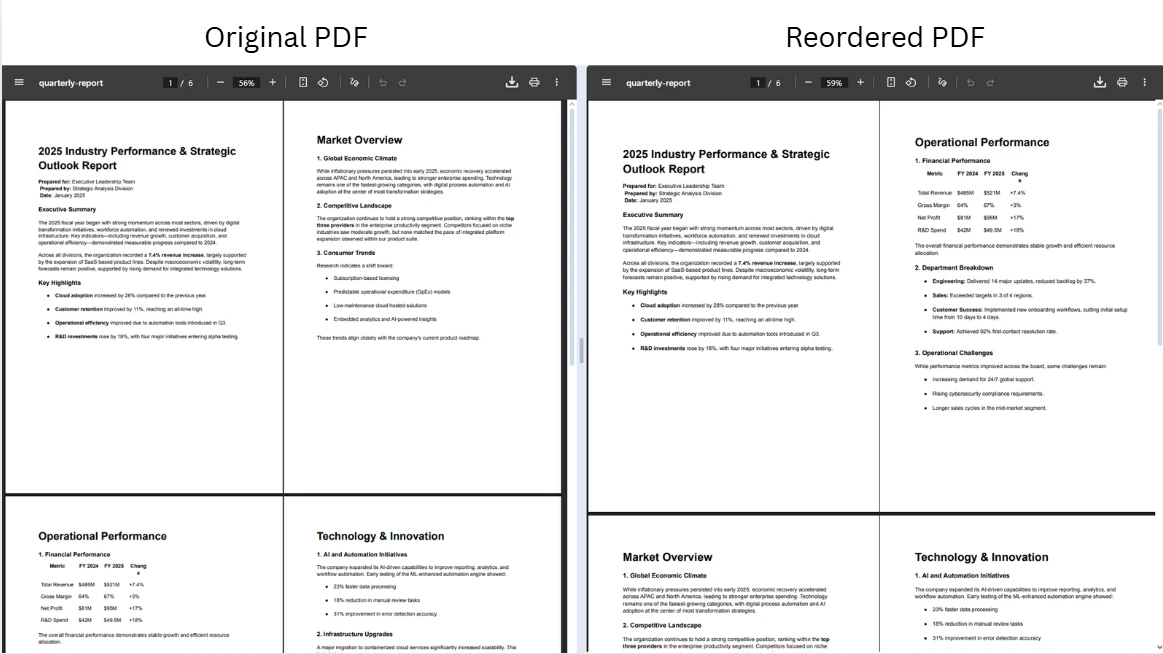
アルゴリズムはソース ページをコピーし、それをドキュメントから削除し (これにより、後続のすべてのページ インデックスが 1 つ下に移動します)、そのシフトを考慮してターゲット インデックスを調整し、修正された位置にページを挿入します。 このパターンは前進と後退の両方の動きを正しく処理します。 ドキュメント全体を再構築せずに 1 ページまたは 2 ページを精密に制御する必要がある場合に使用します。
既存のページを移動するのではなく、第二のPDFからコンテンツを挿入する必要がある場合、PdfDocumentを、その最初の引数として受け入れます。IronPDF HTML-to-PDF APIを使用します。
PDF ワークフローを自動化するアプリケーションでは、中間ファイルをディスクに書き込まずにドキュメントを操作する必要がある場合があります。 バイト配列からの読み込みとMemoryStreamへのエクスポートは、すべての処理をメモリ内で保持し、トランジエントな操作には高速で、コンテナ化やサーバーレス環境でのファイルシステム権限の問題を回避します。
using IronPdf;
using System.IO;

// Load PDF from byte array (simulating input from a database or API response)
byte[] pdfBytes = File.ReadAllBytes("report-with-blank.pdf");
var pdf = new PdfDocument(pdfBytes);

// Delete the blank page at index 2 (zero-based)
pdf.RemovePage(2);

// Reorder remaining pages: new sequence from a four-page document
var reorderedPdf = pdf.CopyPages(new int[] { 1, 0, 2, 3 });

// Export to MemoryStream for further processing (e.g., HTTP response body)
MemoryStream outputStream = reorderedPdf.Stream;

// Or save directly using the BinaryData property
File.WriteAllBytes("cleaned-report.pdf", reorderedPdf.BinaryData);Imports IronPdf
Imports System.IO
' Load PDF from byte array (simulating input from a database or API response)
Dim pdfBytes As Byte() = File.ReadAllBytes("report-with-blank.pdf")
Dim pdf As New PdfDocument(pdfBytes)
' Delete the blank page at index 2 (zero-based)
pdf.RemovePage(2)
' Reorder remaining pages: new sequence from a four-page document
Dim reorderedPdf = pdf.CopyPages(New Integer() {1, 0, 2, 3})
' Export to MemoryStream for further processing (e.g., HTTP response body)
Dim outputStream As MemoryStream = reorderedPdf.Stream
' Or save directly using the BinaryData property
File.WriteAllBytes("cleaned-report.pdf", reorderedPdf.BinaryData)MemoryStreamとして返します。 このパターンは、ファイル応答を返すASP.NET Coreコントローラー、Blob Storage の読み取りと書き込みを行う Azure Functions、およびメッセージ キューから PDF のバッチを処理するバックグラウンド サービスに適しています。 ライブラリは、埋め込まれた画像を含む大きなドキュメントでもメモリ管理を効率的に処理します。
回転、抽出、スタンプなどのページ操作方法の完全なセットを確認するには、 PdfDocument API リファレンスを参照してください。
並べ替えられた PDF をコントローラーから直接返すのは簡単です。 読み込まれたドキュメントでBinaryDataを書きます。
using IronPdf;
using Microsoft.AspNetCore.Mvc;

[ApiController]
[Route("api/pdf")]
public class PdfController : ControllerBase
{
    [HttpPost("reorder")]
    public IActionResult Reorder(IFormFile file, [FromQuery] string order)
    {
        // Parse comma-separated page indexes from query string
        var indexes = order.Split(',').Select(int.Parse).ToArray();

        using var stream = file.OpenReadStream();
        using var ms = new System.IO.MemoryStream();
        stream.CopyTo(ms);

        var pdf = new PdfDocument(ms.ToArray());
        var reordered = pdf.CopyPages(indexes);

        // Return the reordered PDF as a downloadable file
        return File(reordered.BinaryData, "application/pdf", "reordered.pdf");
    }
}Imports IronPdf
Imports Microsoft.AspNetCore.Mvc
Imports System.IO
<ApiController>
<Route("api/pdf")>
Public Class PdfController
Inherits ControllerBase
<HttpPost("reorder")>
Public Function Reorder(file As IFormFile, <FromQuery> order As String) As IActionResult
' Parse comma-separated page indexes from query string
Dim indexes = order.Split(","c).Select(Function(s) Integer.Parse(s)).ToArray()
Using stream = file.OpenReadStream()
Using ms = New MemoryStream()
stream.CopyTo(ms)
Dim pdf = New PdfDocument(ms.ToArray())
Dim reordered = pdf.CopyPages(indexes)
' Return the reordered PDF as a downloadable file
Return File(reordered.BinaryData, "application/pdf", "reordered.pdf")
End Using
End Using
End Function
End Classこのコントローラーは、アップロードされたファイルを読み取り、クエリ文字列を介してコンマ区切りのページ順序を受け入れ、並べ替えられた PDF を応答としてストリーミングします。 どの時点でも一時ファイルは書き込まれません。 同じアプローチは、HTML またはテンプレートからASP.NET Coreで PDF を生成する場合にも機能します。
ページの順序を変更する場合は、複数のソース ファイルのコンテンツを結合することがよくあります。 IronPDFのPdfDocumentオブジェクトの配列を受け入れ、指定された順序で結合し、上記のページコピー技法と自然に合わせます。
using IronPdf;

// Load two separate PDF files
var docA = PdfDocument.FromFile("section-a.pdf");
var docB = PdfDocument.FromFile("section-b.pdf");

// Reorder pages within each source document
var reorderedA = docA.CopyPages(new int[] { 1, 0, 2 });
var reorderedB = docB.CopyPages(new int[] { 0, 2, 1 });

// Merge into a single output document
using var combined = PdfDocument.Merge(reorderedA, reorderedB);
combined.SaveAs("combined-report.pdf");Imports IronPdf
' Load two separate PDF files
Dim docA = PdfDocument.FromFile("section-a.pdf")
Dim docB = PdfDocument.FromFile("section-b.pdf")
' Reorder pages within each source document
Dim reorderedA = docA.CopyPages(New Integer() {1, 0, 2})
Dim reorderedB = docB.CopyPages(New Integer() {0, 2, 1})
' Merge into a single output document
Using combined = PdfDocument.Merge(reorderedA, reorderedB)
combined.SaveAs("combined-report.pdf")
End Usingマージ後、結果のドキュメントはreorderedBのすべてのページを含んでいます。 追加のMerge呼び出しを連鎖させたり、任意の数のソースを組み合わせるためにより多くの文書を渡すことができます。 IronPDF のマージと分割のドキュメントでは、逆の操作であるドキュメントを個別のセクションに分割する方法について説明します。
バイト配列とメモリ内ドキュメントのマージについてさらに詳しく知るには、 C# でバイト配列から PDF をマージする方法についてのガイドを参照してください。このガイドでは、ドキュメントがファイル パスではなくバイナリ BLOB として保存される、データベース ベースのワークフローについて説明します。
防御的なコーディング習慣により、大規模な PDF ページの操作時に、微妙なバグや製品障害が発生するのを防ぐことができます。 これらの方法を一貫して適用すると、ページ順序を変更するコードのテストと保守が容易になります。
常にPdfDocument.PageCountで検証してください。 利用可能な範囲外のインデックスがある場合、実行時にArgumentOutOfRangeExceptionを発生させます。一行のガードチェックでこのカテゴリの失敗を完全に排除できます。
複数ページの並べ替えを扱う際には、手動でCopyPages(IEnumerable<int>)オーバーロードを優先してください。 バッチオーバーロードは、シーケンス全体を1回のパスで処理するため、割り当てと実行時間の両方を削減します。ページごとのループパターンは、マージ前に個々のページを回転させるなど、ページごとに変換を適用する必要がある場合に使用します。
中間のusingステートメントでラップし、使用後すぐにその管理外リソースが解放されるようにしてください。 これは、中間オブジェクトがすぐに破棄されない場合、多くのドキュメントがメモリに蓄積される可能性がある Web リクエスト ハンドラーとバックグラウンド ジョブでは特に重要です。 IronPDFトラブルシューティング ガイドでは、一般的なメモリとパフォーマンスのパターンについて詳しく説明します。
ドキュメント自動化パイプラインを構築するときは、並べ替えロジックをファイルの入出力から分離することを検討してください。 テスト層でMemoryStreamを受け入れ、返すことで単体テストを迅速にし、ファイルシステム依存を避けることができます。 PDF ページ操作のIronPDF の例では、ファイル パス ワークフローとメモリ内ワークフローの両方のパターンが並べて示されています。
IronPDFを使用して C# で PDF ページを並べ替えると、複雑なドキュメント操作タスクがいくつかのメソッド呼び出しに削減されます。 この記事で取り上げたコア技術には、MemoryStreamを使用した完全なメモリ内でのドキュメント処理が含まれます。
これらの各パターンは、 IronPDF の機能セットの残りの部分と統合されます。 ページを並べ替えた後、透かしやスタンプを追加したり、個々のページをトリミングしたり、ページ番号を追加したりして、最終文書を配信することができます。 IronPDF のハウツー ガイドには、これらの後続操作のそれぞれに対するコード例が提供されています。
無料の試用ライセンスから始めて、ページの並べ替えやその他すべてのIronPDF機能を独自の環境でテストしてください。 展開の準備ができたら、 IronPDF のライセンス オプションを確認し、プロジェクトの要件に適した層を見つけます。 デジタル署名、PDF/A 準拠、アクセシビリティ タグ付けなどの高度なシナリオを調べる必要があるときはいつでも、 IronPDF のドキュメントとオブジェクト リファレンスを利用できます。

Curtis Chauは、カールトン大学でコンピュータサイエンスの学士号を取得し、Node.js、TypeScript、JavaScript、およびReactに精通したフロントエンド開発を専門としています。直感的で美しいユーザーインターフェースを作成することに情熱を持ち、Curtisは現代のフレームワークを用いた開発や、構造の良い視覚的に魅力的なマニュアルの作成を楽しんでいます。

IronPDF はIRONSUITEの一部です
オフィス文書向けの.NET API製品10個

PDFがHTMLのように見える必要があるとき、迅速に。