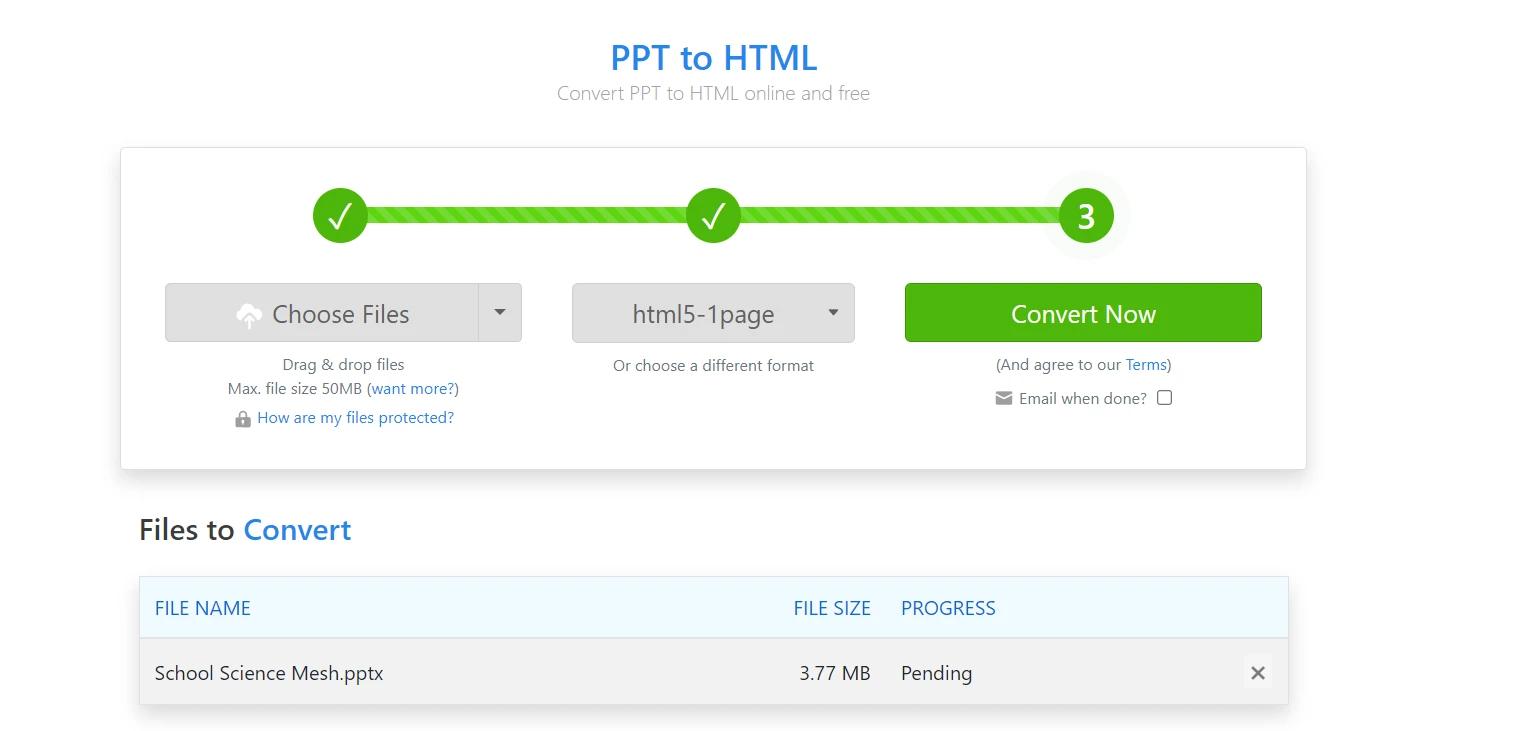
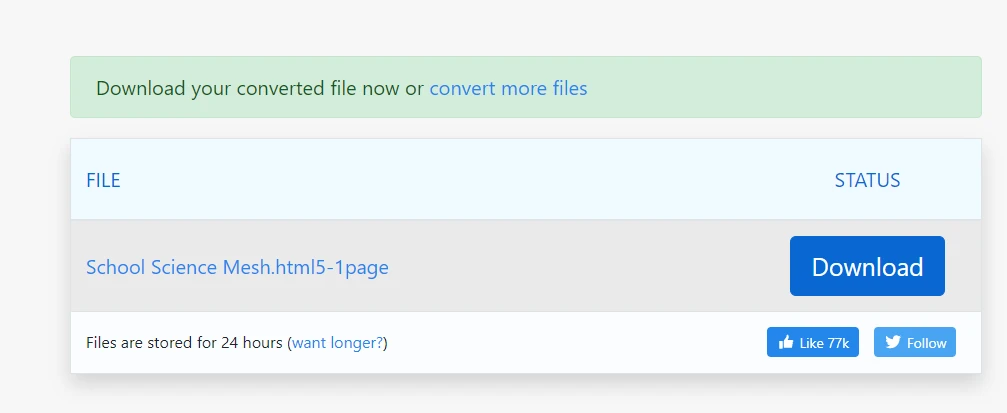
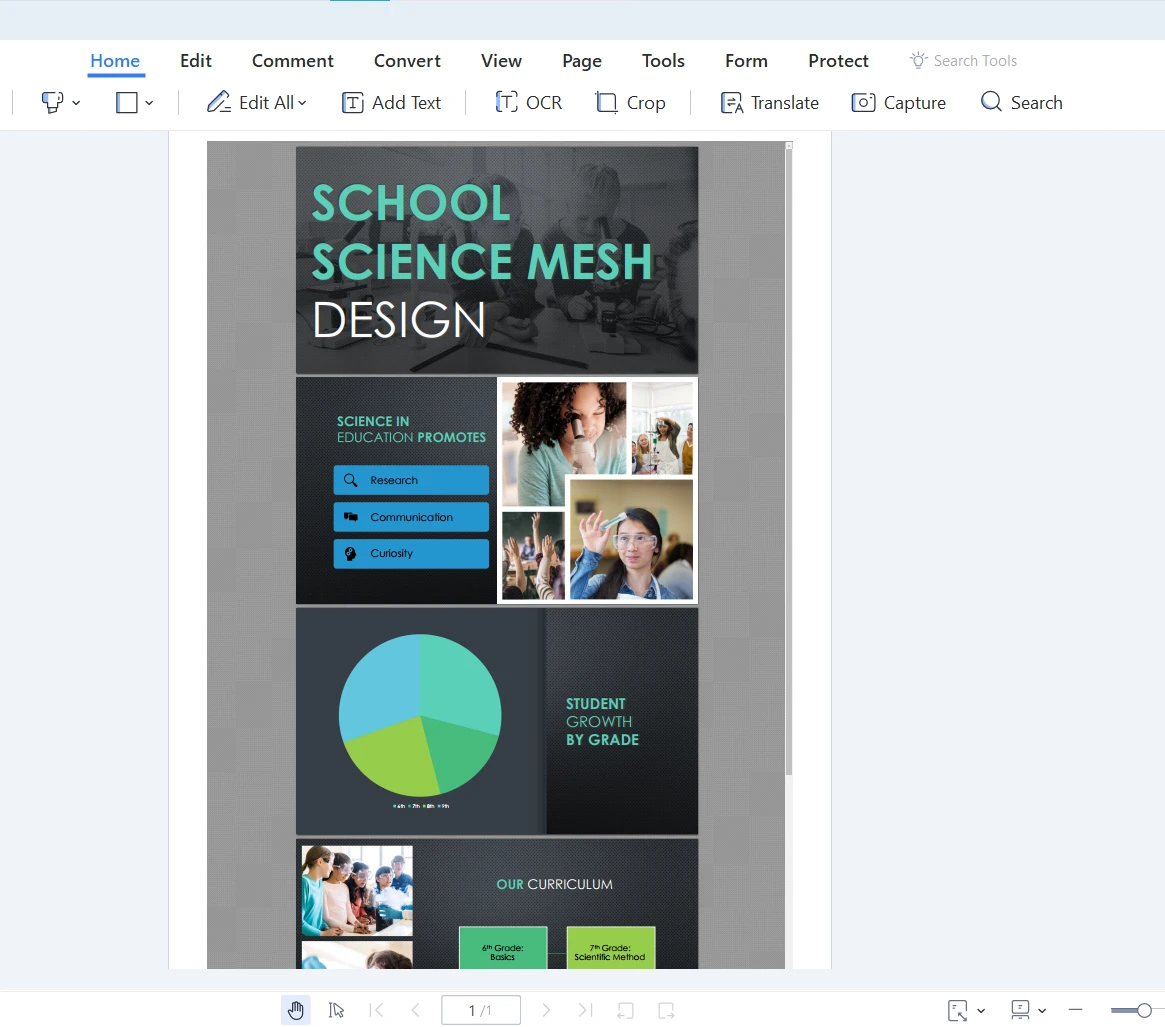
JAVA용 IRONPDF 사용 Java에서 PPT를 PDF로 변환하는 방법 커티스 차우 업데이트됨:8월 31, 2025 다운로드 IronPDF 메이븐 다운로드 JAR 다운로드 무료 체험 시작하기 LLM용 사본 LLM용 사본 LLM용 마크다운 형식으로 페이지를 복사하세요 ChatGPT에서 열기 ChatGPT에 이 페이지에 대해 문의하세요 제미니에서 열기 제미니에게 이 페이지에 대해 문의하세요 Grok에서 열기 Grok에게 이 페이지에 대해 문의하세요 혼란 속에서 열기 Perplexity에게 이 페이지에 대해 문의하세요 공유하다 페이스북에 공유하기 트위터에 공유하기 LinkedIn에 공유하기 URL 복사 이메일로 기사 보내기 This article delves deep into the world of PowerPoint to PDF using Java, discussing why you would want to make this conversion and how to do it effectively using Java libraries and third-party tools. This article also provides real-life examples to make this engaging and easy to understand. ## How to Convert PPT to PDF in Java Download Java library to convert PowerPoint to PDF Convert PPT to HTML with web-based file conversion tool Utilize renderHtmlFileAsPdf method to convert from HTML file to PDF Export the rendered PDF document with saveAs method in Java Check the output PDF in the specified directory IronPDF: Java PDF Library IronPDF for Java is a powerful, feature-rich library that simplifies working with PDF files in Java applications. With a comprehensive API, it enables developers to create, edit, and manipulate PDF documents with ease. This library has gained popularity among developers for its robust functionality, ease of use, and excellent performance. IronPDF for Java has the ability to generate PDF files from HTML content. This feature enables developers to leverage existing HTML and CSS skills to create visually appealing PDF documents with minimal effort. By rendering HTML as a PDF, IronPDF allows for seamless conversion of web pages, reports, and other content into a universally accessible format. IronPDF for Java offers a wide range of PDF manipulation features. These include text extraction, form filling, annotation, encryption, and more. With its simple and intuitive API, developers can easily incorporate these features into their applications, enhancing the overall functionality and user experience. PPT to PDF in Java: The Conversion Process Now that we know the benefits of converting PowerPoint documents to PDF, let's discuss how to do it using Java. The process involves two main steps: Converting PowerPoint presentations to HTML Converting HTML to PDF Converting Microsoft PowerPoint to HTML The first step in the PPT to PDF Java conversion process is transforming the PowerPoint file into an HTML file. One of the easiest ways to do this is by using a web-based file conversion tool like Zamzar. Here's how you can use Zamzar to convert your whole PowerPoint Presentation to HTML: Go to Zamzar's PPT to HTML page. Click the "Choose Files" button to upload your PPT file. Choose "HTML5-1Page" as the target format. PPT to HTML from Zamzar Click the "Convert Now" button to convert PowerPoint Presentations to PDF. Download the converted HTML file once the process is complete. Download the converted PDF file Converting HTML to PDF Using IronPDF for Java Once you have your HTML file, the next step is to convert it to a PDF using a Java library. One popular option is IronPDF for Java. To use IronPDF for Java, follow the steps below: Import the required classes import com.ironsoftware.ironpdf.*; import java.io.IOException; import java.nio.file.Paths; import com.ironsoftware.ironpdf.*; import java.io.IOException; import java.nio.file.Paths; JAVA These lines import the necessary classes from the IronPDF for Java library and Java's built-in IO and NIO packages for working with files and paths. Apply your license key License.setLicenseKey("YOUR-LICENSE-KEY"); License.setLicenseKey("YOUR-LICENSE-KEY"); JAVA This line applies your IronPDF license key, which is required to use the library. Replace "YOUR-LICENSE-KEY" with your actual license key. Set the log path Settings.setLogPath(Paths.get("C:/tmp/IronPdfEngine.log")); Settings.setLogPath(Paths.get("C:/tmp/IronPdfEngine.log")); JAVA This line sets a log file path for the IronPDF library. It is useful for troubleshooting and monitoring the library's operation. In this case, the log file will be created in the "C:/tmp/" directory. Render the HTML as a PDF PdfDocument myPdf = PdfDocument.renderHtmlFileAsPdf("pptToHtml.html"); PdfDocument myPdf = PdfDocument.renderHtmlFileAsPdf("pptToHtml.html"); JAVA This line converts the specified HTML file ("pptToHtml.html") into a PDF document. The resulting PDF document is stored in the myPdf variable, which is of type PdfDocument. Save the PdfDocument to a File myPdf.saveAs(Paths.get("pptToPdf.pdf")); myPdf.saveAs(Paths.get("pptToPdf.pdf")); JAVA Finally, this line saves the PdfDocument object (myPdf) as a PDF file. In this case, the output file is named "pptToPdf.pdf" and will be saved to the output file path. By following these steps, the code snippet effectively converts an HTML file into a PDF document using the IronPDF PDF Library. You can also convert PPT to PDF using IronPDF for .NET. The output PDF file Why Convert PPT to PDF? Let's understand why one would want to convert PowerPoint files to PDFs in the first place. Compatibility: PDF files are universally recognized and can be opened on virtually any device without requiring specific software. Converting your PPT files to PDFs ensures that your presentation can be easily shared and viewed by anyone, regardless of the device they use. Security: PDF files offer better security options, such as password protection and encryption, which can be crucial when dealing with sensitive information. File size: Converting PPT to PDF often results in smaller file sizes, making them more manageable for sharing via email or online storage services. Print quality: PDFs tend to maintain their formatting and quality when printed, unlike PPT files, which may not always print as intended. Real-Life Example: An Employee Training Manual Imagine you're responsible for creating a training manual for new employees at your company. You've designed an engaging PowerPoint presentation filled with images, charts, and text. To ensure that the manual can be easily accessed and printed by employees, you decide to convert it to a PDF. Using the PPT to PDF Java conversion process described earlier, you first convert the PPT file to an HTML file using Zamzar. Then, you use IronPDF for Java to transform the HTML file into a high-quality PDF format. The resulting PDF file is now ready to be shared with new employees, ensuring that they can access the training manual on any device, without worrying about formatting or compatibility issues. We can convert the PowerPoint PPT slide to a PDF slide. Select the desired slide and follow the above process. Conclusion In conclusion, IronPDF for Java PDF Library is a powerful and versatile tool that simplifies the process of generating, manipulating, and converting PDF documents in Java applications. Its rich feature set and user-friendly API make it an excellent choice for developers working with PDF files. To get started with IronPDF, there is a free trial of IronPDF for Java, allowing you to test the library's capabilities before making a purchase. If you decide that IronPDF is the right solution for your needs, licensing options start from $799. 자주 묻는 질문 Java를 사용하여 PowerPoint 프레젠테이션을 PDF로 변환해야 하는 이유는 무엇인가요? Java를 사용하여 PowerPoint 프레젠테이션을 PDF로 변환하면 다양한 플랫폼에서 호환성을 보장하고, 보안을 강화하고, 파일 크기를 줄이고, 인쇄 품질을 개선하여 프레젠테이션을 더 쉽게 공유하고 볼 수 있습니다. PowerPoint 프레젠테이션을 Java에서 PDF로 변환하는 단계는 무엇인가요? PowerPoint 프레젠테이션을 Java에서 PDF로 변환하려면 먼저 Zamzar와 같은 도구를 사용하여 PPT 파일을 HTML로 변환하세요. 그런 다음 Java용 IronPDF를 사용하여 HTML을 PDF 문서로 렌더링합니다. Java용 IronPDF는 HTML을 PDF로 변환하는 데 어떻게 도움이 되나요? Java용 IronPDF는 기존 HTML 및 CSS 기술을 활용하여 HTML 파일을 PDF로 쉽게 변환할 수 있는 강력한 API를 제공하므로 시각적으로 매력적인 PDF 문서를 쉽게 만들 수 있습니다. Java용 IronPDF는 PDF 조작을 위해 어떤 기능을 제공하나요? Java용 IronPDF는 HTML 콘텐츠에서 텍스트 추출, 양식 채우기, 주석, 암호화, PDF 생성 등의 기능을 제공하여 PDF 문서 작업을 위한 다용도 툴입니다. PPT 파일을 HTML 파일로 변환하려면 어떻게 해야 하나요? PPT 파일을 HTML 파일로 변환하려면 Zamzar와 같은 웹 기반 파일 변환 도구를 사용할 수 있습니다. PPT 파일을 업로드하고 대상 형식으로 HTML5-1Page를 선택한 다음 변환된 HTML 파일을 다운로드하기만 하면 됩니다. Java용 IronPDF를 사용하려면 무엇이 필요하나요? Java용 IronPDF를 사용하려면 필요한 클래스를 가져오고, IronPDF 라이선스 키를 적용하고, 로그 경로를 설정하고, 라이브러리의 메서드를 활용하여 HTML 파일을 PDF 문서로 렌더링해야 합니다. 구매하기 전에 Java용 IronPDF를 사용해 볼 수 있나요? 예, Java용 IronPDF는 무료 평가판을 제공하므로 구매하기 전에 라이브러리의 기능과 성능을 살펴볼 수 있습니다. Java용 IronPDF가 PDF 변환에 선호되는 이유는 무엇인가요? 강력한 기능, 사용 편의성, 포괄적인 기능 세트로 선호되는 Java용 IronPDF는 Java 애플리케이션에서 PDF를 생성하고 조작해야 하는 개발자에게 탁월한 선택입니다. PowerPoint에서 PDF로의 변환은 실제 시나리오에서 어떻게 유용할까요? PowerPoint에서 PDF로 변환은 교육 매뉴얼 제작과 같은 작업에 유용합니다. 프레젠테이션을 PDF로 변환하면 매뉴얼에 쉽게 액세스하고 인쇄할 수 있어 여러 기기에서 일관된 서식을 유지할 수 있습니다. Java용 IronPDF의 라이선스 옵션은 무엇인가요? Java용 IronPDF는 라이트 라이선스부터 다양한 라이선스 옵션을 제공합니다. 자세한 가격 정보는 IronPDF 영업팀에 문의하거나 공식 웹사이트를 방문하세요. 커티스 차우 지금 바로 엔지니어링 팀과 채팅하세요 기술 문서 작성자 커티스 차우는 칼턴 대학교에서 컴퓨터 과학 학사 학위를 취득했으며, Node.js, TypeScript, JavaScript, React를 전문으로 하는 프론트엔드 개발자입니다. 직관적이고 미적으로 뛰어난 사용자 인터페이스를 만드는 데 열정을 가진 그는 최신 프레임워크를 활용하고, 잘 구성되고 시각적으로 매력적인 매뉴얼을 제작하는 것을 즐깁니다. 커티스는 개발 분야 외에도 사물 인터넷(IoT)에 깊은 관심을 가지고 있으며, 하드웨어와 소프트웨어를 통합하는 혁신적인 방법을 연구합니다. 여가 시간에는 게임을 즐기거나 디스코드 봇을 만들면서 기술에 대한 애정과 창의성을 결합합니다. 관련 기사 업데이트됨 6월 22, 2025 Java에서 TIFF를 PDF로 변환하는 방법 이 포괄적인 가이드는 IronPDF를 사용하여 Java에서 TIFF 이미지를 PDF로 원활하게 변환하는 방법에 대한 단계를 안내합니다. 더 읽어보기 업데이트됨 7월 28, 2025 Java에서 PDF를 PDFA로 변환하는 방법 이 문서에서는 IronPDF를 사용하여 Java에서 PDF 파일을 PDF/A 형식으로 변환하는 방법을 살펴봅니다. 더 읽어보기 업데이트됨 7월 28, 2025 Java로 PDF 문서를 만드는 방법 이 문서에서는 주요 개념, 최고의 라이브러리 및 예제를 다루는 Java에서 PDF 작업에 대한 포괄적인 가이드를 제공합니다. 더 읽어보기 Java에서 PDF 파일을 보는 방법Java에서 Excel 파일을 PDF로 ...

업데이트됨 6월 22, 2025 Java에서 TIFF를 PDF로 변환하는 방법 이 포괄적인 가이드는 IronPDF를 사용하여 Java에서 TIFF 이미지를 PDF로 원활하게 변환하는 방법에 대한 단계를 안내합니다. 더 읽어보기
업데이트됨 7월 28, 2025 Java에서 PDF를 PDFA로 변환하는 방법 이 문서에서는 IronPDF를 사용하여 Java에서 PDF 파일을 PDF/A 형식으로 변환하는 방법을 살펴봅니다. 더 읽어보기
업데이트됨 7월 28, 2025 Java로 PDF 문서를 만드는 방법 이 문서에서는 주요 개념, 최고의 라이브러리 및 예제를 다루는 Java에서 PDF 작업에 대한 포괄적인 가이드를 제공합니다. 더 읽어보기