푸터 콘텐츠로 바로가기
JAVA용 IRONPDF 사용

Java에서 Word를 PDF로 변환하는 방법

This article will dive into the world of Word to PDF conversion using Java, exploring real-life examples and sharing stories from developers who have experienced the benefits of this process firsthand.

IronPDF: Java PDF Library

IronPDF for Java is a powerful library that simplifies working with PDF documents in Java applications, including creating, editing, and extracting content. One of its key features is the ability to convert HTML content to PDF programmatically, which is perfect for the Word to PDF Java conversion process. With IronPDF for Java, developers can leverage the library's capabilities to streamline the conversion of Word documents to PDF in Java.

Step 1: Convert Word document to HTML

The first step in the Word to PDF Java conversion process is transforming a Word document into HTML. This may sound like a daunting task, but fear not! MS Word itself provides a handy feature for doing just that.

To use this feature, simply follow these steps:

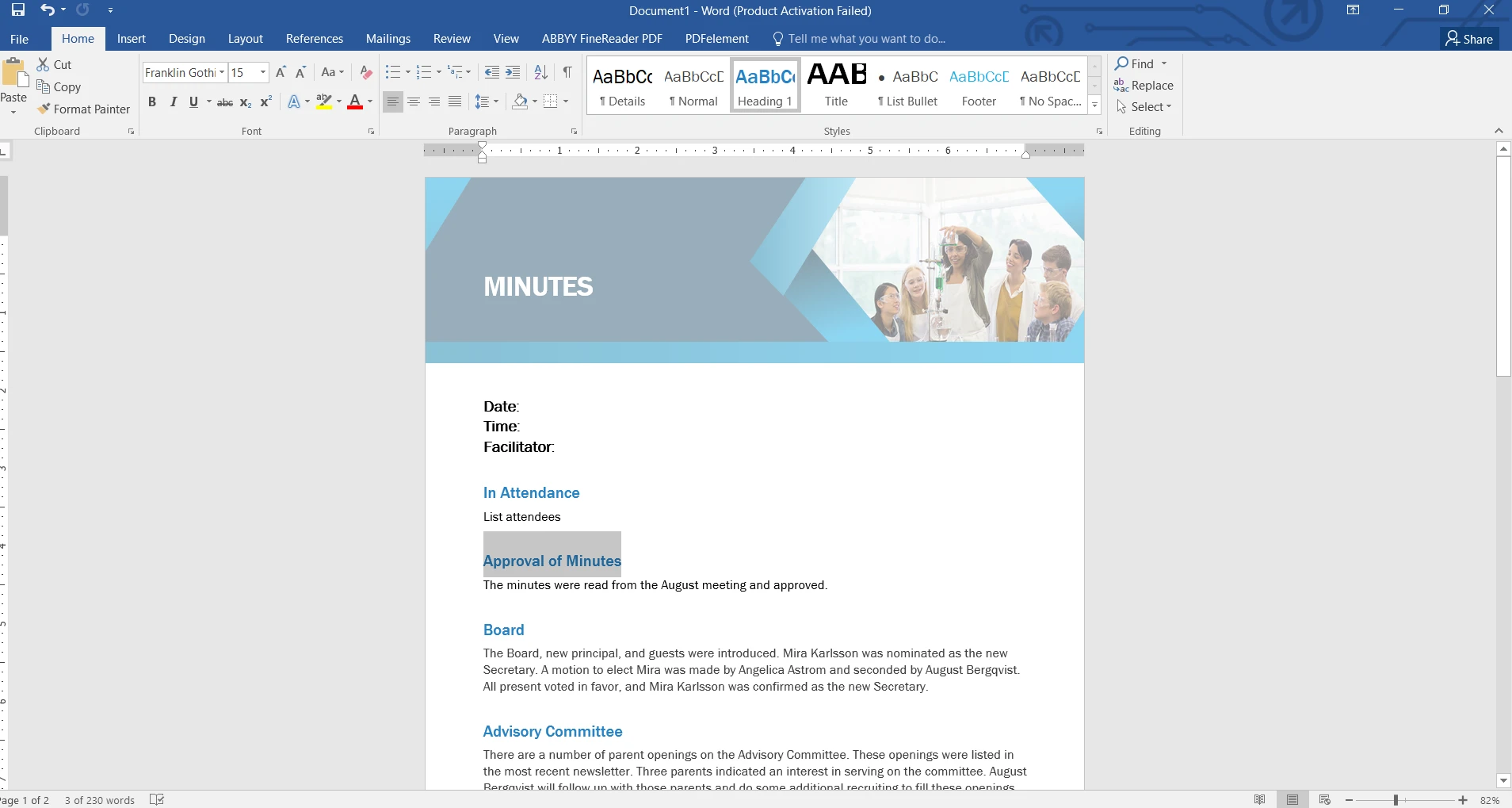
  1. Open the Word document you want to convert. How to Convert Word to PDF in Java, Figure 1: The Word document The Word document

  2. Click on "File" in the toolbar, and then select "Save As".
  3. Choose a location to save the HTML file.
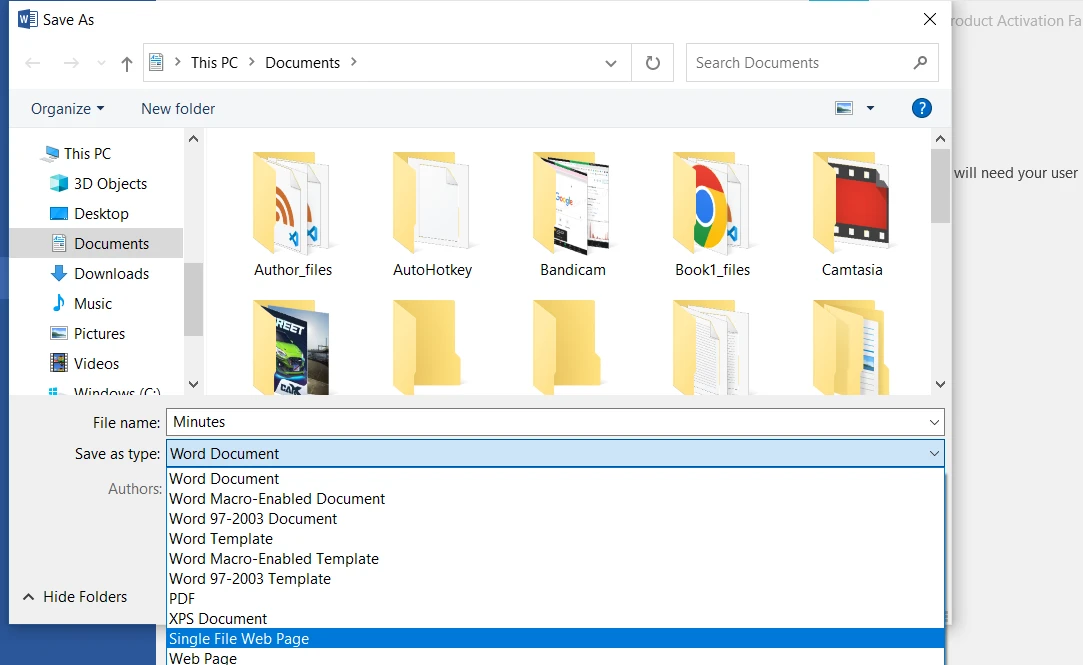
  4. In the "Save as type" dropdown, select "Single File Web Page".

    How to Convert Word to PDF in Java, Figure 2: Select an option to save as an HTML file Select an option to save as an HTML file

  5. Click "Save".

Your Word document has been converted to HTML. Now, it's time to move on to the next step of the process.

Step 2: Convert HTML to PDF with IronPDF for Java

Now that you have an HTML version of your Word document, it's time to use IronPDF for Java to convert it into a PDF. IronPDF for Java is a powerful library that makes it easy for developers to create, edit, and extract content from PDF documents. One of its key features is the ability to convert HTML to PDF, making it the perfect choice for this Word to PDF Java conversion process.

Add IronPDF in Maven Project

To include IronPDF in your Maven project, follow these simple steps:

Add the IronPDF Dependency to your pom.xml File

Open your pom.xml file and locate the dependencies section. If it's not present, create one. Add the following dependencies for IronPDF and the slf4j logger, which IronPDF uses for logging:

<dependencies>
    <dependency>
        <groupId>com.ironsoftware</groupId>
        <artifactId>ironpdf</artifactId>
        <version>VERSION_NUMBER</version>
    </dependency>
    <dependency>
        <groupId>org.slf4j</groupId>
        <artifactId>slf4j-simple</artifactId>
        <version>VERSION_NUMBER</version>
    </dependency>
</dependencies>
<dependencies>
    <dependency>
        <groupId>com.ironsoftware</groupId>
        <artifactId>ironpdf</artifactId>
        <version>VERSION_NUMBER</version>
    </dependency>
    <dependency>
        <groupId>org.slf4j</groupId>
        <artifactId>slf4j-simple</artifactId>
        <version>VERSION_NUMBER</version>
    </dependency>
</dependencies>
XML

Update your Maven Project

After adding the dependencies to your pom.xml file, save it and update your Maven project. This can be done using your IDE or by running the following command in the terminal:

mvn clean install
mvn clean install
SHELL

This command will download the specified IronPDF and slf4j-simple libraries and make them available for your project.

Code for converting HTML to PDF document

Below is a detailed explanation and code for converting an HTML file to a PDF using the IronPDF for Java library.

import com.ironsoftware.ironpdf.*;  // Import classes from IronPDF for Java library
import java.io.IOException;
import java.nio.file.Paths;

public class HtmlToPdfConverter {

    public static void main(String[] args) {
        // Apply your IronPDF license key
        License.setLicenseKey("YOUR-LICENSE-KEY");

        // Set a log path for debugging and monitoring
        Settings.setLogPath(Paths.get("C:/tmp/IronPdfEngine.log"));

        try {
            // Render the HTML file as a PDF
            PdfDocument myPdf = PdfDocument.renderHtmlFileAsPdf("wordHTML.html");

            // Save the PdfDocument to a file
            myPdf.saveAs(Paths.get("wordToPdf.pdf"));
        } catch (IOException e) {
            e.printStackTrace();  // Handle potential IO exceptions
        }
    }
}
import com.ironsoftware.ironpdf.*;  // Import classes from IronPDF for Java library
import java.io.IOException;
import java.nio.file.Paths;

public class HtmlToPdfConverter {

    public static void main(String[] args) {
        // Apply your IronPDF license key
        License.setLicenseKey("YOUR-LICENSE-KEY");

        // Set a log path for debugging and monitoring
        Settings.setLogPath(Paths.get("C:/tmp/IronPdfEngine.log"));

        try {
            // Render the HTML file as a PDF
            PdfDocument myPdf = PdfDocument.renderHtmlFileAsPdf("wordHTML.html");

            // Save the PdfDocument to a file
            myPdf.saveAs(Paths.get("wordToPdf.pdf"));
        } catch (IOException e) {
            e.printStackTrace();  // Handle potential IO exceptions
        }
    }
}
JAVA

In this code snippet:

  • License Key: A license key for IronPDF is set to enable the features of the library.
  • Log Path: A log path is specified for the library to store logs useful for debugging.
  • Render HTML as PDF: The HTML content of the file wordHTML.html is rendered as a PDF, creating a PdfDocument object named myPdf.
  • Save PDF: The generated PDF is saved to the specified location as wordToPdf.pdf.

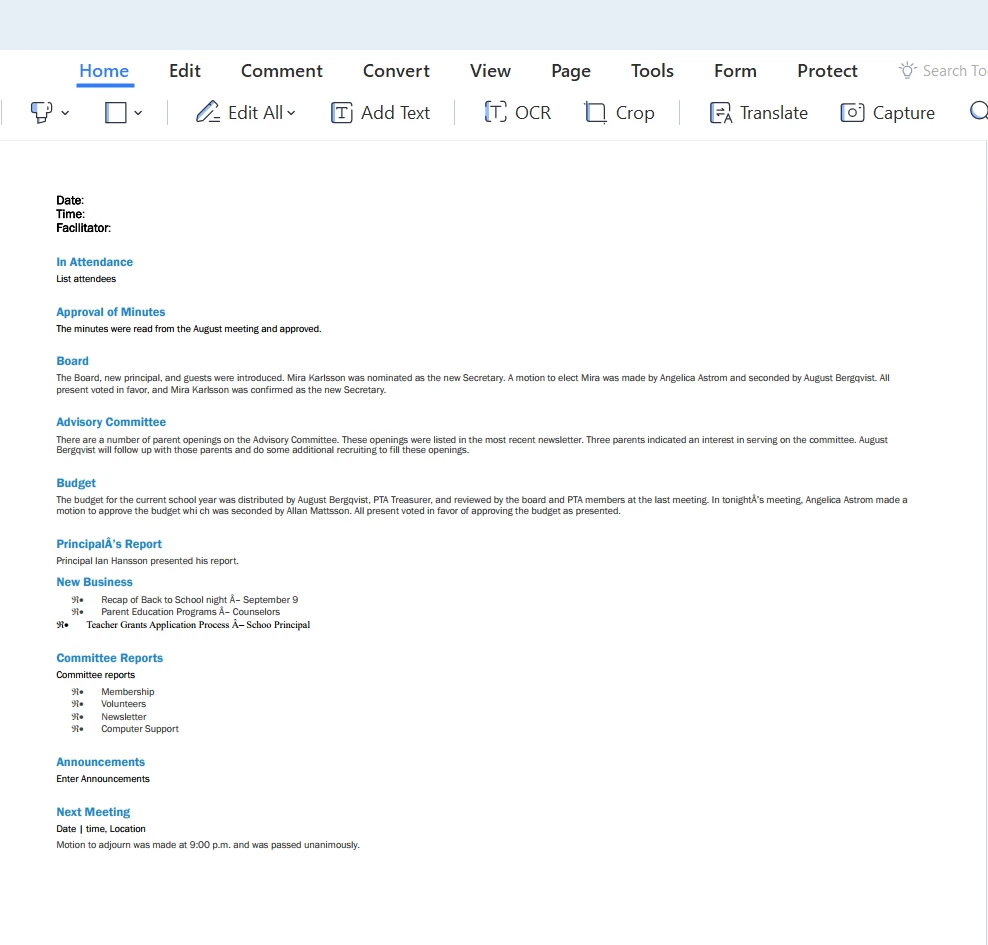
How to Convert Word to PDF in Java, Figure 3: The output PDF file The output PDF file

Scenario in which We Need to Convert Word to PDF

A law firm requires a document management system that can convert Word documents containing contracts and legal agreements into PDF format. This system needs to ensure the formatting is preserved, and the final PDF documents are secure and easy to share with clients.

By implementing a Word to PDF Java conversion process with IronPDF for Java, the law firm can easily and accurately convert their Word documents into PDF files, streamlining their document management process.

Conclusion

In conclusion, the Word to PDF Java conversion process, leveraging the IronPDF for Java library, offers a versatile and efficient solution for developers and businesses to handle document management tasks. With its user-friendly approach, IronPDF provides a seamless method to convert Word documents to PDF files, ensuring consistent formatting, enhanced document security, and professional printing quality with IronPDF for Java.

In addition, IronPDF offers the abilities to add headers and footers in PDF documents, create tables using IronPDF for Java, and implement digital signatures in PDFs.

To give potential users a taste of its capabilities, IronPDF for Java offers a free trial for new users. Licensing options for different needs begin at $799.

자주 묻는 질문

Java를 사용하여 Word 문서를 PDF로 변환하려면 어떻게 해야 하나요?

Java에서 Word 문서를 PDF로 변환하려면 먼저 Word 문서를 HTML로 변환한 다음 IronPDF의 Java 라이브러리를 사용하여 HTML을 PDF로 변환합니다. 이 작업은 HTML을 PDF로 렌더링하고 IronPDF를 사용하여 저장하는 방식으로 수행됩니다.

PDF 변환을 위해 Word 문서를 HTML로 변환하는 단계는 무엇인가요?

Word 문서를 HTML로 변환하려면 Word 문서를 열고 '파일'을 클릭한 다음 '다른 이름으로 저장'을 선택하고 위치를 선택한 다음 '저장 유형' 드롭다운에서 '단일 파일 웹 페이지'를 선택합니다. 그런 다음 이 HTML 파일을 Java용 IronPDF를 사용하여 PDF로 변환할 수 있습니다.

PDF 라이브러리를 Maven 프로젝트에 통합하려면 어떻게 해야 하나요?

IronPDF를 Maven 프로젝트에 통합하려면 프로젝트의 pom.xml 파일의 종속성 섹션에 IronPDF 종속성을 추가하세요. 변경 사항을 저장한 후 Maven 프로젝트를 업데이트하여 지정된 라이브러리를 다운로드하고 사용하세요.

법률 문서 관리 시스템에서 Word 문서를 PDF로 변환하면 어떤 이점이 있나요?

Word 문서를 PDF로 변환하면 문서의 서식이 보존되고 보안이 강화되며 계약서나 계약서와 같은 법률 문서에 필수적인 공유가 용이해지므로 법률 문서 관리 시스템에서 유용하게 사용할 수 있습니다.

이 Java PDF 라이브러리의 추가 기능은 무엇인가요?

Java용 IronPDF는 머리글 및 바닥글 추가, 표 생성, 디지털 서명 적용, 문서 보안 강화, PDF의 전문적인 인쇄 품질 보장 등의 기능을 제공합니다.

이 Java PDF 라이브러리에 대한 평가판 기간이 있나요?

예, Java용 IronPDF는 사용자가 라이선스 구매를 결정하기 전에 라이브러리의 기능을 살펴볼 수 있는 무료 평가판을 제공합니다.

이 Java PDF 라이브러리의 라이선스 키를 설정하려면 어떻게 해야 하나요?

Java 코드에 라이선스 키를 설정하여 IronPDF의 모든 기능을 잠금 해제할 수 있습니다. 이 작업은 구매 시 제공된 라이선스 키를 적절한 방법으로 입력하면 됩니다.

이 Java PDF 라이브러리에는 어떤 로깅 옵션을 사용할 수 있나요?

Java용 IronPDF를 사용하면 로그를 저장할 수 있는 로그 경로를 지정할 수 있으므로 애플리케이션 내에서 라이브러리의 작업을 디버깅하고 모니터링하는 데 유용합니다.

HTML을 PDF로 변환할 때 고려해야 할 사항은 무엇인가요?

Java용 IronPDF를 사용하여 HTML을 PDF로 변환할 때는 정확한 렌더링을 위해 HTML이 필요한 서식과 구조를 유지하는지 확인하세요. 또한 최적의 기능을 위해 라이선스 및 로그 경로를 설정하는 것도 고려해야 합니다.

커티스 차우
기술 문서 작성자

커티스 차우는 칼턴 대학교에서 컴퓨터 과학 학사 학위를 취득했으며, Node.js, TypeScript, JavaScript, React를 전문으로 하는 프론트엔드 개발자입니다. 직관적이고 미적으로 뛰어난 사용자 인터페이스를 만드는 데 열정을 가진 그는 최신 프레임워크를 활용하고, 잘 구성되고 시각적으로 매력적인 매뉴얼을 제작하는 것을 즐깁니다.


커티스는 개발 분야 외에도 사물 인터넷(IoT)에 깊은 관심을 가지고 있으며, 하드웨어와 소프트웨어를 통합하는 혁신적인 방법을 연구합니다. 여가 시간에는 게임을 즐기거나 디스코드 봇을 만들면서 기술에 대한 애정과 창의성을 결합합니다.