




已更新 2026年4月23日
在 .NET 中用 Microsoft.Extensions.AI 簡化 LLM 整合
AI 正在改變軟體開發,但將大型語言模型 (LLM) 整合到 .NET 中一直很複雜。利用 IronPdf.AI 將 AI 整合推向更遠,為 .NET 應用程式帶來由 OpenAI 驅動的 PDF 解析、資料擷取和內容總結。
閱讀更多

在使用C#的多執行緒應用程式時,維護資料完整性至關重要,特別是當您使用像IronPDF這樣的程式庫隨時生成PDF文件時。 ConcurrentDictionary<tkey, tvalue>類別提供了一個執行緒安全的集合,以有效管理鍵和值對,即使多個執行緒同時執行插入、更新或查找等操作。
在這份指南中,我們將探討ConcurrentDictionary的運作原理、它如何整合IronPDF進行平行PDF處理,以及每位.NET開發人員需要了解的鍵型別、執行緒安全性和常見陷阱,例如處理已存在的鍵或確保資料一致性。
ConcurrentDictionary<tkey, tvalue>類別是System.Collections.Concurrent命名空間的一部分,是一個通用集合,設計用於高效能的執行緒安全操作。 與普通字典不同,它允許多個執行緒在不鎖定整個結構的情況下安全地存取和修改集合。
一個新的ConcurrentDictionary<string, string>實例可能會是這樣的:
var dictionary = new ConcurrentDictionary<string, string>();Dim dictionary = New ConcurrentDictionary(Of String, String)()您可以根據具體的使用案例定義您自己的TKey和TValue型別,例如快取渲染的PDF文件路徑或追蹤並行的PDF生成任務。
假想您正在構建一個程式,使用IronPDF為成千上萬的使用者生成個性化的發票。 如果每個執行緒需要渲染文件並儲存其結果,普通字典可能會引入競爭條件或在鍵已存在時拋出例外。
使用ConcurrentDictionary可以確保:
讓我們分解使用IronPDF渲染場景的關鍵方法。
此方法檢查指定的鍵是否存在。 如果不存在,則新增新值。
var filePath = pdfCache.GetOrAdd(userId, id => GeneratePdfForUser(id));Dim filePath = pdfCache.GetOrAdd(userId, Function(id) GeneratePdfForUser(id))此方法允許您在鍵存在時更新值,或者新增新的鍵值對。
pdfCache.AddOrUpdate(userId,
    id => GeneratePdfForUser(id),
    (id, existingValue) => UpdatePdfForUser(id, existingValue));
pdfCache.AddOrUpdate(userId, Function(id) GeneratePdfForUser(id), Function(id, existingValue) UpdatePdfForUser(id, existingValue))此方法嘗試新增值並返回一個指示成功的布林值。
bool added = pdfCache.TryAdd(userId, pdfBytes);
if (!added)
{
    Console.WriteLine("PDF already cached.");
}Dim added As Boolean = pdfCache.TryAdd(userId, pdfBytes)
If Not added Then
Console.WriteLine("PDF already cached.")
End If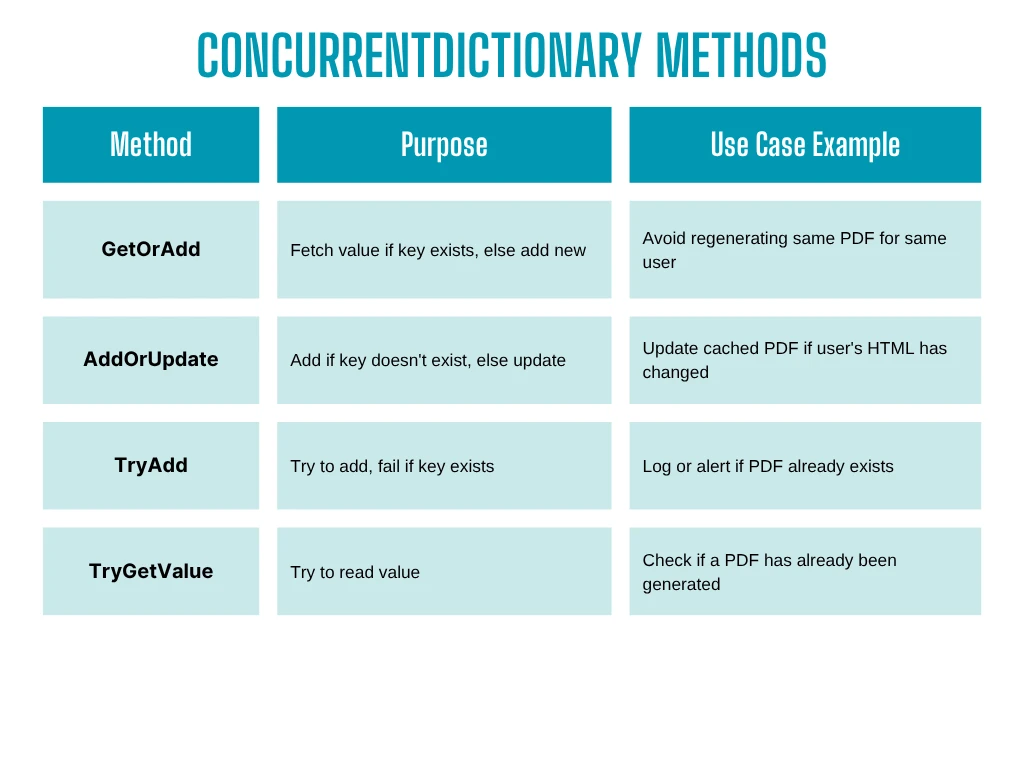
ConcurrentDictionary支持通過構造函式調整設置:
int concurrencyLevel = 4;
int initialCapacity = 100;
var dictionary = new ConcurrentDictionary<string, byte[]>(concurrencyLevel, initialCapacity);Dim concurrencyLevel As Integer = 4
Dim initialCapacity As Integer = 100
Dim dictionary = New ConcurrentDictionary(Of String, Byte())(concurrencyLevel, initialCapacity)正確設置這些參數可以提高吞吐量,並減少多個執行緒之間的爭奪。
當鍵不存在時,TryGetValue等操作可以返回該型別的預設值:
if (!pdfCache.TryGetValue(userId, out var pdf))
{
    pdf = GeneratePdfForUser(userId); // Second call
}Dim pdf As var
If Not pdfCache.TryGetValue(userId, pdf) Then
pdf = GeneratePdfForUser(userId) ' Second call
End If這保護您的程式碼免受未知程式碼或空引用的影響。 在假設存在之前,請始終檢查特定值。
using System;
using System.Collections.Concurrent;
using System.Collections.Generic;
using System.IO;
using System.Threading.Tasks;
using IronPdf;
public class Program
{
    static ConcurrentDictionary<string, byte[]> pdfReports =
        new ConcurrentDictionary<string, byte[]>();
    static void Main(string[] args)
    {
        // Simulated user list with HTML content
        var users = new List<User>
        {
            new User { Id = "user1", HtmlContent = "<h1>Report for User 1</h1>" },
            new User { Id = "user2", HtmlContent = "<h1>Report for User 2</h1>" },
            new User { Id = "user3", HtmlContent = "<h1>Report for User 3</h1>" }
        };
        // Generate PDFs concurrently
        var renderer = new ChromePdfRenderer();
        Parallel.ForEach(users, user =>
        {
            var pdf = pdfReports.GetOrAdd(user.Id, id =>
            {
                var pdfDoc = renderer.RenderHtmlAsPdf(user.HtmlContent);
                return pdfDoc.BinaryData;
            });
            SaveToFile(pdf, $"{user.Id}.pdf");
        });
        Console.WriteLine("PDF generation complete.");
    }
    // Utility method to write PDF binary data to file
    static void SaveToFile(byte[] pdfBytes, string filePath)
    {
        File.WriteAllBytes(filePath, pdfBytes);
        Console.WriteLine($"Saved: {filePath}");
    }
}
// Simple user class with ID and HTML content
public class User
{
    public string Id { get; set; }
    public string HtmlContent { get; set; }
}Imports System
Imports System.Collections.Concurrent
Imports System.Collections.Generic
Imports System.IO
Imports System.Threading.Tasks
Imports IronPdf
Public Class Program
Private Shared pdfReports As New ConcurrentDictionary(Of String, Byte())()
Shared Sub Main(ByVal args() As String)
' Simulated user list with HTML content
Dim users = New List(Of User) From {
New User With {
.Id = "user1",
.HtmlContent = "<h1>Report for User 1</h1>"
},
New User With {
.Id = "user2",
.HtmlContent = "<h1>Report for User 2</h1>"
},
New User With {
.Id = "user3",
.HtmlContent = "<h1>Report for User 3</h1>"
}
}
' Generate PDFs concurrently
Dim renderer = New ChromePdfRenderer()
Parallel.ForEach(users, Sub(user)
Dim pdf = pdfReports.GetOrAdd(user.Id, Function(id)
Dim pdfDoc = renderer.RenderHtmlAsPdf(user.HtmlContent)
Return pdfDoc.BinaryData
End Function)
SaveToFile(pdf, $"{user.Id}.pdf")
End Sub)
Console.WriteLine("PDF generation complete.")
End Sub
' Utility method to write PDF binary data to file
Private Shared Sub SaveToFile(ByVal pdfBytes() As Byte, ByVal filePath As String)
File.WriteAllBytes(filePath, pdfBytes)
Console.WriteLine($"Saved: {filePath}")
End Sub
End Class
' Simple user class with ID and HTML content
Public Class User
Public Property Id() As String
Public Property HtmlContent() As String
End Class
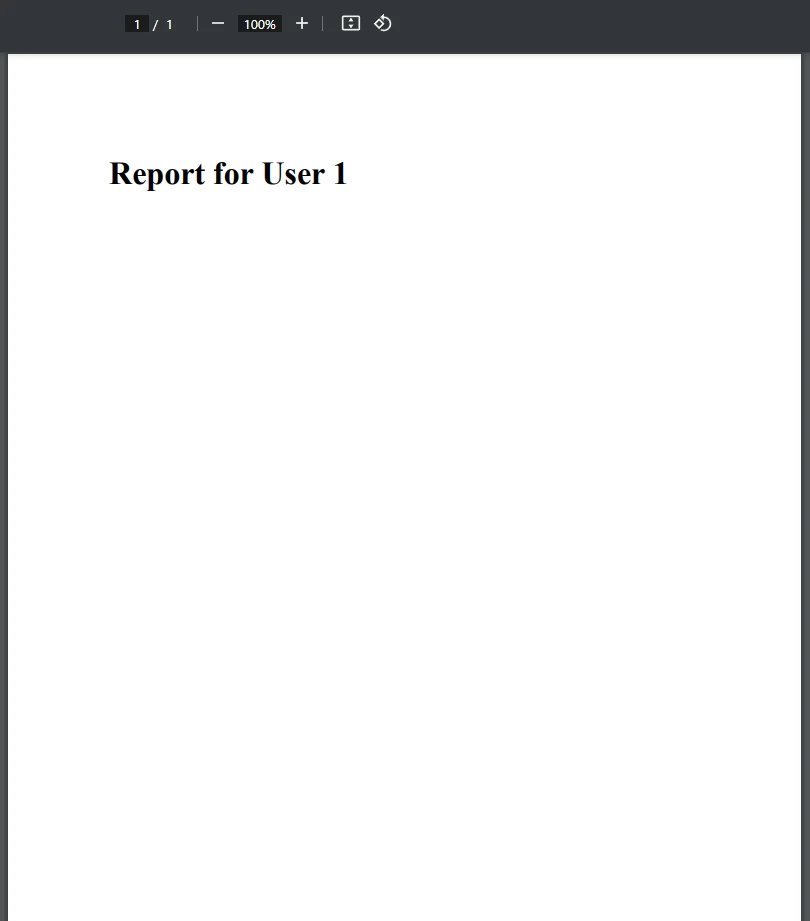
此範例展示瞭如何結合ConcurrentDictionary<TKey, TValue>與IronPDF以執行緒安全的方式生成PDF。 這非常適合多個執行緒同時處理和快取PDF文件的應用程式。
為什麼要使用ConcurrentDictionary?
確保執行緒安全地存取鍵值對。
GetOrAdd()避免重複的PDF生成。
無需手動鎖定——非常適合高併發。 工作原理
一個使用者列表,每個使用者都有一個ID和HTML。
Parallel.ForEach產生執行緒以生成PDF。
每個執行緒都使用GetOrAdd()來獲取或建立PDF。
PDF使用使用者的ID作為文件名保存。 總結
當以下情況時,此模式是理想選擇:
雖然ConcurrentDictionary不提供所有LINQ功能,但您仍然可以使用擴展方法來查詢值:
var completedKeys = pdfReports.Keys.Where(k => k.StartsWith("done-")).ToList();Dim completedKeys = pdfReports.Keys.Where(Function(k) k.StartsWith("done-")).ToList()但是,請避免依賴迭代期間複製的元素,因為詞典可能會改變。 如果需要,可以使用.ToList()或.ToArray()來處理快照。
ConcurrentDictionary<TKey, TValue>非常適合多個執行緒需要同時讀取/寫入鍵值對的場景——使其成為多執行緒應用程式中IronPDF的完美搭檔。
無論您是在快取渲染的PDF、追踪作業狀態,還是防止冗余操作,使用這個執行緒安全的集合可確保您的邏輯隨著性能和可靠性進行擴展。
準備好構建具備完整執行緒安全的高性能PDF應用程式嗎? **下載IronPDF的免費試用 **,體驗無縫的PDF生成,結合C#的ConcurrentDictionary的功能。

Jacob Mellor是Iron Software的首席技術官,一位在C# PDF技術上開創先河的遠見工程師。作為Iron Software核心程式碼庫的原開發者,他從創立以來就一直在塑造公司的產品架構,與首席執行官Cameron Rimington一起將公司轉變為服務於NASA、特斯拉和全球政府公司的50多名人員的公司。



IronPDF 是 IRONSUITE 的一部分
10 款適用於辦公室文件的 .NET API 產品

當您需要您的PDF看起來像HTML一樣快速。


