


C# Global Variable (How it Works for Developers)

全域變數 是程式設計中的強大工具,可以儲存需要在應用程式不同部分存取的資料。 雖然C#本身不支援真正的全域變數,但它提供了替代方案,如靜態變數、常數和依賴注入,以實現類似的功能。
今天,我們將仔細查看管理全域變數的方法,同時探討 IronPDF。 這個強大的程式庫允許開發人員直接透過C#程式碼來建立、編輯和操作PDF文件。 將全域變數與IronPDF整合,可以簡化在每個生成的PDF中包括共享資料(如頁首、頁腳和品牌)的過程。
Understanding Global Variables in C
什麼是全域變數?
全域變數是可以從應用程式的任何部分存取的變數。 它們儲存需要在多個方法、類別或模組之間共享的資料。 然而,在C#中,沒有像其他一些程式語言(例如Python的 "global" 關鍵字)那樣的全域變數。 相反,可以使用靜態欄位、常數或依賴注入來模擬全域變數,這取決於您的個人經驗,可以是一個簡單的過程。
- 靜態變數:屬於類別本身的變數,而不是類別的實例。 這些變數在多次調用之間保留其值,並且可以全域存取。
- 常數:在編譯時定義的不可變值,可以全域存取。
- 依賴注入:一種設計模式,允許將物件作為依賴項傳遞,提供對共享資料的受控存取。
全域變數的常見用例
全域變數通常用於需要儲存將在應用程式的各個部分使用的資料的情況。 常見的用例如下:
- 配置設置:全域變數可儲存應用程式範圍內的配置資料,如API密鑰或資料庫連接字串。
- 共享資源:跨不同模組使用的資產,如文件路徑、圖像或模板。
- 會話資料:需要跨多個會話或交易持久化的資料。
管理全域變數是必須小心謹慎的。 過度使用可能導致元件之間的緊密耦合,使您的程式碼更難維護和測試。
Creating and Using Global Variables in C
首先,讓我們看看如何在C#中使用靜態關鍵字和靜態類別來建立全域變數,以解決缺乏任何本地全域變數的問題。
// Our globals class
public class GlobalSettings
{
    // Static variables accessible globally
    public static string CompanyName = "IronSoftware";
    public static string LogoPath = "IronPdfLogo.png";
}

class Program
{
    static void Main(string[] args)
    {
        // Access global variables
        Console.WriteLine(GlobalSettings.CompanyName);
    }
}
// Our globals class
public class GlobalSettings
{
// Static variables accessible globally
public static string CompanyName = "IronSoftware";
public static string LogoPath = "IronPdfLogo.png";
}
class Program
{
static void Main(string[] args)
{
// Access global variables
Console.WriteLine(GlobalSettings.CompanyName);
}
}' Our globals class
Public Class GlobalSettings
' Static variables accessible globally
Public Shared CompanyName As String = "IronSoftware"
Public Shared LogoPath As String = "IronPdfLogo.png"
End Class
Friend Class Program
Shared Sub Main(ByVal args() As String)
' Access global variables
Console.WriteLine(GlobalSettings.CompanyName)
End Sub
End Class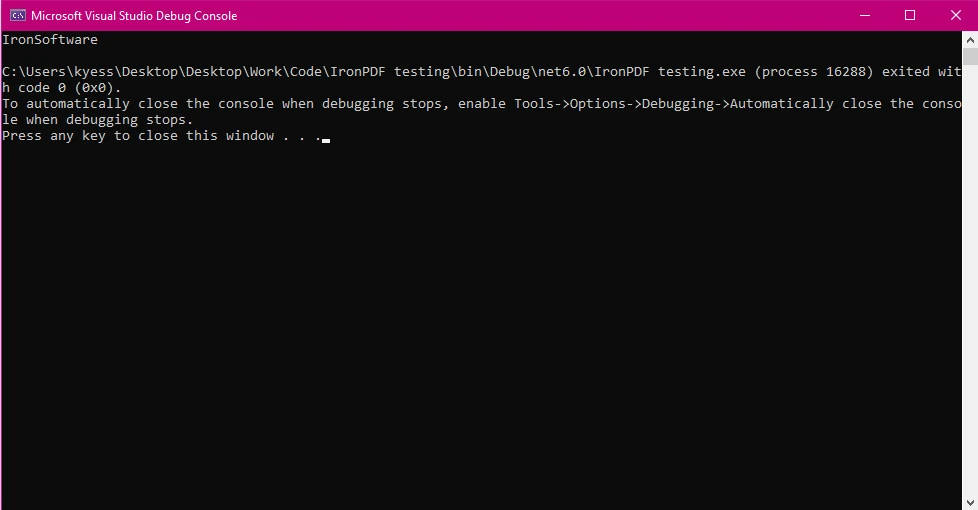
在上述例子中,我們建立了一個稱為 GlobalSettings 的公共類別,其中包含我們的全域變數 CompanyName 和 LogoPath。 然後,我們透過使用 GlobalSettings.CompanyName 在主方法中存取 CompanyName 變數。
將全域變數與IronPDF整合以生成PDF
在您的.NET專案中設置IronPDF
要開始使用 IronPDF,您首先需要安裝它。 如果已經安裝,您可以跳過此部分,否則以下步驟介紹如何安裝IronPDF程式庫。
通過 NuGet 套件管理器控制台
要使用 NuGet 包管理器控制台安裝 IronPDF,打開 Visual Studio 並導航到套件管理器控制台。 然後運行以下命令:
Install-Package IronPdf
就這樣! IronPDF將被新增到您的項目中,您可以立即開始工作。
通過 NuGet 解決方案包管理器
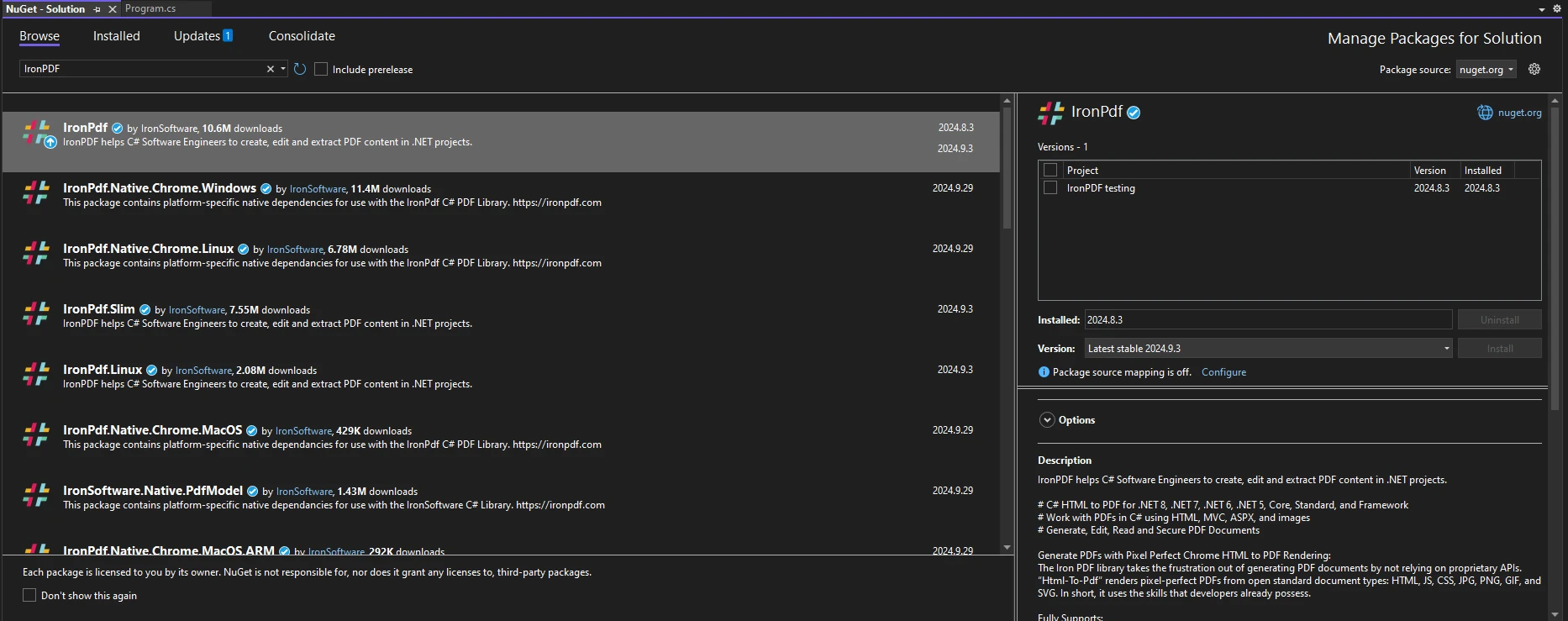
打開Visual Studio,依次進入"工具 -> NuGet Package Manager -> Manage NuGet Packages for Solution",並搜尋IronPDF。 在此之後,您只需要選擇您的專案並點擊"安裝",IronPDF就會被新增到您的專案中。
一旦您安裝了 IronPDF,開始使用 IronPDF 所需做的只是將正確的 using 語句新增到程式碼頂部:
using IronPdf;using IronPdf;Imports IronPdf使用全域變數生成IronPDF PDF
當您希望確保多個PDF文件之間的一致性時,全域變數特別有用。 例如,如果您的PDF報告需要在每頁上包含公司名稱和徽標,您可以全域儲存這些資料。
以下是如何使用這樣的全域變數將公司名稱和徽標插入IronPDF生成的每個PDF中的範例:
using System;
using IronPdf;

public class GlobalSettings
{
    // Static members of the global settings class
    public static string CompanyName = "IronSoftware";
    public static string LogoPath = "IronPdfLogo.png";
}

class Program
{
    static void Main(string[] args)
    {
        // Create a Chrome PDF renderer
        ChromePdfRenderer renderer = new ChromePdfRenderer();

        // Define HTML content incorporating global variables
        string htmlContent = $@"
            <html>
            <body>
                <header>
                    <h1>{GlobalSettings.CompanyName}</h1>
                    <img src='{GlobalSettings.LogoPath}' />
                </header>
                <p>This is a dynamically generated PDF using global variables!</p>
            </body>
            </html>";

        // Render HTML to PDF
        PdfDocument pdf = renderer.RenderHtmlAsPdf(htmlContent);

        // Save the PDF to file
        pdf.SaveAs("globalVar.pdf");
    }
}
using System;
using IronPdf;
public class GlobalSettings
{
// Static members of the global settings class
public static string CompanyName = "IronSoftware";
public static string LogoPath = "IronPdfLogo.png";
}
class Program
{
static void Main(string[] args)
{
// Create a Chrome PDF renderer
ChromePdfRenderer renderer = new ChromePdfRenderer();
// Define HTML content incorporating global variables
string htmlContent = $@"
<html>
<body>
<header>
<h1>{GlobalSettings.CompanyName}</h1>
<img src='{GlobalSettings.LogoPath}' />
</header>
<p>This is a dynamically generated PDF using global variables!</p>
</body>
</html>";
// Render HTML to PDF
PdfDocument pdf = renderer.RenderHtmlAsPdf(htmlContent);
// Save the PDF to file
pdf.SaveAs("globalVar.pdf");
}
}Imports System
Imports IronPdf
Public Class GlobalSettings
' Static members of the global settings class
Public Shared CompanyName As String = "IronSoftware"
Public Shared LogoPath As String = "IronPdfLogo.png"
End Class
Friend Class Program
Shared Sub Main(ByVal args() As String)
' Create a Chrome PDF renderer
Dim renderer As New ChromePdfRenderer()
' Define HTML content incorporating global variables
Dim htmlContent As String = $"
<html>
<body>
<header>
<h1>{GlobalSettings.CompanyName}</h1>
<img src='{GlobalSettings.LogoPath}' />
</header>
<p>This is a dynamically generated PDF using global variables!</p>
</body>
</html>"
' Render HTML to PDF
Dim pdf As PdfDocument = renderer.RenderHtmlAsPdf(htmlContent)
' Save the PDF to file
pdf.SaveAs("globalVar.pdf")
End Sub
End Class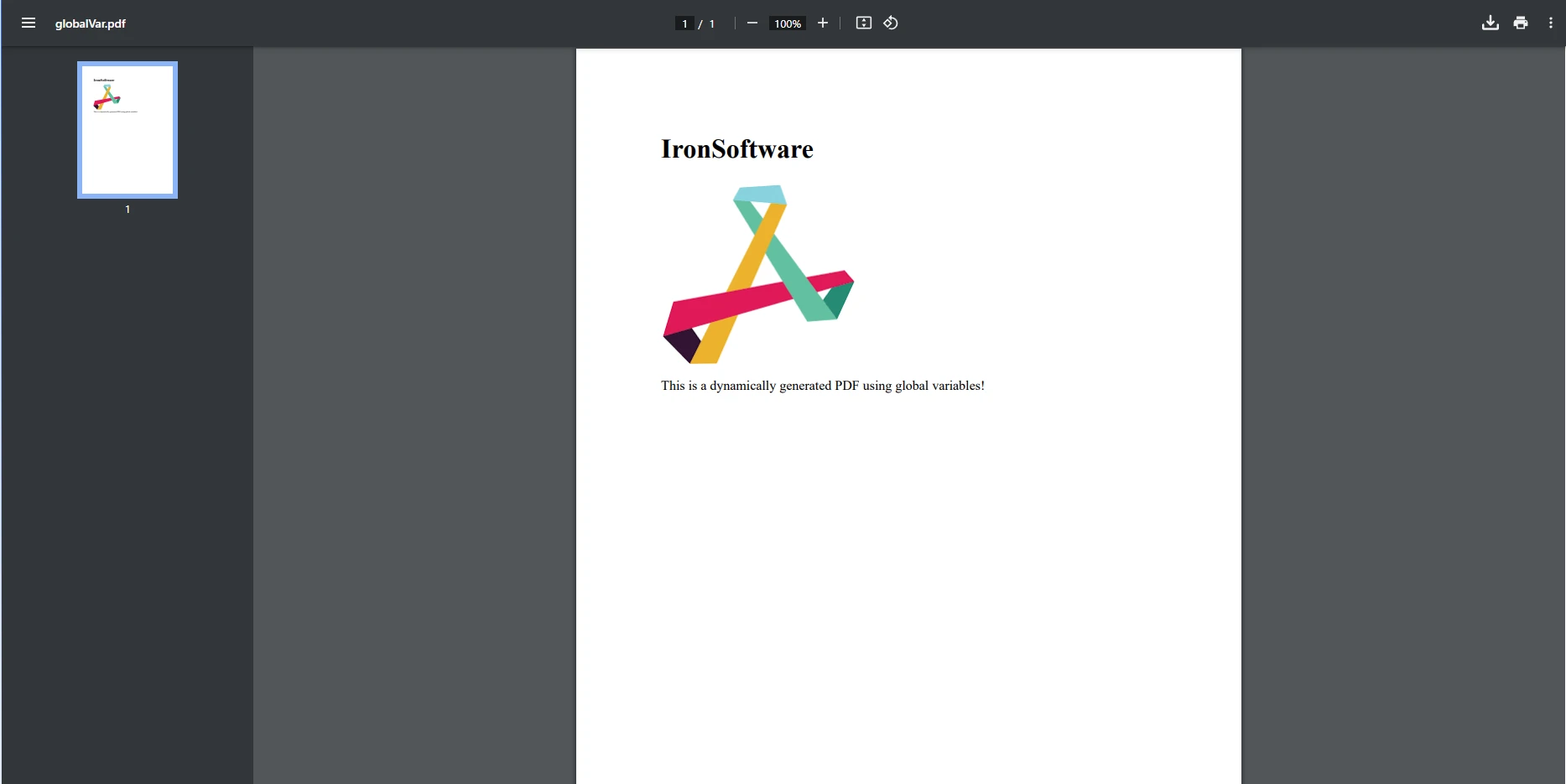
在這個範例中,我們實例化了一個 ChromePdfRenderer 類別,以建立一個新渲染器,我們將使用它將HTML內容渲染為PDF。 HTML內容包括我們在先前範例中建立的靜態全域變數,CompanyName 和 LogoPath。 然後,我們使用 RenderHtmlAsPdf 方法與我們的 PdfDocument 物件將HTML內容渲染為PDF,然後最終保存生成的PDF。
範例:使用全域變數動態生成PDF
想像一個情況,您需要生成財務報告,並需要在每個報告中包含公司的品牌。 通過使用全域變數,您可以儲存公司的名稱、徽標以及其他相關資訊,並將其一致地應用於所有生成的PDF中。
using System;
using IronPdf;

public class GlobalSettings
{
    // Static variable types go here
    public static string CompanyName = "IronSoftware";
    public static string ReportContent { get; set; } = "This is the default report content.";
    public static string FooterText = "Created using IronPDF and Global Variables";
}

public class PDFReport
{
    // Method to dynamically set report content
    public static void SetDynamicContent(string reportContent)
    {
        GlobalSettings.ReportContent = reportContent;
    }

    // Method to generate PDF report
    public static void GenerateReport()
    {
        ChromePdfRenderer renderer = new ChromePdfRenderer();

        // Using global variables in HTML content
        string htmlTemplate = $@"
            <html>
            <body>
                <header style='text-align:center;'>
                    <h1>{GlobalSettings.CompanyName}</h1>
                </header>
                <section>
                    <p>{GlobalSettings.ReportContent}</p>
                </section>
                <footer style='text-align:center;'>
                    <p>{GlobalSettings.FooterText}</p>
                </footer>
            </body>
            </html>";

        // Render HTML to PDF
        PdfDocument pdf = renderer.RenderHtmlAsPdf(htmlTemplate);

        // Save the PDF to file
        pdf.SaveAs("dynamic_report.pdf");
    }
}

class Program
{
    static void Main(string[] args)
    {
        // Set global variables dynamically at runtime
        PDFReport.SetDynamicContent("This report highlights the latest innovations in technology.");

        // Generate the PDF report
        PDFReport.GenerateReport();
    }
}
using System;
using IronPdf;
public class GlobalSettings
{
// Static variable types go here
public static string CompanyName = "IronSoftware";
public static string ReportContent { get; set; } = "This is the default report content.";
public static string FooterText = "Created using IronPDF and Global Variables";
}
public class PDFReport
{
// Method to dynamically set report content
public static void SetDynamicContent(string reportContent)
{
GlobalSettings.ReportContent = reportContent;
}
// Method to generate PDF report
public static void GenerateReport()
{
ChromePdfRenderer renderer = new ChromePdfRenderer();
// Using global variables in HTML content
string htmlTemplate = $@"
<html>
<body>
<header style='text-align:center;'>
<h1>{GlobalSettings.CompanyName}</h1>
</header>
<section>
<p>{GlobalSettings.ReportContent}</p>
</section>
<footer style='text-align:center;'>
<p>{GlobalSettings.FooterText}</p>
</footer>
</body>
</html>";
// Render HTML to PDF
PdfDocument pdf = renderer.RenderHtmlAsPdf(htmlTemplate);
// Save the PDF to file
pdf.SaveAs("dynamic_report.pdf");
}
}
class Program
{
static void Main(string[] args)
{
// Set global variables dynamically at runtime
PDFReport.SetDynamicContent("This report highlights the latest innovations in technology.");
// Generate the PDF report
PDFReport.GenerateReport();
}
}Imports System
Imports IronPdf
Public Class GlobalSettings
' Static variable types go here
Public Shared CompanyName As String = "IronSoftware"
Public Shared Property ReportContent() As String = "This is the default report content."
Public Shared FooterText As String = "Created using IronPDF and Global Variables"
End Class
Public Class PDFReport
' Method to dynamically set report content
Public Shared Sub SetDynamicContent(ByVal reportContent As String)
GlobalSettings.ReportContent = reportContent
End Sub
' Method to generate PDF report
Public Shared Sub GenerateReport()
Dim renderer As New ChromePdfRenderer()
' Using global variables in HTML content
Dim htmlTemplate As String = $"
<html>
<body>
<header style='text-align:center;'>
<h1>{GlobalSettings.CompanyName}</h1>
</header>
<section>
<p>{GlobalSettings.ReportContent}</p>
</section>
<footer style='text-align:center;'>
<p>{GlobalSettings.FooterText}</p>
</footer>
</body>
</html>"
' Render HTML to PDF
Dim pdf As PdfDocument = renderer.RenderHtmlAsPdf(htmlTemplate)
' Save the PDF to file
pdf.SaveAs("dynamic_report.pdf")
End Sub
End Class
Friend Class Program
Shared Sub Main(ByVal args() As String)
' Set global variables dynamically at runtime
PDFReport.SetDynamicContent("This report highlights the latest innovations in technology.")
' Generate the PDF report
PDFReport.GenerateReport()
End Sub
End Class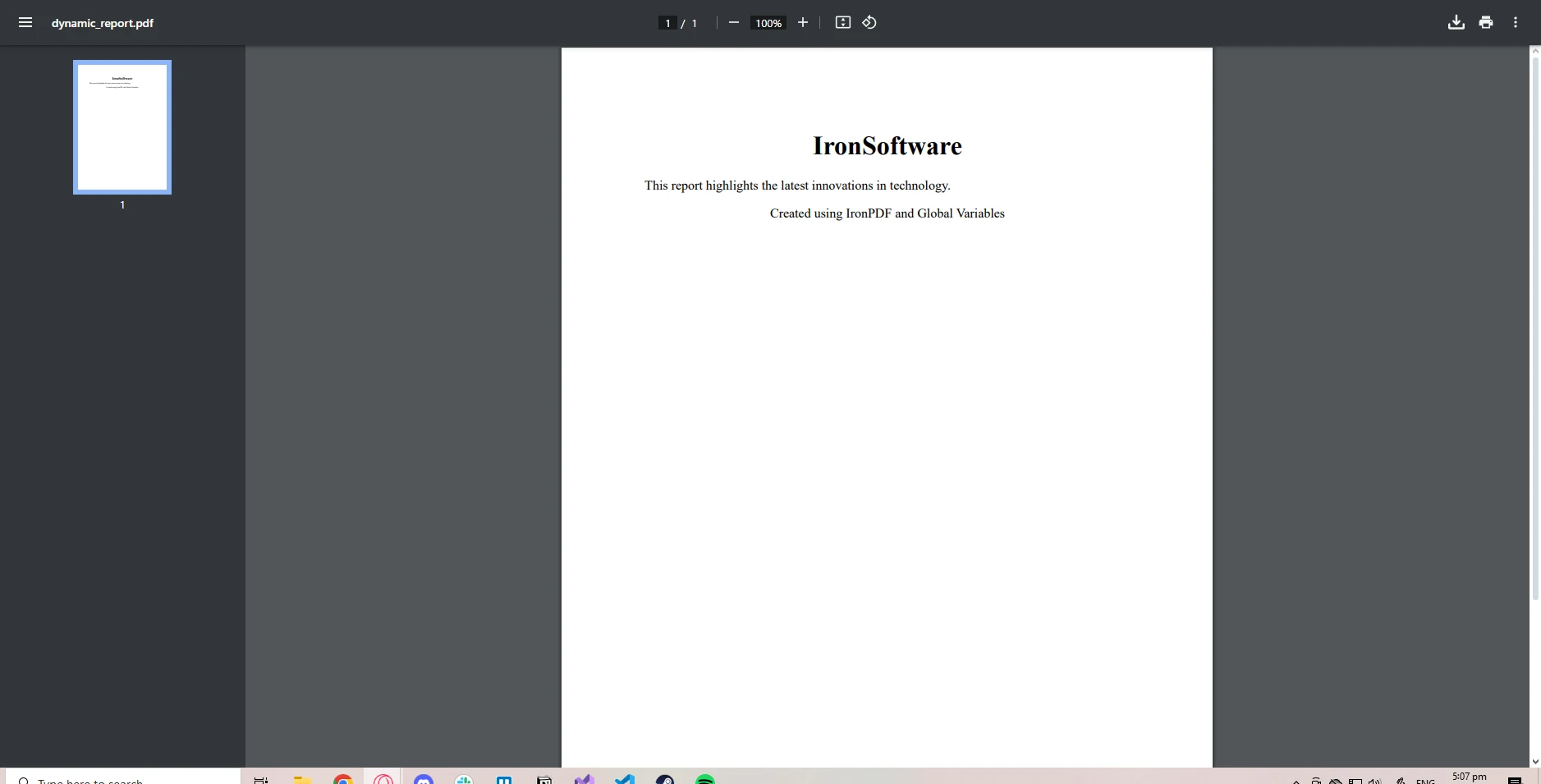
在這個範例中,我們在 GlobalSettings 類別中建立了一個稱為 ReportContent 的全域變數。 這個變數具有 get 和 set 方法,以便其值可以在運行時更新。SetDynamicContent 方法允許在生成PDF之前,動態設置全域變數。 此方法可以擴展以從配置文件、資料庫或使用者輸入中提取資料。 用來建立PDF的 HTML內容 是基於全域變數的值動態生成的。
在C#中使用IronPDF管理全域變數的最佳實踐
何時使用全域變數
全域變數方便,但應僅在簡化程式碼並減少冗餘時使用。 例如,使用全域變數進行應用程式設置、常見資源或PDF生成中的常數,可以節省時間並防止錯誤。
然而,如果您的全域資料容易變更或僅在特定的上下文中相關,則最好通過方法參數傳遞資料或使用依賴注入,以確保更好的程式碼結構和可維護性。
避免全域變數的常見陷阱
全域變數的一些常見問題包括緊密耦合,這使得元件相互依賴,使得測試或修改程式碼更加困難。 以下是一些避免這些陷阱的建議:
- 對於常數使用readonly: 如果不希望靜態全域變數在初始化後被修改,將其標記為readonly。
- 將全域資料封裝在單例類中: 使用單例模式以確保對共享資料的控製存取。
範例:通過全域儲存共享資源來優化PDF生成
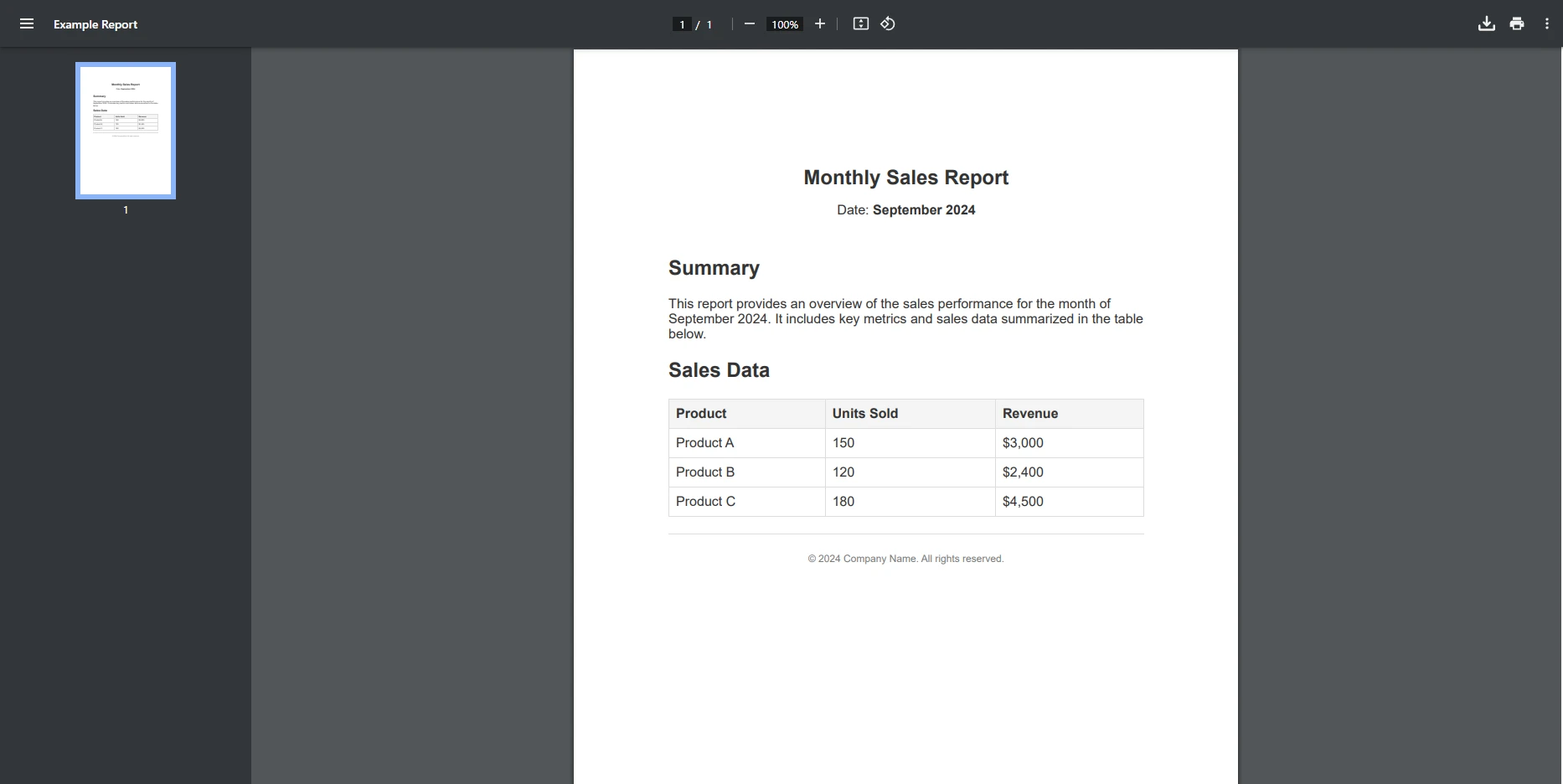
全域變數還可以儲存常用資源,如文件路徑、資料結構、模板或圖像資產。 通過這樣做,您可以優化PDF的生成,因為這些資源被快取並在不同PDF報告中重複使用。
using System;
using System.IO;
using IronPdf;

public class GlobalSettings
{
    // Readonly global variables for shared resources
    public static readonly string TemplatePath = "report.html";
    public static readonly string ImageDirectory = "Images/";
}

public class PDFReport
{
    // Generate a PDF report using a reusable template
    public static void GenerateReport()
    {
        ChromePdfRenderer renderer = new ChromePdfRenderer();

        // Read content from a template file
        string templateContent = File.ReadAllText(GlobalSettings.TemplatePath);

        // Render HTML to PDF
        PdfDocument pdf = renderer.RenderHtmlAsPdf(templateContent);

        // Save the PDF to file
        pdf.SaveAs("templateReport.pdf");
    }
}

class Program
{
    static void Main(string[] args)
    {
        // Generate the PDF report
        PDFReport.GenerateReport();
    }
}
using System;
using System.IO;
using IronPdf;
public class GlobalSettings
{
// Readonly global variables for shared resources
public static readonly string TemplatePath = "report.html";
public static readonly string ImageDirectory = "Images/";
}
public class PDFReport
{
// Generate a PDF report using a reusable template
public static void GenerateReport()
{
ChromePdfRenderer renderer = new ChromePdfRenderer();
// Read content from a template file
string templateContent = File.ReadAllText(GlobalSettings.TemplatePath);
// Render HTML to PDF
PdfDocument pdf = renderer.RenderHtmlAsPdf(templateContent);
// Save the PDF to file
pdf.SaveAs("templateReport.pdf");
}
}
class Program
{
static void Main(string[] args)
{
// Generate the PDF report
PDFReport.GenerateReport();
}
}Imports System
Imports System.IO
Imports IronPdf
Public Class GlobalSettings
' Readonly global variables for shared resources
Public Shared ReadOnly TemplatePath As String = "report.html"
Public Shared ReadOnly ImageDirectory As String = "Images/"
End Class
Public Class PDFReport
' Generate a PDF report using a reusable template
Public Shared Sub GenerateReport()
Dim renderer As New ChromePdfRenderer()
' Read content from a template file
Dim templateContent As String = File.ReadAllText(GlobalSettings.TemplatePath)
' Render HTML to PDF
Dim pdf As PdfDocument = renderer.RenderHtmlAsPdf(templateContent)
' Save the PDF to file
pdf.SaveAs("templateReport.pdf")
End Sub
End Class
Friend Class Program
Shared Sub Main(ByVal args() As String)
' Generate the PDF report
PDFReport.GenerateReport()
End Sub
End Class輸入模板
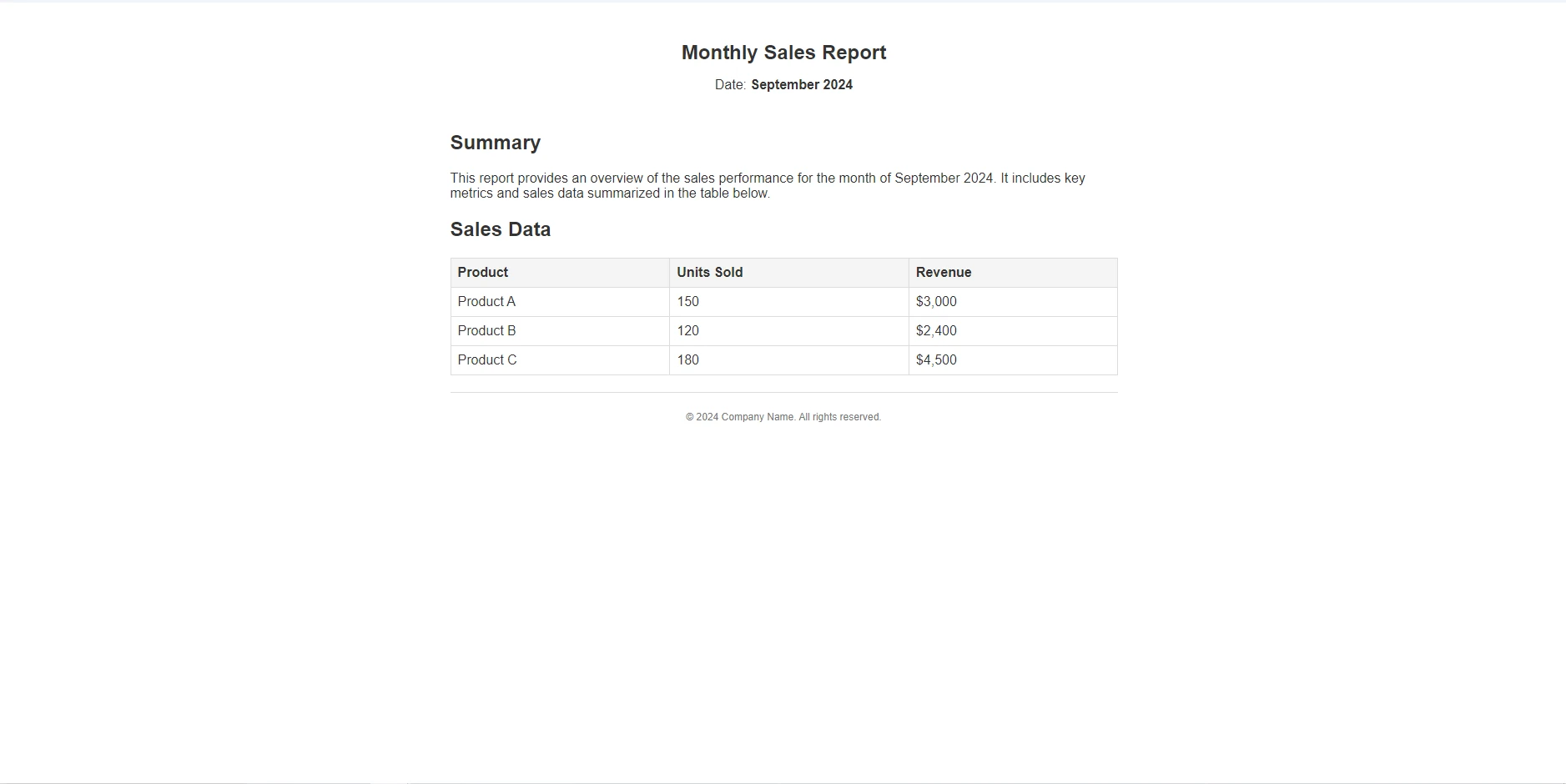
輸出
為什麼使用IronPDF進行資料驅動的PDF生成?
IronPDF進行全域資料驅動PDF生成的主要功能
IronPDF擁有豐富的功能集,這些功能使得處理PDF文件變得輕而易舉,可以應付從簡單的HTML到PDF轉換,到PDF加密和解密等所有需求。
在進行資料驅動的PDF生成時,IronPDF提供了幾個簡化從全域資料生成這些PDF的功能:
- HTML到PDF轉換:將動態HTML內容轉換為高品質的PDF。
- 支持全域配置:輕鬆地在所有PDF中應用全域設置,如頁首、頁尾或樣式。
- 動態內容處理:在模板中包括全域資料,以生成定制化的報告。
與.NET應用程式和全域變數的無縫整合
IronPDF 可以平滑地整合到.NET應用程式中,並支持使用靜態資料或配置設置,以達到一致的PDF生成。 它是一個多用途的程式庫,非常適合需要共享資料生成專業級PDF文件的應用程式。 當結合全域變數的威力時,您將能夠簡化所有IronPDF的PDF生成任務。
結論
全域變數是一種管理應用程式中共享資料的絕佳方式,並且它們能夠與 IronPDF 無縫協作,立即查看它如何簡化您的PDF生成流程。
常見問題
我可以如何在C#中模擬全域變數?
在C#中,您可以使用靜態變數來模擬全域變數,這些變數屬於類本身而不是任何實例。它們在多個調用之間保持其值,使其適合儲存整個應用程式中需要的資料。
靜態變數在C#中扮演什麼角色?
C#中的靜態變數與類本身相關,而不是與任何物件實例相關。它們在方法調用間維持其狀態,可以用來儲存整個應用程式中可存取的全域資料。
依賴注入如何幫助管理C#中的共享資料?
依賴注入通過將物件作為依賴項傳遞來實現對共享資料的受控存取。這種設計模式有助於管理共享資料,而不依賴全域變數,從而促進更模組化且易於測試的程式碼庫。
在.NET中使用PDF生成程式庫有什麼好處?
像IronPDF這樣的PDF生成程式庫提供了HTML轉PDF轉換、動態內容處理以及整合全域資料(如頁首和品牌元素)的能力,這對於生成一致和專業的PDF文件至關重要。
全域變數如何增強C#應用程式中的PDF生成?
在C#應用程式中,全域變數可以儲存像樣板和品牌元素這樣的常用資源,這些資源可以在多個PDF文件中重複使用,以確保一致性並在使用如IronPDF的程式庫生成PDF時減少冗余。
在C#中使用全域變數的最佳實踐是什麼?
最佳實踐包括使用readonly來定義常數,將全域資料封裝在單例類中,並將全域變數的使用限制在簡化程式碼和避免冗余的情況上,以確保更好的程式碼可維護性。
我如何使用全域變數在PDF中包含動態內容?
您可以利用全域變數在C#應用程式中儲存公司名稱或財務資料等動態內容。使用IronPDF,您可以將這些全域變數整合到您的PDF生成過程中,以確保內容的一致性和更新。
使用全域變數可能會出現哪些挑戰?
使用全域變數可能導致元件之間的緊密耦合,增加測試或修改程式碼的難度。這可能會導致應用程式結構不夠模組化以及在管理應用程式狀態方面增加複雜性。
為什麼開發者應該在C#中使用常數而非全域變數?
C#中的常數提供了不可變的編譯時值,為全域變數提供了一個更安全和更有效的替代方案。它們防止資料意外更改,從而確保應用程式行為的穩定性和可預測性。










 免費開始使用
 免費開始使用
 預約免費現場演示





 不需信用卡或帳戶建立










