




已更新 2026年4月23日
在 .NET 中用 Microsoft.Extensions.AI 簡化 LLM 整合
AI 正在改變軟體開發,但將大型語言模型 (LLM) 整合到 .NET 中一直很複雜。利用 IronPdf.AI 將 AI 整合推向更遠,為 .NET 應用程式帶來由 OpenAI 驅動的 PDF 解析、資料擷取和內容總結。
閱讀更多

在廣闊且充滿動態變化的C#程式設計領域中,熟練掌握資料結構是編寫超越僅有功能性的程式碼所不可或缺的基礎。 程式設計的藝術超越了僅僅是執行; 它包含了組織和效率的細緻技巧。
當我們展開這次文學之旅時,我們的目的地是C# KeyValuePair 的複雜宇宙,這次精細化的探索將剖析其多樣化的型別,揭示其多種應用,並透過適用於每個特定使用案例的實作程式碼片段引導您。
在這個逐步展開的敘事中,我們不僅僅尋求傳遞資訊,而是讓自己沉浸在實際的細微複雜性系統中,為探索C#開發織錦的好奇人士提供具體且身臨其境的體驗。 有關鍵值對的更多資訊,請造訪這裡。 在本文中,我們將使用鍵值對及IronPDF生成PDF文件。
在其本質的核心,鍵值對(KVP)作為資料結構中的基本構件,將不同的鍵與其對應的值相結合。 這一概念在C#中通過System.Collections.Generic命名空間中。
此結構的吸引力來自於它固有的靈活性,讓開發者可以自由地藉由鍵值使用各種不同資料型別。
單一鍵與單一值之間無縫連接的優雅在需要直接且簡單關聯的情況下熠熠生輝。
在這種情境下,例如,簡單之美居於中心位置,提供了無障礙且直接的單一鍵與其對應值之間的關聯,這是一種在資料呈現中的清晰與效率的典範。
// Creating a KeyValuePair
KeyValuePair<int, string> studentInfo = new KeyValuePair<int, string>(101, "John Doe");' Creating a KeyValuePair
Dim studentInfo As New KeyValuePair(Of Integer, String)(101, "John Doe")對於需要更加廣泛且多用途資料儲存方法的場景來說,泛型Dictionary<TKey, TValue>類是不為人稱的英雄。 它的優勢在於能夠快速根據關聯鍵檢索值,使其成為索引和快取等任務的首選解決方案。
// Initializing Dictionary
Dictionary<string, int> wordFrequency = new Dictionary<string, int>();

// Adding elements to Dictionary
wordFrequency.Add("apple", 10);
wordFrequency.Add("orange", 8);' Initializing Dictionary
Dim wordFrequency As New Dictionary(Of String, Integer)()
' Adding elements to Dictionary
wordFrequency.Add("apple", 10)
wordFrequency.Add("orange", 8)LINQ查詢作為強力工具,常涉及鍵值對的轉換與投影。 這種語法不僅能導致簡練且富於表達力的程式碼,還能提升程式碼庫的可讀性與可維護性。
// Using LINQ to filter Dictionary items
var filteredData = wordFrequency.Where(pair => pair.Value > 5);' Using LINQ to filter Dictionary items
Dim filteredData = wordFrequency.Where(Function(pair) pair.Value > 5)以ImmutableDictionary<TKey, TValue>為例,不可變集合為鍵值對引入了一層不可改變的層次。 這保證了在鍵和值屬性一經設定後不能再進行修改——在資料完整性至關重要的情境中這一特性尤為寶貴。
// Using ImmutableDictionary to create a collection that cannot change
var immutableData = System.Collections.Immutable.ImmutableDictionary<string, int>.Empty.Add("grape", 15);' Using ImmutableDictionary to create a collection that cannot change
Dim immutableData = System.Collections.Immutable.ImmutableDictionary(Of String, Integer).Empty.Add("grape", 15)IronPDF是一個強健且多功能的C#程式庫,旨在簡化並增強在.NET應用中PDF文件的生成、操作及處理。 IronPDF以易於使用和強大的功能為焦點,使開發者能夠輕鬆將PDF相關任務整合至項目中。
IronPDF的突出功能為其HTML到PDF功能,能夠保持您的佈局和樣式。 它將網頁內容轉換為PDF,非常適合報告、發票和文件的建立。 您可以輕鬆地將HTML文件、URLs和HTML字串轉換為PDF。
using IronPdf;

class Program
{
    static void Main(string[] args)
    {
        // Initializing PDF renderer
        var renderer = new ChromePdfRenderer();

        // 1. Convert HTML String to PDF
        var htmlContent = "<h1>Hello, IronPDF!</h1><p>This is a PDF from an HTML string.</p>";
        var pdfFromHtmlString = renderer.RenderHtmlAsPdf(htmlContent);
        pdfFromHtmlString.SaveAs("HTMLStringToPDF.pdf");

        // 2. Convert HTML File to PDF
        var htmlFilePath = "path_to_your_html_file.html"; // Specify the path to your HTML file
        var pdfFromHtmlFile = renderer.RenderHtmlFileAsPdf(htmlFilePath);
        pdfFromHtmlFile.SaveAs("HTMLFileToPDF.pdf");

        // 3. Convert URL to PDF
        var url = "http://ironpdf.com"; // Specify the URL
        var pdfFromUrl = renderer.RenderUrlAsPdf(url);
        pdfFromUrl.SaveAs("URLToPDF.pdf");
    }
}Imports IronPdf
Friend Class Program
Shared Sub Main(ByVal args() As String)
' Initializing PDF renderer
Dim renderer = New ChromePdfRenderer()
' 1. Convert HTML String to PDF
Dim htmlContent = "<h1>Hello, IronPDF!</h1><p>This is a PDF from an HTML string.</p>"
Dim pdfFromHtmlString = renderer.RenderHtmlAsPdf(htmlContent)
pdfFromHtmlString.SaveAs("HTMLStringToPDF.pdf")
' 2. Convert HTML File to PDF
Dim htmlFilePath = "path_to_your_html_file.html" ' Specify the path to your HTML file
Dim pdfFromHtmlFile = renderer.RenderHtmlFileAsPdf(htmlFilePath)
pdfFromHtmlFile.SaveAs("HTMLFileToPDF.pdf")
' 3. Convert URL to PDF
Dim url = "http://ironpdf.com" ' Specify the URL
Dim pdfFromUrl = renderer.RenderUrlAsPdf(url)
pdfFromUrl.SaveAs("URLToPDF.pdf")
End Sub
End Class無論是從HTML內容建立PDF,將圖片轉換為PDF,還是從現有PDF提取文字和圖片,IronPDF提供了全面的工具,以滿足不同的文件管理需求。 其直觀的API和對流行.NET框架的支援,使IronPDF成為開發者尋求有效解決方案的寶貴資產,以便在其C#應用中進行PDF生成和操控。
除了僅僅的元資料操控,C#鍵值對無縫整合IronPDF以超越PDF生成的領域。 讓我們探索如何將IronPDF與鍵和值對這對動態組合結合使用,以製作裝飾著錯綜表格的PDF。
using IronPdf;
using System.Collections.Generic;

class Program
{
    static void Main()
    {
        // Creating a Key-Value Pair for table data
        KeyValuePair<string, List<string>> tableData = new KeyValuePair<string, List<string>>(
            "Students",
            new List<string> { "John Doe", "Jane Smith", "Bob Johnson" }
        );

        // Creating IronPDF Document
        var pdfDocument = new ChromePdfRenderer();

        // Building HTML table dynamically
        var htmlTable = $"<table><tr><th>{tableData.Key}</th></tr>";

        // Adding rows using foreach loop
        foreach (var item in tableData.Value)
        {
            htmlTable += $"<tr><td>{item}</td></tr>";
        }
        htmlTable += "</table>";

        // Adding HTML content with dynamic table to PDF
        var pdf = pdfDocument.RenderHtmlAsPdf(htmlTable);

        // Save the PDF
        pdf.SaveAs("dynamic_table_output.pdf");
    }
}Imports IronPdf
Imports System.Collections.Generic
Module Program
Sub Main()
' Creating a Key-Value Pair for table data
Dim tableData As New KeyValuePair(Of String, List(Of String))(
"Students",
New List(Of String) From {"John Doe", "Jane Smith", "Bob Johnson"}
)
' Creating IronPDF Document
Dim pdfDocument = New ChromePdfRenderer()
' Building HTML table dynamically
Dim htmlTable = $"<table><tr><th>{tableData.Key}</th></tr>"
' Adding rows using For Each loop
For Each item In tableData.Value
htmlTable += $"<tr><td>{item}</td></tr>"
Next
htmlTable += "</table>"
' Adding HTML content with dynamic table to PDF
Dim pdf = pdfDocument.RenderHtmlAsPdf(htmlTable)
' Save the PDF
pdf.SaveAs("dynamic_table_output.pdf")
End Sub
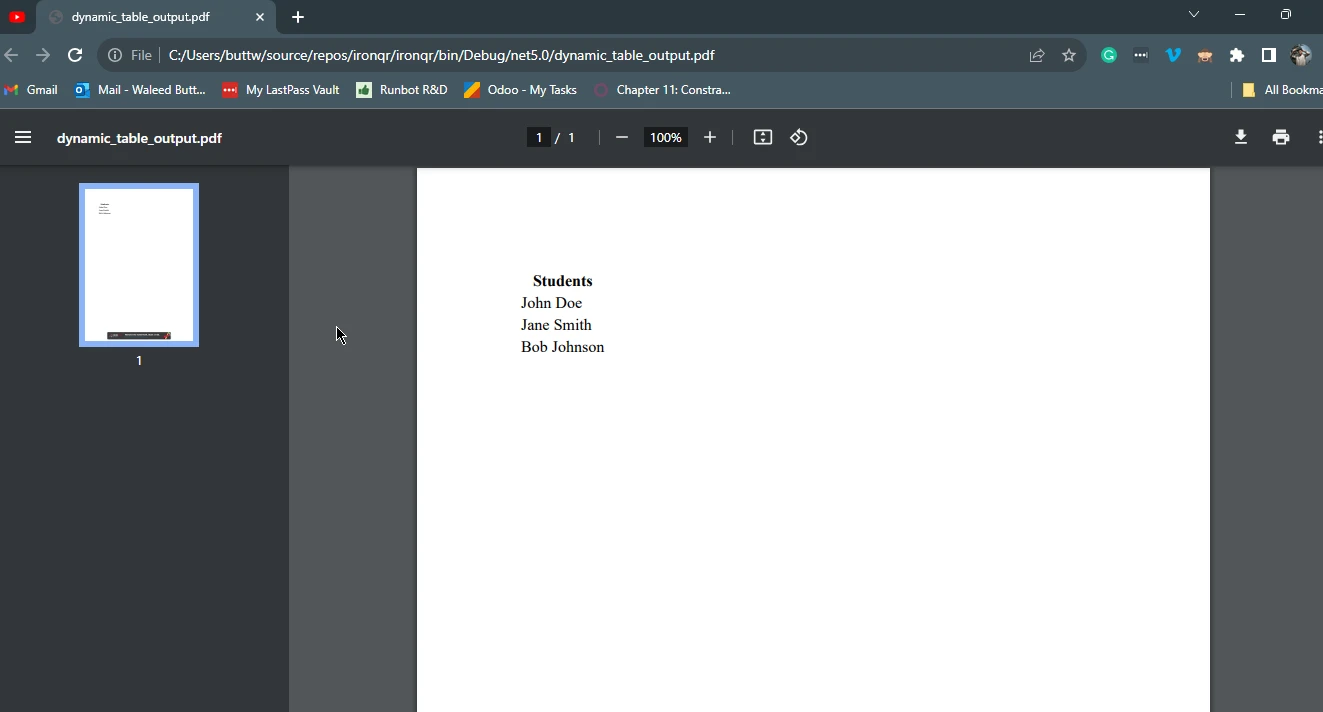
End Module此C#程式運用IronPDF程式庫動態生成包含表格的PDF文件。 表格內容是透過KeyValuePair定義,其中鍵作為表格標題("Students"),而關聯的字串列表代表資料行。
利用ChromePdfRenderer類,程式碼動態構建一個HTML表格,將鍵嵌在標頭單元中,並使用列表元素填充行。
IronPDF程式庫接著將此HTML內容渲染成PDF,生成的文件被命名為"dynamic_table_output.pdf"並被儲存起來。這展示了如KeyValuePair等C#資料結構與外部程式庫之間無縫的協作效果,以進行精簡的PDF生成。
在此範例中,我們利用C#鍵值對的力量動態建立PDF內容的表格,使用IronPDF。 這展示了C#資料結構與外部程式庫之間的協同效應,導致複雜資料無縫整合至PDF文件中。
在廣闊的C#程式設計領域中,資料結構的熟練掌握是編寫不僅限於功能的程式碼的基石,強調組織的細緻與效率。 此次探索穿越了C#鍵值對的複雜性,通過動手操作的程式碼片段揭示其多樣型別及實際應用。
System.Collections.Generic命名空間中,體現了此結構的本質,提供了靈活性以無縫使用不同資料型別的鍵值。
將C#鍵值對與IronPDF整合,使此次探索更進一步,從元資料操作轉變為PDF中的動態表格建立。 該指南涵蓋了C#佇列與PDF的整合演示,該程式碼展現了C#資料結構、方法與IronPDF程式庫之間的和諧互動,展示了語言的多樣性與實力在真實場景中的應用。
總之,對C#鍵值對的深刻理解成為開發者在面對C#開發複雜性時不可或缺的資產,使其能夠創作出優雅、高效且有組織的解決方案,並具有切實的真實應用。
使用者可以獲得免費試用以測試IronPDF的功能。 此外,IronPDF為其開發者提供全面的支援。 了解HTML轉換PDF的資訊,請造訪這裡。

Jacob Mellor是Iron Software的首席技術官,一位在C# PDF技術上開創先河的遠見工程師。作為Iron Software核心程式碼庫的原開發者,他從創立以來就一直在塑造公司的產品架構,與首席執行官Cameron Rimington一起將公司轉變為服務於NASA、特斯拉和全球政府公司的50多名人員的公司。



IronPDF 是 IRONSUITE 的一部分
10 款適用於辦公室文件的 .NET API 產品

當您需要您的PDF看起來像HTML一樣快速。












