
已更新 2026年9月4日
產生每月帳戶報表(PDF 文件)
using IronPDF C# PDF 庫,開發人員可以在 .NET 專案中將 HTML 轉換為可靠的 PDF 文件,而無需依賴外部服務。
閱讀更多

 房主政策文件並不是一個文件,它包括一個聲明頁,一組承保範圍部分,保單持有人選擇的背書清單,適用的排除條款,以及適用於其司法管轄區的州規定通知。 在不同州內有不同承保範圍等級和不同背書的兩個保單持有人會收到結構相同但幾乎沒有相同內容的文件。 每次綁定都會生成一個獨特的組合。
舊版策略管理系統並不為此而設計。 它們的文件輸出功能正常,但缺乏運營商品牌,沒有現代排版,也沒有反映出客戶對其家庭或企業信賴公司的預期的佈局。 對於一個在購買後幾分鐘內簽發租客保單的保險科技公司,或是帶有特定承保範圍背書的商業MGA所綁定的企業主保單,這樣的輸出質量是一種品牌負擔。
手動組裝會使準確性問題變得更加糟糕。 當策略團隊通過從共享驅動器中選擇片段來組裝文件時:這裡是聲明模板,那裡是背書表單,來自按司法管轄區組織的文件夾中的州通知時,包含錯誤版表格的風險,遺漏所需背書的風險,或者交付不符合同期承保範圍的文件的風險是真實存在的。 在高峰續保季節每天綁定數百次的情況下,這是不可避免的。
第三方文件生成API轉移了操作問題但未消除它,並新增了按頁面或按文件收費,這直接隨著續保量的增加而增加,在需求最高的時刻成本也最高。
IronPDF允許.NET保險平台在綁定或續約時從HTML和CSS模板生成完整、個性化的策略文件。 應用程式從策略管理系統中調取保單持有人的承保資料、選擇的背書、適用的排除條款和州規定的通知,填充針對特定部分的模板,使用ChromePdfRenderer渲染每一部分,並使用PdfDocument.Merge()將它們合併成一個單一的策略文件。
結果是一個有品牌的、多部分的PDF文件,精確反映了綁定的承保範圍,閱讀起來像一份專業運營商的文件。 沒有舊版報告引擎,不需要手動選擇部分,沒有隨著續約量增加而對應計算的每份文件API費用。 渲染在現有的.NET應用程式中作為單一NuGet包運行,沒有外部過程。
管理系統中的策略綁定或續約觸發一個事件或webhook,啟動新的PDF文件組裝。 應用程式查詢策略記錄中文件所需的所有內容:被保險人姓名、策略號碼、生效和到期日期、帶限額和扣除額的承保部分、選擇的背書、適用的排除條款、保費細分,以及用來確定必須包含哪些州規定通知的司法管轄區。
查詢結果驅動文件的內容和結構,哪些部分存在,以什麼順序,以及使用哪些資料。 此步驟中沒有任何手動操作。
每個文件部分都是一個HTML和CSS模板文件,由擁有該內容的團隊維護。 聲明頁模板由策略運營維護。 承保範圍部分模板由產品團隊擁有。 背書模板根據表單維護,與表單本身一起版本化。 合規性在監管要求變更時更新州通知模板。
這種分離意味著更新州通知的合規性不需要觸碰聲明模板或任何承保範圍部分。 每個團隊更新自己的文件,該司法管轄區的每個未來綁定都會自動拾取變更。
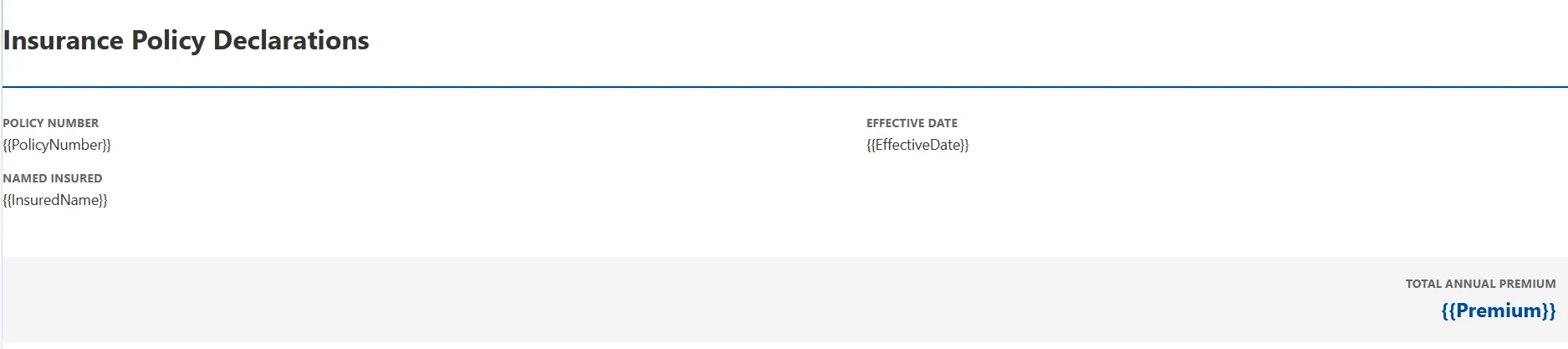
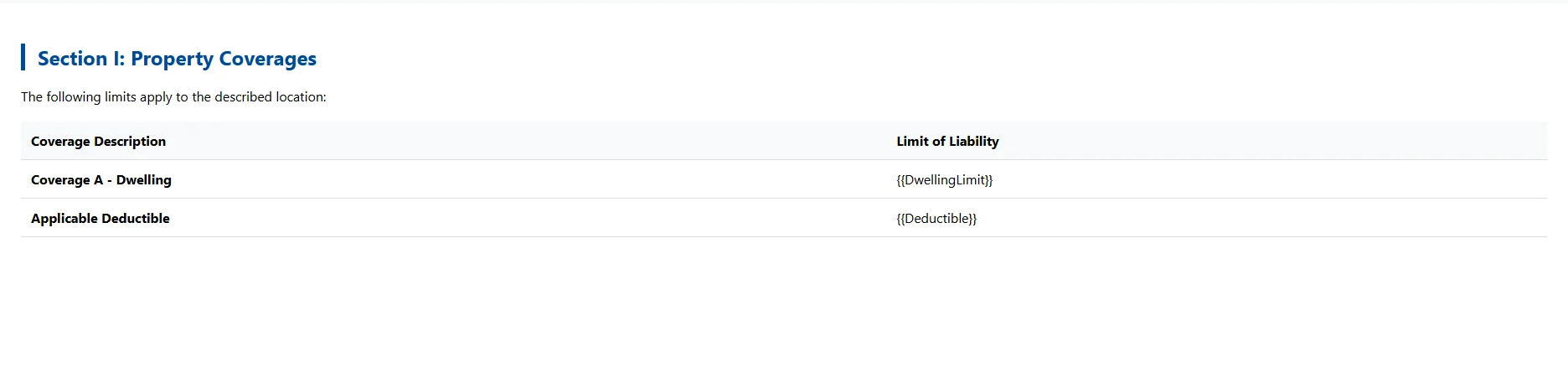
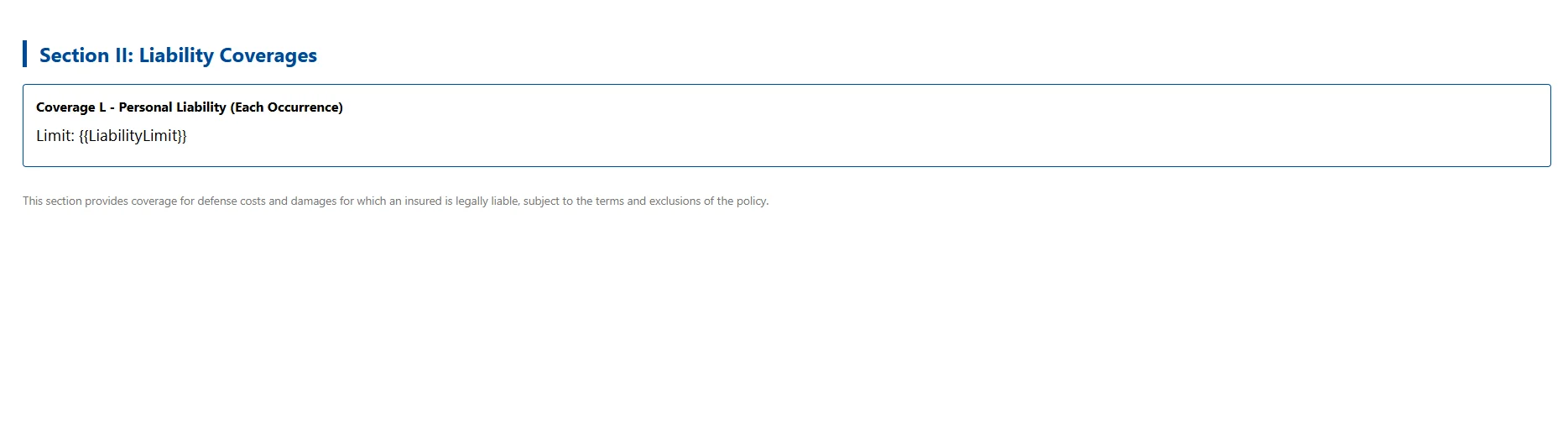
using IronPdf;

var renderer = new ChromePdfRenderer();

renderer.RenderingOptions.MarginTop = 20;

renderer.RenderingOptions.MarginBottom = 20;

// Declarations page
string declHtml = (await File.ReadAllTextAsync("Templates/declarations.html"))
    .Replace("{{PolicyNumber}}", policy.Number)
    .Replace("{{InsuredName}}", policy.InsuredName)
    .Replace("{{EffectiveDate}}", policy.EffectiveDate.ToString("MMMM d, yyyy"))
    .Replace("{{Premium}}", policy.AnnualPremium.ToString("C"));

// Coverage sections
string dwellingHtml = (await File.ReadAllTextAsync("Templates/coverage-dwelling.html"))
    .Replace("{{DwellingLimit}}", policy.DwellingCoverage.Limit.ToString("C"))
    .Replace("{{Deductible}}", policy.DwellingCoverage.Deductible.ToString("C"));

string liabilityHtml = (await File.ReadAllTextAsync("Templates/coverage-liability.html"))
    .Replace("{{LiabilityLimit}}", policy.LiabilityCoverage.Limit.ToString("C"));

var declPdf = renderer.RenderHtmlAsPdf(declHtml);
var dwellingPdf = renderer.RenderHtmlAsPdf(dwellingHtml);
var liabilityPdf = renderer.RenderHtmlAsPdf(liabilityHtml);

// Use the overload that accepts an IEnumerable<PdfDocument>
PdfDocument policyDoc = PdfDocument.Merge(new[] { declPdf, dwellingPdf, liabilityPdf });Imports IronPdf
Dim renderer As New ChromePdfRenderer()
renderer.RenderingOptions.MarginTop = 20
renderer.RenderingOptions.MarginBottom = 20
' Declarations page
Dim declHtml As String = (Await File.ReadAllTextAsync("Templates/declarations.html")) _
.Replace("{{PolicyNumber}}", policy.Number) _
.Replace("{{InsuredName}}", policy.InsuredName) _
.Replace("{{EffectiveDate}}", policy.EffectiveDate.ToString("MMMM d, yyyy")) _
.Replace("{{Premium}}", policy.AnnualPremium.ToString("C"))
' Coverage sections
Dim dwellingHtml As String = (Await File.ReadAllTextAsync("Templates/coverage-dwelling.html")) _
.Replace("{{DwellingLimit}}", policy.DwellingCoverage.Limit.ToString("C")) _
.Replace("{{Deductible}}", policy.DwellingCoverage.Deductible.ToString("C"))
Dim liabilityHtml As String = (Await File.ReadAllTextAsync("Templates/coverage-liability.html")) _
.Replace("{{LiabilityLimit}}", policy.LiabilityCoverage.Limit.ToString("C"))
Dim declPdf = renderer.RenderHtmlAsPdf(declHtml)
Dim dwellingPdf = renderer.RenderHtmlAsPdf(dwellingHtml)
Dim liabilityPdf = renderer.RenderHtmlAsPdf(liabilityHtml)
' Use the overload that accepts an IEnumerable(Of PdfDocument)
Dim policyDoc As PdfDocument = PdfDocument.Merge(New PdfDocument() {declPdf, dwellingPdf, liabilityPdf})Imports IronPdf
Dim renderer As New ChromePdfRenderer()
renderer.RenderingOptions.MarginTop = 20
renderer.RenderingOptions.MarginBottom = 20
' Declarations page
Dim declHtml As String = (Await File.ReadAllTextAsync("Templates/declarations.html")) _
.Replace("{{PolicyNumber}}", policy.Number) _
.Replace("{{InsuredName}}", policy.InsuredName) _
.Replace("{{EffectiveDate}}", policy.EffectiveDate.ToString("MMMM d, yyyy")) _
.Replace("{{Premium}}", policy.AnnualPremium.ToString("C"))
' Coverage sections
Dim dwellingHtml As String = (Await File.ReadAllTextAsync("Templates/coverage-dwelling.html")) _
.Replace("{{DwellingLimit}}", policy.DwellingCoverage.Limit.ToString("C")) _
.Replace("{{Deductible}}", policy.DwellingCoverage.Deductible.ToString("C"))
Dim liabilityHtml As String = (Await File.ReadAllTextAsync("Templates/coverage-liability.html")) _
.Replace("{{LiabilityLimit}}", policy.LiabilityCoverage.Limit.ToString("C"))
Dim declPdf = renderer.RenderHtmlAsPdf(declHtml)
Dim dwellingPdf = renderer.RenderHtmlAsPdf(dwellingHtml)
Dim liabilityPdf = renderer.RenderHtmlAsPdf(liabilityHtml)
' Use the overload that accepts an IEnumerable(Of PdfDocument)
Dim policyDoc As PdfDocument = PdfDocument.Merge(New PdfDocument() {declPdf, dwellingPdf, liabilityPdf})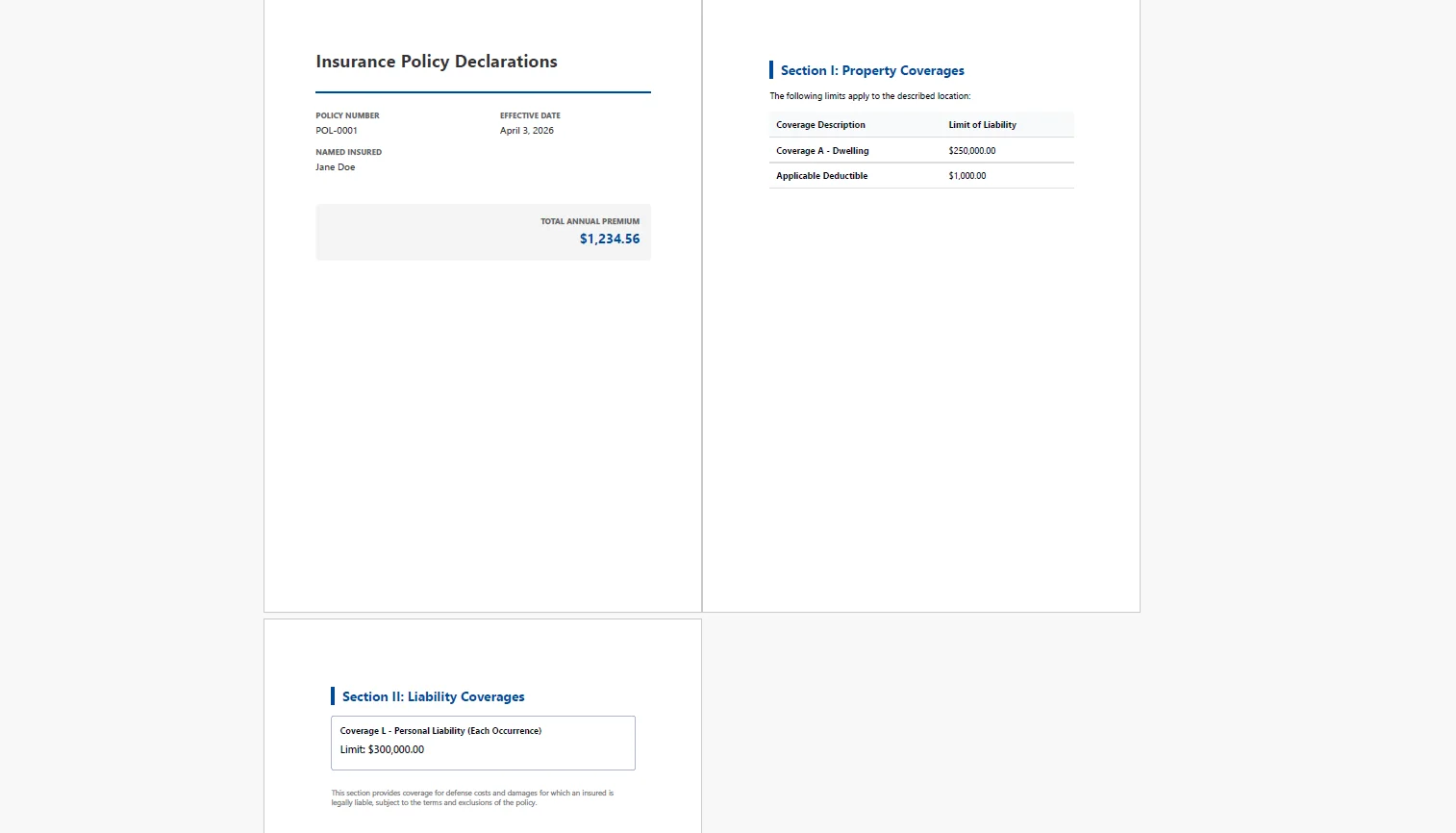 PdfDocument.Merge()按正確順序組裝部分,例如先是聲明,然後是承保範圍部分,然後是背書、排除條款和通知部分,部分之間有分頁。 合併的文件像一個獨立的PDF一樣連續流通。
var sections = new List<PdfDocument> { declPdf, dwellingPdf, liabilityPdf };

foreach (var endorsementCode in policy.Endorsements)
{
    string templatePath = $"Templates/endorsements/{endorsementCode}.html";
    if (!File.Exists(templatePath)) continue;

    string endorsementHtml = (await File.ReadAllTextAsync(templatePath))
        .Replace("{{PolicyNumber}}", policy.Number)
        .Replace("{{EndorsementEffective}}", policy.EffectiveDate.ToString("MMMM d, yyyy"));
    sections.Add(renderer.RenderHtmlAsPdf(endorsementHtml));
}

PdfDocument finalPolicy = PdfDocument.Merge(sections);

finalPolicy.SaveAs($"policies/{policy.Number}-{policy.EffectiveDate:yyyyMMdd}.pdf");
var sections = new List<PdfDocument> { declPdf, dwellingPdf, liabilityPdf };
foreach (var endorsementCode in policy.Endorsements)
{
string templatePath = $"Templates/endorsements/{endorsementCode}.html";
if (!File.Exists(templatePath)) continue;
string endorsementHtml = (await File.ReadAllTextAsync(templatePath))
.Replace("{{PolicyNumber}}", policy.Number)
.Replace("{{EndorsementEffective}}", policy.EffectiveDate.ToString("MMMM d, yyyy"));
sections.Add(renderer.RenderHtmlAsPdf(endorsementHtml));
}
PdfDocument finalPolicy = PdfDocument.Merge(sections);
finalPolicy.SaveAs($"policies/{policy.Number}-{policy.EffectiveDate:yyyyMMdd}.pdf");Imports System.IO
Dim sections As New List(Of PdfDocument) From {declPdf, dwellingPdf, liabilityPdf}
For Each endorsementCode In policy.Endorsements
Dim templatePath As String = $"Templates/endorsements/{endorsementCode}.html"
If Not File.Exists(templatePath) Then Continue For
Dim endorsementHtml As String = (Await File.ReadAllTextAsync(templatePath)).
Replace("{{PolicyNumber}}", policy.Number).
Replace("{{EndorsementEffective}}", policy.EffectiveDate.ToString("MMMM d, yyyy"))
sections.Add(renderer.RenderHtmlAsPdf(endorsementHtml))
Next
Dim finalPolicy As PdfDocument = PdfDocument.Merge(sections)
finalPolicy.SaveAs($"policies/{policy.Number}-{policy.EffectiveDate:yyyyMMdd}.pdf")Imports System.IO
Dim sections As New List(Of PdfDocument) From {declPdf, dwellingPdf, liabilityPdf}
For Each endorsementCode In policy.Endorsements
Dim templatePath As String = $"Templates/endorsements/{endorsementCode}.html"
If Not File.Exists(templatePath) Then Continue For
Dim endorsementHtml As String = (Await File.ReadAllTextAsync(templatePath)).
Replace("{{PolicyNumber}}", policy.Number).
Replace("{{EndorsementEffective}}", policy.EffectiveDate.ToString("MMMM d, yyyy"))
sections.Add(renderer.RenderHtmlAsPdf(endorsementHtml))
Next
Dim finalPolicy As PdfDocument = PdfDocument.Merge(sections)
finalPolicy.SaveAs($"policies/{policy.Number}-{policy.EffectiveDate:yyyyMMdd}.pdf")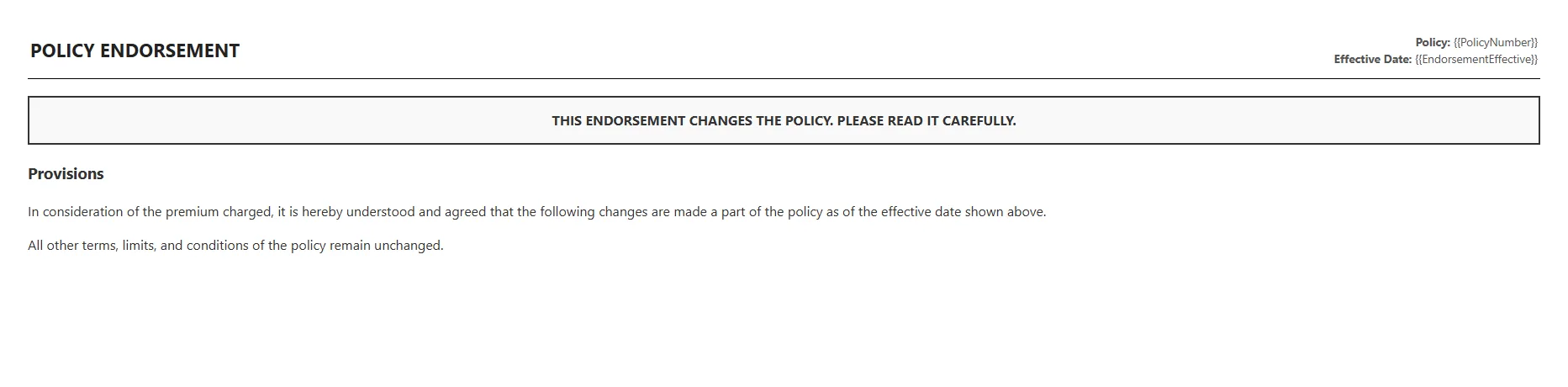 背書迴圈僅渲染存在的模板,並只包含對應保單持有人實際背書清單的部分。一份沒有計劃個人財物背書的保單永遠不會在其文件中有該部分。 一份需要特定洪水排除通知的州內的保單則總是會有。
最終合併的PDF通過電子郵件或代理人門戶交給保單持有人,並存檔於以策略號碼和生效日期為鍵的文件儲存中,作為該期的官方政策記錄。
準確性。 PDF直接從策略管理系統的資料中生成,與綁定承保範圍使用的是同一記錄。 沒有轉錄步驟,也沒有系統記錄與交給保單持有人的文件之間出現不一致的路徑。
條件裝配。 背書和州通知按照策略記錄程式設計性地包括或排除。 不存在選擇包含哪些表格的手動操作,不存在遺漏所需背書的風險,也不存在新增不適用表格的風險。
品牌品質。 HTML和CSS模板生成現代的、具有運營商品牌的文件,反映公司的視覺識別。 輸出看起來不像是由2003年構建的基礎設施產生的。
續約自動化。相同管道在每次續約時重新生成更新的政策文件,更新生效日期,修改保費數字和任何承保範圍的變更。 每次續約無需手動重工,事件觸發後,文件組裝,保單持有人接收。
合規性。 州規定的通知在查詢時按司法管轄區選擇,在需要時總是包含。 遞送不完整政策包即缺少特定州要求的通知的風險在程式碼層面得到控制,而不是手動核對表。
無每份文件費用。 渲染在內部進行。 沒有按頁面API費用,沒有按文件收費,沒有在續保季節 - 即量最大的時候 - 使之不成比例昂貴的定價模型。
一份從綁定的承保範圍記錄中自我組裝的策略文件,僅包含適用的部分,在綁定時刻生成一份有品牌的PDF,與依賴手動組裝或舊版報告引擎的運營根本上不同。第一種方法隨著業務成長而擴展; 第二種方法則會在業務成長下崩潰。
逐段渲染和合併模式直接映射到政策文件實際結構化的方式,獨立的部分,按條件包含,按文件邏輯排序而不是字母順序。 IronPDF處理C#中PDF生成任務的全生命周期,從渲染HTML模板到合併、分頁和操作文件,都可在ironpdf.com上查找。 如果您正在構建或現代化政策文件管道,開始您的免費30天試用,並在下一個續保季節之前根據您自己的承保資料和模板測試裝配。
Curtis Chau擁有Carleton大學的電腦科學學士學位,專精於前端開發,擁有Node.js、TypeScript、JavaScript和React的專業知識。Curtis熱衷於建立直觀且美觀的使用者介面,喜愛使用現代框架並建立結構良好、視覺吸引力的手冊。

IronPDF 是 IRONSUITE 的一部分
10 款適用於辦公室文件的 .NET API 產品

當您需要您的PDF看起來像HTML一樣快速。