



已更新 2026年4月23日
deepstream io(開發人員的工作原理)
在這篇文章中,我們將學習如何使用開放即時伺服器 deepstream 和 IronPDF 生成 PDF。
閱讀更多

《SQLite-utils》Python套件是一個多功能工具,包含用於操作SQLite資料庫的Python實用函式。 它提供了一個命令行接口(CLI)和一個Python程式庫,使得建立、操作和查詢SQLite資料庫變得容易。 讓我們深入了解其功能並看看一些程式碼範例。 在本文稍後,我們將探討IronPDF,這是一個由Iron Software開發的PDF生成程式庫。
SQLite-utils旨在簡化與操作SQLite資料庫相關的各種任務。 它的一些主要功能包括:
您可以使用pip安裝SQLite-utils。
pip install sqlite-utils或者,如果您在macOS上使用Homebrew:
brew install sqlite-utilsCLI工具允許您直接從命令行執行各種操作。以下是一些範例:
讓我們建立一個新的SQLite資料庫,並從CSV文件中插入一些資料:
# Create a new database and insert data from a CSV file
sqlite-utils insert dogs.db dogs dogs.csv --csv以下命令是您從資料庫中執行SQL查詢的方法:
# Query the database and display results in JSON format
sqlite-utils dogs.db "select * from dogs" --json列出資料庫中的所有表及其行數:
sqlite-utils tables dogs.db --counts您還可以將SQLite-utils作為Python程式庫來以程式化方式與SQLite資料庫進行互動。
以下是如何使用Python建立新的資料庫和插入資料:
import sqlite_utils

# Create a new database
db = sqlite_utils.Database("demo_database.db")

# Insert data into a table
db["dogs"].insert_all([
    {"id": 1, "age": 4, "name": "Cleo"},
    {"id": 2, "age": 2, "name": "Pancakes"}
], pk="id")您可以運行SQL查詢並獲取結果:
# Run a query and fetch results
rows = db.query("SELECT * FROM dogs")
for row in rows:
print(row)在表上啟用全文檢索並執行搜索查詢:
# Enable full-text search on the 'name' column
db["dogs"].enable_fts(["name"])

# Run a search query for the term "Cleo"
results = db["dogs"].search("Cleo")
for result in results:
    print(result)
IronPDF是一個強大的Python程式庫,設計用於使用HTML、CSS、圖像和JavaScript來建立、編輯和簽署PDF。 它提供商業級的性能,並具備低記憶體佔用。 其主要功能包括:
HTML 轉 PDF 轉換:
將 HTML 文件、HTML 字串和 URL 轉換為 PDF。 例如,使用 Chrome PDF 轉換器將網頁渲染為 PDF。
跨平臺支援:
相容各種 .NET 平台,包括 .NET Core、.NET Standard 和 .NET Framework。 它支援 Windows、Linux 和 macOS。
編輯和簽署:
設置屬性、用密碼和權限增加安全性,並將數位簽名應用於您的 PDF。
頁面模板和設置:
您可以自定義PDF的標頭、頁腳、頁碼和可調整的頁邊距。 它還支持自定義紙張大小和響應式佈局。
標準相容性:
符合PDF標準,包括PDF/A和PDF/UA,支持UTF-8字元編碼,並管理如影像、CSS和字體等資源。
import sqlite_utils
from ironpdf import ChromePdfRenderer, License

# Apply your license key
License.LicenseKey = "key"

# Initialize a new database
db = sqlite_utils.Database("mydatabase.db")

# Define a table schema
schema = {
    "id": int,
    "name": str,
    "age": int
}

# Create a table with the defined schema
db["users"].create(schema)

# Sample data to insert into the table
data = [
    {"id": 1, "name": "Alice", "age": 30},
    {"id": 2, "name": "Bob", "age": 28},
    {"id": 3, "name": "Charlie", "age": 32}
]

# Insert data into the table
db["users"].insert_all(data)

# Query all records from the table
rows = db.query("SELECT * FROM users")

# Initialize the PDF renderer
renderer = ChromePdfRenderer()

# Create HTML content for the PDF
content = "<h1>Awesome IronPDF with Sqlite-Utils</h1>"
content += "<p>Table data:</p>"
for row in rows:
    content += f"<p>{row}</p>"

# Render the HTML content as PDF
pdf = renderer.RenderHtmlAsPdf(content)

# Save the generated PDF as a file
pdf.save_as("DemoSqliteUtils.pdf")這段程式碼結合了SQLite-utils Python套件和IronPDF程式庫的功能來管理SQLite資料庫並生成PDF文件。 以下是程式碼所做的逐步說明:
資料庫初始化:
表建立:
age定義表模式。資料插入:
資料查詢:
PDF 生成:
總的來說,這段程式碼演示了如何利用SQLite-utils進行資料庫管理任務,如表建立、資料插入和查詢,並結合IronPDF從Python應用程式中來自SQLite資料庫的動態內容生成PDF文件。

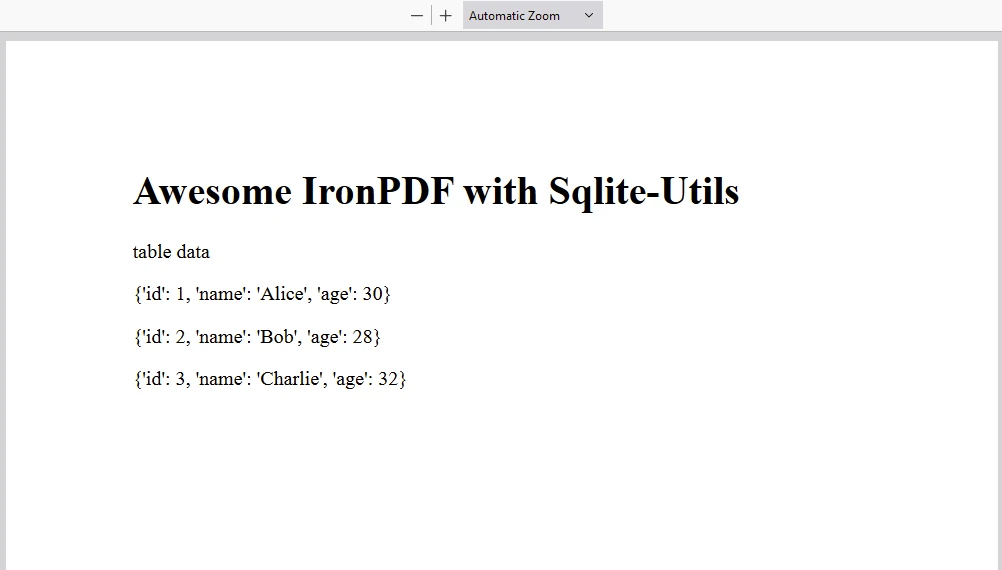
IronPDF在Python授權金鑰上運行。 IronPDF for Python提供免費試用授權金鑰,以允許使用者在購買前測試其豐富功能。
將授權金鑰放在腳本的開始,然後使用IronPDF套件:
from ironpdf import License

# Apply your license key
License.LicenseKey = "key"SQLite-utils是操作SQLite資料庫的強大工具。 它同時提供CLI和Python程式庫。 無論您需要從命令行快速操作資料,還是將SQLite操作整合到Python應用程式中,SQLite都提供了一個靈活且易於使用的解決方案。

Curtis Chau擁有Carleton大學的電腦科學學士學位,專精於前端開發,擁有Node.js、TypeScript、JavaScript和React的專業知識。Curtis熱衷於建立直觀且美觀的使用者介面,喜愛使用現代框架並建立結構良好、視覺吸引力的手冊。



IronPDF 是 IRONSUITE 的一部分
10 款適用於辦公室文件的 .NET API 產品

當您需要您的PDF看起來像HTML一樣快速。











