




已更新 2026年4月23日
简化 .NET 与 Microsoft.Extensions.AI 的 LLM 集成
AI正在改变软件开发,但将大型语言模型(LLM)集成到.NET中直到现在一直很复杂。通过IronPdf.AI,将AI集成更进一步,该产品为.NET应用程序带来了OpenAI驱动的PDF解析、数据提取和内容摘要。
阅读更多

C# 提供了一种独特的功能,可以增强大型项目中代码的组织和管理:partial 关键字类。 此功能通过 partial 修饰符访问,允许开发人员在多个文件中拆分类、接口或结构的定义。 这项能力对正在处理已生成的源代码(如用户界面控件定义或服务包装代码)与自定义业务逻辑一起工作特别有用。 在本文中,我们将学习关于 partial 类和使用 Visual Studio 的IronPDF PDF Library 适用于 .NET。
partial 类,保持相同的可访问性级别,在 C# 中通过 partial 修饰符定义,表示类定义在同一程序集的两个或多个文件中。 这种方法保持相关的代码集中,同时保持关注点的分离。 例如,一个partial 类 Employee可能将其业务逻辑放在一个文件中,而将其数据访问层放在另一个文件中,但两部分都被编译成一个类。 这种分离不仅使代码更易于管理,还允许多个开发人员共同处理同一个类而不会产生冲突。
// File 1: Employee_BusinessLogic.cs
public partial class Employee
{
    // Method for calculating pay
    public void CalculatePay()
    {
        // Implementation of pay calculation
    }
}

// File 2: Employee_DataAccess.cs
public partial class Employee
{
    // Method for loading employee data
    public void Load()
    {
        // Implementation of data loading
    }
}' File 1: Employee_BusinessLogic.cs
Partial Public Class Employee
' Method for calculating pay
Public Sub CalculatePay()
' Implementation of pay calculation
End Sub
End Class
' File 2: Employee_DataAccess.cs
Partial Public Class Employee
' Method for loading employee data
Public Sub Load()
' Implementation of data loading
End Sub
End Classpartial 类还可以定义 partial 方法,这些方法可声明但不一定实现。 这些方法允许类的某一部分声明一个方法而不实现它,另一个部分可选择实现它。 如果没有提供实现,partial 方法调用将在编译时被移除,从而不会产生性能损失。
// File 1: Employee_BusinessLogic.cs
public partial class Employee
{
    // Declaration of a partial method to be called when pay is calculated
    partial void OnPayCalculated(double amount);

    public void CalculatePay()
    {
        double amount = 1000; // Simplified calculation
        OnPayCalculated(amount); // Call the partial method
    }
}

// File 2: Employee_Events.cs
public partial class Employee
{
    // Implementation of the partial method
    partial void OnPayCalculated(double amount)
    {
        Console.WriteLine($"Pay calculated: {amount}");
    }
}' File 1: Employee_BusinessLogic.cs
Partial Public Class Employee
' Declaration of a partial method to be called when pay is calculated
Partial Private Sub OnPayCalculated(ByVal amount As Double)
End Sub
Public Sub CalculatePay()
Dim amount As Double = 1000 ' Simplified calculation
OnPayCalculated(amount) ' Call the partial method
End Sub
End Class
' File 2: Employee_Events.cs
Partial Public Class Employee
' Implementation of the partial method
Private Sub OnPayCalculated(ByVal amount As Double)
Console.WriteLine($"Pay calculated: {amount}")
End Sub
End Classpartial 方法,体现 partial 定义的方法,允许在类的一部分中声明并在另一部分中可选实现。 此功能对在生成的代码中提供开发人员可选实现的钩子特别有用。 partial 关键词表示该方法可能有也可能没有实现。
考虑一个示例,其中一个 UI 组件需要在用户界面控件加载之前执行某些操作。 partial 方法为插入自定义业务逻辑提供了一种清晰的方式,而不干扰自动生成的代码。
// File: UIControls_AutoGenerated.cs
public partial class UIControls
{
    // Declaration of a partial method for control loading
    partial void OnControlLoading();

    public void LoadControl()
    {
        OnControlLoading(); // Call the partial method
        // Auto-generated loading logic here
    }
}

// File: UIControls_CustomLogic.cs
public partial class UIControls
{
    // Implementation of the partial method for adding custom logic
    partial void OnControlLoading()
    {
        // Custom business logic code here
        Console.WriteLine("Custom control loading logic executed.");
    }
}' File: UIControls_AutoGenerated.cs
Partial Public Class UIControls
' Declaration of a partial method for control loading
Partial Private Sub OnControlLoading()
End Sub
Public Sub LoadControl()
OnControlLoading() ' Call the partial method
' Auto-generated loading logic here
End Sub
End Class
' File: UIControls_CustomLogic.cs
Partial Public Class UIControls
' Implementation of the partial method for adding custom logic
Private Sub OnControlLoading()
' Custom business logic code here
Console.WriteLine("Custom control loading logic executed.")
End Sub
End Class业务逻辑通常需要修改和扩展,而不是自动生成的代码,尤其是在具有复杂规则或行为的应用程序中。 partial 类提供了一种无缝的方法来在不更改自动生成的 UI 或数据访问代码的情况下在单独的源文件中包含业务逻辑。 这种分离确保业务逻辑易于访问和修改,增强了协作,尤其是在项目涉及多个开发人员时。
// File: Employee_AutoGenerated.cs
public partial class Employee
{
    // Auto-generated properties and methods
}

// File: Employee_BusinessLogic.cs
public partial class Employee
{
    // Business logic method for promoting an employee
    public void Promote()
    {
        // Business logic code to promote an employee
        Console.WriteLine("Employee promoted.");
    }
}' File: Employee_AutoGenerated.cs
Partial Public Class Employee
' Auto-generated properties and methods
End Class
' File: Employee_BusinessLogic.cs
Partial Public Class Employee
' Business logic method for promoting an employee
Public Sub Promote()
' Business logic code to promote an employee
Console.WriteLine("Employee promoted.")
End Sub
End Class嵌套 partial 类型将 partial 类的概念扩展到嵌套类,允许在不同文件中定义嵌套类的各个部分。 这对于组织大型嵌套结构尤为有用,例如复杂的用户界面控件定义,其中包含处理控件行为各个方面的多个嵌套类型。
// File: ComplexControl_Part1.cs
public partial class ComplexControl
{
    public partial class NestedControl
    {
        // Method for initializing the nested control
        public void Initialize()
        {
            // Initialization code here
        }
    }
}

// File: ComplexControl_Part2.cs
public partial class ComplexControl
{
    public partial class NestedControl
    {
        // Method for cleaning up the nested control
        public void Cleanup()
        {
            // Cleanup code here
        }
    }
}' File: ComplexControl_Part1.cs
Partial Public Class ComplexControl
Partial Public Class NestedControl
' Method for initializing the nested control
Public Sub Initialize()
' Initialization code here
End Sub
End Class
End Class
' File: ComplexControl_Part2.cs
Partial Public Class ComplexControl
Partial Public Class NestedControl
' Method for cleaning up the nested control
Public Sub Cleanup()
' Cleanup code here
End Sub
End Class
End Classpartial 类在包含自动生成的源代码的场景中特别有用,例如适用于 Visual Studio 创建的 Windows 窗体的表单。 此设置允许开发人员在一个独立的源文件中分离 UI 设计代码,使他们能够在不影响原始 UI 设计的情况下扩展或修改类。
在 Web 应用中,partial 类便于将生成的 Web 服务包装代码与自定义业务逻辑分开,以确保 Web 服务更新不会覆盖自定义修改。 同样,在使用 LINQ to SQL 的应用中,dbml 文件生成 partial 类定义,这些定义可以扩展以包含额外功能或业务逻辑而不接触自动生成的代码。
// Auto-generated UI class
public partial class MainForm : Form
{
    // Designer code
}

// Custom logic for MainForm
public partial class MainForm
{
    // Custom event handlers and methods
}' Auto-generated UI class
Partial Public Class MainForm
Inherits Form
' Designer code
End Class
' Custom logic for MainForm
Partial Public Class MainForm
Inherits Form
' Custom event handlers and methods
End Class
IronPDF 是一个全面的 .NET 库,允许开发人员在其应用程序中创建、读取和编辑 PDF 文档。 它提供了一种简单直接的方法,使用 IronPDF 从 HTML 生成 PDF、URL、图像、ASPX 和文本,使其成为报告、文档生成和 Web 内容归档的多功能工具。 IronPDF 在易用性方面表现出色,将它集成到任何 .NET 项目中都只需很少的设置,包括用 C# 开发的应用。
为了说明 IronPDF 与 partial 类的集成,让我们考虑一个示例,其中我们有一个生成 PDF 格式报告的 Web 应用。 我们将功能拆分到 partial 类文件中,以使我们的业务逻辑与 PDF 生成逻辑分开。
首先,确保将 IronPDF 添加到项目中。 这通常可以通过 NuGet 包管理器使用以下命令完成:
我们将把我们的类分成两个部分:一个用于与报告数据相关的业务逻辑,另一个使用 IronPDF 生成 PDF。
File 1: ReportGenerator_BusinessLogic.cs
该文件包含用于准备报告数据的业务逻辑。
public partial class ReportGenerator
{
    // Method to get data for the report
    public IEnumerable<string> GetDataForReport()
    {
        // Imagine this method fetches and prepares data for the report
        return new List<string> { "Data1", "Data2", "Data3" };
    }
}Partial Public Class ReportGenerator
' Method to get data for the report
Public Function GetDataForReport() As IEnumerable(Of String)
' Imagine this method fetches and prepares data for the report
Return New List(Of String) From {"Data1", "Data2", "Data3"}
End Function
End ClassFile 2: ReportGenerator_PdfGeneration.cs
该文件利用 IronPDF 从准备的数据生成 PDF 报告。
public partial class ReportGenerator
{
    // Method to generate PDF report using IronPDF
    public void GeneratePdfReport()
    {
        var renderer = new IronPdf.ChromePdfRenderer();
        var data = GetDataForReport();
        var htmlContent = $"<html><body><h1>Report</h1><p>{string.Join("</p><p>", data)}</p></body></html>";

        // Generate PDF from HTML string
        var pdf = renderer.RenderHtmlAsPdf(htmlContent);

        // Save the PDF to a file
        pdf.SaveAs("Report.pdf");
        Console.WriteLine("Report generated successfully.");
    }
}Public Partial Class ReportGenerator
' Method to generate PDF report using IronPDF
Public Sub GeneratePdfReport()
Dim renderer = New IronPdf.ChromePdfRenderer()
Dim data = GetDataForReport()
Dim htmlContent = $"<html><body><h1>Report</h1><p>{String.Join("</p><p>", data)}</p></body></html>"
' Generate PDF from HTML string
Dim pdf = renderer.RenderHtmlAsPdf(htmlContent)
' Save the PDF to a file
pdf.SaveAs("Report.pdf")
Console.WriteLine("Report generated successfully.")
End Sub
End Classusing partial 类设置,生成 PDF 报告成为调用 ReportGenerator 类实例的 GeneratePdfReport 方法的问题。
var reportGenerator = new ReportGenerator();
reportGenerator.GeneratePdfReport();Dim reportGenerator As New ReportGenerator()
reportGenerator.GeneratePdfReport()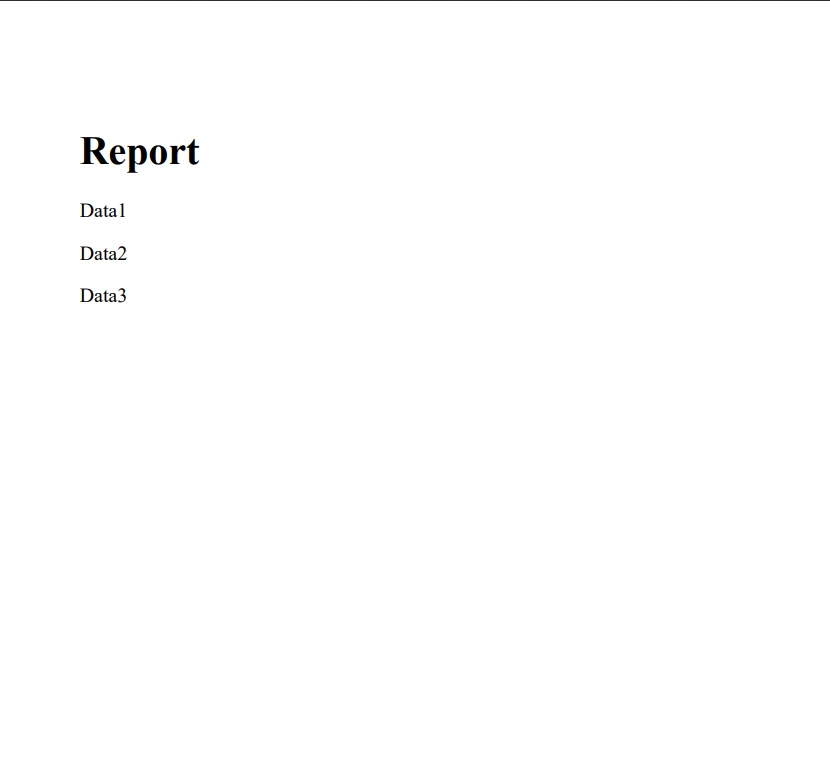
在 C# 中使用 partial 类、partial 方法和嵌套 partial 类型为开发人员提供了用于代码组织和管理的灵活而强大的工具。 通过将自动生成的代码与业务逻辑、用户界面控件定义和应用程序的其他部分分开,开发者可以创建更易于维护、可读和可扩展的应用程序。
通过将业务逻辑和 PDF 处理的关注点分开,开发者可以实现更好的代码组织、可维护性和可扩展性。 IronPDF 的强大功能与 partial 类的组织优势相结合,创造了一个强大的工具集,供 .NET 开发人员在项目中处理 PDF。 你可以使用 IronPDF 的免费试用版免费试用 IronPDF。 如果您有兴趣购买,IronPDF的许可证起价为$999。

Jacob Mellor 是 Iron Software 的首席技术官,也是一位开创 C# PDF 技术的有远见的工程师。作为 Iron Software 核心代码库的原始开发者,他从公司成立之初就开始塑造公司的产品架构,与首席执行官 Cameron Rimington 一起将公司转变为一家拥有 50 多名员工的公司,为 NASA、特斯拉和全球政府机构提供服务。



当您需要PDF看起来像HTML时,速度快。













