




已更新 2026年4月23日
在 .NET 中用 Microsoft.Extensions.AI 簡化 LLM 整合
AI 正在改變軟體開發,但將大型語言模型 (LLM) 整合到 .NET 中一直很複雜。利用 IronPdf.AI 將 AI 整合推向更遠,為 .NET 應用程式帶來由 OpenAI 驅動的 PDF 解析、資料擷取和內容總結。
閱讀更多

C# 提供了一個獨特的功能,增強了在大型專案中對程式碼的組織和管理能力:partial 關鍵字類別。 此功能可透過 partial 修飾符使用,允許開發者將類別、介面或結構的定義分割至多個檔案中。 此功能在與已產生的源程式碼協作時尤其有益,例如使用者介面控制定義或服務包裹程式碼,與自訂業務邏輯並行。 在本文中,我們將學習使用 Visual Studio 的 partial 類別和 IronPDF PDF Library for .NET。
partial 類別在 C# 中保持相同的存取級別,使用 partial 修飾符定義,表示該類別的定義廣泛於同一程式集中的兩個或多個檔案。 這種方法可讓相關的程式碼保持在一起,同時維持專責分離。 例如,一個 partial 類別 Employee 可能在一個檔案中有其業務邏輯,另一個檔案中有其資料存取層,但這兩部分皆被編譯成一個類別。 這種分離不僅讓程式碼更易於管理,也允許多個開發者在同一類別上工作而不發生衝突。
// File 1: Employee_BusinessLogic.cs
public partial class Employee
{
    // Method for calculating pay
    public void CalculatePay()
    {
        // Implementation of pay calculation
    }
}

// File 2: Employee_DataAccess.cs
public partial class Employee
{
    // Method for loading employee data
    public void Load()
    {
        // Implementation of data loading
    }
}' File 1: Employee_BusinessLogic.cs
Partial Public Class Employee
' Method for calculating pay
Public Sub CalculatePay()
' Implementation of pay calculation
End Sub
End Class
' File 2: Employee_DataAccess.cs
Partial Public Class Employee
' Method for loading employee data
Public Sub Load()
' Implementation of data loading
End Sub
End ClassPartial 類別還可以定義 partial 方法,這些方法被聲明但不一定實現。 這些方法允許類別的一部分聲明一個方法而不實現它,選擇性地允許類別的另一部分實現它。 如果未提供實現,partial 方法的調用在編譯時被移除,從而不會帶來性能損失。
// File 1: Employee_BusinessLogic.cs
public partial class Employee
{
    // Declaration of a partial method to be called when pay is calculated
    partial void OnPayCalculated(double amount);

    public void CalculatePay()
    {
        double amount = 1000; // Simplified calculation
        OnPayCalculated(amount); // Call the partial method
    }
}

// File 2: Employee_Events.cs
public partial class Employee
{
    // Implementation of the partial method
    partial void OnPayCalculated(double amount)
    {
        Console.WriteLine($"Pay calculated: {amount}");
    }
}' File 1: Employee_BusinessLogic.cs
Partial Public Class Employee
' Declaration of a partial method to be called when pay is calculated
Partial Private Sub OnPayCalculated(ByVal amount As Double)
End Sub
Public Sub CalculatePay()
Dim amount As Double = 1000 ' Simplified calculation
OnPayCalculated(amount) ' Call the partial method
End Sub
End Class
' File 2: Employee_Events.cs
Partial Public Class Employee
' Implementation of the partial method
Private Sub OnPayCalculated(ByVal amount As Double)
Console.WriteLine($"Pay calculated: {amount}")
End Sub
End ClassPartial 方法,體現了一種部分定義的方法,允許在 partial 類別的一部分聲明並在另一部分選擇性實現。 此功能對於在生成的程式碼中提供可選的開發者實現的鉤子特別有用。 Partial 關鍵字表示該方法可能有也可能沒有實現。
考慮一個例子,其中一個 UI 元件在載入使用者介面控制之前需要執行某些操作。 Partial 方法提供了一種簡潔的方法來插入自訂業務邏輯,而不會使自動生成的程式碼雜亂無章。
// File: UIControls_AutoGenerated.cs
public partial class UIControls
{
    // Declaration of a partial method for control loading
    partial void OnControlLoading();

    public void LoadControl()
    {
        OnControlLoading(); // Call the partial method
        // Auto-generated loading logic here
    }
}

// File: UIControls_CustomLogic.cs
public partial class UIControls
{
    // Implementation of the partial method for adding custom logic
    partial void OnControlLoading()
    {
        // Custom business logic code here
        Console.WriteLine("Custom control loading logic executed.");
    }
}' File: UIControls_AutoGenerated.cs
Partial Public Class UIControls
' Declaration of a partial method for control loading
Partial Private Sub OnControlLoading()
End Sub
Public Sub LoadControl()
OnControlLoading() ' Call the partial method
' Auto-generated loading logic here
End Sub
End Class
' File: UIControls_CustomLogic.cs
Partial Public Class UIControls
' Implementation of the partial method for adding custom logic
Private Sub OnControlLoading()
' Custom business logic code here
Console.WriteLine("Custom control loading logic executed.")
End Sub
End Class業務邏輯往往需要超出自動生成的內容進行修改和擴展,尤其是在具有複雜規則或行為的應用中。 Partial 類別提供了一種無縫的方法,可在單獨的源文件中包括業務邏輯而不更改自動生成的 UI 或資料存取程式碼。 此分離確保業務邏輯對開發者而言是易於存取和修改的,增強了合作,特別是在多個開發者共同參與專案時。
// File: Employee_AutoGenerated.cs
public partial class Employee
{
    // Auto-generated properties and methods
}

// File: Employee_BusinessLogic.cs
public partial class Employee
{
    // Business logic method for promoting an employee
    public void Promote()
    {
        // Business logic code to promote an employee
        Console.WriteLine("Employee promoted.");
    }
}' File: Employee_AutoGenerated.cs
Partial Public Class Employee
' Auto-generated properties and methods
End Class
' File: Employee_BusinessLogic.cs
Partial Public Class Employee
' Business logic method for promoting an employee
Public Sub Promote()
' Business logic code to promote an employee
Console.WriteLine("Employee promoted.")
End Sub
End Class巢狀的 partial 型別將 partial 類別的概念擴展到巢狀類別,允許巢狀類別的某些部分在單獨的文件中定義。 這在組織大型巢狀結構時特別有用,諸如一個複雜的使用者介面控制定義,其中包含多個巢狀型別,來處理控制行為的各個方面。
// File: ComplexControl_Part1.cs
public partial class ComplexControl
{
    public partial class NestedControl
    {
        // Method for initializing the nested control
        public void Initialize()
        {
            // Initialization code here
        }
    }
}

// File: ComplexControl_Part2.cs
public partial class ComplexControl
{
    public partial class NestedControl
    {
        // Method for cleaning up the nested control
        public void Cleanup()
        {
            // Cleanup code here
        }
    }
}' File: ComplexControl_Part1.cs
Partial Public Class ComplexControl
Partial Public Class NestedControl
' Method for initializing the nested control
Public Sub Initialize()
' Initialization code here
End Sub
End Class
End Class
' File: ComplexControl_Part2.cs
Partial Public Class ComplexControl
Partial Public Class NestedControl
' Method for cleaning up the nested control
Public Sub Cleanup()
' Cleanup code here
End Sub
End Class
End ClassPartial 類別在涉及自動生成源程式碼的場景中特別有益,例如表單,其中 Visual Studio 建立 Windows Forms。 此設置允許開發者在獨立的源文件中分離 UI 設計程式碼,使他們可以擴展或修改類別而不影響原始的 UI 設計。
在 Web 應用程式中,partial 類別促進將生成的 Web 服務包裝程式碼與自訂業務邏輯分離,以確保Web服務的更新不會覆蓋自訂修改。 類似地,在使用 LINQ to SQL 的應用中,dbml 文件會生成可延伸的 partial 類別定義,以包含其他功能或業務邏輯,不用觸碰自動生成程式碼。
// Auto-generated UI class
public partial class MainForm : Form
{
    // Designer code
}

// Custom logic for MainForm
public partial class MainForm
{
    // Custom event handlers and methods
}' Auto-generated UI class
Partial Public Class MainForm
Inherits Form
' Designer code
End Class
' Custom logic for MainForm
Partial Public Class MainForm
Inherits Form
' Custom event handlers and methods
End Class
IronPDF 是一個適用於 .NET 的完整程式庫,允許開發者在其應用程式中建立、讀取和編輯 PDF 文件。 它提供了一種平易近人的方式來使用 IronPDF 從 HTML 生成PDF,URL、圖片、ASPX 和文字,使其成為報告、文件生成和 Web 內容檔案保存的多功能工具。 IronPDF 以其易於使用而著稱,將其整合到任何 .NET專案中,無需繁瑣設置,包括使用C#開發的應用程式。
為了說明 IronPDF 與 partial 類別的整合,我們考慮一個生成 PDF 格式報告的 Web 應用例子。 我們將功能拆分到 partial 類別文件中,以便將我們的業務邏輯與 PDF 生成邏輯分開。
首先,確保已將 IronPDF 新增到您的專案中。 這通常可以通過使用 NuGet 包管理器的以下命令來完成:
我們將類別分為兩個部分:一個處理報表資料相關的業務邏輯,另一個使用 IronPDF 生成 PDF。
File 1: ReportGenerator_BusinessLogic.cs
此文件包含用於準備報告資料的業務邏輯。
public partial class ReportGenerator
{
    // Method to get data for the report
    public IEnumerable<string> GetDataForReport()
    {
        // Imagine this method fetches and prepares data for the report
        return new List<string> { "Data1", "Data2", "Data3" };
    }
}Partial Public Class ReportGenerator
' Method to get data for the report
Public Function GetDataForReport() As IEnumerable(Of String)
' Imagine this method fetches and prepares data for the report
Return New List(Of String) From {"Data1", "Data2", "Data3"}
End Function
End ClassFile 2: ReportGenerator_PdfGeneration.cs
此文件利用 IronPDF 從準備好的資料生成 PDF 報告。
public partial class ReportGenerator
{
    // Method to generate PDF report using IronPDF
    public void GeneratePdfReport()
    {
        var renderer = new IronPdf.ChromePdfRenderer();
        var data = GetDataForReport();
        var htmlContent = $"<html><body><h1>Report</h1><p>{string.Join("</p><p>", data)}</p></body></html>";

        // Generate PDF from HTML string
        var pdf = renderer.RenderHtmlAsPdf(htmlContent);

        // Save the PDF to a file
        pdf.SaveAs("Report.pdf");
        Console.WriteLine("Report generated successfully.");
    }
}Public Partial Class ReportGenerator
' Method to generate PDF report using IronPDF
Public Sub GeneratePdfReport()
Dim renderer = New IronPdf.ChromePdfRenderer()
Dim data = GetDataForReport()
Dim htmlContent = $"<html><body><h1>Report</h1><p>{String.Join("</p><p>", data)}</p></body></html>"
' Generate PDF from HTML string
Dim pdf = renderer.RenderHtmlAsPdf(htmlContent)
' Save the PDF to a file
pdf.SaveAs("Report.pdf")
Console.WriteLine("Report generated successfully.")
End Sub
End Class有了 partial 類別設置,生成 PDF 報告只需在 ReportGenerator 類的實例上調用 GeneratePdfReport 方法即可。
var reportGenerator = new ReportGenerator();
reportGenerator.GeneratePdfReport();Dim reportGenerator As New ReportGenerator()
reportGenerator.GeneratePdfReport()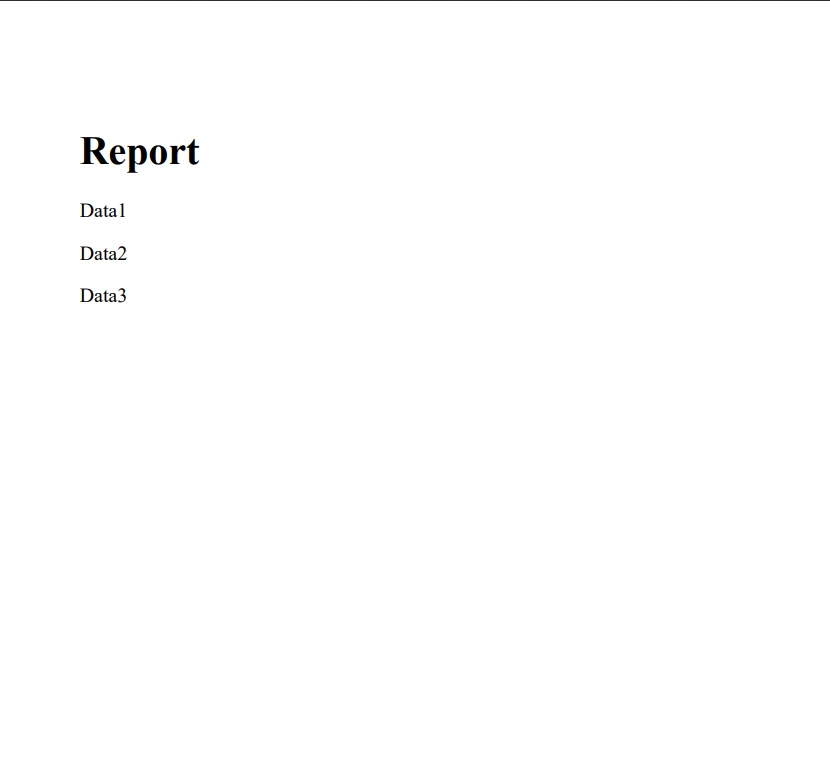
C# 中的 partial 類別、partial 方法和巢狀partial 型別的使用為開發者提供了一種靈活且強大的程式碼組織和管理工具。 通過將自動生成的程式碼與業務邏輯、使用者介面控制定義和應用程式其他部分分開,開發者可以建立更具可維護性、可讀性和可擴展性的應用程式。
通過將業務邏輯和 PDF 處理的責任分開,開發者可以實現更好的程式碼組織、可維護性和可擴展性。 IronPDF 的強大功能與 partial 類別的組織優勢結合,為在其專案中處理 PDF 的 .NET 開發者建立了一個強大的工具組。 您可以使用其IronPDF 免費試用試用 IronPDF。 如果您有興趣購買,IronPDF 的授權從$999開始。

Jacob Mellor是Iron Software的首席技術官,一位在C# PDF技術上開創先河的遠見工程師。作為Iron Software核心程式碼庫的原開發者,他從創立以來就一直在塑造公司的產品架構,與首席執行官Cameron Rimington一起將公司轉變為服務於NASA、特斯拉和全球政府公司的50多名人員的公司。



IronPDF 是 IRONSUITE 的一部分
10 款適用於辦公室文件的 .NET API 產品

當您需要您的PDF看起來像HTML一樣快速。












