




Updated April 23, 2026
Bridging CLI Simplicity & .NET : Using Curl DotNet with IronPDF
Jacob Mellor has bridged this gap with CurlDotNet, a library created to bring the familiarity of cURL to the .NET ecosystem.
Read More

C# offers a unique feature that enhances the organization and management of code in larger projects: the partial keyword class. This feature, accessible via the partial modifier, allows developers to split the definition of a class, interface, or struct across multiple files. This capability is particularly beneficial for working with already generated source code, such as user interface control definitions or service wrapper code, alongside custom business logic. In this article, we'll learn about partial classes and the IronPDF PDF Library for .NET using Visual Studio.
A partial class, maintaining the same accessibility level, is defined with the partial modifier in C#, indicating that the class definition is spread out over two or more files within the same assembly. This approach keeps related code together while maintaining separation of concerns. For example, a partial class Employee might have its business logic in one file and its data access layer in another, yet both parts are compiled into a single class. This separation not only makes the code more manageable but also allows multiple developers to work on the same class without conflict.
// File 1: Employee_BusinessLogic.cs
public partial class Employee
{
    // Method for calculating pay
    public void CalculatePay()
    {
        // Implementation of pay calculation
    }
}

// File 2: Employee_DataAccess.cs
public partial class Employee
{
    // Method for loading employee data
    public void Load()
    {
        // Implementation of data loading
    }
}' File 1: Employee_BusinessLogic.cs
Partial Public Class Employee
' Method for calculating pay
Public Sub CalculatePay()
' Implementation of pay calculation
End Sub
End Class
' File 2: Employee_DataAccess.cs
Partial Public Class Employee
' Method for loading employee data
Public Sub Load()
' Implementation of data loading
End Sub
End ClassPartial classes can also define partial methods, which are declared but not necessarily implemented. These methods enable scenarios where part of the class can declare a method without implementing it, optionally allowing another part of the class to implement it. If no implementation is provided, the partial method call is removed at compile time, resulting in no performance penalty.
// File 1: Employee_BusinessLogic.cs
public partial class Employee
{
    // Declaration of a partial method to be called when pay is calculated
    partial void OnPayCalculated(double amount);

    public void CalculatePay()
    {
        double amount = 1000; // Simplified calculation
        OnPayCalculated(amount); // Call the partial method
    }
}

// File 2: Employee_Events.cs
public partial class Employee
{
    // Implementation of the partial method
    partial void OnPayCalculated(double amount)
    {
        Console.WriteLine($"Pay calculated: {amount}");
    }
}' File 1: Employee_BusinessLogic.cs
Partial Public Class Employee
' Declaration of a partial method to be called when pay is calculated
Partial Private Sub OnPayCalculated(ByVal amount As Double)
End Sub
Public Sub CalculatePay()
Dim amount As Double = 1000 ' Simplified calculation
OnPayCalculated(amount) ' Call the partial method
End Sub
End Class
' File 2: Employee_Events.cs
Partial Public Class Employee
' Implementation of the partial method
Private Sub OnPayCalculated(ByVal amount As Double)
Console.WriteLine($"Pay calculated: {amount}")
End Sub
End ClassPartial methods, embodying a partial definition approach, allow for a declaration in one part of a partial class and an optional implementation in another. This feature is particularly useful for providing hooks in generated code that can be optionally implemented by developers. The partial keyword signifies that the method may or may not have an implementation.
Consider an example where a UI component needs to perform some action before a user interface control is loaded. The partial method provides a clean way to insert custom business logic without cluttering the auto-generated code.
// File: UIControls_AutoGenerated.cs
public partial class UIControls
{
    // Declaration of a partial method for control loading
    partial void OnControlLoading();

    public void LoadControl()
    {
        OnControlLoading(); // Call the partial method
        // Auto-generated loading logic here
    }
}

// File: UIControls_CustomLogic.cs
public partial class UIControls
{
    // Implementation of the partial method for adding custom logic
    partial void OnControlLoading()
    {
        // Custom business logic code here
        Console.WriteLine("Custom control loading logic executed.");
    }
}' File: UIControls_AutoGenerated.cs
Partial Public Class UIControls
' Declaration of a partial method for control loading
Partial Private Sub OnControlLoading()
End Sub
Public Sub LoadControl()
OnControlLoading() ' Call the partial method
' Auto-generated loading logic here
End Sub
End Class
' File: UIControls_CustomLogic.cs
Partial Public Class UIControls
' Implementation of the partial method for adding custom logic
Private Sub OnControlLoading()
' Custom business logic code here
Console.WriteLine("Custom control loading logic executed.")
End Sub
End ClassBusiness logic often requires modification and extension beyond what is automatically generated, especially in applications with complex rules or behaviors. Partial classes provide a seamless way to include business logic in a separate source file without altering the auto-generated UI or data access code. This separation ensures that the business logic is easily accessible and modifiable by developers, enhancing collaboration, especially when more than one developer is working on the project.
// File: Employee_AutoGenerated.cs
public partial class Employee
{
    // Auto-generated properties and methods
}

// File: Employee_BusinessLogic.cs
public partial class Employee
{
    // Business logic method for promoting an employee
    public void Promote()
    {
        // Business logic code to promote an employee
        Console.WriteLine("Employee promoted.");
    }
}' File: Employee_AutoGenerated.cs
Partial Public Class Employee
' Auto-generated properties and methods
End Class
' File: Employee_BusinessLogic.cs
Partial Public Class Employee
' Business logic method for promoting an employee
Public Sub Promote()
' Business logic code to promote an employee
Console.WriteLine("Employee promoted.")
End Sub
End ClassNested partial types extend the concept of partial classes to nested classes, allowing parts of a nested class to be defined in separate files. This can be particularly useful for organizing large nested structures, such as a complex user interface control definition that includes multiple nested types for handling various aspects of the control's behavior.
// File: ComplexControl_Part1.cs
public partial class ComplexControl
{
    public partial class NestedControl
    {
        // Method for initializing the nested control
        public void Initialize()
        {
            // Initialization code here
        }
    }
}

// File: ComplexControl_Part2.cs
public partial class ComplexControl
{
    public partial class NestedControl
    {
        // Method for cleaning up the nested control
        public void Cleanup()
        {
            // Cleanup code here
        }
    }
}' File: ComplexControl_Part1.cs
Partial Public Class ComplexControl
Partial Public Class NestedControl
' Method for initializing the nested control
Public Sub Initialize()
' Initialization code here
End Sub
End Class
End Class
' File: ComplexControl_Part2.cs
Partial Public Class ComplexControl
Partial Public Class NestedControl
' Method for cleaning up the nested control
Public Sub Cleanup()
' Cleanup code here
End Sub
End Class
End ClassPartial classes are particularly beneficial in scenarios involving automatically generated source code, such as Forms, where Visual Studio creates Windows Forms. This setup allows developers to separate UI design code in a distinct source file, enabling them to extend or modify the class without impacting the original UI design.
In web applications, partial classes facilitate the separation of generated web service wrapper code from custom business logic, ensuring that updates to web services do not overwrite custom modifications. Similarly, in applications using LINQ to SQL, dbml files generate partial class definitions that can be extended to include additional functionality or business logic without touching the auto-generated code.
// Auto-generated UI class
public partial class MainForm : Form
{
    // Designer code
}

// Custom logic for MainForm
public partial class MainForm
{
    // Custom event handlers and methods
}' Auto-generated UI class
Partial Public Class MainForm
Inherits Form
' Designer code
End Class
' Custom logic for MainForm
Partial Public Class MainForm
Inherits Form
' Custom event handlers and methods
End Class
IronPDF is a comprehensive library for .NET that allows developers to create, read, and edit PDF documents in their applications. It provides a straightforward approach to generate PDFs from HTML using IronPDF, URLs, images, ASPX, and text, making it a versatile tool for reporting, document generation, and web content archiving. IronPDF excels in its ease of use, requiring minimal setup to integrate into any .NET project, including applications developed with C#.
To illustrate the integration of IronPDF with partial classes, let's consider an example where we have a web application that generates reports in PDF format. We'll split the functionality across partial class files to keep our business logic separate from our PDF generation logic.
First, ensure IronPDF is added to your project. This can typically be done via NuGet Package Manager with the command:
We will divide our class into two parts: one for business logic related to report data and another for PDF generation using IronPDF.
File 1: ReportGenerator_BusinessLogic.cs
This file contains business logic for preparing the data for the report.
public partial class ReportGenerator
{
    // Method to get data for the report
    public IEnumerable<string> GetDataForReport()
    {
        // Imagine this method fetches and prepares data for the report
        return new List<string> { "Data1", "Data2", "Data3" };
    }
}Partial Public Class ReportGenerator
' Method to get data for the report
Public Function GetDataForReport() As IEnumerable(Of String)
' Imagine this method fetches and prepares data for the report
Return New List(Of String) From {"Data1", "Data2", "Data3"}
End Function
End ClassFile 2: ReportGenerator_PdfGeneration.cs
This file utilizes IronPDF to generate a PDF report from the prepared data.
public partial class ReportGenerator
{
    // Method to generate PDF report using IronPDF
    public void GeneratePdfReport()
    {
        var renderer = new IronPdf.ChromePdfRenderer();
        var data = GetDataForReport();
        var htmlContent = $"<html><body><h1>Report</h1><p>{string.Join("</p><p>", data)}</p></body></html>";

        // Generate PDF from HTML string
        var pdf = renderer.RenderHtmlAsPdf(htmlContent);

        // Save the PDF to a file
        pdf.SaveAs("Report.pdf");
        Console.WriteLine("Report generated successfully.");
    }
}Public Partial Class ReportGenerator
' Method to generate PDF report using IronPDF
Public Sub GeneratePdfReport()
Dim renderer = New IronPdf.ChromePdfRenderer()
Dim data = GetDataForReport()
Dim htmlContent = $"<html><body><h1>Report</h1><p>{String.Join("</p><p>", data)}</p></body></html>"
' Generate PDF from HTML string
Dim pdf = renderer.RenderHtmlAsPdf(htmlContent)
' Save the PDF to a file
pdf.SaveAs("Report.pdf")
Console.WriteLine("Report generated successfully.")
End Sub
End ClassWith the partial class setup, generating a PDF report becomes a matter of invoking the GeneratePdfReport method on an instance of the ReportGenerator class.
var reportGenerator = new ReportGenerator();
reportGenerator.GeneratePdfReport();Dim reportGenerator As New ReportGenerator()
reportGenerator.GeneratePdfReport()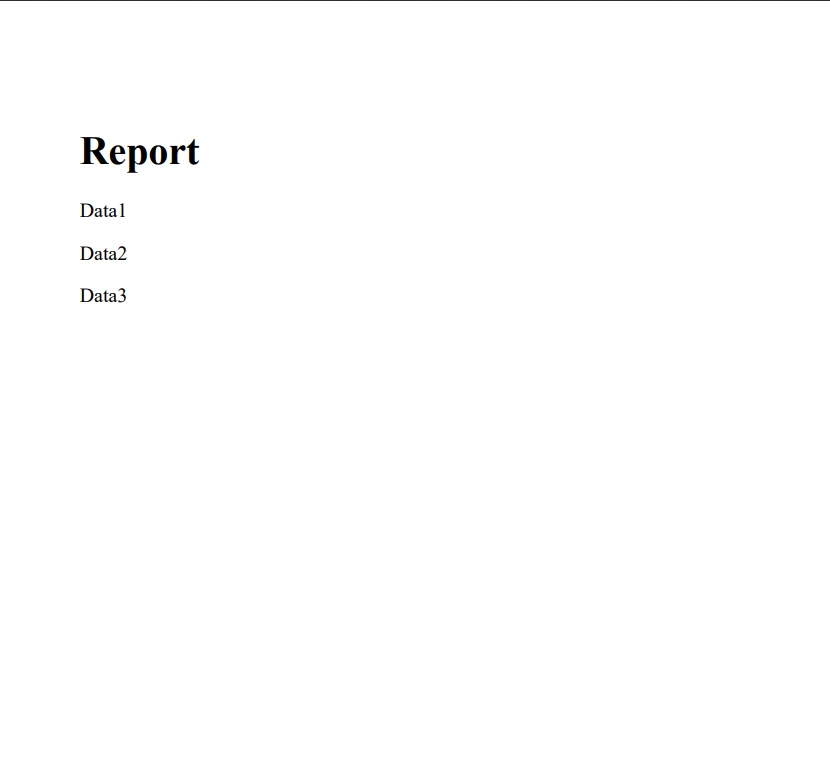
The use of partial classes, partial methods, and nested partial types in C# provides developers with a flexible and powerful tool for code organization and management. By separating auto-generated code from business logic, user interface control definitions, and other parts of the application, developers can create more maintainable, readable, and scalable applications.
By separating the concerns of business logic and PDF processing, developers can achieve better code organization, maintainability, and scalability. IronPDF's robust features combined with the organizational benefits of partial classes create a powerful toolset for .NET developers working with PDFs in their projects. You can try IronPDF for free using its free trial on IronPDF. If you are interested in buying, the license of IronPDF starts from $999.

Jacob Mellor is Chief Technology Officer at Iron Software and a visionary engineer pioneering C# PDF technology. As the original developer behind Iron Software's core codebase, he has shaped the company's product architecture since its inception, transforming it alongside CEO Cameron Rimington into a 50+ person company serving NASA, Tesla, and global government agencies.



IronPDF is a part of IRONSUITE
10 .NET API products for your office documents











When you need your PDF to look like HTML, fast.


