




Updated April 23, 2026
Bridging CLI Simplicity & .NET : Using Curl DotNet with IronPDF
Jacob Mellor has bridged this gap with CurlDotNet, a library created to bring the familiarity of cURL to the .NET ecosystem.
Read More

Handling transient faults, timeouts, and exceptions gracefully is crucial in building robust and resilient applications. Polly is a popular .NET library that provides resilience and transient fault handling capabilities. Among its many features, "retry" is one of the most widely used policies.
In this article, we'll delve into Polly's retry policy in C#, exploring its usage, configuration options, and providing practical code examples. Also, we will use the IronPDF Library for PDF Generation with the Polly Retry attempt to generate a PDF of form request results.
Polly Retry is a policy provided by the Polly library that enables developers to automatically retry operations that might fail due to an error or transient faults. Transient faults are temporary errors that occur due to network glitches, service unavailability, or other transient issues.
With Polly's retry policy, you can define rules for retrying operations, including the maximum number of retries, the delay between multiple retries, and conditions for retrying a failed request. This helps in building resilient applications that can recover from temporary failures without crashing or causing disruptions to end-users.
Before diving into code examples, let's set up a basic understanding of how to install and configure Polly in a C# project.
You can install Polly via the NuGet Package Manager Console using the following command:
Or via .NET CLI:
In your C# file, include the Polly namespace:
using Polly;Imports PollyLet's start with a simple example where we retry an operation that simulates fetching data from a remote service. We'll set up a retry policy with a maximum of 3 retries and a fixed timeout delay of 2 seconds between retries.
using System;
using System.Net.Http;
using Polly;

namespace PollyRetryExample
{
    public class Program
    {
        public static void Main(string[] args)
        {
            // Define a retry policy that handles HttpRequestException with a maximum of 3 retries
            var retryPolicy = Policy
                .Handle<HttpRequestException>() // Specify the exception type to handle
                .WaitAndRetry(
                    3, // Max retry attempts
                    retryAttempt => TimeSpan.FromSeconds(2), // Fixed retry delay
                    (exception, timeSpan, retryCount, context) =>
                    {
                        Console.WriteLine("Retry {0} due to {1}", retryCount, exception.Message);
                    });

            try
            {
                // Execute the action within the context of the retry policy
                retryPolicy.Execute(() =>
                {
                    FetchDataFromRemoteService();
                });
            }
            catch (Exception ex)
            {
                Console.WriteLine("Failed after 3 retries: {0}", ex.Message);
            }
        }

        // Simulate fetching data that throws HttpRequestException
        public static void FetchDataFromRemoteService()
        {
            throw new HttpRequestException("Failed to fetch data from remote service");
        }
    }
}Imports System
Imports System.Net.Http
Imports Polly
Namespace PollyRetryExample
Public Class Program
Public Shared Sub Main(ByVal args() As String)
' Define a retry policy that handles HttpRequestException with a maximum of 3 retries
Dim retryPolicy = Policy.Handle(Of HttpRequestException)().WaitAndRetry(3, Function(retryAttempt) TimeSpan.FromSeconds(2), Sub(exception, timeSpan, retryCount, context)
Console.WriteLine("Retry {0} due to {1}", retryCount, exception.Message)
End Sub)
Try
' Execute the action within the context of the retry policy
retryPolicy.Execute(Sub()
FetchDataFromRemoteService()
End Sub)
Catch ex As Exception
Console.WriteLine("Failed after 3 retries: {0}", ex.Message)
End Try
End Sub
' Simulate fetching data that throws HttpRequestException
Public Shared Sub FetchDataFromRemoteService()
Throw New HttpRequestException("Failed to fetch data from remote service")
End Sub
End Class
End NamespaceIn this example:
Handle<HttpRequestException>() specifies that we want to handle HttpRequestException and retry the operation if it occurs.WaitAndRetry() configures the retry policy with 3 retries and a fixed delay of 2 seconds between retries (specified maximum duration).onRetry delegate logs a message when a retry occurs.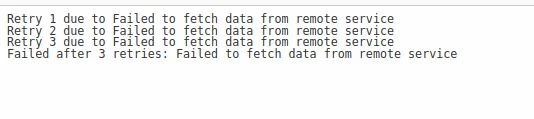
Exponential backoff is a popular retry strategy where the delay between requests and retries increases exponentially. Polly provides a convenient way to implement exponential backoff using WaitAndRetry().
var retryPolicy = Policy
    .Handle<HttpRequestException>()
    .WaitAndRetry(
        retryCount: 3, // Max retry attempts
        sleepDurationProvider: attempt => TimeSpan.FromSeconds(Math.Pow(2, attempt)), // Exponential delay
        onRetry: (exception, timeSpan, retryCount, context) =>
        {
            Console.WriteLine($"Retry {retryCount} due to {exception.Message}");
});Dim retryPolicy = Policy.Handle(Of HttpRequestException)().WaitAndRetry(retryCount:= 3, sleepDurationProvider:= Function(attempt) TimeSpan.FromSeconds(Math.Pow(2, attempt)), onRetry:= Sub(exception, timeSpan, retryCount, context)
Console.WriteLine($"Retry {retryCount} due to {exception.Message}")
End Sub)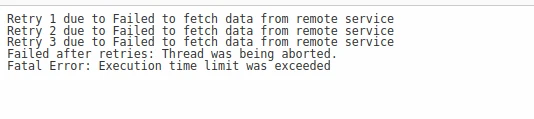
Combining retry with a circuit breaker can further enhance resilience by preventing repeated retries when a service is consistently failing. Polly allows you to combine retry and circuit breaker policies easily.
// Define a circuit breaker policy
var circuitBreakerPolicy = Policy
    .Handle<HttpRequestException>()
    .CircuitBreaker(
        exceptionsAllowedBeforeBreaking: 3, // Number of exceptions before breaking
        durationOfBreak: TimeSpan.FromSeconds(30), // Time circuit stays open
        onBreak: (ex, breakDelay) =>
        {
            Console.WriteLine($"Circuit broken due to {ex.Message}. Retry after {breakDelay.TotalSeconds} seconds.");
        },
        onReset: () =>
        {
            Console.WriteLine("Circuit reset.");
        });

// Define a retry policy
var retryPolicy = Policy
    .Handle<HttpRequestException>()
    .WaitAndRetry(
        retryCount: 3, // Max retry attempts
        sleepDurationProvider: attempt => TimeSpan.FromSeconds(2), // Fixed retry delay
        onRetry: (exception, timeSpan, retryCount, context) =>
        {
            Console.WriteLine($"Retry {retryCount} due to {exception.Message}");
        });

// Combine both policies into a single policy wrap
var policyWrap = Policy.Wrap(circuitBreakerPolicy, retryPolicy);' Define a circuit breaker policy
Dim circuitBreakerPolicy = Policy.Handle(Of HttpRequestException)().CircuitBreaker(exceptionsAllowedBeforeBreaking:= 3, durationOfBreak:= TimeSpan.FromSeconds(30), onBreak:= Sub(ex, breakDelay)
Console.WriteLine($"Circuit broken due to {ex.Message}. Retry after {breakDelay.TotalSeconds} seconds.")
End Sub, onReset:= Sub()
Console.WriteLine("Circuit reset.")
End Sub)
' Define a retry policy
Dim retryPolicy = Policy.Handle(Of HttpRequestException)().WaitAndRetry(retryCount:= 3, sleepDurationProvider:= Function(attempt) TimeSpan.FromSeconds(2), onRetry:= Sub(exception, timeSpan, retryCount, context)
Console.WriteLine($"Retry {retryCount} due to {exception.Message}")
End Sub)
' Combine both policies into a single policy wrap
Dim policyWrap = Policy.Wrap(circuitBreakerPolicy, retryPolicy)In this example:
CircuitBreaker() defines a circuit breaker policy that breaks after 3 exceptions and stays open for 30 seconds.Policy.Wrap() combines the circuit breaker and retry policies into a single policy.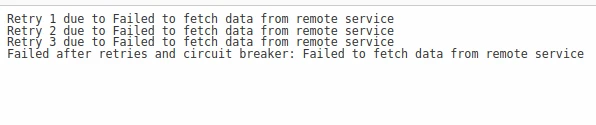
IronPDF C# PDF Library Overview is a powerful C# library that allows developers to create, edit, and manipulate PDF documents within their .NET applications. Whether you need to create invoices, reports, or any other type of PDF document, IronPDF provides an intuitive API that simplifies the process.
With IronPDF, you can easily convert HTML, CSS, and even ASP.NET web pages to PDF, making it a versatile tool for a wide range of applications. Additionally, it offers advanced features like adding text, images, and interactive elements to PDFs, as well as securing them with encryption and digital signatures.
IronPDF excels at HTML to PDF conversion, ensuring precise preservation of original layouts and styles. It's perfect for generating PDFs from web-based content such as reports, invoices, and documentation. IronPDF supports conversion from HTML files, URLs, and raw HTML strings into high-quality PDF files.
using IronPdf;

class Program
{
    static void Main(string[] args)
    {
        var renderer = new ChromePdfRenderer();

        // 1. Convert HTML String to PDF
        var htmlContent = "<h1>Hello, IronPDF!</h1><p>This is a PDF from an HTML string.</p>";
        var pdfFromHtmlString = renderer.RenderHtmlAsPdf(htmlContent);
        pdfFromHtmlString.SaveAs("HTMLStringToPDF.pdf");

        // 2. Convert HTML File to PDF
        var htmlFilePath = "path_to_your_html_file.html"; // Specify the path to your HTML file
        var pdfFromHtmlFile = renderer.RenderHtmlFileAsPdf(htmlFilePath);
        pdfFromHtmlFile.SaveAs("HTMLFileToPDF.pdf");

        // 3. Convert URL to PDF
        var url = "http://ironpdf.com"; // Specify the URL
        var pdfFromUrl = renderer.RenderUrlAsPdf(url);
        pdfFromUrl.SaveAs("URLToPDF.pdf");
    }
}Imports IronPdf
Friend Class Program
Shared Sub Main(ByVal args() As String)
Dim renderer = New ChromePdfRenderer()
' 1. Convert HTML String to PDF
Dim htmlContent = "<h1>Hello, IronPDF!</h1><p>This is a PDF from an HTML string.</p>"
Dim pdfFromHtmlString = renderer.RenderHtmlAsPdf(htmlContent)
pdfFromHtmlString.SaveAs("HTMLStringToPDF.pdf")
' 2. Convert HTML File to PDF
Dim htmlFilePath = "path_to_your_html_file.html" ' Specify the path to your HTML file
Dim pdfFromHtmlFile = renderer.RenderHtmlFileAsPdf(htmlFilePath)
pdfFromHtmlFile.SaveAs("HTMLFileToPDF.pdf")
' 3. Convert URL to PDF
Dim url = "http://ironpdf.com" ' Specify the URL
Dim pdfFromUrl = renderer.RenderUrlAsPdf(url)
pdfFromUrl.SaveAs("URLToPDF.pdf")
End Sub
End ClassWhen working with IronPDF, there might be scenarios where you need to fetch data from external sources or perform complex operations before generating a PDF.
In such cases, you might encounter transient faults or temporary issues that could lead to PDF generation failures. To handle these transient faults gracefully, you can use Polly Retry in conjunction with IronPDF.
Before getting started, make sure to install the IronPDF NuGet package in your project.
Let's look at an example where we use Polly Retry to handle transient faults when generating a PDF using IronPDF. In the following example, we'll simulate fetching data from an external API and then generating a PDF based on that data. We'll use Polly Retry to execute the data fetching operation in case of failures.
using System;
using System.Net.Http;
using System.Threading.Tasks;
using IronPdf;
using Polly;

namespace IronPdfWithPollyRetry
{
    public class Program
    {
        public static async Task Main(string[] args)
        {
            // Define a retry policy with async capability
            var retryPolicy = Policy
                .Handle<HttpRequestException>() // Specify exception type to handle
                .WaitAndRetryAsync(
                    3, // Retry attempts
                    retryAttempt => TimeSpan.FromSeconds(2), // Calculated retry delay
                    (exception, timeSpan, retryCount, context) =>
                    {
                        Console.WriteLine("Retry " + retryCount + " due to " + exception.Message);
                    });

            // Execute the retry policy asynchronously
            var pdf = await retryPolicy.ExecuteAsync(async () =>
            {
                var data = await FetchDataFromExternalApiAsync(); // Fetch data from an external source
                return GeneratePdfFromData(data); // Generate PDF using fetched data
            });

            pdf.SaveAs("GeneratedDocument.pdf");
        }

        // Simulate fetching data from an external API
        static async Task<string> FetchDataFromExternalApiAsync()
        {
            await Task.Delay(100); // Simulate delay
            throw new HttpRequestException("Failed to fetch data from external API");
        }

        // Generate PDF using IronPDF based on the fetched data
        static PdfDocument GeneratePdfFromData(string data)
        {
            var htmlContent = "<html><body><h1>Data: " + data + "</h1></body></html>";
            var renderer = new ChromePdfRenderer();
            return renderer.RenderHtmlAsPdf(htmlContent);
        }
    }
}Imports System
Imports System.Net.Http
Imports System.Threading.Tasks
Imports IronPdf
Imports Polly
Namespace IronPdfWithPollyRetry
Public Class Program
Public Shared Async Function Main(ByVal args() As String) As Task
' Define a retry policy with async capability
Dim retryPolicy = Policy.Handle(Of HttpRequestException)().WaitAndRetryAsync(3, Function(retryAttempt) TimeSpan.FromSeconds(2), Sub(exception, timeSpan, retryCount, context)
Console.WriteLine("Retry " & retryCount & " due to " & exception.Message)
End Sub)
' Execute the retry policy asynchronously
Dim pdf = Await retryPolicy.ExecuteAsync(Async Function()
Dim data = Await FetchDataFromExternalApiAsync() ' Fetch data from an external source
Return GeneratePdfFromData(data) ' Generate PDF using fetched data
End Function)
pdf.SaveAs("GeneratedDocument.pdf")
End Function
' Simulate fetching data from an external API
Private Shared Async Function FetchDataFromExternalApiAsync() As Task(Of String)
Await Task.Delay(100) ' Simulate delay
Throw New HttpRequestException("Failed to fetch data from external API")
End Function
' Generate PDF using IronPDF based on the fetched data
Private Shared Function GeneratePdfFromData(ByVal data As String) As PdfDocument
Dim htmlContent = "<html><body><h1>Data: " & data & "</h1></body></html>"
Dim renderer = New ChromePdfRenderer()
Return renderer.RenderHtmlAsPdf(htmlContent)
End Function
End Class
End NamespaceThis C# code demonstrates how to use the Polly library for implementing retry policies with IronPDF to generate a PDF document. The Main method initializes a retry policy using Polly's WaitAndRetryAsync method.
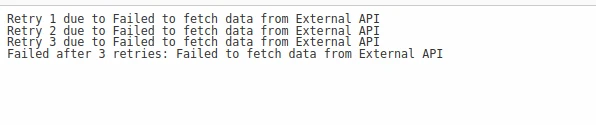
This policy specifies that it should handle HttpRequestException and retry the operation up to 3 times with a delay of 2 seconds between the initial attempt and retries. If a retry failure occurs, a message is printed to the console indicating the retry attempt number and the exception message.
Inside the Main method, the retry policy logic is executed asynchronously using retryPolicy.ExecuteAsync(). Within this execution, two asynchronous operations are chained together: FetchDataFromExternalApiAsync() and GeneratePdfFromData(data).
If FetchDataFromExternalApiAsync() fails (as it's intentionally set up to do with a simulated exception), the retry policy will catch the HttpRequestException, log the retry attempt, and retry the operation.
The FetchDataFromExternalApiAsync() method simulates fetching data from an external API with a delay and intentionally throws an HttpRequestException to simulate failed requests.
In conclusion, Polly's retry policy proves invaluable for handling transient faults and ensuring robustness in C# applications. Its flexibility in configuring retry attempts, delays, and conditions allows developers to tailor resilience strategies to specific requirements.
Whether used independently or in conjunction with libraries like IronPDF, Polly facilitates the creation of applications that gracefully recover from temporary failures, enhancing the user experience and reliability of the software.
By integrating Polly's retry capabilities, developers can build more resilient systems that can adapt and recover from transient issues, ultimately improving the overall quality and dependability of their applications.
IronPDF is the best C# PDF library on the market, it also offers a trial license for IronPDF prices start from $999 USD.
To learn about HTML to PDF conversion using IronPDF visit the following IronPDF HTML to PDF Conversion Tutorial.

Jacob Mellor is Chief Technology Officer at Iron Software and a visionary engineer pioneering C# PDF technology. As the original developer behind Iron Software's core codebase, he has shaped the company's product architecture since its inception, transforming it alongside CEO Cameron Rimington into a 50+ person company serving NASA, Tesla, and global government agencies.



IronPDF is a part of IRONSUITE
10 .NET API products for your office documents











When you need your PDF to look like HTML, fast.


