


Polly Retry(對於開發者的運行原理)

優雅地處理瞬時故障、超時和異常對於構建穩健且彈性的應用程式至關重要。 Polly 是一個流行的 .NET 程式庫,提供彈性和瞬時故障處理功能。 在其眾多功能中,"重試"是最廣泛使用的策略之一。
在本文中,我們將深入探討 C# 中的 Polly 重試策略,探索其使用方法、配置選項,並提供實用的程式碼範例。 此外,我們將使用 IronPDF 程式庫進行 PDF 生成,結合 Polly 重試來生成表單請求結果的 PDF。
什麼是 Polly 重試?
Polly 重試是一種由 Polly 程式庫提供的策略,允許開發人員自動重試可能因錯誤或瞬時故障而失敗的操作。 瞬時故障是由於網路故障、服務不可用或其他瞬間問題引起的臨時錯誤。 using Polly 的重試策略,您可以定義重試操作的規則,包括最大重試次數、每次重試之間的延遲以及重試失敗請求的條件。這有助於構建能夠從臨時故障中恢復而不會崩潰或對最終使用者造成干擾的應用程式。
開始使用 Polly 重試
在深入研究程式碼範例之前,讓我們先了解一下如何在 C# 專案中安裝和配置 Polly。
安裝 Polly
您可以使用以下命令通過 NuGet 程式包管理器控制台安裝 Polly:
Install-Package Polly
或者通過 .NET CLI:
dotnet add package Polly
新增 Polly 使用語句
在您的 C# 文件中,包含 Polly 命名空間:
using Polly;using Polly;Imports Polly基本重試策略範例
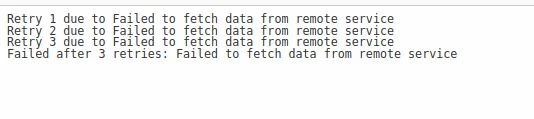
讓我們從一個簡單的範例開始,在這個範例中,我們重試一個模擬從遠程服務獲取資料的操作。我們將設置一個重試策略,最多重試三次,重試之間延遲為兩秒。
using System;
using System.Net.Http;
using Polly;

namespace PollyRetryExample
{
    public class Program
    {
        public static void Main(string[] args)
        {
            // Define a retry policy that handles HttpRequestException with a maximum of 3 retries
            var retryPolicy = Policy
                .Handle<HttpRequestException>() // Specify the exception type to handle
                .WaitAndRetry(
                    3, // Max retry attempts
                    retryAttempt => TimeSpan.FromSeconds(2), // Fixed retry delay
                    (exception, timeSpan, retryCount, context) =>
                    {
                        Console.WriteLine("Retry {0} due to {1}", retryCount, exception.Message);
                    });

            try
            {
                // Execute the action within the context of the retry policy
                retryPolicy.Execute(() =>
                {
                    FetchDataFromRemoteService();
                });
            }
            catch (Exception ex)
            {
                Console.WriteLine("Failed after 3 retries: {0}", ex.Message);
            }
        }

        // Simulate fetching data that throws HttpRequestException
        public static void FetchDataFromRemoteService()
        {
            throw new HttpRequestException("Failed to fetch data from remote service");
        }
    }
}
using System;
using System.Net.Http;
using Polly;
namespace PollyRetryExample
{
public class Program
{
public static void Main(string[] args)
{
// Define a retry policy that handles HttpRequestException with a maximum of 3 retries
var retryPolicy = Policy
.Handle<HttpRequestException>() // Specify the exception type to handle
.WaitAndRetry(
3, // Max retry attempts
retryAttempt => TimeSpan.FromSeconds(2), // Fixed retry delay
(exception, timeSpan, retryCount, context) =>
{
Console.WriteLine("Retry {0} due to {1}", retryCount, exception.Message);
});
try
{
// Execute the action within the context of the retry policy
retryPolicy.Execute(() =>
{
FetchDataFromRemoteService();
});
}
catch (Exception ex)
{
Console.WriteLine("Failed after 3 retries: {0}", ex.Message);
}
}
// Simulate fetching data that throws HttpRequestException
public static void FetchDataFromRemoteService()
{
throw new HttpRequestException("Failed to fetch data from remote service");
}
}
}Imports System
Imports System.Net.Http
Imports Polly
Namespace PollyRetryExample
Public Class Program
Public Shared Sub Main(ByVal args() As String)
' Define a retry policy that handles HttpRequestException with a maximum of 3 retries
Dim retryPolicy = Policy.Handle(Of HttpRequestException)().WaitAndRetry(3, Function(retryAttempt) TimeSpan.FromSeconds(2), Sub(exception, timeSpan, retryCount, context)
Console.WriteLine("Retry {0} due to {1}", retryCount, exception.Message)
End Sub)
Try
' Execute the action within the context of the retry policy
retryPolicy.Execute(Sub()
FetchDataFromRemoteService()
End Sub)
Catch ex As Exception
Console.WriteLine("Failed after 3 retries: {0}", ex.Message)
End Try
End Sub
' Simulate fetching data that throws HttpRequestException
Public Shared Sub FetchDataFromRemoteService()
Throw New HttpRequestException("Failed to fetch data from remote service")
End Sub
End Class
End Namespace在此範例中:
Handle<HttpRequestException>()指定我們希望處理HttpRequestException並在發生時重試該操作。WaitAndRetry()配置了具有三次重試且每次重試之間有兩秒固定延遲的重試策略(指定的最長持續時間)。onRetry委託在發生重試時記錄一條訊息。
進階重試策略配置
指數退避
指數退避是一種流行的重試策略,其特點是請求和重試之間的延遲呈指數級增長。 Polly 提供了一種便捷的方法來使用 WaitAndRetry() 實現指數退避。
var retryPolicy = Policy
    .Handle<HttpRequestException>()
    .WaitAndRetry(
        retryCount: 3, // Max retry attempts
        sleepDurationProvider: attempt => TimeSpan.FromSeconds(Math.Pow(2, attempt)), // Exponential delay
        onRetry: (exception, timeSpan, retryCount, context) =>
        {
            Console.WriteLine($"Retry {retryCount} due to {exception.Message}");
        });
var retryPolicy = Policy
.Handle<HttpRequestException>()
.WaitAndRetry(
retryCount: 3, // Max retry attempts
sleepDurationProvider: attempt => TimeSpan.FromSeconds(Math.Pow(2, attempt)), // Exponential delay
onRetry: (exception, timeSpan, retryCount, context) =>
{
Console.WriteLine($"Retry {retryCount} due to {exception.Message}");
});Dim retryPolicy = Policy.Handle(Of HttpRequestException)().WaitAndRetry(retryCount:= 3, sleepDurationProvider:= Function(attempt) TimeSpan.FromSeconds(Math.Pow(2, attempt)), onRetry:= Sub(exception, timeSpan, retryCount, context)
Console.WriteLine($"Retry {retryCount} due to {exception.Message}")
End Sub)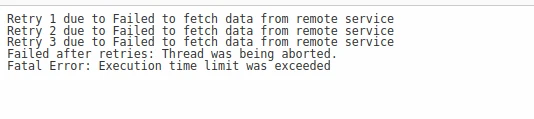
重試與斷路器
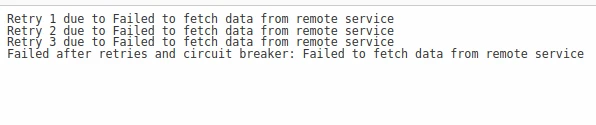
結合重試與斷路器可以進一步提高彈性,防止當服務不斷失敗時重複重試。 Polly 允許您輕鬆結合重試和斷路器策略。
// Define a circuit breaker policy
var circuitBreakerPolicy = Policy
    .Handle<HttpRequestException>()
    .CircuitBreaker(
        exceptionsAllowedBeforeBreaking: 3, // Number of exceptions before breaking
        durationOfBreak: TimeSpan.FromSeconds(30), // Time circuit stays open
        onBreak: (ex, breakDelay) =>
        {
            Console.WriteLine($"Circuit broken due to {ex.Message}. Retry after {breakDelay.TotalSeconds} seconds.");
        },
        onReset: () =>
        {
            Console.WriteLine("Circuit reset.");
        });

// Define a retry policy
var retryPolicy = Policy
    .Handle<HttpRequestException>()
    .WaitAndRetry(
        retryCount: 3, // Max retry attempts
        sleepDurationProvider: attempt => TimeSpan.FromSeconds(2), // Fixed retry delay
        onRetry: (exception, timeSpan, retryCount, context) =>
        {
            Console.WriteLine($"Retry {retryCount} due to {exception.Message}");
        });

// Combine both policies into a single policy wrap
var policyWrap = Policy.Wrap(circuitBreakerPolicy, retryPolicy);
// Define a circuit breaker policy
var circuitBreakerPolicy = Policy
.Handle<HttpRequestException>()
.CircuitBreaker(
exceptionsAllowedBeforeBreaking: 3, // Number of exceptions before breaking
durationOfBreak: TimeSpan.FromSeconds(30), // Time circuit stays open
onBreak: (ex, breakDelay) =>
{
Console.WriteLine($"Circuit broken due to {ex.Message}. Retry after {breakDelay.TotalSeconds} seconds.");
},
onReset: () =>
{
Console.WriteLine("Circuit reset.");
});
// Define a retry policy
var retryPolicy = Policy
.Handle<HttpRequestException>()
.WaitAndRetry(
retryCount: 3, // Max retry attempts
sleepDurationProvider: attempt => TimeSpan.FromSeconds(2), // Fixed retry delay
onRetry: (exception, timeSpan, retryCount, context) =>
{
Console.WriteLine($"Retry {retryCount} due to {exception.Message}");
});
// Combine both policies into a single policy wrap
var policyWrap = Policy.Wrap(circuitBreakerPolicy, retryPolicy);' Define a circuit breaker policy
Dim circuitBreakerPolicy = Policy.Handle(Of HttpRequestException)().CircuitBreaker(exceptionsAllowedBeforeBreaking:= 3, durationOfBreak:= TimeSpan.FromSeconds(30), onBreak:= Sub(ex, breakDelay)
Console.WriteLine($"Circuit broken due to {ex.Message}. Retry after {breakDelay.TotalSeconds} seconds.")
End Sub, onReset:= Sub()
Console.WriteLine("Circuit reset.")
End Sub)
' Define a retry policy
Dim retryPolicy = Policy.Handle(Of HttpRequestException)().WaitAndRetry(retryCount:= 3, sleepDurationProvider:= Function(attempt) TimeSpan.FromSeconds(2), onRetry:= Sub(exception, timeSpan, retryCount, context)
Console.WriteLine($"Retry {retryCount} due to {exception.Message}")
End Sub)
' Combine both policies into a single policy wrap
Dim policyWrap = Policy.Wrap(circuitBreakerPolicy, retryPolicy)在此範例中:
CircuitBreaker()定義了一個斷路器策略,在遇到三次異常後中止,並保持打開狀態30秒。Policy.Wrap()將斷路器和重試策略結合成一個策略。
IronPDF 介紹
IronPDF C# PDF 程式庫概覽 是一個功能強大的 C# 程式庫,允許開發人員在其 .NET 應用程式中建立、編輯和操作PDF文件。 無論您是需要建立發票、報告或其他型別的PDF文件,IronPDF都提供了一個直觀的API來簡化過程。 using IronPDF,您可以輕鬆地將HTML、CSS,甚至ASP.NET網頁轉換為PDF,這使其成為多種應用程式的多功能工具。 此外,它還提供了許多進階功能,如向PDF中新增文字、圖像和互動元素,並通過加密和數位簽名對其進行保護。
IronPDF 在 HTML 到 PDF 轉換方面表現出色,確保精確地保留原始佈局和樣式。 這對於從基於網頁的內容,如報告、發票和文件生成PDF來說是完美的選擇。 IronPDF 支援從HTML文件、URL和原始HTML字串轉換為高品質PDF文件。
using IronPdf;

class Program
{
    static void Main(string[] args)
    {
        var renderer = new ChromePdfRenderer();

        // 1. Convert HTML String to PDF
        var htmlContent = "<h1>Hello, IronPDF!</h1><p>This is a PDF from an HTML string.</p>";
        var pdfFromHtmlString = renderer.RenderHtmlAsPdf(htmlContent);
        pdfFromHtmlString.SaveAs("HTMLStringToPDF.pdf");

        // 2. Convert HTML File to PDF
        var htmlFilePath = "path_to_your_html_file.html"; // Specify the path to your HTML file
        var pdfFromHtmlFile = renderer.RenderHtmlFileAsPdf(htmlFilePath);
        pdfFromHtmlFile.SaveAs("HTMLFileToPDF.pdf");

        // 3. Convert URL to PDF
        var url = "http://ironpdf.com"; // Specify the URL
        var pdfFromUrl = renderer.RenderUrlAsPdf(url);
        pdfFromUrl.SaveAs("URLToPDF.pdf");
    }
}
using IronPdf;
class Program
{
static void Main(string[] args)
{
var renderer = new ChromePdfRenderer();
// 1. Convert HTML String to PDF
var htmlContent = "<h1>Hello, IronPDF!</h1><p>This is a PDF from an HTML string.</p>";
var pdfFromHtmlString = renderer.RenderHtmlAsPdf(htmlContent);
pdfFromHtmlString.SaveAs("HTMLStringToPDF.pdf");
// 2. Convert HTML File to PDF
var htmlFilePath = "path_to_your_html_file.html"; // Specify the path to your HTML file
var pdfFromHtmlFile = renderer.RenderHtmlFileAsPdf(htmlFilePath);
pdfFromHtmlFile.SaveAs("HTMLFileToPDF.pdf");
// 3. Convert URL to PDF
var url = "http://ironpdf.com"; // Specify the URL
var pdfFromUrl = renderer.RenderUrlAsPdf(url);
pdfFromUrl.SaveAs("URLToPDF.pdf");
}
}Imports IronPdf
Friend Class Program
Shared Sub Main(ByVal args() As String)
Dim renderer = New ChromePdfRenderer()
' 1. Convert HTML String to PDF
Dim htmlContent = "<h1>Hello, IronPDF!</h1><p>This is a PDF from an HTML string.</p>"
Dim pdfFromHtmlString = renderer.RenderHtmlAsPdf(htmlContent)
pdfFromHtmlString.SaveAs("HTMLStringToPDF.pdf")
' 2. Convert HTML File to PDF
Dim htmlFilePath = "path_to_your_html_file.html" ' Specify the path to your HTML file
Dim pdfFromHtmlFile = renderer.RenderHtmlFileAsPdf(htmlFilePath)
pdfFromHtmlFile.SaveAs("HTMLFileToPDF.pdf")
' 3. Convert URL to PDF
Dim url = "http://ironpdf.com" ' Specify the URL
Dim pdfFromUrl = renderer.RenderUrlAsPdf(url)
pdfFromUrl.SaveAs("URLToPDF.pdf")
End Sub
End Class使用 IronPDF 的 Polly 重試
當使用 IronPDF 時,可能會出現需要從外部來源獲取資料或在生成PDF之前執行複雜操作的情況。
在此類情況下,您可能會遇到瞬時故障或臨時問題,這可能導致PDF生成失敗。 為了優雅地處理這些瞬時故障,您可以將 Polly 重試與 IronPDF 結合使用。
安裝 IronPDF 和 Polly
在開始之前,請確保在您的專案中安裝 IronPDF NuGet 套件。
Install-Package IronPdf
將 Polly 重試與 IronPDF 結合使用
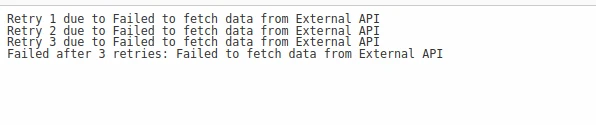
讓我們來看一個範例,說明如何使用 Polly 重試來處理使用 IronPDF 生成PDF時的瞬時故障。 在以下範例中,我們將模擬從外部API獲取資料,然後基於該資料生成PDF。 我們將使用 Polly Retry 執行資料獲取操作以應對失敗情況。
using System;
using System.Net.Http;
using System.Threading.Tasks;
using IronPdf;
using Polly;

namespace IronPdfWithPollyRetry
{
    public class Program
    {
        public static async Task Main(string[] args)
        {
            // Define a retry policy with async capability
            var retryPolicy = Policy
                .Handle<HttpRequestException>() // Specify exception type to handle
                .WaitAndRetryAsync(
                    3, // Retry attempts
                    retryAttempt => TimeSpan.FromSeconds(2), // Calculated retry delay
                    (exception, timeSpan, retryCount, context) =>
                    {
                        Console.WriteLine("Retry " + retryCount + " due to " + exception.Message);
                    });

            // Execute the retry policy asynchronously
            var pdf = await retryPolicy.ExecuteAsync(async () =>
            {
                var data = await FetchDataFromExternalApiAsync(); // Fetch data from an external source
                return GeneratePdfFromData(data); // Generate PDF using fetched data
            });

            pdf.SaveAs("GeneratedDocument.pdf");
        }

        // Simulate fetching data from an external API
        static async Task<string> FetchDataFromExternalApiAsync()
        {
            await Task.Delay(100); // Simulate delay
            throw new HttpRequestException("Failed to fetch data from external API");
        }

        // Generate PDF using IronPDF based on the fetched data
        static PdfDocument GeneratePdfFromData(string data)
        {
            var htmlContent = "<html><body><h1>Data: " + data + "</h1></body></html>";
            var renderer = new ChromePdfRenderer();
            return renderer.RenderHtmlAsPdf(htmlContent);
        }
    }
}
using System;
using System.Net.Http;
using System.Threading.Tasks;
using IronPdf;
using Polly;
namespace IronPdfWithPollyRetry
{
public class Program
{
public static async Task Main(string[] args)
{
// Define a retry policy with async capability
var retryPolicy = Policy
.Handle<HttpRequestException>() // Specify exception type to handle
.WaitAndRetryAsync(
3, // Retry attempts
retryAttempt => TimeSpan.FromSeconds(2), // Calculated retry delay
(exception, timeSpan, retryCount, context) =>
{
Console.WriteLine("Retry " + retryCount + " due to " + exception.Message);
});
// Execute the retry policy asynchronously
var pdf = await retryPolicy.ExecuteAsync(async () =>
{
var data = await FetchDataFromExternalApiAsync(); // Fetch data from an external source
return GeneratePdfFromData(data); // Generate PDF using fetched data
});
pdf.SaveAs("GeneratedDocument.pdf");
}
// Simulate fetching data from an external API
static async Task<string> FetchDataFromExternalApiAsync()
{
await Task.Delay(100); // Simulate delay
throw new HttpRequestException("Failed to fetch data from external API");
}
// Generate PDF using IronPDF based on the fetched data
static PdfDocument GeneratePdfFromData(string data)
{
var htmlContent = "<html><body><h1>Data: " + data + "</h1></body></html>";
var renderer = new ChromePdfRenderer();
return renderer.RenderHtmlAsPdf(htmlContent);
}
}
}Imports System
Imports System.Net.Http
Imports System.Threading.Tasks
Imports IronPdf
Imports Polly
Namespace IronPdfWithPollyRetry
Public Class Program
Public Shared Async Function Main(ByVal args() As String) As Task
' Define a retry policy with async capability
Dim retryPolicy = Policy.Handle(Of HttpRequestException)().WaitAndRetryAsync(3, Function(retryAttempt) TimeSpan.FromSeconds(2), Sub(exception, timeSpan, retryCount, context)
Console.WriteLine("Retry " & retryCount & " due to " & exception.Message)
End Sub)
' Execute the retry policy asynchronously
Dim pdf = Await retryPolicy.ExecuteAsync(Async Function()
Dim data = Await FetchDataFromExternalApiAsync() ' Fetch data from an external source
Return GeneratePdfFromData(data) ' Generate PDF using fetched data
End Function)
pdf.SaveAs("GeneratedDocument.pdf")
End Function
' Simulate fetching data from an external API
Private Shared Async Function FetchDataFromExternalApiAsync() As Task(Of String)
Await Task.Delay(100) ' Simulate delay
Throw New HttpRequestException("Failed to fetch data from external API")
End Function
' Generate PDF using IronPDF based on the fetched data
Private Shared Function GeneratePdfFromData(ByVal data As String) As PdfDocument
Dim htmlContent = "<html><body><h1>Data: " & data & "</h1></body></html>"
Dim renderer = New ChromePdfRenderer()
Return renderer.RenderHtmlAsPdf(htmlContent)
End Function
End Class
End Namespace這段 C# 程式碼展示了如何使用 Polly 程式庫為 IronPDF 實現重試策略來生成PDF文件。 Main 方法使用 Polly 的 WaitAndRetryAsync 方法初始化重試策略。
此策略指定它應處理 HttpRequestException,並在初次嘗試和重試之間設置兩秒延遲,最多重試三次。 如果發生重試失敗,系統將在控制台上列印一條顯示重試次數和異常訊息的訊息。
在 Main 方法內,重試策略邏輯是使用 retryPolicy.ExecuteAsync() 異步執行的。 在這次執行中,將兩個異步操作連結在一起:FetchDataFromExternalApiAsync() 和 GeneratePdfFromData(data)。
如果 FetchDataFromExternalApiAsync() 失敗(因為它被故意設置為觸發模擬異常),重試策略將捕獲 HttpRequestException,記錄重試嘗試並重試該操作。
FetchDataFromExternalApiAsync() 方法模擬一個具有延遲的外部 API 資料抓取,並故意引發 HttpRequestException 來模擬失敗請求。
結論
總之,Polly 的重試策略在處理瞬時故障和確保 C# 應用程式的穩健性方面顯得非常重要。 其在配置重試次數、延遲和條件方面的靈活性允許開發人員為特定需求量身定制彈性策略。
無論獨立使用還是與類似 IronPDF 的程式庫結合使用,Polly 促進了應用程式的建立,使其能夠優雅地從臨時故障中恢復,提升使用者體驗和軟體的可靠性。
通過整合 Polly 的重試功能,開發人員可以構建更多彈性的系統,能夠適應和從瞬時問題中恢復,最終提高應用程式的整體品質和可靠性。
IronPDF 是市場上最好的 C# PDF 程式庫,它還提供了 IronPDF 試用授權,價格起始於 $999 美元。
要了解使用 IronPDF 進行 HTML 到 PDF 轉換,請存取以下 IronPDF HTML 到 PDF 轉換教學。
常見問題
什麼是C#中的Polly重試?
Polly重試是C#中Polly程式庫的一個功能,允許開發者自動重試由於暫時性問題(例如網路故障或服務不可用)而失敗的操作。這有助於通過優雅地處理瞬時故障來構建具有彈性的應用程式。
如何使用Polly實現基本的重試策略?
您可以通過處理HttpRequestException等例外並將其設置為最大重試三次,並且每次嘗試之間有兩秒的固定延遲來在Polly中實現基本的重試策略。
Polly中的指數退避有何意義?
Polly中的指數退避用於指數增加重試之間的延遲,這有助於在故障期間減少對服務的負荷。這可以使用Polly的WaitAndRetry方法實現,該方法根據指數增長計算延遲。
如何為C#项目安装Polly?
您可以使用NuGet包管理器控制台中的命令Install-Package Polly或使用.NET CLI中的dotnet add package Polly在C#项目中安装Polly。
Polly的重試策略可以與其他彈性策略結合嗎?
可以,Polly允許您將其重試策略與其他彈性策略結合,例如斷路器,使用Policy.Wrap方法來提高應用程式的彈性並防止服務不斷失敗時重複重試。
如何在C#中將HTML轉換為PDF?
您可以使用IronPDF的方法,如RenderHtmlAsPdf,將HTML字串轉換為PDF。IronPDF還支持將HTML文件和網頁(包括CSS)轉換為PDF格式。
為什麼Polly的重試策略對C#應用程式很重要?
Polly的重試策略在處理C#應用程式中的瞬時故障方面至關重要,確保穩健性並通過允許系統從臨時故障中恢復而不失敗來改善使用者體驗。
如何在PDF生成過程中實現重試策略?
在生成PDF時,可以使用Polly實現重試策略來處理瞬時故障。通過將Polly的重試功能與IronPDF整合,您可以在遇到臨時的網路或服務問題時多次嘗試PDF操作。
如何安裝C# PDF庫如IronPDF?
可以通過NuGet包管理器中的命令Install-Package IronPdf安裝IronPDF,以便您可以在C#應用程式中建立、編輯和操作PDF文件。
使用IronPDF進行PDF生成的好處是什麼?
IronPDF為在.NET應用程式中建立和操作PDF文件提供強大的功能。支持將HTML、CSS和網頁轉換為PDF,新增文字和圖像,並通過加密保護文件。










 免費開始
免費開始 免費開始
免費開始 預訂免費直播演示
















