The Problem With Statement Generation at Scale
 For a small customer base, exporting a CSV and formatting it manually is slow but survivable. At a few hundred customers it becomes a dedicated task. At a few thousand it becomes a bottleneck that blocks the billing cycle.
SSRS and Crystal Reports were the standard answer for a long time. They still work, but the output looks like it was built in 2008, difficult to theme, expensive to maintain, and disconnected from the visual design the rest of the product has adopted. Updating a report definition requires a specialist, and the output rarely matches the brand without significant effort.
Third-party statement generation APIs solve the appearance problem but introduce new ones. Per-document pricing scales directly against customer growth, which means your infrastructure costs rise every time the business succeeds. There is also a network dependency: if the API is unavailable during the billing run, the entire cycle stalls.
The performance dimension is non-trivial. A SaaS platform generating usage summaries for 10,000 customers on the 1st of the month, a telecom system producing itemized call records, a property manager distributing rent ledgers to hundreds of tenants, all of these have a window in which the run must complete. An approach that isn't designed for throughput will miss it.
Customers, meanwhile, expect a branded document that looks like it belongs to the product they pay for, not a raw data export with a logo dropped on top.
This IronPDF example demonstrates how modern .NET applications can automatically generate a branded PDF document from an HTML file and deliver it to customers at scale. Using the IronPDF C# PDF library, developers can convert HTML into reliable PDF files inside a .NET project without relying on external services. The approach shown here works across multiple platforms, integrates easily with Visual Studio, and uses the familiar NuGet library for PDF distribution model that .NET developers already trust.
The Solution: Batch PDF Generation With the IronPDF C# PDF Library
IronPDF lets .NET applications generate branded PDF statements from HTML and CSS templates in a batch loop or background job. Each customer's data populates the same template, ChromePdfRenderer produces the PDF, and the application delivers it by email or posts it to a self-service portal.
There is no SSRS installation to maintain, no Crystal Reports license to renew, and no per-document fee that grows with your customer count. IronPDF runs inside your existing .NET application as a single NuGet package with no external processes. The HTML template is owned by your team, styled with the same CSS that powers the rest of the product, and updated on your own schedule.
Installing the IronPDF NuGet Package
Most developers install IronPDF through the NuGet Package Manager in Visual Studio. Open the Visual Studio Solution Explorer, right-click References, select Manage NuGet Packages, then search (Ctrl) for IronPDF and click Install IronPDF.
The NuGet logo appears next to the package listing, confirming the latest NuGet version is available. Once installed, add the required namespace to your project:
using IronPdf;
using IronPdf;
Imports IronPdf
Imports IronPdf
IronPDF is delivered as a C# PDF DLL distributed through the C# NuGet library, making installation straightforward for any .NET document workflow.
How It Works in Practice: Using IronPDF in your .NET Projects
1. A Scheduled Job Triggers the Billing Run
A BackgroundService, a Hangfire recurring job, or a Quartz.NET scheduler fires at the start of each billing period, typically midnight on the 1st. The job queries the billing database for all active customers and their period data: line items, charges, credits, running balance, and usage metrics.
The query returns one record set per customer. From this point, statement generation is a loop.
2. HTML Template Is Populated Per Customer
The template is a standard HTML string or a rendered Razor view. It contains the company logo (embedded as a base64 data URI for deployment-safe rendering), the customer's account number, statement period, and all billing detail organized into sections, usage breakdown, charges, credits, and closing balance.
The template is the single source of truth for how every statement looks. When the legal team needs a new disclosure footer, or the design team updates the color scheme, one file changes and every future statement reflects it.
3. ChromePdfRenderer Renders Each Statement
In this IronPDF example, the ChromePdfRenderer converts dynamic HTML content into a generated PDF document, demonstrating how a modern PDF viewer such as Adobe Reader can display the final PDF content exactly as designed.
using IronPdf;

var renderer = new ChromePdfRenderer();

renderer.RenderingOptions.PaperSize = IronPdf.Rendering.PdfPaperSize.A4;

renderer.RenderingOptions.MarginTop = 20;

renderer.RenderingOptions.MarginBottom = 20;

foreach (var customer in activeCustomers)

{
    string html = $@"
        <h1>Account Statement — {customer.StatementPeriod}</h1>
        <p><strong>Account:</strong> {customer.AccountNumber}</p>
        <p><strong>Name:</strong> {customer.FullName}</p>
        <hr/>
        <h2>Charges This Period</h2>
        {customer.LineItemsHtml}
        <p><strong>Closing Balance:</strong> {customer.ClosingBalance:C}</p>";

    PdfDocument statement = renderer.RenderHtmlAsPdf(html);
    await DeliverStatementAsync(customer, statement);
}
using IronPdf;

var renderer = new ChromePdfRenderer();

renderer.RenderingOptions.PaperSize = IronPdf.Rendering.PdfPaperSize.A4;

renderer.RenderingOptions.MarginTop = 20;

renderer.RenderingOptions.MarginBottom = 20;

foreach (var customer in activeCustomers)

{
    string html = $@"
        <h1>Account Statement — {customer.StatementPeriod}</h1>
        <p><strong>Account:</strong> {customer.AccountNumber}</p>
        <p><strong>Name:</strong> {customer.FullName}</p>
        <hr/>
        <h2>Charges This Period</h2>
        {customer.LineItemsHtml}
        <p><strong>Closing Balance:</strong> {customer.ClosingBalance:C}</p>";

    PdfDocument statement = renderer.RenderHtmlAsPdf(html);
    await DeliverStatementAsync(customer, statement);
}
Imports IronPdf
Dim renderer As New ChromePdfRenderer()
renderer.RenderingOptions.PaperSize = IronPdf.Rendering.PdfPaperSize.A4
renderer.RenderingOptions.MarginTop = 20
renderer.RenderingOptions.MarginBottom = 20
For Each customer In activeCustomers
Dim html As String = $"
<h1>Account Statement — {customer.StatementPeriod}</h1>
<p><strong>Account:</strong> {customer.AccountNumber}</p>
<p><strong>Name:</strong> {customer.FullName}</p>
<hr/>
<h2>Charges This Period</h2>
{customer.LineItemsHtml}
<p><strong>Closing Balance:</strong> {customer.ClosingBalance:C}</p>"
Dim statement As PdfDocument = renderer.RenderHtmlAsPdf(html)
Await DeliverStatementAsync(customer, statement)
Next
Imports IronPdf

Dim renderer As New ChromePdfRenderer()

renderer.RenderingOptions.PaperSize = IronPdf.Rendering.PdfPaperSize.A4

renderer.RenderingOptions.MarginTop = 20

renderer.RenderingOptions.MarginBottom = 20

For Each customer In activeCustomers

    Dim html As String = $"
        <h1>Account Statement — {customer.StatementPeriod}</h1>
        <p><strong>Account:</strong> {customer.AccountNumber}</p>
        <p><strong>Name:</strong> {customer.FullName}</p>
        <hr/>
        <h2>Charges This Period</h2>
        {customer.LineItemsHtml}
        <p><strong>Closing Balance:</strong> {customer.ClosingBalance:C}</p>"

    Dim statement As PdfDocument = renderer.RenderHtmlAsPdf(html)
    Await DeliverStatementAsync(customer, statement)
Next
Rendered PDF Document Output
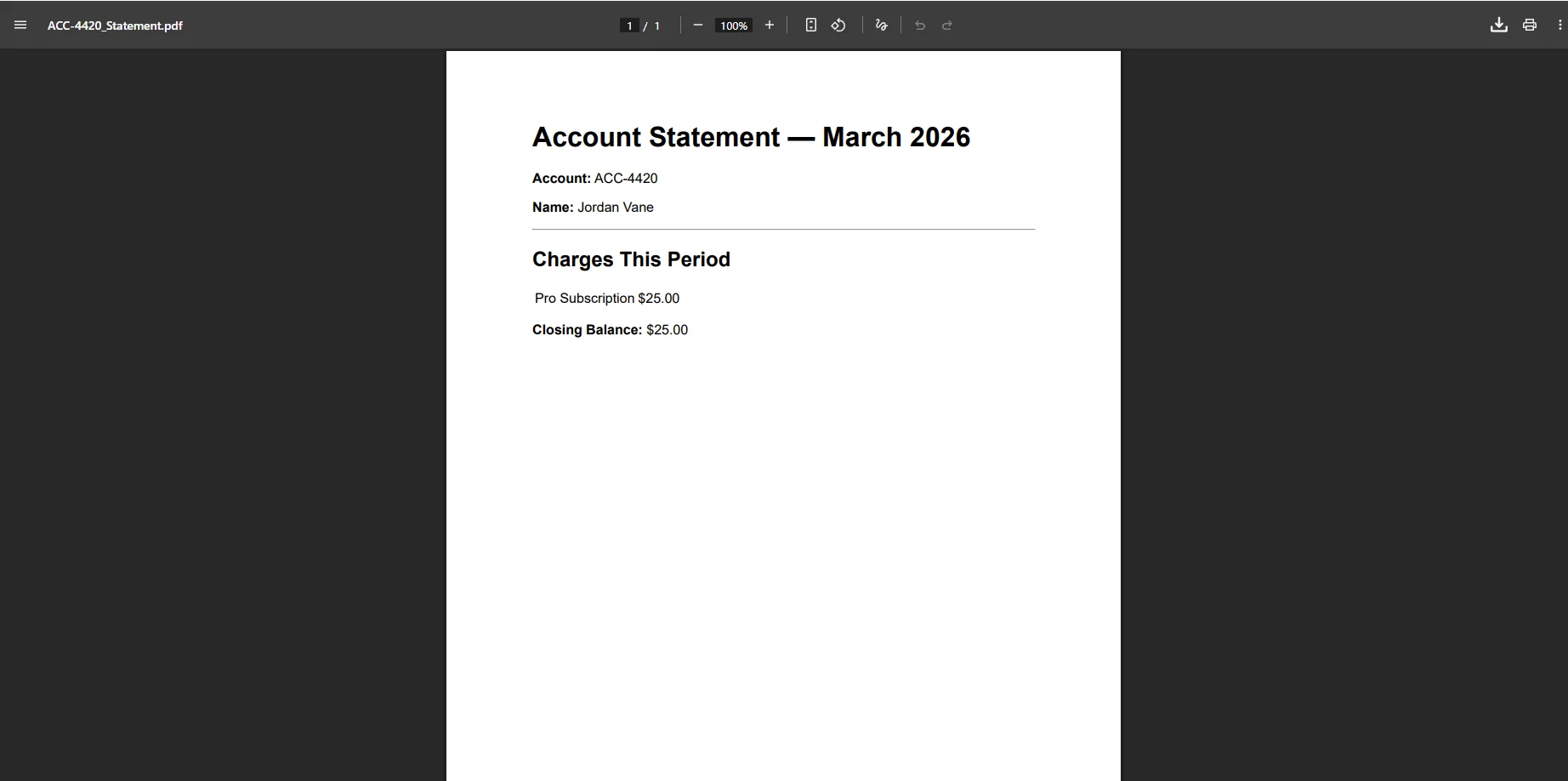 Reusing the same ChromePdfRenderer instance across the loop avoids redundant initialization overhead. For customer bases in the thousands, the job can partition the list and run parallel batches across available cores to stay within the billing window.
For parallel batch processing, instantiate a separate ChromePdfRenderer per thread rather than sharing one instance. The renderer is not thread-safe, but multiple instances run concurrently without contention.
4. PDF Delivered by Email and Stored for Portal Access
The PdfDocument exposes BinaryData, which writes directly to a MemoryStream for email attachment, no filesystem writes required:
using System.Net.Mail;
using System.IO;

async Task DeliverStatementAsync(CustomerRecord customer, PdfDocument statement)
{
    var pdfBytes = statement.BinaryData;
    // Store in blob storage for portal download
    await _blobClient.UploadAsync(
        $"statements/{customer.AccountNumber}/{customer.StatementPeriod}.pdf",
        new BinaryData(pdfBytes)
    );

    // Email to customer
    using var stream = new MemoryStream(pdfBytes);
    using var attachment = new Attachment(stream,
        $"Statement-{customer.StatementPeriod}.pdf", "application/pdf");
    var message = new MailMessage("billing@yourcompany.com", customer.Email)
    {
        Subject = $"Your {customer.StatementPeriod} Statement",
        Body = $"Dear {customer.FullName}, your statement for {customer.StatementPeriod} is attached."
    };

    message.Attachments.Add(attachment);

    using var smtp = new SmtpClient("smtp.yourprovider.com");

    await smtp.SendMailAsync(message);
}
using System.Net.Mail;
using System.IO;

async Task DeliverStatementAsync(CustomerRecord customer, PdfDocument statement)
{
    var pdfBytes = statement.BinaryData;
    // Store in blob storage for portal download
    await _blobClient.UploadAsync(
        $"statements/{customer.AccountNumber}/{customer.StatementPeriod}.pdf",
        new BinaryData(pdfBytes)
    );

    // Email to customer
    using var stream = new MemoryStream(pdfBytes);
    using var attachment = new Attachment(stream,
        $"Statement-{customer.StatementPeriod}.pdf", "application/pdf");
    var message = new MailMessage("billing@yourcompany.com", customer.Email)
    {
        Subject = $"Your {customer.StatementPeriod} Statement",
        Body = $"Dear {customer.FullName}, your statement for {customer.StatementPeriod} is attached."
    };

    message.Attachments.Add(attachment);

    using var smtp = new SmtpClient("smtp.yourprovider.com");

    await smtp.SendMailAsync(message);
}
Imports System.Net.Mail
Imports System.IO
Async Function DeliverStatementAsync( _
customer As CustomerRecord, _
statement As PdfDocument) As Task
Dim pdfBytes = statement.BinaryData
' Store in blob storage for portal download
Await _blobClient.UploadAsync( _
$"statements/{customer.AccountNumber}/{customer.StatementPeriod}.pdf", _
New BinaryData(pdfBytes) _
)
' Email to customer
Using stream As New MemoryStream(pdfBytes)
Using attachment As New Attachment(stream, _
$"Statement-{customer.StatementPeriod}.pdf", "application/pdf")
Dim message As New MailMessage("billing@yourcompany.com", customer.Email) With { _
.Subject = $"Your {customer.StatementPeriod} Statement", _
.Body = $"Dear {customer.FullName}, your statement for {customer.StatementPeriod} is attached." _
}
message.Attachments.Add(attachment)
Using smtp As New SmtpClient("smtp.yourprovider.com")
Await smtp.SendMailAsync(message)
End Using
End Using
End Using
End Function
Imports System.Net.Mail
Imports System.IO

Async Function DeliverStatementAsync( _
    customer As CustomerRecord, _
    statement As PdfDocument) As Task

    Dim pdfBytes = statement.BinaryData
    ' Store in blob storage for portal download
    Await _blobClient.UploadAsync( _
        $"statements/{customer.AccountNumber}/{customer.StatementPeriod}.pdf", _
        New BinaryData(pdfBytes) _
    )

    ' Email to customer
    Using stream As New MemoryStream(pdfBytes)
        Using attachment As New Attachment(stream, _
            $"Statement-{customer.StatementPeriod}.pdf", "application/pdf")
            Dim message As New MailMessage("billing@yourcompany.com", customer.Email) With { _
                .Subject = $"Your {customer.StatementPeriod} Statement", _
                .Body = $"Dear {customer.FullName}, your statement for {customer.StatementPeriod} is attached." _
            }

            message.Attachments.Add(attachment)

            Using smtp As New SmtpClient("smtp.yourprovider.com")
                Await smtp.SendMailAsync(message)
            End Using
        End Using
    End Using
End Function
Example Email with Attached PDF Invoice
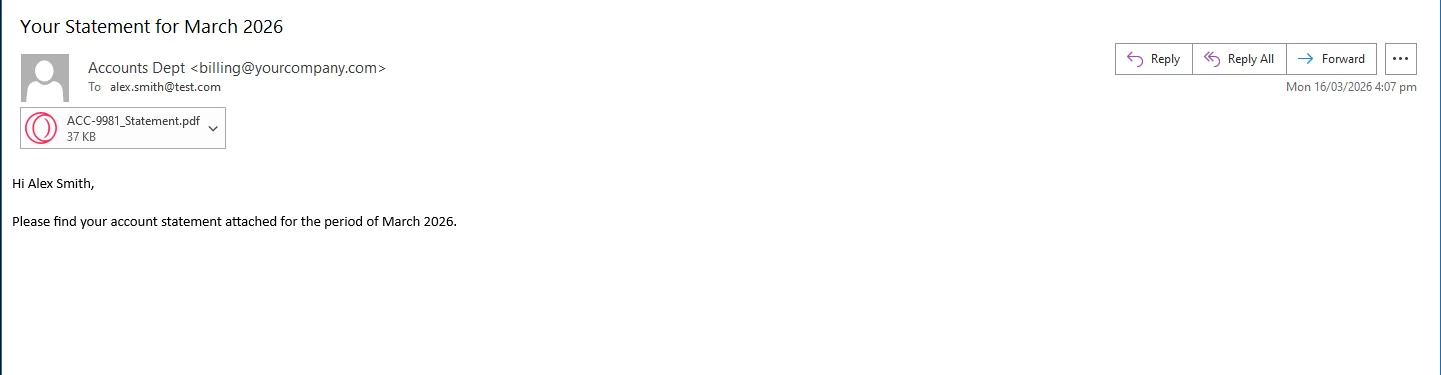 Blob storage keys the file by account number and period, making portal retrieval a straightforward lookup. Customers download current and historical statements without contacting support.
Real-World Benefits
Scale. IronPDF renders each statement in milliseconds. A billing run for 5,000 customers completes in minutes when parallelized across cores, well within a typical overnight billing window.
Brand consistency. Every statement carries the same logo, color scheme, typography, and layout. There is no risk of a mismatched export or a statement that looks different because it was generated by a different team member.
Customer self-service. Statements stored in blob storage are available for portal download immediately after the billing run completes. Customers retrieve current and past periods on their own, support ticket volume for "can you resend my statement" drops accordingly.
Compliance and archiving. IronPDF supports PDF/A output, the ISO-standardized format for long-term document archival. For financial institutions and regulated industries, PDF/A statements satisfy record-keeping requirements without a separate archiving step. Switching it on is a single rendering option.
Template reuse. The HTML and CSS template is maintained by your team alongside the rest of the application code. Updating it takes the same skills used to update any other view - no report designer, no proprietary definition format.
No per-document costs. The rendering runs in-process. There are no API calls to a statement vendor, no metered usage to track, and no line item on your infrastructure bill that scales with customer growth.
Getting Started with IronPDF
Developers can test the library using the fully functional free trial, which includes a trial key available after account creation through the trial form. During evaluation there is no credit card required test, meaning teams can explore the key features without any commitment whatsoever.
IronPDF is part of the broader Iron Suite, often represented by the Iron Suite Enterprise logo and Iron Suite related branding across Iron Software's customer logos. The toolkit helps companies solve document workflow pain points across .NET applications and enterprise systems.
If you want a walkthrough, you can request a live demo, personal demo, or Iron Software product demo from the software product demo team. The sales team book meetings where the software enterprise consult team and Iron Software enterprise consult specialists provide project specific feature recommendations and answer technical questions.
Closing
Monthly statement generation looks like a solved problem until you try to do it at scale with consistent branding and reliable delivery. The tools that were standard a decade ago produce output that no longer fits how products look, and the SaaS alternatives trade one set of constraints for another.
A batch loop powered by IronPDF replaces all of that with an HTML template, a renderer, and a delivery step, all running inside the application your team already owns and operates. IronPDF covers the full lifecycle of PDF work in C# - from rendering and generating documents to saving, streaming, and manipulating them - all from the same library at ironpdf.com. If you're building or redesigning a statement pipeline, start your free 30-day trial and run a complete billing cycle against your own data before committing.













