




更新日 2026年4月23日
Microsoft.Extensions.AIを使用した .NET での LLM 統合の簡素化
AI はソフトウェア開発を変革していますが、.NET への大規模言語モデル (LLM) の統合はこれまで複雑でした。IronPdf.AI を使用して AI 統合をさらに進め、OpenAI を活用した PDF 解析、データ抽出、およびコンテンツの要約を .NET アプリケーションにもたらします。
詳しく読む

C# 6.0で導入された"nameof"演算子は、プログラム要素をその名前で参照する際の問題や、静かに壊れるランタイム動作に対処するために設計されたコンパイル時の構造です。 その主な目的は、ハードコーディングされた文字列の必要性をなくし、より保守しやすくエラーに強いアプローチを提供することです。 この記事では、C#のnameof演算子を探求し、PDFドキュメントをプログラム的に生成するためのIronPDFライブラリも紹介します。
"nameof"演算子の基本構文はシンプルです。 要素を引数として受け取り、その名前を文字列として返します。 次の例を考えてみましょう。
static void Main()
{
    // Declare a string variable
    string myVariable = nameof(myVariable);
    Console.WriteLine(myVariable); // Output: "myVariable"
}Shared Sub Main()
' Declare a string variable
Dim myVariable As String = NameOf(myVariable)
Console.WriteLine(myVariable) ' Output: "myVariable"
End Subこの場合、'nameof(myVariable)'は文字列"myVariable"を生成します。 演算子は、変数、型、メンバーなど、さまざまなコード要素に適用できます。
"nameof"演算子の顕著な利点の一つは、コードの保守性に与えるポジティブな影響です。 名前を文字列としてハードコードする代わりに、開発者は"nameof"を使用することで、名前が変更されたときに参照が自動的に更新されることを保証できます。
static void Main()
{
    // Without using nameof
    Logger.Log("Error: The variable 'myVariable' is null.");
    // Using nameof for improved maintainability
    Logger.Log($"Error: The variable '{nameof(myVariable)}' is null.");
}Shared Sub Main()
' Without using nameof
Logger.Log("Error: The variable 'myVariable' is null.")
' Using nameof for improved maintainability
Logger.Log($"Error: The variable '{NameOf(myVariable)}' is null.")
End Sub"nameof"は、名前の誤字や不一致のリスクを排除することによって、コンパイル時の安全性を向上させます。 変数名のスペルミスや変更があれば、コンパイル時エラーが発生し、ランタイム問題の可能性を減らします。
static void Main()
{
    // Compile-time error if 'myVariable' is misspelled
    string myVariable;
    string variableName = nameof(myVariable);

    Console.WriteLine(variableName);
}Shared Sub Main()
' Compile-time error if 'myVariable' is misspelled
Dim myVariable As String
Dim variableName As String = NameOf(myVariable)
Console.WriteLine(variableName)
End Sub"nameof"演算子はリファクタリングツールとシームレスに統合され、変数、型、またはメンバーの名前を変更する際の煩わしさを排除します。 すべての"nameof"参照は自動的に更新されます。
static void Main()
{
    // Before renaming local variable 'myVariable' to 'newVariable'
    string myVariableNameChange = nameof(myVariableNameChange);
    // After renaming local variable 'myVariable' to 'newVariable'
    string newVariableNameChange = nameof(newVariableNameChange);

    Console.WriteLine(newVariableNameChange);
}Shared Sub Main()
' Before renaming local variable 'myVariable' to 'newVariable'
Dim myVariableNameChange As String = NameOf(myVariableNameChange)
' After renaming local variable 'myVariable' to 'newVariable'
Dim newVariableNameChange As String = NameOf(newVariableNameChange)
Console.WriteLine(newVariableNameChange)
End Subデバッグ中に、"nameof"はコードをより情報豊かで読みやすいものにします。 ログステートメント、例外メッセージ、その他のデバッグ出力は簡潔かつ文脈に関連するものになります。
static void Main()
{
    // Without using nameof
    // throw new ArgumentNullException("myVariable", "The variable cannot be null.");
    // Using nameof for improved debugging
    throw new ArgumentNullException(nameof(myVariable), "The variable cannot be null.");
}Shared Sub Main()
' Without using nameof
' throw new ArgumentNullException("myVariable", "The variable cannot be null.");
' Using nameof for improved debugging
Throw New ArgumentNullException(NameOf(myVariable), "The variable cannot be null.")
End Subここでthrow new ArgumentNullExceptionは変数が宣言されていない場合に例外をスローします。
リフレクションを使用する際、"nameof"演算子は、ハードコーディングされた文字列を使用せずに型、プロパティ、またはメソッドの名前を取得するのを簡素化します。
Type type = typeof(MyClass);
string typeName = nameof(MyClass);Dim type As Type = GetType([MyClass])
Dim typeName As String = NameOf([MyClass])例のクラスMyClassはハードコードされた文字列である可能性がありますが、クラス名を動的に取得するためにリフレクションを使用できます。 変数nameofキーワードを使用してクラスインスタンスの名前を取得します。 それらは同じ名前ではありません。
ロギングステートメントや例外メッセージで"nameof"は非常に価値があり、それらをより読みやすくエラーを起こしにくいものにします。
Logger.Log($"Error: The property '{nameof(MyClass.MyProperty)}' is out of range.");Logger.Log($"Error: The property '{NameOf([MyClass].MyProperty)}' is out of range.")この例では、Personを表す簡単なクラスを作成し、ロギングとエラーメッセージの改善のためにnameof演算子を使用します。
using System;

class Person
{
    public string FirstName { get; set; }
    public string LastName { get; set; }

    // Method that displays the full name of the person
    public void DisplayFullName()
    {
        if (string.IsNullOrEmpty(FirstName) || string.IsNullOrEmpty(LastName))
        {
            LogError($"Invalid name: {nameof(FirstName)} or {nameof(LastName)} is missing.");
        }
        else
        {
            Console.WriteLine($"Full Name: {FirstName} {LastName}");
        }
    }

    // Custom error logging method that highlights errors
    private void LogError(string errorMessage)
    {
        Console.ForegroundColor = ConsoleColor.Red;
        Console.WriteLine($"Error: {errorMessage}");
        Console.ResetColor();
    }
}

class Program
{
    static void Main()
    {
        // Create an instance of the Person class
        Person person = new Person();

        // Attempt to display the full name without setting the properties
        person.DisplayFullName();

        // Set the properties and display the full name again
        person.FirstName = "John";
        person.LastName = "Doe";
        person.DisplayFullName();
    }
}Imports System
Friend Class Person
Public Property FirstName() As String
Public Property LastName() As String
' Method that displays the full name of the person
Public Sub DisplayFullName()
If String.IsNullOrEmpty(FirstName) OrElse String.IsNullOrEmpty(LastName) Then
LogError($"Invalid name: {NameOf(FirstName)} or {NameOf(LastName)} is missing.")
Else
Console.WriteLine($"Full Name: {FirstName} {LastName}")
End If
End Sub
' Custom error logging method that highlights errors
Private Sub LogError(ByVal errorMessage As String)
Console.ForegroundColor = ConsoleColor.Red
Console.WriteLine($"Error: {errorMessage}")
Console.ResetColor()
End Sub
End Class
Friend Class Program
Shared Sub Main()
' Create an instance of the Person class
Dim person As New Person()
' Attempt to display the full name without setting the properties
person.DisplayFullName()
' Set the properties and display the full name again
person.FirstName = "John"
person.LastName = "Doe"
person.DisplayFullName()
End Sub
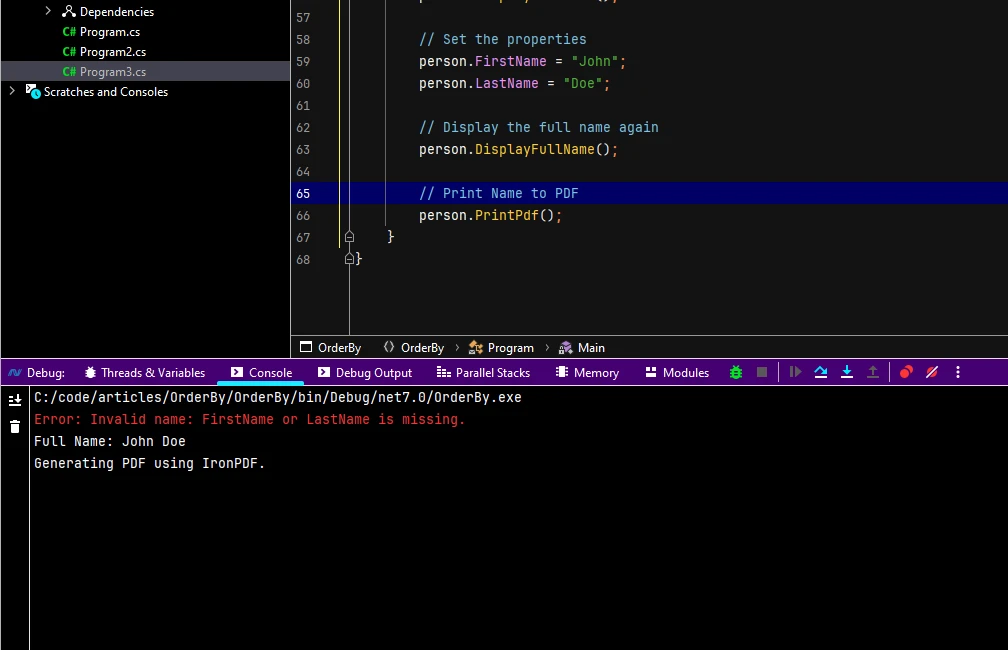
End ClassDisplayFullNameメソッドがあります。nameof(LastName)を使用します。 これにより、コードの読みやすさが改善され、プロパティ名が変更された場合、プロパティ定義と対応するエラーメッセージがコンパイル時に自動的に更新されることが保証されます。nameofを利用して、エラーメッセージにプロパティ名を動的に含めます。Personクラスのインスタンスを作成し、プロパティを設定せずにフルネームを表示しようとし、その後プロパティを設定して再度フルネームを表示します。このプログラムを実行すると、エラーメッセージがプロパティ名を動的に取り入れてより文脈的になり、どのプロパティが不足しているかを特定しやすくなります。
この例は、プロパティ名が変更された場合に参照を自動的に更新し、開発中により情報に富んだ詳細でエラーメッセージを改善することでnameof演算子がコードの保守性をどのように向上させるかを示しています。
IronPDF for C#.NETは、Iron SoftwareからのPDFライブラリで、PDF生成およびリーダーとして使用できます。 ここでは基本機能を紹介します。 詳細については、ドキュメントを参照してください。
IronPDFの際立った特徴は、そのHTML to PDF変換機能であり、レイアウトやスタイルを保持します。 WebコンテンツからPDFを生成し、レポート、請求書、ドキュメントに最適です。 HTMLファイル、URL、およびHTML文字列をシームレスにPDFに変換できます。
using IronPdf;

class Program
{
    static void Main(string[] args)
    {
        var renderer = new ChromePdfRenderer();

        // 1. Convert HTML String to PDF
        var htmlContent = "<h1>Hello, IronPDF!</h1><p>This is a PDF from an HTML string.</p>";
        var pdfFromHtmlString = renderer.RenderHtmlAsPdf(htmlContent);
        pdfFromHtmlString.SaveAs("HTMLStringToPDF.pdf");

        // 2. Convert HTML File to PDF
        var htmlFilePath = "path_to_your_html_file.html"; // Specify the path to your HTML file
        var pdfFromHtmlFile = renderer.RenderHtmlFileAsPdf(htmlFilePath);
        pdfFromHtmlFile.SaveAs("HTMLFileToPDF.pdf");

        // 3. Convert URL to PDF
        var url = "http://ironpdf.com"; // Specify the URL
        var pdfFromUrl = renderer.RenderUrlAsPdf(url);
        pdfFromUrl.SaveAs("URLToPDF.pdf");
    }
}Imports IronPdf
Friend Class Program
Shared Sub Main(ByVal args() As String)
Dim renderer = New ChromePdfRenderer()
' 1. Convert HTML String to PDF
Dim htmlContent = "<h1>Hello, IronPDF!</h1><p>This is a PDF from an HTML string.</p>"
Dim pdfFromHtmlString = renderer.RenderHtmlAsPdf(htmlContent)
pdfFromHtmlString.SaveAs("HTMLStringToPDF.pdf")
' 2. Convert HTML File to PDF
Dim htmlFilePath = "path_to_your_html_file.html" ' Specify the path to your HTML file
Dim pdfFromHtmlFile = renderer.RenderHtmlFileAsPdf(htmlFilePath)
pdfFromHtmlFile.SaveAs("HTMLFileToPDF.pdf")
' 3. Convert URL to PDF
Dim url = "http://ironpdf.com" ' Specify the URL
Dim pdfFromUrl = renderer.RenderUrlAsPdf(url)
pdfFromUrl.SaveAs("URLToPDF.pdf")
End Sub
End ClassIronPDFは、NuGetパッケージマネージャーコンソールまたはVisual Studioパッケージマネージャーを使用してインストールできます。

namespace OrderBy;

class Person
{
    public string FirstName { get; set; }
    public string LastName { get; set; }

    public void DisplayFullName()
    {
        if (string.IsNullOrEmpty(FirstName) || string.IsNullOrEmpty(LastName))
        {
            LogError($"Invalid name: {nameof(FirstName)} or {nameof(LastName)} is missing.");
        }
        else
        {
            Console.WriteLine($"Full Name: {FirstName} {LastName}");
        }
    }

    public void PrintPdf()
    {
        Console.WriteLine("Generating PDF using IronPDF.");
        string content = $@"<!DOCTYPE html>
<html>
<body>
<h1>Hello, {FirstName}!</h1>
<p>First Name: {FirstName}</p>
<p>Last Name: {LastName}</p>
</body>
</html>";

        // Create a new PDF document
        var pdfDocument = new ChromePdfRenderer();
        pdfDocument.RenderHtmlAsPdf(content).SaveAs("person.pdf");
    }

    private void LogError(string errorMessage)
    {
        Console.ForegroundColor = ConsoleColor.Red;
        Console.WriteLine($"Error: {errorMessage}");
        Console.ResetColor();
    }
}

class Program
{
    static void Main()
    {
        // Create an  instance of the Person class
        Person person = new Person();

        // Attempt to display the full name
        person.DisplayFullName();

        // Set the properties
        person.FirstName = "John";
        person.LastName = "Doe";

        // Display the full name again
        person.DisplayFullName();

        // Generate a PDF
        person.PrintPdf();
    }
}Namespace OrderBy
Friend Class Person
Public Property FirstName() As String
Public Property LastName() As String
Public Sub DisplayFullName()
If String.IsNullOrEmpty(FirstName) OrElse String.IsNullOrEmpty(LastName) Then
LogError($"Invalid name: {NameOf(FirstName)} or {NameOf(LastName)} is missing.")
Else
Console.WriteLine($"Full Name: {FirstName} {LastName}")
End If
End Sub
Public Sub PrintPdf()
Console.WriteLine("Generating PDF using IronPDF.")
Dim content As String = $"<!DOCTYPE html>
<html>
<body>
<h1>Hello, {FirstName}!</h1>
<p>First Name: {FirstName}</p>
<p>Last Name: {LastName}</p>
</body>
</html>"
ignore ignore ignore ignore ignore ignore ignore var pdfDocument = New ChromePdfRenderer()
pdfDocument.RenderHtmlAsPdf(content).SaveAs("person.pdf")
End Sub
Private Sub LogError(ByVal errorMessage As String)
Console.ForegroundColor = ConsoleColor.Red
Console.WriteLine($"Error: {errorMessage}")
Console.ResetColor()
End Sub
End Class
Friend Class Program
Shared Sub Main()
' Create an instance of the Person class
Dim person As New Person()
' Attempt to display the full name
person.DisplayFullName()
' Set the properties
person.FirstName = "John"
person.LastName = "Doe"
' Display the full name again
person.DisplayFullName()
' Generate a PDF
person.PrintPdf()
End Sub
End Class
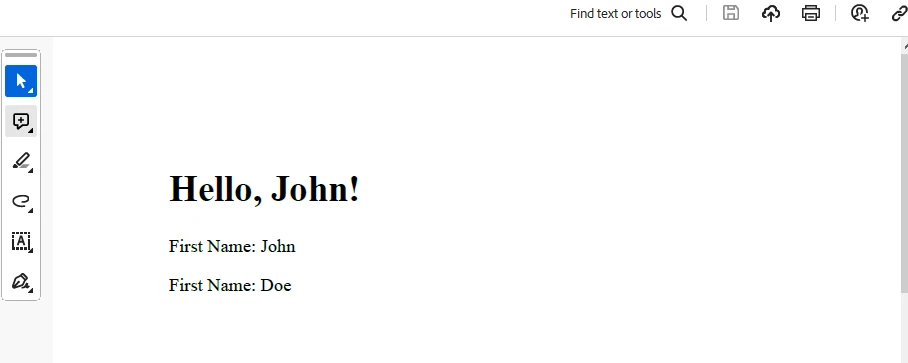
End NamespaceここでIronPDFを使用して、PrintPdfメソッドで確認できます。
出力
PDF生成
ライセンスについては、トライアルライセンス情報をチェックしてください。 このキーはappsettings.jsonに配置する必要があります。
"IronPdf.LicenseKey": "your license key"トライアルライセンスを取得するには、メールアドレスを提供してください。
C#の"nameof"演算子は、よりクリーンで安全で保守しやすいコードを求める開発者にとって不可欠な存在になっています。 コードの可読性の向上に加え、コンパイル時の安全性とシームレスなリファクタリングサポートを兼ね備えているため、C#開発者のツールキットにおいて欠かせないツールとなっています。 開発コミュニティが"nameof"演算子を活用し続ける中で、C#プログラミングの未来を形成する上で重要な役割を果たすでしょう。 IronPDFは、PDFを迅速かつ簡単に生成するために使用できる便利なNuGetパッケージです。

ジェイコブ・メラーはIron Softwareの最高技術責任者(CTO)であり、C# PDFテクノロジーを開拓する先見的なエンジニアです。Iron Softwareのコアコードベースを支えるオリジナル開発者として、彼は創業以来、会社の製品アーキテクチャを形成し、CEOのCameron Rimingtonとともに、会社をNASA、Tesla、および世界的な政府機関にサービスを提供する50人以上の会社に変えました。1999年にロンドンで最初のソフトウェアビジネスを開業し、2005年に最初 for .NETコンポーネントを作成した後、Microsoftのエコシステム全体で複雑な問題を解決することを専門としました。



IronPDF はIRONSUITEの一部です
オフィス文書向けの.NET API製品10個

PDFがHTMLのように見える必要があるとき、迅速に。












