




已更新 2026年4月23日
在 .NET 中用 Microsoft.Extensions.AI 簡化 LLM 整合
AI 正在改變軟體開發,但將大型語言模型 (LLM) 整合到 .NET 中一直很複雜。利用 IronPdf.AI 將 AI 整合推向更遠,為 .NET 應用程式帶來由 OpenAI 驅動的 PDF 解析、資料擷取和內容總結。
閱讀更多

C# 6.0 中引入的 'nameof' 運算子是一個編譯時期的結構,用於解決透過其名稱參考程式元素時,避免執行階段行為靜默中斷的挑戰。 其主要目的是消除硬編碼字串的需要,提供一種更易於維護和錯誤抵抗的方法。 在本文中,我們將探索 C# 中的 nameof 運算子,並介紹 NuGet上的IronPDF程式庫以程式化方式生成PDF文件。
'nameof' 運算子的基本語法很簡單。 它將元素作為參數並返回其名稱作為字串。 請考慮以下範例:
static void Main()
{
    // Declare a string variable
    string myVariable = nameof(myVariable);
    Console.WriteLine(myVariable); // Output: "myVariable"
}Shared Sub Main()
' Declare a string variable
Dim myVariable As String = NameOf(myVariable)
Console.WriteLine(myVariable) ' Output: "myVariable"
End Sub在這個例子中,'nameof(myVariable)' 會產生字串 "myVariable"。 此運算子可以應用於各種程式碼元素,包括變數、型別、成員等。
'nameof' 運算子的其中一個顯著優勢是對程式碼可維護性的正面影響。 開發者可以使用 'nameof' 而非以字串形式硬編碼名稱,確保參考在名稱變更時自動更新。
static void Main()
{
    // Without using nameof
    Logger.Log("Error: The variable 'myVariable' is null.");
    // Using nameof for improved maintainability
    Logger.Log($"Error: The variable '{nameof(myVariable)}' is null.");
}Shared Sub Main()
' Without using nameof
Logger.Log("Error: The variable 'myVariable' is null.")
' Using nameof for improved maintainability
Logger.Log($"Error: The variable '{NameOf(myVariable)}' is null.")
End Sub'nameof' 運算子可透過消除名稱中的拼寫錯誤或不一致性來增強編譯時的安全性。 任何變數名稱的拼寫錯誤或修改都會觸發編譯時錯誤,減少執行階段的問題風險。
static void Main()
{
    // Compile-time error if 'myVariable' is misspelled
    string myVariable;
    string variableName = nameof(myVariable);

    Console.WriteLine(variableName);
}Shared Sub Main()
' Compile-time error if 'myVariable' is misspelled
Dim myVariable As String
Dim variableName As String = NameOf(myVariable)
Console.WriteLine(variableName)
End Sub'nameof' 運算子與重構工具無縫整合,在重命名變數、型別或成員時提供無憂體驗。 所有的 'nameof' 參考會自動更新。
static void Main()
{
    // Before renaming local variable 'myVariable' to 'newVariable'
    string myVariableNameChange = nameof(myVariableNameChange);
    // After renaming local variable 'myVariable' to 'newVariable'
    string newVariableNameChange = nameof(newVariableNameChange);

    Console.WriteLine(newVariableNameChange);
}Shared Sub Main()
' Before renaming local variable 'myVariable' to 'newVariable'
Dim myVariableNameChange As String = NameOf(myVariableNameChange)
' After renaming local variable 'myVariable' to 'newVariable'
Dim newVariableNameChange As String = NameOf(newVariableNameChange)
Console.WriteLine(newVariableNameChange)
End Sub在除錯期間,'nameof' 使程式碼更具資訊性和可讀性。 日誌語句、例外訊息和其他除錯輸出變得更簡潔且具上下文關聯性。
static void Main()
{
    // Without using nameof
    // throw new ArgumentNullException("myVariable", "The variable cannot be null.");
    // Using nameof for improved debugging
    throw new ArgumentNullException(nameof(myVariable), "The variable cannot be null.");
}Shared Sub Main()
' Without using nameof
' throw new ArgumentNullException("myVariable", "The variable cannot be null.");
' Using nameof for improved debugging
Throw New ArgumentNullException(NameOf(myVariable), "The variable cannot be null.")
End Sub這裡throw new ArgumentNullException 如果變數未宣告,則會丟擲一個例外。
在使用反射時,'nameof' 運算子簡化了獲取型別、屬性或方法名稱的過程,而無需使用硬編碼字串。
Type type = typeof(MyClass);
string typeName = nameof(MyClass);Dim type As Type = GetType([MyClass])
Dim typeName As String = NameOf([MyClass])範例類MyClass 可以是硬編碼的字串,但我們可以使用反射來動態獲取類名。 變數type 有類名,然後使用nameof 關鍵字來獲取類實例的名稱。 它們不是同一個名稱。
'nameof' 在日誌語句和異常消息中證明是無價的,使它們更可讀且不易出錯。
Logger.Log($"Error: The property '{nameof(MyClass.MyProperty)}' is out of range.");Logger.Log($"Error: The property '{NameOf([MyClass].MyProperty)}' is out of range.")在這個範例中,我們將建立一個表示人的簡單類,並使用 nameof 運算子來改善日誌和錯誤訊息。
using System;

class Person
{
    public string FirstName { get; set; }
    public string LastName { get; set; }

    // Method that displays the full name of the person
    public void DisplayFullName()
    {
        if (string.IsNullOrEmpty(FirstName) || string.IsNullOrEmpty(LastName))
        {
            LogError($"Invalid name: {nameof(FirstName)} or {nameof(LastName)} is missing.");
        }
        else
        {
            Console.WriteLine($"Full Name: {FirstName} {LastName}");
        }
    }

    // Custom error logging method that highlights errors
    private void LogError(string errorMessage)
    {
        Console.ForegroundColor = ConsoleColor.Red;
        Console.WriteLine($"Error: {errorMessage}");
        Console.ResetColor();
    }
}

class Program
{
    static void Main()
    {
        // Create an instance of the Person class
        Person person = new Person();

        // Attempt to display the full name without setting the properties
        person.DisplayFullName();

        // Set the properties and display the full name again
        person.FirstName = "John";
        person.LastName = "Doe";
        person.DisplayFullName();
    }
}Imports System
Friend Class Person
Public Property FirstName() As String
Public Property LastName() As String
' Method that displays the full name of the person
Public Sub DisplayFullName()
If String.IsNullOrEmpty(FirstName) OrElse String.IsNullOrEmpty(LastName) Then
LogError($"Invalid name: {NameOf(FirstName)} or {NameOf(LastName)} is missing.")
Else
Console.WriteLine($"Full Name: {FirstName} {LastName}")
End If
End Sub
' Custom error logging method that highlights errors
Private Sub LogError(ByVal errorMessage As String)
Console.ForegroundColor = ConsoleColor.Red
Console.WriteLine($"Error: {errorMessage}")
Console.ResetColor()
End Sub
End Class
Friend Class Program
Shared Sub Main()
' Create an instance of the Person class
Dim person As New Person()
' Attempt to display the full name without setting the properties
person.DisplayFullName()
' Set the properties and display the full name again
person.FirstName = "John"
person.LastName = "Doe"
person.DisplayFullName()
End Sub
End ClassPerson 類,具有FirstName 和LastName 屬性及方法DisplayFullName,在顯示全名之前檢查兩個屬性是否已設置。nameof(FirstName) 和nameof(LastName) 作為字串文字來引用屬性名稱。 這提高了程式碼可讀性並確保如果屬性名稱更改,則屬性定義和相應的錯誤訊息會在編譯期間自動更新。LogError 利用nameof 在錯誤消息中動態包含屬性名稱。Main 方法中,我們建立一個Person 類的實例,試圖在未設置屬性時顯示全名,然後設置屬性並再次顯示全名。當您運行此程式時,您會看到錯誤消息動態地包含屬性名稱,提供更多上下文,使其更容易識別缺失的屬性。
此範例演示了nameof 運算子如何通過當屬性名稱變更時自動更新引用來改進程式碼的可維護性,並在開發過程中透過更具資訊的細節增強錯誤消息。
C#.NET的IronPDF 是來自Iron Software的PDF程式庫,可用於生成和讀取PDF。 這裡我們介紹基本功能。 欲了解更多資訊,請參考檔案。
IronPDF 的顯著功能是其HTML 到 PDF 的轉換能力,保留了您的佈局和樣式。 它從網頁內容生成PDF,適合用於報告、發票和文件。 HTML文件、URL和HTML字串可以無縫轉換為PDF。
using IronPdf;

class Program
{
    static void Main(string[] args)
    {
        var renderer = new ChromePdfRenderer();

        // 1. Convert HTML String to PDF
        var htmlContent = "<h1>Hello, IronPDF!</h1><p>This is a PDF from an HTML string.</p>";
        var pdfFromHtmlString = renderer.RenderHtmlAsPdf(htmlContent);
        pdfFromHtmlString.SaveAs("HTMLStringToPDF.pdf");

        // 2. Convert HTML File to PDF
        var htmlFilePath = "path_to_your_html_file.html"; // Specify the path to your HTML file
        var pdfFromHtmlFile = renderer.RenderHtmlFileAsPdf(htmlFilePath);
        pdfFromHtmlFile.SaveAs("HTMLFileToPDF.pdf");

        // 3. Convert URL to PDF
        var url = "http://ironpdf.com"; // Specify the URL
        var pdfFromUrl = renderer.RenderUrlAsPdf(url);
        pdfFromUrl.SaveAs("URLToPDF.pdf");
    }
}Imports IronPdf
Friend Class Program
Shared Sub Main(ByVal args() As String)
Dim renderer = New ChromePdfRenderer()
' 1. Convert HTML String to PDF
Dim htmlContent = "<h1>Hello, IronPDF!</h1><p>This is a PDF from an HTML string.</p>"
Dim pdfFromHtmlString = renderer.RenderHtmlAsPdf(htmlContent)
pdfFromHtmlString.SaveAs("HTMLStringToPDF.pdf")
' 2. Convert HTML File to PDF
Dim htmlFilePath = "path_to_your_html_file.html" ' Specify the path to your HTML file
Dim pdfFromHtmlFile = renderer.RenderHtmlFileAsPdf(htmlFilePath)
pdfFromHtmlFile.SaveAs("HTMLFileToPDF.pdf")
' 3. Convert URL to PDF
Dim url = "http://ironpdf.com" ' Specify the URL
Dim pdfFromUrl = renderer.RenderUrlAsPdf(url)
pdfFromUrl.SaveAs("URLToPDF.pdf")
End Sub
End Class可以使用NuGet套件管理控制台或Visual Studio套件管理器安裝IronPDF。

namespace OrderBy;

class Person
{
    public string FirstName { get; set; }
    public string LastName { get; set; }

    public void DisplayFullName()
    {
        if (string.IsNullOrEmpty(FirstName) || string.IsNullOrEmpty(LastName))
        {
            LogError($"Invalid name: {nameof(FirstName)} or {nameof(LastName)} is missing.");
        }
        else
        {
            Console.WriteLine($"Full Name: {FirstName} {LastName}");
        }
    }

    public void PrintPdf()
    {
        Console.WriteLine("Generating PDF using IronPDF.");
        string content = $@"<!DOCTYPE html>
<html>
<body>
<h1>Hello, {FirstName}!</h1>
<p>First Name: {FirstName}</p>
<p>Last Name: {LastName}</p>
</body>
</html>";

        // Create a new PDF document
        var pdfDocument = new ChromePdfRenderer();
        pdfDocument.RenderHtmlAsPdf(content).SaveAs("person.pdf");
    }

    private void LogError(string errorMessage)
    {
        Console.ForegroundColor = ConsoleColor.Red;
        Console.WriteLine($"Error: {errorMessage}");
        Console.ResetColor();
    }
}

class Program
{
    static void Main()
    {
        // Create an  instance of the Person class
        Person person = new Person();

        // Attempt to display the full name
        person.DisplayFullName();

        // Set the properties
        person.FirstName = "John";
        person.LastName = "Doe";

        // Display the full name again
        person.DisplayFullName();

        // Generate a PDF
        person.PrintPdf();
    }
}Namespace OrderBy
Friend Class Person
Public Property FirstName() As String
Public Property LastName() As String
Public Sub DisplayFullName()
If String.IsNullOrEmpty(FirstName) OrElse String.IsNullOrEmpty(LastName) Then
LogError($"Invalid name: {NameOf(FirstName)} or {NameOf(LastName)} is missing.")
Else
Console.WriteLine($"Full Name: {FirstName} {LastName}")
End If
End Sub
Public Sub PrintPdf()
Console.WriteLine("Generating PDF using IronPDF.")
Dim content As String = $"<!DOCTYPE html>
<html>
<body>
<h1>Hello, {FirstName}!</h1>
<p>First Name: {FirstName}</p>
<p>Last Name: {LastName}</p>
</body>
</html>"
ignore ignore ignore ignore ignore ignore ignore var pdfDocument = New ChromePdfRenderer()
pdfDocument.RenderHtmlAsPdf(content).SaveAs("person.pdf")
End Sub
Private Sub LogError(ByVal errorMessage As String)
Console.ForegroundColor = ConsoleColor.Red
Console.WriteLine($"Error: {errorMessage}")
Console.ResetColor()
End Sub
End Class
Friend Class Program
Shared Sub Main()
' Create an instance of the Person class
Dim person As New Person()
' Attempt to display the full name
person.DisplayFullName()
' Set the properties
person.FirstName = "John"
person.LastName = "Doe"
' Display the full name again
person.DisplayFullName()
' Generate a PDF
person.PrintPdf()
End Sub
End Class
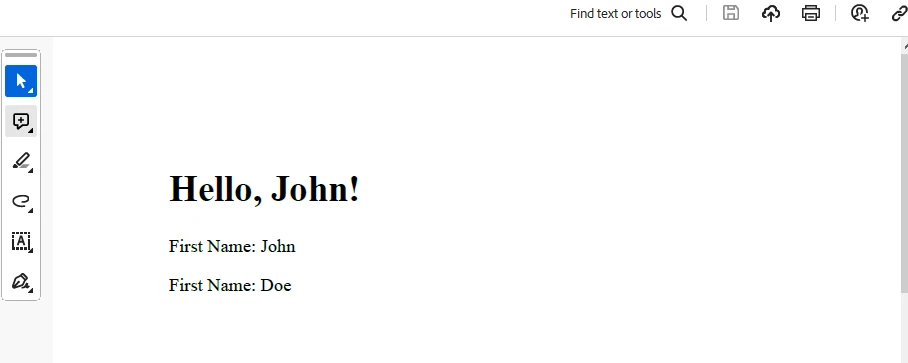
End Namespace在這裡 IronPDF 用於使用本地變數 content 和 pdfDocument 生成 PDF,這可以在 PrintPdf 方法中看到。
輸出
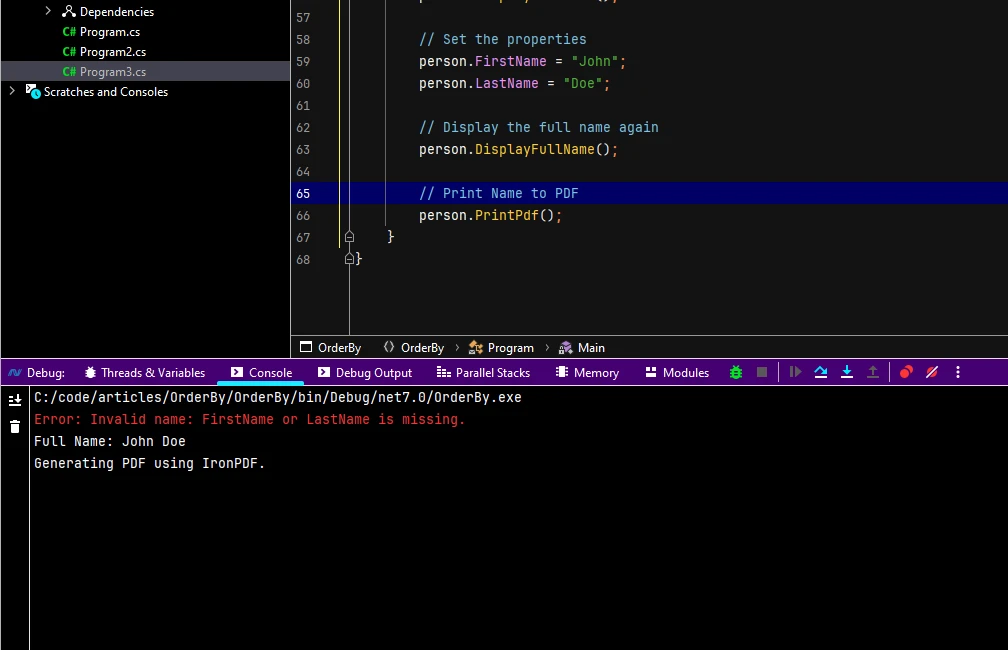
PDF 生成
欲了解授權,請查閱試用授權資訊。 此金鑰需要放置在appsettings.json。
"IronPdf.LicenseKey": "your license key"提供您的電子郵件以獲取試用許可。
C# 的 'nameof' 運算子已成為開發者尋求更乾淨、更安全、更易於維護的程式碼的主要工具。 它增強程式碼可讀性的能力,加上編譯時安全性和無縫的重構支持,使其成為 C# 開發者工具包中的不可或缺的工具。 隨著開發社群不斷接受和利用 'nameof' 運算子,它將在塑造 C# 程式設計的未來中發揮關鍵作用。 IronPDF 是一個方便的 NuGet 套件,可用於快速、輕鬆地生成 PDF。

Jacob Mellor是Iron Software的首席技術官,一位在C# PDF技術上開創先河的遠見工程師。作為Iron Software核心程式碼庫的原開發者,他從創立以來就一直在塑造公司的產品架構,與首席執行官Cameron Rimington一起將公司轉變為服務於NASA、特斯拉和全球政府公司的50多名人員的公司。



IronPDF 是 IRONSUITE 的一部分
10 款適用於辦公室文件的 .NET API 產品

當您需要您的PDF看起來像HTML一樣快速。












