


C# 運算子 (對開發者如何運作)

在 C# 中,運算符號在對變數和數值執行各種操作時扮演重要角色。 無論您是初學者或經驗豐富的開發人員,對 C# 運算符號有扎實的了解是撰寫有效率且具表現力程式碼的基礎。 在本綜合指南中,我們將探討 C# 中不同類型的運算符號,以及如何在您的程式中使用這些運算符號。 我們還將瞭解如何在 IronPDF 中使用這些 C# 運算符。
1. C# 運算子類型
1.1.算術運算符號
C# 中的算術運算符號用於基本的數學運算。 這些運算包括加法(+)、減法(-)、乘法(*)、除法(/)和取模(%)。 對於算術運算元,運算元先例類似於數學運算元先例常用的 BEDMAS 或 PEDMAS。
讓我們深入了解一個範例,以瞭解這些運算符號如何運作:
// Arithmetic Operators
int a = 10;
int b = 3;
int sum = a + b; // Adds the values of a and b
int difference = a - b; // Subtracts b from a
int product = a * b; // Multiplies a by b
int quotient = a / b; // Divides a by b (integer division)
int remainder = a % b; // Modulus operation; gives the remainder of a divided by b

Console.WriteLine("Arithmetic Operators:");
Console.WriteLine($"Sum: {sum}, Difference: {difference}, Product: {product}, Quotient: {quotient}, Remainder: {remainder}");
Console.WriteLine();
// Arithmetic Operators
int a = 10;
int b = 3;
int sum = a + b; // Adds the values of a and b
int difference = a - b; // Subtracts b from a
int product = a * b; // Multiplies a by b
int quotient = a / b; // Divides a by b (integer division)
int remainder = a % b; // Modulus operation; gives the remainder of a divided by b
Console.WriteLine("Arithmetic Operators:");
Console.WriteLine($"Sum: {sum}, Difference: {difference}, Product: {product}, Quotient: {quotient}, Remainder: {remainder}");
Console.WriteLine();' Arithmetic Operators
Dim a As Integer = 10
Dim b As Integer = 3
Dim sum As Integer = a + b ' Adds the values of a and b
Dim difference As Integer = a - b ' Subtracts b from a
Dim product As Integer = a * b ' Multiplies a by b
Dim quotient As Integer = a \ b ' Divides a by b (integer division)
Dim remainder As Integer = a Mod b ' Modulus operation; gives the remainder of a divided by b
Console.WriteLine("Arithmetic Operators:")
Console.WriteLine($"Sum: {sum}, Difference: {difference}, Product: {product}, Quotient: {quotient}, Remainder: {remainder}")
Console.WriteLine()1.2.關係運算符
關係運算子用於比較數值並判斷它們之間的關係。 C# 中常見的關係運算子包括大於 (>)、小於 (<)、等於 (==)、不等於 (!=)、大於或等於 (>=),以及小於或等於 (<=)。
// Relational Operators
bool isEqual = (a == b); // Checks if a is equal to b
bool notEqual = (a != b); // Checks if a is not equal to b
bool greaterThan = (a > b); // Checks if a is greater than b
bool lessThan = (a < b); // Checks if a is less than b
bool greaterOrEqual = (a >= b); // Checks if a is greater than or equal to b
bool lessOrEqual = (a <= b); // Checks if a is less than or equal to b

Console.WriteLine("Relational Operators:");
Console.WriteLine($"Equal: {isEqual}, Not Equal: {notEqual}, Greater Than: {greaterThan}, Less Than: {lessThan}, Greater or Equal: {greaterOrEqual}, Less or Equal: {lessOrEqual}");
Console.WriteLine();
// Relational Operators
bool isEqual = (a == b); // Checks if a is equal to b
bool notEqual = (a != b); // Checks if a is not equal to b
bool greaterThan = (a > b); // Checks if a is greater than b
bool lessThan = (a < b); // Checks if a is less than b
bool greaterOrEqual = (a >= b); // Checks if a is greater than or equal to b
bool lessOrEqual = (a <= b); // Checks if a is less than or equal to b
Console.WriteLine("Relational Operators:");
Console.WriteLine($"Equal: {isEqual}, Not Equal: {notEqual}, Greater Than: {greaterThan}, Less Than: {lessThan}, Greater or Equal: {greaterOrEqual}, Less or Equal: {lessOrEqual}");
Console.WriteLine();' Relational Operators
Dim isEqual As Boolean = (a = b) ' Checks if a is equal to b
Dim notEqual As Boolean = (a <> b) ' Checks if a is not equal to b
Dim greaterThan As Boolean = (a > b) ' Checks if a is greater than b
Dim lessThan As Boolean = (a < b) ' Checks if a is less than b
Dim greaterOrEqual As Boolean = (a >= b) ' Checks if a is greater than or equal to b
Dim lessOrEqual As Boolean = (a <= b) ' Checks if a is less than or equal to b
Console.WriteLine("Relational Operators:")
Console.WriteLine($"Equal: {isEqual}, Not Equal: {notEqual}, Greater Than: {greaterThan}, Less Than: {lessThan}, Greater or Equal: {greaterOrEqual}, Less or Equal: {lessOrEqual}")
Console.WriteLine()1.3.邏輯運算符號
邏輯運算符號用於對布林值執行邏輯操作。 C# 中常見的邏輯運算有 AND (&&) 和 OR (||), and NOT (!)。 AND 和 OR 是二元運算符號,有兩個操作數,然而 NOT 是一元運算符號,表示它只影響一個操作數。
// Logical Operators
bool condition1 = true;
bool condition2 = false;
bool resultAnd = condition1 && condition2; // true if both conditions are true
bool resultOr = condition1 || condition2; // true if either condition is true
bool resultNot = !condition1; // inverts the Boolean value of condition1

Console.WriteLine("Logical Operators:");
Console.WriteLine($"AND: {resultAnd}, OR: {resultOr}, NOT: {resultNot}");
Console.WriteLine();
// Logical Operators
bool condition1 = true;
bool condition2 = false;
bool resultAnd = condition1 && condition2; // true if both conditions are true
bool resultOr = condition1 || condition2; // true if either condition is true
bool resultNot = !condition1; // inverts the Boolean value of condition1
Console.WriteLine("Logical Operators:");
Console.WriteLine($"AND: {resultAnd}, OR: {resultOr}, NOT: {resultNot}");
Console.WriteLine();' Logical Operators
Dim condition1 As Boolean = True
Dim condition2 As Boolean = False
Dim resultAnd As Boolean = condition1 AndAlso condition2 ' true if both conditions are true
Dim resultOr As Boolean = condition1 OrElse condition2 ' true if either condition is true
Dim resultNot As Boolean = Not condition1 ' inverts the Boolean value of condition1
Console.WriteLine("Logical Operators:")
Console.WriteLine($"AND: {resultAnd}, OR: {resultOr}, NOT: {resultNot}")
Console.WriteLine()1.4.指定操作符
指定運算符號用於為變數指定值。 簡單賦值運算子是 =。 但是,C# 也提供了複合賦值運算符,例如 +=、-=、*=、/= 和 %=。
// Assignment Operators
int x = 5; // Assigns 5 to x
int y = 2; // Assigns 2 to y
x += y; // Increases x by the value of y
y *= 3; // Multiplies y by 3

Console.WriteLine("Assignment Operators:");
Console.WriteLine($"x after +=: {x}, y after *=: {y}");
Console.WriteLine();
// Assignment Operators
int x = 5; // Assigns 5 to x
int y = 2; // Assigns 2 to y
x += y; // Increases x by the value of y
y *= 3; // Multiplies y by 3
Console.WriteLine("Assignment Operators:");
Console.WriteLine($"x after +=: {x}, y after *=: {y}");
Console.WriteLine();' Assignment Operators
Dim x As Integer = 5 ' Assigns 5 to x
Dim y As Integer = 2 ' Assigns 2 to y
x += y ' Increases x by the value of y
y *= 3 ' Multiplies y by 3
Console.WriteLine("Assignment Operators:")
Console.WriteLine($"x after +=: {x}, y after *=: {y}")
Console.WriteLine()1.5.位操作符
位運算符號在位層級執行操作。 常用的位元運算子包括位元與 (&) 和位元或 (|), bitwise XOR (^), bitwise NOT or complement (~), left shift (<<), and right shift (>>)。
// Bitwise Operators
int p = 5; // Binary: 0101
int q = 3; // Binary: 0011
int bitwiseAnd = p & q; // Binary AND operation
int bitwiseOr = p | q; // Binary OR operation
int bitwiseXor = p ^ q; // Binary XOR operation
int bitwiseNotP = ~p; // Binary NOT operation (complement)
int leftShift = p << 1; // Shift bits of p left by 1
int rightShift = p >> 1; // Shift bits of p right by 1

Console.WriteLine("Bitwise Operators:");
Console.WriteLine($"AND: {bitwiseAnd}, OR: {bitwiseOr}, XOR: {bitwiseXor}, NOT: {bitwiseNotP}, Left Shift: {leftShift}, Right Shift: {rightShift}");
Console.WriteLine();
// Bitwise Operators
int p = 5; // Binary: 0101
int q = 3; // Binary: 0011
int bitwiseAnd = p & q; // Binary AND operation
int bitwiseOr = p | q; // Binary OR operation
int bitwiseXor = p ^ q; // Binary XOR operation
int bitwiseNotP = ~p; // Binary NOT operation (complement)
int leftShift = p << 1; // Shift bits of p left by 1
int rightShift = p >> 1; // Shift bits of p right by 1
Console.WriteLine("Bitwise Operators:");
Console.WriteLine($"AND: {bitwiseAnd}, OR: {bitwiseOr}, XOR: {bitwiseXor}, NOT: {bitwiseNotP}, Left Shift: {leftShift}, Right Shift: {rightShift}");
Console.WriteLine();' Bitwise Operators
Dim p As Integer = 5 ' Binary: 0101
Dim q As Integer = 3 ' Binary: 0011
Dim bitwiseAnd As Integer = p And q ' Binary AND operation
Dim bitwiseOr As Integer = p Or q ' Binary OR operation
Dim bitwiseXor As Integer = p Xor q ' Binary XOR operation
Dim bitwiseNotP As Integer = Not p ' Binary NOT operation (complement)
Dim leftShift As Integer = p << 1 ' Shift bits of p left by 1
Dim rightShift As Integer = p >> 1 ' Shift bits of p right by 1
Console.WriteLine("Bitwise Operators:")
Console.WriteLine($"AND: {bitwiseAnd}, OR: {bitwiseOr}, XOR: {bitwiseXor}, NOT: {bitwiseNotP}, Left Shift: {leftShift}, Right Shift: {rightShift}")
Console.WriteLine()1.6.條件運算符號 (三元運算符號)。
條件運算子(?:)是一種用一行表達 if-else 語句的簡寫方式。
// Conditional (Ternary) Operator
int age = 20;
string result = (age >= 18) ? "Adult" : "Minor"; // Checks if age is 18 or more

Console.WriteLine("Conditional Operator:");
Console.WriteLine($"Result: {result}");
Console.WriteLine();
// Conditional (Ternary) Operator
int age = 20;
string result = (age >= 18) ? "Adult" : "Minor"; // Checks if age is 18 or more
Console.WriteLine("Conditional Operator:");
Console.WriteLine($"Result: {result}");
Console.WriteLine();' Conditional (Ternary) Operator
Dim age As Integer = 20
Dim result As String = If(age >= 18, "Adult", "Minor") ' Checks if age is 18 or more
Console.WriteLine("Conditional Operator:")
Console.WriteLine($"Result: {result}")
Console.WriteLine()在這個例子中,如果 age 大於或等於 18,則 result 的值將為"成人",否則為"未成年人"。
1.7.空值合併運算子
空值合併運算子(??)用於為可空類型提供預設值。
// Null-Coalescing Operator
int? nullableValue = null;
int resultCoalesce = nullableValue ?? 10; // Uses value 10 if nullableValue is null

Console.WriteLine("Null-Coalescing Operator:");
Console.WriteLine($"Result: {resultCoalesce}");
// Null-Coalescing Operator
int? nullableValue = null;
int resultCoalesce = nullableValue ?? 10; // Uses value 10 if nullableValue is null
Console.WriteLine("Null-Coalescing Operator:");
Console.WriteLine($"Result: {resultCoalesce}");' Null-Coalescing Operator
Dim nullableValue? As Integer = Nothing
Dim resultCoalesce As Integer = If(nullableValue, 10) ' Uses value 10 if nullableValue is null
Console.WriteLine("Null-Coalescing Operator:")
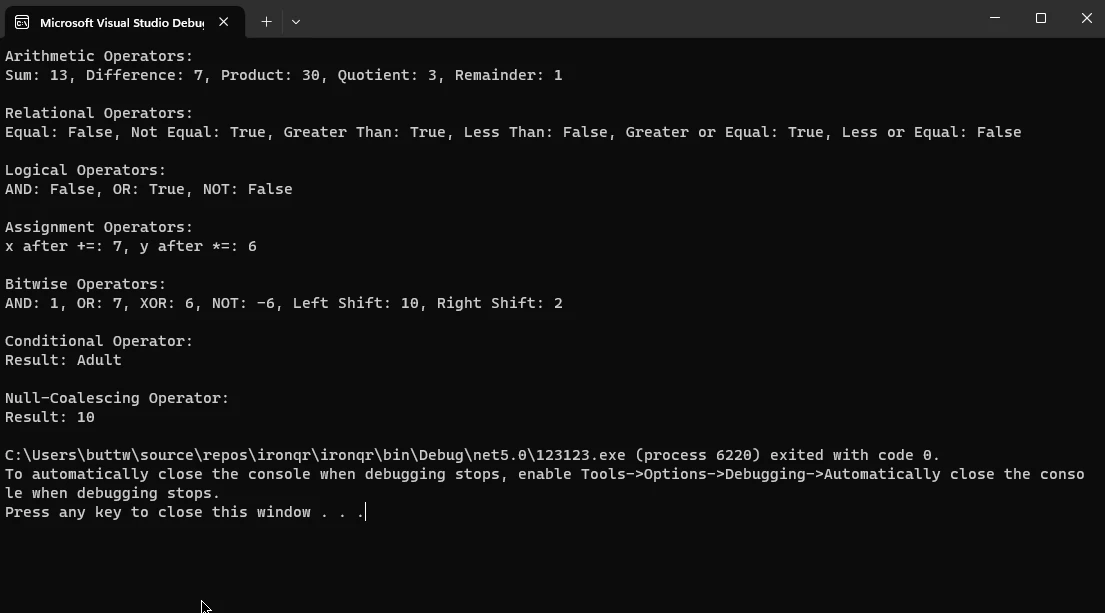
Console.WriteLine($"Result: {resultCoalesce}")1.8.所有 C# 運算器程式碼範例的輸出截圖。
2. IronPDF 簡介。
IronPDF for C# 是一個多功能函式庫,可讓開發人員將 PDF 相關功能無縫整合至其 .NET 應用程式。 IronPDF 提供了一套全面的工具,有助於從 PDF 文件中建立、修改和擷取資訊。 無論是從 HTML 產生動態 PDF、從網站擷取內容,或是執行進階格式化,IronPDF 都能透過直覺式 API 簡化這些流程。
IronPDF 廣泛應用於需要處理 PDF 的應用程式,例如報表生成和文件管理系統。 IronPDF 簡化了複雜的任務,使其成為使用 C# 和 .NET 技術的開發人員的寶貴資源。 有關精確的使用說明和更新,請務必參閱官方說明文件。
2.1.IronPDF 入門。
要開始在 C# 專案中使用 IronPDF,您首先需要安裝 IronPDF NuGet 套件。 您可以透過套件管理員控制台,使用下列指令完成此工作:
Install-Package IronPdf
另外,您也可以使用 NuGet Package Manager 搜尋"IronPDF",並從那裡安裝套件。
安裝套件後,您就可以開始使用 IronPDF 來無縫處理 PDF 檔案。
2.2.程式碼範例:使用 IronPDF 的 C# 運算符。
using IronPdf;
using System;
class Program
{
    static void Main()
    {
        // Create an instance of ChromePdfRenderer
        var renderer = new ChromePdfRenderer();

        // Add HTML content with mathematical operations
        string content = $@"<!DOCTYPE html>
                            <html>
                            <body>
                                <h1>Mathematical Operations in IronPDF</h1>
                                <p>Sum: 5 + 7 = {5 + 7}</p>
                                <p>Product: 3 * 4 = {3 * 4}</p>
                                <p>Division: 10 / 2 = {10 / 2}</p>
                                <p>Modulus: 15 % 4 = {15 % 4}</p>
                            </body>
                            </html>";

        // Render HTML content to PDF
        var pdf = renderer.RenderHtmlAsPdf(content);

        // Save the PDF to a file
        pdf.SaveAs("MathOperations.pdf");
        Console.WriteLine("PDF with mathematical operations created successfully!");
    }
}
using IronPdf;
using System;
class Program
{
static void Main()
{
// Create an instance of ChromePdfRenderer
var renderer = new ChromePdfRenderer();
// Add HTML content with mathematical operations
string content = $@"<!DOCTYPE html>
<html>
<body>
<h1>Mathematical Operations in IronPDF</h1>
<p>Sum: 5 + 7 = {5 + 7}</p>
<p>Product: 3 * 4 = {3 * 4}</p>
<p>Division: 10 / 2 = {10 / 2}</p>
<p>Modulus: 15 % 4 = {15 % 4}</p>
</body>
</html>";
// Render HTML content to PDF
var pdf = renderer.RenderHtmlAsPdf(content);
// Save the PDF to a file
pdf.SaveAs("MathOperations.pdf");
Console.WriteLine("PDF with mathematical operations created successfully!");
}
}Imports IronPdf
Imports System
Friend Class Program
Shared Sub Main()
' Create an instance of ChromePdfRenderer
Dim renderer = New ChromePdfRenderer()
' Add HTML content with mathematical operations
Dim content As String = $"<!DOCTYPE html>
<html>
<body>
<h1>Mathematical Operations in IronPDF</h1>
<p>Sum: 5 + 7 = {5 + 7}</p>
<p>Product: 3 * 4 = {3 * 4}</p>
<p>Division: 10 / 2 = {10 \ 2}</p>
<p>Modulus: 15 % 4 = {15 Mod 4}</p>
</body>
</html>"
' Render HTML content to PDF
Dim pdf = renderer.RenderHtmlAsPdf(content)
' Save the PDF to a file
pdf.SaveAs("MathOperations.pdf")
Console.WriteLine("PDF with mathematical operations created successfully!")
End Sub
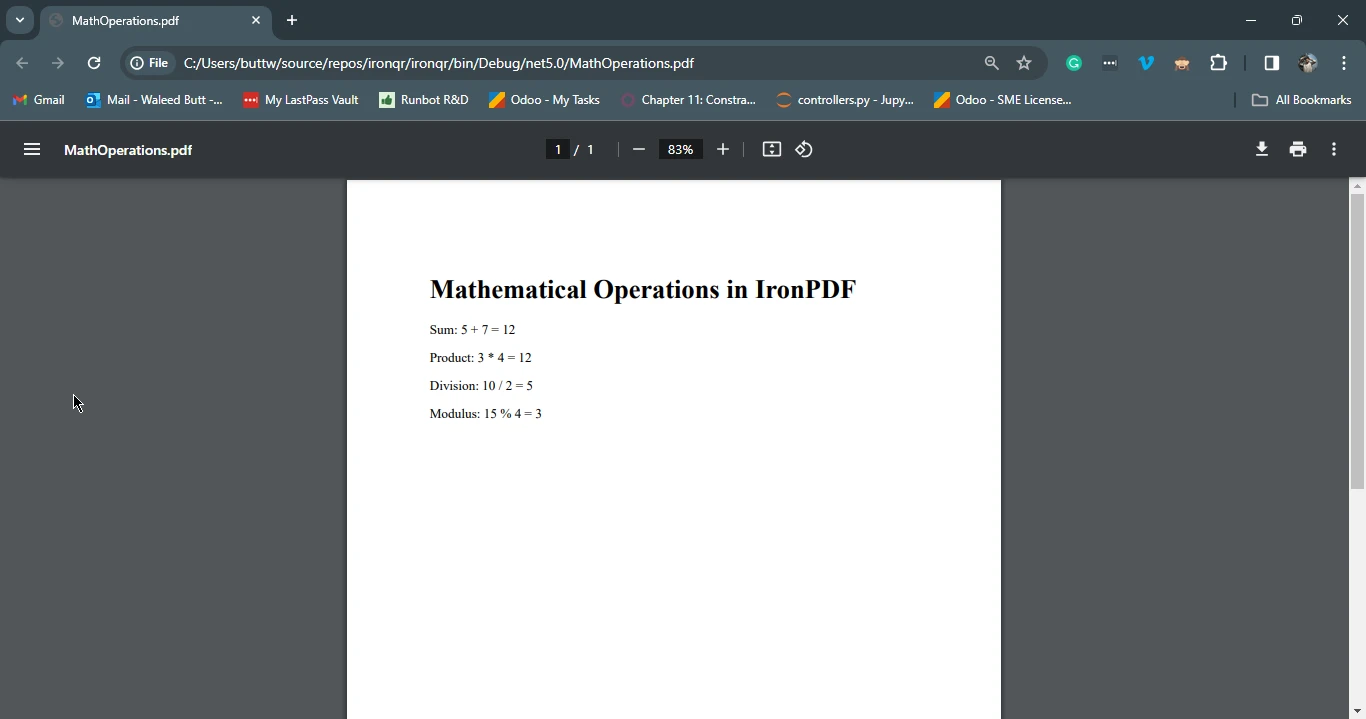
End Class此 C# 程式碼利用 IronPDF 函式庫建立 PDF 文件,其特色為我們所展示的多種運算符號。 它使用 ChromePdfRenderer 類別來渲染 HTML 內容,其中包括使用 C# 運算子計算的數學表達式。
HTML 內容包含標題和顯示總和、乘積、除數和模數等結果的段落,使用字串格式插值。 渲染後的 HTML 會使用 IronPDF 轉換成 PDF,產生的 PDF 會儲存為 "MathOperations.pdf"。
 。
。
3.結論
掌握 C# 運算符號是開發人員的基本知識,可透過算術、關係、邏輯、賦值、位元、條件和空值合併操作實現高效編碼。 這本綜合指南探討了各種運算符類型,提供了實用的程式碼範例。 此外,IronPDF 的介紹強調了其在 C# 中執行 PDF 相關任務的實用性。
透過將 C# 運算符與 IronPDF 無縫整合,開發人員可以輕鬆地在 PDF 檔案中執行算術運算,展現此函式庫的多功能性。 總而言之,對 C# 運算符號有扎實的瞭解,能讓開發人員為各種程式設計任務建立更強大且更具表現力的程式碼。
您可以造訪此連結,取得 IronPDF 的免費試用授權。 若要瞭解 IronPDF 的更多資訊,請造訪 此處,若要取得程式碼範例,請造訪 此處。
常見問題解答
C# 中有哪些不同類型的運算符?
C# 中的運算符分為幾種類型,包括算術、關係、邏輯、賦值、位元、條件和空合併運算符。每種類型在編程中都有一個具體的功能,並且可以與 IronPDF 結合使用,以增強 PDF 的生成和修改過程。
如何在 PDF 生成中使用算術運算符?
C# 中的算術運算符可以在 IronPDF 中使用以執行計算,從而在 PDF 文檔中動態生成內容。例如,您可以使用它們來計算總數、平均值或需要在 PDF 中顯示的任何其他數值數據。
邏輯運算符是否可以幫助進行 PDF 內容決策?
是的,邏輯運算符如 AND、OR 和 NOT 可以在 C# 中用來決定在使用 IronPDF 時包含哪些內容。它們評估條件,以確定數據流和內容渲染。
賦值運算符在 PDF 創建中是如何運作的?
C# 中的賦值運算符用於賦值和修改變量值。在使用 IronPDF 進行 PDF 創建的上下文中,它們可以用於設置影響 PDF 格式和內容的值,例如將計算出的值賦給一個變量,然後將其渲染到文檔中。
位元運算符在 C# 編程中扮演什麼角色?
C# 中的位元運算符對二進制數據進行低級操作,包括 AND、OR、XOR 和 NOT 運算。雖然不直接用於 PDF 生成,但這些運算符可以作為數據預處理任務的一部分,然後再將數據渲染為 PDF,使用 IronPDF。
如何在 PDF 生成中應用條件運算符?
條件運算符(?:)允許您根據條件執行不同的代碼路徑。在使用 IronPDF 進行 PDF 生成時,它可以根據特定條件或標準決定要包括或排除的內容。
空合併運算符如何增強 PDF 生成?
C# 中的空合併運算符(??)為可能為空的變量提供一個默認值。這確保在使用 IronPDF 進行 PDF 生成過程中不存在空引用異常,從而實現順暢且無錯誤的渲染過程。
使用 IronPDF 對 .NET 應用程序有什麼好處?
IronPDF 是一個強大的庫,將 PDF 功能整合到 .NET 應用程序中,允許開發者輕鬆創建、修改和提取 PDF 內容。它支持 C# 運算符,讓您可以將動態內容和數據驅動洞察力融入 PDF 中。
如何使用 C# 將 HTML 內容渲染為 PDF?
使用 IronPDF,您可以使用 RenderHtmlAsPdf 方法將 HTML 內容轉換為 PDF。這允許將基於網頁的內容無縫集成到靜態 PDF 文檔中,確保動態和交互式 HTML 元素被準確表示。
如果我的 PDF 生成失敗,我可以採取哪些故障排除步驟?
如果 PDF 生成失敗,請確保您的 C# 代碼沒有語法錯誤,並且所有要渲染的數據格式正確。檢查空值,使用邏輯和條件運算符處理異常,並確認在您的項目中正確安裝和引用了 IronPDF。


















 免費開始使用
 免費開始使用
 預約免費現場演示





 無需信用卡或創建帳戶










