




Updated April 23, 2026
Bridging CLI Simplicity & .NET : Using Curl DotNet with IronPDF
Jacob Mellor has bridged this gap with CurlDotNet, a library created to bring the familiarity of cURL to the .NET ecosystem.
Read More

The 'nameof' operator, introduced in C# 6.0, is a compile-time construct designed to address the challenge of referring to program elements by their names and silently broken runtime behavior. Its primary purpose is to eliminate the need for hardcoded strings, offering a more maintainable and error-resistant approach. In this article, we will explore the nameof operator in C# and also introduce the IronPDF Library on NuGet library to generate PDF documents programmatically.
The fundamental syntax of the 'nameof' operator is simple. It takes an element as an argument and returns its name as a string. Consider the following example:
static void Main()
{
    // Declare a string variable
    string myVariable = nameof(myVariable);
    Console.WriteLine(myVariable); // Output: "myVariable"
}Shared Sub Main()
' Declare a string variable
Dim myVariable As String = NameOf(myVariable)
Console.WriteLine(myVariable) ' Output: "myVariable"
End SubIn this case, 'nameof(myVariable)' yields the string "myVariable". The operator can be applied to various code elements, including variables, types, members, and more.
One of the standout advantages of the 'nameof' operator is its positive impact on code maintainability. Instead of hardcoding names as strings, developers can use 'nameof,' ensuring that references automatically update when names change.
static void Main()
{
    // Without using nameof
    Logger.Log("Error: The variable 'myVariable' is null.");
    // Using nameof for improved maintainability
    Logger.Log($"Error: The variable '{nameof(myVariable)}' is null.");
}Shared Sub Main()
' Without using nameof
Logger.Log("Error: The variable 'myVariable' is null.")
' Using nameof for improved maintainability
Logger.Log($"Error: The variable '{NameOf(myVariable)}' is null.")
End Sub'nameof' enhances compile-time safety by eliminating the risk of typos or inconsistencies in names. Any misspelling or modification of a variable name triggers a compile-time error, reducing the chances of runtime issues.
static void Main()
{
    // Compile-time error if 'myVariable' is misspelled
    string myVariable;
    string variableName = nameof(myVariable);

    Console.WriteLine(variableName);
}Shared Sub Main()
' Compile-time error if 'myVariable' is misspelled
Dim myVariable As String
Dim variableName As String = NameOf(myVariable)
Console.WriteLine(variableName)
End SubThe 'nameof' operator seamlessly integrates with refactoring tools, providing a hassle-free experience when renaming variables, types, or members. All 'nameof' references are updated automatically.
static void Main()
{
    // Before renaming local variable 'myVariable' to 'newVariable'
    string myVariableNameChange = nameof(myVariableNameChange);
    // After renaming local variable 'myVariable' to 'newVariable'
    string newVariableNameChange = nameof(newVariableNameChange);

    Console.WriteLine(newVariableNameChange);
}Shared Sub Main()
' Before renaming local variable 'myVariable' to 'newVariable'
Dim myVariableNameChange As String = NameOf(myVariableNameChange)
' After renaming local variable 'myVariable' to 'newVariable'
Dim newVariableNameChange As String = NameOf(newVariableNameChange)
Console.WriteLine(newVariableNameChange)
End SubDuring debugging, 'nameof' makes code more informative and readable. Logging statements, exception messages, and other debug outputs become concise and contextually relevant.
static void Main()
{
    // Without using nameof
    // throw new ArgumentNullException("myVariable", "The variable cannot be null.");
    // Using nameof for improved debugging
    throw new ArgumentNullException(nameof(myVariable), "The variable cannot be null.");
}Shared Sub Main()
' Without using nameof
' throw new ArgumentNullException("myVariable", "The variable cannot be null.");
' Using nameof for improved debugging
Throw New ArgumentNullException(NameOf(myVariable), "The variable cannot be null.")
End SubHere the throw new ArgumentNullException throws an exception if the variable is not declared.
When working with reflection, the 'nameof' operator simplifies obtaining the names of types, properties, or methods without using hardcoded strings.
Type type = typeof(MyClass);
string typeName = nameof(MyClass);Dim type As Type = GetType([MyClass])
Dim typeName As String = NameOf([MyClass])The example class MyClass can be a hard-coded string, but we can use reflection to get the class name dynamically. The variable type has the class name, and then the nameof keyword is used to get the name of a class instance. They are not the same name.
'nameof' proves invaluable in logging statements and exception messages, making them more readable and less error-prone.
Logger.Log($"Error: The property '{nameof(MyClass.MyProperty)}' is out of range.");Logger.Log($"Error: The property '{NameOf([MyClass].MyProperty)}' is out of range.")In this example, we'll create a simple class representing a Person, and we'll use the nameof operator to improve logging and error messages.
using System;

class Person
{
    public string FirstName { get; set; }
    public string LastName { get; set; }

    // Method that displays the full name of the person
    public void DisplayFullName()
    {
        if (string.IsNullOrEmpty(FirstName) || string.IsNullOrEmpty(LastName))
        {
            LogError($"Invalid name: {nameof(FirstName)} or {nameof(LastName)} is missing.");
        }
        else
        {
            Console.WriteLine($"Full Name: {FirstName} {LastName}");
        }
    }

    // Custom error logging method that highlights errors
    private void LogError(string errorMessage)
    {
        Console.ForegroundColor = ConsoleColor.Red;
        Console.WriteLine($"Error: {errorMessage}");
        Console.ResetColor();
    }
}

class Program
{
    static void Main()
    {
        // Create an instance of the Person class
        Person person = new Person();

        // Attempt to display the full name without setting the properties
        person.DisplayFullName();

        // Set the properties and display the full name again
        person.FirstName = "John";
        person.LastName = "Doe";
        person.DisplayFullName();
    }
}Imports System
Friend Class Person
Public Property FirstName() As String
Public Property LastName() As String
' Method that displays the full name of the person
Public Sub DisplayFullName()
If String.IsNullOrEmpty(FirstName) OrElse String.IsNullOrEmpty(LastName) Then
LogError($"Invalid name: {NameOf(FirstName)} or {NameOf(LastName)} is missing.")
Else
Console.WriteLine($"Full Name: {FirstName} {LastName}")
End If
End Sub
' Custom error logging method that highlights errors
Private Sub LogError(ByVal errorMessage As String)
Console.ForegroundColor = ConsoleColor.Red
Console.WriteLine($"Error: {errorMessage}")
Console.ResetColor()
End Sub
End Class
Friend Class Program
Shared Sub Main()
' Create an instance of the Person class
Dim person As New Person()
' Attempt to display the full name without setting the properties
person.DisplayFullName()
' Set the properties and display the full name again
person.FirstName = "John"
person.LastName = "Doe"
person.DisplayFullName()
End Sub
End ClassPerson class with FirstName and LastName properties and a method DisplayFullName that checks if both properties are set before displaying the full name.DisplayFullName, we use nameof(FirstName) and nameof(LastName) to refer to the property names as string literals. This improves code readability and ensures that if the property names change, both the property definition and the corresponding error message are automatically updated during compilation.LogError takes advantage of nameof to include the property name dynamically in the error message.Main method, we create an instance of the Person class, attempt to display the full name without setting the properties, and then set the properties and display the full name again.When you run this program, you'll see that the error message dynamically incorporates the property names, providing more context and making it easier to identify which property is missing.
This example demonstrates how the nameof operator improves code maintainability by automatically updating references when property names change and enhances error messages with more informative details during development.
IronPDF for C#.NET is a PDF library from Iron Software that can be used as a PDF generator and reader. Here we introduce basic functionality. For more information, refer to the documentation.
IronPDF's standout feature is its HTML to PDF Conversion capability, preserving your layouts and styles. It generates PDFs from web content, making it great for reports, invoices, and documentation. HTML files, URLs, and HTML strings can be converted to PDFs seamlessly.
using IronPdf;

class Program
{
    static void Main(string[] args)
    {
        var renderer = new ChromePdfRenderer();

        // 1. Convert HTML String to PDF
        var htmlContent = "<h1>Hello, IronPDF!</h1><p>This is a PDF from an HTML string.</p>";
        var pdfFromHtmlString = renderer.RenderHtmlAsPdf(htmlContent);
        pdfFromHtmlString.SaveAs("HTMLStringToPDF.pdf");

        // 2. Convert HTML File to PDF
        var htmlFilePath = "path_to_your_html_file.html"; // Specify the path to your HTML file
        var pdfFromHtmlFile = renderer.RenderHtmlFileAsPdf(htmlFilePath);
        pdfFromHtmlFile.SaveAs("HTMLFileToPDF.pdf");

        // 3. Convert URL to PDF
        var url = "http://ironpdf.com"; // Specify the URL
        var pdfFromUrl = renderer.RenderUrlAsPdf(url);
        pdfFromUrl.SaveAs("URLToPDF.pdf");
    }
}Imports IronPdf
Friend Class Program
Shared Sub Main(ByVal args() As String)
Dim renderer = New ChromePdfRenderer()
' 1. Convert HTML String to PDF
Dim htmlContent = "<h1>Hello, IronPDF!</h1><p>This is a PDF from an HTML string.</p>"
Dim pdfFromHtmlString = renderer.RenderHtmlAsPdf(htmlContent)
pdfFromHtmlString.SaveAs("HTMLStringToPDF.pdf")
' 2. Convert HTML File to PDF
Dim htmlFilePath = "path_to_your_html_file.html" ' Specify the path to your HTML file
Dim pdfFromHtmlFile = renderer.RenderHtmlFileAsPdf(htmlFilePath)
pdfFromHtmlFile.SaveAs("HTMLFileToPDF.pdf")
' 3. Convert URL to PDF
Dim url = "http://ironpdf.com" ' Specify the URL
Dim pdfFromUrl = renderer.RenderUrlAsPdf(url)
pdfFromUrl.SaveAs("URLToPDF.pdf")
End Sub
End ClassIronPDF can be installed using the NuGet package manager console or Visual Studio package manager.
> dotnet add package IronPdf

namespace OrderBy;

class Person
{
    public string FirstName { get; set; }
    public string LastName { get; set; }

    public void DisplayFullName()
    {
        if (string.IsNullOrEmpty(FirstName) || string.IsNullOrEmpty(LastName))
        {
            LogError($"Invalid name: {nameof(FirstName)} or {nameof(LastName)} is missing.");
        }
        else
        {
            Console.WriteLine($"Full Name: {FirstName} {LastName}");
        }
    }

    public void PrintPdf()
    {
        Console.WriteLine("Generating PDF using IronPDF.");
        string content = $@"<!DOCTYPE html>
<html>
<body>
<h1>Hello, {FirstName}!</h1>
<p>First Name: {FirstName}</p>
<p>Last Name: {LastName}</p>
</body>
</html>";

        // Create a new PDF document
        var pdfDocument = new ChromePdfRenderer();
        pdfDocument.RenderHtmlAsPdf(content).SaveAs("person.pdf");
    }

    private void LogError(string errorMessage)
    {
        Console.ForegroundColor = ConsoleColor.Red;
        Console.WriteLine($"Error: {errorMessage}");
        Console.ResetColor();
    }
}

class Program
{
    static void Main()
    {
        // Create an  instance of the Person class
        Person person = new Person();

        // Attempt to display the full name
        person.DisplayFullName();

        // Set the properties
        person.FirstName = "John";
        person.LastName = "Doe";

        // Display the full name again
        person.DisplayFullName();

        // Generate a PDF
        person.PrintPdf();
    }
}Namespace OrderBy
Friend Class Person
Public Property FirstName() As String
Public Property LastName() As String
Public Sub DisplayFullName()
If String.IsNullOrEmpty(FirstName) OrElse String.IsNullOrEmpty(LastName) Then
LogError($"Invalid name: {NameOf(FirstName)} or {NameOf(LastName)} is missing.")
Else
Console.WriteLine($"Full Name: {FirstName} {LastName}")
End If
End Sub
Public Sub PrintPdf()
Console.WriteLine("Generating PDF using IronPDF.")
Dim content As String = $"<!DOCTYPE html>
<html>
<body>
<h1>Hello, {FirstName}!</h1>
<p>First Name: {FirstName}</p>
<p>Last Name: {LastName}</p>
</body>
</html>"
ignore ignore ignore ignore ignore ignore ignore var pdfDocument = New ChromePdfRenderer()
pdfDocument.RenderHtmlAsPdf(content).SaveAs("person.pdf")
End Sub
Private Sub LogError(ByVal errorMessage As String)
Console.ForegroundColor = ConsoleColor.Red
Console.WriteLine($"Error: {errorMessage}")
Console.ResetColor()
End Sub
End Class
Friend Class Program
Shared Sub Main()
' Create an instance of the Person class
Dim person As New Person()
' Attempt to display the full name
person.DisplayFullName()
' Set the properties
person.FirstName = "John"
person.LastName = "Doe"
' Display the full name again
person.DisplayFullName()
' Generate a PDF
person.PrintPdf()
End Sub
End Class
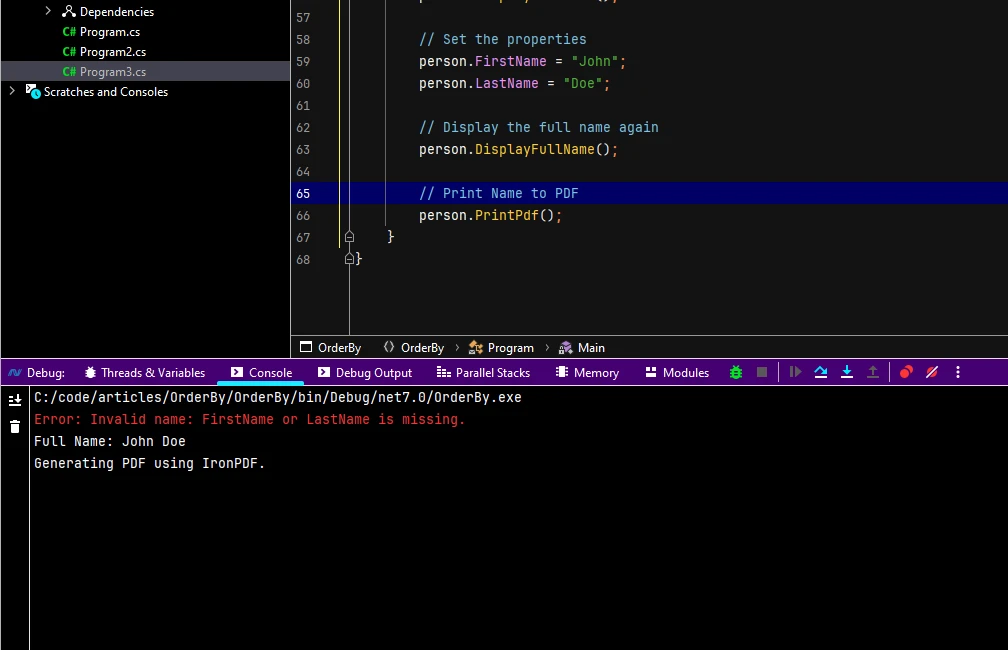
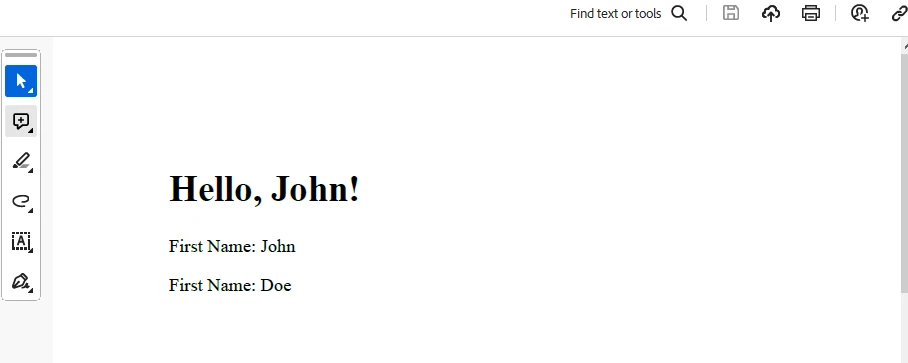
End NamespaceHere IronPDF is used to generate a PDF using the local variables content and pdfDocument, which can be seen in the PrintPdf method.
Output
PDF Generation
For licensing, check out the Trial License Information. This key needs to be placed in appsettings.json.
"IronPdf.LicenseKey": "your license key"Provide your email to get a trial license.
C#'s 'nameof' operator has become a staple for developers seeking cleaner, safer, and more maintainable code. Its ability to enhance code readability, coupled with compile-time safety and seamless refactoring support, makes it an indispensable tool in the C# developer's toolkit. As the development community continues to embrace and leverage the 'nameof' operator, it is poised to play a pivotal role in shaping the future of C# programming. IronPDF is a handy NuGet Package that can be used to generate PDFs quickly and easily.

Jacob Mellor is Chief Technology Officer at Iron Software and a visionary engineer pioneering C# PDF technology. As the original developer behind Iron Software's core codebase, he has shaped the company's product architecture since its inception, transforming it alongside CEO Cameron Rimington into a 50+ person company serving NASA, Tesla, and global government agencies.




10 .NET API products for your office documents











When you need your PDF to look like HTML, fast.


