


C# If (개발자를 위한 작동 방식)

이 튜토리얼에서는 if 및 else 문장을 분해하고 이를 C# 프로그램에서 효과적으로 사용하는 방법을 설명합니다. 또한, Boolean 식 및 조건 연산자와 같은 관련 개념을 탐구할 것입니다. 자, 바로 시작해 봅시다!
if 문 이해하기
if 문은 프로그래밍의 기본 개념입니다. 이는 특정 조건에 따라 코드에서 결정을 내리는 데 사용됩니다. C#에서 if 문의 기본 구문은 다음과 같습니다:
if (Boolean expression)
{
    // Statements to execute if the Boolean expression is true
}
if (Boolean expression)
{
// Statements to execute if the Boolean expression is true
}If Boolean expression Then
' Statements to execute if the Boolean expression is true
End Ifif 문은 주어진 Boolean 표현식이 true로 평가되는지 확인합니다. 그렇다면, 중괄호로 둘러싸인 문 블록 안의 코드가 실행됩니다. Boolean 표현식이 false로 평가되면, 문 블록 내의 코드는 건너뜁니다.
if-else 문의 강력한 기능
이제 if 조건이 거짓일 때 다른 코드를 실행하고자 한다면 어떻게 해야 할까요? 이때 선택적으로 사용할 수 있는 else 문이 활용됩니다. C#의 if-else 문에 대한 문법은 다음과 같습니다:
if (Boolean expression)
{
    // Statements to execute if the Boolean expression is true
}
else
{
// Statements to execute if the Boolean expression is false
}if (Boolean expression)
{
// Statements to execute if the Boolean expression is true
}
else
{
// Statements to execute if the Boolean expression is false
}If Boolean expression Then
' Statements to execute if the Boolean expression is true
Else
' Statements to execute if the Boolean expression is false
End If위 경우에서 Boolean 표현식이 true로 평가되면, if 블록 내의 코드가 실행됩니다. false로 평가되면, 대신 else 블록 내의 코드가 실행됩니다.
간단한 예제
C# if-else 문의 실제 사용 예제를 봅시다. 투표 자격이 있는지 확인하는 프로그램을 작성한다고 상상해 봅시다. 대부분의 국가에서 투표 연령은 18세입니다.
다음 예제는 if-else 문을 사용하여 투표 자격을 결정하는 방법을 보여줍니다:
using System;

class Program
{
    static void Main(string[] args)
    {
        int age = 21;

        if (age >= 18)
        {
            Console.WriteLine("You are eligible to vote!");
        }
        else
        {
            Console.WriteLine("Sorry, you are not eligible to vote.");
        }
    }
}
using System;
class Program
{
static void Main(string[] args)
{
int age = 21;
if (age >= 18)
{
Console.WriteLine("You are eligible to vote!");
}
else
{
Console.WriteLine("Sorry, you are not eligible to vote.");
}
}
}Imports System
Friend Class Program
Shared Sub Main(ByVal args() As String)
Dim age As Integer = 21
If age >= 18 Then
Console.WriteLine("You are eligible to vote!")
Else
Console.WriteLine("Sorry, you are not eligible to vote.")
End If
End Sub
End Class위 코드에서 우리는 먼저 age라는 이름의 정수 변수를 선언하고 값 21을 할당합니다. 그런 다음, 나이가 18 이상인지 확인하는 if-else 문을 사용합니다. 조건이 참이면 프로그램은 콘솔에 'You are eligible to vote!'를 출력합니다. 거짓이라면, 'Sorry, you are not eligible to vote.'를 출력합니다.
불리언 표현식 다루기
C#에서는 다양한 유형의 불리언 표현식을 사용하여 보다 복잡한 조건을 만들 수 있습니다. 일반적으로 사용되는 조건 연산자에는 다음이 포함됩니다:
==: 동등!=: 불평등<: 미만>: 초과<=: 이하>=: 이상
예제를 하나 살펴보겠습니다. 숫자가 양수, 음수 또는 0인지 확인하는 프로그램을 작성한다고 가정해 봅시다. 다음 코드 스니펫은 if 문과 조건 연산자를 사용하여 이를 달성합니다:
using System;

class Program
{
    static void Main(string[] args)
    {
        int number = 0;

        if (number > 0)
        {
            Console.WriteLine("The number is positive.");
        }
        else if (number < 0)
        {
            Console.WriteLine("The number is negative.");
        }
        else
        {
            Console.WriteLine("The number is zero.");
        }
    }
}
using System;
class Program
{
static void Main(string[] args)
{
int number = 0;
if (number > 0)
{
Console.WriteLine("The number is positive.");
}
else if (number < 0)
{
Console.WriteLine("The number is negative.");
}
else
{
Console.WriteLine("The number is zero.");
}
}
}Imports System
Friend Class Program
Shared Sub Main(ByVal args() As String)
Dim number As Integer = 0
If number > 0 Then
Console.WriteLine("The number is positive.")
ElseIf number < 0 Then
Console.WriteLine("The number is negative.")
Else
Console.WriteLine("The number is zero.")
End If
End Sub
End Class위 예에서 우리는 먼저 number라는 이름의 정수 변수를 선언하고 0을 할당합니다. 그런 다음 숫자가 0보다 큰지 확인하는 if 문을 사용합니다. 참이면 'The number is positive.'를 출력합니다. 거짓인 경우 else if 문으로 이동하여 숫자가 0보다 작은지 확인합니다. 이 조건이 참이면 'The number is negative.'를 출력합니다. 마지막으로, 이전 조건이 모두 충족되지 않으면 else 블록에 도달하여 'The number is zero.'를 출력합니다.
논리 연산자로 조건 결합하기
경우에 따라 여러 조건을 동시에 확인해야 할 수도 있습니다. C#은 이를 달성하도록 돕기 위해 논리 연산자를 제공합니다. 가장 일반적으로 사용되는 논리 연산자는 다음과 같습니다:
&&: 논리적 AND||: 논리적 OR!: 논리적 NOT
if 문과 함께 논리 연산자를 사용하는 예를 봅시다. 상점에서 특별 할인을 받을 자격이 있는지를 결정하는 프로그램을 작성한다고 상상해 봅시다. 할인은 노년층(65세 이상) 또는 학생(18세 이상 25세 이하) 고객에게 제공됩니다. 다음 코드 스니펫은 논리 연산자를 사용하여 C# if-else 문으로 할인 자격을 결정하는 방법을 보여줍니다:
using System;

class Program
{
    static void Main(string[] args)
    {
        int age = 23;
        bool isStudent = true;

        if ((age >= 65) || (isStudent && (age >= 18 && age <= 25)))
        {
            Console.WriteLine("You are eligible for the discount!");
        }
        else
        {
            Console.WriteLine("Sorry, you are not eligible for the discount.");
        }
    }
}
using System;
class Program
{
static void Main(string[] args)
{
int age = 23;
bool isStudent = true;
if ((age >= 65) || (isStudent && (age >= 18 && age <= 25)))
{
Console.WriteLine("You are eligible for the discount!");
}
else
{
Console.WriteLine("Sorry, you are not eligible for the discount.");
}
}
}Imports System
Friend Class Program
Shared Sub Main(ByVal args() As String)
Dim age As Integer = 23
Dim isStudent As Boolean = True
If (age >= 65) OrElse (isStudent AndAlso (age >= 18 AndAlso age <= 25)) Then
Console.WriteLine("You are eligible for the discount!")
Else
Console.WriteLine("Sorry, you are not eligible for the discount.")
End If
End Sub
End Class위 코드에서 우리는 먼저 age라는 이름의 정수 변수와 isStudent라는 이름의 Boolean 변수를 선언합니다. 그런 다음, 논리 연산자와 함께 if-else 문을 사용하여 해당 인물이 할인 자격이 있는지를 확인합니다. 나이가 65세 이상이거나, 인물이 18세에서 25세 사이의 학생이라면, 프로그램은 'You are eligible for the discount!'를 출력합니다. 그렇지 않으면 'Sorry, you are not eligible for the discount.'를 출력합니다.
IronPDF로 PDF 생성하기: if-else 문의 관련 응용
이제 C# if-else 문을 확실히 이해했으니, C# 애플리케이션에서 PDF 파일을 원활하게 작업할 수 있게 해주는 IronPDF 라이브러리를 사용한 실제 응용 프로그램을 살펴보겠습니다.
IronPDF는 .NET 라이브러리로, C# 애플리케이션 내에서 PDF 파일을 생성, 수정 및 콘텐츠 추출을 가능하게 해주는 강력한 도구입니다.
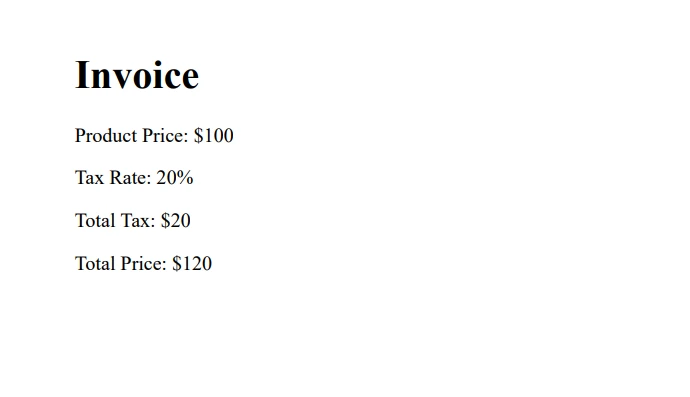
이 예제에서는 고객의 위치에 따라 다른 세율을 적용하는 간단한 PDF 청구서 생성기를 만들 것입니다. 이 시나리오는 if-else 문을 활용할 수 있는 훌륭한 기회를 제공합니다.
먼저 다음 명령어를 실행하여 NuGet을 통해 IronPDF를 설치하세요:
Install-Package IronPdf
그 다음 지역별로 다른 세율로 청구서를 생성하는 간단한 프로그램을 만들어 보겠습니다:
using System;
using IronPdf;

class Program
{
    static void Main(string[] args)
    {
        string customerLocation = "Europe";
        double taxRate;

        // Determine tax rate based on customer location
        if (customerLocation == "USA")
        {
            taxRate = 0.07;
        }
        else if (customerLocation == "Europe")
        {
            taxRate = 0.20;
        }
        else
        {
            taxRate = 0.15;
        }

        double productPrice = 100.0;
        double totalTax = productPrice * taxRate;
        double totalPrice = productPrice + totalTax;

        string invoiceContent = $@"
            <h1>Invoice</h1>
            <p>Product Price: ${productPrice}</p>
            <p>Tax Rate: {taxRate * 100}%</p>
            <p>Total Tax: ${totalTax}</p>
            <p>Total Price: ${totalPrice}</p>
        ";

        // Render the HTML content to a PDF document using IronPDF
        var pdf = new ChromePdfRenderer();
        var document = pdf.RenderHtmlAsPdf(invoiceContent);
        document.SaveAs("Invoice.pdf"); // Save the PDF file locally
    }
}
using System;
using IronPdf;
class Program
{
static void Main(string[] args)
{
string customerLocation = "Europe";
double taxRate;
// Determine tax rate based on customer location
if (customerLocation == "USA")
{
taxRate = 0.07;
}
else if (customerLocation == "Europe")
{
taxRate = 0.20;
}
else
{
taxRate = 0.15;
}
double productPrice = 100.0;
double totalTax = productPrice * taxRate;
double totalPrice = productPrice + totalTax;
string invoiceContent = $@"
<h1>Invoice</h1>
<p>Product Price: ${productPrice}</p>
<p>Tax Rate: {taxRate * 100}%</p>
<p>Total Tax: ${totalTax}</p>
<p>Total Price: ${totalPrice}</p>
";
// Render the HTML content to a PDF document using IronPDF
var pdf = new ChromePdfRenderer();
var document = pdf.RenderHtmlAsPdf(invoiceContent);
document.SaveAs("Invoice.pdf"); // Save the PDF file locally
}
}Imports System
Imports IronPdf
Friend Class Program
Shared Sub Main(ByVal args() As String)
Dim customerLocation As String = "Europe"
Dim taxRate As Double
' Determine tax rate based on customer location
If customerLocation = "USA" Then
taxRate = 0.07
ElseIf customerLocation = "Europe" Then
taxRate = 0.20
Else
taxRate = 0.15
End If
Dim productPrice As Double = 100.0
Dim totalTax As Double = productPrice * taxRate
Dim totalPrice As Double = productPrice + totalTax
Dim invoiceContent As String = $"
<h1>Invoice</h1>
<p>Product Price: ${productPrice}</p>
<p>Tax Rate: {taxRate * 100}%</p>
<p>Total Tax: ${totalTax}</p>
<p>Total Price: ${totalPrice}</p>
"
' Render the HTML content to a PDF document using IronPDF
Dim pdf = New ChromePdfRenderer()
Dim document = pdf.RenderHtmlAsPdf(invoiceContent)
document.SaveAs("Invoice.pdf") ' Save the PDF file locally
End Sub
End Class이 코드 예제에서는 고객의 위치에 따라 적절한 세율을 결정하기 위해 if-else 문을 사용합니다. IronPDF를 사용하여 HTML 문자열에서 PDF 청구서를 생성합니다. C#에서는 항목을 저장하고 조작할 수 있는 C# 리스트와 같은 것을 사용할 수 있습니다, 예를 들어 제품 가격들처럼.
결론
이 튜토리얼 전반에 걸쳐 C# if-else 문의 기본 사항을 다루고, 다양한 조건적 및 논리적 연산자를 탐구했으며, 개념을 더 잘 이해하기 위한 실제 사례를 검토했습니다. 강력한 IronPDF 라이브러리를 사용한 실제 응용 프로그램도 시연했으며, 무료 체험판 및 라이선스 옵션을 제공합니다.
프로그래밍 개념을 마스터하는 데 있어 연습이 중요하다는 것을 기억하세요. 다양한 시나리오를 실험하고 if-else 문과 기타 관련 개념에 대한 새로 얻은 지식을 계속해서 적용하세요.
자주 묻는 질문
C#에서 if 문의 목적은 무엇입니까?
C#에서 if 문은 지정된 Boolean 조건이 true로 평가될 때만 코드 블록을 실행하기 위해 사용됩니다. 이는 프로그램에서 결정을 내리는 데 필수적입니다.
C# 프로그래밍에서 if-else 문은 어떻게 강화됩니까?
C#의 if-else 문은 조건이 true인지 false인지에 따라 다른 코드 블록을 실행할 수 있게 하며, 이는 프로그래밍에서 다양한 논리적 시나리오를 처리하는 데 필수적입니다.
C#의 조건문에서 Boolean 표현식은 어떤 역할을 합니까?
Boolean 표현식은 C# 조건문에서 매우 중요하며, 이는 if 및 if-else 구조에서 실행 흐름을 제어하는 진리값을 결정합니다.
C#에서 일반적으로 사용되는 조건 연산자는 무엇입니까?
C#의 일반적인 조건 연산자로는 '==', '!=', '<', '>', '<=', '>='가 있습니다. 이 연산자들은 if 문 내의 조건을 평가하는 데 사용됩니다.
C#에서 if 문과 논리 연산자를 어떻게 활용할 수 있습니까?
'&&' (AND), '||' (OR), '!' (NOT)과 같은 논리 연산자는 여러 조건을 결합하여 C#에서 복잡한 논리를 평가할 수 있도록 if 문 내에서 사용할 수 있습니다.
C#에서 PDF 생성에 조건 논리를 어떻게 적용할 수 있습니까?
조건 논리를 사용하여 PDF 생성 시, 특정 조건에 따라 다양한 형식이나 콘텐츠를 적용할 수 있어 동적 문서 생성을 가능하게 합니다.
논리 연산자를 사용한 if-else 문의 예를 들어주시겠습니까?
논리 연산자를 사용한 if-else 문의 예로는 고령자 또는 학생 자격 기준에 따른 할인 자격을 확인하는 것입니다.
C#에서 if-else 문을 연습할 수 있는 실용적인 방법은 무엇입니까?
if-else 문을 연습할 수 있는 실용적인 방법 중 하나는 나이에 따라 투표 자격을 결정하는 것과 같은 결정 논리를 포함하는 간단한 프로그램을 작성하는 것입니다.
PDF 인보이스 생성기에서 if-else 문이 세율을 어떻게 관리할 수 있습니까?
PDF 인보이스 생성기에서, if-else 문을 사용하여 위치나 고객 유형과 같은 조건에 따라 다양한 세율을 적용할 수 있으며, 인보이스의 정확성과 기능성을 향상시킵니다.










 무료로 시작하세요
 무료로 시작하세요
 무료 라이브 데모 예약하기





 신용카드나 계정 생성은 필요하지 않습니다.










