


C# If (開発者向けの仕組み)

このチュートリアルでは、if と else ステートメントの概念を分解し、それらを C# プログラムで効果的に使用する方法を説明します。 また、ブール式や条件演算子といった関連する概念も探索します。 それでは、さっそく始めましょう!
Ifステートメントを理解する
if ステートメントはプログラミングの基本的な概念です。 特定の条件に基づいてコード内で決定を下すために使用されます。 C#でのifステートメントの基本的な構文は以下の通りです。
if (Boolean expression)
{
    // Statements to execute if the Boolean expression is true
}
if (Boolean expression)
{
// Statements to execute if the Boolean expression is true
}If Boolean expression Then
' Statements to execute if the Boolean expression is true
End Ifif ステートメントは、与えられたブール式が true と評価されることを確認します。 もしそうであれば、ステートメントブロック内のコード(波括弧で囲まれたコード)が実行されます。 ブール式が false と評価された場合、ステートメントブロック内のコードはスキップされます。
If-Elseステートメントの力
では、if条件が偽のときに他のコードを実行したい場合はどうしますか? そのときに使うのが、オプションのelseステートメントです。 C# の if-else ステートメントの構文は次のようになります。
if (Boolean expression)
{
    // Statements to execute if the Boolean expression is true
}
else
{
// Statements to execute if the Boolean expression is false
}if (Boolean expression)
{
// Statements to execute if the Boolean expression is true
}
else
{
// Statements to execute if the Boolean expression is false
}If Boolean expression Then
' Statements to execute if the Boolean expression is true
Else
' Statements to execute if the Boolean expression is false
End If上記の場合、ブール式が true と評価されると、if ブロック内のコードが実行されます。 それが false と評価される場合、代わりに else ブロック内のコードが実行されます。
簡単な例
C#のif-elseステートメントを使用する現実の例を見てみましょう。 人が投票資格があるかを確認するプログラムを書いているとします。 ほとんどの国では、投票年齢は18です。
以下の例は、投票資格を決定するためにif-elseステートメントを使用する方法を示しています。
using System;

class Program
{
    static void Main(string[] args)
    {
        int age = 21;

        if (age >= 18)
        {
            Console.WriteLine("You are eligible to vote!");
        }
        else
        {
            Console.WriteLine("Sorry, you are not eligible to vote.");
        }
    }
}
using System;
class Program
{
static void Main(string[] args)
{
int age = 21;
if (age >= 18)
{
Console.WriteLine("You are eligible to vote!");
}
else
{
Console.WriteLine("Sorry, you are not eligible to vote.");
}
}
}Imports System
Friend Class Program
Shared Sub Main(ByVal args() As String)
Dim age As Integer = 21
If age >= 18 Then
Console.WriteLine("You are eligible to vote!")
Else
Console.WriteLine("Sorry, you are not eligible to vote.")
End If
End Sub
End Class上記のコードでは、まず age という名前の整数変数を宣言し、その値を 21 に設定します。次に、if-else ステートメントを使用して、年齢が 18 以上かどうかを確認します。この条件が真であれば、プログラムはコンソールに"You are eligible to vote!"を表示します。 falseの場合、"Sorry, you are not eligible to vote."が表示されます。
ブール式の操作
C#では、より複雑な条件を作成するためにさまざまなタイプのブール式を使用できます。 一般的に使用される条件演算子には次のものがあります:
==: 等しい!=: 等しくない<: より小さい>: より大きい<=: 以下>=: 以上
例を見てみましょう。 数が正、負、またはゼロかをチェックするプログラムを書きたいとします。 このコードスニペットは、ifステートメントと条件演算子を使用して達成する方法を示しています。
using System;

class Program
{
    static void Main(string[] args)
    {
        int number = 0;

        if (number > 0)
        {
            Console.WriteLine("The number is positive.");
        }
        else if (number < 0)
        {
            Console.WriteLine("The number is negative.");
        }
        else
        {
            Console.WriteLine("The number is zero.");
        }
    }
}
using System;
class Program
{
static void Main(string[] args)
{
int number = 0;
if (number > 0)
{
Console.WriteLine("The number is positive.");
}
else if (number < 0)
{
Console.WriteLine("The number is negative.");
}
else
{
Console.WriteLine("The number is zero.");
}
}
}Imports System
Friend Class Program
Shared Sub Main(ByVal args() As String)
Dim number As Integer = 0
If number > 0 Then
Console.WriteLine("The number is positive.")
ElseIf number < 0 Then
Console.WriteLine("The number is negative.")
Else
Console.WriteLine("The number is zero.")
End If
End Sub
End Class上記の例では、まず number という名前の整数変数を宣言し、その値を 0 に設定します。次に、if ステートメントを使用して数値が 0 より大きいかどうかを確認します。真であれば、"The number is positive."を表示します。偽であれば、else if ステートメントに移動し、数値が 0 より小さいかどうかを確認します。この条件が真であれば、"The number is negative."を表示します。最後に、前の条件がすべて満たされなかった場合、else ブロックに達し、"The number is zero."を表示します。
論理演算子を使用して条件を結合する
場合によっては、一度に複数の条件を確認する必要があるかもしれません。 C#では、これを達成するための論理演算子が用意されています。 最も一般的に使用される論理演算子は次の通りです:
&&: 論理AND||:論理和!: 論理NOT
if文で論理演算子を使用する例を見てみましょう。 人が店舗で特別割引を受ける資格があるかどうかを判断するプログラムを書いていると想像してください。 割引は、65歳以上の高齢者または18歳から25歳の学生に対して利用可能です。 Here's a code snippet that demonstrates how to use the C# if-else statement with logical operators to determine discount eligibility:
using System;

class Program
{
    static void Main(string[] args)
    {
        int age = 23;
        bool isStudent = true;

        if ((age >= 65) || (isStudent && (age >= 18 && age <= 25)))
        {
            Console.WriteLine("You are eligible for the discount!");
        }
        else
        {
            Console.WriteLine("Sorry, you are not eligible for the discount.");
        }
    }
}
using System;
class Program
{
static void Main(string[] args)
{
int age = 23;
bool isStudent = true;
if ((age >= 65) || (isStudent && (age >= 18 && age <= 25)))
{
Console.WriteLine("You are eligible for the discount!");
}
else
{
Console.WriteLine("Sorry, you are not eligible for the discount.");
}
}
}Imports System
Friend Class Program
Shared Sub Main(ByVal args() As String)
Dim age As Integer = 23
Dim isStudent As Boolean = True
If (age >= 65) OrElse (isStudent AndAlso (age >= 18 AndAlso age <= 25)) Then
Console.WriteLine("You are eligible for the discount!")
Else
Console.WriteLine("Sorry, you are not eligible for the discount.")
End If
End Sub
End Class上記のコードでは、まず age という名前の整数変数と、isStudent という名前のブール変数を宣言します。 次に、if-else文と論理演算子を使用して、その人が割引の資格があるかどうかをチェックします。 年齢が65歳以上であるか、またはその人が18歳から25歳の学生である場合、プログラムは"あなたは割引の資格があります!"と表示します。そうでなければ、"申し訳ありませんが、割引の資格はありません。"と表示します。
IronPDFを使用したPDFの生成: if-else文の関連アプリケーション
今やC#のif-else文をしっかりと理解したので、PDFファイルをC#アプリケーションでシームレスに扱うIronPDFライブラリに関わる実用的なアプリケーションを探ってみましょう。
IronPDFは、C#アプリケーション内でPDFファイルを作成、編集、抽出することを可能にする強力な.NETライブラリです。
このシナリオは、if-elseステートメントを利用する絶好の機会です。 このシナリオは、if-else文を利用する絶好の機会を提供します。
次に、異なる地域の顧客に対して異なる税率の請求書を生成するシンプルなプログラムを作成しましょう:
Install-Package IronPdf
このコード例では、顧客の所在地に基づいて適切な税率を決定するためにif-elseステートメントを使用します。
using System;
using IronPdf;

class Program
{
    static void Main(string[] args)
    {
        string customerLocation = "Europe";
        double taxRate;

        // Determine tax rate based on customer location
        if (customerLocation == "USA")
        {
            taxRate = 0.07;
        }
        else if (customerLocation == "Europe")
        {
            taxRate = 0.20;
        }
        else
        {
            taxRate = 0.15;
        }

        double productPrice = 100.0;
        double totalTax = productPrice * taxRate;
        double totalPrice = productPrice + totalTax;

        string invoiceContent = $@"
            <h1>Invoice</h1>
            <p>Product Price: ${productPrice}</p>
            <p>Tax Rate: {taxRate * 100}%</p>
            <p>Total Tax: ${totalTax}</p>
            <p>Total Price: ${totalPrice}</p>
        ";

        // Render the HTML content to a PDF document using IronPDF
        var pdf = new ChromePdfRenderer();
        var document = pdf.RenderHtmlAsPdf(invoiceContent);
        document.SaveAs("Invoice.pdf"); // Save the PDF file locally
    }
}
using System;
using IronPdf;
class Program
{
static void Main(string[] args)
{
string customerLocation = "Europe";
double taxRate;
// Determine tax rate based on customer location
if (customerLocation == "USA")
{
taxRate = 0.07;
}
else if (customerLocation == "Europe")
{
taxRate = 0.20;
}
else
{
taxRate = 0.15;
}
double productPrice = 100.0;
double totalTax = productPrice * taxRate;
double totalPrice = productPrice + totalTax;
string invoiceContent = $@"
<h1>Invoice</h1>
<p>Product Price: ${productPrice}</p>
<p>Tax Rate: {taxRate * 100}%</p>
<p>Total Tax: ${totalTax}</p>
<p>Total Price: ${totalPrice}</p>
";
// Render the HTML content to a PDF document using IronPDF
var pdf = new ChromePdfRenderer();
var document = pdf.RenderHtmlAsPdf(invoiceContent);
document.SaveAs("Invoice.pdf"); // Save the PDF file locally
}
}Imports System
Imports IronPdf
Friend Class Program
Shared Sub Main(ByVal args() As String)
Dim customerLocation As String = "Europe"
Dim taxRate As Double
' Determine tax rate based on customer location
If customerLocation = "USA" Then
taxRate = 0.07
ElseIf customerLocation = "Europe" Then
taxRate = 0.20
Else
taxRate = 0.15
End If
Dim productPrice As Double = 100.0
Dim totalTax As Double = productPrice * taxRate
Dim totalPrice As Double = productPrice + totalTax
Dim invoiceContent As String = $"
<h1>Invoice</h1>
<p>Product Price: ${productPrice}</p>
<p>Tax Rate: {taxRate * 100}%</p>
<p>Total Tax: ${totalTax}</p>
<p>Total Price: ${totalPrice}</p>
"
' Render the HTML content to a PDF document using IronPDF
Dim pdf = New ChromePdfRenderer()
Dim document = pdf.RenderHtmlAsPdf(invoiceContent)
document.SaveAs("Invoice.pdf") ' Save the PDF file locally
End Sub
End ClassIronPDFを使用してHTML文字列からPDF請求書を作成します。 C#では、C#リストを利用して、商品価格などのアイテムを格納および操作できます。 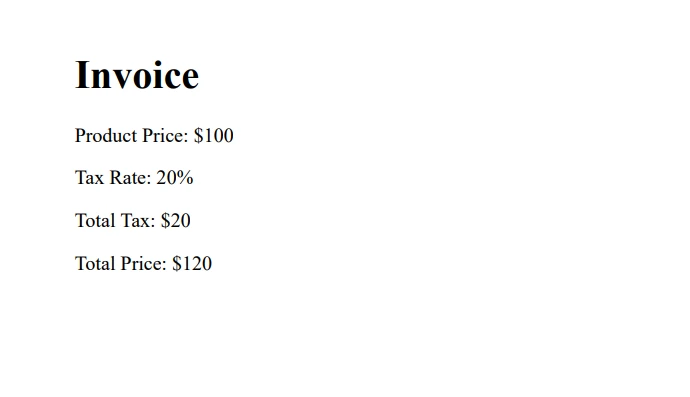
結論
このチュートリアルでは、C#のif-else文の基本をカバーし、さまざまな条件演算子と論理演算子を探求し、概念をより良く理解するための実生活の例を検証しました。 私たちは、強力なIronPDFライブラリを使用して実用的なアプリケーションを実証し、無料試用とライセンスオプションを提供しています。
プログラミングの概念を習得するには、練習が重要であることを忘れないでください。if-else文やその他の関連概念に関する新しい知識を応用しながら、さまざまなシナリオで実験を続けてください。
よくある質問
C#におけるif文の目的は何ですか?
C#のif文は、指定されたブール条件がtrueと評価されるときにのみコードブロックを実行するために使用されます。これはプログラム内での意思決定に不可欠です。
if-else文はC#プログラミングをどのように強化しますか?
C#のif-else文は、条件が真か偽かに基づいて異なるコードブロックを実行することを可能にし、プログラミングにおけるさまざまな論理シナリオを処理するために重要です。
ブール式はC#の条件文でどのような役割を果たしますか?
ブール式はC#の条件文で重要な役割を果たし、ifやif-else構造内での実行フローを制御する真偽値を決定します。
C#で一般的に使用される条件演算子はどれですか?
C#で一般的な条件演算子には、'==', '!=', '<', '>', '<=', '>='があります。これらの演算子はif文内で条件を評価するために使用されます。
C#でif文とともに論理演算子をどのように利用できますか?
論理演算子の'&&'(AND)、'||'(OR)、'!'(NOT)は、複数の条件を組み合わせるためにif文内で使用でき、C#で複雑なロジックを評価することを可能にします。
C#によるPDF生成で条件ロジックをどのように適用できますか?
条件ロジックはif-else文でPDF生成に使用され、特定の条件に基づいて異なる形式や内容を適用し、動的なドキュメント作成を可能にします。
if-else文を論理演算子とともに使用する例を教えてください。
論理演算子を使用したif-else文の例としては、高齢者や学生としての資格を持つかどうかの年齢基準に基づいた割引資格をチェックすることがあります。
C#でif-else文を実践する実用的な方法は何ですか?
if-else文を実践する一つの方法は、意思決定ロジックを含む小さなプログラムを作成することで、例えば年齢に基づいて投票資格を判断することです。
PDF請求書ジェネレーターで税率を管理するためにif-else文をどのように使用できますか?
PDF請求書ジェネレーターでは、if-else文を使用して、場所や顧客の種類などの条件に基づいて異なる税率を適用し、請求書の正確性と機能を向上させます。










 無料で始めましょう
 無料で始めましょう
 無料ライブデモを予約
















