




已更新 2026年4月23日
在 .NET 中用 Microsoft.Extensions.AI 簡化 LLM 整合
AI 正在改變軟體開發,但將大型語言模型 (LLM) 整合到 .NET 中一直很複雜。利用 IronPdf.AI 將 AI 整合推向更遠,為 .NET 應用程式帶來由 OpenAI 驅動的 PDF 解析、資料擷取和內容總結。
閱讀更多

在本教程中,我們將解釋else語句的概念,以及如何在您的C#程式中有效地使用它們。 我們還將探討相關概念,如布林表達式和條件運算子。 所以,讓我們直接來看看吧!
if語句是程式設計中的基本概念。 它用於根據某個條件在程式中做出決策。 C#中的if語句的基本語法如下:
if (Boolean expression)
{
    // Statements to execute if the Boolean expression is true
}If Boolean expression Then
' Statements to execute if the Boolean expression is true
End Ifif語句檢查給定的布林表達式是否評估為true。 如果是,則執行語句塊中的程式碼(即花括號中的程式碼)。 如果布林表達式評估為false,則跳過語句塊中的程式碼。
那麼,如果您希望在if條件為false時執行其他程式碼該怎麼辦? 這就是選擇使用else語句的原因。 C#中if-else語句的語法如下:
if (Boolean expression)
{
    // Statements to execute if the Boolean expression is true
}
else
{
// Statements to execute if the Boolean expression is false
}If Boolean expression Then
' Statements to execute if the Boolean expression is true
Else
' Statements to execute if the Boolean expression is false
End If在上述情況下,如果布林表達式評估為true,則執行if塊中的程式碼。 如果評估為false,則改為執行else塊中的程式碼。
讓我們看看使用C# if-else語句的實際例子。 假設您正在編寫一個程式來檢查一個人是否有資格投票。 在大多數國家,投票年齡是18歲。
以下範例演示了如何使用if-else語句來判斷投票資格:
using System;

class Program
{
    static void Main(string[] args)
    {
        int age = 21;

        if (age >= 18)
        {
            Console.WriteLine("You are eligible to vote!");
        }
        else
        {
            Console.WriteLine("Sorry, you are not eligible to vote.");
        }
    }
}Imports System
Friend Class Program
Shared Sub Main(ByVal args() As String)
Dim age As Integer = 21
If age >= 18 Then
Console.WriteLine("You are eligible to vote!")
Else
Console.WriteLine("Sorry, you are not eligible to vote.")
End If
End Sub
End Class在上述程式碼中,我們首先聲明一個名為age的整數變數,並將其賦值為21。然後,我們使用if-else語句檢查該年齡是否大於或等於18。如果條件為真,則程式在控制台中列印"您有資格投票!"。 如果條件為假,則列印"抱歉,您沒有資格投票。"
在C#中,您可以使用各種型別的布林表達式來建立更複雜的條件。 一些常用的條件運算子包括:
==: 相等!=: 不等<: 小於>: 大於<=: 小於或等於>=: 大於或等於讓我們看看一個例子。 假設您想編寫一個程式來檢查一個數字是正數、負數還是零。 以下程式碼片段使用if語句和條件運算子來實現這一點:
using System;

class Program
{
    static void Main(string[] args)
    {
        int number = 0;

        if (number > 0)
        {
            Console.WriteLine("The number is positive.");
        }
        else if (number < 0)
        {
            Console.WriteLine("The number is negative.");
        }
        else
        {
            Console.WriteLine("The number is zero.");
        }
    }
}Imports System
Friend Class Program
Shared Sub Main(ByVal args() As String)
Dim number As Integer = 0
If number > 0 Then
Console.WriteLine("The number is positive.")
ElseIf number < 0 Then
Console.WriteLine("The number is negative.")
Else
Console.WriteLine("The number is zero.")
End If
End Sub
End Class在上述例子中,我們首先聲明一個名為else if語句,該語句檢查該數字是否小於0。如果此條件為真,我們列印"該數字是負數。"最後,如果之前的條件都不滿足,我們到達else塊,該塊列印"該數字是零。"
在某些情況下,您可能需要同時檢查多個條件。 C#提供了邏輯運算子,幫助您實現這一點。 最常用的邏輯運算子有:
&&: 邏輯AND||: 邏輯OR!: 邏輯NOT讓我們看看一個使用邏輯運算子與if語句的例子。 假設您正在編寫一個程式來確定一個人是否有資格在商店獲得特別折扣。 該折扣可供年齡在65歲或以上的老年人或年齡在18到25歲之間的學生享有。 以下是如何使用C# if-else語句和邏輯運算子來確定折扣資格的程式碼片段:
using System;

class Program
{
    static void Main(string[] args)
    {
        int age = 23;
        bool isStudent = true;

        if ((age >= 65) || (isStudent && (age >= 18 && age <= 25)))
        {
            Console.WriteLine("You are eligible for the discount!");
        }
        else
        {
            Console.WriteLine("Sorry, you are not eligible for the discount.");
        }
    }
}Imports System
Friend Class Program
Shared Sub Main(ByVal args() As String)
Dim age As Integer = 23
Dim isStudent As Boolean = True
If (age >= 65) OrElse (isStudent AndAlso (age >= 18 AndAlso age <= 25)) Then
Console.WriteLine("You are eligible for the discount!")
Else
Console.WriteLine("Sorry, you are not eligible for the discount.")
End If
End Sub
End Class在上述程式碼中,我們首先聲明一個名為isStudent的布林變數。 然後,我們使用if-else語句和邏輯運算子檢查該人是否符合折扣條件。 如果年齡在65歲或以上,或者該人是18到25歲之間的學生,則程式列印"您有資格享受折扣!"否則,它列印"抱歉,您沒有資格享受折扣。"
現在您對C# if-else語句已有了扎實的掌握,讓我們來探討一個實際應用,即使用IronPDF程式庫,它允許您在C#應用程式中無縫地處理PDF檔案。
IronPDF是一個強大的.NET程式庫,允許您在C#應用程式中建立、編輯和提取PDF檔案中的內容。
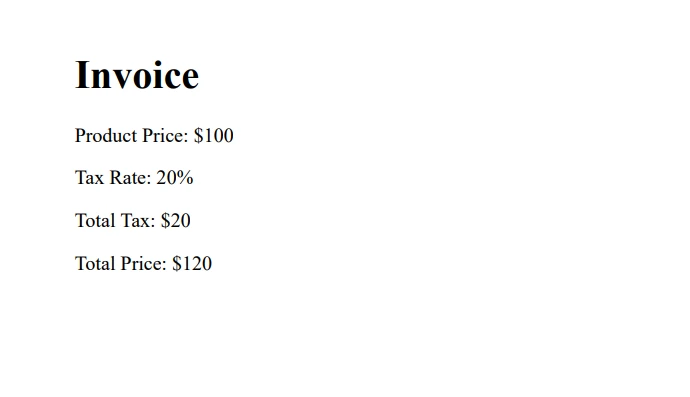
在本例中,我們將建立一個簡單的PDF發票生成器,根據客戶的地點應用不同的稅率。 這個場景提供了一個利用if-else語句的絕佳機會。
首先,通過運行以下命令從NuGet安裝IronPDF:
接下來,讓我們建立一個簡單的程式,根據不同地區的客戶生成具有不同稅率的發票:
using System;
using IronPdf;

class Program
{
    static void Main(string[] args)
    {
        string customerLocation = "Europe";
        double taxRate;

        // Determine tax rate based on customer location
        if (customerLocation == "USA")
        {
            taxRate = 0.07;
        }
        else if (customerLocation == "Europe")
        {
            taxRate = 0.20;
        }
        else
        {
            taxRate = 0.15;
        }

        double productPrice = 100.0;
        double totalTax = productPrice * taxRate;
        double totalPrice = productPrice + totalTax;

        string invoiceContent = $@"
            <h1>Invoice</h1>
            <p>Product Price: ${productPrice}</p>
            <p>Tax Rate: {taxRate * 100}%</p>
            <p>Total Tax: ${totalTax}</p>
            <p>Total Price: ${totalPrice}</p>
        ";

        // Render the HTML content to a PDF document using IronPDF
        var pdf = new ChromePdfRenderer();
        var document = pdf.RenderHtmlAsPdf(invoiceContent);
        document.SaveAs("Invoice.pdf"); // Save the PDF file locally
    }
}Imports System
Imports IronPdf
Friend Class Program
Shared Sub Main(ByVal args() As String)
Dim customerLocation As String = "Europe"
Dim taxRate As Double
' Determine tax rate based on customer location
If customerLocation = "USA" Then
taxRate = 0.07
ElseIf customerLocation = "Europe" Then
taxRate = 0.20
Else
taxRate = 0.15
End If
Dim productPrice As Double = 100.0
Dim totalTax As Double = productPrice * taxRate
Dim totalPrice As Double = productPrice + totalTax
Dim invoiceContent As String = $"
<h1>Invoice</h1>
<p>Product Price: ${productPrice}</p>
<p>Tax Rate: {taxRate * 100}%</p>
<p>Total Tax: ${totalTax}</p>
<p>Total Price: ${totalPrice}</p>
"
' Render the HTML content to a PDF document using IronPDF
Dim pdf = New ChromePdfRenderer()
Dim document = pdf.RenderHtmlAsPdf(invoiceContent)
document.SaveAs("Invoice.pdf") ' Save the PDF file locally
End Sub
End Class在這個程式碼範例中,我們使用if-else語句根據客戶的位置確定適當的稅率。 我們使用IronPDF從HTML字串中生成PDF發票。 在C#中,我們可以利用C# List來儲存和操作項目,例如產品價格。
在整個教程中,我們介紹了C# if-else語句的基礎知識,探討了各種條件和邏輯運算子,並檢查了真實生活中的例子,以更好地理解這一概念。 我們甚至展示了一個使用強大的IronPDF程式庫的實際應用,該程式庫提供免費試用和授權選項。
記住,練習對於掌握程式設計概念至關重要。繼續嘗試不同的情景,應用您新學到的if-else語句及其他相關概念的知識。

Jacob Mellor是Iron Software的首席技術官,一位在C# PDF技術上開創先河的遠見工程師。作為Iron Software核心程式碼庫的原開發者,他從創立以來就一直在塑造公司的產品架構,與首席執行官Cameron Rimington一起將公司轉變為服務於NASA、特斯拉和全球政府公司的50多名人員的公司。



IronPDF 是 IRONSUITE 的一部分
10 款適用於辦公室文件的 .NET API 產品

當您需要您的PDF看起來像HTML一樣快速。












