




已更新 2026年4月23日
简化 .NET 与 Microsoft.Extensions.AI 的 LLM 集成
AI正在改变软件开发,但将大型语言模型(LLM)集成到.NET中直到现在一直很复杂。通过IronPdf.AI,将AI集成更进一步,该产品为.NET应用程序带来了OpenAI驱动的PDF解析、数据提取和内容摘要。
阅读更多

在本教程中,我们将分解else语句的概念,以及如何在您的C#程序中有效使用它们。 我们还将探索相关概念,如布尔表达式和条件运算符。 那么,让我们直接开始吧!
if语句是编程中的一个基本概念。 它用于根据某个条件在代码中做出决策。 C# 中 if 语句的基本语法如下:
if (Boolean expression)
{
    // Statements to execute if the Boolean expression is true
}If Boolean expression Then
' Statements to execute if the Boolean expression is true
End Ifif语句检查给定的布尔表达式是否计算为true。 如果是,则执行语句块中的代码(大括号中的代码)。 如果布尔表达式计算为false,则语句块中的代码将被跳过。
那么,当 if 条件为 false 时,你想执行其他代码怎么办? 这时,可选的 else 语句就派上用场了。 C#中的if-else语句的语法如下所示:
if (Boolean expression)
{
    // Statements to execute if the Boolean expression is true
}
else
{
// Statements to execute if the Boolean expression is false
}If Boolean expression Then
' Statements to execute if the Boolean expression is true
Else
' Statements to execute if the Boolean expression is false
End If在上述情况下,如果布尔表达式计算为true,则执行if块中的代码。 如果它计算为false,则执行else块中的代码。
让我们看看使用 C# if-else 语句的真实例子。 假设你正在编写一个程序来检查一个人是否有资格投票。 在大多数国家,投票年龄为 18 岁。
以下示例演示了如何使用 if-else 语句来确定投票资格:
using System;

class Program
{
    static void Main(string[] args)
    {
        int age = 21;

        if (age >= 18)
        {
            Console.WriteLine("You are eligible to vote!");
        }
        else
        {
            Console.WriteLine("Sorry, you are not eligible to vote.");
        }
    }
}Imports System
Friend Class Program
Shared Sub Main(ByVal args() As String)
Dim age As Integer = 21
If age >= 18 Then
Console.WriteLine("You are eligible to vote!")
Else
Console.WriteLine("Sorry, you are not eligible to vote.")
End If
End Sub
End Class在上面的代码中,我们首先声明一个名为age的整数变量,并将其赋值为21。然后,我们使用if-else语句检查年龄是否大于或等于18。如果条件为真,程序将在控制台打印"您有资格投票!" 如果为假,则打印"对不起,你没有资格投票。"
在 C# 中,你可以使用各种类型的布尔表达式来创建更复杂的条件。 一些常用的条件运算符包括:
==:* 相等!=:* 不相等<:* 小于>:* 大于<=:* 小于或等于>=:* 大于或等于让我们看看一个例子。 假设你想编写一个程序来检查一个数字是正数、负数还是零。 以下代码片段使用 if 语句和条件运算符来实现这一目标:
using System;

class Program
{
    static void Main(string[] args)
    {
        int number = 0;

        if (number > 0)
        {
            Console.WriteLine("The number is positive.");
        }
        else if (number < 0)
        {
            Console.WriteLine("The number is negative.");
        }
        else
        {
            Console.WriteLine("The number is zero.");
        }
    }
}Imports System
Friend Class Program
Shared Sub Main(ByVal args() As String)
Dim number As Integer = 0
If number > 0 Then
Console.WriteLine("The number is positive.")
ElseIf number < 0 Then
Console.WriteLine("The number is negative.")
Else
Console.WriteLine("The number is zero.")
End If
End Sub
End Class在上述例子中,我们首先声明一个名为else if语句检查该数字是否小于0。如果这个条件为真,我们打印"该数字是负数。"最后,如果没有满足之前的条件,我们便到达else块,打印"该数字是零。"
在某些情况下,你可能需要同时检查多个条件。 C# 提供逻辑运算符来帮助实现这一目的。 最常用的逻辑运算符是:
&&:* 逻辑与||:**逻辑或!:* 逻辑非让我们看看一个使用逻辑运算符和 if 语句的例子。 假设你在编写一个程序以确定一个人是否有资格在商店获得特别折扣。 该折扣适用于年老的顾客(65 岁或以上)或学生(年龄在 18 到 25 岁之间)。 这里有一个代码片段,展示了如何使用 C# if-else 语句与逻辑运算符来决定折扣资格:
using System;

class Program
{
    static void Main(string[] args)
    {
        int age = 23;
        bool isStudent = true;

        if ((age >= 65) || (isStudent && (age >= 18 && age <= 25)))
        {
            Console.WriteLine("You are eligible for the discount!");
        }
        else
        {
            Console.WriteLine("Sorry, you are not eligible for the discount.");
        }
    }
}Imports System
Friend Class Program
Shared Sub Main(ByVal args() As String)
Dim age As Integer = 23
Dim isStudent As Boolean = True
If (age >= 65) OrElse (isStudent AndAlso (age >= 18 AndAlso age <= 25)) Then
Console.WriteLine("You are eligible for the discount!")
Else
Console.WriteLine("Sorry, you are not eligible for the discount.")
End If
End Sub
End Class在上面的代码中,我们首先声明了一个名为isStudent的布尔变量。 然后,我们使用含有逻辑运算符的 if-else 语句来检查该人是否有资格获得折扣。 如果年龄为 65 岁或以上,或者该人是 18 到 25 岁之间的学生,程序将打印"你有资格获得折扣!"。否则,打印"对不起,你没有资格获得折扣。"
现在你已经牢牢掌握了 C# if-else 语句,让我们探索一个实际应用,涉及IronPDF 库,它可以让你在 C# 应用程序中无缝处理 PDF 文件。
IronPDF 是一个强大的 .NET 库,可以让你在 C# 应用程序中创建、编辑和提取 PDF 文件的内容。
在此示例中,我们将创建一个简单的 PDF 发票生成器,根据客户的位置应用不同的税率。 这个场景提供了一个利用 if-else 语句的绝佳机会。
首先,通过运行以下命令通过 NuGet 安装 IronPDF:
接下来,让我们创建一个简单的程序,为不同地区的客户生成不同税率的发票:
using System;
using IronPdf;

class Program
{
    static void Main(string[] args)
    {
        string customerLocation = "Europe";
        double taxRate;

        // Determine tax rate based on customer location
        if (customerLocation == "USA")
        {
            taxRate = 0.07;
        }
        else if (customerLocation == "Europe")
        {
            taxRate = 0.20;
        }
        else
        {
            taxRate = 0.15;
        }

        double productPrice = 100.0;
        double totalTax = productPrice * taxRate;
        double totalPrice = productPrice + totalTax;

        string invoiceContent = $@"
            <h1>Invoice</h1>
            <p>Product Price: ${productPrice}</p>
            <p>Tax Rate: {taxRate * 100}%</p>
            <p>Total Tax: ${totalTax}</p>
            <p>Total Price: ${totalPrice}</p>
        ";

        // Render the HTML content to a PDF document using IronPDF
        var pdf = new ChromePdfRenderer();
        var document = pdf.RenderHtmlAsPdf(invoiceContent);
        document.SaveAs("Invoice.pdf"); // Save the PDF file locally
    }
}Imports System
Imports IronPdf
Friend Class Program
Shared Sub Main(ByVal args() As String)
Dim customerLocation As String = "Europe"
Dim taxRate As Double
' Determine tax rate based on customer location
If customerLocation = "USA" Then
taxRate = 0.07
ElseIf customerLocation = "Europe" Then
taxRate = 0.20
Else
taxRate = 0.15
End If
Dim productPrice As Double = 100.0
Dim totalTax As Double = productPrice * taxRate
Dim totalPrice As Double = productPrice + totalTax
Dim invoiceContent As String = $"
<h1>Invoice</h1>
<p>Product Price: ${productPrice}</p>
<p>Tax Rate: {taxRate * 100}%</p>
<p>Total Tax: ${totalTax}</p>
<p>Total Price: ${totalPrice}</p>
"
' Render the HTML content to a PDF document using IronPDF
Dim pdf = New ChromePdfRenderer()
Dim document = pdf.RenderHtmlAsPdf(invoiceContent)
document.SaveAs("Invoice.pdf") ' Save the PDF file locally
End Sub
End Class在此代码范例中,我们使用 if-else 语句根据客户的位置确定适当的税率。 我们使用 IronPDF 从 HTML 字符串创建PDF 发票。 在 C# 中,我们可以使用C# 列表来存储和操作项目,例如产品价格。
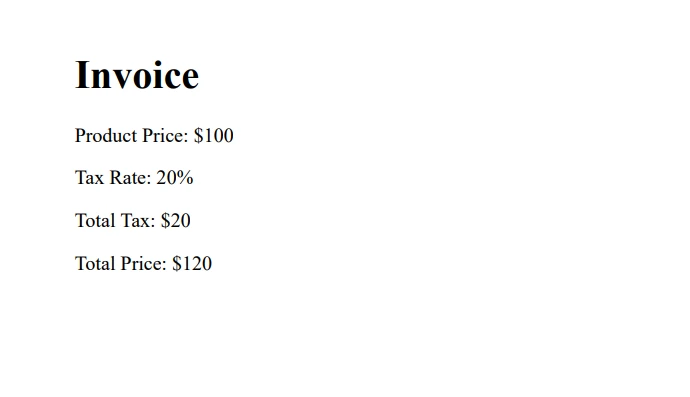
在整个教程中,我们讲解了 C# if-else 语句的基础知识,探讨了各种条件和逻辑运算符,并通过实际例子更好地理解了这一概念。 我们甚至演示了一个实际应用,使用强大的IronPDF 库,它提供了免费试用和授权选项。
记住,练习对于掌握编程概念至关重要。继续尝试不同的方案,应用你新学到的 if-else 语句和其他相关概念的知识。

Jacob Mellor 是 Iron Software 的首席技术官,也是一位开创 C# PDF 技术的有远见的工程师。作为 Iron Software 核心代码库的原始开发者,他从公司成立之初就开始塑造公司的产品架构,与首席执行官 Cameron Rimington 一起将公司转变为一家拥有 50 多名员工的公司,为 NASA、特斯拉和全球政府机构提供服务。



当您需要PDF看起来像HTML时,速度快。













