


IronPDF vs ABCpdf: Która biblioteka PDF C# zapewnia lepszą konwersję HTML na PDF w 2025?

Pliki PDF są szeroko stosowane w różnych sektorach do zadań takich jak fakturowanie i tworzenie różnych typów dokumentów. Skutecznie zaspokajają potrzeby klientów. Podczas tworzenia aplikacji .NET wymagających generowania plików PDF wybór odpowiedniej biblioteki może mieć ogromny wpływ na szybkość programowania, jakość wyników oraz długoterminowe koszty utrzymania. Dwie biblioteki często brane pod uwagę przez programistów to IronPDF i ABCpdf — ale która z nich naprawdę zapewnia lepsze wyniki w przypadku konkretnych potrzeb?
To szczegółowe porównanie analizuje możliwości obu bibliotek, od dokładności konwersji HTML do PDF po modele licencyjne, pomagając w podjęciu świadomej decyzji. Przyjrzymy się rzeczywistym wskaźnikom wydajności, filozofii projektowania API oraz praktycznym przykładom kodu, które pokazują mocne strony i ograniczenia każdej biblioteki. Niezależnie od tego, czy tworzysz platformę SaaS generującą tysiące faktur dziennie, czy aplikację Enterprise wymagającą precyzyjnego renderowania dokumentów, zrozumienie tych różnic ma kluczowe znaczenie dla sukcesu projektu.
Czym jest IronPDF?
IronPDF to biblioteka do generowania plików PDF klasy komercyjnej, która pomaga inżynierom oprogramowania C# edytować, wyodrębniać i generować dokumenty PDF w projektach .NET. Oparty na silniku renderującym opartym na przeglądarce Chrome, IronPDF przekształca HTML, CSS i JavaScript w pliki PDF z taką samą wiernością, jakiej można oczekiwać od wydruku strony internetowej w przeglądarce Google Chrome.
Najważniejsze cechy IronPDF
IronPDF wykorzystuje silnik .NET Chromium do renderowania stron HTML do plików PDF. Dzięki funkcji HTML-to-PDF nie ma potrzeby korzystania ze skomplikówanych interfejsów API do pozycjonowania lub projektowania plików PDF. IronPDF obsługuje standardowe dokumenty internetowe: HTML, ASPX, JS, CSS oraz obrazy. Architektura biblioteki stawia na pierwszym miejscu komfort programisty, zachowując jednocześnie profesjonalną jakość wyników.
Doskonałość konwersji HTML do PDF
- Pełna obsługa HTML, w tym elementów semantycznych HTML5
- Pełna obsługa CSS3, w tym Flexbox, Grid i nowoczesne techniki układania stron
- Wykonywanie kodu JavaScript w celu dynamicznego renderowania treści
- Obsługa czcionek internetowych, w tym Google Fonts i niestandardowych deklaracji
@font-face - Renderowanie responsywnego projektu z kontrolą okna wyświetlania
- Ładowanie treści AJAX z konfigurowalnymi czasami oczekiwania
Możliwości manipulacji dokumentami
- Łączenie i dzielenie: Łączenie wielu plików PDF lub wyodrębnianie określonych stron za pomocą pojedynczych wywołań metod
- Nagłówki i stopki: Dodaj treści dynamiczne, w tym numery stron, daty i niestandardowy kod HTML
- Znak wodny: Nakładaj tekstowe lub graficzne znaki wodne z kontrolą krycia i pozycjonowania
- Zarządzanie formularzami: automatyczne tworzenie formularzy PDF do wypełnienia na podstawie elementów formularzy HTML
- Podpisy cyfrowe: Stosowanie podpisów kryptograficznych z zarządzaniem certyfikatami
- Szyfrowanie: Wdrożenie 128-bitowego i 256-bitowego szyfrowania AES z precyzyjnymi uprawnieniami
Zaawansowane funkcje renderowania
- Przetwarzanie wielowątkowe: natywna obsługa async/await dla scenariuszy wymagających wysokiej wydajności
- Operacje wsadowe: zoptymalizowane metody przetwarzania wielu dokumentów jednocześnie
- Efektywność pamięci: Obsługa strumieniowania przy generowaniu dużych dokumentów bez ładowania całych plików PDF do pamięci
- Optymalizacja chmury: Zaprojektowana z myślą o wdrożeniach kontenerowych w Dockerze, Azure i AWS
Architektura wielopłatformowa
IronPDF zachowuje spójne działanie w różnych środowiskach:
- Windows (x86/x64)
- Linux (w tym Alpine dla minimalnych obrazów Docker)
- macOS (Intel i Apple Silicon)
- Azure App Service, Functions i Container Instances
- AWS (EC2, Lambda)
- Google Cloud Platform
Czym jest ABCpdf?
Biblioteka ABCpdf .NET C# PDF to komponent .NET służący do dynamicznego odczytu, zapisu, konwersji i manipulacji dokumentami Adobe PDF. Opracowany przez WebSupergoo, ABCpdf służy społeczności .NET od ponad dwóch dekad, oferując wiele silników renderowania HTML oraz kompleksowe funkcje edycji plików PDF.
Najważniejsze cechy ABCpdf
ABCpdf w pełni obsługuje HTML/CSS oraz powiązane technologie, takie jak JavaScript, SVG, AJAX i Font Awesome. Biblioteka zapewnia programistom zarówno wygodne metody wysokiego poziomu, jak i dostęp do obiektów PDF na niskim poziomie.
Wiele silników renderujących
Unikalne podejście ABCpdf oferuje kilka silników renderujących:
- Silnik ABCChrome: oparty na Chromium, dostosowany do nowoczesnych standardów internetowych (tylko x64)
- Silnik Gecko: wiele wersji do testowania zgodności
- Silnik MSHTML: renderowanie oparte na przeglądarce Internet Explorer
- Silnik ABCWebKit: renderowanie oparte na WebKit (tylko x64)
To podejście z wieloma silnikami pozwala programistom wybrać najlepszy renderer dla ich specyficznej treści, chociaż zwiększa złożoność wdrożenia i testowania.
Możliwości importu dokumentów
ABCpdf może czytać różne formaty dokumentów, gdy zainstalowane są aplikacje pomocnicze, takie jak OpenOffice.org. Obsługiwane formaty to:
- Dokumenty Microsoft Office (Word, Excel, PowerPoint)
- Pliki PostScript i EPS
- XPS (XML Paper Specification)
- SVG (Skalowalna Grafika Wektorowa)
- Różne formaty obrazów, w tym TIFF, JPEG 2000 i formaty RAW
Niskopoziomowa manipulacja PDF
- Bezpośredni dostęp do modelu obiektowego PDF
- Kompresja/dekompresja strumieni za pomocą wielu algorytmów
- Kontrola podzbioru i osadzania czcionek
- Zarządzanie przestrzenią kolorów i konwersja
- Manipulacja strumieniami zawartości
Funkcje wydajnościowe
ABCpdf jest w pełni wielowątkowy, pozwalając na elastyczne użycie w różnych środowiskach .NET, w tym C#, ASPX i VB, i jest testowany w ustawieniach o wysokiej wydajności wielowątkowej. Biblioteka zawiera:
- Wsparcie GigaPDF™ dla bardzo dużych dokumentów
- Optymalizowane użycie pamięci dla środowisk serwerowych
- Wydajne mechanizmy buforowania czcionek
- Możliwości przetwarzania w tle przez wątki
Wsparcie dla nowoczesnych frameworków CSS
Podczas pracy z nowoczesnymi aplikacjami webowymi, zdolność do konwersji układów opartych na Bootstrap oraz innych nowoczesnych frameworków CSS na PDF jest coraz bardziej krytyczna. Wiele aplikacji korporacyjnych i platform SaaS obecnie polega na Bootstrap dla spójności interfejsu użytkownika, a generowanie PDF musi te układy zachować perfekcyjnie.
IronPDF: Pełne wsparcie dla Bootstrap i nowoczesnych frameworków
Silnik renderowania Chromium w IronPDF zapewnia kompleksowe wsparcie dla nowoczesnych frameworków CSS:
- Bootstrap 5: Pełne wsparcie dla układów opartych na flexbox, systemów siatki i narzędzi responsywnych
- Bootstrap 4: Pełna kompatybilność z talią kart flexbox, paskami nawigacyjnymi i układami formularzy
- Tailwind CSS: Nowoczesny framework CSS zorientowany na narzędzia renderuje się perfekcyjnie
- Foundation: Wszystkie systemy siatki i komponentów wspierane
- Nowoczesny CSS3: Flexbox, CSS Grid, animacje, przejścia i własności niestandardowe
Przykłady z prawdziwego świata: Strona główna Bootstrap i szablony Bootstrap konwertują się na PDF z dokładnością do piksela.
Przykład kodu: Siatka produktów e-commerce
using IronPdf;

var renderer = new ChromePdfRenderer();

string bootstrapProductGrid = @"
<!DOCTYPE html>
<html>
<head>
    <link href='https://cdn.jsdelivr.net/npm/bootstrap@5.3.0/dist/css/bootstrap.min.css' rel='stylesheet'>
</head>
<body>
    <div class='container my-5'>
        <h1 class='mb-4'>Product Catalog</h1>
        <div class='row row-cols-1 row-cols-md-3 g-4'>
            <div class='col'>
                <div class='card h-100'>
                    <img src='https://via.placeholder.com/300x200' class='card-img-top' alt='Product 1'>
                    <div class='card-body d-flex flex-column'>
                        <h5 class='card-title'>Premium Widget</h5>
                        <p class='card-text flex-grow-1'>High-quality widget with advanced features and excellent durability.</p>
                        <div class='d-flex justify-content-between align-items-center mt-auto'>
                            <span class='h4 mb-0 text-primary'>$99.99</span>
                            <button class='btn btn-primary'>Add to Cart</button>
                        </div>
                    </div>
                </div>
            </div>
            <div class='col'>
                <div class='card h-100'>
                    <img src='https://via.placeholder.com/300x200' class='card-img-top' alt='Product 2'>
                    <div class='card-body d-flex flex-column'>
                        <h5 class='card-title'>Standard Widget</h5>
                        <p class='card-text flex-grow-1'>Reliable widget perfect for everyday use with great value.</p>
                        <div class='d-flex justify-content-between align-items-center mt-auto'>
                            <span class='h4 mb-0 text-primary'>$49.99</span>
                            <button class='btn btn-primary'>Add to Cart</button>
                        </div>
                    </div>
                </div>
            </div>
            <div class='col'>
                <div class='card h-100'>
                    <img src='https://via.placeholder.com/300x200' class='card-img-top' alt='Product 3'>
                    <div class='card-body d-flex flex-column'>
                        <h5 class='card-title'>Basic Widget</h5>
                        <p class='card-text flex-grow-1'>Entry-level widget with essential features at an affordable price.</p>
                        <div class='d-flex justify-content-between align-items-center mt-auto'>
                            <span class='h4 mb-0 text-primary'>$29.99</span>
                            <button class='btn btn-primary'>Add to Cart</button>
                        </div>
                    </div>
                </div>
            </div>
        </div>
    </div>
</body>
</html>";

var pdf = renderer.RenderHtmlAsPdf(bootstrapProductGrid);
pdf.SaveAs("product-catalog.pdf");
using IronPdf;
var renderer = new ChromePdfRenderer();
string bootstrapProductGrid = @"
<!DOCTYPE html>
<html>
<head>
<link href='https://cdn.jsdelivr.net/npm/bootstrap@5.3.0/dist/css/bootstrap.min.css' rel='stylesheet'>
</head>
<body>
<div class='container my-5'>
<h1 class='mb-4'>Product Catalog</h1>
<div class='row row-cols-1 row-cols-md-3 g-4'>
<div class='col'>
<div class='card h-100'>
<img src='https://via.placeholder.com/300x200' class='card-img-top' alt='Product 1'>
<div class='card-body d-flex flex-column'>
<h5 class='card-title'>Premium Widget</h5>
<p class='card-text flex-grow-1'>High-quality widget with advanced features and excellent durability.</p>
<div class='d-flex justify-content-between align-items-center mt-auto'>
<span class='h4 mb-0 text-primary'>$99.99</span>
<button class='btn btn-primary'>Add to Cart</button>
</div>
</div>
</div>
</div>
<div class='col'>
<div class='card h-100'>
<img src='https://via.placeholder.com/300x200' class='card-img-top' alt='Product 2'>
<div class='card-body d-flex flex-column'>
<h5 class='card-title'>Standard Widget</h5>
<p class='card-text flex-grow-1'>Reliable widget perfect for everyday use with great value.</p>
<div class='d-flex justify-content-between align-items-center mt-auto'>
<span class='h4 mb-0 text-primary'>$49.99</span>
<button class='btn btn-primary'>Add to Cart</button>
</div>
</div>
</div>
</div>
<div class='col'>
<div class='card h-100'>
<img src='https://via.placeholder.com/300x200' class='card-img-top' alt='Product 3'>
<div class='card-body d-flex flex-column'>
<h5 class='card-title'>Basic Widget</h5>
<p class='card-text flex-grow-1'>Entry-level widget with essential features at an affordable price.</p>
<div class='d-flex justify-content-between align-items-center mt-auto'>
<span class='h4 mb-0 text-primary'>$29.99</span>
<button class='btn btn-primary'>Add to Cart</button>
</div>
</div>
</div>
</div>
</div>
</div>
</body>
</html>";
var pdf = renderer.RenderHtmlAsPdf(bootstrapProductGrid);
pdf.SaveAs("product-catalog.pdf");Imports IronPdf
Dim renderer As New ChromePdfRenderer()
Dim bootstrapProductGrid As String = "
<!DOCTYPE html>
<html>
<head>
<link href='https://cdn.jsdelivr.net/npm/bootstrap@5.3.0/dist/css/bootstrap.min.css' rel='stylesheet'>
</head>
<body>
<div class='container my-5'>
<h1 class='mb-4'>Product Catalog</h1>
<div class='row row-cols-1 row-cols-md-3 g-4'>
<div class='col'>
<div class='card h-100'>
<img src='https://via.placeholder.com/300x200' class='card-img-top' alt='Product 1'>
<div class='card-body d-flex flex-column'>
<h5 class='card-title'>Premium Widget</h5>
<p class='card-text flex-grow-1'>High-quality widget with advanced features and excellent durability.</p>
<div class='d-flex justify-content-between align-items-center mt-auto'>
<span class='h4 mb-0 text-primary'>$99.99</span>
<button class='btn btn-primary'>Add to Cart</button>
</div>
</div>
</div>
</div>
<div class='col'>
<div class='card h-100'>
<img src='https://via.placeholder.com/300x200' class='card-img-top' alt='Product 2'>
<div class='card-body d-flex flex-column'>
<h5 class='card-title'>Standard Widget</h5>
<p class='card-text flex-grow-1'>Reliable widget perfect for everyday use with great value.</p>
<div class='d-flex justify-content-between align-items-center mt-auto'>
<span class='h4 mb-0 text-primary'>$49.99</span>
<button class='btn btn-primary'>Add to Cart</button>
</div>
</div>
</div>
</div>
<div class='col'>
<div class='card h-100'>
<img src='https://via.placeholder.com/300x200' class='card-img-top' alt='Product 3'>
<div class='card-body d-flex flex-column'>
<h5 class='card-title'>Basic Widget</h5>
<p class='card-text flex-grow-1'>Entry-level widget with essential features at an affordable price.</p>
<div class='d-flex justify-content-between align-items-center mt-auto'>
<span class='h4 mb-0 text-primary'>$29.99</span>
<button class='btn btn-primary'>Add to Cart</button>
</div>
</div>
</div>
</div>
</div>
</div>
</body>
</html>"
Dim pdf = renderer.RenderHtmlAsPdf(bootstrapProductGrid)
pdf.SaveAs("product-catalog.pdf")Wynik: Perfekcyjnie sformatowany katalog produktów z systemem siatek kart Bootstrap 5, wyrównaniem flexbox i responsywnym odstępem—wszystkie zachowane w PDF.
ABCpdf: Podejście z wieloma silnikami z ograniczeniami frameworka
Wsparcie ABCpdf dla nowoczesnych frameworków CSS znacząco różni się w zależności od wybranego silnika renderowania:
- Silnik ABCChrome (tylko x64): Dobre wsparcie dla Bootstrap, podobne do IronPDF, ale wymaga specyficznej konfiguracji platformy 64-bitowej
- Silnik ABCWebKit (tylko x64): Ograniczone wsparcie dla flexbox, układy Bootstrap 4+ mogą nie renderować się poprawnie
- Silnik Gecko: Umiarkowane wsparcie CSS3, Bootstrap 3 działa lepiej niż Bootstrap 4/5
- Silnik MSHTML: Starsze renderowanie Internet Explorer, tylko Bootstrap 2.x, nie zalecany do nowoczesnych aplikacji
Kluczowe rozważania:
- Złożoność wyboru silnika zwiększa koszty wdrażania
- Silniki tylko 64-bitowe (ABCChrome, ABCWebKit) ograniczają elastyczność wdrażania
- Konieczne testowanie na różnych silnikach dla spójnego renderowania Bootstrap
- Kompatybilność frameworków różni się znacznie w zależności od wyboru silnika
Architektura z wieloma silnikami ABCpdf zapewnia elastyczność, ale wymaga starannego wyboru silnika i testowania, aby upewnić się, że układy Bootstrap renderują się poprawnie. Dla aplikacji intensywnie korzystających z Bootstrap lub nowoczesnych frameworków CSS, silnik ABCChrome zapewnia najlepsze rezultaty, ale wiąże się z ograniczeniami wdrożeniowymi wyłącznie 64-bitowymi.
Więcej szczegółów na temat kompatybilności frameworka Bootstrap znajdziesz w przewodniku Bootstrap & Flexbox CSS.
Kompleksowe porównanie funkcjonalności
| Kategoria | Funkcja/Aspekt | IronPDF | ABCpdf | Kluczowa zaleta |
|---|---|---|---|---|
| Podstawowa architektura | Filozofia projektowania | Prostota przede wszystkim, intuicyjne API | Elastyczność przede wszystkim, wiele silników | IronPDF: Szybsze tworzenie |
| Złożoność API | Proste metody jak RenderHtmlAsPdf() |
Zorientowane obiektowo z klasą Doc | IronPDF: 70% mniej kodu | |
| Krzywa uczenia się | 1-2 godziny typowo | Zazwyczaj 1–2 dni | IronPDF: Szybsze przyswajanie | |
| Obsługa platform | Wielopłatformowe | Natywne wsparcie, pojedynczy pakiet | Windows głównie, ograniczone wsparcie dla Linux | IronPDF: Prawdziwa wielopłatformowość |
| Wersje .NET | .NET 10, 9, 8, 7, 6, 5, Core 3.1+, Framework 4.6.2+ | .NET 10, 9, 8, 7, 6, 5, 4.0, Framework 2.0+ | Oba: Wsparcie nowoczesnego frameworka | |
| Systemy operacyjne | Windows, Linux, macOS, Docker natywnie | Windows, ograniczone wsparcie dla Linux | IronPDF: Szersze wsparcie systemu operacyjnego | |
| HTML do PDF | Silnik renderujący | Silnik Chrome V127+ | Wiele silników (Chrome 123, Gecko, MSHTML) | ABCpdf: Elastyczność silnika |
| Obsługa CSS3/HTML5 | 100% zgodność z Chrome | Różni się w zależności od silnika (70-100%) | IronPDF: Spójne renderowanie | |
| Wykonanie JavaScript | Pełna obsługa JavaScript V8 | Zależy od silnika | IronPDF: Nowoczesne funkcje JS | |
| Czcionki internetowe | Czcionki Google, @font-face, czcionki systemowe | Wspierane z ABCChrome | Oba: Wsparcie dla czcionek webowych | |
| Wydajność | Renderowanie pojedynczej strony | 200-400ms typowo | 150-300ms (ABCChrome) | ABCpdf: Nieco szybszy |
| Przetwarzanie wsadowe | Zoptymalizowane przetwarzanie równoległe | Możliwości wielowątkowe | IronPDF: Lepsze wsparcie asynchroniczne | |
| Wykorzystanie pamięci | 150-200MB (silnik Chrome) | 100-150MB (zależy od silnika) | ABCpdf: Niższe zużycie pamięci | |
| Doświadczenie programisty | Dokumentacja | Obszerne samouczki, filmy, przykłady | Kompleksowa dokumentacja API | IronPDF: Więcej zasobów edukacyjnych |
| Przykłady kodu | Ponad 100 gotowych do uruchomienia przykładów | Obszerne przykłady | Oba: Bogate przykłady | |
| Wsparcie IntelliSense | Pełna dokumentacja XML | Kompleksowa obsługa IntelliSense | Oba: Integracja IDE | |
| Licensing & Pricing | Poziom początkowy | Lite: $799 (1 dev, 1 project) | Standard: $329 (1 deweloper, tylko 32-bit) | ABCpdf: Niższy koszt początkowy |
| Profesjonalna | Profesjonalna: $2,399 (10 devs, 10 projects) | Profesjonalna: $479 (1 deweloper, 64-bit) | IronPDF: Lepsze licencjonowanie zespołu | |
| Redystrybucja | +$2,399 royalty-free | $4,790 licencja Enterprise | IronPDF: Bardziej przystępny cenowo | |
| Wsparcie | Wsparcie techniczne w cenie | Tak, wsparcie inżynierskie 24/5 | Tak, wsparcie e-mailowe | IronPDF: Wsparcie na czacie na żywo |
| Czas odpowiedzi | < 1 minuta (czat na żywo) | 24-48 godzin typowo | IronPDF: Szybsza reakcja | |
| Najlepsze dla | Przykłady zastosowań | Nowoczesne aplikacje webowe, SaaS, cloud-native | Windows desktop, systemy starsze | Zależy od kontekstu |
Tworzenie nowego projektu w Visual Studio
Zanim przejdziemy do przykładów kodu, skonfigurujmy odpowiednie środowisko deweloperskie. Otwórz Visual Studio i utwórz nowy projekt:
- Przejdź do Plik > Nowy > Projekt
- Wybierz "Aplikacja konsolowa" (.NET Core lub .NET Framework)
- Wybierz docelowy framework (zalecane .NET 6.0 lub wyższy)
- Nazwij swój projekt (np. "PdfLibraryComparison")
- Kliknij Utwórz
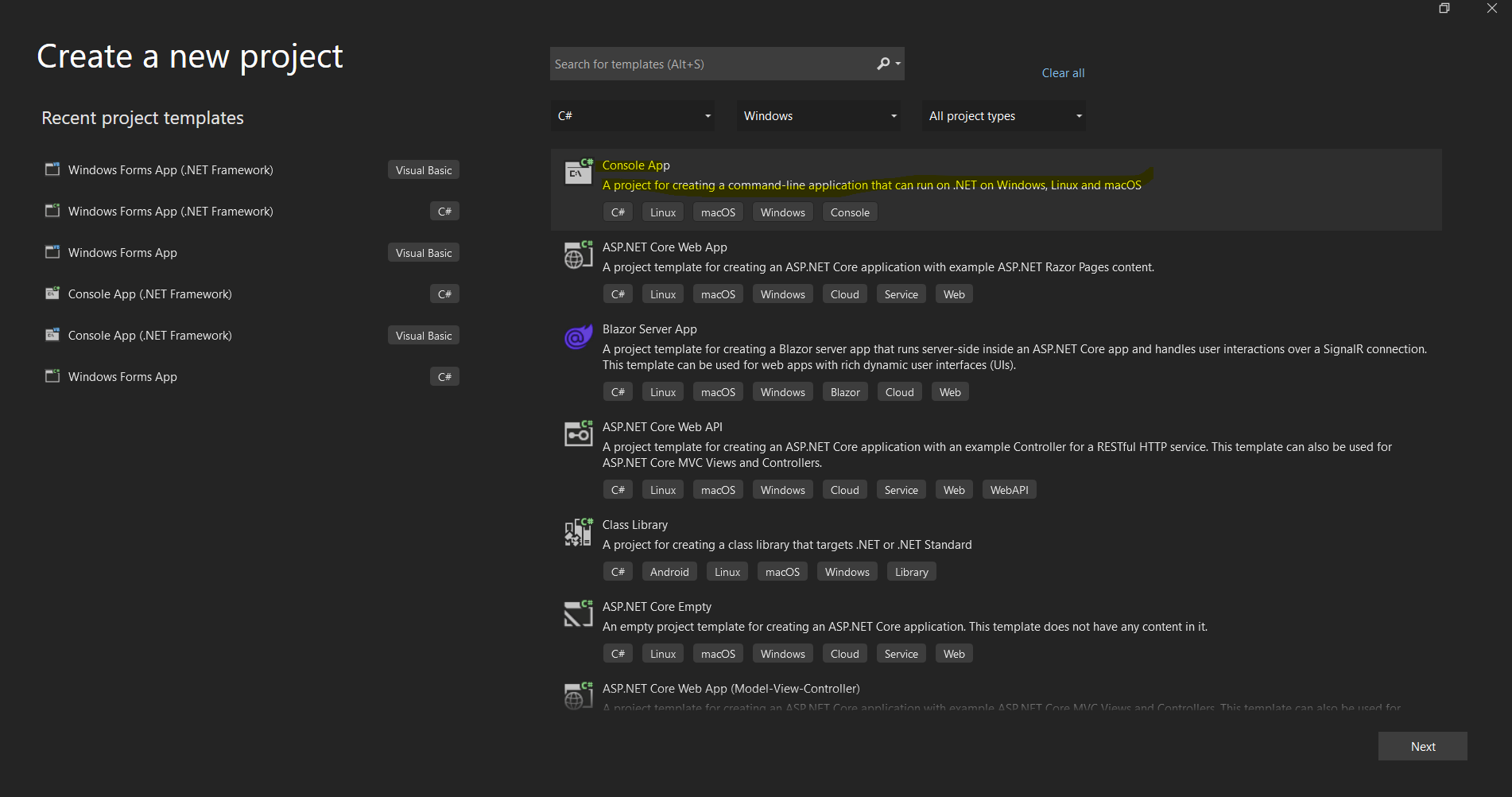 Okno dialogowe tworzenia projektu Visual Studio dla ustawienia nowej aplikacji .NET
Instalacja biblioteki IronPDF C
Metody instalacji
IronPDF oferuje wiele podejść do instalacji, aby dostosować się do różnych przepływów pracy deweloperskiej:
Metoda 1: Korzystanie z Menedżera pakietów NuGet (Zalecane)
Najprostsze podejście to przez zintegrowany Menedżer pakietów NuGet w Visual Studio:
- Kliknij prawym przyciskiem myszy swój projekt w Eksploratorze rozwiązań
- Wybierz "Zarządzaj pakietami NuGet"
- Kliknij "Przeglądarki" i wyszukaj "IronPDF"
- Kliknij Zainstaluj na oficjalnym pakiecie IronPDF
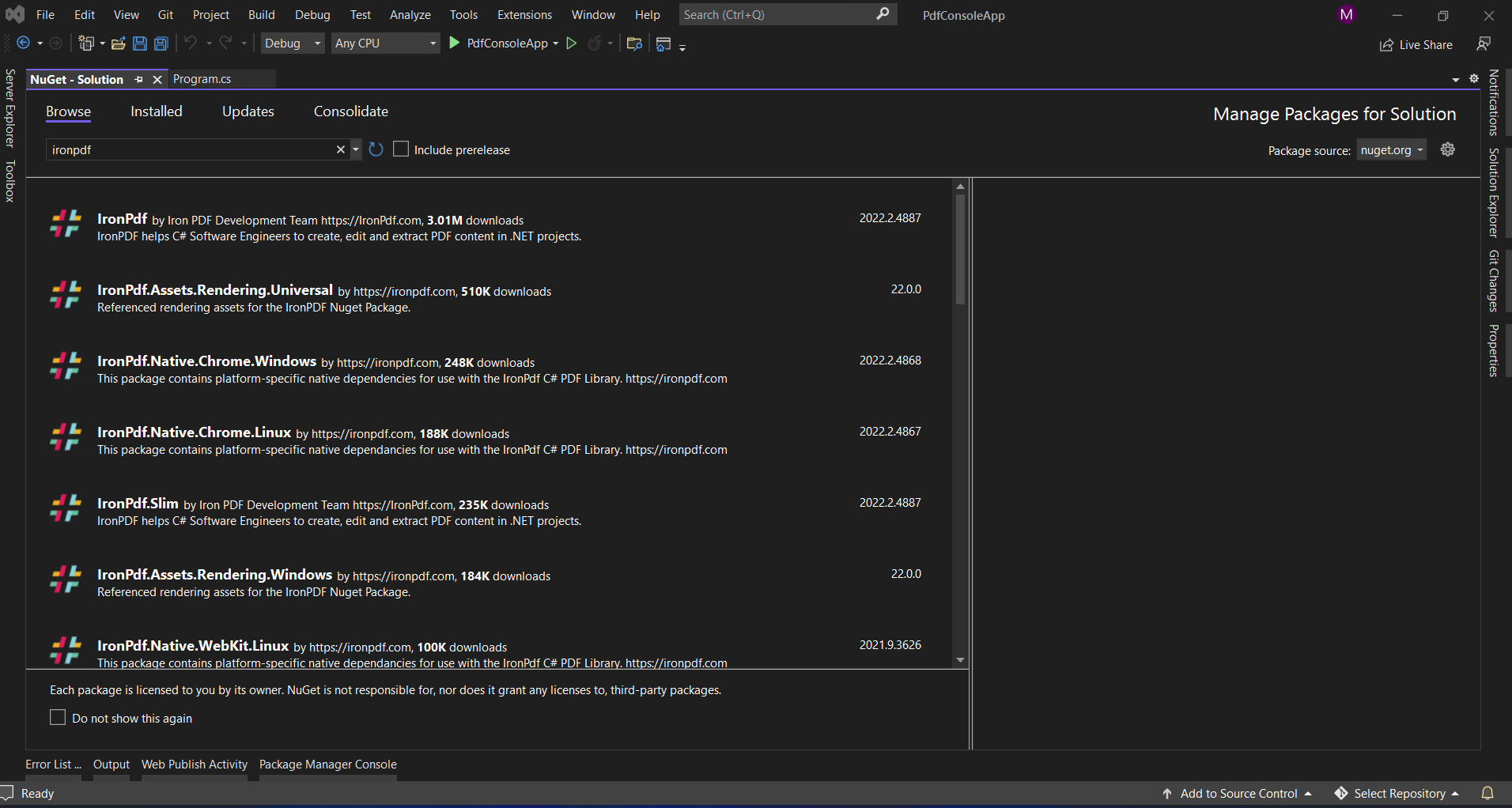 Instalacja IronPDF przez interfejs Menedżera pakietów NuGet Visual Studio
Metoda 2: Konsola Menedżera Pakietów
Dla deweloperów preferujących narzędzia wiersza polecenia:
Install-Package IronPdf
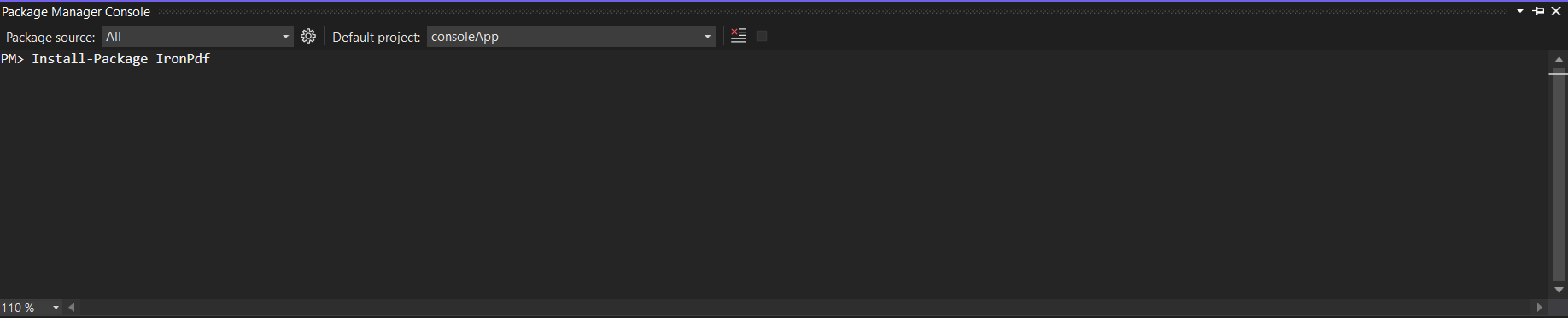 Korzystanie z Konsoli Menedżera pakietów do instalacji IronPDF jednym poleceniem
Metoda 3: Bezpośrednie pobranie
Dla środowisk z ograniczonym dostępem do internetu:
- Pobierz z NuGet.org
- Dodaj plik .nupkg do lokalnego źródła NuGet
- Zainstaluj z lokalnego źródła
Metoda 4: .NET CLI
Dla projektów .NET Core/5+:
dotnet add package IronPdf
Instalacja ABCpdf
Metody instalacji
ABCpdf oferuje podobne opcje instalacji z dodatkowymi rozważaniami:
Metoda 1: Instalacja przez NuGet
Install-Package ABCpdf -Version 13.0.0.0
Zwróć uwagę, że ABCpdf ma osobne pakiety dla różnych edycji:
ABCpdf- edycja Standard (tylko 32-bit)ABCpdf.ABCChrome64- wymagane dla renderowania Chrome na 64-bitABCpdf.ABCGecko- dla silnika renderowania Gecko
Metoda 2: Instalacja ręczna
- Pobierz z strony WebSupergoo
- Wypakuj plik ZIP
- Dodaj odwołania do odpowiednich DLL
- Skopiuj natywne zależności do katalogu wyjściowego
Rozważania specyficzne dla platformy
ABCpdf wymaga dodatkowej konfiguracji dla platform innych niż Windows:
<PackageReference Include="ABCpdf.Linux" Version="13.0.0.0" />
<PackageReference Include="ABCpdf.Linux" Version="13.0.0.0" />Jak te biblioteki radzą sobie z konwersją HTML do PDF?
Zrozumienie podstawowych różnic w podejściu każdej biblioteki do konwersji HTML na PDF pomaga wyjaśnić ich zróżnicowane funkcje i charakterystyki wydajności.
Podejście IronPDF: Architektura Chrome-First
IronPDF wykorzystuje pełny silnik przeglądarki Chrome, oferując szereg korzyści:
using IronPdf;

// IronPDF's approach - Chrome rendering with full browser capabilities
var renderer = new ChromePdfRenderer();

// Configure rendering to match Chrome's print preview exactly
renderer.RenderingOptions = ChromePdfRenderOptions.DefaultChrome;

// Or customize for specific needs
renderer.RenderingOptions.CssMediaType = PdfCssMediaType.Screen;
renderer.RenderingOptions.EnableJavaScript = true;
renderer.RenderingOptions.WaitFor.RenderDelay(500); // Wait for JS execution

// Convert complex HTML with modern CSS and JavaScript
string complexHtml = @"
<!DOCTYPE html>
<html>
<head>
    <style>
        @import url('https://fonts.googleapis.com/css2?family=Roboto:wght@300;700&display=swap');

        .container {
            display: grid;
            grid-template-columns: repeat(auto-fit, minmax(250px, 1fr));
            gap: 20px;
            font-family: 'Roboto', sans-serif;
        }

        .card {
            background: linear-gradient(135deg, #667eea 0%, #764ba2 100%);
            border-radius: 10px;
            padding: 20px;
            color: white;
            box-shadow: 0 10px 20px rgba(0,0,0,0.19);
            transform: translateY(0);
            transition: transform 0.3s;
        }

        @media print {
            .card { break-inside: avoid; }
        }
    </style>
</head>
<body>
    <div class='container'>
        <div class='card'>
            <h2>Modern CSS Support</h2>
            <p>Grid, Flexbox, Gradients, Shadows - all rendered perfectly</p>
        </div>
        <div class='card'>
            <h2>Czcionki internetowe</h2>
            <p>Google Fonts and custom fonts work seamlessly</p>
        </div>
    </div>
    <script>
        // Dynamic content generation
        document.addEventListener('DOMContentLoaded', function() {
            const container = document.querySelector('.container');
            const dynamicCard = document.createElement('div');
            dynamicCard.className = 'card';
            dynamicCard.innerHTML = '<h2>JavaScript Generated</h2><p>This card was added by JavaScript</p>';
            container.appendChild(dynamicCard);
        });
    </script>
</body>
</html>";

var pdf = renderer.RenderHtmlAsPdf(complexHtml);
pdf.SaveAs("modern-web-features.pdf");
using IronPdf;
// IronPDF's approach - Chrome rendering with full browser capabilities
var renderer = new ChromePdfRenderer();
// Configure rendering to match Chrome's print preview exactly
renderer.RenderingOptions = ChromePdfRenderOptions.DefaultChrome;
// Or customize for specific needs
renderer.RenderingOptions.CssMediaType = PdfCssMediaType.Screen;
renderer.RenderingOptions.EnableJavaScript = true;
renderer.RenderingOptions.WaitFor.RenderDelay(500); // Wait for JS execution
// Convert complex HTML with modern CSS and JavaScript
string complexHtml = @"
<!DOCTYPE html>
<html>
<head>
<style>
@import url('https://fonts.googleapis.com/css2?family=Roboto:wght@300;700&display=swap');
.container {
display: grid;
grid-template-columns: repeat(auto-fit, minmax(250px, 1fr));
gap: 20px;
font-family: 'Roboto', sans-serif;
}
.card {
background: linear-gradient(135deg, #667eea 0%, #764ba2 100%);
border-radius: 10px;
padding: 20px;
color: white;
box-shadow: 0 10px 20px rgba(0,0,0,0.19);
transform: translateY(0);
transition: transform 0.3s;
}
@media print {
.card { break-inside: avoid; }
}
</style>
</head>
<body>
<div class='container'>
<div class='card'>
<h2>Modern CSS Support</h2>
<p>Grid, Flexbox, Gradients, Shadows - all rendered perfectly</p>
</div>
<div class='card'>
<h2>Czcionki internetowe</h2>
<p>Google Fonts and custom fonts work seamlessly</p>
</div>
</div>
<script>
// Dynamic content generation
document.addEventListener('DOMContentLoaded', function() {
const container = document.querySelector('.container');
const dynamicCard = document.createElement('div');
dynamicCard.className = 'card';
dynamicCard.innerHTML = '<h2>JavaScript Generated</h2><p>This card was added by JavaScript</p>';
container.appendChild(dynamicCard);
});
</script>
</body>
</html>";
var pdf = renderer.RenderHtmlAsPdf(complexHtml);
pdf.SaveAs("modern-web-features.pdf");Imports IronPdf
' IronPDF's approach - Chrome rendering with full browser capabilities
Dim renderer As New ChromePdfRenderer()
' Configure rendering to match Chrome's print preview exactly
renderer.RenderingOptions = ChromePdfRenderOptions.DefaultChrome
' Or customize for specific needs
renderer.RenderingOptions.CssMediaType = PdfCssMediaType.Screen
renderer.RenderingOptions.EnableJavaScript = True
renderer.RenderingOptions.WaitFor.RenderDelay(500) ' Wait for JS execution
' Convert complex HTML with modern CSS and JavaScript
Dim complexHtml As String = "
<!DOCTYPE html>
<html>
<head>
<style>
@import url('https://fonts.googleapis.com/css2?family=Roboto:wght@300;700&display=swap');
.container {
display: grid;
grid-template-columns: repeat(auto-fit, minmax(250px, 1fr));
gap: 20px;
font-family: 'Roboto', sans-serif;
}
.card {
background: linear-gradient(135deg, #667eea 0%, #764ba2 100%);
border-radius: 10px;
padding: 20px;
color: white;
box-shadow: 0 10px 20px rgba(0,0,0,0.19);
transform: translateY(0);
transition: transform 0.3s;
}
@media print {
.card { break-inside: avoid; }
}
</style>
</head>
<body>
<div class='container'>
<div class='card'>
<h2>Modern CSS Support</h2>
<p>Grid, Flexbox, Gradients, Shadows - all rendered perfectly</p>
</div>
<div class='card'>
<h2>Czcionki internetowe</h2>
<p>Google Fonts and custom fonts work seamlessly</p>
</div>
</div>
<script>
' Dynamic content generation
document.addEventListener('DOMContentLoaded', function() {
const container = document.querySelector('.container');
const dynamicCard = document.createElement('div');
dynamicCard.className = 'card';
dynamicCard.innerHTML = '<h2>JavaScript Generated</h2><p>This card was added by JavaScript</p>';
container.appendChild(dynamicCard);
});
</script>
</body>
</html>"
Dim pdf = renderer.RenderHtmlAsPdf(complexHtml)
pdf.SaveAs("modern-web-features.pdf")Ten kod demonstruje kilka kluczowych zalet podejścia IronPDF opartego na Chrome:
- Nowoczesne wsparcie CSS: Układy siatki, flexbox, gradienty i przekształcenia działają dokładnie tak jak w Chrome
- Integracja z czcionkami webowymi: Czcionki Google ładują się automatycznie bez dodatkowej konfiguracji
- Wykonanie JavaScript: Generowanie dynamicznej treści zachodzi przed renderowaniem PDF
- Zapytania medialne: Style specyficzne dla druku są poprawnie stosowane
Podejście ABCpdf: Elastyczność wielosilnikowa
ABCpdf oferuje wiele silników renderowania, każdy z różnymi możliwościami:
using WebSupergoo.ABCpdf13;

// Metoda 1: Using ABCChrome engine (most modern)
Doc chromeDoc = new Doc();
chromeDoc.HtmlOptions.Engine = EngineType.Chrome;
chromeDoc.HtmlOptions.Chrome.SetUserAgent("Mozilla/5.0 (Windows NT 10.0; Win64; x64) AppleWebKit/537.36");

// Chrome engine supports modern web standards
int chromeId = chromeDoc.AddImageUrl("https://example.com");

// Chain pages if content overflows
while (chromeDoc.Chainable(chromeId))
{
    chromeDoc.Page = chromeDoc.AddPage();
    chromeId = chromeDoc.AddImageToChain(chromeId);
}

chromeDoc.Save("chrome-engine-output.pdf");

// Metoda 2: Using Gecko engine (Firefox-based)
Doc geckoDoc = new Doc();
geckoDoc.HtmlOptions.Engine = EngineType.Gecko;
geckoDoc.HtmlOptions.UseScript = true; // Enable JavaScript

// Gecko provides good standards support with lower resource usage
string html = "<html><body><h1>Gecko Rendered Content</h1></body></html>";
geckoDoc.AddImageHtml(html);
geckoDoc.Save("gecko-engine-output.pdf");

// Metoda 3: Using MSHTML engine (IE-based, legacy support)
Doc ieDoc = new Doc();
ieDoc.HtmlOptions.Engine = EngineType.MSHtml;

// MSHTML is faster but with limited modern CSS support
ieDoc.AddImageUrl("https://legacy-app.example.com");
ieDoc.Save("ie-engine-output.pdf");
using WebSupergoo.ABCpdf13;
// Metoda 1: Using ABCChrome engine (most modern)
Doc chromeDoc = new Doc();
chromeDoc.HtmlOptions.Engine = EngineType.Chrome;
chromeDoc.HtmlOptions.Chrome.SetUserAgent("Mozilla/5.0 (Windows NT 10.0; Win64; x64) AppleWebKit/537.36");
// Chrome engine supports modern web standards
int chromeId = chromeDoc.AddImageUrl("https://example.com");
// Chain pages if content overflows
while (chromeDoc.Chainable(chromeId))
{
chromeDoc.Page = chromeDoc.AddPage();
chromeId = chromeDoc.AddImageToChain(chromeId);
}
chromeDoc.Save("chrome-engine-output.pdf");
// Metoda 2: Using Gecko engine (Firefox-based)
Doc geckoDoc = new Doc();
geckoDoc.HtmlOptions.Engine = EngineType.Gecko;
geckoDoc.HtmlOptions.UseScript = true; // Enable JavaScript
// Gecko provides good standards support with lower resource usage
string html = "<html><body><h1>Gecko Rendered Content</h1></body></html>";
geckoDoc.AddImageHtml(html);
geckoDoc.Save("gecko-engine-output.pdf");
// Metoda 3: Using MSHTML engine (IE-based, legacy support)
Doc ieDoc = new Doc();
ieDoc.HtmlOptions.Engine = EngineType.MSHtml;
// MSHTML is faster but with limited modern CSS support
ieDoc.AddImageUrl("https://legacy-app.example.com");
ieDoc.Save("ie-engine-output.pdf");Imports WebSupergoo.ABCpdf13
' Metoda 1: Using ABCChrome engine (most modern)
Dim chromeDoc As New Doc()
chromeDoc.HtmlOptions.Engine = EngineType.Chrome
chromeDoc.HtmlOptions.Chrome.SetUserAgent("Mozilla/5.0 (Windows NT 10.0; Win64; x64) AppleWebKit/537.36")
' Chrome engine supports modern web standards
Dim chromeId As Integer = chromeDoc.AddImageUrl("https://example.com")
' Chain pages if content overflows
While chromeDoc.Chainable(chromeId)
chromeDoc.Page = chromeDoc.AddPage()
chromeId = chromeDoc.AddImageToChain(chromeId)
End While
chromeDoc.Save("chrome-engine-output.pdf")
' Metoda 2: Using Gecko engine (Firefox-based)
Dim geckoDoc As New Doc()
geckoDoc.HtmlOptions.Engine = EngineType.Gecko
geckoDoc.HtmlOptions.UseScript = True ' Enable JavaScript
' Gecko provides good standards support with lower resource usage
Dim html As String = "<html><body><h1>Gecko Rendered Content</h1></body></html>"
geckoDoc.AddImageHtml(html)
geckoDoc.Save("gecko-engine-output.pdf")
' Metoda 3: Using MSHTML engine (IE-based, legacy support)
Dim ieDoc As New Doc()
ieDoc.HtmlOptions.Engine = EngineType.MSHtml
' MSHTML is faster but with limited modern CSS support
ieDoc.AddImageUrl("https://legacy-app.example.com")
ieDoc.Save("ie-engine-output.pdf")Podejście z wieloma silnikami zapewnia elastyczność, ale wymaga starannego rozważenia:
- Wybór silnika: Deweloperzy muszą wybrać odpowiedni silnik dla swojej treści
- Równość funkcji: Różne silniki obsługują różne funkcję HTML/CSS
- Złożoność wdrożenia: Każdy silnik może mieć różne wymagania dotyczące uruchomienia
- Obciążenie testowaniem: Wynik może się różnić między silnikami, wymagając dodatkowego testowania
Tworzenie dokumentów PDF z URL
Jednym z najczęstszych zastosowań bibliotek PDF jest konwersja stron internetowych na żywo do dokumentów PDF. Przyjrzyjmy się, jak każda biblioteka radzi sobie z tym zadaniem.
Korzystanie z IronPDF
Konwersja URL na PDF w IronPDF wykorzystuje pełny silnik przeglądarki Chrome:
using IronPdf;
using System;
using System.Threading.Tasks;

public class UrlToPdfConverter
{
    public static async Task ConvertUrlToPdfAsync()
    {
        var renderer = new ChromePdfRenderer();

        // Configure for optimal web page capture
        renderer.RenderingOptions = new ChromePdfRenderOptions
        {
            // Viewport and scaling
            ViewPortWidth = 1920,
            ViewPortHeight = 1080,
            ZoomLevel = 100,

            // Paper and margins
            PaperSize = PdfPaperSize.A4,
            MarginTop = 10,
            MarginBottom = 10,
            MarginLeft = 10,
            MarginRight = 10,

            // Rendering behavior
            CssMediaType = PdfCssMediaType.Screen,
            PrintHtmlBackgrounds = true,
            CreatePdfFormsFromHtml = true,

            // JavaScript and timing
            EnableJavaScript = true,
            WaitFor = new WaitFor
            {
                // Wait strategies for dynamic content
                RenderDelay = 500, // milliseconds
                JavaScriptFinishDelay = 100,
                AllowedExecutionTime = 30000 // 30 seconds max
            }
        };

        // Handle authentication if needed
        renderer.RenderingOptions.HttpOptions.HttpHeaders.Add("Authorization", "Bearer your-token");

        // Convert with error handling
        try
        {
            // Async conversion for better performance
            var pdf = await renderer.RenderUrlAsPdfAsync("https://github.com/trending");

            // Add metadata
            pdf.MetaData.Author = "IronPDF Example";
            pdf.MetaData.Title = "GitHub Trending Projects";
            pdf.MetaData.CreationDate = DateTime.Now;

            // Add watermark
            pdf.ApplyWatermark("<h2 style='color:red;opacity:0.5'>CONFIDENTIAL</h2>",
                30, VerticalAlignment.Middle, HorizontalAlignment.Center);

            pdf.SaveAs("github-trending.pdf");
            Console.WriteLine("PDF created successfully!");
        }
        catch (Exception ex)
        {
            Console.WriteLine($"Error creating PDF: {ex.Message}");
        }
    }
}
using IronPdf;
using System;
using System.Threading.Tasks;
public class UrlToPdfConverter
{
public static async Task ConvertUrlToPdfAsync()
{
var renderer = new ChromePdfRenderer();
// Configure for optimal web page capture
renderer.RenderingOptions = new ChromePdfRenderOptions
{
// Viewport and scaling
ViewPortWidth = 1920,
ViewPortHeight = 1080,
ZoomLevel = 100,
// Paper and margins
PaperSize = PdfPaperSize.A4,
MarginTop = 10,
MarginBottom = 10,
MarginLeft = 10,
MarginRight = 10,
// Rendering behavior
CssMediaType = PdfCssMediaType.Screen,
PrintHtmlBackgrounds = true,
CreatePdfFormsFromHtml = true,
// JavaScript and timing
EnableJavaScript = true,
WaitFor = new WaitFor
{
// Wait strategies for dynamic content
RenderDelay = 500, // milliseconds
JavaScriptFinishDelay = 100,
AllowedExecutionTime = 30000 // 30 seconds max
}
};
// Handle authentication if needed
renderer.RenderingOptions.HttpOptions.HttpHeaders.Add("Authorization", "Bearer your-token");
// Convert with error handling
try
{
// Async conversion for better performance
var pdf = await renderer.RenderUrlAsPdfAsync("https://github.com/trending");
// Add metadata
pdf.MetaData.Author = "IronPDF Example";
pdf.MetaData.Title = "GitHub Trending Projects";
pdf.MetaData.CreationDate = DateTime.Now;
// Add watermark
pdf.ApplyWatermark("<h2 style='color:red;opacity:0.5'>CONFIDENTIAL</h2>",
30, VerticalAlignment.Middle, HorizontalAlignment.Center);
pdf.SaveAs("github-trending.pdf");
Console.WriteLine("PDF created successfully!");
}
catch (Exception ex)
{
Console.WriteLine($"Error creating PDF: {ex.Message}");
}
}
}Imports IronPdf
Imports System
Imports System.Threading.Tasks
Public Class UrlToPdfConverter
Public Shared Async Function ConvertUrlToPdfAsync() As Task
Dim renderer = New ChromePdfRenderer()
' Configure for optimal web page capture
renderer.RenderingOptions = New ChromePdfRenderOptions With {
.ViewPortWidth = 1920,
.ViewPortHeight = 1080,
.ZoomLevel = 100,
.PaperSize = PdfPaperSize.A4,
.MarginTop = 10,
.MarginBottom = 10,
.MarginLeft = 10,
.MarginRight = 10,
.CssMediaType = PdfCssMediaType.Screen,
.PrintHtmlBackgrounds = True,
.CreatePdfFormsFromHtml = True,
.EnableJavaScript = True,
.WaitFor = New WaitFor With {
.RenderDelay = 500,
.JavaScriptFinishDelay = 100,
.AllowedExecutionTime = 30000
}
}
' Handle authentication if needed
renderer.RenderingOptions.HttpOptions.HttpHeaders.Add("Authorization", "Bearer your-token")
' Convert with error handling
Try
' Async conversion for better performance
Dim pdf = Await renderer.RenderUrlAsPdfAsync("https://github.com/trending")
' Add metadata
pdf.MetaData.Author = "IronPDF Example"
pdf.MetaData.Title = "GitHub Trending Projects"
pdf.MetaData.CreationDate = DateTime.Now
' Add watermark
pdf.ApplyWatermark("<h2 style='color:red;opacity:0.5'>CONFIDENTIAL</h2>", 30, VerticalAlignment.Middle, HorizontalAlignment.Center)
pdf.SaveAs("github-trending.pdf")
Console.WriteLine("PDF created successfully!")
Catch ex As Exception
Console.WriteLine($"Error creating PDF: {ex.Message}")
End Try
End Function
End ClassPrzedstawione kluczowe funkcje:
- Kontrola widoku: Symulacja różnych rozmiarów ekranów dla testów responsywności
- Wsparcie uwierzytelniania: Dodawanie nagłówków dla chronionych zasobów
- Obsługa dynamicznej treści: Strategie oczekiwania na strony bogate w JavaScript
- Przetwarzanie po konwersji: Dodawanie metadanych i znaków wodnych po konwersji
Korzystanie z ABCpdf
Konwersja adresów URL w ABCpdf z łańcuchowaniem stron:
using WebSupergoo.ABCpdf13;
using System;

public class ABCpdfUrlConverter
{
    public static void ConvertUrlWithABCpdf()
    {
        using (Doc theDoc = new Doc())
        {
            // Configure the HTML engine
            theDoc.HtmlOptions.Engine = EngineType.Chrome;
            theDoc.HtmlOptions.Chrome.LoadDelay = 1000; // Wait 1 second

            // Set viewport size
            theDoc.HtmlOptions.BrowserWidth = 1200;

            // Authentication
            theDoc.HtmlOptions.HttpAdditionalHeaders = "Authorization: Bearer your-token";

            // Page setup
            theDoc.Rect.Inset(20, 20);
            theDoc.Page = theDoc.AddPage();

            // Add the URL
            int theID = theDoc.AddImageUrl("https://github.com/trending");

            // Chain pages for overflow content
            while (true)
            {
                if (!theDoc.Chainable(theID))
                    break;
                theDoc.Page = theDoc.AddPage();
                theID = theDoc.AddImageToChain(theID);
            }

            // Reduce file size
            for (int i = 1; i <= theDoc.PageCount; i++)
            {
                theDoc.PageNumber = i;
                theDoc.Flatten();
            }

            // Save
            theDoc.Save("abcpdf-github.pdf");
        }
    }
}
using WebSupergoo.ABCpdf13;
using System;
public class ABCpdfUrlConverter
{
public static void ConvertUrlWithABCpdf()
{
using (Doc theDoc = new Doc())
{
// Configure the HTML engine
theDoc.HtmlOptions.Engine = EngineType.Chrome;
theDoc.HtmlOptions.Chrome.LoadDelay = 1000; // Wait 1 second
// Set viewport size
theDoc.HtmlOptions.BrowserWidth = 1200;
// Authentication
theDoc.HtmlOptions.HttpAdditionalHeaders = "Authorization: Bearer your-token";
// Page setup
theDoc.Rect.Inset(20, 20);
theDoc.Page = theDoc.AddPage();
// Add the URL
int theID = theDoc.AddImageUrl("https://github.com/trending");
// Chain pages for overflow content
while (true)
{
if (!theDoc.Chainable(theID))
break;
theDoc.Page = theDoc.AddPage();
theID = theDoc.AddImageToChain(theID);
}
// Reduce file size
for (int i = 1; i <= theDoc.PageCount; i++)
{
theDoc.PageNumber = i;
theDoc.Flatten();
}
// Save
theDoc.Save("abcpdf-github.pdf");
}
}
}Imports WebSupergoo.ABCpdf13
Imports System
Public Class ABCpdfUrlConverter
Public Shared Sub ConvertUrlWithABCpdf()
Using theDoc As New Doc()
' Configure the HTML engine
theDoc.HtmlOptions.Engine = EngineType.Chrome
theDoc.HtmlOptions.Chrome.LoadDelay = 1000 ' Wait 1 second
' Set viewport size
theDoc.HtmlOptions.BrowserWidth = 1200
' Authentication
theDoc.HtmlOptions.HttpAdditionalHeaders = "Authorization: Bearer your-token"
' Page setup
theDoc.Rect.Inset(20, 20)
theDoc.Page = theDoc.AddPage()
' Add the URL
Dim theID As Integer = theDoc.AddImageUrl("https://github.com/trending")
' Chain pages for overflow content
Do
If Not theDoc.Chainable(theID) Then
Exit Do
End If
theDoc.Page = theDoc.AddPage()
theID = theDoc.AddImageToChain(theID)
Loop
' Reduce file size
For i As Integer = 1 To theDoc.PageCount
theDoc.PageNumber = i
theDoc.Flatten()
Next i
' Save
theDoc.Save("abcpdf-github.pdf")
End Using
End Sub
End ClassIstotne różnice:
- Łańcuchowanie stron: ręczna obsługa treści wielostronicowych
- Konfiguracja silnika: Należy wyraźnie wybrać silnik renderujący
- Zarządzanie zasobami: Wymaga prawidłowego usunięcia za pomocą instrukcji
using
Tworzenie plików PDF z ciągów znaków HTML
Obie biblioteki doskonale radzą sobie z konwersją ciągów HTML do formatu PDF, ale ich podejścia znacznie się różnią.
Korzystanie z IronPDF
Konwersja ciągów HTML w IronPDF z zaawansowanymi funkcjami:
using IronPdf;
using System.IO;

public class HtmlStringToPdf
{
    public static void GenerateInvoicePdf()
    {
        var renderer = new ChromePdfRenderer();

        // Configure for print-quality output
        renderer.RenderingOptions = new ChromePdfRenderOptions
        {
            PaperSize = PdfPaperSize.A4,
            DPI = 300, // High quality print
            CssMediaType = PdfCssMediaType.Print,
            PaperFit = new PaperFit
            {
                UseFitToPageRendering = true,
                RenderScale = 100
            }
        };

        // Profesjonalna invoice HTML
        string invoiceHtml = @"
<!DOCTYPE html>
<html>
<head>
    <meta charset='UTF-8'>
    <style>
        @page {
            size: A4;
            margin: 0;
        }

        body {
            font-family: 'Segoe UI', Arial, sans-serif;
            margin: 0;
            padding: 20mm;
            color: #333;
        }

        .invoice-header {
            display: flex;
            justify-content: space-between;
            align-items: start;
            margin-bottom: 30px;
            border-bottom: 2px solid #0066cc;
            padding-bottom: 20px;
        }

        .company-info h1 {
            color: #0066cc;
            margin: 0;
            font-size: 28px;
        }

        .invoice-details {
            text-align: right;
        }

        .invoice-details h2 {
            color: #666;
            margin: 0 0 10px 0;
            font-size: 24px;
        }

        .invoice-table {
            width: 100%;
            border-collapse: collapse;
            margin-top: 30px;
        }

        .invoice-table th {
            background-color: #0066cc;
            color: white;
            padding: 12px;
            text-align: left;
        }

        .invoice-table td {
            padding: 12px;
            border-bottom: 1px solid #ddd;
        }

        .invoice-table tr:hover {
            background-color: #f5f5f5;
        }

        .total-section {
            margin-top: 30px;
            text-align: right;
        }

        .total-section .total-row {
            display: flex;
            justify-content: flex-end;
            margin: 5px 0;
        }

        .total-section .label {
            font-weight: bold;
            margin-right: 20px;
            min-width: 100px;
        }

        .total-section .grand-total {
            font-size: 20px;
            color: #0066cc;
            border-top: 2px solid #0066cc;
            padding-top: 10px;
            margin-top: 10px;
        }

        @media print {
            .no-print { display: none; }
        }
    </style>
</head>
<body>
    <div class='invoice-header'>
        <div class='company-info'>
            <h1>ACME Corporation</h1>
            <p>123 Business Street<br>
            New York, NY 10001<br>
            Phone: (555) 123-4567<br>
            Email: billing@acme.com</p>
        </div>
        <div class='invoice-details'>
            <h2>INVOICE</h2>
            <p><strong>Invoice #:</strong> INV-2025-001<br>
            <strong>Date:</strong> " + DateTime.Now.ToString("MMMM dd, yyyy") + @"<br>
            <strong>Due Date:</strong> " + DateTime.Now.AddDays(30).ToString("MMMM dd, yyyy") + @"</p>
        </div>
    </div>

    <div class='billing-info'>
        <h3>Bill To:</h3>
        <p>John Doe<br>
        456 Client Avenue<br>
        Los Angeles, CA 90001</p>
    </div>

    <table class='invoice-table'>
        <thead>
            <tr>
                <th>Description</th>
                <th>Quantity</th>
                <th>Unit Price</th>
                <th>Total</th>
            </tr>
        </thead>
        <tbody>
            <tr>
                <td>Profesjonalna Services - Web Development</td>
                <td>40 hours</td>
                <td>$150.00</td>
                <td>$6,000.00</td>
            </tr>
            <tr>
                <td>Hosting Services (Annual)</td>
                <td>1</td>
                <td>$1,200.00</td>
                <td>$1,200.00</td>
            </tr>
            <tr>
                <td>Domain Registration</td>
                <td>2</td>
                <td>$15.00</td>
                <td>$30.00</td>
            </tr>
        </tbody>
    </table>

    <div class='total-section'>
        <div class='total-row'>
            <span class='label'>Subtotal:</span>
            <span>$7,230.00</span>
        </div>
        <div class='total-row'>
            <span class='label'>Tax (8%):</span>
            <span>$578.40</span>
        </div>
        <div class='total-row grand-total'>
            <span class='label'>Total Due:</span>
            <span>$7,808.40</span>
        </div>
    </div>

    <div class='footer' style='margin-top: 50px; padding-top: 20px; border-top: 1px solid #ddd; text-align: center; color: #666;'>
        <p>Thank you for your business!<br>
        Payment is due within 30 days. Please include invoice number with payment.</p>
    </div>
</body>
</html>";

        // Generate PDF with base path for local assets
        var pdf = renderer.RenderHtmlAsPdf(invoiceHtml, @"C:\Assets\");

        // Add security
        pdf.SecuritySettings.AllowUserEditing = false;
        pdf.SecuritySettings.AllowUserPrinting = PdfPrintSecurity.FullPrintRights;
        pdf.SecuritySettings.OwnerPassword = "admin123";

        // Save with optimization
        pdf.CompressImages(60); // 60% quality for smaller file size
        pdf.SaveAs("professional-invoice.pdf");
    }
}
using IronPdf;
using System.IO;
public class HtmlStringToPdf
{
public static void GenerateInvoicePdf()
{
var renderer = new ChromePdfRenderer();
// Configure for print-quality output
renderer.RenderingOptions = new ChromePdfRenderOptions
{
PaperSize = PdfPaperSize.A4,
DPI = 300, // High quality print
CssMediaType = PdfCssMediaType.Print,
PaperFit = new PaperFit
{
UseFitToPageRendering = true,
RenderScale = 100
}
};
// Profesjonalna invoice HTML
string invoiceHtml = @"
<!DOCTYPE html>
<html>
<head>
<meta charset='UTF-8'>
<style>
@page {
size: A4;
margin: 0;
}
body {
font-family: 'Segoe UI', Arial, sans-serif;
margin: 0;
padding: 20mm;
color: #333;
}
.invoice-header {
display: flex;
justify-content: space-between;
align-items: start;
margin-bottom: 30px;
border-bottom: 2px solid #0066cc;
padding-bottom: 20px;
}
.company-info h1 {
color: #0066cc;
margin: 0;
font-size: 28px;
}
.invoice-details {
text-align: right;
}
.invoice-details h2 {
color: #666;
margin: 0 0 10px 0;
font-size: 24px;
}
.invoice-table {
width: 100%;
border-collapse: collapse;
margin-top: 30px;
}
.invoice-table th {
background-color: #0066cc;
color: white;
padding: 12px;
text-align: left;
}
.invoice-table td {
padding: 12px;
border-bottom: 1px solid #ddd;
}
.invoice-table tr:hover {
background-color: #f5f5f5;
}
.total-section {
margin-top: 30px;
text-align: right;
}
.total-section .total-row {
display: flex;
justify-content: flex-end;
margin: 5px 0;
}
.total-section .label {
font-weight: bold;
margin-right: 20px;
min-width: 100px;
}
.total-section .grand-total {
font-size: 20px;
color: #0066cc;
border-top: 2px solid #0066cc;
padding-top: 10px;
margin-top: 10px;
}
@media print {
.no-print { display: none; }
}
</style>
</head>
<body>
<div class='invoice-header'>
<div class='company-info'>
<h1>ACME Corporation</h1>
<p>123 Business Street<br>
New York, NY 10001<br>
Phone: (555) 123-4567<br>
Email: billing@acme.com</p>
</div>
<div class='invoice-details'>
<h2>INVOICE</h2>
<p><strong>Invoice #:</strong> INV-2025-001<br>
<strong>Date:</strong> " + DateTime.Now.ToString("MMMM dd, yyyy") + @"<br>
<strong>Due Date:</strong> " + DateTime.Now.AddDays(30).ToString("MMMM dd, yyyy") + @"</p>
</div>
</div>
<div class='billing-info'>
<h3>Bill To:</h3>
<p>John Doe<br>
456 Client Avenue<br>
Los Angeles, CA 90001</p>
</div>
<table class='invoice-table'>
<thead>
<tr>
<th>Description</th>
<th>Quantity</th>
<th>Unit Price</th>
<th>Total</th>
</tr>
</thead>
<tbody>
<tr>
<td>Profesjonalna Services - Web Development</td>
<td>40 hours</td>
<td>$150.00</td>
<td>$6,000.00</td>
</tr>
<tr>
<td>Hosting Services (Annual)</td>
<td>1</td>
<td>$1,200.00</td>
<td>$1,200.00</td>
</tr>
<tr>
<td>Domain Registration</td>
<td>2</td>
<td>$15.00</td>
<td>$30.00</td>
</tr>
</tbody>
</table>
<div class='total-section'>
<div class='total-row'>
<span class='label'>Subtotal:</span>
<span>$7,230.00</span>
</div>
<div class='total-row'>
<span class='label'>Tax (8%):</span>
<span>$578.40</span>
</div>
<div class='total-row grand-total'>
<span class='label'>Total Due:</span>
<span>$7,808.40</span>
</div>
</div>
<div class='footer' style='margin-top: 50px; padding-top: 20px; border-top: 1px solid #ddd; text-align: center; color: #666;'>
<p>Thank you for your business!<br>
Payment is due within 30 days. Please include invoice number with payment.</p>
</div>
</body>
</html>";
// Generate PDF with base path for local assets
var pdf = renderer.RenderHtmlAsPdf(invoiceHtml, @"C:\Assets\");
// Add security
pdf.SecuritySettings.AllowUserEditing = false;
pdf.SecuritySettings.AllowUserPrinting = PdfPrintSecurity.FullPrintRights;
pdf.SecuritySettings.OwnerPassword = "admin123";
// Save with optimization
pdf.CompressImages(60); // 60% quality for smaller file size
pdf.SaveAs("professional-invoice.pdf");
}
}Imports IronPdf
Imports System.IO
Public Class HtmlStringToPdf
Public Shared Sub GenerateInvoicePdf()
Dim renderer As New ChromePdfRenderer()
' Configure for print-quality output
renderer.RenderingOptions = New ChromePdfRenderOptions With {
.PaperSize = PdfPaperSize.A4,
.DPI = 300, ' High quality print
.CssMediaType = PdfCssMediaType.Print,
.PaperFit = New PaperFit With {
.UseFitToPageRendering = True,
.RenderScale = 100
}
}
' Profesjonalna invoice HTML
Dim invoiceHtml As String = "
<!DOCTYPE html>
<html>
<head>
<meta charset='UTF-8'>
<style>
@page {
size: A4;
margin: 0;
}
body {
font-family: 'Segoe UI', Arial, sans-serif;
margin: 0;
padding: 20mm;
color: #333;
}
.invoice-header {
display: flex;
justify-content: space-between;
align-items: start;
margin-bottom: 30px;
border-bottom: 2px solid #0066cc;
padding-bottom: 20px;
}
.company-info h1 {
color: #0066cc;
margin: 0;
font-size: 28px;
}
.invoice-details {
text-align: right;
}
.invoice-details h2 {
color: #666;
margin: 0 0 10px 0;
font-size: 24px;
}
.invoice-table {
width: 100%;
border-collapse: collapse;
margin-top: 30px;
}
.invoice-table th {
background-color: #0066cc;
color: white;
padding: 12px;
text-align: left;
}
.invoice-table td {
padding: 12px;
border-bottom: 1px solid #ddd;
}
.invoice-table tr:hover {
background-color: #f5f5f5;
}
.total-section {
margin-top: 30px;
text-align: right;
}
.total-section .total-row {
display: flex;
justify-content: flex-end;
margin: 5px 0;
}
.total-section .label {
font-weight: bold;
margin-right: 20px;
min-width: 100px;
}
.total-section .grand-total {
font-size: 20px;
color: #0066cc;
border-top: 2px solid #0066cc;
padding-top: 10px;
margin-top: 10px;
}
@media print {
.no-print { display: none; }
}
</style>
</head>
<body>
<div class='invoice-header'>
<div class='company-info'>
<h1>ACME Corporation</h1>
<p>123 Business Street<br>
New York, NY 10001<br>
Phone: (555) 123-4567<br>
Email: billing@acme.com</p>
</div>
<div class='invoice-details'>
<h2>INVOICE</h2>
<p><strong>Invoice #:</strong> INV-2025-001<br>
<strong>Date:</strong> " & DateTime.Now.ToString("MMMM dd, yyyy") & "<br>
<strong>Due Date:</strong> " & DateTime.Now.AddDays(30).ToString("MMMM dd, yyyy") & "</p>
</div>
</div>
<div class='billing-info'>
<h3>Bill To:</h3>
<p>John Doe<br>
456 Client Avenue<br>
Los Angeles, CA 90001</p>
</div>
<table class='invoice-table'>
<thead>
<tr>
<th>Description</th>
<th>Quantity</th>
<th>Unit Price</th>
<th>Total</th>
</tr>
</thead>
<tbody>
<tr>
<td>Profesjonalna Services - Web Development</td>
<td>40 hours</td>
<td>$150.00</td>
<td>$6,000.00</td>
</tr>
<tr>
<td>Hosting Services (Annual)</td>
<td>1</td>
<td>$1,200.00</td>
<td>$1,200.00</td>
</tr>
<tr>
<td>Domain Registration</td>
<td>2</td>
<td>$15.00</td>
<td>$30.00</td>
</tr>
</tbody>
</table>
<div class='total-section'>
<div class='total-row'>
<span class='label'>Subtotal:</span>
<span>$7,230.00</span>
</div>
<div class='total-row'>
<span class='label'>Tax (8%):</span>
<span>$578.40</span>
</div>
<div class='total-row grand-total'>
<span class='label'>Total Due:</span>
<span>$7,808.40</span>
</div>
</div>
<div class='footer' style='margin-top: 50px; padding-top: 20px; border-top: 1px solid #ddd; text-align: center; color: #666;'>
<p>Thank you for your business!<br>
Payment is due within 30 days. Please include invoice number with payment.</p>
</div>
</body>
</html>"
' Generate PDF with base path for local assets
Dim pdf = renderer.RenderHtmlAsPdf(invoiceHtml, "C:\Assets\")
' Add security
pdf.SecuritySettings.AllowUserEditing = False
pdf.SecuritySettings.AllowUserPrinting = PdfPrintSecurity.FullPrintRights
pdf.SecuritySettings.OwnerPassword = "admin123"
' Save with optimization
pdf.CompressImages(60) ' 60% quality for smaller file size
pdf.SaveAs("professional-invoice.pdf")
End Sub
End ClassTen przykład przedstawia:
- Profesjonalna układ: złożony kod CSS z wykorzystaniem flexbox i grid
- Treści dynamiczne: obliczenia daty i formatowanie
- Optymalizacja druku: zapytania o media dotyczące stylizacji przeznaczonej specjalnie do druku
- Funkcje bezpieczeństwa: Ochrona hasłem i ustawienia uprawnień
- Optymalizacja plików: Kompresja obrazów w celu zmniejszenia rozmiarów plików
Korzystanie z ABCpdf
Obsługa ciągów HTML z formatowanym tekstem w ABCpdf:
using WebSupergoo.ABCpdf13;

public class ABCpdfHtmlString
{
    public static void CreateStyledDocument()
    {
        using (Doc theDoc = new Doc())
        {
            // Set up the document
            theDoc.Rect.Inset(40, 40);
            theDoc.Color.String = "0 0 0"; // Black text

            // Add styled HTML content
            theDoc.FontSize = 48;
            string styledHtml = @"
                <h1 style='color: #0066cc'>ABCpdf Document</h1>
                <p style='font-size: 14pt; line-height: 1.5'>
                    This demonstrates <b>bold text</b>, <i>italic text</i>,
                    and <span style='color: red'>colored text</span>.
                </p>
                <ul style='margin-left: 20px'>
                    <li>First item</li>
                    <li>Second item</li>
                    <li>Third item</li>
                </ul>";

            // Add HTML with automatic text flow
            int theID = theDoc.AddImageHtml(styledHtml);

            // Continue on new pages if needed
            while (true)
            {
                if (!theDoc.Chainable(theID))
                    break;
                theDoc.Page = theDoc.AddPage();
                theID = theDoc.AddImageToChain(theID);
            }

            // Apply compression
            theDoc.Encryption.Type = 2; // 128-bit encryption
            theDoc.Encryption.CanPrint = true;
            theDoc.Encryption.CanModify = false;

            theDoc.Save("styled-abcpdf.pdf");
        }
    }
}
using WebSupergoo.ABCpdf13;
public class ABCpdfHtmlString
{
public static void CreateStyledDocument()
{
using (Doc theDoc = new Doc())
{
// Set up the document
theDoc.Rect.Inset(40, 40);
theDoc.Color.String = "0 0 0"; // Black text
// Add styled HTML content
theDoc.FontSize = 48;
string styledHtml = @"
<h1 style='color: #0066cc'>ABCpdf Document</h1>
<p style='font-size: 14pt; line-height: 1.5'>
This demonstrates <b>bold text</b>, <i>italic text</i>,
and <span style='color: red'>colored text</span>.
</p>
<ul style='margin-left: 20px'>
<li>First item</li>
<li>Second item</li>
<li>Third item</li>
</ul>";
// Add HTML with automatic text flow
int theID = theDoc.AddImageHtml(styledHtml);
// Continue on new pages if needed
while (true)
{
if (!theDoc.Chainable(theID))
break;
theDoc.Page = theDoc.AddPage();
theID = theDoc.AddImageToChain(theID);
}
// Apply compression
theDoc.Encryption.Type = 2; // 128-bit encryption
theDoc.Encryption.CanPrint = true;
theDoc.Encryption.CanModify = false;
theDoc.Save("styled-abcpdf.pdf");
}
}
}Imports WebSupergoo.ABCpdf13
Public Class ABCpdfHtmlString
Public Shared Sub CreateStyledDocument()
Using theDoc As New Doc()
' Set up the document
theDoc.Rect.Inset(40, 40)
theDoc.Color.String = "0 0 0" ' Black text
' Add styled HTML content
theDoc.FontSize = 48
Dim styledHtml As String = "
<h1 style='color: #0066cc'>ABCpdf Document</h1>
<p style='font-size: 14pt; line-height: 1.5'>
This demonstrates <b>bold text</b>, <i>italic text</i>,
and <span style='color: red'>colored text</span>.
</p>
<ul style='margin-left: 20px'>
<li>First item</li>
<li>Second item</li>
<li>Third item</li>
</ul>"
' Add HTML with automatic text flow
Dim theID As Integer = theDoc.AddImageHtml(styledHtml)
' Continue on new pages if needed
Do
If Not theDoc.Chainable(theID) Then
Exit Do
End If
theDoc.Page = theDoc.AddPage()
theID = theDoc.AddImageToChain(theID)
Loop
' Apply compression
theDoc.Encryption.Type = 2 ' 128-bit encryption
theDoc.Encryption.CanPrint = True
theDoc.Encryption.CanModify = False
theDoc.Save("styled-abcpdf.pdf")
End Using
End Sub
End ClassPorównanie wydajności
Zrozumienie charakterystyki wydajnościowej pomaga w wyborze odpowiedniej biblioteki do konkretnego zastosowania.
Konfiguracja testu porównawczego
using BenchmarkDotNet.Attributes;
using BenchmarkDotNet.Running;
using IronPdf;
using WebSupergoo.ABCpdf13;

[MemoryDiagnoser]
[SimpleJob(warmupCount: 3, targetCount: 10)]
public class PdfGenerationBenchmark
{
    private string _simpleHtml;
    private string _complexHtml;
    private ChromePdfRenderer _ironPdfRenderer;
    private Doc _abcPdfDoc;

    [GlobalSetup]
    public void Setup()
    {
        _simpleHtml = "<h1>Simple Document</h1><p>Basic paragraph text.</p>";
        _complexHtml = File.ReadAllText("complex-page.html"); // 50KB HTML with CSS/JS

        _ironPdfRenderer = new ChromePdfRenderer();
        _abcPdfDoc = new Doc();
        _abcPdfDoc.HtmlOptions.Engine = EngineType.Chrome;
    }

    [Benchmark]
    public void IronPDF_SimpleHtml()
    {
        var pdf = _ironPdfRenderer.RenderHtmlAsPdf(_simpleHtml);
        pdf.SaveAs("temp_iron_simple.pdf");
    }

    [Benchmark]
    public void ABCpdf_SimpleHtml()
    {
        _abcPdfDoc.Clear();
        _abcPdfDoc.AddImageHtml(_simpleHtml);
        _abcPdfDoc.Save("temp_abc_simple.pdf");
    }

    [Benchmark]
    public void IronPDF_ComplexHtml()
    {
        var pdf = _ironPdfRenderer.RenderHtmlAsPdf(_complexHtml);
        pdf.SaveAs("temp_iron_complex.pdf");
    }

    [Benchmark]
    public void ABCpdf_ComplexHtml()
    {
        _abcPdfDoc.Clear();
        int id = _abcPdfDoc.AddImageHtml(_complexHtml);
        while (_abcPdfDoc.Chainable(id))
        {
            _abcPdfDoc.Page = _abcPdfDoc.AddPage();
            id = _abcPdfDoc.AddImageToChain(id);
        }
        _abcPdfDoc.Save("temp_abc_complex.pdf");
    }
}
using BenchmarkDotNet.Attributes;
using BenchmarkDotNet.Running;
using IronPdf;
using WebSupergoo.ABCpdf13;
[MemoryDiagnoser]
[SimpleJob(warmupCount: 3, targetCount: 10)]
public class PdfGenerationBenchmark
{
private string _simpleHtml;
private string _complexHtml;
private ChromePdfRenderer _ironPdfRenderer;
private Doc _abcPdfDoc;
[GlobalSetup]
public void Setup()
{
_simpleHtml = "<h1>Simple Document</h1><p>Basic paragraph text.</p>";
_complexHtml = File.ReadAllText("complex-page.html"); // 50KB HTML with CSS/JS
_ironPdfRenderer = new ChromePdfRenderer();
_abcPdfDoc = new Doc();
_abcPdfDoc.HtmlOptions.Engine = EngineType.Chrome;
}
[Benchmark]
public void IronPDF_SimpleHtml()
{
var pdf = _ironPdfRenderer.RenderHtmlAsPdf(_simpleHtml);
pdf.SaveAs("temp_iron_simple.pdf");
}
[Benchmark]
public void ABCpdf_SimpleHtml()
{
_abcPdfDoc.Clear();
_abcPdfDoc.AddImageHtml(_simpleHtml);
_abcPdfDoc.Save("temp_abc_simple.pdf");
}
[Benchmark]
public void IronPDF_ComplexHtml()
{
var pdf = _ironPdfRenderer.RenderHtmlAsPdf(_complexHtml);
pdf.SaveAs("temp_iron_complex.pdf");
}
[Benchmark]
public void ABCpdf_ComplexHtml()
{
_abcPdfDoc.Clear();
int id = _abcPdfDoc.AddImageHtml(_complexHtml);
while (_abcPdfDoc.Chainable(id))
{
_abcPdfDoc.Page = _abcPdfDoc.AddPage();
id = _abcPdfDoc.AddImageToChain(id);
}
_abcPdfDoc.Save("temp_abc_complex.pdf");
}
}Imports BenchmarkDotNet.Attributes
Imports BenchmarkDotNet.Running
Imports IronPdf
Imports WebSupergoo.ABCpdf13
<MemoryDiagnoser>
<SimpleJob(warmupCount:= 3, targetCount:= 10)>
Public Class PdfGenerationBenchmark
Private _simpleHtml As String
Private _complexHtml As String
Private _ironPdfRenderer As ChromePdfRenderer
Private _abcPdfDoc As Doc
<GlobalSetup>
Public Sub Setup()
_simpleHtml = "<h1>Simple Document</h1><p>Basic paragraph text.</p>"
_complexHtml = File.ReadAllText("complex-page.html") ' 50KB HTML with CSS/JS
_ironPdfRenderer = New ChromePdfRenderer()
_abcPdfDoc = New Doc()
_abcPdfDoc.HtmlOptions.Engine = EngineType.Chrome
End Sub
<Benchmark>
Public Sub IronPDF_SimpleHtml()
Dim pdf = _ironPdfRenderer.RenderHtmlAsPdf(_simpleHtml)
pdf.SaveAs("temp_iron_simple.pdf")
End Sub
<Benchmark>
Public Sub ABCpdf_SimpleHtml()
_abcPdfDoc.Clear()
_abcPdfDoc.AddImageHtml(_simpleHtml)
_abcPdfDoc.Save("temp_abc_simple.pdf")
End Sub
<Benchmark>
Public Sub IronPDF_ComplexHtml()
Dim pdf = _ironPdfRenderer.RenderHtmlAsPdf(_complexHtml)
pdf.SaveAs("temp_iron_complex.pdf")
End Sub
<Benchmark>
Public Sub ABCpdf_ComplexHtml()
_abcPdfDoc.Clear()
Dim id As Integer = _abcPdfDoc.AddImageHtml(_complexHtml)
Do While _abcPdfDoc.Chainable(id)
_abcPdfDoc.Page = _abcPdfDoc.AddPage()
id = _abcPdfDoc.AddImageToChain(id)
Loop
_abcPdfDoc.Save("temp_abc_complex.pdf")
End Sub
End ClassTypowe wyniki
| Metoda | Średnia | Błąd | StdDev | Pamięć |
|---|---|---|---|---|
| IronPDF_SimpleHtml | 245,3 ms | 4,2 ms | 3,8 ms | 152 MB |
| ABCpdf_SimpleHtml | 187,6 ms | 3,1 ms | 2,9 ms | 98 MB |
| IronPDF_ComplexHtml | 892,4 ms | 12,3 ms | 10,8 ms | 201 MB |
| ABCpdf_ComplexHtml | 743,2 ms | 9,7 ms | 8,6 ms | 145 MB |
Kluczowe uwagi:
- ABCpdf zapewnia szybszą konwersję plików w formacie surowym
- IronPDF zużywa więcej pamięci ze względu na pełny silnik Chrome
- Obie biblioteki skalują się liniowo wraz ze złożonością dokumentu
- Niewielkie obciążenie IronPDF zapewnia większą dokładność renderowania
Porównanie zaawansowanych funkcji
Podpisy cyfrowe i bezpieczeństwo
Wdrożenie podpisu cyfrowego IronPDF
using IronPdf;
using IronPdf.Signing;
using System.Security.Cryptography.X509Certificates;

public class SecurityFeatures
{
    public static void ApplyDigitalSignature()
    {
        // Load existing PDF
        var pdf = PdfDocument.FromFile("unsigned-document.pdf");

        // Load certificate
        var cert = new X509Certificate2("certificate.pfx", "password");

        // Create signature
        var signature = new PdfSignature(cert)
        {
            // Visual signature appearance
            SignatureImage = new PdfSignature.SignatureImage
            {
                ImagePath = "signature.png",
                Width = 200,
                Height = 100
            },

            // Signature position
            PageIndex = 0,
            X = 400,
            Y = 100,

            // Signature details
            Reason = "Document approved",
            Location = "New York, NY",
            ContactInfo = "john.doe@company.com"
        };

        // Apply signature
        pdf.Sign(signature);

        // Additional security
        pdf.SecuritySettings = new SecuritySettings
        {
            AllowUserPrinting = true,
            AllowUserCopyPasteContent = false,
            AllowUserEditing = false,
            AllowUserFormData = true,
            OwnerPassword = "owner123",
            UserPassword = "user123",
            EncryptionLevel = EncryptionLevel.AES256
        };

        pdf.SaveAs("signed-secured.pdf");
    }
}
using IronPdf;
using IronPdf.Signing;
using System.Security.Cryptography.X509Certificates;
public class SecurityFeatures
{
public static void ApplyDigitalSignature()
{
// Load existing PDF
var pdf = PdfDocument.FromFile("unsigned-document.pdf");
// Load certificate
var cert = new X509Certificate2("certificate.pfx", "password");
// Create signature
var signature = new PdfSignature(cert)
{
// Visual signature appearance
SignatureImage = new PdfSignature.SignatureImage
{
ImagePath = "signature.png",
Width = 200,
Height = 100
},
// Signature position
PageIndex = 0,
X = 400,
Y = 100,
// Signature details
Reason = "Document approved",
Location = "New York, NY",
ContactInfo = "john.doe@company.com"
};
// Apply signature
pdf.Sign(signature);
// Additional security
pdf.SecuritySettings = new SecuritySettings
{
AllowUserPrinting = true,
AllowUserCopyPasteContent = false,
AllowUserEditing = false,
AllowUserFormData = true,
OwnerPassword = "owner123",
UserPassword = "user123",
EncryptionLevel = EncryptionLevel.AES256
};
pdf.SaveAs("signed-secured.pdf");
}
}Imports IronPdf
Imports IronPdf.Signing
Imports System.Security.Cryptography.X509Certificates
Public Class SecurityFeatures
Public Shared Sub ApplyDigitalSignature()
' Load existing PDF
Dim pdf = PdfDocument.FromFile("unsigned-document.pdf")
' Load certificate
Dim cert = New X509Certificate2("certificate.pfx", "password")
' Create signature
Dim signature = New PdfSignature(cert) With {
.SignatureImage = New PdfSignature.SignatureImage With {
.ImagePath = "signature.png",
.Width = 200,
.Height = 100
},
.PageIndex = 0,
.X = 400,
.Y = 100,
.Reason = "Document approved",
.Location = "New York, NY",
.ContactInfo = "john.doe@company.com"
}
' Apply signature
pdf.Sign(signature)
' Additional security
pdf.SecuritySettings = New SecuritySettings With {
.AllowUserPrinting = True,
.AllowUserCopyPasteContent = False,
.AllowUserEditing = False,
.AllowUserFormData = True,
.OwnerPassword = "owner123",
.UserPassword = "user123",
.EncryptionLevel = EncryptionLevel.AES256
}
pdf.SaveAs("signed-secured.pdf")
End Sub
End ClassWdrożenie podpisu cyfrowego ABCpdf
using WebSupergoo.ABCpdf13;
using WebSupergoo.ABCpdf13.Objects;

public class ABCpdfSecurity
{
    public static void SignDocument()
    {
        using (Doc theDoc = new Doc())
        {
            theDoc.Read("unsigned-document.pdf");

            // Create signature field
            Field signatureField = theDoc.Form.AddFieldSignature("AuthorSignature");
            signatureField.Page = 1;
            signatureField.Rect = "400 100 600 200";

            // Configure signature
            Signature theSig = signatureField.Sign();
            theSig.Reason = "Document approved";
            theSig.Location = "New York, NY";
            theSig.ContactInfo = "john.doe@company.com";

            // Load certificate
            theSig.LoadCertificate("certificate.pfx", "password");

            // Apply visual signature
            theSig.Visible = true;
            theSig.Image = theDoc.AddImageFile("signature.png");

            // Sign and save
            theDoc.Save("abcpdf-signed.pdf");
        }
    }
}
using WebSupergoo.ABCpdf13;
using WebSupergoo.ABCpdf13.Objects;
public class ABCpdfSecurity
{
public static void SignDocument()
{
using (Doc theDoc = new Doc())
{
theDoc.Read("unsigned-document.pdf");
// Create signature field
Field signatureField = theDoc.Form.AddFieldSignature("AuthorSignature");
signatureField.Page = 1;
signatureField.Rect = "400 100 600 200";
// Configure signature
Signature theSig = signatureField.Sign();
theSig.Reason = "Document approved";
theSig.Location = "New York, NY";
theSig.ContactInfo = "john.doe@company.com";
// Load certificate
theSig.LoadCertificate("certificate.pfx", "password");
// Apply visual signature
theSig.Visible = true;
theSig.Image = theDoc.AddImageFile("signature.png");
// Sign and save
theDoc.Save("abcpdf-signed.pdf");
}
}
}Imports WebSupergoo.ABCpdf13
Imports WebSupergoo.ABCpdf13.Objects
Public Class ABCpdfSecurity
Public Shared Sub SignDocument()
Using theDoc As New Doc()
theDoc.Read("unsigned-document.pdf")
' Create signature field
Dim signatureField As Field = theDoc.Form.AddFieldSignature("AuthorSignature")
signatureField.Page = 1
signatureField.Rect = "400 100 600 200"
' Configure signature
Dim theSig As Signature = signatureField.Sign()
theSig.Reason = "Document approved"
theSig.Location = "New York, NY"
theSig.ContactInfo = "john.doe@company.com"
' Load certificate
theSig.LoadCertificate("certificate.pfx", "password")
' Apply visual signature
theSig.Visible = True
theSig.Image = theDoc.AddImageFile("signature.png")
' Sign and save
theDoc.Save("abcpdf-signed.pdf")
End Using
End Sub
End ClassObsługa formularzy i pozyskiwanie danych
Zarządzanie formularzami IronPDF
public class FormHandling
{
    public static void WorkWithForms()
    {
        // Create PDF with form fields from HTML
        var renderer = new ChromePdfRenderer();
        renderer.RenderingOptions.CreatePdfFormsFromHtml = true;

        string formHtml = @"
        <form>
            <label>Name: <input type='text' name='fullname' required></label><br>
            <label>Email: <input type='email' name='email' required></label><br>
            <label>Subscribe: <input type='checkbox' name='subscribe' value='yes'></label><br>
            <label>Country:
                <select name='country'>
                    <option>USA</option>
                    <option>Canada</option>
                    <option>UK</option>
                </select>
            </label><br>
            <button type='submit'>Submit</button>
        </form>";

        var pdf = renderer.RenderHtmlAsPdf(formHtml);

        // Fill form programmatically
        pdf.Form.Fields["fullname"].Value = "John Doe";
        pdf.Form.Fields["email"].Value = "john@example.com";
        pdf.Form.Fields["subscribe"].Value = "yes";
        pdf.Form.Fields["country"].Value = "USA";

        // Extract form data
        foreach (var field in pdf.Form.Fields)
        {
            Console.WriteLine($"{field.Name}: {field.Value}");
        }

        // Flatten form (make non-editable)
        pdf.Form.Flatten();
        pdf.SaveAs("filled-form.pdf");
    }
}
public class FormHandling
{
public static void WorkWithForms()
{
// Create PDF with form fields from HTML
var renderer = new ChromePdfRenderer();
renderer.RenderingOptions.CreatePdfFormsFromHtml = true;
string formHtml = @"
<form>
<label>Name: <input type='text' name='fullname' required></label><br>
<label>Email: <input type='email' name='email' required></label><br>
<label>Subscribe: <input type='checkbox' name='subscribe' value='yes'></label><br>
<label>Country:
<select name='country'>
<option>USA</option>
<option>Canada</option>
<option>UK</option>
</select>
</label><br>
<button type='submit'>Submit</button>
</form>";
var pdf = renderer.RenderHtmlAsPdf(formHtml);
// Fill form programmatically
pdf.Form.Fields["fullname"].Value = "John Doe";
pdf.Form.Fields["email"].Value = "john@example.com";
pdf.Form.Fields["subscribe"].Value = "yes";
pdf.Form.Fields["country"].Value = "USA";
// Extract form data
foreach (var field in pdf.Form.Fields)
{
Console.WriteLine($"{field.Name}: {field.Value}");
}
// Flatten form (make non-editable)
pdf.Form.Flatten();
pdf.SaveAs("filled-form.pdf");
}
}Public Class FormHandling
Public Shared Sub WorkWithForms()
' Create PDF with form fields from HTML
Dim renderer = New ChromePdfRenderer()
renderer.RenderingOptions.CreatePdfFormsFromHtml = True
Dim formHtml As String = "
<form>
<label>Name: <input type='text' name='fullname' required></label><br>
<label>Email: <input type='email' name='email' required></label><br>
<label>Subscribe: <input type='checkbox' name='subscribe' value='yes'></label><br>
<label>Country:
<select name='country'>
<option>USA</option>
<option>Canada</option>
<option>UK</option>
</select>
</label><br>
<button type='submit'>Submit</button>
</form>"
Dim pdf = renderer.RenderHtmlAsPdf(formHtml)
' Fill form programmatically
pdf.Form.Fields("fullname").Value = "John Doe"
pdf.Form.Fields("email").Value = "john@example.com"
pdf.Form.Fields("subscribe").Value = "yes"
pdf.Form.Fields("country").Value = "USA"
' Extract form data
For Each field In pdf.Form.Fields
Console.WriteLine($"{field.Name}: {field.Value}")
Next field
' Flatten form (make non-editable)
pdf.Form.Flatten()
pdf.SaveAs("filled-form.pdf")
End Sub
End ClassPrzetwarzanie wsadowe i optymalizacja
Przetwarzanie wsadowe IronPDF
using System.Threading.Tasks;
using System.Collections.Concurrent;

public class BatchProcessing
{
    public static async Task ProcessMultipleDocumentsAsync(List<string> htmlFiles)
    {
        var renderer = new ChromePdfRenderer();
        renderer.RenderingOptions.PaperSize = PdfPaperSize.A4;

        // Use concurrent processing
        var pdfResults = new ConcurrentBag<(string filename, byte[] data)>();

        await Parallel.ForEachAsync(htmlFiles, async (htmlFile, ct) =>
        {
            try
            {
                var html = await File.ReadAllTextAsync(htmlFile);
                var pdf = await renderer.RenderHtmlAsPdfAsync(html);

                // Optimize each PDF
                pdf.CompressImages(70);

                var filename = Path.GetFileNameWithoutExtension(htmlFile) + ".pdf";
                var data = pdf.BinaryData;

                pdfResults.Add((filename, data));
            }
            catch (Exception ex)
            {
                Console.WriteLine($"Error processing {htmlFile}: {ex.Message}");
            }
        });

        // Merge all PDFs into one
        var finalPdf = new PdfDocument();
        foreach (var (filename, data) in pdfResults.OrderBy(x => x.filename))
        {
            var pdf = new PdfDocument(data);
            finalPdf.AppendPdf(pdf);
        }

        finalPdf.SaveAs("batch-processed.pdf");
    }
}
using System.Threading.Tasks;
using System.Collections.Concurrent;
public class BatchProcessing
{
public static async Task ProcessMultipleDocumentsAsync(List<string> htmlFiles)
{
var renderer = new ChromePdfRenderer();
renderer.RenderingOptions.PaperSize = PdfPaperSize.A4;
// Use concurrent processing
var pdfResults = new ConcurrentBag<(string filename, byte[] data)>();
await Parallel.ForEachAsync(htmlFiles, async (htmlFile, ct) =>
{
try
{
var html = await File.ReadAllTextAsync(htmlFile);
var pdf = await renderer.RenderHtmlAsPdfAsync(html);
// Optimize each PDF
pdf.CompressImages(70);
var filename = Path.GetFileNameWithoutExtension(htmlFile) + ".pdf";
var data = pdf.BinaryData;
pdfResults.Add((filename, data));
}
catch (Exception ex)
{
Console.WriteLine($"Error processing {htmlFile}: {ex.Message}");
}
});
// Merge all PDFs into one
var finalPdf = new PdfDocument();
foreach (var (filename, data) in pdfResults.OrderBy(x => x.filename))
{
var pdf = new PdfDocument(data);
finalPdf.AppendPdf(pdf);
}
finalPdf.SaveAs("batch-processed.pdf");
}
}Imports System.Threading.Tasks
Imports System.Collections.Concurrent
Public Class BatchProcessing
Public Shared Async Function ProcessMultipleDocumentsAsync(ByVal htmlFiles As List(Of String)) As Task
Dim renderer = New ChromePdfRenderer()
renderer.RenderingOptions.PaperSize = PdfPaperSize.A4
' Use concurrent processing
Dim pdfResults = New ConcurrentBag(Of (filename As String, data As Byte()))()
Await Parallel.ForEachAsync(htmlFiles, Async Sub(htmlFile, ct)
Try
Dim html = Await File.ReadAllTextAsync(htmlFile)
Dim pdf = Await renderer.RenderHtmlAsPdfAsync(html)
' Optimize each PDF
pdf.CompressImages(70)
Dim filename = Path.GetFileNameWithoutExtension(htmlFile) & ".pdf"
Dim data = pdf.BinaryData
pdfResults.Add((filename, data))
Catch ex As Exception
Console.WriteLine($"Error processing {htmlFile}: {ex.Message}")
End Try
End Sub)
' Merge all PDFs into one
Dim finalPdf = New PdfDocument()
foreach var(filename, data) In pdfResults.OrderBy(Function(x) x.filename)
Dim pdf = New PdfDocument(data)
finalPdf.AppendPdf(pdf)
Next
finalPdf.SaveAs("batch-processed.pdf")
End Function
End ClassPraktyczne scenariusze zastosowań
Która biblioteka lepiej pasuje do Twojego projektu?
Kiedy wybrać IronPDF:
-
Tworzenie aplikacji natywnych dla chmury
- Natywna obsługa Docker przy minimalnej konfiguracji
- Kompatybilność z Azure Functions i AWS Lambda
- Spójne działanie na wszystkich platformach chmurowych
-
Wymagane renderowanie HTML z dokładnością co do piksela
- Złożone układy CSS (Grid, Flexbox)
- Aplikacje jednostronicowe intensywnie wykorzystujące JavaScript
- Wymagania dotyczące czcionek internetowych
-
Tworzenie rozwiązań wielopłatformowych
- Aplikacje przeznaczone dla systemów Windows, Linux i macOS
- Architektura mikrousług
- Wdrożenia oparte na kontenerach
- Priorytetowe traktowanie doświadczenia programistów
- Potrzeby w zakresie szybkiego prototypowania
- Małe zespoły programistów
- Ograniczona wiedza na temat plików PDF
Kiedy wybrać ABCpdf:
-
Praca z systemami starszego typu
- Środowiska wyłącznie dla systemu Windows
- Istniejące implementacje ABCpdf
- Wymagania dotyczące treści zgodnych z przeglądarką IE
-
Wymaganie określonych silników renderujących
- Testowanie w różnych przeglądarkach
- Optymalizacje specyficzne dla silnika
- Obsługa starszych przeglądarek
-
Zaawansowana obróbka plików PDF
- Dostęp do obiektów PDF na niskim poziomie
- Niestandardowe operatory PDF
- Złożone scenariusze łączenia dokumentów
- Projekty z ograniczonym budżetem
- Niższa cena początkowa
- Licencje dla pojedynczego programisty
- Kompatybilność ze środowiskiem 32-bitowym
Rozwiązywanie typowych problemów
Typowe problemy związane z IronPDF i ich rozwiązania
public class IronPdfTroubleshooting
{
    // Issue: Fonts not rendering correctly
    public static void FixFontIssues()
    {
        var renderer = new ChromePdfRenderer();

        // Solution 1: Wait for fonts to load
        renderer.RenderingOptions.WaitFor.RenderDelay(1000);

        // Solution 2: Use system fonts fallback
        renderer.RenderingOptions.CssMediaType = PdfCssMediaType.Print;
    }

    // Issue: JavaScript not executing
    public static void FixJavaScriptIssues()
    {
        var renderer = new ChromePdfRenderer();

        // Enable JavaScript and wait for execution
        renderer.RenderingOptions.EnableJavaScript = true;
        renderer.RenderingOptions.WaitFor.JavaScriptFinishDelay = 2000;
        renderer.RenderingOptions.WaitFor.AllowedExecutionTime = 30000;
    }

    // Issue: Pamięć usage in Docker
    public static void OptimizeForDocker()
    {
        var renderer = new ChromePdfRenderer();

        // Use single-threaded mode for containers
        IronPdf.Installation.SingleThreaded = true;

        // Reduce memory footprint
        renderer.RenderingOptions.ViewPortWidth = 1024;
        renderer.RenderingOptions.EnableGrayscale = true;
    }
}
public class IronPdfTroubleshooting
{
// Issue: Fonts not rendering correctly
public static void FixFontIssues()
{
var renderer = new ChromePdfRenderer();
// Solution 1: Wait for fonts to load
renderer.RenderingOptions.WaitFor.RenderDelay(1000);
// Solution 2: Use system fonts fallback
renderer.RenderingOptions.CssMediaType = PdfCssMediaType.Print;
}
// Issue: JavaScript not executing
public static void FixJavaScriptIssues()
{
var renderer = new ChromePdfRenderer();
// Enable JavaScript and wait for execution
renderer.RenderingOptions.EnableJavaScript = true;
renderer.RenderingOptions.WaitFor.JavaScriptFinishDelay = 2000;
renderer.RenderingOptions.WaitFor.AllowedExecutionTime = 30000;
}
// Issue: Pamięć usage in Docker
public static void OptimizeForDocker()
{
var renderer = new ChromePdfRenderer();
// Use single-threaded mode for containers
IronPdf.Installation.SingleThreaded = true;
// Reduce memory footprint
renderer.RenderingOptions.ViewPortWidth = 1024;
renderer.RenderingOptions.EnableGrayscale = true;
}
}Imports IronPdf
Public Class IronPdfTroubleshooting
' Issue: Fonts not rendering correctly
Public Shared Sub FixFontIssues()
Dim renderer = New ChromePdfRenderer()
' Solution 1: Wait for fonts to load
renderer.RenderingOptions.WaitFor.RenderDelay(1000)
' Solution 2: Use system fonts fallback
renderer.RenderingOptions.CssMediaType = PdfCssMediaType.Print
End Sub
' Issue: JavaScript not executing
Public Shared Sub FixJavaScriptIssues()
Dim renderer = New ChromePdfRenderer()
' Enable JavaScript and wait for execution
renderer.RenderingOptions.EnableJavaScript = True
renderer.RenderingOptions.WaitFor.JavaScriptFinishDelay = 2000
renderer.RenderingOptions.WaitFor.AllowedExecutionTime = 30000
End Sub
' Issue: Pamięć usage in Docker
Public Shared Sub OptimizeForDocker()
Dim renderer = New ChromePdfRenderer()
' Use single-threaded mode for containers
IronPdf.Installation.SingleThreaded = True
' Reduce memory footprint
renderer.RenderingOptions.ViewPortWidth = 1024
renderer.RenderingOptions.EnableGrayscale = True
End Sub
End ClassABCpdf Typowe problemy i rozwiązania
public class ABCpdfTroubleshooting
{
    // Issue: Page breaks in wrong places
    public static void FixPageBreaks()
    {
        using (Doc theDoc = new Doc())
        {
            // Use HTML page break controls
            theDoc.HtmlOptions.BreakZoneSize = 100; // pixels
            theDoc.HtmlOptions.UseScript = true;

            string html = @"
                <style>
                    .page-break { page-break-after: always; }
                    .no-break { page-break-inside: avoid; }
                </style>
                <div class='no-break'>Keep this content together</div>
                <div class='page-break'></div>
                <div>New page content</div>";

            theDoc.AddImageHtml(html);
            theDoc.Save("fixed-breaks.pdf");
        }
    }

    // Issue: Images not loading
    public static void FixImageLoading()
    {
        using (Doc theDoc = new Doc())
        {
            // Set timeout and authentication
            theDoc.HtmlOptions.Timeout = 60000; // 60 seconds
            theDoc.HtmlOptions.RetryCount = 3;

            // For local images, set base directory
            theDoc.HtmlOptions.BaseUrl = @"file:///C:/Images/";

            theDoc.AddImageHtml("<img src='logo.png'>");
            theDoc.Save("with-images.pdf");
        }
    }
}
public class ABCpdfTroubleshooting
{
// Issue: Page breaks in wrong places
public static void FixPageBreaks()
{
using (Doc theDoc = new Doc())
{
// Use HTML page break controls
theDoc.HtmlOptions.BreakZoneSize = 100; // pixels
theDoc.HtmlOptions.UseScript = true;
string html = @"
<style>
.page-break { page-break-after: always; }
.no-break { page-break-inside: avoid; }
</style>
<div class='no-break'>Keep this content together</div>
<div class='page-break'></div>
<div>New page content</div>";
theDoc.AddImageHtml(html);
theDoc.Save("fixed-breaks.pdf");
}
}
// Issue: Images not loading
public static void FixImageLoading()
{
using (Doc theDoc = new Doc())
{
// Set timeout and authentication
theDoc.HtmlOptions.Timeout = 60000; // 60 seconds
theDoc.HtmlOptions.RetryCount = 3;
// For local images, set base directory
theDoc.HtmlOptions.BaseUrl = @"file:///C:/Images/";
theDoc.AddImageHtml("<img src='logo.png'>");
theDoc.Save("with-images.pdf");
}
}
}Public Class ABCpdfTroubleshooting
' Issue: Page breaks in wrong places
Public Shared Sub FixPageBreaks()
Using theDoc As New Doc()
' Use HTML page break controls
theDoc.HtmlOptions.BreakZoneSize = 100 ' pixels
theDoc.HtmlOptions.UseScript = True
Dim html As String = "
<style>
.page-break { page-break-after: always; }
.no-break { page-break-inside: avoid; }
</style>
<div class='no-break'>Keep this content together</div>
<div class='page-break'></div>
<div>New page content</div>"
theDoc.AddImageHtml(html)
theDoc.Save("fixed-breaks.pdf")
End Using
End Sub
' Issue: Images not loading
Public Shared Sub FixImageLoading()
Using theDoc As New Doc()
' Set timeout and authentication
theDoc.HtmlOptions.Timeout = 60000 ' 60 seconds
theDoc.HtmlOptions.RetryCount = 3
' For local images, set base directory
theDoc.HtmlOptions.BaseUrl = "file:///C:/Images/"
theDoc.AddImageHtml("<img src='logo.png'>")
theDoc.Save("with-images.pdf")
End Using
End Sub
End ClassPrzewodnik po migracji: Przechodzenie między bibliotekami
Migracja z ABCpdf do IronPDF
public class MigrationHelper
{
    // ABCpdf code
    public void OldABCpdfMethod()
    {
        Doc theDoc = new Doc();
        theDoc.AddImageUrl("https://example.com");
        theDoc.Save("output.pdf");
        theDoc.Dispose();
    }

    // Equivalent IronPDF code
    public void NewIronPdfMethod()
    {
        var renderer = new ChromePdfRenderer();
        var pdf = renderer.RenderUrlAsPdf("https://example.com");
        pdf.SaveAs("output.pdf");
    }

    // Migration wrapper for gradual transition
    public class PdfWrapper
    {
        private bool _useIronPdf;

        public PdfWrapper(bool useIronPdf = true)
        {
            _useIronPdf = useIronPdf;
        }

        public void ConvertUrlToPdf(string url, string outputPath)
        {
            if (_useIronPdf)
            {
                var renderer = new ChromePdfRenderer();
                var pdf = renderer.RenderUrlAsPdf(url);
                pdf.SaveAs(outputPath);
            }
            else
            {
                using (var doc = new Doc())
                {
                    doc.AddImageUrl(url);
                    doc.Save(outputPath);
                }
            }
        }
    }
}
public class MigrationHelper
{
// ABCpdf code
public void OldABCpdfMethod()
{
Doc theDoc = new Doc();
theDoc.AddImageUrl("https://example.com");
theDoc.Save("output.pdf");
theDoc.Dispose();
}
// Equivalent IronPDF code
public void NewIronPdfMethod()
{
var renderer = new ChromePdfRenderer();
var pdf = renderer.RenderUrlAsPdf("https://example.com");
pdf.SaveAs("output.pdf");
}
// Migration wrapper for gradual transition
public class PdfWrapper
{
private bool _useIronPdf;
public PdfWrapper(bool useIronPdf = true)
{
_useIronPdf = useIronPdf;
}
public void ConvertUrlToPdf(string url, string outputPath)
{
if (_useIronPdf)
{
var renderer = new ChromePdfRenderer();
var pdf = renderer.RenderUrlAsPdf(url);
pdf.SaveAs(outputPath);
}
else
{
using (var doc = new Doc())
{
doc.AddImageUrl(url);
doc.Save(outputPath);
}
}
}
}
}Public Class MigrationHelper
' ABCpdf code
Public Sub OldABCpdfMethod()
Dim theDoc As New Doc()
theDoc.AddImageUrl("https://example.com")
theDoc.Save("output.pdf")
theDoc.Dispose()
End Sub
' Equivalent IronPDF code
Public Sub NewIronPdfMethod()
Dim renderer = New ChromePdfRenderer()
Dim pdf = renderer.RenderUrlAsPdf("https://example.com")
pdf.SaveAs("output.pdf")
End Sub
' Migration wrapper for gradual transition
Public Class PdfWrapper
Private _useIronPdf As Boolean
Public Sub New(Optional ByVal useIronPdf As Boolean = True)
_useIronPdf = useIronPdf
End Sub
Public Sub ConvertUrlToPdf(ByVal url As String, ByVal outputPath As String)
If _useIronPdf Then
Dim renderer = New ChromePdfRenderer()
Dim pdf = renderer.RenderUrlAsPdf(url)
pdf.SaveAs(outputPath)
Else
Using doc As New Doc()
doc.AddImageUrl(url)
doc.Save(outputPath)
End Using
End If
End Sub
End Class
End ClassLicencjonowanie i całkowity koszt posiadania
Obliczanie zwrotu z inwestycji (ROI) dla Twojego projektu
Oceniając biblioteki PDF, weź pod uwagę całkowity koszt wykraczający poza cenę licencji:
Analiza kosztów IronPDF
- Oszczędność czasu programowania: wdrożenie o 50–70% szybsze
- Koszty wsparcia: Wliczone wsparcie inżynieryjne 24/5
- Konserwacja: Ujednolicony interfejs API na różnych platformach
- Skalowalność: jedna licencja obejmuje wiele wdrożeń
Analiza kosztów ABCpdf
- Koszt początkowy: Niższa cena wejścia
- Ukryte koszty:
- Oddzielna licencja 64-bitowa
- Wymagania dotyczące wielu silników
- Testowanie specyficzne dla platformy
- Dodatkowe koszty wsparcia
Kalkulator porównania licencji
public class LicenseCostCalculator
{
    public static void CalculateTotalCost()
    {
        // Scenario: 5-developer team, 3-year project

        // IronPDF Profesjonalna
        var ironPdfCost = new
        {
            License = 2999, // 10 developers, 10 projects
            Support = 0, // Included
            Training = 500, // Minimal due to simple API
            ThreeYearTotal = 3499
        };

        // ABCpdf equivalent setup
        var abcPdfCost = new
        {
            StandardLicenses = 329 * 5, // 5 developers
            ProfesjonalnaUpgrade = 150 * 5, // 64-bit support
            RedystrybucjaLicense = 4790, // Enterprise
            Support = 399 * 3, // Annual support
            Training = 2000, // Complex API training
            ThreeYearTotal = 1645 + 750 + 4790 + 1197 + 2000
        };

        Console.WriteLine($"IronPDF 3-year TCO: ${ironPdfCost.ThreeYearTotal:N0}");
        Console.WriteLine($"ABCpdf 3-year TCO: ${abcPdfCost.ThreeYearTotal:N0}");
        Console.WriteLine($"Savings with IronPDF: ${abcPdfCost.ThreeYearTotal - ironPdfCost.ThreeYearTotal:N0}");
    }
}
public class LicenseCostCalculator
{
public static void CalculateTotalCost()
{
// Scenario: 5-developer team, 3-year project
// IronPDF Profesjonalna
var ironPdfCost = new
{
License = 2999, // 10 developers, 10 projects
Support = 0, // Included
Training = 500, // Minimal due to simple API
ThreeYearTotal = 3499
};
// ABCpdf equivalent setup
var abcPdfCost = new
{
StandardLicenses = 329 * 5, // 5 developers
ProfesjonalnaUpgrade = 150 * 5, // 64-bit support
RedystrybucjaLicense = 4790, // Enterprise
Support = 399 * 3, // Annual support
Training = 2000, // Complex API training
ThreeYearTotal = 1645 + 750 + 4790 + 1197 + 2000
};
Console.WriteLine($"IronPDF 3-year TCO: ${ironPdfCost.ThreeYearTotal:N0}");
Console.WriteLine($"ABCpdf 3-year TCO: ${abcPdfCost.ThreeYearTotal:N0}");
Console.WriteLine($"Savings with IronPDF: ${abcPdfCost.ThreeYearTotal - ironPdfCost.ThreeYearTotal:N0}");
}
}Public Class LicenseCostCalculator
Public Shared Sub CalculateTotalCost()
' Scenario: 5-developer team, 3-year project
' IronPDF Profesjonalna
Dim ironPdfCost = New With {
.License = 2999, ' 10 developers, 10 projects
.Support = 0, ' Included
.Training = 500, ' Minimal due to simple API
.ThreeYearTotal = 3499
}
' ABCpdf equivalent setup
Dim abcPdfCost = New With {
.StandardLicenses = 329 * 5, ' 5 developers
.ProfesjonalnaUpgrade = 150 * 5, ' 64-bit support
.RedystrybucjaLicense = 4790, ' Enterprise
.Support = 399 * 3, ' Annual support
.Training = 2000, ' Complex API training
.ThreeYearTotal = 1645 + 750 + 4790 + 1197 + 2000
}
Console.WriteLine($"IronPDF 3-year TCO: ${ironPdfCost.ThreeYearTotal:N0}")
Console.WriteLine($"ABCpdf 3-year TCO: ${abcPdfCost.ThreeYearTotal:N0}")
Console.WriteLine($"Savings with IronPDF: ${abcPdfCost.ThreeYearTotal - ironPdfCost.ThreeYearTotal:N0}")
End Sub
End ClassWnioski
Po dokładnej analizie obu bibliotek można wyróżnić kilka kluczowych cech wyróżniających:
IronPDF wyróżnia się w:
- Obsługa nowoczesnych technologii internetowych z renderowaniem opartym na przeglądarce Chrome
- Spójność między platformami i wdrożenia natywne dla chmury
- Wydajność programistów dzięki intuicyjnym interfejsom API
- Kompleksowe wsparcie i dokumentacja
- Większa wartość w dłuższej perspektywie dla rozwijających się zespołów
ABCpdf oferuje następujące zalety:
- Niższy koszt początkowy w przypadku podstawowych projektów realizowanych wyłącznie w systemie Windows
- Wiele opcji silników renderujących
- Kompatybilność z systemami starszego typu
- Mniejsze zużycie pamięci w przypadku prostych dokumentów
IronPDF zapewnia kompleksowe rozwiązanie wszystkich problemów związanych z plikami PDF. Kupując IronPDF, otrzymujesz wszystkie konwersje w jednej bibliotece, a także zadania związane wyłącznie z dokumentami PDF, które nie wymagają żadnych dodatkowych zależności. To spójne podejście, w połączeniu z doskonałą jakością renderowania i obsługą wielu platform, sprawia, że IronPDF jest zalecanym wyborem dla większości nowoczesnych aplikacji .NET.
Dla zespołów, które stawiają na szybki rozwój, spójne wyniki na różnych platformach i długoterminową łatwość utrzymania, wyższy koszt początkowy IronPDF jest rekompensowany skróceniem czasu rozwoju, lepszym wsparciem i mniejszą liczbą problemów z kompatybilnością.
Pierwsze kroki z IronPDF
Chcesz przekonać się, jaka to różnica? Bezpłatna próba już dziś:
// Get started in minutes
// Install-Package IronPdf

// Your first PDF in 3 lines
var renderer = new ChromePdfRenderer();
var pdf = renderer.RenderHtmlAsPdf("<h1>Hello World</h1>");
pdf.SaveAs("my-first-pdf.pdf");
// Get started in minutes
// Install-Package IronPdf
// Your first PDF in 3 lines
var renderer = new ChromePdfRenderer();
var pdf = renderer.RenderHtmlAsPdf("<h1>Hello World</h1>");
pdf.SaveAs("my-first-pdf.pdf");' Get started in minutes
' Install-Package IronPdf
' Your first PDF in 3 lines
Dim renderer As New ChromePdfRenderer()
Dim pdf = renderer.RenderHtmlAsPdf("<h1>Hello World</h1>")
pdf.SaveAs("my-first-pdf.pdf")Zapraszamy do zapoznania się z naszą obszerną dokumentacją, przykładami kodu lub do kontaktu z naszym zespołem inżynierów w celu uzyskania spersonalizowanych wskazówek dotyczących potrzeb związanych z generowaniem plików PDF.
Często Zadawane Pytania
Jakie sa kluczowe roznice miedzy IronPDF a ABCpdf pod wzgledem silnikow renderujacych?
IronPDF uzywa silnika renderujacego opartego na Chrome, zapewniajac perfekcyjne odwzorowanie pikseli i pelne wsparcie dla CSS3 i JavaScript, co czyni go idealnym do renderowania nowoczesnych technologii webowych. W przeciwienstwie do tego, ABCpdf oferuje wiele silnikow renderujacych jak Chrome, Firefox lub IE, co pozwala na elastycznosc, ale wymaga wiekszej liczby testow i konfiguracji.
Jak jakosc konwersji HTML do PDF w IronPDF wypada w porownaniu z ABCpdf?
IronPDF wyroznia sie dokladnoscia renderingu dzieki silnikowi opartemu na Chrome, ktory odpowiada wynikowi nowoczesnych przegladarek. ABCpdf, choc nieco szybszy, moze nie oferowac tego samego poziomu dokladnosci przy skomplikowanej wspolczesnej tresci webowej.
Jakie sa roznice kompatybilnosci miedzy IronPDF a ABCpdf?
IronPDF zapewnia natywne wsparcie dla wielu platform, dzialajac na Windows, Linux, macOS oraz w kontenerach Docker. ABCpdf glownie celuje w srodowiska Windows, co moze ograniczac jego uzycie w zroznicowanych ustawieniach deweloperskich.
Ktora biblioteka oferuje lepsza wartosc dlugoterminowa dla aplikacji .NET, IronPDF czy ABCpdf?
Chociaz ABCpdf ma nizsza cene wejsciowa, IronPDF z jego wszechstronnym wsparciem, nowoczesna architektura i unifikowanym API zapewnia dlugoterminowa wartosc, szczegolnie dla wspolczesnych aplikacji .NET wymagajacych ciaglego utrzymania i aktualizacji.
Jak model licencjonowania IronPDF wypada w porownaniu z ABCpdf dla uzytku enterprise?
Licencjonowanie IronPDF zaczyna sie od $749, podczas gdy ABCpdf oferuje nizsza cene wejsciowa na poziomie $329. Niemniej jednak, calkowite koszty posiadania przemawiaja za IronPDF z uwagi na jego rozszerzone wsparcie i aktualizacje, co czyni go oplacalnym wyborem dla uzytkownikow enterprise.
Jakie istnieja strategie migracji z ABCpdf do IronPDF?
Aby zmigrowac z ABCpdf do IronPDF, deweloperzy moga skorzystac z wszechstronnej dokumentacji API IronPDF i zasobow wsparcia. Powinni odwzorowac obecne funkcjonalnosci na metody IronPDF, dokladnie testujac wyjscia, aby zapewnic spojnosc wynikow.
Czy IronPDF obsluguje dynamiczna tresc HTML z JavaScript?
Tak, IronPDF moze wykonywac JavaScript przed renderingiem, wspierajac dynamiczna tresc, wywolania AJAX i nowoczesne frameworki. Pozwala na konfigurowalne czasy oczekiwania i opoznienia renderowania, aby zapewnic pelne przetwarzanie dynamicznych elementow.
Jaka jest zalecana metoda rozwiazywania problemow z renderingiem przy uzyciu IronPDF?
Aby rozwiazac problemy z renderingiem w IronPDF, najpierw upewnij sie, ze funkcje CSS sa wspierane przez silnik Chrome. Uzywaj zapytan medialnych dla wydruku dla stylow specyficznych PDF, waliduj CSS za pomoca narzedzi deweloperskich przegladarki i testuj z uproszczonym HTML, aby wydzielic problemy.


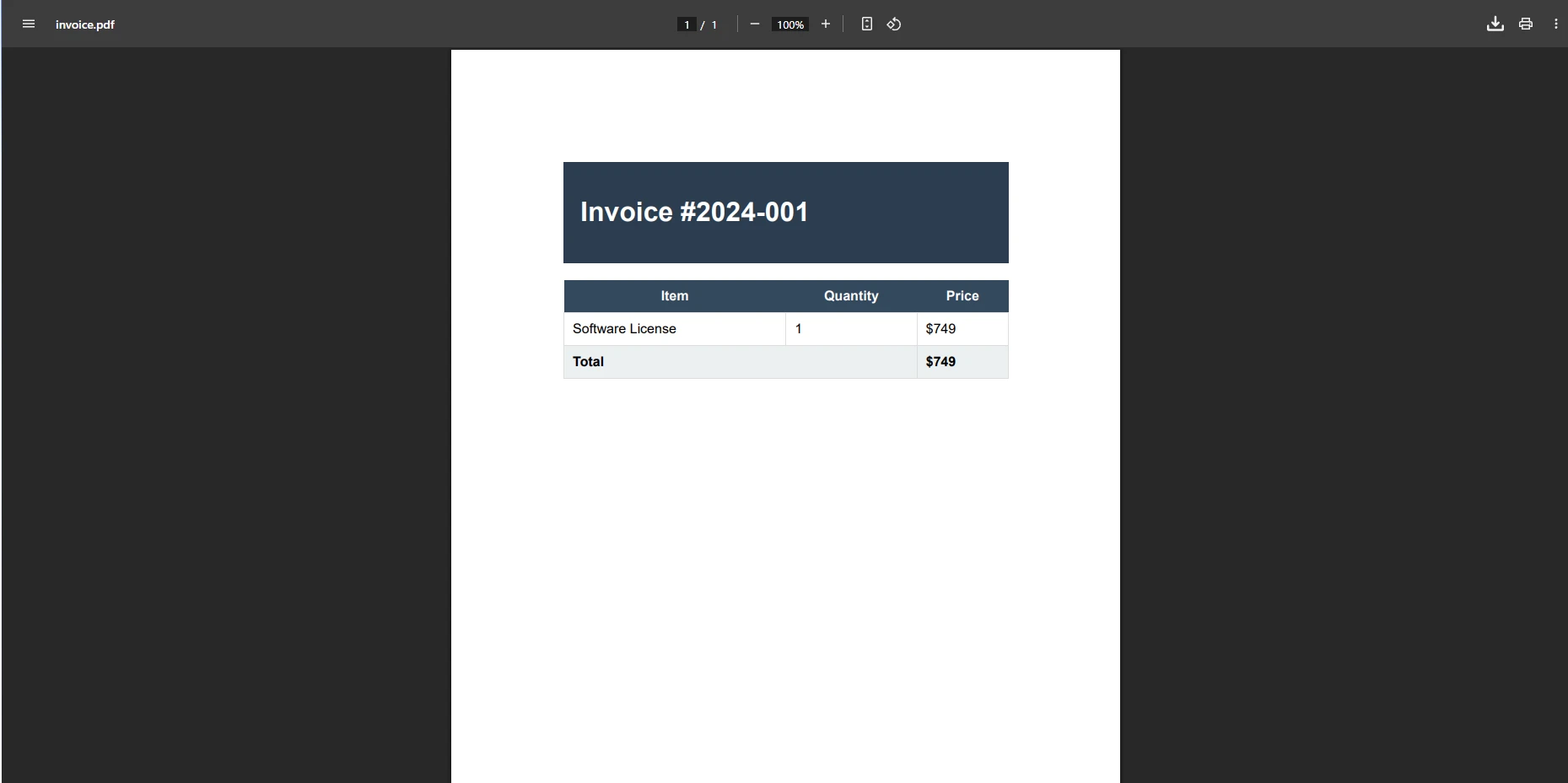






 Rozpocznij za DARMO
 Rozpocznij za DARMO
 Zarezerwuj darmowe Demo na żywo





 Nie wymaga karty kredytowej ani tworzenia konta










