


IronPDF vs BitMiracle.Docotic.Pdf: Uma comparação completa de bibliotecas PDF for .NET

Os arquivos PDF são amplamente utilizados em diversos setores para tarefas como faturamento e criação de diferentes tipos de documentos. Eles atendem às necessidades dos clientes de forma eficaz. Ao desenvolver aplicações .NET que requerem geração de PDFs, a seleção da biblioteca correta pode afetar significativamente a velocidade de desenvolvimento, a qualidade da saída e os custos de manutenção a longo prazo. Duas bibliotecas frequentemente consideradas pelos desenvolvedores são o IronPDF e o ABCpdf — mas qual delas realmente oferece os melhores resultados para as suas necessidades específicas?
Esta comparação detalhada examina as capacidades de ambas as bibliotecas, desde a precisão da conversão de HTML para PDF até os modelos de licenciamento, ajudando você a tomar uma decisão informada. Analisaremos métricas de desempenho do mundo real, a filosofia de design da API e exemplos de código práticos que demonstram os pontos fortes e as limitações de cada biblioteca. Quer esteja a desenvolver uma plataforma SaaS que gera milhares de faturas diariamente ou uma aplicação empresarial que exige uma renderização precisa de documentos, compreender estas diferenças é crucial para o sucesso do projeto.
O que é o IronPDF?
IronPDF é uma biblioteca comercial para geração de PDFs que auxilia engenheiros de software C# a editar, extrair e gerar documentos PDF em projetos .NET . Construído com um mecanismo de renderização baseado no Chrome, o IronPDF transforma HTML, CSS e JavaScript em PDFs com a mesma fidelidade que você esperaria ao imprimir uma página da web no Google Chrome.
Principais características do IronPDF
O IronPDF utiliza um mecanismo .NET Chromium para renderizar páginas HTML em arquivos PDF. Com a conversão de HTML para PDF, não há necessidade de usar APIs complexas para posicionar ou formatar PDFs. O IronPDF suporta documentos web padrão: HTML, ASPX, JS, CSS e imagens. A arquitetura da biblioteca prioriza a experiência do desenvolvedor, mantendo ao mesmo tempo uma qualidade de saída de nível profissional.
Excelência na conversão de HTML para PDF
- Suporte completo para HTML, incluindo elementos semânticos do HTML5.
- Suporte completo a CSS3, incluindo Flexbox, Grid e técnicas modernas de layout.
- Execução de JavaScript para renderização de conteúdo dinâmico
- Suporte a fontes da web, incluindo Google Fonts e declarações personalizadas
@font-face - Renderização responsiva com controle de viewport
- Carregamento de conteúdo AJAX com tempos de espera configuráveis
Capacidades de manipulação de documentos
- Mesclar e dividir: combine vários PDFs ou extraia páginas específicas com chamadas de método únicas.
- Cabeçalhos e rodapés: Adicione conteúdo dinâmico, incluindo números de página, datas e HTML personalizado.
- Marca d'água: Aplique marcas d'água de texto ou imagem com controle de opacidade e posicionamento.
- Gestão de Formulários: Crie formulários PDF preenchíveis a partir de elementos de formulário HTML automaticamente.
- Assinaturas digitais: Aplique assinaturas criptográficas com gerenciamento de certificados.
- Criptografia: Implementar criptografia AES de 128 bits e 256 bits com permissões granulares.
Recursos avançados de renderização
- Processamento multithread: suporte nativo a async/await para cenários de alto desempenho
- Operações em lote: Métodos otimizados para processar vários documentos simultaneamente
- Eficiência de memória: suporte a streaming para geração de documentos grandes sem carregar PDFs inteiros na memória.
- Otimização para nuvem: Projetado para implantações em contêineres no Docker, Azure e AWS.
Arquitetura multiplataforma
O IronPDF mantém um comportamento consistente em diferentes ambientes:
- Windows (x86/x64)
- Linux (incluindo Alpine para imagens Docker mínimas)
- macOS (Intel e Apple Silicon)
- Azure App Service, Functions e instâncias de contêiner
- AWS Lambda e EC2
- Plataforma Google Cloud
O que é ABCpdf?
A biblioteca ABCpdf .NET C# para PDF é um componente .NET para leitura, gravação, conversão e manipulação dinâmica de documentos Adobe PDF. Desenvolvido pela WebSupergoo, o ABCpdf tem servido à comunidade .NET por mais de duas décadas, oferecendo múltiplos mecanismos de renderização HTML e recursos abrangentes de manipulação de PDF.
Principais características do ABCpdf
O ABCpdf oferece suporte completo a HTML/CSS e tecnologias relacionadas, como JavaScript, SVG, AJAX e Font Awesome. A biblioteca oferece aos desenvolvedores métodos convenientes de alto nível e acesso a objetos PDF de baixo nível.
Múltiplos mecanismos de renderização
A abordagem exclusiva do ABCpdf oferece diversos mecanismos de renderização:
- Mecanismo ABCChrome: Baseado no Chromium para padrões web modernos (somente x64)
- Gecko Engine: Múltiplas versões para testes de compatibilidade
- Mecanismo MSHTML: renderização baseada no Internet Explorer
- Mecanismo ABCWebKit: renderização baseada em WebKit (somente x64)
Essa abordagem com múltiplos mecanismos permite que os desenvolvedores escolham o melhor renderizador para seu conteúdo específico, embora isso aumente a complexidade da implantação e dos testes.
Capacidades de importação de documentos
O ABCpdf consegue ler diversos formatos de documentos quando aplicativos auxiliares como o OpenOffice.org estão instalados. Os formatos suportados incluem:
- Documentos do Microsoft Office (Word, Excel, PowerPoint)
- Arquivos PostScript e EPS
- XPS (Especificação de Papel XML)
- SVG (Gráficos Vetoriais Escaláveis)
- Vários formatos de imagem, incluindo TIFF, JPEG 2000 e RAW.
Manipulação de PDF de baixo nível
- Acesso direto ao modelo de objeto PDF
- Compressão/descompressão de fluxo com múltiplos algoritmos
- Controle de subconjunto e incorporação de fontes
- Gerenciamento e conversão de espaço de cores
- Manipulação do fluxo de conteúdo
Recursos de desempenho
O ABCpdf é totalmente multithread, permitindo seu uso flexível em diversos ambientes .NET , incluindo C#, ASPX e VB, e foi testado em configurações multithread de alto desempenho. A biblioteca inclui:
- Suporte GigaPDF™ para documentos extremamente grandes
- Utilização otimizada de memória para ambientes de servidor
- Mecanismos eficientes de armazenamento em cache de fontes
- Capacidades de processamento de threads em segundo plano
Suporte a frameworks CSS modernos
Ao trabalhar com aplicações web contemporâneas, a capacidade de converter layouts baseados em Bootstrap e outras estruturas CSS modernas para PDF torna-se cada vez mais crucial. Muitas aplicações empresariais e plataformas SaaS agora dependem do Bootstrap para manter a consistência da interface do usuário, e a geração de PDFs precisa preservar esses layouts perfeitamente.
IronPDF: Suporte completo para Bootstrap e frameworks modernos
O mecanismo de renderização Chromium do IronPDF oferece suporte abrangente para frameworks CSS modernos:
Bootstrap 5: Suporte completo para layouts baseados em flexbox, sistemas de grid e utilitários responsivos.
- Bootstrap 4: Compatibilidade total com flexbox, barras de navegação e layouts de formulário.
- Tailwind CSS: Framework CSS moderno com foco em utilitários, renderiza perfeitamente.
- Fundamentos: Todos os sistemas de rede e componentes são suportados. CSS3 moderno: Flexbox, CSS Grid, animações, transições e propriedades personalizadas.
Exemplos práticos: a página inicial do Bootstrap e os modelos do Bootstrap são convertidos para PDF com precisão perfeita em cada pixel.
Exemplo de código: Grade de produtos de comércio eletrônico
using IronPdf;

var renderer = new ChromePdfRenderer();

string bootstrapProductGrid = @"
<!DOCTYPE html>
<html>
<head>
    <link href='https://cdn.jsdelivr.net/npm/bootstrap@5.3.0/dist/css/bootstrap.min.css' rel='stylesheet'>
</head>
<body>
    <div class='container my-5'>
        <h1 class='mb-4'>Product Catalog</h1>
        <div class='row row-cols-1 row-cols-md-3 g-4'>
            <div class='col'>
                <div class='card h-100'>
                    <img src='https://via.placeholder.com/300x200' class='card-img-top' alt='Product 1'>
                    <div class='card-body d-flex flex-column'>
                        <h5 class='card-title'>Premium Widget</h5>
                        <p class='card-text flex-grow-1'>High-quality widget with advanced features and excellent durability.</p>
                        <div class='d-flex justify-content-between align-items-center mt-auto'>
                            <span class='h4 mb-0 text-primary'>$99.99</span>
                            <button class='btn btn-primary'>Add to Cart</button>
                        </div>
                    </div>
                </div>
            </div>
            <div class='col'>
                <div class='card h-100'>
                    <img src='https://via.placeholder.com/300x200' class='card-img-top' alt='Product 2'>
                    <div class='card-body d-flex flex-column'>
                        <h5 class='card-title'>Standard Widget</h5>
                        <p class='card-text flex-grow-1'>Reliable widget perfect for everyday use with great value.</p>
                        <div class='d-flex justify-content-between align-items-center mt-auto'>
                            <span class='h4 mb-0 text-primary'>$49.99</span>
                            <button class='btn btn-primary'>Add to Cart</button>
                        </div>
                    </div>
                </div>
            </div>
            <div class='col'>
                <div class='card h-100'>
                    <img src='https://via.placeholder.com/300x200' class='card-img-top' alt='Product 3'>
                    <div class='card-body d-flex flex-column'>
                        <h5 class='card-title'>Basic Widget</h5>
                        <p class='card-text flex-grow-1'>Entry-level widget with essential features at an affordable price.</p>
                        <div class='d-flex justify-content-between align-items-center mt-auto'>
                            <span class='h4 mb-0 text-primary'>$29.99</span>
                            <button class='btn btn-primary'>Add to Cart</button>
                        </div>
                    </div>
                </div>
            </div>
        </div>
    </div>
</body>
</html>";

var pdf = renderer.RenderHtmlAsPdf(bootstrapProductGrid);
pdf.SaveAs("product-catalog.pdf");
using IronPdf;
var renderer = new ChromePdfRenderer();
string bootstrapProductGrid = @"
<!DOCTYPE html>
<html>
<head>
<link href='https://cdn.jsdelivr.net/npm/bootstrap@5.3.0/dist/css/bootstrap.min.css' rel='stylesheet'>
</head>
<body>
<div class='container my-5'>
<h1 class='mb-4'>Product Catalog</h1>
<div class='row row-cols-1 row-cols-md-3 g-4'>
<div class='col'>
<div class='card h-100'>
<img src='https://via.placeholder.com/300x200' class='card-img-top' alt='Product 1'>
<div class='card-body d-flex flex-column'>
<h5 class='card-title'>Premium Widget</h5>
<p class='card-text flex-grow-1'>High-quality widget with advanced features and excellent durability.</p>
<div class='d-flex justify-content-between align-items-center mt-auto'>
<span class='h4 mb-0 text-primary'>$99.99</span>
<button class='btn btn-primary'>Add to Cart</button>
</div>
</div>
</div>
</div>
<div class='col'>
<div class='card h-100'>
<img src='https://via.placeholder.com/300x200' class='card-img-top' alt='Product 2'>
<div class='card-body d-flex flex-column'>
<h5 class='card-title'>Standard Widget</h5>
<p class='card-text flex-grow-1'>Reliable widget perfect for everyday use with great value.</p>
<div class='d-flex justify-content-between align-items-center mt-auto'>
<span class='h4 mb-0 text-primary'>$49.99</span>
<button class='btn btn-primary'>Add to Cart</button>
</div>
</div>
</div>
</div>
<div class='col'>
<div class='card h-100'>
<img src='https://via.placeholder.com/300x200' class='card-img-top' alt='Product 3'>
<div class='card-body d-flex flex-column'>
<h5 class='card-title'>Basic Widget</h5>
<p class='card-text flex-grow-1'>Entry-level widget with essential features at an affordable price.</p>
<div class='d-flex justify-content-between align-items-center mt-auto'>
<span class='h4 mb-0 text-primary'>$29.99</span>
<button class='btn btn-primary'>Add to Cart</button>
</div>
</div>
</div>
</div>
</div>
</div>
</body>
</html>";
var pdf = renderer.RenderHtmlAsPdf(bootstrapProductGrid);
pdf.SaveAs("product-catalog.pdf");Imports IronPdf
Dim renderer As New ChromePdfRenderer()
Dim bootstrapProductGrid As String = "
<!DOCTYPE html>
<html>
<head>
<link href='https://cdn.jsdelivr.net/npm/bootstrap@5.3.0/dist/css/bootstrap.min.css' rel='stylesheet'>
</head>
<body>
<div class='container my-5'>
<h1 class='mb-4'>Product Catalog</h1>
<div class='row row-cols-1 row-cols-md-3 g-4'>
<div class='col'>
<div class='card h-100'>
<img src='https://via.placeholder.com/300x200' class='card-img-top' alt='Product 1'>
<div class='card-body d-flex flex-column'>
<h5 class='card-title'>Premium Widget</h5>
<p class='card-text flex-grow-1'>High-quality widget with advanced features and excellent durability.</p>
<div class='d-flex justify-content-between align-items-center mt-auto'>
<span class='h4 mb-0 text-primary'>$99.99</span>
<button class='btn btn-primary'>Add to Cart</button>
</div>
</div>
</div>
</div>
<div class='col'>
<div class='card h-100'>
<img src='https://via.placeholder.com/300x200' class='card-img-top' alt='Product 2'>
<div class='card-body d-flex flex-column'>
<h5 class='card-title'>Standard Widget</h5>
<p class='card-text flex-grow-1'>Reliable widget perfect for everyday use with great value.</p>
<div class='d-flex justify-content-between align-items-center mt-auto'>
<span class='h4 mb-0 text-primary'>$49.99</span>
<button class='btn btn-primary'>Add to Cart</button>
</div>
</div>
</div>
</div>
<div class='col'>
<div class='card h-100'>
<img src='https://via.placeholder.com/300x200' class='card-img-top' alt='Product 3'>
<div class='card-body d-flex flex-column'>
<h5 class='card-title'>Basic Widget</h5>
<p class='card-text flex-grow-1'>Entry-level widget with essential features at an affordable price.</p>
<div class='d-flex justify-content-between align-items-center mt-auto'>
<span class='h4 mb-0 text-primary'>$29.99</span>
<button class='btn btn-primary'>Add to Cart</button>
</div>
</div>
</div>
</div>
</div>
</div>
</body>
</html>"
Dim pdf = renderer.RenderHtmlAsPdf(bootstrapProductGrid)
pdf.SaveAs("product-catalog.pdf")Resultado: Um catálogo de produtos perfeitamente formatado com o sistema de grade de cartões do Bootstrap 5, alinhamento flexbox e espaçamento responsivo — tudo preservado no PDF.
ABCpdf: Abordagem Multi-Motor com Limitações de Framework
O suporte do ABCpdf para frameworks CSS modernos varia significativamente dependendo do mecanismo de renderização selecionado:
- Mecanismo ABCChrome (somente x64): Bom suporte ao Bootstrap, similar ao IronPDF, mas requer configuração específica para plataforma de 64 bits.
- Mecanismo ABCWebKit (somente x64): Suporte limitado a flexbox; layouts do Bootstrap 4+ podem não ser renderizados corretamente.
- Gecko Engine: Suporte moderado a CSS3; o Bootstrap 3 funciona melhor que o Bootstrap 4/5.
- Mecanismo MSHTML: Renderização legada do Internet Explorer, compatível apenas com Bootstrap 2.x, não recomendado para aplicações modernas.
Principais considerações:
- A complexidade na seleção do motor aumenta a sobrecarga de implantação.
- Mecanismos de 64 bits (ABCChrome, ABCWebKit) limitam a flexibilidade de implementação.
- É necessário realizar testes em diferentes mecanismos para garantir a renderização consistente do Bootstrap.
- A compatibilidade com o framework varia significativamente de acordo com a escolha do motor gráfico.
A arquitetura de múltiplos mecanismos do ABCpdf oferece flexibilidade, mas requer uma seleção e testes cuidadosos do mecanismo para garantir que os layouts do Bootstrap sejam renderizados corretamente. Para aplicações que dependem fortemente do Bootstrap ou de frameworks CSS modernos, o mecanismo ABCChrome oferece os melhores resultados, mas apresenta restrições de implantação exclusivas para x64.
Para obter mais detalhes sobre a compatibilidade com o framework Bootstrap, consulte o Guia de CSS do Bootstrap e Flexbox .
Comparação completa de recursos
| Categoria | Característica/Aspecto | IronPDF | ABCpdf | Principal vantagem |
|---|---|---|---|---|
| Arquitetura Central | Filosofia de Design | APIs intuitivas e com foco na simplicidade. | Flexibilidade em primeiro lugar, múltiplos motores | IronPDF: Desenvolvimento mais rápido |
| Complexidade da API | Métodos simples como RenderHtmlAsPdf() |
Orientação a objetos com a classe Doc | IronPDF: API mais simples | |
| Curva de Aprendizagem | Design de motor único, inferior | Configuração multi-motor, superior, necessária | IronPDF: Adoção mais rápida | |
| Suporte da plataforma | Multiplataforma | Suporte nativo, pacote único | Windows como sistema operacional principal, Linux com uso limitado. | IronPDF: Verdadeiramente multiplataforma |
| Versões .NET | .NET 10, 9, 8, 7, 6, 5, Core 3.1+, Framework 4.6.2+ | .NET 10, 9, 8, 7, 6, 5, Core 3.0+, Framework 4.0+ | Ambos: Suporte a frameworks modernos | |
| Sistemas Operacionais | Windows, Linux, macOS, nativo do Docker | Windows, suporte limitado para Linux | IronPDF: Suporte mais amplo para sistemas operacionais | |
| HTML para PDF | Motor de renderização | Motor Chrome V127+ | Vários mecanismos de busca (Chrome 123, Gecko, MSHTML) | ABCpdf: Flexibilidade do motor |
| Suporte a CSS3/HTML5 | Compatível com Chrome (motor V8) | Varia conforme o motor (70-100%) | IronPDF: Renderização consistente | |
| Execução de JavaScript | Suporte completo for JavaScript V8 | Dependente do motor | IronPDF: Recursos modernos de JS | |
| Fontes da Web | Fontes do Google, @font-face, fontes do sistema | Compatível com ABCChrome | Ambos: Suporte a fontes da Web | |
| Desempenho | Renderização de página única | Varia conforme a complexidade do documento | Varia conforme o motor e a complexidade do documento | Ambos: dependente do motor |
| Processamento em lote | Processamento paralelo otimizado | Capacidade multithread | IronPDF: Melhor suporte assíncrono | |
| Uso de memória | Superior (motor completo do Chrome) | Inferior (motores mais leves disponíveis) | ABCpdf: Menor uso de memória com motores não-Chrome | |
| Experiência do desenvolvedor | Documentação | Tutoriais, vídeos e exemplos abrangentes. | Documentação completa da API | IronPDF: Mais recursos de aprendizagem |
| Exemplos de código | Mais de 100 amostras prontas para uso | Exemplos extensos | Ambos: Exemplos ricos | |
| Suporte IntelliSense | Documentação XML completa | IntelliSense abrangente | Ambos: integração com IDE | |
| Licensing & Pricing | Nível inicial | Lite: $999 (1 desenvolvedor, 1 projeto) | Padrão: $329 (1 dispositivo, somente 32 bits) | ABCpdf: Custo de entrada mais baixo |
| Professional | Profissional: $2,999 (10 desenvolvedores, 10 projetos) | Profissional: $479 (1 dispositivo, 64 bits) | IronPDF: Melhor licenciamento de equipe | |
| Redistribuição | + $2,999 livre de royalties | Licença empresarial $4,790 | IronPDF: Mais acessível | |
| Apoiar | Suporte incluído | Sim, suporte técnico 24 horas por dia, 5 dias por semana. | Sim, suporte por e-mail. | IronPDF: Suporte por chat ao vivo |
| Tempo de resposta | < 1 minuto (bate-papo ao vivo) | 24-48 horas normalmente | IronPDF: Resposta mais rápida | |
| Ideal para | Casos de uso | Aplicativos web modernos, SaaS, nativos da nuvem | Área de trabalho Windows, sistemas legados | Dependente do contexto |
Criando um novo projeto no Visual Studio
Antes de analisarmos os exemplos de código, vamos configurar um ambiente de desenvolvimento adequado. Abra o Visual Studio e crie um novo projeto:
- Navegue até Arquivo > Novo > Projeto
- Selecione "Aplicativo de console" (.NET Core ou .NET Framework)
- Escolha a sua estrutura de destino (recomenda-se .NET 6.0 ou superior).
- Dê um nome ao seu projeto (por exemplo, "PdfLibraryComparison")
- Clique em Criar
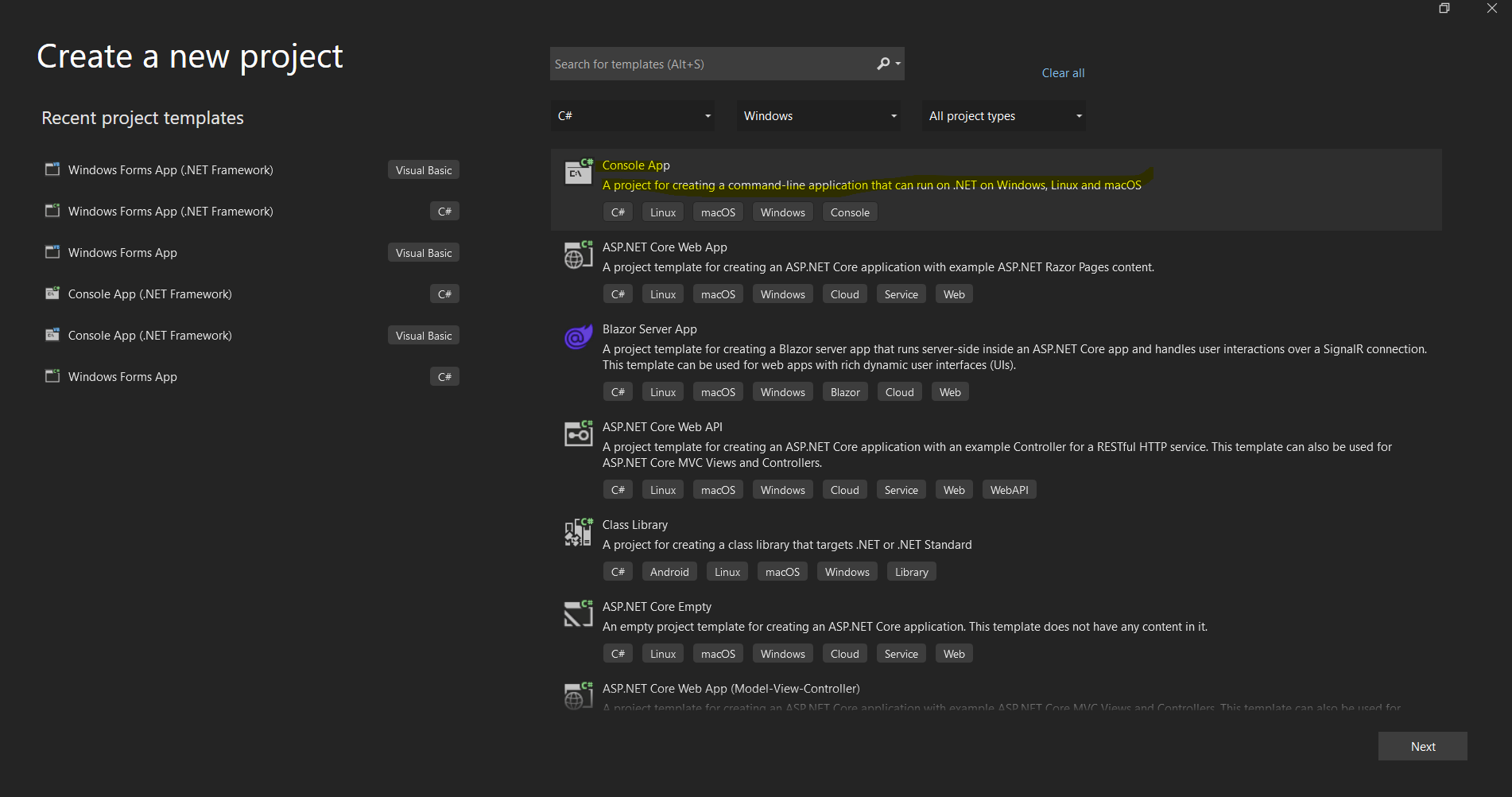 Diálogo de criação de projeto do Visual Studio para configurar um novo aplicativo .NET.
Instalação da Biblioteca IronPDF C
Métodos de instalação
O IronPDF oferece várias abordagens de instalação para se adequar a diferentes fluxos de trabalho de desenvolvimento:
Método 1: Usando o Gerenciador de Pacotes NuGet (Recomendado)
A abordagem mais simples é através do gerenciador de pacotes NuGet integrado ao Visual Studio:
- Clique com o botão direito do mouse no seu projeto no Explorador de Soluções.
- Selecione "Gerenciar pacotes NuGet "
- Clique em "Procurar" e pesquise por "IronPDF".
- Clique em Instalar no pacote oficial do IronPDF.
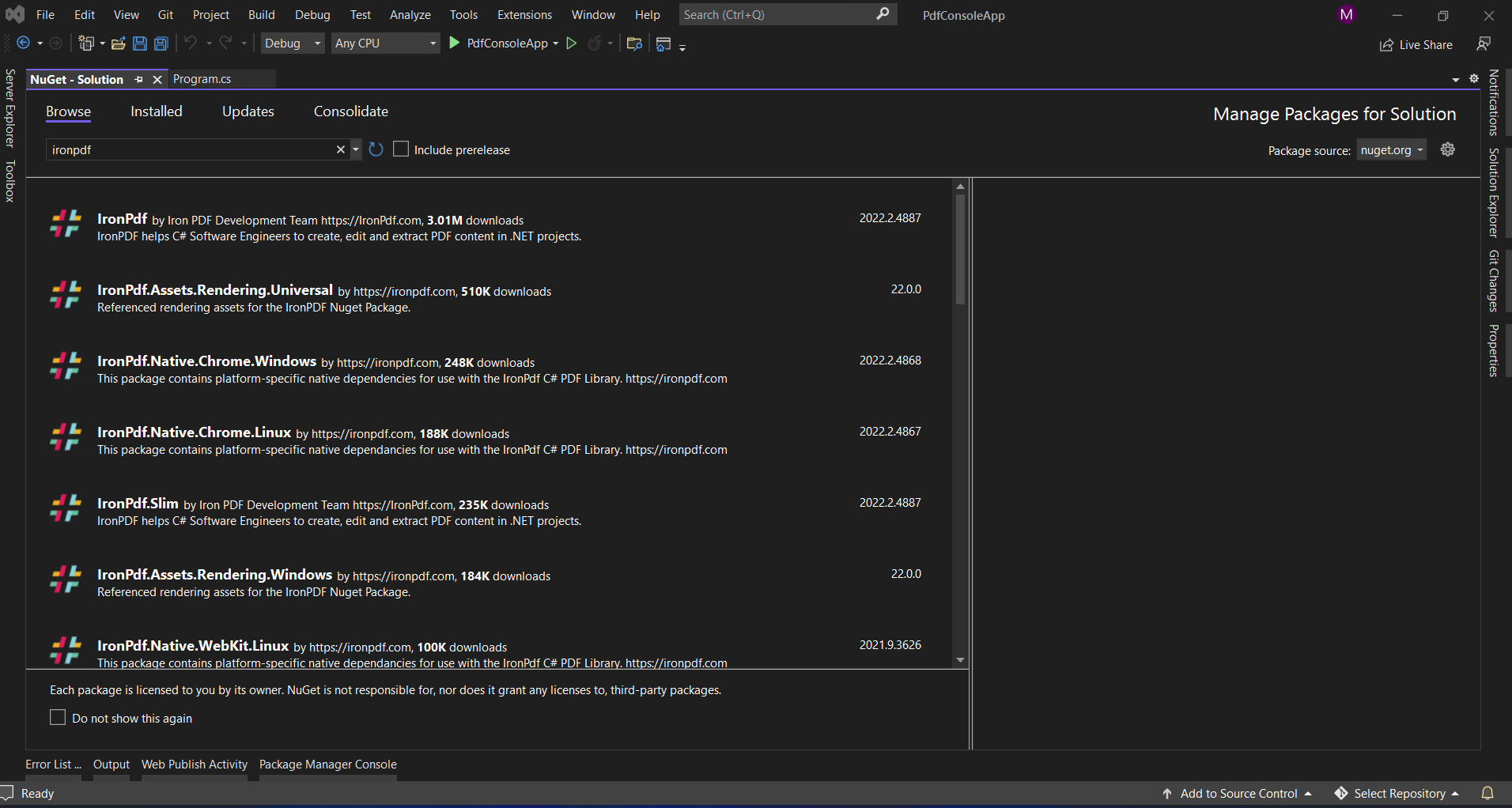 Instalando o IronPDF através da interface do Gerenciador de Pacotes NuGet do Visual Studio.
Método 2: Console do Gerenciador de Pacotes
Para desenvolvedores que preferem ferramentas de linha de comando:
Install-Package IronPdf
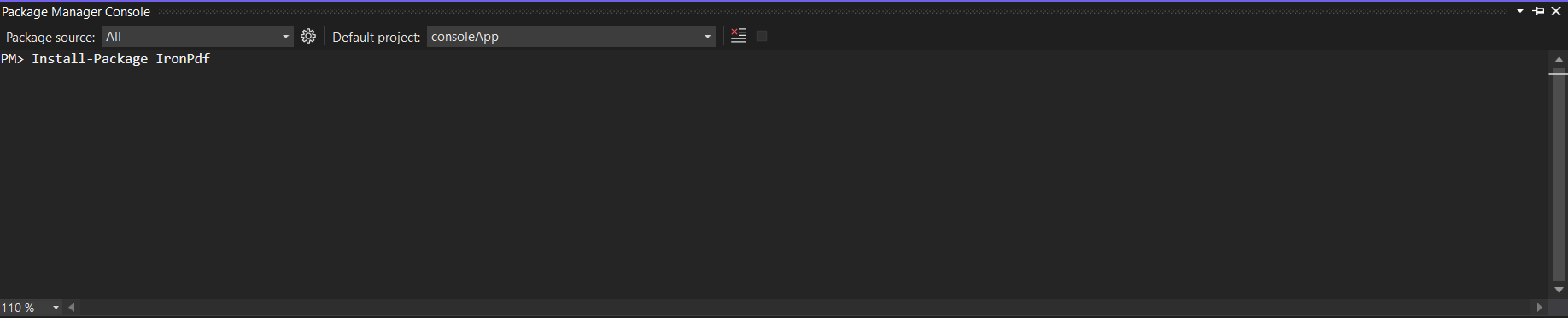 Utilizando o Console do Gerenciador de Pacotes para instalar o IronPDF com um único comando
Método 3: Download direto
Para ambientes com acesso restrito à internet:
- Faça o download em NuGet
- Adicione o arquivo .nupkg a um feed NuGet local.
- Instale a partir do seu feed local.
Método 4: CLI .NET
Para projetos .NET Core/5+:
dotnet add package IronPdf
Instalando o ABCpdf
Métodos de instalação
O ABCpdf oferece opções de instalação semelhantes, com algumas considerações adicionais:
Método 1: Instalação do NuGet
Install-Package ABCpdf -Version 13.0.0.0
Note que o ABCpdf possui pacotes separados para diferentes edições:
ABCpdf- Edição padrão (somente 32 bits)ABCpdf.ABCChrome64- Necessário para renderização do Chrome em 64 bitsABCpdf.ABCGecko- Para o mecanismo de renderização Gecko
Método 2: Instalação manual
- Faça o download no site da WebSupergoo.
- Extraia o arquivo ZIP.
- Adicione referências às DLLs apropriadas.
- Copie as dependências nativas para o seu diretório de saída.
Considerações específicas da plataforma
O ABCpdf requer configuração adicional para plataformas que não sejam Windows:
<PackageReference Include="ABCpdf.Linux" Version="13.0.0.0" />
<PackageReference Include="ABCpdf.Linux" Version="13.0.0.0" />Como essas bibliotecas lidam com a conversão de HTML para PDF?
Compreender as diferenças fundamentais na forma como cada biblioteca aborda a conversão de HTML para PDF ajuda a explicar suas diferentes capacidades e características de desempenho.
A abordagem do IronPDF: Arquitetura Chrome-First
O IronPDF utiliza um mecanismo de navegador Chrome completo, oferecendo diversas vantagens:
using IronPdf;

// IronPDF's approach - Chrome rendering with full browser capabilities
var renderer = new ChromePdfRenderer();

// Configure rendering to match Chrome's print preview exactly
renderer.RenderingOptions = ChromePdfRenderOptions.DefaultChrome;

// Or customize for specific needs
renderer.RenderingOptions.CssMediaType = PdfCssMediaType.Screen;
renderer.RenderingOptions.EnableJavaScript = true;
renderer.RenderingOptions.WaitFor.RenderDelay(500); // Wait for JS execution

// Convert complex HTML with modern CSS and JavaScript
string complexHtml = @"
<!DOCTYPE html>
<html>
<head>
    <style>
        @import url('https://fonts.googleapis.com/css2?family=Roboto:wght@300;700&display=swap');

        .container {
            display: grid;
            grid-template-columns: repeat(auto-fit, minmax(250px, 1fr));
            gap: 20px;
            font-family: 'Roboto', sans-serif;
        }

        .card {
            background: linear-gradient(135deg, #667eea 0%, #764ba2 100%);
            border-radius: 10px;
            padding: 20px;
            color: white;
            box-shadow: 0 10px 20px rgba(0,0,0,0.19);
            transform: translateY(0);
            transition: transform 0.3s;
        }

        @media print {
            .card { break-inside: avoid; }
        }
    </style>
</head>
<body>
    <div class='container'>
        <div class='card'>
            <h2>Modern CSS Support</h2>
            <p>Grid, Flexbox, Gradients, Shadows - all rendered perfectly</p>
        </div>
        <div class='card'>
            <h2>Fontes da Web</h2>
            <p>Google Fonts and custom fonts work seamlessly</p>
        </div>
    </div>
    <script>
        // Dynamic content generation
        document.addEventListener('DOMContentLoaded', function() {
            const container = document.querySelector('.container');
            const dynamicCard = document.createElement('div');
            dynamicCard.className = 'card';
            dynamicCard.innerHTML = '<h2>JavaScript Generated</h2><p>This card was added by JavaScript</p>';
            container.appendChild(dynamicCard);
        });
    </script>
</body>
</html>";

var pdf = renderer.RenderHtmlAsPdf(complexHtml);
pdf.SaveAs("modern-web-features.pdf");
using IronPdf;
// IronPDF's approach - Chrome rendering with full browser capabilities
var renderer = new ChromePdfRenderer();
// Configure rendering to match Chrome's print preview exactly
renderer.RenderingOptions = ChromePdfRenderOptions.DefaultChrome;
// Or customize for specific needs
renderer.RenderingOptions.CssMediaType = PdfCssMediaType.Screen;
renderer.RenderingOptions.EnableJavaScript = true;
renderer.RenderingOptions.WaitFor.RenderDelay(500); // Wait for JS execution
// Convert complex HTML with modern CSS and JavaScript
string complexHtml = @"
<!DOCTYPE html>
<html>
<head>
<style>
@import url('https://fonts.googleapis.com/css2?family=Roboto:wght@300;700&display=swap');
.container {
display: grid;
grid-template-columns: repeat(auto-fit, minmax(250px, 1fr));
gap: 20px;
font-family: 'Roboto', sans-serif;
}
.card {
background: linear-gradient(135deg, #667eea 0%, #764ba2 100%);
border-radius: 10px;
padding: 20px;
color: white;
box-shadow: 0 10px 20px rgba(0,0,0,0.19);
transform: translateY(0);
transition: transform 0.3s;
}
@media print {
.card { break-inside: avoid; }
}
</style>
</head>
<body>
<div class='container'>
<div class='card'>
<h2>Modern CSS Support</h2>
<p>Grid, Flexbox, Gradients, Shadows - all rendered perfectly</p>
</div>
<div class='card'>
<h2>Fontes da Web</h2>
<p>Google Fonts and custom fonts work seamlessly</p>
</div>
</div>
<script>
// Dynamic content generation
document.addEventListener('DOMContentLoaded', function() {
const container = document.querySelector('.container');
const dynamicCard = document.createElement('div');
dynamicCard.className = 'card';
dynamicCard.innerHTML = '<h2>JavaScript Generated</h2><p>This card was added by JavaScript</p>';
container.appendChild(dynamicCard);
});
</script>
</body>
</html>";
var pdf = renderer.RenderHtmlAsPdf(complexHtml);
pdf.SaveAs("modern-web-features.pdf");Imports IronPdf
' IronPDF's approach - Chrome rendering with full browser capabilities
Dim renderer As New ChromePdfRenderer()
' Configure rendering to match Chrome's print preview exactly
renderer.RenderingOptions = ChromePdfRenderOptions.DefaultChrome
' Or customize for specific needs
renderer.RenderingOptions.CssMediaType = PdfCssMediaType.Screen
renderer.RenderingOptions.EnableJavaScript = True
renderer.RenderingOptions.WaitFor.RenderDelay(500) ' Wait for JS execution
' Convert complex HTML with modern CSS and JavaScript
Dim complexHtml As String = "
<!DOCTYPE html>
<html>
<head>
<style>
@import url('https://fonts.googleapis.com/css2?family=Roboto:wght@300;700&display=swap');
.container {
display: grid;
grid-template-columns: repeat(auto-fit, minmax(250px, 1fr));
gap: 20px;
font-family: 'Roboto', sans-serif;
}
.card {
background: linear-gradient(135deg, #667eea 0%, #764ba2 100%);
border-radius: 10px;
padding: 20px;
color: white;
box-shadow: 0 10px 20px rgba(0,0,0,0.19);
transform: translateY(0);
transition: transform 0.3s;
}
@media print {
.card { break-inside: avoid; }
}
</style>
</head>
<body>
<div class='container'>
<div class='card'>
<h2>Modern CSS Support</h2>
<p>Grid, Flexbox, Gradients, Shadows - all rendered perfectly</p>
</div>
<div class='card'>
<h2>Fontes da Web</h2>
<p>Google Fonts and custom fonts work seamlessly</p>
</div>
</div>
<script>
' Dynamic content generation
document.addEventListener('DOMContentLoaded', function() {
const container = document.querySelector('.container');
const dynamicCard = document.createElement('div');
dynamicCard.className = 'card';
dynamicCard.innerHTML = '<h2>JavaScript Generated</h2><p>This card was added by JavaScript</p>';
container.appendChild(dynamicCard);
});
</script>
</body>
</html>"
Dim pdf = renderer.RenderHtmlAsPdf(complexHtml)
pdf.SaveAs("modern-web-features.pdf")Este código demonstra diversas vantagens importantes da abordagem do IronPDF baseada no Chrome:
- Suporte a CSS moderno: layouts em grade, flexbox, gradientes e transformações funcionam exatamente como no Chrome.
- Integração de fontes da Web: as fontes do Google são carregadas automaticamente, sem necessidade de configuração adicional.
- Execução de JavaScript : A geração de conteúdo dinâmico ocorre antes da renderização do PDF.
- Media Queries: Os estilos específicos para impressão são aplicados corretamente.
A abordagem da ABCpdf: Flexibilidade Multimotor
O ABCpdf oferece vários mecanismos de renderização, cada um com diferentes capacidades:
using WebSupergoo.ABCpdf13;

// Method 1: Using ABCChrome engine (most modern)
Doc chromeDoc = new Doc();
chromeDoc.HtmlOptions.Engine = EngineType.Chrome;
chromeDoc.HtmlOptions.Chrome.SetUserAgent("Mozilla/5.0 (Windows NT 10.0; Win64; x64) AppleWebKit/537.36");

// Chrome engine supports modern web standards
int chromeId = chromeDoc.AddImageUrl("https://example.com");

// Chain pages if content overflows
while (chromeDoc.Chainable(chromeId))
{
    chromeDoc.Page = chromeDoc.AddPage();
    chromeId = chromeDoc.AddImageToChain(chromeId);
}

chromeDoc.Save("chrome-engine-output.pdf");

// Method 2: Using Gecko engine (Firefox-based)
Doc geckoDoc = new Doc();
geckoDoc.HtmlOptions.Engine = EngineType.Gecko;
geckoDoc.HtmlOptions.UseScript = true; // Enable JavaScript

// Gecko provides good standards support with lower resource usage
string html = "<html><body><h1>Gecko Rendered Content</h1></body></html>";
geckoDoc.AddImageHtml(html);
geckoDoc.Save("gecko-engine-output.pdf");

// Method 3: Using MSHTML engine (IE-based, legacy support)
Doc ieDoc = new Doc();
ieDoc.HtmlOptions.Engine = EngineType.MSHtml;

// MSHTML is faster but with limited modern CSS support
ieDoc.AddImageUrl("https://legacy-app.example.com");
ieDoc.Save("ie-engine-output.pdf");
using WebSupergoo.ABCpdf13;
// Method 1: Using ABCChrome engine (most modern)
Doc chromeDoc = new Doc();
chromeDoc.HtmlOptions.Engine = EngineType.Chrome;
chromeDoc.HtmlOptions.Chrome.SetUserAgent("Mozilla/5.0 (Windows NT 10.0; Win64; x64) AppleWebKit/537.36");
// Chrome engine supports modern web standards
int chromeId = chromeDoc.AddImageUrl("https://example.com");
// Chain pages if content overflows
while (chromeDoc.Chainable(chromeId))
{
chromeDoc.Page = chromeDoc.AddPage();
chromeId = chromeDoc.AddImageToChain(chromeId);
}
chromeDoc.Save("chrome-engine-output.pdf");
// Method 2: Using Gecko engine (Firefox-based)
Doc geckoDoc = new Doc();
geckoDoc.HtmlOptions.Engine = EngineType.Gecko;
geckoDoc.HtmlOptions.UseScript = true; // Enable JavaScript
// Gecko provides good standards support with lower resource usage
string html = "<html><body><h1>Gecko Rendered Content</h1></body></html>";
geckoDoc.AddImageHtml(html);
geckoDoc.Save("gecko-engine-output.pdf");
// Method 3: Using MSHTML engine (IE-based, legacy support)
Doc ieDoc = new Doc();
ieDoc.HtmlOptions.Engine = EngineType.MSHtml;
// MSHTML is faster but with limited modern CSS support
ieDoc.AddImageUrl("https://legacy-app.example.com");
ieDoc.Save("ie-engine-output.pdf");Imports WebSupergoo.ABCpdf13
' Method 1: Using ABCChrome engine (most modern)
Private chromeDoc As New Doc()
chromeDoc.HtmlOptions.Engine = EngineType.Chrome
chromeDoc.HtmlOptions.Chrome.SetUserAgent("Mozilla/5.0 (Windows NT 10.0; Win64; x64) AppleWebKit/537.36")
' Chrome engine supports modern web standards
Dim chromeId As Integer = chromeDoc.AddImageUrl("https://example.com")
' Chain pages if content overflows
Do While chromeDoc.Chainable(chromeId)
chromeDoc.Page = chromeDoc.AddPage()
chromeId = chromeDoc.AddImageToChain(chromeId)
Loop
chromeDoc.Save("chrome-engine-output.pdf")
' Method 2: Using Gecko engine (Firefox-based)
Dim geckoDoc As New Doc()
geckoDoc.HtmlOptions.Engine = EngineType.Gecko
geckoDoc.HtmlOptions.UseScript = True ' Enable JavaScript
' Gecko provides good standards support with lower resource usage
Dim html As String = "<html><body><h1>Gecko Rendered Content</h1></body></html>"
geckoDoc.AddImageHtml(html)
geckoDoc.Save("gecko-engine-output.pdf")
' Method 3: Using MSHTML engine (IE-based, legacy support)
Dim ieDoc As New Doc()
ieDoc.HtmlOptions.Engine = EngineType.MSHtml
' MSHTML is faster but with limited modern CSS support
ieDoc.AddImageUrl("https://legacy-app.example.com")
ieDoc.Save("ie-engine-output.pdf")A abordagem com múltiplos motores oferece flexibilidade, mas requer uma análise cuidadosa:
- Seleção do Motor Gráfico: Os desenvolvedores devem escolher o motor gráfico apropriado para seu conteúdo.
- Paridade de recursos: Diferentes mecanismos suportam diferentes recursos de HTML/CSS
- Complexidade de Implantação: Cada mecanismo pode ter requisitos de tempo de execução diferentes.
- Custo dos testes: O desempenho pode variar entre os motores, exigindo mais testes.
Criando documentos PDF a partir de URLs
Um dos casos de uso mais comuns para bibliotecas de PDF é a conversão de páginas da web em documentos PDF. Vamos examinar como cada biblioteca lida com essa tarefa.
Usando o IronPDF
A conversão de URL para PDF do IronPDF aproveita ao máximo o mecanismo do navegador Chrome:
using IronPdf;
using System;
using System.Threading.Tasks;

public class UrlToPdfConverter
{
    public static async Task ConvertUrlToPdfAsync()
    {
        var renderer = new ChromePdfRenderer();

        // Configure for optimal web page capture
        renderer.RenderingOptions = new ChromePdfRenderOptions
        {
            // Viewport and scaling
            ViewPortWidth = 1920,
            ViewPortHeight = 1080,
            ZoomLevel = 100,

            // Paper and margins
            PaperSize = PdfPaperSize.A4,
            MarginTop = 10,
            MarginBottom = 10,
            MarginLeft = 10,
            MarginRight = 10,

            // Rendering behavior
            CssMediaType = PdfCssMediaType.Screen,
            PrintHtmlBackgrounds = true,
            CreatePdfFormsFromHtml = true,

            // JavaScript and timing
            EnableJavaScript = true,
            WaitFor = new WaitFor
            {
                // Wait strategies for dynamic content
                RenderDelay = 500, // milliseconds
                JavaScriptFinishDelay = 100,
                AllowedExecutionTime = 30000 // 30 seconds max
            }
        };

        // Handle authentication if needed
        renderer.RenderingOptions.HttpOptions.HttpHeaders.Add("Authorization", "Bearer your-token");

        // Convert with error handling
        try
        {
            // Async conversion for better performance
            var pdf = await renderer.RenderUrlAsPdfAsync("https://github.com/trending");

            // Add metadata
            pdf.MetaData.Author = "IronPDF Example";
            pdf.MetaData.Title = "GitHub Trending Projects";
            pdf.MetaData.CreationDate = DateTime.Now;

            // Add watermark
            pdf.ApplyWatermark("<h2 style='color:red;opacity:0.5'>CONFIDENTIAL</h2>",
                30, VerticalAlignment.Middle, HorizontalAlignment.Center);

            pdf.SaveAs("github-trending.pdf");
            Console.WriteLine("PDF created successfully!");
        }
        catch (Exception ex)
        {
            Console.WriteLine($"Error creating PDF: {ex.Message}");
        }
    }
}
using IronPdf;
using System;
using System.Threading.Tasks;
public class UrlToPdfConverter
{
public static async Task ConvertUrlToPdfAsync()
{
var renderer = new ChromePdfRenderer();
// Configure for optimal web page capture
renderer.RenderingOptions = new ChromePdfRenderOptions
{
// Viewport and scaling
ViewPortWidth = 1920,
ViewPortHeight = 1080,
ZoomLevel = 100,
// Paper and margins
PaperSize = PdfPaperSize.A4,
MarginTop = 10,
MarginBottom = 10,
MarginLeft = 10,
MarginRight = 10,
// Rendering behavior
CssMediaType = PdfCssMediaType.Screen,
PrintHtmlBackgrounds = true,
CreatePdfFormsFromHtml = true,
// JavaScript and timing
EnableJavaScript = true,
WaitFor = new WaitFor
{
// Wait strategies for dynamic content
RenderDelay = 500, // milliseconds
JavaScriptFinishDelay = 100,
AllowedExecutionTime = 30000 // 30 seconds max
}
};
// Handle authentication if needed
renderer.RenderingOptions.HttpOptions.HttpHeaders.Add("Authorization", "Bearer your-token");
// Convert with error handling
try
{
// Async conversion for better performance
var pdf = await renderer.RenderUrlAsPdfAsync("https://github.com/trending");
// Add metadata
pdf.MetaData.Author = "IronPDF Example";
pdf.MetaData.Title = "GitHub Trending Projects";
pdf.MetaData.CreationDate = DateTime.Now;
// Add watermark
pdf.ApplyWatermark("<h2 style='color:red;opacity:0.5'>CONFIDENTIAL</h2>",
30, VerticalAlignment.Middle, HorizontalAlignment.Center);
pdf.SaveAs("github-trending.pdf");
Console.WriteLine("PDF created successfully!");
}
catch (Exception ex)
{
Console.WriteLine($"Error creating PDF: {ex.Message}");
}
}
}Imports IronPdf
Imports System
Imports System.Threading.Tasks
Public Class UrlToPdfConverter
Public Shared Async Function ConvertUrlToPdfAsync() As Task
Dim renderer = New ChromePdfRenderer()
' Configure for optimal web page capture
renderer.RenderingOptions = New ChromePdfRenderOptions With {
.ViewPortWidth = 1920,
.ViewPortHeight = 1080,
.ZoomLevel = 100,
.PaperSize = PdfPaperSize.A4,
.MarginTop = 10,
.MarginBottom = 10,
.MarginLeft = 10,
.MarginRight = 10,
.CssMediaType = PdfCssMediaType.Screen,
.PrintHtmlBackgrounds = True,
.CreatePdfFormsFromHtml = True,
.EnableJavaScript = True,
.WaitFor = New WaitFor With {
.RenderDelay = 500,
.JavaScriptFinishDelay = 100,
.AllowedExecutionTime = 30000
}
}
' Handle authentication if needed
renderer.RenderingOptions.HttpOptions.HttpHeaders.Add("Authorization", "Bearer your-token")
' Convert with error handling
Try
' Async conversion for better performance
Dim pdf = Await renderer.RenderUrlAsPdfAsync("https://github.com/trending")
' Add metadata
pdf.MetaData.Author = "IronPDF Example"
pdf.MetaData.Title = "GitHub Trending Projects"
pdf.MetaData.CreationDate = DateTime.Now
' Add watermark
pdf.ApplyWatermark("<h2 style='color:red;opacity:0.5'>CONFIDENTIAL</h2>", 30, VerticalAlignment.Middle, HorizontalAlignment.Center)
pdf.SaveAs("github-trending.pdf")
Console.WriteLine("PDF created successfully!")
Catch ex As Exception
Console.WriteLine($"Error creating PDF: {ex.Message}")
End Try
End Function
End ClassPrincipais características demonstradas:
- Controle de Viewport: Simule diferentes tamanhos de tela para testes responsivos.
- Suporte à autenticação: Adicione cabeçalhos para recursos protegidos.
- Manipulação de conteúdo dinâmico: estratégias de espera para páginas com uso intensivo de JavaScript
- Pós-processamento: Adicionar metadados e marcas d'água após a conversão
Usando ABCpdf
Conversão de URLs do ABCpdf com encadeamento de páginas:
using WebSupergoo.ABCpdf13;
using System;

public class ABCpdfUrlConverter
{
    public static void ConvertUrlWithABCpdf()
    {
        using (Doc theDoc = new Doc())
        {
            // Configure the HTML engine
            theDoc.HtmlOptions.Engine = EngineType.Chrome;
            theDoc.HtmlOptions.Chrome.LoadDelay = 1000; // Wait 1 second

            // Set viewport size
            theDoc.HtmlOptions.BrowserWidth = 1200;

            // Authentication
            theDoc.HtmlOptions.HttpAdditionalHeaders = "Authorization: Bearer your-token";

            // Page setup
            theDoc.Rect.Inset(20, 20);
            theDoc.Page = theDoc.AddPage();

            // Add the URL
            int theID = theDoc.AddImageUrl("https://github.com/trending");

            // Chain pages for overflow content
            while (true)
            {
                if (!theDoc.Chainable(theID))
                    break;
                theDoc.Page = theDoc.AddPage();
                theID = theDoc.AddImageToChain(theID);
            }

            // Reduce file size
            for (int i = 1; i <= theDoc.PageCount; i++)
            {
                theDoc.PageNumber = i;
                theDoc.Flatten();
            }

            // Save
            theDoc.Save("abcpdf-github.pdf");
        }
    }
}
using WebSupergoo.ABCpdf13;
using System;
public class ABCpdfUrlConverter
{
public static void ConvertUrlWithABCpdf()
{
using (Doc theDoc = new Doc())
{
// Configure the HTML engine
theDoc.HtmlOptions.Engine = EngineType.Chrome;
theDoc.HtmlOptions.Chrome.LoadDelay = 1000; // Wait 1 second
// Set viewport size
theDoc.HtmlOptions.BrowserWidth = 1200;
// Authentication
theDoc.HtmlOptions.HttpAdditionalHeaders = "Authorization: Bearer your-token";
// Page setup
theDoc.Rect.Inset(20, 20);
theDoc.Page = theDoc.AddPage();
// Add the URL
int theID = theDoc.AddImageUrl("https://github.com/trending");
// Chain pages for overflow content
while (true)
{
if (!theDoc.Chainable(theID))
break;
theDoc.Page = theDoc.AddPage();
theID = theDoc.AddImageToChain(theID);
}
// Reduce file size
for (int i = 1; i <= theDoc.PageCount; i++)
{
theDoc.PageNumber = i;
theDoc.Flatten();
}
// Save
theDoc.Save("abcpdf-github.pdf");
}
}
}Imports WebSupergoo.ABCpdf13
Imports System
Public Class ABCpdfUrlConverter
Public Shared Sub ConvertUrlWithABCpdf()
Using theDoc As New Doc()
' Configure the HTML engine
theDoc.HtmlOptions.Engine = EngineType.Chrome
theDoc.HtmlOptions.Chrome.LoadDelay = 1000 ' Wait 1 second
' Set viewport size
theDoc.HtmlOptions.BrowserWidth = 1200
' Authentication
theDoc.HtmlOptions.HttpAdditionalHeaders = "Authorization: Bearer your-token"
' Page setup
theDoc.Rect.Inset(20, 20)
theDoc.Page = theDoc.AddPage()
' Add the URL
Dim theID As Integer = theDoc.AddImageUrl("https://github.com/trending")
' Chain pages for overflow content
Do
If Not theDoc.Chainable(theID) Then
Exit Do
End If
theDoc.Page = theDoc.AddPage()
theID = theDoc.AddImageToChain(theID)
Loop
' Reduce file size
For i As Integer = 1 To theDoc.PageCount
theDoc.PageNumber = i
theDoc.Flatten()
Next i
' Save
theDoc.Save("abcpdf-github.pdf")
End Using
End Sub
End ClassDiferenças notáveis:
- Encadeamento de páginas: Manipulação manual de conteúdo com várias páginas
- Configuração do mecanismo de renderização: É necessário escolher explicitamente o mecanismo de renderização.
- Gestão de Recursos: Requer descarte adequado com declaração
using
Criando PDFs a partir de strings HTML
Ambas as bibliotecas são excelentes na conversão de strings HTML para PDF, mas suas abordagens diferem significativamente.
Usando o IronPDF
Conversão de strings HTML do IronPDF com recursos avançados:
using IronPdf;
using System.IO;

public class HtmlStringToPdf
{
    public static void GenerateInvoicePdf()
    {
        var renderer = new ChromePdfRenderer();

        // Configure for print-quality output
        renderer.RenderingOptions = new ChromePdfRenderOptions
        {
            PaperSize = PdfPaperSize.A4,
            DPI = 300, // High quality print
            CssMediaType = PdfCssMediaType.Print,
            PaperFit = new PaperFit
            {
                UseFitToPageRendering = true,
                RenderScale = 100
            }
        };

        // Professional invoice HTML
        string invoiceHtml = @"
<!DOCTYPE html>
<html>
<head>
    <meta charset='UTF-8'>
    <style>
        @page {
            size: A4;
            margin: 0;
        }

        body {
            font-family: 'Segoe UI', Arial, sans-serif;
            margin: 0;
            padding: 20mm;
            color: #333;
        }

        .invoice-header {
            display: flex;
            justify-content: space-between;
            align-items: start;
            margin-bottom: 30px;
            border-bottom: 2px solid #0066cc;
            padding-bottom: 20px;
        }

        .company-info h1 {
            color: #0066cc;
            margin: 0;
            font-size: 28px;
        }

        .invoice-details {
            text-align: right;
        }

        .invoice-details h2 {
            color: #666;
            margin: 0 0 10px 0;
            font-size: 24px;
        }

        .invoice-table {
            width: 100%;
            border-collapse: collapse;
            margin-top: 30px;
        }

        .invoice-table th {
            background-color: #0066cc;
            color: white;
            padding: 12px;
            text-align: left;
        }

        .invoice-table td {
            padding: 12px;
            border-bottom: 1px solid #ddd;
        }

        .invoice-table tr:hover {
            background-color: #f5f5f5;
        }

        .total-section {
            margin-top: 30px;
            text-align: right;
        }

        .total-section .total-row {
            display: flex;
            justify-content: flex-end;
            margin: 5px 0;
        }

        .total-section .label {
            font-weight: bold;
            margin-right: 20px;
            min-width: 100px;
        }

        .total-section .grand-total {
            font-size: 20px;
            color: #0066cc;
            border-top: 2px solid #0066cc;
            padding-top: 10px;
            margin-top: 10px;
        }

        @media print {
            .no-print { display: none; }
        }
    </style>
</head>
<body>
    <div class='invoice-header'>
        <div class='company-info'>
            <h1>ACME Corporation</h1>
            <p>123 Business Street<br>
            New York, NY 10001<br>
            Phone: (555) 123-4567<br>
            Email: billing@acme.com</p>
        </div>
        <div class='invoice-details'>
            <h2>INVOICE</h2>
            <p><strong>Invoice #:</strong> INV-2025-001<br>
            <strong>Date:</strong> " + DateTime.Now.ToString("MMMM dd, yyyy") + @"<br>
            <strong>Due Date:</strong> " + DateTime.Now.AddDays(30).ToString("MMMM dd, yyyy") + @"</p>
        </div>
    </div>

    <div class='billing-info'>
        <h3>Bill To:</h3>
        <p>John Doe<br>
        456 Client Avenue<br>
        Los Angeles, CA 90001</p>
    </div>

    <table class='invoice-table'>
        <thead>
            <tr>
                <th>Description</th>
                <th>Quantity</th>
                <th>Unit Price</th>
                <th>Total</th>
            </tr>
        </thead>
        <tbody>
            <tr>
                <td>Professional Services - Web Development</td>
                <td>40 hours</td>
                <td>$150.00</td>
                <td>$6,000.00</td>
            </tr>
            <tr>
                <td>Hosting Services (Annual)</td>
                <td>1</td>
                <td>$1,200.00</td>
                <td>$1,200.00</td>
            </tr>
            <tr>
                <td>Domain Registration</td>
                <td>2</td>
                <td>$15.00</td>
                <td>$30.00</td>
            </tr>
        </tbody>
    </table>

    <div class='total-section'>
        <div class='total-row'>
            <span class='label'>Subtotal:</span>
            <span>$7,230.00</span>
        </div>
        <div class='total-row'>
            <span class='label'>Tax (8%):</span>
            <span>$578.40</span>
        </div>
        <div class='total-row grand-total'>
            <span class='label'>Total Due:</span>
            <span>$7,808.40</span>
        </div>
    </div>

    <div class='footer' style='margin-top: 50px; padding-top: 20px; border-top: 1px solid #ddd; text-align: center; color: #666;'>
        <p>Thank you for your business!<br>
        Payment is due within 30 days. Please include invoice number with payment.</p>
    </div>
</body>
</html>";

        // Generate PDF with base path for local assets
        var pdf = renderer.RenderHtmlAsPdf(invoiceHtml, @"C:\Assets\");

        // Add security
        pdf.SecuritySettings.AllowUserEditing = false;
        pdf.SecuritySettings.AllowUserPrinting = PdfPrintSecurity.FullPrintRights;
        pdf.SecuritySettings.OwnerPassword = "admin123";

        // Save with optimization
        pdf.CompressImages(60); // 60% quality for smaller file size
        pdf.SaveAs("professional-invoice.pdf");
    }
}
using IronPdf;
using System.IO;
public class HtmlStringToPdf
{
public static void GenerateInvoicePdf()
{
var renderer = new ChromePdfRenderer();
// Configure for print-quality output
renderer.RenderingOptions = new ChromePdfRenderOptions
{
PaperSize = PdfPaperSize.A4,
DPI = 300, // High quality print
CssMediaType = PdfCssMediaType.Print,
PaperFit = new PaperFit
{
UseFitToPageRendering = true,
RenderScale = 100
}
};
// Professional invoice HTML
string invoiceHtml = @"
<!DOCTYPE html>
<html>
<head>
<meta charset='UTF-8'>
<style>
@page {
size: A4;
margin: 0;
}
body {
font-family: 'Segoe UI', Arial, sans-serif;
margin: 0;
padding: 20mm;
color: #333;
}
.invoice-header {
display: flex;
justify-content: space-between;
align-items: start;
margin-bottom: 30px;
border-bottom: 2px solid #0066cc;
padding-bottom: 20px;
}
.company-info h1 {
color: #0066cc;
margin: 0;
font-size: 28px;
}
.invoice-details {
text-align: right;
}
.invoice-details h2 {
color: #666;
margin: 0 0 10px 0;
font-size: 24px;
}
.invoice-table {
width: 100%;
border-collapse: collapse;
margin-top: 30px;
}
.invoice-table th {
background-color: #0066cc;
color: white;
padding: 12px;
text-align: left;
}
.invoice-table td {
padding: 12px;
border-bottom: 1px solid #ddd;
}
.invoice-table tr:hover {
background-color: #f5f5f5;
}
.total-section {
margin-top: 30px;
text-align: right;
}
.total-section .total-row {
display: flex;
justify-content: flex-end;
margin: 5px 0;
}
.total-section .label {
font-weight: bold;
margin-right: 20px;
min-width: 100px;
}
.total-section .grand-total {
font-size: 20px;
color: #0066cc;
border-top: 2px solid #0066cc;
padding-top: 10px;
margin-top: 10px;
}
@media print {
.no-print { display: none; }
}
</style>
</head>
<body>
<div class='invoice-header'>
<div class='company-info'>
<h1>ACME Corporation</h1>
<p>123 Business Street<br>
New York, NY 10001<br>
Phone: (555) 123-4567<br>
Email: billing@acme.com</p>
</div>
<div class='invoice-details'>
<h2>INVOICE</h2>
<p><strong>Invoice #:</strong> INV-2025-001<br>
<strong>Date:</strong> " + DateTime.Now.ToString("MMMM dd, yyyy") + @"<br>
<strong>Due Date:</strong> " + DateTime.Now.AddDays(30).ToString("MMMM dd, yyyy") + @"</p>
</div>
</div>
<div class='billing-info'>
<h3>Bill To:</h3>
<p>John Doe<br>
456 Client Avenue<br>
Los Angeles, CA 90001</p>
</div>
<table class='invoice-table'>
<thead>
<tr>
<th>Description</th>
<th>Quantity</th>
<th>Unit Price</th>
<th>Total</th>
</tr>
</thead>
<tbody>
<tr>
<td>Professional Services - Web Development</td>
<td>40 hours</td>
<td>$150.00</td>
<td>$6,000.00</td>
</tr>
<tr>
<td>Hosting Services (Annual)</td>
<td>1</td>
<td>$1,200.00</td>
<td>$1,200.00</td>
</tr>
<tr>
<td>Domain Registration</td>
<td>2</td>
<td>$15.00</td>
<td>$30.00</td>
</tr>
</tbody>
</table>
<div class='total-section'>
<div class='total-row'>
<span class='label'>Subtotal:</span>
<span>$7,230.00</span>
</div>
<div class='total-row'>
<span class='label'>Tax (8%):</span>
<span>$578.40</span>
</div>
<div class='total-row grand-total'>
<span class='label'>Total Due:</span>
<span>$7,808.40</span>
</div>
</div>
<div class='footer' style='margin-top: 50px; padding-top: 20px; border-top: 1px solid #ddd; text-align: center; color: #666;'>
<p>Thank you for your business!<br>
Payment is due within 30 days. Please include invoice number with payment.</p>
</div>
</body>
</html>";
// Generate PDF with base path for local assets
var pdf = renderer.RenderHtmlAsPdf(invoiceHtml, @"C:\Assets\");
// Add security
pdf.SecuritySettings.AllowUserEditing = false;
pdf.SecuritySettings.AllowUserPrinting = PdfPrintSecurity.FullPrintRights;
pdf.SecuritySettings.OwnerPassword = "admin123";
// Save with optimization
pdf.CompressImages(60); // 60% quality for smaller file size
pdf.SaveAs("professional-invoice.pdf");
}
}Imports IronPdf
Imports System.IO
Public Class HtmlStringToPdf
Public Shared Sub GenerateInvoicePdf()
Dim renderer = New ChromePdfRenderer()
' Configure for print-quality output
renderer.RenderingOptions = New ChromePdfRenderOptions With {
.PaperSize = PdfPaperSize.A4,
.DPI = 300,
.CssMediaType = PdfCssMediaType.Print,
.PaperFit = New PaperFit With {
.UseFitToPageRendering = True,
.RenderScale = 100
}
}
' Professional invoice HTML
Dim invoiceHtml As String = "
<!DOCTYPE html>
<html>
<head>
<meta charset='UTF-8'>
<style>
@page {
size: A4;
margin: 0;
}
body {
font-family: 'Segoe UI', Arial, sans-serif;
margin: 0;
padding: 20mm;
color: #333;
}
.invoice-header {
display: flex;
justify-content: space-between;
align-items: start;
margin-bottom: 30px;
border-bottom: 2px solid #0066cc;
padding-bottom: 20px;
}
.company-info h1 {
color: #0066cc;
margin: 0;
font-size: 28px;
}
.invoice-details {
text-align: right;
}
.invoice-details h2 {
color: #666;
margin: 0 0 10px 0;
font-size: 24px;
}
.invoice-table {
width: 100%;
border-collapse: collapse;
margin-top: 30px;
}
.invoice-table th {
background-color: #0066cc;
color: white;
padding: 12px;
text-align: left;
}
.invoice-table td {
padding: 12px;
border-bottom: 1px solid #ddd;
}
.invoice-table tr:hover {
background-color: #f5f5f5;
}
.total-section {
margin-top: 30px;
text-align: right;
}
.total-section .total-row {
display: flex;
justify-content: flex-end;
margin: 5px 0;
}
.total-section .label {
font-weight: bold;
margin-right: 20px;
min-width: 100px;
}
.total-section .grand-total {
font-size: 20px;
color: #0066cc;
border-top: 2px solid #0066cc;
padding-top: 10px;
margin-top: 10px;
}
@media print {
.no-print { display: none; }
}
</style>
</head>
<body>
<div class='invoice-header'>
<div class='company-info'>
<h1>ACME Corporation</h1>
<p>123 Business Street<br>
New York, NY 10001<br>
Phone: (555) 123-4567<br>
Email: billing@acme.com</p>
</div>
<div class='invoice-details'>
<h2>INVOICE</h2>
<p><strong>Invoice #:</strong> INV-2025-001<br>
<strong>Date:</strong> " & DateTime.Now.ToString("MMMM dd, yyyy") & "<br>
<strong>Due Date:</strong> " & DateTime.Now.AddDays(30).ToString("MMMM dd, yyyy") & "</p>
</div>
</div>
<div class='billing-info'>
<h3>Bill To:</h3>
<p>John Doe<br>
456 Client Avenue<br>
Los Angeles, CA 90001</p>
</div>
<table class='invoice-table'>
<thead>
<tr>
<th>Description</th>
<th>Quantity</th>
<th>Unit Price</th>
<th>Total</th>
</tr>
</thead>
<tbody>
<tr>
<td>Professional Services - Web Development</td>
<td>40 hours</td>
<td>$150.00</td>
<td>$6,000.00</td>
</tr>
<tr>
<td>Hosting Services (Annual)</td>
<td>1</td>
<td>$1,200.00</td>
<td>$1,200.00</td>
</tr>
<tr>
<td>Domain Registration</td>
<td>2</td>
<td>$15.00</td>
<td>$30.00</td>
</tr>
</tbody>
</table>
<div class='total-section'>
<div class='total-row'>
<span class='label'>Subtotal:</span>
<span>$7,230.00</span>
</div>
<div class='total-row'>
<span class='label'>Tax (8%):</span>
<span>$578.40</span>
</div>
<div class='total-row grand-total'>
<span class='label'>Total Due:</span>
<span>$7,808.40</span>
</div>
</div>
<div class='footer' style='margin-top: 50px; padding-top: 20px; border-top: 1px solid #ddd; text-align: center; color: #666;'>
<p>Thank you for your business!<br>
Payment is due within 30 days. Please include invoice number with payment.</p>
</div>
</body>
</html>"
' Generate PDF with base path for local assets
Dim pdf = renderer.RenderHtmlAsPdf(invoiceHtml, "C:\Assets\")
' Add security
pdf.SecuritySettings.AllowUserEditing = False
pdf.SecuritySettings.AllowUserPrinting = PdfPrintSecurity.FullPrintRights
pdf.SecuritySettings.OwnerPassword = "admin123"
' Save with optimization
pdf.CompressImages(60) ' 60% quality for smaller file size
pdf.SaveAs("professional-invoice.pdf")
End Sub
End ClassEste exemplo demonstra:
- Layout profissional: CSS complexo com flexbox e grid
- Conteúdo dinâmico: Cálculos e formatação de datas
- Otimização para impressão: consultas de mídia para estilização específica para impressão
- Recursos de segurança: proteção por senha e configurações de permissão
- Otimização de arquivos: Compressão de imagens para reduzir o tamanho dos arquivos.
Usando ABCpdf
Manipulação de strings HTML com texto estilizado no ABCpdf:
using WebSupergoo.ABCpdf13;

public class ABCpdfHtmlString
{
    public static void CreateStyledDocument()
    {
        using (Doc theDoc = new Doc())
        {
            // Set up the document
            theDoc.Rect.Inset(40, 40);
            theDoc.Color.String = "0 0 0"; // Black text

            // Add styled HTML content
            theDoc.FontSize = 48;
            string styledHtml = @"
                <h1 style='color: #0066cc'>ABCpdf Document</h1>
                <p style='font-size: 14pt; line-height: 1.5'>
                    This demonstrates <b>bold text</b>, <i>italic text</i>,
                    and <span style='color: red'>colored text</span>.
                </p>
                <ul style='margin-left: 20px'>
                    <li>First item</li>
                    <li>Second item</li>
                    <li>Third item</li>
                </ul>";

            // Add HTML with automatic text flow
            int theID = theDoc.AddImageHtml(styledHtml);

            // Continue on new pages if needed
            while (true)
            {
                if (!theDoc.Chainable(theID))
                    break;
                theDoc.Page = theDoc.AddPage();
                theID = theDoc.AddImageToChain(theID);
            }

            // Apply compression
            theDoc.Encryption.Type = 2; // 128-bit encryption
            theDoc.Encryption.CanPrint = true;
            theDoc.Encryption.CanModify = false;

            theDoc.Save("styled-abcpdf.pdf");
        }
    }
}
using WebSupergoo.ABCpdf13;
public class ABCpdfHtmlString
{
public static void CreateStyledDocument()
{
using (Doc theDoc = new Doc())
{
// Set up the document
theDoc.Rect.Inset(40, 40);
theDoc.Color.String = "0 0 0"; // Black text
// Add styled HTML content
theDoc.FontSize = 48;
string styledHtml = @"
<h1 style='color: #0066cc'>ABCpdf Document</h1>
<p style='font-size: 14pt; line-height: 1.5'>
This demonstrates <b>bold text</b>, <i>italic text</i>,
and <span style='color: red'>colored text</span>.
</p>
<ul style='margin-left: 20px'>
<li>First item</li>
<li>Second item</li>
<li>Third item</li>
</ul>";
// Add HTML with automatic text flow
int theID = theDoc.AddImageHtml(styledHtml);
// Continue on new pages if needed
while (true)
{
if (!theDoc.Chainable(theID))
break;
theDoc.Page = theDoc.AddPage();
theID = theDoc.AddImageToChain(theID);
}
// Apply compression
theDoc.Encryption.Type = 2; // 128-bit encryption
theDoc.Encryption.CanPrint = true;
theDoc.Encryption.CanModify = false;
theDoc.Save("styled-abcpdf.pdf");
}
}
}Imports WebSupergoo.ABCpdf13
Public Class ABCpdfHtmlString
Public Shared Sub CreateStyledDocument()
Using theDoc As New Doc()
' Set up the document
theDoc.Rect.Inset(40, 40)
theDoc.Color.String = "0 0 0" ' Black text
' Add styled HTML content
theDoc.FontSize = 48
Dim styledHtml As String = "
<h1 style='color: #0066cc'>ABCpdf Document</h1>
<p style='font-size: 14pt; line-height: 1.5'>
This demonstrates <b>bold text</b>, <i>italic text</i>,
and <span style='color: red'>colored text</span>.
</p>
<ul style='margin-left: 20px'>
<li>First item</li>
<li>Second item</li>
<li>Third item</li>
</ul>"
' Add HTML with automatic text flow
Dim theID As Integer = theDoc.AddImageHtml(styledHtml)
' Continue on new pages if needed
Do
If Not theDoc.Chainable(theID) Then
Exit Do
End If
theDoc.Page = theDoc.AddPage()
theID = theDoc.AddImageToChain(theID)
Loop
' Apply compression
theDoc.Encryption.Type = 2 ' 128-bit encryption
theDoc.Encryption.CanPrint = True
theDoc.Encryption.CanModify = False
theDoc.Save("styled-abcpdf.pdf")
End Using
End Sub
End ClassAnálise comparativa de desempenho
Compreender as características de desempenho ajuda a escolher a biblioteca certa para o seu caso de uso específico.
Configuração do teste de referência
using BenchmarkDotNet.Attributes;
using BenchmarkDotNet.Running;
using IronPdf;
using WebSupergoo.ABCpdf13;

[MemoryDiagnoser]
[SimpleJob(warmupCount: 3, targetCount: 10)]
public class PdfGenerationBenchmark
{
    private string _simpleHtml;
    private string _complexHtml;
    private ChromePdfRenderer _ironPdfRenderer;
    private Doc _abcPdfDoc;

    [GlobalSetup]
    public void Setup()
    {
        _simpleHtml = "<h1>Simple Document</h1><p>Basic paragraph text.</p>";
        _complexHtml = File.ReadAllText("complex-page.html"); // 50KB HTML with CSS/JS

        _ironPdfRenderer = new ChromePdfRenderer();
        _abcPdfDoc = new Doc();
        _abcPdfDoc.HtmlOptions.Engine = EngineType.Chrome;
    }

    [Benchmark]
    public void IronPDF_SimpleHtml()
    {
        var pdf = _ironPdfRenderer.RenderHtmlAsPdf(_simpleHtml);
        pdf.SaveAs("temp_iron_simple.pdf");
    }

    [Benchmark]
    public void ABCpdf_SimpleHtml()
    {
        _abcPdfDoc.Clear();
        _abcPdfDoc.AddImageHtml(_simpleHtml);
        _abcPdfDoc.Save("temp_abc_simple.pdf");
    }

    [Benchmark]
    public void IronPDF_ComplexHtml()
    {
        var pdf = _ironPdfRenderer.RenderHtmlAsPdf(_complexHtml);
        pdf.SaveAs("temp_iron_complex.pdf");
    }

    [Benchmark]
    public void ABCpdf_ComplexHtml()
    {
        _abcPdfDoc.Clear();
        int id = _abcPdfDoc.AddImageHtml(_complexHtml);
        while (_abcPdfDoc.Chainable(id))
        {
            _abcPdfDoc.Page = _abcPdfDoc.AddPage();
            id = _abcPdfDoc.AddImageToChain(id);
        }
        _abcPdfDoc.Save("temp_abc_complex.pdf");
    }
}
using BenchmarkDotNet.Attributes;
using BenchmarkDotNet.Running;
using IronPdf;
using WebSupergoo.ABCpdf13;
[MemoryDiagnoser]
[SimpleJob(warmupCount: 3, targetCount: 10)]
public class PdfGenerationBenchmark
{
private string _simpleHtml;
private string _complexHtml;
private ChromePdfRenderer _ironPdfRenderer;
private Doc _abcPdfDoc;
[GlobalSetup]
public void Setup()
{
_simpleHtml = "<h1>Simple Document</h1><p>Basic paragraph text.</p>";
_complexHtml = File.ReadAllText("complex-page.html"); // 50KB HTML with CSS/JS
_ironPdfRenderer = new ChromePdfRenderer();
_abcPdfDoc = new Doc();
_abcPdfDoc.HtmlOptions.Engine = EngineType.Chrome;
}
[Benchmark]
public void IronPDF_SimpleHtml()
{
var pdf = _ironPdfRenderer.RenderHtmlAsPdf(_simpleHtml);
pdf.SaveAs("temp_iron_simple.pdf");
}
[Benchmark]
public void ABCpdf_SimpleHtml()
{
_abcPdfDoc.Clear();
_abcPdfDoc.AddImageHtml(_simpleHtml);
_abcPdfDoc.Save("temp_abc_simple.pdf");
}
[Benchmark]
public void IronPDF_ComplexHtml()
{
var pdf = _ironPdfRenderer.RenderHtmlAsPdf(_complexHtml);
pdf.SaveAs("temp_iron_complex.pdf");
}
[Benchmark]
public void ABCpdf_ComplexHtml()
{
_abcPdfDoc.Clear();
int id = _abcPdfDoc.AddImageHtml(_complexHtml);
while (_abcPdfDoc.Chainable(id))
{
_abcPdfDoc.Page = _abcPdfDoc.AddPage();
id = _abcPdfDoc.AddImageToChain(id);
}
_abcPdfDoc.Save("temp_abc_complex.pdf");
}
}Imports BenchmarkDotNet.Attributes
Imports BenchmarkDotNet.Running
Imports IronPdf
Imports WebSupergoo.ABCpdf13
<MemoryDiagnoser>
<SimpleJob(warmupCount:= 3, targetCount:= 10)>
Public Class PdfGenerationBenchmark
Private _simpleHtml As String
Private _complexHtml As String
Private _ironPdfRenderer As ChromePdfRenderer
Private _abcPdfDoc As Doc
<GlobalSetup>
Public Sub Setup()
_simpleHtml = "<h1>Simple Document</h1><p>Basic paragraph text.</p>"
_complexHtml = File.ReadAllText("complex-page.html") ' 50KB HTML with CSS/JS
_ironPdfRenderer = New ChromePdfRenderer()
_abcPdfDoc = New Doc()
_abcPdfDoc.HtmlOptions.Engine = EngineType.Chrome
End Sub
<Benchmark>
Public Sub IronPDF_SimpleHtml()
Dim pdf = _ironPdfRenderer.RenderHtmlAsPdf(_simpleHtml)
pdf.SaveAs("temp_iron_simple.pdf")
End Sub
<Benchmark>
Public Sub ABCpdf_SimpleHtml()
_abcPdfDoc.Clear()
_abcPdfDoc.AddImageHtml(_simpleHtml)
_abcPdfDoc.Save("temp_abc_simple.pdf")
End Sub
<Benchmark>
Public Sub IronPDF_ComplexHtml()
Dim pdf = _ironPdfRenderer.RenderHtmlAsPdf(_complexHtml)
pdf.SaveAs("temp_iron_complex.pdf")
End Sub
<Benchmark>
Public Sub ABCpdf_ComplexHtml()
_abcPdfDoc.Clear()
Dim id As Integer = _abcPdfDoc.AddImageHtml(_complexHtml)
Do While _abcPdfDoc.Chainable(id)
_abcPdfDoc.Page = _abcPdfDoc.AddPage()
id = _abcPdfDoc.AddImageToChain(id)
Loop
_abcPdfDoc.Save("temp_abc_complex.pdf")
End Sub
End ClassConsiderações sobre Benchmark
O código de benchmark acima usa BenchmarkDotNet como estrutura de partida. Os resultados reais variam significativamente com base no hardware, complexidade do documento, versão do runtime .NET e configuração do motor. Observações gerais principais dos relatórios da comunidade:
- O motor do Chrome do IronPDF usa mais memória do que os motores mais leves do ABCpdf (Gecko, MSHTML)
- O motor ABCChrome do ABCpdf tem sobrecarga de memória comparável ao IronPDF quando usado
- Ambas as bibliotecas escalam com a complexidade do documento
- A renderização baseada em Chrome do IronPDF proporciona maior fidelidade de CSS/JS ao custo de uso adicional de recursos
Execute seus próprios benchmarks contra documentos representativos de seu fluxo de trabalho para comparações precisas.
Comparação de recursos avançados
Assinaturas Digitais e Segurança
Implementação de assinatura digital IronPDF
using IronPdf;
using IronPdf.Signing;
using System.Security.Cryptography.X509Certificates;

public class SecurityFeatures
{
    public static void ApplyDigitalSignature()
    {
        // Load existing PDF
        var pdf = PdfDocument.FromFile("unsigned-document.pdf");

        // Load certificate
        var cert = new X509Certificate2("certificate.pfx", "password");

        // Create signature
        var signature = new PdfSignature(cert)
        {
            // Visual signature appearance
            SignatureImage = new PdfSignature.SignatureImage
            {
                ImagePath = "signature.png",
                Width = 200,
                Height = 100
            },

            // Signature position
            PageIndex = 0,
            X = 400,
            Y = 100,

            // Signature details
            Reason = "Document approved",
            Location = "New York, NY",
            ContactInfo = "john.doe@company.com"
        };

        // Apply signature
        pdf.Sign(signature);

        // Additional security
        pdf.SecuritySettings = new SecuritySettings
        {
            AllowUserPrinting = true,
            AllowUserCopyPasteContent = false,
            AllowUserEditing = false,
            AllowUserFormData = true,
            OwnerPassword = "owner123",
            UserPassword = "user123",
            EncryptionLevel = EncryptionLevel.AES256
        };

        pdf.SaveAs("signed-secured.pdf");
    }
}
using IronPdf;
using IronPdf.Signing;
using System.Security.Cryptography.X509Certificates;
public class SecurityFeatures
{
public static void ApplyDigitalSignature()
{
// Load existing PDF
var pdf = PdfDocument.FromFile("unsigned-document.pdf");
// Load certificate
var cert = new X509Certificate2("certificate.pfx", "password");
// Create signature
var signature = new PdfSignature(cert)
{
// Visual signature appearance
SignatureImage = new PdfSignature.SignatureImage
{
ImagePath = "signature.png",
Width = 200,
Height = 100
},
// Signature position
PageIndex = 0,
X = 400,
Y = 100,
// Signature details
Reason = "Document approved",
Location = "New York, NY",
ContactInfo = "john.doe@company.com"
};
// Apply signature
pdf.Sign(signature);
// Additional security
pdf.SecuritySettings = new SecuritySettings
{
AllowUserPrinting = true,
AllowUserCopyPasteContent = false,
AllowUserEditing = false,
AllowUserFormData = true,
OwnerPassword = "owner123",
UserPassword = "user123",
EncryptionLevel = EncryptionLevel.AES256
};
pdf.SaveAs("signed-secured.pdf");
}
}Imports IronPdf
Imports IronPdf.Signing
Imports System.Security.Cryptography.X509Certificates
Public Class SecurityFeatures
Public Shared Sub ApplyDigitalSignature()
' Load existing PDF
Dim pdf = PdfDocument.FromFile("unsigned-document.pdf")
' Load certificate
Dim cert = New X509Certificate2("certificate.pfx", "password")
' Create signature
Dim signature = New PdfSignature(cert) With {
.SignatureImage = New PdfSignature.SignatureImage With {
.ImagePath = "signature.png",
.Width = 200,
.Height = 100
},
.PageIndex = 0,
.X = 400,
.Y = 100,
.Reason = "Document approved",
.Location = "New York, NY",
.ContactInfo = "john.doe@company.com"
}
' Apply signature
pdf.Sign(signature)
' Additional security
pdf.SecuritySettings = New SecuritySettings With {
.AllowUserPrinting = True,
.AllowUserCopyPasteContent = False,
.AllowUserEditing = False,
.AllowUserFormData = True,
.OwnerPassword = "owner123",
.UserPassword = "user123",
.EncryptionLevel = EncryptionLevel.AES256
}
pdf.SaveAs("signed-secured.pdf")
End Sub
End ClassImplementação de assinatura digital ABCpdf
using WebSupergoo.ABCpdf13;
using WebSupergoo.ABCpdf13.Objects;

public class ABCpdfSecurity
{
    public static void SignDocument()
    {
        using (Doc theDoc = new Doc())
        {
            theDoc.Read("unsigned-document.pdf");

            // Create signature field
            Field signatureField = theDoc.Form.AddFieldSignature("AuthorSignature");
            signatureField.Page = 1;
            signatureField.Rect = "400 100 600 200";

            // Configure signature
            Signature theSig = signatureField.Sign();
            theSig.Reason = "Document approved";
            theSig.Location = "New York, NY";
            theSig.ContactInfo = "john.doe@company.com";

            // Load certificate
            theSig.LoadCertificate("certificate.pfx", "password");

            // Apply visual signature
            theSig.Visible = true;
            theSig.Image = theDoc.AddImageFile("signature.png");

            // Sign and save
            theDoc.Save("abcpdf-signed.pdf");
        }
    }
}
using WebSupergoo.ABCpdf13;
using WebSupergoo.ABCpdf13.Objects;
public class ABCpdfSecurity
{
public static void SignDocument()
{
using (Doc theDoc = new Doc())
{
theDoc.Read("unsigned-document.pdf");
// Create signature field
Field signatureField = theDoc.Form.AddFieldSignature("AuthorSignature");
signatureField.Page = 1;
signatureField.Rect = "400 100 600 200";
// Configure signature
Signature theSig = signatureField.Sign();
theSig.Reason = "Document approved";
theSig.Location = "New York, NY";
theSig.ContactInfo = "john.doe@company.com";
// Load certificate
theSig.LoadCertificate("certificate.pfx", "password");
// Apply visual signature
theSig.Visible = true;
theSig.Image = theDoc.AddImageFile("signature.png");
// Sign and save
theDoc.Save("abcpdf-signed.pdf");
}
}
}Imports WebSupergoo.ABCpdf13
Imports WebSupergoo.ABCpdf13.Objects
Public Class ABCpdfSecurity
Public Shared Sub SignDocument()
Using theDoc As New Doc()
theDoc.Read("unsigned-document.pdf")
' Create signature field
Dim signatureField As Field = theDoc.Form.AddFieldSignature("AuthorSignature")
signatureField.Page = 1
signatureField.Rect = "400 100 600 200"
' Configure signature
Dim theSig As Signature = signatureField.Sign()
theSig.Reason = "Document approved"
theSig.Location = "New York, NY"
theSig.ContactInfo = "john.doe@company.com"
' Load certificate
theSig.LoadCertificate("certificate.pfx", "password")
' Apply visual signature
theSig.Visible = True
theSig.Image = theDoc.AddImageFile("signature.png")
' Sign and save
theDoc.Save("abcpdf-signed.pdf")
End Using
End Sub
End ClassManipulação de formulários e extração de dados
Gerenciamento de formulários IronPDF
public class FormHandling
{
    public static void WorkWithForms()
    {
        // Create PDF with form fields from HTML
        var renderer = new ChromePdfRenderer();
        renderer.RenderingOptions.CreatePdfFormsFromHtml = true;

        string formHtml = @"
        <form>
            <label>Name: <input type='text' name='fullname' required></label><br>
            <label>Email: <input type='email' name='email' required></label><br>
            <label>Subscribe: <input type='checkbox' name='subscribe' value='yes'></label><br>
            <label>Country:
                <select name='country'>
                    <option>USA</option>
                    <option>Canada</option>
                    <option>UK</option>
                </select>
            </label><br>
            <button type='submit'>Submit</button>
        </form>";

        var pdf = renderer.RenderHtmlAsPdf(formHtml);

        // Fill form programmatically
        pdf.Form.Fields["fullname"].Value = "John Doe";
        pdf.Form.Fields["email"].Value = "john@example.com";
        pdf.Form.Fields["subscribe"].Value = "yes";
        pdf.Form.Fields["country"].Value = "USA";

        // Extract form data
        foreach (var field in pdf.Form.Fields)
        {
            Console.WriteLine($"{field.Name}: {field.Value}");
        }

        // Flatten form (make non-editable)
        pdf.Form.Flatten();
        pdf.SaveAs("filled-form.pdf");
    }
}
public class FormHandling
{
public static void WorkWithForms()
{
// Create PDF with form fields from HTML
var renderer = new ChromePdfRenderer();
renderer.RenderingOptions.CreatePdfFormsFromHtml = true;
string formHtml = @"
<form>
<label>Name: <input type='text' name='fullname' required></label><br>
<label>Email: <input type='email' name='email' required></label><br>
<label>Subscribe: <input type='checkbox' name='subscribe' value='yes'></label><br>
<label>Country:
<select name='country'>
<option>USA</option>
<option>Canada</option>
<option>UK</option>
</select>
</label><br>
<button type='submit'>Submit</button>
</form>";
var pdf = renderer.RenderHtmlAsPdf(formHtml);
// Fill form programmatically
pdf.Form.Fields["fullname"].Value = "John Doe";
pdf.Form.Fields["email"].Value = "john@example.com";
pdf.Form.Fields["subscribe"].Value = "yes";
pdf.Form.Fields["country"].Value = "USA";
// Extract form data
foreach (var field in pdf.Form.Fields)
{
Console.WriteLine($"{field.Name}: {field.Value}");
}
// Flatten form (make non-editable)
pdf.Form.Flatten();
pdf.SaveAs("filled-form.pdf");
}
}Public Class FormHandling
Public Shared Sub WorkWithForms()
' Create PDF with form fields from HTML
Dim renderer = New ChromePdfRenderer()
renderer.RenderingOptions.CreatePdfFormsFromHtml = True
Dim formHtml As String = "
<form>
<label>Name: <input type='text' name='fullname' required></label><br>
<label>Email: <input type='email' name='email' required></label><br>
<label>Subscribe: <input type='checkbox' name='subscribe' value='yes'></label><br>
<label>Country:
<select name='country'>
<option>USA</option>
<option>Canada</option>
<option>UK</option>
</select>
</label><br>
<button type='submit'>Submit</button>
</form>"
Dim pdf = renderer.RenderHtmlAsPdf(formHtml)
' Fill form programmatically
pdf.Form.Fields("fullname").Value = "John Doe"
pdf.Form.Fields("email").Value = "john@example.com"
pdf.Form.Fields("subscribe").Value = "yes"
pdf.Form.Fields("country").Value = "USA"
' Extract form data
For Each field In pdf.Form.Fields
Console.WriteLine($"{field.Name}: {field.Value}")
Next field
' Flatten form (make non-editable)
pdf.Form.Flatten()
pdf.SaveAs("filled-form.pdf")
End Sub
End ClassProcessamento e Otimização em Lote
Processamento em lote do IronPDF
using System.Threading.Tasks;
using System.Collections.Concurrent;

public class BatchProcessing
{
    public static async Task ProcessMultipleDocumentsAsync(List<string> htmlFiles)
    {
        var renderer = new ChromePdfRenderer();
        renderer.RenderingOptions.PaperSize = PdfPaperSize.A4;

        // Use concurrent processing
        var pdfResults = new ConcurrentBag<(string filename, byte[] data)>();

        await Parallel.ForEachAsync(htmlFiles, async (htmlFile, ct) =>
        {
            try
            {
                var html = await File.ReadAllTextAsync(htmlFile);
                var pdf = await renderer.RenderHtmlAsPdfAsync(html);

                // Optimize each PDF
                pdf.CompressImages(70);

                var filename = Path.GetFileNameWithoutExtension(htmlFile) + ".pdf";
                var data = pdf.BinaryData;

                pdfResults.Add((filename, data));
            }
            catch (Exception ex)
            {
                Console.WriteLine($"Error processing {htmlFile}: {ex.Message}");
            }
        });

        // Merge all PDFs into one
        var finalPdf = new PdfDocument();
        foreach (var (filename, data) in pdfResults.OrderBy(x => x.filename))
        {
            var pdf = new PdfDocument(data);
            finalPdf.AppendPdf(pdf);
        }

        finalPdf.SaveAs("batch-processed.pdf");
    }
}
using System.Threading.Tasks;
using System.Collections.Concurrent;
public class BatchProcessing
{
public static async Task ProcessMultipleDocumentsAsync(List<string> htmlFiles)
{
var renderer = new ChromePdfRenderer();
renderer.RenderingOptions.PaperSize = PdfPaperSize.A4;
// Use concurrent processing
var pdfResults = new ConcurrentBag<(string filename, byte[] data)>();
await Parallel.ForEachAsync(htmlFiles, async (htmlFile, ct) =>
{
try
{
var html = await File.ReadAllTextAsync(htmlFile);
var pdf = await renderer.RenderHtmlAsPdfAsync(html);
// Optimize each PDF
pdf.CompressImages(70);
var filename = Path.GetFileNameWithoutExtension(htmlFile) + ".pdf";
var data = pdf.BinaryData;
pdfResults.Add((filename, data));
}
catch (Exception ex)
{
Console.WriteLine($"Error processing {htmlFile}: {ex.Message}");
}
});
// Merge all PDFs into one
var finalPdf = new PdfDocument();
foreach (var (filename, data) in pdfResults.OrderBy(x => x.filename))
{
var pdf = new PdfDocument(data);
finalPdf.AppendPdf(pdf);
}
finalPdf.SaveAs("batch-processed.pdf");
}
}Imports System.Threading.Tasks
Imports System.Collections.Concurrent
Public Class BatchProcessing
Public Shared Async Function ProcessMultipleDocumentsAsync(ByVal htmlFiles As List(Of String)) As Task
Dim renderer = New ChromePdfRenderer()
renderer.RenderingOptions.PaperSize = PdfPaperSize.A4
' Use concurrent processing
Dim pdfResults = New ConcurrentBag(Of (filename As String, data As Byte()))()
Await Parallel.ForEachAsync(htmlFiles, Async Sub(htmlFile, ct)
Try
Dim html = Await File.ReadAllTextAsync(htmlFile)
Dim pdf = Await renderer.RenderHtmlAsPdfAsync(html)
' Optimize each PDF
pdf.CompressImages(70)
Dim filename = Path.GetFileNameWithoutExtension(htmlFile) & ".pdf"
Dim data = pdf.BinaryData
pdfResults.Add((filename, data))
Catch ex As Exception
Console.WriteLine($"Error processing {htmlFile}: {ex.Message}")
End Try
End Sub)
' Merge all PDFs into one
Dim finalPdf = New PdfDocument()
foreach var(filename, data) In pdfResults.OrderBy(Function(x) x.filename)
Dim pdf = New PdfDocument(data)
finalPdf.AppendPdf(pdf)
Next
finalPdf.SaveAs("batch-processed.pdf")
End Function
End ClassCenários de uso no mundo real
Qual biblioteca se adequa melhor ao seu projeto?
Escolha o IronPDF quando:
-
Criando aplicativos nativos da nuvem
- Suporte nativo ao Docker com configuração mínima
- Compatibilidade com Azure Functions e AWS Lambda
- Comportamento consistente em todas as plataformas de nuvem
-
Exigindo renderização HTML com perfeição de pixels
- Layouts CSS complexos (Grid, Flexbox)
- Aplicativos de página única com uso intensivo de JavaScript
- Requisitos de fontes da Web
-
Desenvolvimento de soluções multiplataforma
- Aplicativos para Windows, Linux e macOS
- Arquitetura de microsserviços
- Implantações baseadas em contêineres
- Priorizando a experiência do desenvolvedor
- Necessidades de prototipagem rápida
- Equipes de desenvolvimento pequenas
- Conhecimento limitado de PDF
Escolha ABCpdf quando:
-
Trabalhando com Sistemas Legados
- Ambientes exclusivos do Windows
- Implementações existentes do ABCpdf
- Requisitos de conteúdo compatíveis com o IE
-
Exigindo mecanismos de renderização específicos
- Testando em diferentes navegadores
- Otimizações específicas do motor
- Suporte para navegadores antigos
-
Manipulação Avançada de PDFs
- Acesso de baixo nível a objetos PDF
- Operadores de PDF personalizados
- Cenários complexos de fusão de documentos
- Projetos com Orçamento Limitado
- Preço de entrada mais baixo
- Licenças para um único desenvolvedor
- Compatibilidade com ambiente de 32 bits
Solução de problemas comuns
Problemas comuns e soluções do IronPDF
public class IronPdfTroubleshooting
{
    // Issue: Fonts not rendering correctly
    public static void FixFontIssues()
    {
        var renderer = new ChromePdfRenderer();

        // Solution 1: Wait for fonts to load
        renderer.RenderingOptions.WaitFor.RenderDelay(1000);

        // Solution 2: Use system fonts fallback
        renderer.RenderingOptions.CssMediaType = PdfCssMediaType.Print;
    }

    // Issue: JavaScript not executing
    public static void FixJavaScriptIssues()
    {
        var renderer = new ChromePdfRenderer();

        // Enable JavaScript and wait for execution
        renderer.RenderingOptions.EnableJavaScript = true;
        renderer.RenderingOptions.WaitFor.JavaScriptFinishDelay = 2000;
        renderer.RenderingOptions.WaitFor.AllowedExecutionTime = 30000;
    }

    // Issue: Memory usage in Docker
    public static void OptimizeForDocker()
    {
        var renderer = new ChromePdfRenderer();

        // Use single-threaded mode for containers
        IronPdf.Installation.SingleThreaded = true;

        // Reduce memory footprint
        renderer.RenderingOptions.ViewPortWidth = 1024;
        renderer.RenderingOptions.EnableGrayscale = true;
    }
}
public class IronPdfTroubleshooting
{
// Issue: Fonts not rendering correctly
public static void FixFontIssues()
{
var renderer = new ChromePdfRenderer();
// Solution 1: Wait for fonts to load
renderer.RenderingOptions.WaitFor.RenderDelay(1000);
// Solution 2: Use system fonts fallback
renderer.RenderingOptions.CssMediaType = PdfCssMediaType.Print;
}
// Issue: JavaScript not executing
public static void FixJavaScriptIssues()
{
var renderer = new ChromePdfRenderer();
// Enable JavaScript and wait for execution
renderer.RenderingOptions.EnableJavaScript = true;
renderer.RenderingOptions.WaitFor.JavaScriptFinishDelay = 2000;
renderer.RenderingOptions.WaitFor.AllowedExecutionTime = 30000;
}
// Issue: Memory usage in Docker
public static void OptimizeForDocker()
{
var renderer = new ChromePdfRenderer();
// Use single-threaded mode for containers
IronPdf.Installation.SingleThreaded = true;
// Reduce memory footprint
renderer.RenderingOptions.ViewPortWidth = 1024;
renderer.RenderingOptions.EnableGrayscale = true;
}
}Public Class IronPdfTroubleshooting
' Issue: Fonts not rendering correctly
Public Shared Sub FixFontIssues()
Dim renderer = New ChromePdfRenderer()
' Solution 1: Wait for fonts to load
renderer.RenderingOptions.WaitFor.RenderDelay(1000)
' Solution 2: Use system fonts fallback
renderer.RenderingOptions.CssMediaType = PdfCssMediaType.Print
End Sub
' Issue: JavaScript not executing
Public Shared Sub FixJavaScriptIssues()
Dim renderer = New ChromePdfRenderer()
' Enable JavaScript and wait for execution
renderer.RenderingOptions.EnableJavaScript = True
renderer.RenderingOptions.WaitFor.JavaScriptFinishDelay = 2000
renderer.RenderingOptions.WaitFor.AllowedExecutionTime = 30000
End Sub
' Issue: Memory usage in Docker
Public Shared Sub OptimizeForDocker()
Dim renderer = New ChromePdfRenderer()
' Use single-threaded mode for containers
IronPdf.Installation.SingleThreaded = True
' Reduce memory footprint
renderer.RenderingOptions.ViewPortWidth = 1024
renderer.RenderingOptions.EnableGrayscale = True
End Sub
End ClassABCpdf Problemas Comuns e Soluções
public class ABCpdfTroubleshooting
{
    // Issue: Page breaks in wrong places
    public static void FixPageBreaks()
    {
        using (Doc theDoc = new Doc())
        {
            // Use HTML page break controls
            theDoc.HtmlOptions.BreakZoneSize = 100; // pixels
            theDoc.HtmlOptions.UseScript = true;

            string html = @"
                <style>
                    .page-break { page-break-after: always; }
                    .no-break { page-break-inside: avoid; }
                </style>
                <div class='no-break'>Keep this content together</div>
                <div class='page-break'></div>
                <div>New page content</div>";

            theDoc.AddImageHtml(html);
            theDoc.Save("fixed-breaks.pdf");
        }
    }

    // Issue: Images not loading
    public static void FixImageLoading()
    {
        using (Doc theDoc = new Doc())
        {
            // Set timeout and authentication
            theDoc.HtmlOptions.Timeout = 60000; // 60 seconds
            theDoc.HtmlOptions.RetryCount = 3;

            // For local images, set base directory
            theDoc.HtmlOptions.BaseUrl = @"file:///C:/Images/";

            theDoc.AddImageHtml("<img src='logo.png'>");
            theDoc.Save("with-images.pdf");
        }
    }
}
public class ABCpdfTroubleshooting
{
// Issue: Page breaks in wrong places
public static void FixPageBreaks()
{
using (Doc theDoc = new Doc())
{
// Use HTML page break controls
theDoc.HtmlOptions.BreakZoneSize = 100; // pixels
theDoc.HtmlOptions.UseScript = true;
string html = @"
<style>
.page-break { page-break-after: always; }
.no-break { page-break-inside: avoid; }
</style>
<div class='no-break'>Keep this content together</div>
<div class='page-break'></div>
<div>New page content</div>";
theDoc.AddImageHtml(html);
theDoc.Save("fixed-breaks.pdf");
}
}
// Issue: Images not loading
public static void FixImageLoading()
{
using (Doc theDoc = new Doc())
{
// Set timeout and authentication
theDoc.HtmlOptions.Timeout = 60000; // 60 seconds
theDoc.HtmlOptions.RetryCount = 3;
// For local images, set base directory
theDoc.HtmlOptions.BaseUrl = @"file:///C:/Images/";
theDoc.AddImageHtml("<img src='logo.png'>");
theDoc.Save("with-images.pdf");
}
}
}Public Class ABCpdfTroubleshooting
' Issue: Page breaks in wrong places
Public Shared Sub FixPageBreaks()
Using theDoc As New Doc()
' Use HTML page break controls
theDoc.HtmlOptions.BreakZoneSize = 100 ' pixels
theDoc.HtmlOptions.UseScript = True
Dim html As String = "
<style>
.page-break { page-break-after: always; }
.no-break { page-break-inside: avoid; }
</style>
<div class='no-break'>Keep this content together</div>
<div class='page-break'></div>
<div>New page content</div>"
theDoc.AddImageHtml(html)
theDoc.Save("fixed-breaks.pdf")
End Using
End Sub
' Issue: Images not loading
Public Shared Sub FixImageLoading()
Using theDoc As New Doc()
' Set timeout and authentication
theDoc.HtmlOptions.Timeout = 60000 ' 60 seconds
theDoc.HtmlOptions.RetryCount = 3
' For local images, set base directory
theDoc.HtmlOptions.BaseUrl = "file:///C:/Images/"
theDoc.AddImageHtml("<img src='logo.png'>")
theDoc.Save("with-images.pdf")
End Using
End Sub
End ClassGuia de Migração: Mudando de Biblioteca
Migrando do ABCpdf para o IronPDF
public class MigrationHelper
{
    // ABCpdf code
    public void OldABCpdfMethod()
    {
        Doc theDoc = new Doc();
        theDoc.AddImageUrl("https://example.com");
        theDoc.Save("output.pdf");
        theDoc.Dispose();
    }

    // Equivalent IronPDF code
    public void NewIronPdfMethod()
    {
        var renderer = new ChromePdfRenderer();
        var pdf = renderer.RenderUrlAsPdf("https://example.com");
        pdf.SaveAs("output.pdf");
    }

    // Migration wrapper for gradual transition
    public class PdfWrapper
    {
        private bool _useIronPdf;

        public PdfWrapper(bool useIronPdf = true)
        {
            _useIronPdf = useIronPdf;
        }

        public void ConvertUrlToPdf(string url, string outputPath)
        {
            if (_useIronPdf)
            {
                var renderer = new ChromePdfRenderer();
                var pdf = renderer.RenderUrlAsPdf(url);
                pdf.SaveAs(outputPath);
            }
            else
            {
                using (var doc = new Doc())
                {
                    doc.AddImageUrl(url);
                    doc.Save(outputPath);
                }
            }
        }
    }
}
public class MigrationHelper
{
// ABCpdf code
public void OldABCpdfMethod()
{
Doc theDoc = new Doc();
theDoc.AddImageUrl("https://example.com");
theDoc.Save("output.pdf");
theDoc.Dispose();
}
// Equivalent IronPDF code
public void NewIronPdfMethod()
{
var renderer = new ChromePdfRenderer();
var pdf = renderer.RenderUrlAsPdf("https://example.com");
pdf.SaveAs("output.pdf");
}
// Migration wrapper for gradual transition
public class PdfWrapper
{
private bool _useIronPdf;
public PdfWrapper(bool useIronPdf = true)
{
_useIronPdf = useIronPdf;
}
public void ConvertUrlToPdf(string url, string outputPath)
{
if (_useIronPdf)
{
var renderer = new ChromePdfRenderer();
var pdf = renderer.RenderUrlAsPdf(url);
pdf.SaveAs(outputPath);
}
else
{
using (var doc = new Doc())
{
doc.AddImageUrl(url);
doc.Save(outputPath);
}
}
}
}
}Public Class MigrationHelper
' ABCpdf code
Public Sub OldABCpdfMethod()
Dim theDoc As New Doc()
theDoc.AddImageUrl("https://example.com")
theDoc.Save("output.pdf")
theDoc.Dispose()
End Sub
' Equivalent IronPDF code
Public Sub NewIronPdfMethod()
Dim renderer = New ChromePdfRenderer()
Dim pdf = renderer.RenderUrlAsPdf("https://example.com")
pdf.SaveAs("output.pdf")
End Sub
' Migration wrapper for gradual transition
Public Class PdfWrapper
Private _useIronPdf As Boolean
Public Sub New(Optional ByVal useIronPdf As Boolean = True)
_useIronPdf = useIronPdf
End Sub
Public Sub ConvertUrlToPdf(ByVal url As String, ByVal outputPath As String)
If _useIronPdf Then
Dim renderer = New ChromePdfRenderer()
Dim pdf = renderer.RenderUrlAsPdf(url)
pdf.SaveAs(outputPath)
Else
Using doc As New Doc()
doc.AddImageUrl(url)
doc.Save(outputPath)
End Using
End If
End Sub
End Class
End ClassLicenciamento e Custo Total de Propriedade
Calculando o ROI do seu projeto
Ao avaliar bibliotecas de PDF, considere o custo total além do preço da licença:
Análise de custos do IronPDF
- Economia de tempo de desenvolvimento: API mais simples reduz o tempo de implementação
- Custos de suporte: Inclui suporte técnico 24 horas por dia, 5 dias por semana.
- Manutenção: API unificada em todas as plataformas
- Escalabilidade: Uma única licença cobre múltiplas implementações.
Análise de custos ABCpdf
- Custo inicial: Preço de entrada mais baixo
- Custos ocultos:
- Licença de 64 bits separada
- Requisitos de múltiplos motores
- Testes específicos da plataforma
- Custos adicionais de suporte
Calculadora de comparação de licenças
public class LicenseCostCalculator
{
    public static void CalculateTotalCost()
    {
        // Scenario: 5-developer team, 3-year project
        // Note: Prices are illustrative. Verify current pricing at vendor websites.

        // IronPDF Professional (see ironpdf.com/licensing/for current prices)
        var ironPdfCost = new
        {
            License = 2999, // 10 developers, 10 projects — verify current price
            Support = 0,    // Included in license
            Training = 0,   // Simple API reduces training overhead
        };

        // ABCpdf equivalent setup (see websupergoo.com for current prices)
        var abcPdfCost = new
        {
            ProfessionalLicenses = 479 * 5, // 5 Professional (64-bit) licenses
            RedistributionLicense = 4790,   // Enterprise/Redistribuição license
            // Training costs may apply due to multi-engine configuration
        };

        // Perform your own TCO calculation based on your team size, support contracts,
        // and training requirements. Check vendor websites for current pricing.
        Console.WriteLine("Verify current prices before calculating TCO.");
    }
}
public class LicenseCostCalculator
{
public static void CalculateTotalCost()
{
// Scenario: 5-developer team, 3-year project
// Note: Prices are illustrative. Verify current pricing at vendor websites.
// IronPDF Professional (see ironpdf.com/licensing/for current prices)
var ironPdfCost = new
{
License = 2999, // 10 developers, 10 projects — verify current price
Support = 0, // Included in license
Training = 0, // Simple API reduces training overhead
};
// ABCpdf equivalent setup (see websupergoo.com for current prices)
var abcPdfCost = new
{
ProfessionalLicenses = 479 * 5, // 5 Professional (64-bit) licenses
RedistributionLicense = 4790, // Enterprise/Redistribuição license
// Training costs may apply due to multi-engine configuration
};
// Perform your own TCO calculation based on your team size, support contracts,
// and training requirements. Check vendor websites for current pricing.
Console.WriteLine("Verify current prices before calculating TCO.");
}
}Public Class LicenseCostCalculator
Public Shared Sub CalculateTotalCost()
' Scenario: 5-developer team, 3-year project
' Note: Prices are illustrative. Verify current pricing at vendor websites.
' IronPDF Professional (see ironpdf.com/licensing/for current prices)
Dim ironPdfCost = New With {
.License = 2999, ' 10 developers, 10 projects — verify current price
.Support = 0, ' Included in license
.Training = 0 ' Simple API reduces training overhead
}
' ABCpdf equivalent setup (see websupergoo.com for current prices)
Dim abcPdfCost = New With {
.ProfessionalLicenses = 479 * 5, ' 5 Professional (64-bit) licenses
.RedistributionLicense = 4790 ' Enterprise/Redistribuição license
' Training costs may apply due to multi-engine configuration
}
' Perform your own TCO calculation based on your team size, support contracts,
' and training requirements. Check vendor websites for current pricing.
Console.WriteLine("Verify current prices before calculating TCO.")
End Sub
End ClassConclusão
Após uma análise minuciosa de ambas as bibliotecas, vários fatores-chave de diferenciação emergem:
O IronPDF se destaca em:
- Suporte para tecnologias web modernas com renderização baseada no Chrome.
- Consistência entre plataformas e implantações nativas da nuvem
- Produtividade do desenvolvedor com APIs intuitivas
- Suporte e documentação completos
- Melhor custo-benefício a longo prazo para equipes em crescimento
O ABCpdf oferece vantagens em:
- Custo inicial mais baixo para projetos básicos exclusivos do Windows
- Opções de múltiplos mecanismos de renderização
- Compatibilidade com sistemas legados
- Menor consumo de memória para documentos simples
O IronPDF oferece uma solução única para todos os problemas relacionados a PDFs. Ao adquirir o IronPDF, você obtém todas as conversões em uma única biblioteca, além de tarefas relacionadas exclusivamente a documentos PDF, sem necessidade de dependências adicionais. Esta abordagem consolidada, combinada com qualidade consistente de renderização baseada em Chrome e suporte multiplataforma, torna o IronPDF uma escolha forte para a maioria das aplicações modernas de .NET.
Para equipes que priorizam desenvolvimento rápido, resultados consistentes em todas as plataformas e manutenção a longo prazo, o custo inicial mais elevado do IronPDF é compensado pela redução do tempo de desenvolvimento, melhor suporte e menos problemas de compatibilidade.
Primeiros passos com o IronPDF
Pronto para experimentar a diferença? Comece sua avaliação gratuita hoje:
// Get started in minutes
// Install-Package IronPdf

// Your first PDF in 3 lines
var renderer = new ChromePdfRenderer();
var pdf = renderer.RenderHtmlAsPdf("<h1>Hello World</h1>");
pdf.SaveAs("my-first-pdf.pdf");
// Get started in minutes
// Install-Package IronPdf
// Your first PDF in 3 lines
var renderer = new ChromePdfRenderer();
var pdf = renderer.RenderHtmlAsPdf("<h1>Hello World</h1>");
pdf.SaveAs("my-first-pdf.pdf");' Get started in minutes
' Install-Package IronPdf
' Your first PDF in 3 lines
Dim renderer As New ChromePdfRenderer()
Dim pdf = renderer.RenderHtmlAsPdf("<h1>Hello World</h1>")
pdf.SaveAs("my-first-pdf.pdf")Visite nossa documentação completa, explore exemplos de código ou converse com nossa equipe de engenharia para obter orientação personalizada sobre suas necessidades de geração de PDFs.
Perguntas frequentes
Quais são as principais diferenças entre o IronPDF e o ABCpdf?
O IronPDF oferece uma API mais amigável e qualidade superior de conversão HTML para PDF em comparação com o ABCpdf. Além disso, o IronPDF muitas vezes apresenta melhores benchmarks de desempenho em ambientes .NET.
O IronPDF é mais econômico que o ABCpdf para aplicações .NET?
Sim, o IronPDF oferece preços competitivos com opções de licenciamento flexíveis que podem resultar em menores custos de manutenção a longo prazo em comparação com o ABCpdf.
Como o IronPDF lida com a conversão de HTML para PDF em comparação com o ABCpdf?
O IronPDF é conhecido por sua conversão de HTML para PDF de alta qualidade, garantindo representação precisa de páginas da web em formato PDF, muitas vezes mais eficiente que o ABCpdf.
Qual biblioteca oferece melhor suporte para desenvolvedores, IronPDF ou ABCpdf?
O IronPDF é elogiado por seu excelente suporte ao cliente e documentação abrangente, facilitando a integração e solução de problemas para os desenvolvedores.
O IronPDF pode gerar arquivos PDF a partir de diferentes tipos de documentos de forma eficaz?
Sim, o IronPDF pode gerar arquivos PDF a partir de diversos tipos de documentos, incluindo HTML, imagens e mais, proporcionando flexibilidade para diferentes necessidades de aplicação.
O desempenho do IronPDF é superior em aplicações .NET em comparação com o ABCpdf?
O IronPDF frequentemente supera o ABCpdf em aplicações .NET, oferecendo velocidades de processamento mais rápidas e gerenciamento eficiente de recursos.
O que torna o IronPDF uma escolha preferível para geração de PDF em C#?
Os recursos robustos do IronPDF, facilidade de uso e qualidade superior de saída o tornam uma escolha preferível para desenvolvedores que trabalham em projetos C# que exigem geração de PDF.
Existem exemplos de código disponíveis para usar o IronPDF em .NET?
Sim, o IronPDF fornece inúmeros exemplos de código e uma referência de API abrangente para ajudar os desenvolvedores a implementar rapidamente a geração de PDF em suas aplicações .NET.
Como a qualidade de saída do IronPDF se compara ao ABCpdf?
O IronPDF é conhecido por sua saída de PDF de alta qualidade, que mantém a integridade do conteúdo original, muitas vezes superando a qualidade de saída do ABCpdf.
O IronPDF oferece uma versão de teste para avaliação?
Sim, o IronPDF fornece uma versão de teste permitindo que os desenvolvedores avaliem seus recursos e desempenho antes de tomar uma decisão de compra.








 Comece GRATUITAMENTE
 Comece GRATUITAMENTE
 Agende uma demonstração ao vivo gratuita





 Não é necessário cartão de crédito nem criação de conta.










