


IronPDF vs ABCpdf: Welche C# PDF-Bibliothek liefert 2025 besser HTML-zu-PDF-Konvertierung?

PDF-Dateien werden in verschiedenen Branchen häufig für Aufgaben wie die Rechnungsstellung und die Erstellung unterschiedlicher Dokumenttypen verwendet. Sie erfüllen die Kundenbedürfnisse effektiv. Bei der Entwicklung von .NET Anwendungen, die die Generierung von PDFs erfordern, kann die Auswahl der richtigen Bibliothek einen großen Einfluss auf die Entwicklungsgeschwindigkeit, die Ausgabequalität und die langfristigen Wartungskosten haben. Zwei von Entwicklern häufig in Betracht gezogene Bibliotheken sind IronPDF und ABCpdf – aber welche liefert wirklich bessere Ergebnisse für Ihre spezifischen Bedürfnisse?
Dieser gründliche Vergleich untersucht die Leistungsfähigkeit beider Bibliotheken, von der Genauigkeit der HTML-zu-PDF-Konvertierung bis hin zu den Lizenzmodellen, und hilft Ihnen so, eine fundierte Entscheidung zu treffen. Wir werden uns reale Leistungskennzahlen, die API-Designphilosophie und praktische Codebeispiele ansehen, die die Stärken und Schwächen jeder Bibliothek aufzeigen. Egal ob Sie eine SaaS-Plattform entwickeln, die täglich Tausende von Rechnungen generiert, oder eine Enterprise , die eine präzise Dokumentenwiedergabe erfordert – das Verständnis dieser Unterschiede ist für den Projekterfolg entscheidend.
Was ist IronPDF?
IronPDF ist eine professionelle PDF-Generierungsbibliothek, die C#-Softwareentwicklern hilft, PDF-Dokumente in .NET Projekten zu bearbeiten, zu extrahieren und zu generieren. IronPDF wurde mit einem Chrome-basierten Rendering-Engine im Kern entwickelt und verwandelt HTML, CSS und JavaScript in PDFs mit der gleichen Treue, die man bei der Ausgabe einer Webseite in Google Chrome erwarten würde.
Hauptfunktionen von IronPDF
IronPDF verwendet eine .NET Chromium-Engine, um HTML-Seiten in PDF-Dateien zu rendern. Mit HTML-zu-PDF müssen keine komplexen APIs verwendet werden, um PDFs zu positionieren oder zu gestalten. IronPDF unterstützt standardmäßige Webdokumente: HTML, ASPX, JS, CSS und Bilder. Die Architektur der Bibliothek priorisiert die Entwicklererfahrung, während sie eine professionelle Ausgabequalität beibehält.
HTML-zu-PDF-Konvertierung auf höchstem Niveau
- Vollständige Unterstützung für HTML einschließlich semantischer HTML5-Elemente
- Umfassende Unterstützung für CSS3 einschließlich Flexbox, Grid und moderner Layouttechniken
- JavaScript-Ausführung für die dynamische Inhaltserstellung
- Webschriftart-Unterstützung einschließlich Google-Schriften und benutzerdefinierter
@font-faceDeklarationen - Responsive Design Rendering mit Viewport-Steuerung
- Laden von AJAX-Inhalten mit konfigurierbaren Wartezeiten
Fähigkeiten zur Dokumentenmanipulation
- Zusammenführen und Aufteilen: Mehrere PDFs kombinieren oder bestimmte Seiten mit einzelnen Methodenaufrufen extrahieren.
- Kopf- und Fußzeilen: Fügen Sie dynamische Inhalte wie Seitenzahlen, Datumsangaben und benutzerdefiniertes HTML hinzu.
- Wasserzeichen: Text- oder Bildwasserzeichen mit Deckkraft- und Positionssteuerung anwenden.
- Formularverwaltung: Automatische Erstellung ausfüllbarer PDF-Formulare aus HTML-Formularelementen
- Digitale Signaturen: Kryptografische Signaturen mit Zertifikatsverwaltung anwenden
- Verschlüsselung: Implementierung von 128-Bit- und 256-Bit-AES-Verschlüsselung mit granularen Berechtigungen
Erweiterte Rendering-Funktionen
- Multithread-Verarbeitung: Native Unterstützung für async/await in Szenarien mit hohen Leistungsanforderungen
- Stapelverarbeitung: Optimierte Methoden zur gleichzeitigen Verarbeitung mehrerer Dokumente
- Speichereffizienz: Streaming-Unterstützung für die Generierung großer Dokumente, ohne dass vollständige PDFs in den Speicher geladen werden müssen.
- Cloud-Optimierung: Entwickelt für containerisierte Bereitstellungen in Docker, Azure und AWS
Plattformübergreifende Architektur
IronPDF sorgt für konsistentes Verhalten über verschiedene Umgebungen hinweg:
- Windows (x86/x64)
- Linux (einschließlich Alpine für minimale Docker-Images)
- macOS (Intel und Apple Silicon)
- Azure App Service, Funktionen und Containerinstanzen
- AWS Lambda und EC2
- Google Cloud Platform
Was ist ABCpdf?
Die ABCpdf .NET C# PDF-Bibliothek ist eine .NET Komponente zum dynamischen Lesen, Schreiben, Konvertieren und Bearbeiten von Adobe PDF-Dokumenten. Entwickelt von WebSupergoo, bedient ABCpdf seit über zwei Jahrzehnten die .NET-Community und bietet mehrere HTML-Rendering-Engines und umfassende PDF-Manipulationsfunktionen.
Hauptmerkmale von ABCpdf
ABCpdf unterstützt HTML/CSS und verwandte Technologien wie JavaScript, SVG, AJAX und Font Awesome vollständig. Die Bibliothek bietet Entwicklern sowohl hochentwickelte Komfortmethoden als auch den Zugriff auf niedrigstufige PDF-Objekte.
Mehrere Rendering-Engines
Die einzigartige Herangehensweise von ABCpdf bietet mehrere Rendering-Engines:
- ABCChrome Engine: Basierend auf Chromium für moderne Webstandards (nur x64)
- Gecko Engine: Mehrere Versionen für Kompatibilitätstests
- MSHTML-Engine: Internet Explorer-basierte Darstellung
- ABCWebKit Engine: WebKit-basiertes Rendering (nur x64)
Dieser Multi-Engine-Ansatz ermöglicht es Entwicklern, den besten Renderer für ihren spezifischen Inhalt auszuwählen, fügt jedoch die Komplexität bei der Bereitstellung und dem Testen hinzu.
Fähigkeiten zum Importieren von Dokumenten
ABCpdf kann eine Vielzahl von Dokumentformaten lesen, wenn Helferanwendungen wie OpenOffice.org installiert sind. Unterstützte Formate umfassen:
- Microsoft Office-Dokumente (Word, Excel, PowerPoint)
- PostScript- und EPS-Dateien
- XPS (XML Paper Specification)
- SVG (Scalable Vector Graphics)
- Verschiedene Bildformate einschließlich TIFF, JPEG 2000 und RAW-Formate
PDF-Bearbeitung auf niedriger Ebene
- Direkter Zugriff auf das PDF-Objektmodell
- Stream-Komprimierung/Dekomprimierung mit mehreren Algorithmen
- Schriftarten-Untersetzung und -Einbindungskontrolle
- Farbmanagement und -umwandlung
- Manipulation von Inhaltsstreams
Leistungsmerkmale
ABCpdf ist vollständig Multithread-fähig, sodass es flexibel in verschiedenen .NET-Umgebungen, einschließlich C#, ASPX und VB, verwendet werden kann und es in hochperformanten Multithread-Umgebungen getestet wurde. Die Bibliothek umfasst:
- GigaPDF™-Unterstützung für extrem große Dokumente
- Optimierter Speicherverbrauch für Serverumgebungen
- Effiziente Schriftarten-Zwischenspeicherung
- Hintergrund-Thread-Verarbeitungsmöglichkeiten
Moderne CSS-Framework-Unterstützung
Wenn Sie mit modernen Webanwendungen arbeiten, ist die Fähigkeit, Bootstrap-basierte Layouts und andere moderne CSS-Frameworks in PDFs zu konvertieren, zunehmend entscheidend. Viele Unternehmensanwendungen und SaaS-Plattformen verlassen sich mittlerweile auf Bootstrap für ihre UI-Konsistenz, und die PDF-Generierung muss diese Layouts perfekt beibehalten.
IronPDF: Vollständige Unterstützung von Bootstrap und Modern Frameworks
Die Chromium-Render-Engine von IronPDF bietet umfassende Unterstützung für moderne CSS-Frameworks:
- Bootstrap 5: Vollständige Unterstützung für Flexbox-basierte Layouts, Rastersysteme und responsive Hilfsfunktionen
- Bootstrap 4: Volle Kompatibilität mit Flexbox-Kartenlayouts, Navigationsleisten und Formularlayouts Tailwind CSS: Modernes Utility-First-CSS-Framework, das perfekt rendert
- Grundlage: Alle unterstützten Grid- und Komponentensysteme
- Modernes CSS3: Flexbox, CSS Grid, Animationen, Übergänge und benutzerdefinierte Eigenschaften
Reale Beispiele: Bootstrap-Homepage und Bootstrap-Vorlagen werden mit pixelgenauer Genauigkeit in PDFs konvertiert.
Codebeispiel: E-Commerce Produktgitter
using IronPdf;

var renderer = new ChromePdfRenderer();

string bootstrapProductGrid = @"
<!DOCTYPE html>
<html>
<head>
    <link href='https://cdn.jsdelivr.net/npm/bootstrap@5.3.0/dist/css/bootstrap.min.css' rel='stylesheet'>
</head>
<body>
    <div class='container my-5'>
        <h1 class='mb-4'>Product Catalog</h1>
        <div class='row row-cols-1 row-cols-md-3 g-4'>
            <div class='col'>
                <div class='card h-100'>
                    <img src='https://via.placeholder.com/300x200' class='card-img-top' alt='Product 1'>
                    <div class='card-body d-flex flex-column'>
                        <h5 class='card-title'>Premium Widget</h5>
                        <p class='card-text flex-grow-1'>High-quality widget with advanced features and excellent durability.</p>
                        <div class='d-flex justify-content-between align-items-center mt-auto'>
                            <span class='h4 mb-0 text-primary'>$99.99</span>
                            <button class='btn btn-primary'>Add to Cart</button>
                        </div>
                    </div>
                </div>
            </div>
            <div class='col'>
                <div class='card h-100'>
                    <img src='https://via.placeholder.com/300x200' class='card-img-top' alt='Product 2'>
                    <div class='card-body d-flex flex-column'>
                        <h5 class='card-title'>Standard Widget</h5>
                        <p class='card-text flex-grow-1'>Reliable widget perfect for everyday use with great value.</p>
                        <div class='d-flex justify-content-between align-items-center mt-auto'>
                            <span class='h4 mb-0 text-primary'>$49.99</span>
                            <button class='btn btn-primary'>Add to Cart</button>
                        </div>
                    </div>
                </div>
            </div>
            <div class='col'>
                <div class='card h-100'>
                    <img src='https://via.placeholder.com/300x200' class='card-img-top' alt='Product 3'>
                    <div class='card-body d-flex flex-column'>
                        <h5 class='card-title'>Basic Widget</h5>
                        <p class='card-text flex-grow-1'>Entry-level widget with essential features at an affordable price.</p>
                        <div class='d-flex justify-content-between align-items-center mt-auto'>
                            <span class='h4 mb-0 text-primary'>$29.99</span>
                            <button class='btn btn-primary'>Add to Cart</button>
                        </div>
                    </div>
                </div>
            </div>
        </div>
    </div>
</body>
</html>";

var pdf = renderer.RenderHtmlAsPdf(bootstrapProductGrid);
pdf.SaveAs("product-catalog.pdf");
using IronPdf;
var renderer = new ChromePdfRenderer();
string bootstrapProductGrid = @"
<!DOCTYPE html>
<html>
<head>
<link href='https://cdn.jsdelivr.net/npm/bootstrap@5.3.0/dist/css/bootstrap.min.css' rel='stylesheet'>
</head>
<body>
<div class='container my-5'>
<h1 class='mb-4'>Product Catalog</h1>
<div class='row row-cols-1 row-cols-md-3 g-4'>
<div class='col'>
<div class='card h-100'>
<img src='https://via.placeholder.com/300x200' class='card-img-top' alt='Product 1'>
<div class='card-body d-flex flex-column'>
<h5 class='card-title'>Premium Widget</h5>
<p class='card-text flex-grow-1'>High-quality widget with advanced features and excellent durability.</p>
<div class='d-flex justify-content-between align-items-center mt-auto'>
<span class='h4 mb-0 text-primary'>$99.99</span>
<button class='btn btn-primary'>Add to Cart</button>
</div>
</div>
</div>
</div>
<div class='col'>
<div class='card h-100'>
<img src='https://via.placeholder.com/300x200' class='card-img-top' alt='Product 2'>
<div class='card-body d-flex flex-column'>
<h5 class='card-title'>Standard Widget</h5>
<p class='card-text flex-grow-1'>Reliable widget perfect for everyday use with great value.</p>
<div class='d-flex justify-content-between align-items-center mt-auto'>
<span class='h4 mb-0 text-primary'>$49.99</span>
<button class='btn btn-primary'>Add to Cart</button>
</div>
</div>
</div>
</div>
<div class='col'>
<div class='card h-100'>
<img src='https://via.placeholder.com/300x200' class='card-img-top' alt='Product 3'>
<div class='card-body d-flex flex-column'>
<h5 class='card-title'>Basic Widget</h5>
<p class='card-text flex-grow-1'>Entry-level widget with essential features at an affordable price.</p>
<div class='d-flex justify-content-between align-items-center mt-auto'>
<span class='h4 mb-0 text-primary'>$29.99</span>
<button class='btn btn-primary'>Add to Cart</button>
</div>
</div>
</div>
</div>
</div>
</div>
</body>
</html>";
var pdf = renderer.RenderHtmlAsPdf(bootstrapProductGrid);
pdf.SaveAs("product-catalog.pdf");Imports IronPdf
Dim renderer As New ChromePdfRenderer()
Dim bootstrapProductGrid As String = "
<!DOCTYPE html>
<html>
<head>
<link href='https://cdn.jsdelivr.net/npm/bootstrap@5.3.0/dist/css/bootstrap.min.css' rel='stylesheet'>
</head>
<body>
<div class='container my-5'>
<h1 class='mb-4'>Product Catalog</h1>
<div class='row row-cols-1 row-cols-md-3 g-4'>
<div class='col'>
<div class='card h-100'>
<img src='https://via.placeholder.com/300x200' class='card-img-top' alt='Product 1'>
<div class='card-body d-flex flex-column'>
<h5 class='card-title'>Premium Widget</h5>
<p class='card-text flex-grow-1'>High-quality widget with advanced features and excellent durability.</p>
<div class='d-flex justify-content-between align-items-center mt-auto'>
<span class='h4 mb-0 text-primary'>$99.99</span>
<button class='btn btn-primary'>Add to Cart</button>
</div>
</div>
</div>
</div>
<div class='col'>
<div class='card h-100'>
<img src='https://via.placeholder.com/300x200' class='card-img-top' alt='Product 2'>
<div class='card-body d-flex flex-column'>
<h5 class='card-title'>Standard Widget</h5>
<p class='card-text flex-grow-1'>Reliable widget perfect for everyday use with great value.</p>
<div class='d-flex justify-content-between align-items-center mt-auto'>
<span class='h4 mb-0 text-primary'>$49.99</span>
<button class='btn btn-primary'>Add to Cart</button>
</div>
</div>
</div>
</div>
<div class='col'>
<div class='card h-100'>
<img src='https://via.placeholder.com/300x200' class='card-img-top' alt='Product 3'>
<div class='card-body d-flex flex-column'>
<h5 class='card-title'>Basic Widget</h5>
<p class='card-text flex-grow-1'>Entry-level widget with essential features at an affordable price.</p>
<div class='d-flex justify-content-between align-items-center mt-auto'>
<span class='h4 mb-0 text-primary'>$29.99</span>
<button class='btn btn-primary'>Add to Cart</button>
</div>
</div>
</div>
</div>
</div>
</div>
</body>
</html>"
Dim pdf = renderer.RenderHtmlAsPdf(bootstrapProductGrid)
pdf.SaveAs("product-catalog.pdf")Ergebnis: Ein perfekt formatierter Produktkatalog mit dem Kartenrastersystem von Bootstrap 5, Flexbox-Ausrichtung und responsivem Abstand – alles im PDF erhalten.
ABCpdf: Multi-Engine-Ansatz mit Framework-Einschränkungen
Die Unterstützung von ABCpdf für moderne CSS-Frameworks variiert erheblich je nach ausgewählter Render-Engine:
- ABCChrome-Engine (nur x64): Gute Bootstrap-Unterstützung ähnlich IronPDF, aber erfordert spezifische 64-Bit-Plattformkonfiguration
- ABCWebKit-Engine (nur x64): Eingeschränkte Unterstützung für Flexbox, Bootstrap 4+ Layouts sind möglicherweise nicht korrekt gerendert
- Gecko Engine: Mäßige CSS3-Unterstützung, Bootstrap 3 funktioniert besser als Bootstrap 4/5
- MSHTML-Engine: Ältere Internet Explorer-Darstellung, nur Bootstrap 2.x, nicht für moderne Anwendungen empfohlen
Wichtige Überlegungen:
- Komplexität der Engine-Auswahl erhöht den Bereitstellungsaufwand
- 64-Bit-Engines (ABCChrome, ABCWebKit) beschränken die Bereitstellungsflexibilität
- Testen erforderlich für konsistentes Bootstrap-Rendering über Engines hinweg
- Framework-Kompatibilität variiert erheblich je nach Engine-Wahl
Die Multi-Engine-Architektur von ABCpdf bietet Flexibilität, erfordert aber eine sorgfältige Auswahl der Engine und Tests, um sicherzustellen, dass Bootstrap-Layouts korrekt gerendert werden. Für Anwendungen, die stark in Bootstrap oder moderne CSS-Frameworks investiert sind, bietet die ABCChrome-Engine die besten Ergebnisse, kommt jedoch mit x64-only Bereitstellungseinschränkungen.
Für weitere Details zur Bootstrap-Framework-Kompatibilität besuchen Sie den Bootstrap & Flexbox CSS Guide.
Gründlicher Funktionsvergleich
| Kategorie | Merkmal/Aspekt | IronPDF | ABCpdf | Hauptvorteil |
|---|---|---|---|---|
| Kernarchitektur | Design-Philosophie | Intuitive APIs, die auf Einfachheit setzen | Flexibilität zuerst, mehrere Engines | IronPDF: Schnellere Entwicklung |
| API-Komplexität | Einfache Methoden wie RenderHtmlAsPdf() |
Objektorientiert mit Doc-Klasse | IronPDF: Einfachere API | |
| Lernkurve | Niedriger, Single-Engine-Design | Höhere, Multi-Engine-Konfiguration erforderlich | IronPDF: Schnellere Akzeptanz | |
| Plattform-Unterstützung | Plattformübergreifend | Native Unterstützung, einzelnes Paket | Windows primär, Linux eingeschränkt | IronPDF: Echt plattformübergreifend |
| .NET-Versionen | .NET 10, 9, 8, 7, 6, 5, Core 3.1+, Framework 4.6.2+ | .NET 10, 9, 8, 7, 6, 5, Core 3.0+, Framework 4.0+ | Beides: Unterstützung moderner Frameworks | |
| Betriebssysteme | Windows, Linux, macOS, Docker nativ | Windows, begrenzte Linux-Unterstützung | IronPDF: Breitere OS-Unterstützung | |
| HTML zu PDF | Rendering-Engine | Chrome V127+ Motor | Mehrere Engines (Chrome 123, Gecko, MSHTML) | ABCpdf: Flexibilität des Motors |
| CSS3/HTML5-Unterstützung | Chrome-kompatibel (V8-Maschine) | Variiert je nach Engine (70-100 %) | IronPDF: Konsistentes Rendering | |
| JavaScript-Ausführung | Vollständige V8-JavaScript-Unterstützung | Engine-abhängig | IronPDF: Moderne JS-Funktionen | |
| Webfonts | Google-Schriftarten, @font-face, Systemschriftarten | Unterstützt mit ABCChrome | Beides: Unterstützung von Webfonts | |
| Leistung | Einzelseiten-Rendering | Variiert nach Dokumentkomplexität | Variiert nach Maschine und Dokumentkomplexität | Beides: maschinenabhängig |
| Stapelverarbeitung | Optimierte Parallelverarbeitung | Multithreading-fähig | IronPDF: Bessere async-Unterstützung | |
| Speicherverwendung | Höher (vollständige Chrome-Maschine) | Niedriger (leichtere Maschinen verfügbar) | ABCpdf: Niedriger Speicherbedarf mit Nicht-Chrome-Maschinen | |
| Erfahrung des Entwicklers | Dokumentation | Umfangreiche Tutorials, Videos, Beispiele | Umfassende API-Dokumente | IronPDF: Weitere Lernressourcen |
| Codebeispiele | 100+ fertige Beispiele | Ausführliche Beispiele | Beides: Reichhaltige Beispiele | |
| IntelliSense-Unterstützung | Vollständige XML-Dokumentation | Umfassende IntelliSense | Beides: IDE-Integration | |
| Licensing & Pricing | Einstiegsstufe | Lite: $999 (1 Entwickler, 1 Projekt) | Standard: $329 (1 dev, nur 32-bit) | ABCpdf: Niedrigere Einstiegskosten |
| Professional | Professionell: $2,399 (10 Entwickler, 10 Projekte) | Professionell: $479 (1 Entwicklerin, 64-Bit) | IronPDF: Bessere Team-Lizenzierung | |
| Weitervertrieb | +$2,399 lizenzgebührenfrei | {Die Übersetzung ist für Unternehmen gedacht Enterprise-Lizenz | IronPDF: Günstiger | |
| Unterstützung | Inklusive Unterstützung | Ja, 24/5 technische Unterstützung | Ja, E-Mail-Unterstützung | IronPDF: Live-Chat-Unterstützung |
| Reaktionszeit | < 1 Minute (Live-Chat) | typischerweise 24-48 Stunden | IronPDF: Schnellere Reaktion | |
| Best für | Anwendungsfälle | Moderne Webanwendungen, SaaS, Cloud-Native | Windows-Desktop, Altsysteme | Kontextabhängig |
Erstellen eines neuen Projekts in Visual Studio
Bevor wir zu den Code-Beispielen kommen, richten wir eine geeignete Entwicklungsumgebung ein. Öffnen Sie Visual Studio und erstellen Sie ein neues Projekt:
- Navigieren Sie zu Datei > Neu > Projekt
- Wählen Sie "Konsolenanwendung" (.NET Core oder .NET Framework)
- Wählen Sie Ihr Ziel-Framework (.NET 6.0 oder höher empfohlen)
- Benennen Sie Ihr Projekt (z.B. "PdfLibraryComparison")
- Klicken Sie auf Erstellen
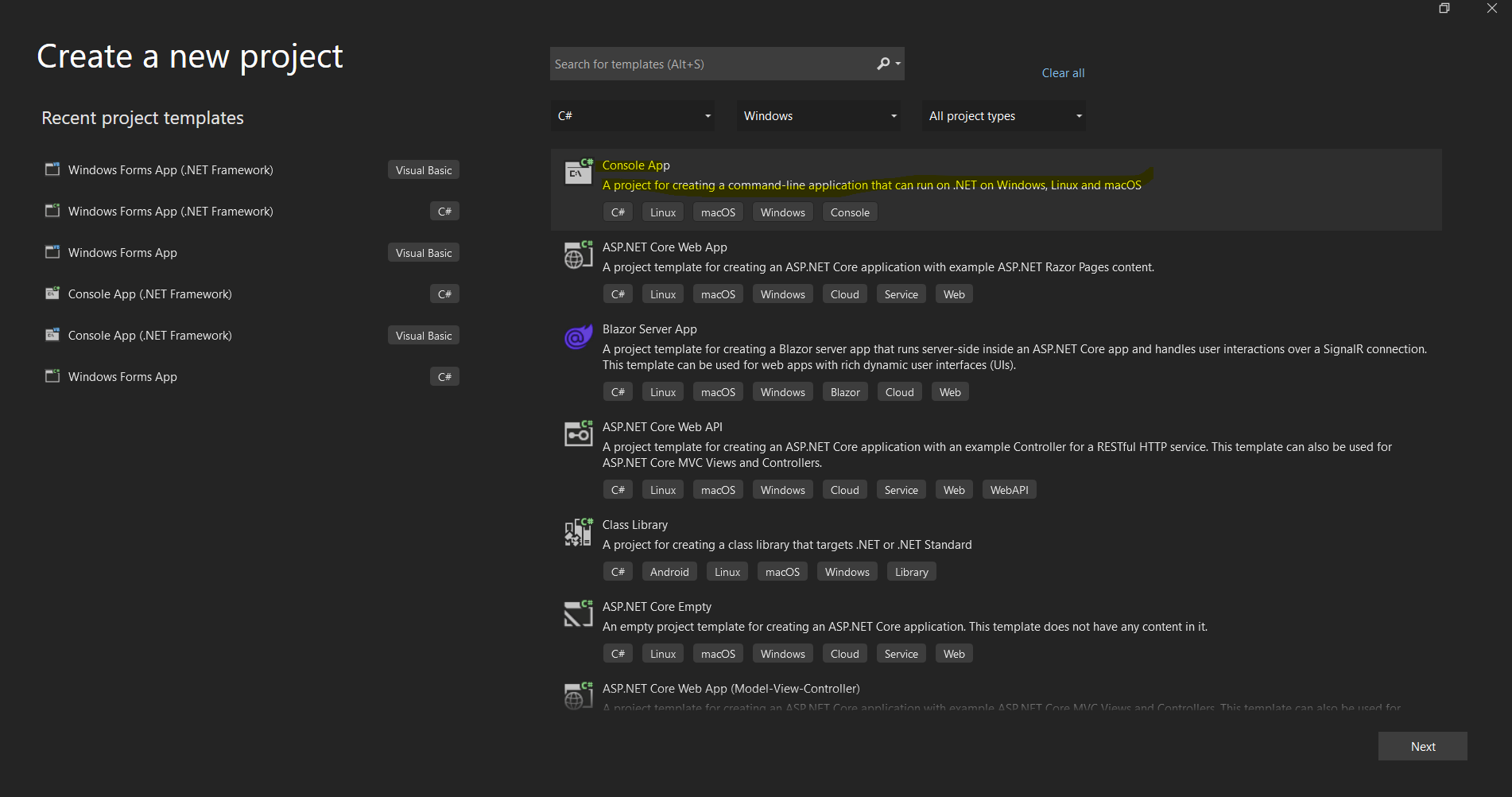 Der Projekt-Erstellungs-Dialog von Visual Studio zum Einrichten einer neuen .NET-Anwendung
IronPDF C# Bibliotheksinstallation
Installationsmethoden
IronPDF bietet mehrere Installationsansätze, um verschiedene Entwicklungs-Workflows zu unterstützen:
Methode 1: Verwendung von NuGet Package Manager (empfohlen)
Der einfachste Ansatz ist über den integrierten NuGet-Paket-Manager von Visual Studio:
- Rechtsklick auf Ihr Projekt im Solution Explorer
- Wählen Sie "NuGet-Pakete verwalten"
- Klicken Sie auf "Durchsuchen" und suchen Sie nach "IronPDF"
- Klicken Sie auf Installieren auf dem offiziellen IronPDF-Paket
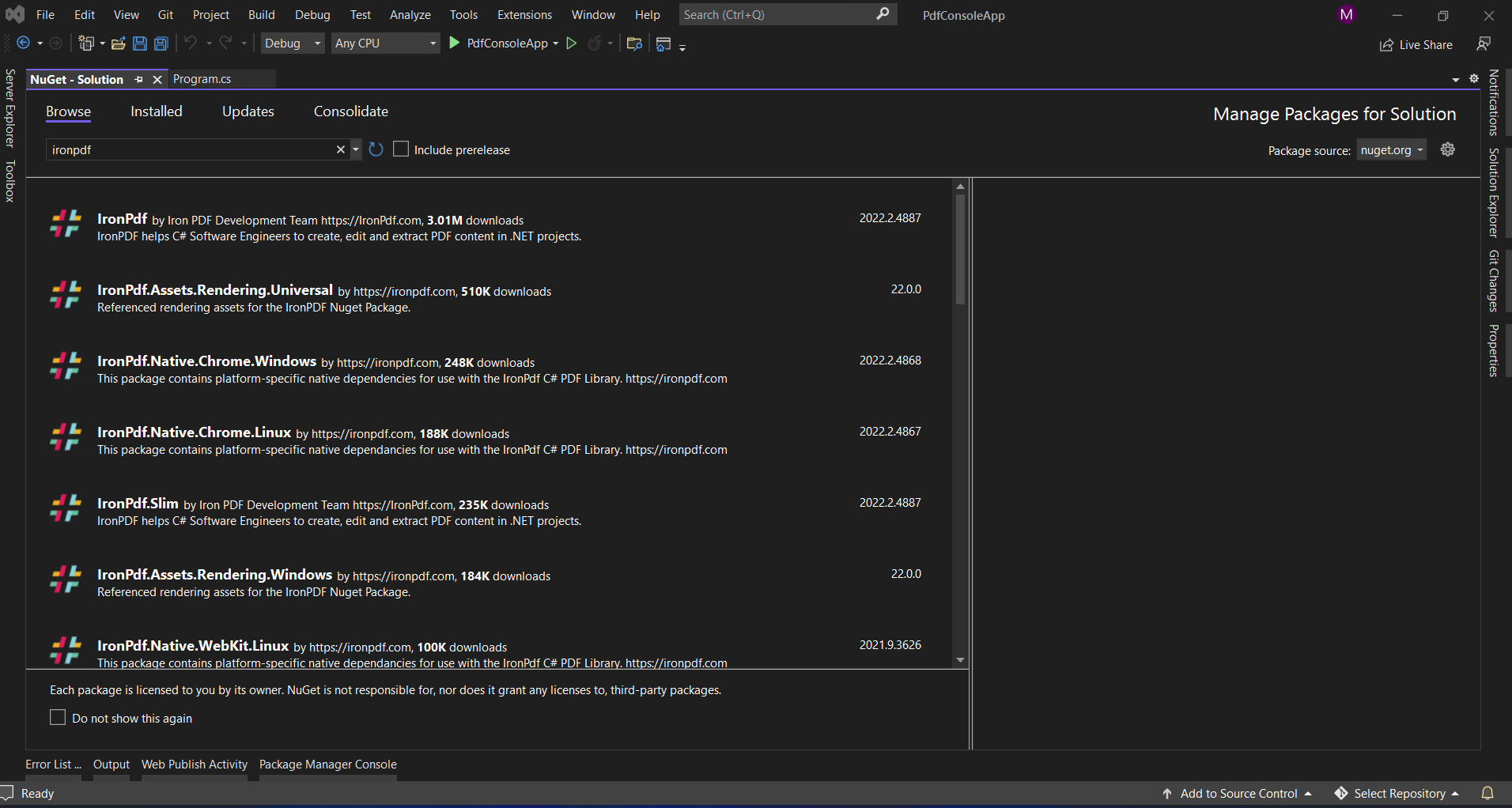 Installation von IronPDF über die NuGet-Paket-Manager-Oberfläche von Visual Studio
Methode 2: Paketmanager-Konsole
Für Entwickler, die Befehlszeilentools bevorzugen:
Install-Package IronPdf
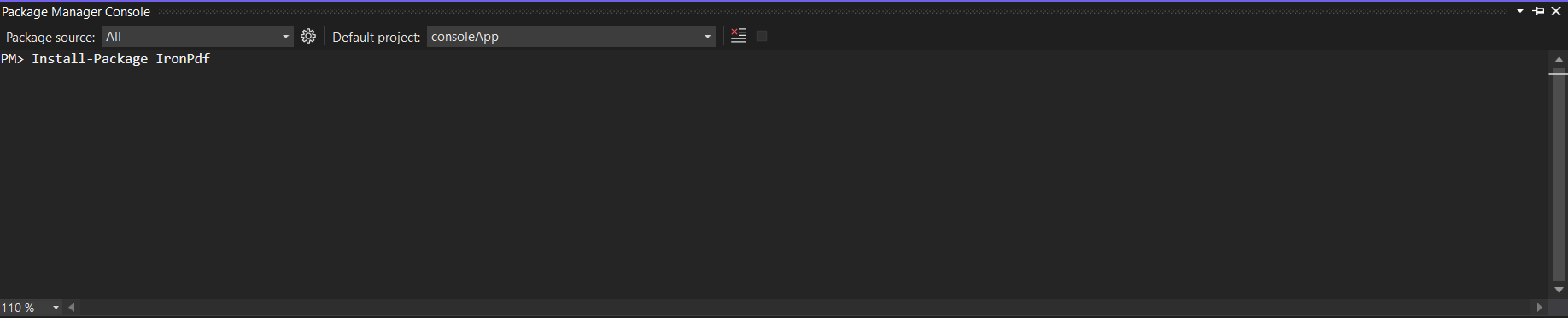 Verwenden der Paket-Manager-Konsole zur Installation von IronPDF mit einem einzigen Befehl
Methode 3: Direkter Download
Für Umgebungen mit eingeschränktem Internetzugang:
- Herunterladen von NuGet.org
- Die .nupkg-Datei zu einem lokalen NuGet-Feed hinzufügen
- Aus Ihrem lokalen Feed installieren
Methode 4: .NET CLI
Für .NET Core/5+ Projekte:
dotnet add package IronPdf
Installation von ABCpdf
Installationsmethoden
ABCpdf bietet ähnliche Installationsoptionen mit einigen zusätzlichen Überlegungen:
Methode 1: NuGet-Installation
Install-Package ABCpdf -Version 13.0.0.0
Beachten Sie, dass ABCpdf separate Pakete für verschiedene Editionen hat:
ABCpdf- Standardausgabe (nur 32-bit)ABCpdf.ABCChrome64- Erforderlich für Rendering in Chrome bei 64-bitABCpdf.ABCGecko- Für Gecko-Rendering-Maschine
Methode 2: Manuelle Installation
- Herunterladen von WebSupergoo-Webseite
- Entpacken der ZIP-Datei
- Referenzen zu den entsprechenden DLLs hinzufügen
- Native Abhängigkeiten in Ihr Ausgabeverzeichnis kopieren
Plattformspezifische Erwägungen
ABCpdf erfordert zusätzliche Einrichtung für nicht-Windows-Plattformen:
<PackageReference Include="ABCpdf.Linux" Version="13.0.0.0" />
<PackageReference Include="ABCpdf.Linux" Version="13.0.0.0" />Wie gehen diese Bibliotheken mit der Konvertierung von HTML in PDF um?
Das Verständnis der grundlegenden Unterschiede, wie jede Bibliothek die HTML-zu-PDF-Konvertierung angeht, hilft, ihre unterschiedlichen Fähigkeiten und Leistungsmerkmale zu erklären.
IronPDFs Ansatz: Chrome-First Architektur
IronPDF verwendet eine vollständige Chrome-Browser-Engine, die mehrere Vorteile bietet:
using IronPdf;

// IronPDF's approach - Chrome rendering with full browser capabilities
var renderer = new ChromePdfRenderer();

// Configure rendering to match Chrome's print preview exactly
renderer.RenderingOptions = ChromePdfRenderOptions.DefaultChrome;

// Or customize for specific needs
renderer.RenderingOptions.CssMediaType = PdfCssMediaType.Screen;
renderer.RenderingOptions.EnableJavaScript = true;
renderer.RenderingOptions.WaitFor.RenderDelay(500); // Wait for JS execution

// Convert complex HTML with modern CSS and JavaScript
string complexHtml = @"
<!DOCTYPE html>
<html>
<head>
    <style>
        @import url('https://fonts.googleapis.com/css2?family=Roboto:wght@300;700&display=swap');

        .container {
            display: grid;
            grid-template-columns: repeat(auto-fit, minmax(250px, 1fr));
            gap: 20px;
            font-family: 'Roboto', sans-serif;
        }

        .card {
            background: linear-gradient(135deg, #667eea 0%, #764ba2 100%);
            border-radius: 10px;
            padding: 20px;
            color: white;
            box-shadow: 0 10px 20px rgba(0,0,0,0.19);
            transform: translateY(0);
            transition: transform 0.3s;
        }

        @media print {
            .card { break-inside: avoid; }
        }
    </style>
</head>
<body>
    <div class='container'>
        <div class='card'>
            <h2>Modern CSS Support</h2>
            <p>Grid, Flexbox, Gradients, Shadows - all rendered perfectly</p>
        </div>
        <div class='card'>
            <h2>Webfonts</h2>
            <p>Google Fonts and custom fonts work seamlessly</p>
        </div>
    </div>
    <script>
        // Dynamic content generation
        document.addEventListener('DOMContentLoaded', function() {
            const container = document.querySelector('.container');
            const dynamicCard = document.createElement('div');
            dynamicCard.className = 'card';
            dynamicCard.innerHTML = '<h2>JavaScript Generated</h2><p>This card was added by JavaScript</p>';
            container.appendChild(dynamicCard);
        });
    </script>
</body>
</html>";

var pdf = renderer.RenderHtmlAsPdf(complexHtml);
pdf.SaveAs("modern-web-features.pdf");
using IronPdf;
// IronPDF's approach - Chrome rendering with full browser capabilities
var renderer = new ChromePdfRenderer();
// Configure rendering to match Chrome's print preview exactly
renderer.RenderingOptions = ChromePdfRenderOptions.DefaultChrome;
// Or customize for specific needs
renderer.RenderingOptions.CssMediaType = PdfCssMediaType.Screen;
renderer.RenderingOptions.EnableJavaScript = true;
renderer.RenderingOptions.WaitFor.RenderDelay(500); // Wait for JS execution
// Convert complex HTML with modern CSS and JavaScript
string complexHtml = @"
<!DOCTYPE html>
<html>
<head>
<style>
@import url('https://fonts.googleapis.com/css2?family=Roboto:wght@300;700&display=swap');
.container {
display: grid;
grid-template-columns: repeat(auto-fit, minmax(250px, 1fr));
gap: 20px;
font-family: 'Roboto', sans-serif;
}
.card {
background: linear-gradient(135deg, #667eea 0%, #764ba2 100%);
border-radius: 10px;
padding: 20px;
color: white;
box-shadow: 0 10px 20px rgba(0,0,0,0.19);
transform: translateY(0);
transition: transform 0.3s;
}
@media print {
.card { break-inside: avoid; }
}
</style>
</head>
<body>
<div class='container'>
<div class='card'>
<h2>Modern CSS Support</h2>
<p>Grid, Flexbox, Gradients, Shadows - all rendered perfectly</p>
</div>
<div class='card'>
<h2>Webfonts</h2>
<p>Google Fonts and custom fonts work seamlessly</p>
</div>
</div>
<script>
// Dynamic content generation
document.addEventListener('DOMContentLoaded', function() {
const container = document.querySelector('.container');
const dynamicCard = document.createElement('div');
dynamicCard.className = 'card';
dynamicCard.innerHTML = '<h2>JavaScript Generated</h2><p>This card was added by JavaScript</p>';
container.appendChild(dynamicCard);
});
</script>
</body>
</html>";
var pdf = renderer.RenderHtmlAsPdf(complexHtml);
pdf.SaveAs("modern-web-features.pdf");Imports IronPdf
' IronPDF's approach - Chrome rendering with full browser capabilities
Dim renderer As New ChromePdfRenderer()
' Configure rendering to match Chrome's print preview exactly
renderer.RenderingOptions = ChromePdfRenderOptions.DefaultChrome
' Or customize for specific needs
renderer.RenderingOptions.CssMediaType = PdfCssMediaType.Screen
renderer.RenderingOptions.EnableJavaScript = True
renderer.RenderingOptions.WaitFor.RenderDelay(500) ' Wait for JS execution
' Convert complex HTML with modern CSS and JavaScript
Dim complexHtml As String = "
<!DOCTYPE html>
<html>
<head>
<style>
@import url('https://fonts.googleapis.com/css2?family=Roboto:wght@300;700&display=swap');
.container {
display: grid;
grid-template-columns: repeat(auto-fit, minmax(250px, 1fr));
gap: 20px;
font-family: 'Roboto', sans-serif;
}
.card {
background: linear-gradient(135deg, #667eea 0%, #764ba2 100%);
border-radius: 10px;
padding: 20px;
color: white;
box-shadow: 0 10px 20px rgba(0,0,0,0.19);
transform: translateY(0);
transition: transform 0.3s;
}
@media print {
.card { break-inside: avoid; }
}
</style>
</head>
<body>
<div class='container'>
<div class='card'>
<h2>Modern CSS Support</h2>
<p>Grid, Flexbox, Gradients, Shadows - all rendered perfectly</p>
</div>
<div class='card'>
<h2>Webfonts</h2>
<p>Google Fonts and custom fonts work seamlessly</p>
</div>
</div>
<script>
' Dynamic content generation
document.addEventListener('DOMContentLoaded', function() {
const container = document.querySelector('.container');
const dynamicCard = document.createElement('div');
dynamicCard.className = 'card';
dynamicCard.innerHTML = '<h2>JavaScript Generated</h2><p>This card was added by JavaScript</p>';
container.appendChild(dynamicCard);
});
</script>
</body>
</html>"
Dim pdf = renderer.RenderHtmlAsPdf(complexHtml)
pdf.SaveAs("modern-web-features.pdf")Dieser Code zeigt mehrere wichtige Vorteile des Chrome-basierten Ansatzes von IronPDF:
- Unterstützung für modernes CSS: Rasterlayouts, Flexbox, Farbverläufe und Transformationen funktionieren genau wie in Chrome.
- Webfont-Integration: Google Fonts werden automatisch ohne zusätzliche Konfiguration geladen.
- JavaScript -Ausführung: Die dynamische Inhaltsgenerierung erfolgt vor dem PDF-Rendering.
- Media Queries: Druckspezifische Stile werden korrekt angewendet.
ABCpdfs Ansatz: Multi-Engine-Flexibilität
ABCpdf bietet mehrere Rendering-Engines, jede mit unterschiedlichen Fähigkeiten:
using WebSupergoo.ABCpdf13;

// Method 1: Using ABCChrome engine (most modern)
Doc chromeDoc = new Doc();
chromeDoc.HtmlOptions.Engine = EngineType.Chrome;
chromeDoc.HtmlOptions.Chrome.SetUserAgent("Mozilla/5.0 (Windows NT 10.0; Win64; x64) AppleWebKit/537.36");

// Chrome engine supports modern web standards
int chromeId = chromeDoc.AddImageUrl("https://example.com");

// Chain pages if content overflows
while (chromeDoc.Chainable(chromeId))
{
    chromeDoc.Page = chromeDoc.AddPage();
    chromeId = chromeDoc.AddImageToChain(chromeId);
}

chromeDoc.Save("chrome-engine-output.pdf");

// Method 2: Using Gecko engine (Firefox-based)
Doc geckoDoc = new Doc();
geckoDoc.HtmlOptions.Engine = EngineType.Gecko;
geckoDoc.HtmlOptions.UseScript = true; // Enable JavaScript

// Gecko provides good standards support with lower resource usage
string html = "<html><body><h1>Gecko Rendered Content</h1></body></html>";
geckoDoc.AddImageHtml(html);
geckoDoc.Save("gecko-engine-output.pdf");

// Method 3: Using MSHTML engine (IE-based, legacy support)
Doc ieDoc = new Doc();
ieDoc.HtmlOptions.Engine = EngineType.MSHtml;

// MSHTML is faster but with limited modern CSS support
ieDoc.AddImageUrl("https://legacy-app.example.com");
ieDoc.Save("ie-engine-output.pdf");
using WebSupergoo.ABCpdf13;
// Method 1: Using ABCChrome engine (most modern)
Doc chromeDoc = new Doc();
chromeDoc.HtmlOptions.Engine = EngineType.Chrome;
chromeDoc.HtmlOptions.Chrome.SetUserAgent("Mozilla/5.0 (Windows NT 10.0; Win64; x64) AppleWebKit/537.36");
// Chrome engine supports modern web standards
int chromeId = chromeDoc.AddImageUrl("https://example.com");
// Chain pages if content overflows
while (chromeDoc.Chainable(chromeId))
{
chromeDoc.Page = chromeDoc.AddPage();
chromeId = chromeDoc.AddImageToChain(chromeId);
}
chromeDoc.Save("chrome-engine-output.pdf");
// Method 2: Using Gecko engine (Firefox-based)
Doc geckoDoc = new Doc();
geckoDoc.HtmlOptions.Engine = EngineType.Gecko;
geckoDoc.HtmlOptions.UseScript = true; // Enable JavaScript
// Gecko provides good standards support with lower resource usage
string html = "<html><body><h1>Gecko Rendered Content</h1></body></html>";
geckoDoc.AddImageHtml(html);
geckoDoc.Save("gecko-engine-output.pdf");
// Method 3: Using MSHTML engine (IE-based, legacy support)
Doc ieDoc = new Doc();
ieDoc.HtmlOptions.Engine = EngineType.MSHtml;
// MSHTML is faster but with limited modern CSS support
ieDoc.AddImageUrl("https://legacy-app.example.com");
ieDoc.Save("ie-engine-output.pdf");Imports WebSupergoo.ABCpdf13
' Method 1: Using ABCChrome engine (most modern)
Private chromeDoc As New Doc()
chromeDoc.HtmlOptions.Engine = EngineType.Chrome
chromeDoc.HtmlOptions.Chrome.SetUserAgent("Mozilla/5.0 (Windows NT 10.0; Win64; x64) AppleWebKit/537.36")
' Chrome engine supports modern web standards
Dim chromeId As Integer = chromeDoc.AddImageUrl("https://example.com")
' Chain pages if content overflows
Do While chromeDoc.Chainable(chromeId)
chromeDoc.Page = chromeDoc.AddPage()
chromeId = chromeDoc.AddImageToChain(chromeId)
Loop
chromeDoc.Save("chrome-engine-output.pdf")
' Method 2: Using Gecko engine (Firefox-based)
Dim geckoDoc As New Doc()
geckoDoc.HtmlOptions.Engine = EngineType.Gecko
geckoDoc.HtmlOptions.UseScript = True ' Enable JavaScript
' Gecko provides good standards support with lower resource usage
Dim html As String = "<html><body><h1>Gecko Rendered Content</h1></body></html>"
geckoDoc.AddImageHtml(html)
geckoDoc.Save("gecko-engine-output.pdf")
' Method 3: Using MSHTML engine (IE-based, legacy support)
Dim ieDoc As New Doc()
ieDoc.HtmlOptions.Engine = EngineType.MSHtml
' MSHTML is faster but with limited modern CSS support
ieDoc.AddImageUrl("https://legacy-app.example.com")
ieDoc.Save("ie-engine-output.pdf")Der Multi-Engine-Ansatz bietet Flexibilität, erfordert aber sorgfältige Überlegung:
- Auswahl der Engine: Entwickler müssen die für ihre Inhalte geeignete Engine auswählen.
- Funktionsgleichheit: Verschiedene Engines unterstützen unterschiedliche HTML/CSS-Funktionen.
- Bereitstellungskomplexität: Jede Engine kann unterschiedliche Laufzeitanforderungen haben.
- Testaufwand: Die Leistung kann je nach Motor variieren, was zusätzliche Tests erforderlich macht.
Erstellung von PDF-Dokumenten aus URLs
Einer der häufigsten Anwendungsfälle für PDF-Bibliotheken ist das Konvertieren von Live-Webseiten in PDF-Dokumente. Lassen Sie uns untersuchen, wie jede Bibliothek diese Aufgabe handhabt.
Verwendung von IronPDF
Die URL-zu-PDF-Konvertierung von IronPDF nutzt die vollständige Chrome-Browser-Engine:
using IronPdf;
using System;
using System.Threading.Tasks;

public class UrlToPdfConverter
{
    public static async Task ConvertUrlToPdfAsync()
    {
        var renderer = new ChromePdfRenderer();

        // Configure for optimal web page capture
        renderer.RenderingOptions = new ChromePdfRenderOptions
        {
            // Viewport and scaling
            ViewPortWidth = 1920,
            ViewPortHeight = 1080,
            ZoomLevel = 100,

            // Paper and margins
            PaperSize = PdfPaperSize.A4,
            MarginTop = 10,
            MarginBottom = 10,
            MarginLeft = 10,
            MarginRight = 10,

            // Rendering behavior
            CssMediaType = PdfCssMediaType.Screen,
            PrintHtmlBackgrounds = true,
            CreatePdfFormsFromHtml = true,

            // JavaScript and timing
            EnableJavaScript = true,
            WaitFor = new WaitFor
            {
                // Wait strategies for dynamic content
                RenderDelay = 500, // milliseconds
                JavaScriptFinishDelay = 100,
                AllowedExecutionTime = 30000 // 30 seconds max
            }
        };

        // Handle authentication if needed
        renderer.RenderingOptions.HttpOptions.HttpHeaders.Add("Authorization", "Bearer your-token");

        // Convert with error handling
        try
        {
            // Async conversion for better performance
            var pdf = await renderer.RenderUrlAsPdfAsync("https://github.com/trending");

            // Add metadata
            pdf.MetaData.Author = "IronPDF Example";
            pdf.MetaData.Title = "GitHub Trending Projects";
            pdf.MetaData.CreationDate = DateTime.Now;

            // Add watermark
            pdf.ApplyWatermark("<h2 style='color:red;opacity:0.5'>CONFIDENTIAL</h2>",
                30, VerticalAlignment.Middle, HorizontalAlignment.Center);

            pdf.SaveAs("github-trending.pdf");
            Console.WriteLine("PDF created successfully!");
        }
        catch (Exception ex)
        {
            Console.WriteLine($"Error creating PDF: {ex.Message}");
        }
    }
}
using IronPdf;
using System;
using System.Threading.Tasks;
public class UrlToPdfConverter
{
public static async Task ConvertUrlToPdfAsync()
{
var renderer = new ChromePdfRenderer();
// Configure for optimal web page capture
renderer.RenderingOptions = new ChromePdfRenderOptions
{
// Viewport and scaling
ViewPortWidth = 1920,
ViewPortHeight = 1080,
ZoomLevel = 100,
// Paper and margins
PaperSize = PdfPaperSize.A4,
MarginTop = 10,
MarginBottom = 10,
MarginLeft = 10,
MarginRight = 10,
// Rendering behavior
CssMediaType = PdfCssMediaType.Screen,
PrintHtmlBackgrounds = true,
CreatePdfFormsFromHtml = true,
// JavaScript and timing
EnableJavaScript = true,
WaitFor = new WaitFor
{
// Wait strategies for dynamic content
RenderDelay = 500, // milliseconds
JavaScriptFinishDelay = 100,
AllowedExecutionTime = 30000 // 30 seconds max
}
};
// Handle authentication if needed
renderer.RenderingOptions.HttpOptions.HttpHeaders.Add("Authorization", "Bearer your-token");
// Convert with error handling
try
{
// Async conversion for better performance
var pdf = await renderer.RenderUrlAsPdfAsync("https://github.com/trending");
// Add metadata
pdf.MetaData.Author = "IronPDF Example";
pdf.MetaData.Title = "GitHub Trending Projects";
pdf.MetaData.CreationDate = DateTime.Now;
// Add watermark
pdf.ApplyWatermark("<h2 style='color:red;opacity:0.5'>CONFIDENTIAL</h2>",
30, VerticalAlignment.Middle, HorizontalAlignment.Center);
pdf.SaveAs("github-trending.pdf");
Console.WriteLine("PDF created successfully!");
}
catch (Exception ex)
{
Console.WriteLine($"Error creating PDF: {ex.Message}");
}
}
}Imports IronPdf
Imports System
Imports System.Threading.Tasks
Public Class UrlToPdfConverter
Public Shared Async Function ConvertUrlToPdfAsync() As Task
Dim renderer = New ChromePdfRenderer()
' Configure for optimal web page capture
renderer.RenderingOptions = New ChromePdfRenderOptions With {
.ViewPortWidth = 1920,
.ViewPortHeight = 1080,
.ZoomLevel = 100,
.PaperSize = PdfPaperSize.A4,
.MarginTop = 10,
.MarginBottom = 10,
.MarginLeft = 10,
.MarginRight = 10,
.CssMediaType = PdfCssMediaType.Screen,
.PrintHtmlBackgrounds = True,
.CreatePdfFormsFromHtml = True,
.EnableJavaScript = True,
.WaitFor = New WaitFor With {
.RenderDelay = 500,
.JavaScriptFinishDelay = 100,
.AllowedExecutionTime = 30000
}
}
' Handle authentication if needed
renderer.RenderingOptions.HttpOptions.HttpHeaders.Add("Authorization", "Bearer your-token")
' Convert with error handling
Try
' Async conversion for better performance
Dim pdf = Await renderer.RenderUrlAsPdfAsync("https://github.com/trending")
' Add metadata
pdf.MetaData.Author = "IronPDF Example"
pdf.MetaData.Title = "GitHub Trending Projects"
pdf.MetaData.CreationDate = DateTime.Now
' Add watermark
pdf.ApplyWatermark("<h2 style='color:red;opacity:0.5'>CONFIDENTIAL</h2>", 30, VerticalAlignment.Middle, HorizontalAlignment.Center)
pdf.SaveAs("github-trending.pdf")
Console.WriteLine("PDF created successfully!")
Catch ex As Exception
Console.WriteLine($"Error creating PDF: {ex.Message}")
End Try
End Function
End ClassZentrale merkmale:
- Viewport-Steuerung: Simulieren Sie verschiedene Bildschirmgrößen für responsive Tests
- Unterstützung für Authentifizierung: Hinzufügen von Headern für geschützte Ressourcen
- Dynamische Inhaltsverarbeitung: Wartestrategien for JavaScript-intensive Seiten
- Nachbearbeitung: Metadaten und Wasserzeichen nach der Konvertierung hinzufügen
Benutzung von ABCpdf
ABCpdfs URL-Konvertierung mit Seitenverkettung:
using WebSupergoo.ABCpdf13;
using System;

public class ABCpdfUrlConverter
{
    public static void ConvertUrlWithABCpdf()
    {
        using (Doc theDoc = new Doc())
        {
            // Configure the HTML engine
            theDoc.HtmlOptions.Engine = EngineType.Chrome;
            theDoc.HtmlOptions.Chrome.LoadDelay = 1000; // Wait 1 second

            // Set viewport size
            theDoc.HtmlOptions.BrowserWidth = 1200;

            // Authentication
            theDoc.HtmlOptions.HttpAdditionalHeaders = "Authorization: Bearer your-token";

            // Page setup
            theDoc.Rect.Inset(20, 20);
            theDoc.Page = theDoc.AddPage();

            // Add the URL
            int theID = theDoc.AddImageUrl("https://github.com/trending");

            // Chain pages for overflow content
            while (true)
            {
                if (!theDoc.Chainable(theID))
                    break;
                theDoc.Page = theDoc.AddPage();
                theID = theDoc.AddImageToChain(theID);
            }

            // Reduce file size
            for (int i = 1; i <= theDoc.PageCount; i++)
            {
                theDoc.PageNumber = i;
                theDoc.Flatten();
            }

            // Save
            theDoc.Save("abcpdf-github.pdf");
        }
    }
}
using WebSupergoo.ABCpdf13;
using System;
public class ABCpdfUrlConverter
{
public static void ConvertUrlWithABCpdf()
{
using (Doc theDoc = new Doc())
{
// Configure the HTML engine
theDoc.HtmlOptions.Engine = EngineType.Chrome;
theDoc.HtmlOptions.Chrome.LoadDelay = 1000; // Wait 1 second
// Set viewport size
theDoc.HtmlOptions.BrowserWidth = 1200;
// Authentication
theDoc.HtmlOptions.HttpAdditionalHeaders = "Authorization: Bearer your-token";
// Page setup
theDoc.Rect.Inset(20, 20);
theDoc.Page = theDoc.AddPage();
// Add the URL
int theID = theDoc.AddImageUrl("https://github.com/trending");
// Chain pages for overflow content
while (true)
{
if (!theDoc.Chainable(theID))
break;
theDoc.Page = theDoc.AddPage();
theID = theDoc.AddImageToChain(theID);
}
// Reduce file size
for (int i = 1; i <= theDoc.PageCount; i++)
{
theDoc.PageNumber = i;
theDoc.Flatten();
}
// Save
theDoc.Save("abcpdf-github.pdf");
}
}
}Imports WebSupergoo.ABCpdf13
Imports System
Public Class ABCpdfUrlConverter
Public Shared Sub ConvertUrlWithABCpdf()
Using theDoc As New Doc()
' Configure the HTML engine
theDoc.HtmlOptions.Engine = EngineType.Chrome
theDoc.HtmlOptions.Chrome.LoadDelay = 1000 ' Wait 1 second
' Set viewport size
theDoc.HtmlOptions.BrowserWidth = 1200
' Authentication
theDoc.HtmlOptions.HttpAdditionalHeaders = "Authorization: Bearer your-token"
' Page setup
theDoc.Rect.Inset(20, 20)
theDoc.Page = theDoc.AddPage()
' Add the URL
Dim theID As Integer = theDoc.AddImageUrl("https://github.com/trending")
' Chain pages for overflow content
Do
If Not theDoc.Chainable(theID) Then
Exit Do
End If
theDoc.Page = theDoc.AddPage()
theID = theDoc.AddImageToChain(theID)
Loop
' Reduce file size
For i As Integer = 1 To theDoc.PageCount
theDoc.PageNumber = i
theDoc.Flatten()
Next i
' Save
theDoc.Save("abcpdf-github.pdf")
End Using
End Sub
End ClassBemerkenswerte Unterschiede:
- Seitenverkettung: Manuelle Bearbeitung mehrseitiger Inhalte
- Engine-Konfiguration: Die Rendering-Engine muss explizit ausgewählt werden.
- Ressourcenmanagement: Erfordert ordnungsgemäße Entsorgung mit
usingAnweisung
Erstellen von PDFs aus HTML-Strings
Beide Bibliotheken glänzen bei der Umwandlung von HTML-Strings in PDFs, aber ihre Ansätze unterscheiden sich erheblich.
Verwendung von IronPDF
IronPDFs HTML-String-Konvertierung mit erweiterten Funktionen:
using IronPdf;
using System.IO;

public class HtmlStringToPdf
{
    public static void GenerateInvoicePdf()
    {
        var renderer = new ChromePdfRenderer();

        // Configure for print-quality output
        renderer.RenderingOptions = new ChromePdfRenderOptions
        {
            PaperSize = PdfPaperSize.A4,
            DPI = 300, // High quality print
            CssMediaType = PdfCssMediaType.Print,
            PaperFit = new PaperFit
            {
                UseFitToPageRendering = true,
                RenderScale = 100
            }
        };

        // Professional invoice HTML
        string invoiceHtml = @"
<!DOCTYPE html>
<html>
<head>
    <meta charset='UTF-8'>
    <style>
        @page {
            size: A4;
            margin: 0;
        }

        body {
            font-family: 'Segoe UI', Arial, sans-serif;
            margin: 0;
            padding: 20mm;
            color: #333;
        }

        .invoice-header {
            display: flex;
            justify-content: space-between;
            align-items: start;
            margin-bottom: 30px;
            border-bottom: 2px solid #0066cc;
            padding-bottom: 20px;
        }

        .company-info h1 {
            color: #0066cc;
            margin: 0;
            font-size: 28px;
        }

        .invoice-details {
            text-align: right;
        }

        .invoice-details h2 {
            color: #666;
            margin: 0 0 10px 0;
            font-size: 24px;
        }

        .invoice-table {
            width: 100%;
            border-collapse: collapse;
            margin-top: 30px;
        }

        .invoice-table th {
            background-color: #0066cc;
            color: white;
            padding: 12px;
            text-align: left;
        }

        .invoice-table td {
            padding: 12px;
            border-bottom: 1px solid #ddd;
        }

        .invoice-table tr:hover {
            background-color: #f5f5f5;
        }

        .total-section {
            margin-top: 30px;
            text-align: right;
        }

        .total-section .total-row {
            display: flex;
            justify-content: flex-end;
            margin: 5px 0;
        }

        .total-section .label {
            font-weight: bold;
            margin-right: 20px;
            min-width: 100px;
        }

        .total-section .grand-total {
            font-size: 20px;
            color: #0066cc;
            border-top: 2px solid #0066cc;
            padding-top: 10px;
            margin-top: 10px;
        }

        @media print {
            .no-print { display: none; }
        }
    </style>
</head>
<body>
    <div class='invoice-header'>
        <div class='company-info'>
            <h1>ACME Corporation</h1>
            <p>123 Business Street<br>
            New York, NY 10001<br>
            Phone: (555) 123-4567<br>
            Email: billing@acme.com</p>
        </div>
        <div class='invoice-details'>
            <h2>INVOICE</h2>
            <p><strong>Invoice #:</strong> INV-2025-001<br>
            <strong>Date:</strong> " + DateTime.Now.ToString("MMMM dd, yyyy") + @"<br>
            <strong>Due Date:</strong> " + DateTime.Now.AddDays(30).ToString("MMMM dd, yyyy") + @"</p>
        </div>
    </div>

    <div class='billing-info'>
        <h3>Bill To:</h3>
        <p>John Doe<br>
        456 Client Avenue<br>
        Los Angeles, CA 90001</p>
    </div>

    <table class='invoice-table'>
        <thead>
            <tr>
                <th>Description</th>
                <th>Quantity</th>
                <th>Unit Price</th>
                <th>Total</th>
            </tr>
        </thead>
        <tbody>
            <tr>
                <td>Professional Services - Web Development</td>
                <td>40 hours</td>
                <td>$150.00</td>
                <td>$6,000.00</td>
            </tr>
            <tr>
                <td>Hosting Services (Annual)</td>
                <td>1</td>
                <td>$1,200.00</td>
                <td>$1,200.00</td>
            </tr>
            <tr>
                <td>Domain Registration</td>
                <td>2</td>
                <td>$15.00</td>
                <td>$30.00</td>
            </tr>
        </tbody>
    </table>

    <div class='total-section'>
        <div class='total-row'>
            <span class='label'>Subtotal:</span>
            <span>$7,230.00</span>
        </div>
        <div class='total-row'>
            <span class='label'>Tax (8%):</span>
            <span>$578.40</span>
        </div>
        <div class='total-row grand-total'>
            <span class='label'>Total Due:</span>
            <span>$7,808.40</span>
        </div>
    </div>

    <div class='footer' style='margin-top: 50px; padding-top: 20px; border-top: 1px solid #ddd; text-align: center; color: #666;'>
        <p>Thank you for your business!<br>
        Payment is due within 30 days. Please include invoice number with payment.</p>
    </div>
</body>
</html>";

        // Generate PDF with base path for local assets
        var pdf = renderer.RenderHtmlAsPdf(invoiceHtml, @"C:\Assets\");

        // Add security
        pdf.SecuritySettings.AllowUserEditing = false;
        pdf.SecuritySettings.AllowUserPrinting = PdfPrintSecurity.FullPrintRights;
        pdf.SecuritySettings.OwnerPassword = "admin123";

        // Save with optimization
        pdf.CompressImages(60); // 60% quality for smaller file size
        pdf.SaveAs("professional-invoice.pdf");
    }
}
using IronPdf;
using System.IO;
public class HtmlStringToPdf
{
public static void GenerateInvoicePdf()
{
var renderer = new ChromePdfRenderer();
// Configure for print-quality output
renderer.RenderingOptions = new ChromePdfRenderOptions
{
PaperSize = PdfPaperSize.A4,
DPI = 300, // High quality print
CssMediaType = PdfCssMediaType.Print,
PaperFit = new PaperFit
{
UseFitToPageRendering = true,
RenderScale = 100
}
};
// Professional invoice HTML
string invoiceHtml = @"
<!DOCTYPE html>
<html>
<head>
<meta charset='UTF-8'>
<style>
@page {
size: A4;
margin: 0;
}
body {
font-family: 'Segoe UI', Arial, sans-serif;
margin: 0;
padding: 20mm;
color: #333;
}
.invoice-header {
display: flex;
justify-content: space-between;
align-items: start;
margin-bottom: 30px;
border-bottom: 2px solid #0066cc;
padding-bottom: 20px;
}
.company-info h1 {
color: #0066cc;
margin: 0;
font-size: 28px;
}
.invoice-details {
text-align: right;
}
.invoice-details h2 {
color: #666;
margin: 0 0 10px 0;
font-size: 24px;
}
.invoice-table {
width: 100%;
border-collapse: collapse;
margin-top: 30px;
}
.invoice-table th {
background-color: #0066cc;
color: white;
padding: 12px;
text-align: left;
}
.invoice-table td {
padding: 12px;
border-bottom: 1px solid #ddd;
}
.invoice-table tr:hover {
background-color: #f5f5f5;
}
.total-section {
margin-top: 30px;
text-align: right;
}
.total-section .total-row {
display: flex;
justify-content: flex-end;
margin: 5px 0;
}
.total-section .label {
font-weight: bold;
margin-right: 20px;
min-width: 100px;
}
.total-section .grand-total {
font-size: 20px;
color: #0066cc;
border-top: 2px solid #0066cc;
padding-top: 10px;
margin-top: 10px;
}
@media print {
.no-print { display: none; }
}
</style>
</head>
<body>
<div class='invoice-header'>
<div class='company-info'>
<h1>ACME Corporation</h1>
<p>123 Business Street<br>
New York, NY 10001<br>
Phone: (555) 123-4567<br>
Email: billing@acme.com</p>
</div>
<div class='invoice-details'>
<h2>INVOICE</h2>
<p><strong>Invoice #:</strong> INV-2025-001<br>
<strong>Date:</strong> " + DateTime.Now.ToString("MMMM dd, yyyy") + @"<br>
<strong>Due Date:</strong> " + DateTime.Now.AddDays(30).ToString("MMMM dd, yyyy") + @"</p>
</div>
</div>
<div class='billing-info'>
<h3>Bill To:</h3>
<p>John Doe<br>
456 Client Avenue<br>
Los Angeles, CA 90001</p>
</div>
<table class='invoice-table'>
<thead>
<tr>
<th>Description</th>
<th>Quantity</th>
<th>Unit Price</th>
<th>Total</th>
</tr>
</thead>
<tbody>
<tr>
<td>Professional Services - Web Development</td>
<td>40 hours</td>
<td>$150.00</td>
<td>$6,000.00</td>
</tr>
<tr>
<td>Hosting Services (Annual)</td>
<td>1</td>
<td>$1,200.00</td>
<td>$1,200.00</td>
</tr>
<tr>
<td>Domain Registration</td>
<td>2</td>
<td>$15.00</td>
<td>$30.00</td>
</tr>
</tbody>
</table>
<div class='total-section'>
<div class='total-row'>
<span class='label'>Subtotal:</span>
<span>$7,230.00</span>
</div>
<div class='total-row'>
<span class='label'>Tax (8%):</span>
<span>$578.40</span>
</div>
<div class='total-row grand-total'>
<span class='label'>Total Due:</span>
<span>$7,808.40</span>
</div>
</div>
<div class='footer' style='margin-top: 50px; padding-top: 20px; border-top: 1px solid #ddd; text-align: center; color: #666;'>
<p>Thank you for your business!<br>
Payment is due within 30 days. Please include invoice number with payment.</p>
</div>
</body>
</html>";
// Generate PDF with base path for local assets
var pdf = renderer.RenderHtmlAsPdf(invoiceHtml, @"C:\Assets\");
// Add security
pdf.SecuritySettings.AllowUserEditing = false;
pdf.SecuritySettings.AllowUserPrinting = PdfPrintSecurity.FullPrintRights;
pdf.SecuritySettings.OwnerPassword = "admin123";
// Save with optimization
pdf.CompressImages(60); // 60% quality for smaller file size
pdf.SaveAs("professional-invoice.pdf");
}
}Imports IronPdf
Imports System.IO
Public Class HtmlStringToPdf
Public Shared Sub GenerateInvoicePdf()
Dim renderer = New ChromePdfRenderer()
' Configure for print-quality output
renderer.RenderingOptions = New ChromePdfRenderOptions With {
.PaperSize = PdfPaperSize.A4,
.DPI = 300,
.CssMediaType = PdfCssMediaType.Print,
.PaperFit = New PaperFit With {
.UseFitToPageRendering = True,
.RenderScale = 100
}
}
' Professional invoice HTML
Dim invoiceHtml As String = "
<!DOCTYPE html>
<html>
<head>
<meta charset='UTF-8'>
<style>
@page {
size: A4;
margin: 0;
}
body {
font-family: 'Segoe UI', Arial, sans-serif;
margin: 0;
padding: 20mm;
color: #333;
}
.invoice-header {
display: flex;
justify-content: space-between;
align-items: start;
margin-bottom: 30px;
border-bottom: 2px solid #0066cc;
padding-bottom: 20px;
}
.company-info h1 {
color: #0066cc;
margin: 0;
font-size: 28px;
}
.invoice-details {
text-align: right;
}
.invoice-details h2 {
color: #666;
margin: 0 0 10px 0;
font-size: 24px;
}
.invoice-table {
width: 100%;
border-collapse: collapse;
margin-top: 30px;
}
.invoice-table th {
background-color: #0066cc;
color: white;
padding: 12px;
text-align: left;
}
.invoice-table td {
padding: 12px;
border-bottom: 1px solid #ddd;
}
.invoice-table tr:hover {
background-color: #f5f5f5;
}
.total-section {
margin-top: 30px;
text-align: right;
}
.total-section .total-row {
display: flex;
justify-content: flex-end;
margin: 5px 0;
}
.total-section .label {
font-weight: bold;
margin-right: 20px;
min-width: 100px;
}
.total-section .grand-total {
font-size: 20px;
color: #0066cc;
border-top: 2px solid #0066cc;
padding-top: 10px;
margin-top: 10px;
}
@media print {
.no-print { display: none; }
}
</style>
</head>
<body>
<div class='invoice-header'>
<div class='company-info'>
<h1>ACME Corporation</h1>
<p>123 Business Street<br>
New York, NY 10001<br>
Phone: (555) 123-4567<br>
Email: billing@acme.com</p>
</div>
<div class='invoice-details'>
<h2>INVOICE</h2>
<p><strong>Invoice #:</strong> INV-2025-001<br>
<strong>Date:</strong> " & DateTime.Now.ToString("MMMM dd, yyyy") & "<br>
<strong>Due Date:</strong> " & DateTime.Now.AddDays(30).ToString("MMMM dd, yyyy") & "</p>
</div>
</div>
<div class='billing-info'>
<h3>Bill To:</h3>
<p>John Doe<br>
456 Client Avenue<br>
Los Angeles, CA 90001</p>
</div>
<table class='invoice-table'>
<thead>
<tr>
<th>Description</th>
<th>Quantity</th>
<th>Unit Price</th>
<th>Total</th>
</tr>
</thead>
<tbody>
<tr>
<td>Professional Services - Web Development</td>
<td>40 hours</td>
<td>$150.00</td>
<td>$6,000.00</td>
</tr>
<tr>
<td>Hosting Services (Annual)</td>
<td>1</td>
<td>$1,200.00</td>
<td>$1,200.00</td>
</tr>
<tr>
<td>Domain Registration</td>
<td>2</td>
<td>$15.00</td>
<td>$30.00</td>
</tr>
</tbody>
</table>
<div class='total-section'>
<div class='total-row'>
<span class='label'>Subtotal:</span>
<span>$7,230.00</span>
</div>
<div class='total-row'>
<span class='label'>Tax (8%):</span>
<span>$578.40</span>
</div>
<div class='total-row grand-total'>
<span class='label'>Total Due:</span>
<span>$7,808.40</span>
</div>
</div>
<div class='footer' style='margin-top: 50px; padding-top: 20px; border-top: 1px solid #ddd; text-align: center; color: #666;'>
<p>Thank you for your business!<br>
Payment is due within 30 days. Please include invoice number with payment.</p>
</div>
</body>
</html>"
' Generate PDF with base path for local assets
Dim pdf = renderer.RenderHtmlAsPdf(invoiceHtml, "C:\Assets\")
' Add security
pdf.SecuritySettings.AllowUserEditing = False
pdf.SecuritySettings.AllowUserPrinting = PdfPrintSecurity.FullPrintRights
pdf.SecuritySettings.OwnerPassword = "admin123"
' Save with optimization
pdf.CompressImages(60) ' 60% quality for smaller file size
pdf.SaveAs("professional-invoice.pdf")
End Sub
End ClassDieses Beispiel zeigt:
- Professional Layout: Komplexes CSS mit Flexbox und Grid
- Dynamischer Inhalt: Datumsberechnungen und -formatierung
- Druckoptimierung: Media Queries für druckspezifisches Styling
- Sicherheitsfunktionen: Passwortschutz und Berechtigungseinstellungen
- Dateioptimierung: Bildkomprimierung für kleinere Dateigrößen
Benutzung von ABCpdf
ABCpdfs HTML-String-Verarbeitung mit stilisiertem Text:
using WebSupergoo.ABCpdf13;

public class ABCpdfHtmlString
{
    public static void CreateStyledDocument()
    {
        using (Doc theDoc = new Doc())
        {
            // Set up the document
            theDoc.Rect.Inset(40, 40);
            theDoc.Color.String = "0 0 0"; // Black text

            // Add styled HTML content
            theDoc.FontSize = 48;
            string styledHtml = @"
                <h1 style='color: #0066cc'>ABCpdf Document</h1>
                <p style='font-size: 14pt; line-height: 1.5'>
                    This demonstrates <b>bold text</b>, <i>italic text</i>,
                    and <span style='color: red'>colored text</span>.
                </p>
                <ul style='margin-left: 20px'>
                    <li>First item</li>
                    <li>Second item</li>
                    <li>Third item</li>
                </ul>";

            // Add HTML with automatic text flow
            int theID = theDoc.AddImageHtml(styledHtml);

            // Continue on new pages if needed
            while (true)
            {
                if (!theDoc.Chainable(theID))
                    break;
                theDoc.Page = theDoc.AddPage();
                theID = theDoc.AddImageToChain(theID);
            }

            // Apply compression
            theDoc.Encryption.Type = 2; // 128-bit encryption
            theDoc.Encryption.CanPrint = true;
            theDoc.Encryption.CanModify = false;

            theDoc.Save("styled-abcpdf.pdf");
        }
    }
}
using WebSupergoo.ABCpdf13;
public class ABCpdfHtmlString
{
public static void CreateStyledDocument()
{
using (Doc theDoc = new Doc())
{
// Set up the document
theDoc.Rect.Inset(40, 40);
theDoc.Color.String = "0 0 0"; // Black text
// Add styled HTML content
theDoc.FontSize = 48;
string styledHtml = @"
<h1 style='color: #0066cc'>ABCpdf Document</h1>
<p style='font-size: 14pt; line-height: 1.5'>
This demonstrates <b>bold text</b>, <i>italic text</i>,
and <span style='color: red'>colored text</span>.
</p>
<ul style='margin-left: 20px'>
<li>First item</li>
<li>Second item</li>
<li>Third item</li>
</ul>";
// Add HTML with automatic text flow
int theID = theDoc.AddImageHtml(styledHtml);
// Continue on new pages if needed
while (true)
{
if (!theDoc.Chainable(theID))
break;
theDoc.Page = theDoc.AddPage();
theID = theDoc.AddImageToChain(theID);
}
// Apply compression
theDoc.Encryption.Type = 2; // 128-bit encryption
theDoc.Encryption.CanPrint = true;
theDoc.Encryption.CanModify = false;
theDoc.Save("styled-abcpdf.pdf");
}
}
}Imports WebSupergoo.ABCpdf13
Public Class ABCpdfHtmlString
Public Shared Sub CreateStyledDocument()
Using theDoc As New Doc()
' Set up the document
theDoc.Rect.Inset(40, 40)
theDoc.Color.String = "0 0 0" ' Black text
' Add styled HTML content
theDoc.FontSize = 48
Dim styledHtml As String = "
<h1 style='color: #0066cc'>ABCpdf Document</h1>
<p style='font-size: 14pt; line-height: 1.5'>
This demonstrates <b>bold text</b>, <i>italic text</i>,
and <span style='color: red'>colored text</span>.
</p>
<ul style='margin-left: 20px'>
<li>First item</li>
<li>Second item</li>
<li>Third item</li>
</ul>"
' Add HTML with automatic text flow
Dim theID As Integer = theDoc.AddImageHtml(styledHtml)
' Continue on new pages if needed
Do
If Not theDoc.Chainable(theID) Then
Exit Do
End If
theDoc.Page = theDoc.AddPage()
theID = theDoc.AddImageToChain(theID)
Loop
' Apply compression
theDoc.Encryption.Type = 2 ' 128-bit encryption
theDoc.Encryption.CanPrint = True
theDoc.Encryption.CanModify = False
theDoc.Save("styled-abcpdf.pdf")
End Using
End Sub
End ClassLeistungs-Benchmarking
Das Verständnis der Leistungsmerkmale hilft bei der Wahl der richtigen Bibliothek für Ihre spezifische Anwendung.
Benchmark-Test einrichten
using BenchmarkDotNet.Attributes;
using BenchmarkDotNet.Running;
using IronPdf;
using WebSupergoo.ABCpdf13;

[MemoryDiagnoser]
[SimpleJob(warmupCount: 3, targetCount: 10)]
public class PdfGenerationBenchmark
{
    private string _simpleHtml;
    private string _complexHtml;
    private ChromePdfRenderer _ironPdfRenderer;
    private Doc _abcPdfDoc;

    [GlobalSetup]
    public void Setup()
    {
        _simpleHtml = "<h1>Simple Document</h1><p>Basic paragraph text.</p>";
        _complexHtml = File.ReadAllText("complex-page.html"); // 50KB HTML with CSS/JS

        _ironPdfRenderer = new ChromePdfRenderer();
        _abcPdfDoc = new Doc();
        _abcPdfDoc.HtmlOptions.Engine = EngineType.Chrome;
    }

    [Benchmark]
    public void IronPDF_SimpleHtml()
    {
        var pdf = _ironPdfRenderer.RenderHtmlAsPdf(_simpleHtml);
        pdf.SaveAs("temp_iron_simple.pdf");
    }

    [Benchmark]
    public void ABCpdf_SimpleHtml()
    {
        _abcPdfDoc.Clear();
        _abcPdfDoc.AddImageHtml(_simpleHtml);
        _abcPdfDoc.Save("temp_abc_simple.pdf");
    }

    [Benchmark]
    public void IronPDF_ComplexHtml()
    {
        var pdf = _ironPdfRenderer.RenderHtmlAsPdf(_complexHtml);
        pdf.SaveAs("temp_iron_complex.pdf");
    }

    [Benchmark]
    public void ABCpdf_ComplexHtml()
    {
        _abcPdfDoc.Clear();
        int id = _abcPdfDoc.AddImageHtml(_complexHtml);
        while (_abcPdfDoc.Chainable(id))
        {
            _abcPdfDoc.Page = _abcPdfDoc.AddPage();
            id = _abcPdfDoc.AddImageToChain(id);
        }
        _abcPdfDoc.Save("temp_abc_complex.pdf");
    }
}
using BenchmarkDotNet.Attributes;
using BenchmarkDotNet.Running;
using IronPdf;
using WebSupergoo.ABCpdf13;
[MemoryDiagnoser]
[SimpleJob(warmupCount: 3, targetCount: 10)]
public class PdfGenerationBenchmark
{
private string _simpleHtml;
private string _complexHtml;
private ChromePdfRenderer _ironPdfRenderer;
private Doc _abcPdfDoc;
[GlobalSetup]
public void Setup()
{
_simpleHtml = "<h1>Simple Document</h1><p>Basic paragraph text.</p>";
_complexHtml = File.ReadAllText("complex-page.html"); // 50KB HTML with CSS/JS
_ironPdfRenderer = new ChromePdfRenderer();
_abcPdfDoc = new Doc();
_abcPdfDoc.HtmlOptions.Engine = EngineType.Chrome;
}
[Benchmark]
public void IronPDF_SimpleHtml()
{
var pdf = _ironPdfRenderer.RenderHtmlAsPdf(_simpleHtml);
pdf.SaveAs("temp_iron_simple.pdf");
}
[Benchmark]
public void ABCpdf_SimpleHtml()
{
_abcPdfDoc.Clear();
_abcPdfDoc.AddImageHtml(_simpleHtml);
_abcPdfDoc.Save("temp_abc_simple.pdf");
}
[Benchmark]
public void IronPDF_ComplexHtml()
{
var pdf = _ironPdfRenderer.RenderHtmlAsPdf(_complexHtml);
pdf.SaveAs("temp_iron_complex.pdf");
}
[Benchmark]
public void ABCpdf_ComplexHtml()
{
_abcPdfDoc.Clear();
int id = _abcPdfDoc.AddImageHtml(_complexHtml);
while (_abcPdfDoc.Chainable(id))
{
_abcPdfDoc.Page = _abcPdfDoc.AddPage();
id = _abcPdfDoc.AddImageToChain(id);
}
_abcPdfDoc.Save("temp_abc_complex.pdf");
}
}Imports BenchmarkDotNet.Attributes
Imports BenchmarkDotNet.Running
Imports IronPdf
Imports WebSupergoo.ABCpdf13
<MemoryDiagnoser>
<SimpleJob(warmupCount:= 3, targetCount:= 10)>
Public Class PdfGenerationBenchmark
Private _simpleHtml As String
Private _complexHtml As String
Private _ironPdfRenderer As ChromePdfRenderer
Private _abcPdfDoc As Doc
<GlobalSetup>
Public Sub Setup()
_simpleHtml = "<h1>Simple Document</h1><p>Basic paragraph text.</p>"
_complexHtml = File.ReadAllText("complex-page.html") ' 50KB HTML with CSS/JS
_ironPdfRenderer = New ChromePdfRenderer()
_abcPdfDoc = New Doc()
_abcPdfDoc.HtmlOptions.Engine = EngineType.Chrome
End Sub
<Benchmark>
Public Sub IronPDF_SimpleHtml()
Dim pdf = _ironPdfRenderer.RenderHtmlAsPdf(_simpleHtml)
pdf.SaveAs("temp_iron_simple.pdf")
End Sub
<Benchmark>
Public Sub ABCpdf_SimpleHtml()
_abcPdfDoc.Clear()
_abcPdfDoc.AddImageHtml(_simpleHtml)
_abcPdfDoc.Save("temp_abc_simple.pdf")
End Sub
<Benchmark>
Public Sub IronPDF_ComplexHtml()
Dim pdf = _ironPdfRenderer.RenderHtmlAsPdf(_complexHtml)
pdf.SaveAs("temp_iron_complex.pdf")
End Sub
<Benchmark>
Public Sub ABCpdf_ComplexHtml()
_abcPdfDoc.Clear()
Dim id As Integer = _abcPdfDoc.AddImageHtml(_complexHtml)
Do While _abcPdfDoc.Chainable(id)
_abcPdfDoc.Page = _abcPdfDoc.AddPage()
id = _abcPdfDoc.AddImageToChain(id)
Loop
_abcPdfDoc.Save("temp_abc_complex.pdf")
End Sub
End ClassBenchmark-Überlegungen
Der obige Benchmark-Code verwendet BenchmarkDotNet als Ausgangs-Framework. Tatsächliche Ergebnisse variieren erheblich basierend auf Hardware, Dokumentkomplexität, .NET-Laufzeitversion und Maschinenkonfiguration. Wichtige allgemeine Beobachtungen aus Community-Berichten:
- IronPDFs Chrome-Maschine verbraucht mehr Speicher als ABCpdfs leichtere Maschinen (Gecko, MSHTML)
- ABCpdfs ABCChrome-Maschine hat vergleichbaren Speicherüberhang zu IronPDF, wenn verwendet
- Beide Bibliotheken skalieren mit Dokumentkomplexität
- IronPDFs Chrome-basiertes Rendering bietet höhere CSS/JS-Treue auf Kosten zusätzlichen Ressourcenverbrauchs
Laufen Sie Ihre eigenen Benchmarks gegen repräsentative Dokumente aus Ihrer Arbeitslast für genaue Vergleiche.
Vergleich der erweiterten Funktionen
Digitale Signaturen und Sicherheit
IronPDF Implementierung einer digitalen Signatur
using IronPdf;
using IronPdf.Signing;
using System.Security.Cryptography.X509Certificates;

public class SecurityFeatures
{
    public static void ApplyDigitalSignature()
    {
        // Load existing PDF
        var pdf = PdfDocument.FromFile("unsigned-document.pdf");

        // Load certificate
        var cert = new X509Certificate2("certificate.pfx", "password");

        // Create signature
        var signature = new PdfSignature(cert)
        {
            // Visual signature appearance
            SignatureImage = new PdfSignature.SignatureImage
            {
                ImagePath = "signature.png",
                Width = 200,
                Height = 100
            },

            // Signature position
            PageIndex = 0,
            X = 400,
            Y = 100,

            // Signature details
            Reason = "Document approved",
            Location = "New York, NY",
            ContactInfo = "john.doe@company.com"
        };

        // Apply signature
        pdf.Sign(signature);

        // Additional security
        pdf.SecuritySettings = new SecuritySettings
        {
            AllowUserPrinting = true,
            AllowUserCopyPasteContent = false,
            AllowUserEditing = false,
            AllowUserFormData = true,
            OwnerPassword = "owner123",
            UserPassword = "user123",
            EncryptionLevel = EncryptionLevel.AES256
        };

        pdf.SaveAs("signed-secured.pdf");
    }
}
using IronPdf;
using IronPdf.Signing;
using System.Security.Cryptography.X509Certificates;
public class SecurityFeatures
{
public static void ApplyDigitalSignature()
{
// Load existing PDF
var pdf = PdfDocument.FromFile("unsigned-document.pdf");
// Load certificate
var cert = new X509Certificate2("certificate.pfx", "password");
// Create signature
var signature = new PdfSignature(cert)
{
// Visual signature appearance
SignatureImage = new PdfSignature.SignatureImage
{
ImagePath = "signature.png",
Width = 200,
Height = 100
},
// Signature position
PageIndex = 0,
X = 400,
Y = 100,
// Signature details
Reason = "Document approved",
Location = "New York, NY",
ContactInfo = "john.doe@company.com"
};
// Apply signature
pdf.Sign(signature);
// Additional security
pdf.SecuritySettings = new SecuritySettings
{
AllowUserPrinting = true,
AllowUserCopyPasteContent = false,
AllowUserEditing = false,
AllowUserFormData = true,
OwnerPassword = "owner123",
UserPassword = "user123",
EncryptionLevel = EncryptionLevel.AES256
};
pdf.SaveAs("signed-secured.pdf");
}
}Imports IronPdf
Imports IronPdf.Signing
Imports System.Security.Cryptography.X509Certificates
Public Class SecurityFeatures
Public Shared Sub ApplyDigitalSignature()
' Load existing PDF
Dim pdf = PdfDocument.FromFile("unsigned-document.pdf")
' Load certificate
Dim cert = New X509Certificate2("certificate.pfx", "password")
' Create signature
Dim signature = New PdfSignature(cert) With {
.SignatureImage = New PdfSignature.SignatureImage With {
.ImagePath = "signature.png",
.Width = 200,
.Height = 100
},
.PageIndex = 0,
.X = 400,
.Y = 100,
.Reason = "Document approved",
.Location = "New York, NY",
.ContactInfo = "john.doe@company.com"
}
' Apply signature
pdf.Sign(signature)
' Additional security
pdf.SecuritySettings = New SecuritySettings With {
.AllowUserPrinting = True,
.AllowUserCopyPasteContent = False,
.AllowUserEditing = False,
.AllowUserFormData = True,
.OwnerPassword = "owner123",
.UserPassword = "user123",
.EncryptionLevel = EncryptionLevel.AES256
}
pdf.SaveAs("signed-secured.pdf")
End Sub
End ClassABCpdf Implementierung einer digitalen Signatur
using WebSupergoo.ABCpdf13;
using WebSupergoo.ABCpdf13.Objects;

public class ABCpdfSecurity
{
    public static void SignDocument()
    {
        using (Doc theDoc = new Doc())
        {
            theDoc.Read("unsigned-document.pdf");

            // Create signature field
            Field signatureField = theDoc.Form.AddFieldSignature("AuthorSignature");
            signatureField.Page = 1;
            signatureField.Rect = "400 100 600 200";

            // Configure signature
            Signature theSig = signatureField.Sign();
            theSig.Reason = "Document approved";
            theSig.Location = "New York, NY";
            theSig.ContactInfo = "john.doe@company.com";

            // Load certificate
            theSig.LoadCertificate("certificate.pfx", "password");

            // Apply visual signature
            theSig.Visible = true;
            theSig.Image = theDoc.AddImageFile("signature.png");

            // Sign and save
            theDoc.Save("abcpdf-signed.pdf");
        }
    }
}
using WebSupergoo.ABCpdf13;
using WebSupergoo.ABCpdf13.Objects;
public class ABCpdfSecurity
{
public static void SignDocument()
{
using (Doc theDoc = new Doc())
{
theDoc.Read("unsigned-document.pdf");
// Create signature field
Field signatureField = theDoc.Form.AddFieldSignature("AuthorSignature");
signatureField.Page = 1;
signatureField.Rect = "400 100 600 200";
// Configure signature
Signature theSig = signatureField.Sign();
theSig.Reason = "Document approved";
theSig.Location = "New York, NY";
theSig.ContactInfo = "john.doe@company.com";
// Load certificate
theSig.LoadCertificate("certificate.pfx", "password");
// Apply visual signature
theSig.Visible = true;
theSig.Image = theDoc.AddImageFile("signature.png");
// Sign and save
theDoc.Save("abcpdf-signed.pdf");
}
}
}Imports WebSupergoo.ABCpdf13
Imports WebSupergoo.ABCpdf13.Objects
Public Class ABCpdfSecurity
Public Shared Sub SignDocument()
Using theDoc As New Doc()
theDoc.Read("unsigned-document.pdf")
' Create signature field
Dim signatureField As Field = theDoc.Form.AddFieldSignature("AuthorSignature")
signatureField.Page = 1
signatureField.Rect = "400 100 600 200"
' Configure signature
Dim theSig As Signature = signatureField.Sign()
theSig.Reason = "Document approved"
theSig.Location = "New York, NY"
theSig.ContactInfo = "john.doe@company.com"
' Load certificate
theSig.LoadCertificate("certificate.pfx", "password")
' Apply visual signature
theSig.Visible = True
theSig.Image = theDoc.AddImageFile("signature.png")
' Sign and save
theDoc.Save("abcpdf-signed.pdf")
End Using
End Sub
End ClassFormularverarbeitung und Datenextraktion
IronPDF Formularverwaltung
public class FormHandling
{
    public static void WorkWithForms()
    {
        // Create PDF with form fields from HTML
        var renderer = new ChromePdfRenderer();
        renderer.RenderingOptions.CreatePdfFormsFromHtml = true;

        string formHtml = @"
        <form>
            <label>Name: <input type='text' name='fullname' required></label><br>
            <label>Email: <input type='email' name='email' required></label><br>
            <label>Subscribe: <input type='checkbox' name='subscribe' value='yes'></label><br>
            <label>Country:
                <select name='country'>
                    <option>USA</option>
                    <option>Canada</option>
                    <option>UK</option>
                </select>
            </label><br>
            <button type='submit'>Submit</button>
        </form>";

        var pdf = renderer.RenderHtmlAsPdf(formHtml);

        // Fill form programmatically
        pdf.Form.Fields["fullname"].Value = "John Doe";
        pdf.Form.Fields["email"].Value = "john@example.com";
        pdf.Form.Fields["subscribe"].Value = "yes";
        pdf.Form.Fields["country"].Value = "USA";

        // Extract form data
        foreach (var field in pdf.Form.Fields)
        {
            Console.WriteLine($"{field.Name}: {field.Value}");
        }

        // Flatten form (make non-editable)
        pdf.Form.Flatten();
        pdf.SaveAs("filled-form.pdf");
    }
}
public class FormHandling
{
public static void WorkWithForms()
{
// Create PDF with form fields from HTML
var renderer = new ChromePdfRenderer();
renderer.RenderingOptions.CreatePdfFormsFromHtml = true;
string formHtml = @"
<form>
<label>Name: <input type='text' name='fullname' required></label><br>
<label>Email: <input type='email' name='email' required></label><br>
<label>Subscribe: <input type='checkbox' name='subscribe' value='yes'></label><br>
<label>Country:
<select name='country'>
<option>USA</option>
<option>Canada</option>
<option>UK</option>
</select>
</label><br>
<button type='submit'>Submit</button>
</form>";
var pdf = renderer.RenderHtmlAsPdf(formHtml);
// Fill form programmatically
pdf.Form.Fields["fullname"].Value = "John Doe";
pdf.Form.Fields["email"].Value = "john@example.com";
pdf.Form.Fields["subscribe"].Value = "yes";
pdf.Form.Fields["country"].Value = "USA";
// Extract form data
foreach (var field in pdf.Form.Fields)
{
Console.WriteLine($"{field.Name}: {field.Value}");
}
// Flatten form (make non-editable)
pdf.Form.Flatten();
pdf.SaveAs("filled-form.pdf");
}
}Public Class FormHandling
Public Shared Sub WorkWithForms()
' Create PDF with form fields from HTML
Dim renderer = New ChromePdfRenderer()
renderer.RenderingOptions.CreatePdfFormsFromHtml = True
Dim formHtml As String = "
<form>
<label>Name: <input type='text' name='fullname' required></label><br>
<label>Email: <input type='email' name='email' required></label><br>
<label>Subscribe: <input type='checkbox' name='subscribe' value='yes'></label><br>
<label>Country:
<select name='country'>
<option>USA</option>
<option>Canada</option>
<option>UK</option>
</select>
</label><br>
<button type='submit'>Submit</button>
</form>"
Dim pdf = renderer.RenderHtmlAsPdf(formHtml)
' Fill form programmatically
pdf.Form.Fields("fullname").Value = "John Doe"
pdf.Form.Fields("email").Value = "john@example.com"
pdf.Form.Fields("subscribe").Value = "yes"
pdf.Form.Fields("country").Value = "USA"
' Extract form data
For Each field In pdf.Form.Fields
Console.WriteLine($"{field.Name}: {field.Value}")
Next field
' Flatten form (make non-editable)
pdf.Form.Flatten()
pdf.SaveAs("filled-form.pdf")
End Sub
End ClassBatch-Verarbeitung und -Optimierung
IronPDF Stapelverarbeitung
using System.Threading.Tasks;
using System.Collections.Concurrent;

public class BatchProcessing
{
    public static async Task ProcessMultipleDocumentsAsync(List<string> htmlFiles)
    {
        var renderer = new ChromePdfRenderer();
        renderer.RenderingOptions.PaperSize = PdfPaperSize.A4;

        // Use concurrent processing
        var pdfResults = new ConcurrentBag<(string filename, byte[] data)>();

        await Parallel.ForEachAsync(htmlFiles, async (htmlFile, ct) =>
        {
            try
            {
                var html = await File.ReadAllTextAsync(htmlFile);
                var pdf = await renderer.RenderHtmlAsPdfAsync(html);

                // Optimize each PDF
                pdf.CompressImages(70);

                var filename = Path.GetFileNameWithoutExtension(htmlFile) + ".pdf";
                var data = pdf.BinaryData;

                pdfResults.Add((filename, data));
            }
            catch (Exception ex)
            {
                Console.WriteLine($"Error processing {htmlFile}: {ex.Message}");
            }
        });

        // Merge all PDFs into one
        var finalPdf = new PdfDocument();
        foreach (var (filename, data) in pdfResults.OrderBy(x => x.filename))
        {
            var pdf = new PdfDocument(data);
            finalPdf.AppendPdf(pdf);
        }

        finalPdf.SaveAs("batch-processed.pdf");
    }
}
using System.Threading.Tasks;
using System.Collections.Concurrent;
public class BatchProcessing
{
public static async Task ProcessMultipleDocumentsAsync(List<string> htmlFiles)
{
var renderer = new ChromePdfRenderer();
renderer.RenderingOptions.PaperSize = PdfPaperSize.A4;
// Use concurrent processing
var pdfResults = new ConcurrentBag<(string filename, byte[] data)>();
await Parallel.ForEachAsync(htmlFiles, async (htmlFile, ct) =>
{
try
{
var html = await File.ReadAllTextAsync(htmlFile);
var pdf = await renderer.RenderHtmlAsPdfAsync(html);
// Optimize each PDF
pdf.CompressImages(70);
var filename = Path.GetFileNameWithoutExtension(htmlFile) + ".pdf";
var data = pdf.BinaryData;
pdfResults.Add((filename, data));
}
catch (Exception ex)
{
Console.WriteLine($"Error processing {htmlFile}: {ex.Message}");
}
});
// Merge all PDFs into one
var finalPdf = new PdfDocument();
foreach (var (filename, data) in pdfResults.OrderBy(x => x.filename))
{
var pdf = new PdfDocument(data);
finalPdf.AppendPdf(pdf);
}
finalPdf.SaveAs("batch-processed.pdf");
}
}Imports System.Threading.Tasks
Imports System.Collections.Concurrent
Public Class BatchProcessing
Public Shared Async Function ProcessMultipleDocumentsAsync(ByVal htmlFiles As List(Of String)) As Task
Dim renderer = New ChromePdfRenderer()
renderer.RenderingOptions.PaperSize = PdfPaperSize.A4
' Use concurrent processing
Dim pdfResults = New ConcurrentBag(Of (filename As String, data As Byte()))()
Await Parallel.ForEachAsync(htmlFiles, Async Sub(htmlFile, ct)
Try
Dim html = Await File.ReadAllTextAsync(htmlFile)
Dim pdf = Await renderer.RenderHtmlAsPdfAsync(html)
' Optimize each PDF
pdf.CompressImages(70)
Dim filename = Path.GetFileNameWithoutExtension(htmlFile) & ".pdf"
Dim data = pdf.BinaryData
pdfResults.Add((filename, data))
Catch ex As Exception
Console.WriteLine($"Error processing {htmlFile}: {ex.Message}")
End Try
End Sub)
' Merge all PDFs into one
Dim finalPdf = New PdfDocument()
foreach var(filename, data) In pdfResults.OrderBy(Function(x) x.filename)
Dim pdf = New PdfDocument(data)
finalPdf.AppendPdf(pdf)
Next
finalPdf.SaveAs("batch-processed.pdf")
End Function
End ClassEchte Anwendungsfälle aus der Praxis
Welche Bibliothek passt besser zu Ihrem Projekt?
Wählen Sie IronPDF, wenn:
-
Cloud-native Anwendungen erstellen
- Native Docker-Unterstützung mit minimaler Konfiguration
- Kompatibilität mit Azure Functions und AWS Lambda
- Konsistentes Verhalten auf allen Cloud-Plattformen
-
Erfordert pixelgenaue HTML-Darstellung
- Komplexe CSS-Layouts (Grid, Flexbox)
- JavaScript-intensive Single-Page-Anwendungen
- Web-Schriftartenanforderungen
-
Entwicklung plattformübergreifender Lösungen erforderlich ist
- Anwendungen, die auf Windows, Linux und macOS abzielen
- Microservices-Architektur
- Container-basierte Bereitstellungen
- Die Entwicklererfahrung priorisiert wird
- Bedarf an schnellen Prototypen
- Kleine Entwicklungsteams
- Begrenzte PDF-Expertise
Wählen Sie ABCpdf wenn:
-
Mit Legacy-Systemen arbeiten
- Nur Windows-Umgebungen
- Bestehende ABCpdf-Implementierungen
- IE-kompatible Inhaltsanforderungen
-
Erfordert spezifische Rendermotoren
- Tests über verschiedene Browser
- Engine-spezifische Optimierungen
- Legacy-Browser-Unterstützung
-
Erweiterte PDF-Manipulation erforderlich
- Zugriff auf niedrigstufige PDF-Objekte
- Benutzerdefinierte PDF-Operatoren
- Komplexe Dokumentzusammenführungsszenarien
- Budgetbewusste Projekte
- Niedrigerer Einstiegspreis
- Ein-Entwickler-Lizenzen
- 32-Bit-Umgebungskompatibilität
Behebung häufiger Probleme
IronPDF Allgemeine Probleme und Lösungen
public class IronPdfTroubleshooting
{
    // Issue: Fonts not rendering correctly
    public static void FixFontIssues()
    {
        var renderer = new ChromePdfRenderer();

        // Solution 1: Wait for fonts to load
        renderer.RenderingOptions.WaitFor.RenderDelay(1000);

        // Solution 2: Use system fonts fallback
        renderer.RenderingOptions.CssMediaType = PdfCssMediaType.Print;
    }

    // Issue: JavaScript not executing
    public static void FixJavaScriptIssues()
    {
        var renderer = new ChromePdfRenderer();

        // Enable JavaScript and wait for execution
        renderer.RenderingOptions.EnableJavaScript = true;
        renderer.RenderingOptions.WaitFor.JavaScriptFinishDelay = 2000;
        renderer.RenderingOptions.WaitFor.AllowedExecutionTime = 30000;
    }

    // Issue: Memory usage in Docker
    public static void OptimizeForDocker()
    {
        var renderer = new ChromePdfRenderer();

        // Use single-threaded mode for containers
        IronPdf.Installation.SingleThreaded = true;

        // Reduce memory footprint
        renderer.RenderingOptions.ViewPortWidth = 1024;
        renderer.RenderingOptions.EnableGrayscale = true;
    }
}
public class IronPdfTroubleshooting
{
// Issue: Fonts not rendering correctly
public static void FixFontIssues()
{
var renderer = new ChromePdfRenderer();
// Solution 1: Wait for fonts to load
renderer.RenderingOptions.WaitFor.RenderDelay(1000);
// Solution 2: Use system fonts fallback
renderer.RenderingOptions.CssMediaType = PdfCssMediaType.Print;
}
// Issue: JavaScript not executing
public static void FixJavaScriptIssues()
{
var renderer = new ChromePdfRenderer();
// Enable JavaScript and wait for execution
renderer.RenderingOptions.EnableJavaScript = true;
renderer.RenderingOptions.WaitFor.JavaScriptFinishDelay = 2000;
renderer.RenderingOptions.WaitFor.AllowedExecutionTime = 30000;
}
// Issue: Memory usage in Docker
public static void OptimizeForDocker()
{
var renderer = new ChromePdfRenderer();
// Use single-threaded mode for containers
IronPdf.Installation.SingleThreaded = true;
// Reduce memory footprint
renderer.RenderingOptions.ViewPortWidth = 1024;
renderer.RenderingOptions.EnableGrayscale = true;
}
}Public Class IronPdfTroubleshooting
' Issue: Fonts not rendering correctly
Public Shared Sub FixFontIssues()
Dim renderer = New ChromePdfRenderer()
' Solution 1: Wait for fonts to load
renderer.RenderingOptions.WaitFor.RenderDelay(1000)
' Solution 2: Use system fonts fallback
renderer.RenderingOptions.CssMediaType = PdfCssMediaType.Print
End Sub
' Issue: JavaScript not executing
Public Shared Sub FixJavaScriptIssues()
Dim renderer = New ChromePdfRenderer()
' Enable JavaScript and wait for execution
renderer.RenderingOptions.EnableJavaScript = True
renderer.RenderingOptions.WaitFor.JavaScriptFinishDelay = 2000
renderer.RenderingOptions.WaitFor.AllowedExecutionTime = 30000
End Sub
' Issue: Memory usage in Docker
Public Shared Sub OptimizeForDocker()
Dim renderer = New ChromePdfRenderer()
' Use single-threaded mode for containers
IronPdf.Installation.SingleThreaded = True
' Reduce memory footprint
renderer.RenderingOptions.ViewPortWidth = 1024
renderer.RenderingOptions.EnableGrayscale = True
End Sub
End ClassABCpdf Allgemeine Probleme und Lösungen
public class ABCpdfTroubleshooting
{
    // Issue: Page breaks in wrong places
    public static void FixPageBreaks()
    {
        using (Doc theDoc = new Doc())
        {
            // Use HTML page break controls
            theDoc.HtmlOptions.BreakZoneSize = 100; // pixels
            theDoc.HtmlOptions.UseScript = true;

            string html = @"
                <style>
                    .page-break { page-break-after: always; }
                    .no-break { page-break-inside: avoid; }
                </style>
                <div class='no-break'>Keep this content together</div>
                <div class='page-break'></div>
                <div>New page content</div>";

            theDoc.AddImageHtml(html);
            theDoc.Save("fixed-breaks.pdf");
        }
    }

    // Issue: Images not loading
    public static void FixImageLoading()
    {
        using (Doc theDoc = new Doc())
        {
            // Set timeout and authentication
            theDoc.HtmlOptions.Timeout = 60000; // 60 seconds
            theDoc.HtmlOptions.RetryCount = 3;

            // For local images, set base directory
            theDoc.HtmlOptions.BaseUrl = @"file:///C:/Images/";

            theDoc.AddImageHtml("<img src='logo.png'>");
            theDoc.Save("with-images.pdf");
        }
    }
}
public class ABCpdfTroubleshooting
{
// Issue: Page breaks in wrong places
public static void FixPageBreaks()
{
using (Doc theDoc = new Doc())
{
// Use HTML page break controls
theDoc.HtmlOptions.BreakZoneSize = 100; // pixels
theDoc.HtmlOptions.UseScript = true;
string html = @"
<style>
.page-break { page-break-after: always; }
.no-break { page-break-inside: avoid; }
</style>
<div class='no-break'>Keep this content together</div>
<div class='page-break'></div>
<div>New page content</div>";
theDoc.AddImageHtml(html);
theDoc.Save("fixed-breaks.pdf");
}
}
// Issue: Images not loading
public static void FixImageLoading()
{
using (Doc theDoc = new Doc())
{
// Set timeout and authentication
theDoc.HtmlOptions.Timeout = 60000; // 60 seconds
theDoc.HtmlOptions.RetryCount = 3;
// For local images, set base directory
theDoc.HtmlOptions.BaseUrl = @"file:///C:/Images/";
theDoc.AddImageHtml("<img src='logo.png'>");
theDoc.Save("with-images.pdf");
}
}
}Public Class ABCpdfTroubleshooting
' Issue: Page breaks in wrong places
Public Shared Sub FixPageBreaks()
Using theDoc As New Doc()
' Use HTML page break controls
theDoc.HtmlOptions.BreakZoneSize = 100 ' pixels
theDoc.HtmlOptions.UseScript = True
Dim html As String = "
<style>
.page-break { page-break-after: always; }
.no-break { page-break-inside: avoid; }
</style>
<div class='no-break'>Keep this content together</div>
<div class='page-break'></div>
<div>New page content</div>"
theDoc.AddImageHtml(html)
theDoc.Save("fixed-breaks.pdf")
End Using
End Sub
' Issue: Images not loading
Public Shared Sub FixImageLoading()
Using theDoc As New Doc()
' Set timeout and authentication
theDoc.HtmlOptions.Timeout = 60000 ' 60 seconds
theDoc.HtmlOptions.RetryCount = 3
' For local images, set base directory
theDoc.HtmlOptions.BaseUrl = "file:///C:/Images/"
theDoc.AddImageHtml("<img src='logo.png'>")
theDoc.Save("with-images.pdf")
End Using
End Sub
End ClassMigrationsleitfaden: Wechsel zwischen Bibliotheken
Migration von ABCpdf zu IronPDF
public class MigrationHelper
{
    // ABCpdf code
    public void OldABCpdfMethod()
    {
        Doc theDoc = new Doc();
        theDoc.AddImageUrl("https://example.com");
        theDoc.Save("output.pdf");
        theDoc.Dispose();
    }

    // Equivalent IronPDF code
    public void NewIronPdfMethod()
    {
        var renderer = new ChromePdfRenderer();
        var pdf = renderer.RenderUrlAsPdf("https://example.com");
        pdf.SaveAs("output.pdf");
    }

    // Migration wrapper for gradual transition
    public class PdfWrapper
    {
        private bool _useIronPdf;

        public PdfWrapper(bool useIronPdf = true)
        {
            _useIronPdf = useIronPdf;
        }

        public void ConvertUrlToPdf(string url, string outputPath)
        {
            if (_useIronPdf)
            {
                var renderer = new ChromePdfRenderer();
                var pdf = renderer.RenderUrlAsPdf(url);
                pdf.SaveAs(outputPath);
            }
            else
            {
                using (var doc = new Doc())
                {
                    doc.AddImageUrl(url);
                    doc.Save(outputPath);
                }
            }
        }
    }
}
public class MigrationHelper
{
// ABCpdf code
public void OldABCpdfMethod()
{
Doc theDoc = new Doc();
theDoc.AddImageUrl("https://example.com");
theDoc.Save("output.pdf");
theDoc.Dispose();
}
// Equivalent IronPDF code
public void NewIronPdfMethod()
{
var renderer = new ChromePdfRenderer();
var pdf = renderer.RenderUrlAsPdf("https://example.com");
pdf.SaveAs("output.pdf");
}
// Migration wrapper for gradual transition
public class PdfWrapper
{
private bool _useIronPdf;
public PdfWrapper(bool useIronPdf = true)
{
_useIronPdf = useIronPdf;
}
public void ConvertUrlToPdf(string url, string outputPath)
{
if (_useIronPdf)
{
var renderer = new ChromePdfRenderer();
var pdf = renderer.RenderUrlAsPdf(url);
pdf.SaveAs(outputPath);
}
else
{
using (var doc = new Doc())
{
doc.AddImageUrl(url);
doc.Save(outputPath);
}
}
}
}
}Public Class MigrationHelper
' ABCpdf code
Public Sub OldABCpdfMethod()
Dim theDoc As New Doc()
theDoc.AddImageUrl("https://example.com")
theDoc.Save("output.pdf")
theDoc.Dispose()
End Sub
' Equivalent IronPDF code
Public Sub NewIronPdfMethod()
Dim renderer = New ChromePdfRenderer()
Dim pdf = renderer.RenderUrlAsPdf("https://example.com")
pdf.SaveAs("output.pdf")
End Sub
' Migration wrapper for gradual transition
Public Class PdfWrapper
Private _useIronPdf As Boolean
Public Sub New(Optional ByVal useIronPdf As Boolean = True)
_useIronPdf = useIronPdf
End Sub
Public Sub ConvertUrlToPdf(ByVal url As String, ByVal outputPath As String)
If _useIronPdf Then
Dim renderer = New ChromePdfRenderer()
Dim pdf = renderer.RenderUrlAsPdf(url)
pdf.SaveAs(outputPath)
Else
Using doc As New Doc()
doc.AddImageUrl(url)
doc.Save(outputPath)
End Using
End If
End Sub
End Class
End ClassLizenzierung und Gesamtbetriebskosten
Berechnung des ROI für Ihr Projekt
Bei der Bewertung von PDF-Bibliotheken sollten die Gesamtkosten über den Lizenzpreis hinaus berücksichtigt werden:
IronPDF Kostenanalyse
- Entwicklungszeiteinsparungen: Einfachere API reduziert Implementierungszeit
- Supportkosten: Inklusive technischem Support rund um die Uhr (24/5).
- Wartung: Einheitliche API über alle Plattformen hinweg
- Skalierbarkeit: Eine einzige Lizenz deckt mehrere Installationen ab
ABCpdf Kostenanalyse
- Anfangskosten: Niedrigerer Einstiegspreis
- Versteckte Kosten:
- Separate 64-Bit-Lizenz
- Anforderungen an mehrere Engines
- Plattform-spezifische Tests
- Zusätzliche Unterstützungskosten
Lizenzvergleichsrechner
public class LicenseCostCalculator
{
    public static void CalculateTotalCost()
    {
        // Scenario: 5-developer team, 3-year project
        // Note: Prices are illustrative. Verify current pricing at vendor websites.

        // IronPDF Professional (see ironpdf.com/licensing/for current prices)
        var ironPdfCost = new
        {
            License = 2999, // 10 developers, 10 projects — verify current price
            Support = 0,    // Included in license
            Training = 0,   // Simple API reduces training overhead
        };

        // ABCpdf equivalent setup (see websupergoo.com for current prices)
        var abcPdfCost = new
        {
            ProfessionalLicenses = 479 * 5, // 5 Professional (64-bit) licenses
            WeitervertriebLicense = 4790,   // Enterprise/Weitervertrieb license
            // Training costs may apply due to multi-engine configuration
        };

        // Perform your own TCO calculation based on your team size, support contracts,
        // and training requirements. Check vendor websites for current pricing.
        Console.WriteLine("Verify current prices before calculating TCO.");
    }
}
public class LicenseCostCalculator
{
public static void CalculateTotalCost()
{
// Scenario: 5-developer team, 3-year project
// Note: Prices are illustrative. Verify current pricing at vendor websites.
// IronPDF Professional (see ironpdf.com/licensing/for current prices)
var ironPdfCost = new
{
License = 2999, // 10 developers, 10 projects — verify current price
Support = 0, // Included in license
Training = 0, // Simple API reduces training overhead
};
// ABCpdf equivalent setup (see websupergoo.com for current prices)
var abcPdfCost = new
{
ProfessionalLicenses = 479 * 5, // 5 Professional (64-bit) licenses
WeitervertriebLicense = 4790, // Enterprise/Weitervertrieb license
// Training costs may apply due to multi-engine configuration
};
// Perform your own TCO calculation based on your team size, support contracts,
// and training requirements. Check vendor websites for current pricing.
Console.WriteLine("Verify current prices before calculating TCO.");
}
}Public Class LicenseCostCalculator
Public Shared Sub CalculateTotalCost()
' Scenario: 5-developer team, 3-year project
' Note: Prices are illustrative. Verify current pricing at vendor websites.
' IronPDF Professional (see ironpdf.com/licensing/for current prices)
Dim ironPdfCost = New With {
.License = 2999, ' 10 developers, 10 projects — verify current price
.Support = 0, ' Included in license
.Training = 0 ' Simple API reduces training overhead
}
' ABCpdf equivalent setup (see websupergoo.com for current prices)
Dim abcPdfCost = New With {
.ProfessionalLicenses = 479 * 5, ' 5 Professional (64-bit) licenses
.WeitervertriebLicense = 4790 ' Enterprise/Weitervertrieb license
' Training costs may apply due to multi-engine configuration
}
' Perform your own TCO calculation based on your team size, support contracts,
' and training requirements. Check vendor websites for current pricing.
Console.WriteLine("Verify current prices before calculating TCO.")
End Sub
End ClassAbschluss
Nach eingehender Analyse beider Bibliotheken lassen sich mehrere wesentliche Unterscheidungsmerkmale herauskristallisieren:
IronPDF zeichnet sich aus bei:
- Unterstützung für moderne Webtechnologien mit Chrome-basiertem Rendering
- Plattformübergreifende Konsistenz und Cloud-native Bereitstellungen
- Entwicklerproduktivität mit intuitiven APIs
- Umfassende Unterstützung und Dokumentation
- Besserer langfristiger Wert für wachsende Teams
ABCpdf bietet Vorteile bei:
- Geringeren Erstkosten für einfache Windows-only-Projekte
- Mehrere Rendering-Engine-Optionen
- Kompatibilität mit Legacy-Systemen
- Geringerem Speicherverbrauch für einfache Dokumente
IronPDF bietet eine einzige Lösung für alle PDF-Probleme. Beim Kauf von IronPDF erhalten Sie alle Konvertierungen in einer einzigen Bibliothek, sowie Aufgaben, die nur mit PDF-Dokumenten zusammenhängen, ohne dass zusätzliche Abhängigkeiten erforderlich sind. Dieser konsolidierte Ansatz, kombiniert mit konsistenter Chrome-basierter Rendering-Qualität und plattformübergreifender Unterstützung, macht IronPDF zu einer starken Wahl für die meisten modernen .NET-Anwendungen.
Für Teams, die schnellen Entwicklungen, konsistenten Ergebnissen über Plattformen hinweg und langfristiger Wartung Priorität einräumen, wird der höhere Erstpreis von IronPDF ausgeglichen durch reduzierte Entwicklungszeit, bessere Unterstützung und weniger Kompatibilitätsprobleme.
Einstieg mit IronPDF
Bereit, den Unterschied zu erleben? Starten Sie Ihre kostenlose Testversion heute:
// Get started in minutes
// Install-Package IronPdf

// Your first PDF in 3 lines
var renderer = new ChromePdfRenderer();
var pdf = renderer.RenderHtmlAsPdf("<h1>Hello World</h1>");
pdf.SaveAs("my-first-pdf.pdf");
// Get started in minutes
// Install-Package IronPdf
// Your first PDF in 3 lines
var renderer = new ChromePdfRenderer();
var pdf = renderer.RenderHtmlAsPdf("<h1>Hello World</h1>");
pdf.SaveAs("my-first-pdf.pdf");' Get started in minutes
' Install-Package IronPdf
' Your first PDF in 3 lines
Dim renderer As New ChromePdfRenderer()
Dim pdf = renderer.RenderHtmlAsPdf("<h1>Hello World</h1>")
pdf.SaveAs("my-first-pdf.pdf")Besuchen Sie unsere umfassende Dokumentation, erkunden Sie Codebeispiele oder chatten Sie mit unserem Entwicklungsteam für personalisierte Unterstützung bei Ihren PDF-Generierungsbedürfnissen.
Häufig gestellte Fragen
Was sind die Hauptunterschiede zwischen IronPDF und ABCpdf?
IronPDF bietet eine benutzerfreundlichere API und überlegene HTML-zu-PDF-Konvertierungsqualität im Vergleich zu ABCpdf. Zusätzlich zeigt IronPDF oft bessere Leistungsbenchmarks in .NET-Umgebungen.
Ist IronPDF kostengünstiger als ABCpdf for .NET-Anwendungen?
Ja, IronPDF bietet eine wettbewerbsfähige Preisgestaltung mit flexiblen Lizenzierungsoptionen, die langfristig niedrigere Wartungskosten im Vergleich zu ABCpdf zur Folge haben können.
Wie handhabt IronPDF die HTML-zu-PDF-Konvertierung im Vergleich zu ABCpdf?
IronPDF ist bekannt für seine hochwertige HTML-zu-PDF-Konvertierung, die eine genaue Darstellung von Webseiten im PDF-Format gewährleistet und oft effizienter als ABCpdf ist.
Welche Bibliothek bietet besseren Support für Entwickler, IronPDF oder ABCpdf?
IronPDF wird für seinen ausgezeichneten Kundensupport und die umfangreiche Dokumentation gelobt, die es Entwicklern erleichtert, zu integrieren und Probleme zu beheben.
Kann IronPDF effektiv PDF-Dateien aus unterschiedlichen Dokumenttypen erzeugen?
Ja, IronPDF kann PDF-Dateien aus verschiedenen Dokumenttypen erzeugen, einschließlich HTML, Bildern und mehr, was Flexibilität für unterschiedliche Anwendungsanforderungen bietet.
Ist die Leistung von IronPDF in .NET-Anwendungen ABCpdf überlegen?
IronPDF übertrifft oft ABCpdf in .NET-Anwendungen, bietet schnellere Verarbeitungsgeschwindigkeiten und effiziente Ressourcenverwaltung.
Was macht IronPDF zur bevorzugten Wahl für die PDF-Erzeugung in C#?
Die robusten Funktionen von IronPDF, die Benutzerfreundlichkeit und die überlegene Ausgabequalität machen es zur bevorzugten Wahl für Entwickler, die an C# Projekten arbeiten, die PDF-Erzeugung erfordern.
Gibt es Codebeispiele für die Verwendung von IronPDF in .NET?
Ja, IronPDF stellt zahlreiche Codebeispiele und eine umfassende API-Referenz bereit, um Entwicklern zu helfen, die PDF-Erzeugung in ihren .NET-Anwendungen schnell zu implementieren.
Wie vergleicht sich die Ausgabequalität von IronPDF mit ABCpdf?
IronPDF ist bekannt für seine hochqualitative PDF-Ausgabe, die die Integrität des Originalinhalts bewahrt und oft die Ausgabequalität von ABCpdf übertrifft.
Bietet IronPDF eine Testversion zur Bewertung an?
Ja, IronPDF bietet eine Testversion, die es Entwicklern ermöglicht, seine Funktionen und Leistung vor einer Kaufentscheidung zu bewerten.









 Kostenlos loslegen
 Kostenlos loslegen
 Kostenlose Live-Demo buchen
















