using IronPdf;

// Disable local disk access or cross-origin requests
Installation.EnableWebSecurity = true;

// Instantiate Renderer
var renderer = new ChromePdfRenderer();

// Create a PDF from a HTML string using C#
var pdf = renderer.RenderHtmlAsPdf("<h1>Hello World</h1>");

// Export to a file or Stream
pdf.SaveAs("output.pdf");

// Advanced Example with HTML Assets
// Load external html assets: Images, CSS and JavaScript.
// An optional BasePath 'C:\site\assets\' is set as the file location to load assets from
var myAdvancedPdf = renderer.RenderHtmlAsPdf("<img src='icons/iron.png'>", @"C:\site\assets\");
myAdvancedPdf.SaveAs("html-with-assets.pdf");
using IronPdf;// Disable local disk access or cross-origin requestsInstallation.EnableWebSecurity = true;// Instantiate Renderervar renderer = new ChromePdfRenderer();// Create a PDF from a HTML string using C#var pdf = renderer.RenderHtmlAsPdf("<h1>Hello World</h1>");// Export to a file or Streampdf.SaveAs("output.pdf");// Advanced Example with HTML Assets// Load external html assets: Images, CSS and JavaScript.// An optional BasePath 'C:\site\assets\' is set as the file location to load assets fromvar myAdvancedPdf = renderer.RenderHtmlAsPdf("<img src='icons/iron.png'>", @"C:\site\assets\");myAdvancedPdf.SaveAs("html-with-assets.pdf");
PM >Install-Package IronPdf
Install-Package IronPdf
PDF ARAÇLARI
IronPDF vs ABCpdf: 2025'te HTML'den PDF'ye Daha İyi Dönüşüm Sağlayan Hangi C# PDF Kütüphanesi?
PDF dosyaları, faturalama gibi görevler ve farklı belge türleri oluşturma için çeşitli sektörlerde yaygın olarak kullanılır. Müşteri ihtiyaçlarını etkili bir şekilde karşılar. .NET uygulamaları geliştirirken PDF oluşturma gereksinimi duyuyorsanız, doğru kütüphaneyi seçmek geliştirme hızınızı, çıktı kalitenizi ve uzun vadeli bakım maliyetlerinizi büyük ölçüde etkileyebilir. Geliştiriciler tarafından genellikle değerlendirilern iki kütüphane .NET ve ABCpdf'dir - ancak hangisi özel ihtiyaçlarınız için gerçekten daha iyi sonuçlar sunar?
Bu detaylı karşılaştırma, HTML-to-PDF dönüştürme doğruluğundan lisanslama modellerine kadar her iki kütüphanenin yeteneklerini inceleyerek bilinçli bir karar vermenize yardımcı oluyor. Gerçek dünya performans ölçümlerine, API tasarım felsefesine ve her kütüphanenin güçlü ve sınırlı yönlerini gösteren pratik kod örneklerine bakacağız. Günlük binlerce fatura üreten bir SaaS platformu veya hassas belge oluşturmayı gerektiren bir kurumsal uygulama oluşturuyor olun, bu farklılıkları anlamak proje başarısı için kritik önem taşır.
## IronPDF Nedir?
.NET, C# yazılım mühendislerine .NET projelerinde PDF dokümanlarını düzenleme, çıkarma ve oluşturma imkanı sunan ticari sınıf bir PDF oluşturma kütüphanesidir. Chrome tabanlı bir renderleme motoru ile inşa edilmiş olan .NET, HTML, CSS ve JavaScript'i, Google Chrome'da bir web sayfasının yazdırılmasını beklediğiniz sadakatle PDF'lere dönüştürür.
### IronPDF'nin Ana Özellikleri
.NET, HTML sayfalarını PDF dosyalarına dönüştürmek için bir .NET Chromium motoru kullanır. HTML-to-PDF ile PDF'lerin konumlandırılması veya tasarlanması için karmaşık API'ler kullanmaya gerek yoktur. .NET, standart web belgelerini destekler: HTML, ASPX, JS, CSS ve resimler. Kütüphanenin mimarisi, profesyonel düzeyde çıktı kalitesini korurken geliştirici deneyimine öncelik verir.
#### HTML-to-PDF Çeviri Mükemmelliği
- HTML5 semantik öğeler dahil tam HTML desteği
- Flexbox, Grid ve modern yerleşim teknikleri dahil tam CSS3 desteği
- Dinamik içerik üretimi için JavaScript çalıştırımı
- Google Fonts ve özel `@font-face` bildirimleri dahil web fontu desteği
- Görsel kontrol ile duyarlı tasarım raporlama
- Konfigüre edilebilir bekleme süreleri ile AJAX içerik yükleme
#### Belge Manipülasyon Kapasiteleri
- **Birleştirme ve Bölme:** Çoklu PDF'leri birleştirin veya tek bir yöntem çağrısıyla belirli sayfaları çıkarın
- **Başlıklar ve Altbilgiler:** Sayfa numaraları, tarihler ve özel HTML dahil dinamik içerik ekleyin
- **Filigran Eklem:** Opaklık ve konum kontrolü ile metin veya resim filigranları uygulayın
- **Form Yönetimi:** HTML form elemanlarından otomatik olarak doldurulabilir PDF formları oluşturun
- **Dijital İmzalar:** Sertifika yönetimi ile kriptografik imzalar uygulayın
- **Şifreleme:** 128 bit ve 256 bit AES şifreleme ile ayrıntılı izinler uygulayın
#### Gelişmiş İşleyiş Özellikleri
- **Çoklu iş parçacıklı işlem:** Yüksek performans senaryoları için yerel async/await desteği
- **Toplu İşlemler:** Aynı anda birden fazla belge işlemek için optimize edilmiş yöntemler
- **Bellek Verimliliği:** Tüm PDF'ler belleğe yüklenmeden büyük belge oluşturma için akış desteği
- **Bulut Optimizasyonu:** Docker, Azure ve AWS'de konteynerleştirilmiş dağıtımlar için tasarlanmıştır
#### Çapraz Platform Mimarisi
IronPDF, farklı ortamlarda tutarlı davranış sağlar:
- Windows (x86/x64)
- Linux (minimum Docker görüntüleri için Alpine dahil)
- macOS (Intel ve Apple Silicon)
- Azure Uygulama Hizmeti, Fonksiyonlar ve Konteyner Örnekleri
- AWS Lambda ve EC2
- Google Cloud Platform
## ABCpdf nedir?
ABCpdf .NET C# PDF kütüphanesi, dinamik Adobe PDF belgelerinin okunması, yazılması, dönüştürülmesi ve manipülasyonu için bir .NET bileşenidir. WebSupergoo tarafından geliştirilen ABCpdf, .NET topluluğuna yirmi yıldan fazla süredir hizmet veriyor, çoklu HTML renderleme motorları ve kapsamlı PDF manipülasyon özellikleri sunuyor.
### ABCpdf'in Temel Özellikleri
ABCpdf, HTML/CSS ve JavaScript, SVG, AJAX ve Font Awesome gibi ilgili teknolojilere tam destek sağlar. Kütüphane, geliştiricilere hem yüksek seviyede kullanım kolaylığı yöntemleri hem de düşük düzeyde PDF nesne erişimi sağlar.
#### Çoklu Renderleme Motorları
ABCpdf'in benzersiz yaklaşımı, çeşitli renderleme motorları sunar:
- **ABCChrome Motoru:** Modern web standartları için Chromium tabanlı (sadece x64)
- **Gecko Motoru:** Uygunluk testi için birden fazla versiyon
- **MSHTML Motoru:** Internet Explorer tabanlı renderleme
- **ABCWebKit Motoru:** WebKit tabanlı renderleme (sadece x64)
Bu çoklu motor yaklaşımı, geliştiricilerin belirli içerik için en iyi motoru seçmelerine olanak tanır, ancak dağıtım ve test süreçlerine fazladan karmaşıklık getirir.
#### Belge İçe Aktarma Kapasiteleri
ABCpdf, OpenOffice.org gibi yardımcı uygulamalar yüklendiğinde çeşitli belge formatlarını okuyabilir. Desteklenen formatlar şunlardır:
- Microsoft Office belgeleri (Word, Excel, PowerPoint)
- PostScript ve EPS dosyaları
- XPS (XML Kağıt Spesifikasyonu)
- SVG (Ölçeklenebilir Vektör Grafikleri)
- TIFF, JPEG 2000 ve RAW formatları dahil çeşitli resim formatları
#### Düşük Düzeyde PDF Manipülasyonu
- PDF nesne modeli için doğrudan erişim
- Birden fazla algoritma ile akış sıkıştırma/açma
- Yazı tipi kümeleme ve yerleştirme kontrolü
- Renk uzayı yönetimi ve dönüşümü
- İçerik akışı manipülasyonu
#### Performans Özellikleri
ABCpdf tamamen çoklu iş parçacıklıdır ve C#, ASPX ve VB dahil çeşitli .NET ortamlarda esnek kullanım için uygundur ve yüksek performanslı çoklu iş parçacıklı ortamlarda test edilmiştir. Kütüphane şunları içerir:
- Çok büyük belgeler için GigaPDF™ desteği
- Sunucu ortamları için optimize edilmiş bellek kullanımı
- Etkin yazı tipi önbellekleme mekanizmaları
- Arka plan iş parçacığında işlem yetenekleri
## Modern CSS Çerçeve Desteği
Günümüz web uygulamaları ile çalışırken, Bootstrap tabanlı düzenleri ve diğer modern CSS çerçevelerini PDF'ye dönüştürebilmek giderek daha önemli hale geliyor. Birçok kurumsal uygulama ve SaaS platformu, UI tutarlılığı için şu anda Bootstrap'a güveniyor ve PDF oluşturma bu düzenleri mükemmel bir şekilde korumalıdır.
### IronPDF: Tam Bootstrap ve Modern Çerçeve Desteği
IronPDF'nin Chromium renderleme motoru, modern CSS çerçeveleri için kapsamlı destek sağlar:
- **Bootstrap 5:** Flexbox temelli düzenler, grid sistemleri ve duyarlı yardımcılar için tam destek
- **Bootstrap 4:** Flexbox kart desteleri, navigasyon çubukları ve form düzenleri ile tam uyum
- **Tailwind CSS:** Modern utility-first CSS çerçevesi mükemmel şekilde render edilir
- **Foundation:** Tüm grid ve bileşen sistemleri desteklenir
- **Modern CSS3:** Flexbox, CSS Grid, animasyonlar, geçişler ve özel özellikler
Gerçek dünya örnekleri: [Bootstrap ana sayfası](https://getbootstrap.com/) ve [Bootstrap şablonları](https://getbootstrap.com/docs/5.3/examples/) piksel mükemmelliğinde doğrulukla PDF'ye dönüştürülür.
**Kod Örneği: E-Ticaret Ürün Izgarası**
```csharp
using IronPdf;

var renderer = new ChromePdfRenderer();

string bootstrapProductGrid = @"
<!DOCTYPE html>
<html>
<head>
    <link href='https://cdn.jsdelivr.net/npm/bootstrap@5.3.0/dist/css/bootstrap.min.css' rel='stylesheet'>
</head>
<body>
    <div class='container my-5'>
        <h1 class='mb-4'>Product Catalog</h1>
        <div class='row row-cols-1 row-cols-md-3 g-4'>
            <div class='col'>
                <div class='card h-100'>
                    <img src='https://via.placeholder.com/300x200' class='card-img-top' alt='Product 1'>
                    <div class='card-body d-flex flex-column'>
                        <h5 class='card-title'>Premium Widget</h5>
                        <p class='card-text flex-grow-1'>High-quality widget with advanced features and excellent durability.</p>
                        <div class='d-flex justify-content-between align-items-center mt-auto'>
                            <span class='h4 mb-0 text-primary'>$99.99</span>
                            <button class='btn btn-primary'>Add to Cart</button>
                        </div>
                    </div>
                </div>
            </div>
            <div class='col'>
                <div class='card h-100'>
                    <img src='https://via.placeholder.com/300x200' class='card-img-top' alt='Product 2'>
                    <div class='card-body d-flex flex-column'>
                        <h5 class='card-title'>Standard Widget</h5>
                        <p class='card-text flex-grow-1'>Reliable widget perfect for everyday use with great value.</p>
                        <div class='d-flex justify-content-between align-items-center mt-auto'>
                            <span class='h4 mb-0 text-primary'>$49.99</span>
                            <button class='btn btn-primary'>Add to Cart</button>
                        </div>
                    </div>
                </div>
            </div>
            <div class='col'>
                <div class='card h-100'>
                    <img src='https://via.placeholder.com/300x200' class='card-img-top' alt='Product 3'>
                    <div class='card-body d-flex flex-column'>
                        <h5 class='card-title'>Basic Widget</h5>
                        <p class='card-text flex-grow-1'>Entry-level widget with essential features at an affordable price.</p>
                        <div class='d-flex justify-content-between align-items-center mt-auto'>
                            <span class='h4 mb-0 text-primary'>$29.99</span>
                            <button class='btn btn-primary'>Add to Cart</button>
                        </div>
                    </div>
                </div>
            </div>
        </div>
    </div>
</body>
</html>";

var pdf = renderer.RenderHtmlAsPdf(bootstrapProductGrid);
pdf.SaveAs("product-catalog.pdf");
```
**Çıktı:** Bootstrap 5'in kart ızgara sistemi, flexbox hizalaması ve duyarlı boşluğu ile mükemmel bir şekilde biçimlendirilmiş ürün kataloğu - hepsi PDF'de korunur.
### ABCpdf: Çerçeve Kısıtlamaları ile Çok Motorlu Yaklaşım
ABCpdf'in modern CSS çerçevelerine desteği, seçilen renderleme motoruna bağlı olarak önemli ölçüde değişiklik gösterir:
- **ABCChrome Motoru** (sadece x64): IronPDF'ye benzer iyi Bootstrap desteği, ancak belirli 64 bit platform yapılandırması gerektirir
- **ABCWebKit Motoru** (sadece x64): Sınırlı flexbox desteği, Bootstrap 4+ düzenleri doğru şekilde render edilemeyebilir
- **Gecko Motoru:** Orta düzeyde CSS3 desteği, Bootstrap 3, Bootstrap 4/5'ten daha iyi çalışır
- **MSHTML Motoru:** Eski Internet Explorer renderlemesi, yalnızca Bootstrap 2.x, modern uygulamalar için önerilmez
**Anahtar düşünceler:**
- Motor seçimi karmaşıklığı dağıtım yükünü artırır
- Yalnızca 64 bit motorlar (ABCChrome, ABCWebKit) dağıtım esnekliğini sınırlar
- Tutarlı Bootstrap renderlemesi için motorlar arasında test yapılması gerekir
- Çerçeve uyumluluğu, motor seçimine bağlı olarak önemli ölçüde değişiklik gösterir
ABCpdf'in çok motorlu mimarisi, esneklik sağlar ancak Bootstrap düzenlerinin doğru şekilde render edilmesini sağlamak için dikkatli motor seçimi ve test gerektirir. Bootstrap veya modern CSS çerçevelerine ağır yatırım yaptığınız uygulamalar için, ABCChrome motoru en iyi sonuçları sağlar, ancak x64 yalnızca dağıtım kısıtlamalarıyla birlikte gelir.
Bootstrap çerçeve uyumluluğu hakkında daha fazla ayrıntı için, [Bootstrap & Flexbox CSS Kılavuzu](/troubleshooting/bootstrap-flex-css/)na bakın.
## Kapsamlı Özellik Karşılaştırması
<link rel="stylesheet" type="text/css" href="/front/css/product-comparison-table.css" />
<div class="product__comprehensive-comparison-table">
<div class="table-container">
<div class="table-number">Tablo 4</div>
<div class="table-title">.NET Uygulamaları için .NET ve ABCpdf'in Özellik Karşılaştırması</div>
<table>
<thead>
<tr>
<th>Kategori</th>
<th>Özellik/Aspect</th>
<th>IronPDF</th>
<th>ABCpdf</th>
<th>Ana Avantaj</th>
</tr>
</thead>
<tbody>
<tr>
<td><strong>Çekirdek Mimari</strong></td>
<td>Tasarım Felsefesi</td>
<td>Sadelik öncelikli, sezgisel API'lar</td>
<td>Esneklik öncelikli, çoklu motorlar</td>
<td>IronPDF: Daha hızlı geliştirme</td>
</tr>
<tr>
<td></td>
<td>API Karmaşıklığı</td>
<td><code>RenderHtmlAsPdf()</code> gibi basit yöntemler</td>
<td>Nesne yönelimli Doc sınıfı ile</td>
<td>IronPDF: Daha basit API</td>
</tr>
<tr>
<td></td>
<td>Öğrenme Eğrisi</td>
<td>Alt, tek motor tasarımı</td>
<td>Yüksek, çok motorlu yapılandırma gerekli</td>
<td>IronPDF: Daha hızlı benimseme</td>
</tr>
<tr>
<td><strong>Platform Desteği</strong></td>
<td>Çapraz Platform</td>
<td>Yerel destek, tek paket</td>
<td>Windows birincil, Linux sınırlı</td>
<td>IronPDF: Gerçek çapraz platform</td>
</tr>
<tr>
<td></td>
<td>.NET Sürümleri</td>
<td>.NET 10, 9, 8, 7, 6, 5, Core 3.1+, Framework 4.6.2+</td>
<td>.NET 10, 9, 8, 7, 6, 5, Core 3.0+, Framework 4.0+</td>
<td>Her İkisi: Modern çerçeve desteği</td>
</tr>
<tr>
<td></td>
<td>İşletim Sistemleri</td>
<td>Windows, Linux, macOS, Docker yerel</td>
<td>Windows, sınırlı Linux desteği</td>
<td>IronPDF: Daha geniş OS desteği</td>
</tr>
<tr>
<td><strong>HTML'den PDF'e</strong></td>
<td>Renderleme Motoru</td>
<td>Chrome V127+ motoru</td>
<td>Birden çok motor (Chrome 123, Gecko, MSHTML)</td>
<td>ABCpdf: Motor esnekliği</td>
</tr>
<tr>
<td></td>
<td>CSS3/HTML5 Desteği</td>
<td>Chrome-uyumlu (V8 motoru)</td>
<td>Motora göre değişir (%70-%100)</td>
<td>IronPDF: Tutarlı renderleme</td>
</tr>
<tr>
<td></td>
<td>JavaScript Yürütme</td>
<td>Tam V8 JavaScript desteği</td>
<td>Motora bağlı</td>
<td>IronPDF: Modern JS özellikleri</td>
</tr>
<tr>
<td></td>
<td>Web Yazı Tipleri</td>
<td>Google Fonts, @font-face, sistem fontları</td>
<td>ABCChrome ile desteklenir</td>
<td>Her İkisi: Web font desteği</td>
</tr>
<tr>
<td><strong>Performans</strong></td>
<td>Tek Sayfa Renderleme</td>
<td>Belge karmaşıklığına göre değişir</td>
<td>Motor ve belge karmaşıklığına göre değişir</td>
<td>Her ikisi de: motor bağımlı</td>
</tr>
<tr>
<td></td>
<td>Toplu İşleme</td>
<td>Optimize edilmiş paralel işleme</td>
<td>Çoklu iş parçacıklı yetenek</td>
<td>IronPDF: Daha iyi asenkron destek</td>
</tr>
<tr>
<td></td>
<td>Bellek Kullanımı</td>
<td>Daha yüksek (tam Chrome motoru)</td>
<td>Daha düşük (daha hafif motorlar mevcut)</td>
<td>ABCpdf: Chrome dışı motorlarla daha düşük bellek kullanımı</td>
</tr>
<tr>
<td><strong>Geliştirici Deneyimi</strong></td>
<td>Dokümantasyon</td>
<td>Kapsamlı dersler, videolar, örnekler</td>
<td>Kapsamlı API belgeleri</td>
<td>IronPDF: Daha fazla öğrenme kaynağı</td>
</tr>
<tr>
<td></td>
<td>Kod Örnekleri</td>
<td>100+ çalışmaya hazır örnek</td>
<td>Kapsamlı örnekler</td>
<td>Her İkisi: Zengin örnekler</td>
</tr>
<tr>
<td></td>
<td>IntelliSense Desteği</td>
<td>Tam XML dökümantasyonu</td>
<td>Kapsamlı IntelliSense</td>
<td>Her İkisi: IDE entegrasyonu</td>
</tr>
<tr>
<td><strong>Licensing & Pricing</strong></td>
<td>Giriş Seviyesi</td>
<td>Lite: `$liteLicense` (1 geliştirici, 1 proje)</td>
<td>Standart: `$abcpdf.standard` (1 geliştirici, sadece 32-bit)</td>
<td>ABCpdf: Daha düşük giriş maliyeti</td>
</tr>
<tr>
<td></td>
<td>Professional</td>
<td>Professional: `$professionalLicenseOriginal` (10 geliştirici, 10 proje)</td>
<td>Professional: `$abcpdf.professional` (1 geliştirici, 64-bit)</td>
<td>IronPDF: Daha iyi takım lisanslaması</td>
</tr>
<tr>
<td></td>
<td>Yeniden Dağıtım</td>
<td>+`$professionalLicense` telif ücretsiz</td>
<td>`$abcpdf.enterprise` Enterprise lisansı</td>
<td>IronPDF: Daha uygun fiyatlı</td>
</tr>
<tr>
<td><strong>Destek</strong></td>
<td>Destek Dahil</td>
<td>Evet, 24/5 mühendislik desteği</td>
<td>Evet, e-posta desteği</td>
<td>IronPDF: Canlı sohbet desteği</td>
</tr>
<tr>
<td></td>
<td>Yanıt Süresi</td>
<td>< 1 dakika (canlı sohbet)</td>
<td>24-48 saat tipik</td>
<td>IronPDF: Daha hızlı yanıt</td>
</tr>
<tr>
<td><strong>En İyi Kullanım Alanı</strong></td>
<td>Kullanım Durumları</td>
<td>Modern web uygulamaları, SaaS, bulut yerleşik</td>
<td>Windows masaüstü, eski sistemler</td>
<td>Bağlama bağlı</td>
</tr>
</tbody>
</table>
<div class="table-note">
<em>Not.</em> ABCpdf, esneklik için birden fazla render motoru sunar ama tam işlevsellik için Windows gerektirir. IronPDF, en son Chrome motoru ile tutarlı çapraz platform performansı sağlar. Tek geliştiricili ve takım lisansları arasında fiyat yapıları belirgin bir şekilde farklılık gösterir.
</div>
</div>
</div>
## Visual Studio'da Yeni Proje Oluşturma
Kod örneklerine dalmadan önce, uygun bir geliştirme ortamı kurmalıyız. Visual Studio'yu açın ve yeni bir proje oluşturun:
1. Dosya > Yeni > Proje'ye gidin
2. "Konsol Uygulaması" (.NET Core veya .NET Framework) seçin
3. Hedef framework'ünüzü seçin (.NET 6.0 veya üzeri önerilir)
4. Projenizi adlandırın (örneğin, "PdfLibraryComparison")
5. Oluştur'a tıklayın
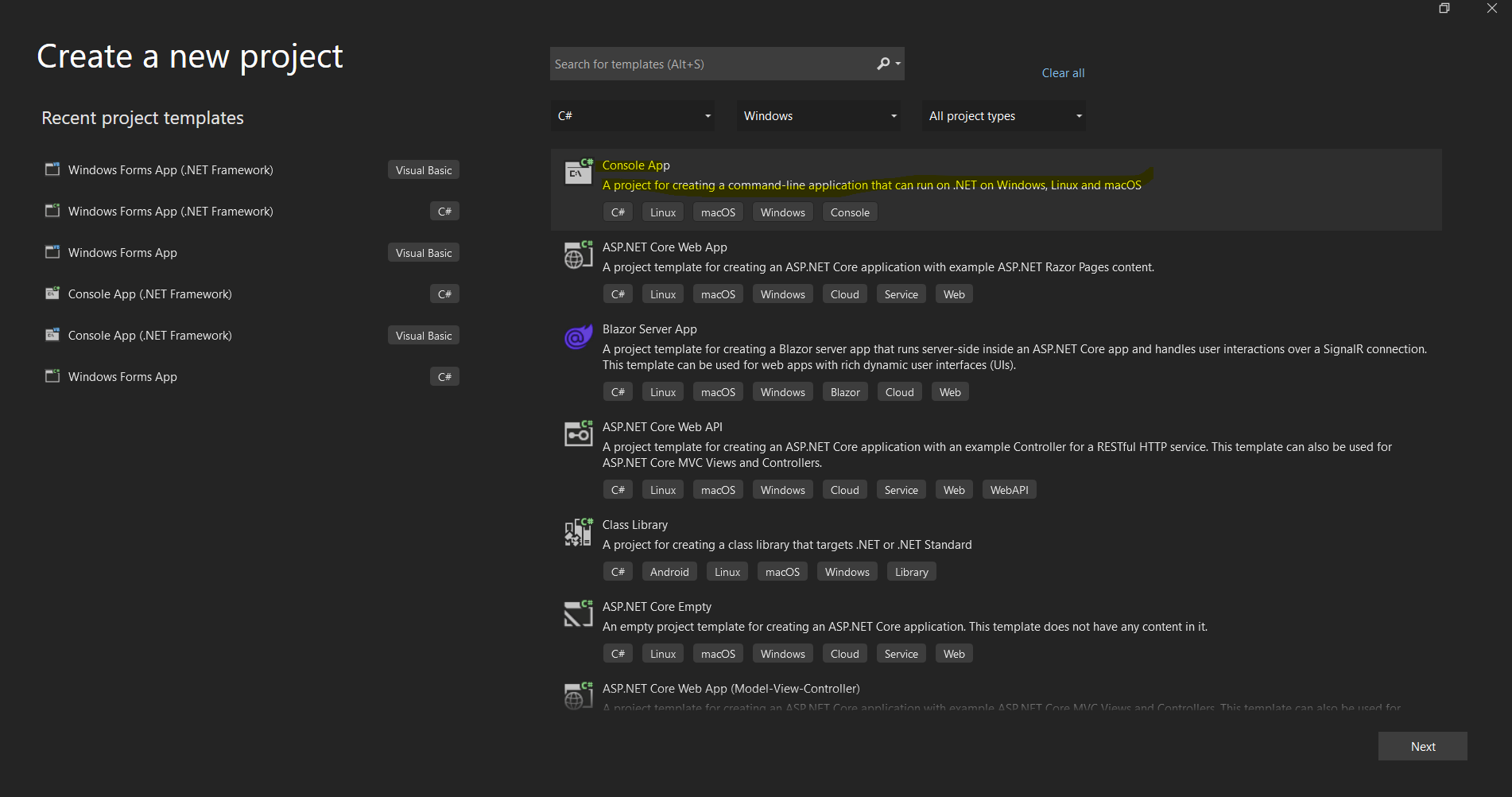
*Visual Studio'nun yeni bir .NET uygulaması kurma için proje oluşturma diyalogu*
## IronPDF C# Kütüphanesi Kurulumu
### Yükleme Yöntemleri
IronPDF, farklı geliştirme iş akışlarına uyacak çeşitli kurulum yöntemleri sunar:
#### Yöntem 1: NuGet Paket Yöneticisi Kullanarak (Önerilen)
En basit yaklaşım, Visual Studio'nun entegre NuGet Paket Yöneticisi aracılığıyladır:
1. Çözüm Gezgini'nde projenize sağ tıklayın
2. "NuGet Paketlerini Yönet" seçeneğini seçin
3. "Gözat"a tıklayın ve "IronPDF" arayın
4. Resmi IronPDF paketini kur'a tıklayın
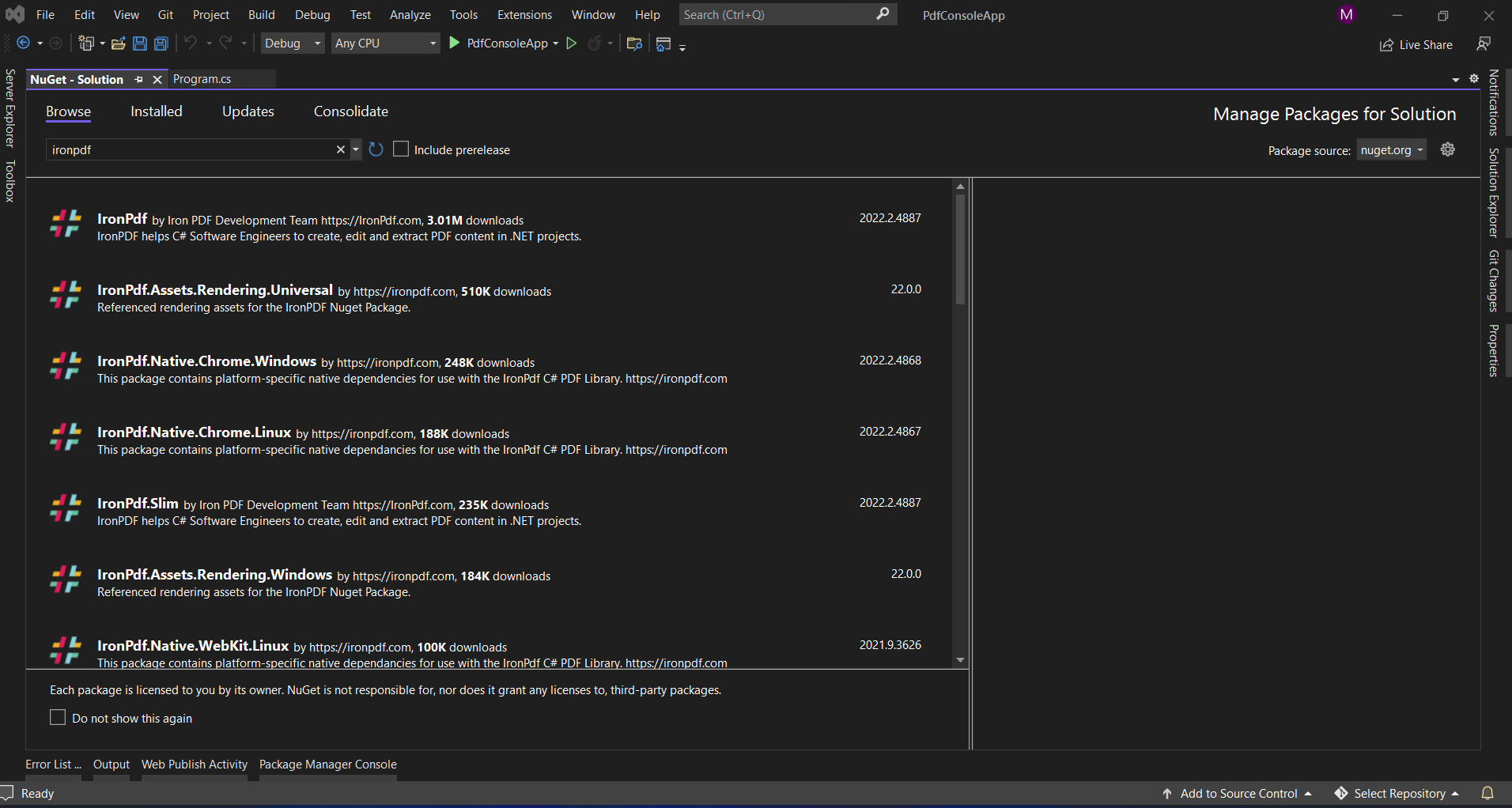
*Visual Studio'nun NuGet Paket Yöneticisi ara yüzü kullanarak IronPDF kurulumu*
#### Yöntem 2: Paket Yöneticisi Konsolu
Komut satırı araçlarını tercih eden geliştiriciler için:
```shell
:ProductInstall
```
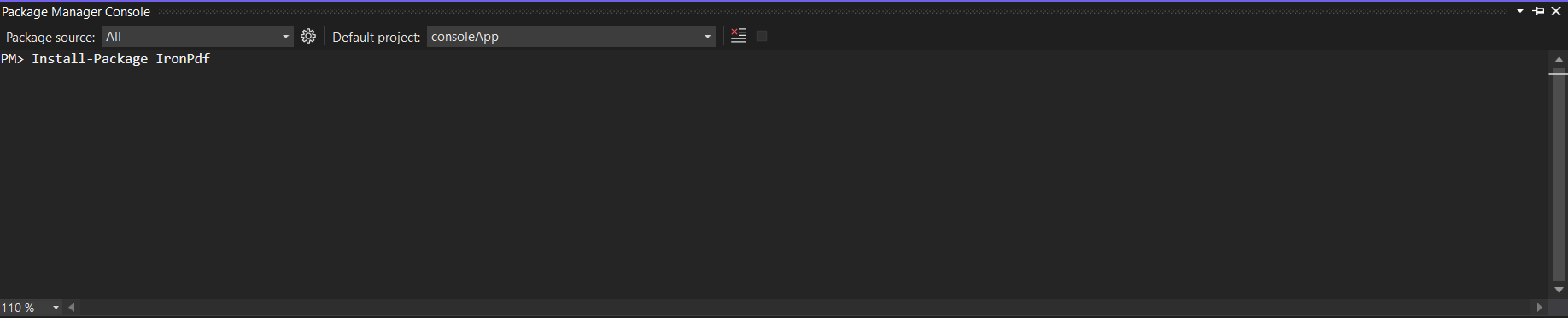
*Tek bir komutla IronPDF'i kurmak için Paket Yöneticisi Konsolu kullanma*
#### Yöntem 3: Doğrudan İndirme
İnternet erişimi kısıtlı ortamlarda:
[NuGet.org](https://www.nuget.org/packages/IronPdf/)'dan indirin
Yerel bir NuGet akışına .nupkg dosyasını ekleyin
Yerel akışınızdan kurun
#### Yöntem 4: .NET CLI
.NET Core/5+ projeleri için:
```shell
:InstallCmd dotnet add package IronPdf
```
## ABCpdf Kurulumu
### Yükleme Yöntemleri
ABCpdf, benzer kurulum seçenekleri ancak bazı ek düşüncelerle sağlar:
#### Yöntem 1: NuGet Kurulumu
```shell
:InstallCmd Install-Package ABCpdf -Version 13.0.0.0
```
ABCpdf'in farklı sürümler için ayrı paketleri olduğunu unutmayın:
- `ABCpdf` - Standart sürüm (sadece 32-bit)
- `ABCpdf.ABCChrome64` - 64-bit üzerinde Chrome render için gerekli
- `ABCpdf.ABCGecko` - Gecko render motoru için
#### Yöntem 2: Manuel Kurulum
[WebSupergoo web sitesinden](https://www.websupergoo.com/download.aspx) indirin
ZIP dosyasını çıkartın
Uygun DLL'lere başvurular ekleyin
Yerel bağımlılıkları çıktı dizininize kopyalayın
### Platforma Özel Düşünceler
ABCpdf, Windows dışı platformlar için ek kurulum gerektirir:
```xml
<!-- For Linux deployment -->
<PackageReference Include="ABCpdf.Linux" Version="13.0.0.0" />
```
## Bu Kütüphaneler HTML'yi PDF'ye Dönüştürmeyi Nasıl Ele Alıyor?
Her kütüphanenin HTML'yi PDF'ye dönüştürmeyi nasıl yaklaştığını anlamak, onların farklı yeteneklerini ve performans özelliklerini açıklamaya yardımcı olur.
### IronPDF'nin Yaklaşımı: Chrome-İlk Mimarisi
IronPDF, birkaç avantaj sağlayan tam bir Chrome tarayıcı motoru kullanır:
```csharp
using IronPdf;
// IronPDF's approach - Chrome rendering with full browser capabilities
var renderer = new ChromePdfRenderer();
// Configure rendering to match Chrome's print preview exactly
renderer.RenderingOptions = ChromePdfRenderOptions.DefaultChrome;
// Or customize for specific needs
renderer.RenderingOptions.CssMediaType = PdfCssMediaType.Screen;
renderer.RenderingOptions.EnableJavaScript = true;
renderer.RenderingOptions.WaitFor.RenderDelay(500); // Wait for JS execution
// Convert complex HTML with modern CSS and JavaScript
string complexHtml = @"
<!DOCTYPE html>
<html>
<head>
<style>
@import url('https://fonts.googleapis.com/css2?family=Roboto:wght@300;700&display=swap');
.container {
display: grid;
grid-template-columns: repeat(auto-fit, minmax(250px, 1fr));
gap: 20px;
font-family: 'Roboto', sans-serif;
}
.card {
background: linear-gradient(135deg, #667eea 0%, #764ba2 100%);
border-radius: 10px;
padding: 20px;
color: white;
box-shadow: 0 10px 20px rgba(0,0,0,0.19);
transform: translateY(0);
transition: transform 0.3s;
}
@media print {
.card { break-inside: avoid; }
}
</style>
</head>
<body>
<div class='container'>
<div class='card'>
<h2>Modern CSS Support</h2>
<p>Grid, Flexbox, Gradients, Shadows - all rendered perfectly</p>
</div>
<div class='card'>
<h2>Web Yazı Tipleri</h2>
<p>Google Fonts and custom fonts work seamlessly</p>
</div>
</div>
<script>
// Dynamic content generation
document.addEventListener('DOMContentLoaded', function() {
const container = document.querySelector('.container');
const dynamicCard = document.createElement('div');
dynamicCard.className = 'card';
dynamicCard.innerHTML = '<h2>JavaScript Generated</h2><p>This card was added by JavaScript</p>';
container.appendChild(dynamicCard);
});
</script>
</body>
</html>";
var pdf = renderer.RenderHtmlAsPdf(complexHtml);
pdf.SaveAs("modern-web-features.pdf");
```
Bu kod, IronPDF'nin Chrome tabanlı yaklaşımının birkaç önemli avantajını gösterir:
1. **Modern CSS Desteği:** Grid düzenleri, flexbox, degrade ve dönüşümler Chrome'da olduğu gibi çalışır
2. **Web Font Entegrasyonu:** Google Fontlar ek yapılandırma olmadan otomatik olarak yüklenir
3. **JavaScript Çalıştırma:** Dinamik içerik üretimi PDF renderından önce gerçekleşir
4. **Medya Sorguları:** Yazdırma için özel stiller düzgün bir şekilde uygulanır
### ABCpdf'nin Yaklaşımı: Çok Motorlu Esneklik
ABCpdf, her biri farklı yeteneklere sahip birden fazla render motoru sunar:
```csharp
using WebSupergoo.ABCpdf13;
// Method 1: Using ABCChrome engine (most modern)
Doc chromeDoc = new Doc();
chromeDoc.HtmlOptions.Engine = EngineType.Chrome;
chromeDoc.HtmlOptions.Chrome.SetUserAgent("Mozilla/5.0 (Windows NT 10.0; Win64; x64) AppleWebKit/537.36");
// Chrome engine supports modern web standards
int chromeId = chromeDoc.AddImageUrl("https://example.com");
// Chain pages if content overflows
while (chromeDoc.Chainable(chromeId))
{
chromeDoc.Page = chromeDoc.AddPage();
chromeId = chromeDoc.AddImageToChain(chromeId);
}
chromeDoc.Save("chrome-engine-output.pdf");
// Method 2: Using Gecko engine (Firefox-based)
Doc geckoDoc = new Doc();
geckoDoc.HtmlOptions.Engine = EngineType.Gecko;
geckoDoc.HtmlOptions.UseScript = true; // Enable JavaScript
// Gecko provides good standards support with lower resource usage
string html = "<html><body><h1>Gecko Rendered Content</h1></body></html>";
geckoDoc.AddImageHtml(html);
geckoDoc.Save("gecko-engine-output.pdf");
// Method 3: Using MSHTML engine (IE-based, legacy support)
Doc ieDoc = new Doc();
ieDoc.HtmlOptions.Engine = EngineType.MSHtml;
// MSHTML is faster but with limited modern CSS support
ieDoc.AddImageUrl("https://legacy-app.example.com");
ieDoc.Save("ie-engine-output.pdf");
```
Çok motorlu yaklaşım esneklik sağlar ancak dikkatli biri değerlendirme gerektirir:
1. **Motor Seçimi:** Geliştiriciler, içerikleri için uygun motoru seçmelidir
2. **Özellik Eşliği:** Farklı motorlar, farklı HTML/CSS özelliklerini destekler
3. **Dağıtım Karmaşıklığı:** Her motorun farklı çalışma zamanı gereksinimleri olabilir
4. **Test Yükü:** Çıktı motorlar arasında farklılık gösterebileceğinden daha fazla test gerektirir
## URL'lerden PDF Belgeleri Oluşturma
PDF kütüphanelerinin en yaygın kullanım senaryolarından biri canlı web sayfalarının PDF belgelerine dönüştürülmesidir. Her kütüphanenin bu görevi nasıl ele aldığına bakalım.
### IronPDF Kullanarak
IronPDF'nin URL'den PDF'ye dönüştürmesi tam Chrome tarayıcı motorundan yararlanır:
```csharp
using IronPdf;
using System;
using System.Threading.Tasks;
public class UrlToPdfConverter
{
public static async Task ConvertUrlToPdfAsync()
{
var renderer = new ChromePdfRenderer();
// Configure for optimal web page capture
renderer.RenderingOptions = new ChromePdfRenderOptions
{
// Viewport and scaling
ViewPortWidth = 1920,
ViewPortHeight = 1080,
ZoomLevel = 100,
// Paper and margins
PaperSize = PdfPaperSize.A4,
MarginTop = 10,
MarginBottom = 10,
MarginLeft = 10,
MarginRight = 10,
// Rendering behavior
CssMediaType = PdfCssMediaType.Screen,
PrintHtmlBackgrounds = true,
CreatePdfFormsFromHtml = true,
// JavaScript and timing
EnableJavaScript = true,
WaitFor = new WaitFor
{
// Wait strategies for dynamic content
RenderDelay = 500, // milliseconds
JavaScriptFinishDelay = 100,
AllowedExecutionTime = 30000 // 30 seconds max
}
};
// Handle authentication if needed
renderer.RenderingOptions.HttpOptions.HttpHeaders.Add("Authorization", "Bearer your-token");
// Convert with error handling
try
{
// Async conversion for better performance
var pdf = await renderer.RenderUrlAsPdfAsync("https://github.com/trending");
// Add metadata
pdf.MetaData.Author = "IronPDF Example";
pdf.MetaData.Title = "GitHub Trending Projects";
pdf.MetaData.CreationDate = DateTime.Now;
// Add watermark
pdf.ApplyWatermark("<h2 style='color:red;opacity:0.5'>CONFIDENTIAL</h2>",
30, VerticalAlignment.Middle, HorizontalAlignment.Center);
pdf.SaveAs("github-trending.pdf");
Console.WriteLine("PDF created successfully!");
}
catch (Exception ex)
{
Console.WriteLine($"Error creating PDF: {ex.Message}");
}
}
}
```
Gösterilen anahtar özellikler:
- **Viewport Kontrol:** Cevap veren testler için farklı ekran boyutlarını simüle edin
- **Kimlik Doğrulama Desteği:** Korunmuş kaynaklar için başlıklar ekleyin
- **Dinamik İçerik İşleme:** JavaScript ağırlıklı sayfalar için bekleme stratejileri
- **Son İşleme:** Dönüştürme sonrası meta veriler ve filigranlar ekleyin
### ABCpdf Kullanarak
ABCpdf'nin sayfa zincirleme ile URL dönüştürmesi:
```csharp
using WebSupergoo.ABCpdf13;
using System;
public class ABCpdfUrlConverter
{
public static void ConvertUrlWithABCpdf()
{
using (Doc theDoc = new Doc())
{
// Configure the HTML engine
theDoc.HtmlOptions.Engine = EngineType.Chrome;
theDoc.HtmlOptions.Chrome.LoadDelay = 1000; // Wait 1 second
// Set viewport size
theDoc.HtmlOptions.BrowserWidth = 1200;
// Authentication
theDoc.HtmlOptions.HttpAdditionalHeaders = "Authorization: Bearer your-token";
// Page setup
theDoc.Rect.Inset(20, 20);
theDoc.Page = theDoc.AddPage();
// Add the URL
int theID = theDoc.AddImageUrl("https://github.com/trending");
// Chain pages for overflow content
while (true)
{
if (!theDoc.Chainable(theID))
break;
theDoc.Page = theDoc.AddPage();
theID = theDoc.AddImageToChain(theID);
}
// Reduce file size
for (int i = 1; i <= theDoc.PageCount; i++)
{
theDoc.PageNumber = i;
theDoc.Flatten();
}
// Save
theDoc.Save("abcpdf-github.pdf");
}
}
}
```
Belirgin farklılıklar:
- **Sayfa Zincirleme:** Çok sayfalı içeriğin manuel işlenmesi
- **Motor Yapılandırması:** Render motorunu açıkça seçmelisiniz
- **Kaynak Yönetimi:** `using` ifadesiyle düzgün şekilde kaldırma gerektirir
## HTML Dizelerinden PDF'ler Oluşturma
Her iki kütüphane de HTML dizelerini PDF'e dönüştürme konusunda mükemmel performans gösterir ancak yaklaşımları oldukça farklıdır.
### IronPDF Kullanarak
IronPDF'nin gelişmiş özelliklerle HTML dize dönüştürmesi:
```csharp
using IronPdf;
using System.IO;
public class HtmlStringToPdf
{
public static void GenerateInvoicePdf()
{
var renderer = new ChromePdfRenderer();
// Configure for print-quality output
renderer.RenderingOptions = new ChromePdfRenderOptions
{
PaperSize = PdfPaperSize.A4,
DPI = 300, // High quality print
CssMediaType = PdfCssMediaType.Print,
PaperFit = new PaperFit
{
UseFitToPageRendering = true,
RenderScale = 100
}
};
// Professional invoice HTML
string invoiceHtml = @"
<!DOCTYPE html>
<html>
<head>
<meta charset='UTF-8'>
<style>
@page {
size: A4;
margin: 0;
}
body {
font-family: 'Segoe UI', Arial, sans-serif;
margin: 0;
padding: 20mm;
color: #333;
}
.invoice-header {
display: flex;
justify-content: space-between;
align-items: start;
margin-bottom: 30px;
border-bottom: 2px solid #0066cc;
padding-bottom: 20px;
}
.company-info h1 {
color: #0066cc;
margin: 0;
font-size: 28px;
}
.invoice-details {
text-align: right;
}
.invoice-details h2 {
color: #666;
margin: 0 0 10px 0;
font-size: 24px;
}
.invoice-table {
width: 100%;
border-collapse: collapse;
margin-top: 30px;
}
.invoice-table th {
background-color: #0066cc;
color: white;
padding: 12px;
text-align: left;
}
.invoice-table td {
padding: 12px;
border-bottom: 1px solid #ddd;
}
.invoice-table tr:hover {
background-color: #f5f5f5;
}
.total-section {
margin-top: 30px;
text-align: right;
}
.total-section .total-row {
display: flex;
justify-content: flex-end;
margin: 5px 0;
}
.total-section .label {
font-weight: bold;
margin-right: 20px;
min-width: 100px;
}
.total-section .grand-total {
font-size: 20px;
color: #0066cc;
border-top: 2px solid #0066cc;
padding-top: 10px;
margin-top: 10px;
}
@media print {
.no-print { display: none; }
}
</style>
</head>
<body>
<div class='invoice-header'>
<div class='company-info'>
<h1>ACME Corporation</h1>
<p>123 Business Street<br>
New York, NY 10001<br>
Phone: (555) 123-4567<br>
Email: billing@acme.com</p>
</div>
<div class='invoice-details'>
<h2>INVOICE</h2>
<p><strong>Invoice #:</strong> INV-2025-001<br>
<strong>Date:</strong> " + DateTime.Now.ToString("MMMM dd, yyyy") + @"<br>
<strong>Due Date:</strong> " + DateTime.Now.AddDays(30).ToString("MMMM dd, yyyy") + @"</p>
</div>
</div>
<div class='billing-info'>
<h3>Bill To:</h3>
<p>John Doe<br>
456 Client Avenue<br>
Los Angeles, CA 90001</p>
</div>
<table class='invoice-table'>
<thead>
<tr>
<th>Description</th>
<th>Quantity</th>
<th>Unit Price</th>
<th>Total</th>
</tr>
</thead>
<tbody>
<tr>
<td>Professional Services - Web Development</td>
<td>40 hours</td>
<td>$150.00</td>
<td>$6,000.00</td>
</tr>
<tr>
<td>Hosting Services (Annual)</td>
<td>1</td>
<td>$1,200.00</td>
<td>$1,200.00</td>
</tr>
<tr>
<td>Domain Registration</td>
<td>2</td>
<td>$15.00</td>
<td>$30.00</td>
</tr>
</tbody>
</table>
<div class='total-section'>
<div class='total-row'>
<span class='label'>Subtotal:</span>
<span>$7,230.00</span>
</div>
<div class='total-row'>
<span class='label'>Tax (8%):</span>
<span>$578.40</span>
</div>
<div class='total-row grand-total'>
<span class='label'>Total Due:</span>
<span>$7,808.40</span>
</div>
</div>
<div class='footer' style='margin-top: 50px; padding-top: 20px; border-top: 1px solid #ddd; text-align: center; color: #666;'>
<p>Thank you for your business!<br>
Payment is due within 30 days. Please include invoice number with payment.</p>
</div>
</body>
</html>";
// Generate PDF with base path for local assets
var pdf = renderer.RenderHtmlAsPdf(invoiceHtml, @"C:\Assets\");
// Add security
pdf.SecuritySettings.AllowUserEditing = false;
pdf.SecuritySettings.AllowUserPrinting = PdfPrintSecurity.FullPrintRights;
pdf.SecuritySettings.OwnerPassword = "admin123";
// Save with optimization
pdf.CompressImages(60); // 60% quality for smaller file size
pdf.SaveAs("professional-invoice.pdf");
}
}
```
Bu örnek şunları sergiliyor:
- **Profesyonel Düzen:** Fleksbox ve grid ile karmaşık CSS
- **Dinamik İçerik:** Tarih hesaplamaları ve formatlama
- **Baskı Optimizasyonu:** Baskıya özgü stiller için medya sorguları
- **Güvenlik Özellikleri:** Parola koruması ve izin ayarları
- **Dosya Optimizasyonu:** Daha küçük dosya boyutları için görsel sıkıştırma
### ABCpdf Kullanarak
ABCpdf'nin stilize metinle HTML dize işleme:
```csharp
using WebSupergoo.ABCpdf13;
public class ABCpdfHtmlString
{
public static void CreateStyledDocument()
{
using (Doc theDoc = new Doc())
{
// Set up the document
theDoc.Rect.Inset(40, 40);
theDoc.Color.String = "0 0 0"; // Black text
// Add styled HTML content
theDoc.FontSize = 48;
string styledHtml = @"
<h1 style='color: #0066cc'>ABCpdf Document</h1>
<p style='font-size: 14pt; line-height: 1.5'>
This demonstrates <b>bold text</b>, <i>italic text</i>,
and <span style='color: red'>colored text</span>.
</p>
<ul style='margin-left: 20px'>
<li>First item</li>
<li>Second item</li>
<li>Third item</li>
</ul>";
// Add HTML with automatic text flow
int theID = theDoc.AddImageHtml(styledHtml);
// Continue on new pages if needed
while (true)
{
if (!theDoc.Chainable(theID))
break;
theDoc.Page = theDoc.AddPage();
theID = theDoc.AddImageToChain(theID);
}
// Apply compression
theDoc.Encryption.Type = 2; // 128-bit encryption
theDoc.Encryption.CanPrint = true;
theDoc.Encryption.CanModify = false;
theDoc.Save("styled-abcpdf.pdf");
}
}
}
```
## Performans Kıyaslaması
Performans özelliklerini anlamak, spesifik kullanım senaryonuz için doğru kütüphaneyi seçmenize yardımcı olur.
### Kıyaslama Testi Kurulumu
```csharp
using BenchmarkDotNet.Attributes;
using BenchmarkDotNet.Running;
using IronPdf;
using WebSupergoo.ABCpdf13;
[MemoryDiagnoser]
[SimpleJob(warmupCount: 3, targetCount: 10)]
public class PdfGenerationBenchmark
{
private string _simpleHtml;
private string _complexHtml;
private ChromePdfRenderer _ironPdfRenderer;
private Doc _abcPdfDoc;
[GlobalSetup]
public void Setup()
{
_simpleHtml = "<h1>Simple Document</h1><p>Basic paragraph text.</p>";
_complexHtml = File.ReadAllText("complex-page.html"); // 50KB HTML with CSS/JS
_ironPdfRenderer = new ChromePdfRenderer();
_abcPdfDoc = new Doc();
_abcPdfDoc.HtmlOptions.Engine = EngineType.Chrome;
}
[Benchmark]
public void .NET_SimpleHtml()
{
var pdf = _ironPdfRenderer.RenderHtmlAsPdf(_simpleHtml);
pdf.SaveAs("temp_iron_simple.pdf");
}
[Benchmark]
public void ABCpdf_SimpleHtml()
{
_abcPdfDoc.Clear();
_abcPdfDoc.AddImageHtml(_simpleHtml);
_abcPdfDoc.Save("temp_abc_simple.pdf");
}
[Benchmark]
public void .NET_ComplexHtml()
{
var pdf = _ironPdfRenderer.RenderHtmlAsPdf(_complexHtml);
pdf.SaveAs("temp_iron_complex.pdf");
}
[Benchmark]
public void ABCpdf_ComplexHtml()
{
_abcPdfDoc.Clear();
int id = _abcPdfDoc.AddImageHtml(_complexHtml);
while (_abcPdfDoc.Chainable(id))
{
_abcPdfDoc.Page = _abcPdfDoc.AddPage();
id = _abcPdfDoc.AddImageToChain(id);
}
_abcPdfDoc.Save("temp_abc_complex.pdf");
}
}
```
### Karşılaştırma Hususları
Yukarıdaki karşılaştırma kodu, başlangıç çerçevesi olarak BenchmarkDotNet kullanır. Fiili sonuçlar, donanım, belge karmaşıklığı, .NET çalışma zamanı sürümü ve motor yapılandırmasına bağlı olarak önemli ölçüde değişiklik gösterir. Topluluktan gelen raporlardan temel genel gözlemler:
- IronPDF'in Chrome motoru, ABCpdf'in daha hafif motorlarından (Gecko, MSHTML) daha fazla bellek kullanır
- ABCpdf'in ABCChrome motoru, kullanıldığında IronPDF ile kıyaslanabilir belleğin yükünü taşır
- Her iki kütüphane de belge karmaşıklığı ile ölçeklenir
- IronPDF'in Chrome tabanlı işleme, ek kaynak kullanımına mal olan daha yüksek CSS/JS doğruluğu sağlar
Doğru karşılaştırmalar için iş yükünüzden temsilci belgeler üzerinde kendi karşılaştırmalarınızı yapın.
## Gelişmiş Özellikler Karşılaştırması
### Dijital İmzalar ve Güvenlik
#### IronPDF Dijital İmza Uygulaması
```csharp
using IronPdf;
using IronPdf.Signing;
using System.Security.Cryptography.X509Certificates;
public class SecurityFeatures
{
public static void ApplyDigitalSignature()
{
// Load existing PDF
var pdf = PdfDocument.FromFile("unsigned-document.pdf");
// Load certificate
var cert = new X509Certificate2("certificate.pfx", "password");
// Create signature
var signature = new PdfSignature(cert)
{
// Visual signature appearance
SignatureImage = new PdfSignature.SignatureImage
{
ImagePath = "signature.png",
Width = 200,
Height = 100
},
// Signature position
PageIndex = 0,
X = 400,
Y = 100,
// Signature details
Reason = "Document approved",
Location = "New York, NY",
ContactInfo = "john.doe@company.com"
};
// Apply signature
pdf.Sign(signature);
// Additional security
pdf.SecuritySettings = new SecuritySettings
{
AllowUserPrinting = true,
AllowUserCopyPasteContent = false,
AllowUserEditing = false,
AllowUserFormData = true,
OwnerPassword = "owner123",
UserPassword = "user123",
EncryptionLevel = EncryptionLevel.AES256
};
pdf.SaveAs("signed-secured.pdf");
}
}
```
#### ABCpdf Dijital İmza Uygulaması
```csharp
using WebSupergoo.ABCpdf13;
using WebSupergoo.ABCpdf13.Objects;
public class ABCpdfSecurity
{
public static void SignDocument()
{
using (Doc theDoc = new Doc())
{
theDoc.Read("unsigned-document.pdf");
// Create signature field
Field signatureField = theDoc.Form.AddFieldSignature("AuthorSignature");
signatureField.Page = 1;
signatureField.Rect = "400 100 600 200";
// Configure signature
Signature theSig = signatureField.Sign();
theSig.Reason = "Document approved";
theSig.Location = "New York, NY";
theSig.ContactInfo = "john.doe@company.com";
// Load certificate
theSig.LoadCertificate("certificate.pfx", "password");
// Apply visual signature
theSig.Visible = true;
theSig.Image = theDoc.AddImageFile("signature.png");
// Sign and save
theDoc.Save("abcpdf-signed.pdf");
}
}
}
```
### Form İşleme ve Veri Çıkartma
#### IronPDF Form Yönetimi
```csharp
public class FormHandling
{
public static void WorkWithForms()
{
// Create PDF with form fields from HTML
var renderer = new ChromePdfRenderer();
renderer.RenderingOptions.CreatePdfFormsFromHtml = true;
string formHtml = @"
<form>
<label>Name: <input type='text' name='fullname' required></label><br>
<label>Email: <input type='email' name='email' required></label><br>
<label>Subscribe: <input type='checkbox' name='subscribe' value='yes'></label><br>
<label>Country:
<select name='country'>
<option>USA</option>
<option>Canada</option>
<option>UK</option>
</select>
</label><br>
<button type='submit'>Submit</button>
</form>";
var pdf = renderer.RenderHtmlAsPdf(formHtml);
// Fill form programmatically
pdf.Form.Fields["fullname"].Value = "John Doe";
pdf.Form.Fields["email"].Value = "john@example.com";
pdf.Form.Fields["subscribe"].Value = "yes";
pdf.Form.Fields["country"].Value = "USA";
// Extract form data
foreach (var field in pdf.Form.Fields)
{
Console.WriteLine($"{field.Name}: {field.Value}");
}
// Flatten form (make non-editable)
pdf.Form.Flatten();
pdf.SaveAs("filled-form.pdf");
}
}
```
### Toplu İşleme ve Optimizasyon
#### IronPDF Toplu İşleme
```csharp
using System.Threading.Tasks;
using System.Collections.Concurrent;
public class BatchProcessing
{
public static async Task ProcessMultipleDocumentsAsync(List<string> htmlFiles)
{
var renderer = new ChromePdfRenderer();
renderer.RenderingOptions.PaperSize = PdfPaperSize.A4;
// Use concurrent processing
var pdfResults = new ConcurrentBag<(string filename, byte[] data)>();
await Parallel.ForEachAsync(htmlFiles, async (htmlFile, ct) =>
{
try
{
var html = await File.ReadAllTextAsync(htmlFile);
var pdf = await renderer.RenderHtmlAsPdfAsync(html);
// Optimize each PDF
pdf.CompressImages(70);
var filename = Path.GetFileNameWithoutExtension(htmlFile) + ".pdf";
var data = pdf.BinaryData;
pdfResults.Add((filename, data));
}
catch (Exception ex)
{
Console.WriteLine($"Error processing {htmlFile}: {ex.Message}");
}
});
// Merge all PDFs into one
var finalPdf = new PdfDocument();
foreach (var (filename, data) in pdfResults.OrderBy(x => x.filename))
{
var pdf = new PdfDocument(data);
finalPdf.AppendPdf(pdf);
}
finalPdf.SaveAs("batch-processed.pdf");
}
}
```
## Gerçek Dünya Kullanım Senaryoları
### Hangi Kütüphane Projenize Daha Uygun?
#### IronPDF Seçin:
1. **Bulut Yerleşik Uygulamalar Geliştirirken**
- Minimal yapılandırma ile yerel Docker desteği
- Azure Fonksiyonları ve AWS Lambda uyumluluğu
- Tüm bulut platformları arasında tutarlı davranış
2. **Piksel-Denklik HTML Render Gerekiyorsa**
- Karmaşık CSS düzenleri (Grid, Flexbox)
- JavaScript ağırlıklı tek sayfa uygulamalar
- Web font gereksinimleri
3. **Çapraz Platform Çözümler Geliştirirken**
- Windows, Linux, ve macOS'u hedefleyen uygulamalar
- Mikro hizmetler mimarisi
- Konteyner tabanlı dağıtımlar
4. **Geliştirici Deneyimini Önceliklendirirken**
- Hızlı prototip oluşturma ihtiyaçları
- Küçük geliştirme ekipleri
- Sınırlı PDF uzmanlığı
#### ABCpdf Seçin:
1. **Eski Sistemlerle Çalışırken**
- Sadece Windows ortamları
- Mevcut ABCpdf uygulamaları
- IE ile uyumlu içerik gereklilikleri
2. **Spesifik Render Motorları Gerekiyorsa**
- Farklı tarayıcılar arasında test
- Motor-spesifik optimizasyonlar
- Eski tarayıcı desteği
3. **İleri Düzey PDF Manipülasyon**
- Düşük seviyeli PDF nesne erişimi
- Özel PDF operatörleri
- Karmaşık belge birleştirme senaryoları
4. **Bütçe Bilinçli Projeler**
- Daha düşük başlangıç fiyat noktası
- Tek geliştirici lisansları
- 32-bit ortam uyumluluğu
## Yaygın Sorunları Giderme
### IronPDF Yaygın Sorunlar ve Çözümler
```csharp
public class IronPdfTroubleshooting
{
// Issue: Fonts not rendering correctly
public static void FixFontIssues()
{
var renderer = new ChromePdfRenderer();
// Solution 1: Wait for fonts to load
renderer.RenderingOptions.WaitFor.RenderDelay(1000);
// Solution 2: Use system fonts fallback
renderer.RenderingOptions.CssMediaType = PdfCssMediaType.Print;
}
// Issue: JavaScript not executing
public static void FixJavaScriptIssues()
{
var renderer = new ChromePdfRenderer();
// Enable JavaScript and wait for execution
renderer.RenderingOptions.EnableJavaScript = true;
renderer.RenderingOptions.WaitFor.JavaScriptFinishDelay = 2000;
renderer.RenderingOptions.WaitFor.AllowedExecutionTime = 30000;
}
// Issue: Memory usage in Docker
public static void OptimizeForDocker()
{
var renderer = new ChromePdfRenderer();
// Use single-threaded mode for containers
IronPdf.Installation.SingleThreaded = true;
// Reduce memory footprint
renderer.RenderingOptions.ViewPortWidth = 1024;
renderer.RenderingOptions.EnableGrayscale = true;
}
}
```
### ABCpdf Yaygın Sorunlar ve Çözümler
```csharp
public class ABCpdfTroubleshooting
{
// Issue: Page breaks in wrong places
public static void FixPageBreaks()
{
using (Doc theDoc = new Doc())
{
// Use HTML page break controls
theDoc.HtmlOptions.BreakZoneSize = 100; // pixels
theDoc.HtmlOptions.UseScript = true;
string html = @"
<style>
.page-break { page-break-after: always; }
.no-break { page-break-inside: avoid; }
</style>
<div class='no-break'>Keep this content together</div>
<div class='page-break'></div>
<div>New page content</div>";
theDoc.AddImageHtml(html);
theDoc.Save("fixed-breaks.pdf");
}
}
// Issue: Images not loading
public static void FixImageLoading()
{
using (Doc theDoc = new Doc())
{
// Set timeout and authentication
theDoc.HtmlOptions.Timeout = 60000; // 60 seconds
theDoc.HtmlOptions.RetryCount = 3;
// For local images, set base directory
theDoc.HtmlOptions.BaseUrl = @"file:///C:/Images/";
theDoc.AddImageHtml("<img src='logo.png'>");
theDoc.Save("with-images.pdf");
}
}
}
```
## Geçiş Kılavuzu: Kütüphaneler Arasında Geçiş
### ABCpdf'den IronPDF'ye Geçiş
```csharp
public class MigrationHelper
{
// ABCpdf code
public void OldABCpdfMethod()
{
Doc theDoc = new Doc();
theDoc.AddImageUrl("https://example.com");
theDoc.Save("output.pdf");
theDoc.Dispose();
}
// Equivalent IronPDF code
public void NewIronPdfMethod()
{
var renderer = new ChromePdfRenderer();
var pdf = renderer.RenderUrlAsPdf("https://example.com");
pdf.SaveAs("output.pdf");
}
// Migration wrapper for gradual transition
public class PdfWrapper
{
private bool _useIronPdf;
public PdfWrapper(bool useIronPdf = true)
{
_useIronPdf = useIronPdf;
}
public void ConvertUrlToPdf(string url, string outputPath)
{
if (_useIronPdf)
{
var renderer = new ChromePdfRenderer();
var pdf = renderer.RenderUrlAsPdf(url);
pdf.SaveAs(outputPath);
}
else
{
using (var doc = new Doc())
{
doc.AddImageUrl(url);
doc.Save(outputPath);
}
}
}
}
}
```
## Lisanslama ve Sahip Olma Toplam Maliyeti
### Projeniz için Yatırım Getirisini (ROI) Hesaplamak
PDF kütüphanelerini değerlendirirken, lisans fiyatının ötesindeki toplam maliyeti göz önünde bulundurun:
#### IronPDF Maliyet Analizi
- **Geliştirme Zamanı Tasarrufu:** Daha basit API uygulama süresini azaltır
- **Destek Maliyetleri:** Dahil 24/5 mühendislik desteği
- **Bakım:** Platformlar arasında birleşik API
- **Ölçeklenebilirlik:** Tek lisans birden çok dağıtımı kapsar
#### ABCpdf Maliyet Analizi
- **Başlangıç Maliyeti:** Daha düşük giriş fiyatı
- **Gizli Maliyetler:**
- Ayrı 64-bit lisans
- Çoklu motor gereksinimleri
- Platforma özel testler
- Ek destek maliyetleri
### Lisans Karşılaştırma Hesaplayıcısı
```csharp
public class LicenseCostCalculator
{
public static void CalculateTotalCost()
{
// Scenario: 5-developer team, 3-year project
// Note: Prices are illustrative. Verify current pricing at vendor websites.
// IronPDF Professional (see ironpdf.com/licensing/for current prices)
var ironPdfCost = new
{
License = 2999, // 10 developers, 10 projects — verify current price
Support = 0, // Included in license
Training = 0, // Simple API reduces training overhead
};
// ABCpdf equivalent setup (see websupergoo.com for current prices)
var abcPdfCost = new
{
ProfessionalLicenses = 479 * 5, // 5 Professional (64-bit) licenses
RedistributionLicense = 4790, // Enterprise/Yeniden Dağıtım license
// Training costs may apply due to multi-engine configuration
};
// Perform your own TCO calculation based on your team size, support contracts,
// and training requirements. Check vendor websites for current pricing.
Console.WriteLine("Verify current prices before calculating TCO.");
}
}
```
## Sonuç
Her iki kütüphanenin kapsamlı analizi sonrasında, birkaç anahtar ayırt edici unsur ortaya çıkıyor:
**IronPDF şu konularda mükemmeldir:**
- Chrome tabanlı render ile modern web teknolojilerine destek
- Çapraz platform tutarlılığı ve bulut tabanlı dağıtımlar
- Sezgisel API'lar ile geliştirici verimliliği
- Kapsamlı destek ve dokümantasyon
- Büyüyen ekipler için daha iyi uzun vadeli değer
**ABCpdf şu alanlarda avantaj sağlar:**
- Sadece Windows'a yönelik temel projeler için düşük başlangıç maliyeti
- Çoklu render motoru seçenekleri
- Miras sistemlerle uyumluluk
- Basit belgeler için daha düşük bellek kullanımı
.NET tüm PDF sorunları için tek bir çözüm sunar. .NET satın aldığınızda, tüm dönüşümleri tek bir kütüphanede elde eder, ayrıca PDF belgelerine ilişkin görevler için başka bağımlılığa ihtiyaç duymazsınız. Bu birleşik yaklaşım, tutarlı Chrome tabanlı işleme kalitesiyle ve çapraz platform desteğiyle birleştirilerek, .NET'i çoğu modern .NET uygulaması için güçlü bir seçim haline getirir.
Hızlı geliştirme, platformlar arası tutarlılık ve uzun vadeli sürdürülebilirliğe öncelik veren ekipler için, IronPDF'nin yüksek başlangıç maliyeti, azaltılmış geliştirme süresi, daha iyi destek ve daha az uyumluluk sorunu ile telafi edilir.
## IronPDF Kullanımına Başlama
Farkı yaşamaya hazır mısınız? [Ücretsiz denemenize](trial-license/) bugün başlayın:
```csharp
// Get started in minutes
// Install-Package IronPdf
// Your first PDF in 3 lines
var renderer = new ChromePdfRenderer();
var pdf = renderer.RenderHtmlAsPdf("<h1>Hello World</h1>");
pdf.SaveAs("my-first-pdf.pdf");
```
Kapsamlı [dokümantasyonumuzu](https://ironpdf.com/docs/) ziyaret edin, [kod örneklerini](/examples/using-html-to-create-a-pdf/) inceleyin veya PDF üretimi ihtiyaçlarınız için kişiselleştirilmiş rehberlik almak üzere mühendis ekibimizle sohbet edin.
[[i:(ABCpdf kendi sahibi tarafından tescilli bir markadır. Bu site ABCpdf ile bağlantılı, desteklenen veya sponsor olunan bir site değildir. Tüm ürün adları, logolar ve markalar kendi sahiplerine aittir. Karşılaştırmalar, yalnızca bilgilendirme amaçlıdır ve yazı sırasında halka açık bilgilerle alakalı olarak yansıtılmaktadır.)]]
PDF dosyaları, faturalama gibi görevler ve farklı belge türleri oluşturma için çeşitli sektörlerde yaygın olarak kullanılır. Müşteri ihtiyaçlarını etkili bir şekilde karşılar. .NET uygulamaları geliştirirken PDF oluşturma gereksinimi duyuyorsanız, doğru kütüphaneyi seçmek geliştirme hızınızı, çıktı kalitenizi ve uzun vadeli bakım maliyetlerinizi büyük ölçüde etkileyebilir. Geliştiriciler tarafından genellikle değerlendirilern iki kütüphane .NET ve ABCpdf'dir - ancak hangisi özel ihtiyaçlarınız için gerçekten daha iyi sonuçlar sunar?
Bu detaylı karşılaştırma, HTML-to-PDF dönüştürme doğruluğundan lisanslama modellerine kadar her iki kütüphanenin yeteneklerini inceleyerek bilinçli bir karar vermenize yardımcı oluyor. Gerçek dünya performans ölçümlerine, API tasarım felsefesine ve her kütüphanenin güçlü ve sınırlı yönlerini gösteren pratik kod örneklerine bakacağız. Günlük binlerce fatura üreten bir SaaS platformu veya hassas belge oluşturmayı gerektiren bir kurumsal uygulama oluşturuyor olun, bu farklılıkları anlamak proje başarısı için kritik önem taşır.
IronPDF Nedir?
.NET, C# yazılım mühendislerine .NET projelerinde PDF dokümanlarını düzenleme, çıkarma ve oluşturma imkanı sunan ticari sınıf bir PDF oluşturma kütüphanesidir. Chrome tabanlı bir renderleme motoru ile inşa edilmiş olan .NET, HTML, CSS ve JavaScript'i, Google Chrome'da bir web sayfasının yazdırılmasını beklediğiniz sadakatle PDF'lere dönüştürür.
IronPDF'nin Ana Özellikleri
.NET, HTML sayfalarını PDF dosyalarına dönüştürmek için bir .NET Chromium motoru kullanır. HTML-to-PDF ile PDF'lerin konumlandırılması veya tasarlanması için karmaşık API'ler kullanmaya gerek yoktur. .NET, standart web belgelerini destekler: HTML, ASPX, JS, CSS ve resimler. Kütüphanenin mimarisi, profesyonel düzeyde çıktı kalitesini korurken geliştirici deneyimine öncelik verir.
HTML-to-PDF Çeviri Mükemmelliği
HTML5 semantik öğeler dahil tam HTML desteği
Flexbox, Grid ve modern yerleşim teknikleri dahil tam CSS3 desteği
Dinamik içerik üretimi için JavaScript çalıştırımı
Google Fonts ve özel @font-face bildirimleri dahil web fontu desteği
Görsel kontrol ile duyarlı tasarım raporlama
Konfigüre edilebilir bekleme süreleri ile AJAX içerik yükleme
Belge Manipülasyon Kapasiteleri
Birleştirme ve Bölme: Çoklu PDF'leri birleştirin veya tek bir yöntem çağrısıyla belirli sayfaları çıkarın
Başlıklar ve Altbilgiler: Sayfa numaraları, tarihler ve özel HTML dahil dinamik içerik ekleyin
Filigran Eklem: Opaklık ve konum kontrolü ile metin veya resim filigranları uygulayın
Form Yönetimi: HTML form elemanlarından otomatik olarak doldurulabilir PDF formları oluşturun
Dijital İmzalar: Sertifika yönetimi ile kriptografik imzalar uygulayın
Şifreleme: 128 bit ve 256 bit AES şifreleme ile ayrıntılı izinler uygulayın
Gelişmiş İşleyiş Özellikleri
Çoklu iş parçacıklı işlem: Yüksek performans senaryoları için yerel async/await desteği
Toplu İşlemler: Aynı anda birden fazla belge işlemek için optimize edilmiş yöntemler
Bellek Verimliliği: Tüm PDF'ler belleğe yüklenmeden büyük belge oluşturma için akış desteği
Bulut Optimizasyonu: Docker, Azure ve AWS'de konteynerleştirilmiş dağıtımlar için tasarlanmıştır
Çapraz Platform Mimarisi
IronPDF, farklı ortamlarda tutarlı davranış sağlar:
Windows (x86/x64)
Linux (minimum Docker görüntüleri için Alpine dahil)
macOS (Intel ve Apple Silicon)
Azure Uygulama Hizmeti, Fonksiyonlar ve Konteyner Örnekleri
AWS Lambda ve EC2
Google Cloud Platform
ABCpdf nedir?
ABCpdf .NET C# PDF kütüphanesi, dinamik Adobe PDF belgelerinin okunması, yazılması, dönüştürülmesi ve manipülasyonu için bir .NET bileşenidir. WebSupergoo tarafından geliştirilen ABCpdf, .NET topluluğuna yirmi yıldan fazla süredir hizmet veriyor, çoklu HTML renderleme motorları ve kapsamlı PDF manipülasyon özellikleri sunuyor.
ABCpdf'in Temel Özellikleri
ABCpdf, HTML/CSS ve JavaScript, SVG, AJAX ve Font Awesome gibi ilgili teknolojilere tam destek sağlar. Kütüphane, geliştiricilere hem yüksek seviyede kullanım kolaylığı yöntemleri hem de düşük düzeyde PDF nesne erişimi sağlar.
Çoklu Renderleme Motorları
ABCpdf'in benzersiz yaklaşımı, çeşitli renderleme motorları sunar:
ABCChrome Motoru: Modern web standartları için Chromium tabanlı (sadece x64)
Gecko Motoru: Uygunluk testi için birden fazla versiyon
MSHTML Motoru: Internet Explorer tabanlı renderleme
Bu çoklu motor yaklaşımı, geliştiricilerin belirli içerik için en iyi motoru seçmelerine olanak tanır, ancak dağıtım ve test süreçlerine fazladan karmaşıklık getirir.
Belge İçe Aktarma Kapasiteleri
ABCpdf, OpenOffice.org gibi yardımcı uygulamalar yüklendiğinde çeşitli belge formatlarını okuyabilir. Desteklenen formatlar şunlardır:
Microsoft Office belgeleri (Word, Excel, PowerPoint)
PostScript ve EPS dosyaları
XPS (XML Kağıt Spesifikasyonu)
SVG (Ölçeklenebilir Vektör Grafikleri)
TIFF, JPEG 2000 ve RAW formatları dahil çeşitli resim formatları
Düşük Düzeyde PDF Manipülasyonu
PDF nesne modeli için doğrudan erişim
Birden fazla algoritma ile akış sıkıştırma/açma
Yazı tipi kümeleme ve yerleştirme kontrolü
Renk uzayı yönetimi ve dönüşümü
İçerik akışı manipülasyonu
Performans Özellikleri
ABCpdf tamamen çoklu iş parçacıklıdır ve C#, ASPX ve VB dahil çeşitli .NET ortamlarda esnek kullanım için uygundur ve yüksek performanslı çoklu iş parçacıklı ortamlarda test edilmiştir. Kütüphane şunları içerir:
Çok büyük belgeler için GigaPDF™ desteği
Sunucu ortamları için optimize edilmiş bellek kullanımı
Etkin yazı tipi önbellekleme mekanizmaları
Arka plan iş parçacığında işlem yetenekleri
Modern CSS Çerçeve Desteği
Günümüz web uygulamaları ile çalışırken, Bootstrap tabanlı düzenleri ve diğer modern CSS çerçevelerini PDF'ye dönüştürebilmek giderek daha önemli hale geliyor. Birçok kurumsal uygulama ve SaaS platformu, UI tutarlılığı için şu anda Bootstrap'a güveniyor ve PDF oluşturma bu düzenleri mükemmel bir şekilde korumalıdır.
IronPDF: Tam Bootstrap ve Modern Çerçeve Desteği
IronPDF'nin Chromium renderleme motoru, modern CSS çerçeveleri için kapsamlı destek sağlar:
Bootstrap 5: Flexbox temelli düzenler, grid sistemleri ve duyarlı yardımcılar için tam destek
Bootstrap 4: Flexbox kart desteleri, navigasyon çubukları ve form düzenleri ile tam uyum
Tailwind CSS: Modern utility-first CSS çerçevesi mükemmel şekilde render edilir
Foundation: Tüm grid ve bileşen sistemleri desteklenir
Modern CSS3: Flexbox, CSS Grid, animasyonlar, geçişler ve özel özellikler
using IronPdf;var renderer = new ChromePdfRenderer();string bootstrapProductGrid = @"<!DOCTYPE html><html><head> <link href='https://cdn.jsdelivr.net/npm/bootstrap@5.3.0/dist/css/bootstrap.min.css' rel='stylesheet'></head><body> <div class='container my-5'> <h1 class='mb-4'>Product Catalog</h1> <div class='row row-cols-1 row-cols-md-3 g-4'> <div class='col'> <div class='card h-100'> <img src='https://via.placeholder.com/300x200' class='card-img-top' alt='Product 1'> <div class='card-body d-flex flex-column'> <h5 class='card-title'>Premium Widget</h5> <p class='card-text flex-grow-1'>High-quality widget with advanced features and excellent durability.</p> <div class='d-flex justify-content-between align-items-center mt-auto'> <span class='h4 mb-0 text-primary'>$99.99</span> <button class='btn btn-primary'>Add to Cart</button> </div> </div> </div> </div> <div class='col'> <div class='card h-100'> <img src='https://via.placeholder.com/300x200' class='card-img-top' alt='Product 2'> <div class='card-body d-flex flex-column'> <h5 class='card-title'>Standard Widget</h5> <p class='card-text flex-grow-1'>Reliable widget perfect for everyday use with great value.</p> <div class='d-flex justify-content-between align-items-center mt-auto'> <span class='h4 mb-0 text-primary'>$49.99</span> <button class='btn btn-primary'>Add to Cart</button> </div> </div> </div> </div> <div class='col'> <div class='card h-100'> <img src='https://via.placeholder.com/300x200' class='card-img-top' alt='Product 3'> <div class='card-body d-flex flex-column'> <h5 class='card-title'>Basic Widget</h5> <p class='card-text flex-grow-1'>Entry-level widget with essential features at an affordable price.</p> <div class='d-flex justify-content-between align-items-center mt-auto'> <span class='h4 mb-0 text-primary'>$29.99</span> <button class='btn btn-primary'>Add to Cart</button> </div> </div> </div> </div> </div> </div></body></html>";var pdf = renderer.RenderHtmlAsPdf(bootstrapProductGrid);pdf.SaveAs("product-catalog.pdf");
using IronPdf;

var renderer = new ChromePdfRenderer();

string bootstrapProductGrid = @"
<!DOCTYPE html>
<html>
<head>
    <link href='https://cdn.jsdelivr.net/npm/bootstrap@5.3.0/dist/css/bootstrap.min.css' rel='stylesheet'>
</head>
<body>
    <div class='container my-5'>
        <h1 class='mb-4'>Product Catalog</h1>
        <div class='row row-cols-1 row-cols-md-3 g-4'>
            <div class='col'>
                <div class='card h-100'>
                    <img src='https://via.placeholder.com/300x200' class='card-img-top' alt='Product 1'>
                    <div class='card-body d-flex flex-column'>
                        <h5 class='card-title'>Premium Widget</h5>
                        <p class='card-text flex-grow-1'>High-quality widget with advanced features and excellent durability.</p>
                        <div class='d-flex justify-content-between align-items-center mt-auto'>
                            <span class='h4 mb-0 text-primary'>$99.99</span>
                            <button class='btn btn-primary'>Add to Cart</button>
                        </div>
                    </div>
                </div>
            </div>
            <div class='col'>
                <div class='card h-100'>
                    <img src='https://via.placeholder.com/300x200' class='card-img-top' alt='Product 2'>
                    <div class='card-body d-flex flex-column'>
                        <h5 class='card-title'>Standard Widget</h5>
                        <p class='card-text flex-grow-1'>Reliable widget perfect for everyday use with great value.</p>
                        <div class='d-flex justify-content-between align-items-center mt-auto'>
                            <span class='h4 mb-0 text-primary'>$49.99</span>
                            <button class='btn btn-primary'>Add to Cart</button>
                        </div>
                    </div>
                </div>
            </div>
            <div class='col'>
                <div class='card h-100'>
                    <img src='https://via.placeholder.com/300x200' class='card-img-top' alt='Product 3'>
                    <div class='card-body d-flex flex-column'>
                        <h5 class='card-title'>Basic Widget</h5>
                        <p class='card-text flex-grow-1'>Entry-level widget with essential features at an affordable price.</p>
                        <div class='d-flex justify-content-between align-items-center mt-auto'>
                            <span class='h4 mb-0 text-primary'>$29.99</span>
                            <button class='btn btn-primary'>Add to Cart</button>
                        </div>
                    </div>
                </div>
            </div>
        </div>
    </div>
</body>
</html>";

var pdf = renderer.RenderHtmlAsPdf(bootstrapProductGrid);
pdf.SaveAs("product-catalog.pdf");
ImportsIronPdfDim renderer As New ChromePdfRenderer()Dim bootstrapProductGrid AsString = "<!DOCTYPE html><html><head> <link href='https://cdn.jsdelivr.net/npm/bootstrap@5.3.0/dist/css/bootstrap.min.css' rel='stylesheet'></head><body> <div class='container my-5'> <h1 class='mb-4'>Product Catalog</h1> <div class='row row-cols-1 row-cols-md-3 g-4'> <div class='col'> <div class='card h-100'> <img src='https://via.placeholder.com/300x200' class='card-img-top' alt='Product 1'> <div class='card-body d-flex flex-column'> <h5 class='card-title'>Premium Widget</h5> <p class='card-text flex-grow-1'>High-quality widget with advanced features and excellent durability.</p> <div class='d-flex justify-content-between align-items-center mt-auto'> <span class='h4 mb-0 text-primary'>$99.99</span> <button class='btn btn-primary'>Add to Cart</button> </div> </div> </div> </div> <div class='col'> <div class='card h-100'> <img src='https://via.placeholder.com/300x200' class='card-img-top' alt='Product 2'> <div class='card-body d-flex flex-column'> <h5 class='card-title'>Standard Widget</h5> <p class='card-text flex-grow-1'>Reliable widget perfect for everyday use with great value.</p> <div class='d-flex justify-content-between align-items-center mt-auto'> <span class='h4 mb-0 text-primary'>$49.99</span> <button class='btn btn-primary'>Add to Cart</button> </div> </div> </div> </div> <div class='col'> <div class='card h-100'> <img src='https://via.placeholder.com/300x200' class='card-img-top' alt='Product 3'> <div class='card-body d-flex flex-column'> <h5 class='card-title'>Basic Widget</h5> <p class='card-text flex-grow-1'>Entry-level widget with essential features at an affordable price.</p> <div class='d-flex justify-content-between align-items-center mt-auto'> <span class='h4 mb-0 text-primary'>$29.99</span> <button class='btn btn-primary'>Add to Cart</button> </div> </div> </div> </div> </div> </div></body></html>"Dim pdf = renderer.RenderHtmlAsPdf(bootstrapProductGrid)pdf.SaveAs("product-catalog.pdf")
Imports IronPdf

Dim renderer As New ChromePdfRenderer()

Dim bootstrapProductGrid As String = "
<!DOCTYPE html>
<html>
<head>
    <link href='https://cdn.jsdelivr.net/npm/bootstrap@5.3.0/dist/css/bootstrap.min.css' rel='stylesheet'>
</head>
<body>
    <div class='container my-5'>
        <h1 class='mb-4'>Product Catalog</h1>
        <div class='row row-cols-1 row-cols-md-3 g-4'>
            <div class='col'>
                <div class='card h-100'>
                    <img src='https://via.placeholder.com/300x200' class='card-img-top' alt='Product 1'>
                    <div class='card-body d-flex flex-column'>
                        <h5 class='card-title'>Premium Widget</h5>
                        <p class='card-text flex-grow-1'>High-quality widget with advanced features and excellent durability.</p>
                        <div class='d-flex justify-content-between align-items-center mt-auto'>
                            <span class='h4 mb-0 text-primary'>$99.99</span>
                            <button class='btn btn-primary'>Add to Cart</button>
                        </div>
                    </div>
                </div>
            </div>
            <div class='col'>
                <div class='card h-100'>
                    <img src='https://via.placeholder.com/300x200' class='card-img-top' alt='Product 2'>
                    <div class='card-body d-flex flex-column'>
                        <h5 class='card-title'>Standard Widget</h5>
                        <p class='card-text flex-grow-1'>Reliable widget perfect for everyday use with great value.</p>
                        <div class='d-flex justify-content-between align-items-center mt-auto'>
                            <span class='h4 mb-0 text-primary'>$49.99</span>
                            <button class='btn btn-primary'>Add to Cart</button>
                        </div>
                    </div>
                </div>
            </div>
            <div class='col'>
                <div class='card h-100'>
                    <img src='https://via.placeholder.com/300x200' class='card-img-top' alt='Product 3'>
                    <div class='card-body d-flex flex-column'>
                        <h5 class='card-title'>Basic Widget</h5>
                        <p class='card-text flex-grow-1'>Entry-level widget with essential features at an affordable price.</p>
                        <div class='d-flex justify-content-between align-items-center mt-auto'>
                            <span class='h4 mb-0 text-primary'>$29.99</span>
                            <button class='btn btn-primary'>Add to Cart</button>
                        </div>
                    </div>
                </div>
            </div>
        </div>
    </div>
</body>
</html>"

Dim pdf = renderer.RenderHtmlAsPdf(bootstrapProductGrid)
pdf.SaveAs("product-catalog.pdf")
Çıktı: Bootstrap 5'in kart ızgara sistemi, flexbox hizalaması ve duyarlı boşluğu ile mükemmel bir şekilde biçimlendirilmiş ürün kataloğu - hepsi PDF'de korunur.
ABCpdf: Çerçeve Kısıtlamaları ile Çok Motorlu Yaklaşım
ABCpdf'in modern CSS çerçevelerine desteği, seçilen renderleme motoruna bağlı olarak önemli ölçüde değişiklik gösterir:
ABCChrome Motoru (sadece x64): IronPDF'ye benzer iyi Bootstrap desteği, ancak belirli 64 bit platform yapılandırması gerektirir
ABCWebKit Motoru (sadece x64): Sınırlı flexbox desteği, Bootstrap 4+ düzenleri doğru şekilde render edilemeyebilir
Gecko Motoru: Orta düzeyde CSS3 desteği, Bootstrap 3, Bootstrap 4/5'ten daha iyi çalışır
MSHTML Motoru: Eski Internet Explorer renderlemesi, yalnızca Bootstrap 2.x, modern uygulamalar için önerilmez
Anahtar düşünceler:
Motor seçimi karmaşıklığı dağıtım yükünü artırır
Yalnızca 64 bit motorlar (ABCChrome, ABCWebKit) dağıtım esnekliğini sınırlar
Tutarlı Bootstrap renderlemesi için motorlar arasında test yapılması gerekir
Çerçeve uyumluluğu, motor seçimine bağlı olarak önemli ölçüde değişiklik gösterir
ABCpdf'in çok motorlu mimarisi, esneklik sağlar ancak Bootstrap düzenlerinin doğru şekilde render edilmesini sağlamak için dikkatli motor seçimi ve test gerektirir. Bootstrap veya modern CSS çerçevelerine ağır yatırım yaptığınız uygulamalar için, ABCChrome motoru en iyi sonuçları sağlar, ancak x64 yalnızca dağıtım kısıtlamalarıyla birlikte gelir.
ABCpdf: Chrome dışı motorlarla daha düşük bellek kullanımı
Geliştirici Deneyimi
Dokümantasyon
Kapsamlı dersler, videolar, örnekler
Kapsamlı API belgeleri
IronPDF: Daha fazla öğrenme kaynağı
Kod Örnekleri
100+ çalışmaya hazır örnek
Kapsamlı örnekler
Her İkisi: Zengin örnekler
IntelliSense Desteği
Tam XML dökümantasyonu
Kapsamlı IntelliSense
Her İkisi: IDE entegrasyonu
Licensing & Pricing
Giriş Seviyesi
Lite: $999 (1 geliştirici, 1 proje)
Standart: $329 (1 geliştirici, sadece 32-bit)
ABCpdf: Daha düşük giriş maliyeti
Professional
Professional: $2,399 (10 geliştirici, 10 proje)
Professional: $495 (1 geliştirici, 64-bit)
IronPDF: Daha iyi takım lisanslaması
Yeniden Dağıtım
+$2,399 telif ücretsiz
$4,950 Enterprise lisansı
IronPDF: Daha uygun fiyatlı
Destek
Destek Dahil
Evet, 24/5 mühendislik desteği
Evet, e-posta desteği
IronPDF: Canlı sohbet desteği
Yanıt Süresi
< 1 dakika (canlı sohbet)
24-48 saat tipik
IronPDF: Daha hızlı yanıt
En İyi Kullanım Alanı
Kullanım Durumları
Modern web uygulamaları, SaaS, bulut yerleşik
Windows masaüstü, eski sistemler
Bağlama bağlı
Not. ABCpdf, esneklik için birden fazla render motoru sunar ama tam işlevsellik için Windows gerektirir. IronPDF, en son Chrome motoru ile tutarlı çapraz platform performansı sağlar. Tek geliştiricili ve takım lisansları arasında fiyat yapıları belirgin bir şekilde farklılık gösterir.
Visual Studio'da Yeni Proje Oluşturma
Kod örneklerine dalmadan önce, uygun bir geliştirme ortamı kurmalıyız. Visual Studio'yu açın ve yeni bir proje oluşturun:
Dosya > Yeni > Proje'ye gidin
"Konsol Uygulaması" (.NET Core veya .NET Framework) seçin
Hedef framework'ünüzü seçin (.NET 6.0 veya üzeri önerilir)
Visual Studio'nun yeni bir .NET uygulaması kurma için proje oluşturma diyalogu
IronPDF C# Kütüphanesi Kurulumu
Yükleme Yöntemleri
IronPDF, farklı geliştirme iş akışlarına uyacak çeşitli kurulum yöntemleri sunar:
Yöntem 1: NuGet Paket Yöneticisi Kullanarak (Önerilen)
En basit yaklaşım, Visual Studio'nun entegre NuGet Paket Yöneticisi aracılığıyladır:
Çözüm Gezgini'nde projenize sağ tıklayın
"NuGet Paketlerini Yönet" seçeneğini seçin
"Gözat"a tıklayın ve "IronPDF" arayın
Resmi IronPDF paketini kur'a tıklayın
Visual Studio'nun NuGet Paket Yöneticisi ara yüzü kullanarak IronPDF kurulumu
Yöntem 2: Paket Yöneticisi Konsolu
Komut satırı araçlarını tercih eden geliştiriciler için:
PM > Install-Package IronPdf
Install-Package IronPdf
Tek bir komutla IronPDF'i kurmak için Paket Yöneticisi Konsolu kullanma
Yöntem 3: Doğrudan İndirme
İnternet erişimi kısıtlı ortamlarda:
NuGet.org'dan indirin
Yerel bir NuGet akışına .nupkg dosyasını ekleyin
Yerel akışınızdan kurun
Yöntem 4: .NET CLI
.NET Core/5+ projeleri için:
> dotnet add package IronPdf
dotnet add package IronPdf
ABCpdf Kurulumu
Yükleme Yöntemleri
ABCpdf, benzer kurulum seçenekleri ancak bazı ek düşüncelerle sağlar:
Yöntem 1: NuGet Kurulumu
PM > Install-Package ABCpdf -Version 13.0.0.0
Install-Package ABCpdf -Version 13.0.0.0
ABCpdf'in farklı sürümler için ayrı paketleri olduğunu unutmayın:
ABCpdf - Standart sürüm (sadece 32-bit)
ABCpdf.ABCChrome64 - 64-bit üzerinde Chrome render için gerekli
ABCpdf.ABCGecko - Gecko render motoru için
Yöntem 2: Manuel Kurulum
WebSupergoo web sitesinden indirin
ZIP dosyasını çıkartın
Uygun DLL'lere başvurular ekleyin
Yerel bağımlılıkları çıktı dizininize kopyalayın
Platforma Özel Düşünceler
ABCpdf, Windows dışı platformlar için ek kurulum gerektirir:
<!-- For Linux deployment --><PackageReference Include="ABCpdf.Linux" Version="13.0.0.0" />
<!-- For Linux deployment -->
<PackageReference Include="ABCpdf.Linux" Version="13.0.0.0" />
XML
Bu Kütüphaneler HTML'yi PDF'ye Dönüştürmeyi Nasıl Ele Alıyor?
Her kütüphanenin HTML'yi PDF'ye dönüştürmeyi nasıl yaklaştığını anlamak, onların farklı yeteneklerini ve performans özelliklerini açıklamaya yardımcı olur.
IronPDF'nin Yaklaşımı: Chrome-İlk Mimarisi
IronPDF, birkaç avantaj sağlayan tam bir Chrome tarayıcı motoru kullanır:
using IronPdf;// IronPDF's approach - Chrome rendering with full browser capabilitiesvar renderer = new ChromePdfRenderer();// Configure rendering to match Chrome's print preview exactlyrenderer.RenderingOptions = ChromePdfRenderOptions.DefaultChrome;// Or customize for specific needsrenderer.RenderingOptions.CssMediaType = PdfCssMediaType.Screen;renderer.RenderingOptions.EnableJavaScript = true;renderer.RenderingOptions.WaitFor.RenderDelay(500); // Wait for JS execution// Convert complex HTML with modern CSS and JavaScriptstring complexHtml = @"<!DOCTYPE html><html><head> <style> @import url('https://fonts.googleapis.com/css2?family=Roboto:wght@300;700&display=swap'); .container { display: grid; grid-template-columns: repeat(auto-fit, minmax(250px, 1fr)); gap: 20px; font-family: 'Roboto', sans-serif; } .card { background: linear-gradient(135deg, #667eea 0%, #764ba2 100%); border-radius: 10px; padding: 20px; color: white; box-shadow: 0 10px 20px rgba(0,0,0,0.19); transform: translateY(0); transition: transform 0.3s; } @media print { .card { break-inside: avoid; } } </style></head><body> <div class='container'> <div class='card'> <h2>Modern CSS Support</h2> <p>Grid, Flexbox, Gradients, Shadows - all rendered perfectly</p> </div> <div class='card'> <h2>Web Yazı Tipleri</h2> <p>Google Fonts and custom fonts work seamlessly</p> </div> </div> <script> // Dynamic content generation document.addEventListener('DOMContentLoaded', function() { const container = document.querySelector('.container'); const dynamicCard = document.createElement('div'); dynamicCard.className = 'card'; dynamicCard.innerHTML = '<h2>JavaScript Generated</h2><p>This card was added by JavaScript</p>'; container.appendChild(dynamicCard); }); </script></body></html>";var pdf = renderer.RenderHtmlAsPdf(complexHtml);pdf.SaveAs("modern-web-features.pdf");
using IronPdf;

// IronPDF's approach - Chrome rendering with full browser capabilities
var renderer = new ChromePdfRenderer();

// Configure rendering to match Chrome's print preview exactly
renderer.RenderingOptions = ChromePdfRenderOptions.DefaultChrome;

// Or customize for specific needs
renderer.RenderingOptions.CssMediaType = PdfCssMediaType.Screen;
renderer.RenderingOptions.EnableJavaScript = true;
renderer.RenderingOptions.WaitFor.RenderDelay(500); // Wait for JS execution

// Convert complex HTML with modern CSS and JavaScript
string complexHtml = @"
<!DOCTYPE html>
<html>
<head>
    <style>
        @import url('https://fonts.googleapis.com/css2?family=Roboto:wght@300;700&display=swap');

        .container {
            display: grid;
            grid-template-columns: repeat(auto-fit, minmax(250px, 1fr));
            gap: 20px;
            font-family: 'Roboto', sans-serif;
        }

        .card {
            background: linear-gradient(135deg, #667eea 0%, #764ba2 100%);
            border-radius: 10px;
            padding: 20px;
            color: white;
            box-shadow: 0 10px 20px rgba(0,0,0,0.19);
            transform: translateY(0);
            transition: transform 0.3s;
        }

        @media print {
            .card { break-inside: avoid; }
        }
    </style>
</head>
<body>
    <div class='container'>
        <div class='card'>
            <h2>Modern CSS Support</h2>
            <p>Grid, Flexbox, Gradients, Shadows - all rendered perfectly</p>
        </div>
        <div class='card'>
            <h2>Web Yazı Tipleri</h2>
            <p>Google Fonts and custom fonts work seamlessly</p>
        </div>
    </div>
    <script>
        // Dynamic content generation
        document.addEventListener('DOMContentLoaded', function() {
            const container = document.querySelector('.container');
            const dynamicCard = document.createElement('div');
            dynamicCard.className = 'card';
            dynamicCard.innerHTML = '<h2>JavaScript Generated</h2><p>This card was added by JavaScript</p>';
            container.appendChild(dynamicCard);
        });
    </script>
</body>
</html>";

var pdf = renderer.RenderHtmlAsPdf(complexHtml);
pdf.SaveAs("modern-web-features.pdf");
ImportsIronPdf' IronPDF's approach - Chrome rendering with full browser capabilitiesDim renderer = New ChromePdfRenderer()' Configure rendering to match Chrome's print preview exactlyrenderer.RenderingOptions = ChromePdfRenderOptions.DefaultChrome' Or customize for specific needsrenderer.RenderingOptions.CssMediaType = PdfCssMediaType.Screenrenderer.RenderingOptions.EnableJavaScript = Truerenderer.RenderingOptions.WaitFor.RenderDelay(500) ' Wait for JS execution' Convert complex HTML with modern CSS and JavaScriptDim complexHtml AsString = "<!DOCTYPE html><html><head> <style> @import url('https://fonts.googleapis.com/css2?family=Roboto:wght@300;700&display=swap'); .container { display: grid; grid-template-columns: repeat(auto-fit, minmax(250px, 1fr)); gap: 20px; font-family: 'Roboto', sans-serif; } .card { background: linear-gradient(135deg, #667eea 0%, #764ba2 100%); border-radius: 10px; padding: 20px; color: white; box-shadow: 0 10px 20px rgba(0,0,0,0.19); transform: translateY(0); transition: transform 0.3s; } @media print { .card { break-inside: avoid; } } </style></head><body> <div class='container'> <div class='card'> <h2>Modern CSS Support</h2> <p>Grid, Flexbox, Gradients, Shadows - all rendered perfectly</p> </div> <div class='card'> <h2>Web Yazı Tipleri</h2> <p>Google Fonts and custom fonts work seamlessly</p> </div> </div> <script> // Dynamic content generation document.addEventListener('DOMContentLoaded', function() { const container = document.querySelector('.container'); const dynamicCard = document.createElement('div'); dynamicCard.className = 'card'; dynamicCard.innerHTML = '<h2>JavaScript Generated</h2><p>This card was added by JavaScript</p>'; container.appendChild(dynamicCard); }); </script></body></html>"Dim pdf = renderer.RenderHtmlAsPdf(complexHtml)pdf.SaveAs("modern-web-features.pdf")
Imports IronPdf

' IronPDF's approach - Chrome rendering with full browser capabilities
Dim renderer = New ChromePdfRenderer()

' Configure rendering to match Chrome's print preview exactly
renderer.RenderingOptions = ChromePdfRenderOptions.DefaultChrome

' Or customize for specific needs
renderer.RenderingOptions.CssMediaType = PdfCssMediaType.Screen
renderer.RenderingOptions.EnableJavaScript = True
renderer.RenderingOptions.WaitFor.RenderDelay(500) ' Wait for JS execution

' Convert complex HTML with modern CSS and JavaScript
Dim complexHtml As String = "
<!DOCTYPE html>
<html>
<head>
    <style>
        @import url('https://fonts.googleapis.com/css2?family=Roboto:wght@300;700&display=swap');

        .container {
            display: grid;
            grid-template-columns: repeat(auto-fit, minmax(250px, 1fr));
            gap: 20px;
            font-family: 'Roboto', sans-serif;
        }

        .card {
            background: linear-gradient(135deg, #667eea 0%, #764ba2 100%);
            border-radius: 10px;
            padding: 20px;
            color: white;
            box-shadow: 0 10px 20px rgba(0,0,0,0.19);
            transform: translateY(0);
            transition: transform 0.3s;
        }

        @media print {
            .card { break-inside: avoid; }
        }
    </style>
</head>
<body>
    <div class='container'>
        <div class='card'>
            <h2>Modern CSS Support</h2>
            <p>Grid, Flexbox, Gradients, Shadows - all rendered perfectly</p>
        </div>
        <div class='card'>
            <h2>Web Yazı Tipleri</h2>
            <p>Google Fonts and custom fonts work seamlessly</p>
        </div>
    </div>
    <script>
        // Dynamic content generation
        document.addEventListener('DOMContentLoaded', function() {
            const container = document.querySelector('.container');
            const dynamicCard = document.createElement('div');
            dynamicCard.className = 'card';
            dynamicCard.innerHTML = '<h2>JavaScript Generated</h2><p>This card was added by JavaScript</p>';
            container.appendChild(dynamicCard);
        });
    </script>
</body>
</html>"

Dim pdf = renderer.RenderHtmlAsPdf(complexHtml)
pdf.SaveAs("modern-web-features.pdf")
Bu kod, IronPDF'nin Chrome tabanlı yaklaşımının birkaç önemli avantajını gösterir:
Modern CSS Desteği: Grid düzenleri, flexbox, degrade ve dönüşümler Chrome'da olduğu gibi çalışır
Web Font Entegrasyonu: Google Fontlar ek yapılandırma olmadan otomatik olarak yüklenir
JavaScript Çalıştırma: Dinamik içerik üretimi PDF renderından önce gerçekleşir
Medya Sorguları: Yazdırma için özel stiller düzgün bir şekilde uygulanır
ABCpdf'nin Yaklaşımı: Çok Motorlu Esneklik
ABCpdf, her biri farklı yeteneklere sahip birden fazla render motoru sunar:
using WebSupergoo.ABCpdf13;// Method 1: Using ABCChrome engine (most modern)Doc chromeDoc = new Doc();chromeDoc.HtmlOptions.Engine = EngineType.Chrome;chromeDoc.HtmlOptions.Chrome.SetUserAgent("Mozilla/5.0 (Windows NT 10.0; Win64; x64) AppleWebKit/537.36");// Chrome engine supports modern web standardsint chromeId = chromeDoc.AddImageUrl("https://example.com");// Chain pages if content overflowswhile (chromeDoc.Chainable(chromeId)){ chromeDoc.Page = chromeDoc.AddPage(); chromeId = chromeDoc.AddImageToChain(chromeId);}chromeDoc.Save("chrome-engine-output.pdf");// Method 2: Using Gecko engine (Firefox-based)Doc geckoDoc = new Doc();geckoDoc.HtmlOptions.Engine = EngineType.Gecko;geckoDoc.HtmlOptions.UseScript = true; // Enable JavaScript// Gecko provides good standards support with lower resource usagestring html = "<html><body><h1>Gecko Rendered Content</h1></body></html>";geckoDoc.AddImageHtml(html);geckoDoc.Save("gecko-engine-output.pdf");// Method 3: Using MSHTML engine (IE-based, legacy support)Doc ieDoc = new Doc();ieDoc.HtmlOptions.Engine = EngineType.MSHtml;// MSHTML is faster but with limited modern CSS supportieDoc.AddImageUrl("https://legacy-app.example.com");ieDoc.Save("ie-engine-output.pdf");
using WebSupergoo.ABCpdf13;

// Method 1: Using ABCChrome engine (most modern)
Doc chromeDoc = new Doc();
chromeDoc.HtmlOptions.Engine = EngineType.Chrome;
chromeDoc.HtmlOptions.Chrome.SetUserAgent("Mozilla/5.0 (Windows NT 10.0; Win64; x64) AppleWebKit/537.36");

// Chrome engine supports modern web standards
int chromeId = chromeDoc.AddImageUrl("https://example.com");

// Chain pages if content overflows
while (chromeDoc.Chainable(chromeId))
{
    chromeDoc.Page = chromeDoc.AddPage();
    chromeId = chromeDoc.AddImageToChain(chromeId);
}

chromeDoc.Save("chrome-engine-output.pdf");

// Method 2: Using Gecko engine (Firefox-based)
Doc geckoDoc = new Doc();
geckoDoc.HtmlOptions.Engine = EngineType.Gecko;
geckoDoc.HtmlOptions.UseScript = true; // Enable JavaScript

// Gecko provides good standards support with lower resource usage
string html = "<html><body><h1>Gecko Rendered Content</h1></body></html>";
geckoDoc.AddImageHtml(html);
geckoDoc.Save("gecko-engine-output.pdf");

// Method 3: Using MSHTML engine (IE-based, legacy support)
Doc ieDoc = new Doc();
ieDoc.HtmlOptions.Engine = EngineType.MSHtml;

// MSHTML is faster but with limited modern CSS support
ieDoc.AddImageUrl("https://legacy-app.example.com");
ieDoc.Save("ie-engine-output.pdf");
ImportsWebSupergoo.ABCpdf13' Method 1: Using ABCChrome engine (most modern)Private chromeDoc As New Doc()chromeDoc.HtmlOptions.Engine = EngineType.ChromechromeDoc.HtmlOptions.Chrome.SetUserAgent("Mozilla/5.0 (Windows NT 10.0; Win64; x64) AppleWebKit/537.36")' Chrome engine supports modern web standardsDim chromeId AsInteger = chromeDoc.AddImageUrl("https://example.com")' Chain pages if content overflowsDo While chromeDoc.Chainable(chromeId) chromeDoc.Page = chromeDoc.AddPage() chromeId = chromeDoc.AddImageToChain(chromeId)LoopchromeDoc.Save("chrome-engine-output.pdf")' Method 2: Using Gecko engine (Firefox-based)Dim geckoDoc As New Doc()geckoDoc.HtmlOptions.Engine = EngineType.GeckogeckoDoc.HtmlOptions.UseScript = True ' Enable JavaScript' Gecko provides good standards support with lower resource usageDim html AsString = "<html><body><h1>Gecko Rendered Content</h1></body></html>"geckoDoc.AddImageHtml(html)geckoDoc.Save("gecko-engine-output.pdf")' Method 3: Using MSHTML engine (IE-based, legacy support)Dim ieDoc As New Doc()ieDoc.HtmlOptions.Engine = EngineType.MSHtml' MSHTML is faster but with limited modern CSS supportieDoc.AddImageUrl("https://legacy-app.example.com")ieDoc.Save("ie-engine-output.pdf")
Imports WebSupergoo.ABCpdf13

' Method 1: Using ABCChrome engine (most modern)
Private chromeDoc As New Doc()
chromeDoc.HtmlOptions.Engine = EngineType.Chrome
chromeDoc.HtmlOptions.Chrome.SetUserAgent("Mozilla/5.0 (Windows NT 10.0; Win64; x64) AppleWebKit/537.36")

' Chrome engine supports modern web standards
Dim chromeId As Integer = chromeDoc.AddImageUrl("https://example.com")

' Chain pages if content overflows
Do While chromeDoc.Chainable(chromeId)
	chromeDoc.Page = chromeDoc.AddPage()
	chromeId = chromeDoc.AddImageToChain(chromeId)
Loop

chromeDoc.Save("chrome-engine-output.pdf")

' Method 2: Using Gecko engine (Firefox-based)
Dim geckoDoc As New Doc()
geckoDoc.HtmlOptions.Engine = EngineType.Gecko
geckoDoc.HtmlOptions.UseScript = True ' Enable JavaScript

' Gecko provides good standards support with lower resource usage
Dim html As String = "<html><body><h1>Gecko Rendered Content</h1></body></html>"
geckoDoc.AddImageHtml(html)
geckoDoc.Save("gecko-engine-output.pdf")

' Method 3: Using MSHTML engine (IE-based, legacy support)
Dim ieDoc As New Doc()
ieDoc.HtmlOptions.Engine = EngineType.MSHtml

' MSHTML is faster but with limited modern CSS support
ieDoc.AddImageUrl("https://legacy-app.example.com")
ieDoc.Save("ie-engine-output.pdf")
Çok motorlu yaklaşım esneklik sağlar ancak dikkatli biri değerlendirme gerektirir:
Motor Seçimi: Geliştiriciler, içerikleri için uygun motoru seçmelidir
Özellik Eşliği: Farklı motorlar, farklı HTML/CSS özelliklerini destekler
Dağıtım Karmaşıklığı: Her motorun farklı çalışma zamanı gereksinimleri olabilir
Test Yükü: Çıktı motorlar arasında farklılık gösterebileceğinden daha fazla test gerektirir
URL'lerden PDF Belgeleri Oluşturma
PDF kütüphanelerinin en yaygın kullanım senaryolarından biri canlı web sayfalarının PDF belgelerine dönüştürülmesidir. Her kütüphanenin bu görevi nasıl ele aldığına bakalım.
IronPDF Kullanarak
IronPDF'nin URL'den PDF'ye dönüştürmesi tam Chrome tarayıcı motorundan yararlanır:
using IronPdf;using System;using System.Threading.Tasks;public class UrlToPdfConverter{ public static async TaskConvertUrlToPdfAsync() { var renderer = new ChromePdfRenderer(); // Configure for optimal web page capture renderer.RenderingOptions = new ChromePdfRenderOptions { // Viewport and scalingViewPortWidth = 1920,ViewPortHeight = 1080,ZoomLevel = 100, // Paper and marginsPaperSize = PdfPaperSize.A4,MarginTop = 10,MarginBottom = 10,MarginLeft = 10,MarginRight = 10, // Rendering behaviorCssMediaType = PdfCssMediaType.Screen,PrintHtmlBackgrounds = true,CreatePdfFormsFromHtml = true, // JavaScript and timingEnableJavaScript = true,WaitFor = new WaitFor { // Wait strategies for dynamic contentRenderDelay = 500, // millisecondsJavaScriptFinishDelay = 100,AllowedExecutionTime = 30000 // 30 seconds max } }; // Handle authentication if needed renderer.RenderingOptions.HttpOptions.HttpHeaders.Add("Authorization", "Bearer your-token"); // Convert with error handling try { // Async conversion for better performance var pdf = await renderer.RenderUrlAsPdfAsync("https://github.com/trending"); // Add metadata pdf.MetaData.Author = "IronPDF Example"; pdf.MetaData.Title = "GitHub Trending Projects"; pdf.MetaData.CreationDate = DateTime.Now; // Add watermark pdf.ApplyWatermark("<h2 style='color:red;opacity:0.5'>CONFIDENTIAL</h2>", 30, VerticalAlignment.Middle, HorizontalAlignment.Center); pdf.SaveAs("github-trending.pdf");Console.WriteLine("PDF created successfully!"); } catch (Exception ex) {Console.WriteLine($"Error creating PDF: {ex.Message}"); } }}
using IronPdf;
using System;
using System.Threading.Tasks;

public class UrlToPdfConverter
{
    public static async Task ConvertUrlToPdfAsync()
    {
        var renderer = new ChromePdfRenderer();

        // Configure for optimal web page capture
        renderer.RenderingOptions = new ChromePdfRenderOptions
        {
            // Viewport and scaling
            ViewPortWidth = 1920,
            ViewPortHeight = 1080,
            ZoomLevel = 100,

            // Paper and margins
            PaperSize = PdfPaperSize.A4,
            MarginTop = 10,
            MarginBottom = 10,
            MarginLeft = 10,
            MarginRight = 10,

            // Rendering behavior
            CssMediaType = PdfCssMediaType.Screen,
            PrintHtmlBackgrounds = true,
            CreatePdfFormsFromHtml = true,

            // JavaScript and timing
            EnableJavaScript = true,
            WaitFor = new WaitFor
            {
                // Wait strategies for dynamic content
                RenderDelay = 500, // milliseconds
                JavaScriptFinishDelay = 100,
                AllowedExecutionTime = 30000 // 30 seconds max
            }
        };

        // Handle authentication if needed
        renderer.RenderingOptions.HttpOptions.HttpHeaders.Add("Authorization", "Bearer your-token");

        // Convert with error handling
        try
        {
            // Async conversion for better performance
            var pdf = await renderer.RenderUrlAsPdfAsync("https://github.com/trending");

            // Add metadata
            pdf.MetaData.Author = "IronPDF Example";
            pdf.MetaData.Title = "GitHub Trending Projects";
            pdf.MetaData.CreationDate = DateTime.Now;

            // Add watermark
            pdf.ApplyWatermark("<h2 style='color:red;opacity:0.5'>CONFIDENTIAL</h2>",
                30, VerticalAlignment.Middle, HorizontalAlignment.Center);

            pdf.SaveAs("github-trending.pdf");
            Console.WriteLine("PDF created successfully!");
        }
        catch (Exception ex)
        {
            Console.WriteLine($"Error creating PDF: {ex.Message}");
        }
    }
}
ImportsIronPdfImportsSystemImportsSystem.Threading.TasksPublic Class UrlToPdfConverter PublicSharedAsync Function ConvertUrlToPdfAsync() AsTask Dim renderer = New ChromePdfRenderer() ' Configure for optimal web page capture renderer.RenderingOptions = New ChromePdfRenderOptionsWith { ' Viewport and scaling .ViewPortWidth = 1920, .ViewPortHeight = 1080, .ZoomLevel = 100, ' Paper and margins .PaperSize = PdfPaperSize.A4, .MarginTop = 10, .MarginBottom = 10, .MarginLeft = 10, .MarginRight = 10, ' Rendering behavior .CssMediaType = PdfCssMediaType.Screen, .PrintHtmlBackgrounds = True, .CreatePdfFormsFromHtml = True, ' JavaScript and timing .EnableJavaScript = True, .WaitFor = New WaitForWith { ' Wait strategies for dynamic content .RenderDelay = 500, ' milliseconds .JavaScriptFinishDelay = 100, .AllowedExecutionTime = 30000 ' 30 seconds max } } ' Handle authentication if needed renderer.RenderingOptions.HttpOptions.HttpHeaders.Add("Authorization", "Bearer your-token") ' Convert with error handlingTry ' Async conversion for better performance Dim pdf = Await renderer.RenderUrlAsPdfAsync("https://github.com/trending") ' Add metadata pdf.MetaData.Author = "IronPDF Example" pdf.MetaData.Title = "GitHub Trending Projects" pdf.MetaData.CreationDate = DateTime.Now ' Add watermark pdf.ApplyWatermark("<h2 style='color:red;opacity:0.5'>CONFIDENTIAL</h2>", 30, VerticalAlignment.Middle, HorizontalAlignment.Center) pdf.SaveAs("github-trending.pdf")Console.WriteLine("PDF created successfully!")Catch ex AsExceptionConsole.WriteLine($"Error creating PDF: {ex.Message}")EndTry End FunctionEnd Class
Imports IronPdf
Imports System
Imports System.Threading.Tasks

Public Class UrlToPdfConverter
    Public Shared Async Function ConvertUrlToPdfAsync() As Task
        Dim renderer = New ChromePdfRenderer()

        ' Configure for optimal web page capture
        renderer.RenderingOptions = New ChromePdfRenderOptions With {
            ' Viewport and scaling
            .ViewPortWidth = 1920,
            .ViewPortHeight = 1080,
            .ZoomLevel = 100,

            ' Paper and margins
            .PaperSize = PdfPaperSize.A4,
            .MarginTop = 10,
            .MarginBottom = 10,
            .MarginLeft = 10,
            .MarginRight = 10,

            ' Rendering behavior
            .CssMediaType = PdfCssMediaType.Screen,
            .PrintHtmlBackgrounds = True,
            .CreatePdfFormsFromHtml = True,

            ' JavaScript and timing
            .EnableJavaScript = True,
            .WaitFor = New WaitFor With {
                ' Wait strategies for dynamic content
                .RenderDelay = 500, ' milliseconds
                .JavaScriptFinishDelay = 100,
                .AllowedExecutionTime = 30000 ' 30 seconds max
            }
        }

        ' Handle authentication if needed
        renderer.RenderingOptions.HttpOptions.HttpHeaders.Add("Authorization", "Bearer your-token")

        ' Convert with error handling
        Try
            ' Async conversion for better performance
            Dim pdf = Await renderer.RenderUrlAsPdfAsync("https://github.com/trending")

            ' Add metadata
            pdf.MetaData.Author = "IronPDF Example"
            pdf.MetaData.Title = "GitHub Trending Projects"
            pdf.MetaData.CreationDate = DateTime.Now

            ' Add watermark
            pdf.ApplyWatermark("<h2 style='color:red;opacity:0.5'>CONFIDENTIAL</h2>", 30, VerticalAlignment.Middle, HorizontalAlignment.Center)

            pdf.SaveAs("github-trending.pdf")
            Console.WriteLine("PDF created successfully!")
        Catch ex As Exception
            Console.WriteLine($"Error creating PDF: {ex.Message}")
        End Try
    End Function
End Class
Gösterilen anahtar özellikler:
Viewport Kontrol: Cevap veren testler için farklı ekran boyutlarını simüle edin
Kimlik Doğrulama Desteği: Korunmuş kaynaklar için başlıklar ekleyin
Dinamik İçerik İşleme: JavaScript ağırlıklı sayfalar için bekleme stratejileri
Son İşleme: Dönüştürme sonrası meta veriler ve filigranlar ekleyin
ABCpdf Kullanarak
ABCpdf'nin sayfa zincirleme ile URL dönüştürmesi:
using WebSupergoo.ABCpdf13;using System;public class ABCpdfUrlConverter{ public static voidConvertUrlWithABCpdf() { using (Doc theDoc = new Doc()) { // Configure the HTML engine theDoc.HtmlOptions.Engine = EngineType.Chrome; theDoc.HtmlOptions.Chrome.LoadDelay = 1000; // Wait 1 second // Set viewport size theDoc.HtmlOptions.BrowserWidth = 1200; // Authentication theDoc.HtmlOptions.HttpAdditionalHeaders = "Authorization: Bearer your-token"; // Page setup theDoc.Rect.Inset(20, 20); theDoc.Page = theDoc.AddPage(); // Add the URL int theID = theDoc.AddImageUrl("https://github.com/trending"); // Chain pages for overflow content while (true) { if (!theDoc.Chainable(theID)) break; theDoc.Page = theDoc.AddPage(); theID = theDoc.AddImageToChain(theID); } // Reduce file size for (int i = 1; i <= theDoc.PageCount; i++) { theDoc.PageNumber = i; theDoc.Flatten(); } // Save theDoc.Save("abcpdf-github.pdf"); } }}
using WebSupergoo.ABCpdf13;
using System;

public class ABCpdfUrlConverter
{
    public static void ConvertUrlWithABCpdf()
    {
        using (Doc theDoc = new Doc())
        {
            // Configure the HTML engine
            theDoc.HtmlOptions.Engine = EngineType.Chrome;
            theDoc.HtmlOptions.Chrome.LoadDelay = 1000; // Wait 1 second

            // Set viewport size
            theDoc.HtmlOptions.BrowserWidth = 1200;

            // Authentication
            theDoc.HtmlOptions.HttpAdditionalHeaders = "Authorization: Bearer your-token";

            // Page setup
            theDoc.Rect.Inset(20, 20);
            theDoc.Page = theDoc.AddPage();

            // Add the URL
            int theID = theDoc.AddImageUrl("https://github.com/trending");

            // Chain pages for overflow content
            while (true)
            {
                if (!theDoc.Chainable(theID))
                    break;
                theDoc.Page = theDoc.AddPage();
                theID = theDoc.AddImageToChain(theID);
            }

            // Reduce file size
            for (int i = 1; i <= theDoc.PageCount; i++)
            {
                theDoc.PageNumber = i;
                theDoc.Flatten();
            }

            // Save
            theDoc.Save("abcpdf-github.pdf");
        }
    }
}
ImportsWebSupergoo.ABCpdf13ImportsSystemPublic Class ABCpdfUrlConverter PublicShared Sub ConvertUrlWithABCpdf()Using theDoc As New Doc() ' Configure the HTML engine theDoc.HtmlOptions.Engine = EngineType.Chrome theDoc.HtmlOptions.Chrome.LoadDelay = 1000 ' Wait 1 second ' Set viewport size theDoc.HtmlOptions.BrowserWidth = 1200 ' Authentication theDoc.HtmlOptions.HttpAdditionalHeaders = "Authorization: Bearer your-token" ' Page setup theDoc.Rect.Inset(20, 20) theDoc.Page = theDoc.AddPage() ' Add the URL Dim theID AsInteger = theDoc.AddImageUrl("https://github.com/trending") ' Chain pages for overflow content Do IfNot theDoc.Chainable(theID) Then Exit Do theDoc.Page = theDoc.AddPage() theID = theDoc.AddImageToChain(theID) Loop ' Reduce file size For i AsInteger = 1 To theDoc.PageCount theDoc.PageNumber = i theDoc.Flatten() Next ' Save theDoc.Save("abcpdf-github.pdf")EndUsing End SubEnd Class
Imports WebSupergoo.ABCpdf13
Imports System

Public Class ABCpdfUrlConverter
    Public Shared Sub ConvertUrlWithABCpdf()
        Using theDoc As New Doc()
            ' Configure the HTML engine
            theDoc.HtmlOptions.Engine = EngineType.Chrome
            theDoc.HtmlOptions.Chrome.LoadDelay = 1000 ' Wait 1 second

            ' Set viewport size
            theDoc.HtmlOptions.BrowserWidth = 1200

            ' Authentication
            theDoc.HtmlOptions.HttpAdditionalHeaders = "Authorization: Bearer your-token"

            ' Page setup
            theDoc.Rect.Inset(20, 20)
            theDoc.Page = theDoc.AddPage()

            ' Add the URL
            Dim theID As Integer = theDoc.AddImageUrl("https://github.com/trending")

            ' Chain pages for overflow content
            Do
                If Not theDoc.Chainable(theID) Then Exit Do
                theDoc.Page = theDoc.AddPage()
                theID = theDoc.AddImageToChain(theID)
            Loop

            ' Reduce file size
            For i As Integer = 1 To theDoc.PageCount
                theDoc.PageNumber = i
                theDoc.Flatten()
            Next

            ' Save
            theDoc.Save("abcpdf-github.pdf")
        End Using
    End Sub
End Class
Belirgin farklılıklar:
Sayfa Zincirleme: Çok sayfalı içeriğin manuel işlenmesi
Motor Yapılandırması: Render motorunu açıkça seçmelisiniz
Kaynak Yönetimi:using ifadesiyle düzgün şekilde kaldırma gerektirir
HTML Dizelerinden PDF'ler Oluşturma
Her iki kütüphane de HTML dizelerini PDF'e dönüştürme konusunda mükemmel performans gösterir ancak yaklaşımları oldukça farklıdır.
IronPDF Kullanarak
IronPDF'nin gelişmiş özelliklerle HTML dize dönüştürmesi:
Imports IronPdf
Imports System.IO

Public Class HtmlStringToPdf
    Public Shared Sub GenerateInvoicePdf()
        Dim renderer = New ChromePdfRenderer()

        ' Configure for print-quality output
        renderer.RenderingOptions = New ChromePdfRenderOptions With {
            .PaperSize = PdfPaperSize.A4,
            .DPI = 300, ' High quality print
            .CssMediaType = PdfCssMediaType.Print,
            .PaperFit = New PaperFit With {
                .UseFitToPageRendering = True,
                .RenderScale = 100
            }
        }

        ' Professional invoice HTML
        Dim invoiceHtml As String = "
<!DOCTYPE html>
<html>
<head>
    <meta charset='UTF-8'>
    <style>
        @page {
            size: A4;
            margin: 0;
        }

        body {
            font-family: 'Segoe UI', Arial, sans-serif;
            margin: 0;
            padding: 20mm;
            color: #333;
        }

        .invoice-header {
            display: flex;
            justify-content: space-between;
            align-items: start;
            margin-bottom: 30px;
            border-bottom: 2px solid #0066cc;
            padding-bottom: 20px;
        }

        .company-info h1 {
            color: #0066cc;
            margin: 0;
            font-size: 28px;
        }

        .invoice-details {
            text-align: right;
        }

        .invoice-details h2 {
            color: #666;
            margin: 0 0 10px 0;
            font-size: 24px;
        }

        .invoice-table {
            width: 100%;
            border-collapse: collapse;
            margin-top: 30px;
        }

        .invoice-table th {
            background-color: #0066cc;
            color: white;
            padding: 12px;
            text-align: left;
        }

        .invoice-table td {
            padding: 12px;
            border-bottom: 1px solid #ddd;
        }

        .invoice-table tr:hover {
            background-color: #f5f5f5;
        }

        .total-section {
            margin-top: 30px;
            text-align: right;
        }

        .total-section .total-row {
            display: flex;
            justify-content: flex-end;
            margin: 5px 0;
        }

        .total-section .label {
            font-weight: bold;
            margin-right: 20px;
            min-width: 100px;
        }

        .total-section .grand-total {
            font-size: 20px;
            color: #0066cc;
            border-top: 2px solid #0066cc;
            padding-top: 10px;
            margin-top: 10px;
        }

        @media print {
            .no-print { display: none; }
        }
    </style>
</head>
<body>
    <div class='invoice-header'>
        <div class='company-info'>
            <h1>ACME Corporation</h1>
            <p>123 Business Street<br>
            New York, NY 10001<br>
            Phone: (555) 123-4567<br>
            Email: billing@acme.com</p>
        </div>
        <div class='invoice-details'>
            <h2>INVOICE</h2>
            <p><strong>Invoice #:</strong> INV-2025-001<br>
            <strong>Date:</strong> " & DateTime.Now.ToString("MMMM dd, yyyy") & "<br>
            <strong>Due Date:</strong> " & DateTime.Now.AddDays(30).ToString("MMMM dd, yyyy") & "</p>
        </div>
    </div>

    <div class='billing-info'>
        <h3>Bill To:</h3>
        <p>John Doe<br>
        456 Client Avenue<br>
        Los Angeles, CA 90001</p>
    </div>

    <table class='invoice-table'>
        <thead>
            <tr>
                <th>Description</th>
                <th>Quantity</th>
                <th>Unit Price</th>
                <th>Total</th>
            </tr>
        </thead>
        <tbody>
            <tr>
                <td>Professional Services - Web Development</td>
                <td>40 hours</td>
                <td>$150.00</td>
                <td>$6,000.00</td>
            </tr>
            <tr>
                <td>Hosting Services (Annual)</td>
                <td>1</td>
                <td>$1,200.00</td>
                <td>$1,200.00</td>
            </tr>
            <tr>
                <td>Domain Registration</td>
                <td>2</td>
                <td>$15.00</td>
                <td>$30.00</td>
            </tr>
        </tbody>
    </table>

    <div class='total-section'>
        <div class='total-row'>
            <span class='label'>Subtotal:</span>
            <span>$7,230.00</span>
        </div>
        <div class='total-row'>
            <span class='label'>Tax (8%):</span>
            <span>$578.40</span>
        </div>
        <div class='total-row grand-total'>
            <span class='label'>Total Due:</span>
            <span>$7,808.40</span>
        </div>
    </div>

    <div class='footer' style='margin-top: 50px; padding-top: 20px; border-top: 1px solid #ddd; text-align: center; color: #666;'>
        <p>Thank you for your business!<br>
        Payment is due within 30 days. Please include invoice number with payment.</p>
    </div>
</body>
</html>"

        ' Generate PDF with base path for local assets
        Dim pdf = renderer.RenderHtmlAsPdf(invoiceHtml, "C:\Assets\")

        ' Add security
        pdf.SecuritySettings.AllowUserEditing = False
        pdf.SecuritySettings.AllowUserPrinting = PdfPrintSecurity.FullPrintRights
        pdf.SecuritySettings.OwnerPassword = "admin123"

        ' Save with optimization
        pdf.CompressImages(60) ' 60% quality for smaller file size
        pdf.SaveAs("professional-invoice.pdf")
    End Sub
End Class
Bu örnek şunları sergiliyor:
Profesyonel Düzen: Fleksbox ve grid ile karmaşık CSS
Dinamik İçerik: Tarih hesaplamaları ve formatlama
Baskı Optimizasyonu: Baskıya özgü stiller için medya sorguları
Güvenlik Özellikleri: Parola koruması ve izin ayarları
Dosya Optimizasyonu: Daha küçük dosya boyutları için görsel sıkıştırma
ABCpdf Kullanarak
ABCpdf'nin stilize metinle HTML dize işleme:
using WebSupergoo.ABCpdf13;public class ABCpdfHtmlString{ public static voidCreateStyledDocument() { using (Doc theDoc = new Doc()) { // Set up the document theDoc.Rect.Inset(40, 40); theDoc.Color.String = "0 0 0"; // Black text // Add styled HTML content theDoc.FontSize = 48; string styledHtml = @" <h1 style='color: #0066cc'>ABCpdf Document</h1> <p style='font-size: 14pt; line-height: 1.5'> This demonstrates <b>bold text</b>, <i>italic text</i>, and <span style='color: red'>colored text</span>. </p> <ul style='margin-left: 20px'> <li>First item</li> <li>Second item</li> <li>Third item</li> </ul>"; // Add HTML with automatic text flow int theID = theDoc.AddImageHtml(styledHtml); // Continue on new pages if needed while (true) { if (!theDoc.Chainable(theID)) break; theDoc.Page = theDoc.AddPage(); theID = theDoc.AddImageToChain(theID); } // Apply compression theDoc.Encryption.Type = 2; // 128-bit encryption theDoc.Encryption.CanPrint = true; theDoc.Encryption.CanModify = false; theDoc.Save("styled-abcpdf.pdf"); } }}
using WebSupergoo.ABCpdf13;

public class ABCpdfHtmlString
{
    public static void CreateStyledDocument()
    {
        using (Doc theDoc = new Doc())
        {
            // Set up the document
            theDoc.Rect.Inset(40, 40);
            theDoc.Color.String = "0 0 0"; // Black text

            // Add styled HTML content
            theDoc.FontSize = 48;
            string styledHtml = @"
                <h1 style='color: #0066cc'>ABCpdf Document</h1>
                <p style='font-size: 14pt; line-height: 1.5'>
                    This demonstrates <b>bold text</b>, <i>italic text</i>,
                    and <span style='color: red'>colored text</span>.
                </p>
                <ul style='margin-left: 20px'>
                    <li>First item</li>
                    <li>Second item</li>
                    <li>Third item</li>
                </ul>";

            // Add HTML with automatic text flow
            int theID = theDoc.AddImageHtml(styledHtml);

            // Continue on new pages if needed
            while (true)
            {
                if (!theDoc.Chainable(theID))
                    break;
                theDoc.Page = theDoc.AddPage();
                theID = theDoc.AddImageToChain(theID);
            }

            // Apply compression
            theDoc.Encryption.Type = 2; // 128-bit encryption
            theDoc.Encryption.CanPrint = true;
            theDoc.Encryption.CanModify = false;

            theDoc.Save("styled-abcpdf.pdf");
        }
    }
}
ImportsWebSupergoo.ABCpdf13Public Class ABCpdfHtmlString PublicShared Sub CreateStyledDocument()Using theDoc As New Doc() ' Set up the document theDoc.Rect.Inset(40, 40) theDoc.Color.String = "0 0 0" ' Black text ' Add styled HTML content theDoc.FontSize = 48 Dim styledHtml AsString = " <h1 style='color: #0066cc'>ABCpdf Document</h1> <p style='font-size: 14pt; line-height: 1.5'> This demonstrates <b>bold text</b>, <i>italic text</i>, and <span style='color: red'>colored text</span>. </p> <ul style='margin-left: 20px'> <li>First item</li> <li>Second item</li> <li>Third item</li> </ul>" ' Add HTML with automatic text flow Dim theID AsInteger = theDoc.AddImageHtml(styledHtml) ' Continue on new pages if needed While True IfNot theDoc.Chainable(theID) ThenExitWhile End If theDoc.Page = theDoc.AddPage() theID = theDoc.AddImageToChain(theID)EndWhile ' Apply compression theDoc.Encryption.Type = 2 ' 128-bit encryption theDoc.Encryption.CanPrint = True theDoc.Encryption.CanModify = False theDoc.Save("styled-abcpdf.pdf")EndUsing End SubEnd Class
Imports WebSupergoo.ABCpdf13

Public Class ABCpdfHtmlString
    Public Shared Sub CreateStyledDocument()
        Using theDoc As New Doc()
            ' Set up the document
            theDoc.Rect.Inset(40, 40)
            theDoc.Color.String = "0 0 0" ' Black text

            ' Add styled HTML content
            theDoc.FontSize = 48
            Dim styledHtml As String = "
                <h1 style='color: #0066cc'>ABCpdf Document</h1>
                <p style='font-size: 14pt; line-height: 1.5'>
                    This demonstrates <b>bold text</b>, <i>italic text</i>,
                    and <span style='color: red'>colored text</span>.
                </p>
                <ul style='margin-left: 20px'>
                    <li>First item</li>
                    <li>Second item</li>
                    <li>Third item</li>
                </ul>"

            ' Add HTML with automatic text flow
            Dim theID As Integer = theDoc.AddImageHtml(styledHtml)

            ' Continue on new pages if needed
            While True
                If Not theDoc.Chainable(theID) Then
                    Exit While
                End If
                theDoc.Page = theDoc.AddPage()
                theID = theDoc.AddImageToChain(theID)
            End While

            ' Apply compression
            theDoc.Encryption.Type = 2 ' 128-bit encryption
            theDoc.Encryption.CanPrint = True
            theDoc.Encryption.CanModify = False

            theDoc.Save("styled-abcpdf.pdf")
        End Using
    End Sub
End Class
Performans Kıyaslaması
Performans özelliklerini anlamak, spesifik kullanım senaryonuz için doğru kütüphaneyi seçmenize yardımcı olur.
Kıyaslama Testi Kurulumu
using BenchmarkDotNet.Attributes;using BenchmarkDotNet.Running;using IronPdf;using WebSupergoo.ABCpdf13;[MemoryDiagnoser][SimpleJob(warmupCount: 3, targetCount: 10)]public class PdfGenerationBenchmark{ private string _simpleHtml; private string _complexHtml; private ChromePdfRenderer _ironPdfRenderer; private Doc _abcPdfDoc; [GlobalSetup] public voidSetup() { _simpleHtml = "<h1>Simple Document</h1><p>Basic paragraph text.</p>"; _complexHtml = File.ReadAllText("complex-page.html"); // 50KB HTML with CSS/JS _ironPdfRenderer = new ChromePdfRenderer(); _abcPdfDoc = new Doc(); _abcPdfDoc.HtmlOptions.Engine = EngineType.Chrome; } [Benchmark] public void .NET_SimpleHtml() { var pdf = _ironPdfRenderer.RenderHtmlAsPdf(_simpleHtml); pdf.SaveAs("temp_iron_simple.pdf"); } [Benchmark] public voidABCpdf_SimpleHtml() { _abcPdfDoc.Clear(); _abcPdfDoc.AddImageHtml(_simpleHtml); _abcPdfDoc.Save("temp_abc_simple.pdf"); } [Benchmark] public void .NET_ComplexHtml() { var pdf = _ironPdfRenderer.RenderHtmlAsPdf(_complexHtml); pdf.SaveAs("temp_iron_complex.pdf"); } [Benchmark] public voidABCpdf_ComplexHtml() { _abcPdfDoc.Clear(); int id = _abcPdfDoc.AddImageHtml(_complexHtml); while (_abcPdfDoc.Chainable(id)) { _abcPdfDoc.Page = _abcPdfDoc.AddPage(); id = _abcPdfDoc.AddImageToChain(id); } _abcPdfDoc.Save("temp_abc_complex.pdf"); }}
using BenchmarkDotNet.Attributes;
using BenchmarkDotNet.Running;
using IronPdf;
using WebSupergoo.ABCpdf13;

[MemoryDiagnoser]
[SimpleJob(warmupCount: 3, targetCount: 10)]
public class PdfGenerationBenchmark
{
    private string _simpleHtml;
    private string _complexHtml;
    private ChromePdfRenderer _ironPdfRenderer;
    private Doc _abcPdfDoc;

    [GlobalSetup]
    public void Setup()
    {
        _simpleHtml = "<h1>Simple Document</h1><p>Basic paragraph text.</p>";
        _complexHtml = File.ReadAllText("complex-page.html"); // 50KB HTML with CSS/JS

        _ironPdfRenderer = new ChromePdfRenderer();
        _abcPdfDoc = new Doc();
        _abcPdfDoc.HtmlOptions.Engine = EngineType.Chrome;
    }

    [Benchmark]
    public void .NET_SimpleHtml()
    {
        var pdf = _ironPdfRenderer.RenderHtmlAsPdf(_simpleHtml);
        pdf.SaveAs("temp_iron_simple.pdf");
    }

    [Benchmark]
    public void ABCpdf_SimpleHtml()
    {
        _abcPdfDoc.Clear();
        _abcPdfDoc.AddImageHtml(_simpleHtml);
        _abcPdfDoc.Save("temp_abc_simple.pdf");
    }

    [Benchmark]
    public void .NET_ComplexHtml()
    {
        var pdf = _ironPdfRenderer.RenderHtmlAsPdf(_complexHtml);
        pdf.SaveAs("temp_iron_complex.pdf");
    }

    [Benchmark]
    public void ABCpdf_ComplexHtml()
    {
        _abcPdfDoc.Clear();
        int id = _abcPdfDoc.AddImageHtml(_complexHtml);
        while (_abcPdfDoc.Chainable(id))
        {
            _abcPdfDoc.Page = _abcPdfDoc.AddPage();
            id = _abcPdfDoc.AddImageToChain(id);
        }
        _abcPdfDoc.Save("temp_abc_complex.pdf");
    }
}
ImportsBenchmarkDotNet.AttributesImportsBenchmarkDotNet.RunningImportsIronPdfImportsWebSupergoo.ABCpdf13<MemoryDiagnoser><SimpleJob(warmupCount:=3, targetCount:=10)>Public Class PdfGenerationBenchmark Private _simpleHtml AsString Private _complexHtml AsString Private _ironPdfRenderer AsChromePdfRenderer Private _abcPdfDoc AsDoc <GlobalSetup> Public Sub Setup() _simpleHtml = "<h1>Simple Document</h1><p>Basic paragraph text.</p>" _complexHtml = File.ReadAllText("complex-page.html") ' 50KB HTML with CSS/JS _ironPdfRenderer = New ChromePdfRenderer() _abcPdfDoc = New Doc() _abcPdfDoc.HtmlOptions.Engine = EngineType.Chrome End Sub <Benchmark> Public Sub NET_SimpleHtml() Dim pdf = _ironPdfRenderer.RenderHtmlAsPdf(_simpleHtml) pdf.SaveAs("temp_iron_simple.pdf") End Sub <Benchmark> Public Sub ABCpdf_SimpleHtml() _abcPdfDoc.Clear() _abcPdfDoc.AddImageHtml(_simpleHtml) _abcPdfDoc.Save("temp_abc_simple.pdf") End Sub <Benchmark> Public Sub NET_ComplexHtml() Dim pdf = _ironPdfRenderer.RenderHtmlAsPdf(_complexHtml) pdf.SaveAs("temp_iron_complex.pdf") End Sub <Benchmark> Public Sub ABCpdf_ComplexHtml() _abcPdfDoc.Clear() Dim id AsInteger = _abcPdfDoc.AddImageHtml(_complexHtml) While _abcPdfDoc.Chainable(id) _abcPdfDoc.Page = _abcPdfDoc.AddPage() id = _abcPdfDoc.AddImageToChain(id)EndWhile _abcPdfDoc.Save("temp_abc_complex.pdf") End SubEnd Class
Imports BenchmarkDotNet.Attributes
Imports BenchmarkDotNet.Running
Imports IronPdf
Imports WebSupergoo.ABCpdf13

<MemoryDiagnoser>
<SimpleJob(warmupCount:=3, targetCount:=10)>
Public Class PdfGenerationBenchmark
    Private _simpleHtml As String
    Private _complexHtml As String
    Private _ironPdfRenderer As ChromePdfRenderer
    Private _abcPdfDoc As Doc

    <GlobalSetup>
    Public Sub Setup()
        _simpleHtml = "<h1>Simple Document</h1><p>Basic paragraph text.</p>"
        _complexHtml = File.ReadAllText("complex-page.html") ' 50KB HTML with CSS/JS

        _ironPdfRenderer = New ChromePdfRenderer()
        _abcPdfDoc = New Doc()
        _abcPdfDoc.HtmlOptions.Engine = EngineType.Chrome
    End Sub

    <Benchmark>
    Public Sub NET_SimpleHtml()
        Dim pdf = _ironPdfRenderer.RenderHtmlAsPdf(_simpleHtml)
        pdf.SaveAs("temp_iron_simple.pdf")
    End Sub

    <Benchmark>
    Public Sub ABCpdf_SimpleHtml()
        _abcPdfDoc.Clear()
        _abcPdfDoc.AddImageHtml(_simpleHtml)
        _abcPdfDoc.Save("temp_abc_simple.pdf")
    End Sub

    <Benchmark>
    Public Sub NET_ComplexHtml()
        Dim pdf = _ironPdfRenderer.RenderHtmlAsPdf(_complexHtml)
        pdf.SaveAs("temp_iron_complex.pdf")
    End Sub

    <Benchmark>
    Public Sub ABCpdf_ComplexHtml()
        _abcPdfDoc.Clear()
        Dim id As Integer = _abcPdfDoc.AddImageHtml(_complexHtml)
        While _abcPdfDoc.Chainable(id)
            _abcPdfDoc.Page = _abcPdfDoc.AddPage()
            id = _abcPdfDoc.AddImageToChain(id)
        End While
        _abcPdfDoc.Save("temp_abc_complex.pdf")
    End Sub
End Class
Karşılaştırma Hususları
Yukarıdaki karşılaştırma kodu, başlangıç çerçevesi olarak BenchmarkDotNet kullanır. Fiili sonuçlar, donanım, belge karmaşıklığı, .NET çalışma zamanı sürümü ve motor yapılandırmasına bağlı olarak önemli ölçüde değişiklik gösterir. Topluluktan gelen raporlardan temel genel gözlemler:
IronPDF'in Chrome motoru, ABCpdf'in daha hafif motorlarından (Gecko, MSHTML) daha fazla bellek kullanır
ABCpdf'in ABCChrome motoru, kullanıldığında IronPDF ile kıyaslanabilir belleğin yükünü taşır
Her iki kütüphane de belge karmaşıklığı ile ölçeklenir
IronPDF'in Chrome tabanlı işleme, ek kaynak kullanımına mal olan daha yüksek CSS/JS doğruluğu sağlar
Doğru karşılaştırmalar için iş yükünüzden temsilci belgeler üzerinde kendi karşılaştırmalarınızı yapın.
Gelişmiş Özellikler Karşılaştırması
Dijital İmzalar ve Güvenlik
IronPDF Dijital İmza Uygulaması
using IronPdf;using IronPdf.Signing;using System.Security.Cryptography.X509Certificates;public class SecurityFeatures{ public static voidApplyDigitalSignature() { // Load existing PDF var pdf = PdfDocument.FromFile("unsigned-document.pdf"); // Load certificate var cert = new X509Certificate2("certificate.pfx", "password"); // Create signature var signature = new PdfSignature(cert) { // Visual signature appearanceSignatureImage = new PdfSignature.SignatureImage {ImagePath = "signature.png",Width = 200,Height = 100 }, // Signature positionPageIndex = 0,X = 400,Y = 100, // Signature detailsReason = "Document approved",Location = "New York, NY",ContactInfo = "john.doe@company.com" }; // Apply signature pdf.Sign(signature); // Additional security pdf.SecuritySettings = new SecuritySettings {AllowUserPrinting = true,AllowUserCopyPasteContent = false,AllowUserEditing = false,AllowUserFormData = true,OwnerPassword = "owner123",UserPassword = "user123",EncryptionLevel = EncryptionLevel.AES256 }; pdf.SaveAs("signed-secured.pdf"); }}
using IronPdf;
using IronPdf.Signing;
using System.Security.Cryptography.X509Certificates;

public class SecurityFeatures
{
    public static void ApplyDigitalSignature()
    {
        // Load existing PDF
        var pdf = PdfDocument.FromFile("unsigned-document.pdf");

        // Load certificate
        var cert = new X509Certificate2("certificate.pfx", "password");

        // Create signature
        var signature = new PdfSignature(cert)
        {
            // Visual signature appearance
            SignatureImage = new PdfSignature.SignatureImage
            {
                ImagePath = "signature.png",
                Width = 200,
                Height = 100
            },

            // Signature position
            PageIndex = 0,
            X = 400,
            Y = 100,

            // Signature details
            Reason = "Document approved",
            Location = "New York, NY",
            ContactInfo = "john.doe@company.com"
        };

        // Apply signature
        pdf.Sign(signature);

        // Additional security
        pdf.SecuritySettings = new SecuritySettings
        {
            AllowUserPrinting = true,
            AllowUserCopyPasteContent = false,
            AllowUserEditing = false,
            AllowUserFormData = true,
            OwnerPassword = "owner123",
            UserPassword = "user123",
            EncryptionLevel = EncryptionLevel.AES256
        };

        pdf.SaveAs("signed-secured.pdf");
    }
}
ImportsIronPdfImportsIronPdf.SigningImportsSystem.Security.Cryptography.X509CertificatesPublic Class SecurityFeatures PublicShared Sub ApplyDigitalSignature() ' Load existing PDF Dim pdf = PdfDocument.FromFile("unsigned-document.pdf") ' Load certificate Dim cert = New X509Certificate2("certificate.pfx", "password") ' Create signature Dim signature = New PdfSignature(cert) With { ' Visual signature appearance .SignatureImage = New PdfSignature.SignatureImageWith { .ImagePath = "signature.png", .Width = 200, .Height = 100 }, ' Signature position .PageIndex = 0, .X = 400, .Y = 100, ' Signature details .Reason = "Document approved", .Location = "New York, NY", .ContactInfo = "john.doe@company.com" } ' Apply signature pdf.Sign(signature) ' Additional security pdf.SecuritySettings = New SecuritySettingsWith { .AllowUserPrinting = True, .AllowUserCopyPasteContent = False, .AllowUserEditing = False, .AllowUserFormData = True, .OwnerPassword = "owner123", .UserPassword = "user123", .EncryptionLevel = EncryptionLevel.AES256 } pdf.SaveAs("signed-secured.pdf") End SubEnd Class
Imports IronPdf
Imports IronPdf.Signing
Imports System.Security.Cryptography.X509Certificates

Public Class SecurityFeatures
    Public Shared Sub ApplyDigitalSignature()
        ' Load existing PDF
        Dim pdf = PdfDocument.FromFile("unsigned-document.pdf")

        ' Load certificate
        Dim cert = New X509Certificate2("certificate.pfx", "password")

        ' Create signature
        Dim signature = New PdfSignature(cert) With {
            ' Visual signature appearance
            .SignatureImage = New PdfSignature.SignatureImage With {
                .ImagePath = "signature.png",
                .Width = 200,
                .Height = 100
            },

            ' Signature position
            .PageIndex = 0,
            .X = 400,
            .Y = 100,

            ' Signature details
            .Reason = "Document approved",
            .Location = "New York, NY",
            .ContactInfo = "john.doe@company.com"
        }

        ' Apply signature
        pdf.Sign(signature)

        ' Additional security
        pdf.SecuritySettings = New SecuritySettings With {
            .AllowUserPrinting = True,
            .AllowUserCopyPasteContent = False,
            .AllowUserEditing = False,
            .AllowUserFormData = True,
            .OwnerPassword = "owner123",
            .UserPassword = "user123",
            .EncryptionLevel = EncryptionLevel.AES256
        }

        pdf.SaveAs("signed-secured.pdf")
    End Sub
End Class
ABCpdf Dijital İmza Uygulaması
using WebSupergoo.ABCpdf13;using WebSupergoo.ABCpdf13.Objects;public class ABCpdfSecurity{ public static voidSignDocument() { using (Doc theDoc = new Doc()) { theDoc.Read("unsigned-document.pdf"); // Create signature field Field signatureField = theDoc.Form.AddFieldSignature("AuthorSignature"); signatureField.Page = 1; signatureField.Rect = "400 100 600 200"; // Configure signature Signature theSig = signatureField.Sign(); theSig.Reason = "Document approved"; theSig.Location = "New York, NY"; theSig.ContactInfo = "john.doe@company.com"; // Load certificate theSig.LoadCertificate("certificate.pfx", "password"); // Apply visual signature theSig.Visible = true; theSig.Image = theDoc.AddImageFile("signature.png"); // Sign and save theDoc.Save("abcpdf-signed.pdf"); } }}
using WebSupergoo.ABCpdf13;
using WebSupergoo.ABCpdf13.Objects;

public class ABCpdfSecurity
{
    public static void SignDocument()
    {
        using (Doc theDoc = new Doc())
        {
            theDoc.Read("unsigned-document.pdf");

            // Create signature field
            Field signatureField = theDoc.Form.AddFieldSignature("AuthorSignature");
            signatureField.Page = 1;
            signatureField.Rect = "400 100 600 200";

            // Configure signature
            Signature theSig = signatureField.Sign();
            theSig.Reason = "Document approved";
            theSig.Location = "New York, NY";
            theSig.ContactInfo = "john.doe@company.com";

            // Load certificate
            theSig.LoadCertificate("certificate.pfx", "password");

            // Apply visual signature
            theSig.Visible = true;
            theSig.Image = theDoc.AddImageFile("signature.png");

            // Sign and save
            theDoc.Save("abcpdf-signed.pdf");
        }
    }
}
ImportsWebSupergoo.ABCpdf13ImportsWebSupergoo.ABCpdf13.ObjectsPublic Class ABCpdfSecurity PublicShared Sub SignDocument()Using theDoc As New Doc() theDoc.Read("unsigned-document.pdf") ' Create signature field Dim signatureField AsField = theDoc.Form.AddFieldSignature("AuthorSignature") signatureField.Page = 1 signatureField.Rect = "400 100 600 200" ' Configure signature Dim theSig AsSignature = signatureField.Sign() theSig.Reason = "Document approved" theSig.Location = "New York, NY" theSig.ContactInfo = "john.doe@company.com" ' Load certificate theSig.LoadCertificate("certificate.pfx", "password") ' Apply visual signature theSig.Visible = True theSig.Image = theDoc.AddImageFile("signature.png") ' Sign and save theDoc.Save("abcpdf-signed.pdf")EndUsing End SubEnd Class
Imports WebSupergoo.ABCpdf13
Imports WebSupergoo.ABCpdf13.Objects

Public Class ABCpdfSecurity
    Public Shared Sub SignDocument()
        Using theDoc As New Doc()
            theDoc.Read("unsigned-document.pdf")

            ' Create signature field
            Dim signatureField As Field = theDoc.Form.AddFieldSignature("AuthorSignature")
            signatureField.Page = 1
            signatureField.Rect = "400 100 600 200"

            ' Configure signature
            Dim theSig As Signature = signatureField.Sign()
            theSig.Reason = "Document approved"
            theSig.Location = "New York, NY"
            theSig.ContactInfo = "john.doe@company.com"

            ' Load certificate
            theSig.LoadCertificate("certificate.pfx", "password")

            ' Apply visual signature
            theSig.Visible = True
            theSig.Image = theDoc.AddImageFile("signature.png")

            ' Sign and save
            theDoc.Save("abcpdf-signed.pdf")
        End Using
    End Sub
End Class
Form İşleme ve Veri Çıkartma
IronPDF Form Yönetimi
public class FormHandling{ public static voidWorkWithForms() { // Create PDF with form fields from HTML var renderer = new ChromePdfRenderer(); renderer.RenderingOptions.CreatePdfFormsFromHtml = true; string formHtml = @" <form> <label>Name: <input type='text' name='fullname' required></label><br> <label>Email: <input type='email' name='email' required></label><br> <label>Subscribe: <input type='checkbox' name='subscribe' value='yes'></label><br> <label>Country: <select name='country'> <option>USA</option> <option>Canada</option> <option>UK</option> </select> </label><br> <button type='submit'>Submit</button> </form>"; var pdf = renderer.RenderHtmlAsPdf(formHtml); // Fill form programmatically pdf.Form.Fields["fullname"].Value = "John Doe"; pdf.Form.Fields["email"].Value = "john@example.com"; pdf.Form.Fields["subscribe"].Value = "yes"; pdf.Form.Fields["country"].Value = "USA"; // Extract form data foreach (var field in pdf.Form.Fields) {Console.WriteLine($"{field.Name}: {field.Value}"); } // Flatten form (make non-editable) pdf.Form.Flatten(); pdf.SaveAs("filled-form.pdf"); }}
public class FormHandling
{
    public static void WorkWithForms()
    {
        // Create PDF with form fields from HTML
        var renderer = new ChromePdfRenderer();
        renderer.RenderingOptions.CreatePdfFormsFromHtml = true;

        string formHtml = @"
        <form>
            <label>Name: <input type='text' name='fullname' required></label><br>
            <label>Email: <input type='email' name='email' required></label><br>
            <label>Subscribe: <input type='checkbox' name='subscribe' value='yes'></label><br>
            <label>Country:
                <select name='country'>
                    <option>USA</option>
                    <option>Canada</option>
                    <option>UK</option>
                </select>
            </label><br>
            <button type='submit'>Submit</button>
        </form>";

        var pdf = renderer.RenderHtmlAsPdf(formHtml);

        // Fill form programmatically
        pdf.Form.Fields["fullname"].Value = "John Doe";
        pdf.Form.Fields["email"].Value = "john@example.com";
        pdf.Form.Fields["subscribe"].Value = "yes";
        pdf.Form.Fields["country"].Value = "USA";

        // Extract form data
        foreach (var field in pdf.Form.Fields)
        {
            Console.WriteLine($"{field.Name}: {field.Value}");
        }

        // Flatten form (make non-editable)
        pdf.Form.Flatten();
        pdf.SaveAs("filled-form.pdf");
    }
}
Public Class FormHandling PublicShared Sub WorkWithForms() ' Create PDF with form fields from HTML Dim renderer = New ChromePdfRenderer() renderer.RenderingOptions.CreatePdfFormsFromHtml = True Dim formHtml AsString = " <form> <label>Name: <input type='text' name='fullname' required></label><br> <label>Email: <input type='email' name='email' required></label><br> <label>Subscribe: <input type='checkbox' name='subscribe' value='yes'></label><br> <label>Country: <select name='country'> <option>USA</option> <option>Canada</option> <option>UK</option> </select> </label><br> <button type='submit'>Submit</button> </form>" Dim pdf = renderer.RenderHtmlAsPdf(formHtml) ' Fill form programmatically pdf.Form.Fields("fullname").Value = "John Doe" pdf.Form.Fields("email").Value = "john@example.com" pdf.Form.Fields("subscribe").Value = "yes" pdf.Form.Fields("country").Value = "USA" ' Extract form data For Each field In pdf.Form.FieldsConsole.WriteLine($"{field.Name}: {field.Value}") Next ' Flatten form (make non-editable) pdf.Form.Flatten() pdf.SaveAs("filled-form.pdf") End SubEnd Class
Public Class FormHandling
    Public Shared Sub WorkWithForms()
        ' Create PDF with form fields from HTML
        Dim renderer = New ChromePdfRenderer()
        renderer.RenderingOptions.CreatePdfFormsFromHtml = True

        Dim formHtml As String = "
        <form>
            <label>Name: <input type='text' name='fullname' required></label><br>
            <label>Email: <input type='email' name='email' required></label><br>
            <label>Subscribe: <input type='checkbox' name='subscribe' value='yes'></label><br>
            <label>Country:
                <select name='country'>
                    <option>USA</option>
                    <option>Canada</option>
                    <option>UK</option>
                </select>
            </label><br>
            <button type='submit'>Submit</button>
        </form>"

        Dim pdf = renderer.RenderHtmlAsPdf(formHtml)

        ' Fill form programmatically
        pdf.Form.Fields("fullname").Value = "John Doe"
        pdf.Form.Fields("email").Value = "john@example.com"
        pdf.Form.Fields("subscribe").Value = "yes"
        pdf.Form.Fields("country").Value = "USA"

        ' Extract form data
        For Each field In pdf.Form.Fields
            Console.WriteLine($"{field.Name}: {field.Value}")
        Next

        ' Flatten form (make non-editable)
        pdf.Form.Flatten()
        pdf.SaveAs("filled-form.pdf")
    End Sub
End Class
Toplu İşleme ve Optimizasyon
IronPDF Toplu İşleme
using System.Threading.Tasks;using System.Collections.Concurrent;public class BatchProcessing{ public static async TaskProcessMultipleDocumentsAsync(List<string> htmlFiles) { var renderer = new ChromePdfRenderer(); renderer.RenderingOptions.PaperSize = PdfPaperSize.A4; // Use concurrent processing var pdfResults = new ConcurrentBag<(string filename, byte[] data)>(); awaitParallel.ForEachAsync(htmlFiles, async (htmlFile, ct) => { try { var html = awaitFile.ReadAllTextAsync(htmlFile); var pdf = await renderer.RenderHtmlAsPdfAsync(html); // Optimize each PDF pdf.CompressImages(70); var filename = Path.GetFileNameWithoutExtension(htmlFile) + ".pdf"; var data = pdf.BinaryData; pdfResults.Add((filename, data)); } catch (Exception ex) {Console.WriteLine($"Error processing {htmlFile}: {ex.Message}"); } }); // Merge all PDFs into one var finalPdf = new PdfDocument(); foreach (var (filename, data) in pdfResults.OrderBy(x => x.filename)) { var pdf = new PdfDocument(data); finalPdf.AppendPdf(pdf); } finalPdf.SaveAs("batch-processed.pdf"); }}
using System.Threading.Tasks;
using System.Collections.Concurrent;

public class BatchProcessing
{
    public static async Task ProcessMultipleDocumentsAsync(List<string> htmlFiles)
    {
        var renderer = new ChromePdfRenderer();
        renderer.RenderingOptions.PaperSize = PdfPaperSize.A4;

        // Use concurrent processing
        var pdfResults = new ConcurrentBag<(string filename, byte[] data)>();

        await Parallel.ForEachAsync(htmlFiles, async (htmlFile, ct) =>
        {
            try
            {
                var html = await File.ReadAllTextAsync(htmlFile);
                var pdf = await renderer.RenderHtmlAsPdfAsync(html);

                // Optimize each PDF
                pdf.CompressImages(70);

                var filename = Path.GetFileNameWithoutExtension(htmlFile) + ".pdf";
                var data = pdf.BinaryData;

                pdfResults.Add((filename, data));
            }
            catch (Exception ex)
            {
                Console.WriteLine($"Error processing {htmlFile}: {ex.Message}");
            }
        });

        // Merge all PDFs into one
        var finalPdf = new PdfDocument();
        foreach (var (filename, data) in pdfResults.OrderBy(x => x.filename))
        {
            var pdf = new PdfDocument(data);
            finalPdf.AppendPdf(pdf);
        }

        finalPdf.SaveAs("batch-processed.pdf");
    }
}
ImportsSystem.Threading.TasksImportsSystem.Collections.ConcurrentPublic Class BatchProcessing PublicSharedAsync Function ProcessMultipleDocumentsAsync(htmlFiles AsList(OfString)) AsTask Dim renderer = New ChromePdfRenderer() renderer.RenderingOptions.PaperSize = PdfPaperSize.A4 ' Use concurrent processing Dim pdfResults = New ConcurrentBag(Of (filename AsString, data AsByte()))()AwaitTask.Run(Sub()Parallel.ForEach(htmlFiles, Sub(htmlFile)Try Dim html = AwaitFile.ReadAllTextAsync(htmlFile) Dim pdf = Await renderer.RenderHtmlAsPdfAsync(html) ' Optimize each PDF pdf.CompressImages(70) Dim filename = Path.GetFileNameWithoutExtension(htmlFile) & ".pdf" Dim data = pdf.BinaryData pdfResults.Add((filename, data))Catch ex AsExceptionConsole.WriteLine($"Error processing {htmlFile}: {ex.Message}")EndTry End Sub) End Sub) ' Merge all PDFs into one Dim finalPdf = New PdfDocument() For Each result In pdfResults.OrderBy(Function(x) x.filename) Dim pdf = New PdfDocument(result.data) finalPdf.AppendPdf(pdf) Next finalPdf.SaveAs("batch-processed.pdf") End FunctionEnd Class
Imports System.Threading.Tasks
Imports System.Collections.Concurrent

Public Class BatchProcessing
    Public Shared Async Function ProcessMultipleDocumentsAsync(htmlFiles As List(Of String)) As Task
        Dim renderer = New ChromePdfRenderer()
        renderer.RenderingOptions.PaperSize = PdfPaperSize.A4

        ' Use concurrent processing
        Dim pdfResults = New ConcurrentBag(Of (filename As String, data As Byte()))()

        Await Task.Run(Sub()
                           Parallel.ForEach(htmlFiles, Sub(htmlFile)
                                                           Try
                                                               Dim html = Await File.ReadAllTextAsync(htmlFile)
                                                               Dim pdf = Await renderer.RenderHtmlAsPdfAsync(html)

                                                               ' Optimize each PDF
                                                               pdf.CompressImages(70)

                                                               Dim filename = Path.GetFileNameWithoutExtension(htmlFile) & ".pdf"
                                                               Dim data = pdf.BinaryData

                                                               pdfResults.Add((filename, data))
                                                           Catch ex As Exception
                                                               Console.WriteLine($"Error processing {htmlFile}: {ex.Message}")
                                                           End Try
                                                       End Sub)
                       End Sub)

        ' Merge all PDFs into one
        Dim finalPdf = New PdfDocument()
        For Each result In pdfResults.OrderBy(Function(x) x.filename)
            Dim pdf = New PdfDocument(result.data)
            finalPdf.AppendPdf(pdf)
        Next

        finalPdf.SaveAs("batch-processed.pdf")
    End Function
End Class
Gerçek Dünya Kullanım Senaryoları
Hangi Kütüphane Projenize Daha Uygun?
IronPDF Seçin:
Bulut Yerleşik Uygulamalar Geliştirirken
Minimal yapılandırma ile yerel Docker desteği
Azure Fonksiyonları ve AWS Lambda uyumluluğu
Tüm bulut platformları arasında tutarlı davranış
Piksel-Denklik HTML Render Gerekiyorsa
Karmaşık CSS düzenleri (Grid, Flexbox)
JavaScript ağırlıklı tek sayfa uygulamalar
Web font gereksinimleri
Çapraz Platform Çözümler Geliştirirken
Windows, Linux, ve macOS'u hedefleyen uygulamalar
Mikro hizmetler mimarisi
Konteyner tabanlı dağıtımlar
Geliştirici Deneyimini Önceliklendirirken
Hızlı prototip oluşturma ihtiyaçları
Küçük geliştirme ekipleri
Sınırlı PDF uzmanlığı
ABCpdf Seçin:
Eski Sistemlerle Çalışırken
Sadece Windows ortamları
Mevcut ABCpdf uygulamaları
IE ile uyumlu içerik gereklilikleri
Spesifik Render Motorları Gerekiyorsa
Farklı tarayıcılar arasında test
Motor-spesifik optimizasyonlar
Eski tarayıcı desteği
İleri Düzey PDF Manipülasyon
Düşük seviyeli PDF nesne erişimi
Özel PDF operatörleri
Karmaşık belge birleştirme senaryoları
Bütçe Bilinçli Projeler
Daha düşük başlangıç fiyat noktası
Tek geliştirici lisansları
32-bit ortam uyumluluğu
Yaygın Sorunları Giderme
IronPDF Yaygın Sorunlar ve Çözümler
public class IronPdfTroubleshooting{ // Issue: Fonts not rendering correctly public static voidFixFontIssues() { var renderer = new ChromePdfRenderer(); // Solution 1: Wait for fonts to load renderer.RenderingOptions.WaitFor.RenderDelay(1000); // Solution 2: Use system fonts fallback renderer.RenderingOptions.CssMediaType = PdfCssMediaType.Print; } // Issue: JavaScript not executing public static voidFixJavaScriptIssues() { var renderer = new ChromePdfRenderer(); // Enable JavaScript and wait for execution renderer.RenderingOptions.EnableJavaScript = true; renderer.RenderingOptions.WaitFor.JavaScriptFinishDelay = 2000; renderer.RenderingOptions.WaitFor.AllowedExecutionTime = 30000; } // Issue: Memory usage in Docker public static voidOptimizeForDocker() { var renderer = new ChromePdfRenderer(); // Use single-threaded mode for containersIronPdf.Installation.SingleThreaded = true; // Reduce memory footprint renderer.RenderingOptions.ViewPortWidth = 1024; renderer.RenderingOptions.EnableGrayscale = true; }}
public class IronPdfTroubleshooting
{
    // Issue: Fonts not rendering correctly
    public static void FixFontIssues()
    {
        var renderer = new ChromePdfRenderer();

        // Solution 1: Wait for fonts to load
        renderer.RenderingOptions.WaitFor.RenderDelay(1000);

        // Solution 2: Use system fonts fallback
        renderer.RenderingOptions.CssMediaType = PdfCssMediaType.Print;
    }

    // Issue: JavaScript not executing
    public static void FixJavaScriptIssues()
    {
        var renderer = new ChromePdfRenderer();

        // Enable JavaScript and wait for execution
        renderer.RenderingOptions.EnableJavaScript = true;
        renderer.RenderingOptions.WaitFor.JavaScriptFinishDelay = 2000;
        renderer.RenderingOptions.WaitFor.AllowedExecutionTime = 30000;
    }

    // Issue: Memory usage in Docker
    public static void OptimizeForDocker()
    {
        var renderer = new ChromePdfRenderer();

        // Use single-threaded mode for containers
        IronPdf.Installation.SingleThreaded = true;

        // Reduce memory footprint
        renderer.RenderingOptions.ViewPortWidth = 1024;
        renderer.RenderingOptions.EnableGrayscale = true;
    }
}
Public Class IronPdfTroubleshooting ' Issue: Fonts not rendering correctly PublicShared Sub FixFontIssues() Dim renderer As New ChromePdfRenderer() ' Solution 1: Wait for fonts to load renderer.RenderingOptions.WaitFor.RenderDelay(1000) ' Solution 2: Use system fonts fallback renderer.RenderingOptions.CssMediaType = PdfCssMediaType.Print End Sub ' Issue: JavaScript not executing PublicShared Sub FixJavaScriptIssues() Dim renderer As New ChromePdfRenderer() ' Enable JavaScript and wait for execution renderer.RenderingOptions.EnableJavaScript = True renderer.RenderingOptions.WaitFor.JavaScriptFinishDelay = 2000 renderer.RenderingOptions.WaitFor.AllowedExecutionTime = 30000 End Sub ' Issue: Memory usage in Docker PublicShared Sub OptimizeForDocker() Dim renderer As New ChromePdfRenderer() ' Use single-threaded mode for containersIronPdf.Installation.SingleThreaded = True ' Reduce memory footprint renderer.RenderingOptions.ViewPortWidth = 1024 renderer.RenderingOptions.EnableGrayscale = True End SubEnd Class
Public Class IronPdfTroubleshooting
    ' Issue: Fonts not rendering correctly
    Public Shared Sub FixFontIssues()
        Dim renderer As New ChromePdfRenderer()

        ' Solution 1: Wait for fonts to load
        renderer.RenderingOptions.WaitFor.RenderDelay(1000)

        ' Solution 2: Use system fonts fallback
        renderer.RenderingOptions.CssMediaType = PdfCssMediaType.Print
    End Sub

    ' Issue: JavaScript not executing
    Public Shared Sub FixJavaScriptIssues()
        Dim renderer As New ChromePdfRenderer()

        ' Enable JavaScript and wait for execution
        renderer.RenderingOptions.EnableJavaScript = True
        renderer.RenderingOptions.WaitFor.JavaScriptFinishDelay = 2000
        renderer.RenderingOptions.WaitFor.AllowedExecutionTime = 30000
    End Sub

    ' Issue: Memory usage in Docker
    Public Shared Sub OptimizeForDocker()
        Dim renderer As New ChromePdfRenderer()

        ' Use single-threaded mode for containers
        IronPdf.Installation.SingleThreaded = True

        ' Reduce memory footprint
        renderer.RenderingOptions.ViewPortWidth = 1024
        renderer.RenderingOptions.EnableGrayscale = True
    End Sub
End Class
ABCpdf Yaygın Sorunlar ve Çözümler
public class ABCpdfTroubleshooting{ // Issue: Page breaks in wrong places public static voidFixPageBreaks() { using (Doc theDoc = new Doc()) { // Use HTML page break controls theDoc.HtmlOptions.BreakZoneSize = 100; // pixels theDoc.HtmlOptions.UseScript = true; string html = @" <style> .page-break { page-break-after: always; } .no-break { page-break-inside: avoid; } </style> <div class='no-break'>Keep this content together</div> <div class='page-break'></div> <div>New page content</div>"; theDoc.AddImageHtml(html); theDoc.Save("fixed-breaks.pdf"); } } // Issue: Images not loading public static voidFixImageLoading() { using (Doc theDoc = new Doc()) { // Set timeout and authentication theDoc.HtmlOptions.Timeout = 60000; // 60 seconds theDoc.HtmlOptions.RetryCount = 3; // For local images, set base directory theDoc.HtmlOptions.BaseUrl = @"file:///C:/Images/"; theDoc.AddImageHtml("<img src='logo.png'>"); theDoc.Save("with-images.pdf"); } }}
public class ABCpdfTroubleshooting
{
    // Issue: Page breaks in wrong places
    public static void FixPageBreaks()
    {
        using (Doc theDoc = new Doc())
        {
            // Use HTML page break controls
            theDoc.HtmlOptions.BreakZoneSize = 100; // pixels
            theDoc.HtmlOptions.UseScript = true;

            string html = @"
                <style>
                    .page-break { page-break-after: always; }
                    .no-break { page-break-inside: avoid; }
                </style>
                <div class='no-break'>Keep this content together</div>
                <div class='page-break'></div>
                <div>New page content</div>";

            theDoc.AddImageHtml(html);
            theDoc.Save("fixed-breaks.pdf");
        }
    }

    // Issue: Images not loading
    public static void FixImageLoading()
    {
        using (Doc theDoc = new Doc())
        {
            // Set timeout and authentication
            theDoc.HtmlOptions.Timeout = 60000; // 60 seconds
            theDoc.HtmlOptions.RetryCount = 3;

            // For local images, set base directory
            theDoc.HtmlOptions.BaseUrl = @"file:///C:/Images/";

            theDoc.AddImageHtml("<img src='logo.png'>");
            theDoc.Save("with-images.pdf");
        }
    }
}
Public Class ABCpdfTroubleshooting ' Issue: Page breaks in wrong places PublicShared Sub FixPageBreaks()Using theDoc As New Doc() ' Use HTML page break controls theDoc.HtmlOptions.BreakZoneSize = 100 ' pixels theDoc.HtmlOptions.UseScript = True Dim html AsString = " <style> .page-break { page-break-after: always; } .no-break { page-break-inside: avoid; } </style> <div class='no-break'>Keep this content together</div> <div class='page-break'></div> <div>New page content</div>" theDoc.AddImageHtml(html) theDoc.Save("fixed-breaks.pdf")EndUsing End Sub ' Issue: Images not loading PublicShared Sub FixImageLoading()Using theDoc As New Doc() ' Set timeout and authentication theDoc.HtmlOptions.Timeout = 60000 ' 60 seconds theDoc.HtmlOptions.RetryCount = 3 ' For local images, set base directory theDoc.HtmlOptions.BaseUrl = "file:///C:/Images/" theDoc.AddImageHtml("<img src='logo.png'>") theDoc.Save("with-images.pdf")EndUsing End SubEnd Class
Public Class ABCpdfTroubleshooting
    ' Issue: Page breaks in wrong places
    Public Shared Sub FixPageBreaks()
        Using theDoc As New Doc()
            ' Use HTML page break controls
            theDoc.HtmlOptions.BreakZoneSize = 100 ' pixels
            theDoc.HtmlOptions.UseScript = True

            Dim html As String = "
                <style>
                    .page-break { page-break-after: always; }
                    .no-break { page-break-inside: avoid; }
                </style>
                <div class='no-break'>Keep this content together</div>
                <div class='page-break'></div>
                <div>New page content</div>"

            theDoc.AddImageHtml(html)
            theDoc.Save("fixed-breaks.pdf")
        End Using
    End Sub

    ' Issue: Images not loading
    Public Shared Sub FixImageLoading()
        Using theDoc As New Doc()
            ' Set timeout and authentication
            theDoc.HtmlOptions.Timeout = 60000 ' 60 seconds
            theDoc.HtmlOptions.RetryCount = 3

            ' For local images, set base directory
            theDoc.HtmlOptions.BaseUrl = "file:///C:/Images/"

            theDoc.AddImageHtml("<img src='logo.png'>")
            theDoc.Save("with-images.pdf")
        End Using
    End Sub
End Class
Geçiş Kılavuzu: Kütüphaneler Arasında Geçiş
ABCpdf'den IronPDF'ye Geçiş
public class MigrationHelper{ // ABCpdf code public voidOldABCpdfMethod() { Doc theDoc = new Doc(); theDoc.AddImageUrl("https://example.com"); theDoc.Save("output.pdf"); theDoc.Dispose(); } // Equivalent IronPDF code public voidNewIronPdfMethod() { var renderer = new ChromePdfRenderer(); var pdf = renderer.RenderUrlAsPdf("https://example.com"); pdf.SaveAs("output.pdf"); } // Migration wrapper for gradual transition public class PdfWrapper { private bool _useIronPdf; publicPdfWrapper(bool useIronPdf = true) { _useIronPdf = useIronPdf; } public voidConvertUrlToPdf(string url, string outputPath) { if (_useIronPdf) { var renderer = new ChromePdfRenderer(); var pdf = renderer.RenderUrlAsPdf(url); pdf.SaveAs(outputPath); } else { using (var doc = new Doc()) { doc.AddImageUrl(url); doc.Save(outputPath); } } } }}
public class MigrationHelper
{
    // ABCpdf code
    public void OldABCpdfMethod()
    {
        Doc theDoc = new Doc();
        theDoc.AddImageUrl("https://example.com");
        theDoc.Save("output.pdf");
        theDoc.Dispose();
    }

    // Equivalent IronPDF code
    public void NewIronPdfMethod()
    {
        var renderer = new ChromePdfRenderer();
        var pdf = renderer.RenderUrlAsPdf("https://example.com");
        pdf.SaveAs("output.pdf");
    }

    // Migration wrapper for gradual transition
    public class PdfWrapper
    {
        private bool _useIronPdf;

        public PdfWrapper(bool useIronPdf = true)
        {
            _useIronPdf = useIronPdf;
        }

        public void ConvertUrlToPdf(string url, string outputPath)
        {
            if (_useIronPdf)
            {
                var renderer = new ChromePdfRenderer();
                var pdf = renderer.RenderUrlAsPdf(url);
                pdf.SaveAs(outputPath);
            }
            else
            {
                using (var doc = new Doc())
                {
                    doc.AddImageUrl(url);
                    doc.Save(outputPath);
                }
            }
        }
    }
}
Public Class MigrationHelper ' ABCpdf code Public Sub OldABCpdfMethod() Dim theDoc As New Doc() theDoc.AddImageUrl("https://example.com") theDoc.Save("output.pdf") theDoc.Dispose() End Sub ' Equivalent IronPDF code Public Sub NewIronPdfMethod() Dim renderer = New ChromePdfRenderer() Dim pdf = renderer.RenderUrlAsPdf("https://example.com") pdf.SaveAs("output.pdf") End Sub ' Migration wrapper for gradual transition Public Class PdfWrapper Private _useIronPdf AsBoolean Public Sub New(Optional useIronPdf AsBoolean = True) _useIronPdf = useIronPdf End Sub Public Sub ConvertUrlToPdf(url AsString, outputPath AsString) If _useIronPdf Then Dim renderer = New ChromePdfRenderer() Dim pdf = renderer.RenderUrlAsPdf(url) pdf.SaveAs(outputPath) ElseUsing doc As New Doc() doc.AddImageUrl(url) doc.Save(outputPath)EndUsing End If End Sub End ClassEnd Class
Public Class MigrationHelper
    ' ABCpdf code
    Public Sub OldABCpdfMethod()
        Dim theDoc As New Doc()
        theDoc.AddImageUrl("https://example.com")
        theDoc.Save("output.pdf")
        theDoc.Dispose()
    End Sub

    ' Equivalent IronPDF code
    Public Sub NewIronPdfMethod()
        Dim renderer = New ChromePdfRenderer()
        Dim pdf = renderer.RenderUrlAsPdf("https://example.com")
        pdf.SaveAs("output.pdf")
    End Sub

    ' Migration wrapper for gradual transition
    Public Class PdfWrapper
        Private _useIronPdf As Boolean

        Public Sub New(Optional useIronPdf As Boolean = True)
            _useIronPdf = useIronPdf
        End Sub

        Public Sub ConvertUrlToPdf(url As String, outputPath As String)
            If _useIronPdf Then
                Dim renderer = New ChromePdfRenderer()
                Dim pdf = renderer.RenderUrlAsPdf(url)
                pdf.SaveAs(outputPath)
            Else
                Using doc As New Doc()
                    doc.AddImageUrl(url)
                    doc.Save(outputPath)
                End Using
            End If
        End Sub
    End Class
End Class
Lisanslama ve Sahip Olma Toplam Maliyeti
Projeniz için Yatırım Getirisini (ROI) Hesaplamak
PDF kütüphanelerini değerlendirirken, lisans fiyatının ötesindeki toplam maliyeti göz önünde bulundurun:
IronPDF Maliyet Analizi
Geliştirme Zamanı Tasarrufu: Daha basit API uygulama süresini azaltır
Destek Maliyetleri: Dahil 24/5 mühendislik desteği
Bakım: Platformlar arasında birleşik API
Ölçeklenebilirlik: Tek lisans birden çok dağıtımı kapsar
ABCpdf Maliyet Analizi
Başlangıç Maliyeti: Daha düşük giriş fiyatı
Gizli Maliyetler:
Ayrı 64-bit lisans
Çoklu motor gereksinimleri
Platforma özel testler
Ek destek maliyetleri
Lisans Karşılaştırma Hesaplayıcısı
public class LicenseCostCalculator{ public static voidCalculateTotalCost() { // Scenario: 5-developer team, 3-year project // Note: Prices are illustrative. Verify current pricing at vendor websites. // IronPDF Professional (see ironpdf.com/licensing/for current prices) var ironPdfCost = new {License = 2999, // 10 developers, 10 projects — verify current priceSupport = 0, // Included in licenseTraining = 0, // Simple API reduces training overhead }; // ABCpdf equivalent setup (see websupergoo.com for current prices) var abcPdfCost = new {ProfessionalLicenses = 479 * 5, // 5 Professional (64-bit) licensesRedistributionLicense = 4790, // Enterprise/Yeniden Dağıtım license // Training costs may apply due to multi-engine configuration }; // Perform your own TCO calculation based on your team size, support contracts, // and training requirements. Check vendor websites for current pricing.Console.WriteLine("Verify current prices before calculating TCO."); }}
public class LicenseCostCalculator
{
    public static void CalculateTotalCost()
    {
        // Scenario: 5-developer team, 3-year project
        // Note: Prices are illustrative. Verify current pricing at vendor websites.

        // IronPDF Professional (see ironpdf.com/licensing/for current prices)
        var ironPdfCost = new
        {
            License = 2999, // 10 developers, 10 projects — verify current price
            Support = 0,    // Included in license
            Training = 0,   // Simple API reduces training overhead
        };

        // ABCpdf equivalent setup (see websupergoo.com for current prices)
        var abcPdfCost = new
        {
            ProfessionalLicenses = 479 * 5, // 5 Professional (64-bit) licenses
            RedistributionLicense = 4790,   // Enterprise/Yeniden Dağıtım license
            // Training costs may apply due to multi-engine configuration
        };

        // Perform your own TCO calculation based on your team size, support contracts,
        // and training requirements. Check vendor websites for current pricing.
        Console.WriteLine("Verify current prices before calculating TCO.");
    }
}
Public Class LicenseCostCalculator PublicShared Sub CalculateTotalCost() ' Scenario: 5-developer team, 3-year project ' Note: Prices are illustrative. Verify current pricing at vendor websites. ' IronPDF Professional (see ironpdf.com/licensing/for current prices) Dim ironPdfCost = New With {Key .License = 2999, ' 10 developers, 10 projects — verify current priceKey .Support = 0, ' Included in licenseKey .Training = 0 ' Simple API reduces training overhead } ' ABCpdf equivalent setup (see websupergoo.com for current prices) Dim abcPdfCost = New With {Key .ProfessionalLicenses = 479 * 5, ' 5 Professional (64-bit) licensesKey .RedistributionLicense = 4790 ' Enterprise/Yeniden Dağıtım license ' Training costs may apply due to multi-engine configuration } ' Perform your own TCO calculation based on your team size, support contracts, ' and training requirements. Check vendor websites for current pricing.Console.WriteLine("Verify current prices before calculating TCO.") End SubEnd Class
Public Class LicenseCostCalculator
    Public Shared Sub CalculateTotalCost()
        ' Scenario: 5-developer team, 3-year project
        ' Note: Prices are illustrative. Verify current pricing at vendor websites.

        ' IronPDF Professional (see ironpdf.com/licensing/for current prices)
        Dim ironPdfCost = New With {
            Key .License = 2999, ' 10 developers, 10 projects — verify current price
            Key .Support = 0,    ' Included in license
            Key .Training = 0    ' Simple API reduces training overhead
        }

        ' ABCpdf equivalent setup (see websupergoo.com for current prices)
        Dim abcPdfCost = New With {
            Key .ProfessionalLicenses = 479 * 5, ' 5 Professional (64-bit) licenses
            Key .RedistributionLicense = 4790    ' Enterprise/Yeniden Dağıtım license
            ' Training costs may apply due to multi-engine configuration
        }

        ' Perform your own TCO calculation based on your team size, support contracts,
        ' and training requirements. Check vendor websites for current pricing.
        Console.WriteLine("Verify current prices before calculating TCO.")
    End Sub
End Class
Sonuç
Her iki kütüphanenin kapsamlı analizi sonrasında, birkaç anahtar ayırt edici unsur ortaya çıkıyor:
IronPDF şu konularda mükemmeldir:
Chrome tabanlı render ile modern web teknolojilerine destek
Çapraz platform tutarlılığı ve bulut tabanlı dağıtımlar
Sezgisel API'lar ile geliştirici verimliliği
Kapsamlı destek ve dokümantasyon
Büyüyen ekipler için daha iyi uzun vadeli değer
ABCpdf şu alanlarda avantaj sağlar:
Sadece Windows'a yönelik temel projeler için düşük başlangıç maliyeti
Çoklu render motoru seçenekleri
Miras sistemlerle uyumluluk
Basit belgeler için daha düşük bellek kullanımı
.NET tüm PDF sorunları için tek bir çözüm sunar. .NET satın aldığınızda, tüm dönüşümleri tek bir kütüphanede elde eder, ayrıca PDF belgelerine ilişkin görevler için başka bağımlılığa ihtiyaç duymazsınız. Bu birleşik yaklaşım, tutarlı Chrome tabanlı işleme kalitesiyle ve çapraz platform desteğiyle birleştirilerek, .NET'i çoğu modern .NET uygulaması için güçlü bir seçim haline getirir.
Hızlı geliştirme, platformlar arası tutarlılık ve uzun vadeli sürdürülebilirliğe öncelik veren ekipler için, IronPDF'nin yüksek başlangıç maliyeti, azaltılmış geliştirme süresi, daha iyi destek ve daha az uyumluluk sorunu ile telafi edilir.
// Get started in minutes// Install-Package IronPdf// Your first PDF in 3 linesvar renderer = new ChromePdfRenderer();var pdf = renderer.RenderHtmlAsPdf("<h1>Hello World</h1>");pdf.SaveAs("my-first-pdf.pdf");
// Get started in minutes
// Install-Package IronPdf

// Your first PDF in 3 lines
var renderer = new ChromePdfRenderer();
var pdf = renderer.RenderHtmlAsPdf("<h1>Hello World</h1>");
pdf.SaveAs("my-first-pdf.pdf");
' Get started in minutes' Install-Package IronPdf' Your first PDF in 3 linesDim renderer As New ChromePdfRenderer()Dim pdf = renderer.RenderHtmlAsPdf("<h1>Hello World</h1>")pdf.SaveAs("my-first-pdf.pdf")
' Get started in minutes
' Install-Package IronPdf

' Your first PDF in 3 lines
Dim renderer As New ChromePdfRenderer()
Dim pdf = renderer.RenderHtmlAsPdf("<h1>Hello World</h1>")
pdf.SaveAs("my-first-pdf.pdf")
Kapsamlı dokümantasyonumuzu ziyaret edin, kod örneklerini inceleyin veya PDF üretimi ihtiyaçlarınız için kişiselleştirilmiş rehberlik almak üzere mühendis ekibimizle sohbet edin.
Lütfen dikkate alın: ABCpdf kendi sahibi tarafından tescilli bir markadır. Bu site ABCpdf ile bağlantılı, desteklenen veya sponsor olunan bir site değildir. Tüm ürün adları, logolar ve markalar kendi sahiplerine aittir. Karşılaştırmalar, yalnızca bilgilendirme amaçlıdır ve yazı sırasında halka açık bilgilerle alakalı olarak yansıtılmaktadır.
Jacob Mellor, Iron Software'de Baş Teknoloji Yöneticisidir ve C# PDF teknolojisinde öncü bir mühendisdir. Iron Software'ın ana kod tabanının ilk geliştiricisi olarak, CEO Cameron Rimington ile birlikte şirketin ürün mimarisini 50'den fazla kişilik bir şirkete dönüştürmüştür ve NASA, Tesla ve dünya genelindeki devlet kurumlarına hizmet etmektedir.





 Visual Studio'nun yeni bir .NET uygulaması kurma için proje oluşturma diyalogu
 Visual Studio'nun NuGet Paket Yöneticisi ara yüzü kullanarak IronPDF kurulumu
 Tek bir komutla IronPDF'i kurmak için Paket Yöneticisi Konsolu kullanma







