using IronPdf;

// Disable local disk access or cross-origin requests
Installation.EnableWebSecurity = true;

// Instantiate Renderer
var renderer = new ChromePdfRenderer();

// Create a PDF from a HTML string using C#
var pdf = renderer.RenderHtmlAsPdf("<h1>Hello World</h1>");

// Export to a file or Stream
pdf.SaveAs("output.pdf");

// Advanced Example with HTML Assets
// Load external html assets: Images, CSS and JavaScript.
// An optional BasePath 'C:\site\assets\' is set as the file location to load assets from
var myAdvancedPdf = renderer.RenderHtmlAsPdf("<img src='icons/iron.png'>", @"C:\site\assets\");
myAdvancedPdf.SaveAs("html-with-assets.pdf");
using IronPdf;// Disable local disk access or cross-origin requestsInstallation.EnableWebSecurity = true;// Instantiate Renderervar renderer = new ChromePdfRenderer();// Create a PDF from a HTML string using C#var pdf = renderer.RenderHtmlAsPdf("<h1>Hello World</h1>");// Export to a file or Streampdf.SaveAs("output.pdf");// Advanced Example with HTML Assets// Load external html assets: Images, CSS and JavaScript.// An optional BasePath 'C:\site\assets\' is set as the file location to load assets fromvar myAdvancedPdf = renderer.RenderHtmlAsPdf("<img src='icons/iron.png'>", @"C:\site\assets\");myAdvancedPdf.SaveAs("html-with-assets.pdf");
<!-- For Linux deployment --><PackageReference Include="ABCpdf.Linux" Version="13.0.0.0" />
<!-- For Linux deployment -->
<PackageReference Include="ABCpdf.Linux" Version="13.0.0.0" />
XML
這些程式庫如何處理HTML到PDF的轉換?
了解每個程式庫對HTML到PDF轉換的基本差異,有助於解釋它們不同的功能和性能特徵。
IronPDF的方法:Chrome優先架構
IronPDF使用完整的Chrome瀏覽器引擎,提供了若干優勢:
using IronPdf;// IronPDF's approach - Chrome rendering with full browser capabilitiesvar renderer = new ChromePdfRenderer();// Configure rendering to match Chrome's print preview exactlyrenderer.RenderingOptions = ChromePdfRenderOptions.DefaultChrome;// Or customize for specific needsrenderer.RenderingOptions.CssMediaType = PdfCssMediaType.Screen;renderer.RenderingOptions.EnableJavaScript = true;renderer.RenderingOptions.WaitFor.RenderDelay(500); // Wait for JS execution// Convert complex HTML with modern CSS and JavaScriptstring complexHtml = @"<!DOCTYPE html><html><head> <style> @import url('https://fonts.googleapis.com/css2?family=Roboto:wght@300;700&display=swap'); .container { display: grid; grid-template-columns: repeat(auto-fit, minmax(250px, 1fr)); gap: 20px; font-family: 'Roboto', sans-serif; } .card { background: linear-gradient(135deg, #667eea 0%, #764ba2 100%); border-radius: 10px; padding: 20px; color: white; box-shadow: 0 10px 20px rgba(0,0,0,0.19); transform: translateY(0); transition: transform 0.3s; } @media print { .card { break-inside: avoid; } } </style></head><body> <div class='container'> <div class='card'> <h2>Modern CSS Support</h2> <p>Grid, Flexbox, Gradients, Shadows - all rendered perfectly</p> </div> <div class='card'> <h2>Web字體</h2> <p>Google Fonts and custom fonts work seamlessly</p> </div> </div> <script> // Dynamic content generation document.addEventListener('DOMContentLoaded', function() { const container = document.querySelector('.container'); const dynamicCard = document.createElement('div'); dynamicCard.className = 'card'; dynamicCard.innerHTML = '<h2>JavaScript Generated</h2><p>This card was added by JavaScript</p>'; container.appendChild(dynamicCard); }); </script></body></html>";var pdf = renderer.RenderHtmlAsPdf(complexHtml);pdf.SaveAs("modern-web-features.pdf");
using IronPdf;

// IronPDF's approach - Chrome rendering with full browser capabilities
var renderer = new ChromePdfRenderer();

// Configure rendering to match Chrome's print preview exactly
renderer.RenderingOptions = ChromePdfRenderOptions.DefaultChrome;

// Or customize for specific needs
renderer.RenderingOptions.CssMediaType = PdfCssMediaType.Screen;
renderer.RenderingOptions.EnableJavaScript = true;
renderer.RenderingOptions.WaitFor.RenderDelay(500); // Wait for JS execution

// Convert complex HTML with modern CSS and JavaScript
string complexHtml = @"
<!DOCTYPE html>
<html>
<head>
    <style>
        @import url('https://fonts.googleapis.com/css2?family=Roboto:wght@300;700&display=swap');

        .container {
            display: grid;
            grid-template-columns: repeat(auto-fit, minmax(250px, 1fr));
            gap: 20px;
            font-family: 'Roboto', sans-serif;
        }

        .card {
            background: linear-gradient(135deg, #667eea 0%, #764ba2 100%);
            border-radius: 10px;
            padding: 20px;
            color: white;
            box-shadow: 0 10px 20px rgba(0,0,0,0.19);
            transform: translateY(0);
            transition: transform 0.3s;
        }

        @media print {
            .card { break-inside: avoid; }
        }
    </style>
</head>
<body>
    <div class='container'>
        <div class='card'>
            <h2>Modern CSS Support</h2>
            <p>Grid, Flexbox, Gradients, Shadows - all rendered perfectly</p>
        </div>
        <div class='card'>
            <h2>Web字體</h2>
            <p>Google Fonts and custom fonts work seamlessly</p>
        </div>
    </div>
    <script>
        // Dynamic content generation
        document.addEventListener('DOMContentLoaded', function() {
            const container = document.querySelector('.container');
            const dynamicCard = document.createElement('div');
            dynamicCard.className = 'card';
            dynamicCard.innerHTML = '<h2>JavaScript Generated</h2><p>This card was added by JavaScript</p>';
            container.appendChild(dynamicCard);
        });
    </script>
</body>
</html>";

var pdf = renderer.RenderHtmlAsPdf(complexHtml);
pdf.SaveAs("modern-web-features.pdf");
C#
此程式碼展示了IronPDF基於Chrome的方法的幾個關鍵優勢:
**現代CSS支持:**網格佈局、flexbox、漸變和變換如同在Chrome中的一樣
**網路字體整合:**自動載入Google字體,無需額外配置
**JavaScript執行:**在PDF渲染前進行動態內容生成
**媒體查詢:**正確應用印刷特定樣式
ABCpdf的方法:多引擎靈活性
ABCpdf提供多個渲染引擎,各有不同的能力:
using WebSupergoo.ABCpdf13;// Method 1: Using ABCChrome engine (most modern)Doc chromeDoc = new Doc();chromeDoc.HtmlOptions.Engine = EngineType.Chrome;chromeDoc.HtmlOptions.Chrome.SetUserAgent("Mozilla/5.0 (Windows NT 10.0; Win64; x64) AppleWebKit/537.36");// Chrome engine supports modern web standardsint chromeId = chromeDoc.AddImageUrl("https://example.com");// Chain pages if content overflowswhile (chromeDoc.Chainable(chromeId)){ chromeDoc.Page = chromeDoc.AddPage(); chromeId = chromeDoc.AddImageToChain(chromeId);}chromeDoc.Save("chrome-engine-output.pdf");// Method 2: Using Gecko engine (Firefox-based)Doc geckoDoc = new Doc();geckoDoc.HtmlOptions.Engine = EngineType.Gecko;geckoDoc.HtmlOptions.UseScript = true; // Enable JavaScript// Gecko provides good standards support with lower resource usagestring html = "<html><body><h1>Gecko Rendered Content</h1></body></html>";geckoDoc.AddImageHtml(html);geckoDoc.Save("gecko-engine-output.pdf");// Method 3: Using MSHTML engine (IE-based, legacy support)Doc ieDoc = new Doc();ieDoc.HtmlOptions.Engine = EngineType.MSHtml;// MSHTML is faster but with limited modern CSS supportieDoc.AddImageUrl("https://legacy-app.example.com");ieDoc.Save("ie-engine-output.pdf");
using WebSupergoo.ABCpdf13;

// Method 1: Using ABCChrome engine (most modern)
Doc chromeDoc = new Doc();
chromeDoc.HtmlOptions.Engine = EngineType.Chrome;
chromeDoc.HtmlOptions.Chrome.SetUserAgent("Mozilla/5.0 (Windows NT 10.0; Win64; x64) AppleWebKit/537.36");

// Chrome engine supports modern web standards
int chromeId = chromeDoc.AddImageUrl("https://example.com");

// Chain pages if content overflows
while (chromeDoc.Chainable(chromeId))
{
    chromeDoc.Page = chromeDoc.AddPage();
    chromeId = chromeDoc.AddImageToChain(chromeId);
}

chromeDoc.Save("chrome-engine-output.pdf");

// Method 2: Using Gecko engine (Firefox-based)
Doc geckoDoc = new Doc();
geckoDoc.HtmlOptions.Engine = EngineType.Gecko;
geckoDoc.HtmlOptions.UseScript = true; // Enable JavaScript

// Gecko provides good standards support with lower resource usage
string html = "<html><body><h1>Gecko Rendered Content</h1></body></html>";
geckoDoc.AddImageHtml(html);
geckoDoc.Save("gecko-engine-output.pdf");

// Method 3: Using MSHTML engine (IE-based, legacy support)
Doc ieDoc = new Doc();
ieDoc.HtmlOptions.Engine = EngineType.MSHtml;

// MSHTML is faster but with limited modern CSS support
ieDoc.AddImageUrl("https://legacy-app.example.com");
ieDoc.Save("ie-engine-output.pdf");
ImportsWebSupergoo.ABCpdf13' Method 1: Using ABCChrome engine (most modern)Private chromeDoc As New Doc()chromeDoc.HtmlOptions.Engine = EngineType.ChromechromeDoc.HtmlOptions.Chrome.SetUserAgent("Mozilla/5.0 (Windows NT 10.0; Win64; x64) AppleWebKit/537.36")' Chrome engine supports modern web standardsDim chromeId AsInteger = chromeDoc.AddImageUrl("https://example.com")' Chain pages if content overflowsDo While chromeDoc.Chainable(chromeId) chromeDoc.Page = chromeDoc.AddPage() chromeId = chromeDoc.AddImageToChain(chromeId)LoopchromeDoc.Save("chrome-engine-output.pdf")' Method 2: Using Gecko engine (Firefox-based)Dim geckoDoc As New Doc()geckoDoc.HtmlOptions.Engine = EngineType.GeckogeckoDoc.HtmlOptions.UseScript = True ' Enable JavaScript' Gecko provides good standards support with lower resource usageDim html AsString = "<html><body><h1>Gecko Rendered Content</h1></body></html>"geckoDoc.AddImageHtml(html)geckoDoc.Save("gecko-engine-output.pdf")' Method 3: Using MSHTML engine (IE-based, legacy support)Dim ieDoc As New Doc()ieDoc.HtmlOptions.Engine = EngineType.MSHtml' MSHTML is faster but with limited modern CSS supportieDoc.AddImageUrl("https://legacy-app.example.com")ieDoc.Save("ie-engine-output.pdf")
Imports WebSupergoo.ABCpdf13

' Method 1: Using ABCChrome engine (most modern)
Private chromeDoc As New Doc()
chromeDoc.HtmlOptions.Engine = EngineType.Chrome
chromeDoc.HtmlOptions.Chrome.SetUserAgent("Mozilla/5.0 (Windows NT 10.0; Win64; x64) AppleWebKit/537.36")

' Chrome engine supports modern web standards
Dim chromeId As Integer = chromeDoc.AddImageUrl("https://example.com")

' Chain pages if content overflows
Do While chromeDoc.Chainable(chromeId)
	chromeDoc.Page = chromeDoc.AddPage()
	chromeId = chromeDoc.AddImageToChain(chromeId)
Loop

chromeDoc.Save("chrome-engine-output.pdf")

' Method 2: Using Gecko engine (Firefox-based)
Dim geckoDoc As New Doc()
geckoDoc.HtmlOptions.Engine = EngineType.Gecko
geckoDoc.HtmlOptions.UseScript = True ' Enable JavaScript

' Gecko provides good standards support with lower resource usage
Dim html As String = "<html><body><h1>Gecko Rendered Content</h1></body></html>"
geckoDoc.AddImageHtml(html)
geckoDoc.Save("gecko-engine-output.pdf")

' Method 3: Using MSHTML engine (IE-based, legacy support)
Dim ieDoc As New Doc()
ieDoc.HtmlOptions.Engine = EngineType.MSHtml

' MSHTML is faster but with limited modern CSS support
ieDoc.AddImageUrl("https://legacy-app.example.com")
ieDoc.Save("ie-engine-output.pdf")
using IronPdf;using System;using System.Threading.Tasks;public class UrlToPdfConverter{ public static async TaskConvertUrlToPdfAsync() { var renderer = new ChromePdfRenderer(); // Configure for optimal web page capture renderer.RenderingOptions = new ChromePdfRenderOptions { // Viewport and scalingViewPortWidth = 1920,ViewPortHeight = 1080,ZoomLevel = 100, // Paper and marginsPaperSize = PdfPaperSize.A4,MarginTop = 10,MarginBottom = 10,MarginLeft = 10,MarginRight = 10, // Rendering behaviorCssMediaType = PdfCssMediaType.Screen,PrintHtmlBackgrounds = true,CreatePdfFormsFromHtml = true, // JavaScript and timingEnableJavaScript = true,WaitFor = new WaitFor { // Wait strategies for dynamic contentRenderDelay = 500, // millisecondsJavaScriptFinishDelay = 100,AllowedExecutionTime = 30000 // 30 seconds max } }; // Handle authentication if needed renderer.RenderingOptions.HttpOptions.HttpHeaders.Add("Authorization", "Bearer your-token"); // Convert with error handling try { // Async conversion for better performance var pdf = await renderer.RenderUrlAsPdfAsync("https://github.com/trending"); // Add metadata pdf.MetaData.Author = "IronPDF Example"; pdf.MetaData.Title = "GitHub Trending Projects"; pdf.MetaData.CreationDate = DateTime.Now; // Add watermark pdf.ApplyWatermark("<h2 style='color:red;opacity:0.5'>CONFIDENTIAL</h2>", 30, VerticalAlignment.Middle, HorizontalAlignment.Center); pdf.SaveAs("github-trending.pdf");Console.WriteLine("PDF created successfully!"); } catch (Exception ex) {Console.WriteLine($"Error creating PDF: {ex.Message}"); } }}
using IronPdf;
using System;
using System.Threading.Tasks;

public class UrlToPdfConverter
{
    public static async Task ConvertUrlToPdfAsync()
    {
        var renderer = new ChromePdfRenderer();

        // Configure for optimal web page capture
        renderer.RenderingOptions = new ChromePdfRenderOptions
        {
            // Viewport and scaling
            ViewPortWidth = 1920,
            ViewPortHeight = 1080,
            ZoomLevel = 100,

            // Paper and margins
            PaperSize = PdfPaperSize.A4,
            MarginTop = 10,
            MarginBottom = 10,
            MarginLeft = 10,
            MarginRight = 10,

            // Rendering behavior
            CssMediaType = PdfCssMediaType.Screen,
            PrintHtmlBackgrounds = true,
            CreatePdfFormsFromHtml = true,

            // JavaScript and timing
            EnableJavaScript = true,
            WaitFor = new WaitFor
            {
                // Wait strategies for dynamic content
                RenderDelay = 500, // milliseconds
                JavaScriptFinishDelay = 100,
                AllowedExecutionTime = 30000 // 30 seconds max
            }
        };

        // Handle authentication if needed
        renderer.RenderingOptions.HttpOptions.HttpHeaders.Add("Authorization", "Bearer your-token");

        // Convert with error handling
        try
        {
            // Async conversion for better performance
            var pdf = await renderer.RenderUrlAsPdfAsync("https://github.com/trending");

            // Add metadata
            pdf.MetaData.Author = "IronPDF Example";
            pdf.MetaData.Title = "GitHub Trending Projects";
            pdf.MetaData.CreationDate = DateTime.Now;

            // Add watermark
            pdf.ApplyWatermark("<h2 style='color:red;opacity:0.5'>CONFIDENTIAL</h2>",
                30, VerticalAlignment.Middle, HorizontalAlignment.Center);

            pdf.SaveAs("github-trending.pdf");
            Console.WriteLine("PDF created successfully!");
        }
        catch (Exception ex)
        {
            Console.WriteLine($"Error creating PDF: {ex.Message}");
        }
    }
}
ImportsIronPdfImportsSystemImportsSystem.Threading.TasksPublic Class UrlToPdfConverter PublicSharedAsync Function ConvertUrlToPdfAsync() AsTask Dim renderer = New ChromePdfRenderer() ' Configure for optimal web page capture renderer.RenderingOptions = New ChromePdfRenderOptionsWith { ' Viewport and scaling .ViewPortWidth = 1920, .ViewPortHeight = 1080, .ZoomLevel = 100, ' Paper and margins .PaperSize = PdfPaperSize.A4, .MarginTop = 10, .MarginBottom = 10, .MarginLeft = 10, .MarginRight = 10, ' Rendering behavior .CssMediaType = PdfCssMediaType.Screen, .PrintHtmlBackgrounds = True, .CreatePdfFormsFromHtml = True, ' JavaScript and timing .EnableJavaScript = True, .WaitFor = New WaitForWith { ' Wait strategies for dynamic content .RenderDelay = 500, ' milliseconds .JavaScriptFinishDelay = 100, .AllowedExecutionTime = 30000 ' 30 seconds max } } ' Handle authentication if needed renderer.RenderingOptions.HttpOptions.HttpHeaders.Add("Authorization", "Bearer your-token") ' Convert with error handlingTry ' Async conversion for better performance Dim pdf = Await renderer.RenderUrlAsPdfAsync("https://github.com/trending") ' Add metadata pdf.MetaData.Author = "IronPDF Example" pdf.MetaData.Title = "GitHub Trending Projects" pdf.MetaData.CreationDate = DateTime.Now ' Add watermark pdf.ApplyWatermark("<h2 style='color:red;opacity:0.5'>CONFIDENTIAL</h2>", 30, VerticalAlignment.Middle, HorizontalAlignment.Center) pdf.SaveAs("github-trending.pdf")Console.WriteLine("PDF created successfully!")Catch ex AsExceptionConsole.WriteLine($"Error creating PDF: {ex.Message}")EndTry End FunctionEnd Class
Imports IronPdf
Imports System
Imports System.Threading.Tasks

Public Class UrlToPdfConverter
    Public Shared Async Function ConvertUrlToPdfAsync() As Task
        Dim renderer = New ChromePdfRenderer()

        ' Configure for optimal web page capture
        renderer.RenderingOptions = New ChromePdfRenderOptions With {
            ' Viewport and scaling
            .ViewPortWidth = 1920,
            .ViewPortHeight = 1080,
            .ZoomLevel = 100,

            ' Paper and margins
            .PaperSize = PdfPaperSize.A4,
            .MarginTop = 10,
            .MarginBottom = 10,
            .MarginLeft = 10,
            .MarginRight = 10,

            ' Rendering behavior
            .CssMediaType = PdfCssMediaType.Screen,
            .PrintHtmlBackgrounds = True,
            .CreatePdfFormsFromHtml = True,

            ' JavaScript and timing
            .EnableJavaScript = True,
            .WaitFor = New WaitFor With {
                ' Wait strategies for dynamic content
                .RenderDelay = 500, ' milliseconds
                .JavaScriptFinishDelay = 100,
                .AllowedExecutionTime = 30000 ' 30 seconds max
            }
        }

        ' Handle authentication if needed
        renderer.RenderingOptions.HttpOptions.HttpHeaders.Add("Authorization", "Bearer your-token")

        ' Convert with error handling
        Try
            ' Async conversion for better performance
            Dim pdf = Await renderer.RenderUrlAsPdfAsync("https://github.com/trending")

            ' Add metadata
            pdf.MetaData.Author = "IronPDF Example"
            pdf.MetaData.Title = "GitHub Trending Projects"
            pdf.MetaData.CreationDate = DateTime.Now

            ' Add watermark
            pdf.ApplyWatermark("<h2 style='color:red;opacity:0.5'>CONFIDENTIAL</h2>", 30, VerticalAlignment.Middle, HorizontalAlignment.Center)

            pdf.SaveAs("github-trending.pdf")
            Console.WriteLine("PDF created successfully!")
        Catch ex As Exception
            Console.WriteLine($"Error creating PDF: {ex.Message}")
        End Try
    End Function
End Class
展示的關鍵功能:
**視口控制:**為響應式測試模擬不同的螢幕大小
**身份驗證支持:**為受保護資源新增標頭
**動態內容處理:**等待策略用于JavaScript繁重的頁面
**後期處理:**在轉換後新增元資料和浮水印
使用ABCpdf
ABCpdf的URL轉換使用頁面連結:
using WebSupergoo.ABCpdf13;using System;public class ABCpdfUrlConverter{ public static voidConvertUrlWithABCpdf() { using (Doc theDoc = new Doc()) { // Configure the HTML engine theDoc.HtmlOptions.Engine = EngineType.Chrome; theDoc.HtmlOptions.Chrome.LoadDelay = 1000; // Wait 1 second // Set viewport size theDoc.HtmlOptions.BrowserWidth = 1200; // Authentication theDoc.HtmlOptions.HttpAdditionalHeaders = "Authorization: Bearer your-token"; // Page setup theDoc.Rect.Inset(20, 20); theDoc.Page = theDoc.AddPage(); // Add the URL int theID = theDoc.AddImageUrl("https://github.com/trending"); // Chain pages for overflow content while (true) { if (!theDoc.Chainable(theID)) break; theDoc.Page = theDoc.AddPage(); theID = theDoc.AddImageToChain(theID); } // Reduce file size for (int i = 1; i <= theDoc.PageCount; i++) { theDoc.PageNumber = i; theDoc.Flatten(); } // Save theDoc.Save("abcpdf-github.pdf"); } }}
using WebSupergoo.ABCpdf13;
using System;

public class ABCpdfUrlConverter
{
    public static void ConvertUrlWithABCpdf()
    {
        using (Doc theDoc = new Doc())
        {
            // Configure the HTML engine
            theDoc.HtmlOptions.Engine = EngineType.Chrome;
            theDoc.HtmlOptions.Chrome.LoadDelay = 1000; // Wait 1 second

            // Set viewport size
            theDoc.HtmlOptions.BrowserWidth = 1200;

            // Authentication
            theDoc.HtmlOptions.HttpAdditionalHeaders = "Authorization: Bearer your-token";

            // Page setup
            theDoc.Rect.Inset(20, 20);
            theDoc.Page = theDoc.AddPage();

            // Add the URL
            int theID = theDoc.AddImageUrl("https://github.com/trending");

            // Chain pages for overflow content
            while (true)
            {
                if (!theDoc.Chainable(theID))
                    break;
                theDoc.Page = theDoc.AddPage();
                theID = theDoc.AddImageToChain(theID);
            }

            // Reduce file size
            for (int i = 1; i <= theDoc.PageCount; i++)
            {
                theDoc.PageNumber = i;
                theDoc.Flatten();
            }

            // Save
            theDoc.Save("abcpdf-github.pdf");
        }
    }
}
ImportsWebSupergoo.ABCpdf13ImportsSystemPublic Class ABCpdfUrlConverter PublicShared Sub ConvertUrlWithABCpdf()Using theDoc As New Doc() ' Configure the HTML engine theDoc.HtmlOptions.Engine = EngineType.Chrome theDoc.HtmlOptions.Chrome.LoadDelay = 1000 ' Wait 1 second ' Set viewport size theDoc.HtmlOptions.BrowserWidth = 1200 ' Authentication theDoc.HtmlOptions.HttpAdditionalHeaders = "Authorization: Bearer your-token" ' Page setup theDoc.Rect.Inset(20, 20) theDoc.Page = theDoc.AddPage() ' Add the URL Dim theID AsInteger = theDoc.AddImageUrl("https://github.com/trending") ' Chain pages for overflow content Do IfNot theDoc.Chainable(theID) Then Exit Do theDoc.Page = theDoc.AddPage() theID = theDoc.AddImageToChain(theID) Loop ' Reduce file size For i AsInteger = 1 To theDoc.PageCount theDoc.PageNumber = i theDoc.Flatten() Next ' Save theDoc.Save("abcpdf-github.pdf")EndUsing End SubEnd Class
Imports WebSupergoo.ABCpdf13
Imports System

Public Class ABCpdfUrlConverter
    Public Shared Sub ConvertUrlWithABCpdf()
        Using theDoc As New Doc()
            ' Configure the HTML engine
            theDoc.HtmlOptions.Engine = EngineType.Chrome
            theDoc.HtmlOptions.Chrome.LoadDelay = 1000 ' Wait 1 second

            ' Set viewport size
            theDoc.HtmlOptions.BrowserWidth = 1200

            ' Authentication
            theDoc.HtmlOptions.HttpAdditionalHeaders = "Authorization: Bearer your-token"

            ' Page setup
            theDoc.Rect.Inset(20, 20)
            theDoc.Page = theDoc.AddPage()

            ' Add the URL
            Dim theID As Integer = theDoc.AddImageUrl("https://github.com/trending")

            ' Chain pages for overflow content
            Do
                If Not theDoc.Chainable(theID) Then Exit Do
                theDoc.Page = theDoc.AddPage()
                theID = theDoc.AddImageToChain(theID)
            Loop

            ' Reduce file size
            For i As Integer = 1 To theDoc.PageCount
                theDoc.PageNumber = i
                theDoc.Flatten()
            Next

            ' Save
            theDoc.Save("abcpdf-github.pdf")
        End Using
    End Sub
End Class
using WebSupergoo.ABCpdf13;public class ABCpdfHtmlString{ public static voidCreateStyledDocument() { using (Doc theDoc = new Doc()) { // Set up the document theDoc.Rect.Inset(40, 40); theDoc.Color.String = "0 0 0"; // Black text // Add styled HTML content theDoc.FontSize = 48; string styledHtml = @" <h1 style='color: #0066cc'>ABCpdf Document</h1> <p style='font-size: 14pt; line-height: 1.5'> This demonstrates <b>bold text</b>, <i>italic text</i>, and <span style='color: red'>colored text</span>. </p> <ul style='margin-left: 20px'> <li>First item</li> <li>Second item</li> <li>Third item</li> </ul>"; // Add HTML with automatic text flow int theID = theDoc.AddImageHtml(styledHtml); // Continue on new pages if needed while (true) { if (!theDoc.Chainable(theID)) break; theDoc.Page = theDoc.AddPage(); theID = theDoc.AddImageToChain(theID); } // Apply compression theDoc.Encryption.Type = 2; // 128-bit encryption theDoc.Encryption.CanPrint = true; theDoc.Encryption.CanModify = false; theDoc.Save("styled-abcpdf.pdf"); } }}
using WebSupergoo.ABCpdf13;

public class ABCpdfHtmlString
{
    public static void CreateStyledDocument()
    {
        using (Doc theDoc = new Doc())
        {
            // Set up the document
            theDoc.Rect.Inset(40, 40);
            theDoc.Color.String = "0 0 0"; // Black text

            // Add styled HTML content
            theDoc.FontSize = 48;
            string styledHtml = @"
                <h1 style='color: #0066cc'>ABCpdf Document</h1>
                <p style='font-size: 14pt; line-height: 1.5'>
                    This demonstrates <b>bold text</b>, <i>italic text</i>,
                    and <span style='color: red'>colored text</span>.
                </p>
                <ul style='margin-left: 20px'>
                    <li>First item</li>
                    <li>Second item</li>
                    <li>Third item</li>
                </ul>";

            // Add HTML with automatic text flow
            int theID = theDoc.AddImageHtml(styledHtml);

            // Continue on new pages if needed
            while (true)
            {
                if (!theDoc.Chainable(theID))
                    break;
                theDoc.Page = theDoc.AddPage();
                theID = theDoc.AddImageToChain(theID);
            }

            // Apply compression
            theDoc.Encryption.Type = 2; // 128-bit encryption
            theDoc.Encryption.CanPrint = true;
            theDoc.Encryption.CanModify = false;

            theDoc.Save("styled-abcpdf.pdf");
        }
    }
}
ImportsWebSupergoo.ABCpdf13Public Class ABCpdfHtmlString PublicShared Sub CreateStyledDocument()Using theDoc As New Doc() ' Set up the document theDoc.Rect.Inset(40, 40) theDoc.Color.String = "0 0 0" ' Black text ' Add styled HTML content theDoc.FontSize = 48 Dim styledHtml AsString = " <h1 style='color: #0066cc'>ABCpdf Document</h1> <p style='font-size: 14pt; line-height: 1.5'> This demonstrates <b>bold text</b>, <i>italic text</i>, and <span style='color: red'>colored text</span>. </p> <ul style='margin-left: 20px'> <li>First item</li> <li>Second item</li> <li>Third item</li> </ul>" ' Add HTML with automatic text flow Dim theID AsInteger = theDoc.AddImageHtml(styledHtml) ' Continue on new pages if needed While True IfNot theDoc.Chainable(theID) ThenExitWhile End If theDoc.Page = theDoc.AddPage() theID = theDoc.AddImageToChain(theID)EndWhile ' Apply compression theDoc.Encryption.Type = 2 ' 128-bit encryption theDoc.Encryption.CanPrint = True theDoc.Encryption.CanModify = False theDoc.Save("styled-abcpdf.pdf")EndUsing End SubEnd Class
Imports WebSupergoo.ABCpdf13

Public Class ABCpdfHtmlString
    Public Shared Sub CreateStyledDocument()
        Using theDoc As New Doc()
            ' Set up the document
            theDoc.Rect.Inset(40, 40)
            theDoc.Color.String = "0 0 0" ' Black text

            ' Add styled HTML content
            theDoc.FontSize = 48
            Dim styledHtml As String = "
                <h1 style='color: #0066cc'>ABCpdf Document</h1>
                <p style='font-size: 14pt; line-height: 1.5'>
                    This demonstrates <b>bold text</b>, <i>italic text</i>,
                    and <span style='color: red'>colored text</span>.
                </p>
                <ul style='margin-left: 20px'>
                    <li>First item</li>
                    <li>Second item</li>
                    <li>Third item</li>
                </ul>"

            ' Add HTML with automatic text flow
            Dim theID As Integer = theDoc.AddImageHtml(styledHtml)

            ' Continue on new pages if needed
            While True
                If Not theDoc.Chainable(theID) Then
                    Exit While
                End If
                theDoc.Page = theDoc.AddPage()
                theID = theDoc.AddImageToChain(theID)
            End While

            ' Apply compression
            theDoc.Encryption.Type = 2 ' 128-bit encryption
            theDoc.Encryption.CanPrint = True
            theDoc.Encryption.CanModify = False

            theDoc.Save("styled-abcpdf.pdf")
        End Using
    End Sub
End Class
性能基準測試
了解性能特徵有助於為您的具體用例選擇合適的程式庫。
基準測試設置
using BenchmarkDotNet.Attributes;using BenchmarkDotNet.Running;using IronPdf;using WebSupergoo.ABCpdf13;[MemoryDiagnoser][SimpleJob(warmupCount: 3, targetCount: 10)]public class PdfGenerationBenchmark{ private string _simpleHtml; private string _complexHtml; private ChromePdfRenderer _ironPdfRenderer; private Doc _abcPdfDoc; [GlobalSetup] public voidSetup() { _simpleHtml = "<h1>Simple Document</h1><p>Basic paragraph text.</p>"; _complexHtml = File.ReadAllText("complex-page.html"); // 50KB HTML with CSS/JS _ironPdfRenderer = new ChromePdfRenderer(); _abcPdfDoc = new Doc(); _abcPdfDoc.HtmlOptions.Engine = EngineType.Chrome; } [Benchmark] public voidIronPDF_SimpleHtml() { var pdf = _ironPdfRenderer.RenderHtmlAsPdf(_simpleHtml); pdf.SaveAs("temp_iron_simple.pdf"); } [Benchmark] public voidABCpdf_SimpleHtml() { _abcPdfDoc.Clear(); _abcPdfDoc.AddImageHtml(_simpleHtml); _abcPdfDoc.Save("temp_abc_simple.pdf"); } [Benchmark] public voidIronPDF_ComplexHtml() { var pdf = _ironPdfRenderer.RenderHtmlAsPdf(_complexHtml); pdf.SaveAs("temp_iron_complex.pdf"); } [Benchmark] public voidABCpdf_ComplexHtml() { _abcPdfDoc.Clear(); int id = _abcPdfDoc.AddImageHtml(_complexHtml); while (_abcPdfDoc.Chainable(id)) { _abcPdfDoc.Page = _abcPdfDoc.AddPage(); id = _abcPdfDoc.AddImageToChain(id); } _abcPdfDoc.Save("temp_abc_complex.pdf"); }}
using BenchmarkDotNet.Attributes;
using BenchmarkDotNet.Running;
using IronPdf;
using WebSupergoo.ABCpdf13;

[MemoryDiagnoser]
[SimpleJob(warmupCount: 3, targetCount: 10)]
public class PdfGenerationBenchmark
{
    private string _simpleHtml;
    private string _complexHtml;
    private ChromePdfRenderer _ironPdfRenderer;
    private Doc _abcPdfDoc;

    [GlobalSetup]
    public void Setup()
    {
        _simpleHtml = "<h1>Simple Document</h1><p>Basic paragraph text.</p>";
        _complexHtml = File.ReadAllText("complex-page.html"); // 50KB HTML with CSS/JS

        _ironPdfRenderer = new ChromePdfRenderer();
        _abcPdfDoc = new Doc();
        _abcPdfDoc.HtmlOptions.Engine = EngineType.Chrome;
    }

    [Benchmark]
    public void IronPDF_SimpleHtml()
    {
        var pdf = _ironPdfRenderer.RenderHtmlAsPdf(_simpleHtml);
        pdf.SaveAs("temp_iron_simple.pdf");
    }

    [Benchmark]
    public void ABCpdf_SimpleHtml()
    {
        _abcPdfDoc.Clear();
        _abcPdfDoc.AddImageHtml(_simpleHtml);
        _abcPdfDoc.Save("temp_abc_simple.pdf");
    }

    [Benchmark]
    public void IronPDF_ComplexHtml()
    {
        var pdf = _ironPdfRenderer.RenderHtmlAsPdf(_complexHtml);
        pdf.SaveAs("temp_iron_complex.pdf");
    }

    [Benchmark]
    public void ABCpdf_ComplexHtml()
    {
        _abcPdfDoc.Clear();
        int id = _abcPdfDoc.AddImageHtml(_complexHtml);
        while (_abcPdfDoc.Chainable(id))
        {
            _abcPdfDoc.Page = _abcPdfDoc.AddPage();
            id = _abcPdfDoc.AddImageToChain(id);
        }
        _abcPdfDoc.Save("temp_abc_complex.pdf");
    }
}
ImportsBenchmarkDotNet.AttributesImportsBenchmarkDotNet.RunningImportsIronPdfImportsWebSupergoo.ABCpdf13<MemoryDiagnoser><SimpleJob(warmupCount:=3, targetCount:=10)>Public Class PdfGenerationBenchmark Private _simpleHtml AsString Private _complexHtml AsString Private _ironPdfRenderer AsChromePdfRenderer Private _abcPdfDoc AsDoc <GlobalSetup> Public Sub Setup() _simpleHtml = "<h1>Simple Document</h1><p>Basic paragraph text.</p>" _complexHtml = File.ReadAllText("complex-page.html") ' 50KB HTML with CSS/JS _ironPdfRenderer = New ChromePdfRenderer() _abcPdfDoc = New Doc() _abcPdfDoc.HtmlOptions.Engine = EngineType.Chrome End Sub <Benchmark> Public Sub IronPDF_SimpleHtml() Dim pdf = _ironPdfRenderer.RenderHtmlAsPdf(_simpleHtml) pdf.SaveAs("temp_iron_simple.pdf") End Sub <Benchmark> Public Sub ABCpdf_SimpleHtml() _abcPdfDoc.Clear() _abcPdfDoc.AddImageHtml(_simpleHtml) _abcPdfDoc.Save("temp_abc_simple.pdf") End Sub <Benchmark> Public Sub IronPDF_ComplexHtml() Dim pdf = _ironPdfRenderer.RenderHtmlAsPdf(_complexHtml) pdf.SaveAs("temp_iron_complex.pdf") End Sub <Benchmark> Public Sub ABCpdf_ComplexHtml() _abcPdfDoc.Clear() Dim id AsInteger = _abcPdfDoc.AddImageHtml(_complexHtml) While _abcPdfDoc.Chainable(id) _abcPdfDoc.Page = _abcPdfDoc.AddPage() id = _abcPdfDoc.AddImageToChain(id)EndWhile _abcPdfDoc.Save("temp_abc_complex.pdf") End SubEnd Class
Imports BenchmarkDotNet.Attributes
Imports BenchmarkDotNet.Running
Imports IronPdf
Imports WebSupergoo.ABCpdf13

<MemoryDiagnoser>
<SimpleJob(warmupCount:=3, targetCount:=10)>
Public Class PdfGenerationBenchmark
    Private _simpleHtml As String
    Private _complexHtml As String
    Private _ironPdfRenderer As ChromePdfRenderer
    Private _abcPdfDoc As Doc

    <GlobalSetup>
    Public Sub Setup()
        _simpleHtml = "<h1>Simple Document</h1><p>Basic paragraph text.</p>"
        _complexHtml = File.ReadAllText("complex-page.html") ' 50KB HTML with CSS/JS

        _ironPdfRenderer = New ChromePdfRenderer()
        _abcPdfDoc = New Doc()
        _abcPdfDoc.HtmlOptions.Engine = EngineType.Chrome
    End Sub

    <Benchmark>
    Public Sub IronPDF_SimpleHtml()
        Dim pdf = _ironPdfRenderer.RenderHtmlAsPdf(_simpleHtml)
        pdf.SaveAs("temp_iron_simple.pdf")
    End Sub

    <Benchmark>
    Public Sub ABCpdf_SimpleHtml()
        _abcPdfDoc.Clear()
        _abcPdfDoc.AddImageHtml(_simpleHtml)
        _abcPdfDoc.Save("temp_abc_simple.pdf")
    End Sub

    <Benchmark>
    Public Sub IronPDF_ComplexHtml()
        Dim pdf = _ironPdfRenderer.RenderHtmlAsPdf(_complexHtml)
        pdf.SaveAs("temp_iron_complex.pdf")
    End Sub

    <Benchmark>
    Public Sub ABCpdf_ComplexHtml()
        _abcPdfDoc.Clear()
        Dim id As Integer = _abcPdfDoc.AddImageHtml(_complexHtml)
        While _abcPdfDoc.Chainable(id)
            _abcPdfDoc.Page = _abcPdfDoc.AddPage()
            id = _abcPdfDoc.AddImageToChain(id)
        End While
        _abcPdfDoc.Save("temp_abc_complex.pdf")
    End Sub
End Class
using IronPdf;using IronPdf.Signing;using System.Security.Cryptography.X509Certificates;public class SecurityFeatures{ public static voidApplyDigitalSignature() { // Load existing PDF var pdf = PdfDocument.FromFile("unsigned-document.pdf"); // Load certificate var cert = new X509Certificate2("certificate.pfx", "password"); // Create signature var signature = new PdfSignature(cert) { // Visual signature appearanceSignatureImage = new PdfSignature.SignatureImage {ImagePath = "signature.png",Width = 200,Height = 100 }, // Signature positionPageIndex = 0,X = 400,Y = 100, // Signature detailsReason = "Document approved",Location = "New York, NY",ContactInfo = "john.doe@company.com" }; // Apply signature pdf.Sign(signature); // Additional security pdf.SecuritySettings = new SecuritySettings {AllowUserPrinting = true,AllowUserCopyPasteContent = false,AllowUserEditing = false,AllowUserFormData = true,OwnerPassword = "owner123",UserPassword = "user123",EncryptionLevel = EncryptionLevel.AES256 }; pdf.SaveAs("signed-secured.pdf"); }}
using IronPdf;
using IronPdf.Signing;
using System.Security.Cryptography.X509Certificates;

public class SecurityFeatures
{
    public static void ApplyDigitalSignature()
    {
        // Load existing PDF
        var pdf = PdfDocument.FromFile("unsigned-document.pdf");

        // Load certificate
        var cert = new X509Certificate2("certificate.pfx", "password");

        // Create signature
        var signature = new PdfSignature(cert)
        {
            // Visual signature appearance
            SignatureImage = new PdfSignature.SignatureImage
            {
                ImagePath = "signature.png",
                Width = 200,
                Height = 100
            },

            // Signature position
            PageIndex = 0,
            X = 400,
            Y = 100,

            // Signature details
            Reason = "Document approved",
            Location = "New York, NY",
            ContactInfo = "john.doe@company.com"
        };

        // Apply signature
        pdf.Sign(signature);

        // Additional security
        pdf.SecuritySettings = new SecuritySettings
        {
            AllowUserPrinting = true,
            AllowUserCopyPasteContent = false,
            AllowUserEditing = false,
            AllowUserFormData = true,
            OwnerPassword = "owner123",
            UserPassword = "user123",
            EncryptionLevel = EncryptionLevel.AES256
        };

        pdf.SaveAs("signed-secured.pdf");
    }
}
ImportsIronPdfImportsIronPdf.SigningImportsSystem.Security.Cryptography.X509CertificatesPublic Class SecurityFeatures PublicShared Sub ApplyDigitalSignature() ' Load existing PDF Dim pdf = PdfDocument.FromFile("unsigned-document.pdf") ' Load certificate Dim cert = New X509Certificate2("certificate.pfx", "password") ' Create signature Dim signature = New PdfSignature(cert) With { ' Visual signature appearance .SignatureImage = New PdfSignature.SignatureImageWith { .ImagePath = "signature.png", .Width = 200, .Height = 100 }, ' Signature position .PageIndex = 0, .X = 400, .Y = 100, ' Signature details .Reason = "Document approved", .Location = "New York, NY", .ContactInfo = "john.doe@company.com" } ' Apply signature pdf.Sign(signature) ' Additional security pdf.SecuritySettings = New SecuritySettingsWith { .AllowUserPrinting = True, .AllowUserCopyPasteContent = False, .AllowUserEditing = False, .AllowUserFormData = True, .OwnerPassword = "owner123", .UserPassword = "user123", .EncryptionLevel = EncryptionLevel.AES256 } pdf.SaveAs("signed-secured.pdf") End SubEnd Class
Imports IronPdf
Imports IronPdf.Signing
Imports System.Security.Cryptography.X509Certificates

Public Class SecurityFeatures
    Public Shared Sub ApplyDigitalSignature()
        ' Load existing PDF
        Dim pdf = PdfDocument.FromFile("unsigned-document.pdf")

        ' Load certificate
        Dim cert = New X509Certificate2("certificate.pfx", "password")

        ' Create signature
        Dim signature = New PdfSignature(cert) With {
            ' Visual signature appearance
            .SignatureImage = New PdfSignature.SignatureImage With {
                .ImagePath = "signature.png",
                .Width = 200,
                .Height = 100
            },

            ' Signature position
            .PageIndex = 0,
            .X = 400,
            .Y = 100,

            ' Signature details
            .Reason = "Document approved",
            .Location = "New York, NY",
            .ContactInfo = "john.doe@company.com"
        }

        ' Apply signature
        pdf.Sign(signature)

        ' Additional security
        pdf.SecuritySettings = New SecuritySettings With {
            .AllowUserPrinting = True,
            .AllowUserCopyPasteContent = False,
            .AllowUserEditing = False,
            .AllowUserFormData = True,
            .OwnerPassword = "owner123",
            .UserPassword = "user123",
            .EncryptionLevel = EncryptionLevel.AES256
        }

        pdf.SaveAs("signed-secured.pdf")
    End Sub
End Class
ABCpdf數位簽名實施
using WebSupergoo.ABCpdf13;using WebSupergoo.ABCpdf13.Objects;public class ABCpdfSecurity{ public static voidSignDocument() { using (Doc theDoc = new Doc()) { theDoc.Read("unsigned-document.pdf"); // Create signature field Field signatureField = theDoc.Form.AddFieldSignature("AuthorSignature"); signatureField.Page = 1; signatureField.Rect = "400 100 600 200"; // Configure signature Signature theSig = signatureField.Sign(); theSig.Reason = "Document approved"; theSig.Location = "New York, NY"; theSig.ContactInfo = "john.doe@company.com"; // Load certificate theSig.LoadCertificate("certificate.pfx", "password"); // Apply visual signature theSig.Visible = true; theSig.Image = theDoc.AddImageFile("signature.png"); // Sign and save theDoc.Save("abcpdf-signed.pdf"); } }}
using WebSupergoo.ABCpdf13;
using WebSupergoo.ABCpdf13.Objects;

public class ABCpdfSecurity
{
    public static void SignDocument()
    {
        using (Doc theDoc = new Doc())
        {
            theDoc.Read("unsigned-document.pdf");

            // Create signature field
            Field signatureField = theDoc.Form.AddFieldSignature("AuthorSignature");
            signatureField.Page = 1;
            signatureField.Rect = "400 100 600 200";

            // Configure signature
            Signature theSig = signatureField.Sign();
            theSig.Reason = "Document approved";
            theSig.Location = "New York, NY";
            theSig.ContactInfo = "john.doe@company.com";

            // Load certificate
            theSig.LoadCertificate("certificate.pfx", "password");

            // Apply visual signature
            theSig.Visible = true;
            theSig.Image = theDoc.AddImageFile("signature.png");

            // Sign and save
            theDoc.Save("abcpdf-signed.pdf");
        }
    }
}
ImportsWebSupergoo.ABCpdf13ImportsWebSupergoo.ABCpdf13.ObjectsPublic Class ABCpdfSecurity PublicShared Sub SignDocument()Using theDoc As New Doc() theDoc.Read("unsigned-document.pdf") ' Create signature field Dim signatureField AsField = theDoc.Form.AddFieldSignature("AuthorSignature") signatureField.Page = 1 signatureField.Rect = "400 100 600 200" ' Configure signature Dim theSig AsSignature = signatureField.Sign() theSig.Reason = "Document approved" theSig.Location = "New York, NY" theSig.ContactInfo = "john.doe@company.com" ' Load certificate theSig.LoadCertificate("certificate.pfx", "password") ' Apply visual signature theSig.Visible = True theSig.Image = theDoc.AddImageFile("signature.png") ' Sign and save theDoc.Save("abcpdf-signed.pdf")EndUsing End SubEnd Class
Imports WebSupergoo.ABCpdf13
Imports WebSupergoo.ABCpdf13.Objects

Public Class ABCpdfSecurity
    Public Shared Sub SignDocument()
        Using theDoc As New Doc()
            theDoc.Read("unsigned-document.pdf")

            ' Create signature field
            Dim signatureField As Field = theDoc.Form.AddFieldSignature("AuthorSignature")
            signatureField.Page = 1
            signatureField.Rect = "400 100 600 200"

            ' Configure signature
            Dim theSig As Signature = signatureField.Sign()
            theSig.Reason = "Document approved"
            theSig.Location = "New York, NY"
            theSig.ContactInfo = "john.doe@company.com"

            ' Load certificate
            theSig.LoadCertificate("certificate.pfx", "password")

            ' Apply visual signature
            theSig.Visible = True
            theSig.Image = theDoc.AddImageFile("signature.png")

            ' Sign and save
            theDoc.Save("abcpdf-signed.pdf")
        End Using
    End Sub
End Class
表單處理和資料提取
IronPDF表單管理
public class FormHandling{ public static voidWorkWithForms() { // Create PDF with form fields from HTML var renderer = new ChromePdfRenderer(); renderer.RenderingOptions.CreatePdfFormsFromHtml = true; string formHtml = @" <form> <label>Name: <input type='text' name='fullname' required></label><br> <label>Email: <input type='email' name='email' required></label><br> <label>Subscribe: <input type='checkbox' name='subscribe' value='yes'></label><br> <label>Country: <select name='country'> <option>USA</option> <option>Canada</option> <option>UK</option> </select> </label><br> <button type='submit'>Submit</button> </form>"; var pdf = renderer.RenderHtmlAsPdf(formHtml); // Fill form programmatically pdf.Form.Fields["fullname"].Value = "John Doe"; pdf.Form.Fields["email"].Value = "john@example.com"; pdf.Form.Fields["subscribe"].Value = "yes"; pdf.Form.Fields["country"].Value = "USA"; // Extract form data foreach (var field in pdf.Form.Fields) {Console.WriteLine($"{field.Name}: {field.Value}"); } // Flatten form (make non-editable) pdf.Form.Flatten(); pdf.SaveAs("filled-form.pdf"); }}
public class FormHandling
{
    public static void WorkWithForms()
    {
        // Create PDF with form fields from HTML
        var renderer = new ChromePdfRenderer();
        renderer.RenderingOptions.CreatePdfFormsFromHtml = true;

        string formHtml = @"
        <form>
            <label>Name: <input type='text' name='fullname' required></label><br>
            <label>Email: <input type='email' name='email' required></label><br>
            <label>Subscribe: <input type='checkbox' name='subscribe' value='yes'></label><br>
            <label>Country:
                <select name='country'>
                    <option>USA</option>
                    <option>Canada</option>
                    <option>UK</option>
                </select>
            </label><br>
            <button type='submit'>Submit</button>
        </form>";

        var pdf = renderer.RenderHtmlAsPdf(formHtml);

        // Fill form programmatically
        pdf.Form.Fields["fullname"].Value = "John Doe";
        pdf.Form.Fields["email"].Value = "john@example.com";
        pdf.Form.Fields["subscribe"].Value = "yes";
        pdf.Form.Fields["country"].Value = "USA";

        // Extract form data
        foreach (var field in pdf.Form.Fields)
        {
            Console.WriteLine($"{field.Name}: {field.Value}");
        }

        // Flatten form (make non-editable)
        pdf.Form.Flatten();
        pdf.SaveAs("filled-form.pdf");
    }
}
Public Class FormHandling PublicShared Sub WorkWithForms() ' Create PDF with form fields from HTML Dim renderer = New ChromePdfRenderer() renderer.RenderingOptions.CreatePdfFormsFromHtml = True Dim formHtml AsString = " <form> <label>Name: <input type='text' name='fullname' required></label><br> <label>Email: <input type='email' name='email' required></label><br> <label>Subscribe: <input type='checkbox' name='subscribe' value='yes'></label><br> <label>Country: <select name='country'> <option>USA</option> <option>Canada</option> <option>UK</option> </select> </label><br> <button type='submit'>Submit</button> </form>" Dim pdf = renderer.RenderHtmlAsPdf(formHtml) ' Fill form programmatically pdf.Form.Fields("fullname").Value = "John Doe" pdf.Form.Fields("email").Value = "john@example.com" pdf.Form.Fields("subscribe").Value = "yes" pdf.Form.Fields("country").Value = "USA" ' Extract form data For Each field In pdf.Form.FieldsConsole.WriteLine($"{field.Name}: {field.Value}") Next ' Flatten form (make non-editable) pdf.Form.Flatten() pdf.SaveAs("filled-form.pdf") End SubEnd Class
Public Class FormHandling
    Public Shared Sub WorkWithForms()
        ' Create PDF with form fields from HTML
        Dim renderer = New ChromePdfRenderer()
        renderer.RenderingOptions.CreatePdfFormsFromHtml = True

        Dim formHtml As String = "
        <form>
            <label>Name: <input type='text' name='fullname' required></label><br>
            <label>Email: <input type='email' name='email' required></label><br>
            <label>Subscribe: <input type='checkbox' name='subscribe' value='yes'></label><br>
            <label>Country:
                <select name='country'>
                    <option>USA</option>
                    <option>Canada</option>
                    <option>UK</option>
                </select>
            </label><br>
            <button type='submit'>Submit</button>
        </form>"

        Dim pdf = renderer.RenderHtmlAsPdf(formHtml)

        ' Fill form programmatically
        pdf.Form.Fields("fullname").Value = "John Doe"
        pdf.Form.Fields("email").Value = "john@example.com"
        pdf.Form.Fields("subscribe").Value = "yes"
        pdf.Form.Fields("country").Value = "USA"

        ' Extract form data
        For Each field In pdf.Form.Fields
            Console.WriteLine($"{field.Name}: {field.Value}")
        Next

        ' Flatten form (make non-editable)
        pdf.Form.Flatten()
        pdf.SaveAs("filled-form.pdf")
    End Sub
End Class
批量處理與優化
IronPDF批量處理
using System.Threading.Tasks;using System.Collections.Concurrent;public class BatchProcessing{ public static async TaskProcessMultipleDocumentsAsync(List<string> htmlFiles) { var renderer = new ChromePdfRenderer(); renderer.RenderingOptions.PaperSize = PdfPaperSize.A4; // Use concurrent processing var pdfResults = new ConcurrentBag<(string filename, byte[] data)>(); awaitParallel.ForEachAsync(htmlFiles, async (htmlFile, ct) => { try { var html = awaitFile.ReadAllTextAsync(htmlFile); var pdf = await renderer.RenderHtmlAsPdfAsync(html); // Optimize each PDF pdf.CompressImages(70); var filename = Path.GetFileNameWithoutExtension(htmlFile) + ".pdf"; var data = pdf.BinaryData; pdfResults.Add((filename, data)); } catch (Exception ex) {Console.WriteLine($"Error processing {htmlFile}: {ex.Message}"); } }); // Merge all PDFs into one var finalPdf = new PdfDocument(); foreach (var (filename, data) in pdfResults.OrderBy(x => x.filename)) { var pdf = new PdfDocument(data); finalPdf.AppendPdf(pdf); } finalPdf.SaveAs("batch-processed.pdf"); }}
using System.Threading.Tasks;
using System.Collections.Concurrent;

public class BatchProcessing
{
    public static async Task ProcessMultipleDocumentsAsync(List<string> htmlFiles)
    {
        var renderer = new ChromePdfRenderer();
        renderer.RenderingOptions.PaperSize = PdfPaperSize.A4;

        // Use concurrent processing
        var pdfResults = new ConcurrentBag<(string filename, byte[] data)>();

        await Parallel.ForEachAsync(htmlFiles, async (htmlFile, ct) =>
        {
            try
            {
                var html = await File.ReadAllTextAsync(htmlFile);
                var pdf = await renderer.RenderHtmlAsPdfAsync(html);

                // Optimize each PDF
                pdf.CompressImages(70);

                var filename = Path.GetFileNameWithoutExtension(htmlFile) + ".pdf";
                var data = pdf.BinaryData;

                pdfResults.Add((filename, data));
            }
            catch (Exception ex)
            {
                Console.WriteLine($"Error processing {htmlFile}: {ex.Message}");
            }
        });

        // Merge all PDFs into one
        var finalPdf = new PdfDocument();
        foreach (var (filename, data) in pdfResults.OrderBy(x => x.filename))
        {
            var pdf = new PdfDocument(data);
            finalPdf.AppendPdf(pdf);
        }

        finalPdf.SaveAs("batch-processed.pdf");
    }
}
ImportsSystem.Threading.TasksImportsSystem.Collections.ConcurrentPublic Class BatchProcessing PublicSharedAsync Function ProcessMultipleDocumentsAsync(htmlFiles AsList(OfString)) AsTask Dim renderer = New ChromePdfRenderer() renderer.RenderingOptions.PaperSize = PdfPaperSize.A4 ' Use concurrent processing Dim pdfResults = New ConcurrentBag(Of (filename AsString, data AsByte()))()AwaitTask.Run(Sub()Parallel.ForEach(htmlFiles, Sub(htmlFile)Try Dim html = AwaitFile.ReadAllTextAsync(htmlFile) Dim pdf = Await renderer.RenderHtmlAsPdfAsync(html) ' Optimize each PDF pdf.CompressImages(70) Dim filename = Path.GetFileNameWithoutExtension(htmlFile) & ".pdf" Dim data = pdf.BinaryData pdfResults.Add((filename, data))Catch ex AsExceptionConsole.WriteLine($"Error processing {htmlFile}: {ex.Message}")EndTry End Sub) End Sub) ' Merge all PDFs into one Dim finalPdf = New PdfDocument() For Each result In pdfResults.OrderBy(Function(x) x.filename) Dim pdf = New PdfDocument(result.data) finalPdf.AppendPdf(pdf) Next finalPdf.SaveAs("batch-processed.pdf") End FunctionEnd Class
Imports System.Threading.Tasks
Imports System.Collections.Concurrent

Public Class BatchProcessing
    Public Shared Async Function ProcessMultipleDocumentsAsync(htmlFiles As List(Of String)) As Task
        Dim renderer = New ChromePdfRenderer()
        renderer.RenderingOptions.PaperSize = PdfPaperSize.A4

        ' Use concurrent processing
        Dim pdfResults = New ConcurrentBag(Of (filename As String, data As Byte()))()

        Await Task.Run(Sub()
                           Parallel.ForEach(htmlFiles, Sub(htmlFile)
                                                           Try
                                                               Dim html = Await File.ReadAllTextAsync(htmlFile)
                                                               Dim pdf = Await renderer.RenderHtmlAsPdfAsync(html)

                                                               ' Optimize each PDF
                                                               pdf.CompressImages(70)

                                                               Dim filename = Path.GetFileNameWithoutExtension(htmlFile) & ".pdf"
                                                               Dim data = pdf.BinaryData

                                                               pdfResults.Add((filename, data))
                                                           Catch ex As Exception
                                                               Console.WriteLine($"Error processing {htmlFile}: {ex.Message}")
                                                           End Try
                                                       End Sub)
                       End Sub)

        ' Merge all PDFs into one
        Dim finalPdf = New PdfDocument()
        For Each result In pdfResults.OrderBy(Function(x) x.filename)
            Dim pdf = New PdfDocument(result.data)
            finalPdf.AppendPdf(pdf)
        Next

        finalPdf.SaveAs("batch-processed.pdf")
    End Function
End Class
真實世界的使用案例場景
哪個程式庫更適合您的專案?
選擇IronPDF當:
構建雲端原生應用程式
原生Docker支持,配置最小
與Azure Functions和AWS Lambda相容
在所有雲平台上表現一致
需要像素完美的HTML渲染
複雜的CSS佈局(Grid, Flexbox)
JavaScript繁重的單頁應用程式
網路字體要求
開發跨平台解決方案
目標是Windows、Linux和macOS的應用程式
微服務架構
基於容器的部署
優先考慮開發者體驗
快速原型需求
小型開發團隊
有限的PDF專業知識
選擇ABCpdf當:
與傳統系統合作
僅限Windows的環境
現有的ABCpdf實施
IE相容的內容要求
需要具體的渲染引擎
測試不同的瀏覽器
特定引擎的優化
傳統瀏覽器支持
高級PDF操作
低層級的PDF物件存取
自訂PDF操作符
複雜文件合併場景
預算考量的專案
較低的入門價格點
單一開發者授權
32位環境相容
疑難排解常見問題
IronPDF常見問題和解決方案
public class IronPdfTroubleshooting{ // Issue: Fonts not rendering correctly public static voidFixFontIssues() { var renderer = new ChromePdfRenderer(); // Solution 1: Wait for fonts to load renderer.RenderingOptions.WaitFor.RenderDelay(1000); // Solution 2: Use system fonts fallback renderer.RenderingOptions.CssMediaType = PdfCssMediaType.Print; } // Issue: JavaScript not executing public static voidFixJavaScriptIssues() { var renderer = new ChromePdfRenderer(); // Enable JavaScript and wait for execution renderer.RenderingOptions.EnableJavaScript = true; renderer.RenderingOptions.WaitFor.JavaScriptFinishDelay = 2000; renderer.RenderingOptions.WaitFor.AllowedExecutionTime = 30000; } // Issue: Memory usage in Docker public static voidOptimizeForDocker() { var renderer = new ChromePdfRenderer(); // Use single-threaded mode for containersIronPdf.Installation.SingleThreaded = true; // Reduce memory footprint renderer.RenderingOptions.ViewPortWidth = 1024; renderer.RenderingOptions.EnableGrayscale = true; }}
public class IronPdfTroubleshooting
{
    // Issue: Fonts not rendering correctly
    public static void FixFontIssues()
    {
        var renderer = new ChromePdfRenderer();

        // Solution 1: Wait for fonts to load
        renderer.RenderingOptions.WaitFor.RenderDelay(1000);

        // Solution 2: Use system fonts fallback
        renderer.RenderingOptions.CssMediaType = PdfCssMediaType.Print;
    }

    // Issue: JavaScript not executing
    public static void FixJavaScriptIssues()
    {
        var renderer = new ChromePdfRenderer();

        // Enable JavaScript and wait for execution
        renderer.RenderingOptions.EnableJavaScript = true;
        renderer.RenderingOptions.WaitFor.JavaScriptFinishDelay = 2000;
        renderer.RenderingOptions.WaitFor.AllowedExecutionTime = 30000;
    }

    // Issue: Memory usage in Docker
    public static void OptimizeForDocker()
    {
        var renderer = new ChromePdfRenderer();

        // Use single-threaded mode for containers
        IronPdf.Installation.SingleThreaded = true;

        // Reduce memory footprint
        renderer.RenderingOptions.ViewPortWidth = 1024;
        renderer.RenderingOptions.EnableGrayscale = true;
    }
}
Public Class IronPdfTroubleshooting ' Issue: Fonts not rendering correctly PublicShared Sub FixFontIssues() Dim renderer As New ChromePdfRenderer() ' Solution 1: Wait for fonts to load renderer.RenderingOptions.WaitFor.RenderDelay(1000) ' Solution 2: Use system fonts fallback renderer.RenderingOptions.CssMediaType = PdfCssMediaType.Print End Sub ' Issue: JavaScript not executing PublicShared Sub FixJavaScriptIssues() Dim renderer As New ChromePdfRenderer() ' Enable JavaScript and wait for execution renderer.RenderingOptions.EnableJavaScript = True renderer.RenderingOptions.WaitFor.JavaScriptFinishDelay = 2000 renderer.RenderingOptions.WaitFor.AllowedExecutionTime = 30000 End Sub ' Issue: Memory usage in Docker PublicShared Sub OptimizeForDocker() Dim renderer As New ChromePdfRenderer() ' Use single-threaded mode for containersIronPdf.Installation.SingleThreaded = True ' Reduce memory footprint renderer.RenderingOptions.ViewPortWidth = 1024 renderer.RenderingOptions.EnableGrayscale = True End SubEnd Class
Public Class IronPdfTroubleshooting
    ' Issue: Fonts not rendering correctly
    Public Shared Sub FixFontIssues()
        Dim renderer As New ChromePdfRenderer()

        ' Solution 1: Wait for fonts to load
        renderer.RenderingOptions.WaitFor.RenderDelay(1000)

        ' Solution 2: Use system fonts fallback
        renderer.RenderingOptions.CssMediaType = PdfCssMediaType.Print
    End Sub

    ' Issue: JavaScript not executing
    Public Shared Sub FixJavaScriptIssues()
        Dim renderer As New ChromePdfRenderer()

        ' Enable JavaScript and wait for execution
        renderer.RenderingOptions.EnableJavaScript = True
        renderer.RenderingOptions.WaitFor.JavaScriptFinishDelay = 2000
        renderer.RenderingOptions.WaitFor.AllowedExecutionTime = 30000
    End Sub

    ' Issue: Memory usage in Docker
    Public Shared Sub OptimizeForDocker()
        Dim renderer As New ChromePdfRenderer()

        ' Use single-threaded mode for containers
        IronPdf.Installation.SingleThreaded = True

        ' Reduce memory footprint
        renderer.RenderingOptions.ViewPortWidth = 1024
        renderer.RenderingOptions.EnableGrayscale = True
    End Sub
End Class
ABCpdf常見問題和解決方案
public class ABCpdfTroubleshooting{ // Issue: Page breaks in wrong places public static voidFixPageBreaks() { using (Doc theDoc = new Doc()) { // Use HTML page break controls theDoc.HtmlOptions.BreakZoneSize = 100; // pixels theDoc.HtmlOptions.UseScript = true; string html = @" <style> .page-break { page-break-after: always; } .no-break { page-break-inside: avoid; } </style> <div class='no-break'>Keep this content together</div> <div class='page-break'></div> <div>New page content</div>"; theDoc.AddImageHtml(html); theDoc.Save("fixed-breaks.pdf"); } } // Issue: Images not loading public static voidFixImageLoading() { using (Doc theDoc = new Doc()) { // Set timeout and authentication theDoc.HtmlOptions.Timeout = 60000; // 60 seconds theDoc.HtmlOptions.RetryCount = 3; // For local images, set base directory theDoc.HtmlOptions.BaseUrl = @"file:///C:/Images/"; theDoc.AddImageHtml("<img src='logo.png'>"); theDoc.Save("with-images.pdf"); } }}
public class ABCpdfTroubleshooting
{
    // Issue: Page breaks in wrong places
    public static void FixPageBreaks()
    {
        using (Doc theDoc = new Doc())
        {
            // Use HTML page break controls
            theDoc.HtmlOptions.BreakZoneSize = 100; // pixels
            theDoc.HtmlOptions.UseScript = true;

            string html = @"
                <style>
                    .page-break { page-break-after: always; }
                    .no-break { page-break-inside: avoid; }
                </style>
                <div class='no-break'>Keep this content together</div>
                <div class='page-break'></div>
                <div>New page content</div>";

            theDoc.AddImageHtml(html);
            theDoc.Save("fixed-breaks.pdf");
        }
    }

    // Issue: Images not loading
    public static void FixImageLoading()
    {
        using (Doc theDoc = new Doc())
        {
            // Set timeout and authentication
            theDoc.HtmlOptions.Timeout = 60000; // 60 seconds
            theDoc.HtmlOptions.RetryCount = 3;

            // For local images, set base directory
            theDoc.HtmlOptions.BaseUrl = @"file:///C:/Images/";

            theDoc.AddImageHtml("<img src='logo.png'>");
            theDoc.Save("with-images.pdf");
        }
    }
}
Public Class ABCpdfTroubleshooting ' Issue: Page breaks in wrong places PublicShared Sub FixPageBreaks()Using theDoc As New Doc() ' Use HTML page break controls theDoc.HtmlOptions.BreakZoneSize = 100 ' pixels theDoc.HtmlOptions.UseScript = True Dim html AsString = " <style> .page-break { page-break-after: always; } .no-break { page-break-inside: avoid; } </style> <div class='no-break'>Keep this content together</div> <div class='page-break'></div> <div>New page content</div>" theDoc.AddImageHtml(html) theDoc.Save("fixed-breaks.pdf")EndUsing End Sub ' Issue: Images not loading PublicShared Sub FixImageLoading()Using theDoc As New Doc() ' Set timeout and authentication theDoc.HtmlOptions.Timeout = 60000 ' 60 seconds theDoc.HtmlOptions.RetryCount = 3 ' For local images, set base directory theDoc.HtmlOptions.BaseUrl = "file:///C:/Images/" theDoc.AddImageHtml("<img src='logo.png'>") theDoc.Save("with-images.pdf")EndUsing End SubEnd Class
Public Class ABCpdfTroubleshooting
    ' Issue: Page breaks in wrong places
    Public Shared Sub FixPageBreaks()
        Using theDoc As New Doc()
            ' Use HTML page break controls
            theDoc.HtmlOptions.BreakZoneSize = 100 ' pixels
            theDoc.HtmlOptions.UseScript = True

            Dim html As String = "
                <style>
                    .page-break { page-break-after: always; }
                    .no-break { page-break-inside: avoid; }
                </style>
                <div class='no-break'>Keep this content together</div>
                <div class='page-break'></div>
                <div>New page content</div>"

            theDoc.AddImageHtml(html)
            theDoc.Save("fixed-breaks.pdf")
        End Using
    End Sub

    ' Issue: Images not loading
    Public Shared Sub FixImageLoading()
        Using theDoc As New Doc()
            ' Set timeout and authentication
            theDoc.HtmlOptions.Timeout = 60000 ' 60 seconds
            theDoc.HtmlOptions.RetryCount = 3

            ' For local images, set base directory
            theDoc.HtmlOptions.BaseUrl = "file:///C:/Images/"

            theDoc.AddImageHtml("<img src='logo.png'>")
            theDoc.Save("with-images.pdf")
        End Using
    End Sub
End Class
遷移指南:在程式庫之間移動
從ABCpdf遷移到IronPDF
public class MigrationHelper{ // ABCpdf code public voidOldABCpdfMethod() { Doc theDoc = new Doc(); theDoc.AddImageUrl("https://example.com"); theDoc.Save("output.pdf"); theDoc.Dispose(); } // Equivalent IronPDF code public voidNewIronPdfMethod() { var renderer = new ChromePdfRenderer(); var pdf = renderer.RenderUrlAsPdf("https://example.com"); pdf.SaveAs("output.pdf"); } // Migration wrapper for gradual transition public class PdfWrapper { private bool _useIronPdf; publicPdfWrapper(bool useIronPdf = true) { _useIronPdf = useIronPdf; } public voidConvertUrlToPdf(string url, string outputPath) { if (_useIronPdf) { var renderer = new ChromePdfRenderer(); var pdf = renderer.RenderUrlAsPdf(url); pdf.SaveAs(outputPath); } else { using (var doc = new Doc()) { doc.AddImageUrl(url); doc.Save(outputPath); } } } }}
public class MigrationHelper
{
    // ABCpdf code
    public void OldABCpdfMethod()
    {
        Doc theDoc = new Doc();
        theDoc.AddImageUrl("https://example.com");
        theDoc.Save("output.pdf");
        theDoc.Dispose();
    }

    // Equivalent IronPDF code
    public void NewIronPdfMethod()
    {
        var renderer = new ChromePdfRenderer();
        var pdf = renderer.RenderUrlAsPdf("https://example.com");
        pdf.SaveAs("output.pdf");
    }

    // Migration wrapper for gradual transition
    public class PdfWrapper
    {
        private bool _useIronPdf;

        public PdfWrapper(bool useIronPdf = true)
        {
            _useIronPdf = useIronPdf;
        }

        public void ConvertUrlToPdf(string url, string outputPath)
        {
            if (_useIronPdf)
            {
                var renderer = new ChromePdfRenderer();
                var pdf = renderer.RenderUrlAsPdf(url);
                pdf.SaveAs(outputPath);
            }
            else
            {
                using (var doc = new Doc())
                {
                    doc.AddImageUrl(url);
                    doc.Save(outputPath);
                }
            }
        }
    }
}
Public Class MigrationHelper ' ABCpdf code Public Sub OldABCpdfMethod() Dim theDoc As New Doc() theDoc.AddImageUrl("https://example.com") theDoc.Save("output.pdf") theDoc.Dispose() End Sub ' Equivalent IronPDF code Public Sub NewIronPdfMethod() Dim renderer = New ChromePdfRenderer() Dim pdf = renderer.RenderUrlAsPdf("https://example.com") pdf.SaveAs("output.pdf") End Sub ' Migration wrapper for gradual transition Public Class PdfWrapper Private _useIronPdf AsBoolean Public Sub New(Optional useIronPdf AsBoolean = True) _useIronPdf = useIronPdf End Sub Public Sub ConvertUrlToPdf(url AsString, outputPath AsString) If _useIronPdf Then Dim renderer = New ChromePdfRenderer() Dim pdf = renderer.RenderUrlAsPdf(url) pdf.SaveAs(outputPath) ElseUsing doc As New Doc() doc.AddImageUrl(url) doc.Save(outputPath)EndUsing End If End Sub End ClassEnd Class
Public Class MigrationHelper
    ' ABCpdf code
    Public Sub OldABCpdfMethod()
        Dim theDoc As New Doc()
        theDoc.AddImageUrl("https://example.com")
        theDoc.Save("output.pdf")
        theDoc.Dispose()
    End Sub

    ' Equivalent IronPDF code
    Public Sub NewIronPdfMethod()
        Dim renderer = New ChromePdfRenderer()
        Dim pdf = renderer.RenderUrlAsPdf("https://example.com")
        pdf.SaveAs("output.pdf")
    End Sub

    ' Migration wrapper for gradual transition
    Public Class PdfWrapper
        Private _useIronPdf As Boolean

        Public Sub New(Optional useIronPdf As Boolean = True)
            _useIronPdf = useIronPdf
        End Sub

        Public Sub ConvertUrlToPdf(url As String, outputPath As String)
            If _useIronPdf Then
                Dim renderer = New ChromePdfRenderer()
                Dim pdf = renderer.RenderUrlAsPdf(url)
                pdf.SaveAs(outputPath)
            Else
                Using doc As New Doc()
                    doc.AddImageUrl(url)
                    doc.Save(outputPath)
                End Using
            End If
        End Sub
    End Class
End Class
授權與總擁有成本
計算專案的投資回報率
在評估PDF程式庫時,請考慮超越授權價格的總成本:
IronPDF成本分析
**開發時間節省:**更簡單的API減少了實施時間
**支持成本:**包括24/5的工程支援
**維護:**跨平台統一的API
**可擴展性:**單一授權涵蓋多個部署
ABCpdf成本分析
**初始成本:**較低的入門價格
隱藏成本:
獨立的64位授權
多個引擎要求
平台特定的測試
額外的支援成本
授權比較計算器
public class LicenseCostCalculator{ public static voidCalculateTotalCost() { // Scenario: 5-developer team, 3-year project // Note: Prices are illustrative. Verify current pricing at vendor websites. // IronPDF 專業版 (see ironpdf.com/licensing/for current prices) var ironPdfCost = new {License = 2999, // 10 developers, 10 projects — verify current priceSupport = 0, // Included in licenseTraining = 0, // Simple API reduces training overhead }; // ABCpdf equivalent setup (see websupergoo.com for current prices) var abcPdfCost = new {ProfessionalLicenses = 479 * 5, // 5 專業版 (64-bit) licensesRedistributionLicense = 4790, // Enterprise/再分發 license // Training costs may apply due to multi-engine configuration }; // Perform your own TCO calculation based on your team size, support contracts, // and training requirements. Check vendor websites for current pricing.Console.WriteLine("Verify current prices before calculating TCO."); }}
public class LicenseCostCalculator
{
    public static void CalculateTotalCost()
    {
        // Scenario: 5-developer team, 3-year project
        // Note: Prices are illustrative. Verify current pricing at vendor websites.

        // IronPDF 專業版 (see ironpdf.com/licensing/for current prices)
        var ironPdfCost = new
        {
            License = 2999, // 10 developers, 10 projects — verify current price
            Support = 0,    // Included in license
            Training = 0,   // Simple API reduces training overhead
        };

        // ABCpdf equivalent setup (see websupergoo.com for current prices)
        var abcPdfCost = new
        {
            ProfessionalLicenses = 479 * 5, // 5 專業版 (64-bit) licenses
            RedistributionLicense = 4790,   // Enterprise/再分發 license
            // Training costs may apply due to multi-engine configuration
        };

        // Perform your own TCO calculation based on your team size, support contracts,
        // and training requirements. Check vendor websites for current pricing.
        Console.WriteLine("Verify current prices before calculating TCO.");
    }
}
// Get started in minutes// Install-Package IronPdf// Your first PDF in 3 linesvar renderer = new ChromePdfRenderer();var pdf = renderer.RenderHtmlAsPdf("<h1>Hello World</h1>");pdf.SaveAs("my-first-pdf.pdf");
// Get started in minutes
// Install-Package IronPdf

// Your first PDF in 3 lines
var renderer = new ChromePdfRenderer();
var pdf = renderer.RenderHtmlAsPdf("<h1>Hello World</h1>");
pdf.SaveAs("my-first-pdf.pdf");
' Get started in minutes' Install-Package IronPdf' Your first PDF in 3 linesDim renderer As New ChromePdfRenderer()Dim pdf = renderer.RenderHtmlAsPdf("<h1>Hello World</h1>")pdf.SaveAs("my-first-pdf.pdf")
' Get started in minutes
' Install-Package IronPdf

' Your first PDF in 3 lines
Dim renderer As New ChromePdfRenderer()
Dim pdf = renderer.RenderHtmlAsPdf("<h1>Hello World</h1>")
pdf.SaveAs("my-first-pdf.pdf")





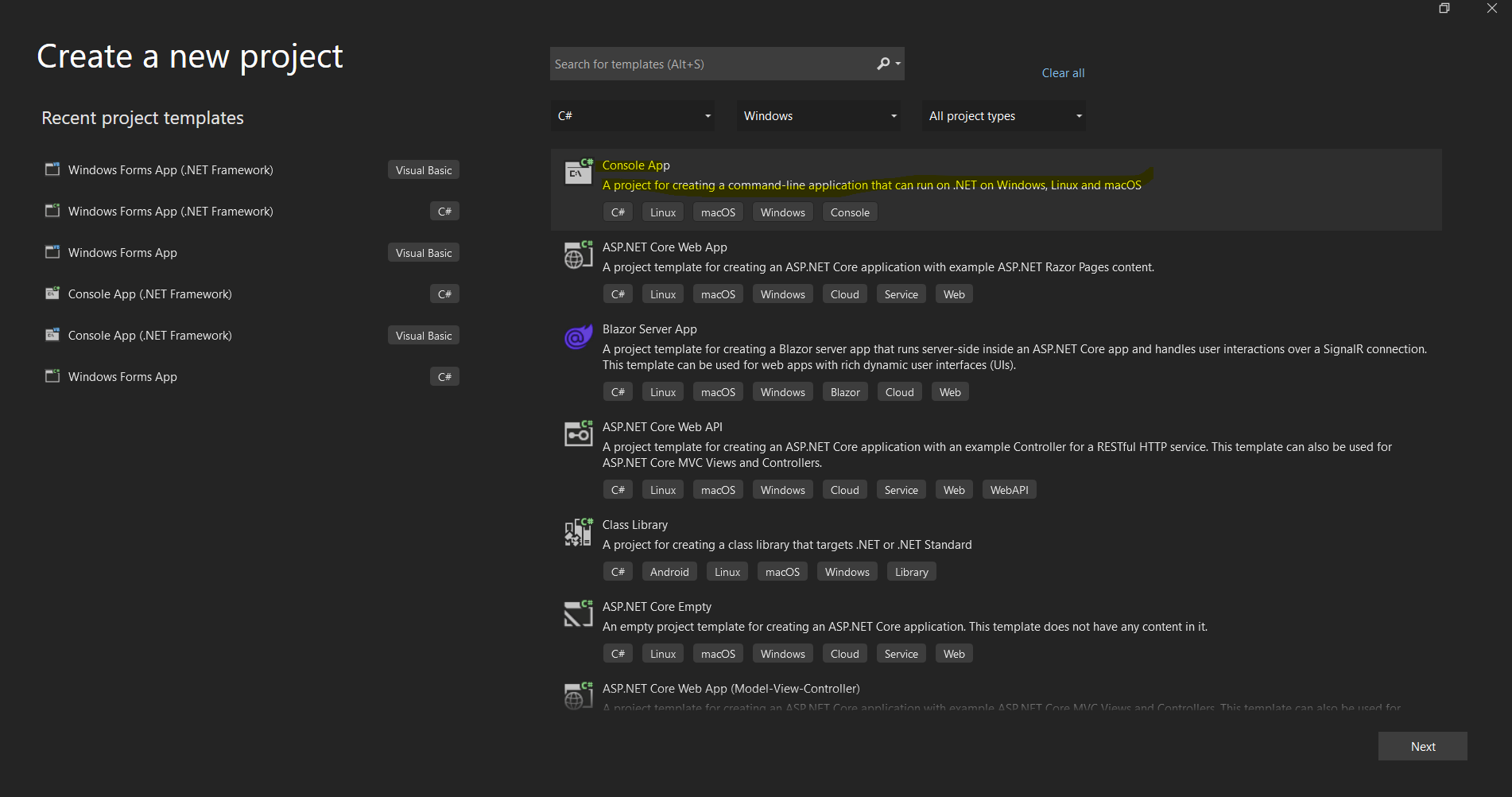 Visual Studio的專案建立對話框,用於設置新的.NET應用程式
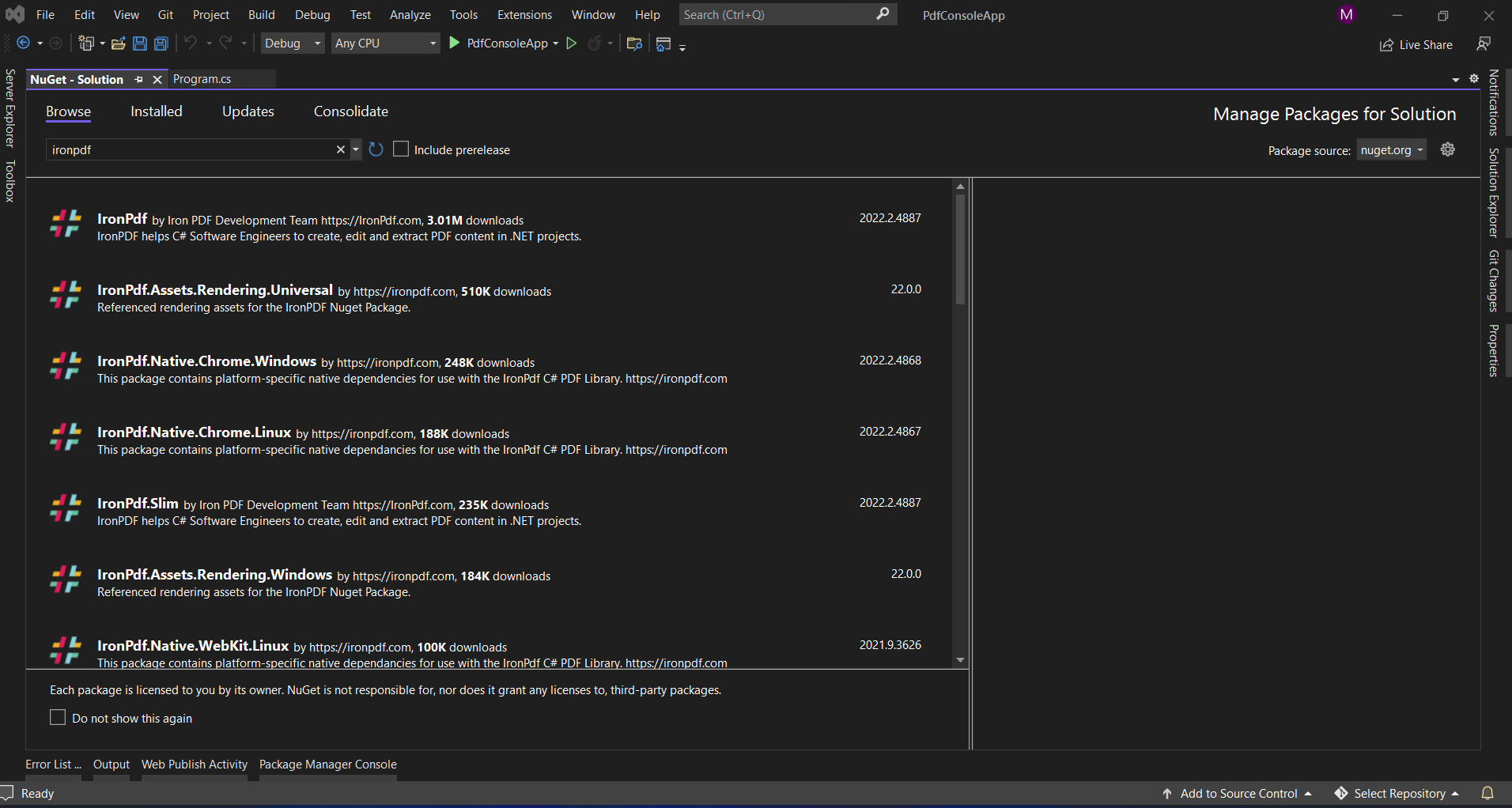 透過Visual Studio的NuGet套件管理器介面安裝IronPDF
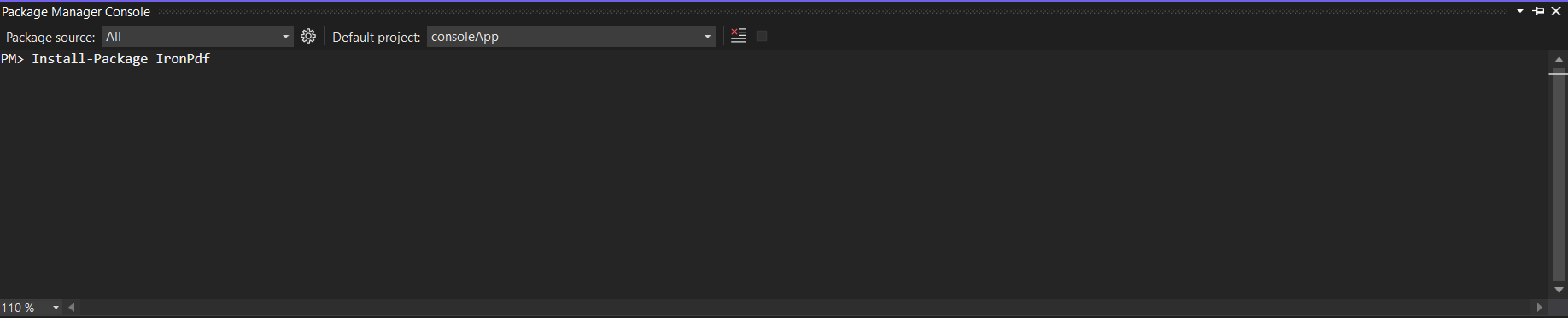 使用套件管理器控制台透過單一指令安裝IronPDF

















