using IronPdf;

// Disable local disk access or cross-origin requests
Installation.EnableWebSecurity = true;

// Instantiate Renderer
var renderer = new ChromePdfRenderer();

// Create a PDF from a HTML string using C#
var pdf = renderer.RenderHtmlAsPdf("<h1>Hello World</h1>");

// Export to a file or Stream
pdf.SaveAs("output.pdf");

// Advanced Example with HTML Assets
// Load external html assets: Images, CSS and JavaScript.
// An optional BasePath 'C:\site\assets\' is set as the file location to load assets from
var myAdvancedPdf = renderer.RenderHtmlAsPdf("<img src='icons/iron.png'>", @"C:\site\assets\");
myAdvancedPdf.SaveAs("html-with-assets.pdf");
using IronPdf;// Disable local disk access or cross-origin requestsInstallation.EnableWebSecurity = true;// Instantiate Renderervar renderer = new ChromePdfRenderer();// Create a PDF from a HTML string using C#var pdf = renderer.RenderHtmlAsPdf("<h1>Hello World</h1>");// Export to a file or Streampdf.SaveAs("output.pdf");// Advanced Example with HTML Assets// Load external html assets: Images, CSS and JavaScript.// An optional BasePath 'C:\site\assets\' is set as the file location to load assets fromvar myAdvancedPdf = renderer.RenderHtmlAsPdf("<img src='icons/iron.png'>", @"C:\site\assets\");myAdvancedPdf.SaveAs("html-with-assets.pdf");
PM >Install-Package IronPdf
Install-Package IronPdf
OUTILS PDF
IronPDF vs ABCpdf : Quelle Bibliothèque PDF C# Offre la Meilleure Conversion HTML en PDF en 2025 ?
Les fichiers PDF sont largement utilisés dans divers secteurs pour des tâches telles que la facturation et la création de différents types de documents. Ils répondent efficacement aux besoins des clients. Lors du développement d'applications .NET nécessitant la génération de PDF, le choix de la bibliothèque appropriée peut avoir un impact considérable sur la vitesse de développement, la qualité de la sortie et les coûts de maintenance à long terme. Deux bibliothèques souvent envisagées par les développeurs sont IronPDF et ABCpdf, mais laquelle offre réellement les meilleurs résultats pour vos besoins spécifiques ?
Cette comparaison approfondie examine les capacités des deux bibliothèques, de la précision de la conversion HTML vers PDF aux modèles de licence, vous aidant ainsi à prendre une décision éclairée. Nous examinerons des indicateurs de performance concrets, la philosophie de conception des API et des exemples de code pratiques qui démontrent les points forts et les limites de chaque bibliothèque. Que vous développiez une plateforme SaaS générant des milliers de factures par jour ou une application Enterprise nécessitant un rendu précis des documents, comprendre ces différences est crucial pour la réussite de votre projet.
## Qu'est-ce que IronPDF?
IronPDF est une bibliothèque de génération de PDF de qualité commerciale qui aide les ingénieurs logiciels C# à éditer, extraire et générer des documents PDF dans des projets .NET . Construit avec un moteur de rendu basé sur Chrome à son cœur, IronPDF transforme HTML, CSS et JavaScript en PDF avec la même fidélité que celle que vous attendez de l'impression d'une page web dans Google Chrome.
### Caractéristiques clés d'IronPDF
IronPDF utilise un moteur Chromium .NET pour afficher les pages HTML en fichiers PDF. Avec HTML-to-PDF, il n'est pas nécessaire d'utiliser des API complexes pour positionner ou concevoir des PDF. IronPDF prend en charge les documents Web standard : HTML, ASPX, JS, CSS et images. L'architecture de la bibliothèque privilégie l'expérience du développeur tout en maintenant une qualité de production de niveau professionnel.
#### Excellence de la conversion HTML vers PDF
- Prise en charge complète du HTML, y compris des éléments sémantiques HTML5
- Prise en charge complète de CSS3, y compris Flexbox, Grid et les techniques de mise en page modernes
- Exécution JavaScript pour le rendu de contenu dynamique
- Support des polices Web, y compris Google Fonts et déclarations `@font-face` personnalisées
- Rendu responsive design avec contrôle du viewport
- Chargement de contenu AJAX avec temps d'attente configurable
#### Capacités de manipulation de documents
**Fusion et division :** combinez plusieurs fichiers PDF ou extrayez des pages spécifiques en une seule opération.
- **En-têtes et pieds de page :** ajoutez du contenu dynamique, notamment des numéros de page, des dates et du code HTML personnalisé.
- **Filigrane :** Appliquez des filigranes texte ou image avec contrôle de l'opacité et de la position.
**Gestion des formulaires :** création automatique de formulaires PDF remplissables à partir d'éléments de formulaire HTML
- **Signatures numériques :** Appliquer des signatures cryptographiques avec gestion des certificats
- **Chiffrement :** Mise en œuvre du chiffrement AES 128 bits et 256 bits avec des autorisations granulaires
#### Fonctionnalités de rendu avancées
- **Traitement multithread :** prise en charge native d'async/await pour les scénarios hautes performances
- **Opérations par lots :** méthodes optimisées pour le traitement simultané de plusieurs documents
- **Efficacité mémoire :** Prise en charge du streaming pour la génération de documents volumineux sans chargement complet des PDF en mémoire
- **Optimisation pour le cloud :** Conçu pour les déploiements conteneurisés dans Docker, Azure et AWS
#### Architecture multiplateforme
IronPDF maintient un comportement cohérent dans différents environnements :
- Windows (x86/x64)
- Linux (y compris Alpine pour les images Docker minimales)
- macOS (Intel et Apple Silicon)
- Azure App Service, Functions et Container Instances
- AWS Lambda et EC2
- Plate-forme Google Cloud
## Qu'est-ce qu'ABCpdf?
La bibliothèque ABCpdf .NET C# PDF est un composant .NET permettant la lecture, l'écriture, la conversion et la manipulation dynamiques de documents Adobe PDF. Développé par WebSupergoo, ABCpdf est au service de la communauté .NET depuis plus de vingt ans, offrant de multiples moteurs de rendu HTML et des fonctionnalités complètes de manipulation de PDF.
### Caractéristiques principales d'ABCpdf
ABCpdf prend entièrement en charge HTML/CSS et les technologies connexes telles que JavaScript, SVG, AJAX et Font Awesome. La bibliothèque fournit aux développeurs des méthodes de commodité de haut niveau et un accès de bas niveau aux objets PDF.
#### Moteurs de rendu multiples
L'approche unique d'ABCpdf offre plusieurs moteurs de rendu :
- **Moteur ABCChrome :** basé sur Chromium pour les standards web modernes (x64 uniquement)
- **Gecko Engine :** Plusieurs versions pour les tests de compatibilité
- **Moteur MSHTML :** rendu basé sur Internet Explorer
- **Moteur ABCWebKit :** rendu basé sur WebKit (x64 uniquement)
Cette approche multi-moteurs permet aux développeurs de choisir le meilleur moteur de rendu pour leur contenu spécifique, bien qu'elle ajoute de la complexité au déploiement et aux tests.
#### Capacités d'importation de documents
ABCpdf peut lire une variété de formats de documents lorsque des applications d'aide comme OpenOffice.org sont installées. Les formats pris en charge incluent :
- Documents Microsoft Office (Word, Excel, PowerPoint)
- Fichiers PostScript et EPS
- XPS (Spécification du papier XML)
- SVG (Scalable Vector Graphics)
- Différents formats d'image, notamment les formats TIFF, JPEG 2000 et RAW
#### Manipulation PDF de bas niveau
- Accès direct au modèle d'objet PDF
- Compression/décompression de flux avec plusieurs algorithmes
- Contrôle du sous-ensemble et de l'intégration des polices
- Gestion et conversion de l'espace couleur
- Manipulation de flux de contenu
#### Caractéristiques de performance
ABCpdf est entièrement multithread, ce qui lui permet d'être utilisé de manière flexible dans divers environnements .NET, y compris C#, ASPX et VB, et il a été testé dans des environnements multithread haute performance. La bibliothèque comprend :
- Prise en charge GigaPDF™ pour les documents extrêmement volumineux
- Utilisation optimisée de la mémoire pour les environnements de serveurs
- Mécanismes efficaces de mise en cache des polices
- Capacités de traitement des threads en arrière-plan
## Support des cadres CSS modernes
Lorsque l'on travaille avec des applications web contemporaines, il est de plus en plus important de pouvoir convertir au format PDF les mises en page basées sur Bootstrap et d'autres frameworks CSS modernes. De nombreuses applications d'entreprise et plateformes SaaS s'appuient désormais sur Bootstrap pour la cohérence de leur interface utilisateur, et la génération de PDF doit préserver parfaitement ces mises en page.
### IronPDF : Prise en charge complète de Bootstrap et des cadres modernes
Le moteur de rendu Chromium d'IronPDF offre une prise en charge complète des cadres CSS modernes :
**Bootstrap 5 :** Prise en charge complète des mises en page basées sur Flexbox, des systèmes de grille et des utilitaires responsifs
**Bootstrap 4 :** Compatibilité totale avec les jeux de cartes Flexbox, les barres de navigation et les mises en page de formulaires.
**Tailwind CSS :** Framework CSS moderne et utilitaire, rendu parfait
- **Fondation :** Tous les systèmes de grille et de composants sont pris en charge
- **CSS3 moderne :** Flexbox, CSS Grid, animations, transitions et propriétés personnalisées
Exemples concrets : [La page d'accueil Bootstrap](https://getbootstrap.com/) et [Les modèles Bootstrap](https://getbootstrap.com/docs/5.3/examples/) sont convertis en PDF avec une précision au pixel près.
**Exemple de code : Grille de produits pour le commerce électronique**
```csharp
using IronPdf;

var renderer = new ChromePdfRenderer();

string bootstrapProductGrid = @"
<!DOCTYPE html>
<html>
<head>
    <link href='https://cdn.jsdelivr.net/npm/bootstrap@5.3.0/dist/css/bootstrap.min.css' rel='stylesheet'>
</head>
<body>
    <div class='container my-5'>
        <h1 class='mb-4'>Product Catalog</h1>
        <div class='row row-cols-1 row-cols-md-3 g-4'>
            <div class='col'>
                <div class='card h-100'>
                    <img src='https://via.placeholder.com/300x200' class='card-img-top' alt='Product 1'>
                    <div class='card-body d-flex flex-column'>
                        <h5 class='card-title'>Premium Widget</h5>
                        <p class='card-text flex-grow-1'>High-quality widget with advanced features and excellent durability.</p>
                        <div class='d-flex justify-content-between align-items-center mt-auto'>
                            <span class='h4 mb-0 text-primary'>$99.99</span>
                            <button class='btn btn-primary'>Add to Cart</button>
                        </div>
                    </div>
                </div>
            </div>
            <div class='col'>
                <div class='card h-100'>
                    <img src='https://via.placeholder.com/300x200' class='card-img-top' alt='Product 2'>
                    <div class='card-body d-flex flex-column'>
                        <h5 class='card-title'>Standard Widget</h5>
                        <p class='card-text flex-grow-1'>Reliable widget perfect for everyday use with great value.</p>
                        <div class='d-flex justify-content-between align-items-center mt-auto'>
                            <span class='h4 mb-0 text-primary'>$49.99</span>
                            <button class='btn btn-primary'>Add to Cart</button>
                        </div>
                    </div>
                </div>
            </div>
            <div class='col'>
                <div class='card h-100'>
                    <img src='https://via.placeholder.com/300x200' class='card-img-top' alt='Product 3'>
                    <div class='card-body d-flex flex-column'>
                        <h5 class='card-title'>Basic Widget</h5>
                        <p class='card-text flex-grow-1'>Entry-level widget with essential features at an affordable price.</p>
                        <div class='d-flex justify-content-between align-items-center mt-auto'>
                            <span class='h4 mb-0 text-primary'>$29.99</span>
                            <button class='btn btn-primary'>Add to Cart</button>
                        </div>
                    </div>
                </div>
            </div>
        </div>
    </div>
</body>
</html>";

var pdf = renderer.RenderHtmlAsPdf(bootstrapProductGrid);
pdf.SaveAs("product-catalog.pdf");
```
**Résultat :** Un catalogue de produits parfaitement formaté avec le système de grille de cartes Bootstrap 5, l'alignement flexbox et l'espacement réactif, le tout préservé dans le PDF.
### ABCpdf : Approche multi-moteurs avec les limites du framework
La prise en charge par ABCpdf des cadres CSS modernes varie considérablement en fonction du moteur de rendu que vous sélectionnez :
- **ABCChrome Engine** (x64 uniquement) : Bonne prise en charge de Bootstrap similaire à IronPDF, mais nécessite une configuration spécifique de la plateforme 64 bits
- **Moteur ABCWebKit** (x64 uniquement) : Prise en charge limitée de flexbox, les mises en page Bootstrap 4+ peuvent ne pas s'afficher correctement
- **Moteur Gecko :** Prise en charge CSS3 modérée, Bootstrap 3 fonctionne mieux que Bootstrap 4/5
- **Moteur MSHTML :** rendu hérité d'Internet Explorer, Bootstrap 2.x uniquement, non recommandé pour les applications modernes
**Points clés à prendre en compte :**
- La complexité de la sélection des moteurs alourdit le déploiement
- les moteurs 64 bits uniquement (ABCChrome, ABCWebKit) limitent la flexibilité du déploiement
- Tests requis sur tous les moteurs pour un rendu Bootstrap cohérent
- La compatibilité des frameworks varie considérablement en fonction du choix du moteur
L'architecture multi-moteurs d'ABCpdf offre une grande flexibilité, mais nécessite une sélection minutieuse des moteurs et des tests pour s'assurer que les mises en page Bootstrap s'affichent correctement. Pour les applications fortement investies dans Bootstrap ou les frameworks CSS modernes, le moteur ABCChrome fournit les meilleurs résultats mais s'accompagne de contraintes de déploiement sur x64 uniquement.
Pour plus de détails sur la compatibilité du cadre Bootstrap, voir le [Bootstrap & Flexbox CSS Guide](/troubleshooting/bootstrap-flex-css/).
## Comparaison détaillée des fonctionnalités
<link rel="stylesheet" type="text/css" href="/front/css/product-comparison-table.css" />
<div class="product__comprehensive-comparison-table">
<div class="table-container">
<div class="table-number">Tableau 4</div>
<div class="table-title">Comparaison des fonctionnalités d'IronPDF et d'ABCpdf pour les applications .NET</div>
<table>
<thead>
<tr>
<th>Catégorie</th>
<th>Fonctionnalité/aspect</th>
<th>IronPDF</th>
<th>ABCpdf</th>
<th>Avantage clé</th>
</tr>
</thead>
<tbody>
<tr>
<td><strong>Architecture de base</strong></td>
<td>Philosophie de conception</td>
<td>Simplicité d'abord, API intuitives</td>
<td>Flexibilité d'abord, moteurs multiples</td>
<td>IronPDF : Un développement plus rapide</td>
</tr>
<tr>
<td></td>
<td>Complexité de l'API</td>
<td>Des méthodes simples comme <code>RenderHtmlAsPdf()</code></td>
<td>Orienté objet avec Doc class</td>
<td>IronPDF : Une API plus simple</td>
</tr>
<tr>
<td></td>
<td>Courbe d'apprentissage</td>
<td>Conception monomoteur inférieure</td>
<td>Configuration multi-moteurs supérieure requise</td>
<td>IronPDF : Adoption plus rapide</td>
</tr>
<tr>
<td><strong>Support de plateforme</strong></td>
<td>Multiplateforme</td>
<td>Support natif, paquet unique</td>
<td>Windows primaire, Linux limité</td>
<td>IronPDF : Véritable multiplateforme</td>
</tr>
<tr>
<td></td>
<td>Versions .NET</td>
<td>.NET 10, 9, 8, 7, 6, 5, Core 3.1+, Framework 4.6.2+</td>
<td>.NET 10, 9, 8, 7, 6, 5, Core 3.0+, Framework 4.0+</td>
<td>Les deux : prise en charge de cadres modernes</td>
</tr>
<tr>
<td></td>
<td>Systèmes d'exploitation</td>
<td>Windows, Linux, macOS, Docker natif</td>
<td>Windows, support Linux limité</td>
<td>IronPDF : Prise en charge élargie des systèmes d'exploitation</td>
</tr>
<tr>
<td><strong>HTML en PDF</strong></td>
<td>Moteur de rendu</td>
<td>Moteur Chrome V127</td>
<td>Moteurs multiples (Chrome 123, Gecko, MSHTML)</td>
<td>ABCpdf : Flexibilité du moteur</td>
</tr>
<tr>
<td></td>
<td>Prise en charge CSS3/HTML5</td>
<td>Compatible Chrome (moteur V8)</td>
<td>Varie selon le moteur (70-100%)</td>
<td>IronPDF : Rendu cohérent</td>
</tr>
<tr>
<td></td>
<td>Exécution de JavaScript</td>
<td>Prise en charge complète de JavaScript V8</td>
<td>Dépendant du moteur</td>
<td>IronPDF : Fonctionnalités JS modernes</td>
</tr>
<tr>
<td></td>
<td>Polices Web</td>
<td>Google Fonts, @font-face, polices système</td>
<td>Supporté par ABCChrome</td>
<td>Both : Prise en charge des polices Web</td>
</tr>
<tr>
<td><strong>Performance</strong></td>
<td>Rendu de page unique</td>
<td>Varie selon la complexité du document</td>
<td>Varie selon le moteur et la complexité du document</td>
<td>Les deux : dépend du moteur</td>
</tr>
<tr>
<td></td>
<td>Traitement par lots</td>
<td>Traitement parallèle optimisé</td>
<td>Capacité multithread</td>
<td>IronPDF : Meilleure prise en charge de l'asynchronisme</td>
</tr>
<tr>
<td></td>
<td>Utilisation de la mémoire</td>
<td>Supérieur (moteur complet de Chrome)</td>
<td>Inférieur (moteurs plus légers disponibles)</td>
<td>ABCpdf : Empreinte mémoire inférieure avec des moteurs non-Chrome</td>
</tr>
<tr>
<td><strong>Expérience du développeur</strong></td>
<td>Documentation</td>
<td>Tutoriels, vidéos et exemples détaillés</td>
<td>Documentation complète sur l'API</td>
<td>IronPDF : Plus de ressources d'apprentissage</td>
</tr>
<tr>
<td></td>
<td>Exemples de code</td>
<td>plus de 100 échantillons prêts à l'emploi</td>
<td>Exemples détaillés</td>
<td>Les deux : Exemples riches</td>
</tr>
<tr>
<td></td>
<td>Support IntelliSense</td>
<td>Documentation XML complète</td>
<td>IntelliSense complet</td>
<td>Les deux : intégration IDE</td>
</tr>
<tr>
<td><strong>Licensing & Pricing</strong></td>
<td>Niveau d'entrée</td>
<td>Lite : `$liteLicense` (1 dev, 1 projet)</td>
<td>Standard : `$abcpdf.standard` (1 dev, 32-bit seulement)</td>
<td>ABCpdf : Coût d'entrée réduit</td>
</tr>
<tr>
<td></td>
<td>Professional</td>
<td>Professional : `$professionalLicenseOriginal` (10 développeurs, 10 projets)</td>
<td>Professionnel : `$abcpdf.professional` (1 dev, 64-bit)</td>
<td>IronPDF : De meilleures licences pour les équipes</td>
</tr>
<tr>
<td></td>
<td>Redistribution</td>
<td>+`$professionalLicense` libre de droits</td>
<td>`$abcpdf.enterprise` Licence d'entreprise</td>
<td>IronPDF : Plus abordable</td>
</tr>
<tr>
<td><strong>Soutien</strong></td>
<td>Support inclus</td>
<td>Oui, support technique 24/5</td>
<td>Oui, assistance par courriel</td>
<td>IronPDF : Assistance par chat en direct</td>
</tr>
<tr>
<td></td>
<td>Temps de réponse</td>
<td>< 1 minute (chat en direct)</td>
<td>24 à 48 heures en général</td>
<td>IronPDF : Une réponse plus rapide</td>
</tr>
<tr>
<td><strong>Parfait pour</strong></td>
<td>Cas d'Utilisation</td>
<td>Applications web modernes, SaaS, cloud-native</td>
<td>Bureau Windows, systèmes existants</td>
<td>En fonction du contexte</td>
</tr>
</tbody>
</table>
<div class="table-note">
<em>Note.</em> ABCpdf offre plusieurs moteurs de rendu pour plus de flexibilité, mais nécessite Windows pour fonctionner pleinement. IronPDF offre des performances multiplateformes constantes avec le dernier moteur Chrome. Les structures de prix diffèrent considérablement entre les licences pour développeur unique et les licences d'équipe.
</div>
</div>
</div>
## Créer un nouveau projet dans Visual Studio
Avant de plonger dans les exemples de code, mettons en place un environnement de développement approprié. Ouvrez Visual Studio et créez un nouveau projet :
1. Accédez à Fichier > Nouveau > Projet
2. Sélectionnez "Application console" (.NET Core ou .NET Framework)
3. Choisissez votre framework cible (.NET 6.0 ou supérieur recommandé)
4. Nommez votre projet (par exemple, "PdfLibraryComparison")
5. Cliquez sur Créer
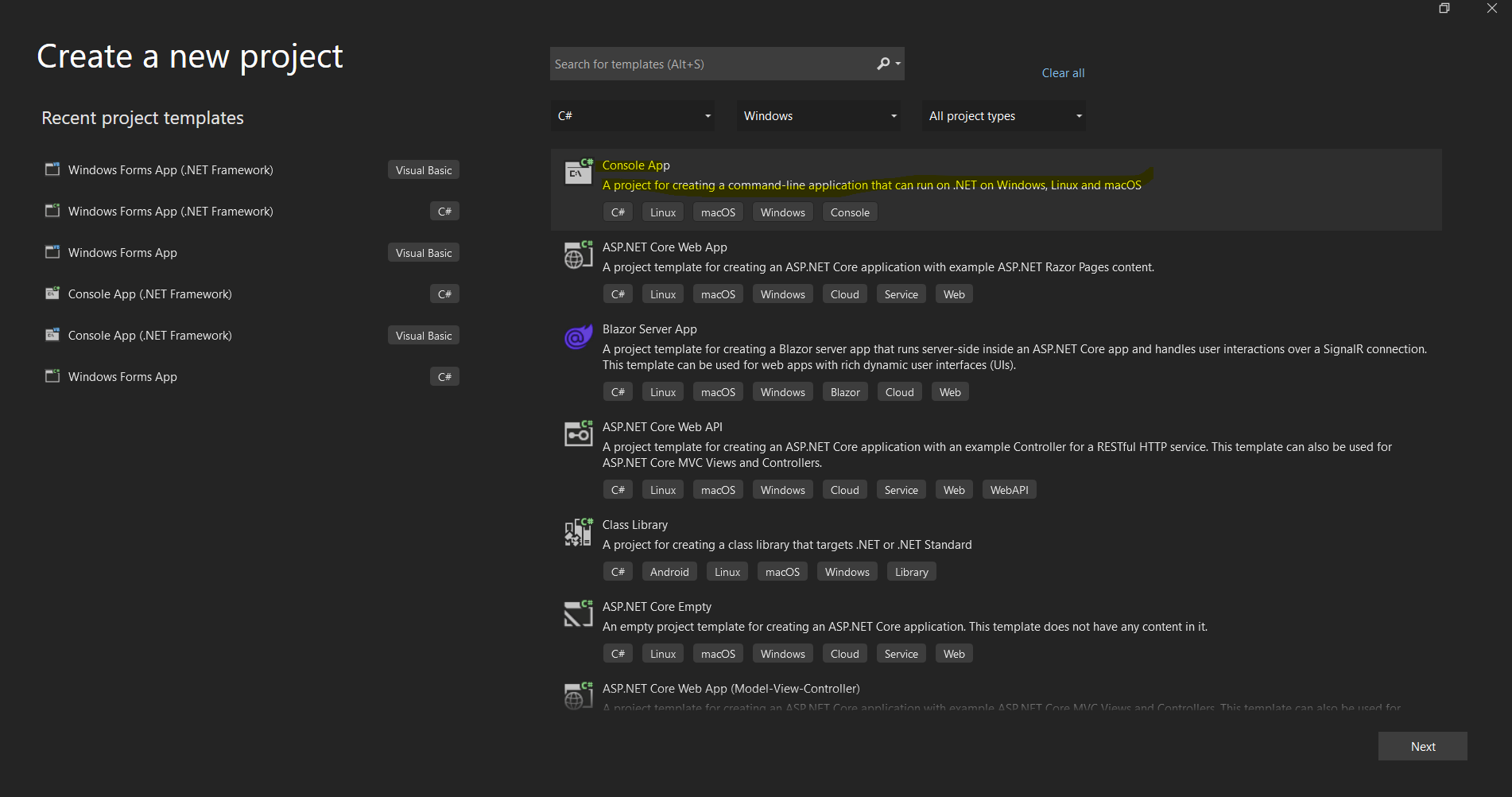
*La boîte de dialogue de création de projet de Visual Studio pour la mise en place d'une nouvelle application .NET*
## Installation de la bibliothèque IronPDF C#
### Méthodes d'installation
IronPDF propose plusieurs approches d'installation pour s'adapter aux différents flux de travail de développement :
#### Méthode 1 : Utilisation du Package Manager NuGet (Recommandé)
L'approche la plus simple consiste à utiliser le Package Manager NuGet intégré à Visual Studio :
1. Cliquez avec le bouton droit sur votre projet dans l'Explorateur de solutions
2. Sélectionnez "Gérer les packages NuGet"
3. Cliquez sur "Parcourir" et recherchez "IronPDF"
4. Cliquez sur Installer sur le package officiel d'IronPDF
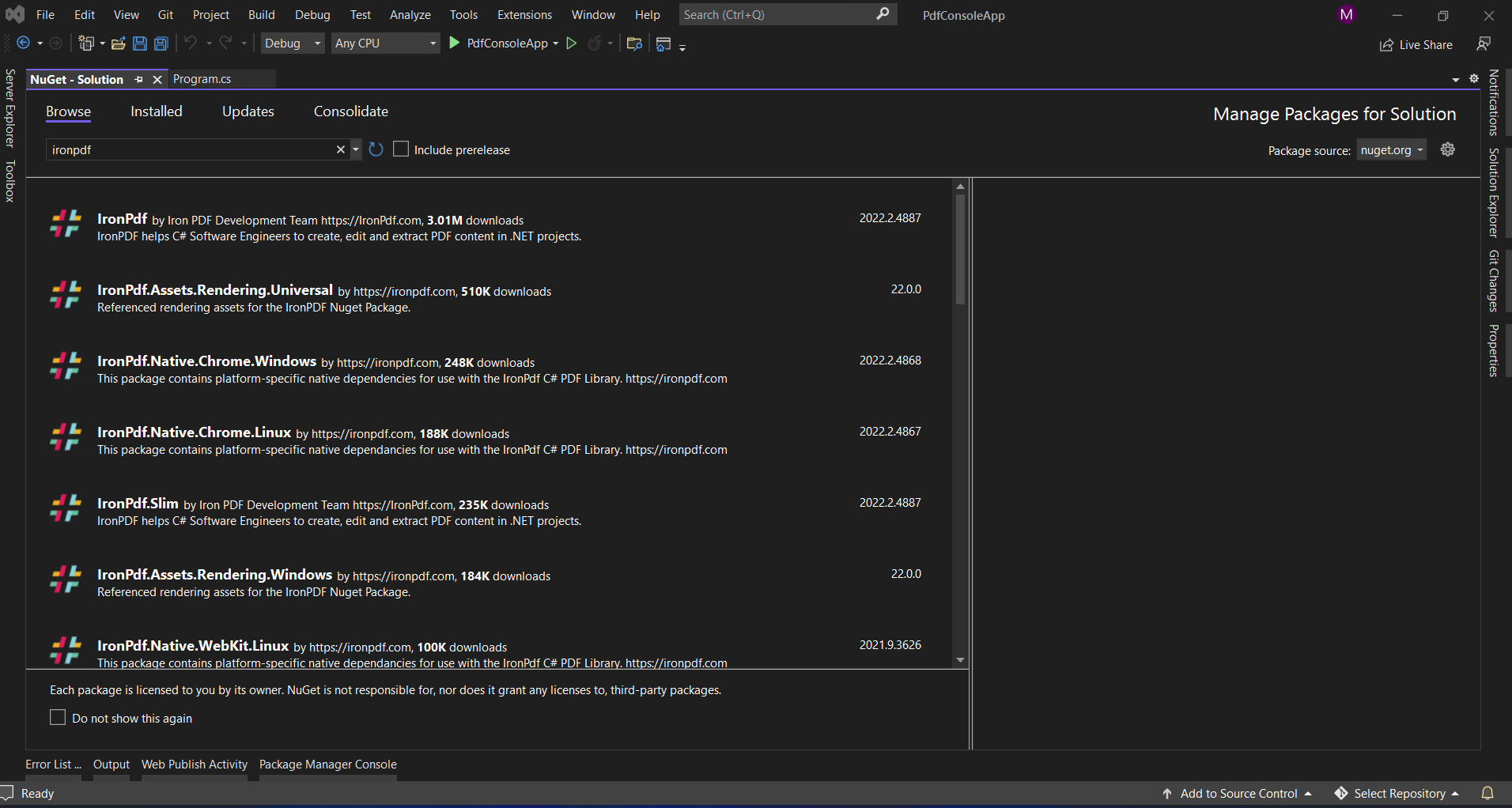
*Installation d'IronPDF via l'interface NuGet de Visual Studio*
#### Méthode 2 : Console du gestionnaire de packages
Pour les développeurs qui préfèrent les outils en ligne de commande :
```shell
:ProductInstall
```
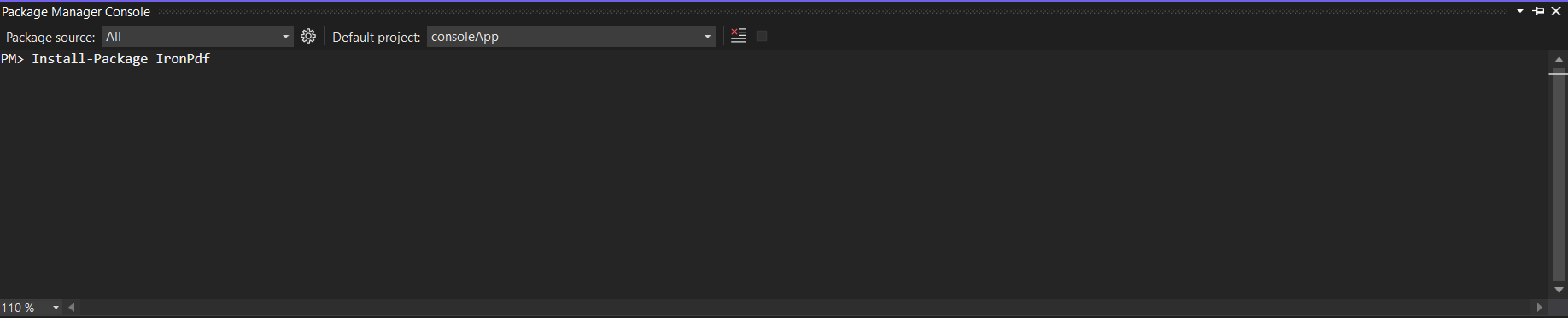
*Utilisation de la console du Package Manager pour installer IronPDF avec une seule commande*
#### Méthode 3 : Téléchargement direct
Pour les environnements où l'accès à l'internet est restreint :
1. Télécharger à partir de [NuGet.org](https://www.nuget.org/packages/IronPdf/)
2. Ajouter le fichier .nupkg à un flux NuGet local
3. Installer à partir de votre flux local
#### Méthode 4 : .NET CLI
Pour les projets .NET Core/5+ :
```shell
:InstallCmd dotnet add package IronPdf
```
## Installation d'ABCpdf
### Méthodes d'installation
ABCpdf offre des options d'installation similaires avec quelques considérations supplémentaires :
#### Méthode 1 : Installation de NuGet
```shell
:InstallCmd Install-Package ABCpdf -Version 13.0.0.0
```
Notez qu'ABCpdf a des paquets distincts pour les différentes éditions :
- `ABCpdf` - Édition standard (32 bits uniquement)
- `ABCpdf.ABCChrome64` - Nécessaire pour le rendu Chrome sur 64 bits
- `ABCpdf.ABCGecko` - Pour le moteur de rendu Gecko
#### Méthode 2 : Installation manuelle
1. Télécharger à partir de [site web deWebSupergoo](https://www.websupergoo.com/download.aspx)
2. Extraire le fichier ZIP
3. Ajouter des références aux DLL appropriées
4. Copiez les dépendances natives dans votre répertoire de sortie
### Considérations spécifiques à la plate-forme
ABCpdf nécessite une configuration supplémentaire pour les plates-formes non Windows :
```xml
<!-- For Linux deployment -->
<PackageReference Include="ABCpdf.Linux" Version="13.0.0.0" />
```
## Comment ces bibliothèques gèrent-elles la conversion HTML en PDF ?
Comprendre les différences fondamentales dans la façon dont chaque bibliothèque aborde la conversion HTML vers PDF permet d'expliquer leurs différentes capacités et caractéristiques de performance.
### L'approche d'IronPDF : Architecture Chrome-First
IronPDF utilise un moteur de navigateur Chrome complet, ce qui présente plusieurs avantages :
```csharp
using IronPdf;
// IronPDF's approach - Chrome rendering with full browser capabilities
var renderer = new ChromePdfRenderer();
// Configure rendering to match Chrome's print preview exactly
renderer.RenderingOptions = ChromePdfRenderOptions.DefaultChrome;
// Or customize for specific needs
renderer.RenderingOptions.CssMediaType = PdfCssMediaType.Screen;
renderer.RenderingOptions.EnableJavaScript = true;
renderer.RenderingOptions.WaitFor.RenderDelay(500); // Wait for JS execution
// Convert complex HTML with modern CSS and JavaScript
string complexHtml = @"
<!DOCTYPE html>
<html>
<head>
<style>
@import url('https://fonts.googleapis.com/css2?family=Roboto:wght@300;700&display=swap');
.container {
display: grid;
grid-template-columns: repeat(auto-fit, minmax(250px, 1fr));
gap: 20px;
font-family: 'Roboto', sans-serif;
}
.card {
background: linear-gradient(135deg, #667eea 0%, #764ba2 100%);
border-radius: 10px;
padding: 20px;
color: white;
box-shadow: 0 10px 20px rgba(0,0,0,0.19);
transform: translateY(0);
transition: transform 0.3s;
}
@media print {
.card { break-inside: avoid; }
}
</style>
</head>
<body>
<div class='container'>
<div class='card'>
<h2>Modern CSS Support</h2>
<p>Grid, Flexbox, Gradients, Shadows - all rendered perfectly</p>
</div>
<div class='card'>
<h2>Polices Web</h2>
<p>Google Fonts and custom fonts work seamlessly</p>
</div>
</div>
<script>
// Dynamic content generation
document.addEventListener('DOMContentLoaded', function() {
const container = document.querySelector('.container');
const dynamicCard = document.createElement('div');
dynamicCard.className = 'card';
dynamicCard.innerHTML = '<h2>JavaScript Generated</h2><p>This card was added by JavaScript</p>';
container.appendChild(dynamicCard);
});
</script>
</body>
</html>";
var pdf = renderer.RenderHtmlAsPdf(complexHtml);
pdf.SaveAs("modern-web-features.pdf");
```
Ce code démontre plusieurs avantages clés de l'approche d'IronPDF basée sur Chrome :
1. **Prise en charge des CSS modernes :** les mises en page en grille, Flexbox, les dégradés et les transformations fonctionnent exactement comme dans Chrome.
2. **Intégration des polices Web :** Google Fonts se charge automatiquement sans configuration supplémentaire
3. **Exécution JavaScript :** La génération de contenu dynamique a lieu avant le rendu PDF
4. **Requêtes média :** Les styles spécifiques à l'impression sont correctement appliqués.
### L'approche d'ABCpdf : Flexibilité multi-moteurs
ABCpdf propose plusieurs moteurs de rendu, chacun avec des capacités différentes :
```csharp
using WebSupergoo.ABCpdf13;
// Method 1: Using ABCChrome engine (most modern)
Doc chromeDoc = new Doc();
chromeDoc.HtmlOptions.Engine = EngineType.Chrome;
chromeDoc.HtmlOptions.Chrome.SetUserAgent("Mozilla/5.0 (Windows NT 10.0; Win64; x64) AppleWebKit/537.36");
// Chrome engine supports modern web standards
int chromeId = chromeDoc.AddImageUrl("https://example.com");
// Chain pages if content overflows
while (chromeDoc.Chainable(chromeId))
{
chromeDoc.Page = chromeDoc.AddPage();
chromeId = chromeDoc.AddImageToChain(chromeId);
}
chromeDoc.Save("chrome-engine-output.pdf");
// Method 2: Using Gecko engine (Firefox-based)
Doc geckoDoc = new Doc();
geckoDoc.HtmlOptions.Engine = EngineType.Gecko;
geckoDoc.HtmlOptions.UseScript = true; // Enable JavaScript
// Gecko provides good standards support with lower resource usage
string html = "<html><body><h1>Gecko Rendered Content</h1></body></html>";
geckoDoc.AddImageHtml(html);
geckoDoc.Save("gecko-engine-output.pdf");
// Method 3: Using MSHTML engine (IE-based, legacy support)
Doc ieDoc = new Doc();
ieDoc.HtmlOptions.Engine = EngineType.MSHtml;
// MSHTML is faster but with limited modern CSS support
ieDoc.AddImageUrl("https://legacy-app.example.com");
ieDoc.Save("ie-engine-output.pdf");
```
L'approche multi-moteurs offre une certaine flexibilité mais nécessite une réflexion approfondie :
1. **Choix du moteur :** Les développeurs doivent choisir le moteur approprié à leur contenu.
2. **Parité des fonctionnalités :** Différents moteurs prennent en charge différentes fonctionnalités HTML/CSS
3. **Complexité du déploiement :** Chaque moteur peut avoir des exigences d'exécution différentes
4. **Surcharge liée aux essais :** La puissance peut varier d'un moteur à l'autre, ce qui nécessite des essais supplémentaires.
## Créer des documents PDF à partir d'URL
L'un des cas d'utilisation les plus courants des bibliothèques PDF est la conversion de pages web en direct en documents PDF. Voyons comment chaque bibliothèque s'acquitte de cette tâche.
### Utilisation de IronPDF
La conversion d'URL en PDF d'IronPDF tire parti de l'intégralité du moteur du navigateur Chrome :
```csharp
using IronPdf;
using System;
using System.Threading.Tasks;
public class UrlToPdfConverter
{
public static async Task ConvertUrlToPdfAsync()
{
var renderer = new ChromePdfRenderer();
// Configure for optimal web page capture
renderer.RenderingOptions = new ChromePdfRenderOptions
{
// Viewport and scaling
ViewPortWidth = 1920,
ViewPortHeight = 1080,
ZoomLevel = 100,
// Paper and margins
PaperSize = PdfPaperSize.A4,
MarginTop = 10,
MarginBottom = 10,
MarginLeft = 10,
MarginRight = 10,
// Rendering behavior
CssMediaType = PdfCssMediaType.Screen,
PrintHtmlBackgrounds = true,
CreatePdfFormsFromHtml = true,
// JavaScript and timing
EnableJavaScript = true,
WaitFor = new WaitFor
{
// Wait strategies for dynamic content
RenderDelay = 500, // milliseconds
JavaScriptFinishDelay = 100,
AllowedExecutionTime = 30000 // 30 seconds max
}
};
// Handle authentication if needed
renderer.RenderingOptions.HttpOptions.HttpHeaders.Add("Authorization", "Bearer your-token");
// Convert with error handling
try
{
// Async conversion for better performance
var pdf = await renderer.RenderUrlAsPdfAsync("https://github.com/trending");
// Add metadata
pdf.MetaData.Author = "IronPDF Example";
pdf.MetaData.Title = "GitHub Trending Projects";
pdf.MetaData.CreationDate = DateTime.Now;
// Add watermark
pdf.ApplyWatermark("<h2 style='color:red;opacity:0.5'>CONFIDENTIAL</h2>",
30, VerticalAlignment.Middle, HorizontalAlignment.Center);
pdf.SaveAs("github-trending.pdf");
Console.WriteLine("PDF created successfully!");
}
catch (Exception ex)
{
Console.WriteLine($"Error creating PDF: {ex.Message}");
}
}
}
```
Les principales caractéristiques ont été démontrées :
- **Contrôle de la fenêtre d'affichage :** simuler différentes tailles d'écran pour les tests de réactivité
- **Prise en charge de l'authentification :** ajout d'en-têtes pour les ressources protégées
- **Gestion du contenu dynamique :** Stratégies d'attente pour les pages riches en JavaScript
**Post-traitement :** ajout de métadonnées et de filigranes après conversion
### Utiliser ABCpdf
Conversion d'URL d'ABCpdf avec chaînage de pages :
```csharp
using WebSupergoo.ABCpdf13;
using System;
public class ABCpdfUrlConverter
{
public static void ConvertUrlWithABCpdf()
{
using (Doc theDoc = new Doc())
{
// Configure the HTML engine
theDoc.HtmlOptions.Engine = EngineType.Chrome;
theDoc.HtmlOptions.Chrome.LoadDelay = 1000; // Wait 1 second
// Set viewport size
theDoc.HtmlOptions.BrowserWidth = 1200;
// Authentication
theDoc.HtmlOptions.HttpAdditionalHeaders = "Authorization: Bearer your-token";
// Page setup
theDoc.Rect.Inset(20, 20);
theDoc.Page = theDoc.AddPage();
// Add the URL
int theID = theDoc.AddImageUrl("https://github.com/trending");
// Chain pages for overflow content
while (true)
{
if (!theDoc.Chainable(theID))
break;
theDoc.Page = theDoc.AddPage();
theID = theDoc.AddImageToChain(theID);
}
// Reduce file size
for (int i = 1; i <= theDoc.PageCount; i++)
{
theDoc.PageNumber = i;
theDoc.Flatten();
}
// Save
theDoc.Save("abcpdf-github.pdf");
}
}
}
```
Différences notables :
- **Enchaînement de pages :** Gestion manuelle du contenu multipage
- **Configuration du moteur :** Vous devez choisir explicitement le moteur de rendu.
- **Gestion des ressources :** Nécessite une élimination correcte avec l'instruction `using`
## Créer des PDF à partir de chaînes HTML
Les deux bibliothèques excellent dans la conversion de chaînes HTML en PDF, mais leurs approches diffèrent considérablement.
### Utilisation de IronPDF
La conversion de chaînes HTML d'IronPDF avec des fonctionnalités avancées :
```csharp
using IronPdf;
using System.IO;
public class HtmlStringToPdf
{
public static void GenerateInvoicePdf()
{
var renderer = new ChromePdfRenderer();
// Configure for print-quality output
renderer.RenderingOptions = new ChromePdfRenderOptions
{
PaperSize = PdfPaperSize.A4,
DPI = 300, // High quality print
CssMediaType = PdfCssMediaType.Print,
PaperFit = new PaperFit
{
UseFitToPageRendering = true,
RenderScale = 100
}
};
// Professional invoice HTML
string invoiceHtml = @"
<!DOCTYPE html>
<html>
<head>
<meta charset='UTF-8'>
<style>
@page {
size: A4;
margin: 0;
}
body {
font-family: 'Segoe UI', Arial, sans-serif;
margin: 0;
padding: 20mm;
color: #333;
}
.invoice-header {
display: flex;
justify-content: space-between;
align-items: start;
margin-bottom: 30px;
border-bottom: 2px solid #0066cc;
padding-bottom: 20px;
}
.company-info h1 {
color: #0066cc;
margin: 0;
font-size: 28px;
}
.invoice-details {
text-align: right;
}
.invoice-details h2 {
color: #666;
margin: 0 0 10px 0;
font-size: 24px;
}
.invoice-table {
width: 100%;
border-collapse: collapse;
margin-top: 30px;
}
.invoice-table th {
background-color: #0066cc;
color: white;
padding: 12px;
text-align: left;
}
.invoice-table td {
padding: 12px;
border-bottom: 1px solid #ddd;
}
.invoice-table tr:hover {
background-color: #f5f5f5;
}
.total-section {
margin-top: 30px;
text-align: right;
}
.total-section .total-row {
display: flex;
justify-content: flex-end;
margin: 5px 0;
}
.total-section .label {
font-weight: bold;
margin-right: 20px;
min-width: 100px;
}
.total-section .grand-total {
font-size: 20px;
color: #0066cc;
border-top: 2px solid #0066cc;
padding-top: 10px;
margin-top: 10px;
}
@media print {
.no-print { display: none; }
}
</style>
</head>
<body>
<div class='invoice-header'>
<div class='company-info'>
<h1>ACME Corporation</h1>
<p>123 Business Street<br>
New York, NY 10001<br>
Phone: (555) 123-4567<br>
Email: billing@acme.com</p>
</div>
<div class='invoice-details'>
<h2>INVOICE</h2>
<p><strong>Invoice #:</strong> INV-2025-001<br>
<strong>Date:</strong> " + DateTime.Now.ToString("MMMM dd, yyyy") + @"<br>
<strong>Due Date:</strong> " + DateTime.Now.AddDays(30).ToString("MMMM dd, yyyy") + @"</p>
</div>
</div>
<div class='billing-info'>
<h3>Bill To:</h3>
<p>John Doe<br>
456 Client Avenue<br>
Los Angeles, CA 90001</p>
</div>
<table class='invoice-table'>
<thead>
<tr>
<th>Description</th>
<th>Quantity</th>
<th>Unit Price</th>
<th>Total</th>
</tr>
</thead>
<tbody>
<tr>
<td>Professional Services - Web Development</td>
<td>40 hours</td>
<td>$150.00</td>
<td>$6,000.00</td>
</tr>
<tr>
<td>Hosting Services (Annual)</td>
<td>1</td>
<td>$1,200.00</td>
<td>$1,200.00</td>
</tr>
<tr>
<td>Domain Registration</td>
<td>2</td>
<td>$15.00</td>
<td>$30.00</td>
</tr>
</tbody>
</table>
<div class='total-section'>
<div class='total-row'>
<span class='label'>Subtotal:</span>
<span>$7,230.00</span>
</div>
<div class='total-row'>
<span class='label'>Tax (8%):</span>
<span>$578.40</span>
</div>
<div class='total-row grand-total'>
<span class='label'>Total Due:</span>
<span>$7,808.40</span>
</div>
</div>
<div class='footer' style='margin-top: 50px; padding-top: 20px; border-top: 1px solid #ddd; text-align: center; color: #666;'>
<p>Thank you for your business!<br>
Payment is due within 30 days. Please include invoice number with payment.</p>
</div>
</body>
</html>";
// Generate PDF with base path for local assets
var pdf = renderer.RenderHtmlAsPdf(invoiceHtml, @"C:\Assets\");
// Add security
pdf.SecuritySettings.AllowUserEditing = false;
pdf.SecuritySettings.AllowUserPrinting = PdfPrintSecurity.FullPrintRights;
pdf.SecuritySettings.OwnerPassword = "admin123";
// Save with optimization
pdf.CompressImages(60); // 60% quality for smaller file size
pdf.SaveAs("professional-invoice.pdf");
}
}
```
Cet exemple illustre :
- **Mise en page Professional :** CSS complexe avec flexbox et grille
- **Contenu dynamique :** calculs et mise en forme des dates
- **Optimisation pour l'impression :** requêtes média pour la mise en forme spécifique à l'impression
- **Fonctionnalités de sécurité :** Protection par mot de passe et paramètres d'autorisation
- **Optimisation des fichiers :** Compression des images pour des fichiers plus petits
### Utiliser ABCpdf
Gestion des chaînes HTML d'ABCpdf avec texte stylé :
```csharp
using WebSupergoo.ABCpdf13;
public class ABCpdfHtmlString
{
public static void CreateStyledDocument()
{
using (Doc theDoc = new Doc())
{
// Set up the document
theDoc.Rect.Inset(40, 40);
theDoc.Color.String = "0 0 0"; // Black text
// Add styled HTML content
theDoc.FontSize = 48;
string styledHtml = @"
<h1 style='color: #0066cc'>ABCpdf Document</h1>
<p style='font-size: 14pt; line-height: 1.5'>
This demonstrates <b>bold text</b>, <i>italic text</i>,
and <span style='color: red'>colored text</span>.
</p>
<ul style='margin-left: 20px'>
<li>First item</li>
<li>Second item</li>
<li>Third item</li>
</ul>";
// Add HTML with automatic text flow
int theID = theDoc.AddImageHtml(styledHtml);
// Continue on new pages if needed
while (true)
{
if (!theDoc.Chainable(theID))
break;
theDoc.Page = theDoc.AddPage();
theID = theDoc.AddImageToChain(theID);
}
// Apply compression
theDoc.Encryption.Type = 2; // 128-bit encryption
theDoc.Encryption.CanPrint = true;
theDoc.Encryption.CanModify = false;
theDoc.Save("styled-abcpdf.pdf");
}
}
}
```
## Analyse comparative des performances
La compréhension des caractéristiques de performance permet de choisir la bibliothèque la mieux adaptée à votre cas d'utilisation spécifique.
### Configuration du test de référence
```csharp
using BenchmarkDotNet.Attributes;
using BenchmarkDotNet.Running;
using IronPdf;
using WebSupergoo.ABCpdf13;
[MemoryDiagnoser]
[SimpleJob(warmupCount: 3, targetCount: 10)]
public class PdfGenerationBenchmark
{
private string _simpleHtml;
private string _complexHtml;
private ChromePdfRenderer _ironPdfRenderer;
private Doc _abcPdfDoc;
[GlobalSetup]
public void Setup()
{
_simpleHtml = "<h1>Simple Document</h1><p>Basic paragraph text.</p>";
_complexHtml = File.ReadAllText("complex-page.html"); // 50KB HTML with CSS/JS
_ironPdfRenderer = new ChromePdfRenderer();
_abcPdfDoc = new Doc();
_abcPdfDoc.HtmlOptions.Engine = EngineType.Chrome;
}
[Benchmark]
public void IronPDF_SimpleHtml()
{
var pdf = _ironPdfRenderer.RenderHtmlAsPdf(_simpleHtml);
pdf.SaveAs("temp_iron_simple.pdf");
}
[Benchmark]
public void ABCpdf_SimpleHtml()
{
_abcPdfDoc.Clear();
_abcPdfDoc.AddImageHtml(_simpleHtml);
_abcPdfDoc.Save("temp_abc_simple.pdf");
}
[Benchmark]
public void IronPDF_ComplexHtml()
{
var pdf = _ironPdfRenderer.RenderHtmlAsPdf(_complexHtml);
pdf.SaveAs("temp_iron_complex.pdf");
}
[Benchmark]
public void ABCpdf_ComplexHtml()
{
_abcPdfDoc.Clear();
int id = _abcPdfDoc.AddImageHtml(_complexHtml);
while (_abcPdfDoc.Chainable(id))
{
_abcPdfDoc.Page = _abcPdfDoc.AddPage();
id = _abcPdfDoc.AddImageToChain(id);
}
_abcPdfDoc.Save("temp_abc_complex.pdf");
}
}
```
### Considérations sur les benchmarks
Le code de benchmark ci-dessus utilise BenchmarkDotNet comme cadre de départ. Les résultats réels varient considérablement en fonction du matériel, de la complexité du document, de la version d'exécution de .NET, et de la configuration du moteur. Observations générales clés des rapports de la communauté :
- Le moteur Chrome d'IronPDF utilise plus de mémoire que les moteurs plus légers d'ABCpdf (Gecko, MSHTML)
- Le moteur ABCChrome d'ABCpdf a une surcharge mémoire comparable à IronPDF lorsqu'il est utilisé
- Les deux bibliothèques s'adaptent à la complexité du document
- Le rendu basé sur Chrome d'IronPDF offre une fidélité CSS/JS supérieure au coût d'une utilisation supplémentaire des ressources
Exécutez vos propres benchmarks contre des documents représentatifs de votre charge de travail pour des comparaisons précises.
## Comparaison des fonctionnalités avancées
### Signatures numériques et sécurité
#### Mise en œuvre de la signature numérique IronPDF
```csharp
using IronPdf;
using IronPdf.Signing;
using System.Security.Cryptography.X509Certificates;
public class SecurityFeatures
{
public static void ApplyDigitalSignature()
{
// Load existing PDF
var pdf = PdfDocument.FromFile("unsigned-document.pdf");
// Load certificate
var cert = new X509Certificate2("certificate.pfx", "password");
// Create signature
var signature = new PdfSignature(cert)
{
// Visual signature appearance
SignatureImage = new PdfSignature.SignatureImage
{
ImagePath = "signature.png",
Width = 200,
Height = 100
},
// Signature position
PageIndex = 0,
X = 400,
Y = 100,
// Signature details
Reason = "Document approved",
Location = "New York, NY",
ContactInfo = "john.doe@company.com"
};
// Apply signature
pdf.Sign(signature);
// Additional security
pdf.SecuritySettings = new SecuritySettings
{
AllowUserPrinting = true,
AllowUserCopyPasteContent = false,
AllowUserEditing = false,
AllowUserFormData = true,
OwnerPassword = "owner123",
UserPassword = "user123",
EncryptionLevel = EncryptionLevel.AES256
};
pdf.SaveAs("signed-secured.pdf");
}
}
```
#### Mise en œuvre de la signature numérique d'ABCpdf
```csharp
using WebSupergoo.ABCpdf13;
using WebSupergoo.ABCpdf13.Objects;
public class ABCpdfSecurity
{
public static void SignDocument()
{
using (Doc theDoc = new Doc())
{
theDoc.Read("unsigned-document.pdf");
// Create signature field
Field signatureField = theDoc.Form.AddFieldSignature("AuthorSignature");
signatureField.Page = 1;
signatureField.Rect = "400 100 600 200";
// Configure signature
Signature theSig = signatureField.Sign();
theSig.Reason = "Document approved";
theSig.Location = "New York, NY";
theSig.ContactInfo = "john.doe@company.com";
// Load certificate
theSig.LoadCertificate("certificate.pfx", "password");
// Apply visual signature
theSig.Visible = true;
theSig.Image = theDoc.AddImageFile("signature.png");
// Sign and save
theDoc.Save("abcpdf-signed.pdf");
}
}
}
```
### Traitement des formulaires et extraction de données
#### Gestion des formulaires IronPDF
```csharp
public class FormHandling
{
public static void WorkWithForms()
{
// Create PDF with form fields from HTML
var renderer = new ChromePdfRenderer();
renderer.RenderingOptions.CreatePdfFormsFromHtml = true;
string formHtml = @"
<form>
<label>Name: <input type='text' name='fullname' required></label><br>
<label>Email: <input type='email' name='email' required></label><br>
<label>Subscribe: <input type='checkbox' name='subscribe' value='yes'></label><br>
<label>Country:
<select name='country'>
<option>USA</option>
<option>Canada</option>
<option>UK</option>
</select>
</label><br>
<button type='submit'>Submit</button>
</form>";
var pdf = renderer.RenderHtmlAsPdf(formHtml);
// Fill form programmatically
pdf.Form.Fields["fullname"].Value = "John Doe";
pdf.Form.Fields["email"].Value = "john@example.com";
pdf.Form.Fields["subscribe"].Value = "yes";
pdf.Form.Fields["country"].Value = "USA";
// Extract form data
foreach (var field in pdf.Form.Fields)
{
Console.WriteLine($"{field.Name}: {field.Value}");
}
// Flatten form (make non-editable)
pdf.Form.Flatten();
pdf.SaveAs("filled-form.pdf");
}
}
```
### Traitement par lots et optimisation
#### Traitement par lots IronPDF
```csharp
using System.Threading.Tasks;
using System.Collections.Concurrent;
public class BatchProcessing
{
public static async Task ProcessMultipleDocumentsAsync(List<string> htmlFiles)
{
var renderer = new ChromePdfRenderer();
renderer.RenderingOptions.PaperSize = PdfPaperSize.A4;
// Use concurrent processing
var pdfResults = new ConcurrentBag<(string filename, byte[] data)>();
await Parallel.ForEachAsync(htmlFiles, async (htmlFile, ct) =>
{
try
{
var html = await File.ReadAllTextAsync(htmlFile);
var pdf = await renderer.RenderHtmlAsPdfAsync(html);
// Optimize each PDF
pdf.CompressImages(70);
var filename = Path.GetFileNameWithoutExtension(htmlFile) + ".pdf";
var data = pdf.BinaryData;
pdfResults.Add((filename, data));
}
catch (Exception ex)
{
Console.WriteLine($"Error processing {htmlFile}: {ex.Message}");
}
});
// Merge all PDFs into one
var finalPdf = new PdfDocument();
foreach (var (filename, data) in pdfResults.OrderBy(x => x.filename))
{
var pdf = new PdfDocument(data);
finalPdf.AppendPdf(pdf);
}
finalPdf.SaveAs("batch-processed.pdf");
}
}
```
## Scénarios de cas d'utilisation réels
### Quelle bibliothèque convient le mieux à votre projet ?
#### Choisissez IronPDF quand :
1. **Construire des applications cloud-natives**
- Prise en charge native de Docker avec une configuration minimale
- Compatibilité avec Azure Functions et AWS Lambda
- Comportement cohérent sur toutes les plateformes cloud
2. **Requiring Pixel-Perfect HTML Rendering** (Exigence d'un rendu HTML parfait)
- Mises en page CSS complexes (Grid, Flexbox)
- Applications à page unique à forte composante JavaScript
- Exigences en matière de polices Web
3. **Développement de solutions multiplateformes**
- Applications ciblant Windows, Linux et macOS
- Architecture microservices
- Déploiements basés sur des conteneurs
4. **Prioriser l'expérience des développeurs**
- Besoins en matière de prototypage rapide
- Petites équipes de développement
- Expertise limitée en matière de PDF
#### Choisissez ABCpdf quand:
1. **Travailler avec des systèmes hérités**
- Environnements Windows uniquement
- Implémentations existantes d'ABCpdf
- Exigences en matière de contenu compatible avec IE
2. **Demande de moteurs de rendu spécifiques**
- Test sur différents navigateurs
- Optimisations spécifiques aux moteurs
- Prise en charge des navigateurs existants
3. **Manipulation avancée des PDF**
- Accès de bas niveau aux objets PDF
- Opérateurs PDF personnalisés
- Scénarios complexes de fusion de documents
4. **Projets à budget limité**
- Prix d'entrée plus bas
- Licences pour développeur unique
- compatibilité avec les environnements 32 bits
## Résolution des problèmes courants
### Questions et solutions communes à IronPDF
```csharp
public class IronPdfTroubleshooting
{
// Issue: Fonts not rendering correctly
public static void FixFontIssues()
{
var renderer = new ChromePdfRenderer();
// Solution 1: Wait for fonts to load
renderer.RenderingOptions.WaitFor.RenderDelay(1000);
// Solution 2: Use system fonts fallback
renderer.RenderingOptions.CssMediaType = PdfCssMediaType.Print;
}
// Issue: JavaScript not executing
public static void FixJavaScriptIssues()
{
var renderer = new ChromePdfRenderer();
// Enable JavaScript and wait for execution
renderer.RenderingOptions.EnableJavaScript = true;
renderer.RenderingOptions.WaitFor.JavaScriptFinishDelay = 2000;
renderer.RenderingOptions.WaitFor.AllowedExecutionTime = 30000;
}
// Issue: Memory usage in Docker
public static void OptimizeForDocker()
{
var renderer = new ChromePdfRenderer();
// Use single-threaded mode for containers
IronPdf.Installation.SingleThreaded = true;
// Reduce memory footprint
renderer.RenderingOptions.ViewPortWidth = 1024;
renderer.RenderingOptions.EnableGrayscale = true;
}
}
```
### ABCpdf Problèmes courants et solutions
```csharp
public class ABCpdfTroubleshooting
{
// Issue: Page breaks in wrong places
public static void FixPageBreaks()
{
using (Doc theDoc = new Doc())
{
// Use HTML page break controls
theDoc.HtmlOptions.BreakZoneSize = 100; // pixels
theDoc.HtmlOptions.UseScript = true;
string html = @"
<style>
.page-break { page-break-after: always; }
.no-break { page-break-inside: avoid; }
</style>
<div class='no-break'>Keep this content together</div>
<div class='page-break'></div>
<div>New page content</div>";
theDoc.AddImageHtml(html);
theDoc.Save("fixed-breaks.pdf");
}
}
// Issue: Images not loading
public static void FixImageLoading()
{
using (Doc theDoc = new Doc())
{
// Set timeout and authentication
theDoc.HtmlOptions.Timeout = 60000; // 60 seconds
theDoc.HtmlOptions.RetryCount = 3;
// For local images, set base directory
theDoc.HtmlOptions.BaseUrl = @"file:///C:/Images/";
theDoc.AddImageHtml("<img src='logo.png'>");
theDoc.Save("with-images.pdf");
}
}
}
```
## Guide de migration : Passer d'une bibliothèque à l'autre
### Migration d'ABCpdf vers IronPDF
```csharp
public class MigrationHelper
{
// ABCpdf code
public void OldABCpdfMethod()
{
Doc theDoc = new Doc();
theDoc.AddImageUrl("https://example.com");
theDoc.Save("output.pdf");
theDoc.Dispose();
}
// Equivalent IronPDF code
public void NewIronPdfMethod()
{
var renderer = new ChromePdfRenderer();
var pdf = renderer.RenderUrlAsPdf("https://example.com");
pdf.SaveAs("output.pdf");
}
// Migration wrapper for gradual transition
public class PdfWrapper
{
private bool _useIronPdf;
public PdfWrapper(bool useIronPdf = true)
{
_useIronPdf = useIronPdf;
}
public void ConvertUrlToPdf(string url, string outputPath)
{
if (_useIronPdf)
{
var renderer = new ChromePdfRenderer();
var pdf = renderer.RenderUrlAsPdf(url);
pdf.SaveAs(outputPath);
}
else
{
using (var doc = new Doc())
{
doc.AddImageUrl(url);
doc.Save(outputPath);
}
}
}
}
}
```
## Licences et coût total de possession
### Calculer le retour sur investissement de votre projet
Lorsque vous évaluez des bibliothèques PDF, tenez compte du coût total au-delà du prix de la licence :
#### Analyse des coûts d'IronPDF
- **Économies de temps de développement :** API plus simple réduit le temps de mise en œuvre
- **Frais d'assistance :** Assistance technique 24h/24 et 5j/7 incluse
- **Maintenance :** API unifiée sur toutes les plateformes
- **Évolutivité :** Une seule licence couvre plusieurs déploiements
#### Analyse des coûts d'ABCpdf
- **Coût initial :** Prix d'entrée plus bas
- **Coûts cachés :**
- Licence 64 bits séparée
- Exigences en matière de moteurs multiples
- Tests spécifiques aux plates-formes
- Coûts d'assistance supplémentaires
### Calculateur de comparaison de licences
```csharp
public class LicenseCostCalculator
{
public static void CalculateTotalCost()
{
// Scenario: 5-developer team, 3-year project
// Note: Prices are illustrative. Verify current pricing at vendor websites.
// IronPDF Professional (see ironpdf.com/licensing/for current prices)
var ironPdfCost = new
{
License = 2999, // 10 developers, 10 projects — verify current price
Support = 0, // Included in license
Training = 0, // Simple API reduces training overhead
};
// ABCpdf equivalent setup (see websupergoo.com for current prices)
var abcPdfCost = new
{
ProfessionalLicenses = 479 * 5, // 5 Professional (64-bit) licenses
RedistributionLicense = 4790, // Enterprise/Redistribution license
// Training costs may apply due to multi-engine configuration
};
// Perform your own TCO calculation based on your team size, support contracts,
// and training requirements. Check vendor websites for current pricing.
Console.WriteLine("Verify current prices before calculating TCO.");
}
}
```
## Conclusion
Après une analyse approfondie des deux bibliothèques, plusieurs différences clés se dégagent :
**IronPDF excelle dans:**
- Prise en charge des technologies web modernes avec un rendu basé sur Chrome
- Cohérence multiplateforme et déploiements cloud-native
- Productivité des développeurs grâce à des API intuitives
- Assistance et documentation complètes
- Une meilleure valeur à long terme pour les équipes en pleine croissance
**ABCpdf offre des avantages dans:**
- Coût initial réduit pour les projets de base sous Windows uniquement
- Plusieurs options de moteur de rendu
- Compatibilité avec les systèmes hérités
- Une empreinte mémoire réduite pour les documents simples
IronPDF offre une solution unique à tous les problèmes liés aux PDF. Lorsque vous achetez IronPDF, vous obtenez toutes les conversions dans une seule bibliothèque, plus les tâches liées aux documents PDF uniquement, ne nécessitant aucune dépendance supplémentaire. Cette approche consolidée, combinée à une qualité de rendu consistante basée sur Chrome et à un support multiplateforme, fait de IronPDF un choix solide pour la plupart des applications .NET modernes.
Pour les équipes qui privilégient un développement rapide, des résultats cohérents sur toutes les plateformes et une maintenabilité à long terme, le coût initial plus élevé d'IronPDF est compensé par une réduction du temps de développement, une meilleure assistance et une diminution des problèmes de compatibilité.
## Commencer avec IronPDF
Prêt à faire l'expérience de la différence ? [Commencez votre essai gratuit](trial-license/) aujourd'hui :
```csharp
// Get started in minutes
// Install-Package IronPdf
// Your first PDF in 3 lines
var renderer = new ChromePdfRenderer();
var pdf = renderer.RenderHtmlAsPdf("<h1>Hello World</h1>");
pdf.SaveAs("my-first-pdf.pdf");
```
Visitez notre [documentation](https://ironpdf.com/docs/) complète, explorez [exemples de code](/examples/using-html-to-create-a-pdf/), ou discutez avec notre équipe d'ingénieurs pour obtenir des conseils personnalisés sur vos besoins en matière de génération de PDF.
[[i:(ABCpdf est une marque déposée de son propriétaire respectif. Ce site n'est pas affilié, endossé ou sponsorisé par ABCpdf. Tous les noms de produits, logos et marques sont la propriété de leurs propriétaires respectifs. Les comparaisons sont à titre informatif uniquement et reflètent les informations publiquement disponibles au moment de l'écriture.)]]
Les fichiers PDF sont largement utilisés dans divers secteurs pour des tâches telles que la facturation et la création de différents types de documents. Ils répondent efficacement aux besoins des clients. Lors du développement d'applications .NET nécessitant la génération de PDF, le choix de la bibliothèque appropriée peut avoir un impact considérable sur la vitesse de développement, la qualité de la sortie et les coûts de maintenance à long terme. Deux bibliothèques souvent envisagées par les développeurs sont IronPDF et ABCpdf, mais laquelle offre réellement les meilleurs résultats pour vos besoins spécifiques ?
Cette comparaison approfondie examine les capacités des deux bibliothèques, de la précision de la conversion HTML vers PDF aux modèles de licence, vous aidant ainsi à prendre une décision éclairée. Nous examinerons des indicateurs de performance concrets, la philosophie de conception des API et des exemples de code pratiques qui démontrent les points forts et les limites de chaque bibliothèque. Que vous développiez une plateforme SaaS générant des milliers de factures par jour ou une application Enterprise nécessitant un rendu précis des documents, comprendre ces différences est crucial pour la réussite de votre projet.
Qu'est-ce que IronPDF?
IronPDF est une bibliothèque de génération de PDF de qualité commerciale qui aide les ingénieurs logiciels C# à éditer, extraire et générer des documents PDF dans des projets .NET . Construit avec un moteur de rendu basé sur Chrome à son cœur, IronPDF transforme HTML, CSS et JavaScript en PDF avec la même fidélité que celle que vous attendez de l'impression d'une page web dans Google Chrome.
Caractéristiques clés d'IronPDF
IronPDF utilise un moteur Chromium .NET pour afficher les pages HTML en fichiers PDF. Avec HTML-to-PDF, il n'est pas nécessaire d'utiliser des API complexes pour positionner ou concevoir des PDF. IronPDF prend en charge les documents Web standard : HTML, ASPX, JS, CSS et images. L'architecture de la bibliothèque privilégie l'expérience du développeur tout en maintenant une qualité de production de niveau professionnel.
Excellence de la conversion HTML vers PDF
Prise en charge complète du HTML, y compris des éléments sémantiques HTML5
Prise en charge complète de CSS3, y compris Flexbox, Grid et les techniques de mise en page modernes
Exécution JavaScript pour le rendu de contenu dynamique
Support des polices Web, y compris Google Fonts et déclarations @font-face personnalisées
Rendu responsive design avec contrôle du viewport
Chargement de contenu AJAX avec temps d'attente configurable
Capacités de manipulation de documents
Fusion et division : combinez plusieurs fichiers PDF ou extrayez des pages spécifiques en une seule opération.
En-têtes et pieds de page : ajoutez du contenu dynamique, notamment des numéros de page, des dates et du code HTML personnalisé.
Filigrane : Appliquez des filigranes texte ou image avec contrôle de l'opacité et de la position.
Gestion des formulaires : création automatique de formulaires PDF remplissables à partir d'éléments de formulaire HTML
Signatures numériques : Appliquer des signatures cryptographiques avec gestion des certificats
Chiffrement : Mise en œuvre du chiffrement AES 128 bits et 256 bits avec des autorisations granulaires
Fonctionnalités de rendu avancées
Traitement multithread : prise en charge native d'async/await pour les scénarios hautes performances
Opérations par lots : méthodes optimisées pour le traitement simultané de plusieurs documents
Efficacité mémoire : Prise en charge du streaming pour la génération de documents volumineux sans chargement complet des PDF en mémoire
Optimisation pour le cloud : Conçu pour les déploiements conteneurisés dans Docker, Azure et AWS
Architecture multiplateforme
IronPDF maintient un comportement cohérent dans différents environnements :
Windows (x86/x64)
Linux (y compris Alpine pour les images Docker minimales)
macOS (Intel et Apple Silicon)
Azure App Service, Functions et Container Instances
AWS Lambda et EC2
Plate-forme Google Cloud
Qu'est-ce qu'ABCpdf?
La bibliothèque ABCpdf .NET C# PDF est un composant .NET permettant la lecture, l'écriture, la conversion et la manipulation dynamiques de documents Adobe PDF. Développé par WebSupergoo, ABCpdf est au service de la communauté .NET depuis plus de vingt ans, offrant de multiples moteurs de rendu HTML et des fonctionnalités complètes de manipulation de PDF.
Caractéristiques principales d'ABCpdf
ABCpdf prend entièrement en charge HTML/CSS et les technologies connexes telles que JavaScript, SVG, AJAX et Font Awesome. La bibliothèque fournit aux développeurs des méthodes de commodité de haut niveau et un accès de bas niveau aux objets PDF.
Moteurs de rendu multiples
L'approche unique d'ABCpdf offre plusieurs moteurs de rendu :
Moteur ABCChrome : basé sur Chromium pour les standards web modernes (x64 uniquement)
Gecko Engine : Plusieurs versions pour les tests de compatibilité
Moteur MSHTML : rendu basé sur Internet Explorer
Moteur ABCWebKit : rendu basé sur WebKit (x64 uniquement)
Cette approche multi-moteurs permet aux développeurs de choisir le meilleur moteur de rendu pour leur contenu spécifique, bien qu'elle ajoute de la complexité au déploiement et aux tests.
Capacités d'importation de documents
ABCpdf peut lire une variété de formats de documents lorsque des applications d'aide comme OpenOffice.org sont installées. Les formats pris en charge incluent :
Documents Microsoft Office (Word, Excel, PowerPoint)
Fichiers PostScript et EPS
XPS (Spécification du papier XML)
SVG (Scalable Vector Graphics)
Différents formats d'image, notamment les formats TIFF, JPEG 2000 et RAW
Manipulation PDF de bas niveau
Accès direct au modèle d'objet PDF
Compression/décompression de flux avec plusieurs algorithmes
Contrôle du sous-ensemble et de l'intégration des polices
Gestion et conversion de l'espace couleur
Manipulation de flux de contenu
Caractéristiques de performance
ABCpdf est entièrement multithread, ce qui lui permet d'être utilisé de manière flexible dans divers environnements .NET, y compris C#, ASPX et VB, et il a été testé dans des environnements multithread haute performance. La bibliothèque comprend :
Prise en charge GigaPDF™ pour les documents extrêmement volumineux
Utilisation optimisée de la mémoire pour les environnements de serveurs
Mécanismes efficaces de mise en cache des polices
Capacités de traitement des threads en arrière-plan
Support des cadres CSS modernes
Lorsque l'on travaille avec des applications web contemporaines, il est de plus en plus important de pouvoir convertir au format PDF les mises en page basées sur Bootstrap et d'autres frameworks CSS modernes. De nombreuses applications d'entreprise et plateformes SaaS s'appuient désormais sur Bootstrap pour la cohérence de leur interface utilisateur, et la génération de PDF doit préserver parfaitement ces mises en page.
IronPDF : Prise en charge complète de Bootstrap et des cadres modernes
Le moteur de rendu Chromium d'IronPDF offre une prise en charge complète des cadres CSS modernes :
Bootstrap 5 : Prise en charge complète des mises en page basées sur Flexbox, des systèmes de grille et des utilitaires responsifs
Bootstrap 4 : Compatibilité totale avec les jeux de cartes Flexbox, les barres de navigation et les mises en page de formulaires.
Tailwind CSS : Framework CSS moderne et utilitaire, rendu parfait
Fondation : Tous les systèmes de grille et de composants sont pris en charge
CSS3 moderne : Flexbox, CSS Grid, animations, transitions et propriétés personnalisées
Exemple de code : Grille de produits pour le commerce électronique
using IronPdf;var renderer = new ChromePdfRenderer();string bootstrapProductGrid = @"<!DOCTYPE html><html><head> <link href='https://cdn.jsdelivr.net/npm/bootstrap@5.3.0/dist/css/bootstrap.min.css' rel='stylesheet'></head><body> <div class='container my-5'> <h1 class='mb-4'>Product Catalog</h1> <div class='row row-cols-1 row-cols-md-3 g-4'> <div class='col'> <div class='card h-100'> <img src='https://via.placeholder.com/300x200' class='card-img-top' alt='Product 1'> <div class='card-body d-flex flex-column'> <h5 class='card-title'>Premium Widget</h5> <p class='card-text flex-grow-1'>High-quality widget with advanced features and excellent durability.</p> <div class='d-flex justify-content-between align-items-center mt-auto'> <span class='h4 mb-0 text-primary'>$99.99</span> <button class='btn btn-primary'>Add to Cart</button> </div> </div> </div> </div> <div class='col'> <div class='card h-100'> <img src='https://via.placeholder.com/300x200' class='card-img-top' alt='Product 2'> <div class='card-body d-flex flex-column'> <h5 class='card-title'>Standard Widget</h5> <p class='card-text flex-grow-1'>Reliable widget perfect for everyday use with great value.</p> <div class='d-flex justify-content-between align-items-center mt-auto'> <span class='h4 mb-0 text-primary'>$49.99</span> <button class='btn btn-primary'>Add to Cart</button> </div> </div> </div> </div> <div class='col'> <div class='card h-100'> <img src='https://via.placeholder.com/300x200' class='card-img-top' alt='Product 3'> <div class='card-body d-flex flex-column'> <h5 class='card-title'>Basic Widget</h5> <p class='card-text flex-grow-1'>Entry-level widget with essential features at an affordable price.</p> <div class='d-flex justify-content-between align-items-center mt-auto'> <span class='h4 mb-0 text-primary'>$29.99</span> <button class='btn btn-primary'>Add to Cart</button> </div> </div> </div> </div> </div> </div></body></html>";var pdf = renderer.RenderHtmlAsPdf(bootstrapProductGrid);pdf.SaveAs("product-catalog.pdf");
using IronPdf;

var renderer = new ChromePdfRenderer();

string bootstrapProductGrid = @"
<!DOCTYPE html>
<html>
<head>
    <link href='https://cdn.jsdelivr.net/npm/bootstrap@5.3.0/dist/css/bootstrap.min.css' rel='stylesheet'>
</head>
<body>
    <div class='container my-5'>
        <h1 class='mb-4'>Product Catalog</h1>
        <div class='row row-cols-1 row-cols-md-3 g-4'>
            <div class='col'>
                <div class='card h-100'>
                    <img src='https://via.placeholder.com/300x200' class='card-img-top' alt='Product 1'>
                    <div class='card-body d-flex flex-column'>
                        <h5 class='card-title'>Premium Widget</h5>
                        <p class='card-text flex-grow-1'>High-quality widget with advanced features and excellent durability.</p>
                        <div class='d-flex justify-content-between align-items-center mt-auto'>
                            <span class='h4 mb-0 text-primary'>$99.99</span>
                            <button class='btn btn-primary'>Add to Cart</button>
                        </div>
                    </div>
                </div>
            </div>
            <div class='col'>
                <div class='card h-100'>
                    <img src='https://via.placeholder.com/300x200' class='card-img-top' alt='Product 2'>
                    <div class='card-body d-flex flex-column'>
                        <h5 class='card-title'>Standard Widget</h5>
                        <p class='card-text flex-grow-1'>Reliable widget perfect for everyday use with great value.</p>
                        <div class='d-flex justify-content-between align-items-center mt-auto'>
                            <span class='h4 mb-0 text-primary'>$49.99</span>
                            <button class='btn btn-primary'>Add to Cart</button>
                        </div>
                    </div>
                </div>
            </div>
            <div class='col'>
                <div class='card h-100'>
                    <img src='https://via.placeholder.com/300x200' class='card-img-top' alt='Product 3'>
                    <div class='card-body d-flex flex-column'>
                        <h5 class='card-title'>Basic Widget</h5>
                        <p class='card-text flex-grow-1'>Entry-level widget with essential features at an affordable price.</p>
                        <div class='d-flex justify-content-between align-items-center mt-auto'>
                            <span class='h4 mb-0 text-primary'>$29.99</span>
                            <button class='btn btn-primary'>Add to Cart</button>
                        </div>
                    </div>
                </div>
            </div>
        </div>
    </div>
</body>
</html>";

var pdf = renderer.RenderHtmlAsPdf(bootstrapProductGrid);
pdf.SaveAs("product-catalog.pdf");
ImportsIronPdfDim renderer As New ChromePdfRenderer()Dim bootstrapProductGrid AsString = "<!DOCTYPE html><html><head> <link href='https://cdn.jsdelivr.net/npm/bootstrap@5.3.0/dist/css/bootstrap.min.css' rel='stylesheet'></head><body> <div class='container my-5'> <h1 class='mb-4'>Product Catalog</h1> <div class='row row-cols-1 row-cols-md-3 g-4'> <div class='col'> <div class='card h-100'> <img src='https://via.placeholder.com/300x200' class='card-img-top' alt='Product 1'> <div class='card-body d-flex flex-column'> <h5 class='card-title'>Premium Widget</h5> <p class='card-text flex-grow-1'>High-quality widget with advanced features and excellent durability.</p> <div class='d-flex justify-content-between align-items-center mt-auto'> <span class='h4 mb-0 text-primary'>$99.99</span> <button class='btn btn-primary'>Add to Cart</button> </div> </div> </div> </div> <div class='col'> <div class='card h-100'> <img src='https://via.placeholder.com/300x200' class='card-img-top' alt='Product 2'> <div class='card-body d-flex flex-column'> <h5 class='card-title'>Standard Widget</h5> <p class='card-text flex-grow-1'>Reliable widget perfect for everyday use with great value.</p> <div class='d-flex justify-content-between align-items-center mt-auto'> <span class='h4 mb-0 text-primary'>$49.99</span> <button class='btn btn-primary'>Add to Cart</button> </div> </div> </div> </div> <div class='col'> <div class='card h-100'> <img src='https://via.placeholder.com/300x200' class='card-img-top' alt='Product 3'> <div class='card-body d-flex flex-column'> <h5 class='card-title'>Basic Widget</h5> <p class='card-text flex-grow-1'>Entry-level widget with essential features at an affordable price.</p> <div class='d-flex justify-content-between align-items-center mt-auto'> <span class='h4 mb-0 text-primary'>$29.99</span> <button class='btn btn-primary'>Add to Cart</button> </div> </div> </div> </div> </div> </div></body></html>"Dim pdf = renderer.RenderHtmlAsPdf(bootstrapProductGrid)pdf.SaveAs("product-catalog.pdf")
Imports IronPdf

Dim renderer As New ChromePdfRenderer()

Dim bootstrapProductGrid As String = "
<!DOCTYPE html>
<html>
<head>
    <link href='https://cdn.jsdelivr.net/npm/bootstrap@5.3.0/dist/css/bootstrap.min.css' rel='stylesheet'>
</head>
<body>
    <div class='container my-5'>
        <h1 class='mb-4'>Product Catalog</h1>
        <div class='row row-cols-1 row-cols-md-3 g-4'>
            <div class='col'>
                <div class='card h-100'>
                    <img src='https://via.placeholder.com/300x200' class='card-img-top' alt='Product 1'>
                    <div class='card-body d-flex flex-column'>
                        <h5 class='card-title'>Premium Widget</h5>
                        <p class='card-text flex-grow-1'>High-quality widget with advanced features and excellent durability.</p>
                        <div class='d-flex justify-content-between align-items-center mt-auto'>
                            <span class='h4 mb-0 text-primary'>$99.99</span>
                            <button class='btn btn-primary'>Add to Cart</button>
                        </div>
                    </div>
                </div>
            </div>
            <div class='col'>
                <div class='card h-100'>
                    <img src='https://via.placeholder.com/300x200' class='card-img-top' alt='Product 2'>
                    <div class='card-body d-flex flex-column'>
                        <h5 class='card-title'>Standard Widget</h5>
                        <p class='card-text flex-grow-1'>Reliable widget perfect for everyday use with great value.</p>
                        <div class='d-flex justify-content-between align-items-center mt-auto'>
                            <span class='h4 mb-0 text-primary'>$49.99</span>
                            <button class='btn btn-primary'>Add to Cart</button>
                        </div>
                    </div>
                </div>
            </div>
            <div class='col'>
                <div class='card h-100'>
                    <img src='https://via.placeholder.com/300x200' class='card-img-top' alt='Product 3'>
                    <div class='card-body d-flex flex-column'>
                        <h5 class='card-title'>Basic Widget</h5>
                        <p class='card-text flex-grow-1'>Entry-level widget with essential features at an affordable price.</p>
                        <div class='d-flex justify-content-between align-items-center mt-auto'>
                            <span class='h4 mb-0 text-primary'>$29.99</span>
                            <button class='btn btn-primary'>Add to Cart</button>
                        </div>
                    </div>
                </div>
            </div>
        </div>
    </div>
</body>
</html>"

Dim pdf = renderer.RenderHtmlAsPdf(bootstrapProductGrid)
pdf.SaveAs("product-catalog.pdf")
Résultat : Un catalogue de produits parfaitement formaté avec le système de grille de cartes Bootstrap 5, l'alignement flexbox et l'espacement réactif, le tout préservé dans le PDF.
ABCpdf : Approche multi-moteurs avec les limites du framework
La prise en charge par ABCpdf des cadres CSS modernes varie considérablement en fonction du moteur de rendu que vous sélectionnez :
ABCChrome Engine (x64 uniquement) : Bonne prise en charge de Bootstrap similaire à IronPDF, mais nécessite une configuration spécifique de la plateforme 64 bits
Moteur ABCWebKit (x64 uniquement) : Prise en charge limitée de flexbox, les mises en page Bootstrap 4+ peuvent ne pas s'afficher correctement
Moteur Gecko : Prise en charge CSS3 modérée, Bootstrap 3 fonctionne mieux que Bootstrap 4/5
Moteur MSHTML : rendu hérité d'Internet Explorer, Bootstrap 2.x uniquement, non recommandé pour les applications modernes
Points clés à prendre en compte :
La complexité de la sélection des moteurs alourdit le déploiement
les moteurs 64 bits uniquement (ABCChrome, ABCWebKit) limitent la flexibilité du déploiement
Tests requis sur tous les moteurs pour un rendu Bootstrap cohérent
La compatibilité des frameworks varie considérablement en fonction du choix du moteur
L'architecture multi-moteurs d'ABCpdf offre une grande flexibilité, mais nécessite une sélection minutieuse des moteurs et des tests pour s'assurer que les mises en page Bootstrap s'affichent correctement. Pour les applications fortement investies dans Bootstrap ou les frameworks CSS modernes, le moteur ABCChrome fournit les meilleurs résultats mais s'accompagne de contraintes de déploiement sur x64 uniquement.
IronPDF : Prise en charge élargie des systèmes d'exploitation
HTML en PDF
Moteur de rendu
Moteur Chrome V127
Moteurs multiples (Chrome 123, Gecko, MSHTML)
ABCpdf : Flexibilité du moteur
Prise en charge CSS3/HTML5
Compatible Chrome (moteur V8)
Varie selon le moteur (70-100%)
IronPDF : Rendu cohérent
Exécution de JavaScript
Prise en charge complète de JavaScript V8
Dépendant du moteur
IronPDF : Fonctionnalités JS modernes
Polices Web
Google Fonts, @font-face, polices système
Supporté par ABCChrome
Both : Prise en charge des polices Web
Performance
Rendu de page unique
Varie selon la complexité du document
Varie selon le moteur et la complexité du document
Les deux : dépend du moteur
Traitement par lots
Traitement parallèle optimisé
Capacité multithread
IronPDF : Meilleure prise en charge de l'asynchronisme
Utilisation de la mémoire
Supérieur (moteur complet de Chrome)
Inférieur (moteurs plus légers disponibles)
ABCpdf : Empreinte mémoire inférieure avec des moteurs non-Chrome
Expérience du développeur
Documentation
Tutoriels, vidéos et exemples détaillés
Documentation complète sur l'API
IronPDF : Plus de ressources d'apprentissage
Exemples de code
plus de 100 échantillons prêts à l'emploi
Exemples détaillés
Les deux : Exemples riches
Support IntelliSense
Documentation XML complète
IntelliSense complet
Les deux : intégration IDE
Licensing & Pricing
Niveau d'entrée
Lite : $999 (1 dev, 1 projet)
Standard : $329 (1 dev, 32-bit seulement)
ABCpdf : Coût d'entrée réduit
Professional
Professional : $2,399 (10 développeurs, 10 projets)
Professionnel : $479 (1 dev, 64-bit)
IronPDF : De meilleures licences pour les équipes
Redistribution
+$2,399 libre de droits
$4,790 Licence d'entreprise
IronPDF : Plus abordable
Soutien
Support inclus
Oui, support technique 24/5
Oui, assistance par courriel
IronPDF : Assistance par chat en direct
Temps de réponse
< 1 minute (chat en direct)
24 à 48 heures en général
IronPDF : Une réponse plus rapide
Parfait pour
Cas d'Utilisation
Applications web modernes, SaaS, cloud-native
Bureau Windows, systèmes existants
En fonction du contexte
Note. ABCpdf offre plusieurs moteurs de rendu pour plus de flexibilité, mais nécessite Windows pour fonctionner pleinement. IronPDF offre des performances multiplateformes constantes avec le dernier moteur Chrome. Les structures de prix diffèrent considérablement entre les licences pour développeur unique et les licences d'équipe.
Créer un nouveau projet dans Visual Studio
Avant de plonger dans les exemples de code, mettons en place un environnement de développement approprié. Ouvrez Visual Studio et créez un nouveau projet :
Accédez à Fichier > Nouveau > Projet
Sélectionnez "Application console" (.NET Core ou .NET Framework)
Choisissez votre framework cible (.NET 6.0 ou supérieur recommandé)
Nommez votre projet (par exemple, "PdfLibraryComparison")
Cliquez sur Créer
La boîte de dialogue de création de projet de Visual Studio pour la mise en place d'une nouvelle application .NET
Installation de la bibliothèque IronPDF C#
Méthodes d'installation
IronPDF propose plusieurs approches d'installation pour s'adapter aux différents flux de travail de développement :
Méthode 1 : Utilisation du Package Manager NuGet (Recommandé)
L'approche la plus simple consiste à utiliser le Package Manager NuGet intégré à Visual Studio :
Cliquez avec le bouton droit sur votre projet dans l'Explorateur de solutions
Sélectionnez "Gérer les packages NuGet"
Cliquez sur "Parcourir" et recherchez "IronPDF"
Cliquez sur Installer sur le package officiel d'IronPDF
Installation d'IronPDF via l'interface NuGet de Visual Studio
Méthode 2 : Console du gestionnaire de packages
Pour les développeurs qui préfèrent les outils en ligne de commande :
PM > Install-Package IronPdf
Install-Package IronPdf
Utilisation de la console du Package Manager pour installer IronPDF avec une seule commande
Méthode 3 : Téléchargement direct
Pour les environnements où l'accès à l'internet est restreint :
Copiez les dépendances natives dans votre répertoire de sortie
Considérations spécifiques à la plate-forme
ABCpdf nécessite une configuration supplémentaire pour les plates-formes non Windows :
<!-- For Linux deployment --><PackageReference Include="ABCpdf.Linux" Version="13.0.0.0" />
<!-- For Linux deployment -->
<PackageReference Include="ABCpdf.Linux" Version="13.0.0.0" />
XML
Comment ces bibliothèques gèrent-elles la conversion HTML en PDF ?
Comprendre les différences fondamentales dans la façon dont chaque bibliothèque aborde la conversion HTML vers PDF permet d'expliquer leurs différentes capacités et caractéristiques de performance.
L'approche d'IronPDF : Architecture Chrome-First
IronPDF utilise un moteur de navigateur Chrome complet, ce qui présente plusieurs avantages :
using IronPdf;// IronPDF's approach - Chrome rendering with full browser capabilitiesvar renderer = new ChromePdfRenderer();// Configure rendering to match Chrome's print preview exactlyrenderer.RenderingOptions = ChromePdfRenderOptions.DefaultChrome;// Or customize for specific needsrenderer.RenderingOptions.CssMediaType = PdfCssMediaType.Screen;renderer.RenderingOptions.EnableJavaScript = true;renderer.RenderingOptions.WaitFor.RenderDelay(500); // Wait for JS execution// Convert complex HTML with modern CSS and JavaScriptstring complexHtml = @"<!DOCTYPE html><html><head> <style> @import url('https://fonts.googleapis.com/css2?family=Roboto:wght@300;700&display=swap'); .container { display: grid; grid-template-columns: repeat(auto-fit, minmax(250px, 1fr)); gap: 20px; font-family: 'Roboto', sans-serif; } .card { background: linear-gradient(135deg, #667eea 0%, #764ba2 100%); border-radius: 10px; padding: 20px; color: white; box-shadow: 0 10px 20px rgba(0,0,0,0.19); transform: translateY(0); transition: transform 0.3s; } @media print { .card { break-inside: avoid; } } </style></head><body> <div class='container'> <div class='card'> <h2>Modern CSS Support</h2> <p>Grid, Flexbox, Gradients, Shadows - all rendered perfectly</p> </div> <div class='card'> <h2>Polices Web</h2> <p>Google Fonts and custom fonts work seamlessly</p> </div> </div> <script> // Dynamic content generation document.addEventListener('DOMContentLoaded', function() { const container = document.querySelector('.container'); const dynamicCard = document.createElement('div'); dynamicCard.className = 'card'; dynamicCard.innerHTML = '<h2>JavaScript Generated</h2><p>This card was added by JavaScript</p>'; container.appendChild(dynamicCard); }); </script></body></html>";var pdf = renderer.RenderHtmlAsPdf(complexHtml);pdf.SaveAs("modern-web-features.pdf");
using IronPdf;

// IronPDF's approach - Chrome rendering with full browser capabilities
var renderer = new ChromePdfRenderer();

// Configure rendering to match Chrome's print preview exactly
renderer.RenderingOptions = ChromePdfRenderOptions.DefaultChrome;

// Or customize for specific needs
renderer.RenderingOptions.CssMediaType = PdfCssMediaType.Screen;
renderer.RenderingOptions.EnableJavaScript = true;
renderer.RenderingOptions.WaitFor.RenderDelay(500); // Wait for JS execution

// Convert complex HTML with modern CSS and JavaScript
string complexHtml = @"
<!DOCTYPE html>
<html>
<head>
    <style>
        @import url('https://fonts.googleapis.com/css2?family=Roboto:wght@300;700&display=swap');

        .container {
            display: grid;
            grid-template-columns: repeat(auto-fit, minmax(250px, 1fr));
            gap: 20px;
            font-family: 'Roboto', sans-serif;
        }

        .card {
            background: linear-gradient(135deg, #667eea 0%, #764ba2 100%);
            border-radius: 10px;
            padding: 20px;
            color: white;
            box-shadow: 0 10px 20px rgba(0,0,0,0.19);
            transform: translateY(0);
            transition: transform 0.3s;
        }

        @media print {
            .card { break-inside: avoid; }
        }
    </style>
</head>
<body>
    <div class='container'>
        <div class='card'>
            <h2>Modern CSS Support</h2>
            <p>Grid, Flexbox, Gradients, Shadows - all rendered perfectly</p>
        </div>
        <div class='card'>
            <h2>Polices Web</h2>
            <p>Google Fonts and custom fonts work seamlessly</p>
        </div>
    </div>
    <script>
        // Dynamic content generation
        document.addEventListener('DOMContentLoaded', function() {
            const container = document.querySelector('.container');
            const dynamicCard = document.createElement('div');
            dynamicCard.className = 'card';
            dynamicCard.innerHTML = '<h2>JavaScript Generated</h2><p>This card was added by JavaScript</p>';
            container.appendChild(dynamicCard);
        });
    </script>
</body>
</html>";

var pdf = renderer.RenderHtmlAsPdf(complexHtml);
pdf.SaveAs("modern-web-features.pdf");
C#
Ce code démontre plusieurs avantages clés de l'approche d'IronPDF basée sur Chrome :
Prise en charge des CSS modernes : les mises en page en grille, Flexbox, les dégradés et les transformations fonctionnent exactement comme dans Chrome.
Intégration des polices Web : Google Fonts se charge automatiquement sans configuration supplémentaire
Exécution JavaScript : La génération de contenu dynamique a lieu avant le rendu PDF
Requêtes média : Les styles spécifiques à l'impression sont correctement appliqués.
L'approche d'ABCpdf : Flexibilité multi-moteurs
ABCpdf propose plusieurs moteurs de rendu, chacun avec des capacités différentes :
using WebSupergoo.ABCpdf13;// Method 1: Using ABCChrome engine (most modern)Doc chromeDoc = new Doc();chromeDoc.HtmlOptions.Engine = EngineType.Chrome;chromeDoc.HtmlOptions.Chrome.SetUserAgent("Mozilla/5.0 (Windows NT 10.0; Win64; x64) AppleWebKit/537.36");// Chrome engine supports modern web standardsint chromeId = chromeDoc.AddImageUrl("https://example.com");// Chain pages if content overflowswhile (chromeDoc.Chainable(chromeId)){ chromeDoc.Page = chromeDoc.AddPage(); chromeId = chromeDoc.AddImageToChain(chromeId);}chromeDoc.Save("chrome-engine-output.pdf");// Method 2: Using Gecko engine (Firefox-based)Doc geckoDoc = new Doc();geckoDoc.HtmlOptions.Engine = EngineType.Gecko;geckoDoc.HtmlOptions.UseScript = true; // Enable JavaScript// Gecko provides good standards support with lower resource usagestring html = "<html><body><h1>Gecko Rendered Content</h1></body></html>";geckoDoc.AddImageHtml(html);geckoDoc.Save("gecko-engine-output.pdf");// Method 3: Using MSHTML engine (IE-based, legacy support)Doc ieDoc = new Doc();ieDoc.HtmlOptions.Engine = EngineType.MSHtml;// MSHTML is faster but with limited modern CSS supportieDoc.AddImageUrl("https://legacy-app.example.com");ieDoc.Save("ie-engine-output.pdf");
using WebSupergoo.ABCpdf13;

// Method 1: Using ABCChrome engine (most modern)
Doc chromeDoc = new Doc();
chromeDoc.HtmlOptions.Engine = EngineType.Chrome;
chromeDoc.HtmlOptions.Chrome.SetUserAgent("Mozilla/5.0 (Windows NT 10.0; Win64; x64) AppleWebKit/537.36");

// Chrome engine supports modern web standards
int chromeId = chromeDoc.AddImageUrl("https://example.com");

// Chain pages if content overflows
while (chromeDoc.Chainable(chromeId))
{
    chromeDoc.Page = chromeDoc.AddPage();
    chromeId = chromeDoc.AddImageToChain(chromeId);
}

chromeDoc.Save("chrome-engine-output.pdf");

// Method 2: Using Gecko engine (Firefox-based)
Doc geckoDoc = new Doc();
geckoDoc.HtmlOptions.Engine = EngineType.Gecko;
geckoDoc.HtmlOptions.UseScript = true; // Enable JavaScript

// Gecko provides good standards support with lower resource usage
string html = "<html><body><h1>Gecko Rendered Content</h1></body></html>";
geckoDoc.AddImageHtml(html);
geckoDoc.Save("gecko-engine-output.pdf");

// Method 3: Using MSHTML engine (IE-based, legacy support)
Doc ieDoc = new Doc();
ieDoc.HtmlOptions.Engine = EngineType.MSHtml;

// MSHTML is faster but with limited modern CSS support
ieDoc.AddImageUrl("https://legacy-app.example.com");
ieDoc.Save("ie-engine-output.pdf");
ImportsWebSupergoo.ABCpdf13' Method 1: Using ABCChrome engine (most modern)Private chromeDoc As New Doc()chromeDoc.HtmlOptions.Engine = EngineType.ChromechromeDoc.HtmlOptions.Chrome.SetUserAgent("Mozilla/5.0 (Windows NT 10.0; Win64; x64) AppleWebKit/537.36")' Chrome engine supports modern web standardsDim chromeId AsInteger = chromeDoc.AddImageUrl("https://example.com")' Chain pages if content overflowsDo While chromeDoc.Chainable(chromeId) chromeDoc.Page = chromeDoc.AddPage() chromeId = chromeDoc.AddImageToChain(chromeId)LoopchromeDoc.Save("chrome-engine-output.pdf")' Method 2: Using Gecko engine (Firefox-based)Dim geckoDoc As New Doc()geckoDoc.HtmlOptions.Engine = EngineType.GeckogeckoDoc.HtmlOptions.UseScript = True ' Enable JavaScript' Gecko provides good standards support with lower resource usageDim html AsString = "<html><body><h1>Gecko Rendered Content</h1></body></html>"geckoDoc.AddImageHtml(html)geckoDoc.Save("gecko-engine-output.pdf")' Method 3: Using MSHTML engine (IE-based, legacy support)Dim ieDoc As New Doc()ieDoc.HtmlOptions.Engine = EngineType.MSHtml' MSHTML is faster but with limited modern CSS supportieDoc.AddImageUrl("https://legacy-app.example.com")ieDoc.Save("ie-engine-output.pdf")
Imports WebSupergoo.ABCpdf13

' Method 1: Using ABCChrome engine (most modern)
Private chromeDoc As New Doc()
chromeDoc.HtmlOptions.Engine = EngineType.Chrome
chromeDoc.HtmlOptions.Chrome.SetUserAgent("Mozilla/5.0 (Windows NT 10.0; Win64; x64) AppleWebKit/537.36")

' Chrome engine supports modern web standards
Dim chromeId As Integer = chromeDoc.AddImageUrl("https://example.com")

' Chain pages if content overflows
Do While chromeDoc.Chainable(chromeId)
	chromeDoc.Page = chromeDoc.AddPage()
	chromeId = chromeDoc.AddImageToChain(chromeId)
Loop

chromeDoc.Save("chrome-engine-output.pdf")

' Method 2: Using Gecko engine (Firefox-based)
Dim geckoDoc As New Doc()
geckoDoc.HtmlOptions.Engine = EngineType.Gecko
geckoDoc.HtmlOptions.UseScript = True ' Enable JavaScript

' Gecko provides good standards support with lower resource usage
Dim html As String = "<html><body><h1>Gecko Rendered Content</h1></body></html>"
geckoDoc.AddImageHtml(html)
geckoDoc.Save("gecko-engine-output.pdf")

' Method 3: Using MSHTML engine (IE-based, legacy support)
Dim ieDoc As New Doc()
ieDoc.HtmlOptions.Engine = EngineType.MSHtml

' MSHTML is faster but with limited modern CSS support
ieDoc.AddImageUrl("https://legacy-app.example.com")
ieDoc.Save("ie-engine-output.pdf")
L'approche multi-moteurs offre une certaine flexibilité mais nécessite une réflexion approfondie :
Choix du moteur : Les développeurs doivent choisir le moteur approprié à leur contenu.
Parité des fonctionnalités : Différents moteurs prennent en charge différentes fonctionnalités HTML/CSS
Complexité du déploiement : Chaque moteur peut avoir des exigences d'exécution différentes
Surcharge liée aux essais : La puissance peut varier d'un moteur à l'autre, ce qui nécessite des essais supplémentaires.
Créer des documents PDF à partir d'URL
L'un des cas d'utilisation les plus courants des bibliothèques PDF est la conversion de pages web en direct en documents PDF. Voyons comment chaque bibliothèque s'acquitte de cette tâche.
Utilisation de IronPDF
La conversion d'URL en PDF d'IronPDF tire parti de l'intégralité du moteur du navigateur Chrome :
using IronPdf;using System;using System.Threading.Tasks;public class UrlToPdfConverter{ public static async TaskConvertUrlToPdfAsync() { var renderer = new ChromePdfRenderer(); // Configure for optimal web page capture renderer.RenderingOptions = new ChromePdfRenderOptions { // Viewport and scalingViewPortWidth = 1920,ViewPortHeight = 1080,ZoomLevel = 100, // Paper and marginsPaperSize = PdfPaperSize.A4,MarginTop = 10,MarginBottom = 10,MarginLeft = 10,MarginRight = 10, // Rendering behaviorCssMediaType = PdfCssMediaType.Screen,PrintHtmlBackgrounds = true,CreatePdfFormsFromHtml = true, // JavaScript and timingEnableJavaScript = true,WaitFor = new WaitFor { // Wait strategies for dynamic contentRenderDelay = 500, // millisecondsJavaScriptFinishDelay = 100,AllowedExecutionTime = 30000 // 30 seconds max } }; // Handle authentication if needed renderer.RenderingOptions.HttpOptions.HttpHeaders.Add("Authorization", "Bearer your-token"); // Convert with error handling try { // Async conversion for better performance var pdf = await renderer.RenderUrlAsPdfAsync("https://github.com/trending"); // Add metadata pdf.MetaData.Author = "IronPDF Example"; pdf.MetaData.Title = "GitHub Trending Projects"; pdf.MetaData.CreationDate = DateTime.Now; // Add watermark pdf.ApplyWatermark("<h2 style='color:red;opacity:0.5'>CONFIDENTIAL</h2>", 30, VerticalAlignment.Middle, HorizontalAlignment.Center); pdf.SaveAs("github-trending.pdf");Console.WriteLine("PDF created successfully!"); } catch (Exception ex) {Console.WriteLine($"Error creating PDF: {ex.Message}"); } }}
using IronPdf;
using System;
using System.Threading.Tasks;

public class UrlToPdfConverter
{
    public static async Task ConvertUrlToPdfAsync()
    {
        var renderer = new ChromePdfRenderer();

        // Configure for optimal web page capture
        renderer.RenderingOptions = new ChromePdfRenderOptions
        {
            // Viewport and scaling
            ViewPortWidth = 1920,
            ViewPortHeight = 1080,
            ZoomLevel = 100,

            // Paper and margins
            PaperSize = PdfPaperSize.A4,
            MarginTop = 10,
            MarginBottom = 10,
            MarginLeft = 10,
            MarginRight = 10,

            // Rendering behavior
            CssMediaType = PdfCssMediaType.Screen,
            PrintHtmlBackgrounds = true,
            CreatePdfFormsFromHtml = true,

            // JavaScript and timing
            EnableJavaScript = true,
            WaitFor = new WaitFor
            {
                // Wait strategies for dynamic content
                RenderDelay = 500, // milliseconds
                JavaScriptFinishDelay = 100,
                AllowedExecutionTime = 30000 // 30 seconds max
            }
        };

        // Handle authentication if needed
        renderer.RenderingOptions.HttpOptions.HttpHeaders.Add("Authorization", "Bearer your-token");

        // Convert with error handling
        try
        {
            // Async conversion for better performance
            var pdf = await renderer.RenderUrlAsPdfAsync("https://github.com/trending");

            // Add metadata
            pdf.MetaData.Author = "IronPDF Example";
            pdf.MetaData.Title = "GitHub Trending Projects";
            pdf.MetaData.CreationDate = DateTime.Now;

            // Add watermark
            pdf.ApplyWatermark("<h2 style='color:red;opacity:0.5'>CONFIDENTIAL</h2>",
                30, VerticalAlignment.Middle, HorizontalAlignment.Center);

            pdf.SaveAs("github-trending.pdf");
            Console.WriteLine("PDF created successfully!");
        }
        catch (Exception ex)
        {
            Console.WriteLine($"Error creating PDF: {ex.Message}");
        }
    }
}
ImportsIronPdfImportsSystemImportsSystem.Threading.TasksPublic Class UrlToPdfConverter PublicSharedAsync Function ConvertUrlToPdfAsync() AsTask Dim renderer = New ChromePdfRenderer() ' Configure for optimal web page capture renderer.RenderingOptions = New ChromePdfRenderOptionsWith { ' Viewport and scaling .ViewPortWidth = 1920, .ViewPortHeight = 1080, .ZoomLevel = 100, ' Paper and margins .PaperSize = PdfPaperSize.A4, .MarginTop = 10, .MarginBottom = 10, .MarginLeft = 10, .MarginRight = 10, ' Rendering behavior .CssMediaType = PdfCssMediaType.Screen, .PrintHtmlBackgrounds = True, .CreatePdfFormsFromHtml = True, ' JavaScript and timing .EnableJavaScript = True, .WaitFor = New WaitForWith { ' Wait strategies for dynamic content .RenderDelay = 500, ' milliseconds .JavaScriptFinishDelay = 100, .AllowedExecutionTime = 30000 ' 30 seconds max } } ' Handle authentication if needed renderer.RenderingOptions.HttpOptions.HttpHeaders.Add("Authorization", "Bearer your-token") ' Convert with error handlingTry ' Async conversion for better performance Dim pdf = Await renderer.RenderUrlAsPdfAsync("https://github.com/trending") ' Add metadata pdf.MetaData.Author = "IronPDF Example" pdf.MetaData.Title = "GitHub Trending Projects" pdf.MetaData.CreationDate = DateTime.Now ' Add watermark pdf.ApplyWatermark("<h2 style='color:red;opacity:0.5'>CONFIDENTIAL</h2>", 30, VerticalAlignment.Middle, HorizontalAlignment.Center) pdf.SaveAs("github-trending.pdf")Console.WriteLine("PDF created successfully!")Catch ex AsExceptionConsole.WriteLine($"Error creating PDF: {ex.Message}")EndTry End FunctionEnd Class
Imports IronPdf
Imports System
Imports System.Threading.Tasks

Public Class UrlToPdfConverter
    Public Shared Async Function ConvertUrlToPdfAsync() As Task
        Dim renderer = New ChromePdfRenderer()

        ' Configure for optimal web page capture
        renderer.RenderingOptions = New ChromePdfRenderOptions With {
            ' Viewport and scaling
            .ViewPortWidth = 1920,
            .ViewPortHeight = 1080,
            .ZoomLevel = 100,

            ' Paper and margins
            .PaperSize = PdfPaperSize.A4,
            .MarginTop = 10,
            .MarginBottom = 10,
            .MarginLeft = 10,
            .MarginRight = 10,

            ' Rendering behavior
            .CssMediaType = PdfCssMediaType.Screen,
            .PrintHtmlBackgrounds = True,
            .CreatePdfFormsFromHtml = True,

            ' JavaScript and timing
            .EnableJavaScript = True,
            .WaitFor = New WaitFor With {
                ' Wait strategies for dynamic content
                .RenderDelay = 500, ' milliseconds
                .JavaScriptFinishDelay = 100,
                .AllowedExecutionTime = 30000 ' 30 seconds max
            }
        }

        ' Handle authentication if needed
        renderer.RenderingOptions.HttpOptions.HttpHeaders.Add("Authorization", "Bearer your-token")

        ' Convert with error handling
        Try
            ' Async conversion for better performance
            Dim pdf = Await renderer.RenderUrlAsPdfAsync("https://github.com/trending")

            ' Add metadata
            pdf.MetaData.Author = "IronPDF Example"
            pdf.MetaData.Title = "GitHub Trending Projects"
            pdf.MetaData.CreationDate = DateTime.Now

            ' Add watermark
            pdf.ApplyWatermark("<h2 style='color:red;opacity:0.5'>CONFIDENTIAL</h2>", 30, VerticalAlignment.Middle, HorizontalAlignment.Center)

            pdf.SaveAs("github-trending.pdf")
            Console.WriteLine("PDF created successfully!")
        Catch ex As Exception
            Console.WriteLine($"Error creating PDF: {ex.Message}")
        End Try
    End Function
End Class
Les principales caractéristiques ont été démontrées :
Contrôle de la fenêtre d'affichage : simuler différentes tailles d'écran pour les tests de réactivité
Prise en charge de l'authentification : ajout d'en-têtes pour les ressources protégées
Gestion du contenu dynamique : Stratégies d'attente pour les pages riches en JavaScript
Post-traitement : ajout de métadonnées et de filigranes après conversion
Utiliser ABCpdf
Conversion d'URL d'ABCpdf avec chaînage de pages :
using WebSupergoo.ABCpdf13;using System;public class ABCpdfUrlConverter{ public static voidConvertUrlWithABCpdf() { using (Doc theDoc = new Doc()) { // Configure the HTML engine theDoc.HtmlOptions.Engine = EngineType.Chrome; theDoc.HtmlOptions.Chrome.LoadDelay = 1000; // Wait 1 second // Set viewport size theDoc.HtmlOptions.BrowserWidth = 1200; // Authentication theDoc.HtmlOptions.HttpAdditionalHeaders = "Authorization: Bearer your-token"; // Page setup theDoc.Rect.Inset(20, 20); theDoc.Page = theDoc.AddPage(); // Add the URL int theID = theDoc.AddImageUrl("https://github.com/trending"); // Chain pages for overflow content while (true) { if (!theDoc.Chainable(theID)) break; theDoc.Page = theDoc.AddPage(); theID = theDoc.AddImageToChain(theID); } // Reduce file size for (int i = 1; i <= theDoc.PageCount; i++) { theDoc.PageNumber = i; theDoc.Flatten(); } // Save theDoc.Save("abcpdf-github.pdf"); } }}
using WebSupergoo.ABCpdf13;
using System;

public class ABCpdfUrlConverter
{
    public static void ConvertUrlWithABCpdf()
    {
        using (Doc theDoc = new Doc())
        {
            // Configure the HTML engine
            theDoc.HtmlOptions.Engine = EngineType.Chrome;
            theDoc.HtmlOptions.Chrome.LoadDelay = 1000; // Wait 1 second

            // Set viewport size
            theDoc.HtmlOptions.BrowserWidth = 1200;

            // Authentication
            theDoc.HtmlOptions.HttpAdditionalHeaders = "Authorization: Bearer your-token";

            // Page setup
            theDoc.Rect.Inset(20, 20);
            theDoc.Page = theDoc.AddPage();

            // Add the URL
            int theID = theDoc.AddImageUrl("https://github.com/trending");

            // Chain pages for overflow content
            while (true)
            {
                if (!theDoc.Chainable(theID))
                    break;
                theDoc.Page = theDoc.AddPage();
                theID = theDoc.AddImageToChain(theID);
            }

            // Reduce file size
            for (int i = 1; i <= theDoc.PageCount; i++)
            {
                theDoc.PageNumber = i;
                theDoc.Flatten();
            }

            // Save
            theDoc.Save("abcpdf-github.pdf");
        }
    }
}
ImportsWebSupergoo.ABCpdf13ImportsSystemPublic Class ABCpdfUrlConverter PublicShared Sub ConvertUrlWithABCpdf()Using theDoc As New Doc() ' Configure the HTML engine theDoc.HtmlOptions.Engine = EngineType.Chrome theDoc.HtmlOptions.Chrome.LoadDelay = 1000 ' Wait 1 second ' Set viewport size theDoc.HtmlOptions.BrowserWidth = 1200 ' Authentication theDoc.HtmlOptions.HttpAdditionalHeaders = "Authorization: Bearer your-token" ' Page setup theDoc.Rect.Inset(20, 20) theDoc.Page = theDoc.AddPage() ' Add the URL Dim theID AsInteger = theDoc.AddImageUrl("https://github.com/trending") ' Chain pages for overflow content Do IfNot theDoc.Chainable(theID) Then Exit Do theDoc.Page = theDoc.AddPage() theID = theDoc.AddImageToChain(theID) Loop ' Reduce file size For i AsInteger = 1 To theDoc.PageCount theDoc.PageNumber = i theDoc.Flatten() Next ' Save theDoc.Save("abcpdf-github.pdf")EndUsing End SubEnd Class
Imports WebSupergoo.ABCpdf13
Imports System

Public Class ABCpdfUrlConverter
    Public Shared Sub ConvertUrlWithABCpdf()
        Using theDoc As New Doc()
            ' Configure the HTML engine
            theDoc.HtmlOptions.Engine = EngineType.Chrome
            theDoc.HtmlOptions.Chrome.LoadDelay = 1000 ' Wait 1 second

            ' Set viewport size
            theDoc.HtmlOptions.BrowserWidth = 1200

            ' Authentication
            theDoc.HtmlOptions.HttpAdditionalHeaders = "Authorization: Bearer your-token"

            ' Page setup
            theDoc.Rect.Inset(20, 20)
            theDoc.Page = theDoc.AddPage()

            ' Add the URL
            Dim theID As Integer = theDoc.AddImageUrl("https://github.com/trending")

            ' Chain pages for overflow content
            Do
                If Not theDoc.Chainable(theID) Then Exit Do
                theDoc.Page = theDoc.AddPage()
                theID = theDoc.AddImageToChain(theID)
            Loop

            ' Reduce file size
            For i As Integer = 1 To theDoc.PageCount
                theDoc.PageNumber = i
                theDoc.Flatten()
            Next

            ' Save
            theDoc.Save("abcpdf-github.pdf")
        End Using
    End Sub
End Class
Différences notables :
Enchaînement de pages : Gestion manuelle du contenu multipage
Configuration du moteur : Vous devez choisir explicitement le moteur de rendu.
Gestion des ressources : Nécessite une élimination correcte avec l'instruction using
Créer des PDF à partir de chaînes HTML
Les deux bibliothèques excellent dans la conversion de chaînes HTML en PDF, mais leurs approches diffèrent considérablement.
Utilisation de IronPDF
La conversion de chaînes HTML d'IronPDF avec des fonctionnalités avancées :
Imports IronPdf
Imports System.IO

Public Class HtmlStringToPdf
    Public Shared Sub GenerateInvoicePdf()
        Dim renderer = New ChromePdfRenderer()

        ' Configure for print-quality output
        renderer.RenderingOptions = New ChromePdfRenderOptions With {
            .PaperSize = PdfPaperSize.A4,
            .DPI = 300, ' High quality print
            .CssMediaType = PdfCssMediaType.Print,
            .PaperFit = New PaperFit With {
                .UseFitToPageRendering = True,
                .RenderScale = 100
            }
        }

        ' Professional invoice HTML
        Dim invoiceHtml As String = "
<!DOCTYPE html>
<html>
<head>
    <meta charset='UTF-8'>
    <style>
        @page {
            size: A4;
            margin: 0;
        }

        body {
            font-family: 'Segoe UI', Arial, sans-serif;
            margin: 0;
            padding: 20mm;
            color: #333;
        }

        .invoice-header {
            display: flex;
            justify-content: space-between;
            align-items: start;
            margin-bottom: 30px;
            border-bottom: 2px solid #0066cc;
            padding-bottom: 20px;
        }

        .company-info h1 {
            color: #0066cc;
            margin: 0;
            font-size: 28px;
        }

        .invoice-details {
            text-align: right;
        }

        .invoice-details h2 {
            color: #666;
            margin: 0 0 10px 0;
            font-size: 24px;
        }

        .invoice-table {
            width: 100%;
            border-collapse: collapse;
            margin-top: 30px;
        }

        .invoice-table th {
            background-color: #0066cc;
            color: white;
            padding: 12px;
            text-align: left;
        }

        .invoice-table td {
            padding: 12px;
            border-bottom: 1px solid #ddd;
        }

        .invoice-table tr:hover {
            background-color: #f5f5f5;
        }

        .total-section {
            margin-top: 30px;
            text-align: right;
        }

        .total-section .total-row {
            display: flex;
            justify-content: flex-end;
            margin: 5px 0;
        }

        .total-section .label {
            font-weight: bold;
            margin-right: 20px;
            min-width: 100px;
        }

        .total-section .grand-total {
            font-size: 20px;
            color: #0066cc;
            border-top: 2px solid #0066cc;
            padding-top: 10px;
            margin-top: 10px;
        }

        @media print {
            .no-print { display: none; }
        }
    </style>
</head>
<body>
    <div class='invoice-header'>
        <div class='company-info'>
            <h1>ACME Corporation</h1>
            <p>123 Business Street<br>
            New York, NY 10001<br>
            Phone: (555) 123-4567<br>
            Email: billing@acme.com</p>
        </div>
        <div class='invoice-details'>
            <h2>INVOICE</h2>
            <p><strong>Invoice #:</strong> INV-2025-001<br>
            <strong>Date:</strong> " & DateTime.Now.ToString("MMMM dd, yyyy") & "<br>
            <strong>Due Date:</strong> " & DateTime.Now.AddDays(30).ToString("MMMM dd, yyyy") & "</p>
        </div>
    </div>

    <div class='billing-info'>
        <h3>Bill To:</h3>
        <p>John Doe<br>
        456 Client Avenue<br>
        Los Angeles, CA 90001</p>
    </div>

    <table class='invoice-table'>
        <thead>
            <tr>
                <th>Description</th>
                <th>Quantity</th>
                <th>Unit Price</th>
                <th>Total</th>
            </tr>
        </thead>
        <tbody>
            <tr>
                <td>Professional Services - Web Development</td>
                <td>40 hours</td>
                <td>$150.00</td>
                <td>$6,000.00</td>
            </tr>
            <tr>
                <td>Hosting Services (Annual)</td>
                <td>1</td>
                <td>$1,200.00</td>
                <td>$1,200.00</td>
            </tr>
            <tr>
                <td>Domain Registration</td>
                <td>2</td>
                <td>$15.00</td>
                <td>$30.00</td>
            </tr>
        </tbody>
    </table>

    <div class='total-section'>
        <div class='total-row'>
            <span class='label'>Subtotal:</span>
            <span>$7,230.00</span>
        </div>
        <div class='total-row'>
            <span class='label'>Tax (8%):</span>
            <span>$578.40</span>
        </div>
        <div class='total-row grand-total'>
            <span class='label'>Total Due:</span>
            <span>$7,808.40</span>
        </div>
    </div>

    <div class='footer' style='margin-top: 50px; padding-top: 20px; border-top: 1px solid #ddd; text-align: center; color: #666;'>
        <p>Thank you for your business!<br>
        Payment is due within 30 days. Please include invoice number with payment.</p>
    </div>
</body>
</html>"

        ' Generate PDF with base path for local assets
        Dim pdf = renderer.RenderHtmlAsPdf(invoiceHtml, "C:\Assets\")

        ' Add security
        pdf.SecuritySettings.AllowUserEditing = False
        pdf.SecuritySettings.AllowUserPrinting = PdfPrintSecurity.FullPrintRights
        pdf.SecuritySettings.OwnerPassword = "admin123"

        ' Save with optimization
        pdf.CompressImages(60) ' 60% quality for smaller file size
        pdf.SaveAs("professional-invoice.pdf")
    End Sub
End Class
Cet exemple illustre :
Mise en page Professional : CSS complexe avec flexbox et grille
Contenu dynamique : calculs et mise en forme des dates
Optimisation pour l'impression : requêtes média pour la mise en forme spécifique à l'impression
Fonctionnalités de sécurité : Protection par mot de passe et paramètres d'autorisation
Optimisation des fichiers : Compression des images pour des fichiers plus petits
Utiliser ABCpdf
Gestion des chaînes HTML d'ABCpdf avec texte stylé :
using WebSupergoo.ABCpdf13;public class ABCpdfHtmlString{ public static voidCreateStyledDocument() { using (Doc theDoc = new Doc()) { // Set up the document theDoc.Rect.Inset(40, 40); theDoc.Color.String = "0 0 0"; // Black text // Add styled HTML content theDoc.FontSize = 48; string styledHtml = @" <h1 style='color: #0066cc'>ABCpdf Document</h1> <p style='font-size: 14pt; line-height: 1.5'> This demonstrates <b>bold text</b>, <i>italic text</i>, and <span style='color: red'>colored text</span>. </p> <ul style='margin-left: 20px'> <li>First item</li> <li>Second item</li> <li>Third item</li> </ul>"; // Add HTML with automatic text flow int theID = theDoc.AddImageHtml(styledHtml); // Continue on new pages if needed while (true) { if (!theDoc.Chainable(theID)) break; theDoc.Page = theDoc.AddPage(); theID = theDoc.AddImageToChain(theID); } // Apply compression theDoc.Encryption.Type = 2; // 128-bit encryption theDoc.Encryption.CanPrint = true; theDoc.Encryption.CanModify = false; theDoc.Save("styled-abcpdf.pdf"); } }}
using WebSupergoo.ABCpdf13;

public class ABCpdfHtmlString
{
    public static void CreateStyledDocument()
    {
        using (Doc theDoc = new Doc())
        {
            // Set up the document
            theDoc.Rect.Inset(40, 40);
            theDoc.Color.String = "0 0 0"; // Black text

            // Add styled HTML content
            theDoc.FontSize = 48;
            string styledHtml = @"
                <h1 style='color: #0066cc'>ABCpdf Document</h1>
                <p style='font-size: 14pt; line-height: 1.5'>
                    This demonstrates <b>bold text</b>, <i>italic text</i>,
                    and <span style='color: red'>colored text</span>.
                </p>
                <ul style='margin-left: 20px'>
                    <li>First item</li>
                    <li>Second item</li>
                    <li>Third item</li>
                </ul>";

            // Add HTML with automatic text flow
            int theID = theDoc.AddImageHtml(styledHtml);

            // Continue on new pages if needed
            while (true)
            {
                if (!theDoc.Chainable(theID))
                    break;
                theDoc.Page = theDoc.AddPage();
                theID = theDoc.AddImageToChain(theID);
            }

            // Apply compression
            theDoc.Encryption.Type = 2; // 128-bit encryption
            theDoc.Encryption.CanPrint = true;
            theDoc.Encryption.CanModify = false;

            theDoc.Save("styled-abcpdf.pdf");
        }
    }
}
ImportsWebSupergoo.ABCpdf13Public Class ABCpdfHtmlString PublicShared Sub CreateStyledDocument()Using theDoc As New Doc() ' Set up the document theDoc.Rect.Inset(40, 40) theDoc.Color.String = "0 0 0" ' Black text ' Add styled HTML content theDoc.FontSize = 48 Dim styledHtml AsString = " <h1 style='color: #0066cc'>ABCpdf Document</h1> <p style='font-size: 14pt; line-height: 1.5'> This demonstrates <b>bold text</b>, <i>italic text</i>, and <span style='color: red'>colored text</span>. </p> <ul style='margin-left: 20px'> <li>First item</li> <li>Second item</li> <li>Third item</li> </ul>" ' Add HTML with automatic text flow Dim theID AsInteger = theDoc.AddImageHtml(styledHtml) ' Continue on new pages if needed While True IfNot theDoc.Chainable(theID) ThenExitWhile End If theDoc.Page = theDoc.AddPage() theID = theDoc.AddImageToChain(theID)EndWhile ' Apply compression theDoc.Encryption.Type = 2 ' 128-bit encryption theDoc.Encryption.CanPrint = True theDoc.Encryption.CanModify = False theDoc.Save("styled-abcpdf.pdf")EndUsing End SubEnd Class
Imports WebSupergoo.ABCpdf13

Public Class ABCpdfHtmlString
    Public Shared Sub CreateStyledDocument()
        Using theDoc As New Doc()
            ' Set up the document
            theDoc.Rect.Inset(40, 40)
            theDoc.Color.String = "0 0 0" ' Black text

            ' Add styled HTML content
            theDoc.FontSize = 48
            Dim styledHtml As String = "
                <h1 style='color: #0066cc'>ABCpdf Document</h1>
                <p style='font-size: 14pt; line-height: 1.5'>
                    This demonstrates <b>bold text</b>, <i>italic text</i>,
                    and <span style='color: red'>colored text</span>.
                </p>
                <ul style='margin-left: 20px'>
                    <li>First item</li>
                    <li>Second item</li>
                    <li>Third item</li>
                </ul>"

            ' Add HTML with automatic text flow
            Dim theID As Integer = theDoc.AddImageHtml(styledHtml)

            ' Continue on new pages if needed
            While True
                If Not theDoc.Chainable(theID) Then
                    Exit While
                End If
                theDoc.Page = theDoc.AddPage()
                theID = theDoc.AddImageToChain(theID)
            End While

            ' Apply compression
            theDoc.Encryption.Type = 2 ' 128-bit encryption
            theDoc.Encryption.CanPrint = True
            theDoc.Encryption.CanModify = False

            theDoc.Save("styled-abcpdf.pdf")
        End Using
    End Sub
End Class
Analyse comparative des performances
La compréhension des caractéristiques de performance permet de choisir la bibliothèque la mieux adaptée à votre cas d'utilisation spécifique.
Configuration du test de référence
using BenchmarkDotNet.Attributes;using BenchmarkDotNet.Running;using IronPdf;using WebSupergoo.ABCpdf13;[MemoryDiagnoser][SimpleJob(warmupCount: 3, targetCount: 10)]public class PdfGenerationBenchmark{ private string _simpleHtml; private string _complexHtml; private ChromePdfRenderer _ironPdfRenderer; private Doc _abcPdfDoc; [GlobalSetup] public voidSetup() { _simpleHtml = "<h1>Simple Document</h1><p>Basic paragraph text.</p>"; _complexHtml = File.ReadAllText("complex-page.html"); // 50KB HTML with CSS/JS _ironPdfRenderer = new ChromePdfRenderer(); _abcPdfDoc = new Doc(); _abcPdfDoc.HtmlOptions.Engine = EngineType.Chrome; } [Benchmark] public voidIronPDF_SimpleHtml() { var pdf = _ironPdfRenderer.RenderHtmlAsPdf(_simpleHtml); pdf.SaveAs("temp_iron_simple.pdf"); } [Benchmark] public voidABCpdf_SimpleHtml() { _abcPdfDoc.Clear(); _abcPdfDoc.AddImageHtml(_simpleHtml); _abcPdfDoc.Save("temp_abc_simple.pdf"); } [Benchmark] public voidIronPDF_ComplexHtml() { var pdf = _ironPdfRenderer.RenderHtmlAsPdf(_complexHtml); pdf.SaveAs("temp_iron_complex.pdf"); } [Benchmark] public voidABCpdf_ComplexHtml() { _abcPdfDoc.Clear(); int id = _abcPdfDoc.AddImageHtml(_complexHtml); while (_abcPdfDoc.Chainable(id)) { _abcPdfDoc.Page = _abcPdfDoc.AddPage(); id = _abcPdfDoc.AddImageToChain(id); } _abcPdfDoc.Save("temp_abc_complex.pdf"); }}
using BenchmarkDotNet.Attributes;
using BenchmarkDotNet.Running;
using IronPdf;
using WebSupergoo.ABCpdf13;

[MemoryDiagnoser]
[SimpleJob(warmupCount: 3, targetCount: 10)]
public class PdfGenerationBenchmark
{
    private string _simpleHtml;
    private string _complexHtml;
    private ChromePdfRenderer _ironPdfRenderer;
    private Doc _abcPdfDoc;

    [GlobalSetup]
    public void Setup()
    {
        _simpleHtml = "<h1>Simple Document</h1><p>Basic paragraph text.</p>";
        _complexHtml = File.ReadAllText("complex-page.html"); // 50KB HTML with CSS/JS

        _ironPdfRenderer = new ChromePdfRenderer();
        _abcPdfDoc = new Doc();
        _abcPdfDoc.HtmlOptions.Engine = EngineType.Chrome;
    }

    [Benchmark]
    public void IronPDF_SimpleHtml()
    {
        var pdf = _ironPdfRenderer.RenderHtmlAsPdf(_simpleHtml);
        pdf.SaveAs("temp_iron_simple.pdf");
    }

    [Benchmark]
    public void ABCpdf_SimpleHtml()
    {
        _abcPdfDoc.Clear();
        _abcPdfDoc.AddImageHtml(_simpleHtml);
        _abcPdfDoc.Save("temp_abc_simple.pdf");
    }

    [Benchmark]
    public void IronPDF_ComplexHtml()
    {
        var pdf = _ironPdfRenderer.RenderHtmlAsPdf(_complexHtml);
        pdf.SaveAs("temp_iron_complex.pdf");
    }

    [Benchmark]
    public void ABCpdf_ComplexHtml()
    {
        _abcPdfDoc.Clear();
        int id = _abcPdfDoc.AddImageHtml(_complexHtml);
        while (_abcPdfDoc.Chainable(id))
        {
            _abcPdfDoc.Page = _abcPdfDoc.AddPage();
            id = _abcPdfDoc.AddImageToChain(id);
        }
        _abcPdfDoc.Save("temp_abc_complex.pdf");
    }
}
ImportsBenchmarkDotNet.AttributesImportsBenchmarkDotNet.RunningImportsIronPdfImportsWebSupergoo.ABCpdf13<MemoryDiagnoser><SimpleJob(warmupCount:=3, targetCount:=10)>Public Class PdfGenerationBenchmark Private _simpleHtml AsString Private _complexHtml AsString Private _ironPdfRenderer AsChromePdfRenderer Private _abcPdfDoc AsDoc <GlobalSetup> Public Sub Setup() _simpleHtml = "<h1>Simple Document</h1><p>Basic paragraph text.</p>" _complexHtml = File.ReadAllText("complex-page.html") ' 50KB HTML with CSS/JS _ironPdfRenderer = New ChromePdfRenderer() _abcPdfDoc = New Doc() _abcPdfDoc.HtmlOptions.Engine = EngineType.Chrome End Sub <Benchmark> Public Sub IronPDF_SimpleHtml() Dim pdf = _ironPdfRenderer.RenderHtmlAsPdf(_simpleHtml) pdf.SaveAs("temp_iron_simple.pdf") End Sub <Benchmark> Public Sub ABCpdf_SimpleHtml() _abcPdfDoc.Clear() _abcPdfDoc.AddImageHtml(_simpleHtml) _abcPdfDoc.Save("temp_abc_simple.pdf") End Sub <Benchmark> Public Sub IronPDF_ComplexHtml() Dim pdf = _ironPdfRenderer.RenderHtmlAsPdf(_complexHtml) pdf.SaveAs("temp_iron_complex.pdf") End Sub <Benchmark> Public Sub ABCpdf_ComplexHtml() _abcPdfDoc.Clear() Dim id AsInteger = _abcPdfDoc.AddImageHtml(_complexHtml) While _abcPdfDoc.Chainable(id) _abcPdfDoc.Page = _abcPdfDoc.AddPage() id = _abcPdfDoc.AddImageToChain(id)EndWhile _abcPdfDoc.Save("temp_abc_complex.pdf") End SubEnd Class
Imports BenchmarkDotNet.Attributes
Imports BenchmarkDotNet.Running
Imports IronPdf
Imports WebSupergoo.ABCpdf13

<MemoryDiagnoser>
<SimpleJob(warmupCount:=3, targetCount:=10)>
Public Class PdfGenerationBenchmark
    Private _simpleHtml As String
    Private _complexHtml As String
    Private _ironPdfRenderer As ChromePdfRenderer
    Private _abcPdfDoc As Doc

    <GlobalSetup>
    Public Sub Setup()
        _simpleHtml = "<h1>Simple Document</h1><p>Basic paragraph text.</p>"
        _complexHtml = File.ReadAllText("complex-page.html") ' 50KB HTML with CSS/JS

        _ironPdfRenderer = New ChromePdfRenderer()
        _abcPdfDoc = New Doc()
        _abcPdfDoc.HtmlOptions.Engine = EngineType.Chrome
    End Sub

    <Benchmark>
    Public Sub IronPDF_SimpleHtml()
        Dim pdf = _ironPdfRenderer.RenderHtmlAsPdf(_simpleHtml)
        pdf.SaveAs("temp_iron_simple.pdf")
    End Sub

    <Benchmark>
    Public Sub ABCpdf_SimpleHtml()
        _abcPdfDoc.Clear()
        _abcPdfDoc.AddImageHtml(_simpleHtml)
        _abcPdfDoc.Save("temp_abc_simple.pdf")
    End Sub

    <Benchmark>
    Public Sub IronPDF_ComplexHtml()
        Dim pdf = _ironPdfRenderer.RenderHtmlAsPdf(_complexHtml)
        pdf.SaveAs("temp_iron_complex.pdf")
    End Sub

    <Benchmark>
    Public Sub ABCpdf_ComplexHtml()
        _abcPdfDoc.Clear()
        Dim id As Integer = _abcPdfDoc.AddImageHtml(_complexHtml)
        While _abcPdfDoc.Chainable(id)
            _abcPdfDoc.Page = _abcPdfDoc.AddPage()
            id = _abcPdfDoc.AddImageToChain(id)
        End While
        _abcPdfDoc.Save("temp_abc_complex.pdf")
    End Sub
End Class
Considérations sur les benchmarks
Le code de benchmark ci-dessus utilise BenchmarkDotNet comme cadre de départ. Les résultats réels varient considérablement en fonction du matériel, de la complexité du document, de la version d'exécution de .NET, et de la configuration du moteur. Observations générales clés des rapports de la communauté :
Le moteur Chrome d'IronPDF utilise plus de mémoire que les moteurs plus légers d'ABCpdf (Gecko, MSHTML)
Le moteur ABCChrome d'ABCpdf a une surcharge mémoire comparable à IronPDF lorsqu'il est utilisé
Les deux bibliothèques s'adaptent à la complexité du document
Le rendu basé sur Chrome d'IronPDF offre une fidélité CSS/JS supérieure au coût d'une utilisation supplémentaire des ressources
Exécutez vos propres benchmarks contre des documents représentatifs de votre charge de travail pour des comparaisons précises.
Comparaison des fonctionnalités avancées
Signatures numériques et sécurité
Mise en œuvre de la signature numérique IronPDF
using IronPdf;using IronPdf.Signing;using System.Security.Cryptography.X509Certificates;public class SecurityFeatures{ public static voidApplyDigitalSignature() { // Load existing PDF var pdf = PdfDocument.FromFile("unsigned-document.pdf"); // Load certificate var cert = new X509Certificate2("certificate.pfx", "password"); // Create signature var signature = new PdfSignature(cert) { // Visual signature appearanceSignatureImage = new PdfSignature.SignatureImage {ImagePath = "signature.png",Width = 200,Height = 100 }, // Signature positionPageIndex = 0,X = 400,Y = 100, // Signature detailsReason = "Document approved",Location = "New York, NY",ContactInfo = "john.doe@company.com" }; // Apply signature pdf.Sign(signature); // Additional security pdf.SecuritySettings = new SecuritySettings {AllowUserPrinting = true,AllowUserCopyPasteContent = false,AllowUserEditing = false,AllowUserFormData = true,OwnerPassword = "owner123",UserPassword = "user123",EncryptionLevel = EncryptionLevel.AES256 }; pdf.SaveAs("signed-secured.pdf"); }}
using IronPdf;
using IronPdf.Signing;
using System.Security.Cryptography.X509Certificates;

public class SecurityFeatures
{
    public static void ApplyDigitalSignature()
    {
        // Load existing PDF
        var pdf = PdfDocument.FromFile("unsigned-document.pdf");

        // Load certificate
        var cert = new X509Certificate2("certificate.pfx", "password");

        // Create signature
        var signature = new PdfSignature(cert)
        {
            // Visual signature appearance
            SignatureImage = new PdfSignature.SignatureImage
            {
                ImagePath = "signature.png",
                Width = 200,
                Height = 100
            },

            // Signature position
            PageIndex = 0,
            X = 400,
            Y = 100,

            // Signature details
            Reason = "Document approved",
            Location = "New York, NY",
            ContactInfo = "john.doe@company.com"
        };

        // Apply signature
        pdf.Sign(signature);

        // Additional security
        pdf.SecuritySettings = new SecuritySettings
        {
            AllowUserPrinting = true,
            AllowUserCopyPasteContent = false,
            AllowUserEditing = false,
            AllowUserFormData = true,
            OwnerPassword = "owner123",
            UserPassword = "user123",
            EncryptionLevel = EncryptionLevel.AES256
        };

        pdf.SaveAs("signed-secured.pdf");
    }
}
ImportsIronPdfImportsIronPdf.SigningImportsSystem.Security.Cryptography.X509CertificatesPublic Class SecurityFeatures PublicShared Sub ApplyDigitalSignature() ' Load existing PDF Dim pdf = PdfDocument.FromFile("unsigned-document.pdf") ' Load certificate Dim cert = New X509Certificate2("certificate.pfx", "password") ' Create signature Dim signature = New PdfSignature(cert) With { ' Visual signature appearance .SignatureImage = New PdfSignature.SignatureImageWith { .ImagePath = "signature.png", .Width = 200, .Height = 100 }, ' Signature position .PageIndex = 0, .X = 400, .Y = 100, ' Signature details .Reason = "Document approved", .Location = "New York, NY", .ContactInfo = "john.doe@company.com" } ' Apply signature pdf.Sign(signature) ' Additional security pdf.SecuritySettings = New SecuritySettingsWith { .AllowUserPrinting = True, .AllowUserCopyPasteContent = False, .AllowUserEditing = False, .AllowUserFormData = True, .OwnerPassword = "owner123", .UserPassword = "user123", .EncryptionLevel = EncryptionLevel.AES256 } pdf.SaveAs("signed-secured.pdf") End SubEnd Class
Imports IronPdf
Imports IronPdf.Signing
Imports System.Security.Cryptography.X509Certificates

Public Class SecurityFeatures
    Public Shared Sub ApplyDigitalSignature()
        ' Load existing PDF
        Dim pdf = PdfDocument.FromFile("unsigned-document.pdf")

        ' Load certificate
        Dim cert = New X509Certificate2("certificate.pfx", "password")

        ' Create signature
        Dim signature = New PdfSignature(cert) With {
            ' Visual signature appearance
            .SignatureImage = New PdfSignature.SignatureImage With {
                .ImagePath = "signature.png",
                .Width = 200,
                .Height = 100
            },

            ' Signature position
            .PageIndex = 0,
            .X = 400,
            .Y = 100,

            ' Signature details
            .Reason = "Document approved",
            .Location = "New York, NY",
            .ContactInfo = "john.doe@company.com"
        }

        ' Apply signature
        pdf.Sign(signature)

        ' Additional security
        pdf.SecuritySettings = New SecuritySettings With {
            .AllowUserPrinting = True,
            .AllowUserCopyPasteContent = False,
            .AllowUserEditing = False,
            .AllowUserFormData = True,
            .OwnerPassword = "owner123",
            .UserPassword = "user123",
            .EncryptionLevel = EncryptionLevel.AES256
        }

        pdf.SaveAs("signed-secured.pdf")
    End Sub
End Class
Mise en œuvre de la signature numérique d'ABCpdf
using WebSupergoo.ABCpdf13;using WebSupergoo.ABCpdf13.Objects;public class ABCpdfSecurity{ public static voidSignDocument() { using (Doc theDoc = new Doc()) { theDoc.Read("unsigned-document.pdf"); // Create signature field Field signatureField = theDoc.Form.AddFieldSignature("AuthorSignature"); signatureField.Page = 1; signatureField.Rect = "400 100 600 200"; // Configure signature Signature theSig = signatureField.Sign(); theSig.Reason = "Document approved"; theSig.Location = "New York, NY"; theSig.ContactInfo = "john.doe@company.com"; // Load certificate theSig.LoadCertificate("certificate.pfx", "password"); // Apply visual signature theSig.Visible = true; theSig.Image = theDoc.AddImageFile("signature.png"); // Sign and save theDoc.Save("abcpdf-signed.pdf"); } }}
using WebSupergoo.ABCpdf13;
using WebSupergoo.ABCpdf13.Objects;

public class ABCpdfSecurity
{
    public static void SignDocument()
    {
        using (Doc theDoc = new Doc())
        {
            theDoc.Read("unsigned-document.pdf");

            // Create signature field
            Field signatureField = theDoc.Form.AddFieldSignature("AuthorSignature");
            signatureField.Page = 1;
            signatureField.Rect = "400 100 600 200";

            // Configure signature
            Signature theSig = signatureField.Sign();
            theSig.Reason = "Document approved";
            theSig.Location = "New York, NY";
            theSig.ContactInfo = "john.doe@company.com";

            // Load certificate
            theSig.LoadCertificate("certificate.pfx", "password");

            // Apply visual signature
            theSig.Visible = true;
            theSig.Image = theDoc.AddImageFile("signature.png");

            // Sign and save
            theDoc.Save("abcpdf-signed.pdf");
        }
    }
}
ImportsWebSupergoo.ABCpdf13ImportsWebSupergoo.ABCpdf13.ObjectsPublic Class ABCpdfSecurity PublicShared Sub SignDocument()Using theDoc As New Doc() theDoc.Read("unsigned-document.pdf") ' Create signature field Dim signatureField AsField = theDoc.Form.AddFieldSignature("AuthorSignature") signatureField.Page = 1 signatureField.Rect = "400 100 600 200" ' Configure signature Dim theSig AsSignature = signatureField.Sign() theSig.Reason = "Document approved" theSig.Location = "New York, NY" theSig.ContactInfo = "john.doe@company.com" ' Load certificate theSig.LoadCertificate("certificate.pfx", "password") ' Apply visual signature theSig.Visible = True theSig.Image = theDoc.AddImageFile("signature.png") ' Sign and save theDoc.Save("abcpdf-signed.pdf")EndUsing End SubEnd Class
Imports WebSupergoo.ABCpdf13
Imports WebSupergoo.ABCpdf13.Objects

Public Class ABCpdfSecurity
    Public Shared Sub SignDocument()
        Using theDoc As New Doc()
            theDoc.Read("unsigned-document.pdf")

            ' Create signature field
            Dim signatureField As Field = theDoc.Form.AddFieldSignature("AuthorSignature")
            signatureField.Page = 1
            signatureField.Rect = "400 100 600 200"

            ' Configure signature
            Dim theSig As Signature = signatureField.Sign()
            theSig.Reason = "Document approved"
            theSig.Location = "New York, NY"
            theSig.ContactInfo = "john.doe@company.com"

            ' Load certificate
            theSig.LoadCertificate("certificate.pfx", "password")

            ' Apply visual signature
            theSig.Visible = True
            theSig.Image = theDoc.AddImageFile("signature.png")

            ' Sign and save
            theDoc.Save("abcpdf-signed.pdf")
        End Using
    End Sub
End Class
Traitement des formulaires et extraction de données
Gestion des formulaires IronPDF
public class FormHandling{ public static voidWorkWithForms() { // Create PDF with form fields from HTML var renderer = new ChromePdfRenderer(); renderer.RenderingOptions.CreatePdfFormsFromHtml = true; string formHtml = @" <form> <label>Name: <input type='text' name='fullname' required></label><br> <label>Email: <input type='email' name='email' required></label><br> <label>Subscribe: <input type='checkbox' name='subscribe' value='yes'></label><br> <label>Country: <select name='country'> <option>USA</option> <option>Canada</option> <option>UK</option> </select> </label><br> <button type='submit'>Submit</button> </form>"; var pdf = renderer.RenderHtmlAsPdf(formHtml); // Fill form programmatically pdf.Form.Fields["fullname"].Value = "John Doe"; pdf.Form.Fields["email"].Value = "john@example.com"; pdf.Form.Fields["subscribe"].Value = "yes"; pdf.Form.Fields["country"].Value = "USA"; // Extract form data foreach (var field in pdf.Form.Fields) {Console.WriteLine($"{field.Name}: {field.Value}"); } // Flatten form (make non-editable) pdf.Form.Flatten(); pdf.SaveAs("filled-form.pdf"); }}
public class FormHandling
{
    public static void WorkWithForms()
    {
        // Create PDF with form fields from HTML
        var renderer = new ChromePdfRenderer();
        renderer.RenderingOptions.CreatePdfFormsFromHtml = true;

        string formHtml = @"
        <form>
            <label>Name: <input type='text' name='fullname' required></label><br>
            <label>Email: <input type='email' name='email' required></label><br>
            <label>Subscribe: <input type='checkbox' name='subscribe' value='yes'></label><br>
            <label>Country:
                <select name='country'>
                    <option>USA</option>
                    <option>Canada</option>
                    <option>UK</option>
                </select>
            </label><br>
            <button type='submit'>Submit</button>
        </form>";

        var pdf = renderer.RenderHtmlAsPdf(formHtml);

        // Fill form programmatically
        pdf.Form.Fields["fullname"].Value = "John Doe";
        pdf.Form.Fields["email"].Value = "john@example.com";
        pdf.Form.Fields["subscribe"].Value = "yes";
        pdf.Form.Fields["country"].Value = "USA";

        // Extract form data
        foreach (var field in pdf.Form.Fields)
        {
            Console.WriteLine($"{field.Name}: {field.Value}");
        }

        // Flatten form (make non-editable)
        pdf.Form.Flatten();
        pdf.SaveAs("filled-form.pdf");
    }
}
Public Class FormHandling PublicShared Sub WorkWithForms() ' Create PDF with form fields from HTML Dim renderer = New ChromePdfRenderer() renderer.RenderingOptions.CreatePdfFormsFromHtml = True Dim formHtml AsString = " <form> <label>Name: <input type='text' name='fullname' required></label><br> <label>Email: <input type='email' name='email' required></label><br> <label>Subscribe: <input type='checkbox' name='subscribe' value='yes'></label><br> <label>Country: <select name='country'> <option>USA</option> <option>Canada</option> <option>UK</option> </select> </label><br> <button type='submit'>Submit</button> </form>" Dim pdf = renderer.RenderHtmlAsPdf(formHtml) ' Fill form programmatically pdf.Form.Fields("fullname").Value = "John Doe" pdf.Form.Fields("email").Value = "john@example.com" pdf.Form.Fields("subscribe").Value = "yes" pdf.Form.Fields("country").Value = "USA" ' Extract form data For Each field In pdf.Form.FieldsConsole.WriteLine($"{field.Name}: {field.Value}") Next ' Flatten form (make non-editable) pdf.Form.Flatten() pdf.SaveAs("filled-form.pdf") End SubEnd Class
Public Class FormHandling
    Public Shared Sub WorkWithForms()
        ' Create PDF with form fields from HTML
        Dim renderer = New ChromePdfRenderer()
        renderer.RenderingOptions.CreatePdfFormsFromHtml = True

        Dim formHtml As String = "
        <form>
            <label>Name: <input type='text' name='fullname' required></label><br>
            <label>Email: <input type='email' name='email' required></label><br>
            <label>Subscribe: <input type='checkbox' name='subscribe' value='yes'></label><br>
            <label>Country:
                <select name='country'>
                    <option>USA</option>
                    <option>Canada</option>
                    <option>UK</option>
                </select>
            </label><br>
            <button type='submit'>Submit</button>
        </form>"

        Dim pdf = renderer.RenderHtmlAsPdf(formHtml)

        ' Fill form programmatically
        pdf.Form.Fields("fullname").Value = "John Doe"
        pdf.Form.Fields("email").Value = "john@example.com"
        pdf.Form.Fields("subscribe").Value = "yes"
        pdf.Form.Fields("country").Value = "USA"

        ' Extract form data
        For Each field In pdf.Form.Fields
            Console.WriteLine($"{field.Name}: {field.Value}")
        Next

        ' Flatten form (make non-editable)
        pdf.Form.Flatten()
        pdf.SaveAs("filled-form.pdf")
    End Sub
End Class
Traitement par lots et optimisation
Traitement par lots IronPDF
using System.Threading.Tasks;using System.Collections.Concurrent;public class BatchProcessing{ public static async TaskProcessMultipleDocumentsAsync(List<string> htmlFiles) { var renderer = new ChromePdfRenderer(); renderer.RenderingOptions.PaperSize = PdfPaperSize.A4; // Use concurrent processing var pdfResults = new ConcurrentBag<(string filename, byte[] data)>(); awaitParallel.ForEachAsync(htmlFiles, async (htmlFile, ct) => { try { var html = awaitFile.ReadAllTextAsync(htmlFile); var pdf = await renderer.RenderHtmlAsPdfAsync(html); // Optimize each PDF pdf.CompressImages(70); var filename = Path.GetFileNameWithoutExtension(htmlFile) + ".pdf"; var data = pdf.BinaryData; pdfResults.Add((filename, data)); } catch (Exception ex) {Console.WriteLine($"Error processing {htmlFile}: {ex.Message}"); } }); // Merge all PDFs into one var finalPdf = new PdfDocument(); foreach (var (filename, data) in pdfResults.OrderBy(x => x.filename)) { var pdf = new PdfDocument(data); finalPdf.AppendPdf(pdf); } finalPdf.SaveAs("batch-processed.pdf"); }}
using System.Threading.Tasks;
using System.Collections.Concurrent;

public class BatchProcessing
{
    public static async Task ProcessMultipleDocumentsAsync(List<string> htmlFiles)
    {
        var renderer = new ChromePdfRenderer();
        renderer.RenderingOptions.PaperSize = PdfPaperSize.A4;

        // Use concurrent processing
        var pdfResults = new ConcurrentBag<(string filename, byte[] data)>();

        await Parallel.ForEachAsync(htmlFiles, async (htmlFile, ct) =>
        {
            try
            {
                var html = await File.ReadAllTextAsync(htmlFile);
                var pdf = await renderer.RenderHtmlAsPdfAsync(html);

                // Optimize each PDF
                pdf.CompressImages(70);

                var filename = Path.GetFileNameWithoutExtension(htmlFile) + ".pdf";
                var data = pdf.BinaryData;

                pdfResults.Add((filename, data));
            }
            catch (Exception ex)
            {
                Console.WriteLine($"Error processing {htmlFile}: {ex.Message}");
            }
        });

        // Merge all PDFs into one
        var finalPdf = new PdfDocument();
        foreach (var (filename, data) in pdfResults.OrderBy(x => x.filename))
        {
            var pdf = new PdfDocument(data);
            finalPdf.AppendPdf(pdf);
        }

        finalPdf.SaveAs("batch-processed.pdf");
    }
}
ImportsSystem.Threading.TasksImportsSystem.Collections.ConcurrentPublic Class BatchProcessing PublicSharedAsync Function ProcessMultipleDocumentsAsync(htmlFiles AsList(OfString)) AsTask Dim renderer = New ChromePdfRenderer() renderer.RenderingOptions.PaperSize = PdfPaperSize.A4 ' Use concurrent processing Dim pdfResults = New ConcurrentBag(Of (filename AsString, data AsByte()))()AwaitTask.Run(Sub()Parallel.ForEach(htmlFiles, Sub(htmlFile)Try Dim html = AwaitFile.ReadAllTextAsync(htmlFile) Dim pdf = Await renderer.RenderHtmlAsPdfAsync(html) ' Optimize each PDF pdf.CompressImages(70) Dim filename = Path.GetFileNameWithoutExtension(htmlFile) & ".pdf" Dim data = pdf.BinaryData pdfResults.Add((filename, data))Catch ex AsExceptionConsole.WriteLine($"Error processing {htmlFile}: {ex.Message}")EndTry End Sub) End Sub) ' Merge all PDFs into one Dim finalPdf = New PdfDocument() For Each result In pdfResults.OrderBy(Function(x) x.filename) Dim pdf = New PdfDocument(result.data) finalPdf.AppendPdf(pdf) Next finalPdf.SaveAs("batch-processed.pdf") End FunctionEnd Class
Imports System.Threading.Tasks
Imports System.Collections.Concurrent

Public Class BatchProcessing
    Public Shared Async Function ProcessMultipleDocumentsAsync(htmlFiles As List(Of String)) As Task
        Dim renderer = New ChromePdfRenderer()
        renderer.RenderingOptions.PaperSize = PdfPaperSize.A4

        ' Use concurrent processing
        Dim pdfResults = New ConcurrentBag(Of (filename As String, data As Byte()))()

        Await Task.Run(Sub()
                           Parallel.ForEach(htmlFiles, Sub(htmlFile)
                                                           Try
                                                               Dim html = Await File.ReadAllTextAsync(htmlFile)
                                                               Dim pdf = Await renderer.RenderHtmlAsPdfAsync(html)

                                                               ' Optimize each PDF
                                                               pdf.CompressImages(70)

                                                               Dim filename = Path.GetFileNameWithoutExtension(htmlFile) & ".pdf"
                                                               Dim data = pdf.BinaryData

                                                               pdfResults.Add((filename, data))
                                                           Catch ex As Exception
                                                               Console.WriteLine($"Error processing {htmlFile}: {ex.Message}")
                                                           End Try
                                                       End Sub)
                       End Sub)

        ' Merge all PDFs into one
        Dim finalPdf = New PdfDocument()
        For Each result In pdfResults.OrderBy(Function(x) x.filename)
            Dim pdf = New PdfDocument(result.data)
            finalPdf.AppendPdf(pdf)
        Next

        finalPdf.SaveAs("batch-processed.pdf")
    End Function
End Class
Scénarios de cas d'utilisation réels
Quelle bibliothèque convient le mieux à votre projet ?
Choisissez IronPDF quand :
Construire des applications cloud-natives
Prise en charge native de Docker avec une configuration minimale
Compatibilité avec Azure Functions et AWS Lambda
Comportement cohérent sur toutes les plateformes cloud
Requiring Pixel-Perfect HTML Rendering (Exigence d'un rendu HTML parfait)
Mises en page CSS complexes (Grid, Flexbox)
Applications à page unique à forte composante JavaScript
Exigences en matière de polices Web
Développement de solutions multiplateformes
Applications ciblant Windows, Linux et macOS
Architecture microservices
Déploiements basés sur des conteneurs
Prioriser l'expérience des développeurs
Besoins en matière de prototypage rapide
Petites équipes de développement
Expertise limitée en matière de PDF
Choisissez ABCpdf quand:
Travailler avec des systèmes hérités
Environnements Windows uniquement
Implémentations existantes d'ABCpdf
Exigences en matière de contenu compatible avec IE
Demande de moteurs de rendu spécifiques
Test sur différents navigateurs
Optimisations spécifiques aux moteurs
Prise en charge des navigateurs existants
Manipulation avancée des PDF
Accès de bas niveau aux objets PDF
Opérateurs PDF personnalisés
Scénarios complexes de fusion de documents
Projets à budget limité
Prix d'entrée plus bas
Licences pour développeur unique
compatibilité avec les environnements 32 bits
Résolution des problèmes courants
Questions et solutions communes à IronPDF
public class IronPdfTroubleshooting{ // Issue: Fonts not rendering correctly public static voidFixFontIssues() { var renderer = new ChromePdfRenderer(); // Solution 1: Wait for fonts to load renderer.RenderingOptions.WaitFor.RenderDelay(1000); // Solution 2: Use system fonts fallback renderer.RenderingOptions.CssMediaType = PdfCssMediaType.Print; } // Issue: JavaScript not executing public static voidFixJavaScriptIssues() { var renderer = new ChromePdfRenderer(); // Enable JavaScript and wait for execution renderer.RenderingOptions.EnableJavaScript = true; renderer.RenderingOptions.WaitFor.JavaScriptFinishDelay = 2000; renderer.RenderingOptions.WaitFor.AllowedExecutionTime = 30000; } // Issue: Memory usage in Docker public static voidOptimizeForDocker() { var renderer = new ChromePdfRenderer(); // Use single-threaded mode for containersIronPdf.Installation.SingleThreaded = true; // Reduce memory footprint renderer.RenderingOptions.ViewPortWidth = 1024; renderer.RenderingOptions.EnableGrayscale = true; }}
public class IronPdfTroubleshooting
{
    // Issue: Fonts not rendering correctly
    public static void FixFontIssues()
    {
        var renderer = new ChromePdfRenderer();

        // Solution 1: Wait for fonts to load
        renderer.RenderingOptions.WaitFor.RenderDelay(1000);

        // Solution 2: Use system fonts fallback
        renderer.RenderingOptions.CssMediaType = PdfCssMediaType.Print;
    }

    // Issue: JavaScript not executing
    public static void FixJavaScriptIssues()
    {
        var renderer = new ChromePdfRenderer();

        // Enable JavaScript and wait for execution
        renderer.RenderingOptions.EnableJavaScript = true;
        renderer.RenderingOptions.WaitFor.JavaScriptFinishDelay = 2000;
        renderer.RenderingOptions.WaitFor.AllowedExecutionTime = 30000;
    }

    // Issue: Memory usage in Docker
    public static void OptimizeForDocker()
    {
        var renderer = new ChromePdfRenderer();

        // Use single-threaded mode for containers
        IronPdf.Installation.SingleThreaded = true;

        // Reduce memory footprint
        renderer.RenderingOptions.ViewPortWidth = 1024;
        renderer.RenderingOptions.EnableGrayscale = true;
    }
}
Public Class IronPdfTroubleshooting ' Issue: Fonts not rendering correctly PublicShared Sub FixFontIssues() Dim renderer As New ChromePdfRenderer() ' Solution 1: Wait for fonts to load renderer.RenderingOptions.WaitFor.RenderDelay(1000) ' Solution 2: Use system fonts fallback renderer.RenderingOptions.CssMediaType = PdfCssMediaType.Print End Sub ' Issue: JavaScript not executing PublicShared Sub FixJavaScriptIssues() Dim renderer As New ChromePdfRenderer() ' Enable JavaScript and wait for execution renderer.RenderingOptions.EnableJavaScript = True renderer.RenderingOptions.WaitFor.JavaScriptFinishDelay = 2000 renderer.RenderingOptions.WaitFor.AllowedExecutionTime = 30000 End Sub ' Issue: Memory usage in Docker PublicShared Sub OptimizeForDocker() Dim renderer As New ChromePdfRenderer() ' Use single-threaded mode for containersIronPdf.Installation.SingleThreaded = True ' Reduce memory footprint renderer.RenderingOptions.ViewPortWidth = 1024 renderer.RenderingOptions.EnableGrayscale = True End SubEnd Class
Public Class IronPdfTroubleshooting
    ' Issue: Fonts not rendering correctly
    Public Shared Sub FixFontIssues()
        Dim renderer As New ChromePdfRenderer()

        ' Solution 1: Wait for fonts to load
        renderer.RenderingOptions.WaitFor.RenderDelay(1000)

        ' Solution 2: Use system fonts fallback
        renderer.RenderingOptions.CssMediaType = PdfCssMediaType.Print
    End Sub

    ' Issue: JavaScript not executing
    Public Shared Sub FixJavaScriptIssues()
        Dim renderer As New ChromePdfRenderer()

        ' Enable JavaScript and wait for execution
        renderer.RenderingOptions.EnableJavaScript = True
        renderer.RenderingOptions.WaitFor.JavaScriptFinishDelay = 2000
        renderer.RenderingOptions.WaitFor.AllowedExecutionTime = 30000
    End Sub

    ' Issue: Memory usage in Docker
    Public Shared Sub OptimizeForDocker()
        Dim renderer As New ChromePdfRenderer()

        ' Use single-threaded mode for containers
        IronPdf.Installation.SingleThreaded = True

        ' Reduce memory footprint
        renderer.RenderingOptions.ViewPortWidth = 1024
        renderer.RenderingOptions.EnableGrayscale = True
    End Sub
End Class
ABCpdf Problèmes courants et solutions
public class ABCpdfTroubleshooting{ // Issue: Page breaks in wrong places public static voidFixPageBreaks() { using (Doc theDoc = new Doc()) { // Use HTML page break controls theDoc.HtmlOptions.BreakZoneSize = 100; // pixels theDoc.HtmlOptions.UseScript = true; string html = @" <style> .page-break { page-break-after: always; } .no-break { page-break-inside: avoid; } </style> <div class='no-break'>Keep this content together</div> <div class='page-break'></div> <div>New page content</div>"; theDoc.AddImageHtml(html); theDoc.Save("fixed-breaks.pdf"); } } // Issue: Images not loading public static voidFixImageLoading() { using (Doc theDoc = new Doc()) { // Set timeout and authentication theDoc.HtmlOptions.Timeout = 60000; // 60 seconds theDoc.HtmlOptions.RetryCount = 3; // For local images, set base directory theDoc.HtmlOptions.BaseUrl = @"file:///C:/Images/"; theDoc.AddImageHtml("<img src='logo.png'>"); theDoc.Save("with-images.pdf"); } }}
public class ABCpdfTroubleshooting
{
    // Issue: Page breaks in wrong places
    public static void FixPageBreaks()
    {
        using (Doc theDoc = new Doc())
        {
            // Use HTML page break controls
            theDoc.HtmlOptions.BreakZoneSize = 100; // pixels
            theDoc.HtmlOptions.UseScript = true;

            string html = @"
                <style>
                    .page-break { page-break-after: always; }
                    .no-break { page-break-inside: avoid; }
                </style>
                <div class='no-break'>Keep this content together</div>
                <div class='page-break'></div>
                <div>New page content</div>";

            theDoc.AddImageHtml(html);
            theDoc.Save("fixed-breaks.pdf");
        }
    }

    // Issue: Images not loading
    public static void FixImageLoading()
    {
        using (Doc theDoc = new Doc())
        {
            // Set timeout and authentication
            theDoc.HtmlOptions.Timeout = 60000; // 60 seconds
            theDoc.HtmlOptions.RetryCount = 3;

            // For local images, set base directory
            theDoc.HtmlOptions.BaseUrl = @"file:///C:/Images/";

            theDoc.AddImageHtml("<img src='logo.png'>");
            theDoc.Save("with-images.pdf");
        }
    }
}
Public Class ABCpdfTroubleshooting ' Issue: Page breaks in wrong places PublicShared Sub FixPageBreaks()Using theDoc As New Doc() ' Use HTML page break controls theDoc.HtmlOptions.BreakZoneSize = 100 ' pixels theDoc.HtmlOptions.UseScript = True Dim html AsString = " <style> .page-break { page-break-after: always; } .no-break { page-break-inside: avoid; } </style> <div class='no-break'>Keep this content together</div> <div class='page-break'></div> <div>New page content</div>" theDoc.AddImageHtml(html) theDoc.Save("fixed-breaks.pdf")EndUsing End Sub ' Issue: Images not loading PublicShared Sub FixImageLoading()Using theDoc As New Doc() ' Set timeout and authentication theDoc.HtmlOptions.Timeout = 60000 ' 60 seconds theDoc.HtmlOptions.RetryCount = 3 ' For local images, set base directory theDoc.HtmlOptions.BaseUrl = "file:///C:/Images/" theDoc.AddImageHtml("<img src='logo.png'>") theDoc.Save("with-images.pdf")EndUsing End SubEnd Class
Public Class ABCpdfTroubleshooting
    ' Issue: Page breaks in wrong places
    Public Shared Sub FixPageBreaks()
        Using theDoc As New Doc()
            ' Use HTML page break controls
            theDoc.HtmlOptions.BreakZoneSize = 100 ' pixels
            theDoc.HtmlOptions.UseScript = True

            Dim html As String = "
                <style>
                    .page-break { page-break-after: always; }
                    .no-break { page-break-inside: avoid; }
                </style>
                <div class='no-break'>Keep this content together</div>
                <div class='page-break'></div>
                <div>New page content</div>"

            theDoc.AddImageHtml(html)
            theDoc.Save("fixed-breaks.pdf")
        End Using
    End Sub

    ' Issue: Images not loading
    Public Shared Sub FixImageLoading()
        Using theDoc As New Doc()
            ' Set timeout and authentication
            theDoc.HtmlOptions.Timeout = 60000 ' 60 seconds
            theDoc.HtmlOptions.RetryCount = 3

            ' For local images, set base directory
            theDoc.HtmlOptions.BaseUrl = "file:///C:/Images/"

            theDoc.AddImageHtml("<img src='logo.png'>")
            theDoc.Save("with-images.pdf")
        End Using
    End Sub
End Class
Guide de migration : Passer d'une bibliothèque à l'autre
Migration d'ABCpdf vers IronPDF
public class MigrationHelper{ // ABCpdf code public voidOldABCpdfMethod() { Doc theDoc = new Doc(); theDoc.AddImageUrl("https://example.com"); theDoc.Save("output.pdf"); theDoc.Dispose(); } // Equivalent IronPDF code public voidNewIronPdfMethod() { var renderer = new ChromePdfRenderer(); var pdf = renderer.RenderUrlAsPdf("https://example.com"); pdf.SaveAs("output.pdf"); } // Migration wrapper for gradual transition public class PdfWrapper { private bool _useIronPdf; publicPdfWrapper(bool useIronPdf = true) { _useIronPdf = useIronPdf; } public voidConvertUrlToPdf(string url, string outputPath) { if (_useIronPdf) { var renderer = new ChromePdfRenderer(); var pdf = renderer.RenderUrlAsPdf(url); pdf.SaveAs(outputPath); } else { using (var doc = new Doc()) { doc.AddImageUrl(url); doc.Save(outputPath); } } } }}
public class MigrationHelper
{
    // ABCpdf code
    public void OldABCpdfMethod()
    {
        Doc theDoc = new Doc();
        theDoc.AddImageUrl("https://example.com");
        theDoc.Save("output.pdf");
        theDoc.Dispose();
    }

    // Equivalent IronPDF code
    public void NewIronPdfMethod()
    {
        var renderer = new ChromePdfRenderer();
        var pdf = renderer.RenderUrlAsPdf("https://example.com");
        pdf.SaveAs("output.pdf");
    }

    // Migration wrapper for gradual transition
    public class PdfWrapper
    {
        private bool _useIronPdf;

        public PdfWrapper(bool useIronPdf = true)
        {
            _useIronPdf = useIronPdf;
        }

        public void ConvertUrlToPdf(string url, string outputPath)
        {
            if (_useIronPdf)
            {
                var renderer = new ChromePdfRenderer();
                var pdf = renderer.RenderUrlAsPdf(url);
                pdf.SaveAs(outputPath);
            }
            else
            {
                using (var doc = new Doc())
                {
                    doc.AddImageUrl(url);
                    doc.Save(outputPath);
                }
            }
        }
    }
}
Public Class MigrationHelper ' ABCpdf code Public Sub OldABCpdfMethod() Dim theDoc As New Doc() theDoc.AddImageUrl("https://example.com") theDoc.Save("output.pdf") theDoc.Dispose() End Sub ' Equivalent IronPDF code Public Sub NewIronPdfMethod() Dim renderer = New ChromePdfRenderer() Dim pdf = renderer.RenderUrlAsPdf("https://example.com") pdf.SaveAs("output.pdf") End Sub ' Migration wrapper for gradual transition Public Class PdfWrapper Private _useIronPdf AsBoolean Public Sub New(Optional useIronPdf AsBoolean = True) _useIronPdf = useIronPdf End Sub Public Sub ConvertUrlToPdf(url AsString, outputPath AsString) If _useIronPdf Then Dim renderer = New ChromePdfRenderer() Dim pdf = renderer.RenderUrlAsPdf(url) pdf.SaveAs(outputPath) ElseUsing doc As New Doc() doc.AddImageUrl(url) doc.Save(outputPath)EndUsing End If End Sub End ClassEnd Class
Public Class MigrationHelper
    ' ABCpdf code
    Public Sub OldABCpdfMethod()
        Dim theDoc As New Doc()
        theDoc.AddImageUrl("https://example.com")
        theDoc.Save("output.pdf")
        theDoc.Dispose()
    End Sub

    ' Equivalent IronPDF code
    Public Sub NewIronPdfMethod()
        Dim renderer = New ChromePdfRenderer()
        Dim pdf = renderer.RenderUrlAsPdf("https://example.com")
        pdf.SaveAs("output.pdf")
    End Sub

    ' Migration wrapper for gradual transition
    Public Class PdfWrapper
        Private _useIronPdf As Boolean

        Public Sub New(Optional useIronPdf As Boolean = True)
            _useIronPdf = useIronPdf
        End Sub

        Public Sub ConvertUrlToPdf(url As String, outputPath As String)
            If _useIronPdf Then
                Dim renderer = New ChromePdfRenderer()
                Dim pdf = renderer.RenderUrlAsPdf(url)
                pdf.SaveAs(outputPath)
            Else
                Using doc As New Doc()
                    doc.AddImageUrl(url)
                    doc.Save(outputPath)
                End Using
            End If
        End Sub
    End Class
End Class
Licences et coût total de possession
Calculer le retour sur investissement de votre projet
Lorsque vous évaluez des bibliothèques PDF, tenez compte du coût total au-delà du prix de la licence :
Analyse des coûts d'IronPDF
Économies de temps de développement : API plus simple réduit le temps de mise en œuvre
Frais d'assistance : Assistance technique 24h/24 et 5j/7 incluse
Maintenance : API unifiée sur toutes les plateformes
Évolutivité : Une seule licence couvre plusieurs déploiements
Analyse des coûts d'ABCpdf
Coût initial : Prix d'entrée plus bas
Coûts cachés :
Licence 64 bits séparée
Exigences en matière de moteurs multiples
Tests spécifiques aux plates-formes
Coûts d'assistance supplémentaires
Calculateur de comparaison de licences
public class LicenseCostCalculator{ public static voidCalculateTotalCost() { // Scenario: 5-developer team, 3-year project // Note: Prices are illustrative. Verify current pricing at vendor websites. // IronPDF Professional (see ironpdf.com/licensing/for current prices) var ironPdfCost = new {License = 2999, // 10 developers, 10 projects — verify current priceSupport = 0, // Included in licenseTraining = 0, // Simple API reduces training overhead }; // ABCpdf equivalent setup (see websupergoo.com for current prices) var abcPdfCost = new {ProfessionalLicenses = 479 * 5, // 5 Professional (64-bit) licensesRedistributionLicense = 4790, // Enterprise/Redistribution license // Training costs may apply due to multi-engine configuration }; // Perform your own TCO calculation based on your team size, support contracts, // and training requirements. Check vendor websites for current pricing.Console.WriteLine("Verify current prices before calculating TCO."); }}
public class LicenseCostCalculator
{
    public static void CalculateTotalCost()
    {
        // Scenario: 5-developer team, 3-year project
        // Note: Prices are illustrative. Verify current pricing at vendor websites.

        // IronPDF Professional (see ironpdf.com/licensing/for current prices)
        var ironPdfCost = new
        {
            License = 2999, // 10 developers, 10 projects — verify current price
            Support = 0,    // Included in license
            Training = 0,   // Simple API reduces training overhead
        };

        // ABCpdf equivalent setup (see websupergoo.com for current prices)
        var abcPdfCost = new
        {
            ProfessionalLicenses = 479 * 5, // 5 Professional (64-bit) licenses
            RedistributionLicense = 4790,   // Enterprise/Redistribution license
            // Training costs may apply due to multi-engine configuration
        };

        // Perform your own TCO calculation based on your team size, support contracts,
        // and training requirements. Check vendor websites for current pricing.
        Console.WriteLine("Verify current prices before calculating TCO.");
    }
}
C#
Conclusion
Après une analyse approfondie des deux bibliothèques, plusieurs différences clés se dégagent :
IronPDF excelle dans:
Prise en charge des technologies web modernes avec un rendu basé sur Chrome
Cohérence multiplateforme et déploiements cloud-native
Productivité des développeurs grâce à des API intuitives
Assistance et documentation complètes
Une meilleure valeur à long terme pour les équipes en pleine croissance
ABCpdf offre des avantages dans:
Coût initial réduit pour les projets de base sous Windows uniquement
Plusieurs options de moteur de rendu
Compatibilité avec les systèmes hérités
Une empreinte mémoire réduite pour les documents simples
IronPDF offre une solution unique à tous les problèmes liés aux PDF. Lorsque vous achetez IronPDF, vous obtenez toutes les conversions dans une seule bibliothèque, plus les tâches liées aux documents PDF uniquement, ne nécessitant aucune dépendance supplémentaire. Cette approche consolidée, combinée à une qualité de rendu consistante basée sur Chrome et à un support multiplateforme, fait de IronPDF un choix solide pour la plupart des applications .NET modernes.
Pour les équipes qui privilégient un développement rapide, des résultats cohérents sur toutes les plateformes et une maintenabilité à long terme, le coût initial plus élevé d'IronPDF est compensé par une réduction du temps de développement, une meilleure assistance et une diminution des problèmes de compatibilité.
// Get started in minutes// Install-Package IronPdf// Your first PDF in 3 linesvar renderer = new ChromePdfRenderer();var pdf = renderer.RenderHtmlAsPdf("<h1>Hello World</h1>");pdf.SaveAs("my-first-pdf.pdf");
// Get started in minutes
// Install-Package IronPdf

// Your first PDF in 3 lines
var renderer = new ChromePdfRenderer();
var pdf = renderer.RenderHtmlAsPdf("<h1>Hello World</h1>");
pdf.SaveAs("my-first-pdf.pdf");
' Get started in minutes' Install-Package IronPdf' Your first PDF in 3 linesDim renderer As New ChromePdfRenderer()Dim pdf = renderer.RenderHtmlAsPdf("<h1>Hello World</h1>")pdf.SaveAs("my-first-pdf.pdf")
' Get started in minutes
' Install-Package IronPdf

' Your first PDF in 3 lines
Dim renderer As New ChromePdfRenderer()
Dim pdf = renderer.RenderHtmlAsPdf("<h1>Hello World</h1>")
pdf.SaveAs("my-first-pdf.pdf")
Visitez notre documentation complète, explorez exemples de code, ou discutez avec notre équipe d'ingénieurs pour obtenir des conseils personnalisés sur vos besoins en matière de génération de PDF.
Veuillez noter: ABCpdf est une marque déposée de son propriétaire respectif. Ce site n'est pas affilié, endossé ou sponsorisé par ABCpdf. Tous les noms de produits, logos et marques sont la propriété de leurs propriétaires respectifs. Les comparaisons sont à titre informatif uniquement et reflètent les informations publiquement disponibles au moment de l'écriture.
Jacob Mellor est directeur de la technologie chez Iron Software et un ingénieur visionnaire pionnier de la technologie C# PDF. En tant que développeur à l'origine de la base de code centrale d'Iron Software, il a façonné l'architecture des produits de l'entreprise depuis sa création, la transformant aux côtés du PDG Cameron Rimington en une entreprise de plus de 50 personnes au service de la NASA, de Tesla et d'agences gouvernementales mondiales.





 La boîte de dialogue de création de projet de Visual Studio pour la mise en place d'une nouvelle application .NET
 Installation d'IronPDF via l'interface NuGet de Visual Studio
 Utilisation de la console du Package Manager pour installer IronPDF avec une seule commande

















