using IronPdf;

// Disable local disk access or cross-origin requests
Installation.EnableWebSecurity = true;

// Instantiate Renderer
var renderer = new ChromePdfRenderer();

// Create a PDF from a HTML string using C#
var pdf = renderer.RenderHtmlAsPdf("<h1>Hello World</h1>");

// Export to a file or Stream
pdf.SaveAs("output.pdf");

// Advanced Example with HTML Assets
// Load external html assets: Images, CSS and JavaScript.
// An optional BasePath 'C:\site\assets\' is set as the file location to load assets from
var myAdvancedPdf = renderer.RenderHtmlAsPdf("<img src='icons/iron.png'>", @"C:\site\assets\");
myAdvancedPdf.SaveAs("html-with-assets.pdf");
using IronPdf;// Disable local disk access or cross-origin requestsInstallation.EnableWebSecurity = true;// Instantiate Renderervar renderer = new ChromePdfRenderer();// Create a PDF from a HTML string using C#var pdf = renderer.RenderHtmlAsPdf("<h1>Hello World</h1>");// Export to a file or Streampdf.SaveAs("output.pdf");// Advanced Example with HTML Assets// Load external html assets: Images, CSS and JavaScript.// An optional BasePath 'C:\site\assets\' is set as the file location to load assets fromvar myAdvancedPdf = renderer.RenderHtmlAsPdf("<img src='icons/iron.png'>", @"C:\site\assets\");myAdvancedPdf.SaveAs("html-with-assets.pdf");
PM >Install-Package IronPdf
Install-Package IronPdf
PDF ツール
IronPDF vs ABCpdf: 2025年にどのC# PDFライブラリがより優れたHTMLからPDFへの変換を提供するか?
IronPDFは、C# ソフトウェア エンジニアが.NETプロジェクトで PDF ドキュメントを編集、抽出、生成するのに役立つ商用グレードの PDF 生成ライブラリです。 Chromeベースのレンダリングエンジンを核にして構築されたIronPDFは、HTML、CSS、およびJavaScriptを、Google Chromeでウェブページを印刷するのと同じ忠実度でPDFに変換します。
ABCpdf .NET C# PDF ライブラリは、Adobe PDF ドキュメントの動的な読み取り、書き込み、変換、および操作を行う.NETコンポーネントです。 WebSupergooによって開発されたABCpdfは、20年以上にわたり.NETコミュニティにサービスを提供し、複数のHTMLレンダリングエンジンおよび包括的なPDF操作機能を提供しています。
using IronPdf;// IronPDF's approach - Chrome rendering with full browser capabilitiesvar renderer = new ChromePdfRenderer();// Configure rendering to match Chrome's print preview exactlyrenderer.RenderingOptions = ChromePdfRenderOptions.DefaultChrome;// Or customize for specific needsrenderer.RenderingOptions.CssMediaType = PdfCssMediaType.Screen;renderer.RenderingOptions.EnableJavaScript = true;renderer.RenderingOptions.WaitFor.RenderDelay(500); // Wait for JS execution// Convert complex HTML with modern CSS and JavaScriptstring complexHtml = @"<!DOCTYPE html><html><head> <style> @import url('https://fonts.googleapis.com/css2?family=Roboto:wght@300;700&display=swap'); .container { display: grid; grid-template-columns: repeat(auto-fit, minmax(250px, 1fr)); gap: 20px; font-family: 'Roboto', sans-serif; } .card { background: linear-gradient(135deg, #667eea 0%, #764ba2 100%); border-radius: 10px; padding: 20px; color: white; box-shadow: 0 10px 20px rgba(0,0,0,0.19); transform: translateY(0); transition: transform 0.3s; } @media print { .card { break-inside: avoid; } } </style></head><body> <div class='container'> <div class='card'> <h2>Modern CSS Support</h2> <p>Grid, Flexbox, Gradients, Shadows - all rendered perfectly</p> </div> <div class='card'> <h2>Webフォント</h2> <p>Google Fonts and custom fonts work seamlessly</p> </div> </div> <script> // Dynamic content generation document.addEventListener('DOMContentLoaded', function() { const container = document.querySelector('.container'); const dynamicCard = document.createElement('div'); dynamicCard.className = 'card'; dynamicCard.innerHTML = '<h2>JavaScript Generated</h2><p>This card was added by JavaScript</p>'; container.appendChild(dynamicCard); }); </script></body></html>";var pdf = renderer.RenderHtmlAsPdf(complexHtml);pdf.SaveAs("modern-web-features.pdf");
using IronPdf;

// IronPDF's approach - Chrome rendering with full browser capabilities
var renderer = new ChromePdfRenderer();

// Configure rendering to match Chrome's print preview exactly
renderer.RenderingOptions = ChromePdfRenderOptions.DefaultChrome;

// Or customize for specific needs
renderer.RenderingOptions.CssMediaType = PdfCssMediaType.Screen;
renderer.RenderingOptions.EnableJavaScript = true;
renderer.RenderingOptions.WaitFor.RenderDelay(500); // Wait for JS execution

// Convert complex HTML with modern CSS and JavaScript
string complexHtml = @"
<!DOCTYPE html>
<html>
<head>
    <style>
        @import url('https://fonts.googleapis.com/css2?family=Roboto:wght@300;700&display=swap');

        .container {
            display: grid;
            grid-template-columns: repeat(auto-fit, minmax(250px, 1fr));
            gap: 20px;
            font-family: 'Roboto', sans-serif;
        }

        .card {
            background: linear-gradient(135deg, #667eea 0%, #764ba2 100%);
            border-radius: 10px;
            padding: 20px;
            color: white;
            box-shadow: 0 10px 20px rgba(0,0,0,0.19);
            transform: translateY(0);
            transition: transform 0.3s;
        }

        @media print {
            .card { break-inside: avoid; }
        }
    </style>
</head>
<body>
    <div class='container'>
        <div class='card'>
            <h2>Modern CSS Support</h2>
            <p>Grid, Flexbox, Gradients, Shadows - all rendered perfectly</p>
        </div>
        <div class='card'>
            <h2>Webフォント</h2>
            <p>Google Fonts and custom fonts work seamlessly</p>
        </div>
    </div>
    <script>
        // Dynamic content generation
        document.addEventListener('DOMContentLoaded', function() {
            const container = document.querySelector('.container');
            const dynamicCard = document.createElement('div');
            dynamicCard.className = 'card';
            dynamicCard.innerHTML = '<h2>JavaScript Generated</h2><p>This card was added by JavaScript</p>';
            container.appendChild(dynamicCard);
        });
    </script>
</body>
</html>";

var pdf = renderer.RenderHtmlAsPdf(complexHtml);
pdf.SaveAs("modern-web-features.pdf");
C#
このコードはいくつかの主要な特長を示します。IronPDFのChromeベースのアプローチ:
1.**最新のCSSサポート:**グリッドレイアウト、フレックスボックス、グラデーション、変形はChromeと全く同じように動作します
2. Webフォントの統合: Google Fontsは追加の設定なしで自動的に読み込まれます
3. JavaScriptの実行: PDFレンダリングの前に動的コンテンツの生成が行われます
4.**メディアクエリ:**印刷固有のスタイルが適切に適用されている
ABCpdfのアプローチ: マルチエンジンの柔軟性
ABCpdfは、異なる能力を持つ複数のレンダリングエンジンを提供します:
using WebSupergoo.ABCpdf13;// Method 1: Using ABCChrome engine (most modern)Doc chromeDoc = new Doc();chromeDoc.HtmlOptions.Engine = EngineType.Chrome;chromeDoc.HtmlOptions.Chrome.SetUserAgent("Mozilla/5.0 (Windows NT 10.0; Win64; x64) AppleWebKit/537.36");// Chrome engine supports modern web standardsint chromeId = chromeDoc.AddImageUrl("https://example.com");// Chain pages if content overflowswhile (chromeDoc.Chainable(chromeId)){ chromeDoc.Page = chromeDoc.AddPage(); chromeId = chromeDoc.AddImageToChain(chromeId);}chromeDoc.Save("chrome-engine-output.pdf");// Method 2: Using Gecko engine (Firefox-based)Doc geckoDoc = new Doc();geckoDoc.HtmlOptions.Engine = EngineType.Gecko;geckoDoc.HtmlOptions.UseScript = true; // Enable JavaScript// Gecko provides good standards support with lower resource usagestring html = "<html><body><h1>Gecko Rendered Content</h1></body></html>";geckoDoc.AddImageHtml(html);geckoDoc.Save("gecko-engine-output.pdf");// Method 3: Using MSHTML engine (IE-based, legacy support)Doc ieDoc = new Doc();ieDoc.HtmlOptions.Engine = EngineType.MSHtml;// MSHTML is faster but with limited modern CSS supportieDoc.AddImageUrl("https://legacy-app.example.com");ieDoc.Save("ie-engine-output.pdf");
using WebSupergoo.ABCpdf13;

// Method 1: Using ABCChrome engine (most modern)
Doc chromeDoc = new Doc();
chromeDoc.HtmlOptions.Engine = EngineType.Chrome;
chromeDoc.HtmlOptions.Chrome.SetUserAgent("Mozilla/5.0 (Windows NT 10.0; Win64; x64) AppleWebKit/537.36");

// Chrome engine supports modern web standards
int chromeId = chromeDoc.AddImageUrl("https://example.com");

// Chain pages if content overflows
while (chromeDoc.Chainable(chromeId))
{
    chromeDoc.Page = chromeDoc.AddPage();
    chromeId = chromeDoc.AddImageToChain(chromeId);
}

chromeDoc.Save("chrome-engine-output.pdf");

// Method 2: Using Gecko engine (Firefox-based)
Doc geckoDoc = new Doc();
geckoDoc.HtmlOptions.Engine = EngineType.Gecko;
geckoDoc.HtmlOptions.UseScript = true; // Enable JavaScript

// Gecko provides good standards support with lower resource usage
string html = "<html><body><h1>Gecko Rendered Content</h1></body></html>";
geckoDoc.AddImageHtml(html);
geckoDoc.Save("gecko-engine-output.pdf");

// Method 3: Using MSHTML engine (IE-based, legacy support)
Doc ieDoc = new Doc();
ieDoc.HtmlOptions.Engine = EngineType.MSHtml;

// MSHTML is faster but with limited modern CSS support
ieDoc.AddImageUrl("https://legacy-app.example.com");
ieDoc.Save("ie-engine-output.pdf");
ImportsWebSupergoo.ABCpdf13' Method 1: Using ABCChrome engine (most modern)Private chromeDoc As New Doc()chromeDoc.HtmlOptions.Engine = EngineType.ChromechromeDoc.HtmlOptions.Chrome.SetUserAgent("Mozilla/5.0 (Windows NT 10.0; Win64; x64) AppleWebKit/537.36")' Chrome engine supports modern web standardsDim chromeId AsInteger = chromeDoc.AddImageUrl("https://example.com")' Chain pages if content overflowsDo While chromeDoc.Chainable(chromeId) chromeDoc.Page = chromeDoc.AddPage() chromeId = chromeDoc.AddImageToChain(chromeId)LoopchromeDoc.Save("chrome-engine-output.pdf")' Method 2: Using Gecko engine (Firefox-based)Dim geckoDoc As New Doc()geckoDoc.HtmlOptions.Engine = EngineType.GeckogeckoDoc.HtmlOptions.UseScript = True ' Enable JavaScript' Gecko provides good standards support with lower resource usageDim html AsString = "<html><body><h1>Gecko Rendered Content</h1></body></html>"geckoDoc.AddImageHtml(html)geckoDoc.Save("gecko-engine-output.pdf")' Method 3: Using MSHTML engine (IE-based, legacy support)Dim ieDoc As New Doc()ieDoc.HtmlOptions.Engine = EngineType.MSHtml' MSHTML is faster but with limited modern CSS supportieDoc.AddImageUrl("https://legacy-app.example.com")ieDoc.Save("ie-engine-output.pdf")
Imports WebSupergoo.ABCpdf13

' Method 1: Using ABCChrome engine (most modern)
Private chromeDoc As New Doc()
chromeDoc.HtmlOptions.Engine = EngineType.Chrome
chromeDoc.HtmlOptions.Chrome.SetUserAgent("Mozilla/5.0 (Windows NT 10.0; Win64; x64) AppleWebKit/537.36")

' Chrome engine supports modern web standards
Dim chromeId As Integer = chromeDoc.AddImageUrl("https://example.com")

' Chain pages if content overflows
Do While chromeDoc.Chainable(chromeId)
	chromeDoc.Page = chromeDoc.AddPage()
	chromeId = chromeDoc.AddImageToChain(chromeId)
Loop

chromeDoc.Save("chrome-engine-output.pdf")

' Method 2: Using Gecko engine (Firefox-based)
Dim geckoDoc As New Doc()
geckoDoc.HtmlOptions.Engine = EngineType.Gecko
geckoDoc.HtmlOptions.UseScript = True ' Enable JavaScript

' Gecko provides good standards support with lower resource usage
Dim html As String = "<html><body><h1>Gecko Rendered Content</h1></body></html>"
geckoDoc.AddImageHtml(html)
geckoDoc.Save("gecko-engine-output.pdf")

' Method 3: Using MSHTML engine (IE-based, legacy support)
Dim ieDoc As New Doc()
ieDoc.HtmlOptions.Engine = EngineType.MSHtml

' MSHTML is faster but with limited modern CSS support
ieDoc.AddImageUrl("https://legacy-app.example.com")
ieDoc.Save("ie-engine-output.pdf")
using WebSupergoo.ABCpdf13;using System;public class ABCpdfUrlConverter{ public static voidConvertUrlWithABCpdf() { using (Doc theDoc = new Doc()) { // Configure the HTML engine theDoc.HtmlOptions.Engine = EngineType.Chrome; theDoc.HtmlOptions.Chrome.LoadDelay = 1000; // Wait 1 second // Set viewport size theDoc.HtmlOptions.BrowserWidth = 1200; // Authentication theDoc.HtmlOptions.HttpAdditionalHeaders = "Authorization: Bearer your-token"; // Page setup theDoc.Rect.Inset(20, 20); theDoc.Page = theDoc.AddPage(); // Add the URL int theID = theDoc.AddImageUrl("https://github.com/trending"); // Chain pages for overflow content while (true) { if (!theDoc.Chainable(theID)) break; theDoc.Page = theDoc.AddPage(); theID = theDoc.AddImageToChain(theID); } // Reduce file size for (int i = 1; i <= theDoc.PageCount; i++) { theDoc.PageNumber = i; theDoc.Flatten(); } // Save theDoc.Save("abcpdf-github.pdf"); } }}
using WebSupergoo.ABCpdf13;
using System;

public class ABCpdfUrlConverter
{
    public static void ConvertUrlWithABCpdf()
    {
        using (Doc theDoc = new Doc())
        {
            // Configure the HTML engine
            theDoc.HtmlOptions.Engine = EngineType.Chrome;
            theDoc.HtmlOptions.Chrome.LoadDelay = 1000; // Wait 1 second

            // Set viewport size
            theDoc.HtmlOptions.BrowserWidth = 1200;

            // Authentication
            theDoc.HtmlOptions.HttpAdditionalHeaders = "Authorization: Bearer your-token";

            // Page setup
            theDoc.Rect.Inset(20, 20);
            theDoc.Page = theDoc.AddPage();

            // Add the URL
            int theID = theDoc.AddImageUrl("https://github.com/trending");

            // Chain pages for overflow content
            while (true)
            {
                if (!theDoc.Chainable(theID))
                    break;
                theDoc.Page = theDoc.AddPage();
                theID = theDoc.AddImageToChain(theID);
            }

            // Reduce file size
            for (int i = 1; i <= theDoc.PageCount; i++)
            {
                theDoc.PageNumber = i;
                theDoc.Flatten();
            }

            // Save
            theDoc.Save("abcpdf-github.pdf");
        }
    }
}
ImportsWebSupergoo.ABCpdf13ImportsSystemPublic Class ABCpdfUrlConverter PublicShared Sub ConvertUrlWithABCpdf()Using theDoc As New Doc() ' Configure the HTML engine theDoc.HtmlOptions.Engine = EngineType.Chrome theDoc.HtmlOptions.Chrome.LoadDelay = 1000 ' Wait 1 second ' Set viewport size theDoc.HtmlOptions.BrowserWidth = 1200 ' Authentication theDoc.HtmlOptions.HttpAdditionalHeaders = "Authorization: Bearer your-token" ' Page setup theDoc.Rect.Inset(20, 20) theDoc.Page = theDoc.AddPage() ' Add the URL Dim theID AsInteger = theDoc.AddImageUrl("https://github.com/trending") ' Chain pages for overflow content Do IfNot theDoc.Chainable(theID) Then Exit Do theDoc.Page = theDoc.AddPage() theID = theDoc.AddImageToChain(theID) Loop ' Reduce file size For i AsInteger = 1 To theDoc.PageCount theDoc.PageNumber = i theDoc.Flatten() Next ' Save theDoc.Save("abcpdf-github.pdf")EndUsing End SubEnd Class
Imports WebSupergoo.ABCpdf13
Imports System

Public Class ABCpdfUrlConverter
    Public Shared Sub ConvertUrlWithABCpdf()
        Using theDoc As New Doc()
            ' Configure the HTML engine
            theDoc.HtmlOptions.Engine = EngineType.Chrome
            theDoc.HtmlOptions.Chrome.LoadDelay = 1000 ' Wait 1 second

            ' Set viewport size
            theDoc.HtmlOptions.BrowserWidth = 1200

            ' Authentication
            theDoc.HtmlOptions.HttpAdditionalHeaders = "Authorization: Bearer your-token"

            ' Page setup
            theDoc.Rect.Inset(20, 20)
            theDoc.Page = theDoc.AddPage()

            ' Add the URL
            Dim theID As Integer = theDoc.AddImageUrl("https://github.com/trending")

            ' Chain pages for overflow content
            Do
                If Not theDoc.Chainable(theID) Then Exit Do
                theDoc.Page = theDoc.AddPage()
                theID = theDoc.AddImageToChain(theID)
            Loop

            ' Reduce file size
            For i As Integer = 1 To theDoc.PageCount
                theDoc.PageNumber = i
                theDoc.Flatten()
            Next

            ' Save
            theDoc.Save("abcpdf-github.pdf")
        End Using
    End Sub
End Class
using WebSupergoo.ABCpdf13;public class ABCpdfHtmlString{ public static voidCreateStyledDocument() { using (Doc theDoc = new Doc()) { // Set up the document theDoc.Rect.Inset(40, 40); theDoc.Color.String = "0 0 0"; // Black text // Add styled HTML content theDoc.FontSize = 48; string styledHtml = @" <h1 style='color: #0066cc'>ABCpdf Document</h1> <p style='font-size: 14pt; line-height: 1.5'> This demonstrates <b>bold text</b>, <i>italic text</i>, and <span style='color: red'>colored text</span>. </p> <ul style='margin-left: 20px'> <li>First item</li> <li>Second item</li> <li>Third item</li> </ul>"; // Add HTML with automatic text flow int theID = theDoc.AddImageHtml(styledHtml); // Continue on new pages if needed while (true) { if (!theDoc.Chainable(theID)) break; theDoc.Page = theDoc.AddPage(); theID = theDoc.AddImageToChain(theID); } // Apply compression theDoc.Encryption.Type = 2; // 128-bit encryption theDoc.Encryption.CanPrint = true; theDoc.Encryption.CanModify = false; theDoc.Save("styled-abcpdf.pdf"); } }}
using WebSupergoo.ABCpdf13;

public class ABCpdfHtmlString
{
    public static void CreateStyledDocument()
    {
        using (Doc theDoc = new Doc())
        {
            // Set up the document
            theDoc.Rect.Inset(40, 40);
            theDoc.Color.String = "0 0 0"; // Black text

            // Add styled HTML content
            theDoc.FontSize = 48;
            string styledHtml = @"
                <h1 style='color: #0066cc'>ABCpdf Document</h1>
                <p style='font-size: 14pt; line-height: 1.5'>
                    This demonstrates <b>bold text</b>, <i>italic text</i>,
                    and <span style='color: red'>colored text</span>.
                </p>
                <ul style='margin-left: 20px'>
                    <li>First item</li>
                    <li>Second item</li>
                    <li>Third item</li>
                </ul>";

            // Add HTML with automatic text flow
            int theID = theDoc.AddImageHtml(styledHtml);

            // Continue on new pages if needed
            while (true)
            {
                if (!theDoc.Chainable(theID))
                    break;
                theDoc.Page = theDoc.AddPage();
                theID = theDoc.AddImageToChain(theID);
            }

            // Apply compression
            theDoc.Encryption.Type = 2; // 128-bit encryption
            theDoc.Encryption.CanPrint = true;
            theDoc.Encryption.CanModify = false;

            theDoc.Save("styled-abcpdf.pdf");
        }
    }
}
ImportsWebSupergoo.ABCpdf13Public Class ABCpdfHtmlString PublicShared Sub CreateStyledDocument()Using theDoc As New Doc() ' Set up the document theDoc.Rect.Inset(40, 40) theDoc.Color.String = "0 0 0" ' Black text ' Add styled HTML content theDoc.FontSize = 48 Dim styledHtml AsString = " <h1 style='color: #0066cc'>ABCpdf Document</h1> <p style='font-size: 14pt; line-height: 1.5'> This demonstrates <b>bold text</b>, <i>italic text</i>, and <span style='color: red'>colored text</span>. </p> <ul style='margin-left: 20px'> <li>First item</li> <li>Second item</li> <li>Third item</li> </ul>" ' Add HTML with automatic text flow Dim theID AsInteger = theDoc.AddImageHtml(styledHtml) ' Continue on new pages if needed While True IfNot theDoc.Chainable(theID) ThenExitWhile End If theDoc.Page = theDoc.AddPage() theID = theDoc.AddImageToChain(theID)EndWhile ' Apply compression theDoc.Encryption.Type = 2 ' 128-bit encryption theDoc.Encryption.CanPrint = True theDoc.Encryption.CanModify = False theDoc.Save("styled-abcpdf.pdf")EndUsing End SubEnd Class
Imports WebSupergoo.ABCpdf13

Public Class ABCpdfHtmlString
    Public Shared Sub CreateStyledDocument()
        Using theDoc As New Doc()
            ' Set up the document
            theDoc.Rect.Inset(40, 40)
            theDoc.Color.String = "0 0 0" ' Black text

            ' Add styled HTML content
            theDoc.FontSize = 48
            Dim styledHtml As String = "
                <h1 style='color: #0066cc'>ABCpdf Document</h1>
                <p style='font-size: 14pt; line-height: 1.5'>
                    This demonstrates <b>bold text</b>, <i>italic text</i>,
                    and <span style='color: red'>colored text</span>.
                </p>
                <ul style='margin-left: 20px'>
                    <li>First item</li>
                    <li>Second item</li>
                    <li>Third item</li>
                </ul>"

            ' Add HTML with automatic text flow
            Dim theID As Integer = theDoc.AddImageHtml(styledHtml)

            ' Continue on new pages if needed
            While True
                If Not theDoc.Chainable(theID) Then
                    Exit While
                End If
                theDoc.Page = theDoc.AddPage()
                theID = theDoc.AddImageToChain(theID)
            End While

            ' Apply compression
            theDoc.Encryption.Type = 2 ' 128-bit encryption
            theDoc.Encryption.CanPrint = True
            theDoc.Encryption.CanModify = False

            theDoc.Save("styled-abcpdf.pdf")
        End Using
    End Sub
End Class
パフォーマンスベンチマーク
パフォーマンス特性を理解することで、特定のユースケースに適したライブラリを選択するのに役立ちます。
ベンチマークテスト設定
using BenchmarkDotNet.Attributes;using BenchmarkDotNet.Running;using IronPdf;using WebSupergoo.ABCpdf13;[MemoryDiagnoser][SimpleJob(warmupCount: 3, targetCount: 10)]public class PdfGenerationBenchmark{ private string _simpleHtml; private string _complexHtml; private ChromePdfRenderer _ironPdfRenderer; private Doc _abcPdfDoc; [GlobalSetup] public voidSetup() { _simpleHtml = "<h1>Simple Document</h1><p>Basic paragraph text.</p>"; _complexHtml = File.ReadAllText("complex-page.html"); // 50KB HTML with CSS/JS _ironPdfRenderer = new ChromePdfRenderer(); _abcPdfDoc = new Doc(); _abcPdfDoc.HtmlOptions.Engine = EngineType.Chrome; } [Benchmark] public voidIronPDF_SimpleHtml() { var pdf = _ironPdfRenderer.RenderHtmlAsPdf(_simpleHtml); pdf.SaveAs("temp_iron_simple.pdf"); } [Benchmark] public voidABCpdf_SimpleHtml() { _abcPdfDoc.Clear(); _abcPdfDoc.AddImageHtml(_simpleHtml); _abcPdfDoc.Save("temp_abc_simple.pdf"); } [Benchmark] public voidIronPDF_ComplexHtml() { var pdf = _ironPdfRenderer.RenderHtmlAsPdf(_complexHtml); pdf.SaveAs("temp_iron_complex.pdf"); } [Benchmark] public voidABCpdf_ComplexHtml() { _abcPdfDoc.Clear(); int id = _abcPdfDoc.AddImageHtml(_complexHtml); while (_abcPdfDoc.Chainable(id)) { _abcPdfDoc.Page = _abcPdfDoc.AddPage(); id = _abcPdfDoc.AddImageToChain(id); } _abcPdfDoc.Save("temp_abc_complex.pdf"); }}
using BenchmarkDotNet.Attributes;
using BenchmarkDotNet.Running;
using IronPdf;
using WebSupergoo.ABCpdf13;

[MemoryDiagnoser]
[SimpleJob(warmupCount: 3, targetCount: 10)]
public class PdfGenerationBenchmark
{
    private string _simpleHtml;
    private string _complexHtml;
    private ChromePdfRenderer _ironPdfRenderer;
    private Doc _abcPdfDoc;

    [GlobalSetup]
    public void Setup()
    {
        _simpleHtml = "<h1>Simple Document</h1><p>Basic paragraph text.</p>";
        _complexHtml = File.ReadAllText("complex-page.html"); // 50KB HTML with CSS/JS

        _ironPdfRenderer = new ChromePdfRenderer();
        _abcPdfDoc = new Doc();
        _abcPdfDoc.HtmlOptions.Engine = EngineType.Chrome;
    }

    [Benchmark]
    public void IronPDF_SimpleHtml()
    {
        var pdf = _ironPdfRenderer.RenderHtmlAsPdf(_simpleHtml);
        pdf.SaveAs("temp_iron_simple.pdf");
    }

    [Benchmark]
    public void ABCpdf_SimpleHtml()
    {
        _abcPdfDoc.Clear();
        _abcPdfDoc.AddImageHtml(_simpleHtml);
        _abcPdfDoc.Save("temp_abc_simple.pdf");
    }

    [Benchmark]
    public void IronPDF_ComplexHtml()
    {
        var pdf = _ironPdfRenderer.RenderHtmlAsPdf(_complexHtml);
        pdf.SaveAs("temp_iron_complex.pdf");
    }

    [Benchmark]
    public void ABCpdf_ComplexHtml()
    {
        _abcPdfDoc.Clear();
        int id = _abcPdfDoc.AddImageHtml(_complexHtml);
        while (_abcPdfDoc.Chainable(id))
        {
            _abcPdfDoc.Page = _abcPdfDoc.AddPage();
            id = _abcPdfDoc.AddImageToChain(id);
        }
        _abcPdfDoc.Save("temp_abc_complex.pdf");
    }
}
ImportsBenchmarkDotNet.AttributesImportsBenchmarkDotNet.RunningImportsIronPdfImportsWebSupergoo.ABCpdf13<MemoryDiagnoser><SimpleJob(warmupCount:=3, targetCount:=10)>Public Class PdfGenerationBenchmark Private _simpleHtml AsString Private _complexHtml AsString Private _ironPdfRenderer AsChromePdfRenderer Private _abcPdfDoc AsDoc <GlobalSetup> Public Sub Setup() _simpleHtml = "<h1>Simple Document</h1><p>Basic paragraph text.</p>" _complexHtml = File.ReadAllText("complex-page.html") ' 50KB HTML with CSS/JS _ironPdfRenderer = New ChromePdfRenderer() _abcPdfDoc = New Doc() _abcPdfDoc.HtmlOptions.Engine = EngineType.Chrome End Sub <Benchmark> Public Sub IronPDF_SimpleHtml() Dim pdf = _ironPdfRenderer.RenderHtmlAsPdf(_simpleHtml) pdf.SaveAs("temp_iron_simple.pdf") End Sub <Benchmark> Public Sub ABCpdf_SimpleHtml() _abcPdfDoc.Clear() _abcPdfDoc.AddImageHtml(_simpleHtml) _abcPdfDoc.Save("temp_abc_simple.pdf") End Sub <Benchmark> Public Sub IronPDF_ComplexHtml() Dim pdf = _ironPdfRenderer.RenderHtmlAsPdf(_complexHtml) pdf.SaveAs("temp_iron_complex.pdf") End Sub <Benchmark> Public Sub ABCpdf_ComplexHtml() _abcPdfDoc.Clear() Dim id AsInteger = _abcPdfDoc.AddImageHtml(_complexHtml) While _abcPdfDoc.Chainable(id) _abcPdfDoc.Page = _abcPdfDoc.AddPage() id = _abcPdfDoc.AddImageToChain(id)EndWhile _abcPdfDoc.Save("temp_abc_complex.pdf") End SubEnd Class
Imports BenchmarkDotNet.Attributes
Imports BenchmarkDotNet.Running
Imports IronPdf
Imports WebSupergoo.ABCpdf13

<MemoryDiagnoser>
<SimpleJob(warmupCount:=3, targetCount:=10)>
Public Class PdfGenerationBenchmark
    Private _simpleHtml As String
    Private _complexHtml As String
    Private _ironPdfRenderer As ChromePdfRenderer
    Private _abcPdfDoc As Doc

    <GlobalSetup>
    Public Sub Setup()
        _simpleHtml = "<h1>Simple Document</h1><p>Basic paragraph text.</p>"
        _complexHtml = File.ReadAllText("complex-page.html") ' 50KB HTML with CSS/JS

        _ironPdfRenderer = New ChromePdfRenderer()
        _abcPdfDoc = New Doc()
        _abcPdfDoc.HtmlOptions.Engine = EngineType.Chrome
    End Sub

    <Benchmark>
    Public Sub IronPDF_SimpleHtml()
        Dim pdf = _ironPdfRenderer.RenderHtmlAsPdf(_simpleHtml)
        pdf.SaveAs("temp_iron_simple.pdf")
    End Sub

    <Benchmark>
    Public Sub ABCpdf_SimpleHtml()
        _abcPdfDoc.Clear()
        _abcPdfDoc.AddImageHtml(_simpleHtml)
        _abcPdfDoc.Save("temp_abc_simple.pdf")
    End Sub

    <Benchmark>
    Public Sub IronPDF_ComplexHtml()
        Dim pdf = _ironPdfRenderer.RenderHtmlAsPdf(_complexHtml)
        pdf.SaveAs("temp_iron_complex.pdf")
    End Sub

    <Benchmark>
    Public Sub ABCpdf_ComplexHtml()
        _abcPdfDoc.Clear()
        Dim id As Integer = _abcPdfDoc.AddImageHtml(_complexHtml)
        While _abcPdfDoc.Chainable(id)
            _abcPdfDoc.Page = _abcPdfDoc.AddPage()
            id = _abcPdfDoc.AddImageToChain(id)
        End While
        _abcPdfDoc.Save("temp_abc_complex.pdf")
    End Sub
End Class
using IronPdf;using IronPdf.Signing;using System.Security.Cryptography.X509Certificates;public class SecurityFeatures{ public static voidApplyDigitalSignature() { // Load existing PDF var pdf = PdfDocument.FromFile("unsigned-document.pdf"); // Load certificate var cert = new X509Certificate2("certificate.pfx", "password"); // Create signature var signature = new PdfSignature(cert) { // Visual signature appearanceSignatureImage = new PdfSignature.SignatureImage {ImagePath = "signature.png",Width = 200,Height = 100 }, // Signature positionPageIndex = 0,X = 400,Y = 100, // Signature detailsReason = "Document approved",Location = "New York, NY",ContactInfo = "john.doe@company.com" }; // Apply signature pdf.Sign(signature); // Additional security pdf.SecuritySettings = new SecuritySettings {AllowUserPrinting = true,AllowUserCopyPasteContent = false,AllowUserEditing = false,AllowUserFormData = true,OwnerPassword = "owner123",UserPassword = "user123",EncryptionLevel = EncryptionLevel.AES256 }; pdf.SaveAs("signed-secured.pdf"); }}
using IronPdf;
using IronPdf.Signing;
using System.Security.Cryptography.X509Certificates;

public class SecurityFeatures
{
    public static void ApplyDigitalSignature()
    {
        // Load existing PDF
        var pdf = PdfDocument.FromFile("unsigned-document.pdf");

        // Load certificate
        var cert = new X509Certificate2("certificate.pfx", "password");

        // Create signature
        var signature = new PdfSignature(cert)
        {
            // Visual signature appearance
            SignatureImage = new PdfSignature.SignatureImage
            {
                ImagePath = "signature.png",
                Width = 200,
                Height = 100
            },

            // Signature position
            PageIndex = 0,
            X = 400,
            Y = 100,

            // Signature details
            Reason = "Document approved",
            Location = "New York, NY",
            ContactInfo = "john.doe@company.com"
        };

        // Apply signature
        pdf.Sign(signature);

        // Additional security
        pdf.SecuritySettings = new SecuritySettings
        {
            AllowUserPrinting = true,
            AllowUserCopyPasteContent = false,
            AllowUserEditing = false,
            AllowUserFormData = true,
            OwnerPassword = "owner123",
            UserPassword = "user123",
            EncryptionLevel = EncryptionLevel.AES256
        };

        pdf.SaveAs("signed-secured.pdf");
    }
}
ImportsIronPdfImportsIronPdf.SigningImportsSystem.Security.Cryptography.X509CertificatesPublic Class SecurityFeatures PublicShared Sub ApplyDigitalSignature() ' Load existing PDF Dim pdf = PdfDocument.FromFile("unsigned-document.pdf") ' Load certificate Dim cert = New X509Certificate2("certificate.pfx", "password") ' Create signature Dim signature = New PdfSignature(cert) With { ' Visual signature appearance .SignatureImage = New PdfSignature.SignatureImageWith { .ImagePath = "signature.png", .Width = 200, .Height = 100 }, ' Signature position .PageIndex = 0, .X = 400, .Y = 100, ' Signature details .Reason = "Document approved", .Location = "New York, NY", .ContactInfo = "john.doe@company.com" } ' Apply signature pdf.Sign(signature) ' Additional security pdf.SecuritySettings = New SecuritySettingsWith { .AllowUserPrinting = True, .AllowUserCopyPasteContent = False, .AllowUserEditing = False, .AllowUserFormData = True, .OwnerPassword = "owner123", .UserPassword = "user123", .EncryptionLevel = EncryptionLevel.AES256 } pdf.SaveAs("signed-secured.pdf") End SubEnd Class
Imports IronPdf
Imports IronPdf.Signing
Imports System.Security.Cryptography.X509Certificates

Public Class SecurityFeatures
    Public Shared Sub ApplyDigitalSignature()
        ' Load existing PDF
        Dim pdf = PdfDocument.FromFile("unsigned-document.pdf")

        ' Load certificate
        Dim cert = New X509Certificate2("certificate.pfx", "password")

        ' Create signature
        Dim signature = New PdfSignature(cert) With {
            ' Visual signature appearance
            .SignatureImage = New PdfSignature.SignatureImage With {
                .ImagePath = "signature.png",
                .Width = 200,
                .Height = 100
            },

            ' Signature position
            .PageIndex = 0,
            .X = 400,
            .Y = 100,

            ' Signature details
            .Reason = "Document approved",
            .Location = "New York, NY",
            .ContactInfo = "john.doe@company.com"
        }

        ' Apply signature
        pdf.Sign(signature)

        ' Additional security
        pdf.SecuritySettings = New SecuritySettings With {
            .AllowUserPrinting = True,
            .AllowUserCopyPasteContent = False,
            .AllowUserEditing = False,
            .AllowUserFormData = True,
            .OwnerPassword = "owner123",
            .UserPassword = "user123",
            .EncryptionLevel = EncryptionLevel.AES256
        }

        pdf.SaveAs("signed-secured.pdf")
    End Sub
End Class
ABCpdfのデジタル署名実装
using WebSupergoo.ABCpdf13;using WebSupergoo.ABCpdf13.Objects;public class ABCpdfSecurity{ public static voidSignDocument() { using (Doc theDoc = new Doc()) { theDoc.Read("unsigned-document.pdf"); // Create signature field Field signatureField = theDoc.Form.AddFieldSignature("AuthorSignature"); signatureField.Page = 1; signatureField.Rect = "400 100 600 200"; // Configure signature Signature theSig = signatureField.Sign(); theSig.Reason = "Document approved"; theSig.Location = "New York, NY"; theSig.ContactInfo = "john.doe@company.com"; // Load certificate theSig.LoadCertificate("certificate.pfx", "password"); // Apply visual signature theSig.Visible = true; theSig.Image = theDoc.AddImageFile("signature.png"); // Sign and save theDoc.Save("abcpdf-signed.pdf"); } }}
using WebSupergoo.ABCpdf13;
using WebSupergoo.ABCpdf13.Objects;

public class ABCpdfSecurity
{
    public static void SignDocument()
    {
        using (Doc theDoc = new Doc())
        {
            theDoc.Read("unsigned-document.pdf");

            // Create signature field
            Field signatureField = theDoc.Form.AddFieldSignature("AuthorSignature");
            signatureField.Page = 1;
            signatureField.Rect = "400 100 600 200";

            // Configure signature
            Signature theSig = signatureField.Sign();
            theSig.Reason = "Document approved";
            theSig.Location = "New York, NY";
            theSig.ContactInfo = "john.doe@company.com";

            // Load certificate
            theSig.LoadCertificate("certificate.pfx", "password");

            // Apply visual signature
            theSig.Visible = true;
            theSig.Image = theDoc.AddImageFile("signature.png");

            // Sign and save
            theDoc.Save("abcpdf-signed.pdf");
        }
    }
}
ImportsWebSupergoo.ABCpdf13ImportsWebSupergoo.ABCpdf13.ObjectsPublic Class ABCpdfSecurity PublicShared Sub SignDocument()Using theDoc As New Doc() theDoc.Read("unsigned-document.pdf") ' Create signature field Dim signatureField AsField = theDoc.Form.AddFieldSignature("AuthorSignature") signatureField.Page = 1 signatureField.Rect = "400 100 600 200" ' Configure signature Dim theSig AsSignature = signatureField.Sign() theSig.Reason = "Document approved" theSig.Location = "New York, NY" theSig.ContactInfo = "john.doe@company.com" ' Load certificate theSig.LoadCertificate("certificate.pfx", "password") ' Apply visual signature theSig.Visible = True theSig.Image = theDoc.AddImageFile("signature.png") ' Sign and save theDoc.Save("abcpdf-signed.pdf")EndUsing End SubEnd Class
Imports WebSupergoo.ABCpdf13
Imports WebSupergoo.ABCpdf13.Objects

Public Class ABCpdfSecurity
    Public Shared Sub SignDocument()
        Using theDoc As New Doc()
            theDoc.Read("unsigned-document.pdf")

            ' Create signature field
            Dim signatureField As Field = theDoc.Form.AddFieldSignature("AuthorSignature")
            signatureField.Page = 1
            signatureField.Rect = "400 100 600 200"

            ' Configure signature
            Dim theSig As Signature = signatureField.Sign()
            theSig.Reason = "Document approved"
            theSig.Location = "New York, NY"
            theSig.ContactInfo = "john.doe@company.com"

            ' Load certificate
            theSig.LoadCertificate("certificate.pfx", "password")

            ' Apply visual signature
            theSig.Visible = True
            theSig.Image = theDoc.AddImageFile("signature.png")

            ' Sign and save
            theDoc.Save("abcpdf-signed.pdf")
        End Using
    End Sub
End Class
フォームの取り扱いとデータ抽出
IronPDFのフォーム管理
public class FormHandling{ public static voidWorkWithForms() { // Create PDF with form fields from HTML var renderer = new ChromePdfRenderer(); renderer.RenderingOptions.CreatePdfFormsFromHtml = true; string formHtml = @" <form> <label>Name: <input type='text' name='fullname' required></label><br> <label>Email: <input type='email' name='email' required></label><br> <label>Subscribe: <input type='checkbox' name='subscribe' value='yes'></label><br> <label>Country: <select name='country'> <option>USA</option> <option>Canada</option> <option>UK</option> </select> </label><br> <button type='submit'>Submit</button> </form>"; var pdf = renderer.RenderHtmlAsPdf(formHtml); // Fill form programmatically pdf.Form.Fields["fullname"].Value = "John Doe"; pdf.Form.Fields["email"].Value = "john@example.com"; pdf.Form.Fields["subscribe"].Value = "yes"; pdf.Form.Fields["country"].Value = "USA"; // Extract form data foreach (var field in pdf.Form.Fields) {Console.WriteLine($"{field.Name}: {field.Value}"); } // Flatten form (make non-editable) pdf.Form.Flatten(); pdf.SaveAs("filled-form.pdf"); }}
public class FormHandling
{
    public static void WorkWithForms()
    {
        // Create PDF with form fields from HTML
        var renderer = new ChromePdfRenderer();
        renderer.RenderingOptions.CreatePdfFormsFromHtml = true;

        string formHtml = @"
        <form>
            <label>Name: <input type='text' name='fullname' required></label><br>
            <label>Email: <input type='email' name='email' required></label><br>
            <label>Subscribe: <input type='checkbox' name='subscribe' value='yes'></label><br>
            <label>Country:
                <select name='country'>
                    <option>USA</option>
                    <option>Canada</option>
                    <option>UK</option>
                </select>
            </label><br>
            <button type='submit'>Submit</button>
        </form>";

        var pdf = renderer.RenderHtmlAsPdf(formHtml);

        // Fill form programmatically
        pdf.Form.Fields["fullname"].Value = "John Doe";
        pdf.Form.Fields["email"].Value = "john@example.com";
        pdf.Form.Fields["subscribe"].Value = "yes";
        pdf.Form.Fields["country"].Value = "USA";

        // Extract form data
        foreach (var field in pdf.Form.Fields)
        {
            Console.WriteLine($"{field.Name}: {field.Value}");
        }

        // Flatten form (make non-editable)
        pdf.Form.Flatten();
        pdf.SaveAs("filled-form.pdf");
    }
}
Public Class FormHandling PublicShared Sub WorkWithForms() ' Create PDF with form fields from HTML Dim renderer = New ChromePdfRenderer() renderer.RenderingOptions.CreatePdfFormsFromHtml = True Dim formHtml AsString = " <form> <label>Name: <input type='text' name='fullname' required></label><br> <label>Email: <input type='email' name='email' required></label><br> <label>Subscribe: <input type='checkbox' name='subscribe' value='yes'></label><br> <label>Country: <select name='country'> <option>USA</option> <option>Canada</option> <option>UK</option> </select> </label><br> <button type='submit'>Submit</button> </form>" Dim pdf = renderer.RenderHtmlAsPdf(formHtml) ' Fill form programmatically pdf.Form.Fields("fullname").Value = "John Doe" pdf.Form.Fields("email").Value = "john@example.com" pdf.Form.Fields("subscribe").Value = "yes" pdf.Form.Fields("country").Value = "USA" ' Extract form data For Each field In pdf.Form.FieldsConsole.WriteLine($"{field.Name}: {field.Value}") Next ' Flatten form (make non-editable) pdf.Form.Flatten() pdf.SaveAs("filled-form.pdf") End SubEnd Class
Public Class FormHandling
    Public Shared Sub WorkWithForms()
        ' Create PDF with form fields from HTML
        Dim renderer = New ChromePdfRenderer()
        renderer.RenderingOptions.CreatePdfFormsFromHtml = True

        Dim formHtml As String = "
        <form>
            <label>Name: <input type='text' name='fullname' required></label><br>
            <label>Email: <input type='email' name='email' required></label><br>
            <label>Subscribe: <input type='checkbox' name='subscribe' value='yes'></label><br>
            <label>Country:
                <select name='country'>
                    <option>USA</option>
                    <option>Canada</option>
                    <option>UK</option>
                </select>
            </label><br>
            <button type='submit'>Submit</button>
        </form>"

        Dim pdf = renderer.RenderHtmlAsPdf(formHtml)

        ' Fill form programmatically
        pdf.Form.Fields("fullname").Value = "John Doe"
        pdf.Form.Fields("email").Value = "john@example.com"
        pdf.Form.Fields("subscribe").Value = "yes"
        pdf.Form.Fields("country").Value = "USA"

        ' Extract form data
        For Each field In pdf.Form.Fields
            Console.WriteLine($"{field.Name}: {field.Value}")
        Next

        ' Flatten form (make non-editable)
        pdf.Form.Flatten()
        pdf.SaveAs("filled-form.pdf")
    End Sub
End Class
バッチ処理と最適化
IronPDFのバッチ処理
using System.Threading.Tasks;using System.Collections.Concurrent;public class BatchProcessing{ public static async TaskProcessMultipleDocumentsAsync(List<string> htmlFiles) { var renderer = new ChromePdfRenderer(); renderer.RenderingOptions.PaperSize = PdfPaperSize.A4; // Use concurrent processing var pdfResults = new ConcurrentBag<(string filename, byte[] data)>(); awaitParallel.ForEachAsync(htmlFiles, async (htmlFile, ct) => { try { var html = awaitFile.ReadAllTextAsync(htmlFile); var pdf = await renderer.RenderHtmlAsPdfAsync(html); // Optimize each PDF pdf.CompressImages(70); var filename = Path.GetFileNameWithoutExtension(htmlFile) + ".pdf"; var data = pdf.BinaryData; pdfResults.Add((filename, data)); } catch (Exception ex) {Console.WriteLine($"Error processing {htmlFile}: {ex.Message}"); } }); // Merge all PDFs into one var finalPdf = new PdfDocument(); foreach (var (filename, data) in pdfResults.OrderBy(x => x.filename)) { var pdf = new PdfDocument(data); finalPdf.AppendPdf(pdf); } finalPdf.SaveAs("batch-processed.pdf"); }}
using System.Threading.Tasks;
using System.Collections.Concurrent;

public class BatchProcessing
{
    public static async Task ProcessMultipleDocumentsAsync(List<string> htmlFiles)
    {
        var renderer = new ChromePdfRenderer();
        renderer.RenderingOptions.PaperSize = PdfPaperSize.A4;

        // Use concurrent processing
        var pdfResults = new ConcurrentBag<(string filename, byte[] data)>();

        await Parallel.ForEachAsync(htmlFiles, async (htmlFile, ct) =>
        {
            try
            {
                var html = await File.ReadAllTextAsync(htmlFile);
                var pdf = await renderer.RenderHtmlAsPdfAsync(html);

                // Optimize each PDF
                pdf.CompressImages(70);

                var filename = Path.GetFileNameWithoutExtension(htmlFile) + ".pdf";
                var data = pdf.BinaryData;

                pdfResults.Add((filename, data));
            }
            catch (Exception ex)
            {
                Console.WriteLine($"Error processing {htmlFile}: {ex.Message}");
            }
        });

        // Merge all PDFs into one
        var finalPdf = new PdfDocument();
        foreach (var (filename, data) in pdfResults.OrderBy(x => x.filename))
        {
            var pdf = new PdfDocument(data);
            finalPdf.AppendPdf(pdf);
        }

        finalPdf.SaveAs("batch-processed.pdf");
    }
}
ImportsSystem.Threading.TasksImportsSystem.Collections.ConcurrentPublic Class BatchProcessing PublicSharedAsync Function ProcessMultipleDocumentsAsync(htmlFiles AsList(OfString)) AsTask Dim renderer = New ChromePdfRenderer() renderer.RenderingOptions.PaperSize = PdfPaperSize.A4 ' Use concurrent processing Dim pdfResults = New ConcurrentBag(Of (filename AsString, data AsByte()))()AwaitTask.Run(Sub()Parallel.ForEach(htmlFiles, Sub(htmlFile)Try Dim html = AwaitFile.ReadAllTextAsync(htmlFile) Dim pdf = Await renderer.RenderHtmlAsPdfAsync(html) ' Optimize each PDF pdf.CompressImages(70) Dim filename = Path.GetFileNameWithoutExtension(htmlFile) & ".pdf" Dim data = pdf.BinaryData pdfResults.Add((filename, data))Catch ex AsExceptionConsole.WriteLine($"Error processing {htmlFile}: {ex.Message}")EndTry End Sub) End Sub) ' Merge all PDFs into one Dim finalPdf = New PdfDocument() For Each result In pdfResults.OrderBy(Function(x) x.filename) Dim pdf = New PdfDocument(result.data) finalPdf.AppendPdf(pdf) Next finalPdf.SaveAs("batch-processed.pdf") End FunctionEnd Class
Imports System.Threading.Tasks
Imports System.Collections.Concurrent

Public Class BatchProcessing
    Public Shared Async Function ProcessMultipleDocumentsAsync(htmlFiles As List(Of String)) As Task
        Dim renderer = New ChromePdfRenderer()
        renderer.RenderingOptions.PaperSize = PdfPaperSize.A4

        ' Use concurrent processing
        Dim pdfResults = New ConcurrentBag(Of (filename As String, data As Byte()))()

        Await Task.Run(Sub()
                           Parallel.ForEach(htmlFiles, Sub(htmlFile)
                                                           Try
                                                               Dim html = Await File.ReadAllTextAsync(htmlFile)
                                                               Dim pdf = Await renderer.RenderHtmlAsPdfAsync(html)

                                                               ' Optimize each PDF
                                                               pdf.CompressImages(70)

                                                               Dim filename = Path.GetFileNameWithoutExtension(htmlFile) & ".pdf"
                                                               Dim data = pdf.BinaryData

                                                               pdfResults.Add((filename, data))
                                                           Catch ex As Exception
                                                               Console.WriteLine($"Error processing {htmlFile}: {ex.Message}")
                                                           End Try
                                                       End Sub)
                       End Sub)

        ' Merge all PDFs into one
        Dim finalPdf = New PdfDocument()
        For Each result In pdfResults.OrderBy(Function(x) x.filename)
            Dim pdf = New PdfDocument(result.data)
            finalPdf.AppendPdf(pdf)
        Next

        finalPdf.SaveAs("batch-processed.pdf")
    End Function
End Class
実際の使用例シナリオ
どのライブラリがプロジェクトに適しているか?
IronPDFを選ぶとき:
クラウドネイティブアプリケーションを構築する場合
最小限の構成でのネイティブDockerサポート
Azure FunctionsおよびAWS Lambda互換性
すべてのクラウドプラットフォームでの一貫した動作
ピクセルパーフェクトなHTMLレンダリングが必要な場合
複雑なCSSレイアウト (グリッド、フレックスボックス)
JavaScript重視のシングルページアプリケーション
ウェブフォントの要件
クロスプラットフォームソリューションを開発する場合
Windows、Linux、macOSをターゲットにしたアプリケーション
マイクロサービスアーキテクチャ
コンテナベースのデプロイメント
開発者体験を優先する場合
迅速なプロトタイピングのニーズ
小さな開発チーム
限られたPDFの専門知識
ABCpdfを選ぶとき:
レガシーシステムで作業する場合
Windowsのみの環境
既存のABCpdf実装
IE互換のコンテンツ要件
特定のレンダリングエンジンが必要な場合
異なるブラウザ間のテスト
エンジン固有の最適化
レガシー・ブラウザのサポート
高度なPDF操作
低レベルのPDFオブジェクトアクセス
カスタムPDFオペレーター
複雑なドキュメントマージシナリオ
予算に敏感なプロジェクト
低いエントリープライスポイント
単一開発者ライセンス
32ビット環境の互換性
一般的な問題のトラブルシューティング
IronPDFの一般的な問題と解決策
public class IronPdfTroubleshooting{ // Issue: Fonts not rendering correctly public static voidFixFontIssues() { var renderer = new ChromePdfRenderer(); // Solution 1: Wait for fonts to load renderer.RenderingOptions.WaitFor.RenderDelay(1000); // Solution 2: Use system fonts fallback renderer.RenderingOptions.CssMediaType = PdfCssMediaType.Print; } // Issue: JavaScript not executing public static voidFixJavaScriptIssues() { var renderer = new ChromePdfRenderer(); // Enable JavaScript and wait for execution renderer.RenderingOptions.EnableJavaScript = true; renderer.RenderingOptions.WaitFor.JavaScriptFinishDelay = 2000; renderer.RenderingOptions.WaitFor.AllowedExecutionTime = 30000; } // Issue: Memory usage in Docker public static voidOptimizeForDocker() { var renderer = new ChromePdfRenderer(); // Use single-threaded mode for containersIronPdf.Installation.SingleThreaded = true; // Reduce memory footprint renderer.RenderingOptions.ViewPortWidth = 1024; renderer.RenderingOptions.EnableGrayscale = true; }}
public class IronPdfTroubleshooting
{
    // Issue: Fonts not rendering correctly
    public static void FixFontIssues()
    {
        var renderer = new ChromePdfRenderer();

        // Solution 1: Wait for fonts to load
        renderer.RenderingOptions.WaitFor.RenderDelay(1000);

        // Solution 2: Use system fonts fallback
        renderer.RenderingOptions.CssMediaType = PdfCssMediaType.Print;
    }

    // Issue: JavaScript not executing
    public static void FixJavaScriptIssues()
    {
        var renderer = new ChromePdfRenderer();

        // Enable JavaScript and wait for execution
        renderer.RenderingOptions.EnableJavaScript = true;
        renderer.RenderingOptions.WaitFor.JavaScriptFinishDelay = 2000;
        renderer.RenderingOptions.WaitFor.AllowedExecutionTime = 30000;
    }

    // Issue: Memory usage in Docker
    public static void OptimizeForDocker()
    {
        var renderer = new ChromePdfRenderer();

        // Use single-threaded mode for containers
        IronPdf.Installation.SingleThreaded = true;

        // Reduce memory footprint
        renderer.RenderingOptions.ViewPortWidth = 1024;
        renderer.RenderingOptions.EnableGrayscale = true;
    }
}
Public Class IronPdfTroubleshooting ' Issue: Fonts not rendering correctly PublicShared Sub FixFontIssues() Dim renderer As New ChromePdfRenderer() ' Solution 1: Wait for fonts to load renderer.RenderingOptions.WaitFor.RenderDelay(1000) ' Solution 2: Use system fonts fallback renderer.RenderingOptions.CssMediaType = PdfCssMediaType.Print End Sub ' Issue: JavaScript not executing PublicShared Sub FixJavaScriptIssues() Dim renderer As New ChromePdfRenderer() ' Enable JavaScript and wait for execution renderer.RenderingOptions.EnableJavaScript = True renderer.RenderingOptions.WaitFor.JavaScriptFinishDelay = 2000 renderer.RenderingOptions.WaitFor.AllowedExecutionTime = 30000 End Sub ' Issue: Memory usage in Docker PublicShared Sub OptimizeForDocker() Dim renderer As New ChromePdfRenderer() ' Use single-threaded mode for containersIronPdf.Installation.SingleThreaded = True ' Reduce memory footprint renderer.RenderingOptions.ViewPortWidth = 1024 renderer.RenderingOptions.EnableGrayscale = True End SubEnd Class
Public Class IronPdfTroubleshooting
    ' Issue: Fonts not rendering correctly
    Public Shared Sub FixFontIssues()
        Dim renderer As New ChromePdfRenderer()

        ' Solution 1: Wait for fonts to load
        renderer.RenderingOptions.WaitFor.RenderDelay(1000)

        ' Solution 2: Use system fonts fallback
        renderer.RenderingOptions.CssMediaType = PdfCssMediaType.Print
    End Sub

    ' Issue: JavaScript not executing
    Public Shared Sub FixJavaScriptIssues()
        Dim renderer As New ChromePdfRenderer()

        ' Enable JavaScript and wait for execution
        renderer.RenderingOptions.EnableJavaScript = True
        renderer.RenderingOptions.WaitFor.JavaScriptFinishDelay = 2000
        renderer.RenderingOptions.WaitFor.AllowedExecutionTime = 30000
    End Sub

    ' Issue: Memory usage in Docker
    Public Shared Sub OptimizeForDocker()
        Dim renderer As New ChromePdfRenderer()

        ' Use single-threaded mode for containers
        IronPdf.Installation.SingleThreaded = True

        ' Reduce memory footprint
        renderer.RenderingOptions.ViewPortWidth = 1024
        renderer.RenderingOptions.EnableGrayscale = True
    End Sub
End Class
ABCpdfの一般的な問題と解決策
public class ABCpdfTroubleshooting{ // Issue: Page breaks in wrong places public static voidFixPageBreaks() { using (Doc theDoc = new Doc()) { // Use HTML page break controls theDoc.HtmlOptions.BreakZoneSize = 100; // pixels theDoc.HtmlOptions.UseScript = true; string html = @" <style> .page-break { page-break-after: always; } .no-break { page-break-inside: avoid; } </style> <div class='no-break'>Keep this content together</div> <div class='page-break'></div> <div>New page content</div>"; theDoc.AddImageHtml(html); theDoc.Save("fixed-breaks.pdf"); } } // Issue: Images not loading public static voidFixImageLoading() { using (Doc theDoc = new Doc()) { // Set timeout and authentication theDoc.HtmlOptions.Timeout = 60000; // 60 seconds theDoc.HtmlOptions.RetryCount = 3; // For local images, set base directory theDoc.HtmlOptions.BaseUrl = @"file:///C:/Images/"; theDoc.AddImageHtml("<img src='logo.png'>"); theDoc.Save("with-images.pdf"); } }}
public class ABCpdfTroubleshooting
{
    // Issue: Page breaks in wrong places
    public static void FixPageBreaks()
    {
        using (Doc theDoc = new Doc())
        {
            // Use HTML page break controls
            theDoc.HtmlOptions.BreakZoneSize = 100; // pixels
            theDoc.HtmlOptions.UseScript = true;

            string html = @"
                <style>
                    .page-break { page-break-after: always; }
                    .no-break { page-break-inside: avoid; }
                </style>
                <div class='no-break'>Keep this content together</div>
                <div class='page-break'></div>
                <div>New page content</div>";

            theDoc.AddImageHtml(html);
            theDoc.Save("fixed-breaks.pdf");
        }
    }

    // Issue: Images not loading
    public static void FixImageLoading()
    {
        using (Doc theDoc = new Doc())
        {
            // Set timeout and authentication
            theDoc.HtmlOptions.Timeout = 60000; // 60 seconds
            theDoc.HtmlOptions.RetryCount = 3;

            // For local images, set base directory
            theDoc.HtmlOptions.BaseUrl = @"file:///C:/Images/";

            theDoc.AddImageHtml("<img src='logo.png'>");
            theDoc.Save("with-images.pdf");
        }
    }
}
Public Class ABCpdfTroubleshooting ' Issue: Page breaks in wrong places PublicShared Sub FixPageBreaks()Using theDoc As New Doc() ' Use HTML page break controls theDoc.HtmlOptions.BreakZoneSize = 100 ' pixels theDoc.HtmlOptions.UseScript = True Dim html AsString = " <style> .page-break { page-break-after: always; } .no-break { page-break-inside: avoid; } </style> <div class='no-break'>Keep this content together</div> <div class='page-break'></div> <div>New page content</div>" theDoc.AddImageHtml(html) theDoc.Save("fixed-breaks.pdf")EndUsing End Sub ' Issue: Images not loading PublicShared Sub FixImageLoading()Using theDoc As New Doc() ' Set timeout and authentication theDoc.HtmlOptions.Timeout = 60000 ' 60 seconds theDoc.HtmlOptions.RetryCount = 3 ' For local images, set base directory theDoc.HtmlOptions.BaseUrl = "file:///C:/Images/" theDoc.AddImageHtml("<img src='logo.png'>") theDoc.Save("with-images.pdf")EndUsing End SubEnd Class
Public Class ABCpdfTroubleshooting
    ' Issue: Page breaks in wrong places
    Public Shared Sub FixPageBreaks()
        Using theDoc As New Doc()
            ' Use HTML page break controls
            theDoc.HtmlOptions.BreakZoneSize = 100 ' pixels
            theDoc.HtmlOptions.UseScript = True

            Dim html As String = "
                <style>
                    .page-break { page-break-after: always; }
                    .no-break { page-break-inside: avoid; }
                </style>
                <div class='no-break'>Keep this content together</div>
                <div class='page-break'></div>
                <div>New page content</div>"

            theDoc.AddImageHtml(html)
            theDoc.Save("fixed-breaks.pdf")
        End Using
    End Sub

    ' Issue: Images not loading
    Public Shared Sub FixImageLoading()
        Using theDoc As New Doc()
            ' Set timeout and authentication
            theDoc.HtmlOptions.Timeout = 60000 ' 60 seconds
            theDoc.HtmlOptions.RetryCount = 3

            ' For local images, set base directory
            theDoc.HtmlOptions.BaseUrl = "file:///C:/Images/"

            theDoc.AddImageHtml("<img src='logo.png'>")
            theDoc.Save("with-images.pdf")
        End Using
    End Sub
End Class
ライブラリ間の移行ガイド
ABCpdfからIronPDFへの移行
public class MigrationHelper{ // ABCpdf code public voidOldABCpdfMethod() { Doc theDoc = new Doc(); theDoc.AddImageUrl("https://example.com"); theDoc.Save("output.pdf"); theDoc.Dispose(); } // Equivalent IronPDF code public voidNewIronPdfMethod() { var renderer = new ChromePdfRenderer(); var pdf = renderer.RenderUrlAsPdf("https://example.com"); pdf.SaveAs("output.pdf"); } // Migration wrapper for gradual transition public class PdfWrapper { private bool _useIronPdf; publicPdfWrapper(bool useIronPdf = true) { _useIronPdf = useIronPdf; } public voidConvertUrlToPdf(string url, string outputPath) { if (_useIronPdf) { var renderer = new ChromePdfRenderer(); var pdf = renderer.RenderUrlAsPdf(url); pdf.SaveAs(outputPath); } else { using (var doc = new Doc()) { doc.AddImageUrl(url); doc.Save(outputPath); } } } }}
public class MigrationHelper
{
    // ABCpdf code
    public void OldABCpdfMethod()
    {
        Doc theDoc = new Doc();
        theDoc.AddImageUrl("https://example.com");
        theDoc.Save("output.pdf");
        theDoc.Dispose();
    }

    // Equivalent IronPDF code
    public void NewIronPdfMethod()
    {
        var renderer = new ChromePdfRenderer();
        var pdf = renderer.RenderUrlAsPdf("https://example.com");
        pdf.SaveAs("output.pdf");
    }

    // Migration wrapper for gradual transition
    public class PdfWrapper
    {
        private bool _useIronPdf;

        public PdfWrapper(bool useIronPdf = true)
        {
            _useIronPdf = useIronPdf;
        }

        public void ConvertUrlToPdf(string url, string outputPath)
        {
            if (_useIronPdf)
            {
                var renderer = new ChromePdfRenderer();
                var pdf = renderer.RenderUrlAsPdf(url);
                pdf.SaveAs(outputPath);
            }
            else
            {
                using (var doc = new Doc())
                {
                    doc.AddImageUrl(url);
                    doc.Save(outputPath);
                }
            }
        }
    }
}
Public Class MigrationHelper ' ABCpdf code Public Sub OldABCpdfMethod() Dim theDoc As New Doc() theDoc.AddImageUrl("https://example.com") theDoc.Save("output.pdf") theDoc.Dispose() End Sub ' Equivalent IronPDF code Public Sub NewIronPdfMethod() Dim renderer = New ChromePdfRenderer() Dim pdf = renderer.RenderUrlAsPdf("https://example.com") pdf.SaveAs("output.pdf") End Sub ' Migration wrapper for gradual transition Public Class PdfWrapper Private _useIronPdf AsBoolean Public Sub New(Optional useIronPdf AsBoolean = True) _useIronPdf = useIronPdf End Sub Public Sub ConvertUrlToPdf(url AsString, outputPath AsString) If _useIronPdf Then Dim renderer = New ChromePdfRenderer() Dim pdf = renderer.RenderUrlAsPdf(url) pdf.SaveAs(outputPath) ElseUsing doc As New Doc() doc.AddImageUrl(url) doc.Save(outputPath)EndUsing End If End Sub End ClassEnd Class
Public Class MigrationHelper
    ' ABCpdf code
    Public Sub OldABCpdfMethod()
        Dim theDoc As New Doc()
        theDoc.AddImageUrl("https://example.com")
        theDoc.Save("output.pdf")
        theDoc.Dispose()
    End Sub

    ' Equivalent IronPDF code
    Public Sub NewIronPdfMethod()
        Dim renderer = New ChromePdfRenderer()
        Dim pdf = renderer.RenderUrlAsPdf("https://example.com")
        pdf.SaveAs("output.pdf")
    End Sub

    ' Migration wrapper for gradual transition
    Public Class PdfWrapper
        Private _useIronPdf As Boolean

        Public Sub New(Optional useIronPdf As Boolean = True)
            _useIronPdf = useIronPdf
        End Sub

        Public Sub ConvertUrlToPdf(url As String, outputPath As String)
            If _useIronPdf Then
                Dim renderer = New ChromePdfRenderer()
                Dim pdf = renderer.RenderUrlAsPdf(url)
                pdf.SaveAs(outputPath)
            Else
                Using doc As New Doc()
                    doc.AddImageUrl(url)
                    doc.Save(outputPath)
                End Using
            End If
        End Sub
    End Class
End Class
ライセンスと総所有コスト
プロジェクトのROI計算
PDFライブラリを評価する際は、ライセンス価格を超えた総コストを考慮してください:
IronPDFのコスト分析
開発時間の節約: 簡単なAPIは実装時間を短縮します
-サポート費用: 24時間365日のエンジニアリングサポートが含まれます
-**メンテナンス:**プラットフォーム間で統合された API
-スケーラビリティ: 1つのライセンスで複数の展開をカバー
ABCpdfのコスト分析
-**初期費用:**低い参入価格
隠れたコスト:
別の64ビットライセンス
複数のエンジン要件
プラットフォーム固有のテスト
追加のサポートコスト
ライセンス比較計算機
public class LicenseCostCalculator{ public static voidCalculateTotalCost() { // Scenario: 5-developer team, 3-year project // Note: Prices are illustrative. Verify current pricing at vendor websites. // IronPDF Professional (see ironpdf.com/licensing/for current prices) var ironPdfCost = new {License = 2999, // 10 developers, 10 projects — verify current priceSupport = 0, // Included in licenseTraining = 0, // Simple API reduces training overhead }; // ABCpdf equivalent setup (see websupergoo.com for current prices) var abcPdfCost = new {ProfessionalLicenses = 479 * 5, // 5 Professional (64-bit) licensesRedistributionLicense = 4790, // Enterprise/Redistribution license // Training costs may apply due to multi-engine configuration }; // Perform your own TCO calculation based on your team size, support contracts, // and training requirements. Check vendor websites for current pricing.Console.WriteLine("Verify current prices before calculating TCO."); }}
public class LicenseCostCalculator
{
    public static void CalculateTotalCost()
    {
        // Scenario: 5-developer team, 3-year project
        // Note: Prices are illustrative. Verify current pricing at vendor websites.

        // IronPDF Professional (see ironpdf.com/licensing/for current prices)
        var ironPdfCost = new
        {
            License = 2999, // 10 developers, 10 projects — verify current price
            Support = 0,    // Included in license
            Training = 0,   // Simple API reduces training overhead
        };

        // ABCpdf equivalent setup (see websupergoo.com for current prices)
        var abcPdfCost = new
        {
            ProfessionalLicenses = 479 * 5, // 5 Professional (64-bit) licenses
            RedistributionLicense = 4790,   // Enterprise/Redistribution license
            // Training costs may apply due to multi-engine configuration
        };

        // Perform your own TCO calculation based on your team size, support contracts,
        // and training requirements. Check vendor websites for current pricing.
        Console.WriteLine("Verify current prices before calculating TCO.");
    }
}
C#
結論
両方のライブラリを徹底的に分析した結果、いくつかの重要な違いが浮かび上がりました。
IronPDFは以下で優れています:
Chromeベースのレンダリングを用いたモダンなウェブ技術のサポート
クロスプラットフォームの一貫性とクラウドネイティブデプロイメント
直感的なAPIによる開発者の生産性
包括的なサポートとドキュメンテーション
拡張し続けるチームに対するより良い長期的価値
ABCpdfが提供する利点:
Windowsのみの基本プロジェクトに対する低い初期コスト
複数のレンダリングエンジンオプション
レガシーシステムの互換性
単純なドキュメントのための低メモリフットプリント
IronPDFはすべてのPDF問題への単一の解決策を提供します。 IronPDFを購入すると、単一のライブラリでのすべての変換が得られ、PDFドキュメントにのみ関連するタスクが追加の依存関係を必要としません。 Chrome半依存の一貫したレンダリング品質やクロスプラットフォームのサポートと組み合わせたこの統合されたアプローチは、ほとんどの現代 for .NETアプリケーションのための強い選択です。
// Get started in minutes// Install-Package IronPdf// Your first PDF in 3 linesvar renderer = new ChromePdfRenderer();var pdf = renderer.RenderHtmlAsPdf("<h1>Hello World</h1>");pdf.SaveAs("my-first-pdf.pdf");
// Get started in minutes
// Install-Package IronPdf

// Your first PDF in 3 lines
var renderer = new ChromePdfRenderer();
var pdf = renderer.RenderHtmlAsPdf("<h1>Hello World</h1>");
pdf.SaveAs("my-first-pdf.pdf");
' Get started in minutes' Install-Package IronPdf' Your first PDF in 3 linesDim renderer As New ChromePdfRenderer()Dim pdf = renderer.RenderHtmlAsPdf("<h1>Hello World</h1>")pdf.SaveAs("my-first-pdf.pdf")
' Get started in minutes
' Install-Package IronPdf

' Your first PDF in 3 lines
Dim renderer As New ChromePdfRenderer()
Dim pdf = renderer.RenderHtmlAsPdf("<h1>Hello World</h1>")
pdf.SaveAs("my-first-pdf.pdf")





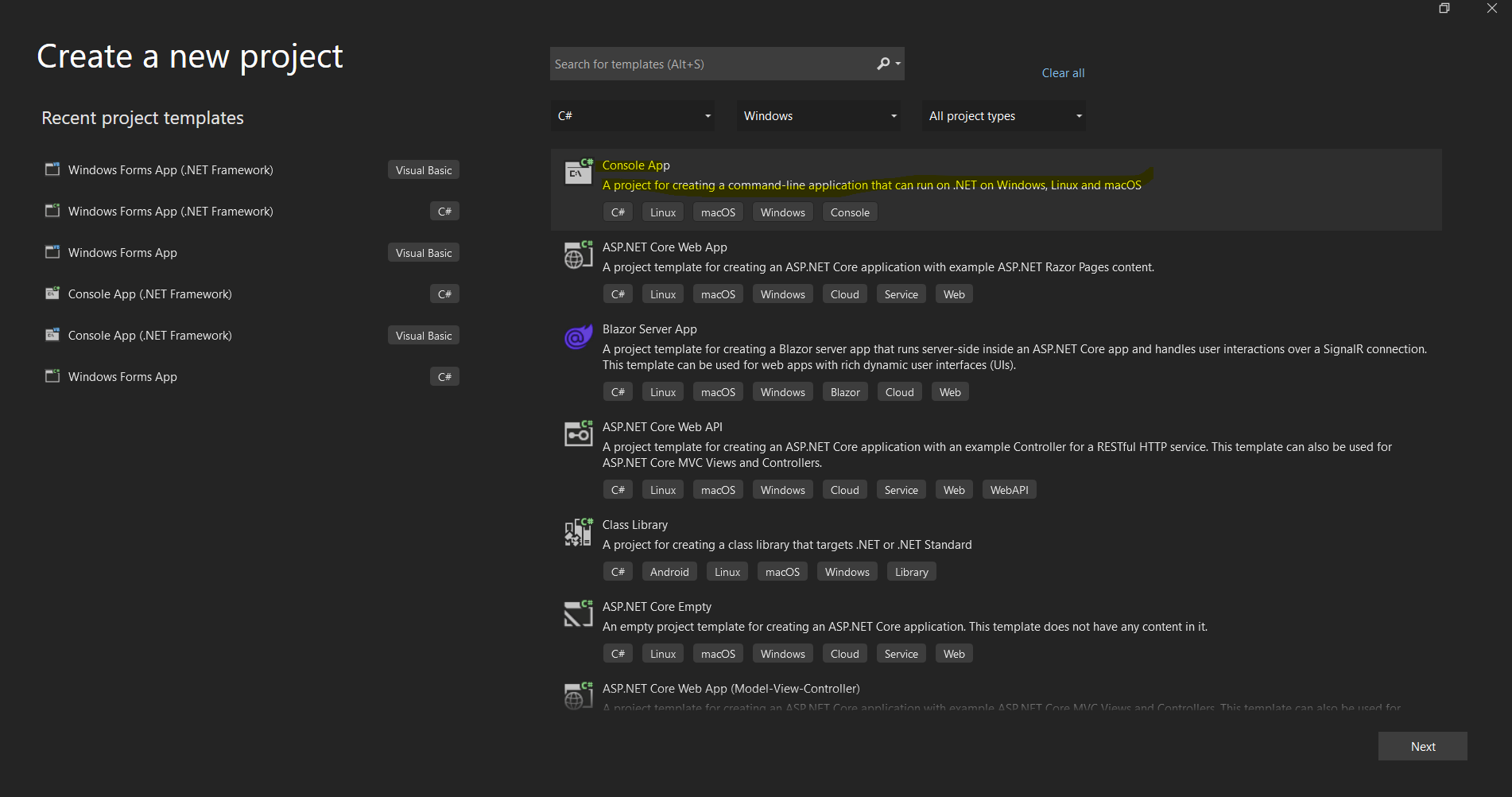 新しい.NETアプリケーションをセットアップするためのVisual Studioのプロジェクト作成ダイアログ
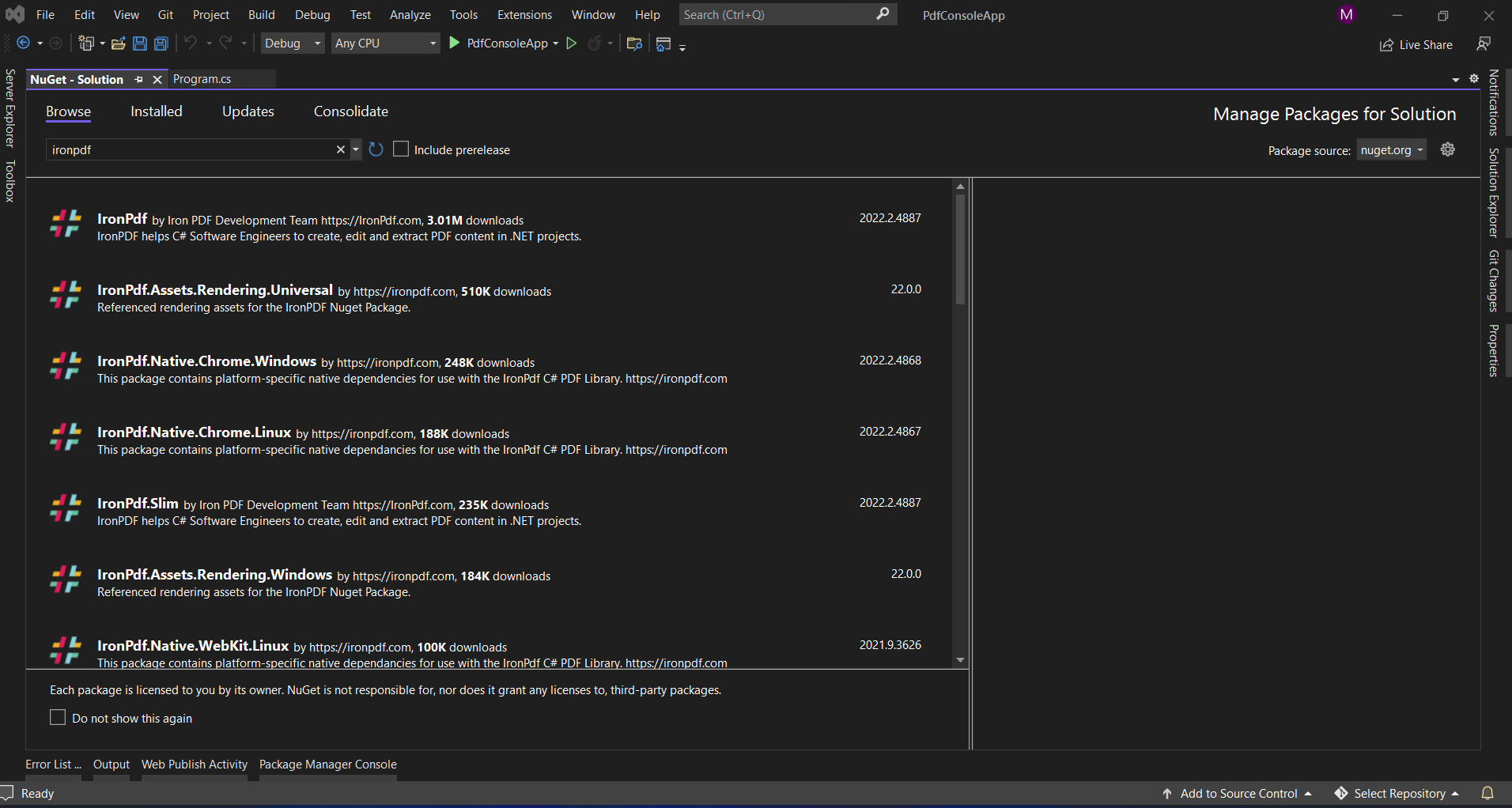 Visual StudioのNuGetパッケージマネージャーインターフェースを通じてIronPDFをインストールする
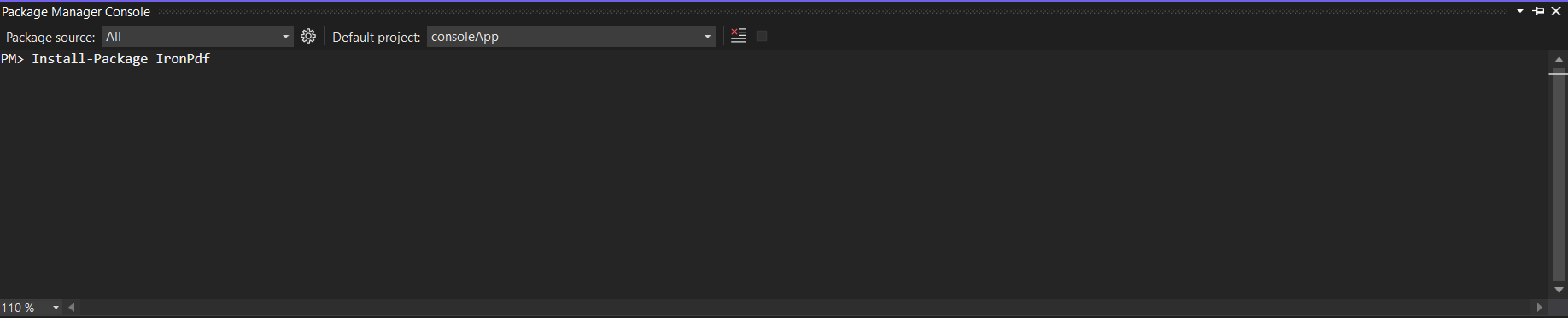 パッケージマネージャーコンソールを使用して、1つのコマンドでIronPDFをインストール

















