using IronPdf;

// Disable local disk access or cross-origin requests
Installation.EnableWebSecurity = true;

// Instantiate Renderer
var renderer = new ChromePdfRenderer();

// Create a PDF from a HTML string using C#
var pdf = renderer.RenderHtmlAsPdf("<h1>Hello World</h1>");

// Export to a file or Stream
pdf.SaveAs("output.pdf");

// Advanced Example with HTML Assets
// Load external html assets: Images, CSS and JavaScript.
// An optional BasePath 'C:\site\assets\' is set as the file location to load assets from
var myAdvancedPdf = renderer.RenderHtmlAsPdf("<img src='icons/iron.png'>", @"C:\site\assets\");
myAdvancedPdf.SaveAs("html-with-assets.pdf");
using IronPdf;// Disable local disk access or cross-origin requestsInstallation.EnableWebSecurity = true;// Instantiate Renderervar renderer = new ChromePdfRenderer();// Create a PDF from a HTML string using C#var pdf = renderer.RenderHtmlAsPdf("<h1>Hello World</h1>");// Export to a file or Streampdf.SaveAs("output.pdf");// Advanced Example with HTML Assets// Load external html assets: Images, CSS and JavaScript.// An optional BasePath 'C:\site\assets\' is set as the file location to load assets fromvar myAdvancedPdf = renderer.RenderHtmlAsPdf("<img src='icons/iron.png'>", @"C:\site\assets\");myAdvancedPdf.SaveAs("html-with-assets.pdf");
PDF文件在各个行业被广泛用于开具发票和创建各种文档类型等任务,能够有效地满足客户需求。 在开发需要生成 PDF 的.NET应用程序时,选择合适的库可以极大地影响您的开发速度、输出质量和长期维护成本。 IronPDF和 ABCpdf 是开发人员经常考虑的两个库——但哪一个才能真正更好地满足您的特定需求呢?
本次全面比较考察了两个库的功能,从 HTML 到 PDF 的转换准确性到许可模式,帮助您做出明智的决定。 我们将考察实际性能指标、API 设计理念和实际代码示例,以展示每个库的优势和局限性。 无论您是构建每天生成数千张发票的 SaaS 平台,还是需要精确文档渲染的Enterprise应用程序,了解这些差异对于项目的成功都至关重要。
什么是 IronPDF?
IronPDF是一个商业级的 PDF 生成库,可以帮助 C# 软件工程师在.NET项目中编辑、提取和生成 PDF 文档。 IronPDF 的核心是基于 Chrome 浏览器的渲染引擎,它能将 HTML、CSS 和 JavaScript 转换为 PDF,其保真度与您在 Google Chrome 浏览器中打印网页时的效果相同。
IronPDF 的主要功能
IronPDF 使用 .NET Chromium 引擎将 HTML 页面渲染为 PDF 文件。 使用 HTML-to-PDF 无需使用复杂的 API 来定位或设计 PDF。 IronPDF 支持标准网络文档:HTML、ASPX、JS、CSS 和图像。 该库架构优先考虑开发者体验,保持专业输出质量。
卓越的 HTML 到 PDF 转换
完全支持 HTML,包括 HTML5 语义元素
完全支持 CSS3,包括 Flexbox、网格和现代布局技术
执行 JavaScript 以呈现动态内容
Web 字体支持包括 Google 字体和自定义 @font-face 声明
采用视口控制的响应式设计渲染
可配置等待时间的 AJAX 内容加载
文档操作能力
-**合并和拆分:**通过单个方法调用合并多个 PDF 或提取特定页面
-**页眉和页脚:**添加动态内容,包括页码、日期和自定义 HTML
-**水印:**添加文本或图像水印,并可控制其不透明度和位置。
-**表单管理:**自动从 HTML 表单元素创建可填写的 PDF 表单
-**数字签名:**应用加密签名和证书管理
-**加密:**实现具有细粒度权限的 128 位和 256 位 AES 加密
1.从 WebSupergoo 网站下载
2.解压 ZIP 文件
3.添加对相应 DLL 的引用
4.将本地依赖项复制到输出目录
ABCpdf 的方法:多引擎灵活性
ABCpdf 需要在非 Windows 平台上进行额外设置:
<!-- For Linux deployment --><PackageReference Include="ABCpdf.Linux" Version="13.0.0.0" />
<!-- For Linux deployment -->
<PackageReference Include="ABCpdf.Linux" Version="13.0.0.0" />
XML
这些库如何处理 HTML 到 PDF 的转换?
了解每个库将 HTML 转换为 PDF 的基本方法差异有助于解释它们的不同功能和性能特点。
IronPDF 的方法:Chrome 优先架构
IronPDF 使用完整的 Chrome 浏览器引擎,具有多项优势:
using IronPdf;// IronPDF's approach - Chrome rendering with full browser capabilitiesvar renderer = new ChromePdfRenderer();// Configure rendering to match Chrome's print preview exactlyrenderer.RenderingOptions = ChromePdfRenderOptions.DefaultChrome;// Or customize for specific needsrenderer.RenderingOptions.CssMediaType = PdfCssMediaType.Screen;renderer.RenderingOptions.EnableJavaScript = true;renderer.RenderingOptions.WaitFor.RenderDelay(500); // Wait for JS execution// Convert complex HTML with modern CSS and JavaScriptstring complexHtml = @"<!DOCTYPE html><html><head> <style> @import url('https://fonts.googleapis.com/css2?family=Roboto:wght@300;700&display=swap'); .container { display: grid; grid-template-columns: repeat(auto-fit, minmax(250px, 1fr)); gap: 20px; font-family: 'Roboto', sans-serif; } .card { background: linear-gradient(135deg, #667eea 0%, #764ba2 100%); border-radius: 10px; padding: 20px; color: white; box-shadow: 0 10px 20px rgba(0,0,0,0.19); transform: translateY(0); transition: transform 0.3s; } @media print { .card { break-inside: avoid; } } </style></head><body> <div class='container'> <div class='card'> <h2>Modern CSS Support</h2> <p>Grid, Flexbox, Gradients, Shadows - all rendered perfectly</p> </div> <div class='card'> <h2>网络字体</h2> <p>Google Fonts and custom fonts work seamlessly</p> </div> </div> <script> // Dynamic content generation document.addEventListener('DOMContentLoaded', function() { const container = document.querySelector('.container'); const dynamicCard = document.createElement('div'); dynamicCard.className = 'card'; dynamicCard.innerHTML = '<h2>JavaScript Generated</h2><p>This card was added by JavaScript</p>'; container.appendChild(dynamicCard); }); </script></body></html>";var pdf = renderer.RenderHtmlAsPdf(complexHtml);pdf.SaveAs("modern-web-features.pdf");
using IronPdf;

// IronPDF's approach - Chrome rendering with full browser capabilities
var renderer = new ChromePdfRenderer();

// Configure rendering to match Chrome's print preview exactly
renderer.RenderingOptions = ChromePdfRenderOptions.DefaultChrome;

// Or customize for specific needs
renderer.RenderingOptions.CssMediaType = PdfCssMediaType.Screen;
renderer.RenderingOptions.EnableJavaScript = true;
renderer.RenderingOptions.WaitFor.RenderDelay(500); // Wait for JS execution

// Convert complex HTML with modern CSS and JavaScript
string complexHtml = @"
<!DOCTYPE html>
<html>
<head>
    <style>
        @import url('https://fonts.googleapis.com/css2?family=Roboto:wght@300;700&display=swap');

        .container {
            display: grid;
            grid-template-columns: repeat(auto-fit, minmax(250px, 1fr));
            gap: 20px;
            font-family: 'Roboto', sans-serif;
        }

        .card {
            background: linear-gradient(135deg, #667eea 0%, #764ba2 100%);
            border-radius: 10px;
            padding: 20px;
            color: white;
            box-shadow: 0 10px 20px rgba(0,0,0,0.19);
            transform: translateY(0);
            transition: transform 0.3s;
        }

        @media print {
            .card { break-inside: avoid; }
        }
    </style>
</head>
<body>
    <div class='container'>
        <div class='card'>
            <h2>Modern CSS Support</h2>
            <p>Grid, Flexbox, Gradients, Shadows - all rendered perfectly</p>
        </div>
        <div class='card'>
            <h2>网络字体</h2>
            <p>Google Fonts and custom fonts work seamlessly</p>
        </div>
    </div>
    <script>
        // Dynamic content generation
        document.addEventListener('DOMContentLoaded', function() {
            const container = document.querySelector('.container');
            const dynamicCard = document.createElement('div');
            dynamicCard.className = 'card';
            dynamicCard.innerHTML = '<h2>JavaScript Generated</h2><p>This card was added by JavaScript</p>';
            container.appendChild(dynamicCard);
        });
    </script>
</body>
</html>";

var pdf = renderer.RenderHtmlAsPdf(complexHtml);
pdf.SaveAs("modern-web-features.pdf");
C#
这段代码展示了 IronPDF 基于 Chrome 浏览器的几大优势:
1.**现代 CSS 支持:**网格布局、Flexbox、渐变和变换等功能与在 Chrome 浏览器中完全相同。
2.网页字体集成: Google 字体无需额外配置即可自动加载
3. **JavaScript执行:**动态内容生成发生在 PDF 渲染之前
4.**媒体查询:**已正确应用印刷专用样式
ABCpdf 的方法:多引擎灵活性
ABCpdf 提供多种渲染引擎,每种引擎都有不同的功能:
using WebSupergoo.ABCpdf13;// Method 1: Using ABCChrome engine (most modern)Doc chromeDoc = new Doc();chromeDoc.HtmlOptions.Engine = EngineType.Chrome;chromeDoc.HtmlOptions.Chrome.SetUserAgent("Mozilla/5.0 (Windows NT 10.0; Win64; x64) AppleWebKit/537.36");// Chrome engine supports modern web standardsint chromeId = chromeDoc.AddImageUrl("https://example.com");// Chain pages if content overflowswhile (chromeDoc.Chainable(chromeId)){ chromeDoc.Page = chromeDoc.AddPage(); chromeId = chromeDoc.AddImageToChain(chromeId);}chromeDoc.Save("chrome-engine-output.pdf");// Method 2: Using Gecko engine (Firefox-based)Doc geckoDoc = new Doc();geckoDoc.HtmlOptions.Engine = EngineType.Gecko;geckoDoc.HtmlOptions.UseScript = true; // Enable JavaScript// Gecko provides good standards support with lower resource usagestring html = "<html><body><h1>Gecko Rendered Content</h1></body></html>";geckoDoc.AddImageHtml(html);geckoDoc.Save("gecko-engine-output.pdf");// Method 3: Using MSHTML engine (IE-based, legacy support)Doc ieDoc = new Doc();ieDoc.HtmlOptions.Engine = EngineType.MSHtml;// MSHTML is faster but with limited modern CSS supportieDoc.AddImageUrl("https://legacy-app.example.com");ieDoc.Save("ie-engine-output.pdf");
using WebSupergoo.ABCpdf13;

// Method 1: Using ABCChrome engine (most modern)
Doc chromeDoc = new Doc();
chromeDoc.HtmlOptions.Engine = EngineType.Chrome;
chromeDoc.HtmlOptions.Chrome.SetUserAgent("Mozilla/5.0 (Windows NT 10.0; Win64; x64) AppleWebKit/537.36");

// Chrome engine supports modern web standards
int chromeId = chromeDoc.AddImageUrl("https://example.com");

// Chain pages if content overflows
while (chromeDoc.Chainable(chromeId))
{
    chromeDoc.Page = chromeDoc.AddPage();
    chromeId = chromeDoc.AddImageToChain(chromeId);
}

chromeDoc.Save("chrome-engine-output.pdf");

// Method 2: Using Gecko engine (Firefox-based)
Doc geckoDoc = new Doc();
geckoDoc.HtmlOptions.Engine = EngineType.Gecko;
geckoDoc.HtmlOptions.UseScript = true; // Enable JavaScript

// Gecko provides good standards support with lower resource usage
string html = "<html><body><h1>Gecko Rendered Content</h1></body></html>";
geckoDoc.AddImageHtml(html);
geckoDoc.Save("gecko-engine-output.pdf");

// Method 3: Using MSHTML engine (IE-based, legacy support)
Doc ieDoc = new Doc();
ieDoc.HtmlOptions.Engine = EngineType.MSHtml;

// MSHTML is faster but with limited modern CSS support
ieDoc.AddImageUrl("https://legacy-app.example.com");
ieDoc.Save("ie-engine-output.pdf");
ImportsWebSupergoo.ABCpdf13' Method 1: Using ABCChrome engine (most modern)Private chromeDoc As New Doc()chromeDoc.HtmlOptions.Engine = EngineType.ChromechromeDoc.HtmlOptions.Chrome.SetUserAgent("Mozilla/5.0 (Windows NT 10.0; Win64; x64) AppleWebKit/537.36")' Chrome engine supports modern web standardsDim chromeId AsInteger = chromeDoc.AddImageUrl("https://example.com")' Chain pages if content overflowsDo While chromeDoc.Chainable(chromeId) chromeDoc.Page = chromeDoc.AddPage() chromeId = chromeDoc.AddImageToChain(chromeId)LoopchromeDoc.Save("chrome-engine-output.pdf")' Method 2: Using Gecko engine (Firefox-based)Dim geckoDoc As New Doc()geckoDoc.HtmlOptions.Engine = EngineType.GeckogeckoDoc.HtmlOptions.UseScript = True ' Enable JavaScript' Gecko provides good standards support with lower resource usageDim html AsString = "<html><body><h1>Gecko Rendered Content</h1></body></html>"geckoDoc.AddImageHtml(html)geckoDoc.Save("gecko-engine-output.pdf")' Method 3: Using MSHTML engine (IE-based, legacy support)Dim ieDoc As New Doc()ieDoc.HtmlOptions.Engine = EngineType.MSHtml' MSHTML is faster but with limited modern CSS supportieDoc.AddImageUrl("https://legacy-app.example.com")ieDoc.Save("ie-engine-output.pdf")
Imports WebSupergoo.ABCpdf13

' Method 1: Using ABCChrome engine (most modern)
Private chromeDoc As New Doc()
chromeDoc.HtmlOptions.Engine = EngineType.Chrome
chromeDoc.HtmlOptions.Chrome.SetUserAgent("Mozilla/5.0 (Windows NT 10.0; Win64; x64) AppleWebKit/537.36")

' Chrome engine supports modern web standards
Dim chromeId As Integer = chromeDoc.AddImageUrl("https://example.com")

' Chain pages if content overflows
Do While chromeDoc.Chainable(chromeId)
	chromeDoc.Page = chromeDoc.AddPage()
	chromeId = chromeDoc.AddImageToChain(chromeId)
Loop

chromeDoc.Save("chrome-engine-output.pdf")

' Method 2: Using Gecko engine (Firefox-based)
Dim geckoDoc As New Doc()
geckoDoc.HtmlOptions.Engine = EngineType.Gecko
geckoDoc.HtmlOptions.UseScript = True ' Enable JavaScript

' Gecko provides good standards support with lower resource usage
Dim html As String = "<html><body><h1>Gecko Rendered Content</h1></body></html>"
geckoDoc.AddImageHtml(html)
geckoDoc.Save("gecko-engine-output.pdf")

' Method 3: Using MSHTML engine (IE-based, legacy support)
Dim ieDoc As New Doc()
ieDoc.HtmlOptions.Engine = EngineType.MSHtml

' MSHTML is faster but with limited modern CSS support
ieDoc.AddImageUrl("https://legacy-app.example.com")
ieDoc.Save("ie-engine-output.pdf")
using WebSupergoo.ABCpdf13;using System;public class ABCpdfUrlConverter{ public static voidConvertUrlWithABCpdf() { using (Doc theDoc = new Doc()) { // Configure the HTML engine theDoc.HtmlOptions.Engine = EngineType.Chrome; theDoc.HtmlOptions.Chrome.LoadDelay = 1000; // Wait 1 second // Set viewport size theDoc.HtmlOptions.BrowserWidth = 1200; // Authentication theDoc.HtmlOptions.HttpAdditionalHeaders = "Authorization: Bearer your-token"; // Page setup theDoc.Rect.Inset(20, 20); theDoc.Page = theDoc.AddPage(); // Add the URL int theID = theDoc.AddImageUrl("https://github.com/trending"); // Chain pages for overflow content while (true) { if (!theDoc.Chainable(theID)) break; theDoc.Page = theDoc.AddPage(); theID = theDoc.AddImageToChain(theID); } // Reduce file size for (int i = 1; i <= theDoc.PageCount; i++) { theDoc.PageNumber = i; theDoc.Flatten(); } // Save theDoc.Save("abcpdf-github.pdf"); } }}
using WebSupergoo.ABCpdf13;
using System;

public class ABCpdfUrlConverter
{
    public static void ConvertUrlWithABCpdf()
    {
        using (Doc theDoc = new Doc())
        {
            // Configure the HTML engine
            theDoc.HtmlOptions.Engine = EngineType.Chrome;
            theDoc.HtmlOptions.Chrome.LoadDelay = 1000; // Wait 1 second

            // Set viewport size
            theDoc.HtmlOptions.BrowserWidth = 1200;

            // Authentication
            theDoc.HtmlOptions.HttpAdditionalHeaders = "Authorization: Bearer your-token";

            // Page setup
            theDoc.Rect.Inset(20, 20);
            theDoc.Page = theDoc.AddPage();

            // Add the URL
            int theID = theDoc.AddImageUrl("https://github.com/trending");

            // Chain pages for overflow content
            while (true)
            {
                if (!theDoc.Chainable(theID))
                    break;
                theDoc.Page = theDoc.AddPage();
                theID = theDoc.AddImageToChain(theID);
            }

            // Reduce file size
            for (int i = 1; i <= theDoc.PageCount; i++)
            {
                theDoc.PageNumber = i;
                theDoc.Flatten();
            }

            // Save
            theDoc.Save("abcpdf-github.pdf");
        }
    }
}
ImportsWebSupergoo.ABCpdf13ImportsSystemPublic Class ABCpdfUrlConverter PublicShared Sub ConvertUrlWithABCpdf()Using theDoc As New Doc() ' Configure the HTML engine theDoc.HtmlOptions.Engine = EngineType.Chrome theDoc.HtmlOptions.Chrome.LoadDelay = 1000 ' Wait 1 second ' Set viewport size theDoc.HtmlOptions.BrowserWidth = 1200 ' Authentication theDoc.HtmlOptions.HttpAdditionalHeaders = "Authorization: Bearer your-token" ' Page setup theDoc.Rect.Inset(20, 20) theDoc.Page = theDoc.AddPage() ' Add the URL Dim theID AsInteger = theDoc.AddImageUrl("https://github.com/trending") ' Chain pages for overflow content Do IfNot theDoc.Chainable(theID) Then Exit Do theDoc.Page = theDoc.AddPage() theID = theDoc.AddImageToChain(theID) Loop ' Reduce file size For i AsInteger = 1 To theDoc.PageCount theDoc.PageNumber = i theDoc.Flatten() Next ' Save theDoc.Save("abcpdf-github.pdf")EndUsing End SubEnd Class
Imports WebSupergoo.ABCpdf13
Imports System

Public Class ABCpdfUrlConverter
    Public Shared Sub ConvertUrlWithABCpdf()
        Using theDoc As New Doc()
            ' Configure the HTML engine
            theDoc.HtmlOptions.Engine = EngineType.Chrome
            theDoc.HtmlOptions.Chrome.LoadDelay = 1000 ' Wait 1 second

            ' Set viewport size
            theDoc.HtmlOptions.BrowserWidth = 1200

            ' Authentication
            theDoc.HtmlOptions.HttpAdditionalHeaders = "Authorization: Bearer your-token"

            ' Page setup
            theDoc.Rect.Inset(20, 20)
            theDoc.Page = theDoc.AddPage()

            ' Add the URL
            Dim theID As Integer = theDoc.AddImageUrl("https://github.com/trending")

            ' Chain pages for overflow content
            Do
                If Not theDoc.Chainable(theID) Then Exit Do
                theDoc.Page = theDoc.AddPage()
                theID = theDoc.AddImageToChain(theID)
            Loop

            ' Reduce file size
            For i As Integer = 1 To theDoc.PageCount
                theDoc.PageNumber = i
                theDoc.Flatten()
            Next

            ' Save
            theDoc.Save("abcpdf-github.pdf")
        End Using
    End Sub
End Class
using WebSupergoo.ABCpdf13;public class ABCpdfHtmlString{ public static voidCreateStyledDocument() { using (Doc theDoc = new Doc()) { // Set up the document theDoc.Rect.Inset(40, 40); theDoc.Color.String = "0 0 0"; // Black text // Add styled HTML content theDoc.FontSize = 48; string styledHtml = @" <h1 style='color: #0066cc'>ABCpdf Document</h1> <p style='font-size: 14pt; line-height: 1.5'> This demonstrates <b>bold text</b>, <i>italic text</i>, and <span style='color: red'>colored text</span>. </p> <ul style='margin-left: 20px'> <li>First item</li> <li>Second item</li> <li>Third item</li> </ul>"; // Add HTML with automatic text flow int theID = theDoc.AddImageHtml(styledHtml); // Continue on new pages if needed while (true) { if (!theDoc.Chainable(theID)) break; theDoc.Page = theDoc.AddPage(); theID = theDoc.AddImageToChain(theID); } // Apply compression theDoc.Encryption.Type = 2; // 128-bit encryption theDoc.Encryption.CanPrint = true; theDoc.Encryption.CanModify = false; theDoc.Save("styled-abcpdf.pdf"); } }}
using WebSupergoo.ABCpdf13;

public class ABCpdfHtmlString
{
    public static void CreateStyledDocument()
    {
        using (Doc theDoc = new Doc())
        {
            // Set up the document
            theDoc.Rect.Inset(40, 40);
            theDoc.Color.String = "0 0 0"; // Black text

            // Add styled HTML content
            theDoc.FontSize = 48;
            string styledHtml = @"
                <h1 style='color: #0066cc'>ABCpdf Document</h1>
                <p style='font-size: 14pt; line-height: 1.5'>
                    This demonstrates <b>bold text</b>, <i>italic text</i>,
                    and <span style='color: red'>colored text</span>.
                </p>
                <ul style='margin-left: 20px'>
                    <li>First item</li>
                    <li>Second item</li>
                    <li>Third item</li>
                </ul>";

            // Add HTML with automatic text flow
            int theID = theDoc.AddImageHtml(styledHtml);

            // Continue on new pages if needed
            while (true)
            {
                if (!theDoc.Chainable(theID))
                    break;
                theDoc.Page = theDoc.AddPage();
                theID = theDoc.AddImageToChain(theID);
            }

            // Apply compression
            theDoc.Encryption.Type = 2; // 128-bit encryption
            theDoc.Encryption.CanPrint = true;
            theDoc.Encryption.CanModify = false;

            theDoc.Save("styled-abcpdf.pdf");
        }
    }
}
ImportsWebSupergoo.ABCpdf13Public Class ABCpdfHtmlString PublicShared Sub CreateStyledDocument()Using theDoc As New Doc() ' Set up the document theDoc.Rect.Inset(40, 40) theDoc.Color.String = "0 0 0" ' Black text ' Add styled HTML content theDoc.FontSize = 48 Dim styledHtml AsString = " <h1 style='color: #0066cc'>ABCpdf Document</h1> <p style='font-size: 14pt; line-height: 1.5'> This demonstrates <b>bold text</b>, <i>italic text</i>, and <span style='color: red'>colored text</span>. </p> <ul style='margin-left: 20px'> <li>First item</li> <li>Second item</li> <li>Third item</li> </ul>" ' Add HTML with automatic text flow Dim theID AsInteger = theDoc.AddImageHtml(styledHtml) ' Continue on new pages if needed While True IfNot theDoc.Chainable(theID) ThenExitWhile End If theDoc.Page = theDoc.AddPage() theID = theDoc.AddImageToChain(theID)EndWhile ' Apply compression theDoc.Encryption.Type = 2 ' 128-bit encryption theDoc.Encryption.CanPrint = True theDoc.Encryption.CanModify = False theDoc.Save("styled-abcpdf.pdf")EndUsing End SubEnd Class
Imports WebSupergoo.ABCpdf13

Public Class ABCpdfHtmlString
    Public Shared Sub CreateStyledDocument()
        Using theDoc As New Doc()
            ' Set up the document
            theDoc.Rect.Inset(40, 40)
            theDoc.Color.String = "0 0 0" ' Black text

            ' Add styled HTML content
            theDoc.FontSize = 48
            Dim styledHtml As String = "
                <h1 style='color: #0066cc'>ABCpdf Document</h1>
                <p style='font-size: 14pt; line-height: 1.5'>
                    This demonstrates <b>bold text</b>, <i>italic text</i>,
                    and <span style='color: red'>colored text</span>.
                </p>
                <ul style='margin-left: 20px'>
                    <li>First item</li>
                    <li>Second item</li>
                    <li>Third item</li>
                </ul>"

            ' Add HTML with automatic text flow
            Dim theID As Integer = theDoc.AddImageHtml(styledHtml)

            ' Continue on new pages if needed
            While True
                If Not theDoc.Chainable(theID) Then
                    Exit While
                End If
                theDoc.Page = theDoc.AddPage()
                theID = theDoc.AddImageToChain(theID)
            End While

            ' Apply compression
            theDoc.Encryption.Type = 2 ' 128-bit encryption
            theDoc.Encryption.CanPrint = True
            theDoc.Encryption.CanModify = False

            theDoc.Save("styled-abcpdf.pdf")
        End Using
    End Sub
End Class
性能基准测试
了解性能特点有助于为您的特定用例选择合适的库。
基准测试设置
using BenchmarkDotNet.Attributes;using BenchmarkDotNet.Running;using IronPdf;using WebSupergoo.ABCpdf13;[MemoryDiagnoser][SimpleJob(warmupCount: 3, targetCount: 10)]public class PdfGenerationBenchmark{ private string _simpleHtml; private string _complexHtml; private ChromePdfRenderer _ironPdfRenderer; private Doc _abcPdfDoc; [GlobalSetup] public voidSetup() { _simpleHtml = "<h1>Simple Document</h1><p>Basic paragraph text.</p>"; _complexHtml = File.ReadAllText("complex-page.html"); // 50KB HTML with CSS/JS _ironPdfRenderer = new ChromePdfRenderer(); _abcPdfDoc = new Doc(); _abcPdfDoc.HtmlOptions.Engine = EngineType.Chrome; } [Benchmark] public voidIronPDF_SimpleHtml() { var pdf = _ironPdfRenderer.RenderHtmlAsPdf(_simpleHtml); pdf.SaveAs("temp_iron_simple.pdf"); } [Benchmark] public voidABCpdf_SimpleHtml() { _abcPdfDoc.Clear(); _abcPdfDoc.AddImageHtml(_simpleHtml); _abcPdfDoc.Save("temp_abc_simple.pdf"); } [Benchmark] public voidIronPDF_ComplexHtml() { var pdf = _ironPdfRenderer.RenderHtmlAsPdf(_complexHtml); pdf.SaveAs("temp_iron_complex.pdf"); } [Benchmark] public voidABCpdf_ComplexHtml() { _abcPdfDoc.Clear(); int id = _abcPdfDoc.AddImageHtml(_complexHtml); while (_abcPdfDoc.Chainable(id)) { _abcPdfDoc.Page = _abcPdfDoc.AddPage(); id = _abcPdfDoc.AddImageToChain(id); } _abcPdfDoc.Save("temp_abc_complex.pdf"); }}
using BenchmarkDotNet.Attributes;
using BenchmarkDotNet.Running;
using IronPdf;
using WebSupergoo.ABCpdf13;

[MemoryDiagnoser]
[SimpleJob(warmupCount: 3, targetCount: 10)]
public class PdfGenerationBenchmark
{
    private string _simpleHtml;
    private string _complexHtml;
    private ChromePdfRenderer _ironPdfRenderer;
    private Doc _abcPdfDoc;

    [GlobalSetup]
    public void Setup()
    {
        _simpleHtml = "<h1>Simple Document</h1><p>Basic paragraph text.</p>";
        _complexHtml = File.ReadAllText("complex-page.html"); // 50KB HTML with CSS/JS

        _ironPdfRenderer = new ChromePdfRenderer();
        _abcPdfDoc = new Doc();
        _abcPdfDoc.HtmlOptions.Engine = EngineType.Chrome;
    }

    [Benchmark]
    public void IronPDF_SimpleHtml()
    {
        var pdf = _ironPdfRenderer.RenderHtmlAsPdf(_simpleHtml);
        pdf.SaveAs("temp_iron_simple.pdf");
    }

    [Benchmark]
    public void ABCpdf_SimpleHtml()
    {
        _abcPdfDoc.Clear();
        _abcPdfDoc.AddImageHtml(_simpleHtml);
        _abcPdfDoc.Save("temp_abc_simple.pdf");
    }

    [Benchmark]
    public void IronPDF_ComplexHtml()
    {
        var pdf = _ironPdfRenderer.RenderHtmlAsPdf(_complexHtml);
        pdf.SaveAs("temp_iron_complex.pdf");
    }

    [Benchmark]
    public void ABCpdf_ComplexHtml()
    {
        _abcPdfDoc.Clear();
        int id = _abcPdfDoc.AddImageHtml(_complexHtml);
        while (_abcPdfDoc.Chainable(id))
        {
            _abcPdfDoc.Page = _abcPdfDoc.AddPage();
            id = _abcPdfDoc.AddImageToChain(id);
        }
        _abcPdfDoc.Save("temp_abc_complex.pdf");
    }
}
ImportsBenchmarkDotNet.AttributesImportsBenchmarkDotNet.RunningImportsIronPdfImportsWebSupergoo.ABCpdf13<MemoryDiagnoser><SimpleJob(warmupCount:=3, targetCount:=10)>Public Class PdfGenerationBenchmark Private _simpleHtml AsString Private _complexHtml AsString Private _ironPdfRenderer AsChromePdfRenderer Private _abcPdfDoc AsDoc <GlobalSetup> Public Sub Setup() _simpleHtml = "<h1>Simple Document</h1><p>Basic paragraph text.</p>" _complexHtml = File.ReadAllText("complex-page.html") ' 50KB HTML with CSS/JS _ironPdfRenderer = New ChromePdfRenderer() _abcPdfDoc = New Doc() _abcPdfDoc.HtmlOptions.Engine = EngineType.Chrome End Sub <Benchmark> Public Sub IronPDF_SimpleHtml() Dim pdf = _ironPdfRenderer.RenderHtmlAsPdf(_simpleHtml) pdf.SaveAs("temp_iron_simple.pdf") End Sub <Benchmark> Public Sub ABCpdf_SimpleHtml() _abcPdfDoc.Clear() _abcPdfDoc.AddImageHtml(_simpleHtml) _abcPdfDoc.Save("temp_abc_simple.pdf") End Sub <Benchmark> Public Sub IronPDF_ComplexHtml() Dim pdf = _ironPdfRenderer.RenderHtmlAsPdf(_complexHtml) pdf.SaveAs("temp_iron_complex.pdf") End Sub <Benchmark> Public Sub ABCpdf_ComplexHtml() _abcPdfDoc.Clear() Dim id AsInteger = _abcPdfDoc.AddImageHtml(_complexHtml) While _abcPdfDoc.Chainable(id) _abcPdfDoc.Page = _abcPdfDoc.AddPage() id = _abcPdfDoc.AddImageToChain(id)EndWhile _abcPdfDoc.Save("temp_abc_complex.pdf") End SubEnd Class
Imports BenchmarkDotNet.Attributes
Imports BenchmarkDotNet.Running
Imports IronPdf
Imports WebSupergoo.ABCpdf13

<MemoryDiagnoser>
<SimpleJob(warmupCount:=3, targetCount:=10)>
Public Class PdfGenerationBenchmark
    Private _simpleHtml As String
    Private _complexHtml As String
    Private _ironPdfRenderer As ChromePdfRenderer
    Private _abcPdfDoc As Doc

    <GlobalSetup>
    Public Sub Setup()
        _simpleHtml = "<h1>Simple Document</h1><p>Basic paragraph text.</p>"
        _complexHtml = File.ReadAllText("complex-page.html") ' 50KB HTML with CSS/JS

        _ironPdfRenderer = New ChromePdfRenderer()
        _abcPdfDoc = New Doc()
        _abcPdfDoc.HtmlOptions.Engine = EngineType.Chrome
    End Sub

    <Benchmark>
    Public Sub IronPDF_SimpleHtml()
        Dim pdf = _ironPdfRenderer.RenderHtmlAsPdf(_simpleHtml)
        pdf.SaveAs("temp_iron_simple.pdf")
    End Sub

    <Benchmark>
    Public Sub ABCpdf_SimpleHtml()
        _abcPdfDoc.Clear()
        _abcPdfDoc.AddImageHtml(_simpleHtml)
        _abcPdfDoc.Save("temp_abc_simple.pdf")
    End Sub

    <Benchmark>
    Public Sub IronPDF_ComplexHtml()
        Dim pdf = _ironPdfRenderer.RenderHtmlAsPdf(_complexHtml)
        pdf.SaveAs("temp_iron_complex.pdf")
    End Sub

    <Benchmark>
    Public Sub ABCpdf_ComplexHtml()
        _abcPdfDoc.Clear()
        Dim id As Integer = _abcPdfDoc.AddImageHtml(_complexHtml)
        While _abcPdfDoc.Chainable(id)
            _abcPdfDoc.Page = _abcPdfDoc.AddPage()
            id = _abcPdfDoc.AddImageToChain(id)
        End While
        _abcPdfDoc.Save("temp_abc_complex.pdf")
    End Sub
End Class
using IronPdf;using IronPdf.Signing;using System.Security.Cryptography.X509Certificates;public class SecurityFeatures{ public static voidApplyDigitalSignature() { // Load existing PDF var pdf = PdfDocument.FromFile("unsigned-document.pdf"); // Load certificate var cert = new X509Certificate2("certificate.pfx", "password"); // Create signature var signature = new PdfSignature(cert) { // Visual signature appearanceSignatureImage = new PdfSignature.SignatureImage {ImagePath = "signature.png",Width = 200,Height = 100 }, // Signature positionPageIndex = 0,X = 400,Y = 100, // Signature detailsReason = "Document approved",Location = "New York, NY",ContactInfo = "john.doe@company.com" }; // Apply signature pdf.Sign(signature); // Additional security pdf.SecuritySettings = new SecuritySettings {AllowUserPrinting = true,AllowUserCopyPasteContent = false,AllowUserEditing = false,AllowUserFormData = true,OwnerPassword = "owner123",UserPassword = "user123",EncryptionLevel = EncryptionLevel.AES256 }; pdf.SaveAs("signed-secured.pdf"); }}
using IronPdf;
using IronPdf.Signing;
using System.Security.Cryptography.X509Certificates;

public class SecurityFeatures
{
    public static void ApplyDigitalSignature()
    {
        // Load existing PDF
        var pdf = PdfDocument.FromFile("unsigned-document.pdf");

        // Load certificate
        var cert = new X509Certificate2("certificate.pfx", "password");

        // Create signature
        var signature = new PdfSignature(cert)
        {
            // Visual signature appearance
            SignatureImage = new PdfSignature.SignatureImage
            {
                ImagePath = "signature.png",
                Width = 200,
                Height = 100
            },

            // Signature position
            PageIndex = 0,
            X = 400,
            Y = 100,

            // Signature details
            Reason = "Document approved",
            Location = "New York, NY",
            ContactInfo = "john.doe@company.com"
        };

        // Apply signature
        pdf.Sign(signature);

        // Additional security
        pdf.SecuritySettings = new SecuritySettings
        {
            AllowUserPrinting = true,
            AllowUserCopyPasteContent = false,
            AllowUserEditing = false,
            AllowUserFormData = true,
            OwnerPassword = "owner123",
            UserPassword = "user123",
            EncryptionLevel = EncryptionLevel.AES256
        };

        pdf.SaveAs("signed-secured.pdf");
    }
}
ImportsIronPdfImportsIronPdf.SigningImportsSystem.Security.Cryptography.X509CertificatesPublic Class SecurityFeatures PublicShared Sub ApplyDigitalSignature() ' Load existing PDF Dim pdf = PdfDocument.FromFile("unsigned-document.pdf") ' Load certificate Dim cert = New X509Certificate2("certificate.pfx", "password") ' Create signature Dim signature = New PdfSignature(cert) With { ' Visual signature appearance .SignatureImage = New PdfSignature.SignatureImageWith { .ImagePath = "signature.png", .Width = 200, .Height = 100 }, ' Signature position .PageIndex = 0, .X = 400, .Y = 100, ' Signature details .Reason = "Document approved", .Location = "New York, NY", .ContactInfo = "john.doe@company.com" } ' Apply signature pdf.Sign(signature) ' Additional security pdf.SecuritySettings = New SecuritySettingsWith { .AllowUserPrinting = True, .AllowUserCopyPasteContent = False, .AllowUserEditing = False, .AllowUserFormData = True, .OwnerPassword = "owner123", .UserPassword = "user123", .EncryptionLevel = EncryptionLevel.AES256 } pdf.SaveAs("signed-secured.pdf") End SubEnd Class
Imports IronPdf
Imports IronPdf.Signing
Imports System.Security.Cryptography.X509Certificates

Public Class SecurityFeatures
    Public Shared Sub ApplyDigitalSignature()
        ' Load existing PDF
        Dim pdf = PdfDocument.FromFile("unsigned-document.pdf")

        ' Load certificate
        Dim cert = New X509Certificate2("certificate.pfx", "password")

        ' Create signature
        Dim signature = New PdfSignature(cert) With {
            ' Visual signature appearance
            .SignatureImage = New PdfSignature.SignatureImage With {
                .ImagePath = "signature.png",
                .Width = 200,
                .Height = 100
            },

            ' Signature position
            .PageIndex = 0,
            .X = 400,
            .Y = 100,

            ' Signature details
            .Reason = "Document approved",
            .Location = "New York, NY",
            .ContactInfo = "john.doe@company.com"
        }

        ' Apply signature
        pdf.Sign(signature)

        ' Additional security
        pdf.SecuritySettings = New SecuritySettings With {
            .AllowUserPrinting = True,
            .AllowUserCopyPasteContent = False,
            .AllowUserEditing = False,
            .AllowUserFormData = True,
            .OwnerPassword = "owner123",
            .UserPassword = "user123",
            .EncryptionLevel = EncryptionLevel.AES256
        }

        pdf.SaveAs("signed-secured.pdf")
    End Sub
End Class
ABCpdf 数字签名实现
using WebSupergoo.ABCpdf13;using WebSupergoo.ABCpdf13.Objects;public class ABCpdfSecurity{ public static voidSignDocument() { using (Doc theDoc = new Doc()) { theDoc.Read("unsigned-document.pdf"); // Create signature field Field signatureField = theDoc.Form.AddFieldSignature("AuthorSignature"); signatureField.Page = 1; signatureField.Rect = "400 100 600 200"; // Configure signature Signature theSig = signatureField.Sign(); theSig.Reason = "Document approved"; theSig.Location = "New York, NY"; theSig.ContactInfo = "john.doe@company.com"; // Load certificate theSig.LoadCertificate("certificate.pfx", "password"); // Apply visual signature theSig.Visible = true; theSig.Image = theDoc.AddImageFile("signature.png"); // Sign and save theDoc.Save("abcpdf-signed.pdf"); } }}
using WebSupergoo.ABCpdf13;
using WebSupergoo.ABCpdf13.Objects;

public class ABCpdfSecurity
{
    public static void SignDocument()
    {
        using (Doc theDoc = new Doc())
        {
            theDoc.Read("unsigned-document.pdf");

            // Create signature field
            Field signatureField = theDoc.Form.AddFieldSignature("AuthorSignature");
            signatureField.Page = 1;
            signatureField.Rect = "400 100 600 200";

            // Configure signature
            Signature theSig = signatureField.Sign();
            theSig.Reason = "Document approved";
            theSig.Location = "New York, NY";
            theSig.ContactInfo = "john.doe@company.com";

            // Load certificate
            theSig.LoadCertificate("certificate.pfx", "password");

            // Apply visual signature
            theSig.Visible = true;
            theSig.Image = theDoc.AddImageFile("signature.png");

            // Sign and save
            theDoc.Save("abcpdf-signed.pdf");
        }
    }
}
ImportsWebSupergoo.ABCpdf13ImportsWebSupergoo.ABCpdf13.ObjectsPublic Class ABCpdfSecurity PublicShared Sub SignDocument()Using theDoc As New Doc() theDoc.Read("unsigned-document.pdf") ' Create signature field Dim signatureField AsField = theDoc.Form.AddFieldSignature("AuthorSignature") signatureField.Page = 1 signatureField.Rect = "400 100 600 200" ' Configure signature Dim theSig AsSignature = signatureField.Sign() theSig.Reason = "Document approved" theSig.Location = "New York, NY" theSig.ContactInfo = "john.doe@company.com" ' Load certificate theSig.LoadCertificate("certificate.pfx", "password") ' Apply visual signature theSig.Visible = True theSig.Image = theDoc.AddImageFile("signature.png") ' Sign and save theDoc.Save("abcpdf-signed.pdf")EndUsing End SubEnd Class
Imports WebSupergoo.ABCpdf13
Imports WebSupergoo.ABCpdf13.Objects

Public Class ABCpdfSecurity
    Public Shared Sub SignDocument()
        Using theDoc As New Doc()
            theDoc.Read("unsigned-document.pdf")

            ' Create signature field
            Dim signatureField As Field = theDoc.Form.AddFieldSignature("AuthorSignature")
            signatureField.Page = 1
            signatureField.Rect = "400 100 600 200"

            ' Configure signature
            Dim theSig As Signature = signatureField.Sign()
            theSig.Reason = "Document approved"
            theSig.Location = "New York, NY"
            theSig.ContactInfo = "john.doe@company.com"

            ' Load certificate
            theSig.LoadCertificate("certificate.pfx", "password")

            ' Apply visual signature
            theSig.Visible = True
            theSig.Image = theDoc.AddImageFile("signature.png")

            ' Sign and save
            theDoc.Save("abcpdf-signed.pdf")
        End Using
    End Sub
End Class
表单处理和数据提取
构建云原生应用程序
public class FormHandling{ public static voidWorkWithForms() { // Create PDF with form fields from HTML var renderer = new ChromePdfRenderer(); renderer.RenderingOptions.CreatePdfFormsFromHtml = true; string formHtml = @" <form> <label>Name: <input type='text' name='fullname' required></label><br> <label>Email: <input type='email' name='email' required></label><br> <label>Subscribe: <input type='checkbox' name='subscribe' value='yes'></label><br> <label>Country: <select name='country'> <option>USA</option> <option>Canada</option> <option>UK</option> </select> </label><br> <button type='submit'>Submit</button> </form>"; var pdf = renderer.RenderHtmlAsPdf(formHtml); // Fill form programmatically pdf.Form.Fields["fullname"].Value = "John Doe"; pdf.Form.Fields["email"].Value = "john@example.com"; pdf.Form.Fields["subscribe"].Value = "yes"; pdf.Form.Fields["country"].Value = "USA"; // Extract form data foreach (var field in pdf.Form.Fields) {Console.WriteLine($"{field.Name}: {field.Value}"); } // Flatten form (make non-editable) pdf.Form.Flatten(); pdf.SaveAs("filled-form.pdf"); }}
public class FormHandling
{
    public static void WorkWithForms()
    {
        // Create PDF with form fields from HTML
        var renderer = new ChromePdfRenderer();
        renderer.RenderingOptions.CreatePdfFormsFromHtml = true;

        string formHtml = @"
        <form>
            <label>Name: <input type='text' name='fullname' required></label><br>
            <label>Email: <input type='email' name='email' required></label><br>
            <label>Subscribe: <input type='checkbox' name='subscribe' value='yes'></label><br>
            <label>Country:
                <select name='country'>
                    <option>USA</option>
                    <option>Canada</option>
                    <option>UK</option>
                </select>
            </label><br>
            <button type='submit'>Submit</button>
        </form>";

        var pdf = renderer.RenderHtmlAsPdf(formHtml);

        // Fill form programmatically
        pdf.Form.Fields["fullname"].Value = "John Doe";
        pdf.Form.Fields["email"].Value = "john@example.com";
        pdf.Form.Fields["subscribe"].Value = "yes";
        pdf.Form.Fields["country"].Value = "USA";

        // Extract form data
        foreach (var field in pdf.Form.Fields)
        {
            Console.WriteLine($"{field.Name}: {field.Value}");
        }

        // Flatten form (make non-editable)
        pdf.Form.Flatten();
        pdf.SaveAs("filled-form.pdf");
    }
}
Public Class FormHandling PublicShared Sub WorkWithForms() ' Create PDF with form fields from HTML Dim renderer = New ChromePdfRenderer() renderer.RenderingOptions.CreatePdfFormsFromHtml = True Dim formHtml AsString = " <form> <label>Name: <input type='text' name='fullname' required></label><br> <label>Email: <input type='email' name='email' required></label><br> <label>Subscribe: <input type='checkbox' name='subscribe' value='yes'></label><br> <label>Country: <select name='country'> <option>USA</option> <option>Canada</option> <option>UK</option> </select> </label><br> <button type='submit'>Submit</button> </form>" Dim pdf = renderer.RenderHtmlAsPdf(formHtml) ' Fill form programmatically pdf.Form.Fields("fullname").Value = "John Doe" pdf.Form.Fields("email").Value = "john@example.com" pdf.Form.Fields("subscribe").Value = "yes" pdf.Form.Fields("country").Value = "USA" ' Extract form data For Each field In pdf.Form.FieldsConsole.WriteLine($"{field.Name}: {field.Value}") Next ' Flatten form (make non-editable) pdf.Form.Flatten() pdf.SaveAs("filled-form.pdf") End SubEnd Class
Public Class FormHandling
    Public Shared Sub WorkWithForms()
        ' Create PDF with form fields from HTML
        Dim renderer = New ChromePdfRenderer()
        renderer.RenderingOptions.CreatePdfFormsFromHtml = True

        Dim formHtml As String = "
        <form>
            <label>Name: <input type='text' name='fullname' required></label><br>
            <label>Email: <input type='email' name='email' required></label><br>
            <label>Subscribe: <input type='checkbox' name='subscribe' value='yes'></label><br>
            <label>Country:
                <select name='country'>
                    <option>USA</option>
                    <option>Canada</option>
                    <option>UK</option>
                </select>
            </label><br>
            <button type='submit'>Submit</button>
        </form>"

        Dim pdf = renderer.RenderHtmlAsPdf(formHtml)

        ' Fill form programmatically
        pdf.Form.Fields("fullname").Value = "John Doe"
        pdf.Form.Fields("email").Value = "john@example.com"
        pdf.Form.Fields("subscribe").Value = "yes"
        pdf.Form.Fields("country").Value = "USA"

        ' Extract form data
        For Each field In pdf.Form.Fields
            Console.WriteLine($"{field.Name}: {field.Value}")
        Next

        ' Flatten form (make non-editable)
        pdf.Form.Flatten()
        pdf.SaveAs("filled-form.pdf")
    End Sub
End Class
批处理和优化
IronPDF 批量处理
using System.Threading.Tasks;using System.Collections.Concurrent;public class BatchProcessing{ public static async TaskProcessMultipleDocumentsAsync(List<string> htmlFiles) { var renderer = new ChromePdfRenderer(); renderer.RenderingOptions.PaperSize = PdfPaperSize.A4; // Use concurrent processing var pdfResults = new ConcurrentBag<(string filename, byte[] data)>(); awaitParallel.ForEachAsync(htmlFiles, async (htmlFile, ct) => { try { var html = awaitFile.ReadAllTextAsync(htmlFile); var pdf = await renderer.RenderHtmlAsPdfAsync(html); // Optimize each PDF pdf.CompressImages(70); var filename = Path.GetFileNameWithoutExtension(htmlFile) + ".pdf"; var data = pdf.BinaryData; pdfResults.Add((filename, data)); } catch (Exception ex) {Console.WriteLine($"Error processing {htmlFile}: {ex.Message}"); } }); // Merge all PDFs into one var finalPdf = new PdfDocument(); foreach (var (filename, data) in pdfResults.OrderBy(x => x.filename)) { var pdf = new PdfDocument(data); finalPdf.AppendPdf(pdf); } finalPdf.SaveAs("batch-processed.pdf"); }}
using System.Threading.Tasks;
using System.Collections.Concurrent;

public class BatchProcessing
{
    public static async Task ProcessMultipleDocumentsAsync(List<string> htmlFiles)
    {
        var renderer = new ChromePdfRenderer();
        renderer.RenderingOptions.PaperSize = PdfPaperSize.A4;

        // Use concurrent processing
        var pdfResults = new ConcurrentBag<(string filename, byte[] data)>();

        await Parallel.ForEachAsync(htmlFiles, async (htmlFile, ct) =>
        {
            try
            {
                var html = await File.ReadAllTextAsync(htmlFile);
                var pdf = await renderer.RenderHtmlAsPdfAsync(html);

                // Optimize each PDF
                pdf.CompressImages(70);

                var filename = Path.GetFileNameWithoutExtension(htmlFile) + ".pdf";
                var data = pdf.BinaryData;

                pdfResults.Add((filename, data));
            }
            catch (Exception ex)
            {
                Console.WriteLine($"Error processing {htmlFile}: {ex.Message}");
            }
        });

        // Merge all PDFs into one
        var finalPdf = new PdfDocument();
        foreach (var (filename, data) in pdfResults.OrderBy(x => x.filename))
        {
            var pdf = new PdfDocument(data);
            finalPdf.AppendPdf(pdf);
        }

        finalPdf.SaveAs("batch-processed.pdf");
    }
}
ImportsSystem.Threading.TasksImportsSystem.Collections.ConcurrentPublic Class BatchProcessing PublicSharedAsync Function ProcessMultipleDocumentsAsync(htmlFiles AsList(OfString)) AsTask Dim renderer = New ChromePdfRenderer() renderer.RenderingOptions.PaperSize = PdfPaperSize.A4 ' Use concurrent processing Dim pdfResults = New ConcurrentBag(Of (filename AsString, data AsByte()))()AwaitTask.Run(Sub()Parallel.ForEach(htmlFiles, Sub(htmlFile)Try Dim html = AwaitFile.ReadAllTextAsync(htmlFile) Dim pdf = Await renderer.RenderHtmlAsPdfAsync(html) ' Optimize each PDF pdf.CompressImages(70) Dim filename = Path.GetFileNameWithoutExtension(htmlFile) & ".pdf" Dim data = pdf.BinaryData pdfResults.Add((filename, data))Catch ex AsExceptionConsole.WriteLine($"Error processing {htmlFile}: {ex.Message}")EndTry End Sub) End Sub) ' Merge all PDFs into one Dim finalPdf = New PdfDocument() For Each result In pdfResults.OrderBy(Function(x) x.filename) Dim pdf = New PdfDocument(result.data) finalPdf.AppendPdf(pdf) Next finalPdf.SaveAs("batch-processed.pdf") End FunctionEnd Class
Imports System.Threading.Tasks
Imports System.Collections.Concurrent

Public Class BatchProcessing
    Public Shared Async Function ProcessMultipleDocumentsAsync(htmlFiles As List(Of String)) As Task
        Dim renderer = New ChromePdfRenderer()
        renderer.RenderingOptions.PaperSize = PdfPaperSize.A4

        ' Use concurrent processing
        Dim pdfResults = New ConcurrentBag(Of (filename As String, data As Byte()))()

        Await Task.Run(Sub()
                           Parallel.ForEach(htmlFiles, Sub(htmlFile)
                                                           Try
                                                               Dim html = Await File.ReadAllTextAsync(htmlFile)
                                                               Dim pdf = Await renderer.RenderHtmlAsPdfAsync(html)

                                                               ' Optimize each PDF
                                                               pdf.CompressImages(70)

                                                               Dim filename = Path.GetFileNameWithoutExtension(htmlFile) & ".pdf"
                                                               Dim data = pdf.BinaryData

                                                               pdfResults.Add((filename, data))
                                                           Catch ex As Exception
                                                               Console.WriteLine($"Error processing {htmlFile}: {ex.Message}")
                                                           End Try
                                                       End Sub)
                       End Sub)

        ' Merge all PDFs into one
        Dim finalPdf = New PdfDocument()
        For Each result In pdfResults.OrderBy(Function(x) x.filename)
            Dim pdf = New PdfDocument(result.data)
            finalPdf.AppendPdf(pdf)
        Next

        finalPdf.SaveAs("batch-processed.pdf")
    End Function
End Class
真实世界用例场景
开发跨平台解决方案
选择 IronPDF 时:
1.构建云原生应用程序
本地 Docker 支持,只需最少的配置
Azure Functions 和 AWS Lambda 兼容性
在所有云平台上保持行为一致
2.要求像素完美的 HTML 渲染。
复杂的 CSS 布局(网格、Flexbox)
JavaScript 繁重的单页面应用程序
网页字体要求
3.开发跨平台解决方案
针对 Windows、Linux 和 macOS 的应用程序
微服务架构
基于容器的部署
4.优先考虑开发体验
快速原型需求
小型开发团队
有限的 PDF 专业知识
选择 ABCpdf 时:
1.使用遗留系统
仅限 Windows 环境
现有的 ABCpdf 实现
兼容 IE 内容要求
2.要求使用特定的渲染引擎。
跨不同浏览器测试
特定引擎优化
支持传统浏览器
3.高级 PDF 操作
低级 PDF 对象访问
自定义 PDF 操作
复杂的文档合并场景
4.注重预算的项目
较低的入门价格
单开发者许可证
32 位环境兼容
ABCpdf 常见问题和解决方案
迁移指南:在库之间迁移
public class IronPdfTroubleshooting{ // Issue: Fonts not rendering correctly public static voidFixFontIssues() { var renderer = new ChromePdfRenderer(); // Solution 1: Wait for fonts to load renderer.RenderingOptions.WaitFor.RenderDelay(1000); // Solution 2: Use system fonts fallback renderer.RenderingOptions.CssMediaType = PdfCssMediaType.Print; } // Issue: JavaScript not executing public static voidFixJavaScriptIssues() { var renderer = new ChromePdfRenderer(); // Enable JavaScript and wait for execution renderer.RenderingOptions.EnableJavaScript = true; renderer.RenderingOptions.WaitFor.JavaScriptFinishDelay = 2000; renderer.RenderingOptions.WaitFor.AllowedExecutionTime = 30000; } // Issue: Memory usage in Docker public static voidOptimizeForDocker() { var renderer = new ChromePdfRenderer(); // Use single-threaded mode for containersIronPdf.Installation.SingleThreaded = true; // Reduce memory footprint renderer.RenderingOptions.ViewPortWidth = 1024; renderer.RenderingOptions.EnableGrayscale = true; }}
public class IronPdfTroubleshooting
{
    // Issue: Fonts not rendering correctly
    public static void FixFontIssues()
    {
        var renderer = new ChromePdfRenderer();

        // Solution 1: Wait for fonts to load
        renderer.RenderingOptions.WaitFor.RenderDelay(1000);

        // Solution 2: Use system fonts fallback
        renderer.RenderingOptions.CssMediaType = PdfCssMediaType.Print;
    }

    // Issue: JavaScript not executing
    public static void FixJavaScriptIssues()
    {
        var renderer = new ChromePdfRenderer();

        // Enable JavaScript and wait for execution
        renderer.RenderingOptions.EnableJavaScript = true;
        renderer.RenderingOptions.WaitFor.JavaScriptFinishDelay = 2000;
        renderer.RenderingOptions.WaitFor.AllowedExecutionTime = 30000;
    }

    // Issue: Memory usage in Docker
    public static void OptimizeForDocker()
    {
        var renderer = new ChromePdfRenderer();

        // Use single-threaded mode for containers
        IronPdf.Installation.SingleThreaded = true;

        // Reduce memory footprint
        renderer.RenderingOptions.ViewPortWidth = 1024;
        renderer.RenderingOptions.EnableGrayscale = true;
    }
}
Public Class IronPdfTroubleshooting ' Issue: Fonts not rendering correctly PublicShared Sub FixFontIssues() Dim renderer As New ChromePdfRenderer() ' Solution 1: Wait for fonts to load renderer.RenderingOptions.WaitFor.RenderDelay(1000) ' Solution 2: Use system fonts fallback renderer.RenderingOptions.CssMediaType = PdfCssMediaType.Print End Sub ' Issue: JavaScript not executing PublicShared Sub FixJavaScriptIssues() Dim renderer As New ChromePdfRenderer() ' Enable JavaScript and wait for execution renderer.RenderingOptions.EnableJavaScript = True renderer.RenderingOptions.WaitFor.JavaScriptFinishDelay = 2000 renderer.RenderingOptions.WaitFor.AllowedExecutionTime = 30000 End Sub ' Issue: Memory usage in Docker PublicShared Sub OptimizeForDocker() Dim renderer As New ChromePdfRenderer() ' Use single-threaded mode for containersIronPdf.Installation.SingleThreaded = True ' Reduce memory footprint renderer.RenderingOptions.ViewPortWidth = 1024 renderer.RenderingOptions.EnableGrayscale = True End SubEnd Class
Public Class IronPdfTroubleshooting
    ' Issue: Fonts not rendering correctly
    Public Shared Sub FixFontIssues()
        Dim renderer As New ChromePdfRenderer()

        ' Solution 1: Wait for fonts to load
        renderer.RenderingOptions.WaitFor.RenderDelay(1000)

        ' Solution 2: Use system fonts fallback
        renderer.RenderingOptions.CssMediaType = PdfCssMediaType.Print
    End Sub

    ' Issue: JavaScript not executing
    Public Shared Sub FixJavaScriptIssues()
        Dim renderer As New ChromePdfRenderer()

        ' Enable JavaScript and wait for execution
        renderer.RenderingOptions.EnableJavaScript = True
        renderer.RenderingOptions.WaitFor.JavaScriptFinishDelay = 2000
        renderer.RenderingOptions.WaitFor.AllowedExecutionTime = 30000
    End Sub

    ' Issue: Memory usage in Docker
    Public Shared Sub OptimizeForDocker()
        Dim renderer As New ChromePdfRenderer()

        ' Use single-threaded mode for containers
        IronPdf.Installation.SingleThreaded = True

        ' Reduce memory footprint
        renderer.RenderingOptions.ViewPortWidth = 1024
        renderer.RenderingOptions.EnableGrayscale = True
    End Sub
End Class
从 ABCpdf 迁移到 IronPDF
public class ABCpdfTroubleshooting{ // Issue: Page breaks in wrong places public static voidFixPageBreaks() { using (Doc theDoc = new Doc()) { // Use HTML page break controls theDoc.HtmlOptions.BreakZoneSize = 100; // pixels theDoc.HtmlOptions.UseScript = true; string html = @" <style> .page-break { page-break-after: always; } .no-break { page-break-inside: avoid; } </style> <div class='no-break'>Keep this content together</div> <div class='page-break'></div> <div>New page content</div>"; theDoc.AddImageHtml(html); theDoc.Save("fixed-breaks.pdf"); } } // Issue: Images not loading public static voidFixImageLoading() { using (Doc theDoc = new Doc()) { // Set timeout and authentication theDoc.HtmlOptions.Timeout = 60000; // 60 seconds theDoc.HtmlOptions.RetryCount = 3; // For local images, set base directory theDoc.HtmlOptions.BaseUrl = @"file:///C:/Images/"; theDoc.AddImageHtml("<img src='logo.png'>"); theDoc.Save("with-images.pdf"); } }}
public class ABCpdfTroubleshooting
{
    // Issue: Page breaks in wrong places
    public static void FixPageBreaks()
    {
        using (Doc theDoc = new Doc())
        {
            // Use HTML page break controls
            theDoc.HtmlOptions.BreakZoneSize = 100; // pixels
            theDoc.HtmlOptions.UseScript = true;

            string html = @"
                <style>
                    .page-break { page-break-after: always; }
                    .no-break { page-break-inside: avoid; }
                </style>
                <div class='no-break'>Keep this content together</div>
                <div class='page-break'></div>
                <div>New page content</div>";

            theDoc.AddImageHtml(html);
            theDoc.Save("fixed-breaks.pdf");
        }
    }

    // Issue: Images not loading
    public static void FixImageLoading()
    {
        using (Doc theDoc = new Doc())
        {
            // Set timeout and authentication
            theDoc.HtmlOptions.Timeout = 60000; // 60 seconds
            theDoc.HtmlOptions.RetryCount = 3;

            // For local images, set base directory
            theDoc.HtmlOptions.BaseUrl = @"file:///C:/Images/";

            theDoc.AddImageHtml("<img src='logo.png'>");
            theDoc.Save("with-images.pdf");
        }
    }
}
Public Class ABCpdfTroubleshooting ' Issue: Page breaks in wrong places PublicShared Sub FixPageBreaks()Using theDoc As New Doc() ' Use HTML page break controls theDoc.HtmlOptions.BreakZoneSize = 100 ' pixels theDoc.HtmlOptions.UseScript = True Dim html AsString = " <style> .page-break { page-break-after: always; } .no-break { page-break-inside: avoid; } </style> <div class='no-break'>Keep this content together</div> <div class='page-break'></div> <div>New page content</div>" theDoc.AddImageHtml(html) theDoc.Save("fixed-breaks.pdf")EndUsing End Sub ' Issue: Images not loading PublicShared Sub FixImageLoading()Using theDoc As New Doc() ' Set timeout and authentication theDoc.HtmlOptions.Timeout = 60000 ' 60 seconds theDoc.HtmlOptions.RetryCount = 3 ' For local images, set base directory theDoc.HtmlOptions.BaseUrl = "file:///C:/Images/" theDoc.AddImageHtml("<img src='logo.png'>") theDoc.Save("with-images.pdf")EndUsing End SubEnd Class
Public Class ABCpdfTroubleshooting
    ' Issue: Page breaks in wrong places
    Public Shared Sub FixPageBreaks()
        Using theDoc As New Doc()
            ' Use HTML page break controls
            theDoc.HtmlOptions.BreakZoneSize = 100 ' pixels
            theDoc.HtmlOptions.UseScript = True

            Dim html As String = "
                <style>
                    .page-break { page-break-after: always; }
                    .no-break { page-break-inside: avoid; }
                </style>
                <div class='no-break'>Keep this content together</div>
                <div class='page-break'></div>
                <div>New page content</div>"

            theDoc.AddImageHtml(html)
            theDoc.Save("fixed-breaks.pdf")
        End Using
    End Sub

    ' Issue: Images not loading
    Public Shared Sub FixImageLoading()
        Using theDoc As New Doc()
            ' Set timeout and authentication
            theDoc.HtmlOptions.Timeout = 60000 ' 60 seconds
            theDoc.HtmlOptions.RetryCount = 3

            ' For local images, set base directory
            theDoc.HtmlOptions.BaseUrl = "file:///C:/Images/"

            theDoc.AddImageHtml("<img src='logo.png'>")
            theDoc.Save("with-images.pdf")
        End Using
    End Sub
End Class
迁移指南:库之间迁移
从 ABCpdf 迁移到 IronPDF.
public class MigrationHelper{ // ABCpdf code public voidOldABCpdfMethod() { Doc theDoc = new Doc(); theDoc.AddImageUrl("https://example.com"); theDoc.Save("output.pdf"); theDoc.Dispose(); } // Equivalent IronPDF code public voidNewIronPdfMethod() { var renderer = new ChromePdfRenderer(); var pdf = renderer.RenderUrlAsPdf("https://example.com"); pdf.SaveAs("output.pdf"); } // Migration wrapper for gradual transition public class PdfWrapper { private bool _useIronPdf; publicPdfWrapper(bool useIronPdf = true) { _useIronPdf = useIronPdf; } public voidConvertUrlToPdf(string url, string outputPath) { if (_useIronPdf) { var renderer = new ChromePdfRenderer(); var pdf = renderer.RenderUrlAsPdf(url); pdf.SaveAs(outputPath); } else { using (var doc = new Doc()) { doc.AddImageUrl(url); doc.Save(outputPath); } } } }}
public class MigrationHelper
{
    // ABCpdf code
    public void OldABCpdfMethod()
    {
        Doc theDoc = new Doc();
        theDoc.AddImageUrl("https://example.com");
        theDoc.Save("output.pdf");
        theDoc.Dispose();
    }

    // Equivalent IronPDF code
    public void NewIronPdfMethod()
    {
        var renderer = new ChromePdfRenderer();
        var pdf = renderer.RenderUrlAsPdf("https://example.com");
        pdf.SaveAs("output.pdf");
    }

    // Migration wrapper for gradual transition
    public class PdfWrapper
    {
        private bool _useIronPdf;

        public PdfWrapper(bool useIronPdf = true)
        {
            _useIronPdf = useIronPdf;
        }

        public void ConvertUrlToPdf(string url, string outputPath)
        {
            if (_useIronPdf)
            {
                var renderer = new ChromePdfRenderer();
                var pdf = renderer.RenderUrlAsPdf(url);
                pdf.SaveAs(outputPath);
            }
            else
            {
                using (var doc = new Doc())
                {
                    doc.AddImageUrl(url);
                    doc.Save(outputPath);
                }
            }
        }
    }
}
Public Class MigrationHelper ' ABCpdf code Public Sub OldABCpdfMethod() Dim theDoc As New Doc() theDoc.AddImageUrl("https://example.com") theDoc.Save("output.pdf") theDoc.Dispose() End Sub ' Equivalent IronPDF code Public Sub NewIronPdfMethod() Dim renderer = New ChromePdfRenderer() Dim pdf = renderer.RenderUrlAsPdf("https://example.com") pdf.SaveAs("output.pdf") End Sub ' Migration wrapper for gradual transition Public Class PdfWrapper Private _useIronPdf AsBoolean Public Sub New(Optional useIronPdf AsBoolean = True) _useIronPdf = useIronPdf End Sub Public Sub ConvertUrlToPdf(url AsString, outputPath AsString) If _useIronPdf Then Dim renderer = New ChromePdfRenderer() Dim pdf = renderer.RenderUrlAsPdf(url) pdf.SaveAs(outputPath) ElseUsing doc As New Doc() doc.AddImageUrl(url) doc.Save(outputPath)EndUsing End If End Sub End ClassEnd Class
Public Class MigrationHelper
    ' ABCpdf code
    Public Sub OldABCpdfMethod()
        Dim theDoc As New Doc()
        theDoc.AddImageUrl("https://example.com")
        theDoc.Save("output.pdf")
        theDoc.Dispose()
    End Sub

    ' Equivalent IronPDF code
    Public Sub NewIronPdfMethod()
        Dim renderer = New ChromePdfRenderer()
        Dim pdf = renderer.RenderUrlAsPdf("https://example.com")
        pdf.SaveAs("output.pdf")
    End Sub

    ' Migration wrapper for gradual transition
    Public Class PdfWrapper
        Private _useIronPdf As Boolean

        Public Sub New(Optional useIronPdf As Boolean = True)
            _useIronPdf = useIronPdf
        End Sub

        Public Sub ConvertUrlToPdf(url As String, outputPath As String)
            If _useIronPdf Then
                Dim renderer = New ChromePdfRenderer()
                Dim pdf = renderer.RenderUrlAsPdf(url)
                pdf.SaveAs(outputPath)
            Else
                Using doc As New Doc()
                    doc.AddImageUrl(url)
                    doc.Save(outputPath)
                End Using
            End If
        End Sub
    End Class
End Class
许可和总体拥有成本
计算您项目的投资回报率
在评估 PDF 库时,要考虑许可证价格以外的总成本:
IronPDF 成本分析
**开发时间节省:**更简单的API减少了实施时间
-**支持费用:**包含 24/5 全天候工程支持
-**维护:**跨平台统一 API
-**可扩展性:**单个许可证可覆盖多个部署。
ABCpdf 成本分析
-**初始成本:**较低的入门价格
隐藏成本:
单独的 64 位许可证
多种引擎要求
特定平台测试
额外的支持费用
许可证比较计算器
public class LicenseCostCalculator{ public static voidCalculateTotalCost() { // Scenario: 5-developer team, 3-year project // Note: Prices are illustrative. Verify current pricing at vendor websites. // IronPDF Professional (see ironpdf.com/licensing/for current prices) var ironPdfCost = new {License = 2999, // 10 developers, 10 projects — verify current priceSupport = 0, // Included in licenseTraining = 0, // Simple API reduces training overhead }; // ABCpdf equivalent setup (see websupergoo.com for current prices) var abcPdfCost = new {ProfessionalLicenses = 479 * 5, // 5 Professional (64-bit) licensesRedistributionLicense = 4790, // Enterprise/再分发 license // Training costs may apply due to multi-engine configuration }; // Perform your own TCO calculation based on your team size, support contracts, // and training requirements. Check vendor websites for current pricing.Console.WriteLine("Verify current prices before calculating TCO."); }}
public class LicenseCostCalculator
{
    public static void CalculateTotalCost()
    {
        // Scenario: 5-developer team, 3-year project
        // Note: Prices are illustrative. Verify current pricing at vendor websites.

        // IronPDF Professional (see ironpdf.com/licensing/for current prices)
        var ironPdfCost = new
        {
            License = 2999, // 10 developers, 10 projects — verify current price
            Support = 0,    // Included in license
            Training = 0,   // Simple API reduces training overhead
        };

        // ABCpdf equivalent setup (see websupergoo.com for current prices)
        var abcPdfCost = new
        {
            ProfessionalLicenses = 479 * 5, // 5 Professional (64-bit) licenses
            RedistributionLicense = 4790,   // Enterprise/再分发 license
            // Training costs may apply due to multi-engine configuration
        };

        // Perform your own TCO calculation based on your team size, support contracts,
        // and training requirements. Check vendor websites for current pricing.
        Console.WriteLine("Verify current prices before calculating TCO.");
    }
}
C#
结论
经过对这两个库的全面分析,可以发现几个关键区别:
IronPDF擅长:
支持现代网站技术,基于 Chrome 的渲染
跨平台一致性和云原生部署
通过直观的 API 提高开发人员的工作效率
全面的支持和文档
为成长型团队提供更好的长期价值
ABCpdf 的优势在于:
降低仅适用于 Windows 的基本项目的初始成本
多种渲染引擎选项
遗留系统兼容性
降低简单文档的内存占用
IronPDF 为所有 PDF 问题提供单一解决方案。 购买 IronPDF 后,您将在一个库中获得所有转换功能,Plus 仅与 PDF 文档相关的任务,无需额外依赖。 这种集成的方法,结合一致的基于Chrome的渲染质量和跨平台支持,使IronPDF成为大多数现代.NET应用程序的强大选择。
// Get started in minutes// Install-Package IronPdf// Your first PDF in 3 linesvar renderer = new ChromePdfRenderer();var pdf = renderer.RenderHtmlAsPdf("<h1>Hello World</h1>");pdf.SaveAs("my-first-pdf.pdf");
// Get started in minutes
// Install-Package IronPdf

// Your first PDF in 3 lines
var renderer = new ChromePdfRenderer();
var pdf = renderer.RenderHtmlAsPdf("<h1>Hello World</h1>");
pdf.SaveAs("my-first-pdf.pdf");
' Get started in minutes' Install-Package IronPdf' Your first PDF in 3 linesDim renderer As New ChromePdfRenderer()Dim pdf = renderer.RenderHtmlAsPdf("<h1>Hello World</h1>")pdf.SaveAs("my-first-pdf.pdf")
' Get started in minutes
' Install-Package IronPdf

' Your first PDF in 3 lines
Dim renderer As New ChromePdfRenderer()
Dim pdf = renderer.RenderHtmlAsPdf("<h1>Hello World</h1>")
pdf.SaveAs("my-first-pdf.pdf")
请访问我们全面的文档,探索代码示例,或与我们的工程团队交谈,就您的 PDF 生成需求获得个性化指导。
Jacob Mellor 是 Iron Software 的首席技术官,也是一位开创 C# PDF 技术的有远见的工程师。作为 Iron Software 核心代码库的原始开发者,他从公司成立之初就开始塑造公司的产品架构,与首席执行官 Cameron Rimington 一起将公司转变为一家拥有 50 多名员工的公司,为 NASA、特斯拉和全球政府机构提供服务。





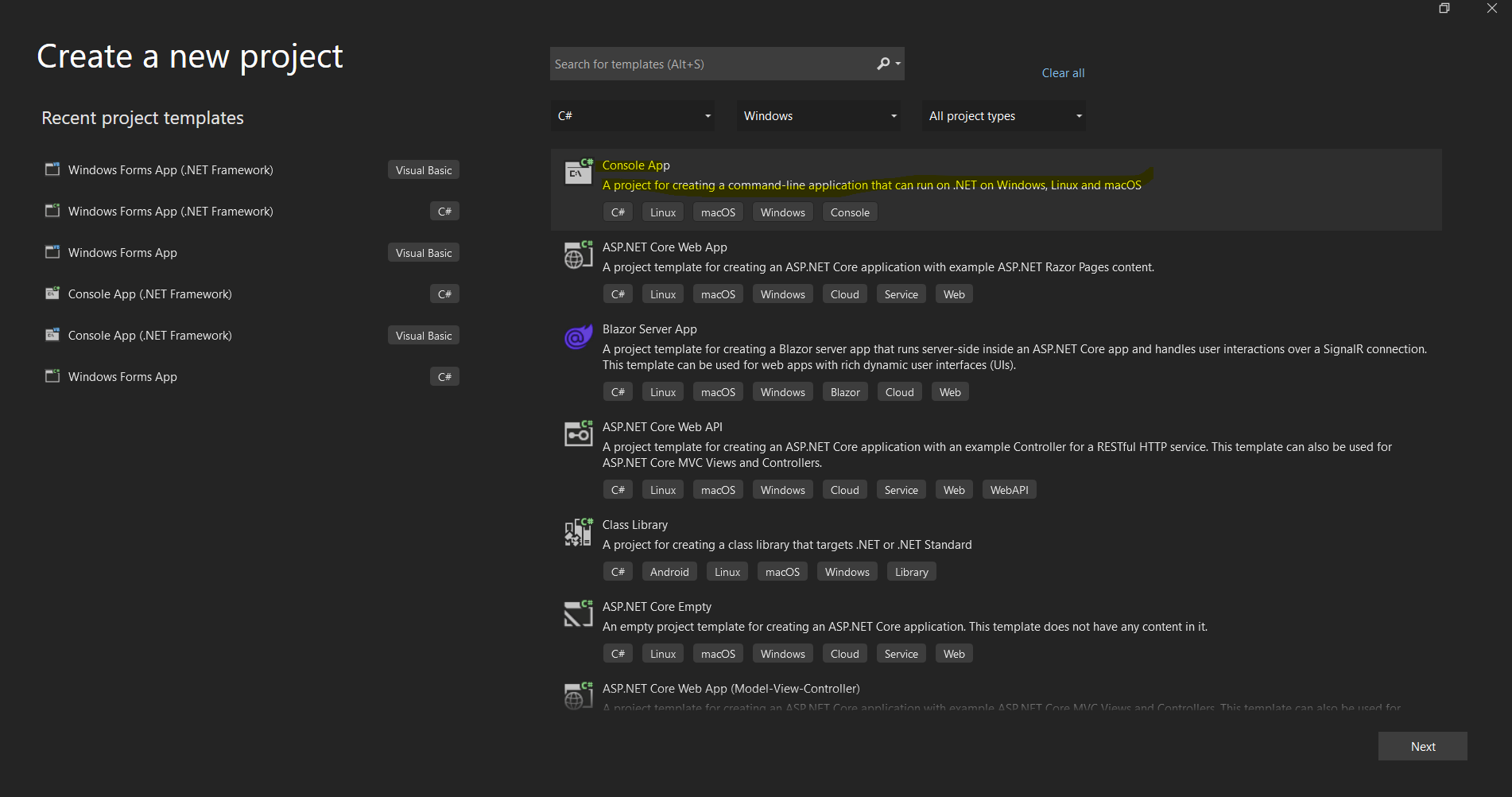 Visual Studio 用于设置新 .NET 应用程序的项目创建对话框
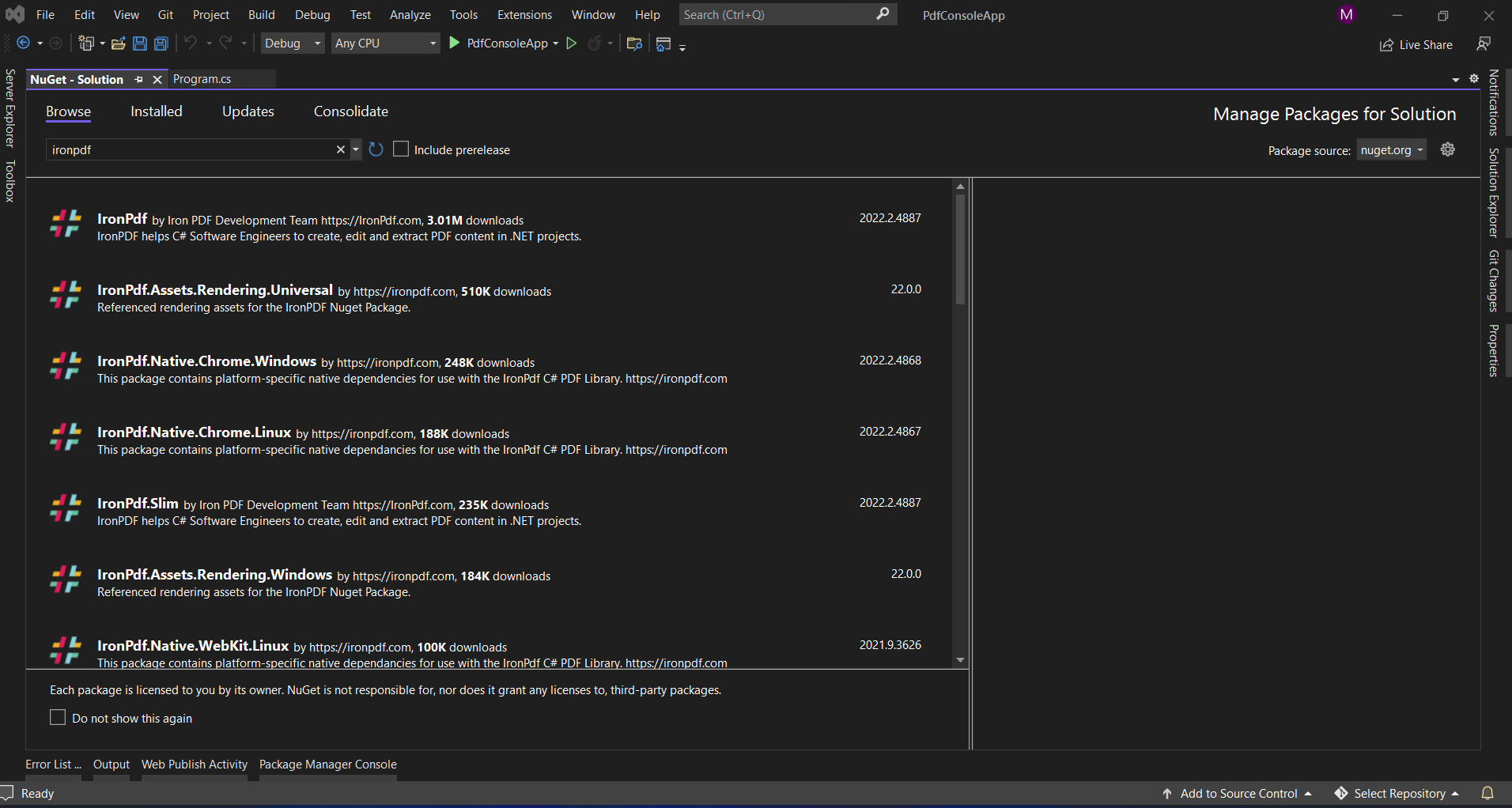 通过 Visual Studio 的 NuGet 包管理器界面安装 IronPDF
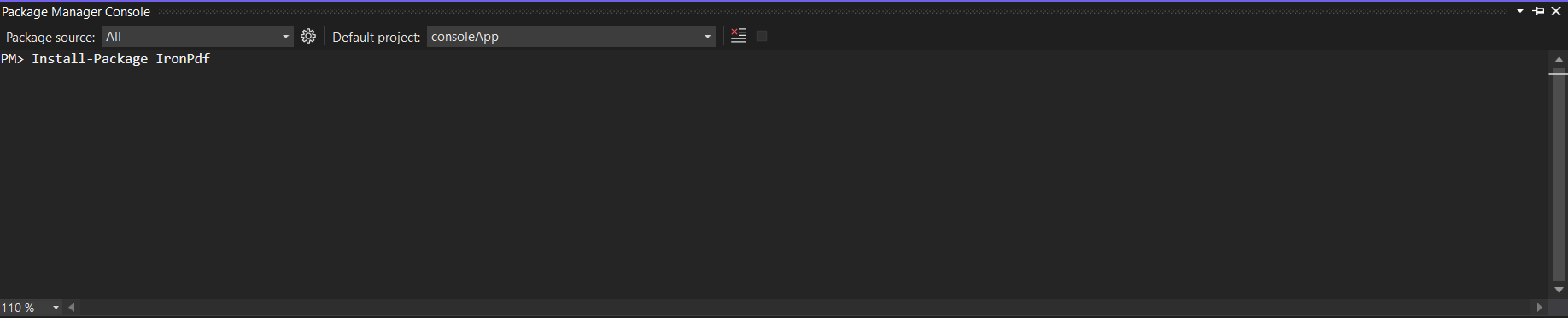 使用软件包管理器控制台,只需一条命令即可安装 IronPDF。

















