using IronPdf;

// Disable local disk access or cross-origin requests
Installation.EnableWebSecurity = true;

// Instantiate Renderer
var renderer = new ChromePdfRenderer();

// Create a PDF from a HTML string using C#
var pdf = renderer.RenderHtmlAsPdf("<h1>Hello World</h1>");

// Export to a file or Stream
pdf.SaveAs("output.pdf");

// Advanced Example with HTML Assets
// Load external html assets: Images, CSS and JavaScript.
// An optional BasePath 'C:\site\assets\' is set as the file location to load assets from
var myAdvancedPdf = renderer.RenderHtmlAsPdf("<img src='icons/iron.png'>", @"C:\site\assets\");
myAdvancedPdf.SaveAs("html-with-assets.pdf");
using IronPdf;// Disable local disk access or cross-origin requestsInstallation.EnableWebSecurity = true;// Instantiate Renderervar renderer = new ChromePdfRenderer();// Create a PDF from a HTML string using C#var pdf = renderer.RenderHtmlAsPdf("<h1>Hello World</h1>");// Export to a file or Streampdf.SaveAs("output.pdf");// Advanced Example with HTML Assets// Load external html assets: Images, CSS and JavaScript.// An optional BasePath 'C:\site\assets\' is set as the file location to load assets fromvar myAdvancedPdf = renderer.RenderHtmlAsPdf("<img src='icons/iron.png'>", @"C:\site\assets\");myAdvancedPdf.SaveAs("html-with-assets.pdf");
Podczas rozwijania nowoczesnych aplikacji .NET, które wymagają możliwości generowania i manipulacji PDF, wybór odpowiedniej biblioteki może znacząco wpłynąć na sukces projektu. Dwa prominentne wybory w ekosystemie .NET to [IronPDF](https://ironpdf.com) i [PDFSharpCore](https://github.com/ststeiger/PdfSharpCore), każdy oferujący różne podejścia do obsługi PDF. To kompleksowe porównanie pomoże podjąć świadomą decyzję w oparciu o specyficzne wymagania, budżet i potrzeby techniczne.
## Szybki przegląd porównawczy
Przed zagłębieniem się w szczegóły techniczne, oto kompleksowa tabela porównawcza, która podsumowuje kluczowe różnice między IronPDF a PDFSharpCore:
<link rel="stylesheet" type="text/css" href="/front/css/product-comparison-table.css" />
<div class="product__comprehensive-comparison-table">
<div class="table-container">
<div class="table-number">Przegląd porównania produktów</div>
<div class="table-title">Porównanie IronPDF iPDFSharpCoredla Przetwarzania PDF w .NET</div>
<table>
<thead>
<tr>
<th>Kategoria</th>
<th>Funkcja/Aspekt</th>
<th>IronPDF</th>
<th>PDFSharpCore</th>
<th>Kluczowa zaleta</th>
</tr>
</thead>
<tbody>
<tr>
<td><strong>Podstawowa architektura</strong></td>
<td>Filozofia projektowania</td>
<td>Chromowy silnik renderujący, intuicyjne API</td>
<td>Lekkie, ręczne budowanie PDF</td>
<td>IronPDF: Szybsze tworzenie</td>
</tr>
<tr>
<td></td>
<td>Złożoność API</td>
<td>Proste metody jak <code>RenderHtmlAsPdf()</code></td>
<td>Ręczne rysowanie przy użyciu XGraphics</td>
<td>IronPDF: prostsze API</td>
</tr>
<tr>
<td></td>
<td>Krzywa uczenia się</td>
<td>Zazwyczaj 1–2 dni</td>
<td>3-5 dni typowo</td>
<td>IronPDF: Szybsze przyswajanie</td>
</tr>
<tr>
<td><strong>Obsługa platform</strong></td>
<td>Wielopłatformowe</td>
<td>Wbudowana obsługa, bez dodatkowych pakietów</td>
<td>Pełne wsparcie wieloplatformowe</td>
<td>Obydwie: Nowoczesne wdrożenie</td>
</tr>
<tr>
<td></td>
<td>Wersje .NET</td>
<td>.NET 10, 9, 8, 7, 6, 5, Core 3.1+, Framework 4.6.2+</td>
<td>.NET 6+, .NET Standard 2.0</td>
<td>IronPDF: Szersza kompatybilność</td>
</tr>
<tr>
<td></td>
<td>Systemy operacyjne</td>
<td>Windows, Linux, macOS, Docker, Azure, AWS</td>
<td>Windows, Linux, macOS</td>
<td>IronPDF: Optymalizowany dla chmury</td>
</tr>
<tr>
<td><strong>HTML do PDF</strong></td>
<td>Silnik renderujący</td>
<td>Pełny silnik Chrome V8</td>
<td>Brak natywnej obsługi HTML</td>
<td>IronPDF: Zdolności HTML</td>
</tr>
<tr>
<td></td>
<td>Obsługa CSS3/HTML5</td>
<td>Pełne wsparcie</td>
<td>Wymaga bibliotek zewnętrznych</td>
<td>IronPDF: Nowoczesne standardy internetowe</td>
</tr>
<tr>
<td></td>
<td>Wykonanie JavaScript</td>
<td>Pełna obsługa JavaScript</td>
<td>Nie dotyczy</td>
<td>IronPDF: Dynamiczna treść</td>
</tr>
<tr>
<td><strong>Kluczowe Funkcje</strong></td>
<td>Wyodrębnianie tekstu</td>
<td>Wbudowany <code>ExtractAllText()</code></td>
<td>Ograniczone wsparcie</td>
<td>IronPDF: Doskonalsza ekstrakcja</td>
</tr>
<tr>
<td></td>
<td>Znak wodny</td>
<td>Oparty na HTML/CSS, pełna stylizacja</td>
<td>Wymagane ręczne rysowanie</td>
<td>IronPDF: Bogate znaki wodne</td>
</tr>
<tr>
<td></td>
<td>Podpisy cyfrowe</td>
<td>Zintegrowane, wizualne podpisy</td>
<td>Not supported</td>
<td>IronPDF: Bezpieczeństwo na poziomie przedsiębiorstwa</td>
</tr>
<tr>
<td></td>
<td>Szyfrowanie</td>
<td>AES-256, niestandardowe procedury obsługi</td>
<td>Podstawowe wsparcie dla szyfrowania</td>
<td>IronPDF: Zaawansowane bezpieczeństwo</td>
</tr>
<tr>
<td></td>
<td>Nagłówki/stopki</td>
<td>Opiera się na HTML, dynamiczna zawartość</td>
<td>Ręczne pozycjonowanie</td>
<td>IronPDF: Dynamiczne nagłówki</td>
</tr>
<tr>
<td><strong>Wydajność</strong></td>
<td>Szybkość renderowania HTML</td>
<td>0.8-2s typowe (silnik Chrome)</td>
<td>Nie dotyczy</td>
<td>IronPDF: Renderowanie HTML</td>
</tr>
<tr>
<td></td>
<td>Przetwarzanie dużych dokumentów</td>
<td>Zoptymalizowane dla skali</td>
<td>Efektywność pamięciowa</td>
<td>PDFSharpCore: Mniejsze zużycie pamięci</td>
</tr>
<tr>
<td></td>
<td>Obsługa wątków</td>
<td>Native async/await, przetwarzanie równoległe</td>
<td>Operacje bezpieczne dla wątków</td>
<td>IronPDF: Lepsza skalowalność</td>
</tr>
<tr>
<td><strong>Doświadczenie programisty</strong></td>
<td>Dokumentacja</td>
<td>Rozbudowane tutoriale, dokumentacja API, filmy</td>
<td>Podstawowa dokumentacja</td>
<td>IronPDF: Lepsze zasoby</td>
</tr>
<tr>
<td></td>
<td>Przykłady kodu</td>
<td>Ponad 100 gotowych do uruchomienia przykładów</td>
<td>Przykłady społeczności</td>
<td>IronPDF: Obszerne przykłady</td>
</tr>
<tr>
<td></td>
<td>Wsparcie IntelliSense</td>
<td>Pełny IntelliSense, dokumentacja XML</td>
<td>Standardowy IntelliSense</td>
<td>Oba: Integracja IDE</td>
</tr>
<tr>
<td><strong>Licensing & Pricing</strong></td>
<td>Typ licencji</td>
<td>Komercyjna, wieczysta</td>
<td>Licencja MIT (darmowa)</td>
<td>PDFSharpCore: Bez kosztów</td>
</tr>
<tr>
<td></td>
<td>Cena wywoławcza</td>
<td>Lite: `$liteLicense` (1 deweloper, 1 projekt)</td>
<td>Darmowy</td>
<td>PDFSharpCore: Zero kosztów</td>
</tr>
<tr>
<td></td>
<td>Wsparcie</td>
<td>24/5 wsparcie inżynieryjne w zestawie</td>
<td>Wsparcie tylko społeczności</td>
<td>IronPDF: Profesjonalne wsparcie</td>
</tr>
<tr>
<td><strong>Najlepsze dla</strong></td>
<td>Przykłady zastosowań</td>
<td>Aplikacje webowe, raporty, enterprise</td>
<td>Proste PDF-y, projekty budżetowe</td>
<td>Zależy od kontekstu</td>
</tr>
</tbody>
</table>
<div class="table-note">
<em>Uwaga.</em>PDFSharpCoreto biblioteka open-source odpowiednia dla podstawowego tworzenia PDF, podczas gdy IronPDF oferuje wszechstronne funkcje, w tym renderowanie HTML i wsparcie dla enterprise. Wybór zależy od złożoności projektu i ograniczeń budżetowych.
</div>
</div>
</div>
## Wprowadzenie do IronPDF i PDFSharpCore
### Czym jest IronPDF?
**IronPDF** to kompleksowa komercyjna biblioteka .NET zaprojektowana do ułatwienia generowania, edytowania i manipulacji PDF-ami dla programistów. Oparta na silniku renderującym Chrome, wyróżnia się w konwersji HTML, CSS i JavaScript na perfekcyjne pod względem pikseli PDF-y. Biblioteka oferuje szeroki zestaw funkcji, w tym [konwersję HTML na PDF](/how-to/html-string-to-pdf/), [podpisy cyfrowe](/how-to/signing/), [znakowanie wodne](/examples/pdf-watermarking/), [szyfrowanie PDF](/examples/encryption-and-decryption/) i [zarządzanie formularzami](/how-to/create-forms/).
IronPDF wspiera nowoczesne wersje .NET, w tym .NET 10, 9, 8, 7, 6, 5, Core 3.1+ i Framework 4.6.2+, co czyni go wszechstronnym zarówno dla nowych, jak i starszych aplikacji. Jego zoptymalizowana pod kątem chmury architektura umożliwia bezproblemowe wdrażanie w środowiskach [Azure](/how-to/azure/), [AWS](/get-started/aws/) i [Docker](/get-started/ironpdf-docker/).
### Czym jest PDFSharpCore?
**PDFSharpCore** to biblioteka open-source będąca portem .NET Core oryginalnej biblioteki PDFSharp. Wydana na licencji MIT, koncentruje się na programowym tworzeniu PDF i podstawowej manipulacji bez użycia bibliotek specyficznych dla Windows. To doskonały wybór dla projektów cross-platform działających na Linux, macOS i Windows.
ChoćPDFSharpCorenie oferuje natywnej konwersji HTML na PDF, zapewnia precyzyjną kontrolę nad tworzeniem dokumentów PDF przez swoje API do rysowania. Programiści mogą ręcznie konstruować dokumenty PDF, pozycjonując tekst, obrazy i grafikę za pomocą poleceń rysowania opartych na współrzędnych.
## Instalacja i konfiguracja
### Instalacja IronPDF
Aby zacząć używaćIronPDF w swoim projekcie, można go łatwo zainstalować przez Menedżer pakietów NuGet. Postępuj zgodnie z poniższymi wskazówkami:
1. Otwórz swój projekt w Visual Studio.
2. Przejdź do **Narzędzia** > **Menedżer pakietów NuGet** > **Zarządzaj pakietami NuGet dla rozwiązania**.
3. Wyszukaj **IronPDF** w Menedżerze NuGet.
4. Wybierz swój projekt, a następnie kliknij **Zainstaluj**, aby dodaćIronPDF do swojego projektu.
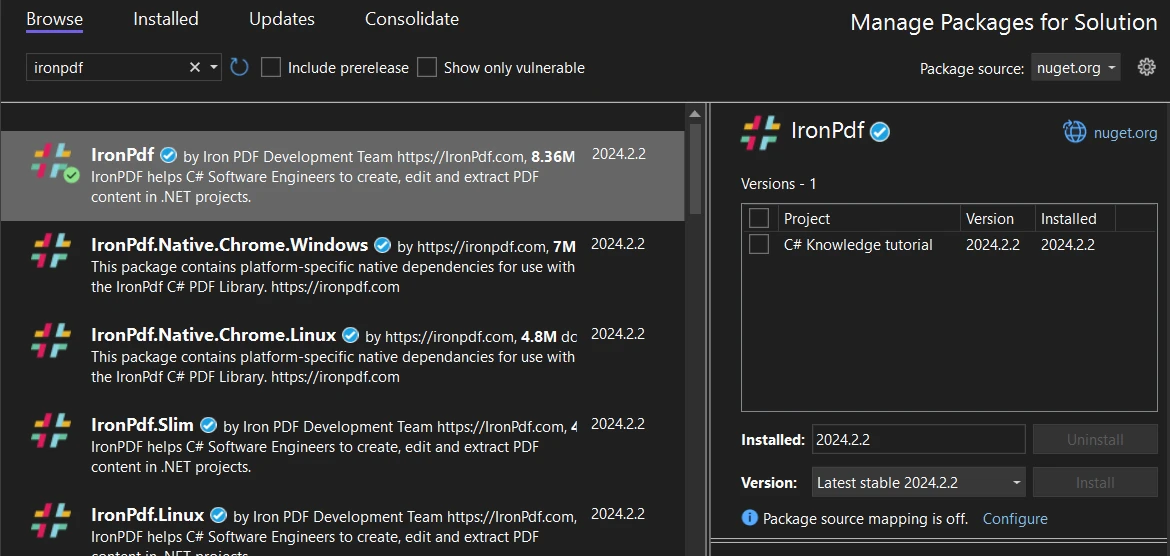
*Instalacja IronPDF przez interfejs Menedżera pakietów NuGet Visual Studio*
Alternatywnie można użyć konsoli Menedżera pakietów, aby zainstalowaćIronPDF za pomocą następującego polecenia:
```shell
:ProductInstall
```
### Installing PDFSharpCore
Aby zainstalowaćPDFSharpCoreza pomocą NuGet, postępuj zgodnie z tymi instrukcjami:
1. Upewnij się, że projekt Visual Studio jest otwarty.
2. Przejdź do **Narzędzia** > **Menedżer pakietów NuGet** > **Zarządzaj pakietami NuGet dla rozwiązania**.
3. W Menedżerze pakietów NuGet wyszukaj **PDFSharpCore**.
4. Wybierz swój projekt i kliknij **Zainstaluj**, aby zintegrować PDFSharpCore.
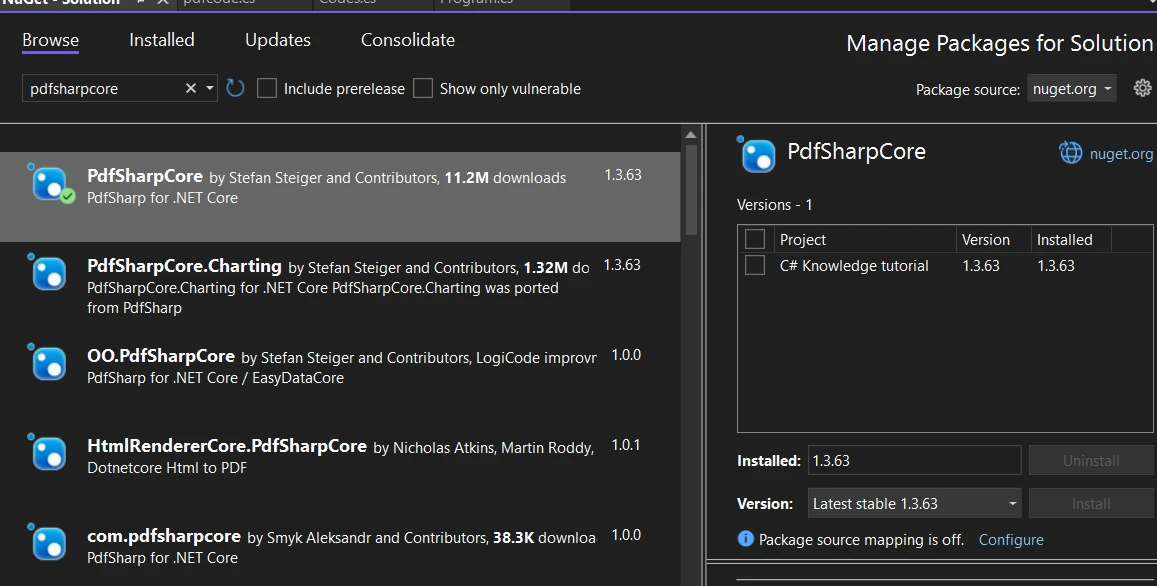
*InstalacjaPDFSharpCoreprzez Menedżera pakietów NuGet*
Dla programistów preferujących konsolę Menedżera pakietów,PDFSharpCoremożna zainstalować za pomocą tego polecenia:
```shell
:InstallCmd Install-Package PdfSharpCore
```
## Tworzenie plików PDF:IronPDF kontra PDFSharpCore
### IronPDF: Nowoczesne podejście oparte na HTML
IronPDF rewolucjonizuje tworzenie PDF, wykorzystując technologie webowe, które programiści już znają. Jego silnik renderujący oparty na Chrome zapewnia, że Twój HTML, CSS i JavaScript są renderowane dokładnie tak, jak pojawiłyby się w nowoczesnej przeglądarce.
#### Łańcuch HTML do PDF z zaawansowanymi funkcjami
[Możliwości konwersji HTML na PDF](/examples/using-html-to-create-a-pdf/)IronPDF wychodzą daleko poza zwykłe renderowanie tekstu. Oto wzmocniony przykład, który demonstruje jego moc:
```csharp
using IronPdf;
using IronPdf.Rendering;

class Program
{
    static void Main(string[] args)
    {
        // Apply your license key (required for production)
        License.LicenseKey = "Your-License-Key";

        // Create renderer with optimized settings
        var renderer = new ChromePdfRenderer()
        {
            RenderingOptions = new ChromePdfRenderOptions()
            {
                // Set margins for professional appearance
                MarginTop = 25,
                MarginBottom = 25,
                MarginLeft = 20,
                MarginRight = 20,

                // Enable JavaScript execution for dynamic content
                EnableJavaScript = true,

                // Wait for AJAX/animations to complete
                RenderDelay = 500,

                // Set paper orientation and size
                PaperOrientation = PdfPaperOrientation.Portrait,
                PaperSize = PdfPaperSize.A4,

                // Enable printing of background colors and images
                PrintHtmlBackgrounds = true
            }
        };

        // HTML with Bootstrap styling and charts
        string htmlContent = @"
            <!DOCTYPE html>
            <html>
            <head>
                <link href='https://cdn.jsdelivr.net/npm/bootstrap@5.1.3/dist/css/bootstrap.min.css' rel='stylesheet'>
                <script src='https://cdn.jsdelivr.net/npm/chart.js'></script>
                <style>
                    body { font-family: 'Segoe UI', Tahoma, Geneva, Verdana, sans-serif; }
                    .header { background: linear-gradient(135deg, #667eea 0%, #764ba2 100%); color: white; padding: 30px; }
                    .chart-container { width: 100%; height: 300px; margin: 20px 0; }
                </style>
            </head>
            <body>
                <div class='header text-center'>
                    <h1>2024 Sales Performance Report</h1>
                    <p class='lead'>Comprehensive Analysis & Insights</p>
                </div>

                <div class='container mt-4'>
                    <div class='row'>
                        <div class='col-md-6'>
                            <div class='card'>
                                <div class='card-body'>
                                    <h5 class='card-title'>Q1 Performance Metrics</h5>
                                    <table class='table table-striped'>
                                        <thead>
                                            <tr>
                                                <th>Month</th>
                                                <th>Revenue</th>
                                                <th>Growth</th>
                                            </tr>
                                        </thead>
                                        <tbody>
                                            <tr>
                                                <td>January</td>
                                                <td>$50,000</td>
                                                <td><span class='badge bg-success'>+12%</span></td>
                                            </tr>
                                            <tr>
                                                <td>February</td>
                                                <td>$55,000</td>
                                                <td><span class='badge bg-success'>+10%</span></td>
                                            </tr>
                                            <tr>
                                                <td>March</td>
                                                <td>$60,000</td>
                                                <td><span class='badge bg-success'>+9%</span></td>
                                            </tr>
                                        </tbody>
                                    </table>
                                </div>
                            </div>
                        </div>
                        <div class='col-md-6'>
                            <div class='card'>
                                <div class='card-body'>
                                    <h5 class='card-title'>Revenue Trend</h5>
                                    <canvas id='revenueChart'></canvas>
                                </div>
                            </div>
                        </div>
                    </div>

                    <div class='alert alert-info mt-4'>
                        <strong>Key Insight:</strong> Q1 showed consistent growth across all months,
                        with total revenue reaching $165,000, representing a 31% increase YoY.
                    </div>
                </div>

                <script>
                    // Create an interactive chart
                    const ctx = document.getElementById('revenueChart').getContext('2d');
                    new Chart(ctx, {
                        type: 'line',
                        data: {
                            labels: ['January', 'February', 'March'],
                            datasets: [{
                                label: 'Revenue',
                                data: [50000, 55000, 60000],
                                borderColor: '#667eea',
                                backgroundColor: 'rgba(102, 126, 234, 0.1)',
                                tension: 0.4
                            }]
                        },
                        options: {
                            responsive: true,
                            maintainAspectRatio: false
                        }
                    });
                </script>
            </body>
            </html>";

        // Render the HTML to PDF
        var pdf = renderer.RenderHtmlAsPdf(htmlContent);

        // Add metadata for better document management
        pdf.MetaData.Author = "Sales Department";
        pdf.MetaData.Title = "Q1 2024 Sales Report";
        pdf.MetaData.Subject = "Quarterly Performance Analysis";
        pdf.MetaData.Keywords = "sales, performance, Q1, 2024";
        pdf.MetaData.CreationDate = DateTime.Now;

        // Save the PDF
        pdf.SaveAs("sales-report-q1-2024.pdf");
        Console.WriteLine("Professional sales report generated successfully!");
    }
}
```
Ten przykład pokazuje kilka zaawansowanych funkcji IronPDF:
- **Integracja z Bootstrap:** Wykorzystuje popularne frameworki CSS do profesjonalnego stylowania
- **Wykresy JavaScript:** Renderuje dynamiczne wizualizacje Chart.js w PDF
- **Projektowanie responsywne:** Inteligentnie obsługuje układy responsywne
- **Zarządzanie metadanymi:** Dodaje wyszukiwalne metadane dla systemów zarządzania dokumentami
- **Opóźnienia renderowania:** Zapewnia pełne załadowanie treści JavaScript przed renderowanie
Klasa `ChromePdfRenderer` zapewnia szeroką kontrolę nad procesem renderowania. Kluczowe opcje obejmują:
- `EnableJavaScript`: Wykonuje kod JavaScript przed renderowaniem
- `RenderDelay`: Czeka na załadowanie asynchronicznych treści
- `PrintHtmlBackgrounds`: Zachowuje kolory tła i obrazy
- `PaperOrientation` i `PaperSize`: Kontroluje układ strony
- Ustawienia marginesów dla profesjonalnego wyglądu dokumentu
#### Konwersja plików HTML i URL-i
IronPDF również doskonale sobie radzi z konwersją istniejących plików HTML i aktywnych stron internetowych:
```csharp
using IronPdf;
class Program
{
static async Task Main(string[] args)
{
License.LicenseKey = "Your-License-Key";
var renderer = new ChromePdfRenderer();
// Convert a local HTML file with external resources
var filePdf = renderer.RenderHtmlFileAsPdf(@"C:\Reports\template.html");
filePdf.SaveAs("from-file.pdf");
// Convert a URL with authentication
renderer.LoginCredentials = new ChromeHttpLoginCredentials()
{
Username = "user@example.com",
Password = "secure-password"
};
// Render a password-protected page
var urlPdf = await renderer.RenderUrlAsPdfAsync("https://secure.example.com/reports");
urlPdf.SaveAs("secure-report.pdf");
}
}
```
### PDFSharpCore: Ręczna konstrukcja dokumentu
PDFSharpCore przyjmuje zupełnie inne podejście, wymagając od programistów ręcznej budowy dokumentów PDF przy użyciu poleceń rysowania. Chociaż zapewnia to precyzyjną kontrolę, wymaga znacznie więcej kodu dla złożonych układów.
```csharp
using PdfSharpCore.Drawing;
using PdfSharpCore.Pdf;
using System;
class Program
{
static void Main()
{
// Create a new PDF document
var document = new PdfDocument();
document.Info.Title = "Sales Report Q1 2024";
document.Info.Author = "Sales Department";
// Add a page
var page = document.AddPage();
page.Size = PdfSharpCore.PageSize.A4;
// Create graphics object for drawing
var gfx = XGraphics.FromPdfPage(page);
// Define fonts
var titleFont = new XFont("Arial", 24, XFontStyle.Bold);
var headingFont = new XFont("Arial", 14, XFontStyle.Bold);
var normalFont = new XFont("Arial", 11, XFontStyle.Regular);
// Draw title with gradient-like effect (manual implementation)
var titleBrush = new XLinearGradientBrush(
new XPoint(0, 0),
new XPoint(page.Width, 0),
XColors.DarkBlue,
XColors.Purple
);
gfx.DrawRectangle(titleBrush, 0, 0, page.Width, 80);
gfx.DrawString("2024 Sales Performance Report",
titleFont, XBrushes.White,
new XRect(0, 20, page.Width, 40),
XStringFormats.TopCenter);
// Draw table manually
double yPosition = 120;
double margin = 50;
double columnWidth = (page.Width - 2 * margin) / 3;
// Table header
gfx.DrawRectangle(XBrushes.LightGray, margin, yPosition, page.Width - 2 * margin, 25);
gfx.DrawString("Month", headingFont, XBrushes.Black,
new XRect(margin, yPosition, columnWidth, 25),
XStringFormats.Center);
gfx.DrawString("Revenue", headingFont, XBrushes.Black,
new XRect(margin + columnWidth, yPosition, columnWidth, 25),
XStringFormats.Center);
gfx.DrawString("Growth", headingFont, XBrushes.Black,
new XRect(margin + 2 * columnWidth, yPosition, columnWidth, 25),
XStringFormats.Center);
// Table data
string[,] data = {
{ "January", "$50,000", "+12%" },
{ "February", "$55,000", "+10%" },
{ "March", "$60,000", "+9%" }
};
yPosition += 25;
for (int i = 0; i < 3; i++)
{
// Alternate row colors
if (i % 2 == 0)
{
gfx.DrawRectangle(XBrushes.WhiteSmoke, margin, yPosition, page.Width - 2 * margin, 20);
}
for (int j = 0; j < 3; j++)
{
gfx.DrawString(data[i, j], normalFont, XBrushes.Black,
new XRect(margin + j * columnWidth, yPosition, columnWidth, 20),
XStringFormats.Center);
}
yPosition += 20;
}
// Draw a simple line chart (very basic implementation)
yPosition += 40;
gfx.DrawString("Revenue Trend", headingFont, XBrushes.Black,
new XRect(margin, yPosition, page.Width - 2 * margin, 25),
XStringFormats.TopLeft);
// Chart area
yPosition += 30;
double chartHeight = 150;
double chartWidth = page.Width - 2 * margin;
// Draw axes
gfx.DrawLine(XPens.Black, margin, yPosition + chartHeight, margin + chartWidth, yPosition + chartHeight);
gfx.DrawLine(XPens.Black, margin, yPosition, margin, yPosition + chartHeight);
// Plot points (simplified)
double[] revenues = { 50000, 55000, 60000 };
double maxRevenue = 65000;
double xStep = chartWidth / 3;
for (int i = 0; i < revenues.Length; i++)
{
double x = margin + (i + 0.5) * xStep;
double y = yPosition + chartHeight - (revenues[i] / maxRevenue * chartHeight);
// Draw point
gfx.DrawEllipse(XBrushes.Blue, x - 3, y - 3, 6, 6);
// Draw connecting lines
if (i > 0)
{
double prevX = margin + (i - 0.5) * xStep;
double prevY = yPosition + chartHeight - (revenues[i - 1] / maxRevenue * chartHeight);
gfx.DrawLine(new XPen(XColors.Blue, 2), prevX, prevY, x, y);
}
// Labels
gfx.DrawString($"${revenues[i]:N0}", normalFont, XBrushes.Black,
new XRect(x - 30, y - 20, 60, 15),
XStringFormats.TopCenter);
}
// Save the document
document.Save("pdfsharp-sales-report.pdf");
Console.WriteLine("PDF created with PDFSharpCore");
}
}
```
Jak widać, nawet tworzenie umiarkowanie złożonego dokumentu zPDFSharpCorewymaga:
- Ręcznego pozycjonowania każdego elementu
- Złożonych obliczeń dla układów
- Brak wbudowanego wsparcia dla HTML ani CSS
- Ręcznej implementacji wykresów i grafiki
- Znacznie więcej kodu dla tego samego rezultatu
### HTML to PDF with PDFSharpCore
PonieważPDFSharpCorenie wspiera natywnie konwersji HTML na PDF, programiści muszą korzystać z bibliotek zewnętrznych. Popularnym wyborem jest połączeniePDFSharpCorez HtmlRenderer:
```csharp
using PdfSharpCore.Pdf;
using TheArtOfDev.HtmlRenderer.PdfSharp;
var document = new PdfDocument();
string htmlContent = File.ReadAllText("template.html");
// Note: HtmlRenderer has limited CSS support
PdfGenerator.AddPdfPages(document, htmlContent, PdfSharpCore.PageSize.A4);
document.Save("from-html.pdf");
```
Jednak to podejście ma znaczące ograniczenia:
- Ograniczone wsparcie dla CSS3 (brak flexbox, brak CSS Grid, brak wsparcia współczesnych frameworków)
- Brak możliwości wykonywania kodu JavaScript
- Słaba obsługa nowoczesnych funkcji webowych
- Niezgodna z przeglądarkami jakość renderowania
## Wsparcie Modern CSS Framework: Bootstrap i dalej
Podczas tworzenia aplikacji wymagających generowania PDF z treści webowych, wsparcie dla Bootstrap i nowoczesnych frameworków CSS jest kluczowe. Większość aplikacji webowych korzysta z tych frameworków dla spójnego designu, a możliwość konwertowania tych interfejsów na PDF bez modyfikacji znacznie skraca czas rozwoju.
### IronPDF: Pełne wsparcie dla Bootstrap i CSS Framework
- **Bootstrap 5:** Kompletny silnik układu flexbox, CSS Grid, klasy użytkowe i wszystkie systemy komponentów
- **Bootstrap 4:** Pełne komponenty kart, nawigacja, narzędzia flex i klasy responsywne
- **Tailwind CSS:** Wszystkie klasy narzędziowe z dokładnym renderowaniem
- **Foundation:** Kompletny system siatki i biblioteka komponentów
- **Nowoczesny CSS3:** Flexbox, CSS Grid, zmienne zwyczajowe, animacje, przejścia i transformacje
Realne dowody:IronPDF renderuje [stronę główną Bootstrap](https://getbootstrap.com/) i wszystkie [oficjalne szablony](https://getbootstrap.com/docs/5.3/examples/) z perfekcyjną dokładnością do pikseli.
**Przykład kodu: Tablica postępów projektu**
```csharp
using IronPdf;
// Set your IronPDF license key
IronPdf.License.LicenseKey = "License-Key goes here";
var renderer = new ChromePdfRenderer();
string bootstrapProgress = @"
<!DOCTYPE html>
<html>
<head>
<link href='https://cdn.jsdelivr.net/npm/bootstrap@5.3.0/dist/css/bootstrap.min.css' rel='stylesheet'>
<style>
.project-card {
transition: all 0.3s ease;
border-left: 4px solid transparent;
}
.project-card.active { border-left-color: #0d6efd; }
.progress-label { font-size: 0.75rem; font-weight: 600; }
</style>
</head>
<body>
<div class='container my-5'>
<div class='d-flex justify-content-between align-items-center mb-4'>
<div>
<h1 class='display-6 mb-1'>Project Portfolio Status</h1>
<p class='text-muted mb-0'>Q1 2025 Development Pipeline</p>
</div>
<div>
<span class='badge bg-success fs-6'>8 Active Projects</span>
</div>
</div>
<div class='row g-4 mb-4'>
<div class='col-md-3'>
<div class='card text-center shadow-sm'>
<div class='card-body'>
<div class='display-4 text-primary mb-2'>72%</div>
<h6 class='text-muted text-uppercase mb-0'>Overall Progress</h6>
</div>
</div>
</div>
<div class='col-md-3'>
<div class='card text-center shadow-sm'>
<div class='card-body'>
<div class='display-4 text-success mb-2'>5</div>
<h6 class='text-muted text-uppercase mb-0'>On Track</h6>
</div>
</div>
</div>
<div class='col-md-3'>
<div class='card text-center shadow-sm'>
<div class='card-body'>
<div class='display-4 text-warning mb-2'>2</div>
<h6 class='text-muted text-uppercase mb-0'>At Risk</h6>
</div>
</div>
</div>
<div class='col-md-3'>
<div class='card text-center shadow-sm'>
<div class='card-body'>
<div class='display-4 text-danger mb-2'>1</div>
<h6 class='text-muted text-uppercase mb-0'>Delayed</h6>
</div>
</div>
</div>
</div>
<div class='card shadow-sm mb-4'>
<div class='card-header bg-primary text-white'>
<h5 class='mb-0'>Active Projects</h5>
</div>
<div class='card-body p-0'>
<div class='list-group list-group-flush'>
<div class='list-group-item'>
<div class='d-flex justify-content-between align-items-start mb-3'>
<div>
<h6 class='mb-1'>E-Commerce Platform Redesign</h6>
<small class='text-muted'>Lead: Sarah Chen | Due: Apr 15, 2025</small>
</div>
<span class='badge bg-success'>On Track</span>
</div>
<div class='mb-2'>
<div class='d-flex justify-content-between align-items-center mb-1'>
<span class='progress-label text-muted'>COMPLETION</span>
<span class='progress-label text-primary'>85%</span>
</div>
<div class='progress' style='height: 8px;'>
<div class='progress-bar bg-primary' role='progressbar' style='width: 85%'></div>
</div>
</div>
<div class='d-flex gap-2 flex-wrap'>
<span class='badge bg-light text-dark'>Frontend: 90%</span>
<span class='badge bg-light text-dark'>Backend: 80%</span>
<span class='badge bg-light text-dark'>Testing: 85%</span>
</div>
</div>
<div class='list-group-item'>
<div class='d-flex justify-content-between align-items-start mb-3'>
<div>
<h6 class='mb-1'>Mobile App Integration</h6>
<small class='text-muted'>Lead: Marcus Johnson | Due: Mar 30, 2025</small>
</div>
<span class='badge bg-success'>On Track</span>
</div>
<div class='mb-2'>
<div class='d-flex justify-content-between align-items-center mb-1'>
<span class='progress-label text-muted'>COMPLETION</span>
<span class='progress-label text-success'>92%</span>
</div>
<div class='progress' style='height: 8px;'>
<div class='progress-bar bg-success' role='progressbar' style='width: 92%'></div>
</div>
</div>
<div class='d-flex gap-2 flex-wrap'>
<span class='badge bg-light text-dark'>iOS: 95%</span>
<span class='badge bg-light text-dark'>Android: 90%</span>
<span class='badge bg-light text-dark'>API: 100%</span>
</div>
</div>
<div class='list-group-item'>
<div class='d-flex justify-content-between align-items-start mb-3'>
<div>
<h6 class='mb-1'>Customer Analytics Dashboard</h6>
<small class='text-muted'>Lead: Emily Rodriguez | Due: Apr 22, 2025</small>
</div>
<span class='badge bg-warning text-dark'>At Risk</span>
</div>
<div class='mb-2'>
<div class='d-flex justify-content-between align-items-center mb-1'>
<span class='progress-label text-muted'>COMPLETION</span>
<span class='progress-label text-warning'>58%</span>
</div>
<div class='progress' style='height: 8px;'>
<div class='progress-bar bg-warning' role='progressbar' style='width: 58%'></div>
</div>
</div>
<div class='d-flex gap-2 flex-wrap'>
<span class='badge bg-light text-dark'>Data Pipeline: 65%</span>
<span class='badge bg-light text-dark'>UI: 50%</span>
<span class='badge bg-light text-dark'>Reports: 45%</span>
</div>
<div class='alert alert-warning mt-2 mb-0 py-2'>
<small><strong>Issue:</strong> Resource constraints affecting timeline. Review scheduled for next week.</small>
</div>
</div>
<div class='list-group-item'>
<div class='d-flex justify-content-between align-items-start mb-3'>
<div>
<h6 class='mb-1'>Security Infrastructure Upgrade</h6>
<small class='text-muted'>Lead: David Kim | Due: Mar 25, 2025</small>
</div>
<span class='badge bg-danger'>Delayed</span>
</div>
<div class='mb-2'>
<div class='d-flex justify-content-between align-items-center mb-1'>
<span class='progress-label text-muted'>COMPLETION</span>
<span class='progress-label text-danger'>42%</span>
</div>
<div class='progress' style='height: 8px;'>
<div class='progress-bar bg-danger' role='progressbar' style='width: 42%'></div>
</div>
</div>
<div class='d-flex gap-2 flex-wrap'>
<span class='badge bg-light text-dark'>Authentication: 60%</span>
<span class='badge bg-light text-dark'>Szyfrowanie: 40%</span>
<span class='badge bg-light text-dark'>Audit Logs: 25%</span>
</div>
<div class='alert alert-danger mt-2 mb-0 py-2'>
<small><strong>Critical:</strong> 7 days behind schedule. Additional resources allocated. Daily standup required.</small>
</div>
</div>
</div>
</div>
</div>
<div class='row g-4'>
<div class='col-md-6'>
<div class='card shadow-sm'>
<div class='card-header bg-white'>
<h5 class='mb-0'>Sprint Velocity</h5>
</div>
<div class='card-body'>
<div class='mb-3'>
<div class='d-flex justify-content-between mb-1'>
<span class='text-muted'>Current Sprint</span>
<strong>42 Story Points</strong>
</div>
<div class='progress' style='height: 20px;'>
<div class='progress-bar bg-success' style='width: 84%'>84% Complete</div>
</div>
</div>
<div class='mb-3'>
<div class='d-flex justify-content-between mb-1'>
<span class='text-muted'>Previous Sprint</span>
<strong>38 Story Points</strong>
</div>
<div class='progress' style='height: 20px;'>
<div class='progress-bar bg-info' style='width: 100%'>Completed</div>
</div>
</div>
<div class='mb-0'>
<div class='d-flex justify-content-between mb-1'>
<span class='text-muted'>Average Velocity</span>
<strong>40 Story Points</strong>
</div>
<div class='progress' style='height: 20px;'>
<div class='progress-bar bg-primary' style='width: 100%'>Baseline</div>
</div>
</div>
</div>
</div>
</div>
<div class='col-md-6'>
<div class='card shadow-sm'>
<div class='card-header bg-white'>
<h5 class='mb-0'>Team Capacity</h5>
</div>
<div class='card-body'>
<div class='d-flex justify-content-between align-items-center mb-3'>
<div>
<h6 class='mb-0'>Frontend Team</h6>
<small class='text-muted'>6 developers</small>
</div>
<span class='badge bg-success'>92% Utilized</span>
</div>
<div class='d-flex justify-content-between align-items-center mb-3'>
<div>
<h6 class='mb-0'>Backend Team</h6>
<small class='text-muted'>5 developers</small>
</div>
<span class='badge bg-success'>88% Utilized</span>
</div>
<div class='d-flex justify-content-between align-items-center mb-3'>
<div>
<h6 class='mb-0'>QA Team</h6>
<small class='text-muted'>3 testers</small>
</div>
<span class='badge bg-warning text-dark'>105% Utilized</span>
</div>
<div class='d-flex justify-content-between align-items-center mb-0'>
<div>
<h6 class='mb-0'>DevOps Team</h6>
<small class='text-muted'>2 engineers</small>
</div>
<span class='badge bg-danger'>110% Utilized</span>
</div>
</div>
</div>
</div>
</div>
</div>
</body>
</html>";
var pdf = renderer.RenderHtmlAsPdf(bootstrapProgress);
pdf.SaveAs("project-progress.pdf");
```
**Wynik:** Profesjonalny dokument PDF do zarządzania projektami z układami opartymi na flexbox Bootstrap 5, komponentami paska postępu, narzędziami do oznaczania, systemami kart responsywnych i komponentami alertów - wszystko renderowane z idealnym wyrównaniem, odstępami i dokładnością kolorów.
### PDFSharpCore: Brak natywnego wsparcia dla HTML
PDFSharpCore nie ma **natynowego silnika renderowania HTML**. Biblioteka jest zaprojektowana wyłącznie do niskopoziomowej manipulacji PDF i operacji rysowania:
- **Brak wsparcia dla Bootstrap:** Nie może przetwarzać frameworków HTML/CSS w ogóle
- **Brak flexbox ani CSS Grid:** Brak jakichkolwiek możliwości renderowania CSS
- **Tylko ręczna konstrukcja:** Wymaga rysowania tekstów, kształtów i obrazów za pomocą API opartych na współrzędnych
- **Wymagane narzędzia zewnętrzne:** Trzeba korzystać z zewnętrznych rendererów HTML lub usług konwersji
Integracja z HtmlRenderer (strona trzecia) zapewnia tylko podstawowe wsparcie dla HTML z poważnymi ograniczeniami - brak flexbox, brak CSS Grid i brak wsparcia dla współczesnych frameworków.
**Wpływ na rozwój:** Zespoły muszą albo całkowicie zrezygnować z workflowów opartych na HTML, albo zintegrować wiele narzędzi (PDFSharpCore + zewnętrzny renderer HTML), dodając złożoność, ciężar utrzymania i potencjalne problemy kompatybilności między wersjami bibliotek.
Dla szczegółowej kompatybilności frameworku Bootstrap i możliwości renderowania CSS3, zapoznaj się z [Przewodnikiem CSS dla Bootstrap & Flexbox](/troubleshooting/bootstrap-flex-css/).
## Porównanie zaawansowanych funkcji
### Wyodrębnianie tekstu
Jedną z najczęstszych operacji na PDF jest ekstrakcja tekstu do indeksowania, analizy lub konwersji. Oto jak obie biblioteki radzą sobie z tym zadaniem:
#### IronPDF Ekstrakcja Tekstu
IronPDF zapewnia solidne [możliwości ekstrakcji tekstu](/how-to/extract-text-and-images/) z prostym API:
```csharp
using IronPdf;
// Extract all text from a PDF
var pdf = PdfDocument.FromFile("report.pdf");
string allText = pdf.ExtractAllText();
// Extract text from specific pages
for (int i = 0; i < pdf.PageCount; i++)
{
string pageText = pdf.ExtractTextFromPage(i);
Console.WriteLine($"Page {i + 1}: {pageText.Substring(0, Math.Min(100, pageText.Length))}...");
}
// Extract text from a specific region
var pageIndex = 0;
var region = new Rectangle(50, 50, 200, 100); // x, y, width, height
string regionText = pdf.ExtractTextFromPage(pageIndex, region);
```
#### PDFSharpCore Ekstrakcja Tekstu
PDFSharpCore ma ograniczone natywne możliwości ekstrakcji tekstu. Jak wskazano w [artykułach porównawczych](/blog/compare-to-other-components/pdfsharp-extract-text-from-pdf/), często generuje fragmentaryczne lub niekompletne wyniki:
```csharp
//PDFSharpCoredoesn't have reliable text extraction
// This is a significant limitation for many use cases
```
### Znakowanie wodne
[Znakowanie wodne PDF](/how-to/custom-watermark/) jest istotne dla brandingu i bezpieczeństwa dokumentów.
#### IronPDF Znakowanie wodne
```csharp
using IronPdf;
var pdf = PdfDocument.FromFile("document.pdf");
// HTML-based watermark with full CSS support
string watermarkHtml = @"
<div style='
font-size: 48px;
color: rgba(255, 0, 0, 0.3);
transform: rotate(-45deg);
text-align: center;
font-weight: bold;
'>
CONFIDENTIAL
</div>";
pdf.ApplyWatermark(watermarkHtml, 50, VerticalAlignment.Middle, HorizontalAlignment.Center);
// Image watermark
pdf.ApplyWatermark("logo.png", 30, VerticalAlignment.Bottom, HorizontalAlignment.Right);
pdf.SaveAs("watermarked.pdf");
```
#### PDFSharpCore Znakowanie wodne
```csharp
using PdfSharpCore.Drawing;
using PdfSharpCore.Pdf;
using PdfSharpCore.Pdf.IO;
var document = PdfReader.Open("document.pdf", PdfDocumentOpenMode.Modify);
foreach (var page in document.Pages)
{
var gfx = XGraphics.FromPdfPage(page, XGraphicsPdfPageOptions.Append);
// Create watermark font
var font = new XFont("Arial", 48);
// Calculate rotation
gfx.TranslateTransform(page.Width / 2, page.Height / 2);
gfx.RotateTransform(-45);
// Draw watermark
var size = gfx.MeasureString("CONFIDENTIAL", font);
gfx.DrawString("CONFIDENTIAL", font,
new XSolidBrush(XColor.FromArgb(128, 255, 0, 0)),
new XRect(-size.Width / 2, -size.Height / 2, size.Width, size.Height),
XStringFormats.Center);
}
document.Save("watermarked-pdfsharp.pdf");
```
### Podpisy cyfrowe
[Podpisy cyfrowe](/examples/digitally-sign-a-pdf/) zapewniają autentyczność i integralność dokumentów.
#### IronPDF Podpisy cyfrowe
```csharp
using IronPdf;
using IronPdf.Signing;
var pdf = PdfDocument.FromFile("contract.pdf");
// Create a signature with certificate
var signature = new PdfSignature("certificate.pfx", "password")
{
SigningContact = "legal@company.com",
SigningLocation = "New York, NY",
SigningReason = "Contract Approval"
};
// Add visual signature
var signatureImage = new PdfSignature("certificate.pfx", "password")
{
SignatureImage = new PdfSignatureImage("signature.png", 0, 0, 200, 100)
};
// Apply signature to the last page
pdf.Sign(signature);
pdf.SaveAs("signed-contract.pdf");
```
#### PDFSharpCore Podpisy cyfrowe
PDFSharpCore nie obsługuje natywnie podpisów cyfrowych, co jest znaczącym ograniczeniem dla aplikacji biznesowych wymagających zabezpieczenia dokumentów.
### Praca z formularzami
Praca z [formularzami PDF](/how-to/create-forms/) jest kluczowa dla dokumentów interaktywnych.
#### IronPDF Praca z formularzami
```csharp
using IronPdf;
// Create a form from HTML
var html = @"
<form>
<label>Name: <input type='text' name='fullName' required></label><br>
<label>Email: <input type='email' name='email' required></label><br>
<label>Subscribe: <input type='checkbox' name='subscribe' value='yes'></label><br>
<label>
Plan:
<select name='plan'>
<option value='basic'>Basic</option>
<option value='pro'>Professional</option>
<option value='enterprise'>Enterprise</option>
</select>
</label>
</form>";
var renderer = new ChromePdfRenderer();
var pdf = renderer.RenderHtmlAsPdf(html);
// Fill existing form
var filledPdf = PdfDocument.FromFile("application-form.pdf");
filledPdf.Form.FindFormField("fullName").Value = "John Doe";
filledPdf.Form.FindFormField("email").Value = "john@example.com";
filledPdf.Form.FindFormField("subscribe").Value = "yes";
filledPdf.SaveAs("completed-application.pdf");
```
## Testy wydajności
Oto porównania wydajności oparte na typowych wzorcach użycia:
### Renderowanie HTML na PDF
|Przypadek testowy|IronPDF|PDFSharpCore(with HtmlRenderer) |
|-----------|---------|-----------------------------------|
| Prosty kod HTML (1 strona) |Szybki (nadkażenie silnika Chrome)|Szybszy dla trywialnych wyjść|
|Złożony HTML z CSS3|Pełne renderowanie, dokładne wyniki|Często się nie udaje lub renderuje niepoprawnie|
|Wykresy JavaScript| Pełne wykonywanie kodu JavaScript | Nieobsługiwane |
|Duża partia dokumentów|Zoptymalizowane asynchroniczne/przetwarzanie równoległe|Niższe zużycie pamięci|
| Wykorzystanie pamięci |Wyższe (silnik Chrome)|Niższe (lekka biblioteka)|
### Kluczowe spostrzeżenia wydajnościowe
1. **IronPDF** doskonale radzi sobie z:
- Złożonym renderowaniem HTML z pełną zgodnością przeglądarek
- Przetwarzaniem równoległym dla operacji w partii
- Spójną wydajnością w różnych typach treści
- [Operacjami asynchronicznymi](/how-to/async/) dla lepszej skalowalności
2. **PDFSharpCore** lepiej radzi sobie z:
- Prostym programowym tworzeniem PDF
- Niższym zużyciem pamięci
- Podstawowymi modyfikacjami dokumentu
### Realne przykłady wydajnościowe
```csharp
//IronPDF- Batch processing with parallel execution
using IronPdf;
using System.Threading.Tasks;
class BatchProcessor
{
public static async Task ProcessInvoicesAsync(List<string> htmlInvoices)
{
var renderer = new ChromePdfRenderer();
// Process multiple PDFs in parallel
var tasks = htmlInvoices.Select(async (html, index) =>
{
var pdf = await renderer.RenderHtmlAsPdfAsync(html);
await pdf.SaveAsAsync($"invoice-{index}.pdf");
});
await Task.WhenAll(tasks);
}
}
```
## Praktyczne przykłady zastosowań
### Kiedy wybrać IronPDF
IronPDF jest idealny do:
1. **Integracja z aplikacjami webowymi**
- Konwertowanie dynamicznych treści webowych na PDF
- Generowanie raportów z kokpitów zarządzania webowymi
- Tworzenie faktur z szablonów HTML
2. **Zarządzanie dokumentami przedsiębiorstwa**
- Wdrażanie workflowów dokumentów z podpisami cyfrowymi
- Tworzenie bezpiecznych, zaszyfrowanych PDF-ów dla danych wrażliwych
- Przetwarzanie dużych wolumenów dokumentów w partii
3. **Aplikacje SaaS**
- Generowanie PDF z obsługą multi-tenancy
- Wdrożenia natywne dla chmury na Azure/AWS
- Wysoka wydajność asynchronicznego przetwarzania
4. **Złożone raportowanie**
- Sprawozdania finansowe z wykresami i grafiką
- Materiały marketingowe z bogatymi mediami
- Dokumentacja techniczna z podświetlaniem kodu
### Kiedy wybrać PDFSharpCore
PDFSharpCore jest odpowiedni dla:
1. **Projekty z ograniczonym budżetem**
- Projekty open source bez budżetu na licencje
- Proste potrzeby związane z generowaniem plików PDF
- Projekty akademickie lub osobiste
2. **Podstawowe operacje na plikach PDF**
- Tworzenie prostych plików PDF zawierających tekst
- Podstawowe scałanie dokumentów
- Dodawanie prostych grafik lub kształtów
3. **Lekkie aplikacje**
- Systemy wbudowane z ograniczeniami pamięci
- Proste narzędzia wiersza poleceń
- Mikrousługi o minimalnych zależnościach
## Licencjonowanie i ceny
### Licencjonowanie IronPDF
[IronPDF oferuje elastyczne opcje licencjonowania](/licensing/) (ceny na kwiecień 2026):
- **Licencja Lite:** `$liteLicense` (1 programista, 1 lokalizacja, 1 projekt)
- **Licencja Plus:** `$plusLicenseOriginal` (3 programistów, 3 lokalizacje, 3 projekty)
- **Licencja Professional:** `$professionalLicenseOriginal` (10 programistów, 10 lokalizacji, 10 projektów)
- **[Bezpłatna wersja próbna](trial-license):** 30-dniowy okres próbny, w pełni funkcjonalna wersja próbna
Dodatkowe korzyści:
- Licencja wieczysta (jednorazowy zakup)
- Możliwość redystrybucji bez opłat licencyjnych
- W cenie zawarte jest wsparcie techniczne dostępne 24 godziny na dobę, 5 dni w tygodniu
- Bezpłatne aktualizacje przez rok
- [Pakiet Iron Suite](https://ironsoftware.com/suite/) dostępny w promocyjnej cenie
### Licencjonowanie PDFSharpCore
PDFSharpCore jest całkowicie bezpłatny na licencji MIT:
- Brak kosztów licencji
- Brak ograniczeń dotyczących wykorzystania komercyjnego
- Tylko wsparcie społeczności
- Brak gwarancji aktualizacji lub poprawek błędów
## Doświadczenie programisty
### Dokumentacja i zasoby
**IronPDF** zapewnia:
- [Kompleksowa dokumentacja](/docs/)
- [Ponad 100 przykładów kodu](/examples/using-html-to-create-a-pdf/)
- [Samouczki wideo](/blog/videos/)
- [Przewodniki dotyczące rozwiązywania problemów](/troubleshooting/engineering-request-pdf/)
- [Dokumentacja API](/object-reference/api/)
**PDFSharpCore** oferuje:
- Podstawowa dokumentacja GitHub
- Przykłady ze społeczności
- Ograniczona liczba oficjalnych samouczków
### Porównanie wsparcia
| Rodzaj wsparcia |IronPDF|PDFSharpCore|
|--------------|---------|---------------|
| Professional wsparcie | 24/5 w cenie | None |
| Czas odpowiedzi | 24–48 godzin | Zależne od społeczności |
| Bezpośredni dostęp do inżynierii | Tak | Nie |
| Gwarancje dotyczące usuwania błędów | Tak | Nie |
## Wnioski
Zarówno IronPDF, jak iPDFSharpCoreodgrywają ważną rolę w ekosystemie PDF dla platformy .NET, ale są przeznaczone do różnych potrzeb i zastosowań.
**Wybierz IronPDF, gdy:**
- Potrzebujesz solidnej konwersji HTML do PDF z pełną obsługą CSS3 i JavaScript
- Twój projekt wymaga zaawansowanych funkcji, takich jak podpisy cyfrowe, szyfrowanie lub obsługa formularzy
- Tworzysz aplikacje Enterprise lub komercyjne
- Cenisz sobie obszerną dokumentację i profesjonalne wsparcie
- Wydajność i niezawodność mają kluczowe znaczenie
- Potrzebujesz opcji [wdrożenia gotowych do pracy w chmurze](/how-to/azure/)
**Wybierz PDFSharpCore, gdy:**
- Pracujesz nad projektem o ograniczonym budżecie lub projektem open source
- Twoje potrzeby związane z plikami PDF są proste i nie wymagają renderowania HTML
- Preferujesz ręczną kontrolę nad tworzeniem plików PDF
- Zużycie pamięci jest kluczową kwestią
- Czujesz się swobodnie w kontaktach ze społecznością
Nowoczesne podejście IronPDF do generowania plików PDF, w połączeniu z bogatym zestawem funkcji i doskonałym wsparciem technicznym, sprawia, że jest to najlepszy wybór dla większości profesjonalnych zastosowań. Chociaż wymaga to inwestycji w licencję, oszczędność czasu w fazie rozwoju oraz zyskana niezawodność często uzasadniają ten koszt w przypadku projektów komercyjnych.
Chcesz przekonać się, jaka to różnica? [Rozpocznij bezpłatny 30-dniowy okres próbny IronPDF](trial-license) i przekonaj się, jak może on zmienić Twój proces tworzenia plików PDF. Dzięki obszernej dokumentacji, responsywnemu wsparciu technicznemu i bogatemu w funkcje API,IronPDF umożliwia programistom tworzenie profesjonalnych plików PDF przy minimalnym wysiłku.
!!!--LIBRARY_GET_STARTED_WITH_PRODUCT_TRIAL_EXTENDED_BLOCK--!!!
[[i:(PDFSharpCore jest zastrzeżonym znakiem towarowym odpowiedniego właściciela. Ta strona nie jest powiązana z PDFSharpCore, nie jest przez nią promowana ani sponsorowana. Wszystkie nazwy produktów, logo i marki są własnością ich odpowiednich właścicieli. Porównania mają charakter wyłącznie informacyjny i odzwierciedlają informacje dostępne publicznie w momencie pisania.)]]
Podczas rozwijania nowoczesnych aplikacji .NET, które wymagają możliwości generowania i manipulacji PDF, wybór odpowiedniej biblioteki może znacząco wpłynąć na sukces projektu. Dwa prominentne wybory w ekosystemie .NET to IronPDF i PDFSharpCore, każdy oferujący różne podejścia do obsługi PDF. To kompleksowe porównanie pomoże podjąć świadomą decyzję w oparciu o specyficzne wymagania, budżet i potrzeby techniczne.
Szybki przegląd porównawczy
Przed zagłębieniem się w szczegóły techniczne, oto kompleksowa tabela porównawcza, która podsumowuje kluczowe różnice między IronPDF a PDFSharpCore:
Przegląd porównania produktów
Porównanie IronPDF iPDFSharpCoredla Przetwarzania PDF w .NET
IronPDF: Bezpieczeństwo na poziomie przedsiębiorstwa
Szyfrowanie
AES-256, niestandardowe procedury obsługi
Podstawowe wsparcie dla szyfrowania
IronPDF: Zaawansowane bezpieczeństwo
Nagłówki/stopki
Opiera się na HTML, dynamiczna zawartość
Ręczne pozycjonowanie
IronPDF: Dynamiczne nagłówki
Wydajność
Szybkość renderowania HTML
0.8-2s typowe (silnik Chrome)
Nie dotyczy
IronPDF: Renderowanie HTML
Przetwarzanie dużych dokumentów
Zoptymalizowane dla skali
Efektywność pamięciowa
PDFSharpCore: Mniejsze zużycie pamięci
Obsługa wątków
Native async/await, przetwarzanie równoległe
Operacje bezpieczne dla wątków
IronPDF: Lepsza skalowalność
Doświadczenie programisty
Dokumentacja
Rozbudowane tutoriale, dokumentacja API, filmy
Podstawowa dokumentacja
IronPDF: Lepsze zasoby
Przykłady kodu
Ponad 100 gotowych do uruchomienia przykładów
Przykłady społeczności
IronPDF: Obszerne przykłady
Wsparcie IntelliSense
Pełny IntelliSense, dokumentacja XML
Standardowy IntelliSense
Oba: Integracja IDE
Licensing & Pricing
Typ licencji
Komercyjna, wieczysta
Licencja MIT (darmowa)
PDFSharpCore: Bez kosztów
Cena wywoławcza
Lite: $999 (1 deweloper, 1 projekt)
Darmowy
PDFSharpCore: Zero kosztów
Wsparcie
24/5 wsparcie inżynieryjne w zestawie
Wsparcie tylko społeczności
IronPDF: Profesjonalne wsparcie
Najlepsze dla
Przykłady zastosowań
Aplikacje webowe, raporty, enterprise
Proste PDF-y, projekty budżetowe
Zależy od kontekstu
Uwaga.PDFSharpCoreto biblioteka open-source odpowiednia dla podstawowego tworzenia PDF, podczas gdy IronPDF oferuje wszechstronne funkcje, w tym renderowanie HTML i wsparcie dla enterprise. Wybór zależy od złożoności projektu i ograniczeń budżetowych.
Wprowadzenie do IronPDF i PDFSharpCore
Czym jest IronPDF?
IronPDF to kompleksowa komercyjna biblioteka .NET zaprojektowana do ułatwienia generowania, edytowania i manipulacji PDF-ami dla programistów. Oparta na silniku renderującym Chrome, wyróżnia się w konwersji HTML, CSS i JavaScript na perfekcyjne pod względem pikseli PDF-y. Biblioteka oferuje szeroki zestaw funkcji, w tym konwersję HTML na PDF, podpisy cyfrowe, znakowanie wodne, szyfrowanie PDF i zarządzanie formularzami.
IronPDF wspiera nowoczesne wersje .NET, w tym .NET 10, 9, 8, 7, 6, 5, Core 3.1+ i Framework 4.6.2+, co czyni go wszechstronnym zarówno dla nowych, jak i starszych aplikacji. Jego zoptymalizowana pod kątem chmury architektura umożliwia bezproblemowe wdrażanie w środowiskach Azure, AWS i Docker.
Czym jest PDFSharpCore?
PDFSharpCore to biblioteka open-source będąca portem .NET Core oryginalnej biblioteki PDFSharp. Wydana na licencji MIT, koncentruje się na programowym tworzeniu PDF i podstawowej manipulacji bez użycia bibliotek specyficznych dla Windows. To doskonały wybór dla projektów cross-platform działających na Linux, macOS i Windows.
ChoćPDFSharpCorenie oferuje natywnej konwersji HTML na PDF, zapewnia precyzyjną kontrolę nad tworzeniem dokumentów PDF przez swoje API do rysowania. Programiści mogą ręcznie konstruować dokumenty PDF, pozycjonując tekst, obrazy i grafikę za pomocą poleceń rysowania opartych na współrzędnych.
Instalacja i konfiguracja
Instalacja IronPDF
Aby zacząć używaćIronPDF w swoim projekcie, można go łatwo zainstalować przez Menedżer pakietów NuGet. Postępuj zgodnie z poniższymi wskazówkami:
Otwórz swój projekt w Visual Studio.
Przejdź do Narzędzia > Menedżer pakietów NuGet > Zarządzaj pakietami NuGet dla rozwiązania.
Wyszukaj IronPDF w Menedżerze NuGet.
Wybierz swój projekt, a następnie kliknij Zainstaluj, aby dodaćIronPDF do swojego projektu.
Instalacja IronPDF przez interfejs Menedżera pakietów NuGet Visual Studio
Alternatywnie można użyć konsoli Menedżera pakietów, aby zainstalowaćIronPDF za pomocą następującego polecenia:
PM > Install-Package IronPdf
Install-Package IronPdf
Installing PDFSharpCore
Aby zainstalowaćPDFSharpCoreza pomocą NuGet, postępuj zgodnie z tymi instrukcjami:
Upewnij się, że projekt Visual Studio jest otwarty.
Przejdź do Narzędzia > Menedżer pakietów NuGet > Zarządzaj pakietami NuGet dla rozwiązania.
W Menedżerze pakietów NuGet wyszukaj PDFSharpCore.
Wybierz swój projekt i kliknij Zainstaluj, aby zintegrować PDFSharpCore.
Dla programistów preferujących konsolę Menedżera pakietów,PDFSharpCoremożna zainstalować za pomocą tego polecenia:
PM > Install-Package PdfSharpCore
Install-Package PdfSharpCore
Tworzenie plików PDF:IronPDF kontra PDFSharpCore
IronPDF: Nowoczesne podejście oparte na HTML
IronPDF rewolucjonizuje tworzenie PDF, wykorzystując technologie webowe, które programiści już znają. Jego silnik renderujący oparty na Chrome zapewnia, że Twój HTML, CSS i JavaScript są renderowane dokładnie tak, jak pojawiłyby się w nowoczesnej przeglądarce.
Łańcuch HTML do PDF z zaawansowanymi funkcjami
Możliwości konwersji HTML na PDFIronPDF wychodzą daleko poza zwykłe renderowanie tekstu. Oto wzmocniony przykład, który demonstruje jego moc:
using IronPdf;using IronPdf.Rendering;class Program{ static voidMain(string[] args) { // Apply your license key (required for production)License.LicenseKey = "Your-License-Key"; // Create renderer with optimized settings var renderer = new ChromePdfRenderer() {RenderingOptions = new ChromePdfRenderOptions() { // Set margins for professional appearanceMarginTop = 25,MarginBottom = 25,MarginLeft = 20,MarginRight = 20, // Enable JavaScript execution for dynamic contentEnableJavaScript = true, // Wait for AJAX/animations to completeRenderDelay = 500, // Set paper orientation and sizePaperOrientation = PdfPaperOrientation.Portrait,PaperSize = PdfPaperSize.A4, // Enable printing of background colors and imagesPrintHtmlBackgrounds = true } }; // HTML with Bootstrap styling and charts string htmlContent = @" <!DOCTYPE html> <html> <head> <link href='https://cdn.jsdelivr.net/npm/bootstrap@5.1.3/dist/css/bootstrap.min.css' rel='stylesheet'> <script src='https://cdn.jsdelivr.net/npm/chart.js'></script> <style> body { font-family: 'Segoe UI', Tahoma, Geneva, Verdana, sans-serif; } .header { background: linear-gradient(135deg, #667eea 0%, #764ba2 100%); color: white; padding: 30px; } .chart-container { width: 100%; height: 300px; margin: 20px 0; } </style> </head> <body> <div class='header text-center'> <h1>2024 Sales Performance Report</h1> <p class='lead'>Comprehensive Analysis & Insights</p> </div> <div class='container mt-4'> <div class='row'> <div class='col-md-6'> <div class='card'> <div class='card-body'> <h5 class='card-title'>Q1 Performance Metrics</h5> <table class='table table-striped'> <thead> <tr> <th>Month</th> <th>Revenue</th> <th>Growth</th> </tr> </thead> <tbody> <tr> <td>January</td> <td>$50,000</td> <td><span class='badge bg-success'>+12%</span></td> </tr> <tr> <td>February</td> <td>$55,000</td> <td><span class='badge bg-success'>+10%</span></td> </tr> <tr> <td>March</td> <td>$60,000</td> <td><span class='badge bg-success'>+9%</span></td> </tr> </tbody> </table> </div> </div> </div> <div class='col-md-6'> <div class='card'> <div class='card-body'> <h5 class='card-title'>Revenue Trend</h5> <canvas id='revenueChart'></canvas> </div> </div> </div> </div> <div class='alert alert-info mt-4'> <strong>Key Insight:</strong> Q1 showed consistent growth across all months, with total revenue reaching $165,000, representing a 31% increase YoY. </div> </div> <script> // Create an interactive chart const ctx = document.getElementById('revenueChart').getContext('2d'); new Chart(ctx, { type: 'line', data: { labels: ['January', 'February', 'March'], datasets: [{ label: 'Revenue', data: [50000, 55000, 60000], borderColor: '#667eea', backgroundColor: 'rgba(102, 126, 234, 0.1)', tension: 0.4 }] }, options: { responsive: true, maintainAspectRatio: false } }); </script> </body> </html>"; // Render the HTML to PDF var pdf = renderer.RenderHtmlAsPdf(htmlContent); // Add metadata for better document management pdf.MetaData.Author = "Sales Department"; pdf.MetaData.Title = "Q1 2024 Sales Report"; pdf.MetaData.Subject = "Quarterly Performance Analysis"; pdf.MetaData.Keywords = "sales, performance, Q1, 2024"; pdf.MetaData.CreationDate = DateTime.Now; // Save the PDF pdf.SaveAs("sales-report-q1-2024.pdf");Console.WriteLine("Professional sales report generated successfully!"); }}
using IronPdf;
using IronPdf.Rendering;

class Program
{
    static void Main(string[] args)
    {
        // Apply your license key (required for production)
        License.LicenseKey = "Your-License-Key";

        // Create renderer with optimized settings
        var renderer = new ChromePdfRenderer()
        {
            RenderingOptions = new ChromePdfRenderOptions()
            {
                // Set margins for professional appearance
                MarginTop = 25,
                MarginBottom = 25,
                MarginLeft = 20,
                MarginRight = 20,

                // Enable JavaScript execution for dynamic content
                EnableJavaScript = true,

                // Wait for AJAX/animations to complete
                RenderDelay = 500,

                // Set paper orientation and size
                PaperOrientation = PdfPaperOrientation.Portrait,
                PaperSize = PdfPaperSize.A4,

                // Enable printing of background colors and images
                PrintHtmlBackgrounds = true
            }
        };

        // HTML with Bootstrap styling and charts
        string htmlContent = @"
            <!DOCTYPE html>
            <html>
            <head>
                <link href='https://cdn.jsdelivr.net/npm/bootstrap@5.1.3/dist/css/bootstrap.min.css' rel='stylesheet'>
                <script src='https://cdn.jsdelivr.net/npm/chart.js'></script>
                <style>
                    body { font-family: 'Segoe UI', Tahoma, Geneva, Verdana, sans-serif; }
                    .header { background: linear-gradient(135deg, #667eea 0%, #764ba2 100%); color: white; padding: 30px; }
                    .chart-container { width: 100%; height: 300px; margin: 20px 0; }
                </style>
            </head>
            <body>
                <div class='header text-center'>
                    <h1>2024 Sales Performance Report</h1>
                    <p class='lead'>Comprehensive Analysis & Insights</p>
                </div>

                <div class='container mt-4'>
                    <div class='row'>
                        <div class='col-md-6'>
                            <div class='card'>
                                <div class='card-body'>
                                    <h5 class='card-title'>Q1 Performance Metrics</h5>
                                    <table class='table table-striped'>
                                        <thead>
                                            <tr>
                                                <th>Month</th>
                                                <th>Revenue</th>
                                                <th>Growth</th>
                                            </tr>
                                        </thead>
                                        <tbody>
                                            <tr>
                                                <td>January</td>
                                                <td>$50,000</td>
                                                <td><span class='badge bg-success'>+12%</span></td>
                                            </tr>
                                            <tr>
                                                <td>February</td>
                                                <td>$55,000</td>
                                                <td><span class='badge bg-success'>+10%</span></td>
                                            </tr>
                                            <tr>
                                                <td>March</td>
                                                <td>$60,000</td>
                                                <td><span class='badge bg-success'>+9%</span></td>
                                            </tr>
                                        </tbody>
                                    </table>
                                </div>
                            </div>
                        </div>
                        <div class='col-md-6'>
                            <div class='card'>
                                <div class='card-body'>
                                    <h5 class='card-title'>Revenue Trend</h5>
                                    <canvas id='revenueChart'></canvas>
                                </div>
                            </div>
                        </div>
                    </div>

                    <div class='alert alert-info mt-4'>
                        <strong>Key Insight:</strong> Q1 showed consistent growth across all months,
                        with total revenue reaching $165,000, representing a 31% increase YoY.
                    </div>
                </div>

                <script>
                    // Create an interactive chart
                    const ctx = document.getElementById('revenueChart').getContext('2d');
                    new Chart(ctx, {
                        type: 'line',
                        data: {
                            labels: ['January', 'February', 'March'],
                            datasets: [{
                                label: 'Revenue',
                                data: [50000, 55000, 60000],
                                borderColor: '#667eea',
                                backgroundColor: 'rgba(102, 126, 234, 0.1)',
                                tension: 0.4
                            }]
                        },
                        options: {
                            responsive: true,
                            maintainAspectRatio: false
                        }
                    });
                </script>
            </body>
            </html>";

        // Render the HTML to PDF
        var pdf = renderer.RenderHtmlAsPdf(htmlContent);

        // Add metadata for better document management
        pdf.MetaData.Author = "Sales Department";
        pdf.MetaData.Title = "Q1 2024 Sales Report";
        pdf.MetaData.Subject = "Quarterly Performance Analysis";
        pdf.MetaData.Keywords = "sales, performance, Q1, 2024";
        pdf.MetaData.CreationDate = DateTime.Now;

        // Save the PDF
        pdf.SaveAs("sales-report-q1-2024.pdf");
        Console.WriteLine("Professional sales report generated successfully!");
    }
}
ImportsIronPdfImportsIronPdf.RenderingClass ProgramShared Sub Main(args AsString()) ' Apply your license key (required for production)License.LicenseKey = "Your-License-Key" ' Create renderer with optimized settings Dim renderer = New ChromePdfRenderer() With { .RenderingOptions = New ChromePdfRenderOptions() With { ' Set margins for professional appearance .MarginTop = 25, .MarginBottom = 25, .MarginLeft = 20, .MarginRight = 20, ' Enable JavaScript execution for dynamic content .EnableJavaScript = True, ' Wait for AJAX/animations to complete .RenderDelay = 500, ' Set paper orientation and size .PaperOrientation = PdfPaperOrientation.Portrait, .PaperSize = PdfPaperSize.A4, ' Enable printing of background colors and images .PrintHtmlBackgrounds = True } } ' HTML with Bootstrap styling and charts Dim htmlContent AsString = " <!DOCTYPE html> <html> <head> <link href='https://cdn.jsdelivr.net/npm/bootstrap@5.1.3/dist/css/bootstrap.min.css' rel='stylesheet'> <script src='https://cdn.jsdelivr.net/npm/chart.js'></script> <style> body { font-family: 'Segoe UI', Tahoma, Geneva, Verdana, sans-serif; } .header { background: linear-gradient(135deg, #667eea 0%, #764ba2 100%); color: white; padding: 30px; } .chart-container { width: 100%; height: 300px; margin: 20px 0; } </style> </head> <body> <div class='header text-center'> <h1>2024 Sales Performance Report</h1> <p class='lead'>Comprehensive Analysis & Insights</p> </div> <div class='container mt-4'> <div class='row'> <div class='col-md-6'> <div class='card'> <div class='card-body'> <h5 class='card-title'>Q1 Performance Metrics</h5> <table class='table table-striped'> <thead> <tr> <th>Month</th> <th>Revenue</th> <th>Growth</th> </tr> </thead> <tbody> <tr> <td>January</td> <td>$50,000</td> <td><span class='badge bg-success'>+12%</span></td> </tr> <tr> <td>February</td> <td>$55,000</td> <td><span class='badge bg-success'>+10%</span></td> </tr> <tr> <td>March</td> <td>$60,000</td> <td><span class='badge bg-success'>+9%</span></td> </tr> </tbody> </table> </div> </div> </div> <div class='col-md-6'> <div class='card'> <div class='card-body'> <h5 class='card-title'>Revenue Trend</h5> <canvas id='revenueChart'></canvas> </div> </div> </div> </div> <div class='alert alert-info mt-4'> <strong>Key Insight:</strong> Q1 showed consistent growth across all months, with total revenue reaching $165,000, representing a 31% increase YoY. </div> </div> <script> ' Create an interactive chart const ctx = document.getElementById('revenueChart').getContext('2d'); new Chart(ctx, { type: 'line', data: { labels: ['January', 'February', 'March'], datasets: [{ label: 'Revenue', data: [50000, 55000, 60000], borderColor: '#667eea', backgroundColor: 'rgba(102, 126, 234, 0.1)', tension: 0.4 }] }, options: { responsive: true, maintainAspectRatio: false } }); </script> </body> </html>" ' Render the HTML to PDF Dim pdf = renderer.RenderHtmlAsPdf(htmlContent) ' Add metadata for better document management pdf.MetaData.Author = "Sales Department" pdf.MetaData.Title = "Q1 2024 Sales Report" pdf.MetaData.Subject = "Quarterly Performance Analysis" pdf.MetaData.Keywords = "sales, performance, Q1, 2024" pdf.MetaData.CreationDate = DateTime.Now ' Save the PDF pdf.SaveAs("sales-report-q1-2024.pdf")Console.WriteLine("Professional sales report generated successfully!") End SubEnd Class
Imports IronPdf
Imports IronPdf.Rendering

Class Program
    Shared Sub Main(args As String())
        ' Apply your license key (required for production)
        License.LicenseKey = "Your-License-Key"

        ' Create renderer with optimized settings
        Dim renderer = New ChromePdfRenderer() With {
            .RenderingOptions = New ChromePdfRenderOptions() With {
                ' Set margins for professional appearance
                .MarginTop = 25,
                .MarginBottom = 25,
                .MarginLeft = 20,
                .MarginRight = 20,

                ' Enable JavaScript execution for dynamic content
                .EnableJavaScript = True,

                ' Wait for AJAX/animations to complete
                .RenderDelay = 500,

                ' Set paper orientation and size
                .PaperOrientation = PdfPaperOrientation.Portrait,
                .PaperSize = PdfPaperSize.A4,

                ' Enable printing of background colors and images
                .PrintHtmlBackgrounds = True
            }
        }

        ' HTML with Bootstrap styling and charts
        Dim htmlContent As String = "
            <!DOCTYPE html>
            <html>
            <head>
                <link href='https://cdn.jsdelivr.net/npm/bootstrap@5.1.3/dist/css/bootstrap.min.css' rel='stylesheet'>
                <script src='https://cdn.jsdelivr.net/npm/chart.js'></script>
                <style>
                    body { font-family: 'Segoe UI', Tahoma, Geneva, Verdana, sans-serif; }
                    .header { background: linear-gradient(135deg, #667eea 0%, #764ba2 100%); color: white; padding: 30px; }
                    .chart-container { width: 100%; height: 300px; margin: 20px 0; }
                </style>
            </head>
            <body>
                <div class='header text-center'>
                    <h1>2024 Sales Performance Report</h1>
                    <p class='lead'>Comprehensive Analysis & Insights</p>
                </div>

                <div class='container mt-4'>
                    <div class='row'>
                        <div class='col-md-6'>
                            <div class='card'>
                                <div class='card-body'>
                                    <h5 class='card-title'>Q1 Performance Metrics</h5>
                                    <table class='table table-striped'>
                                        <thead>
                                            <tr>
                                                <th>Month</th>
                                                <th>Revenue</th>
                                                <th>Growth</th>
                                            </tr>
                                        </thead>
                                        <tbody>
                                            <tr>
                                                <td>January</td>
                                                <td>$50,000</td>
                                                <td><span class='badge bg-success'>+12%</span></td>
                                            </tr>
                                            <tr>
                                                <td>February</td>
                                                <td>$55,000</td>
                                                <td><span class='badge bg-success'>+10%</span></td>
                                            </tr>
                                            <tr>
                                                <td>March</td>
                                                <td>$60,000</td>
                                                <td><span class='badge bg-success'>+9%</span></td>
                                            </tr>
                                        </tbody>
                                    </table>
                                </div>
                            </div>
                        </div>
                        <div class='col-md-6'>
                            <div class='card'>
                                <div class='card-body'>
                                    <h5 class='card-title'>Revenue Trend</h5>
                                    <canvas id='revenueChart'></canvas>
                                </div>
                            </div>
                        </div>
                    </div>

                    <div class='alert alert-info mt-4'>
                        <strong>Key Insight:</strong> Q1 showed consistent growth across all months,
                        with total revenue reaching $165,000, representing a 31% increase YoY.
                    </div>
                </div>

                <script>
                    ' Create an interactive chart
                    const ctx = document.getElementById('revenueChart').getContext('2d');
                    new Chart(ctx, {
                        type: 'line',
                        data: {
                            labels: ['January', 'February', 'March'],
                            datasets: [{
                                label: 'Revenue',
                                data: [50000, 55000, 60000],
                                borderColor: '#667eea',
                                backgroundColor: 'rgba(102, 126, 234, 0.1)',
                                tension: 0.4
                            }]
                        },
                        options: {
                            responsive: true,
                            maintainAspectRatio: false
                        }
                    });
                </script>
            </body>
            </html>"

        ' Render the HTML to PDF
        Dim pdf = renderer.RenderHtmlAsPdf(htmlContent)

        ' Add metadata for better document management
        pdf.MetaData.Author = "Sales Department"
        pdf.MetaData.Title = "Q1 2024 Sales Report"
        pdf.MetaData.Subject = "Quarterly Performance Analysis"
        pdf.MetaData.Keywords = "sales, performance, Q1, 2024"
        pdf.MetaData.CreationDate = DateTime.Now

        ' Save the PDF
        pdf.SaveAs("sales-report-q1-2024.pdf")
        Console.WriteLine("Professional sales report generated successfully!")
    End Sub
End Class
Ten przykład pokazuje kilka zaawansowanych funkcji IronPDF:
Integracja z Bootstrap: Wykorzystuje popularne frameworki CSS do profesjonalnego stylowania
Wykresy JavaScript: Renderuje dynamiczne wizualizacje Chart.js w PDF
Zarządzanie metadanymi: Dodaje wyszukiwalne metadane dla systemów zarządzania dokumentami
Opóźnienia renderowania: Zapewnia pełne załadowanie treści JavaScript przed renderowanie
Klasa ChromePdfRenderer zapewnia szeroką kontrolę nad procesem renderowania. Kluczowe opcje obejmują:
EnableJavaScript: Wykonuje kod JavaScript przed renderowaniem
RenderDelay: Czeka na załadowanie asynchronicznych treści
PrintHtmlBackgrounds: Zachowuje kolory tła i obrazy
PaperOrientation i PaperSize: Kontroluje układ strony
Ustawienia marginesów dla profesjonalnego wyglądu dokumentu
Konwersja plików HTML i URL-i
IronPDF również doskonale sobie radzi z konwersją istniejących plików HTML i aktywnych stron internetowych:
using IronPdf;class Program{ static async TaskMain(string[] args) {License.LicenseKey = "Your-License-Key"; var renderer = new ChromePdfRenderer(); // Convert a local HTML file with external resources var filePdf = renderer.RenderHtmlFileAsPdf(@"C:\Reports\template.html"); filePdf.SaveAs("from-file.pdf"); // Convert a URL with authentication renderer.LoginCredentials = new ChromeHttpLoginCredentials() {Username = "user@example.com",Password = "secure-password" }; // Render a password-protected page var urlPdf = await renderer.RenderUrlAsPdfAsync("https://secure.example.com/reports"); urlPdf.SaveAs("secure-report.pdf"); }}
using IronPdf;

class Program
{
    static async Task Main(string[] args)
    {
        License.LicenseKey = "Your-License-Key";

        var renderer = new ChromePdfRenderer();

        // Convert a local HTML file with external resources
        var filePdf = renderer.RenderHtmlFileAsPdf(@"C:\Reports\template.html");
        filePdf.SaveAs("from-file.pdf");

        // Convert a URL with authentication
        renderer.LoginCredentials = new ChromeHttpLoginCredentials()
        {
            Username = "user@example.com",
            Password = "secure-password"
        };

        // Render a password-protected page
        var urlPdf = await renderer.RenderUrlAsPdfAsync("https://secure.example.com/reports");
        urlPdf.SaveAs("secure-report.pdf");
    }
}
ImportsIronPdfModuleProgramAsync Function Main(ByVal args AsString()) AsTaskLicense.LicenseKey = "Your-License-Key" Dim renderer As New ChromePdfRenderer() ' Convert a local HTML file with external resources Dim filePdf = renderer.RenderHtmlFileAsPdf("C:\Reports\template.html") filePdf.SaveAs("from-file.pdf") ' Convert a URL with authentication renderer.LoginCredentials = New ChromeHttpLoginCredentials() With { .Username = "user@example.com", .Password = "secure-password" } ' Render a password-protected page Dim urlPdf = Await renderer.RenderUrlAsPdfAsync("https://secure.example.com/reports") urlPdf.SaveAs("secure-report.pdf") End FunctionEndModule
Imports IronPdf

Module Program
    Async Function Main(ByVal args As String()) As Task
        License.LicenseKey = "Your-License-Key"

        Dim renderer As New ChromePdfRenderer()

        ' Convert a local HTML file with external resources
        Dim filePdf = renderer.RenderHtmlFileAsPdf("C:\Reports\template.html")
        filePdf.SaveAs("from-file.pdf")

        ' Convert a URL with authentication
        renderer.LoginCredentials = New ChromeHttpLoginCredentials() With {
            .Username = "user@example.com",
            .Password = "secure-password"
        }

        ' Render a password-protected page
        Dim urlPdf = Await renderer.RenderUrlAsPdfAsync("https://secure.example.com/reports")
        urlPdf.SaveAs("secure-report.pdf")
    End Function
End Module
PDFSharpCore: Ręczna konstrukcja dokumentu
PDFSharpCore przyjmuje zupełnie inne podejście, wymagając od programistów ręcznej budowy dokumentów PDF przy użyciu poleceń rysowania. Chociaż zapewnia to precyzyjną kontrolę, wymaga znacznie więcej kodu dla złożonych układów.
using PdfSharpCore.Drawing;using PdfSharpCore.Pdf;using System;class Program{ static voidMain() { // Create a new PDF document var document = new PdfDocument(); document.Info.Title = "Sales Report Q1 2024"; document.Info.Author = "Sales Department"; // Add a page var page = document.AddPage(); page.Size = PdfSharpCore.PageSize.A4; // Create graphics object for drawing var gfx = XGraphics.FromPdfPage(page); // Define fonts var titleFont = new XFont("Arial", 24, XFontStyle.Bold); var headingFont = new XFont("Arial", 14, XFontStyle.Bold); var normalFont = new XFont("Arial", 11, XFontStyle.Regular); // Draw title with gradient-like effect (manual implementation) var titleBrush = new XLinearGradientBrush( new XPoint(0, 0), new XPoint(page.Width, 0),XColors.DarkBlue, XColors.Purple ); gfx.DrawRectangle(titleBrush, 0, 0, page.Width, 80); gfx.DrawString("2024 Sales Performance Report", titleFont, XBrushes.White, new XRect(0, 20, page.Width, 40),XStringFormats.TopCenter); // Draw table manually double yPosition = 120; double margin = 50; double columnWidth = (page.Width - 2 * margin) / 3; // Table header gfx.DrawRectangle(XBrushes.LightGray, margin, yPosition, page.Width - 2 * margin, 25); gfx.DrawString("Month", headingFont, XBrushes.Black, new XRect(margin, yPosition, columnWidth, 25), XStringFormats.Center); gfx.DrawString("Revenue", headingFont, XBrushes.Black, new XRect(margin + columnWidth, yPosition, columnWidth, 25), XStringFormats.Center); gfx.DrawString("Growth", headingFont, XBrushes.Black, new XRect(margin + 2 * columnWidth, yPosition, columnWidth, 25), XStringFormats.Center); // Table data string[,] data = { { "January", "$50,000", "+12%" }, { "February", "$55,000", "+10%" }, { "March", "$60,000", "+9%" } }; yPosition += 25; for (int i = 0; i < 3; i++) { // Alternate row colors if (i % 2 == 0) { gfx.DrawRectangle(XBrushes.WhiteSmoke, margin, yPosition, page.Width - 2 * margin, 20); } for (int j = 0; j < 3; j++) { gfx.DrawString(data[i, j], normalFont, XBrushes.Black, new XRect(margin + j * columnWidth, yPosition, columnWidth, 20),XStringFormats.Center); } yPosition += 20; } // Draw a simple line chart (very basic implementation) yPosition += 40; gfx.DrawString("Revenue Trend", headingFont, XBrushes.Black, new XRect(margin, yPosition, page.Width - 2 * margin, 25),XStringFormats.TopLeft); // Chart area yPosition += 30; double chartHeight = 150; double chartWidth = page.Width - 2 * margin; // Draw axes gfx.DrawLine(XPens.Black, margin, yPosition + chartHeight, margin + chartWidth, yPosition + chartHeight); gfx.DrawLine(XPens.Black, margin, yPosition, margin, yPosition + chartHeight); // Plot points (simplified) double[] revenues = { 50000, 55000, 60000 }; double maxRevenue = 65000; double xStep = chartWidth / 3; for (int i = 0; i < revenues.Length; i++) { double x = margin + (i + 0.5) * xStep; double y = yPosition + chartHeight - (revenues[i] / maxRevenue * chartHeight); // Draw point gfx.DrawEllipse(XBrushes.Blue, x - 3, y - 3, 6, 6); // Draw connecting lines if (i > 0) { double prevX = margin + (i - 0.5) * xStep; double prevY = yPosition + chartHeight - (revenues[i - 1] / maxRevenue * chartHeight); gfx.DrawLine(new XPen(XColors.Blue, 2), prevX, prevY, x, y); } // Labels gfx.DrawString($"${revenues[i]:N0}", normalFont, XBrushes.Black, new XRect(x - 30, y - 20, 60, 15),XStringFormats.TopCenter); } // Save the document document.Save("pdfsharp-sales-report.pdf");Console.WriteLine("PDF created with PDFSharpCore"); }}
using PdfSharpCore.Drawing;
using PdfSharpCore.Pdf;
using System;

class Program
{
    static void Main()
    {
        // Create a new PDF document
        var document = new PdfDocument();
        document.Info.Title = "Sales Report Q1 2024";
        document.Info.Author = "Sales Department";

        // Add a page
        var page = document.AddPage();
        page.Size = PdfSharpCore.PageSize.A4;

        // Create graphics object for drawing
        var gfx = XGraphics.FromPdfPage(page);

        // Define fonts
        var titleFont = new XFont("Arial", 24, XFontStyle.Bold);
        var headingFont = new XFont("Arial", 14, XFontStyle.Bold);
        var normalFont = new XFont("Arial", 11, XFontStyle.Regular);

        // Draw title with gradient-like effect (manual implementation)
        var titleBrush = new XLinearGradientBrush(
            new XPoint(0, 0),
            new XPoint(page.Width, 0),
            XColors.DarkBlue,
            XColors.Purple
        );
        gfx.DrawRectangle(titleBrush, 0, 0, page.Width, 80);
        gfx.DrawString("2024 Sales Performance Report",
            titleFont, XBrushes.White,
            new XRect(0, 20, page.Width, 40),
            XStringFormats.TopCenter);

        // Draw table manually
        double yPosition = 120;
        double margin = 50;
        double columnWidth = (page.Width - 2 * margin) / 3;

        // Table header
        gfx.DrawRectangle(XBrushes.LightGray, margin, yPosition, page.Width - 2 * margin, 25);
        gfx.DrawString("Month", headingFont, XBrushes.Black,
            new XRect(margin, yPosition, columnWidth, 25),
            XStringFormats.Center);
        gfx.DrawString("Revenue", headingFont, XBrushes.Black,
            new XRect(margin + columnWidth, yPosition, columnWidth, 25),
            XStringFormats.Center);
        gfx.DrawString("Growth", headingFont, XBrushes.Black,
            new XRect(margin + 2 * columnWidth, yPosition, columnWidth, 25),
            XStringFormats.Center);

        // Table data
        string[,] data = {
            { "January", "$50,000", "+12%" },
            { "February", "$55,000", "+10%" },
            { "March", "$60,000", "+9%" }
        };

        yPosition += 25;
        for (int i = 0; i < 3; i++)
        {
            // Alternate row colors
            if (i % 2 == 0)
            {
                gfx.DrawRectangle(XBrushes.WhiteSmoke, margin, yPosition, page.Width - 2 * margin, 20);
            }

            for (int j = 0; j < 3; j++)
            {
                gfx.DrawString(data[i, j], normalFont, XBrushes.Black,
                    new XRect(margin + j * columnWidth, yPosition, columnWidth, 20),
                    XStringFormats.Center);
            }
            yPosition += 20;
        }

        // Draw a simple line chart (very basic implementation)
        yPosition += 40;
        gfx.DrawString("Revenue Trend", headingFont, XBrushes.Black,
            new XRect(margin, yPosition, page.Width - 2 * margin, 25),
            XStringFormats.TopLeft);

        // Chart area
        yPosition += 30;
        double chartHeight = 150;
        double chartWidth = page.Width - 2 * margin;

        // Draw axes
        gfx.DrawLine(XPens.Black, margin, yPosition + chartHeight, margin + chartWidth, yPosition + chartHeight);
        gfx.DrawLine(XPens.Black, margin, yPosition, margin, yPosition + chartHeight);

        // Plot points (simplified)
        double[] revenues = { 50000, 55000, 60000 };
        double maxRevenue = 65000;
        double xStep = chartWidth / 3;

        for (int i = 0; i < revenues.Length; i++)
        {
            double x = margin + (i + 0.5) * xStep;
            double y = yPosition + chartHeight - (revenues[i] / maxRevenue * chartHeight);

            // Draw point
            gfx.DrawEllipse(XBrushes.Blue, x - 3, y - 3, 6, 6);

            // Draw connecting lines
            if (i > 0)
            {
                double prevX = margin + (i - 0.5) * xStep;
                double prevY = yPosition + chartHeight - (revenues[i - 1] / maxRevenue * chartHeight);
                gfx.DrawLine(new XPen(XColors.Blue, 2), prevX, prevY, x, y);
            }

            // Labels
            gfx.DrawString($"${revenues[i]:N0}", normalFont, XBrushes.Black,
                new XRect(x - 30, y - 20, 60, 15),
                XStringFormats.TopCenter);
        }

        // Save the document
        document.Save("pdfsharp-sales-report.pdf");
        Console.WriteLine("PDF created with PDFSharpCore");
    }
}
ImportsPdfSharpCore.DrawingImportsPdfSharpCore.PdfImportsSystemClass ProgramShared Sub Main() ' Create a new PDF document Dim document As New PdfDocument() document.Info.Title = "Sales Report Q1 2024" document.Info.Author = "Sales Department" ' Add a page Dim page AsPdfPage = document.AddPage() page.Size = PdfSharpCore.PageSize.A4 ' Create graphics object for drawing Dim gfx AsXGraphics = XGraphics.FromPdfPage(page) ' Define fonts Dim titleFont As New XFont("Arial", 24, XFontStyle.Bold) Dim headingFont As New XFont("Arial", 14, XFontStyle.Bold) Dim normalFont As New XFont("Arial", 11, XFontStyle.Regular) ' Draw title with gradient-like effect (manual implementation) Dim titleBrush As New XLinearGradientBrush(New XPoint(0, 0), New XPoint(page.Width, 0), XColors.DarkBlue, XColors.Purple) gfx.DrawRectangle(titleBrush, 0, 0, page.Width, 80) gfx.DrawString("2024 Sales Performance Report", titleFont, XBrushes.White, New XRect(0, 20, page.Width, 40), XStringFormats.TopCenter) ' Draw table manually Dim yPosition AsDouble = 120 Dim margin AsDouble = 50 Dim columnWidth AsDouble = (page.Width - 2 * margin) / 3 ' Table header gfx.DrawRectangle(XBrushes.LightGray, margin, yPosition, page.Width - 2 * margin, 25) gfx.DrawString("Month", headingFont, XBrushes.Black, New XRect(margin, yPosition, columnWidth, 25), XStringFormats.Center) gfx.DrawString("Revenue", headingFont, XBrushes.Black, New XRect(margin + columnWidth, yPosition, columnWidth, 25), XStringFormats.Center) gfx.DrawString("Growth", headingFont, XBrushes.Black, New XRect(margin + 2 * columnWidth, yPosition, columnWidth, 25), XStringFormats.Center) ' Table data Dim data AsString(,) = {{"January", "$50,000", "+12%"}, {"February", "$55,000", "+10%"}, {"March", "$60,000", "+9%"}} yPosition += 25 For i AsInteger = 0 To 2 ' Alternate row colors If i Mod2 = 0 Then gfx.DrawRectangle(XBrushes.WhiteSmoke, margin, yPosition, page.Width - 2 * margin, 20) End If For j AsInteger = 0 To 2 gfx.DrawString(data(i, j), normalFont, XBrushes.Black, New XRect(margin + j * columnWidth, yPosition, columnWidth, 20), XStringFormats.Center) Next yPosition += 20 Next ' Draw a simple line chart (very basic implementation) yPosition += 40 gfx.DrawString("Revenue Trend", headingFont, XBrushes.Black, New XRect(margin, yPosition, page.Width - 2 * margin, 25), XStringFormats.TopLeft) ' Chart area yPosition += 30 Dim chartHeight AsDouble = 150 Dim chartWidth AsDouble = page.Width - 2 * margin ' Draw axes gfx.DrawLine(XPens.Black, margin, yPosition + chartHeight, margin + chartWidth, yPosition + chartHeight) gfx.DrawLine(XPens.Black, margin, yPosition, margin, yPosition + chartHeight) ' Plot points (simplified) Dim revenues() AsDouble = {50000, 55000, 60000} Dim maxRevenue AsDouble = 65000 Dim xStep AsDouble = chartWidth / 3 For i AsInteger = 0 To revenues.Length - 1 Dim x AsDouble = margin + (i + 0.5) * xStep Dim y AsDouble = yPosition + chartHeight - (revenues(i) / maxRevenue * chartHeight) ' Draw point gfx.DrawEllipse(XBrushes.Blue, x - 3, y - 3, 6, 6) ' Draw connecting lines If i > 0 Then Dim prevX AsDouble = margin + (i - 0.5) * xStep Dim prevY AsDouble = yPosition + chartHeight - (revenues(i - 1) / maxRevenue * chartHeight) gfx.DrawLine(New XPen(XColors.Blue, 2), prevX, prevY, x, y) End If ' Labels gfx.DrawString($"${revenues(i):N0}", normalFont, XBrushes.Black, New XRect(x - 30, y - 20, 60, 15), XStringFormats.TopCenter) Next ' Save the document document.Save("pdfsharp-sales-report.pdf")Console.WriteLine("PDF created with PDFSharpCore") End SubEnd Class
Imports PdfSharpCore.Drawing
Imports PdfSharpCore.Pdf
Imports System

Class Program
    Shared Sub Main()
        ' Create a new PDF document
        Dim document As New PdfDocument()
        document.Info.Title = "Sales Report Q1 2024"
        document.Info.Author = "Sales Department"

        ' Add a page
        Dim page As PdfPage = document.AddPage()
        page.Size = PdfSharpCore.PageSize.A4

        ' Create graphics object for drawing
        Dim gfx As XGraphics = XGraphics.FromPdfPage(page)

        ' Define fonts
        Dim titleFont As New XFont("Arial", 24, XFontStyle.Bold)
        Dim headingFont As New XFont("Arial", 14, XFontStyle.Bold)
        Dim normalFont As New XFont("Arial", 11, XFontStyle.Regular)

        ' Draw title with gradient-like effect (manual implementation)
        Dim titleBrush As New XLinearGradientBrush(New XPoint(0, 0), New XPoint(page.Width, 0), XColors.DarkBlue, XColors.Purple)
        gfx.DrawRectangle(titleBrush, 0, 0, page.Width, 80)
        gfx.DrawString("2024 Sales Performance Report", titleFont, XBrushes.White, New XRect(0, 20, page.Width, 40), XStringFormats.TopCenter)

        ' Draw table manually
        Dim yPosition As Double = 120
        Dim margin As Double = 50
        Dim columnWidth As Double = (page.Width - 2 * margin) / 3

        ' Table header
        gfx.DrawRectangle(XBrushes.LightGray, margin, yPosition, page.Width - 2 * margin, 25)
        gfx.DrawString("Month", headingFont, XBrushes.Black, New XRect(margin, yPosition, columnWidth, 25), XStringFormats.Center)
        gfx.DrawString("Revenue", headingFont, XBrushes.Black, New XRect(margin + columnWidth, yPosition, columnWidth, 25), XStringFormats.Center)
        gfx.DrawString("Growth", headingFont, XBrushes.Black, New XRect(margin + 2 * columnWidth, yPosition, columnWidth, 25), XStringFormats.Center)

        ' Table data
        Dim data As String(,) = {{"January", "$50,000", "+12%"}, {"February", "$55,000", "+10%"}, {"March", "$60,000", "+9%"}}

        yPosition += 25
        For i As Integer = 0 To 2
            ' Alternate row colors
            If i Mod 2 = 0 Then
                gfx.DrawRectangle(XBrushes.WhiteSmoke, margin, yPosition, page.Width - 2 * margin, 20)
            End If

            For j As Integer = 0 To 2
                gfx.DrawString(data(i, j), normalFont, XBrushes.Black, New XRect(margin + j * columnWidth, yPosition, columnWidth, 20), XStringFormats.Center)
            Next
            yPosition += 20
        Next

        ' Draw a simple line chart (very basic implementation)
        yPosition += 40
        gfx.DrawString("Revenue Trend", headingFont, XBrushes.Black, New XRect(margin, yPosition, page.Width - 2 * margin, 25), XStringFormats.TopLeft)

        ' Chart area
        yPosition += 30
        Dim chartHeight As Double = 150
        Dim chartWidth As Double = page.Width - 2 * margin

        ' Draw axes
        gfx.DrawLine(XPens.Black, margin, yPosition + chartHeight, margin + chartWidth, yPosition + chartHeight)
        gfx.DrawLine(XPens.Black, margin, yPosition, margin, yPosition + chartHeight)

        ' Plot points (simplified)
        Dim revenues() As Double = {50000, 55000, 60000}
        Dim maxRevenue As Double = 65000
        Dim xStep As Double = chartWidth / 3

        For i As Integer = 0 To revenues.Length - 1
            Dim x As Double = margin + (i + 0.5) * xStep
            Dim y As Double = yPosition + chartHeight - (revenues(i) / maxRevenue * chartHeight)

            ' Draw point
            gfx.DrawEllipse(XBrushes.Blue, x - 3, y - 3, 6, 6)

            ' Draw connecting lines
            If i > 0 Then
                Dim prevX As Double = margin + (i - 0.5) * xStep
                Dim prevY As Double = yPosition + chartHeight - (revenues(i - 1) / maxRevenue * chartHeight)
                gfx.DrawLine(New XPen(XColors.Blue, 2), prevX, prevY, x, y)
            End If

            ' Labels
            gfx.DrawString($"${revenues(i):N0}", normalFont, XBrushes.Black, New XRect(x - 30, y - 20, 60, 15), XStringFormats.TopCenter)
        Next

        ' Save the document
        document.Save("pdfsharp-sales-report.pdf")
        Console.WriteLine("PDF created with PDFSharpCore")
    End Sub
End Class
Jak widać, nawet tworzenie umiarkowanie złożonego dokumentu zPDFSharpCorewymaga:
Ręcznego pozycjonowania każdego elementu
Złożonych obliczeń dla układów
Brak wbudowanego wsparcia dla HTML ani CSS
Ręcznej implementacji wykresów i grafiki
Znacznie więcej kodu dla tego samego rezultatu
HTML to PDF with PDFSharpCore
PonieważPDFSharpCorenie wspiera natywnie konwersji HTML na PDF, programiści muszą korzystać z bibliotek zewnętrznych. Popularnym wyborem jest połączeniePDFSharpCorez HtmlRenderer:
using PdfSharpCore.Pdf;using TheArtOfDev.HtmlRenderer.PdfSharp;var document = new PdfDocument();string htmlContent = File.ReadAllText("template.html");// Note: HtmlRenderer has limited CSS supportPdfGenerator.AddPdfPages(document, htmlContent, PdfSharpCore.PageSize.A4);document.Save("from-html.pdf");
using PdfSharpCore.Pdf;
using TheArtOfDev.HtmlRenderer.PdfSharp;

var document = new PdfDocument();
string htmlContent = File.ReadAllText("template.html");

// Note: HtmlRenderer has limited CSS support
PdfGenerator.AddPdfPages(document, htmlContent, PdfSharpCore.PageSize.A4);
document.Save("from-html.pdf");
ImportsPdfSharpCore.PdfImportsTheArtOfDev.HtmlRenderer.PdfSharpPrivate document = New PdfDocument()Private htmlContent AsString = File.ReadAllText("template.html")' Note: HtmlRenderer has limited CSS supportPdfGenerator.AddPdfPages(document, htmlContent, PdfSharpCore.PageSize.A4)document.Save("from-html.pdf")
Imports PdfSharpCore.Pdf
Imports TheArtOfDev.HtmlRenderer.PdfSharp

Private document = New PdfDocument()
Private htmlContent As String = File.ReadAllText("template.html")

' Note: HtmlRenderer has limited CSS support
PdfGenerator.AddPdfPages(document, htmlContent, PdfSharpCore.PageSize.A4)
document.Save("from-html.pdf")
Jednak to podejście ma znaczące ograniczenia:
Ograniczone wsparcie dla CSS3 (brak flexbox, brak CSS Grid, brak wsparcia współczesnych frameworków)
Brak możliwości wykonywania kodu JavaScript
Słaba obsługa nowoczesnych funkcji webowych
Niezgodna z przeglądarkami jakość renderowania
Wsparcie Modern CSS Framework: Bootstrap i dalej
Podczas tworzenia aplikacji wymagających generowania PDF z treści webowych, wsparcie dla Bootstrap i nowoczesnych frameworków CSS jest kluczowe. Większość aplikacji webowych korzysta z tych frameworków dla spójnego designu, a możliwość konwertowania tych interfejsów na PDF bez modyfikacji znacznie skraca czas rozwoju.
IronPDF: Pełne wsparcie dla Bootstrap i CSS Framework
Bootstrap 5: Kompletny silnik układu flexbox, CSS Grid, klasy użytkowe i wszystkie systemy komponentów
Bootstrap 4: Pełne komponenty kart, nawigacja, narzędzia flex i klasy responsywne
Tailwind CSS: Wszystkie klasy narzędziowe z dokładnym renderowaniem
Foundation: Kompletny system siatki i biblioteka komponentów
Nowoczesny CSS3: Flexbox, CSS Grid, zmienne zwyczajowe, animacje, przejścia i transformacje
Wynik: Profesjonalny dokument PDF do zarządzania projektami z układami opartymi na flexbox Bootstrap 5, komponentami paska postępu, narzędziami do oznaczania, systemami kart responsywnych i komponentami alertów - wszystko renderowane z idealnym wyrównaniem, odstępami i dokładnością kolorów.
PDFSharpCore: Brak natywnego wsparcia dla HTML
PDFSharpCore nie ma natynowego silnika renderowania HTML. Biblioteka jest zaprojektowana wyłącznie do niskopoziomowej manipulacji PDF i operacji rysowania:
Brak wsparcia dla Bootstrap: Nie może przetwarzać frameworków HTML/CSS w ogóle
Brak flexbox ani CSS Grid: Brak jakichkolwiek możliwości renderowania CSS
Tylko ręczna konstrukcja: Wymaga rysowania tekstów, kształtów i obrazów za pomocą API opartych na współrzędnych
Wymagane narzędzia zewnętrzne: Trzeba korzystać z zewnętrznych rendererów HTML lub usług konwersji
Integracja z HtmlRenderer (strona trzecia) zapewnia tylko podstawowe wsparcie dla HTML z poważnymi ograniczeniami - brak flexbox, brak CSS Grid i brak wsparcia dla współczesnych frameworków.
Wpływ na rozwój: Zespoły muszą albo całkowicie zrezygnować z workflowów opartych na HTML, albo zintegrować wiele narzędzi (PDFSharpCore + zewnętrzny renderer HTML), dodając złożoność, ciężar utrzymania i potencjalne problemy kompatybilności między wersjami bibliotek.
Jedną z najczęstszych operacji na PDF jest ekstrakcja tekstu do indeksowania, analizy lub konwersji. Oto jak obie biblioteki radzą sobie z tym zadaniem:
using IronPdf;// Extract all text from a PDFvar pdf = PdfDocument.FromFile("report.pdf");string allText = pdf.ExtractAllText();// Extract text from specific pagesfor (int i = 0; i < pdf.PageCount; i++){ string pageText = pdf.ExtractTextFromPage(i);Console.WriteLine($"Page {i + 1}: {pageText.Substring(0, Math.Min(100, pageText.Length))}...");}// Extract text from a specific regionvar pageIndex = 0;var region = new Rectangle(50, 50, 200, 100); // x, y, width, heightstring regionText = pdf.ExtractTextFromPage(pageIndex, region);
using IronPdf;

// Extract all text from a PDF
var pdf = PdfDocument.FromFile("report.pdf");
string allText = pdf.ExtractAllText();

// Extract text from specific pages
for (int i = 0; i < pdf.PageCount; i++)
{
    string pageText = pdf.ExtractTextFromPage(i);
    Console.WriteLine($"Page {i + 1}: {pageText.Substring(0, Math.Min(100, pageText.Length))}...");
}

// Extract text from a specific region
var pageIndex = 0;
var region = new Rectangle(50, 50, 200, 100); // x, y, width, height
string regionText = pdf.ExtractTextFromPage(pageIndex, region);
ImportsIronPdf' Extract all text from a PDFPrivate pdf = PdfDocument.FromFile("report.pdf")Private allText AsString = pdf.ExtractAllText()' Extract text from specific pagesFor i AsInteger = 0 To pdf.PageCount - 1 Dim pageText AsString = pdf.ExtractTextFromPage(i)Console.WriteLine($"Page {i + 1}: {pageText.Substring(0, Math.Min(100, pageText.Length))}...")Next i' Extract text from a specific regionDim pageIndex = 0Dim region = New Rectangle(50, 50, 200, 100) ' x, y, width, heightDim regionText AsString = pdf.ExtractTextFromPage(pageIndex, region)
Imports IronPdf

' Extract all text from a PDF
Private pdf = PdfDocument.FromFile("report.pdf")
Private allText As String = pdf.ExtractAllText()

' Extract text from specific pages
For i As Integer = 0 To pdf.PageCount - 1
	Dim pageText As String = pdf.ExtractTextFromPage(i)
	Console.WriteLine($"Page {i + 1}: {pageText.Substring(0, Math.Min(100, pageText.Length))}...")
Next i

' Extract text from a specific region
Dim pageIndex = 0
Dim region = New Rectangle(50, 50, 200, 100) ' x, y, width, height
Dim regionText As String = pdf.ExtractTextFromPage(pageIndex, region)
PDFSharpCore Ekstrakcja Tekstu
PDFSharpCore ma ograniczone natywne możliwości ekstrakcji tekstu. Jak wskazano w artykułach porównawczych, często generuje fragmentaryczne lub niekompletne wyniki:
//PDFSharpCoredoesn't have reliable text extraction// This is a significant limitation for many use cases
//PDFSharpCoredoesn't have reliable text extraction
// This is a significant limitation for many use cases
'PDFSharpCore doesn't have reliable text extraction' This is a significant limitation for many use cases
'PDFSharpCore doesn't have reliable text extraction
' This is a significant limitation for many use cases
Imports IronPdf

Private pdf = PdfDocument.FromFile("document.pdf")

' HTML-based watermark with full CSS support
Private watermarkHtml As String = "
    <div style='
        font-size: 48px;
        color: rgba(255, 0, 0, 0.3);
        transform: rotate(-45deg);
        text-align: center;
        font-weight: bold;
    '>
        CONFIDENTIAL
    </div>"

pdf.ApplyWatermark(watermarkHtml, 50, VerticalAlignment.Middle, HorizontalAlignment.Center)

' Image watermark
pdf.ApplyWatermark("logo.png", 30, VerticalAlignment.Bottom, HorizontalAlignment.Right)

pdf.SaveAs("watermarked.pdf")
PDFSharpCore Znakowanie wodne
using PdfSharpCore.Drawing;using PdfSharpCore.Pdf;using PdfSharpCore.Pdf.IO;var document = PdfReader.Open("document.pdf", PdfDocumentOpenMode.Modify);foreach (var page in document.Pages){ var gfx = XGraphics.FromPdfPage(page, XGraphicsPdfPageOptions.Append); // Create watermark font var font = new XFont("Arial", 48); // Calculate rotation gfx.TranslateTransform(page.Width / 2, page.Height / 2); gfx.RotateTransform(-45); // Draw watermark var size = gfx.MeasureString("CONFIDENTIAL", font); gfx.DrawString("CONFIDENTIAL", font, new XSolidBrush(XColor.FromArgb(128, 255, 0, 0)), new XRect(-size.Width / 2, -size.Height / 2, size.Width, size.Height),XStringFormats.Center);}document.Save("watermarked-pdfsharp.pdf");
using PdfSharpCore.Drawing;
using PdfSharpCore.Pdf;
using PdfSharpCore.Pdf.IO;

var document = PdfReader.Open("document.pdf", PdfDocumentOpenMode.Modify);

foreach (var page in document.Pages)
{
    var gfx = XGraphics.FromPdfPage(page, XGraphicsPdfPageOptions.Append);

    // Create watermark font
    var font = new XFont("Arial", 48);

    // Calculate rotation
    gfx.TranslateTransform(page.Width / 2, page.Height / 2);
    gfx.RotateTransform(-45);

    // Draw watermark
    var size = gfx.MeasureString("CONFIDENTIAL", font);
    gfx.DrawString("CONFIDENTIAL", font,
        new XSolidBrush(XColor.FromArgb(128, 255, 0, 0)),
        new XRect(-size.Width / 2, -size.Height / 2, size.Width, size.Height),
        XStringFormats.Center);
}

document.Save("watermarked-pdfsharp.pdf");
ImportsPdfSharpCore.DrawingImportsPdfSharpCore.PdfImportsPdfSharpCore.Pdf.IODim document = PdfReader.Open("document.pdf", PdfDocumentOpenMode.Modify)For Each page In document.Pages Dim gfx = XGraphics.FromPdfPage(page, XGraphicsPdfPageOptions.Append) ' Create watermark font Dim font = New XFont("Arial", 48) ' Calculate rotation gfx.TranslateTransform(page.Width / 2, page.Height / 2) gfx.RotateTransform(-45) ' Draw watermark Dim size = gfx.MeasureString("CONFIDENTIAL", font) gfx.DrawString("CONFIDENTIAL", font, New XSolidBrush(XColor.FromArgb(128, 255, 0, 0)), New XRect(-size.Width / 2, -size.Height / 2, size.Width, size.Height),XStringFormats.Center)Nextdocument.Save("watermarked-pdfsharp.pdf")
Imports PdfSharpCore.Drawing
Imports PdfSharpCore.Pdf
Imports PdfSharpCore.Pdf.IO

Dim document = PdfReader.Open("document.pdf", PdfDocumentOpenMode.Modify)

For Each page In document.Pages
    Dim gfx = XGraphics.FromPdfPage(page, XGraphicsPdfPageOptions.Append)

    ' Create watermark font
    Dim font = New XFont("Arial", 48)

    ' Calculate rotation
    gfx.TranslateTransform(page.Width / 2, page.Height / 2)
    gfx.RotateTransform(-45)

    ' Draw watermark
    Dim size = gfx.MeasureString("CONFIDENTIAL", font)
    gfx.DrawString("CONFIDENTIAL", font,
        New XSolidBrush(XColor.FromArgb(128, 255, 0, 0)),
        New XRect(-size.Width / 2, -size.Height / 2, size.Width, size.Height),
        XStringFormats.Center)
Next

document.Save("watermarked-pdfsharp.pdf")
Podpisy cyfrowe
Podpisy cyfrowe zapewniają autentyczność i integralność dokumentów.
IronPDF Podpisy cyfrowe
using IronPdf;using IronPdf.Signing;var pdf = PdfDocument.FromFile("contract.pdf");// Create a signature with certificatevar signature = new PdfSignature("certificate.pfx", "password"){SigningContact = "legal@company.com",SigningLocation = "New York, NY",SigningReason = "Contract Approval"};// Add visual signaturevar signatureImage = new PdfSignature("certificate.pfx", "password"){SignatureImage = new PdfSignatureImage("signature.png", 0, 0, 200, 100)};// Apply signature to the last pagepdf.Sign(signature);pdf.SaveAs("signed-contract.pdf");
using IronPdf;
using IronPdf.Signing;

var pdf = PdfDocument.FromFile("contract.pdf");

// Create a signature with certificate
var signature = new PdfSignature("certificate.pfx", "password")
{
    SigningContact = "legal@company.com",
    SigningLocation = "New York, NY",
    SigningReason = "Contract Approval"
};

// Add visual signature
var signatureImage = new PdfSignature("certificate.pfx", "password")
{
    SignatureImage = new PdfSignatureImage("signature.png", 0, 0, 200, 100)
};

// Apply signature to the last page
pdf.Sign(signature);
pdf.SaveAs("signed-contract.pdf");
ImportsIronPdfImportsIronPdf.SigningPrivate pdf = PdfDocument.FromFile("contract.pdf")' Create a signature with certificatePrivate signature = New PdfSignature("certificate.pfx", "password") With { .SigningContact = "legal@company.com", .SigningLocation = "New York, NY", .SigningReason = "Contract Approval"}' Add visual signaturePrivate signatureImage = New PdfSignature("certificate.pfx", "password") With {.SignatureImage = New PdfSignatureImage("signature.png", 0, 0, 200, 100)}' Apply signature to the last pagepdf.Sign(signature)pdf.SaveAs("signed-contract.pdf")
Imports IronPdf
Imports IronPdf.Signing

Private pdf = PdfDocument.FromFile("contract.pdf")

' Create a signature with certificate
Private signature = New PdfSignature("certificate.pfx", "password") With {
	.SigningContact = "legal@company.com",
	.SigningLocation = "New York, NY",
	.SigningReason = "Contract Approval"
}

' Add visual signature
Private signatureImage = New PdfSignature("certificate.pfx", "password") With {.SignatureImage = New PdfSignatureImage("signature.png", 0, 0, 200, 100)}

' Apply signature to the last page
pdf.Sign(signature)
pdf.SaveAs("signed-contract.pdf")
PDFSharpCore Podpisy cyfrowe
PDFSharpCore nie obsługuje natywnie podpisów cyfrowych, co jest znaczącym ograniczeniem dla aplikacji biznesowych wymagających zabezpieczenia dokumentów.
Praca z formularzami
Praca z formularzami PDF jest kluczowa dla dokumentów interaktywnych.
IronPDF Praca z formularzami
using IronPdf;// Create a form from HTMLvar html = @" <form> <label>Name: <input type='text' name='fullName' required></label><br> <label>Email: <input type='email' name='email' required></label><br> <label>Subscribe: <input type='checkbox' name='subscribe' value='yes'></label><br> <label> Plan: <select name='plan'> <option value='basic'>Basic</option> <option value='pro'>Professional</option> <option value='enterprise'>Enterprise</option> </select> </label> </form>";var renderer = new ChromePdfRenderer();var pdf = renderer.RenderHtmlAsPdf(html);// Fill existing formvar filledPdf = PdfDocument.FromFile("application-form.pdf");filledPdf.Form.FindFormField("fullName").Value = "John Doe";filledPdf.Form.FindFormField("email").Value = "john@example.com";filledPdf.Form.FindFormField("subscribe").Value = "yes";filledPdf.SaveAs("completed-application.pdf");
using IronPdf;

// Create a form from HTML
var html = @"
    <form>
        <label>Name: <input type='text' name='fullName' required></label><br>
        <label>Email: <input type='email' name='email' required></label><br>
        <label>Subscribe: <input type='checkbox' name='subscribe' value='yes'></label><br>
        <label>
            Plan:
            <select name='plan'>
                <option value='basic'>Basic</option>
                <option value='pro'>Professional</option>
                <option value='enterprise'>Enterprise</option>
            </select>
        </label>
    </form>";

var renderer = new ChromePdfRenderer();
var pdf = renderer.RenderHtmlAsPdf(html);

// Fill existing form
var filledPdf = PdfDocument.FromFile("application-form.pdf");
filledPdf.Form.FindFormField("fullName").Value = "John Doe";
filledPdf.Form.FindFormField("email").Value = "john@example.com";
filledPdf.Form.FindFormField("subscribe").Value = "yes";

filledPdf.SaveAs("completed-application.pdf");
ImportsIronPdf' Create a form from HTMLPrivate html = " <form> <label>Name: <input type='text' name='fullName' required></label><br> <label>Email: <input type='email' name='email' required></label><br> <label>Subscribe: <input type='checkbox' name='subscribe' value='yes'></label><br> <label> Plan: <select name='plan'> <option value='basic'>Basic</option> <option value='pro'>Professional</option> <option value='enterprise'>Enterprise</option> </select> </label> </form>"Private renderer = New ChromePdfRenderer()Private pdf = renderer.RenderHtmlAsPdf(html)' Fill existing formPrivate filledPdf = PdfDocument.FromFile("application-form.pdf")filledPdf.Form.FindFormField("fullName").Value = "John Doe"filledPdf.Form.FindFormField("email").Value = "john@example.com"filledPdf.Form.FindFormField("subscribe").Value = "yes"filledPdf.SaveAs("completed-application.pdf")
Imports IronPdf

' Create a form from HTML
Private html = "
    <form>
        <label>Name: <input type='text' name='fullName' required></label><br>
        <label>Email: <input type='email' name='email' required></label><br>
        <label>Subscribe: <input type='checkbox' name='subscribe' value='yes'></label><br>
        <label>
            Plan:
            <select name='plan'>
                <option value='basic'>Basic</option>
                <option value='pro'>Professional</option>
                <option value='enterprise'>Enterprise</option>
            </select>
        </label>
    </form>"

Private renderer = New ChromePdfRenderer()
Private pdf = renderer.RenderHtmlAsPdf(html)

' Fill existing form
Private filledPdf = PdfDocument.FromFile("application-form.pdf")
filledPdf.Form.FindFormField("fullName").Value = "John Doe"
filledPdf.Form.FindFormField("email").Value = "john@example.com"
filledPdf.Form.FindFormField("subscribe").Value = "yes"

filledPdf.SaveAs("completed-application.pdf")
Testy wydajności
Oto porównania wydajności oparte na typowych wzorcach użycia:
//IronPDF- Batch processing with parallel executionusing IronPdf;using System.Threading.Tasks;class BatchProcessor{ public static async TaskProcessInvoicesAsync(List<string> htmlInvoices) { var renderer = new ChromePdfRenderer(); // Process multiple PDFs in parallel var tasks = htmlInvoices.Select(async (html, index) => { var pdf = await renderer.RenderHtmlAsPdfAsync(html); await pdf.SaveAsAsync($"invoice-{index}.pdf"); }); awaitTask.WhenAll(tasks); }}
//IronPDF- Batch processing with parallel execution
using IronPdf;
using System.Threading.Tasks;

class BatchProcessor
{
    public static async Task ProcessInvoicesAsync(List<string> htmlInvoices)
    {
        var renderer = new ChromePdfRenderer();

        // Process multiple PDFs in parallel
        var tasks = htmlInvoices.Select(async (html, index) =>
        {
            var pdf = await renderer.RenderHtmlAsPdfAsync(html);
            await pdf.SaveAsAsync($"invoice-{index}.pdf");
        });

        await Task.WhenAll(tasks);
    }
}
ImportsIronPdfImportsSystem.Threading.TasksClass BatchProcessor PublicSharedAsync Function ProcessInvoicesAsync(htmlInvoices AsList(OfString)) AsTask Dim renderer = New ChromePdfRenderer() ' Process multiple PDFs in parallel Dim tasks = htmlInvoices.Select(Async Function(html, index) Dim pdf = Await renderer.RenderHtmlAsPdfAsync(html)Await pdf.SaveAsAsync($"invoice-{index}.pdf") End Function)AwaitTask.WhenAll(tasks) End FunctionEnd Class
Imports IronPdf
Imports System.Threading.Tasks

Class BatchProcessor
    Public Shared Async Function ProcessInvoicesAsync(htmlInvoices As List(Of String)) As Task
        Dim renderer = New ChromePdfRenderer()

        ' Process multiple PDFs in parallel
        Dim tasks = htmlInvoices.Select(Async Function(html, index)
                                            Dim pdf = Await renderer.RenderHtmlAsPdfAsync(html)
                                            Await pdf.SaveAsAsync($"invoice-{index}.pdf")
                                        End Function)

        Await Task.WhenAll(tasks)
    End Function
End Class
Praktyczne przykłady zastosowań
Kiedy wybrać IronPDF
IronPDF jest idealny do:
Integracja z aplikacjami webowymi
Konwertowanie dynamicznych treści webowych na PDF
Generowanie raportów z kokpitów zarządzania webowymi
Tworzenie faktur z szablonów HTML
Zarządzanie dokumentami przedsiębiorstwa
Wdrażanie workflowów dokumentów z podpisami cyfrowymi
Tworzenie bezpiecznych, zaszyfrowanych PDF-ów dla danych wrażliwych
Przetwarzanie dużych wolumenów dokumentów w partii
Aplikacje SaaS
Generowanie PDF z obsługą multi-tenancy
Wdrożenia natywne dla chmury na Azure/AWS
Wysoka wydajność asynchronicznego przetwarzania
Złożone raportowanie
Sprawozdania finansowe z wykresami i grafiką
Materiały marketingowe z bogatymi mediami
Dokumentacja techniczna z podświetlaniem kodu
Kiedy wybrać PDFSharpCore
PDFSharpCore jest odpowiedni dla:
Projekty z ograniczonym budżetem
Projekty open source bez budżetu na licencje
Proste potrzeby związane z generowaniem plików PDF
Pracujesz nad projektem o ograniczonym budżecie lub projektem open source
Twoje potrzeby związane z plikami PDF są proste i nie wymagają renderowania HTML
Preferujesz ręczną kontrolę nad tworzeniem plików PDF
Zużycie pamięci jest kluczową kwestią
Czujesz się swobodnie w kontaktach ze społecznością
Nowoczesne podejście IronPDF do generowania plików PDF, w połączeniu z bogatym zestawem funkcji i doskonałym wsparciem technicznym, sprawia, że jest to najlepszy wybór dla większości profesjonalnych zastosowań. Chociaż wymaga to inwestycji w licencję, oszczędność czasu w fazie rozwoju oraz zyskana niezawodność często uzasadniają ten koszt w przypadku projektów komercyjnych.
Chcesz przekonać się, jaka to różnica? Rozpocznij bezpłatny 30-dniowy okres próbny IronPDF i przekonaj się, jak może on zmienić Twój proces tworzenia plików PDF. Dzięki obszernej dokumentacji, responsywnemu wsparciu technicznemu i bogatemu w funkcje API,IronPDF umożliwia programistom tworzenie profesjonalnych plików PDF przy minimalnym wysiłku.
Pierwszy krok:
Zwróć uwagę: PDFSharpCore jest zastrzeżonym znakiem towarowym odpowiedniego właściciela. Ta strona nie jest powiązana z PDFSharpCore, nie jest przez nią promowana ani sponsorowana. Wszystkie nazwy produktów, logo i marki są własnością ich odpowiednich właścicieli. Porównania mają charakter wyłącznie informacyjny i odzwierciedlają informacje dostępne publicznie w momencie pisania.
Jacob Mellor jest Chief Technology Officer w Iron Software i wizjonerskim inżynierem, pionierem technologii C# PDF. Jako pierwotny deweloper głównej bazy kodowej Iron Software, kształtuje architekturę produktów firmy od jej początku, przekształcając ją wspólnie z CEO Cameron Rimington w firmę liczącą ponad 50 osób, obsługującą NASA, Teslę i światowe agencje rządowe.





 Instalacja IronPDF przez interfejs Menedżera pakietów NuGet Visual Studio
 InstalacjaPDFSharpCoreprzez Menedżera pakietów NuGet








