


Uma comparação entre IronPDF e Apryse C#

Ao desenvolver aplicações .NET modernas que exigem recursos de geração e manipulação de PDFs, a escolha da biblioteca certa pode impactar significativamente o sucesso do seu projeto. Duas opções de destaque no ecossistema .NET são o IronPDF e o PDFSharpCore , cada uma oferecendo abordagens distintas para o processamento de PDFs. Esta comparação abrangente ajudará você a tomar uma decisão informada com base em suas necessidades específicas, orçamento e requisitos técnicos.
Visão geral da comparação rápida
Antes de entrarmos nos detalhes técnicos, aqui está uma tabela comparativa completa que resume as principais diferenças entre o IronPDF e o PDFSharpCore:
| Categoria | Característica/Aspecto | IronPDF | PDFSharpCore | Principal vantagem |
|---|---|---|---|---|
| Arquitetura Central | Filosofia de Design | Renderização baseada no Chrome, APIs intuitivas | Construção leve e manual em PDF | IronPDF: Desenvolvimento mais rápido |
| Complexidade da API | Métodos simples como RenderHtmlAsPdf() |
Desenho manual com XGraphics | IronPDF: API mais simples | |
| Curva de Aprendizagem | 1 a 2 dias normalmente | 3 a 5 dias normalmente | IronPDF: Adoção mais rápida | |
| Suporte da plataforma | Multiplataforma | Suporte nativo, sem pacotes adicionais. | Suporte completo multiplataforma | Ambos: Implantação moderna |
| Versões .NET | .NET 10, 9, 8, 7, 6, 5, Core 3.1+, Framework 4.6.2+ | .NET 6+, .NET Standard 2.0 | IronPDF: Maior compatibilidade | |
| Sistemas Operacionais | Windows, Linux, macOS, Docker, Azure, AWS | Windows, Linux, macOS | IronPDF: Otimizado para a nuvem | |
| HTML para PDF | Motor de renderização | Motor V8 totalmente cromado | Sem suporte nativo a HTML | IronPDF: capacidade de HTML |
| Suporte a CSS3/HTML5 | Suporte completo | Requer bibliotecas de terceiros | IronPDF: Padrões modernos da web | |
| Execução de JavaScript | Suporte completo a JavaScript | N / D | IronPDF: Conteúdo dinâmico | |
| Principais características | Extração de texto | ExtractAllText() integrado |
Suporte limitado | IronPDF: Extração superior |
| Marca d'água | Estilização completa baseada em HTML/CSS. | Desenho manual necessário | IronPDF: Marcas d'água sofisticadas | |
| Assinaturas digitais | Assinaturas visuais integradas | Not supported | IronPDF: Segurança empresarial | |
| Criptografia | AES-256, manipuladores personalizados | Suporte básico à criptografia | IronPDF: Segurança avançada | |
| Cabeçalhos/Rodapés | Conteúdo dinâmico baseado em HTML | Posicionamento manual | IronPDF: Cabeçalhos dinâmicos | |
| Desempenho | Velocidade de renderização HTML | Tempo típico de 0,8 a 2 segundos (motor Chrome) | N / D | IronPDF: renderização HTML |
| Processamento de Documentos Grandes | Otimizado para escala | Eficiente em termos de memória | PDFSharpCore: Menos memória | |
| Suporte de rosca | Assíncrono/await nativo, processamento paralelo | Operações seguras para roscas | IronPDF: Melhor escalabilidade | |
| Experiência do desenvolvedor | Documentação | Tutoriais completos, documentação da API, vídeos | Documentação básica | IronPDF: Melhores recursos |
| Exemplos de código | Mais de 100 amostras prontas para uso | Exemplos da comunidade | IronPDF: Ampla variedade de exemplos | |
| Suporte IntelliSense | IntelliSense completo, documentação XML | IntelliSense padrão | Ambos: integração com IDE | |
| Licensing & Pricing | Tipo de licença | Comercial, perpétuo | Licença MIT (Gratuita) | PDFSharpCore: Gratuito |
| Preço de entrada | Lite: $999 (1 desenvolvedor, 1 projeto) | Livre | PDFSharpCore: Custo zero | |
| Suporte | Suporte técnico 24 horas por dia, 5 dias por semana, incluído. | Apenas apoio da comunidade | IronPDF: Suporte profissional | |
| Ideal para | Casos de uso | Aplicativos web, relatórios, empresa | PDFs simples, projetos de orçamento | Dependente do contexto |
Introdução ao IronPDF e PDFSharpCore
O que é o IronPDF?
IronPDF é uma biblioteca comercial .NET abrangente, projetada para facilitar a geração, edição e manipulação de PDFs para desenvolvedores. Construído sobre um mecanismo de renderização baseado no Chrome, ele se destaca na conversão de conteúdo HTML, CSS e JavaScript em PDFs com perfeição de pixels. A biblioteca oferece um conjunto abrangente de recursos que inclui conversão de HTML para PDF , assinaturas digitais , marcas d'água , criptografia de PDF e gerenciamento de formulários .
O IronPDF é compatível com versões modernas do .NET , incluindo .NET 10, 9, 8, 7, 6, 5, Core 3.1+ e Framework 4.6.2+, tornando-o versátil tanto para aplicações novas quanto para aplicações legadas. Sua arquitetura otimizada para nuvem garante uma implantação perfeita em ambientes Azure , AWS e Docker .
O que é PDFSharpCore?
PDFSharpCore é uma biblioteca de código aberto que serve como uma porta do .NET Core da biblioteca PDFSharp original. Lançado sob a licença MIT, ele se concentra na criação programática de PDFs e na manipulação básica sem depender de bibliotecas específicas do Windows. Isso a torna uma excelente opção para projetos multiplataforma executados em Linux, macOS e Windows.
Embora oPDFSharpCorenão ofereça conversão nativa de HTML para PDF, ele proporciona controle preciso sobre a criação de documentos PDF por meio de sua API de desenho. Os desenvolvedores podem construir documentos PDF manualmente, posicionando texto, imagens e gráficos usando comandos de desenho baseados em coordenadas.
Instalação e configuração
Instalando o IronPDF
Para começar a usar o IronPDF em seu projeto, você pode instalá-lo facilmente através do Gerenciador de Pacotes NuGet . Siga estes passos:
- Abra seu projeto no Visual Studio.
- Navegue até Ferramentas > Gerenciador de Pacotes NuGet > Gerenciar Pacotes NuGet para a Solução .
- Procure por IronPDF no Gerenciador NuGet.
- Selecione seu projeto e clique em Instalar para adicionar o IronPDF ao seu projeto.
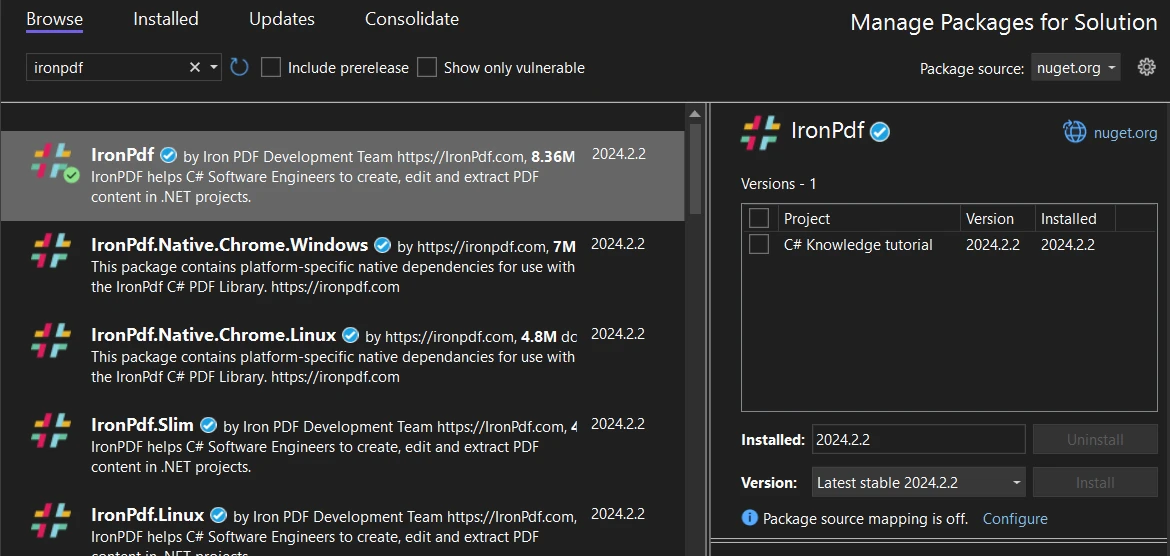 Instalando o IronPDF através da interface do Gerenciador de Pacotes NuGet do Visual Studio.
Alternativamente, você pode usar o Console do Gerenciador de Pacotes para instalar o IronPDF com o seguinte comando:
Install-Package IronPdf
Instalando o PDFSharpCore
Para instalar oPDFSharpCoreusando o NuGet, siga estas instruções:
- Certifique-se de que seu projeto do Visual Studio esteja aberto.
- Acesse Ferramentas > Gerenciador de Pacotes NuGet > Gerenciar Pacotes NuGet para a Solução .
- Não Gerenciador de Pacotes NuGet , procure por PDFSharpCore .
- Selecione seu projeto e clique em Instalar para incorporar o PDFSharpCore.
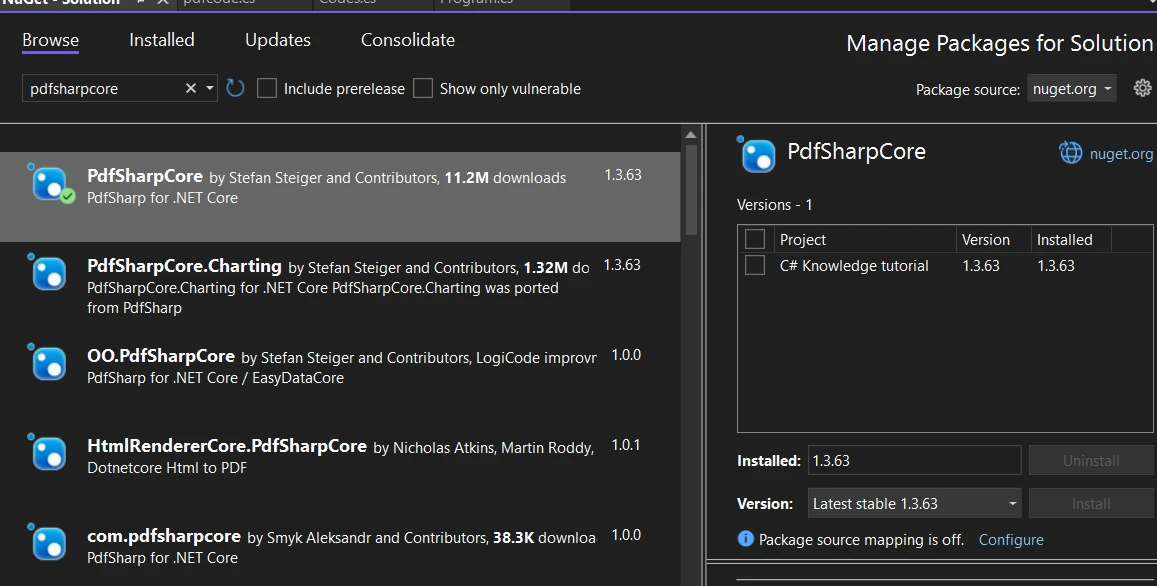 Instalação doPDFSharpCoreatravés do Gerenciador de Pacotes NuGet
Para desenvolvedores que preferem o Console do Gerenciador de Pacotes, oPDFSharpCorepode ser instalado com este comando:
Install-Package PdfSharpCore
Criação de arquivos PDF:IronPDF vs PDFSharpCore
IronPDF: Uma abordagem moderna baseada em HTML
O IronPDF revoluciona a criação de PDFs ao aproveitar tecnologias web que os desenvolvedores já conhecem. Seu mecanismo de renderização baseado no Chrome garante que seu HTML, CSS e JavaScript sejam renderizados exatamente como apareceriam em um navegador moderno.
Converter string HTML em PDF com recursos avançados
Os recursos de conversão de HTML para PDF do IronPDF vão muito além da simples renderização de texto. Aqui está um exemplo aprimorado que demonstra seu poder:
using IronPdf;
using IronPdf.Rendering;

class Program
{
    static void Main(string[] args)
    {
        // Apply your license key (required for production)
        License.LicenseKey = "Your-License-Key";

        // Create renderer with optimized settings
        var renderer = new ChromePdfRenderer()
        {
            RenderingOptions = new ChromePdfRenderOptions()
            {
                // Set margins for professional appearance
                MarginTop = 25,
                MarginBottom = 25,
                MarginLeft = 20,
                MarginRight = 20,

                // Enable JavaScript execution for dynamic content
                EnableJavaScript = true,

                // Wait for AJAX/animations to complete
                RenderDelay = 500,

                // Set paper orientation and size
                PaperOrientation = PdfPaperOrientation.Portrait,
                PaperSize = PdfPaperSize.A4,

                // Enable printing of background colors and images
                PrintHtmlBackgrounds = true
            }
        };

        // HTML with Bootstrap styling and charts
        string htmlContent = @"
            <!DOCTYPE html>
            <html>
            <head>
                <link href='https://cdn.jsdelivr.net/npm/bootstrap@5.1.3/dist/css/bootstrap.min.css' rel='stylesheet'>
                <script src='https://cdn.jsdelivr.net/npm/chart.js'></script>
                <style>
                    body { font-family: 'Segoe UI', Tahoma, Geneva, Verdana, sans-serif; }
                    .header { background: linear-gradient(135deg, #667eea 0%, #764ba2 100%); color: white; padding: 30px; }
                    .chart-container { width: 100%; height: 300px; margin: 20px 0; }
                </style>
            </head>
            <body>
                <div class='header text-center'>
                    <h1>2024 Sales Performance Report</h1>
                    <p class='lead'>Comprehensive Analysis & Insights</p>
                </div>

                <div class='container mt-4'>
                    <div class='row'>
                        <div class='col-md-6'>
                            <div class='card'>
                                <div class='card-body'>
                                    <h5 class='card-title'>Q1 Performance Metrics</h5>
                                    <table class='table table-striped'>
                                        <thead>
                                            <tr>
                                                <th>Month</th>
                                                <th>Revenue</th>
                                                <th>Growth</th>
                                            </tr>
                                        </thead>
                                        <tbody>
                                            <tr>
                                                <td>January</td>
                                                <td>$50,000</td>
                                                <td><span class='badge bg-success'>+12%</span></td>
                                            </tr>
                                            <tr>
                                                <td>February</td>
                                                <td>$55,000</td>
                                                <td><span class='badge bg-success'>+10%</span></td>
                                            </tr>
                                            <tr>
                                                <td>March</td>
                                                <td>$60,000</td>
                                                <td><span class='badge bg-success'>+9%</span></td>
                                            </tr>
                                        </tbody>
                                    </table>
                                </div>
                            </div>
                        </div>
                        <div class='col-md-6'>
                            <div class='card'>
                                <div class='card-body'>
                                    <h5 class='card-title'>Revenue Trend</h5>
                                    <canvas id='revenueChart'></canvas>
                                </div>
                            </div>
                        </div>
                    </div>

                    <div class='alert alert-info mt-4'>
                        <strong>Key Insight:</strong> Q1 showed consistent growth across all months,
                        with total revenue reaching $165,000, representing a 31% increase YoY.
                    </div>
                </div>

                <script>
                    // Create an interactive chart
                    const ctx = document.getElementById('revenueChart').getContext('2d');
                    new Chart(ctx, {
                        type: 'line',
                        data: {
                            labels: ['January', 'February', 'March'],
                            datasets: [{
                                label: 'Revenue',
                                data: [50000, 55000, 60000],
                                borderColor: '#667eea',
                                backgroundColor: 'rgba(102, 126, 234, 0.1)',
                                tension: 0.4
                            }]
                        },
                        options: {
                            responsive: true,
                            maintainAspectRatio: false
                        }
                    });
                </script>
            </body>
            </html>";

        // Render the HTML to PDF
        var pdf = renderer.RenderHtmlAsPdf(htmlContent);

        // Add metadata for better document management
        pdf.MetaData.Author = "Sales Department";
        pdf.MetaData.Title = "Q1 2024 Sales Report";
        pdf.MetaData.Subject = "Quarterly Performance Analysis";
        pdf.MetaData.Keywords = "sales, performance, Q1, 2024";
        pdf.MetaData.CreationDate = DateTime.Now;

        // Save the PDF
        pdf.SaveAs("sales-report-q1-2024.pdf");
        Console.WriteLine("Professional sales report generated successfully!");
    }
}
using IronPdf;
using IronPdf.Rendering;
class Program
{
static void Main(string[] args)
{
// Apply your license key (required for production)
License.LicenseKey = "Your-License-Key";
// Create renderer with optimized settings
var renderer = new ChromePdfRenderer()
{
RenderingOptions = new ChromePdfRenderOptions()
{
// Set margins for professional appearance
MarginTop = 25,
MarginBottom = 25,
MarginLeft = 20,
MarginRight = 20,
// Enable JavaScript execution for dynamic content
EnableJavaScript = true,
// Wait for AJAX/animations to complete
RenderDelay = 500,
// Set paper orientation and size
PaperOrientation = PdfPaperOrientation.Portrait,
PaperSize = PdfPaperSize.A4,
// Enable printing of background colors and images
PrintHtmlBackgrounds = true
}
};
// HTML with Bootstrap styling and charts
string htmlContent = @"
<!DOCTYPE html>
<html>
<head>
<link href='https://cdn.jsdelivr.net/npm/bootstrap@5.1.3/dist/css/bootstrap.min.css' rel='stylesheet'>
<script src='https://cdn.jsdelivr.net/npm/chart.js'></script>
<style>
body { font-family: 'Segoe UI', Tahoma, Geneva, Verdana, sans-serif; }
.header { background: linear-gradient(135deg, #667eea 0%, #764ba2 100%); color: white; padding: 30px; }
.chart-container { width: 100%; height: 300px; margin: 20px 0; }
</style>
</head>
<body>
<div class='header text-center'>
<h1>2024 Sales Performance Report</h1>
<p class='lead'>Comprehensive Analysis & Insights</p>
</div>
<div class='container mt-4'>
<div class='row'>
<div class='col-md-6'>
<div class='card'>
<div class='card-body'>
<h5 class='card-title'>Q1 Performance Metrics</h5>
<table class='table table-striped'>
<thead>
<tr>
<th>Month</th>
<th>Revenue</th>
<th>Growth</th>
</tr>
</thead>
<tbody>
<tr>
<td>January</td>
<td>$50,000</td>
<td><span class='badge bg-success'>+12%</span></td>
</tr>
<tr>
<td>February</td>
<td>$55,000</td>
<td><span class='badge bg-success'>+10%</span></td>
</tr>
<tr>
<td>March</td>
<td>$60,000</td>
<td><span class='badge bg-success'>+9%</span></td>
</tr>
</tbody>
</table>
</div>
</div>
</div>
<div class='col-md-6'>
<div class='card'>
<div class='card-body'>
<h5 class='card-title'>Revenue Trend</h5>
<canvas id='revenueChart'></canvas>
</div>
</div>
</div>
</div>
<div class='alert alert-info mt-4'>
<strong>Key Insight:</strong> Q1 showed consistent growth across all months,
with total revenue reaching $165,000, representing a 31% increase YoY.
</div>
</div>
<script>
// Create an interactive chart
const ctx = document.getElementById('revenueChart').getContext('2d');
new Chart(ctx, {
type: 'line',
data: {
labels: ['January', 'February', 'March'],
datasets: [{
label: 'Revenue',
data: [50000, 55000, 60000],
borderColor: '#667eea',
backgroundColor: 'rgba(102, 126, 234, 0.1)',
tension: 0.4
}]
},
options: {
responsive: true,
maintainAspectRatio: false
}
});
</script>
</body>
</html>";
// Render the HTML to PDF
var pdf = renderer.RenderHtmlAsPdf(htmlContent);
// Add metadata for better document management
pdf.MetaData.Author = "Sales Department";
pdf.MetaData.Title = "Q1 2024 Sales Report";
pdf.MetaData.Subject = "Quarterly Performance Analysis";
pdf.MetaData.Keywords = "sales, performance, Q1, 2024";
pdf.MetaData.CreationDate = DateTime.Now;
// Save the PDF
pdf.SaveAs("sales-report-q1-2024.pdf");
Console.WriteLine("Professional sales report generated successfully!");
}
}Imports IronPdf
Imports IronPdf.Rendering
Friend Class Program
Shared Sub Main(ByVal args() As String)
' Apply your license key (required for production)
License.LicenseKey = "Your-License-Key"
' Create renderer with optimized settings
Dim renderer = New ChromePdfRenderer() With {
.RenderingOptions = New ChromePdfRenderOptions() With {
.MarginTop = 25,
.MarginBottom = 25,
.MarginLeft = 20,
.MarginRight = 20,
.EnableJavaScript = True,
.RenderDelay = 500,
.PaperOrientation = PdfPaperOrientation.Portrait,
.PaperSize = PdfPaperSize.A4,
.PrintHtmlBackgrounds = True
}
}
' HTML with Bootstrap styling and charts
Dim htmlContent As String = "
<!DOCTYPE html>
<html>
<head>
<link href='https://cdn.jsdelivr.net/npm/bootstrap@5.1.3/dist/css/bootstrap.min.css' rel='stylesheet'>
<script src='https://cdn.jsdelivr.net/npm/chart.js'></script>
<style>
body { font-family: 'Segoe UI', Tahoma, Geneva, Verdana, sans-serif; }
.header { background: linear-gradient(135deg, #667eea 0%, #764ba2 100%); color: white; padding: 30px; }
.chart-container { width: 100%; height: 300px; margin: 20px 0; }
</style>
</head>
<body>
<div class='header text-center'>
<h1>2024 Sales Performance Report</h1>
<p class='lead'>Comprehensive Analysis & Insights</p>
</div>
<div class='container mt-4'>
<div class='row'>
<div class='col-md-6'>
<div class='card'>
<div class='card-body'>
<h5 class='card-title'>Q1 Performance Metrics</h5>
<table class='table table-striped'>
<thead>
<tr>
<th>Month</th>
<th>Revenue</th>
<th>Growth</th>
</tr>
</thead>
<tbody>
<tr>
<td>January</td>
<td>$50,000</td>
<td><span class='badge bg-success'>+12%</span></td>
</tr>
<tr>
<td>February</td>
<td>$55,000</td>
<td><span class='badge bg-success'>+10%</span></td>
</tr>
<tr>
<td>March</td>
<td>$60,000</td>
<td><span class='badge bg-success'>+9%</span></td>
</tr>
</tbody>
</table>
</div>
</div>
</div>
<div class='col-md-6'>
<div class='card'>
<div class='card-body'>
<h5 class='card-title'>Revenue Trend</h5>
<canvas id='revenueChart'></canvas>
</div>
</div>
</div>
</div>
<div class='alert alert-info mt-4'>
<strong>Key Insight:</strong> Q1 showed consistent growth across all months,
with total revenue reaching $165,000, representing a 31% increase YoY.
</div>
</div>
<script>
// Create an interactive chart
const ctx = document.getElementById('revenueChart').getContext('2d');
new Chart(ctx, {
type: 'line',
data: {
labels: ['January', 'February', 'March'],
datasets: [{
label: 'Revenue',
data: [50000, 55000, 60000],
borderColor: '#667eea',
backgroundColor: 'rgba(102, 126, 234, 0.1)',
tension: 0.4
}]
},
options: {
responsive: true,
maintainAspectRatio: false
}
});
</script>
</body>
</html>"
' Render the HTML to PDF
Dim pdf = renderer.RenderHtmlAsPdf(htmlContent)
' Add metadata for better document management
pdf.MetaData.Author = "Sales Department"
pdf.MetaData.Title = "Q1 2024 Sales Report"
pdf.MetaData.Subject = "Quarterly Performance Analysis"
pdf.MetaData.Keywords = "sales, performance, Q1, 2024"
pdf.MetaData.CreationDate = DateTime.Now
' Save the PDF
pdf.SaveAs("sales-report-q1-2024.pdf")
Console.WriteLine("Professional sales report generated successfully!")
End Sub
End ClassEste exemplo demonstra vários recursos avançados do IronPDF:
- Integração com Bootstrap: Utiliza frameworks CSS populares para estilização profissional.
- Gráficos JavaScript : Renderiza visualizações dinâmicas do Chart.js no PDF
- Design responsivo: Lida com layouts responsivos de forma inteligente.
- Gerenciamento de Metadados: Adiciona metadados pesquisáveis para sistemas de gerenciamento de documentos.
- Atrasos de renderização: Garante que o conteúdo JavaScript seja carregado completamente antes da renderização.
A classe ChromePdfRenderer fornece controle extensivo sobre o processo de renderização. As principais opções incluem:
EnableJavaScript: Executa código JavaScript antes da renderizaçãoRenderDelay: Aguarda o carregamento de conteúdo assíncronoPrintHtmlBackgrounds: Preserva cores e imagens de fundoPaperOrientationePaperSize: Controlam o layout da página- Configurações de margem para uma aparência profissional do documento
Convertendo arquivos HTML e URLs
O IronPDF também se destaca na conversão de arquivos HTML existentes e páginas da web em tempo real:
using IronPdf;

class Program
{
    static async Task Main(string[] args)
    {
        License.LicenseKey = "Your-License-Key";

        var renderer = new ChromePdfRenderer();

        // Convert a local HTML file with external resources
        var filePdf = renderer.RenderHtmlFileAsPdf(@"C:\Reports\template.html");
        filePdf.SaveAs("from-file.pdf");

        // Convert a URL with authentication
        renderer.LoginCredentials = new ChromeHttpLoginCredentials()
        {
            Username = "user@example.com",
            Password = "secure-password"
        };

        // Render a password-protected page
        var urlPdf = await renderer.RenderUrlAsPdfAsync("https://secure.example.com/reports");
        urlPdf.SaveAs("secure-report.pdf");
    }
}
using IronPdf;
class Program
{
static async Task Main(string[] args)
{
License.LicenseKey = "Your-License-Key";
var renderer = new ChromePdfRenderer();
// Convert a local HTML file with external resources
var filePdf = renderer.RenderHtmlFileAsPdf(@"C:\Reports\template.html");
filePdf.SaveAs("from-file.pdf");
// Convert a URL with authentication
renderer.LoginCredentials = new ChromeHttpLoginCredentials()
{
Username = "user@example.com",
Password = "secure-password"
};
// Render a password-protected page
var urlPdf = await renderer.RenderUrlAsPdfAsync("https://secure.example.com/reports");
urlPdf.SaveAs("secure-report.pdf");
}
}Imports IronPdf
Friend Class Program
Shared Async Function Main(ByVal args() As String) As Task
License.LicenseKey = "Your-License-Key"
Dim renderer = New ChromePdfRenderer()
' Convert a local HTML file with external resources
Dim filePdf = renderer.RenderHtmlFileAsPdf("C:\Reports\template.html")
filePdf.SaveAs("from-file.pdf")
' Convert a URL with authentication
renderer.LoginCredentials = New ChromeHttpLoginCredentials() With {
.Username = "user@example.com",
.Password = "secure-password"
}
' Render a password-protected page
Dim urlPdf = Await renderer.RenderUrlAsPdfAsync("https://secure.example.com/reports")
urlPdf.SaveAs("secure-report.pdf")
End Function
End ClassPDFSharpCore: Construção Manual de Documentos
OPDFSharpCoreadota uma abordagem fundamentalmente diferente, exigindo que os desenvolvedores construam manualmente documentos PDF usando comandos de desenho. Embora isso proporcione um controle preciso, exige significativamente mais código para layouts complexos.
using PdfSharpCore.Drawing;
using PdfSharpCore.Pdf;
using System;

class Program
{
    static void Main()
    {
        // Create a new PDF document
        var document = new PdfDocument();
        document.Info.Title = "Sales Report Q1 2024";
        document.Info.Author = "Sales Department";

        // Add a page
        var page = document.AddPage();
        page.Size = PdfSharpCore.PageSize.A4;

        // Create graphics object for drawing
        var gfx = XGraphics.FromPdfPage(page);

        // Define fonts
        var titleFont = new XFont("Arial", 24, XFontStyle.Bold);
        var headingFont = new XFont("Arial", 14, XFontStyle.Bold);
        var normalFont = new XFont("Arial", 11, XFontStyle.Regular);

        // Draw title with gradient-like effect (manual implementation)
        var titleBrush = new XLinearGradientBrush(
            new XPoint(0, 0),
            new XPoint(page.Width, 0),
            XColors.DarkBlue,
            XColors.Purple
        );
        gfx.DrawRectangle(titleBrush, 0, 0, page.Width, 80);
        gfx.DrawString("2024 Sales Performance Report",
            titleFont, XBrushes.White,
            new XRect(0, 20, page.Width, 40),
            XStringFormats.TopCenter);

        // Draw table manually
        double yPosition = 120;
        double margin = 50;
        double columnWidth = (page.Width - 2 * margin) / 3;

        // Table header
        gfx.DrawRectangle(XBrushes.LightGray, margin, yPosition, page.Width - 2 * margin, 25);
        gfx.DrawString("Month", headingFont, XBrushes.Black,
            new XRect(margin, yPosition, columnWidth, 25),
            XStringFormats.Center);
        gfx.DrawString("Revenue", headingFont, XBrushes.Black,
            new XRect(margin + columnWidth, yPosition, columnWidth, 25),
            XStringFormats.Center);
        gfx.DrawString("Growth", headingFont, XBrushes.Black,
            new XRect(margin + 2 * columnWidth, yPosition, columnWidth, 25),
            XStringFormats.Center);

        // Table data
        string[,] data = {
            { "January", "$50,000", "+12%" },
            { "February", "$55,000", "+10%" },
            { "March", "$60,000", "+9%" }
        };

        yPosition += 25;
        for (int i = 0; i < 3; i++)
        {
            // Alternate row colors
            if (i % 2 == 0)
            {
                gfx.DrawRectangle(XBrushes.WhiteSmoke, margin, yPosition, page.Width - 2 * margin, 20);
            }

            for (int j = 0; j < 3; j++)
            {
                gfx.DrawString(data[i, j], normalFont, XBrushes.Black,
                    new XRect(margin + j * columnWidth, yPosition, columnWidth, 20),
                    XStringFormats.Center);
            }
            yPosition += 20;
        }

        // Draw a simple line chart (very basic implementation)
        yPosition += 40;
        gfx.DrawString("Revenue Trend", headingFont, XBrushes.Black,
            new XRect(margin, yPosition, page.Width - 2 * margin, 25),
            XStringFormats.TopLeft);

        // Chart area
        yPosition += 30;
        double chartHeight = 150;
        double chartWidth = page.Width - 2 * margin;

        // Draw axes
        gfx.DrawLine(XPens.Black, margin, yPosition + chartHeight, margin + chartWidth, yPosition + chartHeight);
        gfx.DrawLine(XPens.Black, margin, yPosition, margin, yPosition + chartHeight);

        // Plot points (simplified)
        double[] revenues = { 50000, 55000, 60000 };
        double maxRevenue = 65000;
        double xStep = chartWidth / 3;

        for (int i = 0; i < revenues.Length; i++)
        {
            double x = margin + (i + 0.5) * xStep;
            double y = yPosition + chartHeight - (revenues[i] / maxRevenue * chartHeight);

            // Draw point
            gfx.DrawEllipse(XBrushes.Blue, x - 3, y - 3, 6, 6);

            // Draw connecting lines
            if (i > 0)
            {
                double prevX = margin + (i - 0.5) * xStep;
                double prevY = yPosition + chartHeight - (revenues[i - 1] / maxRevenue * chartHeight);
                gfx.DrawLine(new XPen(XColors.Blue, 2), prevX, prevY, x, y);
            }

            // Labels
            gfx.DrawString($"${revenues[i]:N0}", normalFont, XBrushes.Black,
                new XRect(x - 30, y - 20, 60, 15),
                XStringFormats.TopCenter);
        }

        // Save the document
        document.Save("pdfsharp-sales-report.pdf");
        Console.WriteLine("PDF created with PDFSharpCore");
    }
}
using PdfSharpCore.Drawing;
using PdfSharpCore.Pdf;
using System;
class Program
{
static void Main()
{
// Create a new PDF document
var document = new PdfDocument();
document.Info.Title = "Sales Report Q1 2024";
document.Info.Author = "Sales Department";
// Add a page
var page = document.AddPage();
page.Size = PdfSharpCore.PageSize.A4;
// Create graphics object for drawing
var gfx = XGraphics.FromPdfPage(page);
// Define fonts
var titleFont = new XFont("Arial", 24, XFontStyle.Bold);
var headingFont = new XFont("Arial", 14, XFontStyle.Bold);
var normalFont = new XFont("Arial", 11, XFontStyle.Regular);
// Draw title with gradient-like effect (manual implementation)
var titleBrush = new XLinearGradientBrush(
new XPoint(0, 0),
new XPoint(page.Width, 0),
XColors.DarkBlue,
XColors.Purple
);
gfx.DrawRectangle(titleBrush, 0, 0, page.Width, 80);
gfx.DrawString("2024 Sales Performance Report",
titleFont, XBrushes.White,
new XRect(0, 20, page.Width, 40),
XStringFormats.TopCenter);
// Draw table manually
double yPosition = 120;
double margin = 50;
double columnWidth = (page.Width - 2 * margin) / 3;
// Table header
gfx.DrawRectangle(XBrushes.LightGray, margin, yPosition, page.Width - 2 * margin, 25);
gfx.DrawString("Month", headingFont, XBrushes.Black,
new XRect(margin, yPosition, columnWidth, 25),
XStringFormats.Center);
gfx.DrawString("Revenue", headingFont, XBrushes.Black,
new XRect(margin + columnWidth, yPosition, columnWidth, 25),
XStringFormats.Center);
gfx.DrawString("Growth", headingFont, XBrushes.Black,
new XRect(margin + 2 * columnWidth, yPosition, columnWidth, 25),
XStringFormats.Center);
// Table data
string[,] data = {
{ "January", "$50,000", "+12%" },
{ "February", "$55,000", "+10%" },
{ "March", "$60,000", "+9%" }
};
yPosition += 25;
for (int i = 0; i < 3; i++)
{
// Alternate row colors
if (i % 2 == 0)
{
gfx.DrawRectangle(XBrushes.WhiteSmoke, margin, yPosition, page.Width - 2 * margin, 20);
}
for (int j = 0; j < 3; j++)
{
gfx.DrawString(data[i, j], normalFont, XBrushes.Black,
new XRect(margin + j * columnWidth, yPosition, columnWidth, 20),
XStringFormats.Center);
}
yPosition += 20;
}
// Draw a simple line chart (very basic implementation)
yPosition += 40;
gfx.DrawString("Revenue Trend", headingFont, XBrushes.Black,
new XRect(margin, yPosition, page.Width - 2 * margin, 25),
XStringFormats.TopLeft);
// Chart area
yPosition += 30;
double chartHeight = 150;
double chartWidth = page.Width - 2 * margin;
// Draw axes
gfx.DrawLine(XPens.Black, margin, yPosition + chartHeight, margin + chartWidth, yPosition + chartHeight);
gfx.DrawLine(XPens.Black, margin, yPosition, margin, yPosition + chartHeight);
// Plot points (simplified)
double[] revenues = { 50000, 55000, 60000 };
double maxRevenue = 65000;
double xStep = chartWidth / 3;
for (int i = 0; i < revenues.Length; i++)
{
double x = margin + (i + 0.5) * xStep;
double y = yPosition + chartHeight - (revenues[i] / maxRevenue * chartHeight);
// Draw point
gfx.DrawEllipse(XBrushes.Blue, x - 3, y - 3, 6, 6);
// Draw connecting lines
if (i > 0)
{
double prevX = margin + (i - 0.5) * xStep;
double prevY = yPosition + chartHeight - (revenues[i - 1] / maxRevenue * chartHeight);
gfx.DrawLine(new XPen(XColors.Blue, 2), prevX, prevY, x, y);
}
// Labels
gfx.DrawString($"${revenues[i]:N0}", normalFont, XBrushes.Black,
new XRect(x - 30, y - 20, 60, 15),
XStringFormats.TopCenter);
}
// Save the document
document.Save("pdfsharp-sales-report.pdf");
Console.WriteLine("PDF created with PDFSharpCore");
}
}Imports PdfSharpCore.Drawing
Imports PdfSharpCore.Pdf
Imports System
Friend Class Program
Shared Sub Main()
' Create a new PDF document
Dim document = New PdfDocument()
document.Info.Title = "Sales Report Q1 2024"
document.Info.Author = "Sales Department"
' Add a page
Dim page = document.AddPage()
page.Size = PdfSharpCore.PageSize.A4
' Create graphics object for drawing
Dim gfx = XGraphics.FromPdfPage(page)
' Define fonts
Dim titleFont = New XFont("Arial", 24, XFontStyle.Bold)
Dim headingFont = New XFont("Arial", 14, XFontStyle.Bold)
Dim normalFont = New XFont("Arial", 11, XFontStyle.Regular)
' Draw title with gradient-like effect (manual implementation)
Dim titleBrush = New XLinearGradientBrush(New XPoint(0, 0), New XPoint(page.Width, 0), XColors.DarkBlue, XColors.Purple)
gfx.DrawRectangle(titleBrush, 0, 0, page.Width, 80)
gfx.DrawString("2024 Sales Performance Report", titleFont, XBrushes.White, New XRect(0, 20, page.Width, 40), XStringFormats.TopCenter)
' Draw table manually
Dim yPosition As Double = 120
Dim margin As Double = 50
Dim columnWidth As Double = (page.Width - 2 * margin) / 3
' Table header
gfx.DrawRectangle(XBrushes.LightGray, margin, yPosition, page.Width - 2 * margin, 25)
gfx.DrawString("Month", headingFont, XBrushes.Black, New XRect(margin, yPosition, columnWidth, 25), XStringFormats.Center)
gfx.DrawString("Revenue", headingFont, XBrushes.Black, New XRect(margin + columnWidth, yPosition, columnWidth, 25), XStringFormats.Center)
gfx.DrawString("Growth", headingFont, XBrushes.Black, New XRect(margin + 2 * columnWidth, yPosition, columnWidth, 25), XStringFormats.Center)
' Table data
Dim data(,) As String = {
{ "January", "$50,000", "+12%" },
{ "February", "$55,000", "+10%" },
{ "March", "$60,000", "+9%" }
}
yPosition += 25
For i As Integer = 0 To 2
' Alternate row colors
If i Mod 2 = 0 Then
gfx.DrawRectangle(XBrushes.WhiteSmoke, margin, yPosition, page.Width - 2 * margin, 20)
End If
For j As Integer = 0 To 2
gfx.DrawString(data(i, j), normalFont, XBrushes.Black, New XRect(margin + j * columnWidth, yPosition, columnWidth, 20), XStringFormats.Center)
Next j
yPosition += 20
Next i
' Draw a simple line chart (very basic implementation)
yPosition += 40
gfx.DrawString("Revenue Trend", headingFont, XBrushes.Black, New XRect(margin, yPosition, page.Width - 2 * margin, 25), XStringFormats.TopLeft)
' Chart area
yPosition += 30
Dim chartHeight As Double = 150
Dim chartWidth As Double = page.Width - 2 * margin
' Draw axes
gfx.DrawLine(XPens.Black, margin, yPosition + chartHeight, margin + chartWidth, yPosition + chartHeight)
gfx.DrawLine(XPens.Black, margin, yPosition, margin, yPosition + chartHeight)
' Plot points (simplified)
Dim revenues() As Double = { 50000, 55000, 60000 }
Dim maxRevenue As Double = 65000
Dim xStep As Double = chartWidth / 3
For i As Integer = 0 To revenues.Length - 1
Dim x As Double = margin + (i + 0.5) * xStep
Dim y As Double = yPosition + chartHeight - (revenues(i) / maxRevenue * chartHeight)
' Draw point
gfx.DrawEllipse(XBrushes.Blue, x - 3, y - 3, 6, 6)
' Draw connecting lines
If i > 0 Then
Dim prevX As Double = margin + (i - 0.5) * xStep
Dim prevY As Double = yPosition + chartHeight - (revenues(i - 1) / maxRevenue * chartHeight)
gfx.DrawLine(New XPen(XColors.Blue, 2), prevX, prevY, x, y)
End If
' Labels
gfx.DrawString($"${revenues(i):N0}", normalFont, XBrushes.Black, New XRect(x - 30, y - 20, 60, 15), XStringFormats.TopCenter)
Next i
' Save the document
document.Save("pdfsharp-sales-report.pdf")
Console.WriteLine("PDF created with PDFSharpCore")
End Sub
End ClassComo você pode ver, criar um documento, mesmo que moderadamente complexo, com oPDFSharpCorerequer:
- Posicionamento manual de cada elemento
- Cálculos complexos para layouts
- Não há suporte integrado para HTML ou CSS
- Implementação manual de gráficos e diagramas
- Muito mais código para o mesmo resultado
HTML para PDF com PDFSharpCore
Como oPDFSharpCorenão oferece suporte nativo à conversão de HTML para PDF, os desenvolvedores precisam usar bibliotecas de terceiros. Uma opção popular é combinar oPDFSharpCorecom o HtmlRenderer:
using PdfSharpCore.Pdf;
using TheArtOfDev.HtmlRenderer.PdfSharp;

var document = new PdfDocument();
string htmlContent = File.ReadAllText("template.html");

// Note: HtmlRenderer has limited CSS support
PdfGenerator.AddPdfPages(document, htmlContent, PdfSharpCore.PageSize.A4);
document.Save("from-html.pdf");
using PdfSharpCore.Pdf;
using TheArtOfDev.HtmlRenderer.PdfSharp;
var document = new PdfDocument();
string htmlContent = File.ReadAllText("template.html");
// Note: HtmlRenderer has limited CSS support
PdfGenerator.AddPdfPages(document, htmlContent, PdfSharpCore.PageSize.A4);
document.Save("from-html.pdf");Imports PdfSharpCore.Pdf
Imports TheArtOfDev.HtmlRenderer.PdfSharp
Private document = New PdfDocument()
Private htmlContent As String = File.ReadAllText("template.html")
' Note: HtmlRenderer has limited CSS support
PdfGenerator.AddPdfPages(document, htmlContent, PdfSharpCore.PageSize.A4)
document.Save("from-html.pdf")No entanto, essa abordagem apresenta limitações significativas:
- Suporte limitado a CSS3 (sem flexbox, sem CSS Grid, sem suporte a frameworks modernos)
- Sem execução de JavaScript
- Má gestão de funcionalidades web modernas
- Renderização inconsistente em comparação com outros navegadores
Suporte a frameworks CSS modernos: Bootstrap e muito mais.
Ao desenvolver aplicações que exigem a geração de PDFs a partir de conteúdo web, o suporte a Bootstrap e frameworks CSS modernos é fundamental. A maioria das aplicações web utiliza esses frameworks para um design consistente, e a capacidade de converter essas interfaces para PDF sem modificações reduz significativamente o tempo de desenvolvimento.
IronPDF: Suporte completo para Bootstrap e frameworks CSS
Bootstrap 5: Mecanismo completo de layout flexbox, CSS Grid, classes utilitárias e todos os sistemas de componentes. Bootstrap 4: Componentes de cartão completos, navegação, utilitários flexíveis e classes responsivas.
- Tailwind CSS: Todas as classes utilitárias com renderização precisa
- Foundation: Sistema de grade completo e biblioteca de componentes CSS3 moderno: Flexbox, CSS Grid, propriedades personalizadas, animações, transições e transformações.
Prova prática: o IronPDF renderiza a página inicial do Bootstrap e todos os modelos oficiais com precisão perfeita em cada pixel.
Exemplo de código: Painel de progresso do projeto
using IronPdf;
// Set your IronPDF license key
IronPdf.License.LicenseKey = "License-Key goes here";
var renderer = new ChromePdfRenderer();
string bootstrapProgress = @"
<!DOCTYPE html>
<html>
<head>
<link href='https://cdn.jsdelivr.net/npm/bootstrap@5.3.0/dist/css/bootstrap.min.css' rel='stylesheet'>
<style>
.project-card {
transition: all 0.3s ease;
border-left: 4px solid transparent;
}
.project-card.active { border-left-color: #0d6efd; }
.progress-label { font-size: 0.75rem; font-weight: 600; }
</style>
</head>
<body>
<div class='container my-5'>
<div class='d-flex justify-content-between align-items-center mb-4'>
<div>
<h1 class='display-6 mb-1'>Project Portfolio Status</h1>
<p class='text-muted mb-0'>Q1 2025 Development Pipeline</p>
</div>
<div>
<span class='badge bg-success fs-6'>8 Active Projects</span>
</div>
</div>
<div class='row g-4 mb-4'>
<div class='col-md-3'>
<div class='card text-center shadow-sm'>
<div class='card-body'>
<div class='display-4 text-primary mb-2'>72%</div>
<h6 class='text-muted text-uppercase mb-0'>Overall Progress</h6>
</div>
</div>
</div>
<div class='col-md-3'>
<div class='card text-center shadow-sm'>
<div class='card-body'>
<div class='display-4 text-success mb-2'>5</div>
<h6 class='text-muted text-uppercase mb-0'>On Track</h6>
</div>
</div>
</div>
<div class='col-md-3'>
<div class='card text-center shadow-sm'>
<div class='card-body'>
<div class='display-4 text-warning mb-2'>2</div>
<h6 class='text-muted text-uppercase mb-0'>At Risk</h6>
</div>
</div>
</div>
<div class='col-md-3'>
<div class='card text-center shadow-sm'>
<div class='card-body'>
<div class='display-4 text-danger mb-2'>1</div>
<h6 class='text-muted text-uppercase mb-0'>Delayed</h6>
</div>
</div>
</div>
</div>
<div class='card shadow-sm mb-4'>
<div class='card-header bg-primary text-white'>
<h5 class='mb-0'>Active Projects</h5>
</div>
<div class='card-body p-0'>
<div class='list-group list-group-flush'>
<div class='list-group-item'>
<div class='d-flex justify-content-between align-items-start mb-3'>
<div>
<h6 class='mb-1'>E-Commerce Platform Redesign</h6>
<small class='text-muted'>Lead: Sarah Chen | Due: Apr 15, 2025</small>
</div>
<span class='badge bg-success'>On Track</span>
</div>
<div class='mb-2'>
<div class='d-flex justify-content-between align-items-center mb-1'>
<span class='progress-label text-muted'>COMPLETION</span>
<span class='progress-label text-primary'>85%</span>
</div>
<div class='progress' style='height: 8px;'>
<div class='progress-bar bg-primary' role='progressbar' style='width: 85%'></div>
</div>
</div>
<div class='d-flex gap-2 flex-wrap'>
<span class='badge bg-light text-dark'>Frontend: 90%</span>
<span class='badge bg-light text-dark'>Backend: 80%</span>
<span class='badge bg-light text-dark'>Testing: 85%</span>
</div>
</div>
<div class='list-group-item'>
<div class='d-flex justify-content-between align-items-start mb-3'>
<div>
<h6 class='mb-1'>Mobile App Integration</h6>
<small class='text-muted'>Lead: Marcus Johnson | Due: Mar 30, 2025</small>
</div>
<span class='badge bg-success'>On Track</span>
</div>
<div class='mb-2'>
<div class='d-flex justify-content-between align-items-center mb-1'>
<span class='progress-label text-muted'>COMPLETION</span>
<span class='progress-label text-success'>92%</span>
</div>
<div class='progress' style='height: 8px;'>
<div class='progress-bar bg-success' role='progressbar' style='width: 92%'></div>
</div>
</div>
<div class='d-flex gap-2 flex-wrap'>
<span class='badge bg-light text-dark'>iOS: 95%</span>
<span class='badge bg-light text-dark'>Android: 90%</span>
<span class='badge bg-light text-dark'>API: 100%</span>
</div>
</div>
<div class='list-group-item'>
<div class='d-flex justify-content-between align-items-start mb-3'>
<div>
<h6 class='mb-1'>Customer Analytics Dashboard</h6>
<small class='text-muted'>Lead: Emily Rodriguez | Due: Apr 22, 2025</small>
</div>
<span class='badge bg-warning text-dark'>At Risk</span>
</div>
<div class='mb-2'>
<div class='d-flex justify-content-between align-items-center mb-1'>
<span class='progress-label text-muted'>COMPLETION</span>
<span class='progress-label text-warning'>58%</span>
</div>
<div class='progress' style='height: 8px;'>
<div class='progress-bar bg-warning' role='progressbar' style='width: 58%'></div>
</div>
</div>
<div class='d-flex gap-2 flex-wrap'>
<span class='badge bg-light text-dark'>Data Pipeline: 65%</span>
<span class='badge bg-light text-dark'>UI: 50%</span>
<span class='badge bg-light text-dark'>Reports: 45%</span>
</div>
<div class='alert alert-warning mt-2 mb-0 py-2'>
<small><strong>Issue:</strong> Resource constraints affecting timeline. Review scheduled for next week.</small>
</div>
</div>
<div class='list-group-item'>
<div class='d-flex justify-content-between align-items-start mb-3'>
<div>
<h6 class='mb-1'>Security Infrastructure Upgrade</h6>
<small class='text-muted'>Lead: David Kim | Due: Mar 25, 2025</small>
</div>
<span class='badge bg-danger'>Delayed</span>
</div>
<div class='mb-2'>
<div class='d-flex justify-content-between align-items-center mb-1'>
<span class='progress-label text-muted'>COMPLETION</span>
<span class='progress-label text-danger'>42%</span>
</div>
<div class='progress' style='height: 8px;'>
<div class='progress-bar bg-danger' role='progressbar' style='width: 42%'></div>
</div>
</div>
<div class='d-flex gap-2 flex-wrap'>
<span class='badge bg-light text-dark'>Authentication: 60%</span>
<span class='badge bg-light text-dark'>Criptografia: 40%</span>
<span class='badge bg-light text-dark'>Audit Logs: 25%</span>
</div>
<div class='alert alert-danger mt-2 mb-0 py-2'>
<small><strong>Critical:</strong> 7 days behind schedule. Additional resources allocated. Daily standup required.</small>
</div>
</div>
</div>
</div>
</div>
<div class='row g-4'>
<div class='col-md-6'>
<div class='card shadow-sm'>
<div class='card-header bg-white'>
<h5 class='mb-0'>Sprint Velocity</h5>
</div>
<div class='card-body'>
<div class='mb-3'>
<div class='d-flex justify-content-between mb-1'>
<span class='text-muted'>Current Sprint</span>
<strong>42 Story Points</strong>
</div>
<div class='progress' style='height: 20px;'>
<div class='progress-bar bg-success' style='width: 84%'>84% Complete</div>
</div>
</div>
<div class='mb-3'>
<div class='d-flex justify-content-between mb-1'>
<span class='text-muted'>Previous Sprint</span>
<strong>38 Story Points</strong>
</div>
<div class='progress' style='height: 20px;'>
<div class='progress-bar bg-info' style='width: 100%'>Completed</div>
</div>
</div>
<div class='mb-0'>
<div class='d-flex justify-content-between mb-1'>
<span class='text-muted'>Average Velocity</span>
<strong>40 Story Points</strong>
</div>
<div class='progress' style='height: 20px;'>
<div class='progress-bar bg-primary' style='width: 100%'>Baseline</div>
</div>
</div>
</div>
</div>
</div>
<div class='col-md-6'>
<div class='card shadow-sm'>
<div class='card-header bg-white'>
<h5 class='mb-0'>Team Capacity</h5>
</div>
<div class='card-body'>
<div class='d-flex justify-content-between align-items-center mb-3'>
<div>
<h6 class='mb-0'>Frontend Team</h6>
<small class='text-muted'>6 developers</small>
</div>
<span class='badge bg-success'>92% Utilized</span>
</div>
<div class='d-flex justify-content-between align-items-center mb-3'>
<div>
<h6 class='mb-0'>Backend Team</h6>
<small class='text-muted'>5 developers</small>
</div>
<span class='badge bg-success'>88% Utilized</span>
</div>
<div class='d-flex justify-content-between align-items-center mb-3'>
<div>
<h6 class='mb-0'>QA Team</h6>
<small class='text-muted'>3 testers</small>
</div>
<span class='badge bg-warning text-dark'>105% Utilized</span>
</div>
<div class='d-flex justify-content-between align-items-center mb-0'>
<div>
<h6 class='mb-0'>DevOps Team</h6>
<small class='text-muted'>2 engineers</small>
</div>
<span class='badge bg-danger'>110% Utilized</span>
</div>
</div>
</div>
</div>
</div>
</div>
</body>
</html>";
var pdf = renderer.RenderHtmlAsPdf(bootstrapProgress);
pdf.SaveAs("project-progress.pdf");using IronPdf;
// Set your IronPDF license key
IronPdf.License.LicenseKey = "License-Key goes here";
var renderer = new ChromePdfRenderer();
string bootstrapProgress = @"
<!DOCTYPE html>
<html>
<head>
<link href='https://cdn.jsdelivr.net/npm/bootstrap@5.3.0/dist/css/bootstrap.min.css' rel='stylesheet'>
<style>
.project-card {
transition: all 0.3s ease;
border-left: 4px solid transparent;
}
.project-card.active { border-left-color: #0d6efd; }
.progress-label { font-size: 0.75rem; font-weight: 600; }
</style>
</head>
<body>
<div class='container my-5'>
<div class='d-flex justify-content-between align-items-center mb-4'>
<div>
<h1 class='display-6 mb-1'>Project Portfolio Status</h1>
<p class='text-muted mb-0'>Q1 2025 Development Pipeline</p>
</div>
<div>
<span class='badge bg-success fs-6'>8 Active Projects</span>
</div>
</div>
<div class='row g-4 mb-4'>
<div class='col-md-3'>
<div class='card text-center shadow-sm'>
<div class='card-body'>
<div class='display-4 text-primary mb-2'>72%</div>
<h6 class='text-muted text-uppercase mb-0'>Overall Progress</h6>
</div>
</div>
</div>
<div class='col-md-3'>
<div class='card text-center shadow-sm'>
<div class='card-body'>
<div class='display-4 text-success mb-2'>5</div>
<h6 class='text-muted text-uppercase mb-0'>On Track</h6>
</div>
</div>
</div>
<div class='col-md-3'>
<div class='card text-center shadow-sm'>
<div class='card-body'>
<div class='display-4 text-warning mb-2'>2</div>
<h6 class='text-muted text-uppercase mb-0'>At Risk</h6>
</div>
</div>
</div>
<div class='col-md-3'>
<div class='card text-center shadow-sm'>
<div class='card-body'>
<div class='display-4 text-danger mb-2'>1</div>
<h6 class='text-muted text-uppercase mb-0'>Delayed</h6>
</div>
</div>
</div>
</div>
<div class='card shadow-sm mb-4'>
<div class='card-header bg-primary text-white'>
<h5 class='mb-0'>Active Projects</h5>
</div>
<div class='card-body p-0'>
<div class='list-group list-group-flush'>
<div class='list-group-item'>
<div class='d-flex justify-content-between align-items-start mb-3'>
<div>
<h6 class='mb-1'>E-Commerce Platform Redesign</h6>
<small class='text-muted'>Lead: Sarah Chen | Due: Apr 15, 2025</small>
</div>
<span class='badge bg-success'>On Track</span>
</div>
<div class='mb-2'>
<div class='d-flex justify-content-between align-items-center mb-1'>
<span class='progress-label text-muted'>COMPLETION</span>
<span class='progress-label text-primary'>85%</span>
</div>
<div class='progress' style='height: 8px;'>
<div class='progress-bar bg-primary' role='progressbar' style='width: 85%'></div>
</div>
</div>
<div class='d-flex gap-2 flex-wrap'>
<span class='badge bg-light text-dark'>Frontend: 90%</span>
<span class='badge bg-light text-dark'>Backend: 80%</span>
<span class='badge bg-light text-dark'>Testing: 85%</span>
</div>
</div>
<div class='list-group-item'>
<div class='d-flex justify-content-between align-items-start mb-3'>
<div>
<h6 class='mb-1'>Mobile App Integration</h6>
<small class='text-muted'>Lead: Marcus Johnson | Due: Mar 30, 2025</small>
</div>
<span class='badge bg-success'>On Track</span>
</div>
<div class='mb-2'>
<div class='d-flex justify-content-between align-items-center mb-1'>
<span class='progress-label text-muted'>COMPLETION</span>
<span class='progress-label text-success'>92%</span>
</div>
<div class='progress' style='height: 8px;'>
<div class='progress-bar bg-success' role='progressbar' style='width: 92%'></div>
</div>
</div>
<div class='d-flex gap-2 flex-wrap'>
<span class='badge bg-light text-dark'>iOS: 95%</span>
<span class='badge bg-light text-dark'>Android: 90%</span>
<span class='badge bg-light text-dark'>API: 100%</span>
</div>
</div>
<div class='list-group-item'>
<div class='d-flex justify-content-between align-items-start mb-3'>
<div>
<h6 class='mb-1'>Customer Analytics Dashboard</h6>
<small class='text-muted'>Lead: Emily Rodriguez | Due: Apr 22, 2025</small>
</div>
<span class='badge bg-warning text-dark'>At Risk</span>
</div>
<div class='mb-2'>
<div class='d-flex justify-content-between align-items-center mb-1'>
<span class='progress-label text-muted'>COMPLETION</span>
<span class='progress-label text-warning'>58%</span>
</div>
<div class='progress' style='height: 8px;'>
<div class='progress-bar bg-warning' role='progressbar' style='width: 58%'></div>
</div>
</div>
<div class='d-flex gap-2 flex-wrap'>
<span class='badge bg-light text-dark'>Data Pipeline: 65%</span>
<span class='badge bg-light text-dark'>UI: 50%</span>
<span class='badge bg-light text-dark'>Reports: 45%</span>
</div>
<div class='alert alert-warning mt-2 mb-0 py-2'>
<small><strong>Issue:</strong> Resource constraints affecting timeline. Review scheduled for next week.</small>
</div>
</div>
<div class='list-group-item'>
<div class='d-flex justify-content-between align-items-start mb-3'>
<div>
<h6 class='mb-1'>Security Infrastructure Upgrade</h6>
<small class='text-muted'>Lead: David Kim | Due: Mar 25, 2025</small>
</div>
<span class='badge bg-danger'>Delayed</span>
</div>
<div class='mb-2'>
<div class='d-flex justify-content-between align-items-center mb-1'>
<span class='progress-label text-muted'>COMPLETION</span>
<span class='progress-label text-danger'>42%</span>
</div>
<div class='progress' style='height: 8px;'>
<div class='progress-bar bg-danger' role='progressbar' style='width: 42%'></div>
</div>
</div>
<div class='d-flex gap-2 flex-wrap'>
<span class='badge bg-light text-dark'>Authentication: 60%</span>
<span class='badge bg-light text-dark'>Criptografia: 40%</span>
<span class='badge bg-light text-dark'>Audit Logs: 25%</span>
</div>
<div class='alert alert-danger mt-2 mb-0 py-2'>
<small><strong>Critical:</strong> 7 days behind schedule. Additional resources allocated. Daily standup required.</small>
</div>
</div>
</div>
</div>
</div>
<div class='row g-4'>
<div class='col-md-6'>
<div class='card shadow-sm'>
<div class='card-header bg-white'>
<h5 class='mb-0'>Sprint Velocity</h5>
</div>
<div class='card-body'>
<div class='mb-3'>
<div class='d-flex justify-content-between mb-1'>
<span class='text-muted'>Current Sprint</span>
<strong>42 Story Points</strong>
</div>
<div class='progress' style='height: 20px;'>
<div class='progress-bar bg-success' style='width: 84%'>84% Complete</div>
</div>
</div>
<div class='mb-3'>
<div class='d-flex justify-content-between mb-1'>
<span class='text-muted'>Previous Sprint</span>
<strong>38 Story Points</strong>
</div>
<div class='progress' style='height: 20px;'>
<div class='progress-bar bg-info' style='width: 100%'>Completed</div>
</div>
</div>
<div class='mb-0'>
<div class='d-flex justify-content-between mb-1'>
<span class='text-muted'>Average Velocity</span>
<strong>40 Story Points</strong>
</div>
<div class='progress' style='height: 20px;'>
<div class='progress-bar bg-primary' style='width: 100%'>Baseline</div>
</div>
</div>
</div>
</div>
</div>
<div class='col-md-6'>
<div class='card shadow-sm'>
<div class='card-header bg-white'>
<h5 class='mb-0'>Team Capacity</h5>
</div>
<div class='card-body'>
<div class='d-flex justify-content-between align-items-center mb-3'>
<div>
<h6 class='mb-0'>Frontend Team</h6>
<small class='text-muted'>6 developers</small>
</div>
<span class='badge bg-success'>92% Utilized</span>
</div>
<div class='d-flex justify-content-between align-items-center mb-3'>
<div>
<h6 class='mb-0'>Backend Team</h6>
<small class='text-muted'>5 developers</small>
</div>
<span class='badge bg-success'>88% Utilized</span>
</div>
<div class='d-flex justify-content-between align-items-center mb-3'>
<div>
<h6 class='mb-0'>QA Team</h6>
<small class='text-muted'>3 testers</small>
</div>
<span class='badge bg-warning text-dark'>105% Utilized</span>
</div>
<div class='d-flex justify-content-between align-items-center mb-0'>
<div>
<h6 class='mb-0'>DevOps Team</h6>
<small class='text-muted'>2 engineers</small>
</div>
<span class='badge bg-danger'>110% Utilized</span>
</div>
</div>
</div>
</div>
</div>
</div>
</body>
</html>";
var pdf = renderer.RenderHtmlAsPdf(bootstrapProgress);
pdf.SaveAs("project-progress.pdf");Imports IronPdf
' Set your IronPDF license key
IronPdf.License.LicenseKey = "License-Key goes here"
Dim renderer As New ChromePdfRenderer()
Dim bootstrapProgress As String = "
<!DOCTYPE html>
<html>
<head>
<link href='https://cdn.jsdelivr.net/npm/bootstrap@5.3.0/dist/css/bootstrap.min.css' rel='stylesheet'>
<style>
.project-card {
transition: all 0.3s ease;
border-left: 4px solid transparent;
}
.project-card.active { border-left-color: #0d6efd; }
.progress-label { font-size: 0.75rem; font-weight: 600; }
</style>
</head>
<body>
<div class='container my-5'>
<div class='d-flex justify-content-between align-items-center mb-4'>
<div>
<h1 class='display-6 mb-1'>Project Portfolio Status</h1>
<p class='text-muted mb-0'>Q1 2025 Development Pipeline</p>
</div>
<div>
<span class='badge bg-success fs-6'>8 Active Projects</span>
</div>
</div>
<div class='row g-4 mb-4'>
<div class='col-md-3'>
<div class='card text-center shadow-sm'>
<div class='card-body'>
<div class='display-4 text-primary mb-2'>72%</div>
<h6 class='text-muted text-uppercase mb-0'>Overall Progress</h6>
</div>
</div>
</div>
<div class='col-md-3'>
<div class='card text-center shadow-sm'>
<div class='card-body'>
<div class='display-4 text-success mb-2'>5</div>
<h6 class='text-muted text-uppercase mb-0'>On Track</h6>
</div>
</div>
</div>
<div class='col-md-3'>
<div class='card text-center shadow-sm'>
<div class='card-body'>
<div class='display-4 text-warning mb-2'>2</div>
<h6 class='text-muted text-uppercase mb-0'>At Risk</h6>
</div>
</div>
</div>
<div class='col-md-3'>
<div class='card text-center shadow-sm'>
<div class='card-body'>
<div class='display-4 text-danger mb-2'>1</div>
<h6 class='text-muted text-uppercase mb-0'>Delayed</h6>
</div>
</div>
</div>
</div>
<div class='card shadow-sm mb-4'>
<div class='card-header bg-primary text-white'>
<h5 class='mb-0'>Active Projects</h5>
</div>
<div class='card-body p-0'>
<div class='list-group list-group-flush'>
<div class='list-group-item'>
<div class='d-flex justify-content-between align-items-start mb-3'>
<div>
<h6 class='mb-1'>E-Commerce Platform Redesign</h6>
<small class='text-muted'>Lead: Sarah Chen | Due: Apr 15, 2025</small>
</div>
<span class='badge bg-success'>On Track</span>
</div>
<div class='mb-2'>
<div class='d-flex justify-content-between align-items-center mb-1'>
<span class='progress-label text-muted'>COMPLETION</span>
<span class='progress-label text-primary'>85%</span>
</div>
<div class='progress' style='height: 8px;'>
<div class='progress-bar bg-primary' role='progressbar' style='width: 85%'></div>
</div>
</div>
<div class='d-flex gap-2 flex-wrap'>
<span class='badge bg-light text-dark'>Frontend: 90%</span>
<span class='badge bg-light text-dark'>Backend: 80%</span>
<span class='badge bg-light text-dark'>Testing: 85%</span>
</div>
</div>
<div class='list-group-item'>
<div class='d-flex justify-content-between align-items-start mb-3'>
<div>
<h6 class='mb-1'>Mobile App Integration</h6>
<small class='text-muted'>Lead: Marcus Johnson | Due: Mar 30, 2025</small>
</div>
<span class='badge bg-success'>On Track</span>
</div>
<div class='mb-2'>
<div class='d-flex justify-content-between align-items-center mb-1'>
<span class='progress-label text-muted'>COMPLETION</span>
<span class='progress-label text-success'>92%</span>
</div>
<div class='progress' style='height: 8px;'>
<div class='progress-bar bg-success' role='progressbar' style='width: 92%'></div>
</div>
</div>
<div class='d-flex gap-2 flex-wrap'>
<span class='badge bg-light text-dark'>iOS: 95%</span>
<span class='badge bg-light text-dark'>Android: 90%</span>
<span class='badge bg-light text-dark'>API: 100%</span>
</div>
</div>
<div class='list-group-item'>
<div class='d-flex justify-content-between align-items-start mb-3'>
<div>
<h6 class='mb-1'>Customer Analytics Dashboard</h6>
<small class='text-muted'>Lead: Emily Rodriguez | Due: Apr 22, 2025</small>
</div>
<span class='badge bg-warning text-dark'>At Risk</span>
</div>
<div class='mb-2'>
<div class='d-flex justify-content-between align-items-center mb-1'>
<span class='progress-label text-muted'>COMPLETION</span>
<span class='progress-label text-warning'>58%</span>
</div>
<div class='progress' style='height: 8px;'>
<div class='progress-bar bg-warning' role='progressbar' style='width: 58%'></div>
</div>
</div>
<div class='d-flex gap-2 flex-wrap'>
<span class='badge bg-light text-dark'>Data Pipeline: 65%</span>
<span class='badge bg-light text-dark'>UI: 50%</span>
<span class='badge bg-light text-dark'>Reports: 45%</span>
</div>
<div class='alert alert-warning mt-2 mb-0 py-2'>
<small><strong>Issue:</strong> Resource constraints affecting timeline. Review scheduled for next week.</small>
</div>
</div>
<div class='list-group-item'>
<div class='d-flex justify-content-between align-items-start mb-3'>
<div>
<h6 class='mb-1'>Security Infrastructure Upgrade</h6>
<small class='text-muted'>Lead: David Kim | Due: Mar 25, 2025</small>
</div>
<span class='badge bg-danger'>Delayed</span>
</div>
<div class='mb-2'>
<div class='d-flex justify-content-between align-items-center mb-1'>
<span class='progress-label text-muted'>COMPLETION</span>
<span class='progress-label text-danger'>42%</span>
</div>
<div class='progress' style='height: 8px;'>
<div class='progress-bar bg-danger' role='progressbar' style='width: 42%'></div>
</div>
</div>
<div class='d-flex gap-2 flex-wrap'>
<span class='badge bg-light text-dark'>Authentication: 60%</span>
<span class='badge bg-light text-dark'>Criptografia: 40%</span>
<span class='badge bg-light text-dark'>Audit Logs: 25%</span>
</div>
<div class='alert alert-danger mt-2 mb-0 py-2'>
<small><strong>Critical:</strong> 7 days behind schedule. Additional resources allocated. Daily standup required.</small>
</div>
</div>
</div>
</div>
</div>
<div class='row g-4'>
<div class='col-md-6'>
<div class='card shadow-sm'>
<div class='card-header bg-white'>
<h5 class='mb-0'>Sprint Velocity</h5>
</div>
<div class='card-body'>
<div class='mb-3'>
<div class='d-flex justify-content-between mb-1'>
<span class='text-muted'>Current Sprint</span>
<strong>42 Story Points</strong>
</div>
<div class='progress' style='height: 20px;'>
<div class='progress-bar bg-success' style='width: 84%'>84% Complete</div>
</div>
</div>
<div class='mb-3'>
<div class='d-flex justify-content-between mb-1'>
<span class='text-muted'>Previous Sprint</span>
<strong>38 Story Points</strong>
</div>
<div class='progress' style='height: 20px;'>
<div class='progress-bar bg-info' style='width: 100%'>Completed</div>
</div>
</div>
<div class='mb-0'>
<div class='d-flex justify-content-between mb-1'>
<span class='text-muted'>Average Velocity</span>
<strong>40 Story Points</strong>
</div>
<div class='progress' style='height: 20px;'>
<div class='progress-bar bg-primary' style='width: 100%'>Baseline</div>
</div>
</div>
</div>
</div>
</div>
<div class='col-md-6'>
<div class='card shadow-sm'>
<div class='card-header bg-white'>
<h5 class='mb-0'>Team Capacity</h5>
</div>
<div class='card-body'>
<div class='d-flex justify-content-between align-items-center mb-3'>
<div>
<h6 class='mb-0'>Frontend Team</h6>
<small class='text-muted'>6 developers</small>
</div>
<span class='badge bg-success'>92% Utilized</span>
</div>
<div class='d-flex justify-content-between align-items-center mb-3'>
<div>
<h6 class='mb-0'>Backend Team</h6>
<small class='text-muted'>5 developers</small>
</div>
<span class='badge bg-success'>88% Utilized</span>
</div>
<div class='d-flex justify-content-between align-items-center mb-3'>
<div>
<h6 class='mb-0'>QA Team</h6>
<small class='text-muted'>3 testers</small>
</div>
<span class='badge bg-warning text-dark'>105% Utilized</span>
</div>
<div class='d-flex justify-content-between align-items-center mb-0'>
<div>
<h6 class='mb-0'>DevOps Team</h6>
<small class='text-muted'>2 engineers</small>
</div>
<span class='badge bg-danger'>110% Utilized</span>
</div>
</div>
</div>
</div>
</div>
</div>
</body>
</html>"
Dim pdf = renderer.RenderHtmlAsPdf(bootstrapProgress)
pdf.SaveAs("project-progress.pdf")Resultado: PDF profissional de gerenciamento de projetos com layouts baseados em flexbox do Bootstrap 5, componentes de barra de progresso, utilitários de distintivo, sistemas de cartões responsivos e componentes de alerta — tudo renderizado com alinhamento, espaçamento e precisão de cores perfeitos.
PDFSharpCore: Sem suporte nativo a HTML
OPDFSharpCorenão possui um mecanismo nativo de renderização HTML . A biblioteca foi projetada exclusivamente para manipulação de PDFs de baixo nível e operações de desenho:
- Sem suporte para Bootstrap: Não é possível processar frameworks HTML/CSS.
- Sem Flexbox ou CSS Grid: Sem qualquer capacidade de renderização CSS.
- Construção manual apenas: Requer o desenho de texto, formas e imagens usando APIs baseadas em coordenadas.
- Ferramentas externas necessárias: É preciso usar renderizadores HTML ou serviços de conversão de terceiros.
A integração do HtmlRenderer (de terceiros) oferece apenas suporte HTML básico, com severas limitações — sem flexbox, sem CSS Grid e sem suporte a frameworks modernos.
Impacto no desenvolvimento: As equipes precisam abandonar completamente os fluxos de trabalho baseados em HTML ou integrar várias ferramentas (PDFSharpCore + renderizador HTML externo), o que aumenta a complexidade, a carga de manutenção e os potenciais problemas de compatibilidade entre as versões da biblioteca.
Para obter informações detalhadas sobre a compatibilidade com o framework Bootstrap e os recursos de renderização CSS3, consulte o Guia de CSS do Bootstrap e Flexbox .
Comparação de recursos avançados
Extração de texto
Uma das operações mais comuns em PDFs é a extração de texto para indexação, análise ou conversão. Eis como ambas as bibliotecas lidam com essa tarefa:
Extração de texto IronPDF
O IronPDF oferece recursos robustos de extração de texto com uma API simples:
using IronPdf;

// Extract all text from a PDF
var pdf = PdfDocument.FromFile("report.pdf");
string allText = pdf.ExtractAllText();

// Extract text from specific pages
for (int i = 0; i < pdf.PageCount; i++)
{
    string pageText = pdf.ExtractTextFromPage(i);
    Console.WriteLine($"Page {i + 1}: {pageText.Substring(0, Math.Min(100, pageText.Length))}...");
}

// Extract text from a specific region
var pageIndex = 0;
var region = new Rectangle(50, 50, 200, 100); // x, y, width, height
string regionText = pdf.ExtractTextFromPage(pageIndex, region);
using IronPdf;
// Extract all text from a PDF
var pdf = PdfDocument.FromFile("report.pdf");
string allText = pdf.ExtractAllText();
// Extract text from specific pages
for (int i = 0; i < pdf.PageCount; i++)
{
string pageText = pdf.ExtractTextFromPage(i);
Console.WriteLine($"Page {i + 1}: {pageText.Substring(0, Math.Min(100, pageText.Length))}...");
}
// Extract text from a specific region
var pageIndex = 0;
var region = new Rectangle(50, 50, 200, 100); // x, y, width, height
string regionText = pdf.ExtractTextFromPage(pageIndex, region);Imports IronPdf
' Extract all text from a PDF
Private pdf = PdfDocument.FromFile("report.pdf")
Private allText As String = pdf.ExtractAllText()
' Extract text from specific pages
For i As Integer = 0 To pdf.PageCount - 1
Dim pageText As String = pdf.ExtractTextFromPage(i)
Console.WriteLine($"Page {i + 1}: {pageText.Substring(0, Math.Min(100, pageText.Length))}...")
Next i
' Extract text from a specific region
Dim pageIndex = 0
Dim region = New Rectangle(50, 50, 200, 100) ' x, y, width, height
Dim regionText As String = pdf.ExtractTextFromPage(pageIndex, region)Extração de texto PDFSharpCore
OPDFSharpCorepossui capacidades limitadas de extração de texto nativas. Conforme observado nos artigos de comparação , isso frequentemente produz resultados fragmentados ou incompletos:
//PDFSharpCoredoesn't have reliable text extraction
// This is a significant limitation for many use cases
//PDFSharpCoredoesn't have reliable text extraction
// This is a significant limitation for many use cases'PDFSharpCore doesn't have reliable text extraction
' This is a significant limitation for many use casesMarca d'água
A inclusão de marcas d'água em PDFs é essencial para a identidade visual da marca e para a segurança do documento.
Marca d'água IronPDF
using IronPdf;

var pdf = PdfDocument.FromFile("document.pdf");

// HTML-based watermark with full CSS support
string watermarkHtml = @"
    <div style='
        font-size: 48px;
        color: rgba(255, 0, 0, 0.3);
        transform: rotate(-45deg);
        text-align: center;
        font-weight: bold;
    '>
        CONFIDENTIAL
    </div>";

pdf.ApplyWatermark(watermarkHtml, 50, VerticalAlignment.Middle, HorizontalAlignment.Center);

// Image watermark
pdf.ApplyWatermark("logo.png", 30, VerticalAlignment.Bottom, HorizontalAlignment.Right);

pdf.SaveAs("watermarked.pdf");
using IronPdf;
var pdf = PdfDocument.FromFile("document.pdf");
// HTML-based watermark with full CSS support
string watermarkHtml = @"
<div style='
font-size: 48px;
color: rgba(255, 0, 0, 0.3);
transform: rotate(-45deg);
text-align: center;
font-weight: bold;
'>
CONFIDENTIAL
</div>";
pdf.ApplyWatermark(watermarkHtml, 50, VerticalAlignment.Middle, HorizontalAlignment.Center);
// Image watermark
pdf.ApplyWatermark("logo.png", 30, VerticalAlignment.Bottom, HorizontalAlignment.Right);
pdf.SaveAs("watermarked.pdf");Imports IronPdf
Private pdf = PdfDocument.FromFile("document.pdf")
' HTML-based watermark with full CSS support
Private watermarkHtml As String = "
<div style='
font-size: 48px;
color: rgba(255, 0, 0, 0.3);
transform: rotate(-45deg);
text-align: center;
font-weight: bold;
'>
CONFIDENTIAL
</div>"
pdf.ApplyWatermark(watermarkHtml, 50, VerticalAlignment.Middle, HorizontalAlignment.Center)
' Image watermark
pdf.ApplyWatermark("logo.png", 30, VerticalAlignment.Bottom, HorizontalAlignment.Right)
pdf.SaveAs("watermarked.pdf")Marca d'água PDFSharpCore
using PdfSharpCore.Drawing;
using PdfSharpCore.Pdf;
using PdfSharpCore.Pdf.IO;

var document = PdfReader.Open("document.pdf", PdfDocumentOpenMode.Modify);

foreach (var page in document.Pages)
{
    var gfx = XGraphics.FromPdfPage(page, XGraphicsPdfPageOptions.Append);

    // Create watermark font
    var font = new XFont("Arial", 48);

    // Calculate rotation
    gfx.TranslateTransform(page.Width / 2, page.Height / 2);
    gfx.RotateTransform(-45);

    // Draw watermark
    var size = gfx.MeasureString("CONFIDENTIAL", font);
    gfx.DrawString("CONFIDENTIAL", font,
        new XSolidBrush(XColor.FromArgb(128, 255, 0, 0)),
        new XRect(-size.Width / 2, -size.Height / 2, size.Width, size.Height),
        XStringFormats.Center);
}

document.Save("watermarked-pdfsharp.pdf");
using PdfSharpCore.Drawing;
using PdfSharpCore.Pdf;
using PdfSharpCore.Pdf.IO;
var document = PdfReader.Open("document.pdf", PdfDocumentOpenMode.Modify);
foreach (var page in document.Pages)
{
var gfx = XGraphics.FromPdfPage(page, XGraphicsPdfPageOptions.Append);
// Create watermark font
var font = new XFont("Arial", 48);
// Calculate rotation
gfx.TranslateTransform(page.Width / 2, page.Height / 2);
gfx.RotateTransform(-45);
// Draw watermark
var size = gfx.MeasureString("CONFIDENTIAL", font);
gfx.DrawString("CONFIDENTIAL", font,
new XSolidBrush(XColor.FromArgb(128, 255, 0, 0)),
new XRect(-size.Width / 2, -size.Height / 2, size.Width, size.Height),
XStringFormats.Center);
}
document.Save("watermarked-pdfsharp.pdf");Imports PdfSharpCore.Drawing
Imports PdfSharpCore.Pdf
Imports PdfSharpCore.Pdf.IO
Private document = PdfReader.Open("document.pdf", PdfDocumentOpenMode.Modify)
For Each page In document.Pages
Dim gfx = XGraphics.FromPdfPage(page, XGraphicsPdfPageOptions.Append)
' Create watermark font
Dim font = New XFont("Arial", 48)
' Calculate rotation
gfx.TranslateTransform(page.Width \ 2, page.Height \ 2)
gfx.RotateTransform(-45)
' Draw watermark
Dim size = gfx.MeasureString("CONFIDENTIAL", font)
gfx.DrawString("CONFIDENTIAL", font, New XSolidBrush(XColor.FromArgb(128, 255, 0, 0)), New XRect(-size.Width \ 2, -size.Height \ 2, size.Width, size.Height), XStringFormats.Center)
Next page
document.Save("watermarked-pdfsharp.pdf")Assinaturas digitais
As assinaturas digitais garantem a autenticidade e a integridade dos documentos.
Assinaturas digitais IronPDF
using IronPdf;
using IronPdf.Signing;

var pdf = PdfDocument.FromFile("contract.pdf");

// Create a signature with certificate
var signature = new PdfSignature("certificate.pfx", "password")
{
    SigningContact = "legal@company.com",
    SigningLocation = "New York, NY",
    SigningReason = "Contract Approval"
};

// Add visual signature
var signatureImage = new PdfSignature("certificate.pfx", "password")
{
    SignatureImage = new PdfSignatureImage("signature.png", 0, 0, 200, 100)
};

// Apply signature to the last page
pdf.Sign(signature);
pdf.SaveAs("signed-contract.pdf");
using IronPdf;
using IronPdf.Signing;
var pdf = PdfDocument.FromFile("contract.pdf");
// Create a signature with certificate
var signature = new PdfSignature("certificate.pfx", "password")
{
SigningContact = "legal@company.com",
SigningLocation = "New York, NY",
SigningReason = "Contract Approval"
};
// Add visual signature
var signatureImage = new PdfSignature("certificate.pfx", "password")
{
SignatureImage = new PdfSignatureImage("signature.png", 0, 0, 200, 100)
};
// Apply signature to the last page
pdf.Sign(signature);
pdf.SaveAs("signed-contract.pdf");Imports IronPdf
Imports IronPdf.Signing
Private pdf = PdfDocument.FromFile("contract.pdf")
' Create a signature with certificate
Private signature = New PdfSignature("certificate.pfx", "password") With {
.SigningContact = "legal@company.com",
.SigningLocation = "New York, NY",
.SigningReason = "Contract Approval"
}
' Add visual signature
Private signatureImage = New PdfSignature("certificate.pfx", "password") With {.SignatureImage = New PdfSignatureImage("signature.png", 0, 0, 200, 100)}
' Apply signature to the last page
pdf.Sign(signature)
pdf.SaveAs("signed-contract.pdf")Assinaturas digitais PDFSharpCore
OPDFSharpCorenão oferece suporte nativo a assinaturas digitais, o que representa uma limitação significativa para aplicações empresariais que exigem segurança de documentos.
Manipulação de Formulários
Trabalhar com formulários em PDF é crucial para documentos interativos.
Manipulação de formulários IronPDF
using IronPdf;

// Create a form from HTML
var html = @"
    <form>
        <label>Name: <input type='text' name='fullName' required></label><br>
        <label>Email: <input type='email' name='email' required></label><br>
        <label>Subscribe: <input type='checkbox' name='subscribe' value='yes'></label><br>
        <label>
            Plan:
            <select name='plan'>
                <option value='basic'>Basic</option>
                <option value='pro'>Professional</option>
                <option value='enterprise'>Enterprise</option>
            </select>
        </label>
    </form>";

var renderer = new ChromePdfRenderer();
var pdf = renderer.RenderHtmlAsPdf(html);

// Fill existing form
var filledPdf = PdfDocument.FromFile("application-form.pdf");
filledPdf.Form.FindFormField("fullName").Value = "John Doe";
filledPdf.Form.FindFormField("email").Value = "john@example.com";
filledPdf.Form.FindFormField("subscribe").Value = "yes";

filledPdf.SaveAs("completed-application.pdf");
using IronPdf;
// Create a form from HTML
var html = @"
<form>
<label>Name: <input type='text' name='fullName' required></label><br>
<label>Email: <input type='email' name='email' required></label><br>
<label>Subscribe: <input type='checkbox' name='subscribe' value='yes'></label><br>
<label>
Plan:
<select name='plan'>
<option value='basic'>Basic</option>
<option value='pro'>Professional</option>
<option value='enterprise'>Enterprise</option>
</select>
</label>
</form>";
var renderer = new ChromePdfRenderer();
var pdf = renderer.RenderHtmlAsPdf(html);
// Fill existing form
var filledPdf = PdfDocument.FromFile("application-form.pdf");
filledPdf.Form.FindFormField("fullName").Value = "John Doe";
filledPdf.Form.FindFormField("email").Value = "john@example.com";
filledPdf.Form.FindFormField("subscribe").Value = "yes";
filledPdf.SaveAs("completed-application.pdf");Imports IronPdf
' Create a form from HTML
Private html = "
<form>
<label>Name: <input type='text' name='fullName' required></label><br>
<label>Email: <input type='email' name='email' required></label><br>
<label>Subscribe: <input type='checkbox' name='subscribe' value='yes'></label><br>
<label>
Plan:
<select name='plan'>
<option value='basic'>Basic</option>
<option value='pro'>Professional</option>
<option value='enterprise'>Enterprise</option>
</select>
</label>
</form>"
Private renderer = New ChromePdfRenderer()
Private pdf = renderer.RenderHtmlAsPdf(html)
' Fill existing form
Private filledPdf = PdfDocument.FromFile("application-form.pdf")
filledPdf.Form.FindFormField("fullName").Value = "John Doe"
filledPdf.Form.FindFormField("email").Value = "john@example.com"
filledPdf.Form.FindFormField("subscribe").Value = "yes"
filledPdf.SaveAs("completed-application.pdf")Indicadores de desempenho
Aqui estão comparações de desempenho com base em padrões típicos de uso:
Renderização de HTML para PDF
| Caso de teste | IronPDF | PDFSharpCore(com HtmlRenderer) |
|---|---|---|
| HTML simples (1 página) | Rápido (sobrecarga do mecanismo Chrome) | Mais rápido para saída trivial |
| HTML complexo com CSS3 | Renderização completa, saída precisa | Frequentemente falha ou renderiza incorretamente. |
| Gráficos JavaScript | Execução completa de JavaScript | Não suportado |
| Lote de documentos grandes | Processamento assíncrono/paralelo otimizado | Menor consumo de memória |
| Uso de memória | Maior (motor Chrome) | Menor (biblioteca leve) |
Principais indicadores de desempenho
-
O IronPDF se destaca em:
- Renderização HTML complexa com total compatibilidade com navegadores
- Processamento paralelo para operações em lote
- Desempenho consistente em diferentes tipos de conteúdo
- Operações assíncronas para melhor escalabilidade
- O PDFSharpCore apresenta melhor desempenho para:
- Criação programática simples de PDFs
- Menor consumo de memória
- Modificações básicas em documentos
Exemplo de desempenho no mundo real
//IronPDF- Batch processing with parallel execution
using IronPdf;
using System.Threading.Tasks;

class BatchProcessor
{
    public static async Task ProcessInvoicesAsync(List<string> htmlInvoices)
    {
        var renderer = new ChromePdfRenderer();

        // Process multiple PDFs in parallel
        var tasks = htmlInvoices.Select(async (html, index) =>
        {
            var pdf = await renderer.RenderHtmlAsPdfAsync(html);
            await pdf.SaveAsAsync($"invoice-{index}.pdf");
        });

        await Task.WhenAll(tasks);
    }
}
//IronPDF- Batch processing with parallel execution
using IronPdf;
using System.Threading.Tasks;
class BatchProcessor
{
public static async Task ProcessInvoicesAsync(List<string> htmlInvoices)
{
var renderer = new ChromePdfRenderer();
// Process multiple PDFs in parallel
var tasks = htmlInvoices.Select(async (html, index) =>
{
var pdf = await renderer.RenderHtmlAsPdfAsync(html);
await pdf.SaveAsAsync($"invoice-{index}.pdf");
});
await Task.WhenAll(tasks);
}
}Imports IronPdf
Imports System.Threading.Tasks
Class BatchProcessor
Public Shared Async Function ProcessInvoicesAsync(htmlInvoices As List(Of String)) As Task
Dim renderer = New ChromePdfRenderer()
' Process multiple PDFs in parallel
Dim tasks = htmlInvoices.Select(Function(html, index) _
Async Function()
Dim pdf = Await renderer.RenderHtmlAsPdfAsync(html)
Await pdf.SaveAsAsync($"invoice-{index}.pdf")
End Function)
Await Task.WhenAll(tasks)
End Function
End ClassCasos de uso no mundo real
Quando escolher o IronPDF
O IronPDF é ideal para:
-
Integração de Aplicações Web
- Converter conteúdo web dinâmico em PDF
- Geração de relatórios a partir de painéis da web
- Criação de faturas a partir de modelos HTML
-
Gestão de Documentos Empresariais
- Implementação de fluxos de trabalho de documentos com assinaturas digitais
- Criação de PDFs seguros e criptografados para dados confidenciais
- Processamento em lote de grandes volumes de documentos
-
Aplicativos SaaS
- Geração de PDFs para múltiplos inquilinos
- Implantações nativas da nuvem no Azure/AWS
- Processamento assíncrono de alto desempenho
- Relatórios Complexos
- Demonstrações financeiras com gráficos e tabelas
- Materiais de marketing com conteúdo multimídia
- Documentação técnica com destaque de código
Quando escolher o PDFSharpCore
OPDFSharpCoreé adequado para:
-
Projetos com Orçamento Limitado
- Projetos de código aberto sem orçamento para licenciamento
- Requisitos simples para geração de PDFs
- Projetos acadêmicos ou pessoais
-
Operações básicas com PDFs
- Criação de PDFs simples baseados em texto
- Fusão básica de documentos
- Adicionar gráficos ou formas simples
- Aplicações leves
- Sistemas embarcados com restrições de memória
- Ferramentas simples de linha de comando
- Microsserviços com dependências mínimas
Licenciamento e Preços
Licenciamento IronPDF
IronPDF oferece opções de licenciamento flexíveis (preços a partir de abril de 2026):
- Lite License: $999 (1 developer, 1 location, 1 project)
- Plus License: $1,499 (3 developers, 3 locations, 3 projects)
- Professional License: $2,999 (10 developers, 10 locations, 10 projects)
- Teste grátis : 30 dias de teste totalmente funcional
Benefícios adicionais:
- Licença perpétua (compra única)
- Redistribuição livre de royalties disponível
- Suporte técnico 24 horas por dia, 5 dias por semana incluído
- Atualizações gratuitas por um ano
- Pacote Iron Suite disponível para descontos adicionais
Licenciamento do PDFSharpCore
OPDFSharpCoreé totalmente gratuito sob a licença MIT:
- Sem custos de licenciamento
- Sem restrições para uso comercial
- Somente suporte da comunidade
- Sem garantia de atualizações ou correções de bugs
Experiência do desenvolvedor
Documentação e Recursos
O IronPDF oferece:
- Documentação completa
- Mais de 100 exemplos de código
- Tutoriais em vídeo
- Guias de resolução de problemas
- Referência da API
O PDFSharpCore oferece:
- Documentação básica do GitHub
- Exemplos da comunidade
- Tutoriais oficiais limitados
Comparação de suporte
| Tipo de suporte | IronPDF | PDFSharpCore |
|---|---|---|
| Suporte profissional | 24/5 incluído | None |
| Tempo de resposta | 24-48 horas | Dependente da comunidade |
| Acesso direto à engenharia | Sim | Não |
| Garantia de correção de bugs | Sim | Não |
Conclusão
Tanto o IronPDF quanto oPDFSharpCoredesempenham papéis importantes no ecossistema PDF do .NET , mas atendem a necessidades e casos de uso diferentes.
Escolha o IronPDF quando:
Você precisa de uma conversão robusta de HTML para PDF com suporte completo a CSS3 e JavaScript . Seu projeto requer recursos avançados, como assinaturas digitais, criptografia ou processamento de formulários.
- Você está desenvolvendo aplicativos empresariais ou comerciais. Você valoriza documentação completa e suporte profissional. Desempenho e confiabilidade são fundamentais. Você precisa de opções de implantação prontas para a nuvem.
Escolha oPDFSharpCorequando:
- Você está trabalhando em um projeto com orçamento limitado ou em um projeto de código aberto. Suas necessidades de PDF são simples e não exigem renderização em HTML.
- Você prefere o controle manual à construção de PDFs.
- O consumo de memória é uma preocupação crítica. Você se sente confortável com o apoio da comunidade.
A abordagem moderna do IronPDF para geração de PDFs, combinada com seu extenso conjunto de recursos e excelente suporte, o torna a escolha superior para a maioria das aplicações profissionais. Embora exija um investimento em licença, o tempo economizado no desenvolvimento e a confiabilidade obtida geralmente justificam o custo para projetos comerciais.
Pronto para experimentar a diferença? Comece seu teste gratuito de 30 dias do IronPDF e veja como ele pode transformar seu fluxo de trabalho de geração de PDFs. Com documentação completa, suporte ágil e uma API repleta de recursos, o IronPDF permite que os desenvolvedores criem PDFs profissionais com o mínimo esforço.
!{--0100110001001001010000100101001001000001010100100101100101011111010001110100010101010100010111110101001101010100010000010101001001010100010001010100010001011111010101110100100101010100010010000101111101010000010 100100100111101000100010101010100001101010100010111110101010001010010010010010100000101001100010111110100010101011000010101000100010101001110010001000100010101000100010111110100001001001100010011110100001101001011--}
Perguntas frequentes
Como posso converter HTML para PDF em C#?
Você pode usar o método RenderHtmlAsPdf do IronPDF para converter strings HTML em PDFs. Esse método oferece suporte completo à execução de CSS3 e JavaScript, garantindo uma renderização de alta fidelidade.
Quais são as principais diferenças entre o IronPDF e o PDFSharpCore?
IronPDF é uma biblioteca comercial com recursos avançados como conversão de HTML para PDF, assinaturas digitais e otimização para plataformas em nuvem. PDFSharpCore é de código aberto, com foco na criação básica de PDFs por meio de comandos de desenho manual e não possui conversão nativa de HTML para PDF.
Posso extrair texto de PDFs usando essas bibliotecas?
O IronPDF oferece recursos robustos de extração de texto com métodos como ExtractAllText() e ExtractTextFromPage() , mantendo a estrutura do documento. O PDFSharpCore possui funções de extração de texto limitadas, resultando frequentemente em saídas fragmentadas.
Qual a melhor maneira de adicionar assinaturas digitais a PDFs em C#?
O IronPDF oferece suporte completo para assinaturas digitais, incluindo assinaturas visuais e o uso de certificados. Ele oferece opções personalizáveis para assinatura de PDFs, tornando-o adequado para fluxos de trabalho de documentos seguros.
Qual o desempenho dessas bibliotecas em termos de velocidade de renderização de HTML?
O IronPDF normalmente renderiza HTML complexo para PDF em cerca de 0,8 a 2 segundos, com suporte completo a CSS3 e JavaScript. O PDFSharpCore é mais rápido para a criação programática simples de PDFs, mas não oferece suporte a tecnologias web modernas, o que afeta suas capacidades de renderização.
Existe alguma versão de avaliação disponível para bibliotecas de PDF?
O IronPDF oferece um período de teste gratuito de 30 dias, permitindo que você explore todos os recursos, incluindo a conversão de HTML para PDF. O PDFSharpCore é gratuito sob a licença MIT, oferecendo funcionalidades básicas sem período de teste.
Qual biblioteca é mais adequada para lidar com formulários PDF?
O IronPDF se destaca no gerenciamento de formulários, com a capacidade de criar e preencher formulários a partir de HTML e extrair dados de formulários. O PDFSharpCore oferece suporte ao gerenciamento básico de formulários, mas exige a criação manual de campos e não oferece o mesmo nível de automação.
Como cada biblioteca oferece suporte ao desenvolvimento multiplataforma?
Tanto o IronPDF quanto o PDFSharpCore são compatíveis com Windows, Linux e macOS. O IronPDF possui configurações otimizadas para plataformas em nuvem como Azure e AWS, enquanto o PDFSharpCore pode exigir configuração adicional para ambientes em nuvem.
Que tipo de suporte posso esperar dessas bibliotecas?
A IronPDF oferece suporte técnico profissional 24 horas por dia, 5 dias por semana, com tempos de resposta de 24 a 48 horas, além de documentação detalhada. O PDFSharpCore depende do suporte da comunidade por meio de fóruns e do GitHub, sem garantia de tempos de resposta.
Como cada biblioteca lida com o desempenho em operações complexas com PDFs?
O IronPDF se destaca no processamento de renderização HTML complexa e oferece suporte a processamento paralelo para operações em lote, proporcionando um desempenho superior. O PDFSharpCore apresenta vantagens em termos de eficiência de memória para documentos simples, mas carece de recursos avançados de renderização.








 Comece GRATUITAMENTE
 Comece GRATUITAMENTE
 Agende uma demonstração ao vivo gratuita





 Não é necessário cartão de crédito nem criação de conta.










